ENGINEERING
EDUCATION AND
RESEARCH USING MATLAB
Edited by Ali H. Assi
Engineering Education and Research Using MATLAB
Edited by Ali H. Assi
Published by InTech
Janeza Trdine 9, 51000 Rijeka, Croatia
Copyright © 2011 InTech
All chapters are Open Access articles distributed under the Creative Commons
Non Commercial Share Alike Attribution 3.0 license, which permits to copy,
distribute, transmit, and adapt the work in any medium, so long as the original
work is properly cited. After this work has been published by InTech, authors
have the right to republish it, in whole or part, in any publication of which they
are the author, and to make other personal use of the work. Any republication,
referencing or personal use of the work must explicitly identify the original source.
Statements and opinions expressed in the chapters are these of the individual contributors
and not necessarily those of the editors or publisher. No responsibility is accepted
for the accuracy of information contained in the published articles. The publisher
assumes no responsibility for any damage or injury to persons or property arising out
of the use of any materials, instructions, methods or ideas contained in the book.
Publishing Process Manager Davor Vidic
Technical Editor Teodora Dimic
Cover Designer Jan Hyrat
Image Copyright Tiberiu Stan, 2011. Used under license from Shutterstock.com
MATLAB® (Matlab logo and Simulink) is a registered trademark of The MathWorks, Inc.
First published September, 2011
Printed in Croatia
A free online edition of this book is available at www.intechopen.com
Additional hard copies can be obtained from orders@intechweb.org
Engineering Education and Research Using MATLAB, Edited by Ali H. Assi
p. cm.
ISBN 978-953-307-656-0
Contents
Preface IX
Chapter 1 Modeling and Simulation of Multiphase
Machines in the Matlab/Simulink Environment 1
Alberto Tessarolo
Chapter 2 De-Noising Audio Signals
Using MATLAB Wavelets Toolbox 25
Adrian E. Villanueva- Luna, Alberto Jaramillo-Nuñez,
Daniel Sanchez-Lucero, Carlos M. Ortiz-Lima,
J. Gabriel Aguilar-Soto, Aaron Flores-Gil and Manuel May-Alarcon
Chapter 3 A Matlab® Approach for
Implementing Control Algorithms in Real-Time: RTWT 55
Andres Hernandez, Adrian Chavarro and Robin De Keyser
Chapter 4 MatLab in Model-Based Design
for Power Electronics Systems 71
Adriano Carvalho and Maria Teresa Outeiro
Chapter 5 Mixed-Signal Circuits Modelling
and Simulations Using Matlab 113
Drago Strle
Chapter 6 Control Optimization Using MATLAB 149
Patic Paul Ciprian, Duta Luminita and Pascale Lucia
Chapter 7 MATLAB GUI Application for Teaching Electronics 171
Ali H. Assi, Maitha H. Al Shamisi and Hassan A. N. Hejase
Chapter 8 MATLAB-Assisted Regression Modeling of
Mean Daily Global Solar Radiation in Al-Ain, UAE 195
Hassan A. N. Hejase and Ali H. Assi
VI Contents
Chapter 9 Using MATLAB to Develop
Artificial Neural Network Models for
Predicting Global Solar Radiation in Al Ain City – UAE 219
Maitha H. Al Shamisi, Ali H. Assi and Hassan A. N. Hejase
Chapter 10 Fractional Derivatives, Fractional Integrals,
and Fractional Differential Equations in Matlab 239
Ivo Petráš
Chapter 11 Analysis of Dynamic Systems Using
Bond Graph Method Through SIMULINK 265
José Antonio Calvo,
Carolina Álvarez-Caldas and José Luis San Román
Chapter 12 Solving Fluid Dynamics Problems with Matlab 289
Rui M. S. Pereira and Jitesh S. B. Gajjar
Chapter 13 The Use of Matlab in the Study of the
Glass Transition and Vitrification in Polymers 307
John M. Hutchinson and Iria Fraga
Chapter 14 Advanced User-Interaction with GUIs in MatLAB® 337
P. Franciosa, S. Gerbino and S. Patalano
Chapter 15 Using MATLAB to Achieve Nanoscale Optical
Sectioning in the Vicinity of Metamaterial
Substrates by Simulating Emitter-Substrate Interactions 363
Kareem Elsayad, Marek Suplata and Katrin Heinze
Chapter 16 A Methodology and Tool to Translate MATLAB®/Simulink®
Models of Mixed-Signal Circuits to VHDL-AMS 381
Alexandre César Rodrigues da Silva and Ian Andrew Grout
Chapter 17 Automated Model Generation
Approach Using MATLAB 405
Likun Xia
Chapter 18 A Matlab Genetic Programming
Approach to Topographic Mesh Surface Generation 427
Katya Rodríguez V. and Rosalva Mendoza R.
Chapter 19 Matlab Solutions of Chaotic Fractional Order Circuits 443
Trzaska Zdzislaw W.
Chapter 20 Digital Watermarking Using MATLAB 465
Pooya Monshizadeh Naini
Preface
MATLAB is a software package used primarily in the field of engineering for signal
processing, numerical data analysis, modeling, programming, simulation, and
computer graphic visualization. In the last few years, it has become widely accepted as
an efficient tool, and, therefore, its use has significantly increased in scientific
communities and academic institutions. MATLAB has proven itself to be very useful
and important for education and research, hence the title of this book. It has become
very popular for various reason - these include being programmable, well developed,
well tested, compact, extensible, and compatible with many operating systems.
This book consists of 20 chapters presenting research works using MATLAB tools. The
chapters were written by researchers recognized as experts and users of MATLAB.
Chapters include techniques for programming and developing Graphical User
Interfaces (GUIs), dynamic systems, electric machines, signal and image processing,
power electronics, mixed signal circuits, genetic programming, digital watermarking,
control systems, time-series regression modeling, and artificial neural networks.
The task of completing this book and its chapters was accomplished thanks to the
support and contribution of the authors, who spent a lot of effort and time on this
project. Thanks go equally to the editorial board and the team of InTech for the
excellent work in making the revisions of chapters smooth and accurate.
Ali Hussein Assi
United Arab Emirates University
United Arab Emirates
1
Modeling and Simulation of Multiphase
Machines in the Matlab/Simulink Environment
Alberto Tessarolo
University of Trieste
Italy
1. Introduction
Multiphase machines are AC machines characterized by a stator winding composed of a
generic number n of phases. In today’s electric drive and power generation technology,
multiphase machines play an important role for the benefits they bring compared to
traditional three-phase ones (Levi, 2008; Levi et al., 2007). Such benefits have been widely
highlighted by existing literature (Levi et al., 2007) and are mainly related to: an increased
fault tolerance; higher power ratings achieved through power segmentation; enhanced
performance in terms of efficiency and torque ripple.
The use of multiphase machines is spreading both in small-power safety-critical applications
as well as in very high-power industrial drives (Tessarolo et al., 2010), in electric-propulsion
drives (Castellan et al., 2007) and power generation systems (Sulligoi et al., 2010).
Regardless of whether they are used as motors or generators, multiphase electrical machines
are almost always connected to power electronics systems (inverters for motors, rectifiers for
generators), which interface them to the electric grid (Sulligoi et al., 2010; Castellan et al.
2008). Therefore, if the dynamic behaviour of a multiphase machine is to be predicted
through simulations in the design and development stage, it is essential to do this by means
of system-level simulations, where not only the electric machine is included, but also the
power electronics and control systems that interact with it. Such a system-level simulation
approach makes it difficult to use Finite-Element (FE) methods due to the complexity of the
domain to be modelled and to the well-known computational heaviness of time-stepping FE
simulations. Conversely, lumped-parameter models, to be implemented in the
Matlab/Simulink environment, may provide designers with a powerful mean of analysis
and investigation, provided that all the system components to be studied are modelled with
an adequate level of accuracy and completeness.
As concerns power electronics systems usually interfaced to multiphase machines, whether
operating as motors or generators, the Matlab/Simulink environment offers wide and
complete libraries where the designer can find reliable pre-defined blocks (for electronic
switches, snubbers, diodes, etc.) to be used in building the application-related apparatus
models. The same pertains to control and regulation blocks, which can be built up directly
based on their transfer functions and logics.
A possible criticality can be encountered when it comes to build the multiphase machine
model. In fact, no predefined blocks are presently available in the Matlab/Simulink
environment for this purpose. On the other side, building a dedicated user-defined machine
Engineering Education and Research Using MATLAB2
model for any specific multiphase arrangement may require a non-trivial work due to the
wide variety of multiphase schemes (in terms of phase number and distribution) and due to
the several different modelling approaches which can be derived from the current literature
on the subject (Levi et al., 2007).
Based on the above premises, this Chapter aims at providing Matlab/Simulink users,
interested in simulating electromechanical systems where multiphase machines are
involved, with some general modelling and implementation strategies which enable them to
treat all the multiphase machine schemes of practical interest in a unified manner.
The Chapter is organized so as to sequentially cover the topics listed below:
• Qualitative description of the various stator multiphase arrangements for multiphase
machines.
• Introduction of Vector-Space Decomposition as a method for a unified treatment of the
mentioned multiphase schemes.
• Implementation of the VSD-based model in the Matlab-Simulink environment.
• Application examples.
2. Variety, modelling and representation of multiphase winding schemes
There is a large variety of multiphase machines depending on:
1. The number of phases n constituting the stator winding;
2. The way in which the n phases are physically arranged;
3. The kind of rotor (which may be of squired-cage, permanent-magnet, reluctance,
assisted-reluctance type as well as in ordinary three-phase machines).
As concerns phase arrangement, for instance, the n phases may be distributed symmetrically
around the stator circumference with a phase shift of 360/n electrical degrees, as it happens
in five-phase (Pereira et al., 2006) and seven-phase (Figueroa et al., 2006) symmetrical
machines (Fig. 1a).
Otherwise, the n phases (with n necessarily being an integer multiple of 3) may be grouped
into N three-phase sets, displaced by 60/N electrical degrees apart: this is the case of the so
called split-phase winding configurations (Levi et al., 2007; Tessarolo et al., 2010) (Fig. 1b).
Finally, more complicated solutions can be also implemented, such as in the propulsion
motor described by Terrein et al., 2004, where n=15 stator phases are grouped into three
five-phase sets.
Fig. 1. Examples of multiphase winding schemes: (a) symmetrical 5-phase; (b) split-phase
double-star
Modeling and Simulation of Multiphase Machines in the Matlab/Simulink Environment 3
2.1 Graphical representation convention
The graphical representation of the winding scheme used in Fig. 1 is quite conventional and
widespread. However, for the sake of clarity it can be better understood referring to Fig. 2
and Fig. 3, where such graphical representation is shown aside the physical phase
arrangement in the case of a concentrated winding machine (the same pertains to
distributed windings, of course). It can be seen that each coil group of the phase is
represented by an arrow pointing in the direction of the magnetic field which would
originate if the coil group carried a positive current. Coil groups shifted by 180 electrical
degrees are represented by arrows of different line styles (solid and dashed).
Fig. 2. Example of a two-pole 5-phase electric machine where each phase has coil groups
shifted by π electrical radians
Fig. 3. Example of a two-pole 10-phase electric machine where each phase is not composed
of coil groups shifted by π electrical radians. (a) Physical winding topology; (b) conventional
winding representation
2.2 Modeling assumptions
In modelling the various types of multiphase machines, the following usual assumptions
with be made in the rest of the Chapter:
1. Magnetic saturation is neglected, so inductances are assumed as constant.
2. It is assumed that the air-gap width of the machine can be modelled as a constant plus a
sinusoidal function whose period equals a pole pitch.
3. All the n phases are geometrically identical except for their angular displacement, hence
electrical machines with fractional slot windings are not covered.
Engineering Education and Research Using MATLAB4
4. Each phase is composed of identical coil groups (or phase belts) shifted by π electrical
radians apart (as in the 5-phase example shown in Fig. 2); in other words, each phase
has one coil group per pole. Conversely, such winding topologies as that shown in Fig.
3 (one phase belt per pole pair) and are not covered.
It is noticed that the assumption made in point 4 is not importantly restrictive, since such
winding schemes as that shown in Fig. 3 are very rarely used in practice as they give rise to
important even-order space harmonics in the air-gap (Klingshirn, 1983).
3. Multiphase machine modelling through Vector-Space Decomposition
The purpose of this Section is to propose a VSD method which applies to both symmetrical
and asymmetrical n-phase winding schemes, for whatever integer n greater than 3. To do
this, we propose that the VSD transformation should consist of two cascaded steps (Fig. 4):
Fig. 4. Two-step transformation for the VSD of a generic multiphase model
1. The first is a merely geometrical transformation (W) capable of mapping the actual
winding structure into a conventional one; the precise meaning of this “mapping”
operation will be clarified next.
2. The second is a decoupling transformation [represented by matrix T(x) where x is the
rotor position] to be applied to the conventional machine model. Such transformation is
meant to project machine variables onto a set of mutually orthogonal subspaces.
The overall VSD transformation V(x)=T(x)W will then result from combining the two
transformations. The advantage of this approach is that the properly called VSD theory can
be developed only for the conventional multiphase model (thereby making abstraction of
the particular phase arrangement of the actual machine), instead of tailoring VSD
procedures on any particular multiphase winding topology that may occur in practice.
3.1 Selection of the conventional multiphase model
The question arises as to which multiphase model is the most suitable for being chosen as
“conventional”. A natural answer would be the symmetrical n-phase winding scheme with
2π/n phase progression, which is considered by Figueroa et al., 2006. With such a choice, the
theory proposed in by Figueroa et al., 2006 could be in fact used to build the VSD
transformation V(x). The problem which would occur with this choice, however, would be
the lack of generality. In fact, there would be some n-phase schemes of practical importance
which could not be mapped into an equivalent symmetrical winding with 2π/n phase
progression through any transformation W. For instance, this would happen for any split-
phase (multiple-star) windings composed of an even number of phases. The concept is
illustrated in Fig. 5a-b; the figure shows how a triple-star winding can be certainly mapped
Modeling and Simulation of Multiphase Machines in the Matlab/Simulink Environment 5
into a symmetrical 9-phase scheme with 2π/9 phase progression (through a transformation
W’3×3 mapping phase A1 into A, phase A2 into –F, phase A3 into B, etc.), while a dual-star
winding (Fig. 5c) cannot be mapped into any 6-phase scheme with 2 π /6 phase progression,
just because there does not exist a 6-phase scheme with 2 π /6 phase progression.
Fig. 5. Mapping of a triple-star winding (a) into a symmetrical 9-phase scheme with 2π/9
phase progression (b); a dual-star winding (c) cannot be mapped into any symmetrical
6-phase scheme with 2π/6 phase progression
Fig. 6. Conventional arrangement for an n-phase winding
Engineering Education and Research Using MATLAB6
In order to overcome the above limitation, a different choice of the conventional multiphase
scheme is made. The conventional n-phase winding arrangement selected for the purpose is
shown in Fig. 6 and entails n phases numbered from 0 to n−1 and sequentially arranged
over a pole span with a phase progression angle.
/nα π= (1)
With such a choice, any n-phase winding (whether symmetrical or asymmetrical, with
even or odd phase count) can be mapped into a conventional n-phase arrangement such as
that in Fig. 6 by means of a geometrical transformation W, built as detailed in the next
Section.
3.2 Geometrical transformation into conventional winding scheme
By geometrical transformation we mean a sequence of phase permutations and reversals
capable of reducing the actual winding scheme into an equivalent one having the
conventional structure shown in Fig. 6. The principle is illustrated in Fig. 7 with the
examples of a symmetrical 5-phase winding (a) and of an asymmetrical 6-phase (dual star)
winding (c) to be mapped into their corresponding conventional arrangements respectively
through transformations W5 and W2×3.
Fig. 7. Geometrical transformation into conventional phase arrangement
Modeling and Simulation of Multiphase Machines in the Matlab/Simulink Environment 7
Let us suppose that the phase variables are arranged in vector form as per (2) and (3)
respectively for the 5-phase and the dual star case and as per (4) for the conventional
winding schemes:
( )..
t
A E A B C D Ey y y y y=y (2)
( )2 1 2 1 2 1 2
t
ABC A A B B C Cy y y y y y× =y (3)
( )0 1 2 1
t
n ny y y y −=y (4)
where y indicates a generic phase variable, such as a current, voltage or flux linkage and
superscript t indicates transposition. It can be easily seen that the following relationships
must hold for the windings (a), (c) to be respectively equivalent to windings (b), (d) in Fig. 7:
5 5 ..A E=y W y , 5
1 0 0 0 0
0 0 0 1 0
0 1 0 0 0
0 0 0 0 1
0 0 1 0 0
⎛ ⎞
⎜ ⎟
−⎜ ⎟
⎜ ⎟=
⎜ ⎟
−⎜ ⎟
⎜ ⎟
⎝ ⎠
W (5)
6 2 3 2 ABC× ×=y W y , 2 3
1 0 0 0 0 0
0 0 0 1 0 0
0 0 1 0 0 0
0 0 0 0 0 1
0 1 0 0 0 0
0 0 0 0 1 0
×
⎛ ⎞
⎜ ⎟
⎜ ⎟
⎜ ⎟−
= ⎜ ⎟
−⎜ ⎟
⎜ ⎟
⎜ ⎟
⎜ ⎟
⎝ ⎠
W (6)
3.2.1 General transformation for symmetrical n-phase configurations
Let us now consider the general case of a symmetrical n-phase winding with 2π/n phase
progression (see Fig. 1a and Fig. 5b as examples); it can be mapped into a conventional
phase arrangement through the geometrical transformation Wn defined as:
{ } ,
1 if 2 0
1 if 2 , 0, ..., 1
0 otherwise
n i j
j i
j i n i j n
− =⎧
⎪
= − − = = −⎨
⎪
⎩
W ; (7)
The formal proof of (7) is omitted for the sake of brevity as the formula can be easily
checked on a case-by-case basis.
3.2.2 General transformation for asymmetrical (split-phase) configurations
Let us consider the general case of an asymmetrical (or split-phase) winding composed of N
m-phase stars shifted by 2π/(mN) stars (Fig. 5a shows an example with m=3 and N=3, Fig. 1b
with m=3 and N=2). Such a winding can be mapped into a conventional mN-phase
arrangement through the geometrical transformation given by:
Engineering Education and Research Using MATLAB8
{ }
( )
( ),
1 if trunc 2 mod 0
1 if trunc 2 mod , 0, ..., 1
0 otherwise
N m i j
i j / m N (j, m)
i j / m N (j, m) mN i j mN×
⎧ − − =
⎪
= − − − = = −⎨
⎪
⎩
W ; (8)
The formula can be easily checked to hold on a case-by-case basis.
3.3 Machine model in conventional multiphase variables
In the previous Section it has been shown how any multiphase scheme can be mapped into
an equivalent one having a “conventional” phase arrangement and the suitable variable
transformation matrices to be applied for this purpose have been presented. Therefore, it is
not restrictive to suppose, in the following, that stator phases are distributed according to
the conventional scheme. Hereinafter we shall present the form that the machine model
equations take in this case.
The stator voltage equation in matrix form is given by:
s s s s s
d
dt
= + +v R i eϕ (9)
where phase variables are (superscript t denotes transposition):
( )0 1 2 1
t
s n nv v v v− −=v (10)
( )0 1 2 1
t
s n ni i i i− −=i (11)
( )0 1 2 1
t
s n nϕ ϕ ϕ ϕ− −=ϕ (12)
( )0 1 2 1
t
s n ne e e e− −=e (13)
The symbol xk , with x ∈ {v, i, φ, e} and k ∈ {0, 1,…, n−1} represents the kth phase voltage (v),
current (i), flux linkage (φ) or e.m.f. due to the rotor (e). The resistance matrix R is the n×n
diagonal matrix having all its diagonal elements equal to phase resistance r:
0 0
0 0
0 0
s
r
r
r
⎛ ⎞
⎜ ⎟
⎜ ⎟=
⎜ ⎟
⎜ ⎟⎜ ⎟
⎝ ⎠
R (14)
Phase flux linkage and current vectors are linked by the stator inductance matrix L which,
for salient-pole machines, is a function of the rotor position x.
( )s s sx= L iϕ (15)
The stator inductance matrix is assumed to be composed of a leakage inductance term ( )l
sL ,
not dependent on rotor position, and of an air-gap inductance term ( )( )ag
s xL :
Modeling and Simulation of Multiphase Machines in the Matlab/Simulink Environment 9
( ) ( )( )( ) agl
s s sx x= +L L L (16)
Substitution of (16) into (9) gives:
( )s s s s s s s s s s s s s
d d d
dt dt dt
⎛ ⎞
= + + = + + +⎜ ⎟
⎝ ⎠
v R i L i e R i L i L i e (17)
It is easy to show (Tessarolo, 2010) that the leakage inductance matrix has the following
structure.
0 1 2 3 2 1
1 0 1 4 3 2
2 1 0 5 4 3
( )
3 4 5 0 1 2
2 3 4 1 0 1
1 2 3 2 1 0
l
s
− − −⎛ ⎞
⎜ ⎟
− − −⎜ ⎟
⎜ ⎟− − −
⎜ ⎟
= ⎜ ⎟
⎜ ⎟− − −
⎜ ⎟
− − −⎜ ⎟
⎜ ⎟− − −⎝ ⎠
L (18)
Based on the assumptions listed in 2.2, the air-gap inductance matrix can be written as:
( ) ( )( )
1 2 3cos 2 sin 2
2 2
md mq md mqag
s
L L L L
x x
+ −
= + ⎡ + ⎤⎣ ⎦L Γ Γ Γ (19)
where:
( ) ( ) ( )
( ) ( ) ( )
( ) ( )
( )
1
1 cos cos 2 cos 3
cos cos 2 cos 3
cos 2 cos 3
cos 3
α α α
α α α
α α
α
⎛ ⎞
⎜ ⎟
⎜ ⎟
⎜ ⎟=
⎜ ⎟
⎜ ⎟
⎜ ⎟
⎝ ⎠
Γ (20)
( ) ( ) ( )
( ) ( ) ( )
( ) ( ) ( )
( ) ( ) ( )
2
1 cos cos 2 cos 3
cos 1 cos cos 2
cos 2 cos 1 cos
cos 3 cos 2 cos 1
α α α
α α α
α α α
α α α
⎛ ⎞
⎜ ⎟
⎜ ⎟
⎜ ⎟=
⎜ ⎟
⎜ ⎟
⎜ ⎟
⎝ ⎠
Γ (21)
( ) ( ) ( )
( ) ( ) ( )
( ) ( ) ( )
( ) ( ) ( )
3
1 sin sin 2 sin 3
sin 1 sin sin 2
sin 2 sin 1 sin
sin 3 sin 2 sin 1
α α α
α α α
α α α
α α α
⎛ ⎞
⎜ ⎟
⎜ ⎟
⎜ ⎟=
⎜ ⎟
⎜ ⎟
⎜ ⎟
⎝ ⎠
Γ (22)
Equations (19)-(22) directly descend from the expression of the mutual inductance (due to
air-gap flux) between two phases of indices “i” and “j” (Tessarolo et al., 2009):
Engineering Education and Research Using MATLAB10
( )( )
,
cos cos 2
2 2 2
md mq md mqag
s
i j
L L L L i j
i j xα α
+ − ⎡ ⎤+⎛ ⎞⎡ ⎤ ⎡ ⎤= − + −⎢ ⎥⎜ ⎟⎣ ⎦⎣ ⎦ ⎝ ⎠⎣ ⎦
L (23)
3.4 VFD transformation matrix
The problem with the machine model expressed in multiphase variables is that stator model
matrices are not constant in presence of rotor saliency (Lmd ≠ Lmq), as shown by (23).
Furthermore, it would be desirable that model variables become constant during sinusoidal
steady-state operation. Additionally, the model written as per 3.2 contains quite involved
inductance matrix structure and is thereby little suitable for implementation. Finally, a
simple expression for the machine torque cannot be derived from the model formulated as
per 3.2.
Vector-Space Decomposition (VSD) is a modelling technique which enables one to
significantly simplify the machine equations (Levi et al., 2007) and finally yields a model
structure (including diagonal matrices) which is simple to implement numerically. VSD, as
proposed in this Chapter, is based on using a variable transformation T which maps the
conventional multiphase vector variables (10)-(13) into “orhtonormal” vector coordinates
(denoted with subscript dq in the following) as per (24). Model matrices are accordingly
transformed as per (25).
( )dq sx=v T v , ( )dq sx=i T i , ( )dq sx= Tϕ ϕ , ( )dq sx=e T e (24)
The transformation matrix T(x) proposed here to accomplish the VSD is given by:
( ) ( )x x=T P C (25)
where:
cos( ) sin( ) 0 0 0 0
sin( ) cos( ) 0 0 0 0
0 0 cos(3 ) sin(3 ) 0 0
0 0 sin(3 ) cos(3 ) 0 0( )
0 0 0 0 cos(5 ) sin(5 )
0 0 0 0 sin(5 ) cos(5 )
x x
x x
x x
x xx
x x
x x
ω ω
ω ω
ω ω
ω ω
ω ω
ω ω
⎛ ⎞
⎜ ⎟
−⎜ ⎟
⎜ ⎟
⎜ ⎟
−= ⎜ ⎟
⎜ ⎟
⎜ ⎟
−⎜ ⎟
⎜ ⎟⎜ ⎟
⎝ ⎠
P (26)
( ) ( ) ( ) ( )
( ) ( ) ( ) ( )
( ) ( ) ( ) ( )
( ) ( ) ( ) ( )
( ) ( ) ( ) ( )
( ) ( ) ( ) ( )
1 cos cos 2 cos 3 cos 1
0 sin sin 2 sin 3 sin 1
1 cos 3 cos 6 cos 9 cos 3 1
2
0 sin 3 sin 6 sin 9 sin 3 1
1 cos 5 cos 10 cos 15 cos 5 1
0 sin 5 sin 10 sin 10 sin 5 1
n
n
n
n
n
n
n
α α α α
α α α α
α α α α
α α α α
α α α α
α α α α
⎛ ⎞⎡ − ⎤⎣ ⎦⎜ ⎟
⎡ − ⎤⎜ ⎟⎣ ⎦
⎜
⎡ − ⎤⎜ ⎣ ⎦
⎜= ⎡ − ⎤⎣ ⎦⎜
⎜ ⎡ − ⎤⎣ ⎦⎜
⎡ − ⎤⎜ ⎣ ⎦
⎜⎜
⎝ ⎠
C
⎟
⎟
⎟
⎟
⎟
⎟
⎟
⎟⎟
(27)
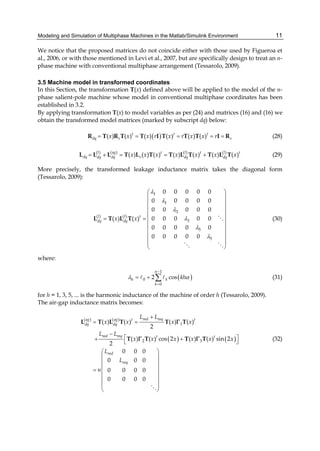
Modeling and Simulation of Multiphase Machines in the Matlab/Simulink Environment 11
We notice that the proposed matrices do not coincide either with those used by Figueroa et
al., 2006, or with those mentioned in Levi et al., 2007, but are specifically design to treat an n-
phase machine with conventional multiphase arrangement (Tessarolo, 2009).
3.5 Machine model in transformed coordinates
In this Section, the transformation T(x) defined above will be applied to the model of the n-
phase salient-pole machine whose model in conventional multiphase coordinates has been
established in 3.2.
By applying transformation T(x) to model variables as per (24) and matrices (16) and (16) we
obtain the transformed model matrices (marked by subscript dq) below:
( )( ) ( ) ( ) ( ) ( ) ( )t t t
dq s sx x x r x r x x r= = = = =R T R T T I T T T I R (28)
( )( ) ( ) ( )
( ) ( ) ( ) ( ) ( ) ( ) ( )agl l lt t t
dq sdq dq dq dqx x x x x x x= + = = +L L L T L T T L T T L T (29)
More precisely, the transformed leakage inductance matrix takes the diagonal form
(Tessarolo, 2009):
1
1
3
( ) ( )
3
5
5
0 0 0 0 0
0 0 0 0 0
0 0 0 0 0
0 0 0 0 0( ) ( )
0 0 0 0 0
0 0 0 0 0
l l t
dq dqx x
λ
λ
λ
λ
λ
λ
⎛ ⎞
⎜ ⎟
⎜ ⎟
⎜ ⎟
⎜ ⎟
= = ⎜ ⎟
⎜ ⎟
⎜ ⎟
⎜ ⎟
⎜ ⎟
⎝ ⎠
L T L T (30)
where:
( )
1
0
0
2 cos
n
h k
k
khλ α
−
=
= + ∑ (31)
for h = 1, 3, 5, ... is the harmonic inductance of the machine of order h (Tessarolo, 2009).
The air-gap inductance matrix becomes:
( ) ( )
( ) ( )
1
2 3
( ) ( ) ( ) ( )
2
( ) ( ) cos 2 ( ) ( ) sin 2
2
0 0 0
0 0 0
0 0 0 0
0 0 0 0
md mqag ag t t
dq dq
md mq t t
md
mq
L L
x x x x
L L
x x x x x x
L
L
n
+
= =
−
⎡ ⎤+ +⎣ ⎦
⎛ ⎞
⎜ ⎟
⎜ ⎟
⎜ ⎟=
⎜ ⎟
⎜ ⎟
⎜ ⎟
⎝ ⎠
L T L T T T
T T T T
Γ
Γ Γ (32)
Engineering Education and Research Using MATLAB12
The overall inductance matrix in transformed coordinates is then the diagonal matrix below:
1
1
3
3
5
5
0 0 0 0 0
0 0 0 0 0
0 0 0 0 0
0 0 0 0 0
0 0 0 0 0
0 0 0 0 0
md
md
dq
nL
nL
λ
λ
λ
λ
λ
λ
+⎛ ⎞
⎜ ⎟
+⎜ ⎟
⎜ ⎟
⎜ ⎟
= ⎜ ⎟
⎜ ⎟
⎜ ⎟
⎜ ⎟
⎜ ⎟
⎝ ⎠
L (33)
Using (24), the relationship (15) between the flux linkage and current vectors becomes:
( ) ( ) ( ) ( ) ( ) ( )t t t
s dq s dq dq s dqx x x x x x= = ⇒ =T L T i T L T iϕ ϕ ϕ (34)
which, in virtue of (29), gives:
dq dq dq= L iϕ (35)
Using the above relationships, the stator voltage equation (9) becomes:
( ) ( ) ( )
( ) ( )
( ) ( ) ( )
( ) ( ) ( )
t t t
s dq s dq dq s
t t
s dq dq dq s
t t t
s dq dq dq dq dq s
t t t
s dq dq dq dq dq s
d
x x x
dt
d
x x
dt
d d
x x x
dt dt
d d
x x x
dt dt
⎡ ⎤= = + +⎣ ⎦
⎡ ⎤= + +⎣ ⎦
⎡ ⎤ ⎡ ⎤ ⎡ ⎤= + + +⎢ ⎥ ⎣ ⎦ ⎣ ⎦⎣ ⎦
⎡ ⎤ ⎡ ⎤= + + +⎢ ⎥ ⎣ ⎦⎣ ⎦
v T v R T i T e
R T i T L i e
R T i T L i T L i e
R T i T L i T L i e
ϕ
(36)
It is important to remark that in the last passage of (37), we have used the fact that Ldq, given
by (34), is time-invariant, i.e.
d
dqdt
=L 0 (37)
so that it is correct to write:
d d d d
dq dq dq dq dq dq dq dqdt dt dt dt
⎡ ⎤ ⎡ ⎤= + =⎣ ⎦ ⎣ ⎦L i L i L i L i (38)
If we left-multiply (37) by ( )xT we obtain:
( ) ( ) ( ) ( ) ( ) ( )
( ) ( )
( ) ( )
t t
s dq s dq dq dq dq dq dq
t
dq dq dq dq dq dq dq
t
dq dq dq dq dq dq dq
d d
x x x x x x
dt dt
dx d d
x x
dt dx dt
d d
x x
dx dt
ω
⎡ ⎤
= = + + +⎢ ⎥
⎣ ⎦
⎡ ⎤
= + + +⎢ ⎥
⎣ ⎦
⎡ ⎤
= + + +⎢ ⎥
⎣ ⎦
T v v T R T i T T L i L i T e
R i T T L i L i e
R i T T L i L i e
(39)
Modeling and Simulation of Multiphase Machines in the Matlab/Simulink Environment 13
where the rotor speed in electrical radians per second has been introduced:
dx
dt
ω = (40)
The product ( ) ( )td
dx
x x⎡ ⎤
⎣ ⎦T T in (40) can be expanded using (25) as follows:
( ) ( ) ( ) ( ) ( ) ( ) ( )
( ) ( ) ( ) ( ) ( ) ( )
t t t t t t t
t
t t t
d d d d
x x x x x x x
dx dx dx dx
d d d
x x x x x x
dx dx dx
⎧ ⎫⎡ ⎤ ⎡ ⎤ ⎛ ⎞ ⎡ ⎤
= = +⎨ ⎬⎜ ⎟⎢ ⎥ ⎢ ⎥ ⎢ ⎥
⎣ ⎦ ⎣ ⎦ ⎝ ⎠ ⎣ ⎦⎩ ⎭
⎡ ⎤ ⎡ ⎤ ⎡ ⎤
= = =⎢ ⎥ ⎢ ⎥ ⎢ ⎥
⎣ ⎦ ⎣ ⎦ ⎣ ⎦
T T P C C P P C C P C P
P C C P P P P P
(41)
where we have used identities t
=C C I and d
dx
=C 0 .
Considering the structure (26) of P(x), the product ( ) ( )
td
dx
x x⎡ ⎤⎣ ⎦P P can be expanded as:
0 1 0 0 0 0
1 0 0 0 0 0
0 0 0 3 0 0
0 0 3 0 0 0( ) ( )
0 0 0 0 0 5
0 0 0 0 5 0
td
dx
x x
−⎛ ⎞
⎜ ⎟
⎜ ⎟
⎜ ⎟−
⎜ ⎟
⎡ ⎤ = =⎜ ⎟⎣ ⎦
⎜ ⎟−
⎜ ⎟
⎜ ⎟
⎜ ⎟⎜ ⎟
⎝ ⎠
P P J (42)
The final expression for the machine voltage equation in orthonormal coordinates is then:
dq dq dq dq dq dq dq dq
d
dt
ω= + + +v R i JL i L i e (43)
which is formally identical to the transformed voltage equation of a three-phase
synchronous machine in the rotor dq reference frame.
From (44) a simple expression for the machine electromagnetic torque can be also derived.
In fact, if we left-multiply both sides of (44) by idq
t we obtain:
t t t t t
dq dq dq dq dq dq dq dq dq dq dq dq dq
d
dt
ω= + + +i v i R i i JL i i L i i e . (44)
Using (10), (11), (24), we can write the left-hand side member of (45) as follows:
[ ]
1
0
( ) ( ) ( ) ( )
n
tt t t t
dq dq s s s s s s k k e
k
x x x x v i p
−
=
= = = = =∑i v T i T v i T T v i v (45)
where pe is the instantaneous electrical power entering machine terminals; using (14) and
(28), the term t
dq dq dqi R i can be written as:
1
2
0
n
t t t t
dq dq dq dq dq k j
k
r ri p
−
=
= = =∑i R i i i (46)
Engineering Education and Research Using MATLAB14
where pj is the total amount of joule losses in stator phases; finally, the term t
dq dq dq
d
dt
i L i can
be written as:
1
2
t t
dq dq dq mag dq dq dq mag
d d d
w p
dt dt dt
⎛ ⎞
= = =⎜ ⎟
⎝ ⎠
i L i i L i (47)
where pmag is the amount of power used to change the magnetic energy 1
2
t
mag dq dq dqw = i L i
stored in machine magnetic circuits. As a result of (46)-(48), equation (45) becomes:
e j mag mp p p p= + + . (48)
where
t t
m dq dq dq dq dqp ω= +i JL i i e . (49)
is the part of the power converted into mechanical power. Then, the power pm can be also
written in terms of electromagnetic machine torque Tem and mechanical rotor speed ωm:
m em m emp T T
p
ω
ω= = . (50)
where p is the number of pole pairs. By equalling (50) and (51) one obtains the expression for
the electromagnetic torque:
t t
em dq dq dq dq dq
p
T p
ω
= +i JL i i e (51)
where the first term represents the reluctance torque component (due to rotor saliency and
acting even in absence of rotor MMF) and the second term represents the torque component
due to the interaction between stator and rotor magneto-motive force fields.
The electromagnetic torque (52) is to be used along with the externally-applied torque Text in
the mechanical differential equation which governs the shaft speed dynamics:
m
em ext m
d
T T J B
dt
ω
ω− = + (52)
where J is the rotor moment of inertia, B is the viscous friction coefficient and ωm is
mechanical rotor speed, equal to ω/p.
4. VSD model implementation in the Matlab/Simulink environment
The mathematical modelling of the multiphase machines described above is suitable for a
modular, scalable and flexible implementation in the Matlab/Simulink environment.
A block scheme which can be used for this purpose is provided in Fig. 8, where the
particular case of a multiphase synchronous machine with wound-field rotor is considered.
Of course, the same scheme holds in case of induction machines as well as for Permanent
Magnet (PM) or reluctance synchronous machines, provided that the field voltage input is
removed or properly replaced.
Modeling and Simulation of Multiphase Machines in the Matlab/Simulink Environment 15
The overall system comprises a “Simulink domain”, where the multiphase machine model is
implemented, and a “SimPowerSystems domain” where the power electronics connected to
the machine is modelled.
Fig. 8. Block scheme of the Simulink implementation of the multiphase machine model
4.1 Implementation of multiphase machine model in conventional phase variables
The core of the system represented in Fig. 8 is constituted by the “Multiphase machine
Simulink model in conventional variables” block, whose detailed structure is depicted in
Fig. 9. It implements the differential equations of the machine under the hypothesis that
stator phases are geometrically arranged according to the “conventional” n-phase scheme
discussed in 3.1. Therefore, the mathematical model implemented is the one described in
Section 3.2 of this Chapter. The choice of using conventional variables makes the block
independent of the phase arrangement and on the phase number.
In order to be implemented using phase currents as state variables, the stator voltage
equation (44) is rewritten in the following form:
( ) ( )1 1
dq dq dq dq dq dq dq dq
d
dt
ω− −
= − + + −i L R JL i L v e (53)
This differential equation directly maps into the block scheme shown in Fig. 9.
As to the torque equation, it is implemented according to (52) as it does not involve any
dynamics. Finally, the mechanical equation (53) is rewritten for implementation as:
( )
1m
em ext m
d B
T T
dt J J
ω
ω= − − (54)
Engineering Education and Research Using MATLAB16
Fig. 9. Internal structure of the model “Multiphase machine Simulink model in conventional
variables”
Beside implementing equations (52), (54) and (55), the block scheme in Fig. 4 includes the
variable transformation T(x), defined by (25)-(27), between the conventional multiphase
variable vectors (10)-(11) and the orthonormal coordinate vectors (24).
4.2 Interface with external blocks
The machine block shown in Fig. 9 accepts “conventional voltages” vs as inputs and
provides “conventional currents” is as outputs. The actual machine phases, however, are not
arranged according to the conventional multiphase scheme assumed for unification
purposes as per 3.1. Therefore, for the machine block to communicate with external blocks,
it is necessary to “reorder” or “permute” conventional variable vectors to obtain the vectors
of the physical (or natural) phase voltages and currents.
Moreover, external blocks interfaced with the machine model are often representative of
power electronics equipment since it is very unusual that a multiphase machine is directly
connected to the grid or to passive loads. Power electronics blocks, used to simulate
inverters or converters, are generally built using SimPowerSystems library items.
As a result, the “stator interface” block appearing in Fig. 8 is added to perform these two
tasks (the internal block structure is shown in Fig. 10):
1. Machine variable transformation between “conventional” and “natural” coordinate
systems.
2. Conversion of machine phase voltages and currents from plain Simulink signals into
SimPowerSystems bus attributes.
The former task is performed by means of the permutation matrices W introduced in 3.1 and
3.2.
The latter task is performed making use of one ideal current generator block and one
voltage measurement block per machine phase. More precisely, the voltage across each
Modeling and Simulation of Multiphase Machines in the Matlab/Simulink Environment 17
machine phase is measured and used to build the natural phase voltage vector, which will
be then transformed into the conventional phase voltage vector through matrix W. The
natural phase currents which come from the machine model, instead, are imposed to flow
across their relative phase bus by means of the ideal current generators.
Fig. 10. Internal structure of the stator interface block
4.3 Model parameterization, initialization and adaptation to different multiphase
machines
The advantage of the multiphase machine model implementation presented in this Chapter
is that it can be easily parametrized and initialized so as to adapt it to simulate various kinds
of multiphase machines, differing by the number and geometrical arrangement of the
phases.
4.3.1 Parametrization
The input parameters which the user has to define, as far as the stator portion of the model
is concerned, are the following:
a. The number of phases
b. The phase arrangement, to be chosen among the types described in Section 2. Typically:
n-phase symmetrical or asymmetrical, in the latter case specifying the number N of
winding sections and the number m of phases per section.
c. The phase resistance r, to be used to build the diagonal resistance matrix R as per (28).
d. The phase harmonic inductances (31), to build the diagonal transformed inductance
matrix (30).
4.3.2 Initialization
The initialization can be performed through a Matlab script run only once at the beginning
of the simulation. The script performs the following tasks:
Engineering Education and Research Using MATLAB18
a. It assigns the permutation matrices W in the stator interface blocks (Fig. 10).
Permutation matrices are selected and defined as per 3.2.1 and 3.2.2 depending on the
phase number and arrangement specified as an input;
b. It defines the variable transformation matrix T(x) as per (25) depending only on the
number of phases;
c. It builds the diagonal matrices R and inductance matrix L using respectively the phase
resistance and stator harmonic inductances (31) specified as input data;
d. It builds the constant block-diagonal matrix J as per (43) depending only on the number
of stator phases.
4.3.3 Model adaptation to different multiphase winding schemes
The adaptation of the model to implement different winding schemes can be essentially
done in the initialization stage simply by properly defining the various model matrices as
the model structure essentially remains the same. Of course, for an n-phase machine, we
shall have n pairs of terminals (one pair per phase) and thereby n of the blocks marked with
blue dashed contour in Fig. 10.
5. Examples of application
To illustrate the possible application of the method described in this Chapter, we next report
the case of a dual-star and a triple-star synchronous machines (the dual and triple three-
phase winding schemes are respectively shown in Fig. 1b and in Fig. 5a). The former (2 MW,
1200 V, 6300 rpm) is operated as a motor fed by two Load-Commutated Inverters (Castellan
et al., 2008), the latter (20 kVA, 720 V, 3000 V) is operated as a driven generator with its
stator terminals in short circuit. Both machines are simulated using the same
Matlab/Simulink model, described in Section 3, adapted to the two cases by a different
initialization of its matrices [W, C, P(x)] as reported below.
Provided that natural phase variables are arranged in vector form as follows
( )2 1 2 1 2 1 2
t
ABC A A B B C Cy y y y y y× =y , (55)
( )3 1 1 1 2 2 2 3 3 3
t
ABC A B C A B C A B Cy y y y y y y y y× =y , (56)
the permutation matrices in the two cases are given by (58) and (59) and the transformation
matrices C and P(x), used to build T(x)=P(x)C, are given by (60)-(63).
The Matlab/Simulink models used for the simulations are shown in Fig. 11 and Fig. 12,
where the yellow block represents the same model differently initialized to represent the
two different machines (shown in Fig. 13).
2 3
1 0 0 0 0 0
0 0 0 1 0 0
0 0 1 0 0 0
0 0 0 0 0 1
0 1 0 0 0 0
0 0 0 0 1 0
×
⎛ ⎞
⎜ ⎟
⎜ ⎟
⎜ ⎟−
= ⎜ ⎟
−⎜ ⎟
⎜ ⎟
⎜ ⎟
⎜ ⎟
⎝ ⎠
W , (57)
Modeling and Simulation of Multiphase Machines in the Matlab/Simulink Environment 19
3 3
1 0 0 0 0 0 0 0 0
0 0 0 1 0 0 0 0 0
0 0 0 0 0 0 1 0 0
0 0 1 0 0 0 0 0 0
0 0 0 0 0 1 0 0 0
0 0 0 0 0 0 0 0 1
0 1 0 0 0 0 0 0 0
0 0 0 0 1 0 0 0 0
0 0 0 0 0 0 0 1 0
×
⎛ ⎞
⎜ ⎟
⎜ ⎟
⎜ ⎟
⎜ ⎟
−⎜ ⎟
⎜ ⎟−=
⎜ ⎟
−⎜ ⎟
⎜ ⎟
⎜ ⎟
⎜ ⎟
⎜ ⎟⎜ ⎟
⎝ ⎠
W
, (58)
( ) ( ) ( ) ( ) ( )
( ) ( ) ( ) ( ) ( )
( ) ( ) ( ) ( ) ( )
( ) ( ) ( ) ( ) ( )
( ) ( ) ( ) ( ) ( )
( ) ( ) ( ) ( )
6 6 6 6 6
6 6 6 6 6
6 6 6 6 6
6
6 6 6 6 6
6 6 6 6 6
6 6 6 6
1 cos cos 2 cos 3 cos 4 cos 5
0 sin sin 2 sin 3 sin 4 sin 5
1 cos 3 cos 6 cos 9 cos 12 cos 152
0 sin 3 sin 6 sin 9 sin 12 sin 156
1 cos 5 cos 10 cos 15 cos 20 cos 25
0 sin 5 sin 10 sin 15 sin 20 sin 25
α α α α α
α α α α α
α α α α α
α α α α α
α α α α α
α α α α α
=C
( )6
⎛ ⎞
⎜ ⎟
⎜ ⎟
⎜ ⎟
⎜ ⎟
⎜ ⎟
⎜ ⎟
⎜ ⎟
⎜ ⎟
⎝ ⎠
(59)
( ) ( ) ( ) ( )
( ) ( ) ( ) ( )
( ) ( ) ( ) ( )
( ) ( ) ( ) ( )
( ) ( ) ( ) ( )
( ) ( ) ( ) ( )
( ) ( ) ( ) ( )
9 9 9 9
9 9 9 9
9 9 9 9
9 9 9 9
9 9 9 99
9 9 9 9
9 9 9 9
1 cos cos 2 cos 8 cos 9
0 sin sin 2 sin 8 sin 9
1 cos 3 cos 6 cos 24 cos 27
0 sin 3 sin 6 sin 24 sin 27
2
1 cos 5 cos 10 cos 40 cos 45
9
0 sin 5 sin 10 sin 40 sin 45
1 cos 7 cos 14 cos 56 cos 63
0 s
α α α α
α α α α
α α α α
α α α α
α α α α
α α α α
α α α α
=C
( ) ( ) ( ) ( )
( ) ( ) ( ) ( )
9 9 9 9
1 1 1 1 1
9 9 9 92 2 2 2 2
in 7 sin 14 sin 56 sin 63
cos 9 cos 18 cos 72 cos 81
α α α α
α α α α
⎛ ⎞
⎜ ⎟
⎜ ⎟
⎜ ⎟
⎜ ⎟
⎜ ⎟
⎜ ⎟
⎜ ⎟
⎜ ⎟
⎜ ⎟
⎜ ⎟
⎜ ⎟
⎜ ⎟
⎜ ⎟
⎝ ⎠
(60)
( )
( ) ( )
( ) ( )
( ) ( )
( ) ( )
( ) ( )
( ) ( )
6
cos x sin x 0 0 0 0
sin x cos x 0 0 0 0
0 0 cos 3x sin 3x 0 0
0 0 sin 3x cos 3x 0 0
0 0 0 0 cos 5x sin 5x
0 0 0 0 sin 5x cos 5x
x
⎛ ⎞
⎜ ⎟
−⎜ ⎟
⎜ ⎟
⎜ ⎟=
−⎜ ⎟
⎜ ⎟
⎜ ⎟
⎜ ⎟−⎝ ⎠
P (61)
( )
( ) ( )
( ) ( )
( ) ( )
( ) ( )
( ) ( )
( ) ( )
( ) ( )
( ) ( )
9
cos x sin x 0 0 0 0 0 0 0
sin x cos x 0 0 0 0 0 0 0
0 0 cos 3x sin 3x 0 0 0 0 0
0 0 sin 3x cos 3x 0 0 0 0 0
0 0 0 0 cos 5x sin 5x 0 0 0
0 0 0 0 sin 5x cos 5x 0 0 0
0 0 0 0 0 0 cos 7x sin 7x 0
0 0 0 0 0 0 sin 7x cos 7x 0
0 0 0 0 0 0 0 0 1
x
⎛ ⎞
⎜ ⎟
−⎜ ⎟
⎜ ⎟
⎜ ⎟
−⎜ ⎟
⎜ ⎟=
⎜ ⎟
⎜ ⎟−
⎜ ⎟
⎜ ⎟
⎜ ⎟−
⎜ ⎟⎜ ⎟
⎝ ⎠
P
(62)
Engineering Education and Research Using MATLAB20
Fig. 11. Matlab/Simulink model for the simulation of a dual-star synchronous machine
supplied by two Load-Commutated Inverters
Modeling and Simulation of Multiphase Machines in the Matlab/Simulink Environment 21
Fig. 12. Matlab/Simulink model for the simulation of a triple-star synchronous machine
operating as a driven generator with short-circuited stator terminals
Engineering Education and Research Using MATLAB22
(a) (b)
Fig. 13. (a) Dual-star synchronous motor (2 MW, 1200V, 6300 rpm) to be fed from two LCIs.
(b) Triple-star synchronous generator driven with short-circuit stator terminals
Simulation results, compared with measurements, for the dual- and triple-star machine are
reported in Fig. 14 and Fig. 15, showing a good accordance in all the operating conditions
TWO ACTIVE WINDINGS
ONE ACTIVE
WINDING
Simulated voltage
Measured voltage
Simulated current
Measured current
Fig. 14. Comparison between simulated and measured voltages and currents for the dual-
star synchronous motor under LCI supply in case of both active windings and one single
active winding
Modeling and Simulation of Multiphase Machines in the Matlab/Simulink Environment 23
Fig. 15. Comparison between simulated and measured short-circuit current in a triple-star
generator driven with short-circuited stator terminals
A further application examples of the methodology described in this Chapter can found in
Tessarolo et al., 2009, where the same synchronous machine model used for the two
simulation cases reported in this Section has been employed to simulate a symmetrical five-
phase synchronous motor fed by a five-phase Load Commutated Inverter.
6. References
E. Levi, “Multiphase electric machines for variable-speed applications”, IEEE Trans. on
Industrial Electronics, vol. 55, May 2008, pp. 1893-1909.
E. Levi, R. Bojoi, F. Profumo, H.A. Tolyat, S. Williamson, “Multiphase induction motor
drives – a technology status review”, Electric Power Application, IET, 2007, July
2007, vol. 1, pp. 489-516.
A. Tessarolo, G. Zocco, C. Tonello, “Design and testing of a 45-MW 100-Hz quadruple-star
synchronous motor for a liquefied natural gas turbo-compressor drive”,
International Symposium on Power Electronics, Electrical Drives, Automation and
Motion, SPEEDAM 2010, 14-16 June 2010, Pisa, Italy, pp. 1754-1761.
S. Castellan, R. Menis, M. Pigani, G. Sulligoi, A. Tessarolo, “Modeling and simulation of
electric propulsion systems for all-electric cruise liners”, IEEE Electric Ship
Technologies Symposium, IEEE ESTS 2007, 21-23 May 2007, Arlington, VA, USA,
pp. 60-64.
G. Sulligoi, A. Tessarolo, V. Benucci, M. Baret, A. Rebora, A. Taffone, “Modeling, simulation
and experimental validation of a generation system for Medium-Voltage DC
Integrated Power Systems”, IEEE Electric Ship Technologies Symposium, 2009,
ESTS 2009, 20-22 April 2009, Baltimora, US, pp. 129- 134.
S. Castellan, G. Sulligoi, A. Tessarolo, “Comparative performance analysis of VSI-fed and
CSI-fed supply solutions for high power multi-phase synchronous motor drives”,
International Symposium on Power Electronics, Electrical Drives, Automation and
Motion, SPEEDAM 2008, 11-13 June 2008, Ischia, Italy, pp. 854-859.
Engineering Education and Research Using MATLAB24
L.A. Pereira, C. C. Scharlau, L.F.A. Pereira, J.F. Haffner, “General model of a five-phase
induction machine allowing for harmonics in the air-gap”, IEEE Trans. on Energy
Conversion, vol. 21, issue 4, Dec. 2006, pp. 891-899.
J. Figueroa, J. Cros, P. Viarouge, “Generalized Transformations for Polyphase Phase-
Modulated Motors”, IEEE Transactions On Energy Conversion, vol. 21, June 2006, pp.
332-341.
F. Terrein, S. Siala, P. Noy, “Multiphase induction motor sensorless control for electric ship
propulsion”, IEE Power Electronics, Machines and Drives Conference, PEMD 2004, pp.
556-561.
E.A. Klingshirn, “High phase order induction motors−Part I−Description and theoretical
considerations”, IEEE Trans. on Power Apparatus and Systems, Jan. 1983, vol. PAS-
102, pp. 47-53.
A. Tessarolo, “On the modeling of poly-phase electric machines through Vector-Space
Decomposition: theoretical considerations”, International Conference on Power
Engineering, Energy and Electrical Drives, POWERENG 2009, 18-20 March 2009,
Lisbon, Portugal, 18-20 March 2009, pp. 519-523.
A. Tessarolo, S. Castellan, R. Menis, “Analysis and simulation of a novel Load-Commutated
Inverter drive based on a five-phase synchronous motor”, European Conference on
Power Electronics and Applications, 2009, EPE '09, 8-10 Sept. 2009, Barcelona, Spain,
CD-ROM paper.
2
De-Noising Audio Signals
Using MATLAB Wavelets Toolbox
Adrian E. Villanueva- Luna1, Alberto Jaramillo-Nuñez1,
Daniel Sanchez-Lucero1, Carlos M. Ortiz-Lima1,
J. Gabriel Aguilar-Soto1, Aaron Flores-Gil2 and Manuel May-Alarcon2
1Instituto Nacional de Astrofisica, Optica y Electronica (INAOE)
2Universidad Autonoma del Carmen (UNACAR)
Mexico
1. Introduction
Based on the fact that noise and distortion are the main factors that limit the capacity of data
transmission in telecommunications and that they also affect the accuracy of the results in
the signal measurement systems, whereas, modeling and removing noise and distortions are
at the core of theoretical and practical considerations in communications and signal
processing. Another important issue here is that, noise reduction and distortion removal are
major problems in applications such as; cellular mobile communication, speech recognition,
image processing, medical signal processing, radar, sonar, and any other application where
the desired signals cannot be isolated from noise and distortion.
The use of wavelets in the field of de-noising audio signals is relatively new, the use of this
technique has been increasing over the past 20 years. One way to think about wavelets
matches the way how our eyes perceive the world when they are faced to different
distances. In the real world, a forest can be seen from many different perspectives; they are,
in fact, different scales of resolution. From the window of an airplane, for instance, the forest
cover appears as a solid green roof. From the window of a car, the green roof gets
transformed into individual trees, and if we leave the car and approach to the forest, we can
gradually see details such as the trees branches and leaves. If we had a magnifying glass, we
could see a dew drop on the tip of a leaf. As we get closer to even smaller scales, we can
discover details that we had not seen before. On the other hand, if we tried to do the same
thing with a photograph, we would be completely frustrated. If we enlarged the picture
"closer" to a tree, we would only be able to see a blurred tree image; we would not be able to
spot neither the branch, nor the leaf, and it would be impossible to spot the dew drop.
Although our eyes can see on many scales of resolution, the camera can only display one at
a time.
In this chapter, we introduce the reader to a way to reduce noise in an audio signal by using
wavelet transforms. We developed this technique by using the wavelet tool in MATLAB. A
Simulink is used to acquire an audio signal and we use it to convert the signal to a digital
format so it can be processed. Finally, a Graphical User Interface Development Environment
(GUIDE) is used to create a graphical user interface. The reader can go through this chapter
systematically, from the theory to the implementation of the noise reduction technique.
Engineering Education and Research Using MATLAB26
We will introduce in the first place the basic theory of an audio signal, the noise treatment
fundamentals and principles of the wavelets theory. Then, we will present the development
of noise reduction when using wavelet functions in MATLAB. In the foreground, we will
demonstrate the usefulness of wavelets to reduce noise in a model system where Gaussian
noise is inserted to an audio signal. In the following sections, we will present a practical
example of noise reduction in a sinusoidal signal that has been generated in the MATLAB,
which it is followed by an example with a real audio signal captured via Simulink. Finally,
the graphic noise reduction model using GUIDE will be shown.
2. Basic audio theory
Sound is the vibration of an elastic medium, whether gaseous, liquid or solid. These
vibrations are a type of mechanical wave that has the capability to stimulate human ear and
to create a sound sensation in the brain. In air, sound is transmitted due to pressure
variations at a rate of change that is called frequency. The difference between the extreme
values of pressure represents its amplitude. Pressure variations in the range of 20 Hz to 20
kHz produce the sound which is audible to the human ear and this is more receptive when
it is between 1 kHz to 4 kHz. In physical terms, the sound is a longitudinal wave that travels
through the air due to vibration of the molecules. Similar to light, sound waves can be
reflected, absorbed, diffracted, or refracted.
Audio signals, which represent longitudinal variations of pressure in a medium, are
converted into electrical signals by piezoelectric transducers. Transducers convert the
energy of a mechanical displacement into an electrical signal, either voltage or current. The
main advantage of converting an audio signal into an electrical signal is that the signal can
now be processed. An example is an analog signal obtained from the transducer that can be
converted into an encoded digital data stream by using an analog-digital converter (ADC)
and constitutes digital processing of analog signals. Alternatively, if a digital-analog
converter (DAC) is applied to a digital data stream, the audio signal transmits through an
amplifier and a speaker. The process is show schematically in Figure 1, which identifies the
important steps in digital audio processing.
Fig. 1. Shows the process of digital processing of three types of audio signal. Part (a)
represents a complete digital audio processing comprising (from left to right) a microphone,
amplifier, ADC, digital processing material, DAC, amplifying section and speaker; an audio
recognition system in (b), and a set of audio synthesis (c)
2.1 Recording audio signals in Simulink/MATLAB
Once in the digital domain, these signals can be processed, transmitted or stored. We found
that the Audio Device block in Simulink enables experimentation and processing of digital
signals. The From Audio Device block reads audio data from an audio device in real time.
De-Noising Audio Signals Using MATLAB Wavelets Toolbox 27
Fig. 2. Shows the process identifies the main steps in a digital audio processing system
based in Simulink software
The From Audio Device block buffers the data from the audio device by means of using the
process illustrated by Figure 2. We selected the block MATLAB Simulink audio and
multimedia file block in order to save the audio acquired by a given time. Figure 3 shows
the From Audio Device GUI, where we selected a 5 second queue period. At the start of the
simulation, the audio device writes input data to a buffer. When the buffer is full, the From
Audio Device block writes the contents of the buffer to the queue. The size of this queue can
be specified in the queue duration (seconds) parameter. As the audio device appends audio
data to the bottom of the queue, the From Audio Device block pulls data from the top of the
queue to fill the Simulink frame. We used this file to make our de-noise method using
wavelets.
Fig. 3. Shows block diagram of audio acquire
We used the wavread function. It loads a: WAVE file specified by the string filename,
returning the sampled data in y. If the filename does not include an extension, wavread
appends a .wav extension. Example code is: [x,Fs,nbits]= wavread(‘filename’) where the function
returns the filename with the number of bits per sample (nbits).
[x,Fs,nbits]= wavread ('voice');
y = awgn(x,10,'measured');
For example, wavwrite(y,Fs,’filename’) writes the data stored in the variable y to a WAVE file
called ‘filename’. The data have a sample rate, Fs, in Hz and is assumed 16-bit.
wavwrite(y,Fs,'noisyvoice')
wavwrite(xd,Fs,'voice5')
3. Basic noise theory
Noise is defined as an unwanted signal that interferes with the communication or
measurement of another signal. A noise itself is an information-bearing signal that conveys
information regarding the sources of the noise and the environment in which it propagates.
Engineering Education and Research Using MATLAB28
There are many types and sources of noise or distortions and they include:
1. Electronic noise such as thermal noise and shot noise,
2. Acoustic noise emanating from moving, vibrating or colliding sources such as revolving
machines, moving vehicles, keyboard clicks, wind and rain,
3. Electromagnetic noise that can interfere with the transmission and reception of voice,
image and data over the radio-frequency spectrum,
4. Electrostatic noise generated by the presence of a voltage,
5. Communication channel distortion and fading and
6. Quantization noise and lost data packets due to network congestion.
Signal distortion is the term often used to describe a systematic undesirable change in a
signal and refers to changes in a signal from the non-ideal characteristics of the
communication channel, signal fading reverberations, echo, and multipath reflections and
missing samples. Depending on its frequency, spectrum or time characteristics, a noise
process is further classified into several categories:
1. White noise: purely random noise has an impulse autocorrelation function and a flat
power spectrum. White noise theoretically contains all frequencies in equal power.
2. Band-limited white noise: Similar to white noise, this is a noise with a flat power spectrum
and a limited bandwidth that usually covers the limited spectrum of the device or the
signal of interest. The autocorrelation of this noise is sinc-shaped.
3. Narrowband noise: It is a noise process with a narrow bandwidth such as 50/60 Hz from
the electricity supply.
4. Coloured noise: It is non-white noise or any wideband noise whose spectrum has a non-
flat shape. Examples are pink noise, brown noise and autoregressive noise.
5. Impulsive noise: Consists of short-duration pulses of random amplitude, time of
occurrence and duration.
6. Transient noise pulses: Consist of relatively long duration noise pulses such as clicks,
burst noise etc.
3.1 Signal to noise ratio
The signal-to-noise ratio (SNR) is commonly used to assess the effect of noise on a signal.
This measurement is based on an additive noise model, where the quantized signal xq[n] is
a superposition of the unquantized, undistorted signal x[n] and the additive quantization
error e[n]. The ratio between the signal powers of x[n] and e[n] defines the SNR. To capture
the wide range of potential SNR values and to consider the logarithmic perception of
loudness in humans, SNR generally given in a logarithmic scale, in decibels (dB)
2
10 2
10 * log ,x
dB
e
SNR
σ
σ
= (1)
Where, σ2x and σ2
e are the powers of x[n], and e[n], respectively. Specifically for the
assessment of quantization noise, SNR is often labeled as the signal to quantization-noise
ratio (SQNR).
3.2 White noise
Shown in Figure 4, white noise is defined as an uncorrelated random noise process with
equal power at all frequencies. Random noise has the same power at all frequencies in the
range of ∞ it would necessarily need to have infinite power, and it is therefore an only a
De-Noising Audio Signals Using MATLAB Wavelets Toolbox 29
theoretical concept. However, a band-limited noise process with a flat spectrum covering
the frequency range of a band-limited communication system is practically considered a
white noise process.
2
1
0
-1
-2
0 50 100 150 200 250 300
r (k) P (k)nn NN
k f
m
(a) (b) (c)
Fig. 4. Shows an illustration of (a) white noise time-domain signal, (b) its autocorrelation
function is a delta function, and (c) its power spectrum is a constant function of frequency
3.3 Additive White Gaussian Noise Model (AWGN)
In classical communication theory, it assumed that the noise is a stationary additive white
Gaussian (AWGN) process. Although for some problems this is a valid assumption and
leads to mathematically convenient and useful solutions, in practice, the noise is often time-
varying, correlated and non-Gaussian. This is particularly true for impulsive-type noise and
for acoustic noise, which is non-stationary and non-Gaussian and hence cannot be modeled
using the AWGN assumption.
3.4 Adding noise using MATLAB
How to do it with MATLAB: In the Communication Toolbox in MATLAB is possible to find
the function awgn. This function means adding Gaussian white noise to signal.
Syntax
y = awgn(x,snr)
y = awgn(x,snr,'measured')
y = awgn(x,snr) adds white Gaussian noise to the vector signal x. The scalar SNR specifies the
signal-to-noise ratio per sample, in dB. If x is complex, awgn adds complex noise. This
syntax assumes that the power of x is 0 dBW.
y = awgn(x,snr,'measured') is the same as y = awgn(x,snr), except that awgn measures the
power of x before adding noise.
Figure 5 shows one example of how to add white noise to the sinusoidal signal using the
communication toolbox of MATLAB. We generate the interval of the signal (k), considering
some frequency (w), then we generate a sinusoidal function with these parameters,
considering this function with the x vector. Now we generate a Gaussian white noise and
add to the sinusoidal function and plot.
k = 0:9.0703e-005:5;
w=500*pi;
h=w.*k;
x = sin(h); % Create sinus signal.
y = awgn(x,10,'measured'); % Add white Gaussian noise.
figure(1)
plot(k,y)
Engineering Education and Research Using MATLAB30
Amplitude
3
2
1
0
-1
-2
-3
100 200 300 400 500
Time (s)
Fig. 5. Shows adding Gaussian white noise to sine signal
4. Wavelets theory
Wavelets are used in a variety of fields including physics, medicine, biology and statistics.
Among the applications in the field of physics, there is the removal of noise from signals
containing information. There are different ways to reduce noise in audio. (Johnson et al.,
2007) demonstrated the application of the Bionic Wavelet Transform (BWT), an adaptive
wavelet transform derived from a non-linear auditory model of the cochlea, to enhance
speech signal. (Bahoura & Rouat, 2006) proposed a new speech enhancement method based
on time and scale adaptation of wavelet thresholds. (Ching-Ta & Hsiao-Chuan Wang, 2003
& 2007) proposed a method based on critical-band decomposition, which converts a noisy
signal into wavelet coefficients (WCs), and enhanced the WCs by subtracting a threshold
from noisy WCs in each subband. Additionally, they proposed a gain factor in each wavelet
subband subject to a perceptual constraint. (Visser et al., 2003) has presented a new speech
enhancement scheme by spatial integration and temporal signal processing methods for
robust speech recognition in noisy environments. It further de-noised by exploiting
differences in temporal speech and noise statistics in a wavelet filter bank. (Képesia &
Weruaga, 2006) proposed new method for time–frequency analysis of speech signals. The
analysis basis of the proposed Short-Time Fan-Chirp Transform (FChT) defined univocally
by the analysis window length and by the frequency variation rate, that parameter predicted
from the last computed spectral segments. (Li et al., 2008) proposed an audio de-noising
algorithm based on adaptive wavelet soft-threshold, based on the gain factor of linear filter
system in the wavelet domain and the wavelet coefficients teager energy operator in order
to progress the effect of the content-based songs retrieval system. (Dong et al., 2008) has
proposed a speech de-noising algorithm for white noise environment based on perceptual
weighting filter, which united the spectrum subtraction and adopted auditory perception
properties in the traditional Wiener filter. (Shankar & Duraiswamy, 2010) proposed an
audio de-noising technique based on biorthogonal wavelet transformation.
Wavelets are characterized by scale and position, and are useful in analyzing variations in
signals and images in terms of scale and position. Because of the fact that the wavelet size
can vary, it has advantage over the classical signal processing transformations to
simultaneously process time and frequency data. The general relationship between wavelet
scales and frequency is to roughly match the scale. At low scale, compressed wavelets are
used. They correspond to fast-changing details, that is, to a high frequency. At high scale,
De-Noising Audio Signals Using MATLAB Wavelets Toolbox 31
the wavelets are stretched. They correspond to slow changing features, that is, to a low
frequency.
The wavelet only has a time domain representation as the wavelet function ψ (t). The
mother wavelet is scaled (or dilated) by a factor of a and translated (or shifted) by a factor of
b to give
,
1
( ) .a b
t b
t
aa
ψ ψ
−⎛ ⎞
= ⎜ ⎟
⎝ ⎠
(2)
Wavelets are defined by the wavelet function ψ (t) (i.e. the mother wavelet) and scaling
function φ (t) (also called father wavelet) in the time domain. The wavelet function is in
effect a band-pass filter and scaling it for each level halves its bandwidth. This creates the
problem that in order to cover the entire spectrum, an infinite number of levels would be
required. The scaling function filters the lowest level of the transform and ensures that the
entire spectrum is covered. For a wavelet with compact support, φ (t) can be considered
finite in length and is equivalent to the scaling filter g.
Wavelets can be scaled and copied (known as "daughter wavelets") of a finite-length or fast-
decaying oscillating waveform (known as the "mother wavelet"). Wavelet transforms have
advantages over traditional Fourier transforms for representing functions that have
discontinuities and sharp peaks, and for accurately deconstructing and reconstructing finite,
non-periodic and/or non-stationary signals.
Wavelet transforms are classified into two broad groups: discrete wavelet transforms
(DWTs) and continuous wavelet transforms (CWTs). Note that both DWT and CWT are
continuous-time (analog) transforms and can represent continuous-time (analog) signals.
CWTs operate over every possible scale and translation whereas DWTs use a specific subset
of scale and translation values or representation grid. When wavelet-functions coefficients
are expressed as z-transform, then the number of zeros at π corresponds to the number of
vanishing moments. S, o p zeros in π means p vanishing moments.
Having p vanishing moments means that wavelet-coefficients for p-th order polynomial will
be zero. That is, any polynomial signal up to order p-1 can be represented completely in
scaling space. In theory, more vanishing moments meaning that scaling function can
represent more signals that are complex accurately, p which it is also called as the accuracy
of the wavelet.
Daubechies wavelets are a family of orthogonal wavelets defining a discrete wavelet
transform and they are characterized by a maximal number of vanishing moments for some
given support. With each wavelet type of this class, a scaling function (also called father
wavelet) generates an orthogonal multi-resolution analysis.
In general the Daubechies wavelets are chosen to have the highest number A of vanishing
moments, (this does not imply the best smoothness) for given support width N=2A, and
between the 2A−1 possible solutions the number one is chosen whose scaling filter has
extreme phase. The wavelet transform is also easy to put into practice by using the fast
wavelet transform. Daubechies wavelets are widely used in solving a broad range of
problems, e.g. self-similarity properties of a signal or fractal problems, signal discontinuities,
etc.
Coiflets are discrete wavelets designed by Ingrid Daubechies, at the request of Ronald
Coifman, to have scaling functions with vanishing moments. The wavelet is near symmetric
Engineering Education and Research Using MATLAB32
their wavelet functions have N/3 vanishing moments and scaling functions N/3−1, they are
used in many applications using Calderón-Zygmund Operators.
Db 10 and Db 9 are asymmetric, orthogonal and biorthogonal, Coif 5 is near symmetric,
orthogonal and biorthogonal. Figure 6 shows the scale and wavelet function of Coiflet 5,
Daubechies 9 and 10.
(a) (b) (c)
Fig. 6. Shows the scale function (left) and wavelet function (right) of (a) Coiflet 5,
(b) Daubechies 9 and (c) Daubechies 10
4.1 One stage filtering: Approximations and details
For many signals, the low-frequency content is the most important part because it gives to
the signal its identity. The high-frequency content, on the other hand, imparts nuance.
Consider the human voice. If high-frequency components are removed, the voice sounds
different, but the words are still audible and clearly recognized. However, if enough low-
frequency components are removed, the resulting audio signal is not clear. In wavelet
analysis, approximations are the high-scale, low-frequency components and the details are
the low-scale, high-frequency components of the signal. Figure 7 shows the steps for signal
decomposition.
S
A D
low pass high pass
filters
1000 data
points
cD high frequency
cA low frequency
500 DWT coefficientsS
500 DWT coefficients
Fig. 7. Show the way to decompose a signal
De-Noising Audio Signals Using MATLAB Wavelets Toolbox 33
4.2 Multiple-level decomposition
The decomposition process can be iterated, with successive approximations being
decomposed in turn, so that one signal is broken down into many lower resolution
components. This is called the wavelet decomposition tree that is shown on figure 8.
Fig. 8. Shows the process of performing, the multiple decomposition, which it is called
wavelet decomposition tree
4.3 Number of levels
Since the analysis process is iterative, in theory it can be continued indefinitely. Realistically,
the decomposition can proceed only until the individual details consist of a single sample or
pixel. Moreover, the processes include selecting a suitable number of levels based on the
nature of the signal, or on a suitable criterion such as entropy.
4.4 Wavelet reconstruction
Discrete wavelet transform can be used to analyze, or decompose, signals and images in a
process called decomposition or analysis. Conversely, reconstruction or synthesis is the
process of assembling hose components back into the original signal without loss of
information. While being this transformation, it is desirable to establish its investment, i.e. to
return to the original signal from the output tree. This methodology follows reasoning in the
opposite direction, i.e. from the coefficients while depending on the number of levels and
considering the high frequency (H’) and low (L’) bands that must be obtained from the
reconstructed signal S, shown in figure 9. The mathematical manipulation that affects
synthesis is called: the inverse discrete wavelet transforms (IDWT). In order to synthesize a
signal by using Wavelet Toolbox software, we reconstruct it from the wavelet coefficients.
Fig. 9. Show how to reconstruct a signal using wavelets
4.5 Wavelet using MATLAB
We will describe a simple method for wavelet transform of a given signal. You must choose
a wavelet function, which is the mother wavelet, as well as determining the value of the
Engineering Education and Research Using MATLAB34
signal wavelet scale, using the command wname. In this example we use a wavelet coif5
level 10.
wname = 'coif5'; lev = 10;
In most of the signals of low frequency components that give the signal most of its
information, while the high frequency components are responsible for incorporating
particular features, that is why we subdivide the components of a signal into two categories:
approaches (low frequencies) and details (high frequencies). To perform this decomposition
the wpdec command is used which is responsible for creating a tree that consists of a vector
in this case it is the signal to break down "y" the level to be decomposed lev = 10 and the
type of wavelet used, which in this case is coiflet 5 and it is stored as a tree in the tree
variable:
tree = wpdec(y,lev,wname);
We generate the coefficients of the decomposition of the signal using the wpcoef command
where needed as the variable information and the number of tree node that has a better
performance in the tree that was generated, which in this case is two.
det1 = wpcoef(tree,2);
We determine noise threshold by using wpbmpen command that returns a global threshold
THR for de-noising. THR obtained by a wavelet packet coefficients selection rule by means
of using a penalization method provided by Birge-Massart. T (in our case tree) is a wavelet
packet tree corresponding to the wavelet packet decomposition of the signal or image to be
de-noised. SIGMA is the standard deviation of the zero mean Gaussian white noise in the
de-noising model. alpha is a tuning parameter for the penalty term, which must be a real
number greater than 1. The sparsity of the wavelet packet representation of the de-noised
signal or image grows with alpha. Typically alpha = 2.
sigma = median(abs(det1))/0.6745;
alpha = 2;
thr = wpbmpen(tree,sigma,alpha);
We use command wpdencmp that performs a de-noising or compression process of a signal,
when using wavelet packet. The ideas and the procedures for de-noising and compression
by using wavelet packet decomposition are the same as those used in the wavelets
framework. Wpdencmp (TREE,SORH,CRIT,PAR,KEEPAPP) has the same output arguments,
using the same options as above, but which were obtained directly from the input wavelet
packet tree decomposition TREE of the signal to be de-noised or compressed. SORH ('s' or
'h') stands for soft or hard thresholding. Best decomposition performed using entropy
criterion defined by string CRIT and parameter PAR. Threshold parameter is also PAR. In
addition, if CRIT = 'nobest' no optimization is done, and the current decomposition is
thresholded. If KEEPAPP= 1, approximation coefficients cannot be thresholded; otherwise,
they can be:
keepapp = 1;
xd = wpdencmp(tree,'s','nobest',thr,keepapp);
All those parameters help us to de-noise our signals by using wavelets.
5. Sine signal example
With MATLAB, it is possible to process noisy signals containing certain information, such as
an audio one, in order to reduce the quantity of noise contained in it. Non-periodicity
De-Noising Audio Signals Using MATLAB Wavelets Toolbox 35
characterizes an audio signal, which is composed by a large number of different frequencies
signals. This feature allows the use of conventional methods such as digital filters to
eliminate noise mixed into the signal.
In this section, we will introduce the treatment of noise in audio signals by using wavelet
transforms, which are included as a tool in MATLAB. To do this we will start by using a sine
wave signal, which is periodic and presents a well-known behavior.
First, it is necessary to define the time interval k, and to define the angular frequency w.
k = 0:9.0703e-005:5;
w=500*pi;
The variable h represents the argument of the sine function x in the next two instructions
h=w.*k;
x = sin(h);
Once we have defined the signal to be treated x, it is necessary to generate the noise source
in order to be mixed with the original signal. One of the most common sources of noise is
Gaussian white noise, which contains all frequencies. Thus to generate white Gaussian noise
we use the awgn instruction described in section 3.4.
y = awgn(x,0,'measured');
wname = 'coif5'; lev = 10;
tree = wpdec(y,lev,wname);
det1 = wpcoef(tree,2);
sigma = median(abs(det1))/0.6745;
alpha = 2;
thr = wpbmpen(tree,sigma,alpha);
keepapp = 1;
xd = wpdencmp(tree,'s','nobest',thr,keepapp);
Correlation between both signals, original and filtered one, is the parameter to compare
them. We used the command crosscorr, which computes and plots the sample cross-
correlation function XCF between two univariate, stochastic time series. To plot the XCF
sequence without the confidence bounds, set nSTDs = 0.
D=crosscorr(x,xd);
Finally, we plot three figures.
figure(1)
plot(k,xd)
hold on
plot(k,y,'k')
hold on
plot(k,x,'g')
legend('Denoise signal','Signal with AWGN','Original signal');
figure(2)
plot(z,D)
legend('Correlation @ 0');
The sinusoidal waveform x represents the signal to which is added white Gaussian noise;
this will subsequently be reduced to recover the sine wave.
We evaluate three wavelets families, Symlets 2 to 8, Daubechies 2 to 10 and Coiflet 1 to 5 by
using the program presented above. Our results show that Coiflet 5 and Daubechies 9 and
10 are the best options for better de-noised in our signals. We choose cross correlation to
Engineering Education and Research Using MATLAB36
evaluate the best performance; the cross correlation number that we select is the maximum
at zero. Figure 10 shows the original signal sinus waveform. Part (b) is an extension of two
periods of part (a). We choose a frequency of 250 Hz due to voice is in that range.
Amplitude
1
0
-1
0.9 0.92 0.94 0.96 0.98 1
Time (s)
0.9 0.902 0.904 0.906 0.908
Time (s)
Amplitude
1
0
-1
Fig. 10. Shows original sinus waveform. The right one shows a zoom view of left figure
We add white Gaussian noise to sine waveform represented in Figure 11 and the resulting
graph is the plot shown in Figure 11. We set SNR to AWGN=10
Amplitude
1
0
-1
0.9 0.92 0.94 0.96 0.98 1
Time (s)
0.9 0.902 0.904 0.906 0.908
Time (s)
Amplitude
1
0
-1
Fig. 11. Shows sine waveform with AWGN=10.
After running the program, we find the cross correlation D between original signal and
signal de-noise. Figure 12 presents the result
Fig. 12. Shows cross correlation of original signal and signal de-noise
De-Noising Audio Signals Using MATLAB Wavelets Toolbox 37
Figure 13 shows the plot of a signal after its processing method using Coiflet 5.
Amplitude
1
0
-1
0.9 0.92 0.94 0.96 0.98 1
Time (s)
0.9 0.902 0.904 0.906 0.908
Time (s)
Amplitude
1
0
-1
Fig. 13. Shows signal after processing method of de-noise using Coiflet 5
Evaluation of the resultant waveform xd presented in Figure 14 is compared with the
original sine function x form Figure 11 gives numbers higher than 99% as presented in
Figure 13. These results support the reliability of the proposed method for de-noising.
6. Audio signal example
As it has been described in section 2.1, to obtain an audio signal, we select the audio block
and we connect it to the multimedia file block. This information is saved in a user-specified
file with extension .wav and then we use the program to extract this information and
process it with wavelets coif5, db9 and db10. Figure 14 shows the original audio signal, audio
signal with noise and the recovered signal using the wavelet coif5. Figure 15 shows the best
correlation using the above wavelets.
Amplitude
1
0
-1
0 0.5 1 1.5 2 2.5 3 3.5 4 4.5 5
Time (s)
Original Signal
Amplitude
2
0
-2
0 0.5 1 1.5 2 2.5 3 3.5 4 4.5 5
Time (s)
Signal With Noise
Amplitude
2
0
-2
0 0.5 1 1.5 2 2.5 3 3.5 4 4.5 5
Time (s)
Signal Denoise
Fig. 14. Shows original audio signal, audio signal with noise and the recovered signal
To make the signal processing we use the next code:
clc,close all,clear all
k = 0:9.0703e-005:5;
w=500*pi;
h=w.*k;
[x,Fs,nbits]= wavread ('voice');
y = awgn(x,10,'measured'); % Add white Gaussian noise.
Engineering Education and Research Using MATLAB38
Fig. 15. Shows cross-correlation for determine the best result after noise reduction
De-Noising Audio Signals Using MATLAB Wavelets Toolbox 39
wavwrite(y,Fs,'noisyvoice')
wname = 'coif5'; lev = 10;
tree = wpdec(y,lev,wname);
det1 = wpcoef(tree,2014);
sigma = median(abs(det1))/0.6745;
alpha = 1.8;
thr = wpbmpen(tree,sigma,alpha)
keepapp = 1;
xd = wpdencmp(tree,'s','nobest',thr,keepapp);
D=crosscorr(x,y);
z=-20:1:20;
figure(1)
subplot(311)
plot(k,x)
xlabel('time')
ylabel('Amplitude')
title('original signal');
subplot(312)
plot(k,y,'k')
xlabel('time')
ylabel('Amplitude')
title('signal with noise');
subplot(313)
plot(k,xd,'g')
xlabel('time')
ylabel('Amplitude')
title('signal denoise');
figure(2)
plot(z,D)
title('coif5')
legend('Correlation @ 0');
wavwrite(xd,Fs,'voice5')
In signal processing, analogue-to-digital converters also suffer linearity errors, they add
noise, distortion, and introduces quantization error due to the precision of their voltage
sampling process. The result of all this is a computerized sequence of samples that may not
be as closely related to the real-world sound as you might expect. Do not be surprised when
high-precision analysis or measurements are unrepeatable due to noise, or if delicate
changes made to a sampled audio signal are undetectable to the naked ear upon replay.
7. Graphical Interface using GUIDE
For better understanding of the content of this chapter, we have developed a graphical
interface, only in the case of a sine wave. We used GUIDE of MATLAB to build this
interface, you need pop-up menu, slider, edit text, four push button and four graphics
(axes), after all that is placed in your figure you need to program each item. Figure 16 shows
how all of this should be seen.
Engineering Education and Research Using MATLAB40
Fig. 16. Shows graphical interface using GUIDE
First you need to configure axes, you do this by double clicking on the graphic, this will
show you an inspector on figure 17, you need to change nextplot from replace to replacechildren
that means to remove all child objects when HandleVisibility property is set to an on function
and then to reset figure NextPlot property to an add function. To set axes limits you need to
change Xlimit from 0.20 to 0.24, and in our case, Ylimit from -1 to 1.
Fig. 17. Shows configurations of axes using inspector
De-Noising Audio Signals Using MATLAB Wavelets Toolbox 41
In our case, a slider is coupled to an edit text component so that: The edit text displays the
current value of the slider. The user can enter a value into the edit text box and cause the
slider to update to that value. Both components update the appropriate model parameters
when activated by the user. Our slider is called AWGN (average white generator noise) and
it is from 0 to 10 SNR.
function complete_OpeningFcn(hObject, eventdata, handles, varargin)
% Choose default command line output for example5
handles.output = hObject;
clc
% initalize error count and use edit1 object's userdata to store it.
data.number_errors = 0;
set(handles.edit1,'UserData',data)
% Update handles structure
guidata(hObject, handles);
% --- Executes on slider movement.
function slider1_Callback(hObject, eventdata, handles)
set(handles.edit1,'String',...
num2str(get(hObject,'Value')));
% --- Executes during object creation, after setting all properties.
function slider1_CreateFcn(hObject, eventdata, handles)
function edit1_Callback(hObject, eventdata, handles)
val = str2double(get(hObject,'String'));
% Determine whether val is a number between 0 and 10.
if isnumeric(val) && length(val)==10 && ...
val >= get(handles.slider1,'min') && ...
val <= get(handles.slider1,'max')
set(handles.slider1,'Value',val);
else
% Retrieve and increment the error count.
% Error count is in the edit text UserData,
% so we already have its handle.
data = get(hObject,'UserData');
data.number_errors = data.number_errors+1;
% Save the changes.
set(hObject,'UserData',data);
% Display new total.
set(hObject,'String',...
['You have entered an invalid entry ',...
num2str(data.number_errors),' times.']);
% Restore focus to the edit text box after error
uicontrol(hObject)
end
% --- Executes during object creation, after setting all properties.
function edit1_CreateFcn(hObject, eventdata, handles)
if ispc && isequal(get(hObject,'BackgroundColor'),
get(0,'defaultUicontrolBackgroundColor'))
set(hObject,'BackgroundColor','white');
end
Engineering Education and Research Using MATLAB42
In the case of the pushbutton 1 that is called sine, and if it only shows sine signal and signal
with noise, it needs to be programmed as follow
% --- Executes on button press in pushbutton1.
function pushbutton1_Callback(hObject, eventdata, handles)
k =(0:9.0703e-005:5);
w=500*pi;
h=w.*k;
x = sin(h);
f=get(handles.slider1,'Value');
y = awgn(x,f,'measured');
D=crosscorr(x,y);
z=-20:1:20;
plot(handles.axes1,k,x)
plot(handles.axes2,k,y)
plot(handles.axes3,z,D)
For programming, push button 2, called de-noise sine, this button performs all the
processing method, which was described previously. It is necessary to write all this code
% --- Executes on button press in pushbutton2.
function pushbutton2_Callback(hObject, eventdata, handles)
menu= get(handles.popupmenu1,'Value');
switch menu
case 1 %case 1: coiflet 5
·% example3 code
k =(0:9.0703e-005:5);
w=500*pi;
h=w.*k;
x = sin(h);
f=get(handles.slider1,'Value');
y = awgn(x,f,'measured');
wname = 'coif5'; lev = 10; % wavelet that need to change!
tree = wpdec(y,lev,wname);
det1 = wpcoef(tree,2);
sigma = median(abs(det1))/0.6745;
alpha = 2;
thr =wpbmpen(tree,sigma,alpha);
keepapp = 1;
xd = wpdencmp(tree,'s','nobest',thr,keepapp);
D=crosscorr(x,xd);
z=-20:1:20;
plot(handles.axes1,k,x)
plot(handles.axes2,k,y)
plot(handles.axes3,k,xd)
set(gca,'XLim',[ 0.2, 0.24], ...
'YLim',[-1 1]);
plot(handles.axes4,z,D)
case 2 %case2 Daubechies 10
De-Noising Audio Signals Using MATLAB Wavelets Toolbox 43
·% example3 code
case 3 %Case 3: Daubechies 9
·% example3 code
End
For programing push button 3, called de-noise audio, this button performs all processing
method, which was described previously. It is necessary to write all this code
% --- Executes on button press in pushbutton3.
function pushbutton3_Callback(hObject, eventdata, handles)
menu= get(handles.popupmenu1,'Value');
switch menu
case 1 %case 1: Coiflet 5
·% example4 code
k = 0:9.0703e-005:5;
w=500*pi;
h=w.*k;
[x,Fs,nbits]= wavread ('voice');
f=get(handles.slider1,'Value');
y = awgn(x,f,'measured');
wavwrite(y,Fs,'noisyvoice')
wname = 'coif5'; lev = 10;
tree = wpdec(y,lev,wname);
det1 = wpcoef(tree,2);
sigma = median(abs(det1))/0.6745;
alpha = 2;
thr =wpbmpen(tree,sigma,alpha);
keepapp = 1;
xd = wpdencmp(tree,'s','nobest',thr,keepapp);
D=crosscorr(x,xd);
z=-20:1:20;
plot(handles.axes1,k,x)
plot(handles.axes2,k,y)
plot(handles.axes3,k,xd)
plot(handles.axes4,z,D)
case 2 %case2 Daubechies 10
·% example4 code
case 3 %Case 3: Daubechies 9
·% example4 code
end
For programing push button 4 called exit
% --- Executes on button press in pushbutton4.
function pushbutton3_Callback(hObject, eventdata, handles)
close all
Figure 18 (left) shows AWGN 1, and it plots original signal, in this case sine, and signal with
noise, cross correlation between them. Figure 18 (right) shows sine after de-noise and cross
correlation between the original signal and the de-noised.
Engineering Education and Research Using MATLAB44
Fig. 18. (up) AWGN at 1 SNR with a correlation of 0.7497 and (down) sine after de-noise
with SNR of 10 and correlation of 0.997
De-Noising Audio Signals Using MATLAB Wavelets Toolbox 45
Fig. 19. (up). AWGN at 10 SNR with a correlation of 0.9966 after de-noise using Daubechies 9
and (down) AWGN at 10 SNR with a correlation of 0.9967 after de-noise using Daubechies 10
Engineering Education and Research Using MATLAB46
Fig. 20. (up). AWGN at 10 SNR with a correlation of 0.9609 after de-noise using Coiflet 5 and
(down) AWGN at 10 SNR with a correlation of 0.9606 after de-noise using Daubechies 9
De-Noising Audio Signals Using MATLAB Wavelets Toolbox 47
Figure 19 shows de-noise of sine with noise using AWGN of 10, using Daubechies 9 and 10,
this wavelets show a better performance that any others. Figure 20 shows behavior of Coiflet
5 and Daubechies 9 using AWGN of 10 adding to audio signal.
In this section, it was described how to build a graphical interface using MATLAB code that
was developed to de-noised sine and audio signals. This interface helps to be able to visualize
the results obtained throughout this chapter, in addition to make it accessible to the user.
8. Conclusions
We provide a practical approach in how to put into practice wavelets in noisy audio data to
improve clarity and signal retrieval. Since there are no books that show the code for a
graphical interface with audio processing using wavelets, this chapter presents MATLAB
code to reduce the Gaussian white noise in periodic signals (sine function) and in audio
signals (composed of several frequencies) using wavelet analysis. We compared different
wavelet families: Symlets, Daubechies and Coiflets, and we used cross-correlation to
determine the best fit between an original signal and the processed one. By using Coiflet 5,
Daubechies 9 and 10 we obtained the best result because they have a higher correlation at
zero. Our signal processing technique recovers signal with a correlation higher than 99%. In
analysis for audio signal with added Gaussian white noise, while using the technique we
obtained a recovered signal with a correlation of 95%. This analysis is very useful to help the
reader understand the know how in removing noise from a signal by using wavelets.
Therefore, when a signal shows a periodic signal extraction from noise, it will be
satisfactory. The graphical interface presented in the last section was performed while using
GUIDE this one gives the readers a guideline to develop their own projects in MATLAB.
9. Acknowledges
The authors would like to thank Dr. Karen Esmonde-White for her helpful review and
comments of this chapter. AEVL would like to thanks to Fundacion Pablo Garcia for help
and support.
Apendix A: Five steps to a continuous Wavelet Transform
Here are the five steps of an easy recipe for creating a Continuous Wavelet Transform
(CWT), see Figure A:
1. Take a wavelet and compare it to a section at the start of the original signal.
2. Calculate a number C, that represents how closely correlated the wavelet is with this
section of the signal. The larger the number C is in absolute value, the more the
similarity appears. If the signal energy and the wavelet energy are equal to one, C may
be interpreted as a correlation coefficient. Note that, in general, the signal energy does
not equal one and the CWT coefficients are not directly interpretable as correlation
coefficients. Therefore, the CWT coefficients are different when you compute the CWT
for the same signal by using different wavelets.
3. Shift the wavelet to the right and repeat steps 1 and 2 until you have covered the whole
signal.
4. Scale (stretch) the wavelet and repeat steps 1 through 3.
5. Repeat steps 1 through 4 for all scales.
Engineering Education and Research Using MATLAB48
signal
wavelet
C=0.2247
C=0.0102
signal
wavelet
signal
wavelet
signal
wavelet
Fig. A. Shows recipe for creating a CWT
Appendix B: User Interface MATLAB code
In this appendix, it shows the complete code to develop the GUI using the GUIDE of
MATLAB, and develops it as an example using a sine wave signal, which is added a certain
level of noise and signal is shown graphically also recovered as the ratio correlation between
the original signal and recovered signal.
function varargout = complete(varargin)
% Begin initialization code - DO NOT EDIT
gui_Singleton = 1;
gui_State = struct('gui_Name', mfilename, ...
'gui_Singleton', gui_Singleton, ...
'gui_OpeningFcn', @complete_OpeningFcn, ...
'gui_OutputFcn', @complete_OutputFcn, ...
'gui_LayoutFcn', [] , ...
'gui_Callback', []);
if nargin && ischar(varargin{1})
gui_State.gui_Callback = str2func(varargin{1});
end
if nargout
[varargout{1:nargout}] = gui_mainfcn(gui_State, varargin{:});
else
gui_mainfcn(gui_State, varargin{:});
end
% End initialization code - DO NOT EDIT
% --- Executes just before complete is made visible.
function complete_OpeningFcn(hObject, eventdata, handles, varargin)
handles.output = hObject;
clc
% Initalize error count and use edittext1 object's userdata to store it.
De-Noising Audio Signals Using MATLAB Wavelets Toolbox 49
data.number_errors = 0;
set(handles.edit1,'UserData',data)
% Update handles structure
guidata(hObject, handles);
% --- Outputs from this function are returned to the command line.
function varargout = complete_OutputFcn(hObject, eventdata, handles)
% Get default command line output from handles structure
varargout{1} = handles.output;
% --- Executes on button press in pushbutton1.
function pushbutton1_Callback(hObject, eventdata, handles)
k =(0:9.0703e-005:5);
w=500*pi;
h=w.*k;
x = sin(h);
f=get(handles.slider1,'Value');
y = awgn(x,f,'measured');
D=crosscorr(x,y);
z=-20:1:20;
plot(handles.axes1,k,x)
plot(handles.axes2,k,y)
plot(handles.axes4,z,D)
% --- Executes on button press in pushbutton2.
function pushbutton2_Callback(hObject, eventdata, handles)
menu= get(handles.popupmenu1,'Value');
switch menu
case 1 %case 1: Coiflet 5
k =(0:9.0703e-005:5);
w=500*pi;
h=w.*k;
x = sin(h);
f=get(handles.slider1,'Value');
y = awgn(x,f,'measured');
wname = 'coif5'; lev = 10;
tree = wpdec(y,lev,wname);
det1 = wpcoef(tree,2);
sigma = median(abs(det1))/0.6745;
alpha = 2;
thr =wpbmpen(tree,sigma,alpha);
keepapp = 1;
xd = wpdencmp(tree,'s','nobest',thr,keepapp);
D=crosscorr(x,xd);
z=-20:1:20;
plot(handles.axes1,k,x)
plot(handles.axes2,k,y)
plot(handles.axes3,k,xd)
set(gca,'XLim',[ 0.2, 0.24], ...
'YLim',[-1 1]);
Engineering Education and Research Using MATLAB50
plot(handles.axes4,z,D)
case 2 %Case2 Daubechies 10
k =(0:9.0703e-005:5);
w=500*pi;
h=w.*k;
x = sin(h);
f=get(handles.slider1,'Value');
y = awgn(x,f,'measured');
wname = 'db10'; lev = 10;
tree = wpdec(y,lev,wname);
det1 = wpcoef(tree,2);
sigma = median(abs(det1))/0.6745;
alpha = 2;
thr =wpbmpen(tree,sigma,alpha);
keepapp = 1;
xd = wpdencmp(tree,'s','nobest',thr,keepapp);
D=crosscorr(x,xd);
z=-20:1:20;
plot(handles.axes1,k,x)
plot(handles.axes2,k,y)
plot(handles.axes3,k,xd)
set(gca,'XLim',[ 0.2, 0.24], ...
'YLim',[-1.1 1.1]);
plot(handles.axes4,z,D)
case 3 %Case 3: Daubechies 9
k =(0:9.0703e-005:5);
w=500*pi;
h=w.*k;
x = sin(h);
f=get(handles.slider1,'Value');
y = awgn(x,f,'measured');
wname = 'db9'; lev = 10;
tree = wpdec(y,lev,wname);
det1 = wpcoef(tree,2);
sigma = median(abs(det1))/0.6745;
alpha = 2;
thr =wpbmpen(tree,sigma,alpha);
keepapp = 1;
xd = wpdencmp(tree,'s','nobest',thr,keepapp);
D=crosscorr(x,xd);
z=-20:1:20;
plot(handles.axes1,k,x)
plot(handles.axes2,k,y)
plot(handles.axes3,k,xd)
plot(handles.axes4,z,D)
end
De-Noising Audio Signals Using MATLAB Wavelets Toolbox 51
% --- Executes on button press in pushbutton3.
function pushbutton3_Callback(hObject, eventdata, handles)
menu= get(handles.popupmenu1,'Value');
switch menu
case 1 %case 1: coiflet 5
k = 0:9.0703e-005:5;
w=500*pi;
h=w.*k;
[x,Fs,nbits]= wavread ('voice');
f=gethandles.slider1,'Value');
y = awgn(x,f,'measured');
wavwrite(y,Fs,'noisyvoice')
wname = 'coif5'; lev = 10;
tree = wpdec(y,lev,wname);
det1 = wpcoef(tree,2);
sigma = median(abs(det1))/0.6745;
alpha = 2;
thr =wpbmpen(tree,sigma,alpha);
keepapp = 1;
xd = wpdencmp(tree,'s','nobest',thr,keepapp);
D=crosscorr(x,xd);
z=-20:1:20;
plot(handles.axes1,k,x)
plot(handles.axes2,k,y)
plot(handles.axes3,k,xd)
plot(handles.axes4,z,D)
case 2 %case 2 Daubechies 10
k = 0:9.0703e-005:5;
w=500*pi;
h=w.*k;
[x,Fs,nbits]= wavread ('voice');
f=get(handles.slider1,'Value');
y = awgn(x,f,'measured');
wavwrite(y,Fs,'noisyvoice')
wname = 'db10'; lev = 10;
tree = wpdec(y,lev,wname);
det1 = wpcoef(tree,2);
sigma = median(abs(det1))/0.6745;
alpha = 2;
thr =wpbmpen(tree,sigma,alpha);
keepapp = 1;
xd = wpdencmp(tree,'s','nobest',thr,keepapp);
D=crosscorr(x,xd);
z=-20:1:20;
plot(handles.axes1,k,x)
plot(handles.axes2,k,y)
plot(handles.axes3,k,xd)
Engineering Education and Research Using MATLAB52
plot(handles.axes4,z,D)
case 3 %Case 3: Daubechies 9
k = 0:9.0703e-005:5;
w=500*pi;
h=w.*k;
[x,Fs,nbits]= wavread ('voice');
f=get(handles.slider1,'Value');
y = awgn(x,f,'measured');
wavwrite(y,Fs,'noisyvoice')
wname = 'db9'; lev = 10;
tree = wpdec(y,lev,wname);
det1 = wpcoef(tree,2);
sigma = median(abs(det1))/0.6745;
alpha = 2;
thr =wpbmpen(tree,sigma,alpha);
keepapp = 1;
xd = wpdencmp(tree,'s','nobest',thr,keepapp);
D=crosscorr(x,xd);
z=-20:1:20;
plot(handles.axes1,k,x)
plot(handles.axes2,k,y)
plot(handles.axes3,k,xd)
plot(handles.axes4,z,D)
end
% --- Executes on slider movement.
function slider1_Callback(hObject, eventdata, handles)
set(handles.edit1,'String',...
num2str(get(hObject,'Value')));
% --- Executes during object creation, after setting all properties.
function slider1_CreateFcn(hObject, eventdata, handles)
if isequal(get(hObject,'BackgroundColor'), get(0,'defaultUicontrolBackgroundColor'))
set(hObject,'BackgroundColor',[.9 .9 .9]);
end
function edit1_Callback(hObject, eventdata, handles)
val = str2double(get(hObject,'String'));
% Determine whether val is a number between 0 and 1.
if isnumeric(val) && length(val)==10 && ...
val >= get(handles.slider1,'min') && ...
val <= get(handles.slider1,'max')
set(handles.slider1,'Value',val);
else
% Retrieve and increment the error count.
% Error count is in the edit text UserData,
% so we already have its handle.
data = get(hObject,'UserData');
data.number_errors = data.number_errors+10;
De-Noising Audio Signals Using MATLAB Wavelets Toolbox 53
% Save the changes.
set(hObject,'UserData',data);
% Display new total.
set(hObject,'String',...
['You have entered an invalid entry ',...
num2str(data.number_errors),' times.']);
% Restore focus to the edit text box after error
uicontrol(hObject)
end
% --- Executes during object creation, after setting all properties.
function edit1_CreateFcn(hObject, eventdata, handles)
if ispc && isequal(get(hObject,'BackgroundColor'),
get(0,'defaultUicontrolBackgroundColor'))
set(hObject,'BackgroundColor','white');
end
% --- Executes on selection change in popupmenu1.
function popupmenu1_Callback(hObject, eventdata, handles)
% --- Executes during object creation, after setting all properties.
function popupmenu1_CreateFcn(hObject, eventdata, handles)
if ispc && isequal(get(hObject,'BackgroundColor'),
get(0,'defaultUicontrolBackgroundColor'))
set(hObject,'BackgroundColor','white');
end
% --- Executes on button press in pushbutton4.
function pushbutton4_Callback(hObject, eventdata, handles)
close all
10. References
Abbate A, Decusatis C. M, Das P. K. (2002). Wavelets and subbands: fundamentals and
applications, ISBN 0-8176-4136-X, Birkhauser, Boston, USA.
Bahoura M & Rouat J, (2006). Wavelet speech enhancement based on time–scale adaptation,
Speech Communication, Vol. 48, No. 12, pp: 1620-1637. ISSN: 0167-6393.
Davis, G, M, (2002). ‘Noise Reduction in Speech Applications, CRC Press LLC, ISBN 0-8493-
0949-2, USA.
Dong E & Pu X. (2008). Speech denoising based on perceptual weighting filter, Proceedings
of 9th IEE International Conference on Signal Processing, pp: 705-708, October 26-
29, Beijing. Print ISBN: 978-1-4244-2178-7.
Gold, B. & Morgan, N. (1999) Speech and audio signal processing: processing and
perception of apeech, and music, John Wiley & Sons, INC., ISBN: 0-471-35154-7,
New York, USA.
Johnson M. T, Yuan X and Ren Y, (2007). Speech Signal Enhancement through Adaptive
Wavelet Thresholding, Speech Communications, Vol. 49, No. 2, pp: 123-133, ISSN:
0167-6393.
Képesia M & Weruaga L. (2006). Adaptive chirp-based time–frequency analysis of speech
signals, Speech Communication, Vol. 48, No. 5, pp: 474-492. ISSN: 0167-6393.
Engineering Education and Research Using MATLAB54
Li N & Zhou M. (2008). Audio Denoising Algorithm Based on Adaptive Wavelet Soft-
Threshold of Gain Factor and Teager Energy Operator, Proceedings of IEEE
International Conference on Computer Science and Software Engineering, Vol. 1,
pp: 787-790. Print ISBN: 978-0-7695-3336-0.
Mcloughlin I (2009). Applied Speech and Audio Processing With MATLAB Examples,
Cambridge University Press, ISBN-13 978-0-521-51954-0, UK.
Minkoff, J. (2002). Signal Processing Fundamentals and Applications for Communications
and Sensing Systems, ARTECH HOUSE, INC., ISBN 1-58053-360-4, USA.
Shankar B. J & Duraiswamy K. (2010). Wavelet-Based Block Matching Process: An Efficient
Audio Denoising Technique,European Journal of Scientific Research, Vol.48 No.1,
pp.16-28. ISSN 1450-216X.
Tuzlukov, V. P. (2002). Signal processing noise, CRC Press LLC, ISBN 0-8493-1025-3,USA.
Vaseghi, S. V. (2008), Advanced Digital Signal Processing and Noise Reduction, fourth
edition, John Wiley & Sons Ltd., ISBN 978-0-470-75406-1 (H/B), United Kingdom.
Visser E, Otsuka M & Lee T W. (2003). A spatio-temporal speech enhancement scheme for
robust speech recognition in noisy environments, Speech Communication, Vol. 41,
No. 2-3, pp: 393-407. ISSN: 0167-6393.
Wang C T& Wang H. G, (2003). Enhancement of single channel speech based on masking
property and wavelet transform, Speech Communication, Vol. 41, No 2-3, pp: 409-
427. ISSN: 0167-6393.
Wang C T& Wang H. G (2007). Speech enhancement using hybrid gain factor in critical-
band-wavelet-packet transform, Digital Signal Processing, Vol. 17, No. 1, pp: 172-
188. ISSN: 1051-2004.
3
A Matlab® Approach for Implementing
Control Algorithms in Real-Time: RTWT
Andres Hernandez, Adrian Chavarro and Robin De Keyser
Ghent University, Dep. Electrical energy, Systems and Automation, Technologiepark 913,
B-9052 Gent,
Belgium
1. Introduction
The literature about real-time systems presents digital control or computer controlled
systems as one of its most important practical applications. However, it is very difficult to
find in these textbooks real-time control aspects (Gambier, 2005). It seems to be more natural
that these applications should be treated as part of digital control courses. In spite of that,
control system literature rarely includes extensively the real-time subject and it does
normally not pay much attention to real-time implementation aspects. Nevertheless, in
practice there is the requirement for the design of control algorithms which run in the
specified time without detriment to quality and functionality.
Thanks to the improvement in some software products, new control algorithms can be
designed and tested in real life practical applications very quickly with excellent quality,
giving a new optic to the control engineering courses. Software like Matlab/Simulink with
its RTW (Real Time Workshop) and the RTWT (Real Time Windows Target) give us the
opportunity to work from an easy interface and produce good results, while one deals with
time-critical applications.
This chapter attempts to give a guide for the implementation of real-time control systems,
using the RTWT toolbox, as a practical tool for students in control engineering. A digital PID
controller will be tested in a real-life application (Hernandez et al., 2011), in order to present
a description of the implementation procedure.
The outline of the paper is as follows: a brief introduction to the application problem is
depicted in the next section. Definitions and characteristics of real-time systems are
described in Section 3. Section 4 treats the implementation of real-time controllers using
RTWT in Matlab®. Section 5 is devoted to the configuration of RTWT for our specific
application as an example, including some experimental results. Final conclusions are
drawn in the last section.
2. Application description: Lungs function test
Non-invasive lung function tests are broadly used for assessing respiratory mechanics
(Northrop, 2002; Oostveen et al., 2003). Contrary to the forced maneuvers from patient side
and special training for the technical medical staff necessary in spirometry and in body
plethysmography (Pellegrino et al., 2005), the technique of superimposing air pressure
Engineering Education and Research Using MATLAB56
oscillations is simple and requires minimal cooperation from the patient, during tidal
breathing (Oostveen et al., 2003). Among the air pressure oscillation techniques for lung
function testing, the most popular one is that of Forced Oscillation Technique (FOT). FOT
uses a multisine signal to excite the respiratory mechanical properties over a wide range of
frequencies, usually between 4-48Hz (Oostveen et al., 2003).
Using measurements of air pressure and air flow, it is possible to extract information
regarding the human respiratory input impedance. However this is a linear approximation
of a nonlinear system, hence the output will depend on the input’s amplitude and frequency
(Schoukens & Pintelon, 2001). It is therefore important to ensure that the desired signal to be
applied at the patient’s mouth will be delivered by the lung function testing device, without
introducing distortions and nonlinear effects. Hence, a closed loop control system is
necessary, to continuously monitor and correct the errors between the desired input signal
and the one delivered by the device at the patient’s mouth.
In practice, in order to send a sinusoidal signal of 50 Hz it is necessary to have a sample rate
of at least 500 Hz, which means 10 samples per sinusoid period. The corresponding
sampling time is 0.002 seconds, which can be delivered by the DAQcard 6024E used in this
application. In this particular example, it is not possible to work with Matlab running in
normal operation, because the delay for calculations in the closed loop is about 14ms, much
higher than the desired sample rate. A solution to overcome this limitation consists in using
RTWT to assign some resources of the system exclusively for this task, ensuring the desired
sampling time.
3. Definitions and characteristics: Real-time systems
Nowadays, thanks to the computational and graphical power of modern computers, more
flexible control systems including higher-level functions and advanced algorithms can be
implemented successfully in real systems. Furthermore, most current complex control
systems could not be implemented without the application of digital hardware; moreover
these systems now contain not only physical components but also algorithms, which must
be programmed, i.e. software is now included in the control loop. This leads to new aspects
to take into account by designing control systems.
When one builds a control algorithm in any programming language, one normally assumes
that sampling is uniform, periodic and synchronous. However, that is not realistic since the
control algorithm also consumes some time producing a control or feedback delay (control
or feedback latency), i.e. a delay between a sampling instant and the instant at which a
control-signal value is applied to the actuator. Also the computational time of control
algorithms can change from one sampling instant to other (e.g. hybrid controller with
controller switching mechanism, event based controllers, adaptive controllers with on-line
parameter update, etc.). This variation in the delay is called control jitter (according to the
IEEE, jitter is “the time-related abrupt, spurious variation in the duration of any specified
related interval”) (Gambier, 2005)
It is important to clarify also some other aspects about the meaning of ‘real-time’, although it
is a vast field and therefore a complete discussion about the topic is outside the scope of this
document. Fast computing aims at getting the results as quickly as possible, while real-time
computing aims at getting the results at a prescribed point of time within defined time
tolerances. This idea explains how real-time is not just for fast systems, but for any control
loop where a task must be achieved in a specific time.
A Matlab® Approach for Implementing Control Algorithms in Real-Time: RTWT 57
4. Implementation of real-time controllers using RTWT1
4.1 Overview on RTWT
Real-Time Windows Target™ rapid prototyping software is a PC solution for prototyping
and testing real-time systems. Real-Time Windows Target software uses a single computer
as a host and target. On this computer, you use the MATLAB® environment, Simulink®
software, and Stateflow® software (optional) to create models using Simulink blocks and
Stateflow diagrams.
After creating a model and simulating it using Simulink software in normal mode, you can
generate executable code using RTW and your C/C++ compiler. Then you can run your
application in real time with Simulink in external mode.
Integration between Simulink external mode and Real-Time Windows Target software
allows you to use your Simulink model as a graphical user interface for
• Signal visualization — Use the same Simulink Scope blocks that you use to visualize
signals during a non-real-time simulation to visualize signals while running a real-time
application.
• Parameter tuning — Use the Block Parameter dialog boxes to change parameters in your
application while it is running in real time.
Typical uses for Real-Time Windows Target applications include
• Real-time control — Create a prototype of automotive, computer peripheral, and
instrumentation control systems.
• Real-time hardware-in-the-loop simulation — Create a prototype of controllers connected to
a physical plant. For example, the physical plant could be an automotive engine. Create
a prototype of a plant connected to an actual controller. For example, the prototyped
plant could be an aircraft engine.
• Education — Teach concepts and procedures for modelling, simulating, testing real-time
systems, and iterating designs
4.2 Real time kernel
Real-Time Windows Target software uses a small real-time kernel to ensure a deterministic
sampling rate in the application. The real-time kernel runs at CPU ring zero (privileged or
kernel mode) and uses the PC clock as its primary source of time. Some important aspects
regarding the kernel operation includes:
• Timer interrupt — The kernel intercepts the interrupt from the PC clock before the
Windows® operating system receives it. The kernel then uses the interrupt to trigger the
execution of the compiled model. As a result, the kernel is able to give the real-time
application the highest priority available. To achieve precise sampling, the kernel
reprograms the PC clock to a higher frequency. Because the PC clock is also the primary
source of time for the Windows operating system, the kernel sends a timer interrupt to
the operating system at the original interrupt rate.
• Scheduler — RTWT lets you to work with a single sample rate or with
multiple/different sampling rates in your model. Each sampling rate is defined like a
task and is clocked by a simple scheduler that runs the executable. The maximum
1 Parts of the text has been subtracted from the “Real-Time Windows Target User’s Guide”, Copyright
1999 by The MathWorks, Inc. http://www.mathworks.com/products/rtwt/
Engineering Education and Research Using MATLAB58
number of tasks is 32, and faster tasks have higher priorities than slower tasks. For
example, a faster task can interrupt a slower task.
• Communication with hardware — The kernel interfaces and communicates with I/O
hardware using I/O driver blocks, and it checks for proper installation of the I/O
board. If the board has been properly installed, the drivers allow your real-time
application to run.
• Simulink external mode — Communication between Simulink software and the real-time
application is through the Simulink external mode interface module. This module talks
directly to the real-time kernel, and is used to start the real-time application, change
parameters, and retrieve scope data.
Opening a dialog box for a source block causes simulation to pause. While simulation is
paused, you can edit the parameter values. You must close the dialog box to have the
changes take effect and allow simulation to continue.
4.3 System concepts
Non-real time simulation
When you run your Simulink model using normal mode, Simulink software uses a computed
time vector to step your model. After the outputs are computed for a given time value, the
Simulink software immediately repeats the computations for the next time value. This
process is repeated until it reaches the stop time.
Because this computed time vector is not connected to a hardware clock, the outputs are
calculated in non-real-time as fast as your computer can run. The time to run a simulation
can differ significantly from real time.
Real time execution
For real-time execution on your PC, you must use Simulink external mode, Real-Time
Workshop code generation software, Real-Time Windows Target software, and a C/C++
compiler, to produce an executable that the kernel can run in real time. This real-time
application uses the initial parameters available from your Simulink model at the time of
code generation.
If you use continuous-time components in your model and create code with RTW code
generation software, you must use a fixed-step integration algorithm. Based on your
selected sample rate, RTWT software uses interrupts to step your application in real time at
the proper rate. With each new interrupt, the executable computes all of the block outputs
from your model.
Development process
With Real-Time Windows Target rapid prototyping software, one can use a desktop PC
with the MATLAB environment, Simulink software, Real-Time Workshop code generation
software, and Real-Time Windows Target software to:
1. Design a control system — Use the MATLAB environment and Control System Toolbox™
software to design and select the system coefficients for your controller.
2. Create a Simulink model — Use Simulink blocks to graphically model your physical
system.
3. Run a simulation in non-real time — Check the behavior of your model before you create
a real-time application. For example, you can check the stability of your model.
A Matlab® Approach for Implementing Control Algorithms in Real-Time: RTWT 59
4. Create a real-time application — Real-Time Workshop code generation software creates C
code from your Simulink model. The C/C++ compiler compiles the C code to an
executable that runs with the Real-Time Windows Target kernel.
5. Run an application in real time — Your PC is the target computer to run the real-time
application.
6. Analyze and visualize signal data — Use MATLAB functions to plot data saved to the
MATLAB workspace or a disk.
Simulink external mode
External mode requires a communication interface to pass external parameters. On the
receiving end, the same communications protocol must be used to accept new parameter
values and insert them in the proper memory locations for use by the real-time application.
In some Real-Time Workshop targets such as Tornado/VME targets, the communications
interface uses TCP/IP protocol. In the case of a Real-Time Windows Target application, the
host computer also serves as the target computer. Therefore, only a virtual device driver is
needed to exchange parameters between the MATLAB environment, Simulink memory
space, and memory that is accessible by the real-time application.
Signal acquisition — You can capture and display signals from your real-time application
while it is running. Signal data is retrieved from the real-time application and displayed in
the same Simulink Scope blocks you used for simulating your model.
Parameter tuning — You can change parameters in your Simulink block diagram and have
the new parameters passed automatically to the real-time application. Simulink external
mode changes parameters in your real-time application while it is running in real time.
Data buffer and transferring data
At each sample interval of the real-time application, Simulink software stores contiguous
data points in memory until a data buffer is filled. Once the data buffer is filled, Simulink
software suspends data capture while the data is transferred back to the MATLAB
environment through Simulink external mode. Your real-time application, however,
continues to run. Transfer of data is less critical than maintaining deterministic real-time
updates at the selected sample interval. Therefore, data transfer runs at a lower priority in
the remaining CPU time after model computations are performed while waiting for another
interrupt to trigger the next model update.
Data captured within one buffer is contiguous. When a buffer of data has been transferred, it
is immediately plotted in a Simulink Scope block, or it can be saved directly to a MAT-file
using the data archiving feature of the Simulink external mode.
With data archiving, each buffer of data can be saved to its own MAT-file. The MAT-file
names can be automatically incremented, allowing you to capture and automatically store
many data buffers. Although points within a buffer are contiguous, the time required to
transfer data back to the Simulink software forces an intermission for data collection until
the entire buffer has been transferred and may result in lost sample points between data
buffers.
4.4 Installation of the software RTWT
Once Matlab® is installed all Real-Time Windows Target software is copied onto your hard
drive, but the Real-Time Windows Target kernel is not automatically installed into the
operating system. You must install the kernel before you can run a Real-Time Windows
Engineering Education and Research Using MATLAB60
Target application. Installing the kernel configures it to start running in the background
each time you start your computer. The kernel installation is done in the workspace by
typing:
>> rtwintgt – install
You can also use the command rtwintgt -setup to install the kernel. The MATLAB
Command Window displays one of these messages:
>> You are going to install the Real-Time Windows Target kernel.
Do you want to proceed? [y] :
or:
>> There is a different version of the Real-Time Windows Target kernel installed.
Do you want to update to the current version? [y] :
Type y to continue installing the kernel, or n to cancel installation without making any
change. If you type y, the MATLAB environment installs the kernel and displays the
message:
>> The Real-Time Windows Target kernel has been successfully installed.
If a message appears asking you to restart your computer, do so before attempting to use the
kernel, or your Real-Time Windows Target model will not run correctly. After installing the
kernel, verify that it was correctly installed by typing:
>> rtwho
The MATLAB Command Window should display a message that shows the kernel version
number, followed by performance, timeslice, and other information.
>>Real Time Windows Target version 1.00 (C) The MathWorks, Inc. 1994-2010
Running on Multiprocessor APIC computer
MATLAB performance = 98.5%
Kernel timeslice period = 0.999 ms
Matlab specifies the performance of the running application on the actual PC and the used
sampling time. It is desirable to execute your applications near 100% performance, is not
recommended to use values of performance near to 50% because the switching execution
time will decrease in the real time windows target in order to attend other programs in the
Operative system.
Once the kernel is installed, you can leave it installed. The kernel remains idle after you
have installed it, which allows the Windows operating system to control the execution of
any standard Windows based application, including Internet browsers, word processors, the
MATLAB environment, and so on. The kernel becomes active when you begin execution of
your model, and becomes idle again after model execution completes.
The Real-Time Windows Target requires a C compiler which is not included in the
installation in MATLAB. To choose the compiler to use it is necessary to type the following
command in the workspace:
>> mex –setup
A Matlab® Approach for Implementing Control Algorithms in Real-Time: RTWT 61
The following dialog will appear:
>> Would you like mex to locate installed compilers [y]/n? y
Select a compiler:
[1] Intel Visual Fortran 9.1 (with Microsoft Visual C++ 2005 linker) in
C:Program FilesIntelCompilerFortran9.1
[2] Lcc-win32 C 2.4.1 in C:PROGRA~1MATLABR2007bsyslcc
[3] Microsoft Visual C++ 2005 in
C:Program FilesMicrosoft Visual Studio 8
[0] None
After you choose your compiler for instance, Compiler: 2, the following dialog will appear:
>> Please verify your choices:
Compiler: Lcc-win32 C 2.4.1
Location: C:PROGRA~1MATLABR2007bsyslcc
>> Are these correct?([y]/n): y
Done . . .
After you confirm your choice typing y the process finish it. You can use any PC-compatible
computer that runs Microsoft® Windows XP 32-bit, or Microsoft Windows Vista ™ 32-bit.
Your computer can be a desktop, laptop, or notebook PC.
4.5 Hardware I/O boards
Real-Time Windows Target applications use standard and inexpensive I/O boards for PC-
compatible computers. When running your models in real time, RTWT captures the
sampled data from one or more input channels, uses the data as inputs to your block
diagram model, immediately processes the data, and sends it back to the outside world
through an output channel on your I/O board.
Real-Time Windows Target software provides a custom Simulink block library. The I/O
driver block library contains universal drivers for supported I/O boards. These universal
blocks are configured to operate with the library of supported drivers. This allows easy
location of driver blocks and easy configuration of I/O boards. You drag and drop an
universal I/O driver block from the I/O library the same way as you would from a standard
Simulink block library. And you connect an I/O driver block to your model just as you
would connect any standard Simulink block.
You create a real-time application in the same way as you create any other Simulink model,
by using standard blocks and C-code S-functions. You can add input and output devices to
your Simulink model by using the I/O driver blocks from the rtwinlib library provided
with the Real-Time Windows Target software. This library contains the blocks depicted in
figure 1.
The Real-Time Windows Target software provides driver blocks for more than 200 I/O
boards. These driver blocks connect the physical world to your real-time application:
• Sensors and actuators are connected to I/O boards.
• I/O boards convert voltages to numerical values and numerical values to voltages.
• Numerical values are read from or written to I/O boards by the I/O drivers.
Engineering Education and Research Using MATLAB62
Fig. 1. Library Real Time Windows Target
5. Application of the real-time control in a lung function test device
By following the procedure described in section 4.3 the Simulink scheme will be
implemented and configured. The computer characteristics used in this example are: Intel
core duo processor of 1.73 GHz with 3Gb of RAM , Windows Xp 32 Bits, and expressCard to
PCMCIA adapter.
5.1 Implementing the simulink model
The communication between the computer running Matlab and the FOT device is made by
using the National Instruments DAQCard 6024E (which is recognized by Matlab and
supported for real time applications). The corresponding Simulink model was developed in
order to send and receive signals to/from the real FOT system, as depicted in figure 2.
Fig. 2. Simulink model for the RTWT application
At this point it is recommendable to create a new folder in your current directory, because
the compilation procedure creates several files and this will let you work in an orderly
manner.
In this application our interest is to test a discrete PID controller; its parameters have been
previously tuned, and its design will not be presented in detail.
A Matlab® Approach for Implementing Control Algorithms in Real-Time: RTWT 63
Configuration of the simulation parameters
Once the model has been created, we must set the simulation parameters. By pressing the
combination of keys ‘Ctrl+E’ the configuration parameters window will appear (figure 3).
Fig. 3. Solver configuration
The first parameter to configure is the solver. We can choose the stop time of the simulation,
between a fixed value or to run indefinitely by typing ‘inf’. In this application a stop time of
40s was chose. In the solver options you can choose between variable or fixed step, in this
application what we want is to guarantee a fixed sampling time, hence, we choose the type
‘Fixed-step’ and as solver the ‘discrete (no continuous states)’.
Fig. 4. Configuration System Target
The next step is to configure the target, for this we must select the option ‘Real-time
Workshop’ as presented in figure 4. The first option to select is the system target file, there
Engineering Education and Research Using MATLAB64
are several options available when we press the ‘Browse’ button, however we must select
‘rtwin.tlc’ which is the Real-Time Windows Target. The language can be selected as C or
C++, we choose C language by default. We accept these changes and return to our model in
Simulink. At this point we can choose the simulation as external mode, as depicted in Figure
5. Remember to save your model by pressing the keys ‘ctrl+S’
Fig. 5. Configuring the simulation in External mode
Configuring the analog input and output
After our simulation parameters has been configured, then we can continue with the process
interfacing. By double clicking in the analog output block in our Simulink model, the
configuration window will appear as depicted in Figure 6. In this window we must select
our hardware board, in this case the National Instruments acquisition board DAQCard-
6024E. The sampling time is selected as ‘Ts’, which can be previously defined in the
workspace as Ts=0.002. In this step also the output range can be configured, which is in our
case from -10 V to 10 V. Some initial and final values can be established at this point, for the
cases when we need that the DAQ board remains with some value after the simulation
stops. It is possible to test our hardware to verify that there are not communication
problems between Simulink and our external hardware. By pressing the ‘Board Setup’ button
a new window will appear, and by pressing the ‘Test’ Button we can test all the inputs and
outputs available in our board. To configure the analog input the same procedure must be
followed, the only difference is that you’ll not find the ‘initial’ and ‘final’ value parameters
available in the analog output.
Discrete PID configuration
For this application we have tuned the parameters of a PID controller by means of the KCR
algorithm (Hernandez et al, 2010); this procedure will not be described here, because our
interest is to present how to use the Real-Time Windows Target toolbox.
The discrete PID controller used in this work can be found in the: SimPowerSystems/Extra
Library/Discrete Control Blocks/Discrete PID Controller (Figure 7). This block implements
a discrete PID controller, where the Kp, Ki, Kd and sampling time Ts parameters can be
configured. There are also some other options available, e.g. the time constant for the
derivative action or the constraints in the output, which have been selected as 1000 and
[-1 1] respectively.
Scope configuration to display and save data
Until now, the simulation parameters, PID and I/O have been configured; nevertheless,
another important issue to solve is how to save the data on our hard disk. By double clicking
A Matlab® Approach for Implementing Control Algorithms in Real-Time: RTWT 65
Fig. 6. Configuration window Analog input/output
Fig. 7. Configuration Window Discrete PID
Engineering Education and Research Using MATLAB66
Fig. 8. Scope Configuration Window to display and save the data
Fig. 9. External mode control panel
in the scope a new window will appear, there, the sampling will be chosen as
‘Decimation’=0, this is done to consider this block as an analog block because the triggering
will not be done by this block. By selecting the next tap ‘Data history’ (Figure 8-right), we
must avoid to limit the data points and instead of this, we select save data to workspace. We
type a name for the variable we want to save and then we choose array as data format and
we press ‘ok’ in all the windows.
Going back to our Simulink model, we choose in the toolbar the option Tools/External
Mode Control Panel, a new window will appear as depicted in Figure 9.
The first step is to press the ‘Signal & Triggering’ button; in this new window we must
configure the trigger as ‘manual’ and the mode in ‘normal’. The duration is the number of
samples that you are going to simulate. A very important detail when we choose this value
A Matlab® Approach for Implementing Control Algorithms in Real-Time: RTWT 67
is to know how much our sampling time is, how long our simulation will be and that Real-
Time Windows Target takes zero as an extra value. By taking this into account it is possible
to see that in 40s at 2ms sampling time, we need to save 2000 samples, however, taking into
account the sample at time zero, finally we choose 2001 as parameter.
After choosing the signal and trigger options, we press the ‘Data Archiving’ button; in this
new window we have to enable ‘archiving’ and then type de directory where we want to
save our data and the name of the file (Figure 10). If we have more than one variable to save
then an array will be saved in this address with the name we chose, the first column is
always the time vector and the next columns each one of our variables. In this application
we have used a mux block to put all the measured variables into one scope (see Figure 2),
however it is also possible to have one scope for each variable.
Fig. 10. External Signal & Triggering and External Data Archiving configuration window
Once the simulink model has been configured, then it has to be saved to accept all the
changes and then compilate it, by using the combination of keys ctrl+B.
Once all procedures have been completed, then we can press the button ‘Connect to Target’
and then ‘Start Simulation’, to run the simulation as depicted in figure 11.
Fig. 11. Run simulation
5.2 Experimental results
By using the hardware and software described in section 4, it is possible to do the open loop
and closed loop identification using the Chirp-TFA algorithm (Ionescu C., et al., 2010). Some
results are given by means of Bode plots in Figure 12. It can be observed that the bandwidth
(frequency at -3dB) of the system is about 45Hz.
In order to be able to follow a reference signal in a closed loop it is necessary that the
magnitude of the closed loop remains around 0dB and the phase around 0º in the frequency-
range of interest. From the Bode plot in Figure 12-right for the closed loop, we can observe
that the results are in agreement with the expected bandwidth, and that the controller
Engineering Education and Research Using MATLAB68
0 0.1 0.2 0.3 0.4 0.5 0.6 0.7 0.8 0.9 1
-2
-1
0
1
2
Time [sec]
Voltage[V]
Reference
Out openloop
Out closedloop
0 0.1 0.2 0.3 0.4 0.5 0.6 0.7 0.8 0.9 1
-2
-1
0
1
2
Time [sec]
Voltage[V]
Ctrl effort
(a)
0 5 10 15 20 25 30 35 40 45 50
-15
-10
-5
0
5
10
Bode characteristic Closed and Open loop
Magnitude[dB]
Open loop
Closed loop
0 5 10 15 20 25 30 35 40 45 50
-100
-50
0
50
100
150
Phase[Degree]
Frequency [Hz]
(b)
Fig. 12. Open and Closed loop characteristics. a) Performance in time. b) Performance in
frequency
A Matlab® Approach for Implementing Control Algorithms in Real-Time: RTWT 69
performs satisfactorily. This result is also visible when a comparison in time domain
between open loop and closed loop is done. The controller avoids distortions and nonlinear
effects at the output of the lung function device; the desired signal will be successfully
delivered at the patient’s mouth as depicted in Figure 12-left.
6. Conclusions
In this work an interactive and effective tool to design control loops in real-time has been
presented. A real system was used as an example to discuss the importance of real-time, and
clarify some fundamental aspects about the meaning of real time in control. An introduction
to real-time control from an educational and practical point of view has been given. Some
well-known misconceptions coming from the control system community were discussed.
The relevance of the real-time implementation has been exposed by implementing the
closed loop control of a medical device for lung function testing.
Although Real-Time Windows Target is a good tool to run control algorithms over a higher
priority than just using a typical m-file algorithm, this tool has two drawbacks: as this is still
a tool running over Windows, complex algorithms could cause that it cannot ensure a fast
sampling time, because it depends on the PC characteristics and its performance. Secondly,
although points within a buffer are contiguous, the time required to transfer data back to the
Simulink software forces an intermission for data collection until the entire buffer has been
transferred and may result in lost sample points between data buffers.
7. References
Dixon W., Dawson D., Costic B., de Queiroz M., “A MATLAB-based Control Systems
Laboratory Experience for Undergraduate Students: toward Standardization and
Shared Resources”, IEEE Transactions on Education, Vol. 45, No. 3, 2002
Gambier A., “Real-time Control Systems: a Tutorial”, Automation Laboratory, B6 23-29, EG.
Bauteil C, University of Mannheim, 68131 Mannheim, Germany, 2005
Hernandez A. , De Keyser R., Ionescu C., “Application of a novel PID Autotuner to a lung
function testing device, in Proc. of the Int. Conf. on Biomedical Electronics and Devices
(BIODEVICES 2011), Rome, Italy, 55-61, 2011
Ionescu C., Robayo F., De Keyser R., Naumovic M., “The Fequency Response Analyse
revisited”, in Proc. of the IEEE 18th Mediterranean Conference on Control and
Automation, Marrakesh, Marocco, 1441-1446, 2010
Northrop R., “Non-invasive measurements and devices for diagnosis”, CRC Press, 2002
Oostveen E., Macleod D., Lorino H., Farré R., Hantos Z., Desager K., Marchal F., “The forced
oscillation technique in clinical practice: methodology, recommendations and
future developments”, European Respiratory Journal, 22: 1026-1041, 2003
Pellegrino R., Viegi G., Brusasco V., Crapo R., Burgos F., Casaburi R., Coates A., van der
Grinten C.P.M., Gustafsson P., Hankinson J., Jensen R., Johnson D.C., McKay R.,
Miller M.R., Navajas D., Pedersen O.F., Wanger J., “Interpretative Strategies for
Lung Function Tests”. European Respiratory Journal, 26: 948-968, 2005
“Real-Time Windows Target User’s Guide”, The MathWorks Inc.
http://www.mathworks.com/products/rtwt/, 1999
Engineering Education and Research Using MATLAB70
Schoukens J., Pintelon R., “System Identification: a Frequency-domain Approach”, (IEEE
Press, 2001)
4
MatLab in Model-Based Design
for Power Electronics Systems
Adriano Carvalho and Maria Teresa Outeiro
Institute of Systems and Robotics, University of Porto
Portugal
1. Introduction
This chapter’s main goal is to show how MatLab can be very useful when applied in the
model-based design of dynamic systems, especially in the domain of power electronics
systems. Two cases will be described that are encountered in energy conversion: i) a slip
energy recovery (SER) system and ii) a power electronic converter for a fuel cell (FC) based
energy generation system. In both cases, the energy handled in the process needs to be
controlled and optimized in order to increase the efficiency of the systems. The chapter
explains how MatLab/Simulink, with its toolboxes, is well adapted to solve the issues of
defining the design requirements, at developing different components’ models for the
physical evolution processes and, through the combination of various sub-systems, how it
enables engineers to verify that the overall performance satisfies the requirements.
Considering the aspects mentioned above, the chapter will illustrate how a simple PC can be
used to test any power system and through the analysis of simulation results, manufacturing
companies can reduce the amount of experimental tests and thus save lots of money.
For each case study some details of the requirements and implementation are discussed and
validation results are presented in order to conclude on the advantages of modelling
processes using the MatLab/Simulink. In fact, at designing electrical engineering systems
that require accurate models of components and sub-systems, MatLab/Simulink is shown to
be an accurate design tool and useful for implementation and rapid prototyping.
In the first case, a brief explanation about the circuit‘s configuration of a SER system is
presented and its control implementation in MatLab/Simulink are done. The SER system
presents some problems associated with the operation of the power electronics converter,
namely its effects on the electromagnetic torque. To analyze these effects, the model of the
system implemented in MatLab/Simulink supports the harmonic study, with several special
features. The oscillations of the electromagnetic torque are explained by considering the
interaction between the stator and the rotor fundamental and harmonic currents. The
simulation results show a strong disturbance in the electromagnetic torque in the steady
state, caused by the power converter operation. To reduce this disturbance, and
consequently to increase the mechanical life of the motor, an appropriate DC link coil is
shown to be useful.
The presentation of the second case illustrates how MatLab/Simulink can be used when
undertaking an accurate design of electrical generation systems based on hydrogen. The
behaviour of PEM fuel cells is dependent on so many parameters, so obtaining an accurate
Engineering Education and Research Using MATLAB72
model of a PEM fuel cell, including dynamical behaviour, becomes essential to design
electrical power generation based on fuel cells.
For that purpose, a mathematical model of a PEM fuel cell system developed in
MatLab/Simulink is explained and the accuracy demonstrated. However, the difficulties
emerge in the lack of manufacturer data about the exact values of the parameters needed for
modelling it. The method adopted in order to determine the optimum set of parameters is
the simulated annealing (SA) optimization algorithm, which proves to be well adapted to
satisfy the goal of a fast convergence to establish the right values for the cell parameters.
In fact, optimization is a key task in modelling almost all-modern technology. Optimization
forms the basis for modelling and computational analysis, design of experiments and the
associated statistical analysis of the data.
The results carried out with a DC-DC power electronics converter appropriate to optimize
the real point operation of a FC show that the MatLab model is appropriate to be applied in
designing electrical generation systems.
For each case study presented, the simulation results are compared with experimental data
obtained from commercial systems.
2. Slip energy recovery (SER) system
A slip energy recovery system is designed over a well-known control method of motor
speed, which increases efficiency by returning the slip power back to the energy source
system. However, this system presents some inconveniences, for example, low power factor,
extra losses, harmonic current generation and electromagnetic torque oscillation. As a
consequence, electromechanical vibrations are generated, which can cause motor failure and
therefore, a need for motor rewinding and/or replacement.
Operation of power electronic converters typically is cause of current and voltage
harmonics, either on the mains side and or on the motor side, and these harmonics’
components are transferred from one side to the other. Particularly, in a slip energy recovery
system, harmonics are produced not only by the rectifier, but also by the inverter and motor
through the DC link.
This kind of analysis is not new, indeed, some authors have already studied similar
problems. The following must be referred to: A. Mayer (1982) presented a complete study of
a hiposynchronous converter cascade system, including the effects of the torque oscillation
on the motor and the effects of harmonics in the mains. J. Brown and B. Jones (1986)
developed and presented an analytical model for the analysis of performance of the Kramer
drive system during transients. But in the present study, the system configuration is
changed to overcome some of the remaining issues. The developed model is validated
through the analysis and comparison of the results obtained in four types of different
inverter thyristor bridges, with the same motor, diode bridge, and smoothing inductance. It
is firstly concluded that it is better to adopt controlled flywheeling rather than the normal
fully controlled technique for single-phase recovery bridge. Secondly, a 3-phase controlled
flywheeling bridge gives the best machine performance, but at the expense of higher
distortion in the supply currents than in the case with a fully controlled bridge. Results for
stator current and voltage, rotor current and voltage, rectified current and electromagnetic
torque are compared.
R. Hanna (1989) presented some techniques for reduction of the harmonic content produced
by adjustable speed drives. After a brief presentation of the main harmonic sources, the
MatLab in Model-Based Design for Power Electronics Systems 73
need to comply with harmonic standard IEEE 519 – 1982 is discussed. The effects of
harmonics on static devices and on electrical machines are examined and some techniques
for their reduction are given. E. Akpinar and P. Pillay (1992) developed a model to predict
the detailed operation of a slip energy recovery drive system in the transient and in the
steady state system. They adopted a hybrid model which retains the actual rotor phase
variables, but transforms the stator. They concluded that measurement and simulation
results showed a good compromise. Y. Baghzouz (1992) introduced a method to evaluate
the harmonics of currents and voltages of the SER system. The harmonic components were
determined from closed form expressions that were functions of the numerical values of the
distorted waveforms. The non-periodic nature of the stator currents and the existence of
harmonics in the rotor currents and voltages for several speeds of operation were also
presented. L. Refoufi and P. Pillay (1994) analyzed the impact of the system in terms of
harmonic generation, with a chopper-controlled SER induction motor drive. They studied in
detail the waveforms of the supply, stator and recovery currents, for different values of
speed and analyzed the respective harmonic spectrum. The simulation and experimental
results showed good agreement. W. Zakaria et al. (1996) developed a model of machine with
a double–circuit in the rotor, one being delta connected and the other star connected, these
two windings fed a 12-pulse diode bridge rectifier, in order to reduce the time harmonics in
the machine. The simulation and experimental results showed a significant reduction of the
current harmonics injected into the network and a significant reduction in the pulsating
torque. A. Dell’Aquila et al. (1998) developed a method for the analysis of harmonic currents
of the line side produced by variable speed induction motor drives. They developed a
method to reproduce the distorted current waveforms injected by the drive system into the
grid. G. Marques and P. Verdelho (2000) presented a circuit configuration that included a
boost-chopper to connect the diode rectifier bridge to the dc-link voltage imposed by a
voltage source inverter. To solve the drawbacks caused by the harmonics introduced by the
rotor rectifier, they presented two different solutions. Despite its simplicity, this system
presented good performance. A comparison between the phase-control and SPWM
techniques showed that the SPWM is advantageous with regard to the phase-control
technique.
M. N. Eskander et al. (2001) presented a comparison between two inverter topologies for
application in industrial drives. They presented the analysis of the steady-state characteristics
of slip energy recovery drives, employing: a three-phase thyristor bridge inverter (topology
‘A’) and a three single-phase bridge inverter operating in the flywheeling mode (topology
‘B’) dealing with the waveforms of voltages and currents of the stator, rotor, DC link,
inverter output and recovery transformer output. The results indicated that the power factor
of the system employing inverter topology ‘B’ was higher than that of inverter topology ‘A’.
Therefore, the results encourage adopting the inverter topology ‘B’, in spite of the relatively
more complex requirements of its control circuit. J. Faiz et al. (2001) studied the harmonics
and performance of a slip energy recovery induction motor drive, based on the hybrid
model dqabc. The sinusoidal pulse-with modulation (SPWM) control technique was used to
improve the power factor of the drive and to weaken the injected low order harmonics into
the supply. With the PWM technique, self-commutated switches (GTO or IGBT) replace the
inverter thyristors and the inverter may operate with a zero reactive power. N. Hoshi et al.
(1983) undertook a study of a slip power recovery system having sinusoidal rotor currents.
The proposed system uses a PWM boost rectifier as a substitute for a diode rectifier and a
boost chopper in a conventional compact type slip power recovery system.
Engineering Education and Research Using MATLAB74
Therefore, with the incentives for energy-economy, a cement plant company decided to
recuperate energy from the rotor of an induction motor that powered a big-blower. Instead
of the conventional diode bridge, DC coil, thyristor inverter and adapter transformer, a set
consisting of a thyristor bridge, no DC coil, thyristor inverter and an adapter transformer
were selected. This presentation serves to present and discuss the particularities of the
detailed model implemented in MatLab/Simulink. In the model, the motor, the transformer,
and mechanical load parameters, are estimated by the experimental data provided by each
manufacturer. Then, a three-phase transient model is modelled and simulated.
2.1 Circuit configuration
Fig.1 shows the circuit configuration of the SER system, without the DC link coil, used in
this study, with particular emphasis on the control system, represented by the S1 and S2
subtractors and NR and IR regulators. Besides the control system, the circuit is composed of:
1) a three-phase feedback transformer, represented by the Dd0 box; 2) the asynchronous
motor M, fed through the stator by the three-phase mains RST; 3) the rotor windings, which
are connected to the thyristor bridge SR1; 4) SR1 and SR2, which are the 6-pulse, 3-phase
thyristor bridge rectifier and the 3-phase thyristor bridge inverter, respectively; 5) system
components TG, IM and UM, which are used to measure the speed, current and voltage,
necessary to the system control.
Dd0
1R 3R 5R
1I3I5I
4R
2I
SD1
IM
SD2
SR1 SR2
2R6R
6I 4I
UM
IT
R
S
T
BR
BS
BT
SC
SNSSUR
NR IR
P
n
nref n
IrefI
S1 S2
A1
A2
B1
B2
AR
AS
AT
Fig. 1. Circuit configuration of the SER system
MatLab in Model-Based Design for Power Electronics Systems 75
2.2 Model implemented in MatLab/Simulink
The model of the induction-motor is made in the PSB library. In this model, the rotor is
referred to the stator. The adapter transformer is modelled with tree linear single-phase
transformer models, also available in the PSB library. The converter is modelled with two
thyristor bridges and no DC coil. It has the following main modules shown in Fig. 2: mains
(M), asynchronous motor (AM), adapter transformer YgY0 (AT), starter rheostat (RS),
rectifier bridge (SR1=RB), inverter bridge (SR2=IB), inverter adapter transformer (IAT),
circulation-current-controller (CCC), mechanical load (blower - ML), rotor slip frequency
calculator (RSFC), rotor voltages adaptive filter (RVAF), rectifier pulse generator (RPG),
main voltage signal filter (MVSF), inverter pulse generator (IPG), rectifier controller (RC),
inverter controller (IC) and inverter activation controller (IAC). Next, a general description
of the system is presented.
Fig. 2. Model of the SER system implemented in MatLab/Simulink
2.2.1 General description
The rotor voltages are measured and with the slip frequency are the inputs of the adaptive
filter (RVAF) that consists of a specially designed phase-locked 3-phase generator
outputting three voltages with the successive 120º phase shift and phases locked with the
corresponding unfiltered rotor voltages. The amplitudes of the generated voltages are
limited in order to obtain a more stable system. These voltages, V_ab, V_bc and V_ca, are
inputs to the rectifier pulse generator. In this pulse generator, V_ab, V_bc and V_ca, are
Engineering Education and Research Using MATLAB76
processed in order to obtain the zero–crossing positive-going instants and a time-delay is
computed according to the running values of the slip frequency and delay angle computed
by the rectifier controller (RC). With these values of time, they are generated pulses, to be
applied to the thyristors if they do not cause difficulties.
The circulation-current-controller module (CCC) detects the occurrence of circulation
current if it occurs and, in this case, blocks the ignition of the adequate thyristor in order to
go out of the circulation current mode.
The inverter controller (IC) and the rectifier controller (RC) have a rectified bridge current
(Id) as input. The rectifier controller (RC) uses it for overcurrent protection, the inverter
controller (IC) for imposing the current level of Id, in normal operation. Some details of the
implementation of the various modules are presented below.
2.2.2 Pulse generation of the 3-phase inverter bridge
The pulse-generator of the 3-phase inverter bridge is based on the classical method applied
for line-commutated converters, because the mains voltages are almost perfect with the
particularity of the IGBTs pulses blocked during system startup.
Fig. 3. Control of rectifier bridge – module RC
2.2.3 Rectifier controller (RC)
The control of the rectifier bridge (RB), one of the main difficulties, is implemented
considering that the system may operate in one of the following modes:
1. Normal operation, corresponding to the state variable A at high level.
2. Overcurrent operation, corresponding to the state variable B at high level.
3. Synchronous-speed operation, corresponding to the state variable C at high level.
4. Operation to avoid the presence of circulating currents in the cascade.
MatLab in Model-Based Design for Power Electronics Systems 77
The control of the 3-phase rectifier is a more complex problem because the rotor voltages are
not sinusoidal ones and have a low-frequency component proportional to the slip, which
varies with the rotating speed. The difficulty increases because there is no DC link, therefore
the voltage step due to the inverter appears directly in the rotor terminal voltages.
Fig. 3 shows the details of the rectifier controller module (RC) that contains four sub-
modules. Input Id is used for detecting overcurrent operation and input wm is used to
detect if speed is inside the narrow band centred in the synchronous speed. The action to be
taken is dependent on the output of the decision module (D).
1) Action module (A)
In normal asynchronous operation the output of D is 1, the action to take is to force αR to be
10º, using a rate limiter and the unblocking of the pulses after a delay of 0.8s, during
rheostat system startup. In asynchronous mode with overcurrent, the output of the sum
block is 3 and αR is forced to 90º using a rate limiter and the pulses are unblocked. This
action tends to lower the DC current, if speed is inside the speed band and there is no
overcurrent, the output of the sum block is 4, the action to take is to block the pulses and
force αR to 0º using a rate limiter. Finally, if the speed is inside the speed band and there is
overcurrent, the output of the sum block is 2, the action to take is to unblock the pulses and
force αR to be 90º using a rate limiter.
2) Decision module (D)
Considering the operating modes 1, 2 and 3 described above, and using Boolean algebra, a
table can be built, whose state variables set (A, B and C) may be in one of 3
2 8= different
states.
Logic variable A at high level corresponds to the sub-synchronous normal mode. Logic
variable B at high level corresponds to the overcurrent mode. Logic variable C at high level
corresponds to the synchronous mode. The oversynchronous mode is not considered in this
implementation. Table 1 presents the eight possible theoretical combinations; some of them
do not occur in practice. Considering only the practical combinations, it may be verified that
A B C= + .
State Variable Values
A B C
Actions to be performed
1 1 1 This combination of states is not verified in practice
1 1 0 This combination of states is not verified in practice
1 0 1 This combination of states is not verified in practice
1 0 0 (a) ==> αR
≅ 10¼
0 1 1 (b) ==> ∧≅ º90Rα Unblock pulses to the rectifier bridge
0 1 0 (c) ==> αR
≅ 90¼
0 0 1 (d) ==> Block pulses to the rectifier bridge
0 0 0 This combination of states is not verified in practice
Table 1. State and actions to be performed by the decision module
Engineering Education and Research Using MATLAB78
3) Overcurrent module (OC)
Fig. 4 shows the overcurrent module where the DC current, in SI units, is reduced to a per-
unit system using a base current of 983A. The result is passed through a low pass filter, with
a time constant of 1.1ms, to reduce the oscillations. The output of this filter is compared with
a per-unit maximum allowed overcurrent (2pu) and the difference is transformed into a
logic level using a hysteretic comparator (Relay B), with ±0.01pu limits. When the output of
the overcurrent module is equal to one, it indicates ’overcurrent’.
Fig. 4. Overcurrent module
4) Synchronous speed module (SS)
In the detector of synchronous speed module presented in Fig. 3 above the speed wm, in
radmec/s is reduced to a per-unit system, using a base speed of (3/100pi) radmec/s. The
result is passed to a low-pass filter with time constant 1.1ms. The output of this filter is
compared with a per-unit speed of 0.99pu and the difference is transformed into a long level
using a hysteretic comparator (Relay C) with 0pu limits. When the output of the
synchronous-speed module is equal to one, it indicates ‘synchronous-speed’.
Fig. 5. Synchronous speed module
2.2.4 Circulation current controller (CCC)
As shown in Fig. 2, the implementation of the circulation current controller module, the sub-
systems of which are presented in Fig. 6a) and Fig. 6b), has inputs such as the rotor currents
ia, ib and ic (A), the rectified current Id (A) and the pulses sent by the RPG module. The
objective of this module is to send the pulses to the rectifier bridge-RB.
In order to minimize the problem of the circulating-current, this module must implement
some actions such as:
MatLab in Model-Based Design for Power Electronics Systems 79
1st Action: Detection of the currents’ state of conduction of each thyristor.
To know the values of the instantaneous current of each of the six thyristors rectifier, the
rotor currents were measured and processed by hysteretic components.
2nd Action: Detection of critical states using AND blocks.
Critical situations occur only with more than two thyristors conducting. Therefore, it
suffices to take action with three thyristors conducting (123, 234, 345..., and 612). Table 2
presents these cases and the actions to be taken, that is: with thyristors 456 conducting, the
(a)
Engineering Education and Research Using MATLAB80
(b)
Fig. 6. Sub-systems of the module CCC: a) Deblocking signal module (DSM), b) Output logic
module (OLM)
non-safe condition occurs if thyristor 1 starts conducting. To stop this occurrence the
blocking of pulses for thyristor 1 is activated. A similar procedure is taken for the other five
possible cases.
3rd Action: Blocking of pulses (sent by the RPG) to the thyristor in each instance, to short-
circuit the rectifier bridge (RB).
The module of circulation current controller performs the all-necessary calculations, using
AND operators to process the outputs of the DSM and RPG, for each thyristor.
MatLab in Model-Based Design for Power Electronics Systems 81
Critical state Deblocking signal for each thyristor
Topology Ia Ib Ic
Thyristor to
be blocked 1 2 3 4 5 6
456 - - + (1R) 0 1 1 1 1 1
561 + - + (2R) 1 0 1 1 1 1
612 + - - (3R) 1 1 0 1 1 1
123 + + - (4R) 1 1 1 0 1 1
234 - + - (5R) 1 1 1 1 0 1
345 - + + (6R) 1 1 1 1 1 0
Table 2. Critical states and preventive actions
2.2.5 Inverter controller (IC)
As shown in Fig. 2, the inverter controller module inputs are the mechanical-speed (wm)
and the DC link current (Id). This module contains two sub-modules in cascade such as the
speed regulator (SR) and the DC current regulator (CR) as presented in the Fig. 7 below. The
module SR sends the reference value of the current to the CR module, which in turn
determines the value of the inverter angle, αI.
Fig. 7. Inverter controller sub-modules
1) Speed regulator (SR)
The speed regulator sub-module is presented in Fig. 8 and the speed wm as the input (in
radmec/s). This is processed by two paths: (a) In path1, wm is reduced to a per-unit value,
using as base speed the synchronous mechanical speed, then the per-unit value wmpu is
Fig. 8. Speed regulator module
Engineering Education and Research Using MATLAB82
passed through a low-pass filter, with a time constant of 1.1ms and compared with the per-
unit reference speed in order to obtain the filtered error speed. This error is applied to a
limiter with limits ±0.1pu. The output of this limiter is the signal D, the per-unit filtered and
limiter speed error, which is active during most of the time. (b) Through the path2 the
instantaneous speed is compared with the reference of 90radmec/s. The control signal E is
used to select the input value of the PI controller. Then the main purpose of this module is
to send a reference current (in pu units) to the DC current regulator module.
2) DC current regulator (CR)
The DC current regulator module is presented in Fig. 9 below. It has the DC current Id(A)
and reference current iref(pu) as inputs. The DC current is reduced to a per-unit value, using
a base-current of 982.43A. The per-unit value is passed through a low-pass filter with a
1.1ms time constant. The output of this filter is compared with irefpu and applied to a
limited PI controller if time is higher than 0.8s. Between 0 and 0.8s, the controller input of
the PI is zero, keeping the αI value constant. This action minimizes the initial transients due
to the inverter.
Fig. 9. DC current regulator module
2.2.6 Starter rheostat (RS)
During startup of the system, the two bridges are blocked and the rotor starting current
passes through a liquid rheostat. This liquid rheostat is a time-dependent resistance as can
be seen in Fig. 10. To model the variable resistance, the rotor currents were measured and
the measurements were used to command a voltage-controlled-source, which in turn gives
the values of the resistors R1, R2 and R3, as presented in Fig. 11. It was considered that the
0.1229
1x10^6
RRh= 0.1229 -(0.1229 / t1 ) x ( t - t0 )
t ( seg )
R ( ohm)
t1t0
Fig. 10. Starter-rheostat
MatLab in Model-Based Design for Power Electronics Systems 83
resistance decays linearly from 0.1229 to zero during the time interval of t0 to t1, being equal
to 1MΩ during the time interval between zero and t0, and again equal to 1MΩ when either
some starter time has elapsed or if the speed exceeds 30π radmec/s.
Fig. 11. Starter-rheostat module
2.3 Simulation results
The simulation results are obtained considering the following parameters and conditions:
integration method; ode23tb [stiff/TR-BDF2], step variable with a maximum value of 2e-4;
absolute and relative tolerances of 10e-3; reference speed of 30π radmec/s and interval of
time simulation of 0-10 seconds. The variations of the angles of the inverter and rectifier
bridges are respectively: 90º 150ºIα< < and 5º 90ºRα< < .
2.3.1 Electromagnetic and mechanical torques
The electromagnetic torque is measured directly from the block model of the three-phase
asynchronous machine selected in the library of MatLab/Simulink software. The S.I. unit
parameter is selected. All the stator and rotor quantities are referred to in the rotor reference
frame (qd frame). Considering an electrical system with these conditions, the electromagnetic
torque is given by Eq. 1. In this equation p corresponds to the number of pole pairs, dsϕ and
Engineering Education and Research Using MATLAB84
qsϕ are the stator d and q axis fluxes respectively, and ids and iqs are the d and q axis stator
currents respectively.
1.5 ( )ds qs qs dsTem p i iϕ ϕ= − (1)
Some Simulink blocks implement the mechanical load torque. The characterization of the
load torque took into account the information supplied by the manufacturer, namely: the
inertia moment (J) = 142.50 kg.m2, the rated speed (NN) = 985 r.p.m and the rated torque
(TN) = 1405 kg.m. The information is transformed to the S.I. units and a curve fitting led to
the Eq. 2 below where wm corresponded to the mechanical speed. This equation is only
valid for the positive speed.
( )
3
2 11,75
206,745 1,50325 3 0,146636 3 1447,22
wm
Tvent wm wm e
×⎛ ⎞
−⎜ ⎟
⎝ ⎠= − × × + × × + × (2)
Fig. 12. Electromagnetic and load torques
2.4 Harmonic analysis
The harmonic analysis of the system is based on a programme developed for the effect, with
several features, namely: the capability to analyse a large range of frequencies (until 2500Hz
or more) and high resolution of the plots. The results for the stator current, the rotor current
and the electromagnetic torque are presented below in Fig. 13 a) and b), Fig. 14 a) and b),
and Fig. 15 a) and b), respectively. These figures show the signal amplitude versus
frequency modulus. In order to obtain the maximum information concerning the spectrum
of the variable, a logarithmic y-axis scale is adopted. The Discrete Fourier Transform (DFT)
was used in this study and its module coefficients a0, ak and bk were calculated. A total of
10000 samples were used in the calculations.
MatLab in Model-Based Design for Power Electronics Systems 85
2.4.1 Rotor current, ir
In steady state behaviour, a non-quality factor can be defined such as NQFir=(irmax-
irmin)/(irmax+irmin) which corresponds to the distortion of the waveform of the rotor current.
Without inductance in the DC link coil, this corresponds to a 0.4628 value and if an
inductance of 10mH is used in the DC link coil, the value decays to 0.062. The spectrum of
the harmonic components of the rotor currents due to the six-pulse rectifier (SR1) and to the
DC side average value, appear at frequencies given by the Eq. 3, in which k=0, 1, 2, 3.
, 1 6R
r h msf k sf= ± (3)
Fig. 13. a) Rotor current referred to the stator in steady state and the frequency spectrum
without inductance L - the rotor slip in the case is 0.3906
Engineering Education and Research Using MATLAB86
0 50 100 150 200 250 300 350 400 450 500
10
-2
10
-1
10
0
10
1
10
2
10
3
10
4
X: 0
Y: 5193
Frequency(Hz)
Amplitude(N.m)
Fig. 13. b) Rotor current referred to the stator in steady state and the frequency spectrum
with an inductance L of 10mH – the rotor slip in the case is 0.3906
Considering the Eq. 3, for k=0 and the slip s=0.3906, the fundamental rotor frequency is
equal to 19.53Hz. Then the 5th, 7th, 11th and 13th harmonic orders appears in the rotor
current and are equal to -97.66Hz, +136.7Hz, -214.8Hz and +253.89Hz, respectively. As it can
be observed by the rotor current spectrums of Fig. 13 a) and Fig. 13 b) and by the Table 3,
the rotor current frequencies reflect the DC current frequencies with two side-bands of the
MatLab in Model-Based Design for Power Electronics Systems 87
fundamental rotor frequency, which is 19.53Hz. The harmonic components, due to the six-
pulse inverter that appear on the DC current at frequencies multiples of 300Hz, appear also
in the rotor currents with two side-bands of m300Hz±19.53Hz, which for m=1 corresponds
to the frequencies of 285.47Hz and 319.53Hz, respectively.
The DC current distortion introduced by the six-pulse inverter is reflected on the rotor
currents, resulting in the appearance of additional harmonics, given by Eq. 4, with k=0, 1, 2,
3,… and m=0, 1, 2, 3,…
( ), 1 6 6 1 6 6R
r h ms ms msf k sf mf k s m f= ± ± = ± ± (4)
Observing the rotor figures presented above and by comparison of the amplitude values of
Table 3, for different values of inductance L in the DC link coil, it is possible to conclude that
the value of the inductance of the DC link coil affects directly the ripple of the waveform of
the rotor current, which is reflected in the values of amplitude of the frequency spectrum.
Amplitude of rotor current (A)
Frequency (Hz)
Without L With L=1mH With L=5mH With L=10mH
+19.53 82.16 81.33 81.17 79.7
-97.66 21.52 17.92 14.35 14.49
+136.71 3.8 4.436 5.7 7.26
-214.83 4.5 4.69 5.2 3.1
+253.89 12.3 3.1 2 2.9
-280.47 10.5 6.3 1 1.2
+319.53 9.3 5.5 - 1.1
Table 3. Frequencies and amplitudes of the rotor current referred to the stator for phase a
and for slip=0.3906
2.4.2 Stator current, is
It was observed that in a steady state the peak-to-peak value of the stator current is not
greatly affected by the value of the inductance placed on the DC link coil.
A DC component of the rotor current establishes a rotating magnetic field in the air gap and
induces voltages in the stator winding at frequency given by Eq. 5, where s is the slip and
fms is the fundamental frequency. For s=0.3906 and fms=50Hz, this corresponds to a
30.47Hz with positive sequence.
Similarly, a rotor current frequency fr manifests itself in the stator current frequencies of
(fr+fm) with fr>0, for positive sequence rotor currents, and fr<0, for negative sequence rotor
currents. Adding the effect of motor speed to the rotor current frequencies, the reflected
stator frequencies are given by Eq. 5, with k=0,1,2,3,....
( ) ( ), 1 6 1 1 6R
r h ms ms msf fr fm k sf s f ks f= + = ± + − = ± (5)
Adding the effect of rotor side-band frequencies due to the inverter harmonics, the
frequencies of the induced harmonics present in the stator, considering these two effects are
given by Eq. 6, with k,m=0, 1, 2, 3. This equation will be reduced to the Eq. 5 if m = 0.
, 1 6 6r h msf ks m f= ± ± (6)
Engineering Education and Research Using MATLAB88
(a)
0 50 100 150 200 250 300 350 400 450 500
10
-5
10
-4
10
-3
10
-2
10
-1
10
0
10
1
10
2
10
3
Frequency(Hz)
Amplitude(A)
(b)
Fig. 14. Frequency spectrum of the stator current for a rotor slip=0.3906, (a) without
inductance L and, (b) with an inductance of 10mH
Figs. 14a) and 14b) show the spectrum of the stator current and Table 4 corresponds to the
amplitude of the frequencies. By Eq. 6, if s=0.3906 and k=0, the fundamental frequency will
be equal to 50Hz.
MatLab in Model-Based Design for Power Electronics Systems 89
Amplitude of stator current (A)
Frequency (Hz)
Without L With L=1mH With L=5mH With L=10mH
50 130.5 129.6 129 127.2
-67.19 19.5 18 12.8 13.2
+167.18 6.5 - 6.2 7.55
-250 10.1 9.2 2.36 1.18
+350 9.1 9 2 1.12
Table 4. Frequencies and amplitudes of stator current in phase A, for a slip=0.3906
By Eq. 7, if k=1 and m=0, the 5th and 7th harmonic orders of the rotor current appear in the
stator at frequencies modules of |-97.66 +30.47|=67.19Hz and |+136.7 +30.47| = 167.1Hz. If
k=2 and m=0, the 11th and 13th harmonics of the rotor current appear in the stator at
frequencies of module 184.36 Hz and 284.36Hz. If k=0 and m≠0, Eq. 6 gives the frequency
effect due to the inverter harmonics. The 300Hz of the inverter referred to the stator
introduces two side-band frequencies module of 250Hz, 289Hz, 310.9Hz and 350Hz, given
from equation 300 30.47 19.53± + ± .
The peaks presented in the stator frequency module, which corresponds to the rotor
frequencies of 285.47Hz and 319.53Hz, are the 250Hz and 350Hz peaks, respectively.
2.4.3 Electromagnetic torque, tem
Figs. 15 a) and 15 b) show the spectrum of the harmonics of the electromagnetic torque,
considering two situations without and with an inductance of 10 mH. The harmonics
presented in the spectrum of the electromagnetic torque can be explained considering the
interaction of the magnetomotive forces (mmf) between the stator and the rotor currents, in
its fundamental and harmonic components. The Eq. 7 below is used for the calculation of the
electromagnetic torque.
( )3
2
sr qs dr ds qrem
p L i i i i= × × −Γ (7)
Each component spectrum of the electromagnetic torque is due to the interaction between a
sinusoidal component of the stator current and a sinusoidal component of the rotor current
as is described by the Eq. 8 following:
( )( ) ( )( )cos coss r mem
k w t w w t= × × +Γ (8)
By rearranging the Eq. 8 above, this can be presented in the new form of Eq. 9, where k and
k1 are constants, ws is the angular speed of the stator currents, wr is the angular speed of
the rotor currents, wm is the mechanical speed in radelec/s, fs and fr are the stator and the
rotor current frequencies and fm=(1-s).fs is the mechanical frequency in electrical Hertz. The
values of ws and wr can be either positive or negative depending on the positive or negative
characteristics of the sequence.
( ) ( )
1
cos cos
2
em s s
k
f fr fm t f fr fm tϕ ϕ⎡ ⎤Γ = × − − − + + + +⎣ ⎦ (9)
The frequency components of the electromagnetic torque presented in Figs. 15 a) and 15 b)
are for the slip=0.3906. As can be observed, with an inductance placed in the DC link, the
Engineering Education and Research Using MATLAB90
spectrum presented is cleaner and has lower amplitude values when compared to the
situation without the inductance L.
(a)
0 50 100 150 200 250 300 350 400 450 500
10
-2
10
-1
10
0
10
1
10
2
10
3
10
4
X: 0
Y: 5193
Frequency(Hz)
Amplitude(N.m)
(b)
Fig. 15. Frequency spectrum of the electromagnetic torque for slip=0.3906, a) without
inductance L and, b) with an inductance of 10mH
MatLab in Model-Based Design for Power Electronics Systems 91
Table 5 shows the spectral components and correspondent amplitude values considering
that the torque is higher than 10N.m. As shown in Figs. 15 a) and 15 b), and then reflected
by the table, the most relevant peaks of the electromagnetic torque appear for frequencies
multiples of 117 Hz and at 300Hz.
Amplitude of torque components (N.m)Frequency
Modulus (Hz) Without L With L=1mH With L=5mH With L=10mH
0 5294 5292 5281 5193
14 75.16 4883- 68.56 -
28 62.05 - - -
37.5 87.64 44.07 12.26 -
51.5 254.2 91.21 18 25.5
65.5 218.7 74.72 - 7.3
79.5 21.73 - - -
117 1223 804.3 504 513.4
169 23.52 14.29 - -
183 70.12 34.8 13.5 10.12
234.5 186.1 165.8 200 160.6
248.5 29.46 - - -
300 1287 775.7 300 156.4
351.5 50.26 66.99 85.86 75.28
365 15.56 - - -
417 41.75 22.72 - 4.5
468.5 - 17.12 29.82 26
Table 5. Frequencies and amplitudes of the electromagnetic torque
Table 5 also shows that the amplitudes of the components decrease for the most relevant
frequencies, if the DC link inductance increases.
As examples, it appears that with the 300 Hz component of the electromagnetic torque, the
amplitude varies between 1287N.m for L=0mH to 156.4N.m for L=10mH and the amplitude
of the electromagnetic torque, 117Hz changes its value from 1223N.m for L=0mH to
513.4N.m for L=10mH.
2.5 Experimental results
Although the main objective of this study did not focus on the power quality of the energy
provided by the network, in order to evaluate the effects caused in this, by the system under
analysis i.e. by the SER system, some experimental measurements were taken in the voltage
busbars of 60kV and 6KV and also the voltage busbar that feeds directly the SER system. It
was verified, however, that in any of the situations analyzed, only the fundamental
frequency component of 50Hz is present. The current measured on the busbar of the SER
system shows a waveform whose spectrum has the fundamental component of 50Hz and its
multiples. Figs. 16 and 17 show the experimental results concerning the current waveforms
for the rotor and the stator.
The information relating to the harmonic spectrum of these variables is presented using
linear scales in both x and y-axis. Due to the low plot resolution (just 256 points) used by the
Engineering Education and Research Using MATLAB92
experimental equipment, the results do not show the detailed information that is obtained in
simulation (with 10000 points). The experimental results were obtained for slip = 0.3906 and
are in accordance with the simulation ones for the same conditions of the SER system
operation.
2.5.1 Experimental rotor current, ir
Figs. 16 a) and 16 b) show the rotor current and correspondent spectrum for the slip=0.3906,
the correspondent fundamental rotor frequency is 19.53Hz. The harmonic components
introduced by the six-pulse rectifier converter, due to the DC side average value, are
reflected on the rotor currents at frequencies given by the Eq. 3.
The frequency of 19.53Hz (100%) is obtained when k is equal to zero in Eq. 3. The harmonics
of 5th, 7th and 11th orders are also present in the spectrum and predicted by the equation.
They correspond to the frequencies of 97.66Hz (26.8%), 136.71Hz and 214.83Hz,
respectively.
As it is observed, the harmonic components, due to the six-pulse inverter that appear in the
DC current at frequencies multiples of 300Hz, also appear in the spectrum of the rotor
currents with two side-bands of 300Hz ± 19.53Hz. These correspond to the 280.47Hz and
319.53Hz peak frequencies in the spectrum of Fig. 16 b), respectively.
X Scale: 20ms/div, Y Scale: 100mV/div,
X Resol: 25# /div, Y Resol: 25# /div, X size: 256.
(a)
X Scale: 97.7 Hz/div, Y Scale: 10 %/div,
X Resol: 20 # /div, Y Resol: 25 # /div, X size: 200
(b)
Fig. 16. Rotor current for slip=0.3906, with relevant peaks at frequencies of 19.53Hz (100%),
the signalised, 97.66 Hz (26.8%), 136.71 Hz, 253.89 Hz, 280.47 Hz and 319.53 Hz
2.5.2 Experimental stator current, is
Figs. 17 a) and 17 b) show the stator current and correspondent spectrum for the slip=0.3906.
By the Eq. 5 and Eq. 6 presented above, the analysis of the spectrum of Fig. 17 shows that: 1)
the 50Hz fundamental frequency can be obtained when k is equal to zero in equation 5, 2)
the 5th and 7th harmonics of the rotor current appear in the stator at frequencies of |-97.66
+30.47|=+67.19Hz and |+136.71 +30.47| = 167.18Hz, which correspond to using k equal to
one and m equal to zero in equation 6, 3) the 11th harmonic of the rotor current appears in
the stator at frequencies of |-214.83 +30.47|=184.36Hz.
MatLab in Model-Based Design for Power Electronics Systems 93
The effects of the inverter harmonics on the stator current were obtained by Eq. 6 with k = 0.
The highest peaks of the stator frequency are the 250Hz and the 350Hz corresponding to the
rotating fields established by the rotor frequencies of 280.47Hz and 319.53Hz.
X Scale: 50ms/div, Y Scale: 100mV/div,
X Resol: 25# /div, Y Resol: 25# /div, X size: 256.
(a)
X Scale: 97.5 Hz/div, Y Scale: 10 %/div,
X Resol: 20 # /div, Y Resol: 25 # /div, X size: 200
(b)
Fig. 17. Stator current for slip=0.3906, with relevant peaks at frequencies of 50Hz (100%), 250
Hz (13.6%) and 350 Hz (9.6%)
2.6 Conclusions
With this case study it was shown in a simple but clear form that the MatLab tools could
meet all the requirements of implementing a particular and rather complex power
electronics system such as the SER. The implementation of the SER system in MatLab has
allowed a better understanding of the same and, in addition, has provided the answers
necessary to act in conformity with the results. The implementation of the control and the
characterization of the various elements of the system were presented in detail according to
the strategy imposed by the commercial system. It should be noted that when this study was
undertaken, the SER system was operating in a cement plant.
The control strategy implemented allows the elimination of the circulation current of the
system and for the harmonic analysis, a MatLab programme is developed for the effect, with
several features, namely: the capability to analyze a large range of frequencies and high
resolution. Some results for the stator current, the rotor current and the electromagnetic
torque were presented. These results show the existence of strong components of high
frequency on the stator and rotor currents. The oscillations presented in the electromagnetic
torque were explained by considering the interaction between the stator and the rotor
fundamental and harmonic currents. Considering the effect of the inductance of the DC link
coil, it affects directly the ripple of the waveform of the rotor current, which is reflected in
the values of amplitude of the frequency spectrum.
3. Power electronic converter for a fuel cell (FC) system
Power electronic converters in general and the DC-DC converters in particular are of very
high importance in the performance and the efficiency of fuel cell (FC) processes based on
Engineering Education and Research Using MATLAB94
energy generation systems. The control of the operation point of the PEM fuel cell requires
appropriate use of static power electronic converters, capable of providing accurate support
to the control methods. Hence, the main objective of applying converters with fuel cells is to
obtain maximum efficiency using the easiest and correct control strategies, taking into
account requirements like cost, efficiency, ripple current and stable operation under
transient load conditions.
There are two main possible converter topologies which can be utilized in order to meet the
objective: a DC-DC converter together with a DC-AC and a DC-AC interfacing directly with
the FC to the grid. A specific application must be considered in order to select the best
topology. Usually the DC-DC converter is put between the fuel cell and the inverter which
performs two functions: 1) acts as the DC isolation for the inverter; and 2) produces
sufficient voltage for the inverter input so that the required magnitude of the AC voltage
can be produced.
The inverter can be single-phase or three-phase depending on the utility connection. Some
typical structures of the electrical fuel cell system are presented in Figs. 18, 19 and 20 below.
Fig. 18. A typical FC configuration with a DC-AC converter interfacing directly to the grid
Fig. 19. A typical FC configuration with a DC-DC and a DC-AC converter
Fig. 20. A typical FC configuration with a DC-AC and an AC-AC converter
3.1 Requirements and selection of the converter topology
The main requirements considered for selecting the converter topology are as follows:
• Control of output voltage according to a given reference,
• Deliver current with little ripple and harmonic distortion,
• High efficiency in the whole operating range,
• Proper operation in all conditions,
• Incorporated filtering and storing possibilities,
• Low cost.
MatLab in Model-Based Design for Power Electronics Systems 95
Basically, the DC-DC converter can be a current-fed or a voltage-fed type. A current-fed
DC–DC converter requires less input filtering to minimize the high frequency current ripple
drawn by the fuel cell because the inductor is placed at the input. Then, after an analysis and
comparison of various topologies, a full-bridge resonant inverter, followed by an HF
transformer and rectifier, composes the power scheme selected to our application.
Additionally, two low-pass filters are inserted, one on the primary side is used to protect the
fuel cell ripple-current and another on the secondary side is used to improve the quality of
the energy supplied by the power system. The next sessions give some characteristics of the
series-resonant topology, which are necessary for its design.
3.2 Model of the converter in MatLab/Simulink
A modular power scheme of the DC-DC converter and its implementation in
MatLab/Simulink is presented in Fig. 21. The operation of this converter can be described
as follows: the voltage supplied by the fuel cell stack, which is typically low (29V - 42V),
must be converted to a high and constant level, in our case, for 400VDC in order to be used
to generate power to the grid through an inverter. The HF transformer is a step-up voltage
transformer, which also serves as galvanic isolation between the high and low voltage levels
of the circuits. The resonant converter with its LC series resonant circuit gives the sinusoidal
waveforms of voltage and current in the primary side of the transformer. Selecting
appropriate values for the L and C elements, the resonant frequency of the circuit is
established. Then, the DC voltage of the fuel cell is firstly inverted in the primary side of the
HF transformer, being rectified on the secondary side. The LC filter in the primary side
allows protecting the PEM fuel cell from the ripple current and voltage produced by the
converter, and also allows the storage of energy in the DC bus. The LC filter in the
secondary allows reducing the ripple current and ripple voltage to the load, respectively.
Fig. 21. The power electronic converter implemented in MatLab/Simulink
Engineering Education and Research Using MATLAB96
3.2.1 Control structure
The control structure implemented in MatLab/Simulink corresponds to the modular
scheme represented in Fig. 22, which is presented and described considering two parts.
Fig. 22. Modular scheme of the control structure selected
3.2.2 Voltage controller
The voltage control sub-system is implemented in MatLab/Simulink as represented in Fig.
23
Fig. 23. Voltage control sub-system of the converter
Explanation of the voltage control sub-system
The voltage control sub-system of the converter allows limiting the maximum and
minimum values for the output voltage i.e. the control output signal, Vcontrol, is always
equal to zero (0), if Vout> = 750V(Selector #1), on the other side is always equal to one (1), if
Vout = 0V (Selector #2). Otherwise, the control module works according to the main goal for
MatLab in Model-Based Design for Power Electronics Systems 97
which it was designed, that is, through a PI controller and regardless of the type and
amount of load applied to the power system, it keeps the converter output voltage at 400V
(Selector #3). This works as follows: the value of the output voltage (Vout) of the converter
is obtained and compared with the reference value; an error signal is produced and
processed by the P - proportional I -integral controller producing a reference signal of
voltage control (Vcontrol). The proportional term responds immediately to the error voltage
yet typically cannot achieve the required set-point accuracy without an unacceptably large
gain. On the other hand, the integral term yields an error zero in steady state for a constant
set-point and enables the rejection of disturbances.
3.2.3 Frequency controller
The frequency control sub-system implemented in MatLab/Simulink is represented in Fig.
24.
Fig. 24. Frequency control sub-system of the converter
Engineering Education and Research Using MATLAB98
Explanation of the frequency control sub-system
The frequency control sub-system allows the generation of the four gate signals to the
resonant inverter bridge, which changes accordingly to the signal reference. Once the input
signal is known, interpreted as a voltage (VCOref), established by the PI controllers, the
continues-time VCO generates a sinusoidal signal whose frequency shifts from the
Quiescent frequency parameter (fc) with a sensitivity to the input parameter (kc) and
amplitude Ac. The inverter topology is a full-bridge; then four output signals need to be
generated by this sub-system, one for each transistor respectively (Mi, i =1,2,3,4). They are
synchronized by φ, which is the initial phase parameter and assumes zero or π value in the
case. Parameterization of the voltage control oscillator blocks are shown in Fig. 25 according
to the Eq. 10.
( ) ( )
0
cos 2 2
t
C c cy t A f k u dπ π τ τ ϕ
⎛ ⎞
= × + +⎜ ⎟
⎜ ⎟
⎝ ⎠
∫ (10)
Fig. 25. Parameterization of the two voltage control oscillator blocks
3.3 PEM Controller
While the voltage-controller is responsible for controlling the output voltage of the
converter, the PEM-controller is responsible for controlling the operation of the PEM,
keeping it in its optimal operation point. This controller works as follows; once
characterized an operation point of the PEM, for certain load conditions and constant output
voltage (maintained by the voltage-controller), assuming for example that is point P in Fig.
26, the PEM-loop has the task of improving the performance of the system, defining a new
point P ' or P'' that best optimizes the PEM performance, i.e. which maximizes the energy
produced with minimum consumption of hydrogen. The algorithm of control that satisfies
these conditions of operation is represented by the flowchart of Fig. 27 and its descriptive
explanation are further given through the summary presented in the table below:
MatLab in Model-Based Design for Power Electronics Systems 99
Fig. 26. Output characteristic of the PEM
Fig. 27. Flowchart of PEM controller
Engineering Education and Research Using MATLAB100
3.3.1 Flowchart explanation
While the voltage-loop is responsible of control-ling the output voltage of the converter, the
PEM-loop is responsible of controlling the operation of the PEM, keeping it in its optimal
operation point. This controller is implemented in MatLab/Simulink and works as follows;
once characterized an operation point of the PEM, assuming for example that is point P in Fig.
26, the PEM-loop has the task of improving the performance of the system, defining a new
point P' or P'' that best optimizes the PEM performance, i.e. introducing small perturbations in
the system thus leading the cell to operate under conditions of maximum efficiency of the
PEM, in other words, providing maximum power with minimal consumption of hydrogen.
However, a minimum consumption of hydrogen means the operation of the PEM with
minimum current, i.e. IFC minimum and VFC maximum, just in the sense of P' of the output
characteristic of the PEM, as exemplified in the graph above.
A lowering of the current cell implies a lowering of the operating frequency of the resonant
converter, so the search condition from the point of optimum operation of PEM requires the
lowering of the resonant frequency of the converter. Once you find the optimum for the
present conditions of load, the resonant converter is operating at a frequency that is also the
minimum frequency that ensures the load conditions imposed on the system. The process is
repeated whenever there is a variation of the conditions imposed by the load. The actions to
be performed by the PEM controller considering a particular condition of operation of the
converter are summarized in Table 6.
3.3.2 PEM controller in MatLab/Simulink
As shown in Fig. 28 below, the implementation in MatLab/Simulink of the PEM controller
previously explained is a cascade of various sub-systems, such as in a first step a sub-system
generates a DELTA value. Once known, the value of DELTA, a new sub-system, generates a
voltage reference value (Vcontrol), according to the current value of IFC. The term of IFC
expressed by Eq. 13 takes into account the load conditions; the fact is that the power
transferred from the PEM to the load has no losses and the output voltage must be kept
always constant and equal to 400VDC. The DELTA value is reduced by a factor of 0.25 as
shown in Fig. 28. Finally, there is a sub-system to control the output voltage VFC acting
under the control algorithm previously explained.
PFC Pout PLoss= + and 0PLoss ≈ (11)
400VFC IFC Iout× = × (12)
400Iout
IFC
VFC
×
= (13)
3.3.3 DELTA sub-system in MatLab/Simulink
The sub-system DELTA and the corresponding parameterization of function relay are
implemented in MatLab/Simulink as shown in Fig. 29 and Fig. 30.
Explanation of the DELTA system
For each module that produces a specific DELTA, the following methodology is used:
a. VCO is compared with the lower limit value of the relay,
b. VCO is compared with the upper limit value of the relay (the top line that enters in the
comparator limit value).
MatLab in Model-Based Design for Power Electronics Systems 101
Fig. 28. PEM controller implemented in MatLab/Simulink
Engineering Education and Research Using MATLAB102
Fig. 29. DELTA sub-system in MatLab/Simulink
Fig. 30. Voltage control in MatLab/Simulink
Fig. 31. Parameterization of relay function in Vcontrol
MatLab in Model-Based Design for Power Electronics Systems 103
The upper limit of each module of the sub-system DELTA is determined by the function
‘relay’ whose output is determined according to the following conditions.
i. The lower value VCO to reach the ceiling value of the relay,
ii. The higher value since the relay changes state (with VCO greater than the upper value
of the relay),
iii. The output relay again put on the lower value of output relay when VCO back down
and reach the lower limit value. From this moment, the relay output (value
upper/lower) is defined by this cycle - then turns to step i) and the cycle repeats.
This methodology is applied for the overall DELTA steps, as an example, if the natural limit
is 0.825, the relay has the limits > 0.825 and ≤ 1. When VCO goes up to 0.825, the output of
relay is 0.825, and in this case there is a condition of equality. Above 0.825, VCO is greater
and the relay function goes to the 2nd block.
In the next internals of time, the current continues to rise and when it reaches the 1 value or
other value may be higher it happens a singular situation, i.e. in either case in which VCO is
'exactly' equal to 1 is on the 1st block, leaving in the next block, because the voltage in the 1st
block is greater. With these conditions, an increase of VCO happens.
3.3.4 Voltage control sub-system in MatLab/Simulink
The sub-system Vcontrol and the corresponding parameterization of function relay are
implemented in MatLab/Simulink as shown in Fig. 30 and Fig. 31.
Explanation of the Vcontrol sub-system
For each module that produces a specific Vcontrol, the following methodology is used:
a. IFC is compared with the lower value of the relay,
b. IFC is compared with the upper limit value of the relay (the top line that enters in the
comparator limit value).
The upper limit of each module of the sub-system Vcontrol is determined by the function
‘relay’ whose output is determined according to the following conditions.
i. The lower value IFC to reach the ceiling value of the relay,
ii. The higher value since the relay changes state (with IFC greater than the upper value of
the relay),
iii. The output relay again put on the lower value of output relay when IFC back down and
reach the lower limit value. From this moment, the relay output (value upper/lower) is
defined by this cycle - then turns to step i) and the cycle repeats.
This methodology is applied for the overall Vcontrol (92 steps), as an example, if the natural
limit is 15A. The relay has the limits >15A and ≤ 16A. When IFC goes up to 15A, the output
of relay is 15 and in this case there is a condition of equality. Above 15A, IFC is greater and
the relay function goes to the 2nd block.
In the next internals of time, the current continues to rise and when it reaches the 16A (or
other value ... may be higher) a singular situation happens, i.e. in either case in which IFC is
'exactly' equal to 16A on the 1st block, leaving in the next block, because the voltage in the
1st block is greater. With these conditions, an increase of IFC happens.
3.4 Simulation results
The following parameter conditions were implemented in test simulations of the converter.
Simulation method: ode23t (Stiff/ Trapezoidal)
Engineering Education and Research Using MATLAB104
Tolerances: 1e-3 (Rel.) 1e-6 (Abs.)
Max step size: 1e-5
Initial output voltage of capacitor = 400.1V
Voltage control: kp=1, ki= 100
Quiescent frequency parameter (fc):1900Hz
Sensitivity to the input parameter (kc):45100Hz
3.4.1 Analysis of the static behaviour of the PEM
The analysis of the static behaviour of the PEM fuel cell is done for some variables that
better characterizes its performance, namely, its polarisation plot Vfc =f(Ifc) and power
delivery as function of the load supplied to the NEXA system. The voltage varies between
45V and 22V approximately, while current varies from 5 to 45A. The efficiency of this stack
is around 22% - 33%.
0 5 10 15 20 25 30 35 40 45 50 55 60 65 70 75 80 85 90 95
0
5
10
15
20
25
30
35
40
45
IFC (A)
VFC(V)andP(W)
Power
VFC
Fig. 32. Voltage and power variables function of the load for the NEXA PEM
3.4.2 Analysis of the dynamic behaviour of the PEM
The analysis of the dynamic behaviour of the PEM fuel cell is done for several variables,
which better characterizes its behaviour. The results presented correspond to the NEXA
system. Fig. 33 illustrates the influence of the temperature on its polarization curve. As can
be seen, in normal operation the losses experienced by the fuel cell are converted into heat,
the stack temperature will increase or decrease respectively to the power delivered,
therefore, as the temperature affects the performance of the PEM fuel cell, this needs to be
analyzed in detail. So, three levels of temperature operation were considered for this study
(40ºC, 50°C and 60ºC). Fig. 33 clearly shows that an increase in temperature decreases the
value of output voltage and consequently the efficiency of the fuel cell.
The dynamic behaviour of the PEM fuel cell is also affected by capacitor value, as can be
observed in Fig. 34. If there is a decrease in the fuel cell current, the voltage rises, showing
MatLab in Model-Based Design for Power Electronics Systems 105
similar delay effect for different values of the capacitor. However, because each point on the
polarisation curve is obtained in steady state, the delay due to the capacitor does not affect
the polarization curve of the PEM fuel cell. The analysis represented is centred in the step-
up current at an instant time of 27s.
FuelCellVoltage(V)
50
45
40
35
T = 40° C
T = 50° C
T = 60° C
0 10 20 30 40
Fuell Cell Current (A)
Fig. 33. Effect of the temperature in the dynamic response of the PEM
26.6 26.8 27 27.2 27.4 27.6 27.8 28
40
41
42
43
Time(sec)
VFC(V)
(1) C= 2.48F
(2) C= 1.50F
(3) C= 3.50F
(2)
(1)
(3)
Fig. 34. Effect of the capacitor value on fuel cell voltage
Engineering Education and Research Using MATLAB106
3.4.3 Analysis of the converter behaviour in open loop
Fig. 35 shows how in open loop mode, the operation of the power converter is affected
through small variations in the reference signal VCO. It appears as an output voltage
variation of the converter. This is because if the value of VCO is changed, the frequency of
operation of the resonant DC-DC converter is changed. In absence of control of the
converter (in open loop), the higher the frequency of operation (that is to say, the VCO) the
faster the response of the system and the output voltage value is at its highest, as can be seen
by the three plots of the figure.
0 0.2 0.4 0.6 0.8 1 1.2 1.4 1.6
0
100
200
300
400
500
600
700
800
Time (sec)
Vout(V)
(1) VCO=0.9
(2) VCo= 0.6
(3) VCO= 0.3
(1)
(3)
(2)
Fig. 35. Open loop response of the converter
3.4.4 Analysis of the converter behaviour in closed loop
Figs. 36, 37 and 38 below correspond to time responses of the main variables of the converter
system in closed loop. The plot response of PEM fuel cell for a change in the load at time
0.04s is represented in Fig. 36. As can be seen, in closed loop, the response of PEM to a step
load requested (IFC) results in a reduction in the output voltage (VFC). The PEM response is
affected by the PI controller implemented which aims to put the PEM operating in
accordance with the request load and maintaining a constant voltage of 400V at the
converter output, as can be seen in the plot of Fig. 38, which corresponds to a change in the
load at instant time 0.04s.
In Fig. 37 the LC series resonant tank waveforms are sinusoidal. The L and C components
are placed on the primary side of the transformer and established for a resonant frequency
of 50kHz. Obviously, other output powers demand lower converter frequency, operating
around resonant pulses at the middle of the semi-period of the converter frequency.
MatLab in Model-Based Design for Power Electronics Systems 107
0 0.01 0.02 0.03 0.04 0.05 0.06 0.07 0.08
40
41
42
43
44
Time (sec)
VFC(V)
0 0.01 0.02 0.03 0.04 0.05 0.06 0.07 0.08
0
5
10
15
20
Time (sec)
IFC(A)
Fig. 36. Closed loop response of PEM fuel cell for a change in the load at time 0.04s
0.0407 0.0408 0.0409 0.041
-200
-100
0
100
200
Time (sec)
VCr(V)
0.0407 0.0408 0.0409 0.041
-50
0
50
Time (sec)
ILr(A)
Fig. 37. Resonant waveforms ILr and VCr
Engineering Education and Research Using MATLAB108
0 0.01 0.02 0.03 0.04 0.05 0.06 0.07 0.08
380
385
390
395
400
405
Time (sec)
Vout(V)
Fig. 38. Output voltage waveform for a change in the load at time 0.04s
3.5 Experimental results
Figs. 39 and 40 show some experimental results obtained in the digital oscilloscope
Tektronix TDS2024. A Tektronix A622 is used for DC current measurement, while for the
AC current measurement a CWT miniature Rogowski coil range from Powertek is used.
The fuel cell voltage in Fig. 39 is 20.6V and the current of the fuel cell is in this case 11.3A.
Considering two points of the experimental PEM polarization represented in Fig. 26, (10A,
20.88V) and (12A, 20.68V9 it can be seen that the measured values in the output of the PEM,
during the operation of the resonant converter, are in accordance with the respective curve
for a given request load. Fig. 40 shows the series resonant converter waveforms, namely the
resonant voltage VCr and resonant current ILr, which are both sinusoidal as expected. The
operation frequency of the converter is in this case 33.38Khz.
Fig. 39. Plots showing the fuel cell voltage (CH1) and current (CH2) for the load requested
MatLab in Model-Based Design for Power Electronics Systems 109
Fig. 40. Plots showing the series resonant converter waveforms - VCr (CH1) and ILr (CH3)
3.6 Conclusions
Similarly to the first case study presented, it was demonstrated in this second case that the
MatLab tools could meet all the requirements of designing a power electronic converter for
fuel cell (FC) based energy generation systems.
The modeling of the converter and the PEM in MatLab/Simulink allows a better
understanding of the behaviour of the system and provides results that are an excellent tool
in the project of the dynamics of the controller.
The case presentation is divided in two parts: in the first part the authors discuss the
methodology for an accurate model for the fuel cell stack including its static and dynamical
behaviour which is an essential aspect in the design of electrical power generation based on
fuel cells. The design tool adopted is MatLab/Simulink, which proves to be a very common
and easy tool for the design of electrical control systems.
However, due to the lack of manufacturer data-sheets about the exact values of the parameters
needed for modelling, it is necessary to adopt a methodology in order to determine the
optimum set of these parameters. The method adopted by the authors is the simulated
annealing (SA) optimization algorithm, which proves to be well adapted to satisfy the goal of a
fast convergence to establish the right values for the cell parameters. The good agreement
between the simulation and the experimental results shows that the proposed model provides
an accurate representation of the static and dynamic behaviour for the PEM fuel cell.
In the second part of the paper the authors give an overview of the possible topologies to be
adopted for the DC/DC converter which are appropriate to take control and optimization of
operation point of the fuel cell. In that sense, the soft switching proves to be particularly
attractive and, in particular, the series resonant topology converters because they allow for
reducing the switching losses and consequently increasing the efficiency. The simulation
results are compared with real data obtained from a commercial system. Finally, the
combination of a good power converter with a well-defined controller, together with the
well–optimized fuel stack model, makes the electrical generation systems by FC very
attractive indeed.
4. Conclusions
This chapter discusses the authors’ approach to designing electrical generation systems
based on MatLab/Simulink. It is shown, through explanation of development in MatLab
Engineering Education and Research Using MATLAB110
using two examples, that MatLab is an appropriate tool for computational analysis of
electrical systems in order to design physically controlled systems. In the first case in the
chapter, it analyzed the implementation and control of a SER system, a conventional system
based on power electronics and electrical drives.
For the second case, the design process of a completely different system is chosen, also
demanding experimental validation of results.
The designing begins with the implementation of an appropriate model for PEM fuel cell
behaviour based on analytical formulation of chemical processes behind fuel cell operation
and the design of an equivalent and analogue electrical circuit describing the fuel cell
operation. This case requires attention on the selection and implementation of an
appropriated static power converter capable of either controlling and adapting the
unregulated DC power generated by the fuel cell to a regulated electrical power source, or
optimizing the efficiency of the fuel cell through appropriate input impedance. The power
converter is a necessary sub-system for these kinds of systems, as it allows them to operate
as controlled voltage sources for any operating point of the fuel cell.
The quality of the approach is demonstrated through implementation of the fuel cell and
converter models, and other conventional sub-systems in a MatLab/Simulink model of the
generation system.
The authors’ approach allows for optimizing the design of electrical generation systems,
both in economical terms and in performance quality, by making available accurate models
that describe the electrical and chemical operations involved by simple methods when using
the available toolboxes of the MatLab/Simulink.
The results illustrate in both cases that the MatLab/Simulink, being a cheap design
environment tool software, can be generically adopted as an appropriate and accurate
design tool.
5. Acknowledgment
The authors thank the following institutions which provided them with the conditions and
financial support needed to conduct this research: Cimpor-Cements of Portugal, Institute of
Telecommunications of Department of Electrical and Computer Engineering, University of
Coimbra, Institute of Systems and Robotics, University of Porto and Foundation for Science
and Technology.
6. References
Franz, M.B., "A new generation of standardised variable speed cascade systems", ABB
Industries AG, Ch-5300 Turgi, Switzerland.
Mayer A., "La cascade de convertisseur statique hypossincrone, compte tenu des réctions sur le
réseau et des couples oscillatoires"., Rev. Brown Boveri. pp. 133-141, April./May 1982.
Brown, J.E., "Analysis of the periodic transient state of a static Kramer drive", IEE
Proceeding, vol. 133, pp. 21-29, Jan. 1986.
Akpinar, E, "Modelling and performance of slip energy recovery induction motor drives",
IEEE Trans. Energy Conversion, vol. 5, No.1, pp. 203-210, Mar. 1990.
Marques, G.D., "Numerical simulation method for the slip power recovery system", IEE
Proceedings of Electronic Power Applications, 1999, p. 17 a 24
Marques, G.D. and Verdelho, P. “A simple slip-power recovery system with a DC voltage
intermediate circuit and reduced harmonics on the mains”, IEEE Trans. on
Industrial Electronics, vol. 47, pp 123-132, February 2000.
MatLab in Model-Based Design for Power Electronics Systems 111
Hoshi, N., et al., “A compact type slip-power recovery system with sinusoidal rotor current
for large pump/fan drives”, IEEE Trans. Power Electronics, vol. 16, pp. 410-417,
May 2001
Eskander, M.N., et al., “Comparison between two inverter topologies for application in
industrial drives”, ISIE 2001, Pusan, Korea
Hanna, R., “Harmonics and technical barriers in adjustable speed drives”, IEEE Trans.
Industry Application, 25 (5) (1989) 894-900
Baghzouz, Y., “Harmonic analysis of slip-power recovery drives”, IEEE Trans. Industry
Application, 28 (1) (1992) 50 -56
Refoufi, L. and Pillay, P., “Harmonic analysis of energy recovery induction motor drives”,
IEEE Trans. Energy Conversion, 9 (4) (1994) 665-672
Zakaria, W., Alwash, S. and Shaltout, A., “A novel double-circuit-rotor balanced induction
motor for improved slip-energy recovery drive performance, Part II - Experimental
verification and harmonic analysis”, IEEE Trans. Energy Conversion, 11 (3) (1996)
563-569
Dell'Aquila, A., Lassandro, A. and Zanchetta, P., “Modeling of line side harmonic currents
produced by variable speed induction motor drives”, IEEE Trans. Energy
Conversion, 13 (3) (1998) 263-269
Marques, G.D. and Verdelho, P., “A simple slip-power recovery system with a DC voltage
intermediate circuit and reduced harmonics on the mains”, IEEE Trans. Industrial
Electronics, 47 (1) (2000) 123-132
Faiz, J., Batari, H. and Akpinar, E., “Harmonic analysis and performance improvement of
slip energy recovery induction motor drives”, IEEE Trans. Power Electronics, 16 (3)
(2001) 410-417
Hoshi, N., et al., “A compact type slip-power recovery system with sinusoidal rotor current
for large pump/fan drives”, IEEE Trans. Power Electronics, 139 (2) (2002) 52-60
Chatelein, J., Machines Électriques, Tome I, Dunod, 1983
Amphlett, J.C., et al., “A model predicting transient responses of proton exchange
membrane fuel cells”, Journal of Power Sources, 1996, 61: p. 183-188
Corrêa, J.M., Farret, F.A. and Canha, L.N., “An analysis of the dynamic performance of
proton exchange membrane fuel cells using an electrochemical model” in 27th
Annual Conference on the IEEE Industrial Electronics Society 2001
Hatti, M., M. Tioursi, and W. Nouibat, “Static Modelling by Neural Networks of a PEM Fuel
Cell”, IEEE Proceedings, 2006: p. 2121-2126
Shaoduan, O. and E.K. Luke, “A hybrid neural network model for PEM fuel cells”, Journal
of Power Sources, 2005, 140: p. 319-330
Saengrung, A., Abtahi, A. and Zilouchian, A., “Neural network model for a commercial
PEM fuel cell system”, Journal of Power Sources, 2007, 172: p. 749-759
Jemei, S., et al., “On-board fuel cell power supply modelling on the basis of neural network
methodology”, Journal of Power Sources, 2003, 124: p. 479-486
Zuyev, S., Fuel Cell Power System Efficiency Calculation, 2004, Central Washington
University, Mechanical Engineering Technology: Washington, USA. p. 16
Wang, C. and M. Nehrir, “Dynamic models and model validation for PEM fuel cells using
electrical circuits”, IEEE Transactions on Energy Conversion, 2005, 2(20): p. 442-451
Al-Baghdadi, M. and H. Al-Janabi, “Optimization study of proton exchange membrane fuel
cell performance”, Turkish Journal Eng. Env. Science, 2005, 29: p. 235-240
Bina, M.T. and D.C. Hamill, “Optimizing a discrete switching pattern using two simulated
annealing algorithms”, The 7th Workshop on Computers in Power Electronics
2000: p. 129-133
Engineering Education and Research Using MATLAB112
Fouskakis, D. and D. Draper, “Stochastic optimization: a review”, International Statistical
Review, 2002, Nº 3(70): p. 315-349
Pham, D.T. and D. Karaboga, Intelligent optimisation techniques: genetic algorithms, tabu
search, simulated annealing and neural networks, 2000, New York: Springer
Zolfaghari, S. and M. Liang, “Comparative study of simulated annealing, genetic algorithms
and tabu search for solving binary and comprehensive machine-grouping
problems”, International Journal of Production Research, 2002, 9(40): p. 2141-2158
Romero, D., J. Rincón, and N. Almao, “Optimization of the thermal behaviour of tropical
buildings”, in 7th International IBPSA Conference, 2001: Rio de Janeiro, Brazil. p.
1079-1084
Zhi-Jun, M., et al., “Parameter optimization for a PEMFC model with a hybrid genetic
algorithm”, International Journal of Energy Research 2006, 30: p. 585-597
Anagnostopoulos, A., et al., “A simulated annealing approach to the traveling tournament
problem”, Journal of Scheduling, 2006 9( 2): p. 177-193
Meireles M., A.P.M., Simões M. G., “A Comprehensive Review for Industrial Applicability
of Artificial Neural Networks”, IEEE Transactions on Industrial Electronics, 2003,
50(3): p. 585-601
Won-Yong Lee , G.-G.P., Tae-Hyun Yang , Young-Gi Yoon and Chang-Soo Kim “Empirical
modeling of polymer electrolyte membrane fuel cell performance using artificial
neural networks”, International Journal of Hydrogen Energy, 2004, 29(8): p. 961-966
Ou, S., Modeling and optimization of PEM fuel cells, in Institute of Technology, 2006,
University of Connecticut: Beijing. p. 129
Haque, M.T.a.K.A.M., “Application of Neural Networks in Power Systems: A Review”,
World Academy of Science, Engineering and Technology, 2005, 6: p. 53-57
Kalogirou, S.A., “Artificial neural networks in renewable energy systems applications: a
review”, Renewable and Sustainable Energy Reviews, 2001, 5: p. 373-401
Rivera E.I.O. , R.L.A., “The Z-source converter as an introduction to power electronics and
undergraduate research”, IEEE 37th annual Frontiers in Education conference, FIE
'07, 2007: p. T2C-5-T2C-10
Xu L., L., J., “Comparison study of DC- DC-AC combined converters for integrated starter
generator applications”, 4th International Power Electronics and Motion Control
Conference, IPEMC'04 2004, 3: p. 1130- 1135
Yoon-Ho Kim, H.-W.M., Soo-Hong Kim, Eun-Jin Cheong , Chung-Yeon Won, “A fuel cell
system with Z-source inverters and ultracapacitors”, 4th International Power
Electronics and Motion Control Conference, IPEMC'04, 2004
Shiju, W., Design and hardware implementation of a soft-switched converter for fuel cell
applications., in Faculty of the Graduate School. 2006, The University of Texas:
Arlington. p. 109
Abu-Qahouq, J.B., I., “Generalized analysis of soft-switching DC-DC converters”, in IEEE
Proceedings of Circuits and Systems, ISCAS 2000, Geneva
Acik Adnan, A.I.s.k.C., “Active Clamped ZVS Forward Converter With Soft-Switched
Synchronous Rectifier”, Turk Journal of Electrical Engineering, 2002, 10(3)
Cancelliere, P., et al., “Modeling and Control of a Zero-Current-Switching DC/AC Current-
Source Inverter”, IEEE Transactions on Industrial Electronics 2007, 54(4): p. 2106-2119
Converter, I.Z.S.-C.B.-d. “Inverting ZCS Switched-Capacitor Bi-directional Converter”, in
IEEE Power Electronics Specialists Conference, PESC'06, 2006
Ivensky, G., et al., “Reducing IGBT Losses in ZCS Series Resonant Converters”, IEEE
Transactions on Industrial Electronics, 1999, 46(1): p. 67-74
5
Mixed-Signal Circuits
Modelling and Simulations Using Matlab
Drago Strle
University of Ljubljana, Faculty for electrical engineering,
Tržaška 25, Ljubljana,
Slovenia
1. Introduction
Continuous advances in IC (integrated circuits) processing technologies offer the possibility
to produce integrated circuits with increased complexity and capability at a reduced cost. In
addition, integrated circuits are composed more and more of heterogeneous embedded
systems with various kinds of digital, analogue, and mixed-signal circuits and sensors that
are integrated on the same IC. In the future, the number of different embedded systems
integrated on the same IC, as well as the number of all modules and the complexity of all
modules, will increase. In addition, more and more heterogeneous modules (including
analogue and mixed-signal circuits, sensors and actuators, micro-electro-mechanical-
systems) will be integrated on the same IC.
Currently, well-established circuit design tools exist for the circuit level design of analogue
circuits; even better design tools exist for the systematic and hierarchical design of large
digital circuits, including an important aspect of any reliable digital circuit, that is,
testability, which is also well covered by existing digital EDA tools (EDA stands for
Electronic Design Automation tools). There are no such tools available at the moment for
analogue and mixed-signal circuits except maybe Saber. Saber can help to model, design,
and simulate a complete mixed signal system in a short amount of time. It may also be used
in several analogue and mixed signal blocks and different kinds of integrated sensors. With
Saber (Synopsis, 2004) it is possible to model such circuits; however, Matlab/Simulink is
much more convenient because of many different toolboxes and libraries available. Matlab,
together with Simulink, offers a hierarchical environment and computation engines that
make it possible to model, simulate and design complex circuits in a very efficient way on a
high hierarchical level. In addition, modules may be described, modelled, simulated, and
designed at different abstraction levels and at different levels of detail. For example,
analogue circuits could be modelled in a very simple way, that is, taking into consideration
only system level aspects like transfer functions; conversely, more details about the
implementation, such as offset voltage, gain bandwidth product, slew rate, thermal and 1/f
noise, and parameters such as nonlinearity, could be added, when necessary. For digital
circuits, it might be necessary to produce a bit-true model early in the design to take all
aspects of the design into consideration. Appropriate decisions early in the design can
improve the efficiency of the design process. Since large modern IC’s usually contain many
mixed-signal functions, it is necessary to model and simulate the analogue and the digital
Engineering Education and Research Using MATLAB114
part of the mixed-signal circuits, and possibly also the sensors, with most important non-
ideal effects included.
Good examples of complex mixed-signal circuits are high-resolution Σ-Δ AD and/or DA
converters. These mixed-signal circuits trade time with accuracy. To get some samples of
digital results, many clock samples of analogue circuits must be processed. Using circuit
simulator for the verification of such a module would require enormous amount of time. For
example, to be able to simulate and calculate the performance of a fifth order modulator
using normal EDA tools, more than 1000 hours on a 3GHz computer would be required; this
amounts only to some simulations, which of course is not acceptable. The simulation of a
high-level model of the same circuit, with most of the important non-ideal effects included,
takes only a couple of minutes if the circuit is modelled on a high hierarchical level using the
Matlab. In addition, because of the speed of simulation, depending on the specifications,
such a methodology could be used to optimize certain parameters and determine the
minimum requirements for the building blocks.
This chapter will explain how to model, design, and simulate mixed-signal circuits
efficiently by using Matlab and Simulink. The design, modelling and simulation of a fifth
order Σ-Δ A/D converter will be used as an example for high-resolution mixed-signal
circuit. Generally, analogue and digital parts, and possibly even the sensors, are modelled
according to needs. At the beginning of the design process, only high-level models are used;
non-ideal effects are not yet implemented and only basic functionality is checked. For
example, a transfer function for linear circuits can be used to verify the concept and later on,
non-ideal effects are added to the model to verify parameters of analogue circuit
implementation. For the digital part, only a discrete time model with double precision of
variables are used at the beginning, while later on, a bit-true model is used. In this way, it is
possible to verify the correctness of the design at an early stage of the design process. Since a
complete mixed-signal circuit is verified on a high hierarchical level, it is possible to
simulate all parts of the circuit at the same time and in a very short time. In this way, the
efficiency of the design process is highly improved and the design time is shortened. The
main objective of this chapter is to explain how we can model and simulate mixed-signal
circuits in an efficient way, using a fifth order Σ-Δ A/D converter as an example.
For digital design, one of the trends is to integrate Matlab/Simulink tools into EDA CAD
tools (CAD stands for computer aided design) for IC design (Perelroyzen, 2007) in order to
facilitate and speed up the design of the digital integrated circuits and more specifically, to
simplify and speed-up the design of the digital signal processing modules. For digital DSP
(digital signal processing) designs, the Matlab/Simulink environment provides the
opportunity to design and use DSP IP blocks and their models, to simulate those models on
a functional level. Some companies (Xilinx, Altera, Synplicity) use Simulink for the
implementation of IP-based design flow. The design starts with Matlab with the design of
the signal processing algorithm; when the algorithm is developed, the corresponding IP
blocks are selected from the library and then the RTL (register transfer logic) description of
the system is synthesized (Moris, 2004). RTL description is then used in the synthesis of
FPGA (field programmable gate array) content. For VLSI (very large scale integrated
circuits) design, the net-list is synthesized from the RTL or HDL (hardware description
language) code.
The methodology and tools for analogue and mixed-signal circuits that are currently used
are based on a Spice-like simulation environment; that is good for simple analogue circuits.
As soon as many modules are involved, or, as in modern heterogeneous designs, many
Mixed-Signal Circuits Modelling and Simulations Using Matlab 115
different modules are integrated, no tool exists that can handle the complex nature of such
circuits and no tool is currently available for the design of such heterogeneous and complex
systems. For such designs, many different specialists must work together. Because of that,
there is a real need for heterogeneous design environment and simulation tool that can be
used on a high hierarchical level and that integrates the design solutions of many different
specialists. We believe that the Matlab/Simulink environment provides the appropriate
tools where representations at the high hierarchical level enables the efficient design of
digital, analogue, and mixed-signal circuits/systems.
In this chapter, we will present a methodology for the efficient design, modelling, and
simulation of mixed-signal integrated circuits using the Matlab/Simulink environment;
specifically and as our example, we shall design and model a fifth order Σ-Δ analogue to
digital converter module. In Section 2, a short description of a top-down approach for
design of a mixed-signal circuit is given, together with a short description of what is needed
to design such circuits/systems successfully. It is assumed that the readers know all the
basic tips and tricks of the Matlab/Simulink environment. In section 3, the definition of a
mixed-signal circuit is given, together with the list of some of the libraries and elements
used for modelling such circuits. In section 4, a system level design procedure is given for
the Σ-Δ modulator that is used as our example together with the description of the Simulink
blocks that are used to model such nonlinear system. In section 5, the basic behaviour, the
mathematical model, and the Simulink model of the discrete-time integrator is presented,
together with the mathematical and Simulink models of the most important non-ideal
effects. Two-simulation results will be presented in this section: the Spectrum of a BS (bit-
stream) including non-ideal effects and a “scatter” plot of the SnR that results from the
Monte Carlo analysis. Section 6 presents the decimator bit-true modelling and design, and a
complete mixed-signal circuit/system simulation result.
2. Top down design approach
To verify a functional property of a complex system early in the design phase, the design
starts from a simplified description at a high hierarchical level. This then proceeds to the
modelling of each constituent building block in a more detailed way. Eventually, such a
modelling is applied to the transistor level. Later on, the description and modelling of each
constituent module is improved by adding lower level detailed information that comes
either from experience or from the detailed design process that use other design tools and
simulation results. For example, for analogue interface circuits, the following might be
important parameters: thermal noise, 1/f noise, open loop gain, gain bandwidth, slew rate,
nonlinearities, sampling, kT/C noise; for the DSP, on the other hand, a bit-true model might
be important to be able to see the influences. For example, one circuit level simulation of a
simple 2nd order Δ-Σ modulator using Spectre simulator requires more than 160 hours of the
processor time; such simulation makes sense when the design is finished, that is, the
simulation acts as a final check to see the effect of parasitic capacitances, for example. If such
simulation tools are used throughout the entire design process, the simulation should be
repeated several times, so the time needed for the complete design cycle would be
prohibitively long. When such a modulator is modelled on a high hierarchical level that
includes the important non-ideal effects, the simulation needs only a couple of minutes. This
means that such a tool could really be used very efficiently: once the model fulfils the
specifications, including the specifications of the most important non-ideal effects, the
Engineering Education and Research Using MATLAB116
model could be taken as a specification limit for the detailed circuit design. Once the
detailed circuit and layout design is finished, the results of the “Spice” simulations of each
module are taken and added into the Matlab model, and the whole simulation cycle could
be repeated again on a high hierarchical level. This methodology is very efficient; it shortens
the design time for mixed-signal circuits considerably.
3. Mixed-signal integrated circuits
Mixed-signal integrated circuits contain analogue and digital modules that are integrated on
a single semiconductor chip; these circuits are closely interconnected and interrelated. It is
difficult or not appropriate to design, model, and simulate analogue and digital modules
separately. A very simple example from a complexity point of view are the Δ-Σ A/D or D/A
converters that include low noise analogue signal processing blocks as well as digital blocks
that are used for dynamic element matching, decimation, clock-form generation, and others.
Furthermore, in modern heterogeneous systems, different kinds of sensors are integrated
and their operation quality is closely related to the operation of analogue and digital
interface circuits for data acquisition, for controlling of the properties and for driving the
sensors. Digital signal processing is included as the integral part to extract useful
information and/or to prepare/correct the driving signals; an example of such a complex
system is the integrated inertial measurement system, which, besides the analogue and the
digital signal processing modules, also includes the MEMS accelerometers and Gyro sensors
(Strle & Kempe, 2007).
For a mixed-signal heterogeneous system, there are no synthesis algorithms available and
most of the work must be done “by-hand” by specialists, that is, by a system designer, a
mixed-signal and/or analogue designer together with a digital designer. Therefore, it is very
important for the whole design team to use a common design environment where
everybody could participate efficiently in the design procedure. In addition to the design of
a mixed signal circuit on a high hierarchical level, the design of functional tests for a mixed-
signal system can be performed and verified on a high hierarchical level by using
Matlab/Simulink. This makes the design procedure even more efficient. Last but not least,
during the design of a mixed signal circuit, a Monte Carlo simulation might be needed to
verify efficiently whether the specifications are fulfilled for the whole spread of certain
process parameters.
3.1 Basic building blocks of mixed-signal circuits
Analogue circuits are composed of a variety of modules built of CT (continuous time)
and/or DT (discrete time) circuits. The operation of CT circuits (linear or nonlinear) is best
described by a system of linear or nonlinear algebraic and/or differential equations, while
the discrete time systems are best described by a system of linear and/or nonlinear
difference equations. Linear systems of both kinds can be described by corresponding S-
domain (for CT circuits) or Z-domain (for DT circuits) transfer functions. Usually the System
on Chip (SoC) contains a mixture of some or all of the mentioned modules that are
implemented either in an analogue and/or in a digital way. Some of the most popular high-
level building blocks that are used in mixed-signal systems are the following:
• Analogue signal processing blocks
• Amplifiers, comparators, switches, trans-conductors,
• CT filters, S-C filters, S-I filters
Mixed-Signal Circuits Modelling and Simulations Using Matlab 117
• Mixers
• Signal generators
• A/D and D/A converters
• And many others
• Digital signal processing blocks
• Adders, multipliers, CPU
• Filters, mixers
• Memory, Ram, counters, shifters
• I/O
Many other blocks not mentioned above might be needed for a complete description of a
SoC (System on Chip).
3.2 Simulink blocks that can be used for mixed-signal modules
Matlab/Simulink offers many different libraries. In this chapter we will use only the most
common libraries and the most common elements that are available in many versions of
Matlab/Simulink. Some of the libraries and some of the library elements are listed below.
The meanings and the settings of the important parameters of each individual block will be
explained when we will use a particular block in our Σ-Δ modulator design example. The
libraries (bold face list) and the most useful blocks within a library for modelling mixed
signal circuits are the following:
• Commonly used blocks
• Constant
• Gain
• In, Out, Terminator
• Sum, Product
• Scope
• Data Type Conversion
• Subsystem definition
• Saturation
• Etcetera
• Continuous time blocks
• Derivative
• Integrator, Transfer function, Zero-Pole
• State-Space
• Variable Time Delay
• Discontinuous
• Saturation, Relay
• Dead Zone
• Quantizer
• Discrete time blocks
• Zero-Order Hold
• Integer Delay, Unit delay
• Discrete time Transfer function
• Discrete time Zero-Pole
• Discrete State-Space
Engineering Education and Research Using MATLAB118
• Discrete time Integrator
• Logic and Bit Operations
• Math operations
• Gain, Product, Slider Gain, Bias
• Sum, Sum of Elements, Product, Divide, Dot Product
• Sign, MinMax
• Math Function
• Ports and Subsystems
• In, Out
• Subsystem
• Signal attributes
• Data Type Conversion
• Signal Conversion
• Sinks
• Out, Terminator
• Display, Scope
• To File, To workspace
• Sources
• Constant, In
• From File
• Sine Wave, Pulse generator, Repeating sequence
• Signal generator, Step
• Band-Limited White Noise, Uniform Random Number
• User defined functions
• Fcn, MATLAB Fcn
Of course, for different systems, it might be necessary to use some additional libraries such
as:
• Communication library
• Signal processing library
• Control system library
4. System level design
The design, modelling, and simulations of a complex mixed-signal module using
Matlab/Simulink will be presented, using a fifth order Σ-Δ A/D converter as a design
example. Σ-Δ converters are currently very popular because of the possibility to achieve
high-resolution A/D conversion with great efficiency using the elements from VLSI process
with characteristics that are not very good and stable. Σ-Δ converter is composed mostly of
analogue modules and small digital circuit for generating clock signals, executing dynamic
element matching algorithm and in addition, a digital decimation filter that is a fixed-point
digital circuit. Many books and articles have been written about the subject; two of them are
(Schrier & Temes, 2005) and (De la Rosa, 2011). Most of them deal with basic synthesis
algorithms and properties. However, practical design recommendations of how to bring
such designs into life in the shortest time possible are not presented in those books.
Predicting final characteristics early on in the design, taking into considerations the most
Mixed-Signal Circuits Modelling and Simulations Using Matlab 119
important non-ideal effects based on real circuit behaviour (kT/C noise, thermal and 1/f
noise, offset voltages, finite gain-bandwidth product (GBW), finite open loop gain (A0), slew
rate (SR), spread of parameters due to technology spread, stability issues, latency issues,
meta-stability issues, etcetera), are usually not taken into considerations. In this chapter, we
will try to model the additional characteristics that are essential for a successful design and
use this information as a kind of specifications for the circuit design process.
4.1 The basics of a Σ-Δ A/D converter design
The design of an A/D converter usually starts with specifications. The simple specifications
may be the following:
• Nyquist rate after decimation (BW=425kHz),
• Required signal to noise ratio (SnR>80dB),
• Required Harmonic distortions (THD≤80dB),
• Maximum signal level and its spectral contents,
• Reference level,
• Supply voltage and supply current, and others.
The data in brackets are the specifications of our sample A/D converter. Usually, the
designer selects the architecture according to her/his experience. We will select a Σ-Δ A/D
converter architecture with as small oversampling ratio as possible and as small order as
possible in order to have as small power consumption as possible. Since the required HD is
very demanding, we do not want to use any of the available linearization and/or dynamic-
element-matching techniques. The natural choice in that case is to use a single bit internal
quantizer and single bit internal D/A converter. It is difficult to design such an A/D
converter correctly. The design presents many design challenges from the system level to
the modelling and the circuit level because it needs a deep understanding of the system
level design as well as the circuit level design issues. In addition, for a one bit internal
quantizer, the circuit is highly nonlinear, which means that it is not possible to complete the
design using simple AC design principles, transformations, and methods that are valid for
the design of “linear” circuits. Despite the fact that linear models offer a simplified insight
into the operation of the Σ-Δ modulator, the design is not complete without extensive
simulations where influences of nonlinearity and other circuit parameters to the SnR (signal
to noise ratio), BW (bandwidth), HD (harmonic distortions), noise, and stability may be
checked. Modelling on a high hierarchical level makes it possible to explore the design space
very efficiently and the results of high-level simulations could be used as inputs to the
circuit design.
4.2 Synthesis of a discrete time noise transfer function
The NTF (noise-transfer-function) can be synthesized according to the definition given in
subsection 4.1. The selected implementation might be an S-C (switched capacitor) loop
transfer function implementation and therefore a discrete time model is selected. The
simplest way to synthesize the noise transfer function is to use the appropriate tool; one
such tool that is using Matlab is described in (Schrier & Temes, 2005). The link to download
a latest version of toolbox called “delsig” is given in (Schreier, 2009). With the help of this
toolbox, it is possible to synthesize the required NTF(z) in an efficient way; z-domain
equation for the specifications given in subsection 4.1 is given in equation (1). Fig. 1 shows
the plot of the |NTF(z)| and the pass-band detail.
Engineering Education and Research Using MATLAB120
( )
( )( )( )
( )( )( )
2 2
2 2
1 1.998 1 1.994 1
0.8116 1.676 0.7128 1.837 0.8782
z z z z z
NTF z
z z z z z
− − ⋅ + − ⋅ +
=
− − ⋅ + − ⋅ +
(1)
It is possible to implement such transfer function in many different ways. Based on
additional requirements such as small power supply consumption and stability under
different signal conditions, we selected feed-forward architecture with only one feedback,
presented in Fig. 2. It has a one-bit internal quantizer, a one bit internal D/A converter, and
a feed-forward structure with one feedback coefficient 1refb .
Coefficients 0α , 0δ , 1,2β , 1,2γ , 1,2η and 1,2λ from (2) are related in a complex way to the
feedback and feed-forward coefficients represented by vectors a, g, b, c of the circuit shown
on Fig.2. They can be calculated using function: [a,g,b,c] = realizeNTF(NTF, FORM, STF)
from package “delsig” (Schreier, 2009), where [a,g,b,c] are vectors of coefficients from Fig.
2. The NTF (noise transfer function) is given by (1); STF (signal transfer function) STF=1 and
FORM refers to the form of the architecture and are selected as the feed-forward structure.
Fig. 1. Noise transfer function plot of (1). Upper plot: |NTF(z)| from 0 to 0.5*fs. Lower plot:
|NTF(z)| pass-band detail
Input signal is added to the first integrator through coefficient 1inb and to the quantizer input
through coefficient b6. The state variables ( )1x z through ( )5x z are the outputs of discrete
time integrators. The coefficients g1 and g2 determine the positions of complex conjugate
poles, while weighted state variables with weights 1a through 5a that are added together,
with weighted input signal ( 6b ), contribute to the signal at the input of one bit internal
quantizer. In this way, a complex conjugate zeros of (1) are formed. A linear model is
formed if the internal quantizer is replaced by an adder that adds signal ( )6x z with
quantization noise ( )Q z and use gain 1k = . One can determine the poles and the zeroes of
Mixed-Signal Circuits Modelling and Simulations Using Matlab 121
noise transfer function ( )xNTF z of the block diagram on Fig. 2. using symbolic and
optimization toolbox of the Matlab and some “hand” written state space equations. The
result is given in (2).
( )
( )
( )
( )( )( )
( )( )( )
2 2
0 1 1 2 2
2 2
0 1 1 2 2
C
z z z z zV z
NTF z
Q z z z z z z
α β γ β γ
δ η λ η λ
− − + − +
= =
− − + − +
(2)
Fig. 2. Block diagram of a fifth order Σ-Δ modulator with feed-forward architecture. State
variables ( )ix z are outputs of the integrators
All coefficients are calculated by assuming the linear model of the Σ-Δ modulator. Of course,
coefficients obtained in this way do not produce appropriately scaled state variables of the
modulators’ loop transfer function and further scaling steps will be needed; these are
explained in the following subsections. For NTF(z) from (1), STF(z)=1, and for the selected
feed-forward architecture the coefficients are (3):
[ ]
[ ]
[ ]
[ ]
1.431.35 0.98 0.53 0.067
0.0090 0.0633
0.23 0 0 0 0 0.5
= 0.23 0.33 0.25 0.18 0.099
T
T
T
T
=
=
=
a
g
b
c
(3)
To check the validity of the synthesis algorithm, we can calculate the spectrum of the linear
model of the modulators’ bit-stream V(n). The state space description of the linear model of
the circuit from Fig. 2 is defined in (4).
( ) ( ) ( )
( ) ( ) ( )
( ) ( ) ( ) ( )
6
1
T
in
in in ref ref
y n n b v n
v n k y n q n
x n n v n b v n v
= +
= +
= + +
a x
Ax b
(4)
Engineering Education and Research Using MATLAB122
The elements of the (4) are defined in (5) and (6). The meanings of the symbols are the
following: ( )nx is a vector of state variables, ( )inv n is input voltage, ( )y n is the output of the
loop-filter, ( )q n is quantization noise, and ( )v n is a bit-stream output. The spectrum
obtained by the FFT function from Matlab is given in Fig. 3.
2 1
3
4 2
5
1 0 0 0 0
1 0 0
0 1 0 0
0 0 1
0 0 0 1
c g
c
c g
c
⎡ ⎤
⎢ ⎥−⎢ ⎥
⎢ ⎥=
⎢ ⎥
−⎢ ⎥
⎢ ⎥
⎣ ⎦
Α (5)
( ) ( ) ( )61: 5 ; 6 ; 1T
in refb b= = =b b b c (6)
Fig. 3. Power spectral density of the bit-stream of ideal linear model of Sigma-Delta
modulator. The output signal v(n) is a consequence of input signal vin (a sine-wave) with
frequency 125kHz, amplitude 0.5Vrms and sampling frequency fs=32 MHz
Further checks require a nonlinear model of a one bit quantizer. For the first tests, a
“signum” function instead of linear model of a quantizer can be used. In that case, the
description is similar to (4) except that v(n) is modelled by a sign() function. The Matlab
simulation result using nonlinear state-space description (7), with sine-wave input at a
frequency of 125 kHz and an amplitude of 0.5 Vrms , is presented in Fig. 4.
( ) ( ) ( )
( ) ( )
( ) ( ) ( ) ( )
6
1
T
in
in in ref ref
y n n b v n
v n sign k y n
x n n v n b v n v
= +
= ⎡ ⎤⎣ ⎦
= + +
a x
Ax b
(7)
Mixed-Signal Circuits Modelling and Simulations Using Matlab 123
Fig. 4. Power spectral density of the bit-stream of a nonlinear model (7) at the output of a
Sigma-Delta modulator v(n) with input signal vin that is a sine-wave with a frequency
125kHz, an amplitude of 0.5Vrms ; sampling frequency is fs=32 MHz
Simulation results in Fig. 3 and Fig. 4 show almost identical spectrums. The main spectral
component at 125 kHz is due to the input signal and the noise spectrum is a consequence of
noise shaping of quantization noise of 1 bit internal quantizer. The biggest difference
between linear and nonlinear model appears at high frequency; the quantization noise
spectrum of the nonlinear model is shaped differently for frequencies above 1MHz. In
addition, for the nonlinear model, the “tones” can be observed close to fovs/2 as sharp
peaks of the spectrum. “Tones” can be removed by adding the appropriate dither signal to
the quantizer input. The procedure for detecting tones and a methodology for their removal
is presented in subsection 4.4.
4.3 Simulink model
The Simulink model of ideal Σ-Δ modulator is equivalent to the block diagram presented in
Fig. 2. All coefficients are available in the work-space and are set in a Matlab m-file
according to the values given in (3). The Simulink symbols used and the settings of some of
their parameters are the following:
• Gain: All coefficients are implemented with the symbol, “Gain” (Fig. 5). The main
parameter is the gain factor that multiplies the input signal to get the output signal. The
coefficients are defined in the m-file. After running the m-file, the coefficients are
available in the Matlab workspace. In pane “Main”, the gain factor and the “Sample
time” are defined. In the “Signal attributes” pane the min-max values for the output
and the data type of the output are set. They are set to their default values. In pane
“Parameter Attributes”, the parameter attributes are set as follows: min-max values and
Engineering Education and Research Using MATLAB124
output data types are set to “Inherit: Same as input”, so their data types are double. The
rounding in this case is of no importance since the variables and constants are
represented in a double floating-point format.
• Zero-Order-Hold: Each input connection of the modulator is assumed to have a
continuous time signal; therefore, it is sampled and held by using the Zero-Order-Hold
symbol, which closely follows the behaviour of the S-C circuits. Signals like In1 and
Vref from the modulators block diagram are equipped with the Zero-Order-Hold
element (Fig. 6). Sampling period of the block is set to Ts.
Fig. 5. Gain symbol
Fig. 6. Zero-Order-Hold symbol
• Sum: The block “Sum” (Fig. 7) adds input signals to get the output. The number of
input signals is dependent on the number of + or – symbols that appear in the “list of
signs”. In our example, several differently shaped “sum” symbols are used: + + , + − ,
and + + + + + + + . Number of + or − symbols signify how many and what kind of inputs
are used (these are present in the “List of signs”). In addition, the shape of the symbol
can be selected (round or rectangle). For example, for feed-forward architecture, the
sum of weighted state variables appears at the input of the quantizer. In the same pane,
the sampling time is set as “-1”, which means that it is “Inherited”. In pane “Signal
attributes”, the “Accumulator data type” is selected as either “Inherit” or “double”; the
output min-max values are not limited and the output data type is selected as “Inherit”.
Since input signal data type is double, all other signals are also double.
Fig. 7. The Sum symbols
• Product: The block which multiplies v(n) (bit-stream BS) with reference voltage is a
“Product” shown in Fig. 8. It is possible to define the “Number of inputs” and the “type
of multiplication”. In our case two inputs need simple element-wise multiplication. In
addition, Sample time is set to “-1=Inherited”. In the pane “Signal Attributes”, the
output minimum and output maximum can be defined. The default value is
Mixed-Signal Circuits Modelling and Simulations Using Matlab 125
“unlimited”, while the output data type is set to “Inherited”, and therefore the data
type is double.
Fig. 8. The Product symbol
• Relay: The comparator can be in the simplest way modelled as a relay. The parameters
that must be set are the following: Switch on point (VH), Switch off point (VL), Output
when on (1), Output when off (-1), Enabled zero crossing, and sample time (-
1=Inherited). The switching levels are defined in the main Matlab m-file. In our case, a
small hysteresis is built-in and taken into consideration as follows: VH=1mV and VL=-
1mV. The output levels (BS) are set to ±1.
Fig. 9. The Relay symbol
• DT integrator: The last element used in the simplified model of our example
modulator is a discrete time integrator shown in Fig. 10. In the ideal and simplest case,
it can be modelled by a discrete transfer function with pole at z=1, followed by a Zero-
Order-Hold block. The transfer function coefficients are defined in the “Main” pane of
the parameter settings, with Numerator coefficients set to [1] and Denominator
coefficients set to [1 -1]. In addition, the Sample time is set to Ts, and is defined in the
main Matlab routine before running the Simulink simulation. The State attributes in this
case are unimportant and default settings can be accepted. All five integrators are
equivalent for the ideal Simulink model.
Fig. 10. Discrete time integrator model used in example modulator
• Top level: To run the simulation and to store some results, a top-level scheme is needed
that consists of system to be simulated (Modulator_5th_order on Fig. 11), signal
generators, and some elements that help store the selected results to the workspace or
to the disk. The scope (osciloskope) is useful for observing some internal signals in time
domain.The top-level Simulink scheme for our example modulator is presented in Fig.
11. It consists of a sine-wave generator, a constant for the reference input, the circuit to
be modelled and simulated (in our case, a fifth order modulator), the scope, and two
sinks with names bs_mod5.mat and Comp_in.mat that store the results to the disk.
Engineering Education and Research Using MATLAB126
Fig. 11. Top level Simulink symbol with generators, constants, and sinks
• Sine-Wave: The definition of sine-wave signals needs many parameters with the
following settings: “Sine Type” is Time based, “Amplitude = ain_real”, “Bias = adc”,
“Frequency = 2*pi*fin”, “Phase = 0”, and “Sample Time= Ts”. Variables ain_real, adc,
fin and Ts are defined in the main Matlab routine and are available in the Matlab
workspace.
• Constant: This is used to define the reference voltage of the modulator. The parameters
are “Constant value = Vref_real” and “Sample Time = Ts”; both are defined in a Matlab
workspace.
• To file: The data or variables are written to the disc. Two such blocks are available in
Fig. 11: bs and comp. The data are stored to the files bs_mod5.mat and Comp_in.mat.
The Parameters are the following: “Filename” that is set to, for example, bs_mod5.mat;
“Variable name” is set to bs; “Decimation” is set to 1 (all samples are stored); and
“Sample time” is set to Ts that is defined in the Matlab work-space. The stored data can
be used for further analysis and plots.
• Scope: It is possible to observe the time-domain responses of the different connected
signals. Fig. 12 shows time-domain signals of simulated modulator for: BS, Comp_in,
and Out1 to Out5 that are state variables x(1) to x(5) and bsref that is a feedback signal
BS multiplied by Vref.
The time-domain simulation results that use the ideal Simulink model, which is composed
of the symbols defined above are presented in Fig. 12. The simulation parameters are
specified in the Fig. 12 caption text. The signals observed are marked on the left hand side of
the picture; BS stands for bit-stream, Comp_in for comparator input signal, X1 through X5
for state variables (outputs of the integrators), and BS_ref for the BS multiplied by the
reference signal. The spectrum of a bit-stream signal for the same simulation is presented in
Fig. 13; it is almost equal to the spectrum obtained by simulation of an ideal nonlinear
Matlab model defined with (7) and presented on Fig. 4.
Mixed-Signal Circuits Modelling and Simulations Using Matlab 127
Fig. 12. Simulation results for 5th order modulator with vref_real=1, ain_real=0.54,
fin=125kHz, fs=32MHz
4.4 Limit cycles analysis
Σ-Δ modulators are nonlinear devices/systems and therefore some characteristic problems
related to such systems can happen. An important and difficult problem is related to “Limit-
Cycles” (Mann, 1999) and (Strle, 2006). It is possible that under certain conditions, the
spectral components appear in the base-band (“tones”) that are not present in the input
signal. This problem is severe in low order modulators but also not negligible in the high
order modulators, where it is not so pronounced compared to low order modulators
because of higher order noise shaping. Because of the non-linearity of the loop, it is very
difficult to analyze the problem theoretically and no analytic result exists for high order
modulators. A possible way to analyze the problem is to use a High level Simulink model
and to perform many systematically prepared simulations at different conditions to locate
eventual limit-cycles. The Matlab/Simulink environment is efficient because simulations
run on a high hierarchical level. The results of a set of such simulations are presented in Fig.
Engineering Education and Research Using MATLAB128
14 as a 3D plot of spectrums, where the x-axis represents the frequency, y-axis represents
DC input voltage, and the z-axis represents the PSD (power spectrum density) of a bit-
stream. For our experiment a small AC signal with an amplitude of Vinac=68 uV and a
frequency of 250 kHz is connected to the input of the modulator at different DC input
voltages (VinDC=-5mV to +5mV). On the left part of Fig. 14, the peaks (“tones”) can be
observed at a certain DC input voltages even in the base-band. A spectrum is presented for
the original fifth order modulator from Fig. 2.
Fig. 13. Spectrum of a BS (bit-stream) for ideal Simulink model of a fifth order modulator
Fig. 14. Limit cycles of a modulator: left simulation without dither and right simulation with
pseudo-random dither signal added to the input of the quantizer
Mixed-Signal Circuits Modelling and Simulations Using Matlab 129
The right side of Fig. 14 shows the spectrum after adding a dither signal to the quantizer
input. A dither signal is a one bit pseudo-random signal connected to the input of the
internal quantizer, according to the Simulink scheme on Fig. 15. The weight of the dither
signal is 0.3*Vref. A pseudo-random-noise signal (PRS) (Zepernick, 2005) that is used as a
“dither” is for the simulation purposes generated off-line and stored into the file. A dither
signal de-correlates “tones” and spreads their energy over the entire band, which is then
shaped by the noise transfer function of the modulator. A 3D plot of a bit-stream’s PSD after
adding the dither signal is presented on the right side of Fig. 14. The tones have disappeared
but there is some small noise penalty in the base-band; the SnR is reduced by approximately
1.5 dB.
4.5 Scaling
The initial implementation of a discrete-time loop filter with feed-forward structure does not
take into consideration the real voltage levels of state-variables at maximum input voltage
signal, as well as the real reference voltage. At the beginning of the design process, the state
variables are almost arbitrary; their relationship is such that poles and zeroes are
implemented, while the state variable levels are not defined. The scaling is a semi-automatic
procedure where maximum levels of the state-variables are adjusted to the required values.
Scaling is needed to optimize signal levels in comparison to the noise levels and to adjust
maximum voltage levels of the integrator outputs. In this way the performance parameters
like SnR (signal to noise ratio), HD (harmonic distortions), SR (slew-rate) requirements are
optimized. In the first step the real reference voltage (vref_real=0.6V for our example
modulator) and the maximum input signal voltage (vin_real=0.54V) are connected to the
modulator. A long simulation is then performed to get the distribution of state-variables.
Long simulations are needed because Σ-Δ modulator is a chaotic device and it is difficult to
predict voltage levels of the state variables in a short simulation; the spectrum may contain
some very low frequency components. The min/max values are obtained from the
simulation results in the second step (see _maxix on the left side of Fig. 16). In the third
step, the desired limit ( )L i of each state variable is compared to the _ maxix and the vector
of scaling coefficients s is calculated using (8).
( )
( ) 1,2,....
_ max
L i
s i i
xi
= = (8)
In the fourth step, the level of each integrator output is adjusted by multiplying all input
coefficients that are connected to the integrator. For example, coefficients inb and refb are
multiplied by ( )1s to adjust the maximum level of ( )1x ; at the same time, the coefficient 2c
is divided by ( )1s to keep the positions of the poles unchanged. This scaling procedure is
repeated for all state variables and for all coefficients using Matlab. After scaling, maximum
state-variable voltage levels are adjusted to the desired level, as shown on the right side of
Fig. 16. In a real circuit, the required voltage range of state variables is dependent on the
architecture, technology, and design of the modules. Histogram plots for all state variables
before and after the scaling procedure are, for our example modulator, shown in Fig. 16.
The maximum levels of the state variables for our example modulator are optimized to
the following levels: ( ) max
1 0.4x V= down to ( ) max
5 0.2x V= . All other state variables
are scaled in such a way that the levels are linearly distributed between 0.4 V to 0.2 V. Such
Engineering Education and Research Using MATLAB130
Fig. 15. Fifth order modulator model with dither added to the quantizer input signal
Mixed-Signal Circuits Modelling and Simulations Using Matlab 131
Fig. 16. Histograms of state variables for Vin=0.54 V and Vref=0.6V. Left figure: before
scaling. Right histogram: after scaling
limits are selected because of the following stability considerations. With a large input
voltage, the modulator could become unstable because of the high order loop filter and
because the feedback cannot follow the input voltage. Therefore, for input voltage larger
than the selected limit, the first state variable enters the saturation of the first integrator and
reduces the loop filter order, and hence, the conditions for stability are improved. For
slightly higher input voltage, the second integrating stage enters the saturation, and so on.
Maximum voltage at the quantizer input ( 6 _ maxx ) is not important for the stability reasons
but for the proper operation of the quantizer; a big input voltage is allowed (2 V in our
example modulator) since we know that a passive adder before the quantizer will contain
some parasitic capacitances that will reduce the level. The only requirement for the input
signal of a one bit quantizer is that it is big enough to reliably drive the internal quantizer.
Engineering Education and Research Using MATLAB132
5. High level modelling of the mixed-signal circuits
Up to now, a discrete time loop-filter was implemented using ideal discrete time integrator
transfer functions (see Fig. 2). The model is good enough if we are not interested in real
implementation and circuit parameter influences. In real designs, it is beneficial if we can
predict the influence of circuit parameters at a high hierarchical level; it is even better if we
can determine the required circuit parameters from a system level model and simulation
results.
The first step in including circuit non-ideal effects is to select the possible implementation of
the discrete time integrators. In our case, we selected a Switched-Capacitor (S-C)
implementation of the loop transfer function, which is composed of switched capacitor
integrators, and therefore, it is necessary to develop the models of their behaviour. The
procedure is defined in the following subsections.
5.1 Modelling Switched-Capacitor (S-C) circuits
Switched capacitor circuits are used in analogue and mixed signal circuits for a very long
time. One of the first books that treated the subject systematically was “Analog MOS
Integrated Circuits for signal processing” written by R. Gregorian and G.C. Temes (Gregorian,
1986); many other books about the subject were published until today. The most important
block used extensively in most of the switched-capacitor circuits is the parasitic-capacitance
insensitive discrete-time S-C integrator with a simplified electrical scheme presented in Fig.
17. The circuit is composed of switches, capacitors, and operational amplifier. The difference
between left and right S-C integrator is the connection of phase Φ1 and Φ2 and how they
drive the switches. For the circuit to function properly, the phases should be non-
overlapping signals.
Assuming that input and output signals are discrete-time signals that change their states at
the end of signal Φ2, we can describe the operation of the S-C integrator on the left (non-
inverting integrator) by writing the difference equation that relate the output signal of the
integrator and the input signal at discrete times according to (9). The 1C and intC are input
and integrating capacitors respectively, while ( )1V n and ( )outV n are input and output
voltages at time slot n, (see left part of Fig. 17).
[ ] ( )int 1 1( ) ( 1) 1out outC V n V n C V n− − − = − − (9)
Fig. 17. Simplified circuit diagrams of S-C integrators. Left: non-inverting S-C integrator,
Right: inverting S-C integrator
Mixed-Signal Circuits Modelling and Simulations Using Matlab 133
The output voltage for this simple integrator is, in time domain equal to (10).
( )1
1
int
( ) ( 1) 1out out
C
V n V n V n
C
= − + − (10)
Capacitor ratio determines the constant of the integrator. In z domain, the description
becomes (11), so the transfer function of ideal non-inverting S-C integrator is (12).
( ) ( ) ( )1 11
1
int
out out
C
V z z V z z V z
C
− −
= + (11)
( )
( )
( )
1
1 1
1
1 int int
1
1 1
outV z C z C
H z
V z C z C z
−
−
= = =
− −
(12)
If switches are driven according to the right part of Fig. 17, the ideal z-domain transfer
function is (13). Therefore, it implements an inverting S-C integrator.
( )
( )
( )
1 1
1
1 int int
1
1 1
outV z C C z
H z
V z C z C z−
= = − = −
− −
(13)
Both integrators can be modelled by discrete time models where all voltages are described
by double floating point numbers to be able to represent the continuum of analogue
variables available in any analogue or mixed signal circuits. The models of discrete-time
integrators are presented in Fig. 18. The left side shows the non-inverting S-C integrator and
the right side shows inverting S-C integrator. Usually, this is the level of abstraction that is
used in modelling mixed signal circuits. However, real circuit influences must be taken into
consideration if one wants to see the contributions of these influences. The discrete time
transfer function of the integrator ( )1 1z − is implemented with non-inverting S-C
integrator, which is modelled on the left part of Fig. 18. A complete DT integrator that is
used in the simplified model of our example modulator is presented in Fig. 19.
Fig. 18. Simulink model of ideal discrete-time (DT) integrator. Left: non-inverting; Right:
inverting
Fig. 19. DT non-inverting integrator Simulink model including Saturation and Zero-Order-
Hold blocks
Engineering Education and Research Using MATLAB134
The architecture of the example modulator remains as it was defined in Fig. 15, except that
all the blocks that implement the DT integrators are replaced with the model from Fig. 19;
coefficients remain exactly the same and are shown in Fig. 15.
Only non-inverting integrators are used in our example circuit because of power
consumption reasons. Two Simulink blocks in Fig. 19 were not described before: “Unit
Delay” and “Saturation”. “Unit delay” needs the settings of two Block Parameters: “Initial
conditions” that are set to 0 and “Sampling time” that is set to Ts, as defined in a Matlab
work-space. The block “saturation” is defined in the subsection 5.3.
5.2 Capacitor ratios
The coefficients are implemented with capacitor ratios as defined in (12). Each capacitor
ratio defines one coefficient. For example, coefficient ( ) ( ) ( )1 1 1in u Ib c C= is the ratio of
input switched capacitor and the integrating capacitor of the first integrator. Assuming at
the beginning that ( ) ( )1 1in refb b≤ (see Fig. 2), then the input switched capacitor is selected
as a unit ( )1 1uc = , while all other capacitors connected to the first integrator are bigger than
( )1uc . It is easy then to calculate the relative capacitance of, for example, ( )1IC . In this way,
all coefficients can be replaced by corresponding capacitor ratios. For each integrator, the
smallest coefficient determines the unit capacitor and all other capacitors in the same
integrator stage are just multiples of the unit corresponding to that. How big the unit
capacitance of each integrator stage must be is dependent on the required noise level
allowed for each integrator stage i. and the architecture of the circuit. To reflect that, all
coefficients implemented by the “Gain” blocks in Fig. 15 are changed; they now contain
appropriate capacitor ratios expressed as the explicit quotient of two capacitors, where
capacitance in the denominator is always corresponding to the integrating capacitor.
5.3 Adding circuit design parameters to the model
In a real S-C integrator, the charges are transferred from input capacitors to the integrating
capacitors ideally without loss of charge, while the time of charge transfer is negligible. We
can model that by difference equations (9) and the DT model in Fig. 18. In reality, this
transfer is not complete and several additional non-ideal effects contribute to the results. It is
beneficial if one is able to predict the influence of such effects on a high hierarchical level
before the start of the circuit design. To be able to take into consideration the important
circuit parameters of a mixed-signal circuit, the model of the S-C integrator must be
improved by adding circuit design parameters such as: nonlinearity of the opamp
characteristics, kT/C noise, thermal and 1/f noise, open loop gain of the amplifier (A0),
offset voltage (Voff), unity gain bandwidth (GB), slew rate (SR), and others. In our improved
model of the DT integrator, some discrete time processes will be influenced by the
continuous time processes inside the sampling period. In addition, random signals will be
added to model the kT/C noise and other circuit noise sources. The model parameters that
give acceptable simulation results are the result of optimisation of power consumption, unit
capacitor size, the architecture of the circuit and optimum selection of other parameters.
Optimized parameters define the limits for the circuit design. The possible non-ideal effects
that we modelled in our example modulator are the following:
• Nonlinearities of the DT integrators are modelled using the block “Saturation” on Fig.
19. Parameters that must be set in the block are the following: “Upper Limit” and
“Lower limit”; they are set to +LIMIT and –LIMIT respectively and are defined in the
Mixed-Signal Circuits Modelling and Simulations Using Matlab 135
Matlab workspace. The element is treated as a gain when voltage is increasing and the
“zero-crossing” detection is enabled. Sampling rate is “inherited”, therefore Ts. The
value of the LIMIT is obtained from the knowledge of the circuit behaviour of the
opamp used in the S-C integrator. If the modulator is appropriately scaled as is
presented on the right side of Fig. 16, we can be sure that under all normal conditions,
the state variables will always remain within the linear region of the integrator. For
our example design, the first integrator saturation level and limit is:
( ) ( )1 1 0.4LIMIT L V= = . Other limits can be obtained from the same figure.
• kT/C noise: Each switched-capacitor, in addition to the charge transfer, produces noise
as a consequence of a thermal noise generated due to finite ON resistance of the switch
(Gregorian & Temes, 1986). The noise power of the switched capacitor is independent of
the switch ON resistance because the switch and the capacitor form a low-pass filter;
with the increase of resistance comes the increase in noise power density and the
decrease in bandwidth. Therefore, a smaller part of the noise gets under-sampled.
Consequently, the noise power becomes independent of the resistance but inversely
proportional to the capacitance. The noise-power of a switched-capacitor is distributed
in the band from 0 to fs/2, which can be calculated according to (14), where
23 1
1.38 10k J K− −
⎡ ⎤= ⋅ ⋅⎣ ⎦ , T is absolute temperature in K° , ic is relative capacitance of the
switched capacitor, and ( )unitc i is the absolute capacitance of the unit capacitor that
corresponds to the integrator stage.
( ), [ ]n i
i unit
k T
P W
c c i
=
⋅
(14)
Each coefficient implemented by the switched-capacitor generates a noise that is
modelled in Simulink as a noise source by using a block “Random source” (see Fig. 20
for the 2nd integrator). The parameters are set as follows: “Source type” to Gaussian,
“Mean” to 0, “Variance” to noise power according to (14), “Sample mode” to discrete,
“Sample time” to Ts, “Samples per frame” to 1, “Output data type” to Double, and
“Complexity” to Real.
Fig. 20. kT/C noise modelling adding Random source to each S-C stage
Engineering Education and Research Using MATLAB136
Fig. 21. Simulink model of the fifth order modulator, with kT/C noise sources included
Mixed-Signal Circuits Modelling and Simulations Using Matlab 137
Our fifth order modulator schematics is improved (Fig. 21) by adding appropriate noise
sources, with noise power inversely proportional to the absolute value of the
corresponding switched capacitance. The contribution of each noise source to the final
noise level at the BS output is shaped by a particular noise transfer function. The
biggest contributions (not attenuated) come from the input and reference switched
capacitors. For high order circuits, the contribution of each k/TC noise source is hard to
predict and optimize; hence, the Simulink model can be used to optimize all unit
capacitor sizes, which may be different for each integrator in the loop. The power-
consumption of each integrator is proportional to the absolute capacitance on one side,
while kT/C noise of each S-C stage is inversely proportional to its capacitance, so the
smallest power consumption could be achieved by optimizing the absolute value of the
unit capacitor of each integrator stage.
• Open loop gain A0: Ideal charge transfer requires infinite open loop gain of the opamp
that was used in the S-C integrator. In a real integrator, part of the charge that is
supposed to be transferred to the integrating capacitor is lost. The consequences are that
the pole is not anymore at z=1 and the coefficient is different than the ratio of input and
integrating capacitance. The real transfer function of DT S-C integrator is given by (15).
The model of DT integrator is changed to Fig. 22, where α can be calculated according
to (16). The pole frequency is moved from an ideal location at 1pz = to pz α= , while
the gain of the integrating stage is moved from k to k α⋅ . In this expression, 0A is low-
frequency open loop gain of the amplifier, ,x iC∑ is the sum of all switched capacitors
connected to the integrator i and ,I iC is the integrating capacitance of the integrator i .
Fig. 22. DT integrator with a model of A0 influence
( )
1
i
i
k
H z
z
α
α
⋅
=
−
(15)
( )
( )
, 0
, 0 ,
1
1
I i
i
I i x i
C A
C A C
α
⎡ ⎤+⎣ ⎦=
⎡ ⎤+ +⎣ ⎦ ∑
(16)
• Dynamic properties of the integrator’s opamp: The response of each integrator during
charge transfer depends on dynamic opamp characteristics: Slew-Rate (SR) and Gain
Bandwidth Product (GB); in addition, it also depends on the finite open loop gain of the
opamp (Maloberti, 2007). During charge transfer (phase Φ2 on the left part of Fig. 17),
the opamp may enter 2 different modes of operation: SR limited mode at the first part
of the transient, if the input charge is big enough, and the “linear” settling mode in the
second part. The whole transient might follow a “linear” settling mode if input charge
is small. For 0RG SR≤ , where ( )0 0R o t
G dv t dt =
= ⎡ ⎤⎣ ⎦ the time domain response of the
output voltage can be modelled using (17), assuming the dominant pole model of the
Engineering Education and Research Using MATLAB138
opamp with ( )1 1 2p GBω τ π= = ⋅ ; α is defined in (16), , ,x i I ik C C= is the capacitor
ratio, xv is the voltage on the input capacitor slightly before the start of the charge
transfer, and ( )1 2o s sv nT T− is the output voltage of the integrator slightly before the
start of the charge transfer. For 0RG SR> , the first part of the transient follows the SR
limited behaviour according to (18), while the second part follows the “linear” settling
behaviour according to (19). 0T is the time where the slopes of the SR limited behaviour
( )1ov t and settling limited behaviour ( )2ov t are equal according to (20). The complete
behaviour in that case is (21).
( ) ( )1 for 2 t < n
2
t
s
o o s x s s s
T
v t v nT kv e nT T Tτ
α
−⎛ ⎞⎛ ⎞
= − + − − ≤⎜ ⎟⎜ ⎟
⎝ ⎠ ⎝ ⎠
(17)
( )1 0* for
2
s
o o s
T
v t v nT SR t t T
⎛ ⎞
= − + ≤⎜ ⎟
⎝ ⎠
(18)
( ) ( )
0
2 0 0 0* 1 for
t T
o xv T k v SR T e t Tτ
α
−
−⎛ ⎞
= ⋅ ⋅ − − >⎜ ⎟⎜ ⎟
⎝ ⎠
(19)
( ) ( )
0 0
1 2
0
o o x
t T t T
dv t dv t kv
T
dt dt SR
α
τ
= =
= ⇒ = − (20)
( ) ( ) ( )
0
1 0 0 01 for
t T
o o x sv t v T k v SR T e T t nTτ
α
−
−⎛ ⎞
= + ⋅ ⋅ − ⋅ − < ≤⎜ ⎟⎜ ⎟
⎝ ⎠
(21)
A complete Simulink model of the S-C integrator stage, excluding input coefficients
(they are defined on the top level of the Simulink model shown in Fig. 21), is presented
in Fig. 23. The model includes dynamic contributions due to SR and GB and the model
of static error cause by 0A . The result of continuous time output voltage at the end of
charge transfer that is at time snT is calculated by using an “Embedded” Matlab
function, GBW_SR1, as shown on the left part of the S-C integrator Simulink
model on Fig. 23. The constants for all integrators from Fig. 21 (constants for second
integrator: Constant=tau(2), Constant1=alpha(2), Constant2=SR(2) and Constant3=Ts)
are defined in the m-file and are available in the Matlab work-space. The code that
evaluates (18) to (21) is presented in Fig. 24. Thermal noise generator (random Source8
on Fig. 23) is added at the output of the integrator and is thus multiplied by appropriate
capacitor ratio. It models the contribution of the thermal noise generated in the opamp;
input referred opamp noise power is multiplied by the appropriate coefficient
( ), ,x i I iC C∑ so, that it can be added to the output of the integrator model.
5.4 Quantizer model
In a nonlinear model defined by state-space equations (7), it is assumed that the quantizer is
described by a sign() function. This function has an infinitely steep response to the input
signal. In reality, the gain of the quantizer alone is finite, which means that for very small
Mixed-Signal Circuits Modelling and Simulations Using Matlab 139
Fig. 23. Model of static and dynamic properties of non-inverting S-C integrator, including
opamp thermal noise
Fig. 24. Code that calculates output voltage of the S-C integrator, according to (18), (19), (20),
and (21)
Engineering Education and Research Using MATLAB140
signals, the decision may be wrong. For low resolution devices, this is of no consequence
but for high resolution devices many wrong decisions could have consequences by
increasing the noise in the base-band. It is very difficult to determine the gain of a one bit
quantizer from a system point of view, that is, by just observing the reaction to the input
signals. The output signal is always limited, whatever the input signal might be. The intuitive
explanation is that the system gain of the quantizer is dependent on the amplitude of the
input signal: it is large for small signals and small for large input signals. Therefore, it would
be necessary to check the NTF and the stability of the loop as a function of the quantizer’s
gain. Some authors have proposed complicated statistical models of the one bit quantizer
(Boche & Monich, 2010); however, we prefer to use simple intuitive understanding and as
simple a model as possible. It is possible to check the NTF for the linear model as a function
of the large signal gain (system gain) of the quantizer, taking into consideration the different
values of k from Fig. 2. Further discussions about the problem are presented in the
continuation of this subsection, where the influence of a small system gain on a more
realistic model of the quantizer is presented, together with its influence to the operation of
the modulator.
Fig. 25. |NTF| and |STF| plots for ideal quantizer and different system gain of the
quantizer. Solid line: system gain of the quantizer k=1. Dashed line: system gain of the
quantizer k=2.5. Upper plots: linear model of the |NTF|. Lower plots: |STF|. Left plots:
un-scaled modulator; Right plots: rescaled modulator with system gain k=2.5 taken into
considerations
Fig. 25 shows plots of the NTF and the STF for the ideal linear model of the fifth order
modulator for different quantizers’ gains. On both plots, the solid line presents the ideal
linear model with system gain of the quantizer k=1, while the dashed lines represent plots of
NTF and STF for system signal gain of a quantizer increased to k=2.5. The system gain of a
linear model of a modulator (k=2.5) is deduced from extensive statistical simulations. Left
plots are for an un-scaled modulator, while the right side of Fig. 25 plots the NTF and STF of
rescaled linear model of the modulator. Rescaling is such that it compensates for the
eventual change in the average system gain of the one bit quantizer in a linear model.
Mixed-Signal Circuits Modelling and Simulations Using Matlab 141
A simple nonlinear model of a one bit quantizer that includes the small signal gain of a
differential stage, saturation block relay, offset voltage, input referred noise, and no latency
is presented in Fig. 26. The model follows the implementation of the comparator, which is
composed of the gain stage with gain G_comp, offset voltage Voff, and input referred noise
power pncomp. The three blocks Fcn model the behaviour of the comparator in a good way:
they calculate the decision under different conditions according to (22).
_ _ _ _
_ _
1 1 1
0 0 0 otherwise
th H th L th L th H
th H th L
u V u V V u V
x y z
u V u V
≥ − ≤ ≤ ≤⎧ ⎫ ⎧ ⎫ ⎧ ⎫⎪ ⎪ ⎪ ⎪
= = =⎨ ⎬ ⎨ ⎬ ⎨ ⎬
< >⎪ ⎪ ⎪ ⎪ ⎩ ⎭⎩ ⎭ ⎩ ⎭
(22)
The decision is stable and correct if the difference between input voltage and the offset
voltage of the comparator, multiplied by the gain of differential stage, is bigger than the
threshold voltage high (x), or if the difference is smaller than the threshold voltage low (y).
In those two cases, the decision is +1 or -1, respectively. However, for small input voltage,
the decision is difficult and may be arbitrary because of comparator noise (z). Using this
model, we can study the influence of some of the characteristics of the internal quantizer
(comparator) as a function of its performance. In Fig. 27, the simulation results for different
small signal comparator gains are presented. The spectrum on the left is for a small signal
comparator gain Gcomp=1000, which gives a correct result, while the spectrum on the right
side of Fig. 27 for Gcomp=100 is not acceptable because the SnR has been degraded
considerably. The explanation for the increased base-band noise level is the following:
because of very small signal gain of the comparator’s differential stage, the decision was
many times dictated by the random noise of the comparator instead of the signal, and this
causes the increase of the baseband noise.
Fig. 26. Nonlinear model of the quantizer
5.5 Simulation and analysis
Using the models defined in the previous subsections, one can study the influence of many
different effects due to non-ideal parameters. The complete model can also be used to
optimize the main parameters of the circuit. Due to lack of space, only two simulation
results will be presented for our fifth order modulator. In reality, many different simulations
must be performed to verify the correctness of the design and to verify the influence of the
non-ideal parameters on the behaviour of a mixed signal module.
Engineering Education and Research Using MATLAB142
Fig. 27. BS spectrum of the example modulator for nonlinear Quantizer model. Left spectrum:
Gcomp=1000, Right spectrum: Gcomp=100
Fig. 28. Spectrum of the BS of the fifth order modulator, with non-ideal effects included. Left
spectrum: No noise circuit included, Right spectrum: All noise sources and all other non-
ideal effects included
Fig. 28 shows two simulation results. Both are calculated from the bit-stream of our fifth
order example modulator. All non-ideal effects are included with parameters given in (23).
[ ]
[ ]
[ ]
0, 1000; 1...5
5 ; 1...5
70, 38,14, 8, 8
15, 40, 80, 80,80
150
i
i s
ndop
A i
BW f Hz i
V
s
nV
Hz
Temp C
μ
°
= =
= ⋅ =
⎡ ⎤
= ⎢ ⎥
⎣ ⎦
⎡ ⎤
= ⎢ ⎥
⎣ ⎦
=
SR
V
(23)
Mixed-Signal Circuits Modelling and Simulations Using Matlab 143
The kT/C noise source effects have been excluded from the simulation for the left part of
Fig. 28, while on the right side of Fig. 28, all noise sources have been included with
optimized unit capacitor sizes. The evidence of circuit noise is clearly seen on the right part
of the figure. The switched capacitors and integrator contributions have been optimized so
that their influences are acceptable and power consumption is optimized.
The last simulation result shown in Fig. 29 presents a Monte Carlo analysis of our fifth order
modulator, with all non-ideal effects included. The absolute values of the capacitances and
the capacitor ratios were randomly changed around their nominal (mean) value, with
standard deviations defined on the upper part of the scatter plot. This information is
compliant with technology information. The capacitor ratios were spread according to the
matching information from the process technology. The properties of the opamps and the
comparator were kept constant, with values slightly different than the values defined in
(23). It would be possible to include also the spread of this circuit parameter values obtained
from the circuit simulation results. The x-axis of Fig. 29 represents rms “distance” of each
experiment from its nominal value, while the y-axis shows the SnR in dB. Each circle
represents one result.
Fig. 29. Monte Carlo simulation result of the 5th order modulator. Each circle represent result
(SnR) of one simulation at the conditions defined in upper left portion of the picture. The
capacitors are spread by 5%σ = . The x-axis is the rms distance of each capacitor set of the
experiment from the nominal rms value
Engineering Education and Research Using MATLAB144
6. Decimator
Each Σ-Δ A/D converter is composed of a modulator and a decimation filter. This pair
forms a simple mixed-signal system (circuit). Many different decimation filter architectures
are possible (Schrier & Temes, 2005). In this chapter, we will not go into the details of a
decimation filter design; rather, we will present the bit-true model of one example filter
using simple Simulink element library and blocks. The model used is very simple. It leads to
the efficient design of decimation filters.
The simplest decimation filter architecture is the so-called sinc filter defined in z-domain
transfer function (24), where ord is the order of the filter and R1 is the decimation factor. To
implement that, a delay, registers, and adder Simulink blocks are needed; the structure is
regular which leads to efficient VLSI design.
( )
1
1
1
1
ordR
z
H z
z
−
−
⎡ ⎤−
= ⎢ ⎥
−⎣ ⎦
(24)
Usually, the order of the decimation filter must be bigger than the order of the modulator to
suppress the out of band quantization noise sufficiently. For our example, a sixth order Sinc
decimation filter is used. The block diagram of the filter is presented in Fig. 30. A complete
filter is built with fixed word-length of WL=32 bits using so called wrap-around two’s
complement arithmetic. The digital integrator stages are running with fs while
differentiators are running with fs/R1 (R1=32). The word length needed is calculated in such a
way that no additional quantization noise is added into the process and that the wrap-
around two’s complement arithmetic works correctly. At the output of the filter, the word-
length is reduced to 24 bits using block Gain6 with correct parameter settings.
Fig. 30. 6th order sinc decimation filter structure
The number of bits used in integrator stages can be fixed by the appropriate number of bits
of the input signal and appropriate settings of the adders. The input signal to the decimation
filter is obtained from the bit-stream of the modulator; in our example, the modulator has a
one bit internal quantizer with a data type double. For the fixed point arithmetic used in the
decimation filter, the BS signal is first converted to an integer by using block Convert (SI) on
Fig. 33. Fixed point arithmetic inside a decimation filter is defined by parameters inside the
adders, as presented on the left part of Fig. 31, where accumulator data type is set to fixed
Mixed-Signal Circuits Modelling and Simulations Using Matlab 145
point with WL1=32 bits. This number is calculated in Matlab m-file using formula
( )1 1 1* log 2( ) inWL ceil ord R WL= + ; the output data type of the adder block is also set to WL1. The
adder must not saturate on integer overflow to accommodate wrap-around arithmetic.
Fig. 31. Adder and Down-sampler parameters. Left: Adder. Right: Down-sampler
Fig. 32. Settings for block Gain6 that determines output word-length
Engineering Education and Research Using MATLAB146
Fig. 33. Top-level Simulink block diagram for modulator-decimator simulation
Fig. 34. Left spectrum: Spectrum of the modulator’s BS including non-ideal effects. Spectrum
on the right: The decimation filter output (the decimator is driven by the BS with spectrum
on the left side
At the end of the sixth integrator stage, every R1
th sample is taken, which is implemented by
a Down-sampler. The parameter settings are presented on the right side of Fig. 31. The
whole decimator is running with the same number of bits WL1 because the structure in this
case is more regular. Nevertheless, it is possible to use a smaller number of bits at the
beginning of the chain and increase the word-length at the end of the structure, taking into
consideration only the quantization noise penalty.
For our example decimator, the lower eight bits are removed by block Gain6 (from Fig. 30)
at the output by setting appropriate parameters as shown in Fig. 32.
Fig. 33 shows a top-level Simulink block diagram that includes a modulator
(mod5CIFFARCH3_noise_A0_GBWSR) with all previously defined non-ideal effects, and a
model of a decimation filter (DEC6_v4) using previously defined settings for fixed-point
arithmetic.
Fig. 34 shows the results of a Simulink simulations in two spectrums. The left plot shows the
spectrum of the bit-stream of the 5th order modulator model that includes all non-ideal
Mixed-Signal Circuits Modelling and Simulations Using Matlab 147
circuit effects defined before with nominal capacitor ratios, while the spectrum on the right
side corresponds to the bit-true decimation filter output.
7. Conclusion
This chapter deals with modelling and simulation of a mixed-signal module (circuit) using
high level Matlab/Simulink model on a high hierarchical level. More specifically, it presents
an example design and the modelling details of a fifth order Σ-Δ A/D converter, which is
built of a fifth order modulator and sixth order decimation filter. The modulator is modelled
by using data types “double” and models of many non-ideal circuit effects, while the
decimator is modelled by using different fixed-point data types. The most important non-
ideal effects are included into the model of the “analogue part”; the decimation filter uses a
bit-true, fixed-point arithmetic and hence we can say that it uses a bit-true model. Using the
proposed modelling technique, one can speed up the design and simulations of complex
mixed-signal circuits and systems considerably. For example, in the design shown in Fig. 34,
less than one minute simulation time is needed to obtain 218 samples and to get the
presented final spectrums.
8. Acknowledgment
This work was partly supported by the NAMASTE Centre of Excellence.
9. References
Boche, H. &. Monich, U. J. (2010). Behavior of the Quantization Operator for Band-Limited,
Nonoversampled Signals. IEEE Trans. on Information Theory , vol. 56, No. 5, pp.
2433-2440.
De la Rosa, J. M. (2011). Sigma_Delta Modulators: Tutorial Overview, Desing Guide, and
State-of-Art Survey. IEEE Trans. on Circuits and systems - I: Regular papers ,vol. 58,
no. 1, pp. 1-21.
Gregorian, R. T. & Temes, G.C. (1986). Analog MOS Integrated Circuits for signal processing,
John Wiley & Sons, New York
Maloberti, F. (2007). Data COnverters. New York: Springer.
Moris, K. (2004). Destination DSP; Methodologies for signal processing success. FPGA and
Programmable Logic Journal (www.fpgajournal.com/articles/20041130_dsp.htm) .
Perelroyzen, E. (2007). Digital Integrated Circuits: Design-for-Test Using Simulink and Stateflow.
N.Y.: CRC Press.
S.Mann, D. (1999). Limit Cycle Behaviour in the Double Loop Band-pass Sigma-Delta A/D
Converter. IEEE Trans CAS.II, Analogue and digital Signal Processing , vol .46, no. 8,
pp. 1086 – 1089.
Schreier, R. (2009). The Delta-Sigma Toolbox Version 7.3.
(http://www.mathworks.com/matlabcentral/fileexchange/delsig), Mathworks.
Schrier, R. T. & Temes, G.C. (2005). Understanding Delta-Sigma Data Converters, John Wiley &
Sons, New York.
Strle, D. &. Kempe, V. (2007). MEMS-based inertial systems. Inf. MIDEM, pp. 199-209.
Strle, D. (2006). Limit Cycles in High Order Sigma Delta Modulators. Inf. MIDEM, vol. 36,
No.1, pp. 11-18.
Engineering Education and Research Using MATLAB148
Synopsis. (2004). Saber Users Guide. Synopsis.
Zepernick, H. &. (2005). Pseudo Random Signal Processing: Theory and applications, John Wiley
& Sons, New York.
6
Control Optimization Using MATLAB
Patic Paul Ciprian, Duta Luminita and Pascale Lucia
Automatics, Informatics and Electrical Engineering Department
Valahia University of Targoviste
Romania
1. Introduction
The automatic modelling system using MATLAB-Simulink software package applies the
Cohen-Coon method for determining the closed loop PID parameters and plotting the
system response clue. Implementing the same system in a closed loop PID adjustment using
LabVIEW software package, requires, at first, an additional procedure, namely, the use of
transfer functions in Z domain, which means the use of a sampling signal. The study in this
paper intends to determine the parameters of a PID regulator using two software packages -
MATLAB-Simulink and LabVIEW. As a mathematical pattern, a DC machine has been used.
To exemplify regulators such as PID, LQR (Linear Quadratic Regulator) and PI-MIMO (PI –
Multiple Input Multiple Output) were used. The application is easily implemented, the
inverted pendulum being used to emphasize the results. The closed loop system and its
evolution over time are easily implemented. This software package offers an easy user
interface, which means it is convenient to introduce the programme functions (Niţu, C., et
al., 1974).
MATLAB is a tool with high performance in technical estimations. It integrates the calculation,
visualization and programming in an easy to use environment where problems and
solutions are expressed in familiar mathematical notation. Using the MATLAB software
package has the following main purposes: mathematical calculation, the development of
algorithms, data acquisition, modelling, simulation and prototype development, visualization,
exploration and data analysis, scientific graphics and engineering, and application
development of a graphical user interface. MATLAB is an interactive system whereby the
basic element to define data is the string that does not require sizing (Andrei, H., et al., 1999;
Călin, S., 1970; Călin, S., et al., 1979, 2002; Dumitrache, I., 1971; Papadache, I., 1975).
With LabVIEW virtual instruments are built (VI), having the appearance of instruments or
physical systems. Virtual instruments have an interactive user interface front panel - and with
one part for the programmer - block diagram. For identification and use in other applications,
each virtual instrument has an icon with specific entries and exits (Bishop, R., 2010).
Automatic systems modelling using the MATLAB-Simulink software package applied the
Cohen-Coon method for determining the closed loop PID parameters and plotting the
system response clue. The limit of the over adjustment was found to be 20%, the timing of
the transitional regime - 3 seconds, and the maximum response time was 10 seconds. Also,
one represented the chart of the evolution over time, in a closed loop system, to unit step
input.
Engineering Education and Research Using MATLAB150
This software package offers an easy user interface, which means that it is convenient to
introduce the programme functions. The application has implemented the conversion done
from a field of definition of transfer functions to another (ex. obviously c2d function
transforming the transfer function of s field in Z domain, using a sampling period by the
user), and includes the Simulink tool that greatly facilitates the user's work as the user wants
to consider in detail the operation of each block and many other features in the field of
automation and theory systems.
MATLAB integrates the calculation, visualization and programming in an easy to use
environment where problems and solutions are expressed in familiar mathematical notation.
Automatic systems modelling using the MATLAB-Simulink software package applied the
Cohen-Coon method for determining the closed loop PID parameters and plotting the
system response clue. This software package offers an easy user interface, which means that
it is convenient to introduce the programme functions.
This paper intends to determine the parameters of a PID regulator using two software
packages - MATLAB-Simulink and LabVIEW (Mahesh, L., et al., 1998).
To exemplify, PID, LQR (Linear Quadratic Regulator) and PI-MIMO (PI – Multiple Input
Multiple Output) regulators types were used.
In the case of the LQR regulator, the Control System Toolbox was necessary since it is an
extended version of the problem from the Simulink demo file.
Using LQG / LTR techniques, one can design a Kalman state estimator and a corresponding
amplifier regulator for the linear system, by adding an integrator to ensure a zero steady
error (Gibson, J., 1967; Ionescu, V., 1975).
An initial design regulator using the LQG / LTR methods is designed starting from a linear
application.
The third problem of control design involves designing a centralized PI-MIMO regulator for
a turbine engine of LVI00 fuel. The application is modelled as a system with two inputs, two
outputs and a minimum of five phase states. Inputs are fuel flow and variable area turbine
nozzle.
The work from this paper intended to determine the parameters of a PID controller using
two software packages, namely MATLAB-Simulink and LabVIEW.
A comparative analysis of the features of the two programmes - MATLAB-Simulink and
LabVIEW to determine the same automatic performances of the system – indicates that the
MATLAB-Simulink software is more efficient. It has different features from its libraries
already implemented, with coverage areas of automation and systems theory. LabVIEW is a
software package dedicated to particular virtual instrumentation and graphical applications
in time (Bishop, R., 2010).
Passing to study cases, first of all, one tries to present the classical case of the inverted
pendulum and, also, the modelling of the robotic arm. We compared the results obtained
using MATLAB-Simulink and LabVIEW software. The equations of the model are presented
and the modelling results are given comparatively.
2. PID regulator
At first, the problem of control design is shaped by the transfer application as having a
single input and a single output (Single Input Single Output, SISO) of third order, where a1
= 43 and a1=3 with an approximation of ± 0.7 and a non-linear saturation ± 1.5.
Control Optimization Using MATLAB 151
In addition, due to design tolerances, the current dynamics presents suggestive variations
from the base model. Specifically, the denominator coefficient a2 varies between 40 and 50
and coefficient a1 between half and 1.5 times the nominal value of 3 (Franklin, G., et al.,
1987; Potvin, A. F., 1991).
Fig. 1. NCD block attached to the result of the plant
( ) 2 2
2 1
1.5
50 1
G s
s a s a s
=
+ + +
(1)
A PID regulator is designed so that closed-cycle system may meet the following
specifications for tracking:
• Maximum oscillation 20%;
• Up to 10 seconds for the propagation;
• Maximum response time of 30 seconds (Franklin, G., et al., 1987; Potvin, A. F., 1991).
This results in the answer that the closed-cycle is resistant to uncertainty in the installation’s
dynamics.
The Simulink ncddemo1 system contains the application and the control structure. It is
noted that non-linearity and saturation speed are included in the model plant. An input step
drives the system. An NCD block is attached to the outlet installation (Figure 1) because it is
the signal which will be restricted. On checking the System's Parameters dialog box one can
notice that each simulation lasts 100 seconds.
Tuneable and uncertain variables are initialized. The uncertain variables a1 and a2 are
initialized at nominal values of 40 and 3 respectively. Tuneable parameters Kp, Ki and Kd
are initialized at 0.63, 0.05, 2.02 respectively. These values result from the use of the Ziegler-
Nichols method for PID regulators.
The Ziegler-Nichols method for PID regulators can be summarized as follows:
• The entire amplification and derivative is established to zero. Than, all these are
increased proportionally, until the system becomes unstable;
• This amplification is defined as Ku, the measure of the oscillation period is Pu;
• The coefficients are established one by one:
3 6 3
, ,
5 5 50
u u u u
p i i
u
K K K P
K K si K
P
∗ ∗ ∗ ∗
= = =
∗
(2)
Engineering Education and Research Using MATLAB152
Then, the limitations of time are defined. Upper and lower restriction limits define oscillation,
propagation time and response time (Franklin, G., et al., 1987; Potvin, A. F., 1991).
Note that the uncertainty in the parameters a1 and a2 is defined and that the restrictions are
applied to the installation only nominally. After running optimization, the time, the cost
function evolution and the final values for tunable parameters vary depending on
computer’s performance. Optimization should provide a regulator to satisfy any restrictions
(National Instruments; MathWorks; MathWorks User’s Guide, 2003).
The lower and superior limits are restricted and the optimizing process is started with
uncertainty. One can consider that these restrictions cannot be satisfied, but the result shows
a maximum violation of the restriction under the value of 0.01.
One can experiment by moving the limits of restriction to achieve better performances of the
system. For example, one can reduce the time spread or decrease the restrictions of
oscillation (Figure 2.)
Fig. 2. Moving the limits of restriction to achieve better performance of the system
Control Optimization Using MATLAB 153
3. LQR regulator with feed-forward controller
The second problem requires a Control System Toolbox since it is an extended version of the
problem from the Simulink demo lqgdemos file.
The SISO application can be modelled as a linear ranking 4 system with an enlarging
saturation by ± 5 and a non-linear limit of error of ± 10.
The equations are (Franklin, G., et al., 1987; Potvin, A. F., 1991; National Instruments;
MathWorks; MathWorks User’s Guide, 2003):
[ ]
1.0285 0.9853 0.9413 0.0927 0
1.2983 1.0957 2.8689 4.7950 6.6389
0.1871 3.8184 2.0788 0.9781 0
0.4069 4.1636 2.5407 1.4236 0
1.7786 1.1390 0 1.0294
x x u Ax Bu
y Cx
− −⎡ ⎤ ⎡ ⎤
⎢ ⎥ ⎢ ⎥− −⎢ ⎥ ⎢ ⎥= + = +
⎢ ⎥ ⎢ ⎥− − −
⎢ ⎥ ⎢ ⎥
− −⎣ ⎦ ⎣ ⎦
= − − =
(3)
They define the nominal plant model. One allows the installation’s matrix to vary between
half to two times of its nominal value.
Using LQG / LTR techniques, one can design a Kalman state estimator and a k amplifier
regulator for the linear system. Add an integrator to ensure a zero steady error.
To achieve an increased time response one adds a feed-forward amplifier (FF).
In the demo Simulink Iqgopt system, the control parameters k and FF are granted by ‘the
method presented above (National Instruments; MathWorks; MathWorks User’s Guide, 2003).
These parameters can be accorded using the NCD Blockset.
In particular the control parameters k and FF are granted, so that the closed-cycle system
may meet the following specifications:
• Maximum oscillation - 20%;
• Propagation time - one second;
• Response time - three seconds (Franklin, G., et al., 1987; Potvin, A. F., 1991; National
Instruments; MathWorks; MathWorks User’s Guide, 2003).
The Simulink system contains the application and the control structure below:
After starting the system, it is noted that the non-linearity error (± 10) and the saturation (± 5)
are included in the model’s installation.
Using the From Workspace block, one introduces a step that goes from zero to one in one
second. An NCD block is attached to the result of the installation because there is a
restricted signal. Checking the System’s Parameters one observes that each simulation
always lasts 10 seconds.
Tunable and uncertain variables are initialized. Domain restrictions for this demonstration
are defined. Upper and lower restriction limits on the oscillation, propagation time and
response time are defined. As described above, an initial design regulator using the LQG /
LTR methods is designed starting from a linear application. For non-linear control
optimization the feed-forward amplifier FF and regulatory matrix amplifier k are tunable
(Franklin, G., et al., 1987; Potvin, A. F., 1991; National Instruments; MathWorks; MathWorks
User’s Guide, 2003).
Note how the installation (reaction) matrix A is defined and also that the optimization
restrictions are applied only on nominal installation (reaction).
Engineering Education and Research Using MATLAB154
Fig. 3. NCD block attached to the result of the plant
Fig. 4. Plant & Actuator
Fig. 5. Moving the limits of restriction to achieve better performance of the system
Control Optimization Using MATLAB 155
After the optimization starts, one monitors the response evolution in time. The optimization
time, the cost function evolution and final values for tunable parameters vary depending on
computer (Savant, C. J., 1967; Sprânceană, N., et al., 1978).
Optimization should produce a regulator which satisfies any restrictions.
One must always restrict the upper and lower limits and start the optimization with
uncertainty. Considering that these restrictions can be satisfied, the result shows a
maximum violation of the restriction under 0.01 (1%).
One can experiment by moving the limits of restriction to achieve better performances of the
system; for example, reducing the propagation time or using restrictions on oscillation
(Figure 5).
3.1 Results and simulation after using LQR
Simulation using the optimal LQR has been implemented. Figure 6 shows the unit step
system response. As shown in the figure, the displacement reaches its final value in 3*10-6
sec., gives zero tracking error and the system has better stability. In comparison to the
results obtained previously, it is quite clear that the use of LQR triggers a much better
response (Jalili-Kharaajoo, M. and Dahastani, A., 2003; Roshan N., 2004).
Fig. 6. State variables versus time for unit step input tracking
Figure 7 and Figure 8 show unit ramps and the unit acceleration system response. As shown
from the figure the displacement reaches its final value in a few microseconds and gives
zero tracking error, which means much better sensitivity and accuracy for the micro
accelerometer compared to previous approaches.
The speed of reaching the final values depends on choosing the values of matrix Q, as
choosing high values of Q means having faster response for any input signal and having
better stability.
Finally, for all inputs, the mass speed when using the LQR is faster and almost has no
oscillations, for example, for unit step input the average speed is 1.82*10-3 m/sec.,
compared to 1.71*10-4 m/sec. as described by some authors. That is, the mass reaches its
final position faster with no oscillations.
Engineering Education and Research Using MATLAB156
Using LQR, has increased and improved the accelerometer bandwidth, stability, accuracy
and response time (Ibrahim, H. E. A., 2010; Jalili-Kharaajoo, M and Dahastani, A., 2003).
Fig. 7. State variables versus time for unit ramp input tracking
Fig. 8. State variables versus time for unit acceleration input tracking
4. PI-MIMO regulator
The third problem of control design involves designing a centralized PI-MIMO regulator for
a turbine engine of LVI00 fuel. One models the application as a system with two inputs, two
outputs and a minimum of five phase states. The inputs are fuel flow and variable area
turbine nozzle. The outputs are speed coil generator fuel and temperature. The five stages
are speed spool generator, the output power, temperature, the driving level of the fuel flow
Control Optimization Using MATLAB 157
and the driving level of the turbine nozzle (Franklin, G., et al., 1987; Potvin, A. F., 1991;
National Instruments; MathWorks; MathWorks User’s Guide, 2003).
Saturation non-linearities exist in the system as limited efforts and maximum temperatures.
These non-linearities can be included in the problem formulation as in previous examples.
Also, the demonstration plant will exaggerate uncertainty of installation.
More precisely, one permits a variation of a matrix A between half and twice its nominal
value.
We want to design a centralized controller 2-by-2 PI for the application so that the system
closed-cycle track meets the following specifications:
• Maximum propagation delay time of one second;
• 0 oscillation in the first channel and less than 10% in one second;
• Less than 5% across the channel coupling.
The Simulink system contains the software and control structure below (Figure 9).
To open the system this can be written in MATLAB prompt or double-click on the NCD
block 3 demo Simulink system.
One model the PI regulator as a state-space system with the value 0 for matrix A and the
identical matrix B.
The C and D matrix are variable tuneable K, and Kp, for a total of eight tuneable variables.
Fig. 9. Control structure of the system
One can note that there are two optimization of NCD blocks that can be displayed
simultaneously (Mejhed, N. H., et al., 2005).
The approach suggested for MIMO regulator design requires the sequencing of input steps.
When the first channel comes in, the first result should follow up the step and the other
channels must reject the signal. When the second channel comes in, the second signal must
follow up the step and the other channels must reject the signal etc. (Franklin, G., et al., 1987;
Potvin, A. F., 1991; National Instruments; MathWorks; MathWorks User’s Guide, 2003).
Note that we used the From Workspace block to enter the sequential steps inside the system.
Double-click on the NCD blocks to open the restriction NCD images and to display all the
other restrictions. It is noted that restrictions for the first result define the limits step
response as shown above. Meanwhile, the output restrictions limits keep the signal near the
± 0.05 value.
Before starting the optimization, the Optimization Parameters dialog box opens by selecting
Parameters from the Optimization menu and it should be noticed that ‘how’ is defined by
Engineering Education and Research Using MATLAB158
the Parameters Optimization. Also opened is the Uncertain Variables and one observes
‘how’ is defined by the A matrix installation and that optimization restrictions are only
nominally applied on installation.
One can press Start or one can hold down the acceleration key and start the optimizing
process. Then, follows the time response evolution, during the optimizing process.
Optimization time, cost function evolution and final values for tuneable parameters vary
depending on the computer. Optimization should produce a regulator that satisfies all
restrictions (Franklin, G., et al., 1987; Potvin, A.F., 1991; National Instruments; MathWorks;
MathWorks User’s Guide, 2003).
Now, one returns to the Uncertainty Variables dialog box and one restricts the lower and
upper limits. Press Start to begin optimizing with uncertainty. We can consider that these
restrictions cannot be satisfied, since the result appears to show a maximum restraint
violation of less than 0.01.
We can experiment by moving the restriction limits to achieve a higher system performance.
For example, one reduces the propagation time or lessens the oscillation restrictions (Figure
10).
Fig. 10. Moving the limits of restriction to achieve better performance of the system
Control Optimization Using MATLAB 159
5. Case studies
We have chosen to present two case studies. The first is the inverted pendulum and the
second is the modelling of a robotic arm.
5.1 Inverted pendulum
The inverted pendulum can be described as a cylindrical metal rod attached to a device
controlled by an engine powered to revolve only around an axis. The device follows a linear
track to create a stabilized problem (Figure 11).
Fig. 11. Inverted pendulum
The inverted pendulum is a classic problem in dynamics and control theory, and is widely
used as a benchmark for testing control algorithms (PID controllers, neural networks, fuzzy
control, genetic algorithms, etc). Variations on this problem include multiple links, allowing
the motion of the cart to be commanded while maintaining the pendulum and balancing the
cart-pendulum system on a see-saw. The inverted pendulum is related to rocket or missile
guidance, where thrust is actuated at the bottom of a tall vehicle. The understanding of a
similar problem is built in the technology of Segway, a self-balancing transportation device.
The largest implemented use of this is on huge lifting cranes in shipyards. When moving the
shipping containers back and forth, the cranes move the box accordingly so that it never
swings or sways. It always stays perfectly positioned under the operator, even when
moving or stopping quickly.
Another way that an inverted pendulum may be stabilized, without any feedback or control
mechanism, is by oscillating the support rapidly up and down. If the oscillation is
sufficiently strong (in terms of its acceleration and amplitude) then the inverted pendulum
can recover from perturbations in a strikingly counterintuitive manner. If the driving point
moves in simple harmonic motion, the pendulum's motion is described by the Mathieu
equation.
In practice, the inverted pendulum is frequently made of an aluminium strip, mounted on a
ball-bearing pivot; the oscillatory force is conveniently applied with a jigsaw.
Engineering Education and Research Using MATLAB160
The equation of motion is similar to that for an un-inverted pendulum, except that the sign
of the angular position is measured from the vertical unstable equilibrium position:
sin 0
g
l
θ θ− = (4)
When added to both sides, it will have the same sign as the angular acceleration term:
sin
g
l
θ θ= (5)
Thus, the inverted pendulum will accelerate away from the vertical unstable equilibrium in
the direction initially displaced and the acceleration is inversely proportional to the length.
Tall pendulums fall more slowly than short ones.
The inverted pendulum with small parametric forcing is considered as an example of a
wider class of parametrically forced Hamiltonian systems. The qualitative dynamics of the
Poincare map corresponding to the central periodic solution is studied via an approximating
integrable normal form. At bifurcation points we construct local universal models in the
appropriate symmetry context, using the equi-variant singularity theory. In this context,
structural stability can be proved under generic conditions (Van Noort, M., 2001).
The upper equilibrium of a pendulum can be stabilized by a vertical oscillation of the
suspension point within a specific range of excitation frequencies and amplitudes. This
follows from classical perturbation theory applied to the linearized equation of motion, e.g.,
according to van der Pol and Strutt, Stoker and Hale.
The corresponding bifurcation is determined by the non-linear dynamics. Our aim is to
understand this dynamics in a qualitative way, with special interest in persistence.
Here, the symmetries of the system are first maintained. However, we consider a system
that is slightly more general, but still in the 1 and ½ degree-of-freedom Hamiltonian setting
(Van Noort, M., 2001).
We study the corresponding Poincare map, following the approach of Broer and Vegter.
Normal form theory yields a planar Hamiltonian vector field which gives an integrable
approximation of this map, valid for every angular displacement and small velocity of the
pendulum. The relation between the Poincare map and its approximation is briefly
discussed in terms of perturbation theory (Sultan, K., 2003, 2007; Van Noort, M., 2001).
At each bifurcation point of the approximating vector field a model is constructed that is
locally equivalent to this approximation, by performing small perturbations that respect the
symmetries and conjugating these perturbations to the model by symmetry-preserving local
morphisms (Van Noort, M., 2001).
The study of the inverted pendulum could be a collection of MATLAB functions and scripts,
and SIMULINK models, useful for analyzing the inverted pendulum system and designing
a control system for it.
The inverted pendulum is one of the most important classical problems of control
engineering. ‘Broom balancing’ is a well known example of a non-linear, unstable control
problem. This problem becomes further complicated when a flexible broom, in place of a
rigid broom, is employed. The degree of complexity and difficulty in its control increases
with its flexibility. This problem has been a research interest of control engineers. In this
paper, however, we have analyzed the inverted pendulum only with a rigid broom (Sultan,
K., 2003, 2007).
Control Optimization Using MATLAB 161
The aim of the study is to stabilize the inverted pendulum so that the position of the carriage
on the track is controlled quickly and accurately so that the pendulum is always erected in
its inverted position during such movements.
The inverted pendulum (IP) is among the most difficult systems to control in the field of
control engineering. Due to its importance in the field of control engineering, it has been a
task of choice to be assigned to control engineering students to analyze its model and
propose a linear compensator according to the PID control law (Sultan, K., 2003, 2007).
For device, a stabilized runway requires the existence of the initial LQR stabilizer. The
generation of this regulator rules is realized starting with writing the non-linear equations
which define the inverted pendulum. Ignoring the dynamics of the engine, the non-linear
equations of motion, for the inverted pendulum system, are (Franklin, G., et al., 1987;
Potvin, A. F., 1991; National Instruments; MathWorks; MathWorks User’s Guide, 2003):
2
sin sin cos
sin
f
l g
my
M
m
θ θ θ θ
θ
+ −
=
+
(6)
2
2
cos sin sin cos
sin
f M m
g l
m m
M
l
m
θ θ θ θ θ
θ
θ
+
− + −
=
⎛ ⎞
+⎜ ⎟
⎝ ⎠
(7)
Where:
• f is the force applied to the cart by the engine in Newton (N);
• m is the position of the cart in meters;
• y is the vertical angle of the pendulum in radians;
• θ is the mass of the cart (0.45 kg);
• M is the pendulum mass (0.21 kg);
• l is the distance from the mass centre of the pendulum (half of its length of 0.61 m);
• g is gravitational acceleration (m/s).
It is necessary that those equations to be linear in the operating point y=0 and (=0 to obtain
the linear system:
( )
0 1 0 0 0
11
0 0 0
0 0 0 1 0
1
0 0 0
y gm
y M Mx f Ax bx
g M m
lMlM
θ
θ
⎡ ⎤ ⎡ ⎤
⎢ ⎥ ⎢ ⎥⎡ ⎤
⎢ ⎥ ⎢ ⎥−⎢ ⎥
⎢ ⎥ ⎢ ⎥⎢ ⎥= = = +⎢ ⎥ ⎢ ⎥⎢ ⎥
⎢ ⎥ ⎢ ⎥⎢ ⎥
⎢ ⎥+ ⎢ ⎥⎣ ⎦ −⎢ ⎥ ⎢ ⎥⎣ ⎦⎣ ⎦
(8)
Using MATLAB command:
Klqr = lqr(A.b,diag( [0.25 0 4 0],0.003)
one obtains the gained stability:
K1qr = (-28.86 -28.56 -145.00 14 -14.86)
Besides the obvious non-linearity of the system’s equations, the voltage limit applied to the
engine gives a restriction of the action saturation of 1 N (Franklin, G., et al., 1987; Potvin, A.
F., 1991; National Instruments; MathWorks; MathWorks User’s Guide, 2003).
Engineering Education and Research Using MATLAB162
The sensors measure the position and the angle of the pendulum device. In addition,
according with the pendulum stability, one obtains a commanded reference signal for the
presenting device. Specifically, one has to design a controller for the system to meet the
following specifications of closed loop:
• up to 4 sec. for propagation time;
• up to 6 sec. for the response time;
• zero oscillation;
• less than 0.2 radians deviation from vertical.
It should be noted that the saturation non-linearity included in the process model and
hidden pendulum block contain the motion system with non-linear equations.
One commands the input device position with a signal-type unit. NCD blocks are attached
to the pendulum angle and device position signal (Figure 12). It is noted that each
simulation lasts 15 sec.
The control structure contents have finite estimated status differences for the speed of the
device and angular velocity of the pendulum.
As part of an internal control cycle, the estimations for the speed and angular velocity are
multiplied by the amplification, collected and then introduced into the engine (Franklin, G.,
et al., 1987; Potvin, A. F., 1991; National Instruments; MathWorks; MathWorks User’s Guide,
2003).
Fig. 12. NCD block attached to the result of the inverted pendulum
The gain is initialized from 1 at 3 with: Klqr = Clqr (2:4), where Clqr is the solution from 1 to
4 at LQR. In a series of external controls (used to allow the device to follow a commanded
signal) a feed-forward amplifier Kf is initialized by Kf=C1qr(1) and an integral amplifier, Ki
is initialized as zero. It is noted that, in the absence of a commanded signal, these baseline
controllers reduce the control structure at LQR amplification described in the previous
section (Andrei, H., et al., 1999; Călin, S. et al., 1979; Franklin, G., et al., 1987; Potvin, A. F.,
1991).
Tunable variables are initialized and, in accordance, restrictions of time domain response
are defined. The configuration of these restrictions should be known like a step response.
Pendulum angle channel contains restrictions that define a disturbance rejection problem of
Control Optimization Using MATLAB 163
perturbations. In other words, while the device moves to the controlled position, the
pendulum must remain in balance.
The optimization begins. The optimization time, the cost function evolution and final values
for tunable parameters vary depending on computer. Optimization should produce a
controller to meet any restrictions.
It is noted that this optimization runs slower than others. This is, due to the estimating
finite-state involved, frequently updated during the simulation (Figure 13).
Fig. 13. Moving the limits of restriction to achieve better performance of the inverted
pendulum
5.2 Modelling of a robotic arm
Modelling the manipulator’s arm in a MATLAB-Simulink environment will be achieved by
integrating the equations of state, twice. Note that the expressions depend, beside the
mechanical parameters of the system, on the state variable and its first order derivative,
which means considering them as integration reaction in the Simulink scheme of the two
variables (Sciavicco, L., Siciliano, B., 2000; Stanciulescu F., 2003).
Engineering Education and Research Using MATLAB164
To obtain a general model that can be used regardless of the values of mechanical
parameters of the system, the Simulink model will be developed with formal parameters.
But, before starting the simulation, the numerical values of mechanical parameters (m1, m2,
I2, b, g0) will be initialized in the MATLAB environment. The following scheme is done in
Simulink (Patic, P. C., Gorghiu, G., 2009; Stanciulescu, F., 2003):
Fig. 14. Simulink scheme regarding the arm modelling
The localization of the blocks in Simulink sub-libraries is (Patic, P. C., Gorghiu, G., 2009;
Stanciulescu, F., 2003):
x_A, x_B, x_C, 1/D, t_A, t_B, t_C, 1/D1 – blocks Fcn in Functions & Tables;
F, M – blocks Constant in Sources;
Sum, Sum1 – blocks Sum in Math;
Mux, Mux1 – blocks Mux in Signals&Systems;
Integrator, Integrator1, …. – blocks Integrator in Continuous;
Rad-grd – block Gain in Math;
FM, x1, Teta2 – blocks Scope in Sinks
The functions performed by each block are:
x_A: -(I2+m2*b^2*(sin(u[2]))^2)*m2*b*sin(u[2])*(u[1]^2);
x_B: -(m2*b)^2*sin(u[1])*cos(u[1])*g0;
x_C: (I2+m2*b^2*(sin(u[3]))^2)*u[1]-(m2*b*cos(u[3]))*u[2];
t_A: (m2*b)^2*sin(u[2])*cos(u[2])*(u[1]^2);
t_B: (m1+m2)*m2*b*sin(u[1])*g0;
t_C: -(m2*b*cos(u[3]))*u[1]+(m1+m2)*u[2];
1/D, 1/D1: u[1]/((m1+m2)*(I2+m2*b^2*(sin(u[2]))^2)-(m2*b*cos(u[2]))^2).
Control Optimization Using MATLAB 165
Fig. 15. The evolution of the system - changing external stimuli
Fig. 16. The evolution of the system - changing external stimuli
Fig. 17. The evolution of the system - changing external stimuli
Engineering Education and Research Using MATLAB166
The block rad-grd being Gain type, with value 180/pi, transform the position θ2 from
radians to degrees, just for viewing. As a method of integration, we will choose the method
with variable step ode45, maximum integration step is imposed being 0.0001 [s], as well as
the final time (stop time), which is 10 [s]. The maximum step 0.0001 was chosen to track the
influence of changing values in the simulation stimuli on the evolution of the system
(Stanciulescu, F., 2003; Stareţu, I., Ionescu, M., 2005).
After the model realization, a MATLAB file by “m” type is created in which are initialized
the values of the mechanical parameters (Patic, P.C., Gorghiu, G., 2009):
m1=1;
m2=1;
I2=0.01;
b=0.2;
g0=9.81;
brat;
When typing in MATLAB window, the name of this file will be loaded in MATLAB space
with the mechanic’s parameter values, the last line of the file causing the opening model
(Stanciulescu, F., 2003).
The simulation will aim to highlight the evolution of the system to changes in external
stimuli.
The results exemplified correspond to a force application F = 2 [Nm] at time of t = 1 sec.
5.2.1 Simulation of the robotic arm using the 3rd degree polynomial interpolation
Continuing our study, for the proper representation of variations of positions, velocities and
accelerations for these study couplers robots, we used two methods, utilized very often, to
solve these problems of movements of a robot. The first method used was the 3rd degree
polynomial interpolation. The other method is the connection of linear functions in parables
(Pozna, C., 2000).
One can say that both methods transform the task space in joint coordinates. Polynomials
can be used to approximate more complicated curves. A relevant application is the
evaluation of the natural logarithm and trigonometric functions. This results in significantly
faster computations. Polynomial interpolation also forms the basis for algorithms in
numerical quadrate and numerical ordinary differential equations.
Polynomial interpolation is also essential to perform sub-quadratic multiplication and
squaring, where an interpolation through points on a polynomial which defines the product,
yields the product itself (Scritube Industrial Robots).
The interpolation polynomial of three degree is like below:
P(x) = a3x3 + a2x2 + a1x + a0 (9)
The statement that P interpolates the data points means that:
P(xi) = yi, where i∈{0, 1, 2, 3} (10)
The second method is the connecting of the linear functions in parables. This method is
generally used when the robot trajectory passes through several points, but can be used,
also, to move from point to point. To join two different points, rectilinear trajectories are
used and to respect the conditions of speed and acceleration (by crossing points) straight
paths are connected in parables.
Control Optimization Using MATLAB 167
The trajectory of motion of the robot is studied from two points of the workspace (Patic, P.
C., Gorghiu, G., 2009).
Below we represent only the polynomial interpolation of degree 3 method, with a view for
further research to developing the other method - connecting linear functions in parables. So
one can observe, graphically, the methods explained, theoretically, above.
First of all, we choose to determine a simulation of a robot arm translation (T) which moves
from P1 (0, 0, 0) to P2 (150, 0, 200) (the shape of the trajectory is not required). In fact, in the
next case:
the translation couple make a displacement by 150 mm:
di=0, df=150 mm.
the rotation couple make a rotation by 200 rad:
qi=0, qf=200 rad.
So, one tries to move the robotic arm from point P1(0, 0, 0) to P2(150, 0, 200), using two
couples with two different degrees of freedom - Translation and Rotation.
After the graphic representation one obtains that both actions, the accelerations and
breakings, are different from one couple to another, because the lengths of paths, which are
moving, are different. The movement is performed simultaneously on all three directions
(Pozna, C., 2000).
In figure 18 one represents the displacement versus time. The displacement from couple 1 is
smaller than those from couple 2 (Patic, P. C., et al., 2010).
In figure 19 one determines the velocities versus time. Like above, the speed for couple 1, is
smaller than for couple 2.
The graphical differences are more evident than above, when one uses the displacements.
In figure 20 one has the accelerations versus time. The acceleration has a decreasing trend,
being noted that in five seconds the accelerations for those two couples is zero (Patic, P. C.,
et al., 2010).
Fig. 18. The displacements of the robotic arm
Engineering Education and Research Using MATLAB168
Fig. 19. The velocities of the robotic arm
Fig. 20. The accelerations of the robotic arm
6. Conclusion
The work from this paper intended to determine the parameters of a PID controller using
two software packages, namely MATLAB-Simulink and LabVIEW. As a mathematical
model, a DC machine was used.
Control Optimization Using MATLAB 169
Automatic modelling systems using MATLAB-Simulink software packages applied the
Cohen-Coon method for determining the closed loop PID parameters and plotted the
system response clue. The limit of the over adjustment was found to be of 20%, the timing of
the transitional regime - 3 seconds, and maximum response time was 10 seconds. Also, one
represented the chart of the evolution over time, in a closed loop system, to unit step input.
The use of these software packages offers an easy way of working, which means that it is
convenient to utilize the programme functions.
Implementing the same system in a closed loop PID adjustment using the LabVIEW
software package, one requires, at first, an additional procedure, namely, the use of the
transfer functions in Z domain. For the displayed example the sampling period is 60 μs and
so can be determined the transfer function graph, sampled to the entry with a unitary step.
By the use of the graphical features of the LabVIEW software package for the adjustment of
the PID controller, one recorded the best performance, since they include zero stationary
error due to the integrative component for minimum stabilization time, due to the
anticipatory component derivative etc.
Using the LabVIEW package to study the reaction systems involved additional procedures.
A comparative analysis of the two programmes using MATLAB-Simulink and LabVIEW to
determine the same automatic performances of the system indicates that MATLAB-Simulink
software is more efficient, having different features of its libraries already implemented,
with coverage areas of automation and systems theory. LabVIEW is a software package
dedicated to particular virtual instrumentation and graphical applications in time.
For the robotic simulation one can say that a functional simulation, using a 3D model is very
important for obtaining an optimum version of a robotic arm and for a robot. After the
graphic representation, one obtains that both actions, the accelerations and breakings, are
different from one couple to another, because the lengths of paths, which are moving, are
different. The movement is performed simultaneously on all three directions. In conclusion,
one recorded the maximum values of the couples that make big displacements, so the
engines that lead such couples are very loaded.
7. References
Andrei, H., Brezeanu, I., Enciu, G., Enciu, M., Elements of Adjustment Theory, Ed. Macarie,
Târgovişte, 1999
Călin, S., Tertişco, M., Dumitrache, I., Popeea, C., Popescu, D., Optimisation in Industrial
Automatisation, Ed. Tehnică, Bucharest, 1979
Călin, S., Brezeanu, I., Popescu, M., Ispas, G., Automatic Tuning System Theory. MATLAB
Application, Ed. Biblioteca, Târgovişte, 2002
Franklin, G. F., David Powell, J. and Emami-Naeini, A., Feedback Control of Dynamic Systems,
Addison-Wesley Publishing Company, 1987
Dumitrache, I., State-space Method for Linear Systems Automatic Analysis, Continuous and
Discrete”, U.P.B. Litography, Bucharest, 1971
Gibson, J., Linear Automatic System, English translation, Ed. Tehnică, Bucharest, 1967
Ibrahim, H.E.A., LQR Optimal Control for Micro-machined Tunnelling Accelerometer,
Proceedings of the 9th WSEAS International Conference on Signal Processing,
Robotics and Automation, ISPRA ’10, February 20-22, Cambridge, U.K., p.40-45,
2010.
Ionescu, V., Introduction in Structural Theory of a Linear Systems, Academy Edition., Bucharest,
1975
Engineering Education and Research Using MATLAB170
Jalili-Kharaajoo, M., Dehestani, A., Active Queue Management: Comparison of Sliding
Mode Controller and Linear Quadratic Regulator, WSEAS Transactions on Circuits
and Systems, Issue 3, Volume 2, July 2003, ISSN 1109-2734, p. 594-599
Sultan, K., Inverted Pendulum, MATLAB Central, 2003 and 2007, Available from
http://www.mathworks.com/MATLABcentral/fileexchange/3790-inverted-
pendulum
Chugani, M. L., Samant, A. R., Cerna, M., LabVIEW Signal Processing, Pearson, 1998
MathWorks, Using MATLAB-Simulink, n.d., Available from
http://www.mathworks.com/access/helpdesk_r13/help/toolbox/ncd/case.html
Mejhed, N. H., Hmamed, A., Benzaouia, A., Continuous Time Regulator for Linear Systems
with Constrained Control, WSEAS Transactions on Systems, Issue 5, Volume 4, May
2005, ISSN 1109-2777, p. 537-545.
National Instrument, NI Developer Zone, n.d., Available from
http://zone.ni.com/devzone/conceptd.nsf/webmain/2F266590B802FEFD8625686
500609588/AN039.pdf
Niţu, C., Jora, B., Popeea, C., Georgescu, E., Automatic Regulators. Laboratory Guide, UPB,
Bucharest, 1974
Non-linear Control Design Blockset, for use with Simulink – User’s Guide – The
MathWorks, 2003
Papadache, I., Choosing and According of the Regulators, Ed. Tehnică, Bucharest, 1975
Patic, P. C., Pascale, L., Popa, F., Ardeleanu, M., Modelling and Simulation of a Column
Industrial Robot Type Used in Mounting Processes, 10th Wseas International Conference
on Signal Processing, Computational Geometry and Artificial Vision (ISCGAV ‘10),
Taipei, Taiwan, August 20-22, 2010, ISBN 978-960-474-217-2, ISSN 1792-4618, pp.
122-127
Patic, P. C., Gorghiu G., The Modelling and Simulation of a Robotic Arm, The Scientific Bulletin of
Electrical Engineering Faculty, ISSN 1843-6188, 2009, No. 2 (11), pp. 85 – 90
Potvin, A. F., A Unified Solution to Constrained Configuration Control Law Design, Master's
Thesis, MIT EECS Dept., 1991
Pozna, C., Command and Control of the Industrial Robots, CIT Publishing House, Brasov 2000
Bishop, R., LabVIEW 2009 Student Edition, Prentice Hall, 2010
Roshan N., Application of Linear Quadratic Regulator (LQR) in Displacement Control of an Active
Mass Damper, 4th WSEAS International Conference on Systems Theory And
Scientific Computation (ISTASC'04), December, 17-19 2004, Tenerife, Spain.
Savant, C. J., Automatic System Calculus, Ed. Tehnică, Bucharest, 1967
Sciavicco, L., Siciliano, B., Modelling and control of robot manipulators, Springer, 2000
Scritube Industrial Robots, n.d., Available from http://www.scritube.com/tehnica-mecanica/
Roboti-Industriali-Introducere45272.php
Călin, S.,, Automatic Regulators, Ed. Didactică şi Pedagogică, Bucharest, 1970
Sprânceană, N., Dobrescu, R., Borangiu Th., Discrete Automation in Industry, Ed. Tehnică,
Bucharest, 1978
Stanciulescu, F., The Complex System Modelling, Ed. Tehnică, 2003
Stareţu, I., Ionescu, M., Kinematics and Functional Simulation of a Robotic Arm from a
Pyrotechnic Robot, 2005, Available from
http://www.imsar.ro/SISOM_Papers_2005/1_R.pdf
Van Noort, M., Dissertaties - Rijksuniversiteit Groningen, 2001, Available from
http://dissertations.ub.rug.nl/FILES/faculties/science/2001/m.van.noort/c2.pdf
7
MATLAB GUI Application for
Teaching Electronics
Ali H. Assi, Maitha H. Al Shamisi and Hassan A. N. Hejase
United Arab Emirates University
United Arab Emirates
1. Introduction
The Electrical Engineering (EE) Department at the University Arab Emirates (UAE)
University incorporates numerous software tools in teaching the diverse electrical
engineering (EE) courses imparted at undergraduate and graduate level. The most common
being the use of MATLAB, Simulink and LabView, in addition to standard circuits,
electronics, and power systems software packages such as OrCAD, MultiSim and PSCAD.
Instructors also make use of free available online JAVA applets that apply to specific
advanced EE courses such as signals and systems, electromagnetics, antenna engineering,
among others. The variety of tools used in each EE course makes it difficult for students to
learn a new tool or program for each course. This suggests that MATLAB can be used as a
common platform for all courses given its rich library and available tools. Student
evaluations over the past years have reflected favourably on the use of MATLAB tools as a
valuable support in graphical visualization, numerical evaluation and modelling tasks in the
diverse EE course. Most books published nowadays in the various EE subjects include
MATLAB exercises and applications in each chapter. The use of these software tools is
intended to enhance student appreciation of theoretical concepts and as support tools for
hands-on analysis and design experience. Most EE students use the limited
MATLAB/Simulink Student Version which does not include many of the needed MATLAB
toolboxes. As a result students have to work on campus in order to access the specialized
toolboxes. Developing GUI-based applets offers the advantage of providing more
independent MATLAB-based tools for use by students on their own Laptop anywhere.
Numerous educators have been developing software applets in different electrical
engineering subjects. Such tools are indispensable in helping students better understand
basic scientific and engineering concepts through a user-friendly interactive environment
that also counts with an adequate help menu to guide students through the application.
(Azemi & Stook, 1996) utilized MATLAB in undergraduate electric circuit courses. They
focused on features of MATLAB that have not been adapted by other educators before. They
worked on generating analytical solutions with the Symbolic Math toolbox, creating
interactive simulations with user interface control, and the use of MATLAB Compiler and
MATLAB C Library to produce stand-alone applications. They presented examples
illustrating the above mentioned features and made the code available on their website.
Engineering Education and Research Using MATLAB172
They also discussed student response to use of the developed MATLAB software package in
circuits analysis. (Andreatos & Michalareas, 2008) developed a MATLAB-based application
for e-assessment in an introductory analog electronic design course. The application
included separate MATLAB GUI interfaces for students and instructor. The applet was
intended to help students design a transistor amplifier and in parallel provide an automated
qualitative and quantitative assessment tool for instructors. The added assessment tool
aimed at ensuring that students engage in actual circuit evaluation rather than making
random guesses. (Andreatos & Zagorianos, 2009) also presented a MATLAB-based GUI tool
for teaching Automatic Control Systems. The tool is demonstrated using a step-by-step
exercise on a typical aircraft control system. (Attia, 1995, 1996) designed AC circuits and
electronics teaching tools using MATLAB to teach circuit theory, filter design, random
processes, control system and communication theory. The tools employ matrix functions for
experimental data analysis as well as graphical features to display the frequency response of
amplifiers and illustrate the principles and concepts of semiconductor physics. The circuits
MATLAB exercises cover sinusoidal ac analysis, network characteristics and frequency
response. The interactive programming and versatile graphics of MATLAB are especially
effective in exploring some of the characteristics of devices and electronic circuits.
(Rajashekar & Bovik, 2000) presented a suite of user-friendly interactive Digital Signal
Processing (DSP) demonstration modules using MATLAB. Their focus was on providing
visualization tools that emphasize the intuitive aspects of DSP algorithms. A MATLAB/GUI
based educational tool was developed by (Koç & Aydoğmus, 2009) for power system fault
calculations. This software provides a user-friendly interface to help the student understand
the symmetrical components and fault calculations. The tool allows students to choose one
of four fault options for which fault current and voltage calculations are performed. The
GUI provides a graphical output representation of currents and voltages. For such
application, the instructor expects students to check their answers with hand calculations.
The EE Department at UAE University offers two circuits courses, namely, Electric Circuits I
(ELEC 320) and Electric Circuits II (ELEC 325). The Electric Circuits I course runs through
both semesters of the academic year. It focuses on the analysis of basic DC and AC electric
circuits. Among the topics covered in this introductory course are operational amplifier (OP-
AMP) circuits. The average student population each year ranges from 25 to 30 students. At
the beginning of the course, students have background knowledge of basic mathematics,
physics, and MATLAB programming skills needed throughout the course. One of the most
significant course design objectives is the development of a tool for achieving improved
learning process. Today, during the teaching process of the fundamentals principles of
Electronics, the emphasis is not given on tedious calculations, but rather on offering
engineering education, by utilizing efficient software tools. Computer-aided applications are
appropriate tools, because they improve the efficiency of learning. In this chapter, basic
electronic and electric circuits are investigated using an interactive MATLAB GUI program
applet (MATLAB, 2010). The developed comprehensive and user-friendly tool called
Electronics Teaching Assistant (abbreviated herein as ETA) can perform typical operational
amplifier (OP-AMP) gain calculations and displays analog graphs for input and output
currents and voltages in a user friendly MATLAB environment.
Section 2 will address the operational amplifier and basic configurations used in teaching
OP-AMP circuits. Section 3 briefly discusses the voltage and current divider circuits. Section
4 explains in detail the development of the GUI tool including code used and input and
output windows. Conclusions are then presented in Section 5.
MATLAB GUI Application for Teaching Electronics 173
The authors intend to develop more GUI-based applets for numerous circuits and
electronics subjects with the objective of making student learning of basic electrical topics
fun and interactive. Proper assessment of student learning is followed each semester in line
with the ABET outcome assessment process.
2. Operational amplifiers
Operational amplifiers (op amps) typically have 2 inputs, a positive (non-inverting) input
and a negative (inverting) input. A signal fed into the positive (non-inverting) input will
produce an output signal which is in phase with the input. If the signal is fed into the
negative (inverting) input, the output will be 180 degrees out of phase when compared to
the input.
The following sub-sections represent an attempt to give you the basic understanding of OP-
AMP configurations. None of the power supply connections are shown. Most OP-AMP
circuits used in audio applications use a ±15 volts power supply. They can also be used with
a single ended supply (no negative voltage).
The diagram below (Fig. 1) shows the OP-AMP symbol.
Fig. 1. The OP-AMP symbol
2.1 Inverting amplifier
This is a fundamental OP-AMP configuration whose schematic diagram depicted in Fig. 2
shows the basic circuit configuration.
Fig. 2. The inverting configuration
Engineering Education and Research Using MATLAB174
An input voltage, Vin is applied to the input resistor, R1. The OP-AMP amplifies the input
voltage it receives and inverts its polarity, producing an output voltage, Vout. This same
output voltage is also applied to a feedback resistor, R2, which is connected to the amplifier
input along with R1.
The OP-AMP itself has a very high voltage gain. As a result, the junction of the two
resistors, which is also the OP-AMP input, must be virtually at ground potential. A non-zero
input voltage will be amplified so that the output voltage would try to exceed its electronic
limits. At the same time, the OP-AMP requires an extremely small input current to operate.
Therefore, the input current (Vin/R1) must be the same as the feedback current (Vout/R2).
This implies that the effective gain of the circuit with feedback in place is simply the
resistance ratio, R2/R1. With such configuration, we can obtain accurate results if we use
precision resistors, and yielding a gain of:
2
1
out
in
V R
Gain
V R
= = (1)
2.2 Non-inverting amplifier
Fig. 3 shows a non-inverting OP-AMP circuit. In this circuit, the input signal is effectively
used as the reference voltage at the "+" input, while the "-" input is indirectly referenced to
ground. In order to keep the two input voltages the same, the OP-AMP must set Vout to
whatever voltage is required to make the feedback voltage to the "-" input match the input
voltage to the "+" input.
Fig. 3. The non-inverting configuration
Since R2 and R1 form a voltage divider, the feedback voltage will be:
1
2 1
out
R
V
R R
×
+
(2)
The gain of this circuit becomes:
2
1
1out
in
V R
Gain
V R
= = + (3)
MATLAB GUI Application for Teaching Electronics 175
2.3 Voltage follower
This is a special case of the non-inverting amplifier with R1 = ∞ and R2 = 0. Fig. 4 shows the
voltage follower circuit.
Fig. 4. The voltage follower
For the circuit shown in Fig. 4, and using equation (3), one can easily find:
out inV V= (4)
This is a very useful circuit, because the input impedance of the OP-AMP is very high,
giving effective isolation of the output from the signal source. The circuit draws very little
power from the signal source, avoiding "loading" effects. This circuit in general is a useful
first stage. The voltage follower is often used for the construction of buffers for logic circuits.
2.4 Summing amplifier
This is special case of the inverting configuration with more than one input as shown in Fig.
5.
Fig. 5. The summing amplifier
This circuit will amplify each individual input voltage and produce an output voltage signal
that is proportional to the algebraic "SUM" of the two individual input voltages Vin1 and
Vin2. We can also add more inputs if required. The point of using an OP-AMP to add
Engineering Education and Research Using MATLAB176
multiple input signals is to avoid interaction between them, so that any change in one input
voltage will not have any effect on the other input. This is because the input signals are
effectively isolated from each other by the "virtual earth" node at the inverting input of the
OP-AMP.
For the circuit shown in Fig. 5, the voltage at the output is given by:
1 2
1 2
out F
V V
V R
R R
⎛ ⎞
= − +⎜ ⎟
⎝ ⎠
(5)
A direct voltage addition can also be obtained when all the resistances are of equal value
(i.e. RF = R1 = R2):
( )1 2outV V V= − + (6)
2.5 Differential amplifier
The circuit of a differential amplifier is shown in Fig. 6. Apply the superposition principle to
obtain the gain expression:
Fig. 6. The differential amplifier
2 4 2
1 2
1 3 4 1
1out in in
R R R
V V V
R R R R
⎛ ⎞
= − + +⎜ ⎟
+ ⎝ ⎠
(7)
For R2 = R4, the output will be:
( )
2
1 2 1
out
in in
R
V
R V V
= −
−
(8)
Finally, for R2 = R1 one can obtain the exact difference of Vin2 and Vin1:
2 1out in inV V V= − (9)
MATLAB GUI Application for Teaching Electronics 177
3. Basic electric circuits
This section explains briefly two basic circuit configurations of general use in electronic
circuit analysis.
3.1 Voltage divider
The two resistor voltage divider, shown in Fig. 7, is used often to supply a voltage different
from that of an available battery or power supply. In practice, the output voltage depends
upon the resistance of the load it drives. Note here that R2 includes also the load resistance.
R
R
1
2
V Voutin
Fig. 7. The voltage divider
2
2 1
out in
R
V V
R R
= ×
+
(10)
3.1 Current divider
For the circuit shown in Fig. 8, one can easily derive the following relation:
2
1 3
2 1
R
I I
R R
= ×
+
(11)
and
1
2 3
2 1
R
I I
R R
= ×
+
(12)
Is
2
I2
I1
R
sI
1R
Fig. 8. The current divider
Engineering Education and Research Using MATLAB178
4. Graphical MATLAB-based tool
A graphical user interface tool was designed using the Matlab GUIDE environment which
greatly simplifies the process of building and developing GUIs. GUIDE Layout Editor
allows the user to populate a GUI by clicking and dragging GUI components namely, axes,
panels, buttons, text fields, sliders into the layout area. Moreover, from the Layout Editor,
the user can size the GUI, modify component look and feel, align components, set tab order,
view a hierarchical list of the component objects, and set GUI options.
GUIDE automatically generates a program file containing MATLAB functions that controls
how the GUI operates. This code file helps initialize the GUI and contains a framework for
the GUI callbacks; the routines that execute when a user interacts with a GUI component.
The MATLAB Editor should be used to add code to callbacks in order to perform the
required actions [MATLAB Creating Graphical User Interfaces, 2004].
4.1 GUI layout and programming
The main window (Electronics Teaching Assistant) is designed to allow the user choose
between Operational Amplifier circuits and Electric Circuits and exit the tool as shown in
Fig. 9. It consists of two Axes, text and three push buttons namely, OP AMP Circuits,
Electric Circuits and Close. The two axes are used for presenting images: one for logo and
the other for background. The text displays the tool’s name. OP AMP Circuits button will
allow the user to analyze different types of OP AMP Circuits. Electric Circuits button will let
the user analyze different types of electric circuits (voltage and current dividers). Close
button will simply close the whole program.
The following code blocks show how the three buttons are programmed. The set function
set(handle, 'PropertyName', value) is used to set a property value of buttons.
% --- Programming theOP_AMP_Circuits_Button.
functionOP_AMP_Circuits_Button_Callback(hObject, eventdata, handles)
% hObject=handle to OP_AMP_Circuits_Button (see GCBO)
% eventdata= reserved to be defined in a future version of MATLAB
% handles = structure with handles and user data (see GUIDATA)
%---- To open Electric Circuits window ---------%
set(ETA_OP_AMP_Circuits,'Visible','on')
%---- To Close Electronics_Teaching_Assistant window ------%
set(Electronics_Teaching_Assistant,'Visible','off')
functionElectronic_Circuit_Button_Callback(hObject, eventdata, handles)
%---- To open Electric Circuits window ---------%
set(ETA_Electric_Circuits,'Visible','on')
%---- To close main window window ------------%
set(Electronics_Teaching_Assistant,'Visible','off')
functionClose_Button_Callback(hObject, eventdata, handles)
%---- To terminate the program ---------%
delete(get(0,'Children'));
In order to show the logo and background images and their axes, the code is written under
Opening Function. Axes function is used to determine which axes the image should
display followed by imshowfunction.
MATLAB GUI Application for Teaching Electronics 179
functionElectronics_Teaching_Assistant_OpeningFcn(hObject, eventdata, handles,
varargin)
% This function has no output arguments. See OutputFcn.
% hObject= handle to figure
% eventdata reserved = to be defined in a future version of MATLAB
% handles = structure with handles and user data (see GUIDATA)
% varargin= command line arguments to Electronics_Teaching_Assistant (see VARARGIN)
% Choose default command line output for Electronics_Teaching_Assistant
handles.output = hObject;
%------------- Add logo---------------------------%
axes(handles.Axes_UAEU_Logo);
imshow('uaeu_logo.png');
%------------- Add Background --------------------%
axes(handles.Axes_Background)
imshow('Electronic_Circuit.jpg');
% Update handles structure
guidata(hObject, handles);
Fig. 9. Electronics Teaching Assistant
The ETA_Op_AMP_Circuits window shown in Fig. 10 is designed to allow the user choose
between different types of circuits through a pop-up menu. The user can also visualize the
circuit diagram when updated according to the user choices. This diagram is presented on
Circuit Axes which is located on the top right hand. Input and output parameters vary
according to circuit types. All circuit components are first laid out then their values are
defined. For example, the R1 and R3 text located in the background of R1 has its visibility
property set to off. Once the user selects the differential amplifier circuit, the text becomes
Engineering Education and Research Using MATLAB180
visible and R1 text will become invisible.The relationship between input and output voltage
(i.e. the gain) is plotted on Vin_Vout_Axes which is located underneath Circuit Axes. Three
push buttons are presented namely; Calculate, Reset and Main. The calculate button
computes gain(s) and plots input and output voltages. The Reset button clears the contents
of input and output texts and axes. The Main button opens the main window and closes
current window.
Fig. 10. ETA_OP_AMP_Circuits GUI Layout
The program code of pop-upmenu and Calculate_Buttoncall functions for case 4 (Summing
Amplifier) are listed below.
functionCircuit_Type_Popupmenu_Callback(hObject, eventdata, handles)
% hObject handle theCircuit_Type_Popupmenu (see GCBO)
% eventdata reserved - to be defined in a future version of MATLAB
% handles structure with handles and user data (see GUIDATA)
% Hints:
% contents = get(hObject,'String') returns Circuit_Type_Popupmenu contents as cell array
% contents{get(hObject,'Value')} returns selected item from Circuit_Type_Popupmenu
switch get(handles.Circuit_Type_Popupmenu,'Value')
%------------------ Summing Amplifier-------------------%
case 4
axes(handles.Circuit_Axes);
imshow('Summation.png');
set(handles.Gain_Text,'Visible','off');
set(handles.Gain_Out_Text,'Visible','off');
%------------------ IF follower was chosen---------------%
%----------------- Extra inputs -------------------------%
MATLAB GUI Application for Teaching Electronics 181
set(handles.Vin_2_Text,'Visible','on'); %Vin 2 label invisible
set(handles.R1_Edit,'Visible','on');
set(handles.R2_Edit,'Visible','on');
%************** R1 & R2 *****************%
set(handles.R1_Text,'Visible','on');
set(handles.R1_Edit,'Visible','on');
set(handles.R1_Unit_Text,'Visible','on');
set(handles.R2_Text,'Visible','on');
set(handles.R2_Edit,'Visible','on');
set(handles.R2_Unit_Text,'Visible','on');
%----------------- Extra inputs -------------------------%
set(handles.Vin_2_Text,'Visible','on'); %Vin 2 label visiable
set(handles.Vin_2_Edit,'Visible','on'); %Vin 2 Edit text visiable
set(handles.V_Text,'Visible','on'); %Measure Unit of Vin2 visiable
set(handles.RF_Text,'Visible','on'); % Rf text visible
set(handles.R_FEdit,'Visible','on'); % Rf Edit visible
set(handles.RF_Unit_Text,'Visible','on'); % Rf unit text visible
set(handles.R1_R3_Text,'Visible','off');
set(handles.R2_R4_Text,'Visible','off');
%------------------ Clear All the Edit Text -------------------------%
set(handles.Vin_Edit,'string', ' ')
set(handles.Vin_2_Edit,'string', ' ')
set(handles.R1_Edit,'string', ' ')
set(handles.R2_Edit,'string', ' ')
set(handles.R_FEdit,'string', ' ')
set(handles.Gain_Out_Text,'string', ' ')
set(handles.Vout_Out_Text,'string', ' ')
%------------- Clear Vin-Vout axes before plotting, clear previous plot ---------------%
axes(handles.Vin_Vout_Axes)
cla
functionCalculate_Button_Callback(hObject, eventdata, handles)
% hObject handle theCalculate_Button (see GCBO)
% eventdata reserved - to be defined in a future version of MATLAB
% handles structure with handles and user data (see GUIDATA)
%------------- Clear Vin-Vout axes before plotting, clear previous plot ---------------%
axes(handles.Vin_Vout_Axes)
cla %
%---------------------- Basic inputs--------------------------------%
Vin = str2double(get(handles.Vin_Edit, 'string'))% Input voltage
R1 = str2double(get(handles.R1_Edit, 'String')); % input Resistor1
R2 = str2double(get(handles.R2_Edit, 'String')); % input Resistor2
%------------------------------------------------------------------------%
%Menu List :
% 1 :Default setting
% 2 : Inverting Amplifier
% 3 : Non- Inverting Amplifier
% 4 : Voltage Follower
Engineering Education and Research Using MATLAB182
% 5 : Summing Amplifier
% 6 : Differential Amplifier
%------------------------------------------------------------------------%
switch get(handles.Circuit_Type_Popupmenu,'Value')
%---------------------------- Summing Amplifier---------------------------%
case 4
Vin2 = str2double(get(handles.Vin_2_Edit, 'string')) % Input voltage 2
Rf = str2double(get(handles.R_FEdit, 'string')); % input Resistor 3
%--------------Summing Equation -------------%
Gain_Result = -Rf/R1 % Gain 1
Gain_Result_2 = -Rf/R2 % Gain 2
%-------output voltage---------%
Vout_1 = Gain_Result * Vin
Vout_2 = Gain_Result_2 * Vin2
Vout = Vout_1+ Vout_2;
set(handles.Vout_Out_Text,'String',num2str(Vout))
n = 1; % one cycle
t = 0 :pi/8 : 2*n*pi % time domain
Vin_Plot = Vin * sin(t)
Vout_Plot = Vout * sin(t)
if (abs (Vout) <= abs(Power_Supply)) % Check if clipping problem is occurred
plot(t, Vin_Plot,'RED' ,'linewidth',2)
grid on
axis([ 0 max(t) -20 20])
hold on
plot(t, Vout_Plot,'GREEN' ,'linewidth',2)
grid on
xlabel('Time (t)','fontweight','bold')
ylabel('Input - Output Voltage (V)','fontweight','bold')
legend('Vin', 'Vout');
else
axes(handles.Vin_Vout_Axes)
Vin_Plot = Vin * sin(t)
Vout_Plot = Vout * sin(t)
for i = 1 : length(Vout_Plot)
if (Vout_Plot(i)>Power_Supply)
Vout_Plot(i)= Power_Supply
elseif (Vout_Plot(i) < -Power_Supply)
Vout_Plot(i)= -Power_Supply
end
end
plot(t, Vin_Plot,'RED' ,'linewidth',2)
grid on
axis([ 0 max(t) -20 20])
hold on
plot(t, Vout_Plot,'GREEN' ,'linewidth',2)
grid on
MATLAB GUI Application for Teaching Electronics 183
xlabel('Time (t)','fontweight','bold')
ylabel('Input - Output Voltage (V)','fontweight','bold')
legend('Vin', 'Vout');
end
%------------------------- Display warning message (Clipping)-------------%
if abs(Vout) > 15
msgboxText{1} = 'Clipping!';
msgbox(msgboxText,'Clipping Phenomena', 'warn');
end
% --- ExecuteReset_Button.
functionReset_Button_Callback(hObject, eventdata, handles)
% hObject handle to Reset_Button (see GCBO)
% eventdata reserved - to be defined in a future version of MATLAB
% handles structure with handles and user data (see GUIDATA)
%----------- Clear the contents-----------------%
set(handles.Vin_Edit,'string', ' ')
set(handles.Vin_2_Edit,'string', ' ')
set(handles.R1_Edit,'string', ' ')
set(handles.R2_Edit,'string', ' ')
set(handles.R_FEdit,'string', ' ')
set(handles.Gain_Out_Text,'string', ' ')
set(handles.Vout_Out_Text,'string', ' ')
set(handles.Circuit_Type_Popupmenu, 'value', 1)%popup menu go to default
axes(handles.Circuit_Axes);
imshow('White_Background.jpg');
axes(handles.Vin_Vout_Axes)
cla % Clear current axis
% --- Execute Main_Button.
functionMain_Button_Callback(hObject, eventdata, handles)
% hObject handle theMain_Button (see GCBO)
% eventdata reserved - to be defined in a future version of MATLAB
% handles structure with handles and user data (see GUIDATA)
%---- To open Main Window window ------%
set(Electronics_Teaching_Assistant,'Visible','on')
%---- To close Main Window window ------%
set(ETA_OP_AMP_Circuits,'Visible','off')
The Electric Circuits window, shown in Fig. 11, is designed to allow users analyze voltage
and current dividers. This window consists of a pop-up menu where the user can choose
between voltage and current dividers. The Electric Circuit Axes is updated accordingly. The
inputs and outputs are varied between the different circuit types, with all components laid
out first then their values specified. Three buttons are used namely; Calculate, Reset and
Main, to perform the following functions: compute voltage and current, clear input and
output text, and navigate to education window, respectively.
The codes shown below define the pop-up menu of the callback function and calculated
push button callback function for case 3 (Current Divider).
functionElectric_Circuit_Popupmenu_Callback(hObject, eventdata, handles)
Engineering Education and Research Using MATLAB184
Fig. 11. ETA_Electric_Circuits GUI Layout
% hObject= handle theElectric_Circuit_Popupmenu (see GCBO)
% eventdata= reserved to be defined in a future version of MATLAB
% handles = structure with handles and user data (see GUIDATA)
switch get(handles.Electric_Circuit_Popupmenu,'Value')
%---------------- current divider ----------------------%
case 3
axes(handles.Electric_Circuit_Axes);
imshow('Current_Divider.png');
%----------- Current divider inputs are visible------------%
set(handles.Is_Text,'Visible','on');
set(handles.Is_Edit,'Visible','on');
set(handles.Is_Unit_Text,'Visible','on');
set(handles.R1_Current_Edit,'Visible','on');
set(handles.R1_Current_text,'Visible','on');
set(handles.R1_Unit_Text,'Visible','on');
set(handles.IR2_Text,'Visible','on');
set(handles.R2_Current_Edit,'Visible','on');
set(handles.R2_Unit_Text,'Visible','on');
%----------- Current divider outputs are visible------------%
set(handles.I1_Text,'Visible','on');
set(handles.I_1_Edit,'Visible','on');
set(handles.I1_Unit_Text,'Visible','on');
set(handles.I2_Text,'Visible','on');
MATLAB GUI Application for Teaching Electronics 185
set(handles.I_2_Edit,'Visible','on');
set(handles.I2_Unit_Text,'Visible','on');
%----------- Voltage divider inputs are invisible------------%
set(handles.Vin_Text,'Visible','off');
set(handles.Vin_Edit,'Visible','off');
set(handles.Vin_Unit_Text,'Visible','off');
set(handles.R1_Text,'Visible','off');
set(handles.R1_Voltage_Edit,'Visible','off');
set(handles.Voltage_R1_Unit_Text,'Visible','off');
set(handles.Rb_Text,'Visible','off');
set(handles.R2_Voltage_Edit,'Visible','off');
set(handles.Rb_Unit_Text,'Visible','off');
%----------- Voltage divider output is invisible------------%
set(handles.Vout_Text,'Visible','off');
set(handles.Vout_Edit,'Visible','off');
set(handles.Vout_Unit_Text,'Visible','off');
end
functionCalculate_Button_Callback(hObject, eventdata, handles)
% hObject= handle theCalculate_Button (see GCBO)
% eventdata=reserved to be defined in a future version of MATLAB
% handles = structure with handles and user data (see GUIDATA)
switch get(handles.Electric_Circuit_Popupmenu,'Value')
case 3
Is = str2double(get(handles.Is_Edit, 'string'))% Input current
R1 = str2double(get(handles.R1_Current_Edit, 'String')); % input Resistor
R2 = str2double(get(handles.R2_Current_Edit, 'String')); % current drain
I1 = (R2/(R1+R2)) * Is
I2 = (R1/(R1+R2)) * Is
set(handles.I_1_Edit,'Visible','on');
set(handles.I_2_Edit,'Visible','on');
set(handles.I_1_Edit,'String',num2str(I1))
set(handles.I_2_Edit,'String',num2str(I2))
end
4.2 Running the GUI
When the program is running, the main window appears as shown in Fig. 12. As mentioned
earlier, this window allows the user to open the “OP AMP circuits” window by clicking the
'OP AMP Circuits' button. One can also open “Electric Circuits window” by clicking the
'Electric Circuits' button. Finally, the program can be closed by clicking the 'Close' button.
When the 'OP AMP Circuits' button is clicked, the OP_AMP_Circuits window opens while
the main window (Education) disappears. The user can choose one of the following basic
OP-AMP circuits types: Inverting Amplifier, Non Inverting Amplifier, Summing Amplifier,
Voltage Follower and Differential Amplifier (Fig. 13). By selecting the circuit type from the
menu; the schematic of the selected circuit will display on the upper axes and the inputs and
outputs will change accordingly. The Calculate, Reset, and Main buttons perform functions
as described earlier.
Engineering Education and Research Using MATLAB186
Fig. 12. Running Electronics Teaching Assistant GUI
Fig. 13. Running the Operational Amplifier GUI
MATLAB GUI Application for Teaching Electronics 187
Figures 14 and 15 show the functions of the inverting and non- inverting amplifier circuits,
respectively. The inputs for these circuits are named Vin (V), R1 (Ohm) and R2 (Ohm). The
inputs and outputs are represented as sinusoidal waves and the relationship between them
(i.e. gain) can be plotted. The red waveform represents the input of the amplifier while the
green waveform represents the output. The value of the gain and Vout are displayed
numerically.
Fig. 14. Running the Inverting Amplifier GUI
Fig. 15. Running the Non Inverting Amplifier GUI
Engineering Education and Research Using MATLAB188
The Summing Amplifier function is shown in Fig. 16. The inputs areVin1 (V), Vin2 (V), R1
(Ohm), R2 (Ohm) and RF (Ohm) while the output is Vout (V).
Fig. 16. Running the Summing Amplifier GUI
TheVoltage Follower function is shown in Fig. 17. This circuit has only one input Vin (V)
with unity gain implying that the input and output values are equal. The Vin waveform does
not appear because Vout = Vin.
Fig. 17. Running the Voltage Follower GUI
MATLAB GUI Application for Teaching Electronics 189
The Differential Amplifier function is shown in Fig. 18. Parameters Vin1, Vin2, (R1, R3), and
(R2, R4) are the inputs of the differential amplifier circuit, while Vout is the output.
Fig. 18. Running the Differential Amplifier GUI
Fig. 19. Clipping Phenomena Warning Message
This ETA program has the ability to check if the clipping phenomena is occurring and notifies
the user by displaying a warning message as illustrated in Fig. 19. Moreover, it checks user
Engineering Education and Research Using MATLAB190
inputs; if the user unintentionally enters a non-numeric value, the error message will be
shown as Fig. 20. The error message will be display if the user attempts to enter a voltage
input that exceeds power supply voltage values (-15 V, 15V) as shown in Fig. 21. In case the
user enters maximum input voltage, a warning message will be shown as shown in Fig. 22.
Fig. 20. The Input is not a Number Warning Message
Fig. 21. The Input is out of the Range Error Message
MATLAB GUI Application for Teaching Electronics 191
Fig. 22. The Maximum input chosen Warning Message
Fig. 23. Running the Electric Circuit GUI
When the user clicks the 'Electric Circuits' button, the ETA_Electric_Circuits window opens
while the main window (Electronics Teaching Assistant) disappears. For this version of the
ETA tool, the user can choose the electric circuit type (i.e. Voltage divider or Current
divider) from the menu as shown in Fig. 23. By selecting the circuit from the menu; the
Engineering Education and Research Using MATLAB192
schematic of the selected circuit will be shown on the upper axes and the inputs and outputs
will change accordingly. The Calculate, Reset, and Main buttons perform functions as
described earlier.
Fig. 24. Runningthe Voltage Divider GUI
Fig. 25. Running the Voltage Divider GUI
MATLAB GUI Application for Teaching Electronics 193
Fig 24 shows the function of the basic voltage divider circuit. When the voltage divider
circuit is selected from the menu, the circuit's schematic is displayed on axes. The inputs of
this circuit are: Vin (V), R1 (Ohm) and R2 (Ohm).The Calculate, Reset, and Main buttons
perform functions as described earlier.
Fig. 25 shows the function of the current divider circuit. When the current divider circuit is
selected from the menu, the circuit's schematic is displayed on axes. The inputs of this
circuit are: Is (A), R1 (Ohm) and R2 (Ohm). The values of I1 and I2 are displayed. The
Calculate, Reset, and Main buttons perform functions as described earlier.
5. Conclusion
This chapter presented a user-friendly interactive MATLAB-based GUI tool for teaching
basic electrical OP-AMP circuits. The programming code for the GUI tool development was
also addressed in addition to explanation of input and output parameters needed for
different types of OP-AMPs. In addition, MATLAB has a rich collection of mathematical
functions and tools to compute and visualize data for different circuit applications. Students
can use OrCAD PSpice to compare with the developed applet results. The interactive and
friendly nature of MATLAB and its immediate graphing tools are indispensable for helping
electrical engineering students achieve a better understanding of basic concepts and
principles of semiconductor fundamentals and other electrical topics.
6. References
Andreatos A.S. & Michalareas G. (2008).Engineering education e-assessment with Matlab;
Case study in electronic design, Proceedings of the 5th WSEAS / IASME International
Conference on ENGINEERING EDUCATION (EE'08), pp. 172-177, Heraklion, Greece,
July 22-24, 2008.
Andreatos A.S. & Zagorianos A. (2009).Matlab GUI Application for Teaching Control
Systems, Proceedings of the 6th WSEAS International Conference on ENGINEERING
EDUCATION, pp. 208-211, Rodos (Rhodes) Island, Greece, July 22-24, 2009.
AttiaJ. O. (1995). Teaching AC circuit analysis with MATLAB.Proceedings of the 25th Frontiers
in EducationConference, Vol. 1, pp.2c6.9-2c612, Atlanta, GA, USA, November 01- 04,
1995.
AttiaJ. O. (1996).Teaching Electronics with MATLAB. Proceedings of the 26th Frontiers in
Education Conference, Vol. 2, pp. 609-611, Salt Lake City, UT, USA, November 06- 09,
1996.
Azemi A. & Stook C. (1996). Utilizing MATLAB in undergraduate electric circuits courses,
Proceedings of the 26th Annual Conference Frontiers in Education Conference (FIE '96),
Vol. 2, pp. 599-602, Salt Lake City, Utah, USA, November 06-09, 1996.
Azemi A. & Yaz E. (1994). PSpice and MATLAB in Undergraduate and Graduate Electrical
Engineering Courses. Proceedings of the 24th Frontiers in Education Conference, pp.
456-459, San Jose, CA, USA, November 02-06, 1994.
Koç S. & AydoğmusZ. (2009).A MATLAB/GUI Based Fault Simulation Tool for Power
System Education, Mathematical and Computational Applications, Vol. 14, No. 3, pp.
207-217.
Engineering Education and Research Using MATLAB194
MATLAB (2010). MATLAB Creating Graphical User Interfaces, revision of March 2010 for
MATLAB 7.10 (Release 2010a), The MathWorks Inc., Natick, MA, USA.
Rajashekar U. &Bovik A.C. (2000).Interactive DSP education using MATLAB demos, IEEE
SignalProcessing Education Workshop, Hunt, Texas, USA, October 15-18, 2000.
8
MATLAB-Assisted
Regression Modeling of Mean Daily
Global Solar Radiation in Al-Ain, UAE
Hassan A. N. Hejase and Ali H. Assi
United Arab Emirates University
United Arab Emirates
1. Introduction
Many researchers have modeled weather data using classical regression, time-series regression
and Artificial Neural Networks (ANN) techniques. MATLAB is used in handling data and
writing task specific codes for models as well as in performing statistical analysis and curve
fitting works. This is due to the dynamic nature of MATLAB and its rich toolboxes that cover
almost every aspect of mathematical and statistical engineering applications.
Numerous authors (Abdalla & Feregh, 1988; Assi & Jama, 2010; Akinoglu & Ecevit, 1990; Al
Mahdi et al., 1992; Ampratwum & Drovlo, 1999; Elagib & Mansell, 2000; Khalil & Alnajjar,
1995; Menges et al., 2006; Newland, 1988; Podesta’ et al., 2004; Sahin, 2007; Samuel, 1991;
Ulgen & Hepbasli, 2002) to count few developed empirical regression models to predict the
monthly average daily global solar radiation (GSR) in their region using various parameters.
The mean daily sunshine duration was the most commonly used and available parameter.
The most popular model was the linear model by Angström-Prescott (Podesta’ et al., 2004;
Assi & Jama, 2010) which establishes a linear relationship between GSR and sunshine
duration with knowledge of extra-terrestrial solar radiation and the theoretical maximum
daily solar hours. Many studies with empirical regression models were done for diverse
regions around the world. (Menges et al. 2006) reviewed 50 GSR empirical models available
in literature for computing the monthly average daily GSR on a horizontal surface. They
tested the models on data recorded in Konya, Turkey for comparison of model accuracy.
The number of weather parameters varied between models. The diverse regression models
used include linear, logarithmic, quadratic, third order polynomial, logarithmic-linear and
exponential and power models relating the normalized GSR to normalized sunshine hours.
Other models included in Menges work used direct regression models involving various
weather parameters such as precipitation, cloud cover, etc., in addition to geographical data
(altitude, latitude). (Şahin, 2007) presented a novel method for estimating the solar
irradiation and sunshine duration by incorporating the atmospheric effects due to extra-
terrestrial solar irradiation and length of day. The author compares his model with
Angström’s equation with favourable advantages as his method does not use Least Square
Method in addition to having no procedural restrictions or assumptions. (Ulgen & Hepbasli,
2002) developed two empirical correlations to estimate the monthly average daily GSR on a
horizontal surface for Izmir, Turkey. Their models resemble Angström type equations. They
Engineering Education and Research Using MATLAB196
compared their models with 25 models previously reported in literature on the basis of
statistical error tests (MBE (mean bias error), RMSE (root mean square error), MPE (mean
percentage error), and R2 (coefficient of determination)) with favourable results.
Other authors worked on prediction models based on artificial neural network techniques
and most specifically Multi-Layer Perceptron (MLP) and Radial-Basis Function (RBF)
methods (Al-Alawi & Al-Hinai, 1998; Assi et al., 2010; Behrang et al., 2010; Benghanem et al.,
2009; Boccol et al., 2010; Elminir et al., 2005; Krishnaiah et al., 2007; Mohandes et al., 1998;
Mohandes et al., 2000; Rehman & Mohandes, 2008). The advantage of the ANN models is
their ability to handle large amounts of data as well as the ability to handle random data
without worry of incomplete, inaccurate or noise-contaminated data.
Another approach followed by many researchers is using time-series modeling techniques
which employ regression for the deterministic component and Box-Jenkins Auto-Regressive
Integrated Moving Average (ARIMA) modeling for the stochastic residual component (Box
& Jenkins, 1994; Enders, 2010). (Sulaiman et al., 1997) and (Zaharim et al., 2009) use the
ARMA Box-Jenkins method to model GSR data in Malaysia. They model the data using non-
seasonal autoregressive models where the model adequacy is checked using the Ljung-Box
statistic for diagnostic data. However, only short-term data was used for testing their model.
(Reikard, 2009) employs a combination of logarithmic regression and ARIMA modeling to
predict solar radiation at high resolution and compares his models with other forecast
methods such as ANN and considered the 24-hour daily seasonality not taken into account
in most modeling approaches. (Boland, 1995) and (Zeroual et al., 1995) use a combination of
regression model with Fourier series for the deterministic part and ARMA modeling for the
residual stochastic component.
The potential of solar energy harvesting in the UAE is significant, with an average annual
sunshine hours of 3568 h (i.e. 9.7 h/day), which corresponds to an average annual solar
radiation of approximately 2285 kWh/m2, i.e. 6.3 kWh/m2 per day (Assi & Abdi, 2010).The
main limitation of using many weather parameters is the difficulty of obtaining this data
due to the high expenses and availability of recording equipment. Some of the regression
models are more accurate for monthly data than daily data and most published works only
show monthly data comparison results as the daily mean data are less accurate.
The authors are doing extensive work on the analysis of weather data in three UAE cities,
namely, Al-Ain, Abu Dhabi and Sharjah. The prediction techniques employed range from
classical one-parameter based regression techniques (Sunshine data), Artificial Neural
Networks (ANN) Multi-Layer Perceptron (MLP) and Radial-Basis Function (RBF) techniques,
and lately using time-series regression techniques with Auto-Regressive Integrated Moving-
Average (ARIMA) modeling. Most of the work done relies on the use of MATLAB as a
common platform for preparing and processing data as well as for testing the suggested
prediction models. MATLAB was also used in curve fitting the output data and finding the
statistical error parameters that judge the accuracy and dependability of our prediction
models. The used correlations included the linear Angstrom-Prescott model and its
derivations, namely, the second and third order correlations, in addition to the single term
exponential model, logarithmic model, linear logarithmic model and power model.
This chapter uses examples with classical empirical regression techniques and time-series
techniques to predict the monthly average daily GSR data in Al-Ain, UAE. In time-series
regression technique, the deterministic component was modeled by decomposing it into a
multiple linear regression component as a function of the available weather variables plus a
MATLAB-Assisted Regression Modeling of Mean Daily Global Solar Radiation in Al-Ain, UAE 197
seasonal component accounting for the annual periodicity and a linear trend. The residual
error is studied using Box-Jenkins ARIMA modeling techniques for the sake of further
enhancing the predicted solar radiation data. The resultant noise residual error renders
Auto-Correlation Function (ACF) and Partial Auto-Correlation Function (PACF) plots
within the 95 % confidence interval bounds and a quasi-normal noise error with zero mean
and constant variance. The stationary form of the resulting time-series and the white-noise
type residual error provide extra confidence of the long-term prediction accuracy of the
estimated model. The MATLAB codes written by authors and their group involve
employing various data modeling techniques such as linear regression, curve fitting, de-
trending, FFT algorithm, statistical data analysis as well as Box-Jenkins method to predict a
time-series model for the residual error.
The current work on solar radiation data in Al-Ain City, UAE will be correlated with other
ongoing studies by authors to come up with solar radiation prediction models for the UAE
cities of Abu Dhabi and Sharjah. The final objective is to come up with a good national
weather model capable of predicting the mean monthly GSR for the whole UAE within an
acceptable prediction error.
2. Methodology
The weather database meteorological data provided by the National Center of Meteorology
& Seismology (NCMS) in Abu Dhabi) for the periods between 1995 and 2007 was divided
into two sets: A model data set with daily record of the variables: air temperature, wind
speed, sunshine hours and relative humidity for the years 1995- 2004 (10 years), and a test
data set for the years of 2005-2007. All regression modeling and simulation work is done
using MATLAB tools and with the help of the statistical software packages Minitab
(Minitab, 2010) and SPSS (IBM SPSS Statistics, 2010). The next section will explain the
modeling procedure for both the classical empirical regression and time-series regression
techniques. Validation of model accuracy is presented along with corresponding error
statistics. Then, a comparison between both empirical approaches is made.
2.1 Procedure
In this section we discuss two methods used to generate the weather data models for Al-
Ain, UAE for years 1995-2004. Selected models are validated with data from years 2005-
2007. The two models discussed in this chapter are:
1. Classical regression methods (Empirical models)
2. Time-series regression model (Regression with Box-Jenkins ARIMA method)
The use of MATLAB in each approach will be fully discussed along with the details of
commands used and computation results for the models under investigation.
2.1.1 Classical regression modelling approach (empirical models)
The empirical regression models are generated with help of MATLAB and verified using
SPSS. The appropriate MATLAB commands used are addressed with each procedural step.
2.1.1.1 Data preparation for nonlinear regression models
The 10-year mean daily GSR data in Al-Ain, UAE is computed for both sunshine hours and
mean daily GSR yielding a data set of size N=365 for each variable. In MATLAB, this is done
as follows:
Engineering Education and Research Using MATLAB198
N= 365; NY= 10;
% N= 365 days of the year and NY= # years of model data used (1995-2004)
for k=1:N, % Day index of year
GSR(k)= mean( GSR_10yr (k:N:(NY-1)*N+k));
end
where GSR_10yr is the data sheet containing the daily mean GSR data array of size 3650
days (1995-2004). Similarly, we generate the 10-year average daily SSH from the sunshine
hours data.
2.1.1.2 Extra-terrestrial radiation parameters
Mean daily values of GSR data are calculated from the knowledge of the latitude and
longitude in the city of Al-Ain (Latitude = 240 16’ and Longitude = 550 36’). The
extraterrestrial solar radiation on horizontal surface in kWh/m2 (G0) and theoretical
maximum daily sun hours (S0) are calculated from the equations (Assi et al., 2010):
[ ]0
24G 360
G 1 0.033cos cos( )cos( )sin( ) sin( )sin( )
365
SC
s s
n
π
⎡ ⎤⎛ ⎞
= + φ δ ω + ω φ δ⎜ ⎟⎢ ⎥
⎝ ⎠⎣ ⎦
(1)
0
2
15
sS = ω (2)
where n is the day index, ωs the mean sunrise hour angle for the month, φ the latitude, and δ
the declination angle. GSC is a constant representing the daily extraterrestrial solar radiation
on horizontal and is given by 1.367 kWh/m2. The declination angle (δ) is defined by the
equation:
[ ]1 2 n 28423.45
sin sin sin
180 365
−
⎡ ⎤⎛ ⎞π +π⎛ ⎞
δ = ⎢ ⎥⎜ ⎟⎜ ⎟
⎝ ⎠⎢ ⎥⎝ ⎠⎣ ⎦
(3)
The GSR and SSH data are next normalized to the extraterrestrial values G0 and S0 described
in eq. (1)-(2), and the resulting normalized data arrays denoted by clearness index
(RSSH=GSR/G0) and Sunshine duration ratio (RSSH = SSH/S0) are stored in excel file
solardata.xlsx in the form:
>> gsrdata=[N, S0, G0, RSSH, RGSR];
>> s=xlswrite('solardata.xlsx',gsrdata,'Sheet1', 'A1:E365');
The RGSR-RSSH data is then fitted to different nonlinear regression models as per Table 1.
Model reference Type Equation
(Podesta, 2004) Linear y= b1+b2* x
(Akinoglu & Ecevit, 1990) Quadratic y= b1+b2* x+b3* x2
(Samuel, 1991) Cubic y= b1+b2* x+b3* x2+b4* x3
(Ampratwum & Dorvlo, 1999) Logarithmic y= b1+ b2 *log( x)
(Newland, 1988) Log-Linear y= b1+ b2* x+ b3*log( x)
(Elagib & Monsell, 2000) Exponential y= b1* exp(b2*x)
Table 1. Nonlinear empirical regression models used for Al-Ain, UAE weather data
MATLAB-Assisted Regression Modeling of Mean Daily Global Solar Radiation in Al-Ain, UAE 199
2.1.1.3 MATLAB application in nonlinear regression
The nonlinear regression in MATLAB is performed using two tools:
1. Interactive nonlinear regression toolbox (nlintool )
2. Nonlinear mixed-effects estimation (nlmefit)
The procedure followed in each approach is discussed in the next sections including sample
output results from the weather GSR modeling. Alternative approaches include specifically
written MATLAB m-files or the use of commercial statistical software packages such as
SPSS, Minitab or SAS. All our MATLAB results agree well with results obtained using SPSS
and Minitab.
2.1.1.3.1 Use of the interactive nonlinear regression toolbox (nlintool)
The MATLAB procedure to use “nlintool” is explained through the application of the log-
linear regression model, described in Table 1, to model the relation between the clearness
index (RGSR) and sunshine duration ratio (RSSH) through the following steps:
1. Given RSSH and RGSR data (N points each). Read the input data to MATLAB
workspace from an Excel data sheet “GSRdata.xlsx” as follows:
>> inputdata=xlsread (‘GSRdata.xlsx’, ‘sheet1’,’A1:B365’)
>> RSSH=inputdata(:,1);
>> RGSR=inputdata(:,2);
The input data array contains two columns of length N=365, namely, RSSH
(independent variable or predictor) and RGSR (dependent variable).
2. Next, generate an m-file script called “loglinear.m” containing the regression function
as follows:
function yhat = loglinear(beta, x)
b1 = beta(1);
b2 = beta(2);
b3 = beta(3);
yhat = b1 + b2*x + b3*log(x);
3. In command window type:
>> beta0=[ 0 0 0]; % define initial guess of constants beta(k), k=1,2,3
>> nlintool(RSSH, RGSR,@loglinear,beta0) % Invoke the interactive
nonlinear regression toolbox
The output is the log-linear regression curve with error bounds as shown in Fig. 1.
4. Data that can be downloaded to MATLAB workspace include the regression
coefficients (beta) and root-mean square error (rmse). This is done as follows:
>> rmse % root mean-square error
rmse =
0.0262
>> beta % regression model coefficients
beta=
-0.1778 6.1287E-05 0.2251
Engineering Education and Research Using MATLAB200
Fig. 1. Nonlinear regression curve with a log-linear function between Clearness index (RGSR)
and sunshine duration ration (RSSH)
The command “whos” provides information on available workspace variables. Similarly,
other nonlinear regression curve fits could be obtained by generating the corresponding m-
file for each regression function and specifying the corresponding initial guess values for the
unknown parameters.
Table 2 shows the coefficients obtained for each regression model shown in Table 1. The
statistical error parameters resulting from each regression model can be computed using
SPSS, Minitab or using MATLAB from the expressions displayed in section 2.3.
Type Equation b1 b2 b3 b4
Linear y= b1+b2* x 0.4619 0.0047
Quadratic y= b1+b2* x+b3* x2 0.2980 0.0118 -7.400E-05
Cubic y= b1+b2* x+b3* x2+b4* x3 8.4297 -0.5183 0.0114 -8.2410E-05
Logarithmic y= b1+b2*log( x) -0.1697 0.2223
Log-Linear y= b1+ b2* x+ b3*log( x) -0.1778 -6.133E-05 0.2252
Exponential y= b1* exp(b2*x) 0.4948 0.0069
Table 2. Estimated coefficients for empirical regression models of weather data for years
1995-2004 in Al-Ain, UAE. Variables are y = RGSR = GSR/G0 and x = RSSH = SSH/S0
2.1.1.3.2 Use of the nonlinear mixed-effects estimation (nlmefit)
The nonlinear regression in MATLAB can also be performed using the nonlinear mixed-
effects estimation (nlmefit). This tool fits the model by maximizing an approximation to the
marginal likelihood with random effects integrated out, assuming that [See MATLAB help]
random effects are multivariate normally distributed and independent between groups, and
that observation errors are independent, identically normally distributed, and independent
of the random effects. As an example, the format for the log-linear regression equation is as
follows:
MATLAB-Assisted Regression Modeling of Mean Daily Global Solar Radiation in Al-Ain, UAE 201
>> model = @(phi,t)(phi(:,1)+ phi(:,2).*t + phi(:,3).*log(t));
>> phi0 =[0 0 0];
>> group=[1:365];
>> [beta,psi,stats] = nlmefit(RSSH(:),RGSR(:),group,[],model,phi0)
The arguments of the MATLAB function ‘nlmefit’ used for our regression are:
RSSH: is an n-by-1 array of n observations on 1 predictor.
RGSR: is an n-by-1 vector of responses.
Group: is a grouping variable indicating m groups in the observations. Here, we enter size
of rows of predictors, i.e. group=[1:365].
Model: is a function handle that accepts predictor values and model parameters and
returns fitted values.
phi0: contains the initial values of the regression for equation parameters.
The program outputs are:
beta= contains the estimated regression model parameters
psi= an r-by-r estimated covariance matrix for the random effects. By default, r is equal
to the number of model parameters p.
stats= returns a structure with the following parameters:
• logl — The maximized log-likelihood for the fitted model
• mse — The estimated error variance for the fitted model
• aic — The Akaike information criterion for the fitted model
• bic — The Bayesian information criterion for the fitted model
• sebeta — The standard errors for beta
• dfe — The error degrees of freedom for the model
The following is the MATLAB output to the log-linear regression model:
beta =
-0.1778
-6.1336E-05
0.2252
psi =
1.0e-003 *
0.6821 0 0
0 0.0000 0
0 0 0.0000
stats =
logl: 8.1257e+002
mse: 3.7845e-028
rmse:1.9454e-014
aic: -1.6111e+003
bic: -1.5838e+003
sebeta: [1.3834 0.0104 0.4869]
dfe: 358
The regression model parameters obtained using the ‘nlmefit’ function match with the
values computed using the “nlintool” function and listed in Table 2. The best regression
Engineering Education and Research Using MATLAB202
model should yield the lowest value of AIC, BIC and RMSE in addition to the
autocorrelation test requirements discussed later in the chapter. Fig.2 shows the ten-year
mean daily GSR computed from the log-linear regression model with estimated coefficients
listed in Table 2. Note the very good agreement between regression model and measured
data. The error statistics yield a deterministic coefficient of R2= 97.74 % in addition to low
statistics RMSE = 0.2104, MBE = -0.0755, MABE = 0.1872, and MAPE= 3.11 %. A comparison
of the remaining regression yields excellent agreement with measured data with R2 values
exceeding 96 %.
Fig. 2. Ten-year mean daily GSR data comparison between the empirical log-linear regression
model and measured data in Al-Ain, UAE for years 1995-2004
2.1.1.4 Validation of empirical regression models
The six selected empirical regression models are validated by computing the predicted GSR
data from these models using the test data set of years 2005-2007. The empirical models
compare very well with measured data for the test data period as depicted in Fig. 3. All
models yield deterministic coefficients values R2 better than 98 %. The models also yield low
values for RMSE, MBE, MABE and MAPE indicating their adequacy as weather prediction
models for Al-Ain, UAE. The 3rd-order polynomial regression model (Cubic) outperforms
the other five empirical models with lowest error statistics and highest deterministic
coefficient.
Fig. 3. Comparison of monthly mean regression model GSR with measured data for test
period of 2005-2007
MATLAB-Assisted Regression Modeling of Mean Daily Global Solar Radiation in Al-Ain, UAE 203
2.1.2 Time-series regression modelling with ARIMA approach
The time-series regression modelling approach makes use of the four weather parameters
measured daily over a period of 10 years, i.e. 1995-2004 in Al-Ain, UAE. These parameters
are:
1. Mean daily temperature (0C) abbreviated as T
2. Mean daily wind speed (knots) abbreviated as W
3. Daily sunshine hours abbreviated as SSH
4. Mean daily relative humidity (%) abbreviated as RH
5. Mean daily global solar radiation (kWh/m2) abbreviated as GSR
The modeling procedure steps are as follows:
Step 1. Explore the form and characteristics of the dependent variable (GSR) and the
predictors (T, W, SSH and RH) by looking at their time-series plots with the help of
MATLAB. These plots will help in identifying the behavior of each variable and to
check the trend and seasonality of GSR data.
Step 2. Compute the descriptive statistics of the four independent variables (T, W, SSH,
and RH) and the dependent variable (mean daily GSR). The correlation between
these variables is shown in Table 3. It shows that wind speed has the least effect on
GSR performance. From the time-series plots of GSR, T and SSH data we can
observe a cyclical behavior. Wind and humidity data on the other hand are more
random. The best model is obtained when all four independent variables are
considered in the GSR regression model.
T W SSH RH GSR
T 1.0000 0.1907 0.4555 -0.7419 0.7958
W 0.1907 1.0000 -0.1099 -0.2170 0.1425
SSH 0.4555 -0.1099 1.0000 -0.4566 0.6972
RH -0.7419 -0.2170 -0.4566 1.0000 -0.6761
GSR-kWh/m2 0.7958 0.1425 0.6972 -0.6761 1.0000
Table 3. Correlation between the measured weather data parameters for the city of Al-Ain,
UAE for years 1995-2004
The Pearson correlation values between the response (GSR) and the four predictor variables
(T, W, SSH, RH) are found in MATLAB using the command:
>> corr(T, W, SSH, RH, GSR)
Table 3 shows that the temperature and sunshine hours have dominant effect on the GSR
parameter followed closely by relative humidity and with less influence by wind speed.
The computation of the descriptive statistics can be done directly in SPSS or Minitab. In
MATLAB we can either write a script m-file to compute all needed statistical parameters or
we can use the already available functions in MATLAB and other functions that can be run
under the Statistics toolbox. One MATLAB command that generates some statistical
parameters is:
>> [xds,yds] = datastats (xdata, ydata)
Engineering Education and Research Using MATLAB204
which returns statistics for the column vectors xdata and ydata to the structures xdata and
ydata, respectively. xdata and ydata must be of the same size. The returned statistics
include: sample size, maximum value, minimum value, mean, median, range, and standard
deviation. MATLAB also has standalone functions for statistical values such as: max, min,
length (sample size), mean, median, mode, std (standard deviation), and var (variance). The
coefficient of variation is found from the ratio of std(x)/mean(x). One can also use hist(x) to
get a histogram of the sample data. Other statistical measures need to be programmed or
can be determined using the MATLAB Statistics toolbox. Table 4 lists the commands that
can be employed to obtain the central and dispersion measures for the data sets under study.
Central Measures Dispersion Measures
Command Description Command Description
geomean Geometric mean iqr Interquartile range
harmean
Harmonic Mean absolute
deviation
mad Mean absolute deviation
mean Arithmetic mean moment
Central moment of all
orders
median 50 % Percentile range Range
trimmean Trimmed mean std Standard deviation
mode Most frequent value var Variance
Table 4. MATLAB commands for computing central and dispersion measures of a data set
The following commands can be used under the Statistics toolbox:
>> locate = [geomean(x) harmmean(x) mean(x) median(x), trimmean(x,25)]
>> stats = [iqr(x) mad(x) range(x) std(x)]
On the other hand, measures of shape are found using quantiles (0 < p < 1) or percentiles
(0< p <100). The percentiles for a data sequence xdata are found in the Statistics toolbox
using the command:
>> y = prctile(xdata,p); % p= percentile needed
>> y = quantile(xdata,p); % p= quantileneeded
The shape of a data distribution is also measured by the Statistics Toolbox functions
skewness, kurtosis, and, more generally, moment.
Table 5 shows the descriptive statistics obtained for the mean daily global solar radiation
data for Al-Ain, UAE for period 1994-2005.
Step 3. Fig. 4 shows the time-series plot of the mean daily GSR for years 1995-2004 with
leap days excluded. The plot shows a clear periodicity of one year (365 days).
Step 4. The partial least square regression technique is used to model the relation between
GSR data for ten years (1995-2004) and the four aforementioned dependent weather
variables. The model equation obtained using MATLAB or using either software
packages SPSS or Minitab is of the form:
regression 1 2 3 4 5GSR (t) a a T(t) a W(t) a (t) a RH(t)SSH= + ∗ + ∗ + ∗ + ∗ (4)
where the regression coefficients are given in Table 6.
MATLAB-Assisted Regression Modeling of Mean Daily Global Solar Radiation in Al-Ain, UAE 205
Statistical Parameters T W SSH RH GSR
Mean ( μ ) 36.501 7.5305 9.9472 44.0450 6.3332
StdDev ( σ ) 7.7250 1.9896 1.5849 16.8160 1.3962
SE Mean( / Nσ ) 0.1280 0.0329 0.2620 0.2780 0.0231
Variance ( 2
σ ) 59.6690 3.9585 2.5121 282.7660 1.9494
CoefVar ( σ/μ ) in % 21.1600 26.4200 15.9300 38.1800 22.0500
Min 16.2000 0.2084 0.8000 7.3750 1.1350
Median 37.6000 7.2506 10.2000 43.4170 6.5540
Max 49.1000 22.7936 12.8000 97.2300 8.8210
Skewness (σk) -0.3000 1.6000 -1.5200 0.2000 -0.3600
Kurtosis (ku) -1.2100 5.7300 3.7700 -0.7000 -0.9000
Table 5. Descriptive data statistics for the measured weather data parameters for the city of
Al-Ain (Years 1995-2004) where N= 3650 data samples
Fig. 4. Daily mean Global Solar Radiation (GSR) in Al-Ain, UAE for years 1995-2004
Coefficient a1 a2 a3 a4 a5
Value -1.1973 0.0971 0.0513 0.3850 - 0.0052
Table 6. Regression coefficients of eq. (4)
The regression model of eq. (4) yields a deterministic coefficient R2 = 0.7824 and
MSE = 0.4247. In MATLAB, the regression between GSR and predictor variables (T, W, SSH,
RH) is done using the Statistics Toolbox command
>> regcoef= robustfit(xdata, GSR )
Where ‘xdata‘ is an array matrix containing the four predictors, i.e. xdata=[T, WS, SSH, RH],
and ‘regcoef‘ is a vector returning the regression coefficients between GSR and the four
predictor weather variables resulting from the robust multi-linear regression process. The
correlation between the regression component GSRregression and GSR can be found using
>> corr(GSR, GSRregression)
Engineering Education and Research Using MATLAB206
Step 5. Trend and Seasonality components of the residual regression error
The residual error from the multivariate linear regression model in eq. (4), denoted by
GSRresidue1 (t) = GSR - GSRregression(t), is shown in Fig. 5. The objective is to first examine it for
trends and/or seasonality and decompose it to yield:
residue1 trend seasonal residue2GSR (t) GSR (t) GSR (t) GSR (t)= + + (5)
Fig. 5. Residual term of mean daily GSR after subtracting regression model of eq. (4)
The trend component is extracted in MATLAB using the statement
>> gsrdet=detrend(gsrresidue1`); % This gives GSRresidue1 with trend removed
>> gsrtrend=gsr-gsrdet;
The trend equation can be deduced using the cftool command in MATLAB that invokes the
curve fitting GUI and then performs a linear polynomial fit to yield the linear trend
equation:
trendGSR (t) 0.0771 4.2211E 05 t= − − ∗ (6)
The mathematical model for the seasonal component, i.e. GSRseasonal(t), is found from
MATLAB using the FFT algorithm. The resulting model is:
NP 1
2
seasonal k k1
2 2
GSR (t) a cos kt b sin kt
NP NPk
−
=
⎡ ⎤π π⎛ ⎞ ⎛ ⎞
= +⎜ ⎟ ⎜ ⎟⎢ ⎥
⎝ ⎠ ⎝ ⎠⎣ ⎦
∑ (7)
The MATLAB statement to generate the Fourier Coefficients for a periodic sequence
(period=NP=365) of data x[n], n=1, 2,.., N=3650 is done using:
>> N=3650;
>> y=fft(x,N); % here x is an array representing the de-trendedGSR residual
MATLAB-Assisted Regression Modeling of Mean Daily Global Solar Radiation in Al-Ain, UAE 207
The overall decomposition leads to the following regression model:
regression trend seasonalGSR(t) GSR (t)+ GSR (t) GSR (t) residual Error(t)= + + (8)
where the multivariable linear regression, trend and seasonal components are described in
eqs. (4), (6) and (7), respectively. The overall residual error of the time-series regression-
based model is shown in Fig. 6.
Fig. 6. Residual mean daily global solar radiation error for 1995-2004 data of Al-Ain, UAE
2.1.2.1 Time-series ARMA modelling for the residual term (stochastic component)
The Box-Jenkins models (Box & Jenkins, 1994) are only applicable to stationary time series.
The identification of an appropriate box-Jenkins model for a particular time-series would
first require a check for stationarity. If the residual term exhibits a normal distribution
behavior with zero mean and constant variance then it resembles white noise error and
there is no need for further ARIMA modeling.
The behavior of the ACF and PACF plots can help identify the ARMA model that best
describes the resulting stationary time-series. Table 7 summarizes the ARMA model
selection criteria (Enders 2010). In general, if the ACF of the time series value either cuts off
or dies down fairly quick, then the time series values should be considered stationary. On
the other hand, if the ACF dies down extremely slow, then the time series values may be
considered non-stationary. If the model is adequate then these plots should show all spikes
within the 95 % Confidence Interval (CI) bounds ( 1.96 / N± ) where N is the sample size. If
the series results non-stationary, one could try to apply differencing or log- transformation
and then check if these make the series stationary. A stationary time-series would have a
quasi-normal distribution with zero mean and constant variance.
Fig. 7 shows the ACF and PACF plots for the residual component as obtained from Minitab.
Note that the ACF decays in an oscillating form after few lags within CI bounds thus
implying a fairly stationary time-series. Differencing the residual component made the ACF
and PACF more unstable with further deterioration of their behavior thus implying that
differencing is inappropriate for this data. The PACF plot cuts off quickly after 1 lag
indicating that an AR(2) or higher could be adequate.
Engineering Education and Research Using MATLAB208
Model ACF PACF
AR (p)
Spikes decay towards zero.
Coefficients may oscillate.
Spikes decay to zero after
lag p
MA (q) Spikes decay to zero after lag q
Spikes decay towards zero.
Coefficients may oscillate.
ARMA (p,q)
Spikes decay (either direct or
oscillatory) to zero beginning
after lag q
Spikes decay (either direct or
oscillatory) to zero beginning
after lag p
Table 7. Behavior of ACF and PACF for each of the general non-seasonal models
1009080706050403020101
1.0
0.8
0.6
0.4
0.2
0.0
-0.2
-0.4
-0.6
-0.8
-1.0
Lag
Autocorrelation
ACF_ Residual Error
1009080706050403020101
1.0
0.8
0.6
0.4
0.2
0.0
-0.2
-0.4
-0.6
-0.8
-1.0
Lag
PartialAutocorrelation
PACF- Residual Error
Fig. 7. Auto-Correlation Function (ACF) and Partial Auto-Correlation Function (PACF) for
residual component of the mean daily GSR data
2.1.2.2 Description of ARMA modeling process
The time-series analysis of the residual stochastic component of the mean daily GSR data is
conducted using SPSS and Minitab with help of MATLAB. The nature of the ARMA model
used is first described followed by explanation of the model selection process with
diagnostic measures used to validate the selected model.
The non-seasonal autoregressive-moving average of order (p, q), e.g. ARMA(p, q) is
described by the equation (Enders, 2010):
1 1 2 2 1 1 2 2... ...t t t p t p t t t q t qy y y y є є є єδ φ φ φ θ θ θ− − − − − −= + + + + + − − − − є (9)
where δ is a random shock and 1 2, ,..., pφ φ φ are unknown autoregressive model coefficients
that are estimated from sample data. The constant parameter is proportional to the mean
value μ which is zero in our case. 1 2, ,..., qθ θ θ are unknown moving average model
coefficients that depend on the sample data. Moreover, 1 2, , ,...,t t t t qє є є є− − − are statistically
independent random shocks assumed to be randomly selected from a normal distribution
with zero mean and constant variance.
The ARMA(p, q) model parameters ( , 1,2,..., , 1,2,..., )i ji p and j qφ θ= = described in eq. (9)
are estimated using Least Square methods with known values of yt representing the residual
component data. The estimated parameters of the selected ARMA(p, q) models should have
t-values higher than 2.0 in order to be judged significantly different from zero at the 5 %
level. Moreover, the coefficients should not be strongly correlated with each other in order
MATLAB-Assisted Regression Modeling of Mean Daily Global Solar Radiation in Al-Ain, UAE 209
to yield a parsimonious ARMA model, whilst passing the diagnostic checks. A parsimonious
model is desirable because including irrelevant lags in the model increases the coefficient
standard errors and therefore reduces the t-statistics. Models that incorporate large numbers
of lags tend not to forecast well as they fit data specific features, explaining much of the
noise or random features in the data. Therefore, model coefficients with p-values higher
than 0.05 are insignificant and should be eliminated to avoid over-fitting as they have little
effect on the prediction model (Enders, 2010). Different models can be obtained for various
combinations of AR and MA individually and collectively. The best model is selected using
the following diagnostics:
(a) Low Akaike Information Criteria (AIC)/ Schwarz-Bayesian Information Criteria (SBC,
BIC)
These model parameters are dependent on the data sample size, model mean-square error
(MSE), and the (p, q) values of the ARMA model. Their definition can be found in MATLAB
help (MATLAB, 2010) or (Enders, 2010). SBC selects the more parsimonious model and is
better than AIC for large samples. The best model should have the lowest AIC/SBC value and the
least MSE.
(b) Plot of residual autocorrelation function (ACF)
The appropriate ARMA model, once fitted, should have a residual error whose ACF plot
varies within the 95% CI bounds ( 1.96 / N± ) where N is the number of observations upon
which the model is based.
(c) Non-significance of auto correlations of residuals via Portmanteau tests (Q-tests based
on Chi-square statistics) such as Box-Pierce or Ljung-Box tests(White noise tests)
Once the optimal ARMA(p,q) model for the residual GSR time-series is selected, there is a
need to check the white noise test if the ACF/PACF correlograms show significant spikes at
one or more lags that could be just by chance. These tests indicate whether there is any
correlation in the time-series or whether the abnormal spikes encountered in the ACF and
PACF of the residual error are just a set of random, identically distributed variables overall.
The Ljung-Box Q-statistics can be used to check if the residuals from the ARMA(p, q) model
behave as a white-noise process (Ljung & Box, 1978; Enders, 2010). Ljung & Box use the Q
statistic:
( )( )
2
1
2
K k
k
r
Q n n
n k=
= +
−
∑ (10)
which yields a more accurate variance of ACF [variance becomes (n-K)/n2 instead of 1/n]
compared to the statistic defined earlier by(Box & Pierce, 1970). K is the degrees of freedom
representing the maximum lags considered (normally 20). n = N-d with N being the number
of data points and d the degree of differencing (no differencing is assumed in this work so d
= 0), and rk is the sample ACF at lag k.
Under the null-hypothesis that all values of autocorrelation rk = 0, the Q Statistic is
compared to critical values from chi-square distribution χ2 distributed with K-degrees of
freedom. If the model is correctly specified, the residuals should be uncorrelated and Q
should be small and consequently the probability value should be large. A white noise
process would ideally have Q = 0. Therefore, if Q > 2
,DF αχ at the specified DF and
significance level α, then the we can reject the null hypothesis.
Engineering Education and Research Using MATLAB210
Several ARMA models were analyzed based on the recommended criteria and two models
surfaced out to be the best, namely, ARMA (2,1) and ARMA (4,3). Any further increase in
the q-coefficients above 3 (q > 3) lead to over-fitting as witnessed by p-values exceeding
0.05. The best parsimonious model obtained based on the suggested diagnostics is the
ARMA(2,1) model. Table 8 shows the ARMA (2, 1) model parameters obtained from SPSS.
All the estimated model coefficients have p -value less than 0.05 ( α= 5 %). This implies that
all the coefficients of the selected Box-Jenkins model are significant since the null hypothesis
H0: φ= 0 (AR) or θ=0 (MA) can be rejected for the preset significance level α (can be chosen
as 0.05 or 0.01). Table 9 shows the model fit statistics for the ARMA (2,1) model. The Ljung-
Box statistic value Q = 15.462 at lag 18 has a corresponding p = 0.419 > 0.05. Hence, we
cannot reject the adequacy of model by setting α = 0.05. The resulting ARMA (2,1) model
will therefore yield a residual error that resembles white noise error. The ACF and PACF
plots of the residual error of the ARMA(2, 1) model, shown in Fig. 8, vary within the 95% CI
bounds. The spikes in the ACF and PACF at lag 7 are due to random events and thus cannot
be explained. However, since it is a 95% confidence interval, one can expect this to happen
once in every twenty lags and so we will not be concerned with this.
Parameter Lag Estimate Standard Error t-value Sig. (p-value)
AR (1) 1 1.4504 0.0189 76.7886 0.000
AR (2) 2 -0.4568 0.0172 -26.5608 0.000
MA (1) 1 0.9699 0.0100 97.0868 0.000
Table 8. SPSS least square estimation of the model parameters for ARMA(2, 1) model of
residual GSR component
Model Fit statistics Ljung-Box Q(18)
Stationary R2 R2 RMSE MAPE MAE MaxAPE MaxAE Norm. BIC Statistics DF Sig.
.265 .265 .337 458.224 .238 240313.424 2.491 -2.168 15.462 15 .419
Table 9. ARMA(2, 1) model statistics
Another method to ensure that the selected ARMA model yields a stationary residual error
is by checking the Unit-root rule for stationarity. Assume that the lag operator in eq. (9) is B.
Then Byt= yt-1. Eq. (9) can then be written in the form (assume zero mean; δ= 0):
( ) ( )2 2
1 2 1 21 ... 1 ...p q
p t q tB B B y B B B єφ φ φ θ θ θ− − − − = − − − − (11)
or
( ) ( )t tB y B єφ θ= (12)
where
1 1
( ) 1 ; ( ) 1
p qi i
i ii i
B B B Bφ φ θ θ= =
= − = −∑ ∑ (13)
The stationarity of the time-series sequence yt requires that all the roots of the AR(p)
coefficients polynomial φ (B) should lie outside the unit circle (Enders, 2010).
MATLAB-Assisted Regression Modeling of Mean Daily Global Solar Radiation in Al-Ain, UAE 211
Fig. 8. ACF and PACF plots for the residual error of the ARMA(2, 1) model
The MATLAB function “roots(c)” computes the roots of the polynomial P(x) whose
coefficients are the elements of the vector c. If c has (n+1) components, the polynomial is
P(x)=c(1)*xn+ ... + c(n)*x + c(n+1).
Next, the ARMA(2,1) model parameters φ(B) obtained from SPSS are used in MATLAB to
perform the stationarity unit-root test as follows :
>> phi=[1.4504 -0.4568];
>> phiB=[-phi(end:-1:1), 1]
phiB=
0.4568 -1.4504 1
>> roots(phiB) % find roots of polynomial with coefficients phiB
ans =
2.1631
1.0120
Note that all roots of φ(B) lie outside the unit circle thus implying a stationary ARMA(2, 1)
model. Once the ARMA(p, q) model is selected and checked for stationary residual error,
the GSR regression model involving the ARMA model becomes:
regression trend seasonal ARIMAGSR(t) GSR (t)+ GSR (t) GSR (t) GSR (t)+ WN(t)= + + (14)
where WN(t) is the final residual error which resembles white noise with zero mean and
constant variance.
Engineering Education and Research Using MATLAB212
2.1.2.3 Comparison of Time-series regression model with measured data
Use cftool MATLAB GUI toolbox to study the correlation between the regression model
without (eq (8)) and with ARMA modeling (eq (14)) and the measured data set for years
1995-2004. This MATLAB tool sketches the data and finds the polynomial fit and descriptive
statistics as depicted in Fig. 9 (a-b). The predicted time-series regression model with and
without ARMA modeling yields deterministic coefficients of 94.4% and 92.4 %, respectively,
as shown in Fig.9 (a)-(b).The ARMA-based model yields lower error statistics RMSE, MABE
and MAPE and hence will do a better forecasting job.
(a)
(b)
Fig. 9. MATLAB “cftool” GUI comparison between regression and measured data for years
1995-2004 (a) with, and (b) without ARMA model
MATLAB-Assisted Regression Modeling of Mean Daily Global Solar Radiation in Al-Ain, UAE 213
The mean daily GSR data comparison between the measured and the regression model for
years 1995-2004 in Al-Ain is shown in Fig. 10. The residual error term of GSR is written as:
residual measured regressionGSR (t) GSR (t) GSR (t)= − (15)
This error is required to have normal distribution with zero mean and constant variance
thus resembling a white noise error. The check of normality can be done in SPSS or Minitab
or other statistical package. In MATLAB and after invoking the Statistics toolbox, we can use
the command ‛normplot(x)’ where x is the time-series data array. We can also use the
Quantile-Quantile Plots (Q-Q Plot) ‘qqplot(x,xa)’ where x and xa represent the measured
and approximate data sequences. A linear relationship between x ad xa suggests that the
two samples may come from the same distribution family and hence ensure a normally
distributed residual error. Additional statistical studies may be done including ANOVA
test and two-sample variance tests with the help of Minitab, SPSS or other statistical
software packages. In MATLAB, we can use the Statistics toolbox functions ANOVA1 and
ANOVA2.
Fig. 10. Mean daily GSR data for years 1995-2004 in Al-Ain, UAE
The residual error of the GSR regression model was checked for normality in the previous
section in order to ensure its stationarity for proper prediction of weather data. Minitab or
SPSS are used to confirm the normality of the residual error. Fig. 11 shows the normality test
results from Minitab showing a residual error with near zero mean (5.8380E-05) and a 0.3364
standard deviation. Note from Fig. 11 that the residual error moves along the normality line
between 1 % and 95% percentiles. The computed Skewness (0.204) and Kurtosis (4.85)
constants indicate a quasi-normal distribution behavior that is slightly shifted to the left of
the mean and with more pointed bell shape than the normal distribution curve.
Table 10 shows the result of running Fisher’s two-tailed F-test on the Regression and
Measured data for years 1995-2004. This variance ratio test follows the Null hypothesis (H0)
that the ratio between variances is equal to 1 against the alternative (Ha) that the ratio
between variances is different from 1. The computed p-value shown in Table 10 is greater
than the significance level alpha=0.05 and thus we cannot reject the null hypothesis H0. The
risk to reject the null hypothesis H0 while it is true is 22.04% and 18.23 % for Regression and
Regression with ARMA cases, respectively.
Engineering Education and Research Using MATLAB214
3210-1-2-3
99.99
99
95
80
50
20
5
1
0.01
Residual Error
Percent
Mean 0.00005848
StDev 0.3364
N 3650
KS 0.074
P-Value <0.010
Normality Test for Residual Error
Normal
Fig. 11. Normality test for residual error with Minitab
Parameter
Regression vs.
Measured
Regression with ARMA
vs. Measured
95% CI on ratio of variances ] 0.976, 1.111 [ ] 0.979, 1.115 [
Ratio of variances 1.041 1.045
F (Observed value) 1.041 1.045
F (Critical value) 1.067 1.067
DF1, DF2 3649, 3649 3649, 3649
p-value (Two-tailed) 0.2204 0.1823
Table 10. Fisher's two-tailed F-test for the model data of 10 years
Levene’s equal variances test can also be applied as shown in Table 11. As the computed p-
value in Tables 11 is greater than the significance level alpha=0.05, one cannot reject the null
hypothesis H0. The risk to reject the null hypothesis H0 in Levene’s test while it is true is
55.62% and 43.96% for Regression and Regression with ARMA cases, respectively. Levene’s
test is mostly used in samples with normal distribution.
Parameter
Regression Vs
Measured
Regression with ARMA Vs
Measured
F (Observed value) 0.346 0.597
F (Critical value) 3.843 3.843
DF1, DF2 1, 7298 1, 7298
p-value (one-tailed) 0.5562 0.4396
Table 11. Levene's two-tailed variance test
2.1.2.5 Validation of time-series regression model
In the following section, the time-series regression model is validated with measured test
data set for years 2005-2007 in Al-Ain, UAE. A MATLAB code is written to implement the
regression model for the input test data (1095 points). The generated regression model test
MATLAB-Assisted Regression Modeling of Mean Daily Global Solar Radiation in Al-Ain, UAE 215
data is then compared with the test data samples to check the correlation and to study the
accuracy of the prediction model. An excellent agreement is noted between the mean daily
regression and measured test data for years 2005-2007. The statistical error data computed
with MATLAB yields deterministic coefficients R2 = 92.6% and 90.77% with and without
ARMA modeling, respectively, thus indicating good model prediction performance.
MATLAB is again used to determine the monthly mean GSR data for the test data period
(2005-2007). The resulting monthly mean GSR data comparison between test (measured)
and regression model for years 2005-2007 is shown in Fig. 12. Note the excellent agreement
between regression model and the test data. Fig. 12 also shows comparison results obtained
using Multi-layer Perceptron (MLP) and Radial Basis Function (RBF) Artificial Neural
Networks (ANN) obtained by the co-author (Al-Shamisi & Assi, 2011) using the same model
and test data sets. Fig. 12 shows a better prediction performance for the regression models
over the ANN-based models for Al-Ain test data. The low error parameters (RMSE, MBE,
MABE, MBE, and MAPE) obtained for the regression models provide a clear indication of
the potential of these techniques for long term GSR data prediction.
3
4
5
6
7
8
9
JAN FEB MAR APR MAY JUN JUL AUG SEP OCT NOV DEC
MeanMonthlyGSR(kWh/m2)
Month
GSR_TestData_2005-07
GSR_Regression_2005-07
GSR_Regression+ARMA_2005-07
ANN_MLP
ANN_RBF
Fig. 12. Monthly mean GSR data comparison for test data 2005-2007 in Al-Ain city
2.2 Definition of the statistical error parameters
This section defines formulas used to compute the statistical error parameters in MATLAB.
These parameters attest to the accuracy of the models used for predicting the mean daily
global solar radiation (GSR). The error parameters were also computed using EXCEL and
SPSS and values agree very well with MATLAB results. The formulas used are:
Mean Average Percentage Error:
i i
N m p
i1
m
GSR GSR1
MAPE 100
N GSRi=
−
= × ∑
Mean Bias Error: ( )N i i
m p1
1
MBE GSR GSR
N i=
= −∑
Mean Absolute Bias Error:
N i i
m pi 1
1
MABE GSR GSR
N =
= −∑
Engineering Education and Research Using MATLAB216
Root Mean-Square Error: ( )
2N i i
m pi 1
1
RMSE GSR GSR
N =
= −∑
Mean measured value:
N i
m mi 1
1
GSR GSR
N =
= ∑
Mean predicted value:
N i
p pi 1
1
GSR GSR
N =
= ∑
Deterministic coefficient:
( )
( )
2N i i
m pi 12
2N i
mmi 1
GSR GSRSSE
R 1 1
SST GSR GSR
=
=
−
= − = −
−
∑
∑
where i
mGSR is the ith measured value, i
pGSR is the predicted value from the regression
model, and N is the total number of data points.
3. Conclusion
This chapter addresses the MATLAB tools employed in finding appropriate prediction
models for the mean daily and monthly global solar radiation in the city of Al-Ain, United
Arab Emirates. A detailed description of tools used in obtaining the classical empirical
regression models as well as time-series ARMA models is presented including computation
of error statistics and use of diagnosis tests to validate the selected models. Excellent
agreement is observed between the empirical regression and time-series prediction models
and measured test data with high deterministic coefficients exceeding 90 % and low MBE,
MABE, MAPE and RMSE error statistics that attest to the suitability of these models for
long-term weather data prediction. The same MATLAB tools will be used to come up with
prediction models for other UAE cities.
4. Acknowledgment
The authors would like to thank the National Center of Meteorology and Seismology
(NCMS), Abu Dhabi for providing the weather data. Thanks are also due to Maitha Al-
Shamisi for pre-processing the received data. This work is financially supported by UAE
University Research Affairs under the contract #1542-07-01-10.
5. References
Abdalla Y.A.G. & Feregh G.M. (1988). Contribution to the Study of Solar Radiation in Abu
Dhabi, Energy Conver. Mgmt.,Vol. 28, No. 1, pp. 63- 67.
Akinoglu B. G. & Ecevit A. (1990). A further comparison and discussion of sunshine based
models to estimate global solar radiation, Energy, Vol. 15, pp. 865-872.
Al-Alawi S. & Al-Hinai H. (1998). An ANN-based Approach for Predicting Global Solar
Radiation in Locations with no Measurements, Renewable Energy, Vol. 14, pp.199–
204.
Al Mahdi N., Al Baharna N. S. & Zaki F. F. (1992). Assessment of Solar radiation models for
Gulf Arabian Countries, Renewable Energy, Vol. 2, No. 1, pp. 65-71.
MATLAB-Assisted Regression Modeling of Mean Daily Global Solar Radiation in Al-Ain, UAE 217
Ampratwum D. B. & Dorvlo A. S. S. (1999). Estimation of solar radiation from the number of
sunshine hours, Appl. Energy, Vol. 63, pp. 161-167.
Al-Shamisi M. & Assi A. (January 2011). ANN Global Solar Radiation unpublished results
for Al-Ain provided by personal communication.
Assi A. & Al-Shamisi M. (2010). "Prediction of Monthly Average Daily Global Solar
Radiation in Al Ain City–UAE Using Artificial Neural Networks", Proceedings of the
25th European Photovoltaic Solar Energy Conference, pp. 508-512, Valencia, Spain,
September 06-10, 2010.
Assi A., Al-Shamisi M. & Jama M. (2010). Prediction of Monthly Average Daily Global Solar
Radiation in Al Ain City–UAE Using Artificial Neural Networks, Proceedings of the
4th International Conference on Renewable Energy Sources (RES'10), pp. 109-113,
Sousse, Tunisia ,May 03-06, 2010.
Assi A. & Jama M. (2010). Estimating Global Solar Radiation on Horizontal from Sunshine
Hours in Abu Dhabi – UAE, Proceedings of the 4th International Conference on
Renewable Energy Sources (RES'10), pp. 101-108, Sousse, Tunisia, May 03-06, 2010.
Behrang M.A., Assareh E., Ghanbarzadeh A. & Noghrehabadi A. R. (2010). The potential of
different artificial neural network (ANN) techniques in daily global solar radiation
modeling based on meteorological data, Solar Energy, Vol. 84, pp. 1468-1480.
Benghanem M., Mellit A. & Alamri S. N. (2009). ANN-based modeling and estimation of
daily global solar radiation data: A case study, Energy Conversion and Management,
Vol. 50, pp. 1644-1655.
Boccol M., Willington E. & Arias M. (2010). Comparison of Regression and Neural Networks
Models to estimate Solar Radiation, Chilean Journal of Agricultural Research, Vol. 70,
No. 3, pp.428-435, July-Sept., 2010.
Boland J. (1995). Time series analysis of climate variables, Solar Energy, Vol. 55, pp. 377–388.
Box G. E. P., Jenkins G. M. & Reinsel G. C. (1994). Time series analysis: Forecasting and control,
(3rd edition), Prentice-Hall International, Englewood Cliffs, N.J.
Box G. & Pierce D. (1970). Distribution of Autocorrelations in autoregressive Moving
Average Time Series Models. Journal of the American Statistical Association, Vol. 65,
pp. 1509- 1526.
Elagib N. & Mansell M. G. (2000). New approaches for estimating global solar radiation
across Sudan, Energy Conversion Management, Vol. 41, pp. 419-434.
Elminir H., Areed F. & Elsayed T. (2005). Estimation of solar radiation components incident
on Helwan site using neural networks, Solar Energy, Vol. 79, pp. 270-279.
Enders W. (2010). Applied Econometric Time Series (3rd edition), John Wiley & Sons, ISBN 978-
0470-50539-7.
IBM SPSS Statistics for Windows, Version 19.0.0, 2010. SPSS Inc.
Khalil A. & Alnajjar A., (1995), Experimental and Theoretical Investigation of Global and
Diffuse Solar Radiation in the United Arab Emirates, Renewable Energy, Vol. 6, No.
5-6, pp. 537-543.
Krishnaiah T., Srinivasa Rao S., Madhumurthy K. & Reddy K. S. (2007). A Neural Network
Approach for Modelling Global Solar Radiation, Applied Science Research, Vol. 3, No.
10, pp.1105-1111.
Ljung G. & Box G. (1978). On a Measure of Lack of Fit in Time Series Models, Biometrica, Vol.
65, pp. 297-303.
MATLAB version 7.10.0.499 (R 2010 a), 2010.The MathWorks Inc.
Engineering Education and Research Using MATLAB218
Menges H. O., Ertekin C. & Sonmete M. H. (2006). Evaluation of solar radiation models for
Konya, Turkey, Energy Conversion and Management, Vol. 47, pp. 3149-3173.
Minitab version 16.1.0, 2010. Minitab, Inc.
Mohandes M., Rehman S., & Halawani T. O. (1998). Estimation of Global Solar Radiation
Using Artificial Neural Networks, Renewable Energy, Vol. 14, pp. 179-184.
Mohandes M., Balghonaim A., Kassas M., Rehman S. & Halawani T. O. (2000). Use of Radial
Basis Functions for Estimating Monthly Mean Daily Solar Radiation, Solar Energy,
Vol. 68, No. 2, pp. 161-168..
Newland F. J. (1988). A study of solar radiation models for the coastal region of south China,
Solar Energy, Vol. 31, pp. 227-235.
Podestá G., Núñez G., Villanueva C. & Skanski M. (2004). Estimating daily solar radiation in
the Argentine Pampas, Agricultural and Forest Meteorology, Vol. 123, pp. 41-53.
Rehman S. & Mohandes M. (2008). Artificial neural network estimation of global solar
radiation using air temperature and relative humidity, Energy Policy, No. 36, pp.
571-576.
Reikard G. (2009). Predicting solar radiation at high resolutions: A comparison of time series
forecasts, Solar Energy, Vol. 83, pp. 342–349.
Şahin A. D. (2007). A new formulation for solar irradiation and sunshine duration
estimation, International Journal of Energy Research, Vol. 31, pp. 109-118.
Samuel T. (1991). Estimation of solar radiation for Sri Lanka, Solar Energy, Vol. 47, pp. 333–
337.
Sulaiman M. Y., Hlaing O. W. M., Wahab M. A. & Sulaiman Z. A. (1997). Analysis of
residuals in daily solar radiation time series, Renewable Energy, Vol. 11, No. 1, pp.
97-105.
Ulgen K. & Hepbasli A. (2002). Comparison of solar radiation correlations for Izmir, Turkey,
International Journal of Energy Research, Vol. 26, pp. 413- 430.
Zaharim A., Razali A. M., Gim T. P. & Sopian K. (2009).Time Series Analysis of Solar
Radiation data in the Tropics, European Journal of Scientific Research, Vol. 25, No. 4,
pp. 672- 678.
Zeroual A., Ankrim M. & Wilkinson A. J. (1995). Stochastic modelling of daily global solar
radiation measured in Marrakesh, Morocco, Renewable Energy, Vol. 6, No. 7, pp.
787-793.
9
Using MATLAB to Develop Artificial
Neural Network Models for Predicting
Global Solar Radiation in Al Ain City – UAE
Maitha H. Al Shamisi, Ali H. Assi and Hassan A. N. Hejase
United Arab Emirates University
United Arab Emirates
1. Introduction
Information about the availability of solar radiation on horizontal surface is essential for the
optimum design and study of solar energy systems. For a country like UAE, the efficient
application of solar energy seems inevitable because of abundant sunshine available
throughout the year. The traditional way of knowing the amount of global solar radiation
(GSR) in a particular region is to install pyranometers at as many locations as possible in this
region thus requiring daily maintenance and data recording, and consequently increasing
cost of GSR data collection. Therefore, it is rather more economical to develop methods to
estimate the GSR using climatological parameters (Akhlaque et al., 2009; Kassem et al., 2009;
Falayi et al., 2008; El-Sebaii & Trabea, 2005).
Many researchers estimated global solar radiation by using artificial neural networks.
(Mohandes et al, 1998) applied ANN techniques to predict GSR using weather data from 41
stations in Saudi Arabia. Data from 31 stations was used in training the NN and the
remaining data was used for testing. Input variables to the NN included 4 parameters:
latitude, longitude, altitude and sunshine duration. Their sample data was not large enough
to allow a credible comparison between the ANN models used and empirical regression
models. (Lam et al., 2008) have used Artificial Neural networks ANNs to develop
predication models for daily global solar radiation using measured sunshine duration for 40
cities covering 9 major thermal climatic zones and sub-zones in China. (Alam et al., 2009)
used ANNs to estimate monthly mean hourly and daily diffuse solar radiation based on
weather data from 10 Indian stations which have different climatic conditions. (Alawi &
Hinai, 1998) applied ANNs to predict solar radiation in areas not covered by direct
measurement instrumentation. The input data that was used for building the network were
the location, month, mean pressure, mean temperature, mean vapor pressure, mean relative
humidity, mean wind speed and mean duration of sunshine. (Tasadduq et al., 2002) have
used neural networks for the prediction of hourly mean values of ambient temperature 24
hours in advance. Full year hourly values of ambient temperature are used to train a neural
network model for a coastal location — Jeddah, Saudi Arabia. (Elminir et al., 2005) applied
ANN modeling techniques to predict solar radiation data in different spectrum bands from
data of meteorology for Helwan (Egypt) meteorology monitoring station. (Rehman &
Mohandes, 2008) developed ANN-based estimation GSR for Abha city in Saudi Arabia; by
Engineering Education and Research Using MATLAB220
using different combination of day of year, time day of year, air temperature and relative
humidity. (Krishnaiah et al., 2007) considered the artificial neural network (ANN) approach
for estimating hourly global solar radiation (HGSR) in India. The ANN models are
presented and implemented on real meteorological data. The solar radiation data from 7
stations are used for training the ANN and data from two stations are used for testing the
predicted values. (Mubiru, 2008) predicted a monthly average daily total solar irradiation on
a horizontal surface for locations in Uganda by using artificial neural network technique,
where both geographical and meteorological data are used to develop model.
For countries like UAE, where solar radiation has significant strength, the average annual
solar hours is 3568 h (i.e. 9.7 h/day), which corresponds to an average annual solar radiation
of approximately 2285 kWh/m2 (i.e. 6.3 kWh/m2 per day) (Assi & Jama, 2010).
This book chapter will show the potential of MATLAB tools in writing scripts that help in
developing Artificial Neural Network (ANN) models for the prediction of global solar
radiation in Al Ain city, UAE. The developed scripts use built-in commands and functions
for customizing data processing, network architecture, training algorithms and testing
performance of the ANN models.
2. Background
2.1 Neural network
A neural network is a massively parallel distributed processor made up of simple
processing units that have a natural tendency for storing experiential knowledge and
making it available for us. Artificial neural network (ANN) is a type of Artificial Intelligence
technique that mimics the behavior of the human brain (Haykin, 2009).
ANNs have the ability to model linear and non-linear systems without the need to make
assumptions implicitly as in most traditional statistical approaches. They have been applied
in various aspects of science and engineering (Rivard & Zmeureanu, 2005; Chantasut et al.,
2005).
ANNs can be grouped into two major categories: feed-forward and feedback (recurrent)
networks. In the former network, no loops are formed by the network connections, while
one or more loops may exist in the latter. The most commonly used family of feed-forward
networks is a layered network in which neurons are organized into layers with connections
strictly in one direction from one layer to another (Jain et al., 1996).
2.2 Multilayer preceptor (MLP)
MLPs are the most common type of feed-forward networks. Fig. 1 shows an MLP which has
three types of layers: an input layer, an output layer and a hidden layer.
Neurons in input layer only act as buffers for distributing the input signals xi (i=1, 2 …n) to
neurons in the hidden layer. Each neuron j (Fig. 2) in the hidden layer sums up its input
signals xi after weighting them with the strengths of the respective connections wji from the
input layer and computes its output yj as a function f of the sum.
i
1
x
n
j ji
i
y f w
=
⎛ ⎞
= ⎜ ⎟
⎝ ⎠
∑ (1)
f can be a simple threshold function or a sigmoidal, hyperbolic tangent or radial basis
function.
Using MATLAB to Develop Artificial Neural Network Models for
Predicting Global Solar Radiation in Al Ain city – UAE 221
Input Layer Hidden Layer(s) Output Layer
Fig. 1. A Multi-layered perceptron (MLP) network
The output of neurons in the output layer is computed similarly. The backpropagation
algorithm, a gradient descent algorithm, is the most commonly adopted MLP training
algorithm. It gives the change ∆wji the weight of a connection between neurons iand j as
follows:
ij j iw η δ xΔ = (2)
wj1
wjn
∑ f(.)
x1
xi
xn
wji
yj
Fig. 2. Detail of the perceptron process
where η is a parameter called the learning rate and δj is a factor depending on whether
neuron j is an input neuron or a hidden neuron. For output neurons,
δj = (∂f/∂netj)(yj
(t)
− yj) (3)
and for hidden neurons
δj = (∂f/∂netj)(∑qwjqδq) (4)
In Eq. (3), netj is the total weighted sum of input signals to neurons j and yj
(t) is the target
output for neuron j.
As there are no target outputs for hidden neurons, in Eq. (4), the difference between the
target and actual output of a hidden neurons j is replaced by the weighted sum of the δq
terms already obtained for neurons q connected to the output of j.
The process begins with the output layer, the δ term is computed for neurons in all layers
and weight updates determined for all connections, iteratively. The weight updating process
can happen after the presentation of each training pattern (pattern-based training) or after
Engineering Education and Research Using MATLAB222
the presentation of the whole set of training patterns (batch training). Training epoch is
completed when all training patterns have been presented once to the MLP.
A commonly adopted method to speed up the training is to add a “momentum” term to Eq.
(5) which effectively lets the previous weight change influence the new weight change:
∆wij (I + 1) = η δj xi + µ ∆wij(I) (5)
where ∆wij (I + 1) and ∆wij (I) are weight changes in epochs (I + 1) and (I), respectively, and µ
is “momentum” coefficient (Jayawardena & Fernando, 1998).
2.3 Radial Basis Function (RBF)
Radial basis function network consists of three layers Fig 3. The input layer has neurons
with a linear function that simply feed the input signals to the hidden layer. Moreover, the
connections between the input and hidden layer are not weighted. The hidden neurons are
processing units that perform the radial basis function. Each unit is mathematically defined
as
φj (x) = φ(║ x - xj║), j = 1 ,2, …, n (6)
= ( )∑
1 (. )
Center
2 (. )
Center
(. )
Center
Fig. 3. Radial basis function network
The jth input data point xj denotes the center of the radial basis function, and the vector x is
the pattern applied to input layer. Selecting the basis function is not crucial to the
performance of the network the most common being the Gaussian basis function which is
used in this study. It is defined as
φj (x) = exp(-1/2σ2
j (║ x - xj║2 )), j = 1 ,2, …, n (7)
The output neuron is a summing unit to produce the output as a weighted sum of the
hidden layer outputs as shown by
Using MATLAB to Develop Artificial Neural Network Models for
Predicting Global Solar Radiation in Al Ain city – UAE 223
1
( ) ( )
n
j j
j
F x w xφ
=
= ∑ (8)
(Haykin, 2009; Jayawardena & Fernando, 1998)
3. Problem definition
Building reliable solar energy systems regardless whether the system is a photovoltaic or
thermal solar energy system requires information on the GSR in the region where the
system is to be built. Many countries developed models for the GSR to predict the solar
radiation and help in building solar energy systems. In UAE we still lack such models for
GSR, and this work is the first attempt to generate a weather model for Al Ain city (see Fig.4
for its geographical location in the UAE) and which will later be extended to other UAE
cities.
In this work, the maximum temperature (°C), mean wind speed(knot), sunshine(hours),
mean relative humidity(%) and solar radiation (kWh/m2) for Al Ain city are provided by
Abu Dhabi’s National Center of Meteorology and Seismology (NCMS), for the period
between 1995 and 2007. The data between 1995 and 2004 is used for training the MLP and
RBF- based ANN techniques while the data between 2005 and 2007 is used for testing the
models.
Fig. 4. Geographical location of Al Ain city in the UAE (southwest of UAE at Latitude: 24°
16’ N and Longitude: 55° 36’ E)
Fig. 5 shows the time-series plot of the four measured weather predictors namely, maximum
temperature (T), mean wind speed (W), sunshine (SH), relative humidity (RH), as well as
the mean daily global solar radiation (GSR, dependent model variable) for Al-Ain city
between 1995 and 2007. All the plots show a clear seasonal component of period equals to
Engineering Education and Research Using MATLAB224
365 days. These plots can help examine the correlation between the output variable (GSR)
and the four weather predictors.
Fig. 5. Measured weather data for Al Ain City, UAE between 1995 and 2007
Using MATLAB to Develop Artificial Neural Network Models for
Predicting Global Solar Radiation in Al Ain city – UAE 225
Eleven combinations of weather predictor variables were considered, as shown in Table 1, in
order to investigate their effect on GSR. Both the MLP and RBF neural network methods are
applied for predicting the GSR in Al-Ain city based on the combinations shown in Table 1.
Model No. Input parameters Model No. Input parameters
1 T, W, SH & RH 7 T& SH
2 T, W & SH 8 T& RH
3 T, W & RH 9 W & SH
4 T, SH & RH 10 W& RH
5 W, SH & RH 11 SH & RH
6 T & W
Table 1. Models based on different combinations of input parameters
Various network architectures were investigated in order to determine the optimal MLP
architecture (i.e. the highest coefficient of determination, the lowest root mean square error
and the lowest mean bias error) for each combination of input variables. Different training
algorithms were used with changes in the number of neurons and hidden layers. In addition,
different transfer functions including the tangent sigmoid, log sigmoid and linear functions
in the hidden layer were also investigated.
Fourteen back-propagation training algorithms were tested in order to obtain the most
appropriate algorithm for the training process. The algorithms include: Levenberg-Marquardt,
Bayesian regularization, BFGS quasi-Newton, Powell -Beale conjugate gradient, Gradient
descent, Gradient descent with momentum, Gradient descent with adaptive learning rate,
Gradient descent with momentum & adaptive learning rate , One step secant, Fletcher-
Powell conjugate gradient, Random order incremental training with learning, Resilient,
Polak-Ribiere conjugate gradient, and Batch training with weight and bias learning rules.
The radius value (known as spread) of the function and the number of neurons are varied
for best performance of the RBF network. Basically, the larger the value of spread, the
smoother the function approximation will be. However, if the spread value is too large,
many neurons may be required to fit the rapidly-changing function. On the other hand, very
small spread values will require many neurons in order to fit the smooth function and
networks cannot be generalized well (Beale et al, 2010). In this paper, the spread will be
varied between 1 and 60 whereas the number of neurons is changed between 5 and 600 in
order to come up with the most suitable ANN prediction models.
4. Designing and programming ANN models
4.1 Designing ANN models
Designing ANN models follows a number of systemic procedures. In general, there are five
basics steps: (1) collecting data, (2) preprocessing data, (3) building the network, (4) train,
and (5) test performance of model as shown in Fig 6.
4.1.1 Data collection
Collecting and preparing sample data is the first step in designing ANN models. As it is
outlined in section 3, measurement data of maximum temperature (°C), mean wind
speed(knot), sunshine (hours), mean relative humidity(%) and solar radiation (kWh/m2) for
Al Ain city for 13-year period from 1995 to 2007 was collected through the NCMS.
Engineering Education and Research Using MATLAB226
4.1.2 Data pre-processing
After data collection, three data preprocessing procedures are conducted to train the ANNs
more efficiently. These procedures are: (1) solve the problem of missing data, (2) normalize
data and (3) randomize data. The missing data are replaced by the average of neighboring
values during the same week. Normalization procedure before presenting the input data to
the network is generally a good practice, since mixing variables with large magnitudes and
small magnitudes will confuse the learning algorithm on the importance of each variable
and may force it to finally reject the variable with the smaller magnitude (Tymvios et al.,
2008).
Fig. 6. Basic flow for designing artificial neural network model
4.1.3 Building the network
At this stage, the designer specifies the number of hidden layers, neurons in each layer,
transfer function in each layer, training function, weight/bias learning function, and
performance function. In this work, multilayer perceptron (MLP) and radial basis function
(RBF) networks are used.
4.1.4 Training the network
During the training process, the weights are adjusted in order to make the actual outputs
(predicated) close to the target (measured) outputs of the network. In this study, 10-year
data period from 1995 to 2004 are used for training. As it is outlined in section 3, fourteen
different types of training algorithms are investigated for developing the MLP network.
MATLAB provides built-in transfer functions which are used in this study; linear (purelin),
Using MATLAB to Develop Artificial Neural Network Models for
Predicting Global Solar Radiation in Al Ain city – UAE 227
Hyperbolic Tangent Sigmoid (logsig) and Logistic Sigmoid (tansig). The graphical
illustration and mathematical form of such functions are shown in Table 2.
Function Name Graphical Illustration Mathematical form
Linear
-5 -4 -3 -2 -1 0 1 2 3 4 5
-5
-4
-3
-2
-1
0
1
2
3
4
5
( )f x x=
Hyperbolic
Tangent Sigmoid
0 5 10 15 20 25
-1
-0.8
-0.6
-0.4
-0.2
0
0.2
0.4
0.6
0.8
1
( )
x x
x x
e e
f x
e e
−
−
−
=
+
Logistic Sigmoid
1 2 3 4 5 6 7 8 9 10 11
0
0.1
0.2
0.3
0.4
0.5
0.6
0.7
0.8
0.9
1
1
( )
1 x
f x
e−
=
+
Gaussian
RBF
-5 -4 -3 -2 -1 0 1 2 3 4 5
0
0.1
0.2
0.3
0.4
0.5
0.6
0.7
0.8
0.9
1
2
2
1
( ) exp
2
j j
j
x x xϕ
σ
⎛ ⎞
⎜ ⎟= − −
⎜ ⎟
⎝ ⎠
Table 2. MATLAB built-in transfer functions
4.1.5 Testing the network
The next step is to test the performance of the developed model. At this stage unseen data
are exposed to the model. For the case study of Al-Ain city, weather data between 2005 and
2007 have been used for testing the ANN models.
Engineering Education and Research Using MATLAB228
In order to evaluate the performance of the developed ANN models quantitatively and
verify whether there is any underlying trend in performance of ANN models, statistical
analysis involving the coefficient of determination (R2), the root mean square error (RMSE),
and the mean bias error (MBE) were conducted. RMSE provides information on the short
term performance which is a measure of the variation of predicated values around the
measured data. The lower the RMSE, the more accurate is the estimation. MBE is an
indication of the average deviation of the predicted values from the corresponding
measured data and can provide information on long term performance of the models; the
lower MBE the better is the long term model prediction. A positive MBE value indicates the
amount of overestimation in the predicated GSR and vice versa. The expressions for the
aforementioned statistical parameters are:
( ),
1
1 n
p i i
i
MBE I I
n =
= −∑ (9)
( )
2
,
1
1 n
p i i
i
RMSE I I
n =
= −∑ (10)
where Ip,I denotes the predicted GSR on horizontal surface in kWh/m2, Ii denotes the
measured GSR on horizontal surface in kWh/m2, and n denotes the number of observations.
4.2 Programming the neural network model
MATLAB is a numerical computing environment and also a programming language.
It allows easy matrix manipulation, plotting of functions and data, implementation
of algorithms, creating user interfaces and interfacing with programs in other languages.
The Neural Network Toolbox contains the MATLAB tools for designing, implementing,
visualizing and simulating neural networks. It also provides comprehensive support
for many proven network paradigms, as well as graphical user interfaces (GUIs) that
enable the user to design and manage neural networks in a very simple
way(http://www.mathworks.com/products/neuralnet).
In this paper MATLAB (R2010a) is used to write script files for developing MLP and RBF
ANN models and performance functions for calculating the model performance error
statistics such as R2, RMSE and MBE. Fig. 7 shows the procedural steps to develop the ANN
models. The MLP program starts by reading data from an Excel file (Training.xlsx and
Testing.xlsx). “xlsread” function is used to read the data specified in the Excel file.
Data_Inputs = xlsread('AlAin_TrainingSet_1995-2004_Model_1.xlsx');
Testing_Data = xlsread('AlAin_TestingSet_2005-2007_Model1.xlsx');
Training data samples are randomized by using the function “randperm”. This function
returns a random permutation of the 3650 integers (training samples) while the order of
columns is kept unchanged (T, W, SH, RH & GSR).
Shuffling_Inputs = Data_Inputs(randperm(3650),1:5);
Next, the input variables (maximum temperature, mean wind speed, sunshine and mean
relative humidity) and output variable (global solar radiation) are specified for training and
testing. The first four columns present the inputs while the last column denotes the output
data (target). The total number of training samples is 3650 (10 years from 1995 to 2004
excluding leap days) while the testing samples are 1095 (3 years from 2005 to 2007).
Using MATLAB to Develop Artificial Neural Network Models for
Predicting Global Solar Radiation in Al Ain city – UAE 229
Fig. 7. Flow Chart for developing MLP and RBF networks using MATLAB
Training_Set = Shuffling_Inputs(1:3650,1:4)% specify training set [1995 - 2004]
Target_Set = Shuffling_Inputs(1:3650,5) % specify target set [1995 - 2004]
Testing_Set = Testing_Data(1:1095,1:4) % specify Testing set [2005- 2007]
Testing_Target_Set = Testing_Data(1:1095, 5) % specify Testing set, Target [2005- 2007]
Engineering Education and Research Using MATLAB230
A normalization process is applied for training and testing the data. Function “mapstd” is
used to normalize the inputs and target in order to yield zero mean and unity standard
deviation. The output is converted back into the same unit that is used for the original
target. Training and testing data are converted to rows (MATLAB requires that all data must
be presented as row vectors).
[pn, ps] = mapstd(Training_Set');
[tn, ts] = mapstd(Target_Set');
The settings structures pn and tn contain normalized values of inputs and output,
respectively, while ps and ts contain the means and standard deviations of the original
inputs and targets.
MATLAB helps devise the MLP model by using the built-in function “newff” which creates
a feed-forward back-propagation network. The designer can specify the number of hidden
layers, the neurons in each layer, the transfer function in each layer, the training function,
the weight/bias learning function, and the performance function. Moreover, this command
will automatically initialize the weights and biases. The function is called as follows:
MyNetwork = newff(pn,tn, [i] , {tf});
where the arguments pn and tn are the normalized input and output, respectively. [i]
implies that the network structure consists of one hidden layer and “i” neurons. For “j”
hidden layers we use [i, j]. The argument {tf} denotes the transfer function of the ith layer.
The network is next configured as follows
MyNetwork.trainFcn = LM;
MyNetwork.trainparam.min_grad = 0.00000001;
MyNetwork.trainParam.epochs = 1000;
MyNetwork.trainParam.lr = 0.4;
MyNetwork.trainParam.max_fail =20;
where
“trainFcn”: defines the function used to train the network. It can be set to the name of any
training function (LM ='trainlm'; %Levenberg-Marquardt back-propagation)
“trainparam.min_grad”: denotes the minimum performance gradient
“trainParam.epochs”: denotes the maximum number of epochs to train
“trainParam.lr”: denotes the learning rate
“trainParam.max_fail”: denotes the maximum validation failures
The function “newrb” is used for iteratively creating an RBF network by including one
neuron at a time. Neurons are added to the network until the sum squared error is found to
be very small or the maximum numbers of neurons are reached. The call for this function is:
MyNetwork= newrb(pn,tn,goal,spread, mn, df);
where pn and tn are the input and target, respectively. The argument “goal” denotes the
mean squared error goal, set here to be 0.01, and “spread” represents the spread of radial
basis functions, changed between 1 and 60 and denoted here as “i”. The argument “mn” is
the maximum number of neurons, changed between 5 and 600 and denoted here “j’, while
“df” represents the number of neurons to add between displays and is set to 50.
The MLP network is trained using the “trainFcn” and “trainParam” train functions. The
trained network is then saved in MATLAB by calling the functions
MyNetwork = train(MyNetwork,pn,tn);
save(NetworkName,'MyNetwork');
“NetworkName“ is a variable name which can be changed according to the network train
function and configuration in order to yield a meaningful name.
Using MATLAB to Develop Artificial Neural Network Models for
Predicting Global Solar Radiation in Al Ain city – UAE 231
When the training is complete, the network performance should be checked. Therefore,
unseen data (testing) will be exposed to the network. The testing simulation process is called
with the statement:
y = sim(MyNetwork, testn); % simulate network
Fig. 8 and Fig. 9 show, respectively, screen captions of the MLP and RBF ANN training
windows obtained using the “nntraintool” GUI toolbox in MATLAB.
Fig. 8. MLP network Training Window
The output from the network (daily GSR) is denormalized in order to compare it with the
measured data. After the network has been trained, one should use these settings to
transform any future inputs that are applied to the network.
y_again = mapstd('reverse',y, targets) % denormlized
The performance function is then called to calculate and store the performance error
statistics as follows
Daily_Result = performance(y,t,'all', 'v') % calculate statstics
Daily measured and predicted data are processed to compute and store the daily mean
values along with corresponding error statistics. Afterwards, the daily mean of measured
and predicted data are processed to produce monthly mean of measured as well as
predicted data. This process is followed by using a MATLAB script to calculate the
statistical results. The last step concludes with writing the mean daily and monthly test
results along with corresponding statistical data to an Excel sheet.
Engineering Education and Research Using MATLAB232
Fig. 9. RBF network Training Window
These steps are performed repeatedly where in MLP the control loop is a number of hidden
layers and a number of neurons, while in RBF, the loop is controlled by spread and number
of neurons. The stored results are checked and compared for all tested models in order to
find the optimal network structure which has highest R2 and lowest RMSE and MBE.
5. Results and discussion
This section presents the best achieved results for both the MLP and RBF ANN models.
Tables 3 and 4 show the computed values of R2, RMSE and MBE for the developed ANN
models (MLP and RBF) considering different network structures. For the network structure
identification used in the second column of Tables 3-4, the first number indicates number of
neurons in the input layer, the last number represents neurons in the output layer, and the
numbers in between represent neurons in the hidden layers.
From Table 3 we note that model one is the best among all the investigated MLP models for
long performance prediction as it yields the lowest values of MBE, RMSE and a 92 %
coefficient of determination. The input parameters used in the selected model are the
maximum temperature, daily sunshine hours, and the mean relative humidity. Table 4 on
the other hand, shows that model four is the best among all the investigated RBF models;
the input parameters for this model are again the maximum temperature, sunshine hours,
and mean relative humidity.
In the seventh, eighth and eleventh models, the MLP technique has better accuracy for
predicting the average monthly GSR compared to RBF. For these models, the computed
MBE values of 0.00376, 0.06900 and 0.00193, respectively, are promising and provide good
accuracy for long term prediction. On the other hand, some RBF models perform better in
terms of low MBE values.
Using MATLAB to Develop Artificial Neural Network Models for
Predicting Global Solar Radiation in Al Ain city – UAE 233
Model Network Structure R2 RMSE MBE
1 4 –100– 1 0.92 0.349 -0.00571
2 3 – 30 -1 0.91 0.370 -0.00754
3 3 – 35 -1 0.84 0.495 -0.01611
4 3 – 20 – 30 – 25 -1 0.92 0.356 -0.02271
5 3- 125 – 1 0.95 0.351 -0.07429
6 3 – 190 -1 0.83 0.518 -0.05402
7 2 – 80 – 1 0.91 0.384 0.00376
8 2 – 195 – 1 0.89 0.485 0.06900
9 2 – 110 – 1 0.91 0.519 -0.03544
10 2- 85 – 1 0.91 0.576 -0.02722
11 2 – 155 – 1 0.93 0.435 0.00193
Table 3. Statistical error parameters of developed MLP models for different network structures
Model Network Structure R2 RMSE MBE
1 4- 50 -1 0.91 0.445 0.00069
2 3- 35 -1 0.86 0.459 -0.00055
3 3-75 -1 0.84 0.503 0.00073
4 3- 140 -1 0.92 0.356 -0.00307
5 3- 50 -1 0.93 0.446 0.01989
6 2- 50 – 1 0.80 0.556 -0.0208
7 2- 55- 1 0.90 0.401 -0.01835
8 2- 65 -1 0.85 0.483 0.48336
9 2- 15 -1 0.91 0.564 -0.03223
10 2 – 65 – 1 0.91 0.616 0.00611
11 2 – 385 – 1 0.92 0.466 -0.02073
Table 4. Statistical error parameters of developed RBF models for different network
structures
Fig. 10 shows the comparison between predicted ANN models and the measured GSR data
for all the eleven MLP and RBF-based networks models. This validation is done using
measured GSR data for years 2005-2007. The predicted ANN models provide a very good
prediction of monthly GSR behavior in Al-Ain, city.
Engineering Education and Research Using MATLAB234
Using MATLAB to Develop Artificial Neural Network Models for
Predicting Global Solar Radiation in Al Ain city – UAE 235
Engineering Education and Research Using MATLAB236
Fig. 10. Comparison between measured data and predicted ANN (MLP and RBF) models
(1- 11)
6. Conclusion
In this work, MATLAB tools are used to predict monthly average global solar radiation in
Al Ain city - UAE. Weather data between 1995 and 2004 are used for training the neural
network, while data between 2005 and 2007 are used for testing. Eleven models with
different input combinations are modeled with MLP and RBF ANN techniques. The
obtained results confirm the superiority of the RBF technique over the MLP technique in
most of the cases, namely, models 2- 6 and 9- 10, with deterministic coefficients near 90 %
Using MATLAB to Develop Artificial Neural Network Models for
Predicting Global Solar Radiation in Al Ain city – UAE 237
and low MBE, MAPE and RMSE values. Moreover, ANN models have in general good
performance even if one or more input parameters are unavailable. Currently, our focus is
on modeling the GSR for other UAE cities and comparing the optimal ANN models with
classical empirical regression and time-series regression models being investigated by this
chapter’s co-authors.
7. Acknowledgment
The authors would like to thank the National Center of Meteorology and Seismology
(NCMS), Abu Dhabi for providing the weather data. This work is financially supported by
UAE University Research Affairs under the contract #1542-07-01-10.
8. References
Ahmed, M., Ahmad, F. & Wasim Akhtar, M. (2009). Estimation of global and diffuse solar
radiation for Hyderabad, Sindh, Pakistan, Journal of Basic and Applied Sciences, Vol.
5, No. 2, pp. 73-77.
Alam, S., Kaushik, S. & Garg, N. (2009).Assessment of Diffuse Solar Energy under General
Sky Condition using Artificial Neural Network, Applied Energy, Vol. 86, pp. 554-564.
Al-Alawi, S. & Al-Hinai, A. (1998). An ANN-based Approach for Predicting Global Solar
Radiation in Locations with no Measurements, Renewable Energy, Vol. 14, No, 1–4,
pp. 199-204.
Assi, A. & Jama, M. (2010). Estimating Global Solar Radiation on Horizontal from Sunshine
Hours in Abu Dhabi –UAE, Advances in Energy Planning, Environmental Education
and Renewable Energy Sources, 4th WSEAS international Conference on Renewable
Energy Sources, pp. 101 – 108, ISBN 978-960-474-187-8, Kantaoui, Sousse, Tunisia,
May 3-6, 2010.
Beale, M., Hagan, M. & Demut, H. (2010). Neural Network Toolbox User’s Guide, 14.03.2011,
Available from http://www.mathworks.com/ help/pdf_doc/nnet/nnet.pdf
Behrang, M., Assareh, E., Ghanbarzadeh, A. & Noghrehabadi, A.(2010). The potential of
different artificial neural network (ANN) techniques in daily global solar radiation
modeling based on meteorological data, Solar Energy, Vol. 84, pp. 1468–1480.
Chantasut, N., Charoenjit, C. & Tanprasert, C. (2004). Predictive Mining of Rainfall
Predictions Using Artificial Neural Networks for Chao Phraya River, 4th
International Conference of The Asian Federation of Information Technology in Agriculture
and The 2nd World Congress on Computers in Agriculture and Natural Resources,
August 9-12.
Elminir, H., Areed,F. & Elsayed, T.(2005). Estimation of solar radiation components incident
on Helwan site using neural networks, Solar Energy, Vol. 79, pp. 270-279.
El-Sebaii, A & Trabea, A.(2005). Estimation of Global Solar Radiation on Horizontal Surfaces
Over Egypt, Egypt. J. Solids, Vol. 28, No. 1, pp. 163-175.
Falayi,E., Adepitan, J. & Rabiu, A. (2008). Empirical models for the correlation of global solar
radiation with meteorological data for Iseyin, Nigeria, Physical Sciences, Vol. 3, No.
9, pp. 210-216.
Haykin, S. (2009). Neural Networks and Learning Machines. 3rd edition, PearsonEducation,
Inc.,New Jersey.
Engineering Education and Research Using MATLAB238
Jain, A., Mao, J. & Mohiuddin, K.(March 1996). Artificial Neural Networks: A Tutorial, IEEE
Computer, Vol. 29, No.3, pp.31-44.
Jayawardena, A., Achela, D. & Fernando, K. (1998). Use of Radial Basis Function Type
Artificial Neural Networks for Runoff Simulation, Computer-Aided Civil and
Infrastructure Engineering, Vol. 13, pp. 91–99.
Kassem, A., Aboukarima, A. & El Ashmawy, N. (2009).Development of Neural Network
Model to Estimate Hourly Total and Diffuse Solar Radiation on Horizontal Surface
at Alexandria City (Egypt), Journal of Applied Sciences Research, Vol. 5, No. 11, pp.
2006-2015.
Krishnaiah, T., SrinivasaRao, S., Madhumurthy, K. & Reddy, K. (2007). A Neural Network
Approach for Modelling Global Solar Radiation, Applied Science Research, Vol. 3, No.
10, pp. 1105-1111.
Lam, J., Wan, K. & Liu, Y. (2008), Solar Radiation Modeling Using ANNs for Different
Climates in China, Energy Conversion and Management, Vol. 49, pp. 1080-1090.
Mohandes, M.; Rehman, S. &Halawani.T.(1998). Estimation of Global Solar Radiation Using
Artificial Neural Networks, Renewable Energy, Vol. 14, pp. 179-184.
Mubiru J. (2008), Predicting total solar irradiation values using artificial neural networks,
Renewable Energy, Vol. 33, No. 10, pp. 2329-2332.
Rehman, S. & Mohandes, M. (2008). Artificial neural network estimation of global solar
radiation using air temperature and relative humidity, Energy Policy, (36), pp. 571-
576.
Tasadduq,I., Rehman, S.& K. Bubshait. (2002). Application of neural networks for the
prediction of hourly mean surface temperature in Saudi Arabia, Renewable Energy,
Vol. 25, pp. 545-554.
The MathWorks (2011). MATLAB. URL: http://www.mathworks.com/products/neuralnet
Tymvios, F., Michaelides, S. & Skouteli, C.(2008). Estimation of Surface solar radiation with
Artificial neural networks, In: Modeling Solar Radiation at the Earth Surface,Viorel
Badescu, pp.(221-256),Springer, ISBN 978-3-540-77454-9, Germany.
Yang, J., Rivard, H. & Zmeureanu, R. (2005). Building Energy Predication with Adaptive
Artificial Neural Networks, Ninth International IBPSA Conference Montréal, August
15-18.
0
Fractional Derivatives, Fractional
Integrals, and Fractional Differential
Equations in Matlab
Ivo Petráš
Technical University of Košice
Slovak Republic
1. Introduction
The term fractional calculus is more than 300 years old. It is a generalization of the ordinary
differentiation and integration to non-integer (arbitrary) order. The subject is as old as the
calculus of differentiation and goes back to times when Leibniz, Gauss, and Newton invented
this kind of calculation. In a letter to L’Hospital in 1695 Leibniz raised the following question
(Miller and Ross, 1993): “Can the meaning of derivatives with integer order be generalized to
derivatives with non-integer orders?" The story goes that L’Hospital was somewhat curious
about that question and replied by another question to Leibniz. “What if the order will
be 1/2?" Leibniz in a letter dated September 30, 1695 replied: “It will lead to a paradox,
from which one day useful consequences will be drawn." The question raised by Leibniz for
a fractional derivative was an ongoing topic in the last 300 years. Several mathematicians
contributed to this subject over the years. People like Liouville, Riemann, and Weyl made
major contributions to the theory of fractional calculus. The story of the fractional calculus
continued with contributions from Fourier, Abel, Leibniz, Grünwald, and Letnikov.
Nowadays, the fractional calculus attracts many scientists and engineers. There are several
applications of this mathematical phenomenon in mechanics, physics, chemistry, control
theory and so on (Caponetto et al., 2010; Magin, 2006; Monje et al., 2010; Oldham and Spanier,
1974; Oustaloup, 1995; Podlubny, 1999). It is natural that many authors tried to solve the
fractional derivatives, fractional integrals and fractional differential equations in Matlab.
A few very good and interesting Matlab functions were already submitted to the MathWorks,
Inc. Matlab Central File Exchange, where they are freely downloadable for sharing among
the users. In this chapter we will use some of them. It is worth mentioning some addition to
Matlab toolboxes, which are appropriate for the solution of fractional calculus problems. One
of them is a toolbox created by CRONE team (CRONE, 2010) and another one is the Fractional
State–Space Toolkit developed by Dominik Sierociuk (Sierociuk, 2005). Last but not least we
should also mention a Matlab toolbox created by Dingyü Xue (Xue, 2010), which is based on
Matlab object for fractional-order transfer function and some manipulation with this class of
the transfer function. Despite that the mentioned toolboxes are mainly for control systems,
they can be “abused" for solutions of general problems related to fractional calculus as well.
10
2 Will-be-set-by-IN-TECH
2. Fractional calculus fundamentals
2.1 Special functions
Here we should mention the most important function used in fractional calculus - Euler’s
gamma function, which is defined as
Γ(n) =
∞
0
tn−1
e−t
dt. (1)
This function is a generalization of the factorial in the following form:
Γ(n) = (n − 1)! (2)
This gamma function is directly implemented in the Matlab with syntax []=gamma().
Another function, which plays a very important role in the fractional calculus, was in fact
introduced in 1953. It is a two-parameter function of the Mittag-Leffler type defined as
(Podlubny, 1999):
Eα,β(z) =
∞
∑
k=0
zk
Γ(αk + β)
, (α > 0, β > 0). (3)
The Mittag-Leffler function (3) can be expressed in the integral representation as
Eα,β(z) =
1
2πi C
tα−βet
tα − z
dt, (4)
the contour C starts and ends at −∞ and circles around the singularities and branch points of
the integrand.
There are some relationships (given e.g. in (Djrbashian, 1993; Podlubny, 1999)):
E1,1(z) = ez
, E1/2,1(
√
z) =
2
√
π
e−z
erfc(−
√
z),
E2,1(z) = cosh(
√
z), E2,1(−z2
) = cos(z), E1,2(z) =
ez − 1
z
.
For β = 1 we obtain the Mittag-Leffler function in one parameter (Podlubny, 1999):
Eα,1(z) =
∞
∑
k=0
zk
Γ(αk + 1)
≡ Eα(z). (5)
For the numerical evaluation of the Mittag-Leffler function (3) with the default accuracy set
to 10−6 the Matlab routine [e]=mlf(alf,bet,c,fi), written by Podlubny and Kacenak
(2005) can be used. Another Matlab function f=gml_fun(a,b,c,x,eps0) for a generalized
Mittag-Leffler function was created by YangQuan Chen (Chen, 2008).
In Fig. 1(a) and Fig. 1(b) are plotted the well-known functions (ez and cos(z)) computed via
the Matlab routine []=mlf() created for the evaluation of the Mittag-Leffler function.
Another important function Ek(t, λ; μ, ν) of the Mittag-Leffler type was introduced by
(Podlubny, 1999). The function is defined by
Ek(t, λ; μ, ν) = tμk+ν−1
E
(k)
μ,ν(λtμ
), (k = 0, 1, 2, . . .), (6)
240 Engineering Education and Research Using MATLAB
Fractional Derivatives, Fractional Integrals, and Fractional Differential Equations in Matlab 3
−2 −1 0 1 2
0
2
4
6
8
z
E1,1
(z)
(a) E1,1(z), where −2 < z < 2
0 2 4 6
−1
−0.5
0
0.5
1
z
E
2,1
(−z
2
)
(b) E2,1(−z2
), where 0 < z < 2π
Fig. 1. Mittag-Leffler function (3) for various parameters
where E
(k)
μ,ν(z) is k-th derivative of the Mittag-Leffler function of two parameters given by
E
(k)
μ,ν(z) =
∞
∑
i=0
(i + k)! zi
i! Γ(μi + μk + ν)
, (k = 0, 1, 2, . . .). (7)
2.2 Fractional derivatives and integrals
Fractional calculus is a generalization of integration and differentiation to non-integer-order
fundamental operator aDα
t , where a and t are the bounds of the operation and α ∈ R. The
continuous integrodifferential operator is defined as
aDα
t =
⎧
⎪⎨
⎪⎩
dα
dtα : α > 0,
1 : α = 0,
t
a (dτ)α : α < 0.
The three most frequently used definitions for the general fractional differintegral are: the
Grünwald-Letnikov (GL) definition, the Riemann-Liouville (RL) and the Caputo definition
(Miller and Ross, 1993; Oldham and Spanier, 1974; Podlubny, 1999). Other definitions are
connected with well-known names as for instance Weyl, Fourier, Cauchy, Abel, etc.
The GL definition is given as
aDα
t f (t) = lim
h→0
h−α
[ t−a
h ]
∑
j=0
(−1)j α
j
f (t − jh), (8)
where [.] means the integer part. The RL definition is given as
aDα
t f (t) =
1
Γ(n − α)
dn
dtn
t
a
f (τ)
(t − τ)α−n+1
dτ, for (n − 1 < α < n), (9)
241Fractional Derivatives, Fractional Integrals, and Fractional Differential Equations in Matlab
4 Will-be-set-by-IN-TECH
where Γ(.) is the gamma function. The Caputo definition of fractional derivatives can be
written as
aDα
t f (t) =
1
Γ(n − α)
t
a
f (n)(τ)
(t − τ)α−n+1
dτ, for (n − 1 < α < n). (10)
In this chapter we will consider mainly the GL, the RL, and the Caputo definitions. This
consideration is based on the fact that, for a wide class of functions, the three best known
definitions - GL, RL, and Caputo - are equivalent under some conditions (Podlubny, 1999).
As it was already mentioned, under the homogeneous initial conditions the
Riemann-Liouville and the Caputo derivative are equivalent. Let us denote the
Riemann-Liouville fractional derivative as RL
a Dα
t t(t) and the Caputo definition as C
a Dα
t f (t),
then the relationship between them is:
RL
a Dα
t t(t) = C
a Dα
t f (t) +
n−1
∑
k=0
(t − a)k−α
Γ(k − α + 1)
f (k)
(a),
for f (k)(a) = 0 (k = 0, 1, . . . , n − 1).
The initial conditions for the fractional-order differential equations with the Caputo
derivatives are in the same form as for the integer-order differential equations. It is an
advantage because applied problems require definitions of fractional derivatives, where there
are clear interpretations of initial conditions, which contain f (a), f (a), f (a), etc.
In addition, for approximation purpose we consider the Laplace transform method of the
fractional differintegral aDα
t . The Laplace transform of the join operator of order α for the GL,
RL and Caputo definitions, under the zero initial conditions is:
L{ 0Dα
t f (t); s} = sα
F(s). (11)
Laplace transform technique is considered as an efficient way in solving differential equations
with integer order and fractional order as well. For differential equations with fractional
order, the Laplace transform technique works effectively only for relatively simple equations,
because of the difficulties of calculating inversion of Laplace transforms. This problem was
solved by applying a numerical inverse Laplace transform algorithms in fractional calculus
(Sheng et al., 2011). Three numerical inverse Laplace transform algorithms in Matlab, named
invlap(), gavsteh(), and nilt(), were described there and tested.
The Laplace transforms for several known Mittag-Leffler type functions are summarized as
follows (Magin, 2006; Podlubny, 1999):
L{Eα(−λtα
)} =
sα−1
sα + λ
, L{tα−1
Eα,α(−λtα
)} =
1
sα + λ
, (12)
L{tβ−1
Eα,β(−λtα
)} =
sα−β
sα + λ
, L{Ek(t, ±λ; α, β)} =
k!sα−β
(sα ∓ λ)k+1
.
2.3 Numerical methods for fractional calculus
There are many numerical methods appropriate for the fractional calculus computation. They
were described in several works and a good survey can be found in (Vinagre et al., 2000; 2003).
In the above-mentioned papers are described the time domain and frequency methods in
242 Engineering Education and Research Using MATLAB
Fractional Derivatives, Fractional Integrals, and Fractional Differential Equations in Matlab 5
the form of IIR and FIR approximations together with illustrative examples. Some of the
mentioned frequency methods in both forms of approximation have been realized as the
Matlab routines in Duarte Valerio’s toolbox called ninteger (see detail review in (Valério, 2005)).
Also created in this toolbox was a Simulink block nid for fractional derivative and integral,
where the order of derivative/integral and method of its approximation can be selected.
2.3.1 Grünwald-Letnikov method
For numerical calculation of fractional-order derivatives we can use the relation (13) derived
from the GL definition (8). This approach is based on the fact that for a wide class of functions
the three definitions - GL (8), RL (9), and Caputo’s (10) - are equivalent if f (a) = 0. The relation
for the explicit numerical approximation of q-th derivative at the points kh, (k = 1, 2, . . . ) has
the following form (Dorˇcák, 1994; Podlubny, 1999):
(k−Lm/h)D
q
tk
f (t) ≈ h−q
k
∑
j=0
(−1)j q
j
f (tk−j) = h−q
k
∑
j=0
c
(q)
j f (tk−j), (13)
where Lm is the “memory length", tk = kh, h is the time step of calculation and c
(q)
j (j =
0, 1, . . . , k) are binomial coefficients. For their calculation we can use for instance the following
expression (Dorˇcák, 1994):
c
(q)
0 = 1, c
(q)
j = 1 −
1 + q
j
c
(q)
j−1. (14)
The binomial coefficients c
(q)
j (j = 0, 1, . . . , k) can be also expressed by using a factorial.
Writing the factorial as a gamma function (2), it allows the binomial coefficient to be
generalized to non-integer arguments. We can write the relations:
(−1)j q
j
= (−1)j Γ(q + 1)
Γ(j + 1)Γ(q − j + 1)
=
Γ(j − q)
Γ(−q)Γ(j + 1)
. (15)
Obviously, for this simplification we pay a penalty in the form of some inaccuracy. If f (t) ≤
M, we can easily establish the following estimate for determining the memory length Lm,
providing the required accuracy :
Lm ≥
M
|Γ(1 − q)|
1/q
. (16)
The above-described numerical method is called Power Series Expansion (PSE) of a generating
function. It is important to note that PSE leads to approximation in the form of polynomials,
that is, the discretized fractional operator is in the form of FIR filter, which has only zeros
(Chen and Moore, 2002; Vinagre et al., 2003).
The resulting discrete transfer function, approximating fractional-order operators, can be
expressed in z-domain as follows:
0D±r
kT G(z) =
Y(z)
F(z)
=
1
T
±r
PSE 1 − z−1
±r
n
≈ T∓r
Rn(z−1
), (17)
243Fractional Derivatives, Fractional Integrals, and Fractional Differential Equations in Matlab
6 Will-be-set-by-IN-TECH
where T is the sample period, PSE{u} denotes the function resulting from applying the power
series expansion to the function u, Y(z) is the Z transform of the output sequence y(kT), F(z)
is the Z transform of the input sequence f (kT), n is the order of the approximation, and R is
polynomial of degree n, respectively, in the variable z−1, and k = 1, 2, . . . . A Matlab routine
dfod2() of this method (17) can be downloaded (see (Petráš, 2003b)).
EXAMPLE 2.1. Let us consider the fractional-order derivative α ∈ [0, 1] of the function y=sin(t)
for t ∈ [0, 2π]. The following Matlab code using a function fderiv(), which was created by
Bayat (2007) and is based on relation (13), can be used:
clear all; close all;
h=0.01; t=0:h:2*pi;
y=sin(t);
order=0:0.1:1;
for i=1:length(order)
yd(i,:)=fderiv(order(i),y,h);
end
[X, Y]=meshgrid(t,order);
mesh(X,Y,yd)
xlabel(’t’); ylabel(’alpha’); zlabel(’y’)
Fig. 2. Fractional derivatives of function y=sin(t)
In Fig. 2 is depicted the fractional derivative of the sine function for fractional order of
derivative 0 < α < 1 and 0 < t < 2π.
2.3.2 Continuous and discrete-time approximation techniques
Other approach can be realized by Continued Fraction Expansion (CFE) of the generating
function and then the approximated fractional operator is in the form of IIR filter, which has
poles and zeros.
Taking into account that our aim is to obtain equivalents to the fractional integrodifferential
operators in the Laplace domain, s±r, the result of such approximation for an irrational
244 Engineering Education and Research Using MATLAB
Fractional Derivatives, Fractional Integrals, and Fractional Differential Equations in Matlab 7
function, G(s), can be expressed in the form (Vinagre et al., 2003):
G(s) a0(s) +
b1(s)
a1(s) + b2(s)
a2(s)+
b3(s)
a3(s)+...
= a0(s) +
b1(s)
a1(s)+
b2(s)
a2(s)+
b3(s)
a3(s)+
. . . (18)
where ais and bis are rational functions of the variable s, or are constants. The application
of the method yields a rational function, which is an approximation of the irrational function
G(s).
In other words, for evaluation purposes, the rational approximations obtained by CFE
frequently converge much more rapidly than the PSE and have a wider domain of
convergence in the complex plane. On the other hand, the approximation by PSE and the
short memory principle is convenient for the dynamical properties consideration.
For interpolation purposes, rational functions are sometimes superior to polynomials. This
is, roughly speaking, due to their ability to model functions with poles. These techniques are
based on the approximations of an irrational function, G(s), by a rational function defined by
the quotient of two polynomials in the variable s in frequency s-domain:
G(s) Ri(i+1)...(i+m) =
Pμ(s)
Qν(s)
=
p0 + p1s + . . . + pμsμ
q0 + q1s + . . . + qνsν
, (m + 1 = μ + ν + 1) (19)
passing through the points (si, G(si)), . . . , (si+m, G(si+m)).
The resulting discrete transfer function, approximating fractional-order operators, can be
expressed as (Vinagre et al., 2003):
0D±r
kT G(z) =
Y(z)
F(z)
=
2
T
±r
CFE
⎧
⎨
⎩
1 − z−1
1 + z−1
±r
⎫
⎬
⎭
p,n
≈
2
T
±r
Pp(z−1)
Qn(z−1)
, (20)
where T is the sample period, CFE{u} denotes the function resulting from applying the
continued fraction expansion to the function u, Y(z) is the Z transform of the output sequence
y(kT), F(z) is the Z transform of the input sequence f (kT), p and n are the orders of the
approximation, and P and Q are polynomials of degrees p and n, respectively, in the variable
z−1, and k = 1, 2, . . . .
In general, the discretization of fractional-order differentiator/integrator s±r (r ∈ R) can be
expressed by the generating function s ≈ ω(z−1). This generating function and its expansion
determine both the form of the approximation and the coefficients (Lubich, 1986).
In this section, for direct discretizing sr, (0 < r < 1), we will concentrate on the IIR form
of discretization where as a generating function we will adopt an Al-Alaoui idea on mixed
scheme of Euler and Tustin operators (Al-Alaoui, 1993; 1997), but we will use a different ratio
between both operators. The mentioned new operator, raised to power ±r, has the form
(Petráš, 2003a):
(ω(z−1
))±r
=
1 + a
T
1 − z−1
1 + az−1
±r
, (21)
245Fractional Derivatives, Fractional Integrals, and Fractional Differential Equations in Matlab
8 Will-be-set-by-IN-TECH
where a is the ratio term and r is the fractional order. The ratio term a is the amount of phase
shift and this tuning knob is sufficient for most engineering problems being solved.
In expanding the above in rational functions, we will use the CFE. It should be pointed
out that, for control applications, the obtained approximate discrete-time rational transfer
function should be stable. Furthermore, for a better fit to the continuous frequency response,
it would be of high interest to obtain discrete approximations with poles an zeros interlaced
along the line z ∈ (−1, 1) of the z plane. The direct discretization approximations proposed in
this paper enjoy the desired properties.
The result of such approximation for an irrational function, G(z−1), can be expressed by
G(z−1) in the CFE form (Vinagre et al., 2000):
G(z−1
) a0(z−1
) +
b1(z−1)
a1(z−1) + b2(z−1)
a2(z−1)+
b3(z−1)
a3(z−1)+...
= a0(z−1
) +
b1(z−1)
a1(z−1)+
b2(z−1)
a2(z−1)+
. . .
b3(z−1)
a3(z−1)+
. . .
where ai and bi are either rational functions of the variable z−1 or constants. The application
of the method yields a rational function, G(z−1), which is an approximation of the irrational
function G(z−1).
The resulting discrete transfer function, approximating fractional-order operators, can be
expressed as:
(ω(z−1
))±r
≈
1 + a
T
±r
CFE
⎧
⎨
⎩
1 − z−1
1 + az−1
±r
⎫
⎬
⎭
p,q
=
1 + a
T
±r Pp(z−1)
Qq(z−1)
, =
1 + a
T
±r
p0 + p1z−1 + · · · + pmz−p
q0 + q1z−1 + · · · + qnz−q
, (22)
where CFE{u} denotes the continued fraction expansion of u; p and q are the orders of the
approximation and P and Q are polynomials of degrees p and q. Normally, we can set p =
q = n. A Matlab routine dfod1() for this described method (22) can be downloaded (see
(Petráš, 2003a)).
EXAMPLE 2.2. Here we present some results for fractional order r = ±0.5 (half-order
derivative/integral). The value of approximation order n is truncated to n = 3 and weighting
factor a was chosen a = 1/3. Assume sampling period T = 0.001 sec.
For r = 0.5 we have the following approximation of the fractional half-order derivative:
G(z−1
) =
985.9 − 1315z−1 + 328.6z−2 + 36.51z−3
27 − 18z−1 − 3z−2 + z−3
(23)
A Matlab sequence for the the fractional half-order derivative approximation (23) follows:
sys=dfod1(3, 0.001, 1/3, 0.5)
bode(sys)
step(sys)
246 Engineering Education and Research Using MATLAB
Fractional Derivatives, Fractional Integrals, and Fractional Differential Equations in Matlab 9
10
0
10
1
10
2
10
3
0
20
40
Frequency [Hz]
Magnitude[dB] Bode plots
10
0
10
1
10
2
10
3
−50
0
50
Frequency [Hz]
Phase[deg]
s0.5
: continuous analytical solution
s0.5
: approximated discrete solution
(a) Bode plots
0 0.02 0.04 0.06 0.08
0
20
40
60
80
100
Time [sec]
Amplitude
Step response
s0.5
: continuous analytical solution
s
0.5
: approximated discrete solution
(b) Unit step responses
Fig. 3. Characteristics of approximated fractional-order differentiator (23) obtained from (22)
for r = 0.5, n = 3, a = 1/3, and T = 0.001 sec
The Bode plots and unit step response of the digital fractional-order differentiator (23) and the
analytical continuous solution of a fractional semi-derivative are depicted in Fig. 3. Poles and
zeros of the transfer function (23) lie in a unit circle.
For r = −0.5 we have the following approximation of the fractional half-order integral:
G(z−1
) =
0.739 − 0.493z−1 − 0.0822z−2 + 0.0274z−3
27 − 36z−1 + 9z−2 + z−3
(24)
A Matlab sequence for the the fractional half-order integral approximation (24) is the
following:
sys=dfod1(3, 0.001, 1/3, -0.5)
bode(sys)
step(sys)
10
0
10
1
10
2
10
3
−40
−20
0
Frequency [Hz]
Magnitude[dB]
Bode plots
10
0
10
1
10
2
10
3
−50
0
50
Frequency [Hz]
Phase[deg]
s−0.5
: continuous analytical solution
s−0.5
: approximated discrete solution
(a) Bode plots
0 0.02 0.04 0.06 0.08
0
0.05
0.1
0.15
0.2
0.25
0.3
0.35
Time [sec]
Amplitude
Step response
s−0.5
: continuous analytical solution
s−0.5
: approximated discrete solution
(b) Unit step responses
Fig. 4. Characteristics of approximated fractional-order integrator (24) obtained from (22) for
r = −0.5, n = 3, a = 1/3, and T = 0.001 sec
247Fractional Derivatives, Fractional Integrals, and Fractional Differential Equations in Matlab
10 Will-be-set-by-IN-TECH
The Bode plots and unit step response of the digital fractional-order integrator (24) and the
analytical continuous solution of a fractional semi-derivative are depicted in Fig. 4. Poles and
zeros of the transfer function (24) lie in a unit circle.
For simulation purpose, here we also present the Oustaloup’s Recursive Approximation
algorithm (Oustaloup et al., 2000). The method is based on the approximation of a function of
the form:
H(s) = sr
, r ∈ R, r ∈ [−1; 1] (25)
for the frequency range selected as (ωb, ωh) by a rational function:
H(s) = Co
N
∏
k=−N
s + ωk
s + ωk
(26)
using the following set of synthesis formulas for zeros, poles and the gain:
ωk = ωb
ωh
ωb
k+N+0.5(1−r)
2N+1
, ωk = ωb
ωh
ωb
k+N+0.5(1−r)
2N+1
, Co =
ωh
ωb
− r
2 N
∏
k=−N
ωk
ωk
, (27)
where ωh, ωb are the high and low transitional frequencies. An implementation of this
algorithm in Matlab as a function ora_foc() is given in (Chen, 2003).
EXAMPLE 2.3. Using the described Oustaloup’s-Recursive-Approximation (ORA) method
with:
ωb = 10−2
, ωh = 102
(28)
the obtained approximation for fractional function H(s) = s− 1
2 nad for N = 3 is as follows:
H(s) =
0.03162s7 + 22.42s6 + 1940s5 + 2.292 × 10⁴s4 + 3.755 × 10⁴s3 + 8523s2 + 264.3s + 1
s7 + 264.3s6 + 8523s5 + 3.755 × 10⁴s4 + 2.292 × 10⁴s3 + 1940s2 + 22.42s + 0.03162
.
(29)
A Matlab sequence for the the fractional half order derivative approximation (29) follows:
sys=ora_foc(-0.5,3,0.01,100)
bode(sys)
step(sys)
The Bode plots and the unit step response of the approximated half-order integrator (29)
obtained for the frequency range (28) and N = 3 are depicted in Fig. 5.
2.3.3 Podlubny’s matrix approach
This approach is based on the fact that operation of the fractional calculus can be expressed
by matrix (Podlubny et al., 2009). It follows from Podlubny (2000), that the left-sided
Riemann-Liouville or Caputo fractional derivative v(α)(t) = 0Dα
t v(t) can be approximated
in all nodes of the equidistant discretization net t = jτ (j = 0, 1, . . . , n) simultaneously with
the help of the upper triangular strip matrix B
(α)
n as (Podlubny, 2000):
v
(α)
n v
(α)
n−1 . . . v
(α)
1 v
(α)
0
T
= B
(α)
n vn vn−1 . . . v1 v0
T
, (30)
248 Engineering Education and Research Using MATLAB
Fractional Derivatives, Fractional Integrals, and Fractional Differential Equations in Matlab 11
10
−2
10
0
10
2
10
4
−50
0
50
Frequency [Hz]
Magnitude[dB]
Bode plots
10
−2
10
0
10
2
10
4
−60
−40
−20
0
Frequency [Hz]
Phase[deg]
(a) Bode plots
0 500 1000 1500 2000 2500 3000 3500
0
5
10
15
20
25
30
35
Time [sec]
Amplitude
Step response
(b) Unit step response
Fig. 5. Characteristics of approximated fractional-order integrator (29) obtained from (27) for
r = −0.5, frequency range (28) and N = 3
where
B
(α)
n =
1
τα
⎡
⎢
⎢
⎢
⎢
⎢
⎢
⎢
⎢
⎢
⎢
⎢
⎢
⎢
⎣
ω
(α)
0 ω
(α)
1
...
... ω
(α)
n−1 ω
(α)
n
0 ω
(α)
0 ω
(α)
1
...
... ω
(α)
n−1
0 0 ω
(α)
0 ω
(α)
1
...
...
· · · · · · · · ·
...
...
...
0 · · · 0 0 ω
(α)
0 ω
(α)
1
0 0 · · · 0 0 ω
(α)
0
⎤
⎥
⎥
⎥
⎥
⎥
⎥
⎥
⎥
⎥
⎥
⎥
⎥
⎥
⎦
, (31)
ω
(α)
j = (−1)j α
j
, j = 0, 1, . . . , n. (32)
Similarly, the right-sided Riemann-Liouville or Caputo fractional derivative v(α)(t) = tDα
b v(t)
can be approximated in all nodes of the equidistant discretization net t = jτ (j = 0, 1, . . . , n)
simultaneously with the help of the lower triangular strip matrix F
(α)
n (Podlubny, 2000):
v
(α)
n v
(α)
n−1 . . . v
(α)
1 v
(α)
0
T
= F
(α)
n vn vn−1 . . . v1 v0
T
, (33)
F
(α)
n =
1
τα
⎡
⎢
⎢
⎢
⎢
⎢
⎢
⎢
⎢
⎢
⎢
⎢
⎢
⎣
ω
(α)
0 0 0 0 · · · 0
ω
(α)
1 ω
(α)
0 0 0 · · · 0
ω
(α)
2 ω
(α)
1 ω
(α)
0 0 · · · 0
...
...
...
... · · · · · ·
ω
(α)
n−1
... ω
(α)
2 ω
(α)
1 ω
(α)
0 0
ω
(α)
n ω
(α)
n−1
... ω
(α)
2 ω
(α)
1 ω
(α)
0
⎤
⎥
⎥
⎥
⎥
⎥
⎥
⎥
⎥
⎥
⎥
⎥
⎥
⎦
. (34)
249Fractional Derivatives, Fractional Integrals, and Fractional Differential Equations in Matlab
12 Will-be-set-by-IN-TECH
The symmetric Riesz derivative of order β can be approximated based on its definition as a
combination of the approximations (30) and (33) for the left and right-sided Riemann-Liouville
derivatives, or using the centered fractional differences approximation of the symmetric
Riesz derivative suggested recently by Ortigueira (2006). The general formula is the same
(Podlubny et al., 2009):
v
(β)
m v
(β)
m−1 . . . v
(β)
1 v
(β)
0
T
= R
(β)
m vm vm−1 . . . v1 v0
T
(35)
In the first case, the approximation for the left-sided Caputo derivative is taken one step
ahead, and the approximation for the right-sided Caputo derivative is taken one step back.
This leads to the matrix
R
(β)
m =
h−α
2 −1Um + +1Um (36)
In the second case (Ortigueira’s definition) we have the following symmetric matrix:
R
(β)
m = h−β
⎡
⎢
⎢
⎢
⎢
⎢
⎢
⎢
⎢
⎢
⎢
⎢
⎢
⎣
ω
(β)
0 ω
(β)
1 ω
(β)
2 ω
(β)
3 · · · ω
(β)
m
ω
(β)
1 ω
(β)
0 ω
(β)
1 ω
(β)
2 · · · ω
(β)
m−1
ω
(β)
2 ω
(β)
1 ω
(β)
0 ω
(β)
1 · · · ω
(β)
m−2
...
...
...
... · · · · · ·
ω
(β)
m−1
... ω
(β)
2 ω
(β)
1 ω
(β)
0 ω
(β)
1
ω
(β)
m ω
(β)
m−1
... ω
(β)
2 ω
(β)
1 ω
(β)
0
⎤
⎥
⎥
⎥
⎥
⎥
⎥
⎥
⎥
⎥
⎥
⎥
⎥
⎦
(37)
ω
(β)
k =
(−1)k Γ(β + 1) cos(βπ/2)
Γ(β/2 − k + 1) Γ(β/2 + k + 1)
, k = 0, 1, . . . , m. (38)
Both these approximations of symmetric Riesz derivatives give practically the same numerical
results and in the case of numerical solution of partial fractional differential equations lead to
a well-posed matrix of the resulting algebraic system.
Similarly, if in addition to fractional-order time derivative we also consider symmetric
fractional-order spatial derivatives, then we have to use all nodes at the considered time layer
from the leftmost to the rightmost spatial discretization node.
Let us consider the nodes (ih, jτ), j = 0, 1, 2, . . . , n, corresponding to all time layers at i-th
spatial discretization node. It has been shown in Podlubny (2000) that all values of α-th
order time derivative of u(x, t) at these nodes are approximated using the discrete analogue
of differentiation of arbitrary order (Podlubny et al., 2009):
u
(α)
i,n u
(α)
i,n−1 . . . u
(α)
i,2 u
(α)
i,1 u
(α)
i,0 = B
(α)
n ui,n ui,n−1 . . . ui,2 ui,1 ui,0
T
. (39)
In order to obtain a simultaneous approximation of α-th order time derivative of u(x, t) in all
nodes, we need to arrange all function values uij at the discretization nodes to the form of
250 Engineering Education and Research Using MATLAB
Fractional Derivatives, Fractional Integrals, and Fractional Differential Equations in Matlab 13
a column vector (Podlubny et al., 2009):
unm =
⎡
⎢
⎢
⎢
⎢
⎢
⎢
⎢
⎢
⎣
um,n um−1,n . . . u1,n u0,n
um,n−1 um−1,n−1 . . . u1,n−1 u0,n−1
. . .
um,1 um−1,1 . . . u1,1 u0,1
um,0 um−1,0 . . . u1,0 u0,0
⎤
⎥
⎥
⎥
⎥
⎥
⎥
⎥
⎥
⎦
T
In visual terms, we first take the nodes of n-th time layer, then the nodes of (n − 1)-th time
layer, and so forth, and put them in this order in a vertical column stack.
The matrix that transforms the vector Unm to the vector U
(α)
t of the partial fractional derivative
of order α with respect to time variable can be obtained as a Kronecker product of the matrix
B
(α)
n , which corresponds to the fractional ordinary derivative of order α (recall that n is
the number of time steps), and the unit matrix Em (recall that m is the number of spatial
discretization nodes):
T
(α)
mn = B
(α)
n ⊗ Em. (40)
Similarly, the matrix that transforms the vector U to the vector U
(β)
x of the partial fractional
derivative of order β with respect to spatial variable can be obtained as a Kronecker product of
the unit matrix En (recall that n is the number of spatial discretization nodes), and the matrix
R
(β)
m , which corresponds to a symmetric Riesz ordinary derivative of order β (Ortigueira,
2006), (recall that m is the number of time steps):
S
(α)
mn = En ⊗ R
(β)
n . (41)
Having these approximations for partial fractional derivatives with respect to both variables,
we can immediately discretize the general form of the fractional diffusion equation by simply
replacing the derivatives with their discrete analogs. Namely, the equation (Podlubny et al.,
2009):
C
0 Dα
t u − χ
∂βu
∂|x|β
= f (x, t) (42)
is discretized as
B
(α)
n ⊗ Em − χ En ⊗ R
(β)
m unm = fnm. (43)
The initial and boundary conditions must be equal to zero. If it is not so, then an
auxiliary unknown function must be introduced, which satisfies the zero initial and boundary
conditions. In this way, the non-zero initial and boundary conditions moves to the right-hand
side of the equation for the new unknown function.
3. Ordinary fractional differential equations
A general fractional-order system can be described by a fractional differential equation of the
form
anDαn
t y(t) + an−1D
αn−1
t y(t) + . . . + a0Dα0
t y(t) =
= bmD
βm
t u(t) + bm−1D
βm−1
t u(t) + . . . + b0D
β0
t u(t), (44)
251Fractional Derivatives, Fractional Integrals, and Fractional Differential Equations in Matlab
14 Will-be-set-by-IN-TECH
where D
γ
t ≡ 0D
γ
t denotes the Grünwald-Letnikov, the Riemann-Liouville or Caputo
fractional derivative (Podlubny, 1999). The corresponding transfer function of incommensurate
real orders has the following form (Podlubny, 1999):
G(s) =
bmsβm + . . . + b1sβ1 + b0sβ0
ansαn + . . . + a1sα1 + a0sα0
=
Q(sβk )
P(sαk )
, (45)
where ak (k = 0, . . . n), bk (k = 0, . . . m) are constant, and αk (k = 0, . . . n), βk (k = 0, . . . m)
are arbitrary real or rational numbers and without loss of generality they can be arranged as
αn > αn−1 > . . . > α0, and βm > βm−1 > . . . > β0.
In the particular case of commensurate order systems, it holds that, αk = αk, βk = αk, (0 < α <
1), ∀k ∈ Z, and the transfer function has the following form:
G(s) = K0
∑M
k=0 bk(sα)k
∑N
k=0 ak(sα)k
= K0
Q(sα)
P(sα)
. (46)
With N > M, the function G(s) becomes a proper rational function in the complex variable sα
which can be expanded in partial fractions of the following form:
G(s) = K0
N
∑
i=1
Ai
sα + λi
, (47)
where λi (i = 1, 2, . . . , N) are the roots of the pseudo-polynomial P(sα) or the system poles
which are assumed to be simple without loss of generality. The analytical solution of the
system (47) can be expressed as
y(t) = L−1
K0
N
∑
i=1
Ai
sα + λi
= K0
N
∑
i=1
Aitα
Eα,α(−λitα
), (48)
where Eμ,ν(z) is the Mittag-Leffler function defined as (3).
A fractional-order plant to be controlled can be described by a typical n-term linear
homogeneous fractional-order differential equation (FODE) in the time domain
an Dαn
t y(t) + · · · + a1 Dα1
t y(t) + a0 Dα0
t y(t) = 0 (49)
where ak (k = 0, 1, · · · , n) are constant coefficients of the FODE; αk (k = 0, 1, 2, · · · , n) are real
numbers. Without loss of generality, assume that αn > αn−1 > . . . > α0 ≥ 0.
The analytical solution of the FODE (49) is given by general formula in the form (Podlubny,
1999):
y(t) =
1
an
∞
∑
m=0
(−1)m
m! ∑
k0+k1+...+kn−2=m
k0≥0;...,kn−2≥0
(m; k0, k1, . . . , kn−2) (50)
×
n−2
∏
i=0
ai
an
ki
Em(t, −
an−1
an
; αn − αn−1, αn +
n−2
∑
j=0
(αn−1 − αj)kj + 1),
where (m; k0, k1, . . . , kn−2) are the multinomial coefficients.
252 Engineering Education and Research Using MATLAB
Fractional Derivatives, Fractional Integrals, and Fractional Differential Equations in Matlab 15
Consider a control function which acts on the FODE system (49) as follows:
an Dαn
t y(t) + · · · + a1 Dα1
t y(t) + a0 Dα0
t y(t) = u(t). (51)
By the Laplace transform, we can get a fractional transfer function:
G(s) =
Y(s)
U(s)
=
1
ansαn + · · · + a1sα1 + a0sα0
. (52)
The fractional-order linear time-invariant (LTI) system can also be represented by the
following state-space model:
0D
q
t x(t) = Ax(t) + Bu(t)
y(t) = Cx(t), (53)
where x ∈ Rn, u ∈ Rr and y ∈ Rp are the state, input and output vectors of the system
and A ∈ Rn×n
, B ∈ Rn×r
, C ∈ Rp×n
, and q = [q1, q2, . . . , qn]T are the fractional orders. If
q1 = q2 = . . . qn ≡ α, system (53) is called a commensurate-order system, otherwise it is an
incommensurate-order system.
EXAMPLE 3.1. Let us consider a simple two-term fractional differential equation with zero
initial condition in general form:
aDα
t y(t) + by(t) = 1 (54)
Solution can be obtained by using the Laplace transform method. In the Laplace domain we
can express the solution as
Y(s) =
1/a
s(sα + b/a)
(55)
and by using the useful relations (6) and (12), in the time domain we can write a general
solution
y(t) =
1
a
E0(t, −
b
a
; α, α + 1) ≡
1
a
tα
Eα,α+1 −
b
a
tα
. (56)
For obtaining the solution in Matlab we can use the following sequence of commands:
clear all; close all;
a=2; b=1; alpha=1.5;
t=0:0.001:20; % for time step 0.001 and computational time 20 sec
y=(1/a)*t.^(alpha).*mlf(alpha,alpha+1,((-b/a)*t.^(alpha)));
plot(t,y);
xlabel(’Time [sec]’);
ylabel(’y(t)’);
EXAMPLE 3.2. Let us consider a three-term fractional differential equation in the form
a2Dα2
t y(t) + a1Dα1
t y(t) + a0y(t) = u(t). (57)
253Fractional Derivatives, Fractional Integrals, and Fractional Differential Equations in Matlab
16 Will-be-set-by-IN-TECH
0 5 10 15 20
0
0.2
0.4
0.6
0.8
1
1.2
1.4
Time [sec]
y(t)
Fig. 6. Solution of the equation (55) for parameters: α = 1.5, a = 2, and b = 1, under zero
initial conditions, time step 0.001 and computation time 20 sec
Substituting (13) into the equation (57), one can write
a2
hα2
k
∑
j=0
q
(α2)
j y(tk − j) +
a1
hα1
k
∑
j=0
q
(α1)
j y(tk − j) + a0y(tk) = u(tk), (58)
where tk = kh (k = 1, 2, . . . , N) and q
(α)
j are binomial coefficients calculated according to (14).
After some rearrangement of the terms in relation (58) we can obtain the numerical solution
of the fractional differential equation (57) in the following form:
y(tk) =
u(tk) − a2
hα2 ∑k
j=1 q
(α2)
j y(tk − j) − a1
hα1 ∑k
j=1 q
(α1)
j y(tk − j)
a2
hα2
+ a1
hα1
+ a0
, (59)
where k = 1, 2, . . . , N for N = Tsim/h and where Tsim is the total time of the calculation. The
above approach is general and can be used for n-term fractional differential equation (44).
clear all; close all;
a2=0.8; a1=0.5; a0=1.0; alpha2=2.2; alpha1=0.9;
h=0.05; TSim=35;
n=round(TSim/h);
cp1=1; cp2=1; Y0=0; u=1.0;
for j=1:n
c1(j)=(1-(1+alpha1)/j)*cp1;
c2(j)=(1-(1+alpha2)/j)*cp2;
cp1=c1(j); cp2=c2(j);
end
Y(1)=Y0;
for i=2:n
Y(i)=(u - (a2)*h^(-alpha2)*memo(Y,c2,i)- ...
(a1)*h^(-alpha1)*memo(Y,c1,i))/(a2/(h^alpha2)+a1/(h^alpha1)+a0);
end
254 Engineering Education and Research Using MATLAB
Fractional Derivatives, Fractional Integrals, and Fractional Differential Equations in Matlab 17
T=0:h:TSim;
plot(T,Y);
xlabel(’Time [sec]’); ylabel(’y(t)’);
function [yo] = memo(r, c, k)
%
temp = 0;
for j=1:k-1
temp = temp + c(j)*r(k-j);
end
yo = temp;
0 5 10 15 20 25 30 35
0
0.5
1
1.5
2
Time [sec]
y(t)
Fig. 7. Solution of the equation (57) for parameters: a2 = 0.8, a1 = 0.5, a0 = 1, α2 = 2.2,
α1 = 0.9 for u(t) = 1, under zero initial conditions, time step h = 0.05 and computation time
Tsim = 35 sec
EXAMPLE 3.3. Let us consider the following three-term fractional differential equations, also
called the Bagley-Torvik equation, in the form (Podlubny, 1999):
Ay (t) + BDα
t y(t) + Cy(t) = F(t), (60)
where F(t) = 8 for 0 ≤ t ≤ 1 and F(t) = 8 for t > 1, and with zero initial conditions
y(0) = y (0) = 0.
In this case we will use a matrix approach and the following syntax of the Matlab functions
(Podlubny et al., 2008):
clear all; close all;
alpha = 1.5; A = 1; B = 0.5; C = 1;
h=0.05;
TSim=40;
T=0:h:TSim;
N=TSim/h + 1;
M=zeros(N,N);
255Fractional Derivatives, Fractional Integrals, and Fractional Differential Equations in Matlab
18 Will-be-set-by-IN-TECH
Dalpha = ban(alpha,N,h);
D2 = ban(2,N,h);
M=A*D2 + B*Dalpha + C*eye(size(Dalpha));
F=8*(T<=1)’;
M = eliminator(N,[1 2])*M*eliminator(N, [1 2])’;
F= eliminator(N,[1 2])*F;
Y=MF;
Y0 = [0; 0; Y];
figure(1)
plot(T,Y0’)
xlabel(’Time [sec]’);
ylabel(’y(t)’);
0 10 20 30 40
−4
−2
0
2
4
6
Time [sec]
y(t)
Fig. 8. Solution of the equation (60) for parameters: A = 1, B = 0.5, C = 1, and α = 1.5 under
zero initial conditions, time step h = 0.05 and computation time 40 sec
EXAMPLE 3.4. The transfer function of the closed feedback control loop with the DC motor
(DCM) and the fractional-order controller designed for desired value of phase margin Φm =
45o and gain margin equal to infinity, has the following form (Petráš, 2009):
Gc(s) =
Y(s)
W(s)
=
Go(s)
1 + Go(s)
=
GDCM(s)C(s)
1 + GDCM(s)C(s)
=
0.05s + 1
0.05s2.5 + s1.5 + 0.05s + 1
, (61)
where Go(s) is the transfer function of the open control loop. Transfer function (61)
corresponds to the fractional differential equation:
0.05D2.5
t y(t) + D1.5
t y(t) + 0.05y (t) + y(t) = 0.05w (t) + w(t) (62)
The feedback control loop described above can be simulated in Matlab environment by using
the approximation technique described in previous section, namely Oustaloup’s recursive
approximation function ora_foc() for desired frequency range ωb = 10−2, ωh = 102, and
N = 6.
256 Engineering Education and Research Using MATLAB
Fractional Derivatives, Fractional Integrals, and Fractional Differential Equations in Matlab 19
close all; clear all;
Gs_DCM=tf([0.08],[0.05 1 0]);
Cs=(0.625*ora_foc(0.5,6,0.01,100))+(12.5*ora_foc(-0.5,6,0.01,100));
Gs_close=(Gs_DCM*Cs)/(1+(Gs_DCM*Cs));
step(Gs_close,15);
Gs_open=(Gs_DCM*Cs);
figure; bode(Gs_open);
[Gm,Pm] = margin(Gs_open);
The results obtained via described Matlab scripts are depicted in Fig. 9. The continuous model
is shown with solid line. Phase margin is Φm ≈ 44.9o and gain margin is infinity.
The discrete version of the continuous fractional-order transfer function can be obtained
by using the digital operator (21) and Matlab function for approximation of digital
fractional-order derivative/integral dfod1() for sampling time T = 1 sec, ratio a = 1/3,
and n = 5.
close all; clear all;
T=0.1; a=1/3;
z=tf(’z’,T,’variable’,’z^-1’)
Hz=((1+a)/T)*((1-z^-1)/(1+a*z^-1));
Gz_DCM=0.08/(Hz*(0.05*Hz+1));
Cz=0.625*dfod1(5,T,a,0.5)+12.5*dfod1(5,T,a,-0.5);
Gz_close=(Gz_DCM*Cz)/(1+(Gz_DCM*Cz));
step(Gz_close,15);
Gz_open=(Gz_DCM*Cz);
figure; bode(Gz_open);
[Gm,Pm] = margin(Gz_open);
The results obtained via described Matlab scripts are depicted in Fig. 9. The discrete model is
shown with dashed line. Phase margin is Φm ≈ 45.1o and gain margin is infinity.
10
−2
10
−1
10
0
10
1
−200
0
200
400
Frequency [Hz]
Magnitude[dB]
Bode plots
10
−2
10
−1
10
0
10
1
−200
−100
0
100
Frequency [Hz]
Phase[deg]
continuous model
discrete model
(a) Bode plots
0 5 10 15
0
0.2
0.4
0.6
0.8
1
1.2
1.4
Time [sec]
Amplitude
Step response
continuous model
discrete model
(b) Unit step responses
Fig. 9. Characteristics of fractional order transfer function (61)
257Fractional Derivatives, Fractional Integrals, and Fractional Differential Equations in Matlab
20 Will-be-set-by-IN-TECH
4. Partial fractional differential equations
For the solution of partial differential equations with derivatives of any order (integer and
non-integer), with time and space fractional derivatives, we can use a matrix approach.
EXAMPLE 4.1. Let us consider the following one-dimensional fractional diffusion equation
with fractional derivatives with respect both to time and to the spatial variable:
C
0 Dα
t y(x, t) − a2 ∂βy(x, t)
∂|x|β
= f (x, t) (63)
with the initial condition y(x, 0) = h(x) and the boundary conditions y(0, t) = y(L, t) =
K. Note that ∂βy(x, t)/∂|x|β is symmetric Riesz derivative. Let us consider the following
parameters: α = 1.2, β = 2.1, a2 = 1, f (x, t) = 5, L = 2, Tsim = 3 sec and K = 0. The Matlab
code is (for more details see also (Podlubny et al., 2008; 2009)):
clear all; close all;
% set the input parameters:
alpha =1.2; beta=2.1; a2=1; f_x=5; L=2; TSim=3; K=0;
% set the calculation parameters:
m = 21; n =148; h = L/(m-1); tau = TSim/n;
% alpha-th order derivative with respect to time:
B1 = ban(alpha,n-1,tau)’;
% time derivative matrix:
TD = kron(B1, eye(m));
% beta-th order derivative with respect to x:
B2 = ransym(beta,m,h);
% spatial derivative matrix:
SD = kron(eye(n-1), B2);
% matrix corresponding to discretization in space and time:
SystemMatrix = TD - a2*SD;
S = eliminator (m, [1 m]);
SK = kron(eye(n-1), S);
SystemMatrix_without_columns_1_m = SystemMatrix * SK’;
% remove rows with ’1’ and ’m’ from SystemMatrix_without_columns_1_m
S = eliminator (m, [1 m]);
SK = kron(eye(n-1), S);
SystemMatrix_without_rows_columns_1_m = ...
SK * SystemMatrix_without_columns_1_m;
% initial conditions:
U0=zeros(1,m);
% right hand side:
F = f_x*ones(size(SystemMatrix_without_rows_columns_1_m,1),1);
% solution of the system:
258 Engineering Education and Research Using MATLAB
Fractional Derivatives, Fractional Integrals, and Fractional Differential Equations in Matlab 21
Y = SystemMatrix_without_rows_columns_1_mF;
% reshape solution array --
% values for k-th time step are in the k-th column of YS:
YS = reshape(Y,m-2,n-1);
YS = fliplr(YS);
% final solution (take into account the initial condition):
for k = 1:(n-1)
U (:,k) = (YS(:,k)+U0(2:(m-1))’);
end
% plot graph
[rows, columns] = size(U);
U = [ zeros(1, columns)+K; U; zeros(1, columns)+K];
U = [U0’ U];
[XX,YY]=meshgrid(tau*(0:n-1),h*(0:m-1));
mesh(XX,YY,U)
xlabel(’t’); ylabel(’x’); zlabel(’y(x,t)’);
title([’alpha =’, num2str(alpha), ’, beta = ’, num2str(beta)])
When we consider non-zero initial condition, e.g. in the form of auxiliary function y(x, 0) =
h(x) = x(x − 1) and non-zero boundary conditions in the form of the constant K, where
y(0, t) = y(L, t) = K, we have to modify the following lines in above Matlab code:
K=2;
...
% initial conditions:
k = 1:m;
U0 = (k-1).*((m-1) - k + 1)*h^2 + K;
In Fig. 10(a) and Fig. 10(b) are depicted the solutions of the fractional partial differential
equation (63) for zero and non-zero initial and boundary conditions, respectively.
5. Nonlinear fractional differential equations
A general numerical solution of the nonlinear fractional differential equation in the form
aD
q
t y(t) = f (y(t), t),
can be expressed by using the relations (13) and (14) as:
y(tk) = f (y(tk), tk) hq
−
k
∑
j=v
c
(q)
j y(tk−j). (64)
For the memory term expressed by the sum, a “short memory" principle can be used. Then the
lower index of the sums in relations (64) will be v = 1 for k < (Lm/h) and v = k − (Lm/h) for
k > (Lm/h), or without using the “short memory" principle, we put v = 1 for all k.
259Fractional Derivatives, Fractional Integrals, and Fractional Differential Equations in Matlab
22 Will-be-set-by-IN-TECH
0
1
2
3
0
0.5
1
1.5
2
0
0.5
1
1.5
2
2.5
t
α =1.2, β = 2.1
x
y(t,x)
(a) For zero initial and boundary conditions:
y(x,0) = 0 and y(0, t) = y(L,t) = 0
0
1
2
3
0
0.5
1
1.5
2
0
1
2
3
4
5
6
t
α =1.2, β = 2.1
x
y(t,x)
(b) For non-zero initial and boundary conditions:
y(x,0) = x(x − 1) and y(0, t) = y(L,t) = 2
Fig. 10. Solution of the equation (63) for parameters: α = 1.2, β = 2.1, a = 1, and f (x, t)=5 for
L = 2 and Tsim = 3 sec
EXAMPLE 5.1. In this section, we will demonstrate the proposed numerical solution on
the set of three nonlinear fractional differential equations, which are used for describing an
economical system. The fractional-order financial system is described as follows (Chen, 2008):
0D
q1
t x(t) = z(t) + (y(t) − a)x(t),
0D
q2
t y(t) = 1 − by(t) − x(t)2
, (65)
0D
q3
t z(t) = −x(t) − cz(t),
where the total order of the system is denoted by ¯q = (q1, q2, q3), a is the saving amount, b is
the cost per investment, and c is the elasticity of demand of commercial market. The state
variables are: x(t) is the interest rate, y(t) is the investment demand, and z(t) is the price
index.
The numerical solution of the fractional-order financial system (65) has the following form
(Petráš, 2011):
x(tk) = (z(tk−1) − (y(tk−1) − a)x(tk−1)) hq1
−
k
∑
j=v
c
(q1)
j x(tk−j),
y(tk) = 1 − by(tk) − x2
(tk) hq2
−
k
∑
j=v
c
(q2)
j y(tk−j), (66)
z(tk) = (−x(tk) − cz(tk−1)) hq3
−
k
∑
j=v
c
(q3)
j z(tk−j),
where Tsim is the simulation time, k = 1, 2, 3 . . . , N, for N = [Tsim/h], and (x(0), y(0), z(0)) is
the start point (initial conditions). The binomial coefficients c
(qi)
j , ∀i, are calculated according
to relation (14).
260 Engineering Education and Research Using MATLAB
Fractional Derivatives, Fractional Integrals, and Fractional Differential Equations in Matlab 23
Let us consider the following parameters of the system (65): a = 1.0, b = 0.1, c = 1.0, orders
q1 = 1.1, q2 = 0.9, q3 = 0.8, computational time Tsim = 200 days, for time step h = 0.04166,
and initial conditions (x(0), y(0), z(0)) = (1, −1, 1). We will use v = 1 in (66) for all k.
The Matlab code for the solution of system (65) follows:
close all; clear all;
[t, y]=FOFinanc([1 0.1 1],[1.1 0.9 0.8],200, [1 -1 1]);
plot3(y(:,1), y(:,2), y(:,3),’k’); % in 3D state space
xlabel(’x(t)’); ylabel(’y(t)’); zlabel(’z(t)’); grid;
figure; plot(y(:,1), y(:,2),’k’); % projection onto x-y plane
xlabel(’x(t)’); ylabel(’y(t)’); grid;
where routine FOFinanc() consists of the following code (Petráš, 2010):
function [T, Y]=FOFinanc(parameters, orders, TSim, Y0)
h=0.04166;
% number of calculated mesh points:
n=round(TSim/h);
%orders of derivatives, respectively:
q1=orders(1); q2=orders(2); q3=orders(3);
% constants of financial system:
a=parameters(1); b=parameters(2); c=parameters(3);
% binomial coefficients calculation:
cp1=1; cp2=1; cp3=1;
for j=1:n
c1(j)=(1-(1+q1)/j)*cp1;
c2(j)=(1-(1+q2)/j)*cp2;
c3(j)=(1-(1+q3)/j)*cp3;
cp1=c1(j); cp2=c2(j); cp3=c3(j);
end
% initial conditions setting:
x(1)=Y0(1); y(1)=Y0(2); z(1)=Y0(3);
% calculation of phase portraits /numerical solution/:
for i=2:n
x(i)=(z(i-1)+(y(i-1)-a)*x(i-1))*h^q1 - memo(x, c1, i);
y(i)=(1-b*y(i-1)-x(i)^2)*h^q2 - memo(y, c2, i);
z(i)=(-x(i)-c*z(i-1))*h^q3 - memo(z, c3, i);
end
for j=1:n
Y(j,1)=x(j); Y(j,2)=y(j); Y(j,3)=z(j);
end
T=0:h:TSim;
Supporting function memo() was already introduced in previous section of this chapter.
In Fig. 11 are depicted the simulation results of the financial system (65) for the following
parameters: a = 1, b = 0.1, and c = 1.0, orders q1 = 1.1, q2 = 0.9, q3 = 0.8, computational
time 200 days, and for time step h = 0.04166 (i.e. approximately one hour sampling).
261Fractional Derivatives, Fractional Integrals, and Fractional Differential Equations in Matlab
24 Will-be-set-by-IN-TECH
−5
0
5 −2
0
2
4
−2
−1
0
1
2
y(t)x(t)
z(t)
(a) State trajectory in 3D state space
−3 −2 −1 0 1 2 3
−1
0
1
2
3
4
x(t)
y(t)
(b) State trajectory projected onto x-y plane
Fig. 11. Simulation result of the fractional-order financial system (65) in state space for the
initial conditions (x(0), y(0), z(0)) = (1, −1, 1)
6. Conclusion
In this chapter are presented the methods for calculation of the fractional derivative and
fractional integral together with methods for solution of the fractional differential equations
in Matlab. Those methods are based on the numerical approximation of the fractional
derivatives and integral in the continuos time, discrete time and frequency domains. For
each mentioned methods are presented illustrative examples with a Matlab code. Moreover,
all described problems can be solved also in Simulink environment but such approach was
omitted in this chapter. Obviously the described problems could be solved via other methods
and also by different Matlab functions but we shown the way how one can create its own
Fractional Calculus Toolbox for Matlab from functions, which are freely downloadable from the
MathWorks, Inc. Matlab Central File Exchange. It depends on the problem which should
be solved in Matlab. Except above-mentioned open source routines, there are very useful
and effective Matlab functions for solution and analysis of the fractional calculus problems,
which are described in (Monje et al., 2010). Especially helpful is the linear fractional-order
differential equations solver fode_sol() and also the set of functions already published in
paper (Chen et al., 2009).
It is worth mentioning that there are many additional useful functions at the Matlab
Central File Exchange web site, which are not used in this chapter. For instance
variable-order, distributed-order, and random-order fractional equations, predictor corrector
numerical method, impulse and step responses invariant discretization of fractional-order
differentiators/integrators as well as various fractional-order digital filters.
7. References
Al-Alaoui, M. A. (1993). Novel digital integrator and differentiator, Electron. Lett., Vol. 29,
376–378.
Al-Alaoui, M. A. (1997). Filling the gap between the bilinear and the backward difference
transforms: An interactive design approach, Int. J. Elect. Eng. Edu., Vol. 34, 331–337.
Bayat, F. M. (2007). Fractional Differentiator, MathWorks, Inc. Matlab Central File Exchange,
URL: www.mathworks.com/matlabcentral/fileexchange/13858.
262 Engineering Education and Research Using MATLAB
Fractional Derivatives, Fractional Integrals, and Fractional Differential Equations in Matlab 25
Caponetto, R.; Dongola, G.; Fortuna, L. and Petráš, I. (2010). Fractional Order Systems: Modeling
and Control Applications, World Scientific, Singapore.
Chen, Y. Q. and Moore, K. L. (2002). Discretization Schemes for Fractional-Order
Differentiators and Integrators, IEEE Trans. On Circuits and Systems - I: Fundamental
Theory and Applications,Vol. 49, No. 3, 363–367.
Chen, Y. Q. (2003). Oustaloup–Recursive–Approximation for Fractional Order
Differentiators, MathWorks, Inc. Matlab Central File Exchange, URL:
www.mathworks.com/matlabcentral/fileexchange/3802.
Chen, Y. Q. (2008). Generalized Mittag-Leffler Function, MathWorks, Inc. Matlab Central File
Exchange, URL: www.mathworks.com/matlabcentral/fileexchange/20849.
Chen, Y. Q.; Petráš, I. and Xue, D. (2009). Fractional order control - A tutorial, Proc. of the
American Control Conference, pp. 1397–1411, June 10-12, 2009, St. Louis, USA.
Chen, W. Ch. (2008). Nonlinear dynamic and chaos in a fractional-order financial system,
Chaos, Solitons and Fractals, Vol. 36, 1305–1314.
CRONE Research Group. (2010). CRONE Toolbox, URL: www.ims-bordeaux.fr/CRONE/toolbox/.
Dorˇcák, L’. (1994). Numerical Models for the Simulation of the Fractional-Order Control
Systems, UEF-04-94, The Academy of Sciences, Inst. of Experimental Physic, Košice,
Slovakia.
Djrbashian, M. M. (1993). Harmonic Analysis and Boundary Value problems in the Complex Domain,
Birkhäuser Verlag, Basel.
Lubich, Ch. (1986). Discretized fractional calculus, SIAM J. Math. Anal., Vol. 17, 704–719.
Magin, R. L. (2006). Fractional Calculus in Bioengineering, Begell House Publishers.
Miller, K. S. and Ross, B. (1993). An Introduction to the Fractional Calculus and Fractional
Differential Equations, John Wiley and Sons. Inc., New York.
Monje, C. A.; Chen, Y. Q.; Vinagre, B. M.; Xue, D. and Feliu, V. (2010). Fractional-order Systems
and Controls, Series: Advances in Industrial Control, Springer.
Oldham, K. B. and Spanier, J. (1974). The Fractional Calculus, Academic Press, New York.
Ortigueira, M. D. (2006). Riesz potential operators and inverses via fractional centered
derivatives, Int. J. Math. Math. Sci., Article ID 48391, 1–12.
Oustaloup, A. (1995). La Derivation Non Entiere: Theorie, Synthese et Applications, Hermes, Paris.
Oustaloup, A.; Levron, F.; Mathieu, B. and Nanot, F. M. (2000). Frequency-band complex
noninteger differentiator: characterization and synthesis, IEEE Trans. on Circuits and
Systems I: Fundamental Theory and Applications I, Vol. 47, 25–39.
Petráš, I. (2003a). Digital Fractional Order Differentiator/integrator – IIR type, MathWorks,
Inc. Matlab Central File Exchange, URL: www.mathworks.com/matlabcentral
/fileexchange/3672.
Petráš, I. (2003b). Digital Fractional Order Differentiator/integrator – FIR type, MathWorks,
Inc. Matlab Central File Exchange, URL: www.mathworks.com/matlabcentral
/fileexchange/3673.
Petráš, I. (2009). Fractional-Order Feedback Control of a DC Motor, Journal of Electrical
Engineering, Vol. 60, No. 3, 117–128.
Petráš, I. (2010). Fractional Order Chaotic Systems, MathWorks, Inc. Matlab Central File
Exchange, URL: www.mathworks.com/matlabcentral/fileexchange/27336.
Petráš, I. (2011). Fractional-Order Nonlinear Systems: Modeling, Analysis and Simulation Series:
Nonlinear Physical Science, Springer, HEP.
Podlubny, I. (1999). Fractional Differential Equations, Academic Press, San Diego.
263Fractional Derivatives, Fractional Integrals, and Fractional Differential Equations in Matlab
26 Will-be-set-by-IN-TECH
Podlubny, I. (2000). Matrix approach to discrete fractional calculus, Fractional Calculus and
Applied Analysis, Vol. 3, 359–386.
Podlubny, I. and Kacenak, M. (2005). Mittag-Leffler Function, MathWorks, Inc. Matlab Central
File Exchange, URL: www.mathworks.com/matlabcentral/fileexchange/8738.
Podlubny, I.; Skovranek, T. and Vinagre, B. M. (2008). Matrix Approach to Discretization
of ODEs and PDEs of Arbitrary Real Order, MathWorks, Inc. Matlab Central File
Exchange, URL: www.mathworks.com/matlabcentral/fileexchange/22071.
Podlubny, I.; Chechkin. A.; Skovranek, T.; Chen, Y. Q. and Vinagre, B. M. J. (2009). Matrix
approach to discrete fractional calculus II: Partial fractional differential equations,
Journal of Computational Physics, Vol. 228, 3137–3153.
Valério, D. (2005). Toolbox Ninteger for MatLab, v. 2.3, MathWorks, Inc. Matlab Central File
Exchange, URL: www.mathworks.com/matlabcentral/fileexchange/8312.
Vinagre, B. M.; Podlubny, I.; Hernández, A. and Feliu, V. (2000). Some approximations of
fractional order operators used in control theory and applications, Fractional Calculus
and Applied Analysis, Vol. 3, 231–248.
Vinagre, B. M.; Chen, Y. Q. and Petráš, I. (2003). Two direct Tustin discretization methods for
fractional-order differentiator/integrator, J. Franklin Inst., Vol. 340, 349–362.
Sierociuk, D. (2005). Fractional Order Discrete State–Space System Simulink Toolkit User
Guide, www.ee.pw.edu.pl/˜dsieroci/fsst/fsst.htm.
Sheng, H.; Li, Y. and Chen, Y. Q. (2011). Application of numerical inverse Laplace transform
algorithms in fractional calculus, J. Franklin Inst., Vol. 348, 315–330.
Xue, D. (2010). Computational Aspect of Fractional-Order Control Problems, Tutorial
Workshop on Fractional Order Dynamic Systems and Controls, Proceedings
of the WCICA’2010, Jinan, China. (URL: mechatronics.ece.usu.edu/foc/cdc10tw
/code-matlab-simulink /xdy_foccode.rar).
264 Engineering Education and Research Using MATLAB
11
Analysis of Dynamic Systems Using
Bond Graph Method Through SIMULINK
José Antonio Calvo, Carolina Álvarez- Caldas and José Luis San Román
Universidad Carlos III de Madrid
Spain
1. Introduction
The dynamic systems analysis, very common in engineering studies, is relatively simple
when the steady state behaviour is analyzed, or when the system has few degrees of
freedom. However, for complex systems, the problem can be highly complicated and the
classic way to establish the behaviour equations becomes inadequate.
In most of the cases, the main concern of engineering students is to establish the
mathematical model that represents the dynamic behaviour of the system and how the
different parameters influence the system behaviour, because the equations that represent
the dynamic of the system are usually partial differential equations, whose solutions require
deep mathematical knowledge that in most cases is not available for the students.
The Bond Graph technique (Blundell, 1982) is extraordinarily useful to overcome these
difficulties. Bond Graph is a simple and effective method to set out the differential equations
of any dynamic system independently of the physical field analyzed. Bond Graph provides a
common model for a wide range of systems ranging from the usual Electric, Mechanics,
Hydraulic, Thermals, etc., or combinations of them.
Depcik et al. (2004) compare different software and language options, which are available to
build models of dynamic systems. They establish that MATLABTM and SimulinkTM might be
the best choice if the teacher wishes to collaborate with students because engineering
students are typically familiar with MATLAB.
Some commercial software allow working directly with Bond Graph concepts as CAMP-G,
TUTSIM, BONDLAB, which allow drawing the flow lines of the Bond Graph method.
However, in order to the students understand the physical and mathematical concepts
involved on the dynamic system, the block diagram used in Simulink allows a better
compression of physical behaviour of the system.
Simulink forms the core environment for Model-Based Design for creating accurate,
mathematical models of physical system behaviour. The graphical block-diagram lets the
user drag-and-drop predefined modelling elements, connect them together and create
models of dynamic systems. These dynamic systems can be continuous-time, multi-rate,
discrete-time, or virtually any combination of the three.
In this chapter, we present an application, developed in Simulink library, which allows the
engineering students to learn easily and quickly about dynamic systems behaviour through
Bond Graph method.
Engineering Education and Research Using MATLAB266
After a brief introduction to the Bond Graph method, it will be explained how Simulink can
be applied to improve the method, transforming the Bond Graph graphical diagram to a
Simulink block diagram. Next, some mechanical examples of the application will be
presented, increasing complexity, to demonstrate the benefits of the method for building
complex models from simpler ones. Finally, the results of the dynamic response to different
excitations will be analyzed using the various tools provided by Simulink.
2. Bond Graph method
This paper does not aim to develop the Bond Graph method. There are many literatures
about Bond Graph method and its applications to analyze dynamic systems, such as Vera et
al. (1993), Thoma (1975), Margolis (1985) and Karnopp (1979) in which the method is
explained adequately. However, we believe that it is appropriate to make a brief
introduction for encourage uninitiated readers to extending the method.
In this paper, the fundamental bases of the Bond Graph theory will be presented, in order to
understand how to implement a model in Simulink, but is not the focus of the present work
to explain the Bond Graph method.
2.1 Bond Graph basis
Energy is a basic commodity in a system. It flows in from one or more sources, is
temporarily stored in system components or partially dissipated in resistances as heat, and
finally arrives at “sinks” or “loads” where it produces some desired effects. Power is the rate
of flow energy and is a scalar with no direction.
Bond Graph represents this power flow between two systems. This flow is symbolized
through an arrow (Bond) as figure 1 illustrated. Unfortunately, power is not easy to measure
directly, and engineers prefer to work with two temporary variables called “flow” and
“effort”. Depending on the physical environment, these variables have different value. For
example in electrical networks, flow represents the “current” and effort the “voltage”, in
mechanical linkages, flow represents the “velocity” and effort the “force”. The product
of both temporary variables is power as equation (1) shows in the case of a mechanical
system:
( ) ( ) ( ) ( )Power f t e t v t F t= ⋅ = ⋅ (1)
On each Bond, one of the variables must be the cause and the other the effect. This can be
deduced by the relationship indicated by the arrow direction. Effort and flow causalities
always act in opposite directions in a Bond.
BOND
SYSTEM 1 SYSTEM 2
Effort e(t)
Flow f(t)
Fig. 1. Power flow in Bond Graph
Analysis of Dynamic Systems Using Bond Graph Method Through SIMULINK 267
Power bonds may join at one of two kinds of junctions: a “0” junction and a “1” junction. In
a “0” junction, the flow and the efforts satisfy the expressions (2):
_ _
_1 _ 2 _ _ 1 _.... ...
input n output m
n m
input input input n output output m
Flow Flow
Effort Effort Effort Effort Effort
=
= = = = = =
∑ ∑
(2)
This corresponds to a node in an electrical circuit (where Kirchhoff's current law applies).
In a “1” junction, the flow and the efforts satisfy the expressions (3):
_ _
_1 _ 2 _ _1 _.... ...
input n output m
n m
input input input n output output m
Effort Effort
Flow Flow Flow Flow Flow
=
= = = = = =
∑ ∑
(3)
This corresponds to force balance at a mass in a mechanical system. An example of a “1”
junction is a resistor in series. In junction, the premise of energy conservation is assumed, no
lost is allowed.
There are two additional variables, important in the description of dynamic systems. These
variables, often called energy or dynamic variables are: Momentum [p(t)] and displacement
[q(t)].
The variable "Momentum" is defined as the time integral of the effort as equation (4) shows.
( )
dp
p(t)= e t dt = e(t)
dt
⇒∫ (4)
Likewise, the variable "displacement" is defined as the time integral of flow as equation (5)
shows.
( )
dq
q(t)= f t dt = f(t)
dt
⇒∫ (5)
In this way the energy of the system will be:
( )E= e q dq∫ (6)
The method makes possible the simulation of multiple physical domains, such as
mechanical, electrical, thermal, hydraulic, etc., including combinations of these with each
other, which can be treated as a unified set of elements. Flows [f(t)] and efforts [e(t)] should be
identified with a particular variable for each specific physical domain which is working.
Table 1 shows the physical meanings of the variables considered in the general notation and
their particular representation for different domains.
Once the system is represented in the form of Bond-graph, the state equations that govern its
behaviour can be obtained directly as a first order differential equations in terms of
generalized variables defined above, using simple and standardized procedures, regardless
of the physical domain to which it belongs, even when interrelated across domains.
Bond Graph used a set of elements to model the real system such as:
• Resistor: This element represents situations where a lost of energy appears. (Electrical
resistor, mechanical damper, Coulomb frictions, etc.). In these sorts of elements there is
Engineering Education and Research Using MATLAB268
a relationship between flow and effort as the equation (7) shows. The value of “R” can
be constant or function of any system parameter including time.
( ) ( )e t R f t= ⋅ (7)
• Compliance: This element represents the situations where a store of energy appears
(electrical capacitors, mechanical springs, etc.). In these sorts of elements there is a
relationship between effort and displacement variable as the equation (8) shows. The
value of “K” can be constant or function of any system parameter including time.
( ) ( )e t K q t= ⋅ (8)
• Inertia: This element represents the relationship between the “flow” and Momentum
(electrical coil, mass, moment of inertia, etc.) as the equation (9) shows. The value of “I”
tends to be constant.
( ) ( )p t I f t= ⋅ (9)
• Sources: This element represents the energy sources. There are two kinds of sources:
Flow source and Effort source.
• Transformer: A transformer adds no power but transforms it, such as an electrical
transformer or a lever. Transformers represent those physical phenomena that are
variation of the values of output flow and effort on the values of input flow and effort.
If the transformation ratio is given by the “Tr” value, then the relationship between
input and output is shown in Equation 10.
1
( ) ( ) ( ) ( )output r input output input
r
e t T e t f t f t
T
= ⋅ = ⋅ (10)
Physical
System
Effort Variable
e(t)
Flow Variable
f(t)
Momentum
Variable p(t)
Displacement
Variable q(t)
Mechanical
Translation
Force
F (N)
Speed
V (m/s)
Momentum
P (N s)
Displacement
X (m)
Mechanical
Rotation
Torque
M (Nm)
Rotational speed
w (Rad/s)
Angular
Momentum
H (N m s)
Angle
q (Rad)
Electrical
Systems
Voltage
V (V)
Intensity
I (A)
Current Flow
F (V s)
Electrical Charge
q (C)
Hydraulic
Systems
Pressure
P (N/m2)
Flow
Q (m3/s)
Momentum
R (N s/m2)
Volume
V (m3)
Table 1. Generalized variables for different physical domains and units
Figure 2 shows the Bond Graph representation of the different basic elements available to
model a system.
Analysis of Dynamic Systems Using Bond Graph Method Through SIMULINK 269
Transformer
Inertia
Compliance
Resistor
Effort Source
Flow Source
TR
I
C
R
SE
SF
BOND GRAPH ELEMENTS
Fig. 2. Bond Graph basic elements
There are more elements in the Bond Graph method, but those showed above are enough for
the following examples.
2.2 Mechanical example
In order to understand the Bond Graph method, a simple mechanical model will be used.
Figure 3 illustrates a single degree of freedom (DOF) system composed by a rigid body that
can only move up and down. This model is represented by a mass “m1”, a spring (K1) and a
damper (R1). The source of energy is a known velocity of the ground v0(t). The output
variable is the mass velocity v1(t).
V
0
k R
1
11
V
Fig. 3. One degree of Freedom System
Engineering Education and Research Using MATLAB270
Usually, the starting point to represent a real system as a Bond Graph diagram are the
sources, in this case a flow source (ground velocity). The next step is to think about the
power flows through the system components, power flows produced by the effort and flow
variables. As figure 3 illustrates the spring and the damper are moved at a velocity that
must be the difference between the mass velocity v1(t) and ground velocity v0(t). This means
that a “0” junction must be used as figure 4 illustrates.
The spring is represented as a compliance bond and the damper as a resistance bond. Both
components move at the same velocity, but each one needs different forces to move at this
velocity. This means that a “1” junction must be used as figure 4 illustrates. Finally, the mass
is represented as an inertia bond that moved at v1(t) velocity. Due to the fact that the system
is under gravity of earth, an effort source must be used.
Bond Graph method calculates the flow and effort on each Bond, and uses as system variables
the displacement associated to compliance (K1) bond [x(t)] and momentum associated to
inertia (m1) bond [P(t)].
SE : -m *g
I : m
f
e
f
e
fe
fe
f
e
f
e
f
e
1
1
1
1
2
2
3 3
4
4
5
5
6
6
7
7
C : K1
R : R1
SF : V0
10
1
Fig. 4. Bond Graph of the one DOF system
According to the Bond Graph showed in figure 4, the flows in each bond are presented in the
equations shown in (11):
1 0
2 1 3 0
1
3 4 5
1
6 7 2 0
1
( )
( )
( )
f V t
P
f f f V t
m
P
f f f
m
P
f f f V t
m
=
= − = −
= = =
= = = −
(11)
The efforts in each bond are presented in the equations shown in (12).
Analysis of Dynamic Systems Using Bond Graph Method Through SIMULINK 271
1 2 3
2 6 7 1 1 0
1
7 1
6 1 0
1
5 2
4 5 3 1 1 0 1
1
( )
( )
( )
e e e
P
e e e K X R V t
m
e K X
P
e R V t
m
e m g
P
e e e K X R V t m g
m
= =
⎛ ⎞
= + = ⋅ + ⋅ −⎜ ⎟
⎝ ⎠
= ⋅
⎛ ⎞
= ⋅ −⎜ ⎟
⎝ ⎠
= − ⋅
⎛ ⎞
= + = ⋅ + ⋅ − − ⋅⎜ ⎟
⎝ ⎠
(12)
That system dynamic behaviour is represented by the following two equations shown in 13
and 14:
7 0
1
( ) ( )
( )
dX t P t
f V t
dt m
= = − (13)
4 1 0 1 1
1
( ) ( )
( ) ( )
dP t P t
e K X t V t R m g
dt m
⎛ ⎞
= = ⋅ + − ⋅ − ⋅⎜ ⎟
⎝ ⎠
(14)
These equations are achieved taking into account that the variation of the momentum is
equal to the effort on the inertia bond, and the variation of the displacement is the flow in
the compliance bond. These are two first order differential equations coupled as a function
of the momentum [P(t)] associated to the inertia and displacement [X(t)] associated to the
spring. These systems can be solved without major problems by using differential calculus.
3. Introduction to Simulink
Simulink is an environment for multidomain simulation and Model-Based Design for
dynamic and embedded systems. It provides an interactive graphical environment and a
customizable set of block libraries that allow to design, simulate, implement, and test a
variety of time-varying systems, including communications, controls, signal processing,
video processing, and image processing.
Simulink is integrated with MATLAB, providing immediate access to an extensive range of
tools that make possible to develop algorithms, analyze and visualize simulations, create
batch processing scripts, customize the modelling environment and define signal,
parameters and test data.
With Simulink, a detailed block diagram of a system can be quickly created, modelled and
maintained using a comprehensive set of predefined blocks. Simulink provides tools for
hierarchical modelling, data management, and subsystem customization, making it easy to
create concise, accurate representations, regardless of your system's complexity. Simulink
software includes an extensive library of functions commonly used in modelling as:
• Continuous and discrete dynamics blocks, such as Integration and Unit Delay
• Algorithmic blocks, such as Sum, Product, and Lookup Table
• Structural blocks, such as Mux, Switch, and Bus Selector
Engineering Education and Research Using MATLAB272
Working directly in Simulink, these built-in blocks can be modified and new ones can be
created and placed into customized libraries.
After building a model in Simulink, its dynamic behaviour can be simulated, and live results
can be viewed. Simulink software provides several features and tools to ensure the speed
and accuracy of the simulation, including fixed-step and variable-step solvers, a graphical
debugger, and a model profiler.
All these features of the program allow generating a block model suitable to represent the
Bond Graph model. The Simulink block model will solve the equations and allows the user to
analyze the dynamic behaviour of the system.
4. Simulink application
After previous discussions about Bond Graph method and Simulink, this section explains
how to use the benefits of Simulink to set up and solve the equations that manage system
behaviour.
The procedure consist in convert the real model into a Bond Graph model and then translate
it to the Simulink block diagrams, as can be seen in Figure 5.
Real System Bond Graph Model Simulink Model Dynamic Solution
Fig. 5. Procedure to Analyze the Dynamic Behaviour of a System
Simulink provides a block-diagram that allows users to represent the equations involved on
the Bond Graph model. These blocks of Simulink will be used to represent the action that
occurs in each element of the Bond Graph model.
The different Simulink blocks that will be used to build the Bond Graph model are being
described following.
It is assumed that readers know the basic operation of MATLAB and Simulink, so no details
will be given regarding how to open the program, select Simulink blocks and build models
from these Simulink blocks.
Figure 6 shows the main window of Simulink to build a new model, and the available blocks
that have been selected. As it can be seen, very few blocks are needed to generate models.
From the working window of MATLAB, Simulink is accessed by clicking the icon at the top
of the screen. Then, the user has to select open a new model and a new workspace appears.
From the Simulink library, the necessary blocks are selected and dragged to the working
window. The blocks used for simple models are as follows:
• Sources library: Time, Constant and Signal Generator. These blocks provide an interface
that allows the user to input energy into the system through a known flow or effort.
Simulink provides different kinds of sources such as constant value, sinusoidal source,
chirp signal, ramp, etc.
Analysis of Dynamic Systems Using Bond Graph Method Through SIMULINK 273
• Continuous library: Derivate and Integrator. These blocks provide an interface that
allows to derive or integrate time-dependent variables of the dynamic system.
• Math Operation library: Add, Divide, Product. These blocks provide an interface that
allows to add, subtract, multiply, divide, etc., time-dependent variables of the dynamic
system.
• Sinks library: XY Graph and To Workspace. These blocks provide an interface that allows
to display and store the variables of the dynamic system in order to analyze them.
Fig. 6. Simulink working model window
Although there are many more blocks that the user can select and use to generate models,
only those previously described are used in this work.
Taking into account the effect of each Bond Graph element on the flow and effort variables,
the idea is to generate Simulink elements that perform the same actions.
Bond Graph and Simulink allows to work with discrete time dynamic systems, for instance,
it is possible to simulate a variable damping shock absorber with two damping states (hard
and soft). These two states could change as a function of other variable of the system.
On the other hand, as the equations and variables used for all physical systems are the same,
it is possible to combine, in one model, mechanical and electrical systems or mechanical and
hydraulic, etc. No changes are necessary in Simulink, just selecting the adequate block.
The first step is to select the necessary blocks to simulate the Bond Graph element behaviour.
Then, it is possible to generate a new Simulink block through the “sub-system create” feature,
that groups blocks to generate a user-defined one. Figure 7 illustrates how to create a
subsystem: select the group of blocks to generate the subsystem and with the right button of
the mouse, select the option "create subsystem". Then a new “Subsystem” block appears.
In order to facilitate the user to enter parameter values, another Simulink feature called "mask
subsystem" can be used.
Engineering Education and Research Using MATLAB274
The path to enter this feature is to click the right button of the mouse on the Subsystem block
and select the option "edit mask". The window shown in Figure 8 will appear and the user
has to select the tab "parameters". By clicking on the first icon on the left, a new line is added.
This line allows entering the name of the variable and its abbreviation. It must be matched
with what it was entered in the original block. It is necessary to define as many variables as
defined in the Subsystem and variable names must be kept. Variable name must be
introduced in the label called “Variable”, and the label “Prompt” allows to introduce a
variable description.
Fig. 7. Subsystem generation
Fig. 8. Mask editor
Analysis of Dynamic Systems Using Bond Graph Method Through SIMULINK 275
Thus, when the user clicks on a Subsystem block, a new window appears to enter the
parameter value as shown in Figure 9.
Fig. 9. Editor window for parameters
With exposed blocks, it is possible to generate the different elements to create a Bond Graph
model following the next rules:
Source bond
This element, as has been already indicated, provides energy to the system, as a known flow
or a known effort. So, the Simulink source blocks can be used directly.
Resistor bond
It provides an interface that allows the user to simulate a component that dissipates energy
from the system. The input block is a known flow that is multiplied by the resistance value
in order to obtain the output, which is a known effort as Figure 10 illustrates. The R value
could be constant or variable. In each case, the necessary block is different (For instance a
“Lookup Table”).
Fig. 10. Resistor bond
Engineering Education and Research Using MATLAB276
Compliance bond
It provides an interface that allows the user to simulate a component that stores energy from
the system. The input block is a known flow that is integrated in order to obtain the
displacement and multiplied by the compliance value to return a known effort as Figure 11
illustrates. To establish the initial position of the inertia at the beginning of the simulation, it
is possible to preload the compliance by adding the initial displacement.
Fig. 11. Compliance bond
Inertia bond
It provides an interface that allows the user to simulate the system inertias. The input block
is a known effort that is divided by the inertia value to obtain the flow derivate as equation
(15) shows.
( ) 1
( ) ( ) ( )
df t
e t I f t e t dt
dt I
= ⋅ ⇒ = ⋅ ∫ (15)
Then, the value is integrated to return to a known flow as illustrated in Figure 12.
Junction “1” and “0”
They provide an interface that allows the user to simulate the junctions to sum flows or
efforts. Both blocks are simple Simulink’s “add” blocks. It is possible to add more input
connections.
Transformer bond
It provides an interface that allows the user to simulate elements that modify the value of
the flow and the effort. The input blocks are a known flow and effort, multiplied by the
transformer ratio. Its inverse is calculated to obtain the flow and effort at the output. Figure
13 illustrates the block diagram.
Analysis of Dynamic Systems Using Bond Graph Method Through SIMULINK 277
Fig. 12. Inertia bond
Display block
It provides a block that allows the user to store the system’s variables in order to analyze
and visualize results once the simulations are completed.
Finally, the working window with the blocks needed to create a model is presented in
Figure 14. Three new blocks has been added, one of them (XY Graph) to display the variables
of the model during the simulation at real time, the second one (Simout) to store the results
in computer memory to be viewed later and the third one is a clock to manage the
simulation time.
Fig. 13. Transformer bond
Finally, through Simulink interface, it is possible to select the method to integrate the
equations, the simulation time and the integration step in order to adapt them to the user
needs.
Engineering Education and Research Using MATLAB278
Fig. 14. Simulink Blocks built from Bond Graph Elements
5. Application example
This section illustrates how Bond Graph and Simulink were used by mechanical engineering
students to analyze, in an easy way, the dynamic behaviour of some typical systems.
The analysis begins with the example of a one degree of freedom system, like the one used
to introduce the Bond Graph method in the previous section (Figure 3). Table 2 shows the
model parameters used as inputs.
Units are expressed in international unit system. It is assumed that the positive
displacement of the mass is upward. Because of that, the weight force is negative.
Parameter Value Unit
Mass (m1) 1 kg
Spring ratio (K1) 9.8 N/m
Spring initial position (X0) 1 m
Damper ratio (R1) 1.88 N s/m
Weight (Se) -9.8 N
Power Source System (Sf) Variable m/s
Table 2. Parameters for a One Degree of Freedom System
Figure 15 illustrates the Simulink block diagram of the one degree of freedom system based
on Bond Graph method developed in Figure 4.
The Flow source (ground velocity) is connected to a sum block (1 junction) that calculates the
difference of velocities between the ground (V0) and the mass (V1). This velocity is the input
(known flow) for the spring (Compliance Bond) and the damper (Resistor Bond), that move at
the same speed. They return to the system the spring force (Fk) and the damper force (Fr)
that are connected to a sum block (0 junction) to calculate, by adding gravity force (Effort
Source), the equilibrium force. This force will be the input to the Inertia block in order to
calculate the velocity of the mass (V1) that is used as an iterative loop to calculate the
difference in velocity between the ground and the mass.
Analysis of Dynamic Systems Using Bond Graph Method Through SIMULINK 279
Fig. 15. One Degree of Freedom Model
The analysis parameters are the following:
• Fk Spring Force.
• Fr Damping Force
• Xm Mass Displacement
• Vm Mass Speed
• am Mass Acceleration
• X0 Ground Displacement
• V0 Ground Speed
• t Time
All of them have been stored in variables with their own names in order to analyze them
and compare results by plotting graphs.
Due to the fact that the input to the system must be a flow (ground speed) it is necessary to
derivate the ground displacement in order to obtain a flow source.
To decide the kind of solver that will be used to integrate the equations, it is necessary to
select the simulation menu and then select the option configuration parameters. A new window
will open as figure 16 shows. Simulation time, solver options and the sample time can be
introduced in this window. For instance, the Runge-kutta integration method has been
selected in this case, with a fixed step of 0.01 second. This method has been selected because
it works with first-order differential equations and the convergence of this method is good
without excessive computer time consumption, but any other method available in Simulink
can be chosen since it will not influence the quality of the result. A step of 0.01 s allows to
analyze the result with enough resolution to apply, for instance, a Fast Fourier Transform
(FFT) without loss of information; but the user can try to adjust the best in each case.
Engineering Education and Research Using MATLAB280
Fig. 16. Solver selection
Four different situations of the example model will be analyzed to show the advantages of
using Simulink to generate, solve and analyze the results.
5.1 Free vibration
Firstly, the ground is stopped (vo= 0 m/s) and the spring is not preloaded (Xo = 0 m), this
means that the mass will fall on top of the spring and therefore the system moves (this is
known as free vibration). Under the damper effect, the system will stop after a few cycles
due to the lost of energy in each cycle.
The powerful tool of MATLAB to plot the results, the MATLAB Graphics Editor, will be
used. Every variable has been stored in MATLAB workspace and is available to be
represented. To access the graphics editor, the workspace flange must be selected in the
MATLAB window, as figure 17 shows. Every available variable is showed in this window.
The desired variable is selected with the button of the mouse. By clicking in the plot icon, a
new window with the variable plotted will open. Then, it is possible to modify the chart by
adding new variables, changing the scale or including legends.
Fig. 17. Matlab graphics editor
Analysis of Dynamic Systems Using Bond Graph Method Through SIMULINK 281
Figure 18 illustrates the system behaviour. Different values have been analyzed, such as:
ground displacement and velocity, mass displacement and acceleration and the force in the
spring and the damper.
Fig. 18. Results for the One Degree of Freedom Model with no Ground Displacement
By looking the different graphs of the variables that have been plotted, it is possible to
analyze what is happening to the model when the mass can move freely.
Initially, the mass falls and compresses the spring. Then, when the inertia and gravity forces
achieve a value equal to the spring force, the mass returns to the steady state position. This
movement is repeated but, as consequence of the damper, the system loses energy and
finally stops after few cycles. When the system stops, the spring is loaded with a force equal
to the mass weight (9.8 N) so the mass stabilizes at minus one meter from the initial
position.
5.2 Forced vibration below natural frequency
In the second simulation, the system starts with the spring preloaded (Xo = 1m), and the
ground has a sinusoidal movement with amplitude of 0.1 meter and a frequency of 0.1 Hz
(This is known as forced vibrations) The natural frequency of the system, according to the
equation 16, is under the frequency of the excitation
1
1
1
( ) 0.498
2
K
F Hz Hz
mπ
= = (16)
Engineering Education and Research Using MATLAB282
To change the model parameters, the user has to click on the block and put the new values.
Taking into account that the system excitation is under the natural frequency, the mass
movement will be similar to the ground movement as figure 19 illustrates.
As figure 19 shows, the system movement has a transitional state before stabilizing and
oscillating around the initial position. Since the difference between the mass velocity and the
ground velocity is very small, the energy dissipated by the damper is small too.
Fig. 19. Results for the One Degree of Freedom Model with Ground Displacement below the
Natural Frequency
5.3 Forced vibration at natural frequency
In the third simulation, the sinusoidal movement of the ground is the natural frequency of
the system. In this case, the movement of the mass is seven times higher than the ground
movement due to the resonance phenomenon, as figure 20 illustrates. Again, after a little
transitional period, the system achieves the steady state. Now, the energy dissipated on the
damper is high as well as the force at the spring
5.4 Forced vibration up to natural frequency
In this simulation, the ground moves at a frequency (2 Hz) that is higher than the natural
frequency of the system. Figure 21 illustrates the variable analysis.
In this case, the mass movement is lower than the ground movement, but as both of them
are out of phase, the damper has to dissipate more energy than in the case analyzed in 5.2.
Analysis of Dynamic Systems Using Bond Graph Method Through SIMULINK 283
Fig. 20. Results for the One Degree of Freedom Model with Ground Displacement at Natural
Frequency
Fig. 21. Results for the One Degree of Freedom Model with Ground Displacement greater
that the Natural Frequency
Engineering Education and Research Using MATLAB284
6. Two Degrees of Freedom Model
Finally, a more complex model will be simulated to demonstrate one of the advantages
of the Bond Graph method and Simulink application. From the one degree of freedom
model, the complexity of the system will be increased by adding an additional degree of
freedom.
Figure 22 illustrates the physical model for a two degrees of freedom system created by
adding two single degree of freedom systems.
V
R
k
2
1
2
V
R
k
1
2
1
V0
Fig. 22. Two Degrees of Freedom System
Figure 23 illustrates the Bond Graph model for the two degrees of freedom system. The
system has been developed from the original one of one degree of freedom. The new part
has been drawn in red:
As illustrated in figure 24, Simulink model it is relatively easy to built since the user only has
to copy and paste the original model to obtain a system with two degrees of freedom.
The new part of the model is drawn in red. Only few lines, drawn in blue, are necessary to
connect both parts of the model. The new blue lines transmit the effort from the spring (K2)
and the damper (R2) to the “zero junction” that feed the inertia 1(m1). The inertia 1 block
returns a known flow to a “one junction” in order to calculate the velocity difference between
the two masses that feed the spring K2 and damper R2.
Analysis of Dynamic Systems Using Bond Graph Method Through SIMULINK 285
SE : -m *g I : m1 1
C : K1
R : R1
SF : V0
10
1
SE : -m *g I : m2 2
C : K2
R : R2
10
1
Fig. 23. Bond Graph chart of the Two Degree of Freedom System
Fig. 24. Simulink blocks of a Two Degrees of Freedom System
Engineering Education and Research Using MATLAB286
Fig. 25. Two Degrees of Freedom Results
Fig. 26. How to add more plots
Analysis of Dynamic Systems Using Bond Graph Method Through SIMULINK 287
It will be necessary to rename the variables of the second part of the model. This requires
accessing the “mask editor” by clicking with the right button of the mouse in each block, and
changing the variable name (m2, K2, R2 …).
The model will be analyzed assuming that initially the ground is stopped, the spring 1 is
preloaded, the spring 2 unloaded and mass m2 falls over it. Figure 25 illustrates the results,
analysing the mass displacement and the forces on the springs and the dampers.
In order to obtain the new graphics, the user has to open the plot window and add as many
graphics as needed by clicking on the icon "created titled subplots" as figure 26 shows.
After that, the desired variable must be clicked and dragged to the blank plot window in
which it is going to be represented.
Likewise, by changing model parameters, different inputs can be simulated and the results
can be comfortably analyzed.
On the other hand, more complex models can be generated by adding more degrees of
freedom following the procedure shown in this example.
7. Conclusion
This work presents a method to apply the Bond Graph technique to implement and solve the
dynamic equations of a dynamic system by taking advantage of MATLAB and Simulink.
This method allows engineering students to quickly and easily gain experience and
knowledge in systems dynamics and to learn which are the forces, accelerations, velocities
and displacements of each component and each degree of freedom of the system.
It is very easy for the students to test the changes in the system and analyze how the results
change.
The proposed method is designed with a user-friendly Windows interface in MATLAB’s
Simulink. The most important benefits of using the proposed method are the following:
• MATLAB toolboxes and functions can be used, allowing the program to simulate
complex systems.
• It is easy to work with differential equations, matrixes and vectors.
• Students do not have to determine the dynamic equations, since the Bond Graph method
allows to transfer from the graphics model to the block model the equations involved in
the dynamic problem.
• MATLAB tools are easy to use when analyzing and comparing the model’s results by
numerical or graphics outputs.
It is noticeable the facility to generate complex models from simples ones and the facility to
change the model parameters in order to obtain different results.
The user does not need to have a deep knowledge of differential equations to develop the
expressions that represent the behaviour of the system and to solve them.
On the other hand, the MATLAB tools allow to generate models with complex behaviour,
for instance, dampers with non-linear behaviour.
8. References
Blundell, A. (1982). Bond Graph for modelling Engineering Systems, Ellis Horword Publishers.,
UK
BONDLAB.PH (2007). Department Silicon Facility (DSF).
http://ssd-rd.web.cern.ch/ssd-rd/bondlab/default.htm, (September 2007)
Engineering Education and Research Using MATLAB288
CAMP-G. (2007) Computer Aided Modelling, Design and Simulation,
http://www.bondgraph.com, (September 2007)
Depcik, C. and Assanis, D.N., (2004). Graphical user interfaces in an engineering educational
environment, Computer Applications in Engineering Education, Vol. 13, No. 1, pp.
48–59.
Karnopp, D., (1979). On the Order of a Physical Model, Trans. ASME Journal of Syst. Dyn.
Meas. & Control. Vol 101, nº 3, pp. 102 – 118, ISSN: 0022-0434, New York, USA
Margolis, D. (1985). Introduction into Bond Graph, 3rd Seminar on Advanced Vehicle
Dynamics. Amalfim Italy
The MathWorks Inc., (2009). Creating Simulink Models,
http://www.mathworks.co.kr/matlabcentral/newsreader
Thoma, J.U., (1985). Introduction to Bond Graph and their applications, Pergamon Oxford. ISBN:
0080239366, New York, USA
TUTSIM (2007). Technical University of Twente SIMulation, University of Twente.
http://www.20sim.com/tutsim.html, (September 2007)
Vera, C., Aparicio, F., Felez, J. (1993). Simulación de sistemas dinámicos mediante la técnica del
Bond Graph, Sección de Publicaciones de la E.T.S.I.I. de Madrid, Universidad
Politécnica de Madrid, ISBN: 84-7884-082-1, Spain
0
Solving Fluid Dynamics Problems with Matlab
Rui M. S. Pereira1 and Jitesh S. B. Gajjar2
1University of Minho
2University of Manchester
1Portugal
2United Kingdom
1. Introduction
MATLAB (short for Matrix Laboratory) was created by Cleve Moler and Jack Little in the
1970’s. It is a programming language for technical computing. Its environment is easy to work
with, the syntax is very simple and intuitive, it has powerful toolboxes to treat many different
problems in engineering, and it allows us to produce fantastic graphics as the programme
runs. It also allows us to create a graphical interface (via graphical user interfaces - GUIs) that
gives our programme a look that is very close to professional software.
Because of many of the mentioned features, a MATLAB code can be very compact, allowing
anyone to have "the big picture" of any code without have to look at all its details. Another
great advantage of Matlab is that, if the code is written in a vectorized form, the code can
run much faster than if it was written in the traditional form (’a la C/fortran’). The fact that
MATLAB allows us to use a powerful toolbox for sparse matrices, is also a great advantage
since, many traditional linear algebra operations can be highly improved, allowing the codes
to run much faster than it would run with the traditional linear algebra functions.
In our work we have made extensive use of MATLAB to do ’proof of concept’ studies,
especially when developing new algorithms and techniques for solving systems of coupled
nonlinear partial differential equations, such as those which arise in fluid dynamics. This
includes, for instance, codes for investigating instabilities in lid-driven cavities, Boppana and
Gajjar (2010), instabilities in flow past circular cylinders, Boppana and Gajjar (2011), and
transonic flow past aerofoils Pereira and Gajjar (2010). In some cases MATLAB is used in
its own right for solving small problems, but the fact that MATLAB is an interpreted language
means that for increasing problem sizes, the MATLAB version of the code can be much slower
than equivalent versions in other languages especially when one is dealing with very large
sparse matrices. On the other hand the beauty of MATLAB is that much of the hard work
is buried in the simple syntax and hidden from the user. An example of this is the use of
the backslash operator for solving linear systems. Whether the system is sparse or full, the
manner in which the equations are solved is hidden from the user and this greatly facilitates
code development. In the equivalent fortran versions of the code the replacement for the ’’
operation requires considerable work and the code translation process is no longer a trivial
exercise.
In this chapter we will discuss the use of hybrid spectral methods to solve two and
three-dimensional problems using MATLAB. There is an excellent book by Trefethen (2000)
which discusses the application of spectral methods using MATLAB to solve ordinary and
12
2 Will-be-set-by-IN-TECH
partial differential equations, and which provides the foundation for the techniques described
below.
To motivate the ideas we first consider the solution of a model elliptic equation of the form
a(x, y)ψxx + b(x, y)ψyy + c(x, y)ψx + e(x, y)ψy + f (x, y)ψ = g(x, y),
say with Dirichlet boundary conditions in a rectangular domain. To obtain a numerical
solution to this problem the first step is to choose an appropriate method and discretization.
In our work we have used a combination of spectral methods in one or two dimensions and
high order finite difference methods in another dimension. The main reasons for this choice
are that a hybrid approach combines the accuracy of spectral methods together with flexibility
in comparison to using spectral methods on their own. One restriction with the use of spectral
methods is that one needs to use somewhat simplified geometries. A hybrid approach gives
more flexibility in this respect. Another important reason stems from consideration of the
type of matrix patterns which arise. With finite differences in say the x direction and spectral
collocation in the y direction, the coefficient matrix with the unknowns ordered in terms of
increasing y values for a fixed x value, has a particular sparsity pattern dependent on the order
of the finite-differencing used. Second order finite-differencing leads to a a block tridiagonal
matrix whilst with fourth-order finite differences, the matrix is block-pentadiagonal of the
form:
AqΨq−2 + BqΨq−1 + CqΨq + DqΨq+1 + EqΨq+2 = Rq, q = 0, 1, ..., M. (1)
Here Ψq is the vector of unknowns at location x = xq, M + 1 is typically the number of points
in the x direction and the block matrices are of size N + 1 by N + 1 where N + 1 spectral points
are used.
Using MATLAB it is not too difficult to generate a short code to solve the above discrete system
and the book by Trefethen (2000) gives plenty of such examples. The problem becomes more
challenging when N and M become large, as for example in some fluid flow applications
where large N, M values are needed to resolve regions of the flow where the solution changes
very rapidly. When using a large number of points the sparse matrix facilities of MATLAB
come into their own. The whole coefficient matrix does not need to be stored and by declaring
this as a sparse matrix, only the non-zero entries of the block matrices are calculated. This
avoids having to store a very large and sparse matrix which can quickly lead to memory
problems.
Increasing the order of the scheme leads to increased bandwidths. This sparsity pattern can
be exploited for 2nd, 4th or even 6th finite-differencing with a direct solver. However, with
spectral methods in two directions, unless the differential operator involved has a special
form, it is not immediately possible to utilize the sparse nature of the matrix. Whilst this
does not pose any intrinsic difficulties if one is coding in MATLAB, with increased number of
points the solution phase can become very memory intensive and requires a lot of processor
time. The use of the hybrid approach in our work is motivated in part by the observation that
the sparse matrix structure can be exploited to write efficient solvers, which not only work
well with MATLAB, but can be coded directly in other languages. MATLAB provides for an
excellent environment in which one can test and develop solvers of this type.
The above techniques have been successfully applied to investigate a whole range of different
flow problems governed by the Navier-Stokes and related equations. In the first example we
consider the onset of instability in the lid-driven cavity flow. MATLAB was used to generate
results on coarse grids and do preliminary eigenvalue computations. For very fine grids, the
290 Engineering Education and Research Using MATLAB
2. Instabilities in lid-driven cavities
Solving Fluid Dynamics Problems with Matlab 3
computations were performed in Fortran 95. The problem is described in detail in Boppana
and Gajjar (2010).
The second problem concerns the onset of instability in the flow past a row of circular
cylinders. Again the same technqiues have been used but for a more complicated geometry.
This problem is described in detail in Boppana and Gajjar (2011).
The third problem we discuss concerns the inviscid transonic flows past thin airfoils. Here
the governing equations are nonlinear and of mixed type and the flow can contain shock
wave discontinuities for certain parameter values. The full details are given in Pereira and
Gajjar (2010). The same methods as described above are used except now type differencing
needs to be incorporated to allow for the different flow behaviours in regions of subsonic
and supersonic flow. The method is fast and very robust and we are able to compute steady
flows with strong shocks. The code was written in MATLAB, using vectorization when
possible, and, in order to produce a good interface with the user, we used GUIs (graphical
user interfaces) from MATLAB. The result was a fast and accurate code, with the extra bonus
of a very good interface with the user, without a lot of effort in terms of programming. The fact
that graphical results can be shown immediately, saves us a lot of work, both on the analysis
of the results and on its presentation.
To motivate the techniques used in our work we first consider a model elliptic equation of the
form
a(x, y)ψxx + b(x, y)ψyy + c(x, y)ψx + e(x, y)ψy + f (x, y)ψ = g(x, y) (2)
with say Dirichlet boundary conditions in a square domain 0 ≤ x, y ≤ 1. It is assumed that
the functions a, b, c, e, f, g are smooth functions of x and y.
The discrete solution to the equations will be obtained at a set of grid points on an (M +
1) × (N + 1) grid say with the nodes, x = xj, j = 0, . . . , M with x1 = 0, xM = 1, and
y = yk, 0 ≤ k ≤ N with y0 = 0, yN = 1, and at these points we set ψj,k = ψ(xj, yk).
We will assume that derivatives in the x− and y− directions may be approximated as
∂ψ
∂x
(xj, yk) =
M
∑
q=0
(Dx)j,qψq,k,
∂2ψ
∂x2
(xj, yk) =
M
∑
q=0
(Dxx)j,qψq,k,
∂ψ
∂y
(xj, yk) =
M
∑
q=0
(Dy)k,qψj,q,
∂2ψ
∂y2
(xj, yk) =
M
∑
q=0
(Dyy)k,qψj,q. (3)
Given the type and order of discretisation, the elements of the matrices Dx, Dxx, Dy, Dyy are
known. For example with second-order central finite differences, at an interior point of a
uniform grid in x with Δx = xj − xj−1, we have
(Dx)j,j−1 = −
1
2Δx
, (Dx)j,j+1 =
1
2Δx
,
(Dxx)j,j−1 =
1
Δ2
x
, (Dxx)j,j+1 =
1
Δ2
x
, (Dxx)j,j = −
2
Δ2
x
, 1 ≤ j ≤ M − 1,
and zero otherwise. If we take Chebychev collocation in the y−direction, the Dy, Dyy are
the Chebychev differentiation matrices and are given in a number of places, see for example
291Solving Fluid Dynamics Problems with Matlab
4 Will-be-set-by-IN-TECH
Weideman and Reddy (2003) or Trefethen (2000), where MATLAB code to generate the
matrices is given.
Discretization of the equation 2 leads to the set of equations
aj,k
M
∑
q=0
(Dxx)j,qψq,k + bj,k
M
∑
q=0
(Dyy)k,qψj,q + cj,k
M
∑
q=0
(Dx)j,qψq,k + ej,k
M
∑
q=0
(Dy)k,qψj,q + fj,kψj,k = gj,k,
(4)
at the interior points 1 ≤ j ≤ M − 1, 1 ≤ k ≤ N − 1. At the boundaries we have ψ = 0.
The discrete set (4) can be combined into a compact form as
[DIAG(a)(IN+1 ⊕ Dxx) + DIAG(c)(IN+1 ⊕ Dx)] Ψ+
DIAG(b)(Dyy ⊕ IM+1) + DIAG(e)(Dy ⊕ IM+1) Ψ + DIAG(f)Ψ = g , (5)
where Ψ denotes the vector of unknowns, A ⊕ B is the kronecker tensor product of two
matrices A, B (which in MATLAB is represented by the kron(A,B) operator), and DIAG(v)
is as in MATLAB the diagonal matrix with entries given by the vector v, and IM+1 is the
identity matrix of order M + 1. Certain rows of the matrix operator in (5) are also modified
when the boundary conditions are incorporated.
The linear sytem may be represented as
SΨ = R. (6)
Once the coefficient matrix S and the right hand sides have been computed, the solution just
involves the use of the  operator with Ψ = SR. From the user perspective other than
declaring that the matrices involved are sparse matrices, no additional special treatment is
required to obtain the solution of the linear systems.
Given the discretization matrices, the above system is easy to code in MATLAB. For certain
discretizations however, the linear systems outlined above can be huge and highly sparse.
The bandwidth of the coefficient matrix increases with increasing order of differences used,
and with spectral methods in two directions, the coefficient matrix has the sparsity pattern
similar to that in figure 1(c), obtained using the spy function in MATLAB. On the other hand
by taking second-order finite differences in the x−direction and spectral collocation in the
y−direction, with a particular ordering of grid points, the matrices can be written in block
tridiagonal form as shown in figure 1(a),1(b), or with fourth order finite-differencing in x the
linear system is block pentadiagonal. With 2nd, 4th or even 6th finite-differencing the linear
systems can be solved with a direct solver but with spectral methods in two directions, unless
the differential operator involved has a special form, it is not immediately possible to utilize
the sparse nature of the matrix. Whilst this does not pose any intrinsic difficulties if one is
coding in MATLAB, with increased number of points the solution phase can become very
memory intensive and requires a lot of processor time. The use of the hybrid approach in our
work is motivated in part by the observation that the sparse matrix structure can be exploited
to write efficient solvers, which not only work well with MATLAB, but can be coded directly
in other languages. MATLAB provides for an excellent environment in which one can test and
develop solvers of this type. In our work we have written our own direct block solvers as well
as making direct use of the  operator with a sparse matrix.
In the MATLAB codes when constructing the coefficient matrices, we use the functions speye
or spalloc for initially creating the sparse matrices. After this only the non-zero elements of
the matrices are assigned.
292 Engineering Education and Research Using MATLAB
Solving Fluid Dynamics Problems with Matlab 5
0 50 100
0
20
40
60
80
100
120
nz = 492
(a)
0 50 100
0
20
40
60
80
100
120
nz = 1302
(b)
0 50 100
0
20
40
60
80
100
120
nz = 2022
(c)
Fig. 1. Sparsity patterns for model problem with (a) second order finite-differences in both x
and y with N = 10, M = 11, (b) second-order finite-difference in y and chebychev collocation
in x with N = 10, M = 11, (b) chebychev collocation in both x and y with N = 10, M = 11.
2.1 Lid-driven cavity flow.
In this section we discuss the steps needed to go from the continuous model described by the
set of coupled nonlinear partial differential equations, the Navier-Stokes equations, to solution
using MATLAB. To focus attention we will consider the classic problem of flow in a lid-driven
cavity which has been extensively studied in the literature. The governing equations for the
problem are
∇2ψ = ω,
and ψyωx − ψxωy = 1
Re ∇2ω.
(7)
Here Re is the Reynolds number defined as Uw
ν , where U is the velocity of the lid, ν
is the kinematic viscosity of the fluid, and w is the width of the cavity that are used
to non-dimensionalize the velocity and length-scale variables respectively. The boundary
conditions (see figure 2(a)) are given by
ψ = 0 & ψx = 0 for x = 0, 0 ≤ y ≤ A,
ψ = 0 & ψx = 0 for x = 1, 0 ≤ y ≤ A,
ψ = 0 & ψy = 0 for y = 0, 0 ≤ x ≤ 1,
ψ = 0 & ψy = 1 for y = A, 0 ≤ x ≤ 1,
⎫
⎪⎪⎬
⎪⎪⎭
(8)
where A is the aspect ratio of the cavity. The discrete solution to the equations will be obtained
at a set of grid points on an (M + 1) × (N + 1) grid say with the nodes, x = xj, j = 0, . . . , M
with x1 = 0, xM = 1, and y = yk, 0 ≤ k ≤ N with y0 = 1, yN = 1, and at these points we set
ψj,k = ψ(xj, yk), ωj,k = ω(xj, yk).
We will assume that derivatives in the x− and y− directions may be approximated as in (3).
The discretization leads to a set of nonlinear algebraic equations for the unknowns ψj,k, ωj,k,
0 ≤ j ≤ M, 0 ≤ k ≤ N. To solve these we use Newton linearization and this will lead to
linear system of equations which are solved using MATLAB. Linearization of the nonlinear
equations is performed by setting ψj,k = ¯ψj,k + Gj,k, ωj,k = ¯ωj,k + Hj,k, the barred quantities
representing a current iterate and Gj,k, Hj,k begin small corrections, and substituting into the
293Solving Fluid Dynamics Problems with Matlab
6 Will-be-set-by-IN-TECH
0
x
y
A
1
ψ = 0ψ = 0
ψ = 0
ψ = 0
ψx = 0ψx = 0
ψy = 0
ψy = 1
(a)
W
x
y
1
(b)
Fig. 2. Sketch of (a) the lid–driven cavity with boundary conditions, and (b) flow past a row
of circular cylinders.
nonlinear equations and neglecting second order small terms. This leads to
(IN+1 ⊕ Dxx)G + (Dyy ⊕ IM+1)G − DIAG(H) =
−(IN+1 ⊕ Dxx) ¯ψ − (Dyy ⊕ IM+1) ¯ψ + DIAG( ¯ω),
DIAG( ¯ψy)(IN+1 ⊕ Dx)H + DIAG( ¯ωx)(Dy ⊕ IM+1)G
− DIAG( ¯ψx)(Dy ⊕ IM+1)H − DIAG( ¯ωy)(IN+1 ⊕ Dx)G
−
1
Re
(IN+1 ⊕ Dxx)H + (Dyy ⊕ IM+1)H = −DIAG( ¯ψy)(IN+1 ⊕ Dx) ¯ω
+ DIAG( ¯ψx)(Dy ⊕ IM+1) ¯ω +
1
Re
(IN+1 ⊕ Dxx) ¯ω + (Dyy ⊕ IM+1) ¯ω) .
Here G, H are the vector of unknown corrections.
Depending on the discretization, the above can be coded directly in MATLAB by constructing
the coefficient matrix multiplying the vector of unknowns (G, H)T. Note that the size of the
coefficient matrix is 2(N + 1)(M + 1) × 2(N + 1)(M + 1) and even for modest N, M the above
procedure leads to very large matrices and is not efficient. The approach we have adopted is
to make use of the sparsity patterns for particular types of discretizations.
2.2 Use of Matlab for the solution of the discrete system
For the case when we use second order finite-differeces in the x−direction and chebychev
collocation in the y−direction, the linear system may be written as
SΦ = (S0, S1, . . . , SM)T
= r,
where
Sp = ApΦp−1 + BpΦp + CpΦp+1, 0 ≤ p ≤ M (9)
294 Engineering Education and Research Using MATLAB
Solving Fluid Dynamics Problems with Matlab 7
Φp = (Gp0, Gp1, . . . , GpN, Hp0, Hp1, . . . HpN)T
, Φ = (Φ0, Φ1, . . . , ΦM)T
,
with A0 = CM = 0. This represents a particular ordering of unknowns and gives rise to the
block tridiagonal system in (9). With 4th order finite-differencing in x the linear system is
block pentadiagonal.
The coefficient matrices Ap, BP, Cp can be extracted from the discrete equations above and
Ap =
1
Δ2
x
IN+1 O
1
2Δx
DIAG(Dy ¯ωp) − 1
2Δx
DIAG(Up) − 1
ReΔ2
x
IN+1
,
Bp =
⎛
⎝
Dyy − 2
Δ2
x
IN+1 −IN+1
DIAG(Ωx p)Dy DIAG(Vp)Dy + 1
Re
2
Δ2
x
IN+1 − Dyy
⎞
⎠ ,
Cp =
1
Δ2
x
IN+1 O
1
2Δx
DIAG(Dy ¯ωp) 1
2Δx
DIAG(Up) − 1
ReΔ2
x
IN+1
,
with
Up = Dy ¯ψp, Ωx p =
¯ωp+1 − ¯ωp−1
2Δx
, Vp = −
¯ψp+1 − ¯ψp−1
2Δx
.
The above excludes the boundary conditions, but these just alter certain rows of the matrices.
In MATLAB the individual entries of the block matrices are easily computed and the S matrix
is updated via
S(1 + 2p(N + 1) : 2(p + 1)(N + 1), 1 + 2(p − 1)(N + 1) : 2p(N + 1)) = Ap,
S(1 + 2p(N + 1) : 2(p + 1)(N + 1), 1 + 2p(N + 1) : 2(p + 1)(N + 1)) = Bp,
S(1 + 2p(N + 1) : 2(p + 1)(N + 1), 1 + 2(p + 1)(N + 1) : 2(p + 2)(N + 1)) = CP,
for 1 ≤ p ≤ M − 1.
2.3 Results for lid-driven cavity
The method described above was used to compute the flow in a lid-driven cavity. The same
techniques used were adapted to firstly compute the steady flow, and then to investigate
the instability of the flow via simulations as well as solving the linear eigenvalue problem
assuming normal mode disturbances proportional to eλt. Further details of the techniques
may be found in Boppana and Gajjar (2010). MATLAB was also used in the eigenvalue
analysis. In fact the eigenvalue problem required to be solved takes the form
SΦ = λT,
which is a generalised eigenvalue problem. The matrix S is the same as the Jacobian matrix
of the linear system after Newton linearization, and T is a singular diagonal matrix. The
eigenvalue problem is solved in MATLAB using the eig function. In other related problems
the routine sptarn available in the PDE toolbox was used for the solution of the generalised
eigenvalue problem.
In figures 3, 4 we have shown the real and imaginary parts of eigenfunctions for the
disturbance streamfunction ψ for aspect ratios of A = 1 and A = 2 at the onset of instability,
obtained from a solution of the eigenvalue problem. The advantage of working with MATLAB
is that such plots can be generated at the same time as the computation is in progress.
More extensive results and details are documented in Boppana and Gajjar (2010).
295Solving Fluid Dynamics Problems with Matlab
8 Will-be-set-by-IN-TECH
(a) ( ˜ψ)
0 0.5 1
0
0.2
0.4
0.6
0.8
1
−0.5 0 0.5
(b) ( ˜ψ)
0 0.5 1
0
0.2
0.4
0.6
0.8
1
−0.5 0 0.5
Fig. 3. Eigenfunctions of the streamfunction for lid-driven cavity at a critical Reynolds
number of Re = 8026.7 and aspect ratio A = 1.
(a) ( ˜ψ)
0 0.5 1
0
0.2
0.4
0.6
0.8
1
1.2
1.4
1.6
1.8
2
−0.5 0 0.5
(b) ( ˜ψ)
0 0.5 1
0
0.2
0.4
0.6
0.8
1
1.2
1.4
1.6
1.8
2
−1 −0.5 0 0.5
Fig. 4. Eigenfunctions of the streamfunction for lid-driven cavity at a critical Reynolds
number of Re = 5861 and aspect ratio A = 2.
296 Engineering Education and Research Using MATLAB
4. Transonic flows past airfoils
Solving Fluid Dynamics Problems with Matlab 9
3. Flow past circular cylinders
The techniques described above have also been used to solve for the uniform flow past a
row of circular cylinders, see figure 2(b). Here the Navier-Stokes equations are solved with
boundary conditions of no slip on the cylinder surfaces and uniform flow far upstream. The
two important parameters are the gap-width between the cylinder centres W (normalised
with respect to cylinder radius) and the Reynolds number Re. Of particular interest is to
ascertain when the flow first becomes unstable and the mode of instability. Experiments, see
for example Mizushima & Ino (2008), for the flow past two such cylinders show a complicated
dynamics as the parameters are varied. For large Reynolds numbers, and for large gap widths
the flow is like that past an isolated cylinder and the observed shedding frequencies also
similar. For Re >> 1 and intermediate gap widths (of 0.5 to 1 cylinder diameters), the flow
can become deflected to one side and becomes asymmetric. For small gap widths, the flow is
similar to that past a single bluff body. At low Reynolds numbers the flow dynamics is also
complicated and with conflicting results.
In our work, MATLAB was used to first compute the base flows, and then for studies of
the onset of instability, by solving the generalised eigenvalue problem. Full details of the
numerical methods and results can be found in Boppana and Gajjar (2011). In figures 5, 6 we
have shown the results for the streamfunction eigenfunctions. Modes which are symmetric
and asymmetric with respect to the cylinder centreline, can be observed and it found that
the critical Reynolds numbers for the onset of instabilties are very similar for both modes.
However the symmetric modes as shown in figures 5(b), 6(b) for instance, have much lower
critical Strohal frequencies as compared to asymmetric mode. The latter is the one which tends
to that for the flow past an isolated cylinder as the gap width increases.
(a) (b)
Fig. 5. Perturbation eigenfunctions the flow past a circular cylinder for a gap width W = 5
with (a) anti-phase oscillatory mode, (b) in phase oscillatory mode.
The study of transonic flows is motivated in part by the observation that many modern
airplane carriers operate most efficiently when cruising at speeds which fall in the transonic
range, that is close to the speed of sound. Mathematically the study of transonic flows is
fascinating because the governing equations are nonlinear and of mixed type. The methods
described above work have been applied to partial differential equations of mixed type
containing shocks.
297Solving Fluid Dynamics Problems with Matlab
10 Will-be-set-by-IN-TECH
(a) (b)
Fig. 6. Perturbation eigenfunctions the flow past a circular cylinder for a gap width W = 50
with (a) anti-phase oscillatory mode, (b) in phase oscillatory mode.
4.1 The mathematical model
In this subsection we describe briefly a numerical method to deal with transonic flows past
thin airfoils, based on the Kárman-Guderley equations. This method is discussed in detail
in Pereira and Gajjar (2010). However the aim of this section in not to repeat once again the
same work, but rather to focus on the use of the graphical interface which is extremely easy
to program in MATLAB. First we will give an overview of how the mathematical model was
built, and then we will explain how to use MATLAB graphics user interfaces (GUIs) in the
context of our problem.
The governing equation may be obtained using asymptotic methods as described in Cole and
Cook (1986). The starting point to our model was the full potential equation:
(a2
− U2
)Φxx − 2UVΦxy + (a2
− V2
)Φyy = 0, (10)
1
2
(Φ2
x + Φ2
y) +
a2
γ − 1
=
U∞
2
+
a2
∞
γ − 1
, (11)
where Φ represents the velocity potential, a is the local speed of sound, U∞ is the velocity in
the far field, a∞ is the speed of sound in the far field, and M∞ = U∞/a∞ is the free-stream
Mach number. The velocity components (U, V) are defined as follows,
U = Φx, V = Φy.
The density ρ and pressure p can be determined via the relationships,
ργ−1
= M2
∞a2
; p =
ργ
γM2
∞
,
where γ is the ratio of specific heats.
In order to define the boundary conditions we assume that the flow is uniform in the far field
and that the flow is tangent to the airfoil on its surface. To construct this theory we also assume
that we have a thin aerofoil with width (δ → 0) and that the air flow speed is close to sonic so
M2
∞ = 1 − kμ(δ), μ(δ) → 0 where k is the transonic similarity parameter and μ is a function
of the airfoil width (δ). The oncoming flow is assumed to be aligned with the x-direction.
In order to define the boundary conditions we assume that the flow is uniform in the far field
and that the flow is tangent to the airfoil on its surface. To construct this theory we also assume
that we have a thin aerofoil with width (δ → 0) and that the air flow speed is close to sonic so
M2
∞ = 1 − kμ(δ), μ(δ) → 0 where k is the transonic similarity parameter and μ is a function
298 Engineering Education and Research Using MATLAB
Solving Fluid Dynamics Problems with Matlab 11
of the airfoil width (δ). The oncoming flow is assumed to be aligned with the x-direction. The
airfoil is defined by,
y = δF(x).
Introducing non dimensional variables,
U = uU∞, V = vU∞,
then the full potential equation becomes,
(
a2
U2
∞
− u2
)Φxx − 2uvΦxy + (
a2
U2
∞
− v2
)Φyy = 0.
The expansion for Φ is described in Cole and Cook (1986) and is given by,
Φ(x, y, M∞, δ) = U∞(x + (δ)φ(x, y, k) + ...).
It is well known that as M∞ → 1, the perturbations extend in the y direction significantly.
Because of this, stretched coordinates were used and the governing equations and boundary
conditions reduce to,
φxx(k − φx(γ + 1)) + φYY = 0, (12)
φx = φY = 0, x2
+ Y2
→ ∞, (13)
φY(Y = 0) = F (x), (14)
where (12) is the so called Kárman-Guderley equation. Equation (12) in conservative form is
written as follows,
∂
∂x
(kφx −
γ + 1
2
φ2
x) + φYY = 0, (15)
and, if we denote,
ψ = kx − (γ + 1)φ (16)
then, we may rewrite (15) as,
(
ψ2
x
2
)x + ψYY = 0. (17)
The boundary conditions become,
ψx(x2
+ Y2
→ ∞) = k, ψY(Y = 0) = −(γ + 1)F (x). (18)
When considering the non symmetric case, one has to introduce a new boundary condition -
the Kutta condition. The Kutta condition is used at the trailing edge to ensure that the jump
obtained in the integration of ψx along the lower and upper surfaces at the tail is zero.
Next we give a brief overview of the numerical method used to solve the above problem.
Ee used finite differences for the derivatives in the x direction and a Chebyshev collocation
method to describe the derivatives in the Y direction. As described in Cole and Cook (1986)
each point of the domain may be either subsonic, sonic, supersonic or a shock point. Let,
P = (
ψ2
x
2
),
299Solving Fluid Dynamics Problems with Matlab
12 Will-be-set-by-IN-TECH
then equation (17) becomes,
Px + ψYY = 0. (19)
Let (ψx)i+1/2,j represent the derivative with respect to x of ψ at the point (xi+1/2, Yj), and let
hi = xi − xi−1. Using central differences for the x derivatives we may write (19) as,
(ψx)2
i+1/2,j − (ψx)2
i−1/2,j
hi + hi+1
+ (ψYY)i,j = 0,
or,
1
hi + hi+1
((ψx)i+1/2,j − (ψx)i−1/2,j)((ψx)i+1/2,j + (ψx)i−1/2,j) + (ψYY)i,j = 0. (20)
As discussed in Cole and Cook (1986) if we have a subsonic point, the equation is elliptic and
central differences should be used to calculate both (ψx)i+1/2,j and (ψx)i−1/2,j. If we have a
supersonic point, then equation (20) becomes hyperbolic and backwards differences should
be used to calculate both (ψx)i+1/2,j and (ψx)i−1/2,j. In the first case we can rewrite (20) as,
pi,j + (ψYY)i,j = 0. (21)
In the second case, we can rewrite (20) as,
pi−1,j + (ψYY)i,j = 0. (22)
where,
pi,j =
Ai,j
hi + hi+1
ψc
x,
Ai,j =
ψi+1,j − ψi,j
hi+1
−
ψi,j − ψi−1,j
hi
. (23)
and,
ψc
x =
ψi+1,j − ψi,j
hi+1
+
ψi,j − ψi−1,j
hi
. (24)
Two other cases are considered, the case when the flow accelerates from subsonic to
supersonic in which case we define a sonic point, and the opposite, when the flow decelerates
form supersonic to subsonic in which case we call it a shock point. To deal with these cases
we use artificial viscosity (μi,j) Murman and Cole (1971), and equations (21) and (22) can be
condensed as,
pi,j(1 − μi,j) + pi−1,jμi−1,j + ψYY = 0
where the values of μi,j and μi−1,j are taken from the following table:
TYPE OF POINT ψcentral
x ψbackWs
x μi−1,j μi,j
ELLIPTIC > 0 > 0 0 0
HYPERBOLIC < 0 < 0 1 1
SONIC < 0 > 0 0 1
SHOCK > 0 < 0 1 0
300 Engineering Education and Research Using MATLAB
Solving Fluid Dynamics Problems with Matlab 13
Note that a shock point can be seen as an addition of both elliptic and hyperbolic x difference
operators.
In the Y direction, the physical domain was first truncated to y∞ and mapped into the
Chebyshev space, as in Canuto et. all (1998),
Y ∈ [0, y∞] → z ∈ [−1, 1]
where,
zj = cos(
jπ
N
), j = 0, 1, ..., N
and,
Yj = y∞(
zj + 1
2
).
First and second derivatives in the Y directions were calculated as described earlier.
After applying the above discretizations we obtain a set of coupled nonlinear algebraic
equations. These are linearized using Newton-Raphson linearization by setting
ψi,j = ψi,j + Gi,j,
where ψi,j represents the value of ψi,j in a previous iteration and Gi,j represents the update for
ψi,j. This results in a linear system of equations for the Gi,j of the form
Ai,jGi−2,j + Bi,jGi−1,j + Ci,jGi,j + Hi,jGi+1,j + Ei,jGi+2,j = Fi,j. (25)
Details on how to calculate the coefficients Ai,j, Bi,j..., Fi,j can be found in Pereira and Gajjar
(2010). The block pentadiagonal system of equations was solved directly using routines
described in Korolev et all. (2002).
4.2 The use of GUIs
In this subsection we will focus on how to generate a good graphics interface using MATLAB
GUIs in the context of the problem described in the previous subsection. In order to obtain
a graphics interface to our programme, the first thing we have to do is to type guide in
MATLAB’s command window. The result is that MATLAB opens a window that has a
graphics interface working environment(GIWE). The next thing to do, is to save it as name.fig.
This action has as a result not only of saving the work done so far, but also to generate a file
name.m, that has the MATLAB corresponding instructions.
Suppose next that we want to introduce a title on top of the graphics interface window. We
select the "Static text" button in the GIWE. With the mouse one selects the location and the
size of the text to input. Then after double clicking on it a new window appears, where one
can choose options for the static text we want to introduce.
Another important feature on the design of an interface, is how to read data from this interface.
To do so, one option is to select the "Edit text" button in the GIWE. With the mouse one selects
the location and the size of the text to be read. Then, after a double click a new window
appears where one can chose options for the text to be read from the keyboard. It is possible
to choose a default text that can be attributed to a certain variable in the MATLAB code. If we
fill in the field "Tag" with a name, that can be used to attribute the edited text to a variable.
Suppose we fill the field "Tag" with A1. By doing this and saving it, one automatically obtains
301Solving Fluid Dynamics Problems with Matlab
14 Will-be-set-by-IN-TECH
in the .m file two new functions A1CreateFcn and A1Callback. The first function executes
during object creation, after setting all properties. The second function allows for the edited
text to be attributed to a variable when the enter key is pressed. Say we want to attribute the
edited text to the variable "x", all you have to do is to write in the A1Callback function the
following instruction:
x=str2double(get(handles.A1,’String’));
Here, the text read via the keyboard, once the enter key is pressed, is converted to double and
attributed to a variable "x". This feature is very important for the user to be able to set the
values of any variables to be used in the program.
In many codes, it is also very important to define a push button. This can be used to set
up certain actions once it is pushed. An example is when one wants to read data from the
keyboard, before starting a simulation. To implement this idea, we click the push button in
the GIWE. Then one selects the size and place where to put it in the GIWE. Next, if one double
clicks in it, a new window opens and the options for this push button are defined. Once this
is done and it is saved, a new function is created in the .m file called pushbuttonCallback.
All the actions that are to happen once the button is pushed are to appear in this function.
For instance, one can attribute a set of values to a set of variables. This is done exactly in the
same way as before. The difference is that this can be done to a set of many variables at once.
The next instructions we put in this function are the ones that compose the main code of our
programme.
Suppose that in the course of the simulation, we want to show a graphic object. This is done
by choosing the Axes button in the GIWE. Then one selects the size and place where to put
the graphic in the GIWE. Next, a double click on it and a new window opens and the options
for this Axes button are defined. If we fill in the field "Tag" with a name, say "graphics1", in
order to plot a graphic (x, f (x)) in that window, we would write:
axes(handles.graphics1);
plot(x,f)
Using these features, we were able to define a useful graphics interface for the program
to solve the transonic flow past an airfoil using the mathematical model presented in the
previous section. The interface was built for the NACA0012 airfoil and is shown in figure
7.
The parameters considered were: Angle of attack (α), Mach number(M∞), number of points
in the x direction over the wing (nx), number of points in the Y direction (ny), maximum value
for Y (Ymax), and relaxation factor (w).
In the figures 8, 9, we present the results obtained by our code for two classic examples
extensively studied in the literature. The first example is for M∞ = 0.75, α = 2.0, nx = 40,
ny = 40, Ymax = 1.25, w = 0.5.
The second example is for M∞ = 0.8, α = 1.25, nx = 40, ny = 40, Ymax = 1.25, w = 0.6.
The results of both examples agree with the literature, see for example Cole and Cook (1986)
and Camilo (2003). As we can see, by using GUIs, we obtained a user friendly professional
looking graphics interface, which allowed any other user to perform simulations and input
their parameters for the run. The other users of the software did not need to be familiar with
the underlying code and equations.
302 Engineering Education and Research Using MATLAB
Solving Fluid Dynamics Problems with Matlab 15
Fig. 7. The ".fig" file built for the example considered.
303Solving Fluid Dynamics Problems with Matlab
16 Will-be-set-by-IN-TECH
Fig. 8. Example of results for KG code for Transonic flows where
Min f = 0.75; α = 2.0; Nx = 40, Ny = 40, relaxation = 0.5.
304 Engineering Education and Research Using MATLAB
Solving Fluid Dynamics Problems with Matlab 17
Fig. 9. Example of results for KG code for Transonic flows where
Min f = 0.8; α = 1.25; Nx = 40, Ny = 40, relaxation = 0.6.
305Solving Fluid Dynamics Problems with Matlab
18 Will-be-set-by-IN-TECH
5. Conclusions
- The environment of MATLAB is easy to work, the syntax is very simple and intuitive, it
has powerful toolboxes to treat many different problems in engineering, and it allows us to
produce fantastic graphics as the program runs.
- A MATLAB code can be very compact, allowing anyone to have "the big picture" of any code
without having to look at all its details.
- Another great advantage of Matlab is that, if the code is written in a vectorized form, the
code can run much faster than if it was written in the traditional form (’a la C/fortran’).
- The fact that MATLAB allows us to use a powerful toolbox for sparse matrices, is also a great
advantage since, many traditional linear algebra operations can be highly improved, allowing
the codes to run much faster than it would run with the traditional linear algebra functions.
- The main drawback with the use of MATLAB is that when the number of points used in
the discretization grows, which is necessary for finely resolved computations, the execution
time and memory requirements can grow substantially. On multicore machines, the use of the
parallel toolbox is recommended and this is supposed to provide superior performance making
use of parallel linear algebra routines with minimal code changes. However we have not been
able to test this with our codes.
6. References
Boppana, V.B.L. and Gajjar, J.S.B. (2010). Global flow instability in a lid-driven cavity. Int J. for
Num Methods in Fluids, 62, 827-853.
Boppana, V.B.L. and Gajjar, J.S.B. (2011). Onset of instability in the flow past a circular cylinder
cascade. J. Fluid Mech. 668, 303-334.
Camilo E. (2003). Solução numérica das equações de Euler para representação do escoamento
transónico de aerofólios.M.Sc thesis, University of São Paulo, Brazil.
Canuto, C., Hussaini, M. Y., Quarteroni, A. and Zhang, T.A., (1998). Spectral Methods in Fluid
Mechanics. Springer series in Comp. Phys., Springer Verlag.
Cole, J. D. and Cook, L. P., (1986). Transonic Aerodynamics, Elsevier Science Publishers B.V. .
Korolev G.L, Gajjar J.S.B., and Ruban A.I., (2002). Once again on the supersonic flow separation
near a corner. J. Fluid Mech., 463, 173-199.
Mizushima, J. and Ino, Y., (2008). Stability of flows past a pair of circular cylinders in a side-by-side
arrangement. J. Fluid Mech., 595, 491-507.
Murman, E. M. and Cole, J. D.,(1971). Calculation of plane steady transonic flows. Boeing Scientific
Research Laboratories.
Pereira, R. M. S. and Gajjar, J. S. B. (2010). Transonic Inviscid Flows Past Thin Airfoils: A New
Numerical Method and Global Stability Analysis using MatLab. International Journal of
Mathematical Models and Methods in Applied Sciences, ISSN 1998-0140.
Trefethen L.N., (2000). Spectral Methods in Matlab. SIAM.
Weideman, J.A.C and Reddy, S.C (2003). http://dip.sun.ac.za/∼weideman/research/differ.html .
306 Engineering Education and Research Using MATLAB
13
The Use of Matlab in the Study of the
Glass Transition and Vitrification in Polymers
John M. Hutchinson and Iria Fraga
Universitat Politècnica de Catalunya
Spain
1. Introduction
The glassy state of matter is common to all types of materials, be they metallic, inorganic or
polymeric, for example. The transformation from an equilibrium liquid state to a non-
equilibrium glassy state is usually achieved by cooling at a rate sufficiently rapid for
crystallization to be inhibited. For metals, this generally requires cooling rates of the order of
millions of degrees per second, whereas, for polymers that can crystallize, a glassy state can
be achieved with cooling rates of only hundreds of degrees per second. Furthermore, for
atactic polymers the irregularity of the chemical structure prevents crystallization and
results naturally in an amorphous glassy state. Cooling is not the only way in which a glassy
state can be achieved, though. The application of high pressure is another method, though it
is rather rarely used for reasons of experimental difficulty and danger. On the other hand,
an alternative method that is very commonly used is by means of a chemical reaction, and in
particular the curing reaction of a thermosetting polymer. In the present paper we
concentrate on the glass transformation process by these two commonly applied methods,
namely cooling from the equilibrium liquid-like state and vitrification during the cross-
linking reaction of a thermosetting polymer.
The glassy state is characterized by a lack of long range order, and is also referred to as an
amorphous state. This does not, however, mean that there is no discernible structure of the
glass; on the contrary, there is a structure to the glass, which can be quantified in respect of
its short range order, and this structure is dependent on the way in which the glass was
formed. A good example of this is the preparation of densified glasses by cooling from the
melt state to the glassy state under high pressure and then releasing the pressure; the
density, and other properties, of the glass formed under pressure in this way is greater than,
and remains greater than, that of the glass formed from the same melt by cooling at
atmospheric pressure. The fact that the structure of the glassy state depends on the way in
which the glass was formed is important, because the properties of the glass are, in their
turn, dependent on the structure.
A further important characteristic of the glassy state is that it is a non-equilibrium state. This
was first recognized by Simon (Simon, 1931) the best part of a century ago, who proposed
that, on cooling the equilibrium liquid at constant pressure, a transformation to a glass takes
place at a temperature, known as the glass transition temperature, Tg, when the timescale for
molecular rearrangements, which increases as the temperature decreases, becomes longer
than that available corresponding to the imposed cooling rate. An immediate consequence
Engineering Education and Research Using MATLAB308
of this is that the glass transition is a kinetic phenomenon, and that Tg depends on the
cooling rate. Another consequence is that, if the temperature is held constant in the glassy
state, the non-equilibrium glass will tend towards an equilibrium state at the same
temperature. Thus, for example, the volume and the enthalpy of the glass will decrease as a
function of time, in a process known as physical aging (Hutchinson, 1995), with consequent
effects on other physical and mechanical properties. It is clearly of interest, therefore, not
only from a fundamental scientific point of view but also with respect to the engineering
applications of polymers, to be able to describe quantitatively the kinetic nature of the glass
transition and the time dependence of the property changes that take place during physical
aging.
The basic equations describing these kinetic aspects derive from the early experimental
studies conducted by Tool in the 1930’s and 1940’s on silicate glasses (Tool, 1946, 1948; Tool
& Eichlin, 1931), and later by Kovacs on polymer glasses (Kovacs, 1963), both making use of
dilatometry. From these studies, two key features of structural relaxation of glasses were
identified. First, Tool established that the relaxation time for structural relaxation of glass
was dependent not only on the temperature but also on the instantaneous structure of the
glass, and he proposed that the structure be characterized by the fictive temperature, Tf, to
be defined below. Second, Kovacs showed that the relaxation process involved a
distribution of relaxation times. Although nowadays such experiments are almost invariably
made by Differential Scanning Calorimetry (DSC), the phenomenology is the same, and
these two key features are necessary for any realistic description of the kinetics of structural
relaxation. For reasons that will become clear later, they are now commonly referred to as
non-linearity and non-exponentiality, respectively. In this paper, we apply a relatively
simple theory for structural relaxation, in which these two aspects are intrinsic, to explore a
number of different situations of practical importance involving the kinetic response of
polymers in the glassy state, including the effect of cooling rate on the glass transformation
process for polymers of different types, the relationship between cooling rate and frequency
derived from Temperature Modulated DSC (TMDSC), and the identification of vitrification
during the cure of thermosetting polymers. For all of these simulations we make use of
Matlab and demonstrate the usefulness and ease of application of several of its basic
attributes.
2. Theoretical aspects
The basic kinetic equation assumes that the rate of approach to equilibrium is proportional
to the departure from equilibrium. For DSC, the departure from equilibrium is the
difference between the instantaneous enthalpy, H, which is a function of both temperature T
and time t, and the value of the enthalpy in equilibrium at the same temperature, H∞, and is
denoted as δ = H− H∞, and hence:
f
dδ δ
=
d τ( , )t T T
− (1)
In this equation τ is the relaxation time, which depends on both temperature and fictive
temperature according to the original suggestion of Tool. The fictive temperature is defined
as that temperature at which the glass would have an equilibrium value of enthalpy if it
were immediately removed to that temperature. This is illustrated in the simulated cooling
curve shown as an enthalpy-temperature diagram in Figure 1.
The Use of Matlab in the Study of the Glass Transition and Vitrification in Polymers 309
340 345 350 355 360 365 370 375 380 385 390
-30
-20
-10
0
10
20
30
40
50
60
Temperature (K)
Enthalpy(arbitraryunits)
Tg
A
B Tf
Ta
Fig. 1. Simulation of a DSC cooling curve, enthalpy versus temperature, showing the
definitions of Tg and Tf. Parameter values: cooling rate −10 K/min, β=0.4, x=0.4, Δh*/R=85
kK, τ=100 s at Tr=370 K. The full red line is the asymptote to the equilibrium liquid region;
the dashed red line is the asymptote to the glassy region
In this simulation, the glass is formed by cooling at −10 K/min from 390 K to 345 K (state A),
and from this cooling curve the glass transition temperature, Tg, is defined as the
intersection of the equilibrium liquid and glassy asymptotes, as shown. If the cooling is
arrested at A and the glass allowed to approach equilibrium isothermally by physical aging
at the temperature Ta, a state B will be reached after some time. The state of the glass at B is
defined conveniently by the fictive temperature, Tf, which is found as the intersection with
the equilibrium asymptote of a line (dash-dotted) with the slope of the glassy asymptote and
passing through state B. Various important aspects of the fictive temperature can be
identified from this diagram: first, the fictive temperature of the glass in state A,
immediately after cooling and forming the glass and without any physical aging, is identical
to the glass transition temperature; second, as the glass is aged at the temperature Ta, below
Tg, the fictive temperature decreases and in the limit is equal to the aging temperature; and
third, Tf is related to δ by:
( )f apδ = ΔC T T− (2)
where ΔCp is the heat capacity difference between that of the liquid, Cpl, and that of the
glass, Cpg.
Equation 1 introduces in a general way the dependence of the relaxation time on both the
temperature and the fictive temperature of the glass, and is known as the single relaxation
time model (Hutchinson & Kovacs, 1976). The specific dependence of τ on T and Tf is
usually written in one of two ways. In the TNM equation (Moynihan et al, 1976;
Narayanaswamy, 1971; Tool, 1946), the dependence is written in the form:
Engineering Education and Research Using MATLAB310
( )f g
f g
Δ * (1- )Δ * Δ *
τ , = τ exp
x h x h h
T T
RT RT RT
⎡ ⎤
+ −⎢ ⎥
⎢ ⎥⎣ ⎦
(3)
where τg is the average relaxation time in equilibrium at Tg, x (0 ≤ x ≤ 1) is the non-linearity
parameter, Δh* is the apparent activation energy at Tg, and R is the universal gas constant.
An alternative expression derives from the concept of configurational entropy (Gibbs &
DiMarzio, 1958) and is known as the Adam-Gibbs (AG) equation (Adam & Gibbs, 1965):
A c
c
*Δμ
τ = exp
N s
A
kTS
⎡ ⎤
⎢ ⎥
⎣ ⎦
(4)
where NA is Avogadro’s number, sc* is the configurational entropy of the smallest
cooperatively rearranging region that permits the transition of a molecular segment from
one state to another, Δμ is the elementary activation energy per segment, k is Boltzmann’s
constant and Sc is the macroscopic configurational entropy of the sample.
To introduce a distribution of relaxation times, two approaches are possible: by means of a
discrete distribution, as in the so-called KAHR model (Kovacs et al, 1979), or, much more
commonly and mathematically more conveniently, by means of an empirical distribution
function, namely the stretched exponential or Kohlrausch-Williams-Watts (KWW) function
(Kohlrausch, 1866; Williams & Watts, 1970):
β
φ( ) = exp
τ
t
t
⎡ ⎤⎛ ⎞⎢ ⎥−⎜ ⎟
⎢ ⎥⎝ ⎠⎣ ⎦
(5)
where the exponent β is inversely related to the width of the distribution of relaxation times.
The set of equations 1, 2, 3 and 5 (or 1, 2, 4 and 5) is sufficient to simulate the response of a
glass forming system to any prescribed thermal history. Matlab provides a very convenient
environment in which to do this, and the results of such simulations in a variety of practical
situations form the basis of this paper. In the first instance, the simple “three step cycles”
thermal history is analysed, involving cooling at constant rate through the glass transition
region to form the glass, isothermal annealing for various times to age the glass, and then
reheating at constant rate through the transition region to simulate a typical DSC experiment,
and in particular to examine the effects of the length of aging time at Ta on this reheating
stage. Following this basic analysis of conventional DSC, the same procedure will be used to
investigate the technique of TMDSC, in which a (usually) sinusoidally periodic modulation
of the temperature is superimposed on the underlying cooling or heating rate (or isotherm).
3. Three step cycles
In this section, we outline first how the theoretical model can describe all the
phenomenological aspects of the glass transition, and then show how the material
parameters may be derived from experimental data by appropriate methods.
3.1 Phenomenology
A typical simulated cooling curve has been shown in Figure 1, together with an unspecified
annealing period at temperature Ta. The three step thermal cycles consist of these two steps
followed by heating at constant rate, which is the step that is obtained experimentally by
The Use of Matlab in the Study of the Glass Transition and Vitrification in Polymers 311
DSC in the study of the physical aging or enthalpy relaxation of polymer glasses (Hodge,
1994; Hutchinson, 1995). These cycles are therefore defined by several experimental variables:
the cooling rate, q1, the temperature Ta, the aging time, ta, at Ta (or the enthalpy reduction
during this time, δ ), and the heating rate, q2. In addition, there are several material
parameters, the most important of which are: x, β, Δh*, τg and ΔCp. The heating step of these
cycles is dependent on all of these variables, and the purpose of these simulations is, first, to
describe and explain the experimentally observed behaviour, and subsequently to show
how to obtain the material parameters from the experimental data. Figure 2 (full lines) shows
two typical heating curves, for glasses aged for about one month (blue line) and four months
(red line) at a temperature 20ºC below Tg, in which large endothermic peaks appear. This is
the most important characteristic of such experiments, and the magnitude and position of
these peaks reflects the amount of aging that has taken place at Ta. To determine the amount
of enthalpy lost during aging, it is necessary to do a second cycle, cooling at the same rate as
for the first cycle, and then immediately reheating at the same rate as for the first cycle,
without any aging time at Ta. This second heating stage is sometimes called the reference
scan, and is shown in Figure 2 by the dashed line (green). Although hardly visible on the
scale of this figure, there is in fact a small endothermic peak, referred to as an upper peak
(Hutchinson & Ruddy, 1990) and here centred at about 65ºC, even though there has been no
aging; it can be shown that such a peak must always be present in these heating scans
(Ramos et al., 1984) unless it is hidden under the main endothermic peak. The difference in
areas under the first and reference scans is equal to the enthalpy lost during aging at Ta.
35 40 45 50 55 60 65 70 75 80 85
-1
0
1
2
3
4
5
6
7
8
9
Temperature (ºC)
Normalisedheatcapacity
Fig. 2. Simulation of a DSC heating curve, normalised heat capacity versus temperature, for
a glass formed by cooling at −40 K/min and then aged at Ta=36ºC for 104 s (black dash-
dotted line), 3×10⁶ s (blue full line) or 107 s (red full line). Material parameter values: β=0.35,
x=0.4, Δh*/R=85 kK, τ=100 s at Tr=56ºC. The horizontal dotted black line is the asymptote to
the equilibrium liquid region, and the vertical dotted black line indicates the fictive
temperature, Tf, after aging at Ta for 3×10⁶ s
Engineering Education and Research Using MATLAB312
The fictive temperature of the glass in the aged state, for example in Figure 2 after about one
month at Ta, can be found by the so-called equal areas method (Moynihan et al., 1976;
Richardson & Savill, 1975). In this method, illustrated in Figure 2, the total area under the
endothermic peak for the aged glass is equal to the area under the asymptote to the liquid-
like region (dotted black line) and above the fictive temperature, Tf. Clearly, with increased
aging, as the endothermic peak increases in magnitude, the fictive temperature moves to
lower values, and in the limit will asymptotically approach the aging temperature, Ta.
The same Figure 2 also shows another characteristic feature of the heating scan of glasses
which occurs under certain conditions. The dash-dotted black line is the heating scan
following only about 3 hours aging at Ta, and shows the existence of what is often called a
sub-Tg peak, here at about 52.5ºC. When first observed by DSC, the appearance of double
peaks in the glass transition region was considered something of a mystery (Illers, 1969;
Neki & Geil, 1973; Retting, 1969), though they in fact arise quite naturally as a consequence
of the distribution of relaxation times, and under certain quite well defined experimental
conditions: a fast cooling rate in comparison with the subsequent heating rate, and little or
no aging at the lower temperature of the cycle, the lower this temperature relative to the
glass transition temperature the more likely being the appearance of a sub-Tg peak. In
addition, although sub-Tg peaks are often observed for glasses with low values of β, in other
words when the relaxation time distribution is broad (Ruddy & Hutchinson, 1988), such as
is the case for poly(vinyl chloride) (Berens & Hodge, 1982), a broad distribution of relaxation
times is not a pre-requisite for their appearance, as was demonstrated by the behaviour of
some carefully prepared inorganic glasses (Pappin et al., 1994).
This phenomenology of the response of glasses to heating through the transition region, in
which characteristic features such as the endothermic peak and its dependence on the aging
time and heating rate are observed, the existence of the upper peak and its relative
invariance with the experimental variables (Hutchinson & Ruddy, 1990), and the
appearance of sub-Tg peaks and the conditions under which they are most likely to be
observed, can be well described by the theoretical development outlined above. Simulations
can be made very simply in the Matlab environment, and in particular, the ease of obtaining
maximum values of a vector is of particular benefit. In the next section, these same
simulations are used to show how the important material parameters may be derived from
the experimental data.
3.2 The peak shift method
The theoretical development above includes one parameter in particular, the non-linearity
parameter x, which, although defining the relative importance of temperature and structure
(fictive temperature) to the relaxation time, does not have any obvious physical significance.
Nevertheless, the excellent description of all the phenomenological aspects outline above
suggests that there should be some physical significance, and considerable effort has been
made by numerous workers to investigate this. The basic idea has been to evaluate x for
different glass-forming systems in order to relate its value to the nature of the glass-former,
and the review by Hodge (Hodge, 1994) gives an excellent summary. Fundamental to this
approach is the need to have a reliable method for the evaluation of this parameter x. The
majority of workers make use of what is termed the curve-fitting method, whereby a least-
squares minimisation routine is used to fit the set of theoretical equations to the
experimental DSC heating curve. While mathematically convenient, this approach suffers
from some drawbacks: for example, it assumes a certain specific form for the distribution
function, namely the stretched exponential. More importantly, though, it is often applied to
The Use of Matlab in the Study of the Glass Transition and Vitrification in Polymers 313
fit heating curves for glasses aged only for short times, which consequently have little non-
linearity; it is not appropriate to determine the non-linearity parameter by fitting curves
which have no significant dependence on this parameter.
An alternative approach, which does not suffer from these drawbacks, was proposed some
time ago. It is based upon the dependence of the endothermic peak temperature, Tp, on the
experimental conditions defining the three step thermal cycles (Kovacs & Hutchinson, 1979;
Ramos et al., 1984). This has become known as the peak shift method. From an extensive
analysis of the response of glasses to such cycles, the dependence of Tp on each experimental
variable (q1, Ta, δ , q2) while maintaining the others constant was found, in the limiting case
of long aging times, to be linear. Thus one can define a set of shifts ( ) ( ) ( ) ( )1 a 2ˆ ˆ ˆ ˆ, , ,s q s T s s qδ⎡ ⎤
⎣ ⎦ ,
the most useful in respect of the experimental determination of x being:
( ) p
p
1 1 2
ˆ δ =
δ , ,
T
s C
q T q
∂⎛ ⎞
Δ ⎜ ⎟
∂⎝ ⎠
(6)
The interesting aspect of this approach is that these shifts are all inter-dependent, and are all
functions of x:
( ) ( ) ( )1 2ˆ ˆ ˆ( ) 1F x s s q s qδ= = − = − (7)
where the function F(x), in limiting conditions, asymptotically approaches the simple
hyperbolic function F(x)=x−1−1, shown in Figure 3 and known as the master curve. Even
more interestingly, this limiting function is essentially independent of the choice of
distribution function used, be it a discrete distribution as in the multi-parameter KAHR
model or the stretched exponential KWW function.
0 0.1 0.2 0.3 0.4 0.5 0.6 0.7 0.8 0.9 1
0
1
2
3
4
5
6
7
8
9
x
F(x)
Fig. 3. Master curve for the peak shift method
Engineering Education and Research Using MATLAB314
The procedure (Hutchinson, 1987) is to determine, by a series of experiments, the peak
endotherm temperatures, Tp, obtained on heating at constant rate, typically 10 K/min, for
glasses which have been formed initially by cooling at the same rate, and then aged at a
temperature, Ta, usually 10 to 20ºC below Tg, for a range of times, which should extend
ideally to periods as long as is convenient in order to approach the limiting conditions
necessary. These lengths of time can be as much as several months, much longer than the
timescales usually used in the curve-fitting method. For each endotherm, the associated
enthalpy lost, δ , during the immediately previous aging can be determined from the area
difference under this endothermic peak and under a reference scan made, for the same
sample, under identical cycle conditions, but without any aging at Ta.
A plot of Tp as a function of δ or as a function of the logarithm of the aging time, ta, appears
linear for values of δ or ta large enough for limiting conditions to be achieved, and from
this linear region the slope is obtained which permits the evaluation of ( )ˆ δs from Equation
6, and hence of F(x) from Equation 7. The experimental value of x is then found from the
master curve in Figure 3. The limiting dependence of Tp on δ is essentially independent of
all the other experimental variables (q1, q2, Ta) defining the thermal cycle, and of the
distribution function for the relaxation times, and thus the peak shift method provides a
rational means of evaluating experimentally the non-linearity parameter x (Hutchinson &
Ruddy, 1988).
4. Temperature modulated DSC (TMDSC)
In the early 1990s, the idea of modulating the constant heating rate of conventional DSC was
conceived by Reading and co-workers (Gill et al., 1993; Reading et al., 1993a). It was
patented in the US in 1993 (Reading et al., 1993b), and commercialised by TA Instruments as
Modulated DSC. Subsequently, other instrument manufacturers commercialised their own
versions, including Alternating DSC (ADSC) from Mettler Toledo. Generically, such
techniques are now referred to as Temperature Modulated DSC (TMDSC). The basic
principle in all cases is to superimpose on the constant heating rate (or cooling rate, or
isotherm) of conventional DSC a periodically (and in practice sinusoidally) varying
modulation. The idea is that, in addition to the same information as is available from
conventional DSC, TMDSC also provides, at any time during a scan, information about the
instantaneous state of the sample.
The periodically modulated heating rate and heat flow signals can be analysed by Fourier
Transformation, to give the amplitudes of the periodically varying heat flow and heating
rate signals, and an average heat flow signal. The average signal is essentially the same
signal as would be obtained by conventional DSC at the same rate as the underlying rate of
TMDSC; the ratio of the amplitudes of the heat flow and heating rate is sometimes referred
to as the “reversing” component; and the difference between the underlying signal and the
reversing component is known as the “non-reversing” component. An alternative approach
is to treat the reversing component as a complex heat capacity, Cp*, and use the phase angle
which results from the Fourier Transformation to separate Cp* into its in-phase, Cp′, and out-
of-phase, Cp″, components (Schawe, 1995). With respect to the glass transition, the response
of glasses in TMDSC during the heating stage of the three step thermal cycles shows some
characteristic features: the average signal shows the usual endotherm associated with
enthalpy relaxation which is seen by conventional DSC; the reversing component and Cp′
show a sigmoidal change at an apparent glass transition temperature, Tg(dynamic), different
The Use of Matlab in the Study of the Glass Transition and Vitrification in Polymers 315
from that found by conventional DSC, and without any endothermic peak; the non-reversing
component and Cp″, as well as the phase angle, show a peak in the region of Tg(dynamic).
Although this technique of TMDSC appeared from the outset to offer several advantages
over conventional DSC, the initial interpretation of some of these features of the response in
the glass transition region was rather confusing. For example, the observation that
Tg(dynamic) is independent of the heating or cooling rate prompted the idea that this
represented a rate independent Tg, in contradiction to the basic idea of the glass transition as
a kinetic phenomenon, while the peak in the non-reversing heat flow was associated with
enthalpy relaxation, since no peak appeared in the reversing component; this last, however,
represents an interpretation difficult to reconcile with the fact that such a peak also appears
in the non-reversing component during cooling, where enthalpy relaxation plays no part.
There was clearly a need for a sound theoretical treatment of TMDSC in the glass transition
region in order to interpret correctly the various signals. This could be based on the same
formalism as had been adopted for the simulation of three step thermal cycles in
conventional DSC, but now with a modulated temperature programme. These simulations
were very conveniently made using Matlab, for which standard procedures exist for Fast
Fourier Transformation (fft), for integrating the fundamental differential equation, Equation
1, for the kinetics of the relaxation process using the 4th-5th order Runge-Kutta routine
(ode23), and for convolution integrals of the type required when the stretched exponential
distribution is incorporated with the fictive temperature formulation (conv). Such
simulations were able to describe quantitatively all the experimentally observed phenomena
and thus permitted the interpretation of the signals in a logical way, as well as providing a
means of investigating the effects of both the experimental and material parameters on the
response. The most important aspects of these results are presented here.
The TMDSC experiment in the glass transition region is defined by a set of experimental
parameters, which are: the underlying or average rate, either on cooling or heating (qav), the
period of the modulations (p), and the amplitude of the temperature modulations (AT). The
material parameters are the same as those for the simulation of conventional DSC. As an
illustration of these simulations, Figure 4 shows the result for a modulated cooling curve, in
the form of modulated heat flow (HF) as a function of time. It is clear that the amplitude of
the modulations decreases markedly during cooling, corresponding to the sigmoidal change
in the reversing or complex heat capacity. What is not so obvious is that the average value of
the heat flow also decreases, though in a different way and over a different temperature (or
time) range. In order to identify this effect, it is necessary to do a Fourier Transform (fft) of
single cycles of these heat flow and heating rate modulations, using a window which is slid
along the time scale to cover the whole cooling curve. From these Fourier Transformations,
amplitudes and average values and the phase angle between heat flow and heating rate are
obtained, from which the complex heat capacity and its in-phase and out-of-phase
components, as well as the average heat capacity, are calculated:
HF
P
β
A
C
A
∗
= (8a)
'
P P cosφC C∗
= (8b)
''
P P sinφC C∗
= (8c)
Engineering Education and Research Using MATLAB316
P,ave
β
HF
C = (8d)
In these equations, AHF is the amplitude of the heat flow modulations, Aβ is the amplitude of
the heating rate modulations, φ is the phase angle between the heating rate and heat flow
modulations, and <HF> and <β> are the average values of the heat flow and heating rate,
respectively. Because the phase angle is very small in the glass transition region, the in-
phase heat capacity is approximately equal to the magnitude of the complex heat capacity.
The variations of the in-phase and out-of-phase heat capacities and of the phase angle,
obtained by Fourier Transformation of the modulations in Figure 4, are shown in Figure 5.
0 500 1000 1500 2000 2500 3000
-0.5
-0.4
-0.3
-0.2
-0.1
0
0.1
0.2
0.3
0.4
time (s)
heatflow(W)
Fig. 4. Modulated cooling curve obtained by Matlab simulation with experimental and
material parameters as follows: qav = −1 K/min, p = 12 s, AT = 0.5 K, β = 0.4, x = 0.4,
Δh*/R = 85 kK, ΔcP = 0.3 J/gK, cPl = 1.6 J/gK, cPg = 1.3 J/gK
340 350 360 370 380 390
1.25
1.3
1.35
1.4
1.45
1.5
1.55
1.6
Temperature (K)
Cpin-phase(J/gK)
(a)
The Use of Matlab in the Study of the Glass Transition and Vitrification in Polymers 317
340 350 360 370 380 390
-0.08
-0.06
-0.04
-0.02
0
Temperature (K)
Cpout-of-phase(J/gK)
b
(b)
340 350 360 370 380 390
-0.08
-0.06
-0.04
-0.02
0
Temperature (K)
Phaseangle(rad)
c
(c)
340 350 360 370 380 390
1.25
1.3
1.35
1.4
1.45
1.5
1.55
1.6
Temperature (K)
Cp,ave(J/gK)
(d)
Fig. 5. Fourier transformed signals (red curves) for modulated cooling curve of Figure 4: (a)
in-phase heat capacity; (b) out-of-phase heat capacity; (c) phase angle; (d) average heat
capacity. In Figure 5a, modulation periods [s] are: 120 (black), 60 (green), 30 (blue), 12 (red),
6 (lilac). In Figure 5d, the cooling rates [K/min] are: −0.5 (green), −1 (red), −2 (blue), −5 (black),
−10 (magenta)
Engineering Education and Research Using MATLAB318
The simulations of Figure 5 describe, both qualitatively and quantitatively, all the
characteristic features of TMDSC experiments in the glass transition region. A number of
comments may be made about these results in general, and also in respect of their
dependence on both the experimental and material parameters. In the first place, it is
evident that the dynamic glass transition (from cP′, Figure 5a) is quite different from the
conventional glass transition (from cP,ave, Figure 5d). Not only is the former considerably
sharper, but also the glass transition temperature, obtained for example from the mid-point
(in these simulations, for the red curves where cP = 1.45 J/gK), is higher for the dynamic
glass transition. These differences represent an important distinction between what are
sometimes referred to as the thermal glass transition, from the average heat capacity of
Figure 5d and equivalent to that obtained by conventional DSC, and the dynamic glass
transition, from the complex or in-phase heat capacity of Figure 5a. In the former case, for
the thermal glass transition, as the glass is cooled it departs from equilibrium (cf. Figure 1) at
some temperature which depends on the cooling rate, and therefore the non-equilibrium
state and the parameters describing non-equilibrium, in particular the non-linearity
parameter x, play an important role in the kinetics of the transition. On the other hand, in
the latter case, for the dynamic glass transition, the state is close to an equilibrium liquid in
principle; the response of the sample is therefore glassy if the period of modulation is short,
is liquid-like if the period is sufficiently long, and displays a transition region if the period is
between these limits. The question of whether any given period is short or long has to be
answered by comparing it with the instantaneous average relaxation time of the material.
This average relaxation time increases as the temperature decreases, thus giving rise to the
approximately Debye-type relaxation seen in Figure 5b for the out-of-phase component.
This situation is, however, complicated by the overlapping of the thermal and dynamic
transitions, which can be demonstrated quite clearly by these Matlab simulations. It is a
simple matter to run simulations for different values of period of modulation and of cooling
rate to establish their separate effects, which are shown in Figures 5a and 5d, respectively. In
Figure 5a, as the period of modulation increases, the dynamic glass transition temperature
decreases, an effect which would, in principle, allow the determination of the apparent
activation energy for the relaxation (Jiang et al, 1998). However, this determination of the
activation energy supposes that the dynamic transition occurs entirely in equilibrium,
analogous to the situation for dynamic mechanical analysis or dielectric analysis. However,
it can be seen here from a comparison of Figures 5a and 5d that, even for the shortest
modulation period of 6 seconds, the thermal transition begins before the dynamic transition
has passed completely from a liquid to a glassy response.
There are two important conclusions that can be drawn from this observation. First, for the
correct study of the dynamic glass transition, it is necessary to separate it from the thermal
transition, which requires either a very slow cooling rate or a very short modulation period.
The latter is limited by problems of heat transfer into the sample, and it is usually
considered that the minimum period experimentally accessible is approximately 12 seconds.
The former is limited only by available time, though it must be borne in mind that these
experimental times can be very long; for example, the simulated experiment in Figure 5d for
a cooling rate of −0.5 K/min takes almost 2 hours, and it would require a further reduction
in the cooling rate by at least an order of magnitude for the complete separation of the
dynamic and thermal transitions.
These considerations lead to the second important conclusion, which is that there must be
some equivalence between the cooling rate and the frequency of modulation, and that this
The Use of Matlab in the Study of the Glass Transition and Vitrification in Polymers 319
equivalence must be related to the material parameters, β and x. For example, it is almost
always observed that, within what might be called typical ranges of values of the
experimental variables (cooling rate and modulation frequency), these two types of
transition overlap, with the dynamic glass transition usually being a few degrees higher
than Tg (Donth et al, 1997; Hensel & Schick, 1998; Hutchinson, 1998; Montserrat, 2000;
Weyer et al, 1997). A theoretical expression for the relationship between cooling rate and
frequency can be derived from the fluctuation dissipation theorem for the glass transition
(Donth et al, 1997), and can be written in the following form relating the angular frequency
of modulation, ω (rad/s) in TMDSC and the cooling rate |q| (K/s) in conventional DSC:
ω =
δ
q
a T
(9)
where a is a constant and δT is the mean temperature fluctuation of the cooperatively
rearranging regions. By means of Matlab simulations in which the cooling rate in
conventional DSC was determined such that it gave the same value of Tg as that for TMDSC
with a period of 120 s (and an average cooling rate of −0.3 K/min), it has been shown
(Hutchinson & Montserrat, 2001; Montserrat et al, 2005) that the magnitude of the
temperature fluctuations increases the wider is the distribution of relaxation times (small β)
and the greater is the non-linearity of the relaxation kinetics (small x), with interesting
implications regarding the physical phenomena underlying the glass transition.
The effects of these material parameters, β and x, on the appearance of the TMDSC signals,
such as those shown in Figure 5, are very different, as can be demonstrated rather simply by
these Matlab simulations. In Figure 6 are shown the effects of changing x and β on the
average heat capacity (Figures 6a and 6b, respectively) and on the complex heat capacity
(Figures 6c and 6d, respectively).
With respect to the average heat capacity signals in Figures 6a and 6b, the effects of
increasing x and of increasing β are very similar: in both cases the transition broadens as the
parameter value decreases towards zero. In respect of x, this is explained by the response
becoming more non-linear as x decreases, giving rise to a greater relative dependence on the
fictive temperature (cf. Equation 3), which means that the relaxation time shortens and the
transition occurs at ever lower temperatures, observed in Figure 6a as a shift, for example, of
340 350 360 370 380 390
1.25
1.3
1.35
1.4
1.45
1.5
1.55
1.6
Temperature (K)
Cp,ave(J/gK)
increasing
beta
b
(a)
Engineering Education and Research Using MATLAB320
340 350 360 370 380 390
1.25
1.3
1.35
1.4
1.45
1.5
1.55
1.6
Temperature (K)
Cp,ave(J/gK)
increasing
x
a
(b)
340 350 360 370 380 390
1.25
1.3
1.35
1.4
1.45
1.5
1.55
1.6
Temperature (K)
Cpcomplex(J/gK)
increasing
beta
d
(c)
340 350 360 370 380 390
1.25
1.3
1.35
1.4
1.45
1.5
1.55
1.6
Temperature (K)
Cpcomplex(J/gK)
increasing
x
c
(d)
Fig. 6. Effects of x and β on the average and complex heat capacities in TMDSC on cooling
through the glass transition region: (a) and (c) x=0.2, 0.3, 0.4, 0.6, 0.8, 1.0, with β=0.6; (b) and
(d) β=0.2, 0.3, 0.4, 0.6, 0.8, 1.0, with x=0.4. Other parameters: qav=−3 K/min, p=24 s, AT=0.5 K,
Δh*/R=85 kK
The Use of Matlab in the Study of the Glass Transition and Vitrification in Polymers 321
the mid-point temperature. In respect of β, reducing its value leads to a broadening of the
distribution function (cf. Equation 5), with a consequent broadening of the response on
cooling. In contrast, with respect to the complex heat capacity signals in Figures 6c and 6d,
the effects of increasing x and of increasing β are very different: in one case (effect of x) the
transition remains essentially unaffected, whereas in the other case (effect of β) the transition
broadens as the parameter value decreases. In respect of x, this is explained by the fact that,
in principle and as explained earlier, the dynamic transition occurs in equilibrium, where
there is no effect of non-linearity since Tf=T (cf. Equation 3). The small amount of deviation
observed in Figure 6c from a unique curve for all values of x may be explained by the
overlapping of the dynamic and thermal transitions, which results in the system’s not
remaining truly in equilibrium in the latter part of the relaxation. In respect of β, on the
other hand, even in equilibrium the effect of the width of the distribution will be evident.
Indeed, the breadth of the relaxation in the complex heat capacity is a function only of β,
since it is essentially independent of x, which means that such curves can be used for the
independent experimental determination of the parameter β (Montserrat & Hutchinson, 2002).
It is interesting also to note another characteristic feature of these curves, namely the
appearance of ripples. These arise from the way in which the Fourier Transformation is
made, in a window of a single cycle of the modulations, sliding this window along the time
scale to cover the whole of the transition. In Figure 5, the window is slid by one whole cycle
between Fourier Transformations, and hence the ripples do not appear. In Figure 6, the
window is slid by the time step of the calculations, and hence the ripples do appear
(Hutchinson & Montserrat, 1997). In the transition interval, the frequency of these ripples is
twice the frequency of the heating rate modulations. In the experimental data these ripples
should also appear, and indeed do so in the output signals from ADSC from Mettler Toledo,
and their frequency is in agreement with the model predictions. These ripples do not appear
in the output data from TMDSC equipment from other manufacturers, either because the
data have been smoothed or because the Fourier Transformation window is slid along the
time scale by integral cycles.
As a final comment on the use of TMDSC for the study of the glass transition in polymers, it
is worth pointing out the relatively recent development of a multi-frequency technique,
named TOPEM®, from Mettler Toledo. In this technique, instead of a periodic modulation of
the temperature or of the heating rate as in TMDSC, the sample is subjected to a stochastic
series of small temperature pulses, alternately positive and negative, with a user-defined
range for the interval of time between these pulses, known as the switching time range. The
combination of these two features, the stochastic nature and the use of pulses rather than
modulations, allows an analysis of the frequency dependence to be made in a single scan,
thus offering a significant advantage over TMDSC techniques which use only a single
frequency in any one experiment. This advantage will become particularly apparent in the
next section of this paper where the crosslinking reactions of thermosetting polymers are
investigated. The method of analysis in TOPEM® is also different, using Laplace
Transformation rather than Fourier Transformation, and is made in a Matlab environment
using a Parameter Estimation Method (PEM). Amongst other output quantities, TOPEM®
calculates what is called the quasi-static heat capacity, Cp0, which is the equivalent of the
complex heat capacity of TMDSC, but for the limiting case of zero frequency. It is this quasi-
static heat capacity which is first obtained from the experimental stochastic data, and is then
separated into its frequency components. In a study of this technique applied to the glass
transition of polymers (Fraga et al, 2007), the effects of a number of experimental parameters
Engineering Education and Research Using MATLAB322
were investigated, including the range of frequencies over which the technique could
usefully be applied.
5. Crosslinking reaction in thermosetting polymers
In the crosslinking (or cure) process for thermosetting polymers, a chemical reaction takes
place between the resin and the crosslinking agent (hardener) such that the monomers of the
un-reacted resin are incorporated into a three-dimensional rigid network structure. In this
process, the viscous liquid resin, which has a very low Tg, usually sub-ambient, is
transformed into a stiff and hard material, with a high Tg and with numerous industrial
applications, from surface coatings to the matrix material for high performance fibre
reinforced composites. Usually, a stoichiometric ratio of resin to hardener will be used, as
this gives the optimum properties of the cured material, including a maximum value of the
glass transition temperature. In addition, though, the conditions under which the cure
reaction is conducted can also be important: for example, the cure may be isothermal, and
the isothermal cure temperature may be selected within quite a wide range, or the cure may
be non-isothermal, at a constant heating rate over a temperature range, with various
possibilities for the heating rate. The selection of cure conditions can be important. For
instance, in isothermal cure at low temperatures, the increase in Tg of the system that results
from the crosslinking reaction can be such that it becomes higher than the isothermal cure
temperature. Under these conditions, vitrification will occur, since the partially cured
material will then be at a temperature below its Tg. Vitrification, followed by devitrification,
can also occur under some circumstance during non-isothermal cure. When a crosslinking
system vitrifies, the reaction rate changes dramatically, from a relatively rapid rate,
controlled by the chemical rate constants of the reaction, to a much slower rate, which is
controlled by the rate of diffusion of the reacting species. The ability to predict whether or
not vitrification will occur under any given cure conditions is of some importance, and
hence it is necessary to describe the kinetics of the reaction.
A particularly good illustration of the importance of understanding the cure kinetics is
afforded by the cure reaction that takes place during the fabrication of epoxy-clay
nanocomposites. These materials consist of a small proportion, typically less than 5 wt%, of
organically modified clay in an epoxy resin matrix. The structure of the clay is laminar, and
the fundamental idea is that the clay layers should separate completely (exfoliate) and be
distributed uniformly throughout the epoxy matrix in the final cured nanocomposite: in this
way, the nanoclay provides a very efficient reinforcement because of its large surface area,
and thus can strengthen and stiffen the epoxy without significantly increasing its density, of
particular importance for aeronautical applications, for example. However, to obtain an
exfoliated structure is difficult, because it depends on the relative rates of cure of the resin in
the intra-gallery and extra-gallery regions of the clay. Control of these rates, i.e. of the
kinetics of the reaction, is therefore of crucial importance in obtaining an optimised
nanostructure of these materials (Montserrat et al, 2008; Pustkova et al, 2009). The following
sections discuss how the cure kinetics can be simulated using Matlab, to model both
conventional and Temperature Modulated DSC experiments.
5.1 Theoretical aspects of cure kinetics
In the absence of vitrification, the cure reaction is chemically controlled and the time
dependence of the degree of cure, which is denoted by α and which increases from 0
The Use of Matlab in the Study of the Glass Transition and Vitrification in Polymers 323
initially to 1 for the fully cured material, can be described by various different kinetic
equations. One of the most widely used equations is that of Kamal (Kamal, 1974), which
describes an autocatalytic reaction:
( )( )1 2
chem
d
= 1
d
nm
k k
t
α
α α
⎛ ⎞
+ −⎜ ⎟
⎝ ⎠
(10)
where k1 and k2 are temperature dependent rate constants and the exponents m and n are the
reaction orders. The rate constants depend on temperature according to the Arrhenius
equation:
c,1
c,1 1exp
E
k A
RT
⎛ ⎞
= −⎜ ⎟
⎝ ⎠
(11a)
c,2
c,2 2exp
E
k A
RT
⎛ ⎞
= −⎜ ⎟
⎝ ⎠
(11b)
where A1 and A2 are pre-exponential constants, E is the activation energy, and R is the
universal gas constant. In this equation, a subscript c has been added for k and E to indicate
that that these are values for the chemically controlled reaction.
These Equations 10 and 11 are sufficient to describe the kinetics of the cure reaction when it
is chemically controlled, in other words in the absence of vitrification (to be discussed in
detail below), and the predictions of this model can be compared with experimental DSC
data in the form of heat flow as a function of time (for isothermal cure) or as a function of
temperature (for non-isothermal cure). The specific heat flow, HF [W/g] is given by:
d
=
d
HF H
t
α
∞Δ (12)
where ΔH∞ is the total heat of reaction per unit mass [J/g] for a fully cured system. Typical
results which emerge from this model are shown in Figures 7a and 7b for isothermal and
non-isothermal cure, respectively, where the effects of some of the experimental parameters
are included: in Figure 7a, four different isothermal cure temperatures (50ºC, 60ºC, 70ºC and
80ºC) are used, with the reaction occurring at shorter times as the cure temperature
increases; in Figure 7b, four different heating rates are used (1, 2, 5 and 10 K/min), with the
reaction shifting to higher temperatures with increasing heating rate.
By fitting these kinetic equations to the experimental data, it is possible to evaluate the
various kinetic parameters, in particular the activation energies, the pre-exponential
parameters, and the reaction exponents, m and n. In principle, the same parameter values
will be obtained from both isothermal and non-isothermal experimental data. In practice,
however, the kinetic equations are only an approximation to the real situation, which is
generally much more complex, involving not just one reaction, for example the reaction of
the primary amine of the cross-linking agent with the epoxy monomers, but also other
reactions such as the reaction of secondary amines which result from the first reaction, and a
homopolymerization reaction (etherification) which can be catalyzed by the tertiary amines
resulting from the second reaction (Fernández-Francos et al, 2007; Kubisa & Penczek, 1999;
Montserrat et al, 2008; Pascault et al, 2002; Tanaka & Bauer, 1988). The result of this added
Engineering Education and Research Using MATLAB324
complexity is that a best fit to non-isothermal data does not always result in a best fit for the
isothermal data. Nevertheless, in most instances a satisfactory fit can be obtained to all the
experimental data, and the evaluation of the parameter values then provides useful
information about the reaction kinetics.
0 50 100 150 200 250 300
0
0.05
0.1
0.15
0.2
0.25
0.3
0.35
time (min)
HeatFlow(W/g)
a
increasing cure temperature
250 300 350 400 450 500 550
0
0.5
1
1.5
Temperature (K)
HeatFlow(W/g)
bincreasing heating rate
Fig. 7. Cure simulations under isothermal [(a): at 50ºC, 60ºC, 70ºC and 80ºC] and non-
isothermal [(b): at 1, 2, 5 and 10 K/min] conditions. Parameters: m=0.5, n=1.5, A1=103.6 s,
A2=103.4 s, Ec,1=51.8 kJ/mol, Ec,2=41.5 kJ/mol, ΔH∞=520 J/g
The usual procedure for evaluating the parameter values from the experimental data is first
to determine the total heat of reaction, per unit mass of sample, from the non-isothermal
cure curves. This is calculated as the area under the cure curve of heat flow per unit mass of
sample as a function of temperature, normalized by the heating rate. For a stoichiometric
ratio of diglycidyl ether of bisphenol-A (DGEBA) epoxy resin and a diamine curing agent,
for example, this is approximately 400 J/g. The reason for using the non-isothermal cure
rather than the isothermal cure is that in isothermal cure it is possible that vitrification might
occur. If this happens, then the cure does not proceed to completion, but the cure rate
decreases to zero before the reaction is complete, and it is not possible to identify, by
conventional DSC, whether or not this occurs. An analysis of the isothermal cure curve
under these circumstances, using the kinetic Equations 10-12 above, would lead to
The Use of Matlab in the Study of the Glass Transition and Vitrification in Polymers 325
erroneous results. In fact, it is also possible for vitrification to occur during non-isothermal
cure, though the experimental circumstances for this (essentially, a very slow heating rate)
are generally not those that are used in practice. The way in which the problem of
vitrification during cure can be addressed by means of TMDSC is discussed in the
following sections, first in a general way and then, separately, with respect to isothermal
cure and non-isothermal cure. In these latter cases it will be shown how Matlab simulations
of the cure under TMDSC conditions provide a rational way of interpreting the
experimental results, and allow a comparison with other dynamic techniques operating over
a quite different frequency range. The graphical representation aspects are particularly
helpful.
5.2 Cure reaction with vitrification
Vitrification occurs, either in isothermal cure or in non-isothermal cure, when the glass
transition temperature of the cross-linking system, which is continuously increasing as the
degree of cross-linking increases, reaches and then exceeds the cure temperature. In
isothermal cure, vitrification results in a rather rapid decrease in the rate of cure, as the rate
of reaction changes from being controlled by the chemical rate constants, kc,1 and kc,2, to
being controlled by the diffusion of the reacting species, with a much slower rate
determined by a diffusion rate constant, kd. As a consequence, the reaction effectively stops,
and the system remains only partially cured. Likewise, in non-isothermal cure, it is possible
for the glass transition of the curing system to increase beyond the instantaneous value of
the (continually increasing) cure temperature, generally provided that the rate of heating is
sufficiently slow. The system therefore vitrifies, but, in contrast to isothermal cure, the cure
temperature continues to increase at the imposed rate, and so the system will eventually
devitrify when the cure temperature again exceeds the glass transition temperature of the
system. In the simulation of cure with vitrification, therefore, there are two important
aspects to consider: first, the dependence of the glass transition temperature of the curing
system on the degree of cure, and second, the expression for the diffusion rate constant, and
its dependence on temperature.
The relationship between the degree of cure, α, and the glass transition temperature, Tg, of
the curing system can be described by the DiBenedetto equation (DiBenedetto, 1987;
Pascault & Williams, 1990):
g g0
g g0
λ
1 (1 λ)
T T
T T
α
α∞
−
=
− − −
(13)
in which Tg0 and Tg∞ are the glass transition temperatures of the uncured (α=0) and of the
fully cured (α=1) system, respectively, and λ is a fitting parameter related to the ratio of the
heat capacities of the fully cured and of the uncured system.
There have been a number of different expressions proposed for the diffusion rate constant
and its dependence on temperature, and a summary of these has been presented earlier
(Fraga et al, 2008). The expression that is perhaps most widely used, and the one that is used
here, assumes a WLF temperature dependence (Williams et al, 1955; Wise et al, 1997):
1 g
d dg
2 g
( )
exp
)
C T T
k k
C T T
⎡ ⎤−
= ⎢ ⎥
+ −⎢ ⎥⎣ ⎦
(14)
Engineering Education and Research Using MATLAB326
where kdg is the value of kd when Tg is equal to the cure temperature, in other words at
vitrification, and C1 and C2 are constants of the WLF equation, and are here taken to have
their “universal” values of 40.2 and 51.6 K, respectively. As regards the value of kdg for these
simulations, there is a surprisingly large variation of values that are used in the literature;
here we adopt the value of 0.0051 s−1 used in earlier work (Fraga et al, 2008).
The chemical rate constants, kc1 and kc2, can be combined with the diffusion rate constant, kd,
to give overall rate constants, ktot,1 and ktot,2, for the reaction, according to the Rabinowitch
equation (Rabinowitch, 1937):
tot,1 d c,1
1 1 1
k k k
= + (15a)
tot,2 d c,2
1 1 1
k k k
= + (15b)
These overall rate constants are used in place of the rate constants k1 and k2 of the Kamal
equation, Equation 10, in order to describe the cure rate during either isothermal or non-
isothermal cure, including that part in which vitrification occurs. This set of Equations 10-15
is solved using Matlab in order to simulate the cure of these reacting systems under
isothermal and non-isothermal conditions, which are considered separately in the following
sections. In particular, the vitrification time is determined as a function of the experimental
conditions, being defined as the time at which the glass transition temperature of the
reacting system becomes equal to the cure temperature.
5.2.1 Isothermal cure with vitrification
As mentioned above, it is not possible by conventional DSC to identify, directly from the
cure curve, when vitrification occurs for a given isothermal cure temperature, Tc. To
determine the vitrification time, it is necessary to repeat the isothermal cure for a series of
different cure times, with a second (non-isothermal) scan after each isotherm in order to
determine the glass transition temperature corresponding to each isothermal cure time. A
plot of Tg as a function of cure time then allows the vitrification time, tv, to be found as the
cure time for which Tg = Tc. This procedure has been used in the past (Montserrat, 1992), but
it is impractical on account of the length of time involved in making numerous repeated
isothermal cure experiments. It is in this respect that TMDSC offers an important advantage:
the reversing or complex heat capacity signal is responsive to the changes that take place
when the system vitrifies, in just the same way as these signals respond to a glass transition
on cooling, and hence at the time of vitrification in isothermal cure the complex heat
capacity shows a sigmoidal change from a liquid-like to a glassy value. By TMDSC,
therefore, it is possible to identify the vitrification time directly from the isothermal cure
curve, and it is conventionally taken to be at the mid-point of the sigmoid.
This approach has been adopted successfully by a number of workers (Alig et al, 1999;
Lange et al, 2000; Montserrat & Cima, 1999; Montserrat & Martin, 2002; Van Assche et al,
1998). Nevertheless, it raises the question of how this measurement of the vitrification time,
which depends on the frequency of modulation, can be reconciled with that obtained by the
lengthy conventional DSC procedure, which does not depend on the frequency. Clearly this
leads again to the relationship between the frequency dependence and the rate dependence
of Tg, which has been discussed above. In the present instance, the effect of frequency can be
The Use of Matlab in the Study of the Glass Transition and Vitrification in Polymers 327
demonstrated very clearly by means of Matlab simulations, and this approach transpires to
be illuminating also about the study of vitrification by other techniques, such as Dielectric
Analysis (DEA), which operate at much higher frequencies. The starting point for these
simulations is that vitrification occurs when the glass transition temperature of the curing
system, which increases with increasing frequency, reaches the cure temperature. However,
rather than use this as the criterion for defining vitrification, we adopt here instead an
alternative and simpler procedure, which is to assign a frequency dependence to the cure
temperature, such that it decreases with increasing frequency according to the following
equation (Fraga et al, 2008a):
f
r c c
1 1
ln
( )
f E
f R T f T
⎛ ⎞ ⎛ ⎞
= −⎜ ⎟ ⎜ ⎟
⎝ ⎠ ⎝ ⎠
(16)
In this equation, Ef is the activation energy controlling the frequency dependence of Tc
(equivalent to the activation energy for Tg), and fr is a reference frequency for which the
dynamic cure temperature, Tc(f), is considered to be equal to the cure temperature, Tc. Since
the vitrification time determined by conventional DSC makes use of a glass transition
temperature determined on heating after cooling freely, the correspondence between
cooling rate and frequency (Donth et al, 1997; Hensel & Schick, 1998; Hutchinson, 1998;
Montserrat, 2000; Weyer et al, 1997) allows us to assign a value of 1/60 s−1 for the reference
frequency. The results of such a simulation are shown in Figure 8, which shows the increase
of Tg of the curing system as a function of isothermal cure time.
0 0.5 1 1.5 2 2.5 3
x 10
4
260
270
280
290
300
310
320
330
340
350
Time (s)
Tg(K)
2 mHz 20 mHz
200 mHz
Fig. 8. Simulation of isothermal cure: chemical reaction without vitrification (full line, red
curve); with vitrification (dashed line, green curve). Horizontal blue lines indicate frequency
dependent isothermal cure temperature: 2 mHz (upper); 20 mHz (middle); 200 mHz (lower).
Parameter values: m=1, n=2, λ=0.5, Ef/R=100 kK, Tg0=−15ºC, Tg∞=85ºC, Tc=50ºC
Engineering Education and Research Using MATLAB328
In the absence of vitrification, the Tg of the curing system increases from its value, Tg0, for
the un-reacted resin monomer to a final value, Tg∞, for the fully reacted system, as shown by
the full line in Figure 8, though this final value is not reached within the time scale shown.
On the other hand, if vitrification intervenes then the rate of cure will reduce dramatically
and the system will not reach a full cure, as shown by the dashed line. The vitrification time,
tv, is determined as the time at which the Tg of the curing system becomes equal to the cure
temperature, Tc. Since the cure temperature has been assigned a frequency dependence, this
means that tv will also depend on the frequency, and in a way this is clearly non-linear. It is
a straightforward matter to evaluate tv for a range of frequencies from such simulations, for
a given isothermal cure temperature, and a typical result is shown in Figure 9.
10
0
10
2
10
4
10
6
10
8
20
40
60
80
100
120
140
160
frequency (mHz)
vitrificationtime(min)
DEA range
TMDSC range
Fig. 9. Vitrification time as a function of frequency (on a logarithmic scale) for isothermal
cure at 70ºC with the following parameter values: m=0.23, n=1.43, λ=0.66, Ef/R=50 kK
As has been shown elsewhere (Fraga et al, 2008a), in a more extensive simulation covering a
range of isothermal curing temperatures and examining the effects of various parameter
values, such results are in excellent agreement with experimental data. In particular, the
important feature of Figure 9 is that, at low frequencies, in the typical range available by
TMDSC, there is a marked upward curvature, whereas at high frequencies, typical of those
available in DEA, there is a good linear relationship between tv and the logarithm of the
frequency. The data obtained by TMDSC experiments are subject to a significant experimental
error in view of the fact that this technique operates at only a single frequency; this means
that a new sample must be prepared for each different frequency, which inevitably
introduces some small variation in the resin to hardener ratio, which has a consequent effect
on the cure kinetics. Nevertheless, it is possible to identify the upward curvature in the
dependence of tv on log(f) at low frequency from a close observation of some light-heating
TMDSC experiments (Fraga et al, 2008a; Van Assche et al, 2001). In addition, the more recent
technique of TOPEM®, a TMDSC technique which allows a range of frequencies to be
The Use of Matlab in the Study of the Glass Transition and Vitrification in Polymers 329
studied in a single scan, shows this upward curvature even more clearly (Fraga et al, 2008b).
On the other hand, at high frequencies the linear dependence of tv on log(f) has been known
for some time (Alig et al, 1999; Fournier et al, 1996; Mangion & Johari, 1990; Montserrat et al,
2003). Not only do these Matlab simulations describe very well the data at both low and
high frequencies, but they also resolve the observation made by Montserrat et al (Montserrat
et al, 2003) that the extrapolation of the tv data from the high frequencies corresponding to
DEA results did not coincide with the data at low frequencies corresponding to TMDSC
data: it is clear from Figure 9 that this is simply because of the upward curvature in this
representation. In fact, in DEA experiments it is not really the vitrification time, in the sense
of a change from a chemical controlled to a diffusion controlled kinetics, that is being
determined; rather it is the dynamic α-relaxation, for which the temperature of the
relaxation peak is equal to the cure temperature at what might be called a dynamic
vitrification time. This is clear from Figure 8, where at high frequencies the location of the
dynamic vitrification time occurs well before the bifurcation which represents the change in
kinetics of the reaction.
5.2.2 Non-isothermal cure with vitrification and devitrification
For the simulation of non-isothermal cure with vitrification (and devitrification), the same
set of Equations 10 to 15 is solved using Matlab, and the same procedure is adopted of
assigning a frequency dependence to the cure temperature according to Equation 16. If the
heating rate is sufficiently slow, then the Tg of the reacting system can surpass the cure
temperature, and vitrification will occur. This dramatically reduces the rate of reaction, and
hence Tg increases only little while the cure temperature continuously increases according to
the imposed rate of heating. Consequently, a point is reached where the cure temperature
again exceeds the glass transition temperature, and the sample devitrifies and proceeds to a
full cure. By conventional DSC these subtle changes in the rate of cure cannot be identified.
On the other hand, by TMDSC the changes in the complex heat capacity allow both
vitrification and devitrification to be identified, as a sigmoidal decrease and increase,
respectively, in Cp*, with their separation being greater the slower is the heating rate (Fraga
et al, 2010a, 2010b). Generally, the heating rates need to be very slow in order to observe
these phenomena: with an epoxy-amine system, for example, these rates are from 0.05 to
0.015 K/min. Furthermore, with TOPEM® the frequency dependence of vitrification and
devitrification can be found experimentally, and Matlab simulations provide excellent
agreement with the experimental observations.
Figure 10 shows an illustration of non-isothermal cure and the effect of a frequency
dependent cure temperature. Here it can be seen that vitrification occurs at a temperature of
about 310 K, depending on the frequency of modulation, and that shortly thereafter the cure
rate decreases significantly. The rapidity with which the cure rate decreases and the extent
to which the cure continues after the glass transition temperature reaches the cure
temperature are dictated by the magnitude of the diffusion rate constant kdg in Equation 14.
As mentioned earlier, there is a surprisingly large variation in values assigned to this
parameter in the literature, when one might have expected it to have approximately the
same value for any vitrifying system, given that the glass transition is a universal
phenomenon with a timescale that is conventionally taken to be around 100 seconds.
Nevertheless, values for kdg as different as 4 × 10⁻⁵ s−1 and 100 s−1 can be found in the
literature (Fraga et al, 2008a). This remains an area for further investigation.
Engineering Education and Research Using MATLAB330
0 0.5 1 1.5 2 2.5
x 10
5
260
280
300
320
340
360
time (s)
Temperature(K)
Fig. 10. Simulation of non-isothermal cure, showing variation of Tg during cure without
vitrification (red full curve) and with vitrification and devitrification (green dashed curve).
As there is now space available, following the format change, this caption could include the
experimental conditions, which are: heating rate=0.02 K/min, m=1, n=2, λ=0.5, Ef/R=100 kK,
Tg0=−15ºC, Tg∞=85ºC
Following vitrification, the cure temperature continues to increase at the experimentally
imposed rate, and consequently the system will devitrify when the cure temperature again
exceeds the glass transition temperature. This generally occurs when the glass transition
temperature is approaching its value for the fully cured system, Tg∞. In Figure 10 this is seen
as the crossing point of the cure curve and the heating rate curve, which is located in the
region of the cure curve which is almost horizontal. The temperature at which
devitrification occurs is therefore a good approximation to that of the fully cured system,
and is almost independent of frequency (Fraga et al, 2010a; Fraga et al, 2010b). This is an
important observation, as can be illustrated by a good example. The tri-functional epoxy
resin, tri-glycidyl para-amino phenol (TGAP), when cured with diamino diphenyl sulphone
(DDS), results in a very highly cross-linked network structure. In fact, the cross-link density
is so high that the glass transition cannot be identified by DSC or TMDSC for this system,
and it is common practice to determine the Tg instead by other techniques, for example by
dynamic mechanical analysis (DMA) (Frigione & Calò, 2008). This is clearly not an ideal
situation for studying the kinetics of cure and its effects on the structure and properties of
the cured system: for instance, DMA does not measure the same Tg as for DSC or TMDSC,
and operates at a higher frequency than does TMDSC (Hutchinson, 2010). However, by
curing non-isothermally at a very slow rate, it is possible to identify both vitrification and
devitrification in this system, with the temperature at which devitrification occurs being
clearly defined, thus allowing the calorimetric determination of Tg∞.
6. Conclusions
This paper summarises some aspects of the glass transition of polymers that have been
investigated by means of simulations made in the Matlab environment. These aspects have
The Use of Matlab in the Study of the Glass Transition and Vitrification in Polymers 331
included the following. First, the basic glass transformation process, involving cooling from
an equilibrium melt to a non-equilibrium glass state, has been simulated by Matlab to show,
in particular, the cooling rate dependence of the glass transition temperature and the
endothermic peak that occurs in the heat flow, as measured by DSC, on reheating after
annealing at a temperature within the glassy state. These simulations required the solution
of a system of differential equations using the “ode” routines. The use of such simulations in
which the effects of both experimental and material parameters were investigated led to a
method (the peak shift method) for the determination of one of the material parameters, the
non-linearity parameter, x.
Second, the technique of Temperature Modulated DSC was simulated by Matlab in order to
better interpret the various new signals that this technique gives in addition to those
available by conventional DSC. These simulations made use of “fft” routines in order to
evaluate the average values and amplitudes of the periodically varying heating rate and
heat flow signals. Again, these simulations were made so as to investigate the effects of both
the experimental and the material parameters, and the results led to a clear interpretation of
the complex heat capacity and its dependence on these parameters. Among other results,
this approach allowed the clear distinction to be made between the thermal and dynamic
glass transition temperatures, and led to an interpretation of the relationship between them
in respect of the correspondence between cooling rate and frequency. Such simulations also
led to a new method for the experimental determination of the other material parameter, the
non-exponentiality parameter β.
Third, the processes of vitrification and devitrification that occur in thermosetting systems
have been investigated by using Matlab to simulate the cure reaction in both isothermal and
non-isothermal conditions. In particular, as regards isothermal cure, the effects of frequency
have been simulated, and have allowed some hitherto apparently anomalous aspects of the
frequency dependence of the vitrification time over a wide range of frequencies to be
explained. With respect to non-isothermal cure, it has been shown that the devitrification
process occurs at a temperature very close to the glass transition temperature of the fully
cured system, and therefore provides a means of determining Tg∞ calorimetrically for
systems in which this is otherwise not possible. In the analysis and simulation of these
processes, the graphical representation capabilities of Matlab were particularly useful.
7. Acknowledgement
This work was supported by a grant from the Spanish Ministry of Education and Science,
Project MAT 2008-06284-C03-03.
8. References
Adam, G. & Gibbs, J.H. (1965). On Temperature Dependence of Cooperative Relaxation
Properties in Glass-forming Liquids. J. Chem. Phys. Vol.43, Iss.1, pp. 139-146, ISSN
0021-9606
Alig, I.; Jenninger, W. & Schawe, J.E.K. (1999). Curing Kinetics of Phase Separating
Thermosets Studied by DSC, TMDSC and Dielectric Relaxation Spectroscopy.
Thermochim. Acta, Vol.330, Iss.1-2, pp. 167-174, ISSN 0040-6031
Berens, A.R. & Hodge, I.M. (1982). Effects of Annealing and Prior History on Enthalpy
Relaxation in Glassy Polymers. I. Experimental Study on Poly(vinyl chloride).
Macromolecules, Vol.15, Iss.3, pp. 756-761, ISSN 0024-9297
Engineering Education and Research Using MATLAB332
DiBenedetto, A.T. (1987). Prediction of the Glass-Transition Temperature of Polymers - a
Model Based on the Principle of Corresponding States. J. Polym. Sci. Part B. Polym.
Phys., Vol.25, Iss.9, pp. 1949-1969, ISSN 0887-6266
Donth, E.; Korus, J.; Hempel, E. & Beiner, M. (1997). Comparison of DSC Heating Rate and
HCS Frequency at the Glass Transition. Thermochim. Acta, Vol.305, Iss.Nov, pp. 239-
249, ISSN 0040-6031
Fernández-Francos, X.; Salla, J.M.; Cadenato, A.; Morancho, J.M.; Mantecón, A.; Serra, A. &
Ramis, X. (2007). Influence of the Initiating Mechanism on the Cationic
Photopolymerization of a Cycloaliphatic Epoxy Resin with Arylsulfonium Salts. J.
Polym. Sci. Part A: Polym. Chem., Vol.45, Iss.1, pp. 16-25, ISSN 0887-624X
Fournier, J.; Williams, G.; Duch, C. & Aldridge, G.A. (1996). Changes in Molecular Dynamics
during Bulk Polymerization of an Epoxide-Amine System as Studied by Dielectric
Relaxation Spectroscopy. Macromolecules, Vol.29, Iss.22, pp.7097-7107, ISSN 0024-
9297
Fraga, I.; Hutchinson, J.M. & Montserrat, S. (2010a). Vitrification and Devitrification during
the Non-Isothermal Cure of a Thermoset. J. Thermal Anal. Calorim., Vol.99, Iss.3, pp.
925-929, ISSN 1388-6150
Fraga, I.; Montserrat, S. & Hutchinson, J.M. (2007). TOPEM, a New Temperature Modulated
DSC Technique - Application to the Glass Transition of Polymers. J. Thermal Anal.
Calorim., Vol.87, Iss.1, pp. 119-124, ISSN 1418-2874
Fraga, I.; Montserrat, S. & Hutchinson, J.M. (2008a). Vitrification during the Isothermal Cure
of Thermosets: Comparison of Theoretical Simulations with Temperature-
Modulated DSC and Dielectric Analysis. Macromol. Chem. Phys., Vol.209, Iss.19, pp.
2003-2011, ISSN 1022-1352
Fraga, I.; Montserrat, S. & Hutchinson, J.M. (2008b). Vitrification during the Isothermal Cure
of Thermosets. Part 1. An Investigation using TOPEM, a New Temperature
Modulated Technique. J. Thermal Anal. Calorim., Vol.91, Iss.3, pp. 687-695, ISSN
1388-6150
Fraga, I.; Montserrat, S. & Hutchinson, J.M. (2010b). Vitrification and Devitrification during
the Non-Isothermal Cure of a Thermoset. Theoretical Model and Comparison with
Calorimetric Experiments. Macromol. Chem. Phys., Vol.211, Iss.1, pp. 57-65, ISSN
1022-1352
Frigione, M. & Calò, E. (2008). Influence of an Hyperbranched Aliphatic Polyester on the
Cure Kinetic of a Trifunctional Epoxy Resin. J. Appl. Polymer Sci., Vol.107, Iss.3, pp.
1744-1758, ISSN 0021-8995
Gibbs, J.H. & DiMarzio, E.A. (1958). Nature of the Glass Transition and the Glassy State. J.
Chem. Phys. Vol.28, Iss.3, pp. 373-383, ISSN 0021-9606
Gill, P.S.; Sauerbrunn, S.R. & Reading M. (1993). Modulated Differential Scanning
Calorimetry. J. Thermal Anal., Vol.40, Iss.3, pp. 931-939, ISSN 0368-4466
Hensel, A. & Schick, C. (1998). Relation between Freezing-in due to Linear Cooling and the
Dynamic Glass Transition Temperature by Temperature-modulated DSC. J. Non-
Cryst. Sol., Vol.235, Iss.Aug, pp. 510-516, ISSN 0022-3093
Hodge, I.M. (1994). Enthalpy Relaxation and Recovery in Amorphous Materials. J. Non-
Cryst. Sol. Vol.169, Iss.3, pp. 211-266, ISSN 0022-3093
The Use of Matlab in the Study of the Glass Transition and Vitrification in Polymers 333
Hutchinson, J.M. (1987). Thermal Cycling of Glasses: a Theoretical and Experimental
Approach, In: Molecular Dynamics and Relaxation Phenomena in Glasses, Th.
Dorfmüller & G. Williams, (Eds.), pp. 172-187, Springer-Verlag, ISBN 3-540-17801-5,
Berlin
Hutchinson, J.M. (1995). Physical Aging of Polymers. Prog. Polym. Sci., Vol.20, Iss.4, pp. 703-
760, ISSN 0079-6700
Hutchinson, J.M. (1998). Characterising the Glass Transition and Relaxation Kinetics by
Conventional and Temperature-modulated Differential Scanning Calorimetry.
Thermochim. Acta, Vol.324, Iss.1-2, pp. 165-174, ISSN 0040-6031
Hutchinson, J.M. (2010). Determination of the Glass Transition Temperature. J. Thermal Anal.
Calorim., Vol.98, Iss.3, pp. 579-589, ISSN 1388-6150
Hutchinson, J.M. & Montserrat, S. (1997). A Theoretical Model of Temperature-Modulated
Differential Scanning Calorimetry in the Glass Transition Region. Thermochim. Acta,
Vol.305, Iss.Nov, pp. 257-265, ISSN 0040-6031
Hutchinson, J.M. & Montserrat, S. (2001). The Application of Temperature-modulated DSC
to the Glass Transition Region II. Effect of a Distribution of Relaxation Times.
Thermochim. Acta, Vol.377, Iss.1-2, pp. 63-84, ISSN 0040-6031
Hutchinson, J.M. & Ruddy, M. (1988). Thermal Cycling of Glasses. II. Experimental
Evaluation of the Structure (or Non-linearity) Parameter x. J. Polym. Sci. Polym.
Phys. Ed, Vol.26, Iss.11, pp. 2341-2366, ISSN 0887-6266
Hutchinson, J.M. & Ruddy, M. (1990). Thermal Cycling of Glasses. III. Upper Peaks. J. Polym.
Sci. Polym. Phys. Ed, Vol.28, Iss.11, pp. 2127-2163, ISSN 0887-6266
Hutchinson, J.M. & Kovacs, A.J. (1976). A Simple Phenomenological Approach to the
Thermal Behavior of Glasses during Uniform Heating or Cooling. J. Polym. Sci.
Polym. Phys. Ed. Vol.14, Iss.9, pp. 1575-1590, ISSN 0887-6266
Illers, K.H. (1969). Einfluss der Thermischen Vorgeschichte auf die Eigenschaften von
Polyvinylchlorid. Makromol. Chem., Vol.127, Iss.Sept , pp. 1-33, IDS E1355
Jiang, X.; Hutchinson, J.M. & Imrie, C.T. (1998). Temperature-Modulated Differential
Scanning Calorimetry. Part II. Determination of Activation Energies. Polymer Int.,
Vol.47, Iss.1, pp. 72-75, ISSN 0959-8103
Kamal, M.R. (1974). Thermoset Characterization for Moldability Analysis. Polym. Eng. Sci.,
Vol.14, Iss.3, pp. 231-239, ISSN 0032-3888
Kohlrausch, F. (1866). Beitrage zur Kenntnifs der Elastischen Nachwirkung. Annalen der
Physik und Chemie Vol.128, No.5, pp. 1-20.
Kovacs, A.J. (1963). Transition Vitreuse dans les Polymères Amorphes. Etude
Phénoménologique. Fortschr. Hochpolym. Forsch., Vol.3, pp. 394-507.
Kovacs, A.J.; Aklonis, J.J.; Hutchinson, J.M. & Ramos, A.R. (1979). Isobaric Volume and
Enthalpy Recovery of Glasses. II. A Transparent Multiparameter Theory. J. Polym.
Sci. Polym. Phys. Ed. Vol.17, Iss.7, pp. 1097-1162, ISSN 0887-6266
Kovacs, A.J. & Hutchinson, J.M. (1979). Isobaric Thermal Behavior of Glasses during
Uniform Cooling and Heating: Dependence of the Characteristic Temperatures on
the Relative Contributions of Temperature and Structure to the Rate of Recovery. II.
A One-parameter Approach. J. Polym. Sci. Polym. Phys. Ed. Vol.17, Iss.12, pp. 2031-
2058, ISSN 0887-6266
Engineering Education and Research Using MATLAB334
Kubisa, P. & Penczek, S. (1999). Cationic Activated Monomer Polymerization of Heterocyclic
Monomers. Prog. Polym. Sci., Vol.24, Iss.10, pp. 1409-1437, ISSN 0079-6700
Lange, J.; Altmann, N.; Kelly, C.T. & Halley, P.J. (2000). Understanding Vitrification during
Cure of Epoxy Resins using Dynamic Scanning Calorimetry and Rheological
Techniques. Polymer, Vol.41, Iss.15, pp. 5949-5955, ISSN 0032-3861
Mangion, M.B.M. & Johari, G.P. (1990). Relaxations of Thermosets. 4. A Dielectric Study of
Cross-Linking of Diglycidyl Ether of Bisphenol-A by 2 Curing Agents. J. Polym. Sci.:
Polym. Phys., Vol.28, Iss.9, pp. 1621-1639, ISSN 0887-6266
Montserrat, S. (1992). Vitrification and Further Structural Relaxation in the Isothermal
Curing of an Epoxy-Resin. J. Appl. Polymer Sci., Vol.44, Iss.3, pp. 545-554, ISSN 0021-
8995
Montserrat, S. (2000). Measuring the Glass Transition of Thermosets by Alternating
Differential Scanning Calorimetry. J. Thermal Anal. Calorim., Vol.59, Iss.1-2, pp. 289-
303, ISSN 1418-2874
Montserrat, S.; Calventus, Y. & Hutchinson, J.M. (2005). Effect of Cooling Rate and
Frequency on the Calorimetric Measurement of the Glass Transition. Polymer,
Vol.46, Iss.26, pp. 12181-12189, ISSN 0032-3861
Montserrat, S & Cima, I. (1999). Isothermal Curing of an Epoxy Resin by Alternating
Differential Scanning Calorimetry. Thermochim. Acta, Vol.330, Iss.1-2, pp. 189-200,
ISSN 0040-6031
Montserrat, S. & Hutchinson, J.M. (2002). On the Measurement of the Width of the
Distribution of Relaxation Times in Polymer Glasses. Polymer, Vol.43, Iss.2, pp. 351-
355, ISSN 0032-3861
Montserrat, S. & Martin, J.G. (2002). The Isothermal Curing of a Diepoxide-Cycloaliphatic
Diamine Resin by Temperature Modulated Differential Scanning Calorimetry.
J. Appl. Polymer Sci., Vol.85, Iss.6, pp. 1263-1276, ISSN 0021-8995
Montserrat, S.; Román, F. & Colomer, P. (2003). Vitrification and Dielectric Relaxation
during the Isothermal Curing of an Epoxy-Amine Resin. Polymer, Vol.44, Iss.1, pp.
101-114, ISSN 0032-3861
Montserrat, S.; Román, F.; Hutchinson, J.M. & Campos, L. (2008). Analysis of the Cure of
Epoxy Based Layered Silicate Nanocomposites: Reaction Kinetics and
Nanostructure Development. J. Appl. Polymer Sci., Vol.108, Iss.2, pp. 923-938, ISSN
0021-8995
Moynihan, C.T.; Easteal A.J.; DeBolt, M.A. & Tucker J. (1976). Dependence of Fictive
Temperature of Glass on Cooling Rate. J. Am. Ceram. Soc. Vol.59, Iss.1-2, pp. 12-16,
ISSN 0002-7820
Narayanaswamy, O.S. (1971). Model of Structural Relaxation in Glass. J. Am. Ceram. Soc.
Vol.54, Iss.10, pp. 491-198, ISSN 0002-7820
Neki, N. & Geil P.H. (1973). Morphology-property Studies of Amorphous Polycarbonate.
J. Macromol. Sci. Phys., Vol.B8, Iss.1-2, pp. 295-341, ISSN 0022-2348
Pappin, A.J.; Hutchinson, J.M. & Ingram, M.D. (1994). The Appearance of Annealing Pre-
peaks in Inorganic Glasses: New Experimental Results and Theoretical
Interpretation. J. Non-Cryst. Sol., Vol.172, Part.1, pp. 584-591, ISSN 0022-3093
Pascault, J.-P.; Sautereau, H.; Verdu, J. & Williams, R.J.J. (2002). Thermosetting Polymers,
Marcel Dekker, ISBN 0-8247-0670-6, New York
The Use of Matlab in the Study of the Glass Transition and Vitrification in Polymers 335
Pascault, J.-P. & Williams, R.J.J. (1990). Glass-Transition Temperature Versus Conversion
Relationships for Thermosetting Polymers. J. Polym. Sci. Part B. Polym. Phys., Vol.28,
Iss.1, pp. 85-95, ISSN 0887-6266
Pustkova, P.; Hutchinson, J.M.; Román, F. & Montserrat, S. (2009). Homopolymerization
Effects in Polymer Layered Silicate Nanocomposites Based Upon Epoxy Resin:
Implications for Exfoliation. J. Appl. Polymer Sci., Vol.114, Iss.2, pp. 1040-1047, ISSN
0021-8995
Rabinowitch, E. (1937). Collision, Co-ordination, Diffusion and Reaction Velocity in
Condensed Systems. Trans. Faraday Soc., Vol.33, Iss.2, pp. 1225-1232, ISSN 0014-7672
Ramos, A.R.; Hutchinson, J.M. & Kovacs, A.J. (1984). Isobaric Thermal Behavior of Glasses
during Uniform Cooling and Heating. III. Predictions from the Multiparameter
KAHR Model. J. Polym. Sci. Polym. Phys. Ed, Vol.22, Iss.9, pp. 1655-1695, ISSN 0887-
6266
Reading, M.; Elliott, D. & Hill, V.L. (1993a). A New Approach to the Calorimetric
Investigation of Physical and Chemical Transitions. J. Thermal Anal., Vol.40, Iss.3,
pp. 949-955, ISSN 0368-4466
Reading, M.; Hahn, B.K. & Crowe, B.S. (1993b). Method and Apparatus for Modulated
Differential Analysis. United States Patent, 5,224,775 (July 6, 1993)
Retting, W. (1969). Zur Abhängigkeit der Mechanischen Eigenschaften von Thermoplasten
von ihrer Thermischen Vorgeschichte. Angewandte Makromol. Chem., Vol.8, Iss. Sept,
pp. 87-98, ISSN 0003-3146
Richardson, M.J. & Savill, N.G. Derivation of Accurate Glass-transition Temperatures by
Differential Scanning Calorimetry. Polymer, Vol.16, Iss.10, pp. 753-757, ISSN 0032-
3861
Ruddy, M. & Hutchinson J.M. (1988). Multiple Peaks in Differential Scanning Calorimetry of
Polymer Glasses. Polym. Comm., Vol.29, Iss.5, pp. 132-134, ISSN 0263-6476
Schawe, J.E.K. (1995). A Comparison of Different Evaluation Methods in Modulated
Temperature DSC. Thermochim. Acta, Vol.260, Iss. Aug, pp. 1-16, ISSN 0040-6031
Simon, F. (1931). Über den Zustand der Unterkühlten Flüssigkeiten und Gläser. Z. anorg.
Allgem. Chem., Vol.203, Iss.1/2, (December 1931), pp. 219-227, ISSN 0044-2313
Tanaka, Y. & Bauer, R.S. (1988). Curing Reactions, In: Epoxy Resins, Chemistry and Technology,
May, C.A. Ed., pp. 285-463, Marcel Dekker, ISBN 0-8247-7690-9, New York
Tool, A.Q. (1946). Relation between Inelastic Deformability and Thermal Expansion of
Glass in its Annealing Range. J. Am. Ceram. Soc., Vol.29, Iss.9, pp. 240-253, ISSN
0002-7820
Tool, A.Q. (1948). Effect of Heat-treatment on the Density and Constitution of High-silica
Glasses of the Borosilicate Type. J. Am. Ceram. Soc., Vol.31, Iss.7, pp. 177-186, ISSN
0002-7820
Tool, A.Q. & Eichlin, C.G. (1931). Variations in the Heating Curves of Glass by Heat
Treatment. J. Am. Ceram. Soc., Vol.14, Iss.4, (April 1931), pp. 276-308, ISSN 0002-
7820
Van Assche, G.; Van Hemelrijck, A.; Rahier, H. & Van Mele, B. (1998). Modulated
Temperature Differential Scanning Calorimetry: Cure, Vitrification, and
Devitrification of Thermosetting Systems. Thermochim. Acta, Vol.305. Iss.Nov., pp.
317-334, ISSN 0040-6031
Engineering Education and Research Using MATLAB336
Van Assche, G.; Van Mele, B. & Saruyama, Y. (2001). Frequency Dependent Heat Capacity in
the Cure of Epoxy Resins. Thermochim. Acta, Vol.377, Iss.1-2, pp. 125-130, ISSN 0040-
6031
Weyer, S.; Hensel, A.; Korus, J.; Donth, E. & Schick, C. (1997). Broad Band Heat Capacity
Spectroscopy in the Glass-transition Region of Polystyrene. Thermochim. Acta,
Vol.305, Iss.Nov, pp. 251-255, ISSN 0040-6031
Williams, G. & Watts, D.C. (1970). Non-symmetrical Dielectric Relaxation Behaviour Arising
from a Simple Empirical Decay Function. Trans. Faraday Soc. Vol.66, Iss.565P, pp.
80-85, IDS F3962
Williams, M.L.; Landel, R.F. & Ferry, J.D. (1955). Mechanical Properties of Substances of
High Molecular Weight. 19. The Temperature Dependence of Relaxation
Mechanisms in Amorphous Polymers and Other Glass-Forming Liquids. J. Amer.
Chem. Soc., Vol.77, Iss.14, pp. 3701-3707, ISSN 0002-7863
Wise, C.W.; Cook, W.D. & Goodwin, A.A. (1997). Chemico-Diffusion Kinetics of Model
Epoxy-Amine Resins. Polymer, Vol.38, Iss.13, pp. 3251-3261, ISSN 0032-3861
14
Advanced User-Interaction
with GUIs in MatLAB®
P. Franciosa, S. Gerbino and S. Patalano
University of Molise, School of Engineering; Termoli
Italy
1. Introduction
The advent of computer graphics and simulation software has strongly influenced the
industrial design. Nowadays, when facing out the design of a new product or the re-design
of an existing one, it is of interest evaluating different design scenarios, by comparing
physical and functional behaviors and product performances. Engineers are aimed to
explore many and many "what-if" design scenarios for design optimization.
MatLAB® scientific computing software offers powerful tools and mathematical utilities
which can aid engineers in modeling and simulating their own applications, by using
friendly graphical user interface (GUI) toolboxes.
Generally speaking, when developing software, toolbox or standalone applications, one may
adopt specific programming languages, such as Visual C++®, Visual Basic®, or Java®. For a
computer science or information technology engineer it is easy and natural to program in
these environments but for other science and engineering researchers all this may be an
obstacle since they are not so familiar with those languages and it is usually required a high
programming expertise (Perutka, 2010).
In this contest, MatLAB® is a valid solution to develop powerful toolboxes and software by
using its high programming language and its utilities (see linear algebra library collections
and visualization toolkits, among others).
While most applications can work by just giving inputs and analyzing results in text or
graphic format, the use of graphical interface offers many advantages for users who wish to
solve complex problems interactively and obtain visual feedbacks.
There are several reasons for using MatLAB® as a GUI development tool (Holland &
Marchand, 2002; Scott, 2006). First of all (I), MatLAB® offers a high-level scripting language.
This allows researchers to focus on the problem they are trying to solve rather than
spending time in developing a GUI architecture based on a low-level language. Second, (II)
MatLAB®'s GUI applications can be fully integrated with the wide collection of
computational routines. Moreover, (III) GUI applications are not dependent on OS
architecture. Since MatLAB®'s code is not compiled, it may be run on any OS supported by
MatLAB®. Finally, (IV) Graphic libraries allow to develop friendly GUI applications with
powerful user interaction.
The high-level GUI development tool embedded in MatLAB® is called GUIDE (Graphical
User Interface Development Environment) and it allows to automatically design the GUI
layout and to handle control and object properties.
Engineering Education and Research Using MATLAB338
The scientific literature offers hundreds of valid GUI tools developed to easily solve
practical engineering problems. For example, on the MathWorks website, under "file
exchange" section, one can find several contributions covering data acquisition and
monitoring, data analysis, image processing, mesh/surface visualization, 3D image
rendering, FEM applications and so on.
This chapter focuses on two MatLAB®’s GUI applications, developed at University of
Molise in collaboration with University of Naples (Italy): SVA-FEA (Statistical Variational
Analysis & Finite Element Analysis) and PROMesh (PROcessing Mesh).
The aim is to show how to provide advanced user interaction in several common tasks such
as importing data, editing data, controlling FEA runs, visualizing results, and exporting
results.
SVA-FEA
SVA-FEA is a graphical tool able to statistically analyze variations occurring into assembly
processes of compliant parts. Variations at part level propagate through the assembly due to
both assembly sequence and process variability. One key issue to be faced-out when
designing a new product is to reduce such a variation. Depending on the complexity of the
process (number of assembly phases/stations) or on the physical laws governing the
assembly process (see for example, plastic deformation or residual stresses occurring when
joining two flanged-parts) manual approaches are often inadequate to give valuable results.
In this contest, only a computer tool may help engineers in finding-out the best design
setting. The implementation of SVA-FEA was motivated to quickly predict variation
occurring into compliant assembly. Many efforts were done to develop a friendly GUI
allowing to interactively define input data, assembly process and visualize final results.
SVA-FEA is linked, in background mode, to MSC NASTRAN® solver, used to calculate
elastic displacements and generalized forces. More details about the SVA-FEA methodology
can be found in (Gerbino et al., 2008).
PROMesh
The implementation of PROMesh was originally made within the PUODARSI (Product
User-Oriented Development based on Augmented Reality and Interactive Simulation)
Italian research project (http://www.kaemart.it/puodarsi), aiming to implement a tool to
quickly perform stress-strain analyses and aerodynamic simulations, visualize results and
keep them up-to-date while the shape of the object is modified interactively (Bordegoni et
al., 2010; Di Gironimo et al., 2009). Starting from this general idea, we developed the
PROMesh tool allowing to interactively modify any tessellated model by applying a
morphing mesh procedure and to create a 3D closed domain starting from an open shell
model. The so-edited geometry can be automatically converted into a suitable FE model,
ready to be used for solving a steady fluid dynamic simulation. Comsol Multiphysics® is
adopted as solver, working into background mode.
Both SVA-FEA and PROMesh were designed to be friendly as much as possible. Among
other things, in order to provide high interaction tools, mouse events (mouse button- down,
-up, -move) were programmed to allow fast selection tasks. In particular, mesh data
information (see, for example, node coordinates) can be directly accessed just by mouse
picking or dragging-dropping within the graphic area.
Some interesting features implemented in those MatLAB®-based applications are related to
the possibility to select objects in a graphic window based on the current viewing
Advanced User-Interaction with GUIs in MatLAB® 339
orientation. MatLAB®, which partially adopts an OpenGL® graphic engine, provides
functionality, similar to that of a camera with zoom lens, which enables to control the
viewing of the scene. By properly combining the camera orientation and the cursor-mouse
position, mouse selection capabilities can be programmed.
This Chapter is arranged as follows: Section 2 provides an overview of SVA-FEA
capabilities, highlighting its data structure and the main user-interaction features. PROMesh
is discussed in Section 3. Finally, Section 4 draws final remarks and conclusions.
2. SVA-FEA overview
SVA-FEA provides functionalities to analyze variations occurring into assembly processes of
compliant parts. Car body sheet-metal parts, aircraft structural components and plastic
injected molded parts are typical elements with some compliance which makes no more
applicable the assumption of rigid body when studying 3D tolerance stack-ups.
a. nominal geometry b. variational geometry
Fig. 1. Assembly of compliant parts
Following the classical PCFR cycle (Chang, 1996), with respect to the specific assembly
station, parts are firstly positioned onto the fixture frame, then clamped and fastened and,
finally, released, reaching the final sub-assembly configuration (Camelio et al., 2004a). When
analyzing variations of flexible assembly many factors should be accounted. First of all, the
compliance of parts being assembled must be considered. Then, how parts interact each-
other need to be investigated. Often, in real industrial applications, assembly processes are
made of many sub-stations (Ceglarek et al., 2009). When a part/sub-assembly moves from
one station to another one, one should also consider that rigid location errors may add to
elastic spring-back deviations. Looking at Fig. 1 one may observe that clamp and fasten tools
may deform parts being assembled due to both part errors and clamp/fasten deviations.
Understanding how deviations propagate through the assembly process it is of interest
especially during the early design stages, when different design scenarios are aimed to be
investigated and analyzed. In this contest, simulation environments are welcome as they
allow to give valuable results into a reasonable time with no need to made very expensive
and time-consuming real prototypes.
Mainly based on these needs, the implementation of SVA-FEA's GUI was motivated in order
to analyze many different assembly configurations by varying few input parameters and to
quickly view the simulation results.
Fasten tools Clamp toolsFasten tools Clamp tools
Engineering Education and Research Using MATLAB340
Nominal CAD/FE Model
MSC NASTRAN®
Assembly Process
Key Points Assembly Operations
Fixture Points Fasten Points
Contact Points Inspection Points Inspection Frame
Fixture Frame Fasten Sequence
Solution
MSC NASTRAN®
Input Data: SVA-FEA GUI
Output Data
SVA-FEA GUI
Fig. 2. SVA-FEA architecture (Franciosa, 2010a)
SVA-FEA allows to model both single- and, more in general, multi-station processes. Part
deformation is calculated by adopting a FEM approach: forces and elastic displacements are
calculated by solving a linear static FE model. The general SVA-FEA architecture (Franciosa,
2010a) is depicted in Fig. 2. Starting from the nominal assembly geometry, imported from a
CAD system, the FE model is created and imported, accordingly, into MSC NASTRAN®
format. For each sub-station, assembly operations have to be defined. In particular, four sets
of Key Points (KPs) are identified: fixture points to model fixture tools; fasten points to
model fasten operations; contact points to model the contact between parts to avoid part-to-
part penetrations; and, inspection points related to points we want to check-out on the
assembly at final stage. For each sub-station, these points must be assigned, accordingly.
Moreover, statistical input data are provided in terms of mean and standard deviation. Once
input data are correctly assigned, output data, in terms of statistical displacements, are
given by solving two consecutive FEA runs.
The whole software architecture is based on MatLAB® environment which drives, in
background mode, the MSC NASTRAN® solver. Fig. 3 depicts the SVA-FEA GUI and its
main menus.
SVA-FEA's user interface was designed to easily allow: (I) importing mesh data; (II)
selecting KPs; (III) defining assembly process; (IV) running FEA analysis; (V) and, viewing
simulation results. The GUI layout was developed by using the GUIDE environment.
2.1 SVA-FEA data structure
This Section shows the general structure used to manage input data in SVA-FEA. Input data
are managed by using structure arrays. The main data structure is depicted into Fig. 4.
Advanced User-Interaction with GUIs in MatLAB® 341
Fig. 3. SVA-FEA user interface
For each part (“part i”), six fields are available:
• MAT: material properties (Young's Modulus and Poisson's ratio) and shell thickness;
• NODE: coordinates of mesh nodes;
• ELEMENT: mesh elements; and,
• FIXTURE/FASTEN/CONTACT: input assignment for fixture, fasten and contact
points.
With respect to the latter fields, the following sub-fields are available:
• DoF: list of constrained degrees of freedom (DoF);
• UCS: local coordinate frame definition;
• NodeIDf: node identification for fixture point assignment;
• NodeIDsrc / NodeIDdst: source and destination node identification;
• T: statistical input value in terms of mean and standard deviation.
2.2 SVA-FEA software: handling MSC NASTRAN® input files
The input information needed to do the numerical analysis in MSC NASTRAN® is
contained into the ASCII .bdf (Bulk Data Format) file. This file is made of three sub-sections:
Engineering Education and Research Using MATLAB342
• executive control statement: includes solver options and diagnosis operations;
• case control section: includes sub-case entries and output queries; and,
• bulk data section: includes the FE model (nodes, elements and boundary conditions).
The general structure of a .bdf file (SVA-FEA supports the free field format, where data are
separated by blanks) is listed below.
Fig. 4. SVA-FEA data structure (Franciosa, 2010a)
When the number of nodes or elements increases (in real industrial applications, meshes are
made of many thousands of nodes) the .bdf file may become very huge and its reading, by
using MatLAB® built-in functions, is often not efficient. To overcome this issue we
implemented a MEX function (see Annex A.1 on how writing a MEX function) allowing to
quickly read and import mesh elements (for example CQUAD4 and CTRIA3 elements by
MSC NASTRAN®) and node coordinates. Material properties, geometry constants and node
constraint settings will be defined through the SVA-FEA's GUI.
I
III
IX
VI
V
II VII
VIII IV
VI III
I
IX
V
VII
II
VIII
IV
(a) mesh data (b) graph representation
Fig. 5. Graph representation of mesh data (two domains)
Advanced User-Interaction with GUIs in MatLAB® 343
$- executive control statement
SOL 101 $- solver type. "101" corresponds to the linear static solver
CEND
$- case control section
SUBCASE 1 $- sub-case entries
$- beginning bulk data section
BEGIN BULK
…
CQUAD4 104 1 122 123 134 133
$- element quad id=104, material id=1, connected nodes: 122,123,134,133
CTRIA3 105 1 150 151 152
$- element tria id=105, material id=1, connected nodes: 150,151,152
…
GRID 150 0.0 0.0 1.0 5
$- node id=150, coordinates [0.0, 0.0, 1.0], local UCS id=5
…
SPC 1 176 1 0.00
$- define single point constraint
…
PWELD 1 3 5.00
…
CWELD 1 1 ALIGN 125 9
$- cweld element to define fasten elements
….
FORCE 1 9 2 10.54 0.00 0.00 1.00
$- define load conditions
…
CORD2R 5 80.00 0.00 4.00 80.00 0.00 5.00 79.00 0.00 4.00
$- define local coordinate UCS
…
ENDDATA
$- ending bulk data file
When importing mesh data from .bdf formatted files, no geometric information is available
about connected domains. We implemented an automatic procedure allowing to select and
store connected domain. Every connected domain corresponds to a part, which can be
introduced into the assembly process being simulated.
The general idea to extract connected domains is to consider the imported mesh as a graph
in which mesh elements correspond to graph-vertices, while each edge represents an
element-to-element connection (see Annex A.2 for a general overview on the main concepts
of the Graph Theory used in the application). Looking at Fig. 5, 9 elements (five CQUAD4
and four CTRIA3) define two connected domains: (I, III, V, VI, IX) and (II, IV, VII, VIII). The
graph representation depicted into Fig. 5b was obtained considering that two elements are
connected if they share one edge or one node. For example, element I is connected to
element IX, through one edge, and to elements III and VI, with one node.
Starting from the definition provided into equation (A.2), the adjacency matrix, "A", of the
mesh-graph can be easily calculated. Knowing the adjacency matrix (Nquad+Ntria x
Nquad+Ntria square matrix, where Nquad and Ntria are, respectively, the number of imported
CQUAD4 and CTRIA3 elements), a growing procedure can be applied to detect all
connected domains. Below the MatLAB®'s pseudo-code.
Engineering Education and Research Using MATLAB344
%- find-out connected domains
function domain=connectedDomain(A)
seed=1;
while true
idConnect=[];
visited(seed)=true; %- seed has been already visited
for i=1:length(seed) %- loop over seed elements
%- get connected elements by using "A" matrix
[temp,visited]=getConnected(seed(i),A,visited);
idConnect=[idConnect,temp];
end
%- "local domain"
tempDomain=[tempDomain,idConnect];
if ~isempty(idConnect)
%- update seed counter
seed=idConnect;
else
%- if no connected element is found then save "local domain"
count=count+1;
domain{count}=tempDomain; %- new domain counted
%- look for a new seed (not yet visited)
seed=getNotVisited(visited);
tempDomain=seed;
end
%- break loop when there is no new seed (all elements were allocated)
if isempty(seed)
break
end
end %- end loop
The procedure looks for those elements connected to the initial "seed element". Thus,
iteratively, the seed counter is update with the so-connected elements ("idConnect"). When
no other connected element is counted, then a connected domain has been selected and it is
saved. These connected elements are classified as "visited". The iterative procedure stops
when all elements have been marked as visited. Once connected domains are calculated,
SVA-FEA updates its data structure: "ELEMENT.Quad", "ELEMENT.Tria" and "NODE"
fields are filled, accordingly, with respect to the i-th connected domain (see Fig. 4). The
"patch" MatLAB® built-in function is used to draw and visualize mesh data.
2.3 SVA-FEA software: selecting mesh nodes
Many efforts were done to make the SVA-FEA's GUI friendly as much as possible. In
particular, when fixture or fasten points have to be assigned, the easiest way is just to select,
by mouse picking, mesh node from the graphic area.
This task can be accomplished by using MatLAB® graphic tools. Fig. 6 reports the general
scheme adopted in MatLAB® for defining a scene (MatLAB® supports both parallel and
perspective projections; however, the actual implementation of SVA-FEA supports only the
parallel projection).
Advanced User-Interaction with GUIs in MatLAB® 345
Fig. 6. Camera representation and mouse selection from graphic area
In Fig. 6 "Pt" is the position, in the coordinate frame (Ω0), of the point the camera points to
(camera target). "Pc" is the position of the camera frame (Ωc) with respect to Ω0 (camera
position). "Vup" defines the rotation (camera up-vector) around the camera view axis, "Zc". "Pmi"
are the mouse picked points, defined with respect to Ω0. "Pmi" correspond to the intersection
between the camera view axis and the front plane (which is parallel to the camera plane Xc-
Yc). By using MatLAB® camera properties, "Pt", "Pc", "Vup" and "Pmi" can be obtained by:
Pc=get(gca,'CameraPosition'); %- camera position
Pt=get(gca,'CameraTarget'); %- camera target
Vup=get(gca,'CameraUpVector'); %- camera up-vector
Pmi=get(gca,'CurrentPoint'); %- picked point
The aim is to find-out the mesh node nearest to the picked point. To do this, the mesh node
and the picked point have to be projected onto the front plane. After calculating the rotation
matrix from the frame Ω0 to Ωc as into equation (1):
up cc t c c
c c c
c t c cup c
c
c
c
V ZP P Z X
Z ,X ,Y
P P Z XV Z
X
R Y
Z
∧− ∧
= = =
− ∧∧
↓
⎡ ⎤
⎢ ⎥
= ⎢ ⎥
⎢ ⎥⎣ ⎦
(1)
one can obtain the index ("idSelected") of the nearest mesh node with respect to the picked
point. Below the MatLAB® pseudo-code.
Engineering Education and Research Using MATLAB346
%- transform mesh-nodes, "Ncoord"
Ncoord=R*Ncoord';
Pmi=R*Pmi';
%- take just (x-y) components
Ncoord= Ncoord(1:2,:);
Pmi=Pmi(1:2);
%- calculate distances
diff=[Ncoord(1,:)-Pmi(1); Ncoord(2,:)-Pmi(2)];
dist=sqrt(sum(diff.^2,1));
%- finally, find-out the index related to the minimum distance
[~,idSelected]=min(dist); %- discard (~) first output
(a) drawing rectangle by mouse picking/moving (b) selecting mesh-nodes
Fig. 7. Application of the rectangle-area selection algorithm
The algorithm just described can be extended to allow rectangle-area selection from the
graphic area by defining three sub-routines running when picking mouse buttons or moving
mouse into the current MatLAB® figure. The procedure can be summarized as follows (see
also Fig. 6):
• calculating "Pm1" point and "R" matrix when picking down the mouse button
("WindowButtondownFcn" callack);
• calculating "Pm4" point and draw rectangle-area selection when moving the mouse
("WindowButtonMotionFcn" callack); and,
• calculating mesh-nodes inside the rectangle-area selection ("WindowButtonUpFcn"
callack).
"Pm1" is calculated once picking down the mouse button. "Pm4" corresponds to the actual
position of the mouse cursor. The MatLAB® pseudo-code is reported below.
The "patch" and "line" MatLAB® built-in functions are used to draw, respectively, the
rectangle-area selection and the selected mesh nodes. Furthermore, the "inpolygon"
MatLAB®'s command is here adopted to check which nodes are inside the rectangle-area.
As example, in Fig. 7 a mouse selection is drawn into the upper side of figure (Fig. 7a). Then,
the selected mesh nodes are marked as blue dots (Fig. 7b).
Advanced User-Interaction with GUIs in MatLAB® 347
%- inizialize selection phase:
set(fig,'WindowButtondownFcn',{@sClick,Ncoord});
function sClick(Ncoord)
%- built frame
R=[Xc;Yc;Zc];
%- start selection
P1=get(gca,'CurrentPoint'); %- picked point
%- start mouse motion
set(gcf,'WindowButtonMotionFcn',{@moveMouse,P1,R,Ncoord})
function moveMouse(P1,R,Ncoord)
%- actual mouse position
P4 = get(gca,'CurrentPoint');
%- transform into the local frame
P1=R*P1';
P4=R*P4';
%- built rectangle selection
P2=[P1(1) P4(2) 0];
P3=[P4(1) P1(2) 0];
%- go-back into global frame
Vertext=R'*[P1;P2;P4;P3];';
%- draw rectangle
patch('Faces',[1 2 3 4],...
'Vertices',Vertext');
%-call mouse button-up
set(fig,'WindowButtonUpFcn',{@endClick,R,Ncoord,Vertex});
function endClick(R,Ncoord,Vertex)
inPol=inpolygon(Ncoord(1,:),Ncoord(2,:),Vertex(:,1),Vertex(:,2));
Psel=Ncoord(inPol,:);
line('xdata',Psel(:,1),...
'ydata',Psel(:,2),...
'zdata',Psel(:,3))
In SVA-FEA, when defining fasten or contact points, mesh-nodes are directly selected from
the graphic area (see Fig. 8) by using the rectangle-area selection tool. Once master and slave
parts are picked, matched nodes are automatically assigned among parts. After selecting
master node, the related matched node is calculated as the nearest one on the slave part. In
Fig. 8, matched nodes are marked as circle dots.
2.4 SVA-FEA software: Tree view implementation
Imported connected domains and KPs can be edited and managed thought the MODEL
TREE, serving as tree viewer (see Fig. 9). Specific programming languages, such as
Engineering Education and Research Using MATLAB348
Microsoft® Visual Basic or Visual C++, offer dedicated tools to develop tree viewers. In
SVA-FEA we implemented the MODEL TREE based on a "listbox" control.
matched nodes master part slave part
Fig. 8. Defining matched nodes among master and slave parts ("CONTACT" menu)
The "listbox" control differentiates its event call-backs depending on the "SelectionType"
property. For example, if a single mouse click occurs, then the "SelectionType" property is
automatically set to "normal". In presence of a double mouse click, "SelectionType" property
becomes equal to "open".
The example below defines a new figure and a "listbox" control. The call-back function
named "listCall" is associated to the "listbox". Every time clicking on that control, depending
on the "SelectionType" property, "OPEN" or "NORMAL" strings are written.
Advanced User-Interaction with GUIs in MatLAB® 349
(a) collapsed MODEL TREE (b) expanded MODEL TREE
Fig. 9. MODEL TREE visualization
function testListbox
%- define a new figure
fig=figure('unit','characters','position',[20 5 160 45]);
%- define a listbox
hList=uicontrol('unit','characters','Style','listbox',...
'position',[0 0 35 45],...
'parent',fig,'enable','on');
%- set call-back function
set(hList,'callback',@listCall)
%- call-back function handling
function listCall(src,event)
%- differentiate depending on "SelectionType" property
if strcmp(get(gcf, 'SelectionType'), 'open') %- double-click
set(src,'string','OPEN','value',1)
elseif strcmp(get(gcf, 'SelectionType'), 'normal') %- single-click
set(src,'string','NORMAL','value',1)
end
Based on this key feature, the MODEL TREE was implemented in SVA-FEA to manage and
visualize the modeling history. When importing new part or defining new KPs, the MODEL
TREE is automatically updated. As example, Fig. 9 shows the MODEL TREE in which one
can browse among part options (PART) and KPs (UCS, CONSTRAINT, CONTACT,
FASTEN, MEASURE). Right-mouse-clicking was also programmed to allow a fast editing of
the selected item.
2.5 SVA-FEA software: Assembly tree implementation
A crucial aspect to be achieved when performing the variation analysis of compliant parts is
the assembly sequence, that is the sequence through which parts or sub-assemblies are put
Engineering Education and Research Using MATLAB350
together. In (Ceglarek, 2009; Camelio et al., 2004b) was reported that the assembly sequence
may influence about 60% the final assembly variation. As stated before in this Chapter, for
each assembly sub-station, a fixture frame and a fasten tool should be defined, simulating
the classical PCFR cycle. As detailed in (Gerbino et al., 2008; Franciosa, 2010a), SVA-FEA
calculates the influence that previous sub-stations have on the actual assembly station. Such
dependencies can be accounted considering the assembly process as an oriented graph, in
which each vertex corresponds to a station, while every edge represents a station-to-station
relationship.
Fig. 10 shows two assembly sequences and the related Laplace matrices (see Annex A.2).
Knowing those matrices, dependencies among stations are univocally determined. For
example, looking at the third column of the "Lb" matrix one can state that "Station 3" depends
on "Station 1" and "Station 2". In SVA-FEA we developed the "Assembly OPERATION" tool
able to interactively define parts to be assembled and the related station level. Moreover, for
each assembly station the related fixture and fasten frame can be defined.
21
43Station 1
station
Station 2
part being assembled
21 43
Station 1
station
Station 2
Station 3
part being assembled
a
0 1
L
1 0
⎡ ⎤
= ⎢ ⎥−⎣ ⎦
b
0 0 1
L 0 0 1
1 1 0
⎡ ⎤
⎢ ⎥
= ⎢ ⎥
⎢ ⎥− −⎣ ⎦
Fig. 10. Two assembly sequences
Fig. 11. Assembly OPERATION tool: two different assembly sequences
Advanced User-Interaction with GUIs in MatLAB® 351
The "text" and "line" MatLAB® built-in functions were used to draw, respectively, part and
station vertices and the edge links of the assembly graph. Fig. 11 reports the two assembly
sequences as seen in SVA-FEA, related to ones depicted into Fig. 10.
2.6 SVA-FEA software: handling MSC NASTRAN output files
Once the assembly sequence is defined and the related KPs are set, accordingly, two
consecutive FEA runs are solved, by running MSC NASTRAN®. Input files (in .bdf format)
are automatically generated by SVA-FEA, and parsed to the MSC NASTRAN® solver. The
following command lines are required to run MSC NASTRAN® from SVA-FEA:
%- MSC NASTRAN® path
pathsolve=sprintf('%s %s',cdNastran,filename);
%- run solver
dos(pathsolve);
where "cdNastran" is the MSC NASTRAN® installation path, whereas "filename" is the .bdf
file to be solved.
FEA results coming from MSC NASTRAN® are stored in two main files: .op2 and .f06. The
.op2 file contains post-processing data (see, for example, displacement fields), interpolated
by using shape functions. However, the .op2 file has an owner format, not directly accessible
or readable by users. On the contrary, the .f06 file is a text file containing node
displacements and generalized forces. The general structure of the .f06 file is listed below.
"Ti" and "Ri" are the translational and rotational degrees of freedom of the analyzed node,
both related to displacements ("DISPLACEMENT VECTOR") and generalized forces
("FORCE OF SINGLE-POINT CONSTRAINT").
POINT-ID=241 // node id=241
DISPLACEMENT VECTOR
SUBCASE TYPE T1 T2 T3 R1 R2 R3
1 G -1.36E-05 4.81E-05 -1.38E-02 8.82E-03 -2.04E-03 -1.73E-06
2 G 1.36E-05 -4.81E-05 1.38E-02 -8.82E-03 2.04E-03 1.73E-06
// two sub-cases analyzed
POINT-ID=132
FORCE OF SINGLE-POINT CONSTRAINT
SUBCASE TYPE T1 T2 T3 R1 R2 R3
1 G -3.96E-11 5.62E+00 8.94E+01 1.05E+03 -1.0E+02 -5.45E-03
// one sub-case analyzed
As described above for the MSC NASTRAN® input file, in order to speed-up the reading
phase of the .f06 file, a compiled MEX functions was also here implemented.
Engineering Education and Research Using MATLAB352
2.7 SVA-FEA software: Post-processing simulation results
Simulation results can be easily analyzed and visualized from the POST-PROCESS main
GUI (see Fig. 12): deformed or undeformed assembly (or sub-assembly) can be visualized;
contour plots of mean or standard deviation values are available. Final results can be
exported in Microsoft® EXCEL file, to quickly create graphs and diagrams. The interested
reader is referred to (Franciosa et al., 2009, 2010b) where more specific case studies are
described and analyzed.
Fig. 12. POST-PROCESS tool
Contour plot utilities were implemented by using the MatLAB®'s "patch" function. This
graphic object allows to visualize mesh data and to specify a color for each mesh-element or
mesh-node. MatLAB® supports three shaders: flat, Gourand and Phong. The flat shader
produces a uniform lighting across faces (that is, mesh-elements) of the object. Gourand and
Phong algorithms, instead, calculate the mesh-node normals and interpolates linearly across
the faces (Lengyel, 2003).
The code below can be adopted to generate a contour plot visualization (the related
results are depicted into Fig. 13). "ELEMENT" contains the mesh-element connections
(CQUAD4 and CTRIA3 elements imported from the input .bdf file). "cData" is a matrix
containing contour data to be plotted (for example, the displacement field along the Z axis
direction).
Advanced User-Interaction with GUIs in MatLAB® 353
%- define a contour plot visualization (mesh edge shown)
patch('Faces',ELEMENT,'Vertices',Ncoord,... %- define mesh plotting
'LineStyle','-','EdgeColor','k',... %- show "black" edge
'FaceVertexCData',cData,'FaceColor','inter',... %- define contour data
'FaceLighting','phong','EdgeLighting','phong') %- define shader
%- define a contour plot visualization (mesh edge hidden)
patch('Faces',ELEMENT,'Vertices',Ncoord,... %- define mesh plotting
'LineStyle','none',... %- hide edge
'FaceVertexCData',cData,'FaceColor','inter',... %- define contour
data
'FaceLighting','phong','EdgeLighting','phong') %- define shader
(a) mesh-edge shown (b) mesh-edge hidden
Fig. 13. Contour plot visualization
3. PROMesh overview
Re-designing real parts or, more generally, industrial products, involves different tasks. First
of all, geometry shape must be digitalized in order to get a first geometrical model, which
can be handled and edited. This model typically comes out as 3D tessellated model usually
made of several thousands of nodes and triangles. Then, it needs to be processed in a CAE
environment to simulate and understand its performances (in terms, for example, of
structural or aerodynamic behavior). If the preliminary CAE results do not match design
intents, the initial geometry has to be modified. The re-design loop is iterated until reaching
a good balance among functional and esthetic requirements. Obviously, all this may become
very time consuming and tedious when many geometry configurations need to be
investigated. In this contest, interactive and automatic tools are welcome, since they may
drive the designers to quickly test different design scenarios.
Within the PUODARSI Italian research project, PROMesh tool was implemented to quickly
perform a fluid-dynamic simulation on any tessellated geometry object, after modifying
it interactively (for example, by mouse drag-and-drop). PROMesh adopts Comsol
Multiphysics® to solve Navier-Stokes equations, governing the fluid-dynamic phenomenon.
Comsol Multiphysics® offers a powerful API interface allowing, among other things, to
save and manipulate its data structure within the MatLAB® workspace and to extract and
visualize simulation data.
Engineering Education and Research Using MATLAB354
Generally speaking, PROMesh allows: (I) loading any tessellated model, made of triangle or
quadrilateral elements; (II) editing the imported geometry; (III) exporting that geometry to
Comsol Multiphysics®; and solving a steady fluid dynamic simulation in automatic way. In
particular, external flows around free shape objects are simulated. Further details about
numerical algorithms can be found in (Di Gironimo et al., 2009).
The PROMesh's software architecture borrowed several algorithms from SVA-FEA, for
example, the mesh-node selection algorithm - Section 2.3. A new feature was implemented
to allow user to interactively modify the geometry shape by the mouse control. To do this, a
Morphing Mesh Procedure (MMP) was implemented.
(a) initial geometry (b) 1st Bezier-weight
c. 2nd Bezier-weight d. 3rd Bezier-weight
Fig. 14. Generation of three different morphed geometries based on Bezier-weight functions
3.1 PROMesh software: MMP and user interaction
Morphing mesh is a well known technique used in computer graphic applications as a
powerful tool for free-shape modeling and designing. The numerical procedure
implemented in PROMesh may be summarized as follows (see (Franciosa & Gerbino, 2009)
for more details). User defines a set of control points on the model, by picking them on the
graphical interface. Then, the relative influence hull is assigned for each point. Control
points directly influence final shape of the deformed object, and this shape can be fine-tuned
by adjusting the influence hull's radius and/or the position of each control point. The
influence hull defines the 3D region within which any mesh-node is influenced by the
related control point. Based on this general idea, one can write:
( )j i,j
node
ΔN f d M
j 1,...,N
i 1,...,r
= ⋅
∀ =
∀ =
(2)
control point
influence hull
Advanced User-Interaction with GUIs in MatLAB® 355
where "ΔNj" is the displacement of the j-th mesh-node, calculated once the morphing matrix,
"M", and the weight function, "f(dj)", are known. "r" is the number of control points. As
demonstrated in (Franciosa & Gerbino, 2009), "M" matrix can be easily calculated from the
control point coordinates. Moreover, the weight function is equal to 1 when the mesh-node
"Nj" is coincident with the i-th control point and tends toward zero for points "Nj" whose
distance from the i-th control point is greater than zero.
Fig. 15. PROMesh user interface: morphing mesh module
In PROMesh the weight functions was assumed as a piecewise Bezier curve, which can be
modified by acting on its control polygon. As example, Fig. 14 shows the application of the
MMP on an initial flat geometry. Once defined one control point and its influence hull
(PROMesh supports only ellipsoid domains), three different geometries were generated, by
varying the Bezier's shape. Since the morphing matrix depends on the control point
coordinates, the geometry can be morphed with a mouse control in the graphical area.
Partially based on the mouse selection algorithm (see Section 2.3), the interactive morphing
procedure can be summarized as follows:
• calculate the selected control point "Pci" and the camera rotation matrix, "R", when
picking down the mouse button ("WindowButtondownFcn" callack);
• calculate the actual position of the control point "Pci,act" point and apply the MMP, when
moving the mouse ("WindowButtonMotionFcn" callack); and,
• end the procedure when releasing the mouse button ("WindowButtonUpFcn" callack).
Engineering Education and Research Using MATLAB356
Fig. 15 depicts the morphing mesh tool embedded in PROMesh. After picking some control
points, the related influence hulls can be manually tuned by varying their sizes and their
orientations ("slider" controls). Then, the weigh function can be edited by moving the control
polygon of the Bezier curve, and the geometry changes in real time.
Figure 16 shows four morphed geometries obtained thought the high user-interaction
offered by PROMesh.
Source files of PROMesh are available on:
http://www.mathworks.com/matlabcentral/fileexchange/authors/38957.
(a) 1st morphed geometry (b) 2nd morphed geometry
(c) 3rd morphed geometry (d) 4th morphed geometry
Fig. 16. Application of the morphing mesh procedure
4. Conclusions and final remarks
The Chapter focused on two MatLAB®'s GUI applications: SVA-FEA® and PROMesh®.
SVA-FEA® is a graphical tool developed to do statistical tolerance analysis of compliant
assembly. It allows to manage imported mesh data, define assembly key points and specify
Advanced User-Interaction with GUIs in MatLAB® 357
the assembly sequence. On the other side, PROMesh® offers dedicated algorithms to handle
tessellated data geometry. The implementation of such tools was characterized by the inner
needs to have friendly GUIs, allowing an advanced user-interaction. In particular, the
following goals were achieved: (I) selection of mesh nodes through mouse clicking or mouse
area-selection; (II) tree view and assembly tree implementations, based on graphs; (III)
implementation of compiled MEX functions to speed-up huge calculations, involving the
reading and writing tasks of formatted ASCII files. Furthermore, PROMesh® was oriented
to allow user to interactively select mesh nodes and "morph" the mesh geometry.
The experiences made in developing these computer tools demonstrates that it is possible to
provide advanced user-interaction without a specific skill in computer science.
Annex A: Methods and tools
A.1 Handling large data set in MatLAB®
When large data sets are allocated and accessed within loops, MatLAB® is not too much
efficient. This is especially true when managing formatted text files rather than binary files.
One manner to optimize and speed-up MatLAB® accessing data is by using compiled
source codes, written in FORTRAN or C++ language (Kernighan & Dennis, 1978). This
Annex describes how to write and compile a MEX function, written in C++ language, for
MatLAB®.
Assume to create an array, A, whose entries are all integers from 1 to 108 (obviously, such as
array may be easily defined as “A=1:1e8”; this example wants to show, instead, how loops
are not so efficient into MatLAB®). From MatLAB® script one can write:
%- define array size
N=1e8;
%- initialize array
A=zeros(1,N);
%- start loop
for i=1:N
A(i)=i; %-allocate “integer” value
end
On a Win 7 64bit, 8GB RAM, 2 i7 quad-core processors machine the run-time is 0.9441 s. The
same array will be now generated by using a MEX compiled function.
The source code for a MEX file consists of two main distinct parts:
• computational routine: it contains the code performing the needed computations; and,
• gateway routine: it is the main function which links with MatLAB®.
The general form of a source MEX file is shown below:
// include mex header
#include "mex.h"
// COMPUTATIONAL ROUTINE SECTION
void userfnc#1(…)
{
Engineering Education and Research Using MATLAB358
//… routine code…
}
double userfnc#2(…)
{
//… routine code…
}
// GATEWAY ROUTINE SECTION
void mexFunction(int nlhs, mxArray *plhs[], int nrhs,
const mxArray *prhs[])
// nlhs = number of output items
// nrhs = number of input items
// plhs = output pointers
// prhs = input pointers
{
// get pointer from MatLAB® input
A = mxGetPr(plhs[…]);
// create MatLAB® variable
plhs[…] = mxCreateDoubleMatrix(…);
// allocate output variable
userfnc(…);
}
The name of the gateway function is always “mexFunction”. This function parses all
MatLAB® inputs into pointer variables (“mxGetPr”) and create the output MatLAB®
variables (“mxCreateDoubleMatrix”). Assuming "testmex.c" is the source code file, the
following line should be written to compile it from MatLAB® (for 64bit MatLAB®
distributions the Microsoft® Visual C++ compiler is suggested by MathWorks; how to
install the Microsoft® Visual C++ for MatLAB® can be found in (Baker, 2009)).
%- link and compile mex source code
mex testmex.c
Therefore, one can now write a MEX file which creates the A array. The source C++ code of
the "testmex.c" file is something like this:
#include "mex.h"
// computational routine
void allocateArray(double A[], int nr)
{
int i; // locale variable
for (i=0; i<nr; i++){
A[i]=i+1; // "fill" array
}
}
// gateway routine
void mexFunction(int nlhs, mxArray *plhs[], int nrhs,
const mxArray *prhs[])
{
Advanced User-Interaction with GUIs in MatLAB® 359
double *A; // pointer to “int” type
int nr; // define “int” variable
// get “int” value from the input pointer
nr = (int)*mxGetPr(prhs0]);
// allocate MatLAB® double matrix
plhs[0] = mxCreateDoubleMatrix(nr,1, mxREAL);
// get the pointer to the output
A = mxGetPr(plhs[0]);
// allocate the output array by using the computational routine
allocateArray(A,nr);
}
The compiled function may be easily called from MatLAB®, typing:
%- use compiled function
A=testmex(N);
The elapsed run-time is now 0.2893 s, that is, about 70% faster than the previous MatLAB®
script. This way is particularly useful when managing large data sets, or nested loops are
required.
A.2 Adjacency matrix and Laplace matrix
A graph "G" is usually defined by means of the vector list of vertices, "V", and the edge
matrix, "E" (Berge, 2001; Deo, 2004).
3
2
1
4
5
3
2
1
4
5
(a) not-oriented graph (b) oriented graph
Fig. A.1. Graph representation
"V" is a vector of integer ranging from 1 to Nv, where Nv is the total number of vertices. "E"
is an Nex2 matrix, in which the i-th row has the indices of vertices connected by that edge
(Ne is the number of edges). Let (i, j) be the couple of entries on the i-th row. For not-
oriented graphs (see Fig. A.1a) it is (i, j)=(j, i), whereas (i, j)≠(j, i) for oriented graphs (see Fig.
A.1b). Moreover, the same couple of vertices may be connected with more than one edge (in
Fig. A.1, vertices 1 and 3 are connected with 2 edges).
Engineering Education and Research Using MATLAB360
NO O
1 2 2 1 1 2
1 3 3 1 1 3
3 1 1 3 3 1
2 4 4 2 2 4E , E
3 4 4 3 3 4
3 5 5 3 3 5
4 5 5 4 4 5
⎡ ⎤ ⎡ ⎤ ⎡ ⎤
⎢ ⎥ ⎢ ⎥ ⎢ ⎥
⎢ ⎥ ⎢ ⎥ ⎢ ⎥
⎢ ⎥ ⎢ ⎥ ⎢ ⎥
⎢ ⎥ ⎢ ⎥ ⎢ ⎥
= ≡ =⎢ ⎥ ⎢ ⎥ ⎢ ⎥
⎢ ⎥ ⎢ ⎥ ⎢ ⎥
⎢ ⎥ ⎢ ⎥ ⎢ ⎥
⎢ ⎥ ⎢ ⎥ ⎢ ⎥
⎢ ⎥ ⎢ ⎥ ⎢ ⎥
⎣ ⎦ ⎣ ⎦ ⎣ ⎦
(A.1)
Looking at Fig. A.1, edge matrices, ENO and EO, for not-oriented and oriented graphs,
respectively, are stated into equation (A.1). A useful representation of graphs, based on the
edge matrix, may be achieved with the adjacency matrix, "A".
Ne
k
vk 1
edge , i j
A(i, j) i, j 1,2,...,N
0, otherwise
=
⎧
≠⎪
= ∀ =⎨
⎪
⎩
∑ (A.2)
It is a symmetric square NvxNv matrix and defined as in equation (A.2). The entry (i, j) in "A"
counts all edges connecting the vertex Vi to Vj. For example, looking at Fig. A.1a, the
adjacency matrix becomes as into equation (A.3).
0 1 2 0 0
1 0 0 1 0
2 0 0 1 1A
0 1 1 0 1
0 0 1 1 0
⎡ ⎤
⎢ ⎥
⎢ ⎥
⎢ ⎥=
⎢ ⎥
⎢ ⎥
⎢ ⎥
⎣ ⎦
(A.3)
For oriented graph it may be useful to preserve the sign of the edge. For this purpose, the
Laplace or Kirchoff matrix, "L" can be introduced. It is a square NvxNv matrix and defined as
in equation (A.4).
Ne
k i j
k 1
Ne
k j i v
k 1
edge , i j and V directed to V
L(i, j) edge , i j and V directed to V i, j 1,2,...,N
0, otherwise
=
=
⎧
+ ≠⎪
⎪
⎪⎪
= − ≠ ∀ =⎨
⎪
⎪
⎪
⎪⎩
∑
∑ (A.4)
The entry (i, j) in "L" counts all edges directed from the vertex Vi to Vj. For example, looking
at Fig. A.1b, it has:
0 1 1 0 0
-1 0 0 1 0
1 0 0 1 1L
0 -1 -1 0 1
0 0 -1 -1 0
⎡ ⎤
⎢ ⎥
⎢ ⎥
⎢ ⎥=
⎢ ⎥
⎢ ⎥
⎢ ⎥
⎣ ⎦
(A.5)
Advanced User-Interaction with GUIs in MatLAB® 361
5. References
Baker, L. (2009). Microsoft 32/64-bit Visual C++ 2008 Express Support Files, available online
from http://www.mathworks.com/matlabcentral/fileexchange/22689-microsoft-
3264-bit-visual-c-2008-express-support-files
Berge, C. (2001). The Theory of Graph, Dover Publications, ISBN-10: 9780486419756
Bordegoni M., Ferrise F., Ambrogio M., Caruso F., Bruno F. (2010). Data exchange and
multi-layered architecture for a collaborative design process in virtual
environments. Journal on Interactive Design and Manufacturing, Vol. 4, pp. 137-138.
Camelio, J. A., Hu, S. J., Ceglarek, D. (2004a). Modeling Variation Propagation in Multi-
Station Assembly Systems with Compliant Parts, ASME Journal of Mechanical
Design, Vol. 125, pp. 673-681
Camelio, J. A., Hu, S. J., Ceglarek, D. (2004b). Impact of Fixture Design on Sheet Metal
Assembly Variation, Journal of Manufacturing Systems, Vol. 23, pp. 182-193
Ceglarek, D., Huang, W., Zhou, S., Ding, Y., Kumar, R., Zhou, Y. (2009). Time-Based
Competition in Multistage Manufacturing: Stream-of-Variation Analysis (SOVA)
Methodology - Review, Journal of Flexible Manufacturing Systems, Vol. 16, pp. 11-44
Chang, M., Gossard, D. C. (1996). Modeling the Assembly of Compliant, non-Ideal Parts,
Computer-Aided Design, Vol. 29, pp. 701-708
Deo, N. (2004). Graph Theory with Applications to Engineering and Computer Science, Prentice-
Hall of India, ISBN-10: 0133634736
Di Gironimo, G., Franciosa, P., Gerbino, S. (2009). An RE-CAE Methodology for Re-
Designing Free Shape Objects Interactively, Int. Journal on Interactive Design and
Manufacturing, DOI 10.1007/s12008-009-0082-8
Franciosa, P., Gerbino, S. (2009). Handling Tessellated Free Shape Objects with a Morphing
Mesh Procedure in Comsol Multiphysics®, In: Proc. of COMSOL Conference’09,
Milano (Italy), October 14-16, 2009
Franciosa, P., Gerbino, S., Patalano, S. (2009). Variation Analysis of Compliant Assemblies: A
Comparative Study of a Single-Station Assembly, Journal Anales de Ingenieria
Grafica, N. 20, pp. 57-64
Franciosa, P. (2010a). Modeling and Simulation of Variational Rigid and Compliant Assembly for
Tolerance Analysis, PhD Dissertation, University of Naples, Federico II, School of
Engineering-Italy, available online from http://www.fedoa.unina.it
Franciosa, P., Gerbino, S., Patalano, S. (2010b). Variation Analysis of Compliant Assemblies:
A Comparative Study of a Multi-Station Assembly, Journal Anales de Ingenieria
Grafica, N. 21, pp. 45-52
Gerbino, S., Patalano, S., Franciosa, P. (2008). Statistical Variation Analysis of Multi-Station
Compliant Assemblies based on Sensitivity Matrix, Int. Journal Computer
Applications in Technology, Vol. 33, 1, pp. 12-23
Holland, T. O., Marchand, P. (2002). Graphics and GUIs with Matlab, Chapman and
Hall/CRC, 3rd edition, ISBN-10: 1584883200
Kernighan, B., Dennis, M. R. (1978). The C Programming Language, Englewood Cliffs, Prentice
Hall, ISBN 0-13-110163-3
Lengyel, E. (2003). Mathematics for 3D Game Programming and Computer Graphics, Charles
River Media, ISBN-10: 1584500379
Engineering Education and Research Using MATLAB362
Perutka, K. (2010). Tips and Tricks for Programming in Matlab, In: Matlab - Modeling
Programming and Simulation, Edited by Emilson Pereira Leite, pp. 2-16, available
online from http://www.intechopen.com/books
Scott, T. Smith (2006). Matlab Advanced GUI Development, Dog Ear Publishing, ISBN-10:
1598581813
0
Using MATLAB to Achieve Nanoscale Optical
Sectioning in the Vicinity of Metamaterial
Substrates by Simulating Emitter-Substrate
Interactions
Kareem Elsayad1*, Marek Suplata1 and Katrin Heinze1,2
1Research Institute of Molecular Pathology (IMP) Dr. Bohr-Gasse 7, Vienna
2Rudolf Virchow Center,DFG Research Center for Experimental Biomedicine,
University of Wuerzburg, Versbacher Str. 9, Wuerzburg
1Austria
2Germany
1. Introduction
The imaging performance of a conventional far-field microscope is restricted by the so-called
diffraction limit Born & Wolf (1997). For an imaging wavelength of λ this corresponds to
a maximum attainable resolution of approximately λ/4 (laterally) and λ/2 (axially) when
using a high numerical aperture objective lens. With recent advances in molecular biology
some of the most interesting questions require a resolution beyond this. Higher resolution
has been typically achieved using lower wavelength probing/scanning fields, or resorting
to near-field scanning techniques (e.g. Scanning Near-field Optical Microscopy (SNOM)
Betzig et al. (1991)). Unfortunately these come with their limitations and undesirable side
effects, which prove to be limiting when it comes to studying molecular dynamics in their
native environment. Furthermore, the use of fluorescent labels for studying specific processes
and background suppression is desirable in many applications. Far-field optical microscopy
still remains the only practical non-invasive technique suitable for imaging fast dynamics over
extended periods and distances of interest with minimal perturbations to the system.
Fortunately, far-field optical microscopy capable of imaging beyond the conventional
diffraction limit for life science applications has seen many advances over the last few
decades. Our current arsenal of techniques include commercially well developed techniques
such as confocal laser scanning microscopy Cremer & Cremer (1978) and Total Internal
Reflection Fluorescence (TIRF) microscopy Axelrod (1981)1. The improved resolution with
these techniques is in itself however only by a factor ∼ 2 and often not sufficient in many cases.
More powerful techniques such as Fluorescence PhotoActivatable Localization Microscopy
(FPALM), Stimulated Emission Depletion (STED) Microscopy, Structured Illumination
1 Although this is in itself not practically speaking a superresolution technique as it only achieves
sub-diffraction limit axial localization over a single small axial region and can thus not be used to
distinguish two emitters separated by distances smaller than ∼ λ/2.
15
2 Will-be-set-by-IN-TECH
Microscopy (SIM), and variations thereof - see e.g. review Hell (2007) - have been developed
which can offer lateral resolution improvements by factors of up to ≈ 20. Despite the great
success of these techniques they struggle with achieving sufficient temporal resolution in
many cases. They also struggle with achieving axial super-resolution, which when achievable
usually requires elaborate modifications to the setup. Currently there exists to our knowledge
no far-field optical microscopy technique that is capable of studying axial dynamics with
< 20nm resolution in live cells without either significantly perturbing the sample or requiring
an elaborate and/or costly microscopy setup.
Here we outline the computational aspects associated with a technique - Metamaterial
Substrate Modified Fluorescence (MeSuMo) Microscopy - we have recently developed that
allows for dynamic imaging with axial superresolution which is compatible with standard
epifluorescence microscope setups. As with majority of optical imaging techniques currently
used in the lifesciences, MeSuMo is essentially a fluorescence microscopy technique, requiring
the objects of interest to be labelled with suitable fluorescent emitters. Compared to other
techniques capable of achieving comparable resolution (e.g. Kanchanawong (2010)), MeSuMo
microscopy is, once optimized, experimentally very simple to implement and suitable for
fast dynamic studies on live cells. It relies on using microscope slides coated with an
optimized metal-dielectric coatings (metamaterials) which modify the emission spectrum
of fluorophores in a manner that is dependent on their separation from the surface of the
substrate. A spectral analysis over a sampled area allows one to infer the average separation
of the emitters in the studied region. In this chapter we will not aim to provide an exhaustive
description of the underlying principles and details associated with the technique, but rather
emphasis how the data analysis can be performed in a MATLAB environment. We note that
there exists an extensive underlying theoretical body of work in the various areas of classical
and quantum physics for modeling the near-field electromagnetic interaction with plasmonic
structures and the photophysics of fluorophores, which the interested reader may learn more
about through the referenced literature. To maintain the focus of the chapter we will thus in
most cases only present qualitative interpretations of the effects when relevant and quote the
essential results (equations and integrals) in a form that can be readily entered and computed
using MATLAB.
The chapter is divided into five sections that include: (1) modeling the metamaterial coated
substrates, (2) fitting the experimental data to the model, (3) modifying the model to obtain
best fit results, and (4) an example of the technique being implemented. We conclude the
chapter in section (5) with a discussion of future additions to the technique we are actively
working on.
2. Modeling the metamaterial coated substrate
An optical metamaterial is an artificial material typically consisting of subwavelength
scale metal and dielectric components. In the most general context its key feature is, in
a nutshell, that it has a unique response to certain electromagnetic fields that can not
be found in naturally occurring materials. This typically consists of negative refractive
properties - namely that an incident field would refract in the opposite direction from
the normal-axis as compared to a conventional naturally occurring material. Numerous
interesting and potentially useful effects may result such as strong enhancements of the
Purcell factor for nearby emitters Jacob et al. (2010), which allow for the realizations of
364 Engineering Education and Research Using MATLAB
Using MATLAB to Achieve Nanoscale Optical Sectioning in the Vicinity of Metamaterial Substrates by Simulating Emitter-Substrate Interactions 3
devices such as SPASERs Bergman and Stockman (2003) and lasing SPASERs Zheludev et al.
(2008). Here we focus on a relatively simple case of layered metallic-dielectric layers
each having a thickness much smaller than or comparable to the wavelength. Depending
on the precise thicknesses of the layers as well as their individual response properties
such structures may exhibit Fabry-Perot resonances, resonant photon tunneling and other
unusual transmission/reflection properties Belov and Hao (2006); Darmanyan and Zayats
(2003); Elsayad and Heinze (2010); Ramakrishna et al. (2003). It turns out that many of these
properties can quite intuitively be modeled analytically using MATLAB due to the matrix
formalism often used to describe them.
In the context of the technique we will discuss there are two properties of interest to us. Firstly,
there is the complex reflection coefficients of the structures. These determine the local field
at the site of the emitter and hence also the excitation and decay rates. Secondly there is the
dispersion relation of the supported modes of the structure which will give us physical insight
into the type of excitations the emitters couple to at different distances and frequencies, and
thereby allow us to tune our structures to obtain optimal results. Of particular relevance
for the latter will be a so-called “cut-off energy” which exists in asymmetric structures
at a given energy, where there is a transition from a bound to an unbound SPP mode
Burke and Stegeman (1986).
For the case of the transmission/reflection coefficients one simple way to model the structures
is to use transfer matrices which describe the propagation and attenuation in each layer
Born & Wolf (1997). As mentioned such calculations are particularly well suited for MATLAB
where, once the matrices are defined, the coefficients for arbitrary combinations of layers
and structures can readily be determined and compared. The transfer matrices are generally
defined in the Fourier domain parallel to the surface of the layers (kx,ky) and the real domain
normal to the layers (z). This also allows for easy analysis of the contribution from different
evanescent field components which are dominant in the near-field (distances smaller than
about the wavelength). Once one has written matrices for the transmission through a given
interface (ti,j, where the superscripts i and j denote the regions on either side of the interface)
and the attenuation through a certain thickness of a given material (pi) in terms of the
transverse wavevector(s) and - for the latter case - the thickness of the layer, one can obtain
the total transmission function (or optical transfer function) of an n-layered structure tn by
tn = Πn−1
i pi ti,i+1 pn. (1)
Details on the implementation of transfer matrices can be found in most standard classical
optics texts Born & Wolf (1997) and will not be elaborated on here. We only mention
that the formalism will, for not too large transverse wavevectors, also be applicable for
subwavelength laterally structured layers (e.g. layers containing split-ring, horse-shoe
shaped, or fractal resonators). In such cases one would need to define suitable effective
anisotropic permittivity and permeability matrices for them, e.g. in a 2D system one may
have a permittivity epsilon(a,b) and permeability mu(a,b) where a and b are the x and z
components required to describe the effective response properties of the structure. The cases
of two polarizations (perpendicular magnetic and electric fields) can be treated separately
by choosing the suitable Fresnel coefficients for the matrix elements of ti,i+1. Alternatively
one can also use a “brute force” approach for not too complicated structures and include the
365
Using MATLAB to Achieve Nanoscale Optical Sectioning
in the Vicinity of Metamaterial Substrates by Simulating Emitter-Substrate Interactions
4 Will-be-set-by-IN-TECH
complete equations (e.g. as a function) into MATLAB. For example, for the case of a four
layered structure (layers indexed by i, j, k, l) this would be:
r
P(S)
ijkl =
r
P(S)
ij + r
P(S)
jkl exp[2i(εjμj(εiμi)−1 − u2)
1
2 kidj]
1 + r
P(S)
ij r
P(S)
jkl exp[2i(εjμj(εiμi)−1 − u2)
1
2 kidj]
(2)
with
r
P(S)
jkl =
r
P(S)
jk + r
P(S)
kl exp[2i(εkμk(εiμi)−1 − u2)
1
2 kidk]
1 + r
P(S)
jk r
P(S)
kl exp[2i(εkμk(εiμi)−1 − u2)
1
2 kidk]
(3)
and
rS
ij =
μj(1 − u2)1/2 − μi[εjμj(εiμi)−1 − u2]1/2
μj(1 − u2)1/2 + μi[εjμj(εiμi)−1 − u2]1/2
(4)
rP
ij =
εj(1 − u2)1/2 − εi[εjμj(εiμi)−1 − u2]1/2
εj(1 − u2)1/2 + εi[εjμj(εiμi)−1 − u2]1/2
(5)
where εi, μi and di are the permittivity, permeability and thickness of the ith layer. The
total wavevector in the ith layer is given by ki =
√
εiμiω/c where ω is the frequency of
the electromagnetic field and c is the speed of light in vacuum. Also a normalized in plane
wavevector is defined as u = kx/k1, where kx is the in plane wavevector component which is
independent of the layer. The value of ε for the metal will in general be complex and frequency
dependent, and is most easily obtained by fitting a high order polynomial to experimentally
measured data (e.g. Drachev (2008) for silver). Alternatively for not to thin metal layers
one may to a good approximation use a Drude-Sommerfeld model (e.g. Kittel (1995)) where
the parameters can later be systematically varied to account for e.g. changes in temperature
Elsayad and Heinze (2010b).
To determine the dispersion relation and the cut-off energy of a given structure one may
also make use of the natural matrix calculation approaches of MATLAB. To do so one firstly
writes a general expression for the parallel electric fields in each layer. For a layer-i extending
from z = zmin to z = zmax this would be A
(1)
i ekzi(z+zmin) + A
(2)
i e−kzi(z+zmax), where kzi is the
out of plane wavevector in the layer and A
(1)
i & A
(2)
i are at this point arbitrary complex
coefficients. One may then write the corresponding magnetic induction fields for each layer
using Maxwell’s equations (i.e. by taking the normal derivative), so that for each layer one
has two equations with two unknowns. This is done for each layer i = 1, 2...N. Finally
one constructs a 2N × 2N with the coefficients for each layer constituting the entries in
each row. The determinant of this matrix will then give the dispersion relation ω(kx) - see
e.g. Dionne et al. (2008). Since kx is complex one can not simply assign a solver such as
fzero to the task. It is it turns out often necessary to evaluate this by brute force - i.e.
letting MATLAB evaluate the determinant for a given complex transverse wavevector and
checking how close it is to zero. In general it is important to provide a good starting guess
of Re(kx) and Im(kx) for each frequency. For the cases of interest, where the frequencies of
interest are close to the cut-off frequency, a good starting guess for the former is the light-line
Re(kx) = nω/c of the medium with refractive index n in which the mode becomes unbound,
366 Engineering Education and Research Using MATLAB
Using MATLAB to Achieve Nanoscale Optical Sectioning in the Vicinity of Metamaterial Substrates by Simulating Emitter-Substrate Interactions 5
and then to progressively search further into the evanescent region, i.e. Re(kx) = nω/c + δ
with δ ∼ 0.01nω/c. For the imaginary part Im(kx) - which diverges at the cut-off - it is most
efficient to employ an algorithm which calculates the gradient of the determinant between
two nearby values of Im(kx) [i.e. taking the difference in the determinant value and dividing
by the difference in Im(kx)], and subsequently search for larger/smaller Im(kx) values if the
determinant is smaller/larger than zero. The stability of the solution should be checked
to assure Limδ→0{ω(kx + δ) − ω(kx − δ) → 0}. The above mentioned approach typically
requires that Im(kx) is well behaved and monotonous in the vicinity of the cut-off, which is
fortunately often the case. Since the equation has to be satisfied for both Re(kx) and Im(kx)
optimizations of both of these have to be performed simultaneously. For completeness an
analysis can also be performed for transverse electric (TE) as well as transverse magnetic
(TM) polarizations, although for the cases of the very thin non-magnetic plasmonic structures
only the latter are usually relevant. For the case of highly asymmetric structures of few
layers, coupling between the interfaces may be negligible and a single plasmonic mode at
one interface can to a good approximation be assumed solely responsible for the dispersion
of the cut-off mode Burke and Stegeman (1986). In this case the cut-off energy can for a
non-magnetic structure be estimated by Ec = ¯hcεjεk[εi(εj + εk)]−1, where εi is the permittivity
of the medium where the cut-off occurs, and εj and εk are the permittivities on either side of
the interface at which the mode is originally localized.
The principle of MeSuMo requires that the cut-off of the structure falls within the emission
spectrum of the emitter. Since many common fluorophores and dyes have a fairly broad
emission spectrum this criteria can usually be met quite easily and is generally quite robust.
To calculate the change in intensity at a given frequency one firstly defines the change in
the decay rate of a fluorophore as a function of distance and frequency. This may (at not
too small distances) be modeled quite well in the dipole approximation using the classical
Chance-Prock-Silbey (CPS) model Chance (Prock and Silbey). Under these conditions the
decay rate in the +ˆz and −ˆz direction (away from and towards the substrate respectively)
for perpendicular (⊥) and parallel (||) electric dipole like emitters can be obtained by:
ˆΓ⊥
+ = q −
3q
4
Im
1
0
(I1 + I2) du
ˆΓ⊥
− =
3q
4
Im
1
0
I1du −
∞
1
I2du (6)
ˆΓ
||
+ = q −
3q
8
Im
1
0
(I3 − I4)du
ˆΓ
||
− =
3q
8
Im
1
0
I3du +
∞
1
I4du (7)
in which the integrands are
I1 = 2u3 1 − |rP|2
(u2 − 1)
1
2
I2 = u3 rP
(u2 − 1)
1
2
exp[2(u2
− 1)
1
2 k1z]
I3 = u
(1 − |rS|2) + (1 − u2)(1 − |rP|2)
(u2 − 1)
1
2
I4 = 2u
rS + (1 − u2)rP
(u2 − 1)
1
2
exp[2(u2
− 1)
1
2 k1z] (8)
367
Using MATLAB to Achieve Nanoscale Optical Sectioning
in the Vicinity of Metamaterial Substrates by Simulating Emitter-Substrate Interactions
6 Will-be-set-by-IN-TECH
where q is the quantum yield of the emitter, the superscripts P(S) denote the transverse
electric(magnetic) cases, and the z and ω dependence of ˆΓ
⊥(||)
+(−)
is implied. The integrals can in
most cases quite easily be evaluated numerically (e.g. using quad). It may be the case that the
structures have resonances (as can be determined by plotting the integrands as a function of
u), in which case one may want to re-write the integrals to assure one integrates in a complex
plane around them and account for the pole(s) in the conventional fashion. Integration can in
almost all cases safely be cut-off at u ∼ 1000, with the contribution beyond u ≈ 100 becoming
negligibly small for z > 10nm. In what follows we will sometimes make use of the notation
Γij = 1
3 [(Γ⊥
+ + Γ⊥
−) + 2(Γ
||
+ + Γ
||
−)]ωij
to signify the isotropic average total decay rate from state
i to j separated in energy by ωij = ωi − ωj. The energy dependence of Γij is understood to be
contained in rS,P = rS,P(ωij), u = u(ωij) and k1 = k1(ωij).
Besides the modification in the decay rate which has been described above, the measured
emission intensity of an emitter will also depend on it’s excitation rate. In particular the
measurable emission intensity for the transition from the excited state a to a lower state b,
which corresponds to a wavelength λab = 2πc/ωab will be given by:
I(ωab) ∝ | ˆμa · Eex(ωab)|2
fabΓR
abΓ−1
a (9)
where Eex(ωab) is the excitation field at the frequency ωab, and ˆμa is the dipole moment of the
excited state a. ΓR
ab and Γa are the radiative decay rate for the transition a → b and the total
decay rate of the state a. fab is the Franck Condon coefficient between a and b, which is related
to the rotational and vibrational configurations of the two energy states relative to each other,
and can be thought of as the intrinsic favourability of the transition. For a realistic emitter
there will in general be many other significant “down transitions” originating from the same
excited state. For the decay of the state a to any other state x, one may thus write:
I(ωax) =
fax
fab
ΓR
ax
ΓR
ab
I(ωab) (10)
Subsequent decay of all states x (and state b) to a common ground state is assumed to proceed
non-radiatively and at a rate several orders of magnitude larger than the radiative decay
rate. For the case of spontaneous emission we consider it can for all intense and purposes be
assumed to be instantaneous. If we neglect direct resonant energy transfer between emitters
(i.e. assume sufficient dilution), then the total excitation field with a frequency ωab at the
location of the fluorophore will be the sum of the external incident field E0(ωab), the reflection
of this field from the structure re−2(1−u2
)1/2
k1zE0(ωab) where r is the reflection coefficient, and
the field generated from excitations in the material by all the fluorophores Er(ωab, z), i.e.
Eex(ωab, u, z) = [1 + re−2(1−u2
)1/2
k1z
]E0
(ωab) + Er(ωab, u, z) (11)
The polarization for the reflected field can in most cases be taken as that of the incident
excitation field. For the case of a single fluorophore Er(ωab, z) is given by the integrands
of equations (6) and/or (7), which are identical to the reflected field for a given transverse
wavevector component u, and will henceforth be written as E0
r (ωab, u, z). To calculate the
reflected field from all of the fluorophores at various distances from the substrate one can
368 Engineering Education and Research Using MATLAB
Using MATLAB to Achieve Nanoscale Optical Sectioning in the Vicinity of Metamaterial Substrates by Simulating Emitter-Substrate Interactions 7
proceed in several ways. It is of no practical relevance in our applications if one requires
information on the position and orientation of each and every contributing fluorophore. We
thus can proceed only via an effective medium approximation. We will assume a density ρ of
fluorophores which may only vary in the axial (z) direction. In the case for ρ(0 < z < zmax) =
ρ and ρ(z > zmax) = 0 one obtains by integrating over z ={0, ∞}:
Er(ωab, u, z) = (1 − e−(1−u2
)1/2
k1zmax
)
ρ
(1 − u2)1/2k1
Γab(u, z)
Γa(z)
E0
r (ωab, u, z/2). (12)
Alternatively one may represent the contribution from a collection of fluorophores by
assigning a negative imaginary response function to the top layer (layer-1) in which they are
immersed - i.e. set Im(ε1)< 0 for non-magnetic structures. Whilst this may be computationally
simpler for constant densities, for the case of a non-trivial z dependence the calculations
become significantly more elaborate. We thus proceed with the former method.
For imaginary (1 − u2)1/2k1 the coupling fields are propagating and equation (12) can be
reduced to the result for e.g. the field in a large semi-transparent 1D box filled with emitters.
For real (1 − u2)1/2k1 the field will on the other hand decay rapidly with increasing z as one
would expect. The contribution to I(ωab) from equation (12) will in itself however only be
small even for large ρ (> 0.01nm−1).
There will be an additional second order contribution to the excitation field and hence the
emission intensity at ωab from excited surface modes of energy ωax where x = b. This
contribution is only significant because the SPP modes have very short decay times - typically
Γ ∼ O(10-100fs), such that their uncertainty broadening is relatively large - O(1 − 10eV). For
ωax ∼ ωab, or more specifically |ωax − ωab| ∼ O(meV), they will contribute significantly
to ER(ωab, z). It follows that when the energy ωab corresponds to mainly real values of
(1 − u2)1/2k1 (evanescent fields) whereas ωax to mainly imaginary values of (1 − u2)1/2k1
(propagating fields) this contribution becomes large near the surface as fluorophores far away
from the substrate can effectively pump those nearby. To the lowest order the contribution
can be written as:
E0
r (ωax, u, z) = dωα dωβ faβ
Γaβ(u, z)
Γaβ
LaβEr(ωaβ, u, z)Lβαδ(ωα − ωax) (13)
where
Laβ =
1
2π
Γaβ(u, z)
(ωa − ωβ)2 + [Γaβ(u, z)/2]2
(14)
and Γab(u, z) and Er(ω, u, z) are the corresponding values of the total decay rate and reflected
field as a function of transverse wavevector [i.e. the integrands of equations (2) and (2) &/or
(3)]. We note that equation (13) accounts for the energy overlap between a state of energy
ωb and a continuum of states whose energy is given by the dummy variable ωβ. The ωα
integration is performed over a range of frequencies in the vicinity of the cut-off (typically
corresponding to a wavelength range of 30-80nm), over which the energy range coincides
with the emission spectrum of the fluorophore (i.e. are allowed transitions for the particular
fluorophore). The weighting (Franck Condon) factors fαβ are empirically determined from
369
Using MATLAB to Achieve Nanoscale Optical Sectioning
in the Vicinity of Metamaterial Substrates by Simulating Emitter-Substrate Interactions
8 Will-be-set-by-IN-TECH
the emission spectrum of an isolated fluorophore scaled so that the value at ωab it is unity.
We note that it is usually practical or necessary to convert this integration into a discrete sum
with an energy spacing of Δω ∼ 1meV. Information particular to the type of fluorophore (e.g.
energy level positions/separations and corresponding Franck Condon coefficients) may be
implemented when constructing the summation.
Since we will not focus on single molecule studies we assume an isotropic average of dipole
orientations for all cases. This can most easily be done by setting Eiso
R = (1/3)E⊥
R + (2/3)E
||
R
and/or Γiso = (1/3)Γ⊥ + (2/3)Γ|| as appropriate. We also note to calculate the final
measurable emission intensity the integral for ΓR which appears in equations 9 & 10 (and
is given by equations 6 & 7) should only be performed up to
√
εi·NA, where NA is the
numerical aperture of the measuring objective. It is possible to now predict the change in the
measurable emission intensity for arbitrary z and fluorophores, near a metamaterial structure.
In figure 1 we outline the basic backbone of a program that calculates the matrix enhan(j,i)
which quantifies the measurable fluorescence enhancement at discrete distances (index j)
and wavelengths (index i). The order of computations (top to bottom) is such that several
independent calculations can depending on available resources be performed in parallel. The
calculation is performed over all transverse wavevectors up to at least |u| ∼ 10z−1 and
summed at the end (with the corresponding weighting factors to mimic integration).
z-range z(j)
j=1,2..100
normalize & fit
determine ω(ab)
and ω range
structure
(d1,epsilon1,
mu1, etc.)
calculate cut-off energy ω(c)
define Ω(i), i=1,2...10 in vicinity of ω(ab) and ω(c)
calculate reflection coefficients
calculate (12)-(14)
fluorophore
density rho
calculate (11)
excitation field
calculate decay rates
calculate total enhancement for Ω(i)
total enhancement matrix as function of z(j) and Ω(i)
enhan(i,j)
define reflection coeff. & decay rates
i+1
j+1
fluorophore emission
& absorption spectrum metal
dispersion
Fig. 1. Structure of program for calculating a matrix that predicts fluorescence enhancement
We now show how to implement equations 6 &7 (with the integrands defined by equation 9)
in MATLAB, which are required for solving equation 10. To focus on the most relevant part
of the code, we expect the reader to have some familiarity with basic MATLAB programming
syntax (i.e. definition of functions and vector-based MATLAB notation). An example code for
calculating the reflection coefficients [2 - 5] and subsequently performing the integration may
look like:
370 Engineering Education and Research Using MATLAB
Using MATLAB to Achieve Nanoscale Optical Sectioning in the Vicinity of Metamaterial Substrates by Simulating Emitter-Substrate Interactions 9
Listing 1. Numerical integration
1 function main()
2 % -- material permittivities
3 sio2 = 2.13; glass = 2.46;
4 water = 1.78; si3n4 = 4.15;
5 % -- ranges for frequency & wavevectors
6 w_vec = 0 : 0.01 : 4;
7 kx = 0 : 0.000001 : 0.02*pi;
8
9 % -- permittivities & permeabilities &
10 % -- thicknesses for each layer
11 mu = [1 1 1 1];
12 d = [1e6 15 15 1e6];
13 e = [ sio2 permitivity_silver(w,d(2)) si3n4 glass];
14
15 % -- integrate Integrand_1
16 lower = 0; % limits for integrals
17 upper = 1;
18 b_up_a = quad(@(u) integrand_I1(u),lower,upper) );
19
20 function [I1] = integrand_I1(u)
21 [r_S,r_P] = r_1234_vec = r_1234_PS(u,’P’);
22
23 A = 1 - abs(r_P).^2;
24 B = sqrt(u.^2 - 1);
25 I1 = 2.*u.^3.*A./B;
26 end
27
28 function r_1234 = r_1234_PS(u,polariz)
29 global d; global e; global k; global mu;
30
31 exp_term = exp(2i.*sqrt(e(2).*mu(2).*(e(1).*mu(1)).^(-1)-u.^2).*k(1).*d(2));
32 r_12_P = r_ij_PS(u,1,2,"P");
33 r_12_S = r_ij_PS(u,1,2,"S");
34 r_234_P = r_234_PS(u,"P");
35 r_234_S = r_234_PS(u,"S");
36
37 switch(polariz)
38 case {"P"}
39 num = r_12_P + r_234_P.*exp_term;
40 den = 1 + r_12_P .* r_234_P.*exp_term;
41 r_1234 = num ./ den;
42 case {"S"}
43 num = r_12_S + r_234_S.*exp_term;
44 den = 1 + r_12_S .* r_234_S.*exp_term;
45 r_1234 = num ./ den;
46 end
47 end
48
49 function r_234 = r_234_PS(u,polariz)
50 global d; global e; global k; global mu;
51
371
Using MATLAB to Achieve Nanoscale Optical Sectioning
in the Vicinity of Metamaterial Substrates by Simulating Emitter-Substrate Interactions
10 Will-be-set-by-IN-TECH
52 exp_term = exp(2i.*k(1).*d(3).*sqrt(e(3).*mu(3).*(e(1).*mu(1)).^-1-u.^2));
53
54 switch(polariz)
55 case {"P"}
56 r_23_P = r_ij_PS(u,2,3,"P");
57 r_34_P = r_ij_PS(u,3,4,"P");
58 num = r_23_P + r_34_P.*exp_term;
59 den = 1 + r_23_P .* r_34_P.*exp_term;
60 r_234 = num ./ den;
61 case {"S"}
62 r_23_S = r_ij_PS(u,2,3,"S");
63 r_34_S = r_ij_PS(u,3,4,"S");
64 num = r_23_S + r_34_S.*exp_term;
65 den = 1 + r_23_S .* r_34_S.*exp_term;
66 r_234 = num ./ den;
67 end
68 end
69
70 function r_ij = r_ij_PS(u,i,j,polariz)
71 global e; global mu;
72
73 A = (1 - u.^2).^0.5;
74 B = ( e(j).*mu(j).* (e(i).*mu(i)).^-1 - u.^2).^0.5;
75
76 switch(polariz)
77 case {"S"}
78 num = mu(j).*A - mu(i).* B;
79 den = mu(j).*A + mu(i).* B;
80 r_ij = num ./ den;
81 case {"P"}
82 num = e(j).*A - e(i).* B;
83 den = e(j).*A + e(i).* B;
84 r_ij = num ./ den;
85 end
86 end
3. Fitting the experimental data to the model
Data can be acquired using a standard scanning epifluorescence microscope with a
spectrometer and photomultiplier tubes. It is generally most practical to save images as .lsm
files which can be directly read into MATLAB [In our setup each file contains a scanned image
of the sample at ten different wavelengths (e.g. bins centered at λ = 490nm, 500nm, 510nm,
etc.)]. For dynamic studies images at different time intervals can also be stored in a single
.lsm file. Many spectrometers come with MATLAB drivers which allow for acquisition
to also be controlled easily through MATLAB. Else for real time (video type) imaging it is
necessary to save the data incrementally into a directory accessible to MATLAB. The spectral
profile of the fluorophores of interest on an uncoated substrate immersed in a similar refractive
index medium as the actual samples should also be available. The area under this spectrum
should be normalized and extrapolated to a discrete matrix [e.g. fitted to a high order
372 Engineering Education and Research Using MATLAB
Using MATLAB to Achieve Nanoscale Optical Sectioning in the Vicinity of Metamaterial Substrates by Simulating Emitter-Substrate Interactions 11
polynomial and evaluated at the discrete wavelengths indexed by i], and saved as a 1 × 10
matrix Ilambda0(i).
Data analysis is performed on a pixel by pixel basis. For each pixel the spectrum
area is normalized, fitted with a high order polynomial, evaluated at i discrete
wavelengths, and written into a 1 × 10 matrix data(i). The ratio enhanobserved(i)
= data(i)/Ilambda0(i) is then calculated. A 1 × j matrix zn(j) is defined which will
represent the fraction of the emitters in the studied area at a distance corresponding to the
index j from the interface. The task is now to solve enhan*zn-enhanobserved=0, which
is in principle straight forward using a function such as e.g. linsolve. The result is best
presented in a plot of zn as a function of z for each or a collection of pixels, which will show
the distribution of fluorophore distances from the substrate at this particular lateral position.
Depending on the sample studied and the information of interest this may be fitted with a
suitable distribution function to obtain an average and spread in distances of emitters from
the substrate within the analyzed region.
4. Optimizing the model and code
In many cases the initial fluorophore-concentration, metamaterial or coupling parameters
may not be the best or correct parameters for the fit. This is usually evident when the results
show an unexpected distribution for zn. Distances less than 10nm should be ignored as
the approximations of the models (dipole approximation and local dielectric functions) are
no longer valid at such small distances. The most significant source of uncertainty is the
predefined and assumed constant value of the fluorophore concentration rho. To account
for this one may redefine rho as being proportional to the integrated area of zn over z, and
repeat the calculation of zn. Also to account for an axial variation in rho - as would be relevant
for samples where the fluorophore density varies strongly with distance z - one may define
rho(j) = rho*(a + zn(j)/norm(zn)), where a is normalization constant chosen so
that on summation over the distances (i) one recovers the total intensity. In this case all
subsequent calculations have to explicitly account for the additional distance dependence in
rho (j), which significantly increases the computational time. This may be efficiently achieved
by defining rho(j) in a smaller parameter space indexed by n that corresponds to dividing
rho into components where rho(j) is constant and non-zero only over a specified region.
Once zn is calculated in this manner the optimization may be repeated for the new rho until
the the calculation of the distribution of zn is stable and smooth or varies on the expected
scale.
5. Example
Whilst elaborate custom substrates may be designed with effective parameters which yield the
desired cut-off energy and dispersion relation, it is often possible to use combinations of no
more than 3-4 layers with no lateral structuring to achieve satisfactory results. Here we give
an example where we use a sample consisting of a thin silver film2 (15nm) deposited on a thick
quartz substrate (ε = 2.13), which is subsequently coated with a high permittivity dielectric
film (ε = 4.15). The sample is immersed in a medium with a refractive index larger than that of
2
Smoothness of the silver is guaranteed by using a Germanium wetting layer and is less than 0.4nm
RMS as measured by Atomic Force Microscopy.
373
Using MATLAB to Achieve Nanoscale Optical Sectioning
in the Vicinity of Metamaterial Substrates by Simulating Emitter-Substrate Interactions
12 Will-be-set-by-IN-TECH
the quartz (ε = 2.4). The cut-off energy can be shown to occur within the emission spectrum of
Alexa488 - a standard fluorescent marker with an emission spectrum peaking at a wavelength
of around 528nm and extending all the way up to >550nm. To demonstrate the accuracy
of the technique, fibroblast cells were grown on the laminin (thickness < 2nm, ε ≈ 2.15)
coated substrate and a particular protein found at adhesion sites close to the substrate called
Paxillin Schaller (2001) was stained with Alexa488. The protein Paxillin has recently been
shown to be separated from the substrate matrix by a distance of around 20-40nm using a
3D version of a technique based on Fluorescence Photoactivatable Localization Microscopy
(FPALM) - known as interference-PALM or iPALM Kanchanawong (2010). In our study
similar cells were used and the separation from the substrate surface can be expected to be
comparable. In figure 2 we show a confocal fluorescence image of the cell we subsequently
analyze (excitation wavelength = 488nm, emission filter ≈500-550nm). We focus on a region
marked by the red box. A spectral analysis of the signal in this region shows an enhancement
at longer wavelengths as expected. Using the procedure outlined in the previous sections
we are able to calculate zn for the pixels in this box over the range z = 1...130. The
fluorophore concentration (rho) was initially taken to be constant up to 2.4μm and the
presented histogram in figure 2 is the result following four iterations of redefining rho
according to the calculated zn in a n=5 parameter space (see previous section). The size
of the bin width for the spectral analysis was 9.7nm. As can be seen in figure 2 where
the distance distribution (zn is plotted as a function of z), the fluorophores and hence the
Paxillin are indeed localized at around the expected distance from the substrate (20-40nm).
We note that compared to the iPALM setup used for these studies our technique is, once
optimized, very simple and straight forward to implement. The analysis is sufficiently fast
to allow for fast real-time studies (which is often impossible with e.g. iPALM) and also
more versatile since there is no requirement for special photoactivatable fluorophorescent
markers. We are currently using it to study the dynamics of other labeled proteins found in
the vicinity of cell-substrate adhesion sites including the zinc-binding phosphoprotein Zyxin
and the microfilament associated protein VASP.
Fig. 2. Left: Axial distance profile of the protein paxillin (zn versus z) as inferred from
Δλ =9.7nm resolution spectrum (λ =480→800nm) of pixels at adhesion site. Right: image of
cell. Red square shows pixels over which the spectrum was analyzed to obtain image on the
left. [NIH 3T3 fibroblast with Alexa488 stained paxillin, scanning confocal microscope image
at λ =519(±9.7nm), with 1.4 NA objective and λ =465nm excitation. Scale-bar = 10μm].
374 Engineering Education and Research Using MATLAB
Using MATLAB to Achieve Nanoscale Optical Sectioning in the Vicinity of Metamaterial Substrates by Simulating Emitter-Substrate Interactions 13
6. Modifications & extensions
A natural extension to the presented nano-sectioning method would be to combine it with
a different technique which allows for lateral (xy) superresolution. One such technique that
is relatively straight forward to implement is FPALM which was already alluded to above.
In FPALM photoactivatable fluorophores are stochastically turned on by a weak activations
source so that individual molecules separated by distances larger than the diffraction limit can
consecutively be localized provided one has knowledge of their point spread function and
the instrument and detector response. Numerous algorithms exist for such 2D localization
purposes most of which rely on fitting a normal 2D (Gaussian) intensity distribution to a
region of interest surrounding each molecule. Several such routines have been made available
in the form of MATLAB codes. For densely labelled samples it is often desirable to be able to
fit multiple overlapping Gaussians so that the isolated single-molecule activation/excitation
condition can be slightly relaxed. This is particularly useful where even a very weak activation
signal is sufficient to activate a significant portion of fluorophores - which we have found to be
the case for photoactivatable fluorophores near the metallic structures of interest. A MATLAB
code capable of fitting “overlapping intensity distributions” may be written employing a
Levenberg-Marquardt based multi Gaussian least squares optimization algorithm. The result
of a multiple Gaussian fit is demonstrated in figure 3 for the distribution from two nearby
molecules. We note that such algorithms are also conducive to parallel processing and
thus in principle fast dynamic studies. Considering the fact that typical amount of data
needed to be processed for each microscopy experiment is in the order of several hundreds of
megabytes; the possibility to use acceleration power of modern GPUs to enable near real-time
observation of reconstruction is welcomed. At this moment MATLAB allows us to develop
our implementations for several image processing and optimization routines and possibly
validate the results from our experimental parallel implementations. In following text we will
focus on the use of Image processing and Optimization toolboxes to outline our framework
for detection regions of interest around sparsely activated fluorophores. We expect that reader
is familiar with basics of image processing and numerical optimization methods and so we
only propose possible solution for stated problem. For further details about mathematical
background regarding image analysis we suggest Sonka et al. (2001).
Current work is underway in our laboratory on combining this with the optical
nanosectioning technique outlined above. A current obstacle appears to be the difficulty
in rapidly photo-bleaching of the emitters - which is an essential feature of performing fast
FPALM - near the substrates. This is a well known feature of fluorophores near metallic
substrates and is understood to be due to the relative suppression of the triplet decay path,
which is associated with the majority of the photobleaching. FPALM based nanosectioning
as mentioned above is however still possible but at the price of lowered signal to noise
ratio, and with properly designed image segmentation we are able extract regions aimed
for further processing. The code shown below represents the necessary steps of the image
processing required for detection of relevant fluorophores. This is based on dilation functions
from the mathematical morphology toolset and subsequent segmentation with experimentally
adjusted thresholding values.
375
Using MATLAB to Achieve Nanoscale Optical Sectioning
in the Vicinity of Metamaterial Substrates by Simulating Emitter-Substrate Interactions
14 Will-be-set-by-IN-TECH
Listing 2. Fluorophore segmentation based on thresholding and morphology
1 img = lsm_read(fileName);
2 img_dbl = im2double(img);
3 se = strel("disk" , 5);
4 img_dil = imdilate(img_dbl,se);
5 img_dil_bw = im2bw(img_dil,threshold);
Depending on the sample studied, one may observe an uneven background signal which
systematically introduce errors into the model fitting which may prove detrimental. For
these reasons we estimate the background intensity map based on uniform filtering over large
region, e.g.:
Listing 3. Fluorophore segmentation with background correction
1 corrected_bg = img_dbl - imfilter(img_dbl,fspecial("average",50));
2 img_corr_bg_closed_bw = im2bw(corrected_bg,0.60);
3 img_corr_bg_closed_bw_dil = imdilate(img_corr_bg_closed_bw,strel("disk",2));
Fig. 3. a. sample of activated fluorophores with noisy background b. segmented fluorophores
after background correction c. overlay of fluorophores positions and corrected background
The main algorithm framework for detection and precise position localization of activated
fluorophores consists of two parts. Lines (1)-(9) set the size of the region of interest around
the detected fluorophore candidates, upscale f actor determine up to a certain level precision
for the fitting (with higher values at the expense of increased computational resources). The
following lines are for loading of the acquired data-stack and the rescaling to the MATLAB
native double format (images with scales from 0 to 1). The subsequent section is based on the
code presented in listings 4 or 3 to detect local maxima and translate them to (x,y) coordinates.
Here the for loop iterates over the range of all (x,y) fluorophore coordinates, and the code
is built from 2 parts, extraction of the image region of interest around the position of the
fluorophore and fitting to the image data model (a Gaussian function based on a nonlinear
iterative least-squares fitting). For the main algorithm of Levenberg-Marquard, interested
readers are referred to Marquardt (1963)
376 Engineering Education and Research Using MATLAB
Using MATLAB to Achieve Nanoscale Optical Sectioning in the Vicinity of Metamaterial Substrates by Simulating Emitter-Substrate Interactions 15
Listing 4. Fluorophore segmentation based on thresholding and morphology
1 win_W = 8; % -- moving window size
2 win_H = 8;
3 upscale_factor = 5;
4 abs_dif_fit_values = [];
5
6 stack = lsm_read("1.lsm"); % -- load LSM stack
7 img = stack(1).data;
8 img = im2double(img); % -- change to 0-1 scale
9 [M,N] = size(img);
10
11 % -- find relevant positions of fluorophores
12 [pos] = find_local_maxima(img, 0.7);% -- detect fluorophore positions
13 [y,x] = find(pos == 1); % -- get their coordinates
14 [x,y] = remove_bound(x,y,win_W,win_H,M,N);% -- remove spots near the boundary
15
16 % -- preallocated upscaled ROI
17 upscaled_window = zeros(M*upscale_factor,N*upscale_factor);
18
19 for k = 1 : 1 : length(x) % -- iterate over all fluorophore positions
20 % -- get corners of the window from low-res image
21 % -- where molecule was detected
22 [win,corner_x,corner_y] = getROI(img,[y(k),x(k)],win_width,win_height);
23
24 % -- rescale the window with nearest neighborhood interpolation
25 % & prepare the meshgrid of the same size for Gaussian 2d fitting
26 [Mw,Nw] = size(win);
27 ups_win = imresize(win,[upscale_factor*Mw,upscale_factor*Nw],"nearest");
28 [ny,nx] = size(ups_win);
29 [px,py] = meshgrid(1:nx,1:ny);
30
31 % -- prepare guess estimates for Gaussian fitting
32 A = 10; z0 = 0;
33 x0 = ny / 2; y0 = nx / 2;
34 sx = 0.2 * upscale_factor;
35 sy = 0.2 * upscale_factor;
36 param0 = [A, x0, sx, y0, sy, z0];
37
38 % -- optimize parameters based on image data and gaussian model
39 % params_fit = lsqnonlin(@(x) gaussian_fit_fun(x, px, py,window),param0);
40 params_fit = lev_marq_gaussian2d(ups_win,px,py,[A,x0,sx,y0,sy 0]’, ...
41 1500,0.01,1e-6,0.01);
42 % -- calculate goodness of fit for possible discarding of
43 % -- incorrect values
44 [F,Yfit, D] = gaussian_fit_fun(params_fit, px, py, ups_win);
45
46 % -- calculate distance measure of model and image data
47 abs_dif_fit_values = [abs_dif_fit_values; sum(abs(D(:))];
48 fprintf("Absolute Difference of Fit : %.3f n", sum(abs(D(:)) );
49 end
377
Using MATLAB to Achieve Nanoscale Optical Sectioning
in the Vicinity of Metamaterial Substrates by Simulating Emitter-Substrate Interactions
16 Will-be-set-by-IN-TECH
Fig. 4. a. Extracted ROI from raw microscopy data b. Initial shape of Gaussian model c.
Fitted model
Fig. 5. Fitting two overlapping Gaussians to data using a Levenberg-Marquardt based
routine. Left: raw data. Center: Gaussian Fits. Right: Wellness of fit as a function of number
of iterations.
7. Concluding remarks
In summary we have outlined the data analysis protocol for a novel fluorescent imaging
technique capable of performing sub-wavelength scale optical sectioning in the vicinity
of metamaterial coated substrates - MeSuMo fluorescence microscopy. An outline of the
approach one would take for analyzing the response properties of particular materials and
how to go about fitting data to the model is explained from a perspective that may be
readily implemented into MATLAB routines. Whilst the calculation can be performed by
378 Engineering Education and Research Using MATLAB
Using MATLAB to Achieve Nanoscale Optical Sectioning in the Vicinity of Metamaterial Substrates by Simulating Emitter-Substrate Interactions 17
most software and self written codes, the intuitive matrix approach of MATLAB makes it well
suited for the required tasks. Certain toolboxes may prove useful,3 however no toolboxes
are essential or required. The presented technique is likely to find a range of applications in
the lifesciences related to studying membrane traffic or indeed any events that can be made
to occur near a coated substrate and nanoscale axial dynamics are of interest. In practice a
fundamental limitations of the technique is the rate and accuracy with which the spectral
information over a give region can be acquired. Whilst the use of multiple photodetectors
combined with fast scanning of the sample may be the most accurate and best suited for not
so bright samples, one can in principle perform the spectral separation optically using dichroic
mirrors & filters and an array of sensitive CCD cameras (or several with split chips). The latter
would remove the need for scanning, with the imaging rate now limited primarily by photon
statistics.
8. References
D. Axelrod (1981). Cell-substrate contacts illuminated by total internal reflection fluorescence.
Journ Cell Biol, Vol.89, pp.141-145.
P.A. Belov and Y. Hao (2006). Subwavelength imaging at optical frequencies using a
transmission device formed by a periodic layered metal-dielectric structure operating
in the canalization regime. Phys. Rev. B, Vol.73, pp.113110-113113.
D.J. Bergman and M.I. Stockman (2003). Surface Plasmon Amplification by Stimulated
Emission of Radiation: Quantum Generation of Coherent Surface Plasmons in
Nanosystems. Phys. Rev. Lett., Vol.90, pp.027402-027405.
Betzig, E. et al. (1991). Breaking the Diffraction Barrier: Optical Microscopy on a Nanometric
Scale. Science, Vol.251, No.5000, pp.1468-1470.
M. Born and E. Wolf (1997). Principles of Optics: Electromagnetic Theory of Propagation,
Interference and Diffraction of Light, Cambridge University Press, Cambridge, UK.
J.J. Burke and G.I. Stegeman (1986). Surface-polariton-like waves guided by thin, lossy metal
films. Phys. Rev. B, Vol.33, pp.51865201.
R.R. Chance, A. Prock and R. Silbey (1978). Molecular fluorescence and energy transfer near
interfaces. Adv. Chem. Phys., Vol.37, pp.165.
C. Cremer and T. Cremer (1978). Considerations on a laser-scanning-microscope with high
resolution and depth of field. Microscopica Acta, Vol.81, No.1, pp.31-44.
S.A. Darmanyan and A.V. Zayats (2003). Light tunneling via resonant surface plasmon
polariton states and the enhanced transmission of periodically nanostructured metal
films: An analytical study. Phys. Rev. B, Vol.67, pp.035424-035430.
J.A. Dionne et al. (2008). Are negative index materials achievable with surface plasmon
waveguides? A case study of three plasmonic geometries. Opt. Exp., Vol.16, No.23,
pp.19001-19016.
V.P. Drachev (2008). The Ag dielectric function in plasmonic metamaterials. Opt. Exp., Vol.16,
No.2, pp.1186- 1195.
3 In particular the Symbolic Math and Curve-fitting toolboxes for modeling the structures and fitting
the spectrums, and the Instrument Control and Image Acquisition toolboxes for controlling optical
components & shutters and data acquisition in MATLAB.
379
Using MATLAB to Achieve Nanoscale Optical Sectioning
in the Vicinity of Metamaterial Substrates by Simulating Emitter-Substrate Interactions
18 Will-be-set-by-IN-TECH
K. Elsayad and K.G. Heinze (2010). Temperature dependence of the near-field superlensing
effect for single metal layers and stacked metal-dielectric films, Proceedings of SPIE,
77573L, San Diego, USA, Aug. 2010.
K. Elsayad and K.G. Heinze (2010). Multifrequency parallelized near-field optical imaging
with anistropic metal-dielectric stacks. Phys. Rev. A, Vol.81, pp.053840-053845.
S.W. Hell (2007). Far-Field Optical Nanoscopy. Science, Vol.316, No.5828, pp.1153-1158.
Z. Jacob et al. (2010). Engineering photonic density of states using metamaterials. App. Phys.
B, Vol.100, No.1, pp.215-218.
P. Kanchanawong et al. (2010). Nanoscale architecture of integrin-based cell adhesions. Nat.,
Vol.468, pp.580-584.
C.Kittel (1995). Introduction to Solid State Physics, Wiley, ISBN 0471111813.
D. Marquardt (1963). An Algorithm for Least Squares Estimation on Nonlinear Parameters.
SIAMJ. J. APPL. MATH.11, pp. 431-441.
S.A. Ramakrishna et al. (2003). Imaging the near field. Journ. Mod. Opt., Vol.50, No.9,
pp.1419-1430.
M.D. Schaller (2001). Paxillin: a focal adhesion-associated adaptor protein. Oncogene, Vol.20,
No.44 pp.6459-6472.
M. Sonka et al. (2001). Image Processing: Analysis and Machine Vision, ISBN: 049508252X.
N.I. Zheludev et al. (2008). Lasing spaser. Nat. Phot., Vol.2, pp.351-354.
380 Engineering Education and Research Using MATLAB
16
A Methodology and Tool to
Translate MATLAB®
/Simulink®
Models of
Mixed-Signal Circuits to VHDL-AMS
Alexandre César Rodrigues da Silva1 and Ian Andrew Grout2
1Univ Estadual Paulista, UNESP;
2University of Limerick, UL;
1Brazil
2Ireland
1. Introduction
Nowadays, due to the increasing complexity of circuits and systems incorporating mixed-
signal components, many designers recognise the advantages of, and in some cases the
necessity for, mixed-signal modelling and simulation of the circuits and systems as a whole
prior to, during and post production of the circuit or system. This is particularly so within
the microelectronics (semiconductor) arena. This, coupled with the emergence of a range of
description languages that find use in the modelling and analysis via simulation of
microelectronic circuit designs, means the ability now exists to design complex signal
processing functions in both the digital and analogue domains. Modelling and simulation
has increased the designer efficiency and ability to develop increasingly complex and useful
electronic circuits, particularly at the integrated circuit (IC) level. Each type of circuit
considered has its own particular requirements in terms of design performance
(specifications), design methodologies required to realise a design, modelling and simulation
toolsets utilised, designer experience and skills set.
This chapter will consider design aspects relating specifically to data converters, in
particular the digital-to-analogue converter (DAC). In many electronic systems, the data
converter (both the analogue-to-digital [A/D] and digital-to-analogue [D/A] converter)
provides an important electronic function. The developed converter design will be provided
to the end-user as either a discrete integrated circuit or as a macro cell within a larger
design, see Fig. 1.
The data converter provides the primary interface block between the analogue ‘real’ world
and the digital signal processing circuitry typically found in many control, instrumentation
and, generically, ’mechatronic’ systems. The converter design performance is continually
increasing to meet the changing needs of the end-user applications, in particular: an increase
in resolution (number of bits); an increase in speed of operation - driven primarily by the
communications applications; the operation of the circuit on lower power supply voltages
and with lower power consumption - driven primarily by the need for portable electronic
circuit applications.
Engineering Education and Research Using MATLAB382
The focus area of this work was in the area of device modelling and simulation during the
circuit design process, in particular, the conversion (translation) of model design descriptions
between the different languages typically used by the design community, along with design
synthesis requirements. The design and modelling of data converter algorithms was
investigated using MATLAB®/Simulink® (The MathWorks Inc.) and then the conversion of
the MATLAB®/Simulink® circuit model (of the data converter design) into a VHDL-AMS
description was considered.
Processor: digital signal processing
and data converter control
Control
Data Data
Analogue
input
Analogue
output
ADC DAC
Fig. 1. Data converter designs embedded within a digital processor
A number of authors have already undertaken work in this area. In the next section, a
summary of some of the prior work undertaken that have influenced the present work is
presented.
1.1 Summary of related work
Electronic devices become more complex each day. To deal with this increasing complexity,
design synthesis methodologies, assisted by suitable software tools, have been developed in
order to allow designers to initially model their circuit or system at different design
abstraction levels during the various design cycles and then ultimately synthesis of some or
the whole design into an electronic circuit implementation within a particular design
project.
In the work of Edenfeld (Edenfeld D. et al., 2004), the future trend of semiconductor
technology is presented, with the advent of systems with mixing signals (mixed-signal). He
noted that even in highly abstract projects, it is possible to discover potential problems in
the initial stage of development, therefore reducing the project time and decreasing the cost.
In MacMillen’s work (MacMillen D. et al., 2000), a complete overview of the technologies,
algorithms and methodologies that are used in the EDA tools (electronic design automation)
and the economic impact of these technologies is undertaken. They consider the different
steps of the project: simulation, verification, synthesis and test. Also discussed are the types
of necessary toolsets to support a project environment.
The necessity of behavioural modelling within mixed technology systems, that is systems
with electronic, electric and non-electric (mechanical, pneumatic, etc.) parts operating
together, is described in Wilson’s work (Wilson P. R. et al., 1997). They present the
A Methodology and Tool to
Translate MATLAB®
/Simulink®
Models of Mixed-Signal Circuits to VHDL-AMS 383
interaction between the various domains and determine that the behavioural models in the
different domains can be created using the VHDL-AMS (VHDL Analogue and Mixed-
Signal) language.
In Christen’s work (Christen E. & Bakalar L., 1999), a revision of the VHDL-AMS language
for analogue applications and mixed-signal is provided. The main elements of the language
are studied. Doboli’s work (Doboli A. & Vermuri R., 2003) and that of Pêcheaus (Pêcheaus et
al., 2005) also deal with the manner of modelling using VHDL-AMS.
Trofimov and Mosin (Travimov M. & Mosin S., 2004) note that one way of increasing the
speed of undertaking project development is to use the top-down methodology. In analogue
and mixed-signal circuit projects, the generation of analogue models is at a high level of
abstraction. The use of models at high levels of abstraction permits a complete simulation of
a mixed-signal device. However, an adequate tool must be used for modelling and
simulation, and there must be a great interaction between the project tools.
Grout and Keane (Grout I. A. & Keane K., 2000) show a prototype of one tool (software
toolbox) that analyses and processes a Simulink® block diagram model producing a VHDL
representation of the model. The derived VHDL model will be a combination of
behavioural, RTL (Register Transfer Logic) and structural definitions mapped directly from
the Simulink® model. This approach was considered to enable a user to develop and
simulate a digital control algorithm using MATLAB® and once the initial algorithm
development was completed, to then convert this to synthesisable VHDL code.
In a study undertaken the following year, Grout (Grout I. A., 2001) show the application of
the developed tool to transform a process modelled into Simulink® in a described model in
VHDL. A closed-loop control system is used in this work.
Zorzi (Zorzi M. et al., 2004) describe a tool, called I.M.A.Ge-AMS, for writing new Spice
models using the VHDL-AMS standard. The core of the I.M.A.Ge-AMS tool is a compiler
derived from the VHDL-AMS compiler, developed for another EDA tool called SANSA.
In 2004, a paper by Grout and O’Shea (Grout I. A. & O´Shea T., 2004) discusses the need to
provide suitable provision for, and flexibility in the use of, modelling and simulation
languages suitable for supporting the range of mixed-signal microelectronic circuit design,
test and test development activities that are encountered in today’s complex microelectronic
products. In this work, emphasis is placed on language support for test development
activities. The target area considered is Delta-Sigma (Δ-Σ) modulation for on-chip signal
generation in the support of mixed-signal built-in self-test (MS-BIST). In the same year,
Zorzi’s work (Zorzi M. et al., 2004) shows the tool to integrate the VHDL-AMS with Spice.
The developed tool allows the user to write new models using VHDL-AMS and
automatically generates the embedded codes to be used by Spice. This approach shows the
advantage of using a behavioural language with a simulator that is the best known of all
analogue simulators at the present time.
The following section will present the basic theory of digital-to-analogue converter
operation and modelling with emphasis in the R-2R ladder networks. The mathematical
model of R-2R ladder network is also presented.
2. Digital-to-analogue converter modelling
In this section, the concepts used in digital-to-analogue converter design modelling are
reviewed. This type of circuit was selected because it is the most frequently encountered
mixed-signal circuit. The data converter can be either an analogue-to-digital (A/D)
Engineering Education and Research Using MATLAB384
(converting signals from the analogue to the digital domain) or a digital-to-analogue (D/A)
converter (converting signals from the digital to the analogue domain).
With the increasing requirements on the design (and testing) of the data converter, the
development of electronic design automation (EDA) tools for supporting design and testing
of A/D and D/A converters are becoming more important. In addition, with the advances
obtained in the development and use of hardware description languages (HDLs), new EDA
tools which integrate different environments are being created. This has permitted the
migration from development of structural representation (logic synthesis) to behavioural
specifications (higher levels abstraction). The new behavioural specification has removed
many of the traditional constraints to design and has given the designer freedom of choice
as to the best solution to any particular problem.
One of the basic ideas developed was to create the model using mathematical blocks
exercising a top-down design methodology for both continuous time and discrete time in
nature. With the Simulink® toolbox, these models are represented using a graphical block
diagram format, in a visual form that can aid in supporting the designer’s understanding of
the problem.
Digital-to-analogue conversion is the process in which data in discrete values are converted
to a continuous variable form (current or voltage). A characteristic feature in digital-to-
analogue conversion is the relative value of bits. In a binary code, each more significant bit
has twice the value of the previous bit. That is, in the representation 2n, where n = 0, 1, 2, 3,
4… etc., the n + 1th bit is in a more significant position than the bit in the nth position. An
analogue voltage generated from a binary code will have components that are related by
powers of 2.
In the present models for commercially available DACs, the output voltage of logic gates
(output digital level) is used to activate electronic switches that apply zero voltage to the
inputs of the digital-to-analogue converter for the logic 0 state and 5.0 V, or another
reference voltage, for the logic 1 state. Fig. 2 shows the simplified circuit of the basic digital-
to-analogue converter with 4 bits. It converts each bit of its inputs (digital data) that has a
binary value of 1 to a current, and sums these currents into Isum at its analogue output. Each
Fig. 2. Simplified circuit diagram of a basic digital-to-analogue converter with 4 bits
A Methodology and Tool to
Translate MATLAB®
/Simulink®
Models of Mixed-Signal Circuits to VHDL-AMS 385
switch (Sn) controls a current source (In). When a switch is ON, its respective current source
contributes its current to the output current (Isum), which becomes proportional to the
parallel input presented as the digital input (digital data input).
A popular approach used within the digital-to-analogue converter available in IC form is
the R-2R current ladder. Only two resistor values are required, regardless of the number of
bits used, which simplifies resistor trimming during the IC fabrication process. The principle
of the R-2R ladder is that at each node the ladder is divided in two. The current divides
equally because the resistor values are 2R for each leg. All the models used in this work use
the R-2R current ladder network. The R-2R ladder network is described in the next section.
2.1 The R-2R ladder network
The R-2R ladder network provides for a simple and inexpensive way in which to perform
digital-to-analogue conversion. Its popularity is due to the networks’ inherent accuracy
superiority (when compared with other models) and ease of manufacture. Fig. 3 presents a
diagram of the basic R-2R ladder network with N bits. Note that the network consists of
only two resistors values. One resistor has R value and the other one has 2R value (twice the
value of R) no matter how many bits make up the ladder. The particular value of R is not
critical to the function of the R-2R ladder.
The node labelled ‘grd’ (at one end of the termination resistor) is connected to ground. The
termination resistor assures that the Thevenin resistance of the network, as measured to
ground looking toward the LSB (with all the bits grounded), is R. The Thevenin resistance of
an R-2R ladder is always R, regardless of the number of bits in the ladder. From Fig. 3, it can
be noted that the information is presented to the ladder as individual bits of a digital word
switched between a reference voltage, labelled ‘Vref’ and ground. The output voltage Vout is
dependent on the number and location of the bits switched to Vref or ground. Vout will vary
between 0 volts and Vref volts.
Fig. 3. The R-2R ladder network with N bits
If all inputs are connected to ground, 0 volts are produced at the output Vout. If all inputs
are connected to Vref, the output voltage approaches Vref, and if some inputs are connected
to ground and some to Vref then an output voltage between 0 volts and Vref appears at Vout.
These inputs range from the most significant bit (MSB) to the least significant bit (LSB).
Engineering Education and Research Using MATLAB386
The MSB, when activated, causes the greatest change in the output voltage and the LSB,
when activated, will cause the smallest change in the output voltage. The output voltage
caused by connecting a particular bit to Vref with all other bits in grounded is Vout= Vref / 2N,
where N is the bit number. Then for N = 1, Vout = Vref / 2, for N = 2, Vout = Vref / 4, etc.
Table 1 shows the effect of individual bit locations to the Nth bit. Notice that since the bit
N =1 has the greatest effect on the output voltage, it is designated the MSB.
Bit number Vout
1 (MSB) Vr/2
2 Vr/4
3 Vr/8
4 Vr/16
5 Vr/32
6 Vr/64
7 Vr/128
8 Vr/256
9 Vr/512
10 Vr/1024
n (LSB) Vr/2n
Table 1. Effect of individual bits on Vout
The R-2R ladder is a linear circuit. Then, by the principle of superposition, the output can be
calculated by taking the sum of the effect of all bits connected to Vref. For example, if bits 1
and 3 are connected to Vref with all other inputs grounded, the output voltage is calculated
by Vout = (Vref /2) + (Vref /8) which reduces to Vout = (5.Vref) /8.
As the R-2R ladder is a binary circuit, the effect of each successive bit approaching the LSB
(less significant bit) is half that of the previous bit. If this sequence is extended to a ladder of
infinite bits, the effect of the LSB on Vout approaches 0. Conversely, the full-scale output of
the network approaches Vref.
2.2 Mathematical model that represents the R-2R ladder
As shown in Table 1, each bit contributes one small part of the reference voltage in the
generation of the output voltage. The sum of the contribution of each individual bit then
represents the analogue signal output. For example, in a DAC with 8 bits, the most
significant bit contributes 0.5 of the reference voltage. The least significant bit contributes
only 0.00390625 of the reference voltage. Each bit then contributes one specific gain value to
the output voltage. The sum of all gains multiplied by the reference voltage then generates
the final output voltage.
A simple scheme for analogue signal generation using only the mathematical approach was
created for this work. As shown in Fig. 4, the mathematical approach of R-2R ladder consists
of an arrangement of gain, sum and multiplier blocks. Each of the gain blocks has a weighting
factor that is added when its input is supplied with a logic 1 and multiplied by reference
voltage, so generating the final output voltage.
In the example presented in Fig. 4, using Vref = 1V when B3 = B0 = 1 and B2 = B1 = 0, the
output value is 0.5625 which represents the addition of each input. The advantage of the
approach is that the DAC using R-2R ladder can be easily simulated using the
A Methodology and Tool to
Translate MATLAB®
/Simulink®
Models of Mixed-Signal Circuits to VHDL-AMS 387
MATLAB®/Simulink® or any other mathematical modelling environment. Note that this
model is similar to R-2R ladder network presented in Fig. 3.
In this work, models of commercially available digital-to-analogue converters were
developed. All converters considered had a resolution of 8 bits and used the R-2R ladder
approach to implement the conversion circuitry. The IC designs used were the DAC08
(Analog Devices Inc. [a]), AD7524 (Analog Devices Inc. [b]) and AD5450 (Analog Devices
Inc. [c]).
Today, the designer of digital circuits and systems typically uses hardware description
languages (HDLs) such as VHDL or Verilog®-HDL in order model the circuit or system at a
high level of design abstraction. Although these HDLs provide language constructs for
behavioural simulation, their language subsets are far too restrictive for system level design.
On the other hand, the MATLAB®/Simulink® modelling and simulation environment
provides a powerful high level mathematical modelling environment for systems that can be
widely used for high level algorithm development. It is a high-performance language for
technical computing. It has a large collection of computational algorithms ranging from
elementary functions, like summation and multiplication, through to complex arithmetic
functions, such as fast Fourier transforms (FFTs).
A hardware description language, such as VHDL, can readily be used to describe a digital
circuit or system. However, this language has a very limited capability when dealing with
complex mathematical operations. The use of an interface, however, between
MATLAB®/Simulink® and certain HDLs can fill the gap between an HDL and a high level
mathematical modelling and simulation environment.
Fig. 4. Mathematical approach for modelling the R-2R ladder using Simulink®
In the next section, models developed in MATLAB®/Simulink® that implemented the
digital-to-analogue converters selected for this work are presented.
3. Data converter models implemented in MATLAB®
/Simulink®
A highly useful feature of Simulink® used in this work is the possibility of using it in the
development of hybrid system models. In the DAC models developed, the use of sum,
multiplier, logic gates and shift register components, along with components to generate input
Engineering Education and Research Using MATLAB388
signals and undertake results analysis was required. All these basic components are
available in libraries provided with Simulink®. These components are found in different
libraries named toolboxes. A list of professional toolboxes currently available can be obtained
from The MathWorks Inc. This list is by no means static; more toolboxes are being created
every year. For example, there are toolboxes for communication systems, control systems,
frequency-domain design, fuzzy logic and digital signal processing. With the components
available to the user, it is possible to create models of the DACs selected in order to
undertake a suitable design modelling and simulation study. Components are available to
implement the analogue and digital circuit parts of the data converter. In addition, there are
components to generate the input signals and to perform results analysis.
Using the available and, or and not logic gates, all required digital parts were created; shift
register, counters, latches and all the logic necessary to implement the ADC7524 and ADC5450
control using subsystems.
As the model increases in size and complexity, the model visualization can be kept
manageable by grouping blocks into suitably defined subsystems. For example, an R-2R
ladder network can be generated as a subsystem and used in all the models. Fig. 5 shows the
R-2R ladder created as a subsystem. This subsystem may then be used in all the models.
Fig. 5. R-2R ladder created as a subsystem
The subsystem named R-2R ladder is a block that has inputs labelled S0 to S7 (digital
inputs) and an output Vout (analogue output). As shown in Fig. 5, the subsystem was
created using the available gain, sum, input and output components, found in the
Simulink® libraries.
A Methodology and Tool to
Translate MATLAB®
/Simulink®
Models of Mixed-Signal Circuits to VHDL-AMS 389
3.1 DAC08 modelled in MATLAB®
/Simulink
®
The DAC08 is a multiplying D/A converter that uses the R-2R ladder in which an output
current is the product of a digital number and an input reference current. Each digital input
has a weight represented by the gain. These gains are added when their inputs have 1 logic
and are multiplied by reference voltage, generating the output voltage. Table 2 shows the
weight of each individual bit in the DAC08.
Bit position Weight
S7 (MSB) 0.5
S6 0.25
S5 0.125
S4 0.0625
S3 0.03125
S2 0.015625
S1 0.00781250
S0 (LSB) 0.00390625
Table 2. Individual bit weighting in the DAC08 model
With this information it is possible to create the DAC08 converter model using the components
available in the Simulink® libraries. Fig. 6 shows the DAC08 model implemented in
Simulink®. It can be seen that the model is composed of the R-2R ladder network block, a
product block and a subtraction block to generate the output currents (Io and Iob).
The multiplier block generates output voltage of the binary value in the digital input. The
reference voltage will define the maximum output voltage. The commutation between the
outputs, labelled Io and Iob, is performed by the subtraction block.
Fig. 6. DAC08 model implemented in Simulink®
As the R-2R ladder block is analogue in nature, there is a need to use the correct data type
between the digital inputs and the analogue ladder network. In the R-2R ladder, the blocks
Engineering Education and Research Using MATLAB390
labelled Data type conversion were used. These blocks implement the necessary conversion
between different data types. Fig. 7 shows the used ladder R-2R network implemented as a
subsystem. To test this model, an 8-bit sine waveform was generated as the converter signal
input. To use the waveform as input of the model, the vectors B1 (MSB) to B8 (LSB) were
generated from a MATLAB® M-file (with a file extension .m) and were used by Simulink®
through the From Workspace block. The Simulink® model used to test the DAC08 is shown in
Fig. 8 and the output signal, resulting from digital to analogue conversion, is shown in Fig. 9.
Fig. 7. R-2R ladder network implemented as subsystem
3.2 AD7524 modelled in MATLAB
®
/Simulink
®
The AD7524 consists of an R-2R ladder and an input latch with 8 bits. The load cycle of the
AD7524 is similar to the write cycle of a random access memory (RAM). In the write mode,
when CSb (chip select – active low) and WRb (write – active low) are both LOW, the AD7524
is in the WRITE mode and the AD7524 analogue output responds to data activity at the
DB0-DB7 data bus inputs.
In all tests undertaken in the study, the CSb and WRb were set to a low level. In this mode,
the AD7524 acts like a non-latched input D/A converter. Fig. 10 shows the AD7524 model
implemented in Simulink®. We can see that the model is comprised of an R-2R ladder
network block, a product block and a subtraction block to generate the outputs (Out1 and
Out2). This model also has Data Latch blocks with 8 bits of input. The R-2R ladder block is
similar to the one used by the ADC08 converter presented in Fig. 5. In this model there is a
A Methodology and Tool to
Translate MATLAB®
/Simulink®
Models of Mixed-Signal Circuits to VHDL-AMS 391
B1 IS THE MORE SIGNIFICANT BIT
Fig. 8. Simulink® model used to test the DAC08
Fig. 9. Output analogue waveform resulting from the digital-to-analogue conversion
subsystem named convertor generated to implement the data type conversion that was used
outside of the R-2R ladder block. The 8-bit input for the Data Latch block was constructed by
two latch blocks with 4 input bits and by a single control circuit. This modularity is for easy
construction of latch with 12, 16 and 20 bits. Fig. 11 shows the Data Latch block.
Engineering Education and Research Using MATLAB392
Fig. 10. AD7524 model implemented in Simulink®
Fig. 11. 8-bit data latch block
Fig. 12. Block for control of writing
A Methodology and Tool to
Translate MATLAB®
/Simulink®
Models of Mixed-Signal Circuits to VHDL-AMS 393
The block for control of writing is a simple NOR gate. When the inputs labelled CS_b and
W_b have low level logic applied, the output of the block is high level logic. In other words:
out = not (CS_b + W_b). This enables the latch to transfer the input to the output. Fig. 12
shows the control circuit to enable the transfer of data between the input and the output.
The block labelled latch 8 was created using two latch blocks with 4 bits. The latch block with
4 bits is shown in Fig. 13.
Fig. 13. Latch block with 4 bits
The same waveform was used for testing the Simulink® model as shown in Fig. 14.
Fig. 14. Simulink® model to the ADC 7524 converter
Engineering Education and Research Using MATLAB394
3.3 AD5450 modelled in MATLAB®
/Simulink
®
The AD545n series (n = 0, 1, 2, 3) DAC has a 3-wire interface that is compatible with the
majority of interface standards. Data is written to the device in 16-bit words. This word
consists of two control bits and 14 data bits. The AD5450 uses 8 data bits and ignores the 6
LSBs. The controls bits C1 and C0 are used to load and update the code and change the
active clock edge. Table 3 shows the control bits of the AD5450.
C1 C0 Function implemented
0 0 Load and update (power-on default)
0 1 Reserved
1 0 Reserved
1 1 Clock data to shift register upon rising edge
Table 3. AD5450 control bits
The SYNC function, low active, is an edge-triggered input that acts as a frame-
synchronization signal and chip enable. Data can only be transferred to the device while
SYNC is low. After the falling edge of the 16th SCLK pulse, bring SYNC high to transfer
data from the input shift register to the DAC register. The AD5450 also uses the R-2R ladder
network to do the conversion.
Fig. 15 shows the AD5450 model implemented in Simulink®. It can be seen that the model is
composed of an R-2R ladder network block. The R-2R ladder block is similar in use to the
ADC08 and AD7524 converters. In this model we also used the data type conversion outside
of the R-2R ladder block. It can also been seen that there is a block named DAC Data Latch
which implements the control blocks, the latch block and the shift register block.
Fig. 15. Simulink® model to the AD5450 converter
Fig. 16 shows the DAC Data Latch block. This block has another 4 blocks called Control Load,
Control Latch, Data Latch and Shift Register.
It can be seen that there are three transport delay blocks in this circuit required to enable the
correct operation of the model. Without these timing delays, the model cannot have the
correct functionality. When a transport delay block is used, there is also a need for a Data Type
Conversion block. Fig. 17 shows the Control Load block. It has a circuit that counts the clock,
called Count Pulses, and another circuit called Set Trigger, to set the trigger signal. The Count
A Methodology and Tool to
Translate MATLAB®
/Simulink®
Models of Mixed-Signal Circuits to VHDL-AMS 395
Pulses block loads data into the latch to be converted after the count circuit receives 16 clock
pulses.
Fig. 16. AD5450 data latch block
Fig. 17. The Control Load Block
Engineering Education and Research Using MATLAB396
Several other blocks created as subsystems are used to test the AD5450 model presented in
Fig. 18.
Fig. 18. Simulink® model used to test the AD5450 converter
In order to test this model, the same 8-bit sine waveform, as used previously, was used. This
model uses the serial input. For each 8-bit vector generated, to represent the sine waveform,
a bit stream (sequence of bits) was also generated. A MATLAB® M-file was created to
generate the workspace bit stream.
The next section presents an approach developed to support mixed-signal circuit design and
analysis. The methodology proposed is a novel approach to the problem of developing
model descriptions of mixed-signal circuit topologies by the construction of a set of
subsystems that support the automated mapping of MATLAB®/Simulink® models to
structural VHDL-AMS descriptions. The tool developed, named MS2SV
(MATLAB®/Simulink® to SystemVision™), reads a Simulink® model file and translates it to
a structural VHDL-AMS code. It also creates the file structure required to simulate the
translated model in the SystemVision™ environment from Mentor Graphics®. The MS2SV
translator was developed using the C programming language and it has a number of
predefined library components required for the translation process. The motivation for
using Simulink® as a high level design model comes from the fact that it is the standard
language used, for example, in areas of control. Simulink® is also a popular tool used in
education and research. The choice of VHDL-AMS as the target language is motivated by
the standard of hardware description language, available in the majority of synthesis
environments. It is worth pointing out that Simulink® is purely a simulation language,
therefore, the automatic translation of Simulink® to VHDL-AMS is highly desirable.
4. The MS2
SV model conversion toolbox
The MS2SV conversion toolbox was developed using the C programming language. The
developed program reads the file type .mdl (MATLAB®/Simulink® model) describing a
A Methodology and Tool to
Translate MATLAB®
/Simulink®
Models of Mixed-Signal Circuits to VHDL-AMS 397
model to be implemented and generates all the necessary structure for this model to be
simulated in the SystemVision™ environment. The .mdl model is then described (translated)
into VHDL-AMS code. In the process of translation, all the components presented in the
Simulink® model are identified in the library of components previously developed for this
specific use. An overview of methodology is shown in Fig. 19.
It can be seen that the steps involved are as below:
i. Initial specification of the model and model performance analysis through simulation
using Simulink®.
ii. Conversion of the Simulink® model to a correspondent VHDL-AMS model.
iii. Simulation and analysis of the converted model using SystemVision™ environment.
iv. Comparison of simulation results from both model forms.
v. Continue the synthesis process (of the VHDL-AMS code parts) if the results comparison
is acceptable, or return to a new specification if the results comparison is not acceptable.
Digital Models
(.mdl file)
Analogue
Models
Simulink®
Model
(.mdl file)
Digital / Analogue
Parts
VHDL- AMS Model
(.VHD file)
Mixed – signal
File Structure
(SystemVision)
MS2
SV
(Conversion Utility)
Logic/Analogue
Level Simulation
System Level
Simulation
User comparison of
results
Fig. 19. Methodology used in the process of translation
Engineering Education and Research Using MATLAB398
In the initial phase of specification, the user can only use the components available in the
library named LIB_MS2SV. This library has a set of combinational and sequential primitives,
such as or, and, not, latches, bistables (flip-flops), counters and shift registers. In addition, it
contains analogue primitives, such as gain, product and sum. Also available are a number of
subsystems created for specific use, along with constant types and pulse sources. Fig. 20
shows some of the components available in the library LIB_MS2SV.
Fig. 20. LIB_MS2SV library of components
One important aspect of the design methodology is related to the names used to specify the
input/output ports of the system. The name of all digital signals must finish with _D and
cannot have names which are reserved words in VHDL-AMS. Note also that the names of
components are different from the conventional names as in the conversion process, the
conventional names are used as reserved words in the target models. They should also not
have names that finish with a number, for example CONVDA8. This is because if there is a
need to use two or more instantiations of the component CONVDA8, then Simulink® will
automatically change the name of the second component to CONVDA1, CONVDA2, and so
on. These new names will not then be recognized correctly. This naming rule is not however
applied to logic gates. In this case the programme identifies only the name GAND, GOR, etc.
A Methodology and Tool to
Translate MATLAB®
/Simulink®
Models of Mixed-Signal Circuits to VHDL-AMS 399
The number of the input is specified inside of the .mdl file. When the MS2SV programme is
executed, the programme identifies all the important information inside the .mdl file and
recognises this information in the library of components LIB_MS2SV. The translation of the
structure of the original model into the corresponding VHDL-AMS code structure is then
undertaken. Once the Simulink® model has been translated into VHDL-AMS code, a project
set is created in the SystemVision™ project environment which allows for adequate
simulation and analysis of the translated model.
4.1 Using the MS2
SV toolbox
The MS2SV programme was developed using the C programming language and it is to be
used with the computer command prompt. To call and run the program, the designer needs
to use the following command:
C:> ms2sv_1 input_file output_file
Read the SIMULINK®
Model
The .mdl file is
interpreted
Build the netlist of
circuit
Create adequate file
structure to
SystemVision
environment
Generates
VHDL- AMS codes
.mdl file
(Simulink®
model)
List of
components
List of links of
components
Information to
generate Netlis
Structure
of files
VHDL-AMS
descriptions
Debug file
LIB_MS2SV
Fig. 21. Block diagram of MS2SV programme
Engineering Education and Research Using MATLAB400
The ms2sv_1 is the name of executable file, the input_file is the name of model Simulink®
(.mdl file) and the output_file is a text file (any name) used to save information of some steps
of execution. This text file is very useful to find mistakes and debug. Fig. 21 shows the block
diagram of the MS2SV programme.
It can be seen from Fig. 21 that the steps used by MS2SV to translate a Simulink® model to
corresponding VHDL-AMS code are:
i. Read the Simulink® model: this model is a file type .mdl that was created by
MATLAB®. The name of this file will be the name of the entity of the VHDL-AMS
description translated.
ii. Interpreter: this step does the interpretation of the .mdl file. The .mdl file has a lot of
different information that is not useful to be translated. As an example, the .mdl file has
information about the position of the components in the screen, the orientation, the
foreground colour, font name, font size and names other different information. It is the
most difficult job of the programme. When finishing this step, the list of components,
the list of links between components and the necessary information to build the circuits
are generated.
iii. Building the circuit: all the information generated in the last step is arranged. Now the
programme has the Simulink® model description in an adequate format to generate the
corresponding VHDL-AMS code.
iv. Create the file structure to SystemVisionTM: all the necessary structure of the directory
and file to a perfect compilation and simulation is created in this step. In the present
version of the programme, all the structure is created under the SystemVisionTM Project
directory.
v. Generate VHDL-AMS code: all the identified components of the model have one
corresponding code in VHDL-AMS. This code is at the library of components. This step
identifies the corresponding code and generates all the VHDL-AMS description to the
translated code. For all components not included at EDULIB, the library has one VHDL
file. One VHDL-AMS file may need other VHDL-AMS files. This hierarchical structure
is very important to be specified in the benchmark of SystemVisionTM. In this step the
debug file is also generated.
4.2 MS2
SV toolbox evaluation
To evaluate MS2SV toolbox, the models of digital-to-analogue converter designs
implemented in MATLAB®/Simulink® (as presented in section 3) were developed again,
however now using only the LIB_MS2SV library. These models were translated to VHDL-
AMS code using the developed tool and the translated codes were compiled and simulated
in the SystemVision™ environment. In this section, only the Simulink® model for the DAC08
data converter is presented and then translated to VHDL-AMS. The waveform used to
simulate the operation of the circuit was the ramp function only, as the LIB_MS2SV library
does not yet have any other sources to allow the generation of different waveforms. In the
future, the intention is to generate additional types of sources for placement within the
MS2SV library.
4.2.1 Project for the DAC08 data converter
The Simulink® model to DAC08 was translated by the MS2SV programme. The following
VHDL-AMS code was generated:
A Methodology and Tool to
Translate MATLAB®
/Simulink®
Models of Mixed-Signal Circuits to VHDL-AMS 401
Entity d08ramp – Top of hierarchy
-- genhdl/d08ramp
-- Generatedby MS2SV toolversion 1.0
LIBRARY ieee;
USE ieee.std_logic_1164.all;
USE ieee.electrical_systems.all;
LIBRARY edulib;
USE work.all;
libraryfundamentals_vda;
library spice2vhd;
entity d08ramp is
Port(
terminal Vout :electrical);
end entity d08ramp;
architecture arch_d08ramp of d08ramp is
terminal VREF : electrical;
terminal Sum2 : electrical;
terminal Sum1 : electrical;
terminal Sum : electrical;
signal Pulse7 : std_logic;
signal Pulse6 : std_logic;
signal Pulse5 : std_logic;
signal Pulse4 : std_logic;
signal Pulse3 : std_logic;
signal Pulse2 : std_logic;
signal Pulse1 : std_logic;
signal Pulse : std_logic;
terminal Product :electrical;
terminal Gain7 :electrical;
terminal Gain6 :electrical;
terminal Gain5 :electrical;
terminal Gain4 :electrical;
terminal Gain3 :electrical;
terminal Gain2 :electrical;
terminal Gain1 :electrical;
terminal Gain :electrical;
terminal Conversion7 :electrical;
terminal Conversion6 :electrical;
terminal Conversion5 :electrical;
terminal Conversion4 :electrical;
terminal Conversion3 :electrical;
terminal Conversion2 :electrical;
terminal Conversion1 :electrical;
terminal Conversion :electrical;
begin
V_VREF :entity EDULIB.V_CONSTANT(IDEAL)
genericmap ( LEVEL => -10.0 )
portmap ( POS => VREF,
NEG => ELECTRICAL_REF );
E_Pulse7 :entity EDULIB.CLOCK_FREQ(IDEAL)
genericmap ( FREQ => 0.0078125 )
portmap ( CLK_OUT => Pulse7 );
D2A_Conversion7 :entity
EDULIB.D2A_BIT(IDEAL)
genericmap( VHIGH => 1.0,
VLOW => 0.0 )
portmap ( D => Pulse7,
A => Conversion7 );
E_Gain7 :entity EDULIB.E_GAIN(BEHAVIORAL)
genericmap ( K => 0.5 )
portmap( INPUT => Conversion7,
OUTPUT => Gain7 );
E_Pulse5 :entity
EDULIB.CLOCK_FREQ(IDEAL)
genericmap ( FREQ => 0.03125 )
portmap ( CLK_OUT => Pulse5 );
D2A_Conversion5 :entity
EDULIB.D2A_BIT(IDEAL)
genericmap( VHIGH => 1.0,
VLOW => 0.0 )
portmap ( D => Pulse5,
A => Conversion5 );
E_Gain5 :entity
EDULIB.E_GAIN(BEHAVIORAL)
genericmap ( K => 0.125 )
portmap( INPUT => Conversion5,
OUTPUT => Gain5 );
E_Pulse6 :entity
EDULIB.CLOCK_FREQ(IDEAL)
genericmap ( FREQ => 0.015625 )
portmap ( CLK_OUT => Pulse6 );
D2A_Conversion6 :entity
EDULIB.D2A_BIT(IDEAL)
genericmap( VHIGH => 1.0,
VLOW => 0.0 )
portmap ( D => Pulse6,
A => Conversion6 );
E_Gain6 :entity
EDULIB.E_GAIN(BEHAVIORAL)
genericmap ( K => 0.25 )
portmap( INPUT => Conversion6,
OUTPUT => Gain6 );
E_Pulse4 :entity
EDULIB.CLOCK_FREQ(IDEAL)
genericmap ( FREQ => 0.0625 )
portmap ( CLK_OUT => Pulse4 );
D2A_Conversion4 :entity
EDULIB.D2A_BIT(IDEAL)
genericmap( VHIGH => 1.0,
VLOW => 0.0 )
portmap ( D => Pulse4,
A => Conversion4 );
E_Gain4 :entity
EDULIB.E_GAIN(BEHAVIORAL)
genericmap ( K => 0.0625 )
portmap( INPUT => Conversion4,
OUTPUT => Gain4 );
E_Sum1 :entity
WORK.L_SUM4(ARCH_L_SUM4)
portmap( IN1 => Gain7,
IN2 => Gain5,
IN3 => Gain6,
IN4 => Gain4,
OUTPUT => Sum1 );
E_Pulse :entity
EDULIB.CLOCK_FREQ(IDEAL)
genericmap ( FREQ => 1.0 )
portmap ( CLK_OUT => Pulse );
D2A_Conversion :entity
EDULIB.D2A_BIT(IDEAL)
genericmap( VHIGH => 1.0,
VLOW => 0.0 )
portmap ( D => Pulse,
A =>Conversion );
Fig. 22. (continues on next page) presents the simulation result in SystemVision™ using the
translated VHDL-AMS codes
Engineering Education and Research Using MATLAB402
E_Gain :entity EDULIB.E_GAIN(BEHAVIORAL)
genericmap ( K => 0.003906 )
portmap( INPUT =>Conversion,
OUTPUT =>Gain );
E_Pulse3 :entity EDULIB.CLOCK_FREQ(IDEAL)
genericmap ( FREQ => 0.125 )
portmap ( CLK_OUT => Pulse3 );
D2A_Conversion3 :entity EDULIB.D2A_BIT(IDEAL)
genericmap( VHIGH => 1.0,
VLOW => 0.0 )
portmap ( D => Pulse3,
A => Conversion3 );
E_Gain3 :entity EDULIB.E_GAIN(BEHAVIORAL)
genericmap ( K => 0.03125 )
portmap( INPUT => Conversion3,
OUTPUT => Gain3 );
E_Pulse2 :entity EDULIB.CLOCK_FREQ(IDEAL)
genericmap ( FREQ => 0.25 )
portmap ( CLK_OUT => Pulse2 );
D2A_Conversion2 :entity EDULIB.D2A_BIT(IDEAL)
genericmap( VHIGH => 1.0,
VLOW => 0.0 )
portmap ( D => Pulse2,
A => Conversion2 );
E_Gain2 :entity EDULIB.E_GAIN(BEHAVIORAL)
genericmap ( K => 0.015625 )
portmap( INPUT => Conversion2,
OUTPUT => Gain2 );
E_Pulse1 :entity EDULIB.CLOCK_FREQ(IDEAL)
genericmap ( FREQ => 0.5 )
portmap ( CLK_OUT => Pulse1 );
D2A_Conversion1 :entity EDULIB.D2A_BIT(IDEAL)
genericmap( VHIGH => 1.0,
VLOW => 0.0 )
portmap ( D => Pulse1,
A => Conversion1 );
E_Gain1 :entity EDULIB.E_GAIN(BEHAVIORAL)
genericmap ( K => 0.007813 )
portmap( INPUT => Conversion1,
OUTPUT => Gain1 );
E_Sum :entity WORK.L_SUM4(ARCH_L_SUM4)
portmap( IN1 =>Gain,
IN2 => Gain3,
IN3 => Gain2,
IN4 => Gain1,
OUTPUT =>Sum );
E_Sum2 :entity EDULIB.E_SUM(BEHAVIORAL)
portmap( IN1 => Sum1,
IN2 =>Sum,
OUTPUT => Sum2 );
E_Product :entity EDULIB.E_MULT(BEHAVIORAL)
portmap( IN1 => VREF,
IN2 => Sum2,
OUTPUT =>Vout );
end architecture arch_d08ramp;
Fig. 22. (continues) presents the simulation result in SystemVision™ using the translated
VHDL-AMS codes
5. Conclusions
In this chapter, work undertaken to investigate the modelling, simulation and synthesis of
mixed-signal integrated circuit designs using a combination of hardware description
A Methodology and Tool to
Translate MATLAB®
/Simulink®
Models of Mixed-Signal Circuits to VHDL-AMS 403
languages (HDLs) and mathematical modelling tools was presented. Three different models
of digital-to-analogue converter designs used in commercial applications were represented.
These models were implemented in MATLAB®/Simulink® and then in SystemVisionTM
using the VHDL-AMS language. An approach to develop and support mixed-signal circuit
design and analysis was shown. The methodology proposed shows a novel approach to the
problem of developing model descriptions of a mixed-signal circuit topologies, by
construction of a set of subsystems that support the automated mapping of
MATLAB®/Simulink® models to structural VHDL-AMS description. The toolbox developed
is named MS2SV (MATLAB®/Simulink® to SystemVision™) and this is used to read a
Simulink® model file and then translate it to a structural VHDL-AMS code. It also creates the
file structure required to simulate the translated model in the SystemVision™ environment
from Mentor Graphics®. The results show the viability of this type of approach. It had a
direct relation between the used elements by MATLAB®/Simulink® to implement the
studied models and elements used by SystemVision™ to implement the same model
functionality for a mixed-signal circuit design.
6. Acknowledgments
This work was supported by CNPq, Process N. 307255/2009-3 and CAPES Process N. 3359-
05-0.
7. References
Analog Devices (a). 8-bit, High-Speed, Multiplying D/A Converter (Universal Digital Logic
Interface), www.analog.com.
Analog Devices (b). CMOS 8-bits Buffered Multiplying DAC, www.analog.com.
Analog Devices (c). 8, 10, 12, 14-Bit High Band Width Multiplying DACs with Serial
Interface, www.analog.com.
Christen E. & Bakalar K. (1999). VHDL-MAS – A Hardware Description Language for
Analog and Mixed-Signal Applications, IEEE Trans. On Circuits and Systyems – II:
Analog and Digital, Signal Processing, Vol. 46, No. 10, October, 1999, pp. 1263-1272.
Doboli A. & Vemuri R. (2003) . Behavioral Modeling for High-Level Synthesis of Analog
and Mixed-Signal Systems From VHDL-AMS, IEEE Trans, on Computer-Aided
Design of Integrated Circuits and Systems, Vol. 22, No. 11, November, 2003, pp.
1504-1520.
Edenfeld D. et al.,(2004). 2003 Technology Roadmap for Semiconductors, Computer, IEEE
Computer Society, January 2004, pp. 47-56.
Grout I.A. & K. Keane,(2000). A Matlab to VHDL conversion toolbox for digital control,
IFAC Symposium on Computer Aided Control Systems Design (CACSD 2000),
Salford, UK, 11th – 13th September 2000.
Grout I. A. (2001). Modeling, simulation and synthesis: From Simulink to VHDL generated
hardware, Proceedings of the 5th World Multi-Conference on Systemics,
Cybernetics and Informatics (SCI 2001), July 22nd–25th 2001, Vol. 15, pp. 443-448.
Grout I. A. & O’Shea T. (2004). MATLAB/VHDL-AMS Modelling and Simulation Support
for Microelectronic Circuit Design and Test, Proceedings of the 10th International
Mixed-Signals Testing Workshop, 2004, pp. 178-183.
Engineering Education and Research Using MATLAB404
MacMillen D. et al., (2000). An Industrial View of Electronic Design Automation, IEEE
Transactions on Computer Aided Design of Integrated Circuits and Systems, Vol.
19, No. 12, December 2000, pp. 1428-1448.
Pêcheus F., Lallement C. & Vachoux A. (2005). VHDL-AMS and Verilog-AMS as Alternative
Hardware Description Languages for Efficient Modeling of Multidiscipline
Systems, IEEE Trans. On Computer-Aided Design of Integrated Circuits and
Systems, Vol. 24 No.2, February, 2005, pp. 204-225.
The MathWorks Inc. MatLab/Simulink, Version 4, USA.
Trofimov M. & Mosin S. (2004). The Realization of Algorithmic Description on VHDL-AMS,
TCSET’2004, February 24-28, 2004, Lviv-Slavsko, Ukraine, pp. 350-352.
Wilson P. R., Ross J. N., Brown A. D. & Rushton A. (2004). Multiple Domain Behavioral
Modeling Using VHDL-AMS, Proceedings of the 2004 International Symposium on
Circuits and Systems, Vol. 5, 23-26 May 2004, pp. V644-647.
Zorzi M., Franzè F., Specialie N. & Masetti G.,(2004). A Tool for Integration of New VHDL-
AMS Models in Spice, Proceedings of the 2004 International Symposium on
Circuits and Systems, Vol. 4, 23-26 May 2004, pp. IV637-640.
17
Automated Model
Generation Approach Using MATLAB
Likun Xia
Universiti Teknologi PETRONAS
Malaysia
1. Introduction
High level models comprise both faulty and fault-free models. High level fault-free
modeling may simply indicate behavior of a fault-free circuit, but normally it is not able to
cope with faulty conditions with strong nonlinearity. The only way to solve this is to replace
the fault-free model with a faulty one. Furthermore, in fault-free simulation, the difference
in term of simulation speed between transistor level and high level may not be obvious, but
this can be shown under fault simulation. High level fault modeling (HLFM) techniques
have shown the potential ability to deal with at least some degree of nonlinearity in large
systems.
Unlike for linear systems, no technique currently guarantees for completely general
nonlinear systems, even in principle, to produce a macromodel that conforms to any
reasonable fidelity metric. The difficulty is due to the fact that nonlinear systems can be
widely varied, with extremely complex dynamical behavior possible, which is very far from
being exhaustively investigated or understood. Generally in view of the diversity and
complexity of nonlinear systems, it is difficult to conceive of a single overarching theory or
method that can be employed for effective modeling of an arbitrary nonlinear block.
Models can be obtained either manually or automatically. Automated model generation
(AMG) approaches are becoming an increasingly important component of methodologies
for effective system verification. Similar to manual creation, AMG can generate lower order
macromodels via an automated computational procedure by receiving the information from
transistor level models (Roychowdhury 2003; Roychowdhury 2004).
Unfortunately, there are not any approaches describing the use of AMG approaches for
HLFM at a system level except for the publication in (Xia, Bell et al. 2010). For
straightforward system simulation relatively simple models may be adequate, but they can
prove inadequate during HLFM. The accuracy and speedup of existing models may be
doubted when fault simulation is implemented because faulty behavior may force
(nonfaulty) subsystems into highly nonlinear regions of operation, which may not be
covered by their models. Multiple training data is required to cover the potentially wide
range of operating conditions.
The chapter is organized as follows. Section 2 reviews various AMG approaches using
MATLAB. A specific AMG approach using MATLAB is presented in sections 3. Section 4
demonstrates the results in simulated and real environments followed by conclusion for the
chapter in section 5.
Engineering Education and Research Using MATLAB406
For clarity, an attempt has been made to adhere to a standard notational convention. Lower
case boldface characters will generally refer to vectors. Upper case BOLDFACE characters
will generally refer to matrices. Vector or matrix transposition will be denoted using (.)T and
(.)* denotes conjugation for complex valued signals. K K×
ℜ denotes the real vector space of
K×K dimensions.
2. Review of automated model generation approaches using MATLAB
Automatic generation of circuit models for handling strong nonlinearity has received great
interest over the last few years. It is essential for realistic exploration of the design space in
current and future mixed-signal SoCs (system-on-chips) and SiPs (system-in-packages).
Generally such techniques take a detailed description of a block such as SPICE level netlist
and then generate a much smaller macromodel via an automated computational procedure.
The advantage of this approach is its generality. As long as the equations of the original
system are available numerically, knowledge of circuit structure, operating principles and so
on are not very important (Roychowdhury 2003).
The model generated by AMG can be structured as either linear-time invariant (LTI), linear-
time varying (LTV), nonlinear-time invariant or nonlinear-time varying. LTI no doubt form
the most important class of dynamical systems. The basic structure of a LTI block for mixed
mode circuits is illustrated in Fig. 1, where u(t) and y(t) represent inputs, and output to the
system in the time domain, respectively. U(s) and Y(s) are forms in the Laplace domain. The
definitive property of any LTI system is that the input and output are related by convolution
with an impulse response h(t) in the time-domain, i.e., ( ) ( ) * ( )y t x t h t= , their transforms are
related to multiplication with a system transfer function H(s), i.e., ( ) ( ) ( )Y s X s H s= ⋅ . Their
relationship can be expressed by partial differential equations (PDEs) or ordinary
differential equations (ODEs). Such differential equations can be easily implemented using
analogue hardware description language (AHDL).
A typical model structure for LTI is AutoRegressive with eXogenous (ARX) that is able to
describe any single-input single-output (SISO) linear discrete-time dynamic system (Ljung
1999).
Impulse response h(t)
ODEs/PDEs
Transfer function H(s)
u(t)/U(s) y(t)/Y(s)
Fig. 1. Linear time-invariant block
LTV models are used in practice because most real-world systems are time-varying as a
result of system parameters changing as function of time. They also permit linearization of
nonlinear systems in the vicinity of a set of operating points of a trajectory. Similar to LTI
systems, LTV can also be completely characterized by impulse responses or transfer
functions. The main difference between them is that time-shift in the input of LTV does not
necessarily result in the same time-shift of the output. A basic structure of LTV is depicted
in Fig. 2, where u(t) and y(t) represent inputs, and output to the system in the time domain,
respectively. U(s) and Y(s) are forms in the Laplace domain.
Automated Model Generation Approach Using MATLAB 407
Impulse response h(t,tau)
T-V ODEs/PDEs
Transfer function H(t,s)
u(t)/U(s) y(t)/Y(s)
Fig. 2. Linear time-varying block
LTV are capable of handling time variation in state-space forms (Ljung 1999). Furthermore,
nonlinear models such as the Wiener and Hammerstein model, and Situation-Dependent
AutoRegressive with eXogenous (SDARX) give much richer possibilities to describe
systems.
These models can be generated by using estimation algorithms, which comprise lookup
tables (Yang and McGaughy 2004), radial basis functions (RBF) (Mutnury, Swaminathan et
al. 2003), artificial neural networks (ANN) (Davalo and Naïm 1991; Zhang and Gupta 2000)
and its derivations such as fuzzy logic (FL) (Verbruggen and Babuška 1999) and neural-
fuzzy network (NF) (Uppal and Patton 2005), and regression (Simeu and Mir 2005). Model
generators can also be categorized into the black, grey or white box approaches, depending
on the level of existing knowledge of the system’s structure and parameters. Dong et al
(Dong and Roychowdhury 2005) indicates that white-box methods can produce more
accurate macromodels than black-box methods. However, this work was only applied to a
limited number of digital circuits.
Regression using MATLAB is an approach that is of interest in this chapter. It is a form of
statistical modeling that attempts to evaluate the relationship between one variable (termed
the dependent variable) and one or more other variables (termed the independent variables)
(Ljung 1999). It can be divided into linear regression and nonlinear regression for generating
linear or nonlinear models. (McConaghy, Eeckelaert et al. 2005; McConaghy and Gielen
2005) use the regression approach (Hong, Sharkey et al. 2003), via the predicted residual
error sums of squares (PRESS) statistic (Breiman 1996), to test predictive robustness of linear
models that are generated by an automatic symbolic model generator named CAFFEINE
(Canonical Functional Form Expression in Evolution). CAFFEINE takes SPICE simulation
data as inputs to generate open-loop symbolic models by using genetic programming (GP)
via a grammar that is specially designed to constrain the search to a canonical functional
form without cutting out good solutions. Results show that these models are interpretable,
and handle nonlinearity with better prediction quality than posynomials (coefficients of a
polynomial need not be positive, and the exponents of a posynomial can be real numbers,
while for polynomials they must be non-negative integers). However, McConaghy et al did
not address whether the generated model can be fitted into a large system and model
nonlinearity well. Additionally, speed of model generation was not mentioned.
Unfortunately, AMG may produce high order models of excessive complexity for both
continuous-time and discrete-time systems, so model order reduction (MOR) techniques are
required. The purpose of MOR is to use the properties of dynamical systems in order to find
approaches for reducing their complexity, while preserving (to the maximum possible
extent) their input-output behavior. It comprises a branch of systems and control theory
(Roychowdhury 2004). Combining MOR with the model structures produces new model
structures dubbed LTI MOR (Pillage and Rohrer 1990), LTV MOR (Phillips 1998;
Roychowdhury 1999) and weakly nonlinear methods including polynomial-based (Li and
Engineering Education and Research Using MATLAB408
Pileggi 2003; Li and Pileggi 2005), trajectory piecewise linear (TPWL) (Rewienski and White
2001), and piecewise polynomial (PWP) (Dong and Roychowdhury 2003).
Mathematically, a LTI model with a MOR method is expressed as a set of differential
equations. In (1) u(t) represents the input waveforms to the block and y(t) are the outputs.
The number of inputs and outputs is relatively small compared to the size of x(t), which is
the state of the internal variables of the block. A, B, C, D and E are constant matrices,
& , , , ( )n p p p pn n
E A R B R C R u t R× ××
∈ ∈ ∈ ∈ .
( ) ( )
( ) ( ) ( )T
Ex Ax t Bu t
y t C x t Du t
= +
= +
(1)
MOR methods for LTI systems fall into two major groups: Projection-based methods and
Non-projection based methods. The former consists of such methods as Krylov-subspace
(moment matching methods), Balanced-truncation method, proper orthogonal decomposition
(POD) methods etc. Krylov-subspace based techniques such as Padé-via-Lanczos (PVL)
techniques (Feldmann and Freund 1995), Krylov-subspace projection methods were an
important milestone in LTI MOR macromodeling (Grimme 1997). Non-projection based
methods comprise methods such as Hankel optimal model reduction, singular perturbation
method, various optimization-based methods etc. Via Krylov-subspace operation, reduced
models are obtained in (2), where , , ,E A B C are reduced order matrices, & q p
E A R ×
∈ ,
,q p p q
B R C R× ×
∈ ∈ , W and V are matrices for spanning the matrices.
, , ,T T T
E W EV A W AV B W B C CV= = = = (2)
However, the reduced models using Krylov methods retained the possibility of violating
passivity, or even being unstable (Roychowdhury 2003).
LTI MOR may not be applicable for many functional blocks in mixed signal systems that are
usually nonlinear. It is unable to model behaviors such as distortion and clipping in
amplifiers. Therefore, LTV MOR is required. The detailed behavior of the system is
described using time-varying differential equations as shown in (3):
( ) ( ) ( ) ( ) ( )
( ) ( ) ( ) ( ) ( )T
E t x A t x t B t u t
y t C t x t D t u t
= +
= +
(3)
The dependence of A, B, C, D and E on t is able to capture time-variation in the system. This
time-variation is periodic in some practical case such as in mixers, the local oscillator input
is often a square waveform or a sine waveform, switched or clocked systems are driven by
periodic clocks (Roychowdhury 2003).
Although LTV MOR may be used when modeling some weakly nonlinear systems, in most
of cases nonlinear system techniques are required for such systems. A standard nonlinear
system formation is based on a set of nonlinear differential-algebraic equations (DAEs)
shown in (4), where, n
x R∈ , n is the order of matrices, x(t) and y(t) indicate the vectors of
circuit unknowns and outputs, u is the input, ( )q ⋅ and ( )f ⋅ are nonlinear vector functions,
and b and c are input and output matrices, respectively.
( ( )) ( ( )) ( )
( ) ( )T
q x t f x t bu t
y t c x t
= +
=
(4)
Automated Model Generation Approach Using MATLAB 409
A polynomial approximation is simply extension of linearization, with f(x) and q(x) replaced
by the first few terms of a Taylor series at the bias point x0 as shown in (5), where q(x) = x
(assumed for simplicity), ⊗ is the Kronecker tensor products operator,
0
1
!
i
i
n n
i x xi
f
A R
i x
×
=
∂
= ∈
∂
. The utility of this system in (5) is that it becomes possible to
leverage an existing body of knowledge on weakly polynomial differential equation
systems.
( )
0 1 0 2 0 0 0( ( )) ( ) ( ) ( ) ( ) ( ) ( )
( ) ( )
i
i
T
d
x t f x A x x A x x x x A x x bu t
dt
y t c x t
= + − + − ⊗ − + − +
=
(5)
Volterra series theory (Schetzen 1980) and weakly nonlinear perturbation techniques
(Nayfeh and Balachandran 1995) can then be used to justify a relaxation-like approach for
this kind of systems. The former provides an elegant way to characterize weakly nonlinear
systems in terms of nonlinear transfer functions (Volterra 2005). By using Volterra series,
response x(t) in (5) can be expressed as a sum of responses at different orders, i.e.,
1
( ) ( )n
n
x t x t
∞
=
= ∑ , xn is the nth order response. The linearized first order through third order
nonlinear responses in (5) need to be solved recursively using Volterra series as shown from
(6) to (8), where 1 2 1 2 2 1
1
( ) (( ) ( ))
2
x x x x x x⊗ = ⊗ + ⊗ .
1 1 1( ( ))
d
x t A x bu
dt
= + (6)
2 1 2 2 1 1 1 1( ( )) ( ) ( )
d d
x t A x A x x x x
dt dt
= + ⊗ − ⊗ (7)
3 1 3 2 1 2 3 1 1 1 1 1 1 1 2( ( )) 2 ( ) ( ) ( ) 2( )
d d
x t A x A x x A x x x x x x x x
dt dt
= + ⊗ + ⊗ ⊗ + ⊗ ⊗ − ⊗ (8)
The nth-order response can be related to a Volterra kernel of order n, hn(τ1,...,τn), which is an
extension to the impulse response function of the LTI system exhibited in (9), to capture
both nonlinearities and dynamics by convolution. Volterra kernels are the backbone of any
Volterra series. They contain knowledge of a system’s behavior, and predict the response of
the system (Volterra 2005).
1 1 1( ) ( , , ) ( ) ( )n n n n nx t h u t u t d dτ τ τ τ τ τ
∞ ∞
∞ ∞
= − −∫ ∫… … … … (9)
Alternatively, a variant that matches moments at multiple frequency points is shown in (10),
where hn(τ1,...,τn) is transformed into the frequency domain via Laplace transform.
1 1( )
1 1 1( , , ) ( , , ) n ns s
n n n n nH s s h e d dτ τ
τ τ τ τ
∞ ∞
− + +
−∞ −∞
= ∫ ∫… … … … (10)
Engineering Education and Research Using MATLAB410
1( , , )n nH s s… is referred to as the nonlinear transfer function of order n. The nth-order
response, xn, can also be related to the input using 1( , , )n nH s s… .
Unfortunately, the size of Volterra based nonlinear descriptions often increase dramatically
with problem size. Li et al combines and extends Volterra and projection approaches using
a method termed NORM (Nonlinear model Order Reduction Method) to reduce the model
size (Li and Pileggi 2003).
Outside a relatively small range of validity, but polynomials are known to be extremely
poor for global approximation (Roychowdhury 2004), so other methods such as piecewise
approximation can be used to achieve better solutions. (Rewienski and White 2001)
developed an approach termed trajectory piecewise-linear (TPWL) using a piecewise-linear
(PWL) system. Initially Rewienski et al select a reasonable number of “centre points” along a
simulation trajectory in the state space, which is generated by exciting the circuit with a
representative training input. Around each centre point, system nonlinearities are
approximated by implicitly defined linearization. A model is generated if the current state
point x is ‘close enough’ to the last linearized point xi, i.e., ix x ε− < , which means that x
lies within a circle of radius of ε and centred at xi. Each of the linearized models takes the
form shown in (11), with expansions around states x0 ,…, xs-1: where x0 is the initial state of
the system and Ai are the Jacobians of f(.) evaluated at states xi.
( ) ( )i i i
dx
f x A x x Bu
dt
= + − + (11)
A Krylov subspace projection method is then used to reduce the complexity of the linear
model within each piecewise region. Rewienski et al then combined all s linear models
according to a weighting equation in (12), where ( )iw x are weights depending on state x.
1 1
0 0
( ) ( ) ( ) ( )
s s
i i i i i
i i
dx
w x f x w x A x x Bu
dt
− −
= =
= + − +∑ ∑ (12)
TPWL is more suitable for circuits with strong nonlinearities such as comparators, and has
more advantages than PWL because as the dimension of the state-space in PWL grows one
concern with these methods is a potential explosion in the number of regions which may
severely limit simplicity of a small macromodel. However, Rewienski et al did not address
the criterion of the training stimulus. Moreover, because PWL approximations do not
capture higher-order derivative information, the ability of TPWL to reproduce small-signal
distortion or intermodulation is limited. Therefore, Krylov-TBR TPWL was developed using
TBR projection to obtain further order reduction (Vasilyev, Rewienski et al. 2003).
The piecewise polynomial (PWP) technique (Dong and Roychowdhury 2003), which is a
combination of polynomial model reduction with the trajectory piecewise linear method, is
able to improve TPWL by dividing the nonlinear state-space into different regions, each of
which is fitted with a polynomial model around the centre expansion point. These points
can be selected either from “training simulation” or from DC sweeps. The resulting
macromodel is refined incrementally by new piecewise regions until a desired accuracy is
reached. Firstly they expand a polynomial function into many points, each of them is then
simplified by approximating the nonlinear function in each piecewise region to obtain much
smaller size models. These models are then stitched together. Finally a scalar weight
function is used to ensure fast and smooth switching from one region to another. A key
advantage of PWP is that a macromodel generated can capture not only linear weakly
Automated Model Generation Approach Using MATLAB 411
nonlinear (such as distortion and intermodulation) but also strongly nonlinear (such as
clipping and slewing) system dynamics. Moreover, fidelity in large-swing and large-signal
analysis can be retained. PWP is further implemented in (Dong and Roychowdhury 2004)
for extracting broadly applicable general-purpose macromodels from SPICE netlists such
that the generated model is able to capture different loading effects, simultaneous switching
noise (SSN), crosstalk noise and so on. Furthermore, a speed up of eight times simulation
speed is achieved (Dong and Roychowdhury 2005). However, multiple training data has to
be used to cover different operating regions.
Xia et al (Xia, Bell et al. 2010) developed an algorithm to generate multiple macromodels
automatically to perform HLFM and high level modeling (HLM). Moreover, the models
generated contain low-orders (2nd), so MOR is not required. More details on the approach
will be discussed in section 3.
3. The multiple model generation approach using MATLAB
3.1 Introduction to least square estimate
Linear models can be obtained using recursive least square (RLS) estimation. It is a
mathematical procedure for finding the best-fitting curve to a given set of points by
minimizing the sum of the squares of the offsets of the points from the curve (Ljung 1999).
Its general process is shown in Fig. 3, where u(t) is the input stimulus, which is used to
connect both a system and the estimator; y(t) is the output response from a system using the
transistor level simulation (TLS); yE(t) is the output response using an estimation approach
such as the RLS.
Output y(t)Input u(t)
A system
(TLS)
Estimator
(RLS)
Original
signals
-
Estimated
Output yE(t)
Fig. 3. General process of the estimation
Both the system and estimator use the input stimulus to produce individual output
response, which are then compared, if the difference is significant, the parameters of the
model need to be modified in order to reduce difference.
Wilkinson et al (Wilkinson, Roberts et al. 1991) combined RLS estimation with the delta
operator (Middleton and Goodwin 1990) to obtain the transfer function of a real time
controller for a servo motor system instead of using discrete-time transfer function because
that model coefficients in discrete-time models strongly depend on the sampling rate, which
result in aliasing and slow simulation time. By using the delta operator the coefficients
Engineering Education and Research Using MATLAB412
produced relate to physical quantities, as in the continuous-time domain model, but are less
susceptible to the choice of sampling interval (Wilkinson, Roberts et al. 1991). Initially a
discrete-time system is given in (13):
1 2 1 2( ) ( 1) ( 2) ( ) ( 1) ( 2) ( )na nby t a y t a y t a y t na b u t b u t b u t nb= − − − − − − + − + − + −… … (13)
A linear regression form of the system is shown in (14):
( ) ( )T
y t tϕ θ= (14)
where θ is the parameter vector shown in (15), φ(t) is the regression vector displayed in (16).
[ ]1 2 1 2
T
na nba a a b b bθ = … … (15)
( ) [ ( 1) ( ) ( 1) ( )]T
t y t y t na u t u t nbϕ = − − − − − −… … (16)
The least square estimate (LSE) of the parameter vector can be found from measurements of
u(t) and y(t) using (17) (Ljung 1999):
1
1 1
1 1
( ) ( ) ( ) ( ) ( )
N N
T
t t
t t t t y t
N N
θ ϕ ϕ ϕ
−
= =
⎡ ⎤ ⎡ ⎤
= ⎢ ⎥ ⎢ ⎥
⎣ ⎦ ⎣ ⎦
∑ ∑ (17)
Its recursive form is expressed in (18), where ε(t) is the prediction error, λ(t) represents
forgetting factor (ff), P(t) indicates covariance matrix, and L(t) is the gain vector.
( ) ( 1) ( ) ( )
( ) ( ) ( ) ( 1)
( 1) ( )
( )
( ) ( ) ( 1) ( )
1 ( 1) ( ) ( ) ( 1)
( ) ( 1)
( ) ( ) ( ) ( 1) ( )
T
T
T
T
t t L t t
t y t t t
P t t
L t
t t P t t
P t t t P t
P t P t
t t t P t t
θ θ ε
ε ϕ θ
ϕ
λ ϕ ϕ
ϕ ϕ
λ λ ϕ ϕ
= − +
= − −
−
=
+ −
⎡ ⎤− −
= − −⎢ ⎥
+ −⎢ ⎥⎣ ⎦
(18)
The linear regression is then restructured using the delta operator as shown in (19)
(Middleton and Goodwin 1990), where δ represents delta, q is the forward shift operator
and Ts is the sampling interval. The relationship between δ and q is a simple linear function,
so δ can offer the same flexibility in the modeling of discrete-time systems as q does.
1q
Ts
δ
−
= (19)
This operator behaves as a form of the forward-difference formula, as shown in (20) (Burden
and Faires 1985). This is used extensively in numerical analysis for computing the derivative
of a function at a point.
( ) ( )
'( )
f x h f x
f x
h
+ −
= (20)
Automated Model Generation Approach Using MATLAB 413
The delta operator makes use of the discrete incremental difference (or delta) operator that
whilst operating on discrete data samples, is similar to those of the continuous-time Laplace
operator. A better correspondence can be obtained between continuous and discrete time if
the shift operator is replaced by a difference operator that is more like a derivative
(Middleton and Goodwin 1990).
A similar procedure is used to achieve regression based on the delta operator. This starts by
considering a continuous time transfer function shown in (21).
1 0
0 1
1 0
1
( )
n n
n
m m
m
b s b s b s
G s
s a s a s
−
−
+ +
=
+ +
…
…
(21)
When Ts is sufficiently short, the continuous time transfer function G(s) is equal to the delta
transfer function G(δ) (Middleton and Goodwin 1990) displayed in (22).
1 0
0 1
1 0
1
( )
( )
( )
n n
n
m m
m
y t b b b
G
u t a a
δ δ δ
δ
δ δ δ
−
−
+ +
= =
+ +
…
…
(22)
After arranging this, equation (23) is obtained:
1
1 0( ) ( ) ( ) ( ) ( )m m n
m ny t a a y t b b u tδ δ δ−
= − + + + + +… … (23)
This can be written as (24) (Middleton and Goodwin 1990), which is similar to (14):
( ) ( )m T
y t tδ ϕ θ= (24)
where
[ ]1 2 0 1
T
m na a a b b bθ = … …
1 0
( ) [ ( ) ( )T m
t y t y tϕ δ δ−
= − −… 0
( ) ( )]n
u t u tδ δ…
Using a similar approach to LSE in the discrete-time transform, the parameter vector is
obtained using the delta operator in (25):
1
1 1
1 1
( ) ( ) ( ) ( ) ( )
N N
T m
t t
t t t t y t
N N
θ ϕ ϕ ϕ δ
−
= =
⎡ ⎤ ⎡ ⎤
= ⎢ ⎥ ⎢ ⎥
⎣ ⎦ ⎣ ⎦
∑ ∑ (25)
RLS is also obtained in (26), as shown that it is similar to equation (18), the difference is that
the vectors including , ,yθ ε have been deltarised.
( ) ( 1) ( ) ( )
( ) ( ) ( ) ( 1)
( 1) ( )
( )
( ) ( ) ( 1) ( )
1 ( 1) ( ) ( ) ( 1)
( ) ( 1)
( ) ( ) ( ) ( 1) ( )
m T
T
T
T
t t L t t
t y t t t
P t t
L t
t t P t t
P t t t P t
P t P t
t t t P t t
θ θ ε
ε δ ϕ θ
ϕ
λ ϕ ϕ
ϕ ϕ
λ λ ϕ ϕ
= − +
= − −
−
=
+ −
⎡ ⎤− −
= − −⎢ ⎥
+ −⎢ ⎥⎣ ⎦
(26)
Engineering Education and Research Using MATLAB414
However, the approach in (Wilkinson, Roberts et al. 1991) is only available to single-input
single-output (SISO) systems.
3.2 System development using delta transfer function
In this section a novel AMG approach named multiple model gradation system using delta
transfer operator (MMGSD) is developed. The concept of process is shown in Fig. 4. The
MMGSD generates macromodels by observing the variation in output voltage error against
input range. The advantage is that the estimated signal can be adjusted recursively in time
to handle nonlinearity. It consists of two parts: the automated model estimator (AME) and
automated model predictor (AMP). The AME implements the model generation algorithm,
and the AMP uses these models from AME to predict signals in the simulation with
different types of stimuli. The system is based on a set of models n. The location of each
model is decided by the thresholds seen in u(t).
Output y(t)Input u(t)
1st
model
2nd
model
nth
model
Predicted
signal
AME AMP
.
.
.
Original
signals Input
u(t) or
Other types
of stimuli
Model library
Fig. 4. Schematics for the procedure of MMGSD
The AME comprises three stages: the pre-analysis, estimator and post-analysis. The general
structure is shown in Fig. 5.
Pre-analysis is mainly to set up conditions such as input range and the number of intervals
for model creation and is only performed once; the estimator is used to determine the
quality of output data; post-analysis is the critical step because procedures for creating
models are implemented here. This process terminates when no new model is created.
Pre-analysis is mainly to set up conditions such as input range. In the whole algorithm, this
stage is only run once. The Estimator process starts by running through all samples using
the for loop in MATLAB. The indices for creating the threshold are found with a find
statement. A statement min is used to guarantee that only the smallest index is selected, and
then the new model pointed by this index is generated. Parameters (th) and the covariance
Automated Model Generation Approach Using MATLAB 415
matrix (p) in each model need to be created and updated. The innovation error (epsi) and
residual error (epsilon) are all calculated. Moreover, the prefilter needs also to be updated.
The estimation is not over until all samples finish (Ljung 1999).
start
Pre-analysis
Create a model
Post-analysis
Estimator
yes
no
end
Is new model
needed?
Fig. 5. The flowchart for the AME
Post-analysis is the critical step because procedures for creating models are run here. The
workflow is described in Fig. 6. The decision to add a new model to an interval of input
voltage is based on (27), where mediumRange is half of the difference between the
maximum amplitude of the error (highInterval) and the minimum amplitude of the error
(lowInterval) for the interval. criticalRange is the equivalent summation. criteria calculated
for the interval results from the comparison of these measures and that of the central
interval of the simulation (mediumRange(central)).
( ) /2
( )/2
[ ( )]
mediumRange highInterval lowInterval
criticalRange highInterval lowInterval
criteria mediumRange mediumRange central criticalRange
= −
= +
= − −
(27)
If the difference between two mediumRange is greater than the criticalRange, one model is
added within the jth interval (if there are j intervals), otherwise no action is taken. If j is
greater than a central point, the threshold will be set at the lower range, otherwise it is set at
the higher range in order to obtain the position close to the central point. In order to increase
Engineering Education and Research Using MATLAB416
simulation speed a shift mechanism is used to delete equivalent models. Finally the new
threshold array is sorted into monotonic order. Only one model is created per iteration,
because the error profile is recalculated whenever a model is added.
The AMP is used to verify the AME system. It loads models generated by the AME to
predict output responses.
Measure the minimum and
maximum values of epsilon
within each interval
Is a new model
required?
Make a decision to add a
model based on some
mathematical equations
A new threshold is needed
for the new model and
stored in an array
Yes
No
start
Sorting the threshold
array in an ascend order
end
Detect the same
thresholds in the array
and delete them
Compare the size of the
new threshold with the size
of the previous threshold in
order to end the iteration
Fig. 6. The algorithm for post-analysis
Automated Model Generation Approach Using MATLAB 417
The model structure is based on the RARMAX system (Ljung 1999) but with modification
since RARMAX is under the discrete-time transform, whereas the MMGSD is based on delta
transform. Therefore, during simulation (estimation) some quantities in the system need to
be either deltarised or undeltarised, for example, the residual error epsilon in the AME and
AMP is already deltarised, but during the vector update the undeltarised value is required.
Therefore, we create two functions in the MMGSD: the Deltarise function and Undeltarise
function. The former is to generate derivative vectors based on original vectors. The
undeltarise function requires original data during the estimation. These two functions are
used in different places in the MMGSD.
3.2.1 The deltarise function
The deltarise function is used to find the deltarised value using the delta operator given in
(28), where delta (δ) is related to both the present and future values, Ts is the sampling rate,
q is the forward shift operator used to describe discrete models, which is shown in (29).
1
s
q d
T dt
δ
−
= ≅ (28)
1k kqx x += (29)
The equivalent form of (29) is obtained in (30), the relationship between δ and q is a simple
linear function, so δ can offer the same flexibility in the modeling of discrete-time systems as
q does.
1 ( ) ( )k k s s s
k
s s
x x x kT T x kT dx
x
T T dt
δ + − + −
= = ≅ (30)
The use of delta operator and its relationship is illustrated in the following example. It is a
discrete-time model, but only output vectors are displayed in (31(a)). Initially each vector is
subtracted from the one next to it, as seen in (31(b)), and is then divided by Ts, so deltarised
value is obtained, as seen in (31(c)). However, the last one highlighted by the rectangle is not
involved in the calculation.
( ) ( ) ( ) ( )y t        y t 1      y t 2      y t 3− − − (31(a))
( ) ( ) ( )y t 1     y t 2      y t 3− − − (31(b))
( ) ( ) ( )y t 1   y t 2   y t 3δ δ δ− − − (31(c))
( ) ( )y t 2   y t 3δ δ− − (31(d))
To achieve δ2y(t-3), equation (31(c)) is subtracted from (31(d)), and then divided by Ts. The
procedure is used to obtain δ3y(t-3) seen in (31(g)).
( ) ( )2 2
y t 2   y t 3δ δ− − (31(e))
( )2
3y tδ − (31(f))
Engineering Education and Research Using MATLAB418
( )3
3y tδ − (31(g))
Thus, the deltarised version of (31(a)) is obtained shown in (32).
( ) ( ) ( ) ( )3 2 1 0
3     3   3   3y t y t y t y tδ δ δ δ− − − − (32)
The same procedure is also used for other vectors such as the inputs vectors u, e and the
noise vector c. Delay is not included here. However, there is some difference such that in the
input vector the current deltarised values (u(t), v(t)) are not required.
3.2.2 The undeltarise function
This function is based on (28) but with the modification, q = δTs+1, in order to model at the
current time. An example is also used to demonstrate how this reverse algorithm works. It is
a model in delta transform, but only the output vectors y are shown in (33(a)). Firstly each
vector, except for the last one, highlighted by the rectangle because it is already
undeltarised, is multiplied by Ts in (33(b)). We then add the output vectors as shown in
(33(b)) and (33(c)), so undeltarised vectors are obtained in (33(d)), i.e., y(t-2) is obtained.
( ) ( ) ( ) ( )3 2 1 0
y t 3   y t 3   y t 3   y t 3δ δ δ δ− − − − (33(a))
( )
( )
( )
( )
( )
( )
( )
( )
( )
3 2 1
s s s
2 1 0
2 1
T y t 3 T y t 3 T y t 3 (33(b))
   (33(c))y t 3 y t 3 y t 3
(33(d))y t 2y t 2 y t 2
δ δ δ
δ δ δ
δ δ
− − −
+ + +
− − −
−− −
To achieve y(t-1), equation (33(d)) is multiplied by Ts, and then we add the vectors shown in
(33(e))- (33(g)).
( )
( )
( )
( )
( )
( )
2 1
s s
1 0
1
T y t 2 T y t 2 (33(e))
   (33(f))y 2 y 2
(33(g))y t 1y t 1
t t
δ δ
δ δ
δ
− −
+ +
− −
−−
Finally y(t) is obtained using the same procedure as above.
( )
( )
( )
1
(33(h))y 1
(33(i))y 1
(33(j))y
sT t
t
t
δ −
+
−
Therefore, the undeltarised version of (33(a)) is achieved shown in (34).
Automated Model Generation Approach Using MATLAB 419
( ) ( ) ( ) ( )y       y 1     y 2     y 3t t t t− − − (34)
The number of iterations depends on a variable called numb, the reason to use the variable is
that during undeltarising, vectors such as output vector need to be undeltarised once to
obtain the value at next time, but during the prefilter update, it needs to be fully
undeltarsied. If a full undeltarisation is required, the variable is set to 0, otherwise an integer
is selected. If the number is greater than the size of the vector array an error message is
produced.
3.2.3 Two functions utility in MMGSD
It is known that the delta operator is a very high gain system because of the sampling
interval Ts (10us in this case), so it is important not to put a vector or a variable in the wrong
place during the manipulation, otherwise, the whole process may numerically explode very
quickly.
In this subsection some key modifications in the MMGSD based on the functions defined
above are described in the following subsections.
3.2.3.1 The AME
In order to obtain the deltarised output data dy at current time and the deltarised vector
array dphi, the vector array phi (φ) and the original output data y at current time are
needed. The deltarise function is employed in (35).
( )( )4y y ,dphi deltarise phi iiia Ts= ⎡ ⎤⎣ ⎦ (35)
where iiia indexes the array for the output vector in phi. Ts is the sampling interval, dphi4y
is the deltarised vector array for output, in which the first element is dy, and all other
elements are assigned to dphi(iiia).
Similarly input vectors u and e, and the noise vector c are deltarised values for dphi.
However, their deltarised values at the current time are not required.
Secondly in the prefilter ztil in RML, the relationship between psi (ψ) and phi (φ) in z
transform is expressed as: phi(t) = c(z)*psi(t), or phi(t) = psi(t)+c1psi(t-1)+…+cncpsi(t-nc),
where c is the polynomial coefficients [1, c1, …, cnc] for noises to improve the property of psi
so that the estimator converges more reliable. It is seen that phi(t) is related to psi at both
current and previous time. The relationship between psi and phi in delta (δ) transform is
expressed as in (36), where the c polynomial is a deltarised version of the coefficients,
( ) ( ) ( )phi t c psi tδ= ⋅ (36)
or its full expression in (37).
1 1 2
1( ) ( ) ( ) ... ( )nc nc nc
ncphi t nc psi t nc c psi t nc c psi t ncδ δ δ− − −
− = − + − + + − (37)
To achieve deltarised psi at current time, this equation is manipulated as shown in (38). It is
a two-dimensional array, the number of rows is equal to the size of vectors in phi and the
number of columns is equal to the number of terms in the c polynomial.
( ) ( ) ( ) ( )1 1 2
1
nc nc nc
ncpsi t nc phi t nc c psi t nc c psi t ncδ δ δ− − −
− = − − − −…− − (38)
Engineering Education and Research Using MATLAB420
When using the z transform, (Ljung 1999) makes use of the fact that past values of psi and
phi are readily available in the estimator, so that psi(t) can be obtained easily from available
data vectors in the estimator. This is because the nature of the data does not change with
storage position in the data vector. However, when using the delta transform ( )-1
-nc
psi t ncδ
cannot be obtained using the same procedure, because samples in the data vector are
different orders of δ. All these data vectors have to be refilled at each sampling interval.
The vectors in ( )1nc
psi t ncδ −
− are shown in (39), if, for example, the coefficients array nn is
[3 4 2 1 4].
2 0 3 0 1 0 3 0
( 3) ( 3), ( 4) ( 4), ( 2) ( 2),1, ( 4) ( 4)y t y t u t u t t t v t v tδ δ δ δ δ ε δ ε δ δ− − − − − − − − − −… … … (39)
2 0
( 3) ( 3)y t y tδ δ− − − −… are obtained by deltarising ( 1) ( 3)y t y t− − − −… using deltarise
function. The undeltarise function in 0 is also required to firstly fully undeltarise each row
of dpsi at previous time to achieve the current time psi(t), e.g., ( 1) ( 3)y t y t− − − −… is
achieved by fully undeltarising 2 0
( 3) ( 3)y t y tδ δ− − − −… . The undeltarise function is
employed again but only for a single iteration (numb = 1) to obtain dpsi the next time, so
this matrix is shifted forward once. The last term (δ0psi) in the array is then thrown away,
so δ1psi becomes δ0psi and so on in order to add the new array in front and keep the
algorithm consistent.
Finally the vector array phi is updated with the new estimation including the noise vector
that is updated by residual error epsilon. We must keep in mind that depsilon is the
deltarised version of epsilon, in this case we only have depsilon at current time, thus the
undeltarise function is needed for epsilon, as shown in (40).
epsilon = undeltarise([depsilon dphi(iiic)], Ts, 0) (40)
where dphi(iiic) includes noise vectors at previous time, iiic is the index array for noise
vectors in dphi, Ts is the sampling rate, 0 indicates the full undeltarisation as has been
discussed above.
3.2.3.1 The AMP
Similar to the AME both the deltarise and undeltarise functions are required through the
system. Unlike the AME, the predicted value y is used for updating the vector array phi,
whereas in the AME inputs u, e and output y are obtained from the training data.
To obtain the output data y, dy is fully undeltarised by employing the undeltarise function
shown in (41):
y = undeltarise([dy -dphi(iiia)], Ts, 0) (41)
where dphi(iiia) includes the previous deltarised output vector, iiia is the array for the
outputs in dphi, Ts is the sampling rate, 0 indicates the full undeltarisation is utilized.
4. Results and discussions
In this subsection the MMGSD is evaluated based on two experiments. The data obtained
from a two-stage CMOS operational amplifier (op amp) as shown in Fig. 7. The op amp is
used in an open-loop configuration.
Automated Model Generation Approach Using MATLAB 421
M4
M5
M6
M13 M14
M11 M12
M8 M9
CC
M10
M7
Vdd
Vss
In- In+
Out
2
1
4
4
12
12
11
5
8
3 0
6
9
IEE
Iref
Fig. 7. Schematic of the two-stage CMOS operational amplifier
4.1 A single model detection
The aim of the experiment is to prove that it is able to hunt for known models and converges
well. The process follows two steps:
1. The AMP system is applied to a known linear model. Both input data and output data
are stored in a text file.
2. The AME generates the model based on these data.
The reason to work in the opposite way is that the AMP is less complicated than the AME
and it is easier to find out whether or not the delta operator works well in the MMGSD. The
system used in this example is a linear model given in (42).
2
(20 500) (10 250) 250
20 500
in ip offset
o
s V s V V
V
s s
− + + + +
=
+ +
(42)
Two types of training data are generated from the PRBSG for the MISO AMP: one is a 0.6V,
50Hz square waveform with a 0.12V, 100kHz PRBS superimposed on it for the inverting
input, a similar signal but with lower amplitude and frequency is applied to the
noninverting input with 14,000 samples. Another training waveform is a 0.2V, 100Hz
triangle waveform with a 0.05V, 100kHz PRBS superimposed on it for the inverting input,
the second input is a similar signal but with lower amplitude and frequency for the
noninverting input with 14,000 samples.
The AME is employed to generate the model seen in (43) with Ts of 10us. It is seen that two
models can be matched referring to their coefficients.
Engineering Education and Research Using MATLAB422
2
(20 500) (10 250) 250.02
20 500
in ip offset
o
s V s V V
V
s s
− + + + +
=
+ +
(43)
4.2 High level fault modeling (HLFM)
In this subsection HLFM is performed to evaluate the models generated using AMG in
MATLAB. The training stimulus is a 2.5V, 83.33Hz triangle waveform with a 0.5V, 100kHz
PRBS superimposed on it and connects to the inverting input of the open-loop op amp. A
similar signal but with lower amplitude and frequency is applied to the noninverting input.
The MMGSD generated five models to cover both fault-free and faulty situations. The model
thresholds were -2.5V, -1.5V -0.5V, 0.5, 1.5V and 2.5V and number of training samples used
for these models were 2263, 2010, 2267, 2452 and 3048, respectively. The generated models
are then used to perform a fault simulation of a circuit built from these op amps.
A standard quadratic low-pass filter, shown in Fig. 8, was used to investigate fault
simulation with the generated model. The input signal was a 2.0V, 20Hz sinusoid. Transient
analysis using SystemVision from Mentor Graphics results from 60ms to 200ms with a step
of 0.1ms where used to compare output waveforms.
op1 op2 op3
R5
R1
R2 C2
R3 R4
R6
C1
100k
100k 100k 100k
100k0.01u
0.01u
70.7k
1 2 3 4 5
gnd gnd gnd
In
Out
Fig. 8. The quadratic low-pass filter.
Simulation of fault M9_dss_11 is shown in Fig. 9. Again the signal becomes nonlinear
compared with the fault free case and in this instance the TLFS and HLFS are well matched
throughout. TLFS takes 1.297s to complete simulation, and HLFS requires 2.543s
5. Conclusion
In this chapter automated model generation (AMG) techniques using MATLAB were
outlined. The models generated were able to generate either SISO or MISO models from
transistor level SPICE simulations. They showed the advantage and ability to perform high
level fault modeling (HLFM) with the reasonable accuracy compared with transistor level
fault simulation (TLFS).
1
short between drain and source on transistor 9 at op1
Automated Model Generation Approach Using MATLAB 423
In section 1, various model structures were introduced, such as linear-time invariant (LTI)
models, or nonlinear-time varying models.
Fig. 9. The output signal from fault M9_dss_1
In section 2, various estimation methodologies were concluded, which consisted of
regression, table lookup, neural networks and so on. Particularly regression approaches
were focused in this case.
In section 3, an example of AMG termed multiple model generation system using delta
operator (MMGSD) was introduced under MATLAB environment. We demonstrated how
the delta operator was converted from the discrete-time operator, and how they could be
used in the MMGSD.
In section 4, two experiments were implemented. The first one was to demonstrate that the
MMGSD was capable of detecting an existing model accurately. The second experiment
proved that it could handle the low-pass filter and model nonlinear behaviors accurately.
In summary, AMG approaches using MATLAB are efficient to support high level modeling
and simulation, especially useful for high level fault modeling and simulation because of
their accuracy.
6. Acknowledgment
The author would like to thank Universiti Teknologi PETRONAS for funding this project.
The author wishes to give most special gratitude to his wonderful parents for their
encouragement, tolerance and unconditional love during these years in China, United
Kingdom and Malaysia. The author shows his appreciation to Miss Zahraa Osman for her
contribution on the work. The authors also would like to thank Dr. Ian M. Bell and Dr.
Engineering Education and Research Using MATLAB424
Antony J. Wilkinson from Hull University, United Kingdom for their support and useful
discussion throughout the work. And last but not least, the author wishes to thank his
friends around of the world.
7. References
Breiman, L. (1996). "Stacked Regressions." Machine Learning 24(1): 49-64.
Burden, R. and J. Faires (1985). Numerical analysis, Prindle, Weber & Schmidt.
Davalo, É. and P. Naïm (1991). Neural networks, Macmillan Education.
Dong, N. and J. Roychowdhury (2003). Piecewise polynomial nonlinear model reduction.
Design Automation Conference Proceedings: 484-489.
Dong, N. and J. Roychowdhury (2004). Automated extraction of broadly applicable
nonlinear analog macromodels from SPICE-level descriptions. Proceedings of the
IEEE Custom Integrated Circuits Conference (CICC2004): 117-120.
Dong, N. and J. Roychowdhury (2005). Automated nonlinear macromodeling of output
buffers for high-speed digital applications. Proceedings of the 42nd Design Automation
Conference (DAC 2005): 51-56.
Feldmann, P. and R. W. Freund (1995). "Efficient linear circuit analysis by Pade
approximation via the Lanczos process." IEEE Transactions on Computer-Aided
Design of Integrated Circuits and Systems 14(5): 639-649.
Grimme, E. J. (1997). Krylov Projection Methods for Model Reduction. Electrical engineering
department Urbana, Illinios, University Illinios. Doctor of philosophy
Hong, X., P. M. Sharkey, et al. (2003). "A robust nonlinear identification algorithm using
PRESS statistic and forward regression." IEEE Transactions on Neural Networks 14(2):
454-458.
Li, P. and L. T. Pileggi (2003). NORM: compact model order reduction of weakly nonlinear
systems. Design Automation Conference Proceedings (DAC 2003): 472-47.
Li, P. and L. T. Pileggi (2005). "Compact reduced-order modeling of weakly nonlinear
analog and RF circuits." IEEE Transactions on Computer-Aided Design of Integrated
Circuits and Systems 24(2): 184-203.
Ljung, L. (1999). System identification: theory for the user, Prentice Hall PTR.
McConaghy, T., T. Eeckelaert, et al. (2005). CAFFEINE: template-free symbolic model
generation of analog circuits via canonical form functions and genetic
programming. Proceedings of Design, Automation and Test in Europe Conference 2:
1082-1087.
McConaghy, T. and G. Gielen (2005). Analysis of simulation-driven numerical
performance modeling techniques for application to analog circuit
optimization. IEEE International Symposium on Circuits and Systems (ISCAS
2005). 2: 1298-1301
Middleton, R. H. and G. C. Goodwin (1990). Digital control and estimation: a unified
approach, Prentice Hall.
Mutnury, B., M. Swaminathan, et al. (2003). Macro-modeling of non-linear I/O drivers using
spline functions and finite time difference approximation. Electrical Performance of
Electronic Packaging.
Automated Model Generation Approach Using MATLAB 425
Nayfeh, A. H. and B. Balachandran (1995). Applied nonlinear dynamics: analytical, computational,
and experimental methods, Wiley.
Phillips, J. R. (1998). Model reduction of time-varying linear systems using approximate
multipoint Krylov-subspace projectors. IEEE/ACM International Conference on
Computer-Aided Design, ICCAD 98. Digest of Technical Papers. Santa Clara, CA, USA:
96-102.
Pillage, L. T. and R. A. Rohrer (1990). "Asymptotic waveform evaluation for timing
analysis." IEEE Transactions on Computer-Aided Design of Integrated Circuits and
Systems 9(4): 352-366.
Rewienski, M. and J. White (2001). A trajectory piecewise-linear approach to model order
reduction and fast simulation of nonlinear circuits and micromachined devices.
IEEE/ACM International Conference on Computer Aided Design (ICCAD 2001): 252-
257.
Roychowdhury, J. (1999). "Reduced-order modeling of time-varying systems." IEEE
Transactions on Circuits and Systems II: Analog and Digital Signal Processing 46(10):
1273-1288.
Roychowdhury, J. (2003). Automated macromodel generation for electronic systems.
Proceedings of the 2003 International Workshop on Behavioral Modeling and Simulation
(BMAS 2003): 11-16.
Roychowdhury, J. (2004). Algorithmic macromodeling methods for mixed-signal systems.
Proceedings of17th International Conference on VLSI Design (VLSID): 141-147.
Schetzen, M. (1980). The Volterra and Wiener theories of nonlinear systems, Wiley.
Simeu, E. and S. Mir (2005). Parameter identification based diagnosis in linear and nonlinear
mixed-signal systems. 11th International Mixed-Signals Testing Workshop, France,
TIMA laboratory
Uppal, F. J. and R. J. Patton (2005). "Neuro-fuzzy uncertainty de-coupling: a multiple-model
paradigm for fault detection and isolation." International Journal of Adaptive Control
and Signal Processing 19(4): 281-304.
Vasilyev, D., M. Rewienski, et al. (2003). A TBR-based trajectory piecewise-linear algorithm
for generating accurate low-order models for nonlinear analog circuits and MEMS.
Proceedings of Design Automation Conference, (DAC 2003): 490-495.
Verbruggen, H. B. and R. Babuška (1999). Fuzzy logic control: advances in applications, World
Scientific.
Volterra. (2005). "Volterra Series and Volterra Kernel." Retrieved 06/08, from
http://ctas.east.asu.edu/chnam/ASE_Book/Volterra%20Theory.htm
Wilkinson, A. J., S. Roberts, et al. (1991). Real time plant monitoring using recursive
identification. Proceedings of COMADEM 91: The Third International Congress on
Condition Monitoring and Diagnostic Engineering Management, Southampton Institute,
Adam Hilger.
Xia, L., I. M. Bell, et al. (2010). "Automated Model Generation Algorithm for High-Level
Fault Modeling." IEEE Transactions on Computer-Aided Design of Integrated Circuits
and Systems (TCAD) 29(7): 1140-1145.
Engineering Education and Research Using MATLAB426
Yang, B. and B. McGaughy (2004). An essentially non-oscillatory (ENO) high-order accurate
adaptive table model for device modeling. Proceedings of the 41st Design Automation
Conference (DAC 2003), San Diego, CA, USA 864-867
Zhang, Q. J. and K. C. Gupta (2000). Neural networks for RF and microwave design, Boston:
Artech House.
18
A Matlab Genetic
Programming Approach to
Topographic Mesh Surface Generation
Katya Rodríguez V.1 and Rosalva Mendoza R.2
1National Autonomous University of México,
Research in Applied Mathematics and Systems Institute;
2National Autonomous University of México,
Engineering Institute;
México
1. Introduction
The problem of surface approximation by means of soft mathematical functions is a relevant
topic in Hydrology. The generation of these functions allows solving implicitly some of the
most important calculation in order to predict the behavior of the hydrological basin. Thus,
this work proposes the use of an Evolutionary Algorithm (EA) (Bäck, 1996) to generate 3-D
mesh surface from a set of topographic data. In literature, there are only few existing works
about the use of Evolutionary Algorithms (EAs) applied to the reconstruction of topographic
surfaces, most of them are based on Genetic Algorithms (GAs) (Holland, 1975; Goldberg,
1989) as an approximation polynomial parameter estimator. Thus, this paper introduces a
Genetic Programming (GP) approach whose aim is to obtain a mathematical function that
allows a compact representation of the surface of the topographic information. This surface
generation problem is then formulated as symbolic regression. The use of EAs, specifically
GP (Koza, 1990; Banzhaf et al., 1998), constitute a promise alternative for the traditional
interpolation techniques that employ approximation polynomials, due to GP integrates in a
natural way the common non-linearities present in complex interpolation problems. This
proposal is then applied to a set of topographic data corresponding to the Mezcalapa River
zone, which is the local name of the Grijalva River located at the southeast of the Mexican
Republic and it is one of the most important rivers due to its flow and generation of electric
energy.
The GP algorithm is programmed in MATLAB®
and the results produced by means of this
GP approach give indication of a significant improvement in terms of the quality of the
approximation in relation to the results obtained by means of approximation polynomials
method applied to this region. In the following section a brief review of some works on
mathematical modeling applied to Civil and Hydraulic Engineering are detailed. After that,
description of genetic programming algorithm and its implementation in MATLAB are
presented. The application of this evolutionary method to evolve mathematical models in
order to construct topographic surface is presented. Finally results and conclusions are
drawn.
Engineering Education and Research Using MATLAB428
2. Previous works
The literature related to the application of EAs to the problem of topographic surface
generation is sparse. Some related papers, in terms of mathematical modeling, are the one
by Fujiwara and Sawai (1999), where the use of EAs is proposed to optimize 3-D facial
images. The problem is formulated as the selection of n points from a total set of N points
that constitutes the original image; but, by selecting only n points (n<N), the image can be
reconstructed with a good approximation to the original one.
Huang and Ho (2003) proposed a genetic algorithm again to select the n points where n<N
and N is the number of points of the original image in order to approximate a surface. In this
work, a crossover operator named OAX (Orthogonal Arrays Crossover) was introduced.
Kodoma et al (2005) proposed the use of hybrid algorithms by combining matrix-based
representation genetic algorithm and a simulated annealing algorithm to reduce the
computing time; however, performance presented by this hybrid algorithm and the original
proposal based only on genetic algorithms are similar.
The work by Gálvez et al (2007) concerns to the problem of curve and surface fitting. They
focus on the case of 3D point clouds fitted with Bézier curves and surfaces. Two Artificial
Intelligence (AI) techniques are considered in this paper: the use of GAs and the functional
networks scheme. Wagner et al (2007) present the ability of a state-of-the-art multi-objective
EA to be successfully integrated in surface reconstruction software.
Goinski (2008) proposes a novel technique for surface reconstruction from a points cloud in
3D. The aim is to combine EAs with a recursive subdivision scheme. Paszkowicz (2009)
reports recent use of GAs in various domains related to materials science, solid state physics
and chemistry, crystallography, biology, and engineering. Shape and topology optimization
is one of the applications reported in the field of engineering.
Periaux et al (2009) compare the performances of two different optimization techniques for
solving inverse problems; the first one deals with the Hierarchical Asynchronous Parallel
Evolutionary Algorithms software (HAPEA) and the second is implemented with a game
strategy named Nash-EA.
In the context of GP, this has been used to solve symbolic regression problems. In Koza
(1990), GP was used to generate a program to represent the colors of an image as a two
dimensions array. Keller et al. (1999) proposed the use of GP to reconstruct surfaces of
prototype pieces of industrial equipment. In this case, the objective is related to the works
by Kodoma et al. (2005), Fujiwara and Sawai (1999) and Huang and Ho (2003).
The generation of mathematical function by means of symbolic regression has been widely
studied in the GP field, as shown by the following papers by Keijzer (2003), Streeter and
Becker (2001), Iba and Nikolaev (2001), Parasuraman et al (2007), Miller and Harding (2008),
Baumes et al (2009), Barmpalexis et al (2011), among others. It seems that the representation
of surface plays an important role in a variety of disciplines including aided-design,
computer vision, graphic computation and geographical signal and image processing. Thus,
evolutionary algorithms, in particular genetic programming, have been promising areas to
these applications.
In the field of hydraulic engineering, the problem of approximating a soft mathematical
function to a set of topographic data was considered (Mendoza et al., 1996). It required of
getting an explicit mathematical expression and then the derivative of it in order to
construct a model of coordinates curves adjusted to free surface. The problem was initially
solved by representing the topographic elevation as a function of the dependent variables x-
A Matlab Genetic Programming Approach to Topographic Mesh Surface Generation 429
y, which was approximated to a third order Taylor series (Arfken, 1980). Coefficients were
adjusted by a Least Square Algorithm. Obtained results were, in general, acceptable.
However, there were a significant number of points where the proposed method did not
provide appropriate estimation (Mendoza et al., 1996). These points corresponded to regions
of peaks and valleys surrounded by very different topographic points.
In order to improve the quality of the approximation, Mendoza (2002) proposed the use of
algorithms belonging to the EAs field. As it is known, EAs are optimization techniques
based on the concepts of natural selection and evolution. This work is then focused on the
use of one of these evolutionary techniques, Genetic Programming (Banzhaf, et al., 1998).
In the present work, representing a topographic surface by means of a mathematical
function is proposed and the problem is formulated as a symbolic regression using
traditional genetic programming. A GP Toolbox for MATLAB is then developed and
detailed in next sections.
3. Genetic programming
Nature has provided the inspiration for the design of computational algorithms in a variety
of ways. These computational processes have taken two main natural systems as their basis
that is the brain and the genetic evolution theory. EAs are one of these computational models
and are proposed in this work for modelling topographic surface.
EAs, also known as Evolutionary Computation (EC), use computational models of
evolutionary processes in the design and implementation of computer-based problem
solving. A general definition and classification of these evolutionary techniques is given in
Bäck (1996). He defines an EA as a search and optimisation algorithm, inspired by the
process of natural evolution, which maintains a population of structures that evolve
according to rules of selection and other operators such as recombination and mutation.
Here, the structure of all evolution-based algorithms is shown in Figure 1.
The adaptive search algorithm called Genetic Programming (GP) was designed by Koza
(1990). GP is an evolution-based search model that is a subclass of the popular GAs
[Holland, 1975; Goldberg, 1989]. Koza introduced a more complex representation based on
computer programs. Although finding algorithms or programs is more difficult than finding a
single solution, it is more useful since generalised solutions work for an entire class of tasks.
PROGRAM Evolution-Based Algorithm
t = 0
Create Initial Population P(t)
Evaluate Initial Population P(t)
While (not termination_criterion) do
t = t + 1
Select Individuals for Reproduction P(t) from P(t-1)
Alter P(t)
Evaluate New Population P(t)
end
Fig. 1. Evolution-based algorithm
Engineering Education and Research Using MATLAB430
To illustrate the hierarchical encoding used for GP, Figure 2 gives a simple example where
the operations +, -, *, %, sin, cos, exp, sqrtp belong to the function set and the variables X
and Y and the set of constants pi, 1, 2, 3, 4, and 5, constitute the terminal set. It is important
to mention that division has been assigned the symbol “%”; this means protected division in
order to avoid infinity results producing by operations like dividing by zero. It is also de
case for square root operation where sqrtp function takes the absolute value of its argument.
Note in Figure 2 that the parse tree is also equivalent to the prefix expression, as well as to
the mathematical function and the MATLAB function.
Fig. 2. A tree-based individual encoding and its equivalent representation in prefix notation,
MATLAB program and mathematical function
3.1 Genetic programming operators
As for the conventional GA, reproduction and crossover are considered the main genetic
operators, mutation being a secondary operator.
3.1.1 Reproduction
Reproduction in GP works in a similar way to that in a GA, being one of the foundations of
the survival of the fittest. It is an asexual operator that selects an individual structure
according to some selection method based on the fitness measures. The selected individual
is then copied without any alteration to the new population.
3.1.2 Crossover
One of the main differences between GP and the traditional implementation of GA is the
fact that GP crossover does not preserve any kind of context in the chromosome. This is due
to the fact that the standard crossover defined by Koza (1990) exchanges subtrees which are
chosen at random in both parents. Koza has pointed out that random subtree crossover
maintains diversity in the population because crossing two identical structures, generally,
A Matlab Genetic Programming Approach to Topographic Mesh Surface Generation 431
will create different offspring. This is because the crossover points are, in general, different
in the two parents.
Crossover works by first selecting a pair of structures from the current population. Then, a
node rooted from each parent is randomly selected. These nodes become the roots for the
sub-structures lying below the crossover point. In the next step, the sub-structures are
exchanged between the parents producing two new structures which are usually of different
sizes to their parents. Figure 4 illustrates the crossover operation over a function set and
terminal set defined as for Figure 2.
Note that for GP-crossover, the crossover point can be either a terminal or an internal point.
If the crossover points in both parents are internal nodes, this means that function nodes are
chosen as roots for the substructures to be exchanged. A second case of crossover occurs
when a terminal node and an internal node, as the root of the substructure, are chosen in the
first and second parents, respectively. When an internal node is selected, the number of
arguments taken by the associated function must be considered in order to exchange a valid
substructure.
A third case of crossover occurs when the crossover node is a terminal in both parents. In
this case, the size and shape of the parents do not modify but the arguments of the two
functions are swapped.
3.1.3 Mutation
Mutation is considered a secondary operator. It operates by randomly selecting a node,
which can be either a terminal or internal point, and replacing the associated sub-structure
with a randomly generated subtree up to a maximum size. A Maximum Mutation Size
(MMS) parameter is introduced which is different from the maximum tree size parameter,
MS.
In a conventional GA, the mutation operator introduces a certain degree of diversity into the
population which is being beneficial. In contrast, the GP-crossover operation is the
mechanism for diversification in the GP population. This fact is the justification given by
Koza (1990) for using a 0% mutation probability. Hence, convergence of the population is
unlikely in genetic programming.
Nevertheless, Angeline (1996) has described a set of mutation operators named: grow,
shrink, cycle, switch and numerical terminal mutation. These mutation schemes are defined
as follows:
Grow exchanges a randomly selected terminal point with a randomly generated subtree.
Shrink substitutes a selected subtree with a single terminal.
Cycle replaces a selected internal (a function) node by another function.
Switch selects two subtrees from the same parent and then switches their positions.
Numerical Terminal selects a single real-valued numerical (not a variable) terminal and
adds to it Gaussian noise with a particular variance.
4. A GA toolbox for MATLAB
MATLAB is a high-level language and possesses a variety of already implemented functions,
where problems can be easily coded in m-files. These facts make the programming of a GA
in MATLAB an easy process.
The Genetic Algorithm Toolbox uses MATLAB matrix functions to build a set of routines for
implementing a wide range of genetic algorithm methods (Chipperfield et al., 1994).
Engineering Education and Research Using MATLAB432
MATLAB essentially supports only one data type, a rectangular matrix of real or complex
numeric elements. Thus, four data structures are defined for the implementation of the GA
Toolbox developed by Chipperfield et al. (1994):
1. Chromosomes: It is a matrix of size Nind*Lind, where Nind is the population size and
Lind is the length of the strings (rows of chromosomes) representing individuals.
2. Phenotypes: This data structure corresponds to the decision variables matrix and is
obtained by applying a mapping process (decoding) from the chromosome
representation into the decision variable space. Thus, this structure is a matrix of size
Nind*Nvar, where Nvar is the number of variables that are encoding into chromosomes
and each row corresponds to an individual’s phenotype.
3. Objective Function: It is used to evaluate the performance of each individual (first
chromosomes and after decoding phenotypes) of the population in the problem
domain. This can be scalar (for mono-objective GA), or a matrix in the case of a
multiobjective GA. Then, this data structure is a matrix of size Nind*Nobj, where Nobj is
the number of objective (Nobj=1 for single objective problems).
4. Fitness Values: These are derived from the objective function by means of a fitness
assignment function (scaling or ranking). Fitness values are defined in Nind*1 matrix
and are non-negative scalars.
5. GP structures in MATLAB
From Figure 2, it is seen that the parse-tree has an equivalent prefix notation (a LISP structure);
thus, this codification is adopted in order to implement genetic programming in MATLAB.
Then, a population is defined by a Nind*Maxnodes matrix whose content is initially zeros. By
means of this encoding, the initial population matrix is:
⎥
⎥
⎥
⎥
⎦
⎤
⎢
⎢
⎢
⎢
⎣
⎡
=
000
000
000
pop
Then, random parse-trees are generated taking random values from the primitive sets. It is
important to mention that the root node is always defined as a function node and the arity
(number of input arguments of each function) is taking into account in order to generate
syntactically valid structures. An example is presented as follows:
1. The root node has been randomly chosen from the function set. For this example, this
function is “exp”.
2. This function takes one argument, thus another node is randomly selected from the
function or terminal sets. Here, a function node was chosen (“+”); the “exp” function
has its argument but the “+” function takes two arguments. Arguments for the “+”
must be randomly selected.
3. This process continues until terminals are selected and the expression cannot increase
its size and (Nodesremain < (Maxnodes – Nodescurr)), where Nodesremain means the nodes
needed in the structure in order to produce a syntactically valid expression and
Nodescurr is the number of nodes selected at the moment to conform an expression that is
still incomplete. In the case where (Nodesremain = (Maxnodes – Nodescurr)), only terminal
nodes are selected for a syntactically valid expression and the process concludes.
A Matlab Genetic Programming Approach to Topographic Mesh Surface Generation 433
In Figure 3, it is then showed some parse-trees and their equivalent prefix notation into a
population matrix.
exp * cos % sin cos 0
cos * 0 0 0 0 0 0
% * 0 0 0 0 0
pi X X Y
X Y Z
pop
X Y X Y
+⎡ ⎤
⎢ ⎥+⎢ ⎥=
⎢ ⎥
⎢ ⎥
+⎣ ⎦
Fig. 3. Initial GP population in MATLAB
But, in order to facilitate the use of MATLAB to manipulate matrix values of the same type,
an identifier is considered for each primitive (function or terminal) as shown in Table 1.
Integer Indentifier Primitive Value
1 +
2 -
3 *
4 %
5 exp
6 cos
7 sin
1000 random constant
1001 X
1002 Y
1003 Z
1004 pi
Table 1. ID for GP Primitive Sets
Then, matrix presented in Figure 3 is transformed to the following matrix:
Engineering Education and Research Using MATLAB434
5 1 3 1004 6 1001 4 7 1001 6 1002 0
1 6 1001 3 1002 1003 0 0 0 0 0 0
4 3 1001 1002 1 1001 1002 0 0 0 0 0
pop
⎡ ⎤
⎢ ⎥
⎢ ⎥=
⎢ ⎥
⎢ ⎥
⎣ ⎦
Genetic operators are applied on these prefix representations by selecting a random
crossover node in the first parent in the interval [1, MaxNodesPopi] and a random node in the
second parent between [1, MaxNodesPopi+1], where MaxNodesPop is a Nind column vector
containing information related to the number of nodes of each individual into the
population. This vector is updated each time crossover or mutation is performed. After that,
associate expression to these selected nodes are taken and exchanged creating two new
individuals.
In the case of mutation, again a node is randomly selected in the range [1, MaxNodesPopi]
and the syntactically valid associate sub-expression is eliminated and a new sub-expression
is inserted. This is created from the primitive sets and using the routine of creating initial
population.
If a new individual generated by means of crossover or mutation exceeds the allowed
maximum size (maximum number of nodes), a new randomly selected node is taken in the
range defined by the position of the previously selected node and MaxNodePopi. This fact
avoids that individuals grow rapidly causing bloat1.
An example of crossover on the MATLAB GP representation is exemplified in Figure 4.
Previous pop matrix is considered in this example. It is important to mention that the
individual selection mechanism can be any method (roulette wheel, tournament, stochastic
universal selection) and it is borrowed from the GA Toolbox, as well as the fitness
assignment mechanism.
5.1 Function evaluation
In order to evaluate each individual into the population, a bottom-up parser must be
constructed as a MATLAB function. Based on primitive set defined in Table 1 and the last
individual of pop matrix from Figure 3, this program is evaluate as illustrated in Figure 5
considering that the variables X and Y take the following values [-3, -2, -1, 0, 1, 2, 3]T and [0,
1, 2, 3, 4, 5, 6]T, respectively. The output of the evaluated individual (information at the root
node) is a vector of size Nx1, where N is the number of data points, in this simple example N
is equal 7. Thus, the objective function is defined as the minimization of the estimated mean
quadratic error produced between the output of each program (individual) and the real
values of the topographic elevation. This is expressed in the following equation:
∑ −=
=
N
1j
2
ijji 'zz
N
1
f
where fi is the objective value of the i-th individual, z is the vector of measured topographic
elevations, z’ is the vector of estimated topographic elevations for N recorded coordinates.
The objective value is scalar and the fitness assignment mechanism described in
Chipperfield et al. (1994) can be straightforward applied. Observe that for the GP Toolbox
1 Bloat is the rapid growth of programs produced by genetic programming.
A Matlab Genetic Programming Approach to Topographic Mesh Surface Generation 435
only three data structures must be defined: pop, a Nind*MaxNodes matrix; objective value, a
Nind column vector; and a fitness value, a Nind column vector.
Fig. 4. GP toolbox crossover mechanism
Engineering Education and Research Using MATLAB436
Fig. 5. A bottom-up parser to evaluate GP individuals
6. Estimation of topographic surface by means of GP toolbox in MATLAB
In this section, the MATLAB GP toolbox is applied to model and estimate the topographic
elevation of the region shown in Figure 6. The number of available topographic data was
1600 points corresponding to the Mezcalapa river zone located at the southeast of the
Mexican Republic. In order to apply the evolutionary methods, the following considerations
were taken into account:
a. The function set was composed of the four basic arithmetic operators, trigonometric
functions (sine and cosine) and the square root sqrt function. Thus, the arity set was
defined as {2, 2, 2, 2, 1, 1, 1}, the arithmetic functions take two input arguments and the
remaining functions take one input argument.
b. The terminal set consisted of the independent variables (coordinates) x and y, and the
ephemeral random constants in the range [-1, 1].
c. The termination criterion was set as the maximum number of generations.
d. In order to evaluate the performance of each individual into the population, estimate
mean squared error between the topographic elevation obtained by the individual and
the known elevation z was used.
e. The selection mechanism used in these experiments was tournament selection with
tournament of size 3.
f. The population was composed of 100 individuals of a maximum size of 256 nodes.
g. Probabilities of crossover and mutation were set to 0.95 and 0.05, respectively.
h. Finally, ten independent runs were carried out for each sub-region.
A Matlab Genetic Programming Approach to Topographic Mesh Surface Generation 437
Fig. 6. Mezcalapa river zone, southeast of Mexican Republic
7. Results analysis
The strategy followed in order to reproduce the topography of The Mezcalapa fork River
was to divide into ten regions the total area; each one of 160 triples of points with
coordinates (xi, yi, zi). In order to avoid numerical noise a constant value in x and y
coordinates was added; then, the wireframe map of the total area is shown in Figure 7.
Figure 8 shows a wireframe map of the same area reconstructed with the estimated values
of the topographic level; comparing the results, they show that the map based on the
estimated values is softer, reproduces well the peaks and the valleys but it does not reach
the values they present.
The real topography is more rugged and steep; in general, the estimated values of the
topographic height fall short in the values of the peaks and valleys, leading to smooth the
values of these. Perhaps the most evidence of this softening is the upper right of the region,
the real topography exhibits a series of peaks, which show vaguely in the topography
generated with the estimated values. In general the border values are well reproduced, but
the extreme internal values (peaks or valleys) are the ones with the information surrounding
do not have a good estimate.
In general, when the estimate is good the calculated value is almost the same as the
measured, however if the information does not help the estimation errors are large (over one
meter) that future studies will try to improve.
The analysis of the results shows good estimations of the z values but there are some
particular areas where it is necessary to refine the set of functions and terminals for better
estimations of the value of the topographic level. The average error in the ten areas was 0.70
masl; the maximorum maximum value is in area 1 and is 4.4 masl; minimorum minimum
value is in area 7 and it has a value of 0.0096 masl. Table 2 shows for each region, the
average, the maximum and the minimum errors.
Engineering Education and Research Using MATLAB438
Fig. 7. Total region, real values of the topographic level
Fig. 8. Wireframe map, estimated values of the topographic level
A Matlab Genetic Programming Approach to Topographic Mesh Surface Generation 439
Region max error (masl) min error (masl)
1 4.39 0.0023
2 2.34 0.0014
3 2.92 0.012
4 3.26 0.033
5 2.87 0.0028
6 3.85 0.0042
7 3.68 0.00096
8 3.05 0.0013
9 2.83 0.0015
10 3.14 0.003
0.69
0.69
average error (masl)
0.64
0.72
0.68
0.74
0.83
0.69
0.71
0.6
Table 2. Results for each region
Figure 9 shows the difference in absolute value between real z value and estimated z value.
It can see that the vast majority of points are in the area where the error is less than 0.5 masl.
However it is also showed that there are points where the estimation error exceeds the value
of a meter, the latter leads to recommend a further study to refine the areas which have
picks or valleys and normally these values are surrounded by information that does not
provide much help for their estimation.
0
0.5
1
1.5
2
2.5
3
3.5
4
4.5
5
0 200 400 600 800 1000 1200 1400 1600 1800
abs(zreal-zcalculated),inmasl
point
Fig. 9. Differences between real and estimated z values
8. Conclusions
In this work, a GP MATLAB Toolbox has been introduced exploiting the facilities that this
interpreter offers. Individual trees are mapped into matrix where each row corresponds to
Engineering Education and Research Using MATLAB440
an individual in prefix notation. This type of representation allows to exploit the MATLAB
data type, rectangular matrix. Then, the GP Toolbox was applied to model topographic
surfaces; the study region was, in this case the Mezcalapa fork river. Modeling problem was
formulated as a symbolic regression and obtained results showed considerably good the
reconstruction of the topographic surface. However, it is necessary to continue the study to
refine the model’s estimations in the areas in which the values of the peaks and valleys are
not reached. In general, it reproduces well the topography but it can be improved by
considering different function sets, genetic operators or more complex individuals in order
to reduce the estimation errors since the standard GP was the one implemented in this
work.
9. Aknowledgment
The authors wish to thank Dr. Abel A. Jiménez C, Researcher at the Engineering Institute,
for providing the data set of Mezcalapa river for this study.
10. References
Angeline, P.J. (1996) An Investigation into the Sensitivity of Genetic Programming to the
Frequency of Leaf Selection During Subtree Crossover. In Proc. of the First Annual
Conference on Genetic Programming. MIT Press, pp. 21-29.
Arfken, G. (1980) Métodos matemáticos para físicos. Diana.
Bäck, T. (1996) Evolutionary Algorithms in Theory and Practice. Oxford University Press.
Banzhaf, W., P. Nordin, R.E. Keller and F.D. Francone (1998) Genetic Programming: An
Introduction. Morgan Kaufmann Publishers.
Barmpalexis, K., K. Kachrimanis, A. Tsakonas and E. Georgarakis (2011) Symbolic
Regression via Genetic Programming in the Optimization of a Controlled Release
Pharmaceutical Formulation. Chemometrics and Intelligent Laboratory Systems. 107:1,
pp. 75-82.
Baumes, L. A., A. Blansché, P. Serna, A. Tchougang, N. Lachinche, P. Collet and A. Corma
(2009) Using Genetic Programming for an Advanced Performance Assessment of
Industrially Relevant Heterogeneous Catalysts. Journal of Materials and
Manufacturing Processes. 24:3, pp. 282-292.
Chipperfield, A., P.J. Fleming, H. Pohlheim and C.M. Fonseca. (1994) Genetic Algorithm
Toolbox User’s Guide. Research Report 512. Dept. Automatic Control and Systems
Engineering, University of Sheffield, U.K.
Fujiwara, Y. and H. Sawai (1999) Evolutionary Computation Applied to Mesh Optimization
of a 3-D Facial Image. IEEE Transactions on Evolutionary Computation. 32, pp. 113-
123.
Gálvez, A., A. Iglesias, A. Cobo, J. Puig-Pey and J. Espinola (2007) Bézier Curve and Surface
fitting of 3D Point Clouds Through Genetic Algorithms, Functional Networks and
Least-Square Approximation. ICCSA Proceedings of The 2007 International Conference
on Computational Science and Its Applications. Lecture Notes in Computer Science.
4706/2007. pp. 680-693.
Goinski, A. (2008) Evolutionary Surface Reconstructions. Conference on Human System
Interactions. pp. 464-469.
A Matlab Genetic Programming Approach to Topographic Mesh Surface Generation 441
Goldberg, D.E. (1989) Genetic Algorithms in Search, Optimization and Machine Learning.
Addison-Wesley.
Holland, J. H. (1975) Adaptation in Natural and Artificial Systems. The University of Michigan
Press.
Huang, H. L. and S. Y. Ho (2003) Mesh Optimization for Surface Approximation Using an
Efficient Coarse-to-Fine Evolutionary Algorithm. Pattern Recognition. Elsevier
Science. 36(5), pp. 1065-1081.
Iba, H. and N. Nikolaev (2000) Genetic Programming Polynomial Models of Financial Data
Series. Proc. Congress on Evolutionary Computation CEC 2000. IEEE Press, pp. 1459-
1466.
Keijzer, M. (2003) Improving Symbolic Regression with Interval Arithmetic and Linear
Scaling. 6th European Conference on Genetic Programming EuroGP 200. LNCS 2610.
(Ryan et al., Eds.). Springer-Verlag, pp. 70-82.
Keller, R.E., W. Banzhaf, J. Mehnen and K. Weinert (1999) CAD Surface Reconstruction from
Digitized 3D Point Data with a Genetic Programming/Evolution Strategy Hybrid.
Advances in Genetic Programming 3, (Spector et al., Eds.), chapter 3. MIT Press., pp.
41-66.
Kodama, T., X. Li, K. Nakahira and D. Ito (2005) Evolutionary Computation Applied to the
Reconstruction of 3-D Surface Topography in the SEM. Journal of Electron
Microscopy, 54, Oxford University Press, pp. 429-435.
Koza, J.R. (1990) Genetic Programming: A Paradigm for Genetically Breeding Populations of
Computer Programs to Solve Problems. Stanford University, Computer Science Dept.
Technical Report STAN-CS-90-1314.
Mendoza, R., P. Alarcón and M. Berezowsky (1996) Cálculo del Campo de Velocidades en
Cuerpos de Agua con Modelo Matemático Bidimensional en Coordenadas
Curvilíneas Adaptables. Informe Final Proyecto CONACYT 0641P-A9506, Vol. 2,
Instituto de Ingeniería, UNAM, México, D.F.
Mendoza, R. (2002) Aplicación de la computación evolutiva en la estimación de cotas topográficas.
Tesis de maestría: Programa de Posgrado en Ciencia e Ingeniería de la
Computación, Universidad Nacional Autónoma de México, México, D.F.
Miller, J. F. and S. L. Harding (2008) Cartesian Genetic Programming. Proc. of the 11th Annual
Conference Companion on Genetic and Evolutionary Computation Conference: Late
Breaking Papers. ACM, New York, NY, USA, p. 2701.
Parasuraman, K., A. Elshorbagy, S. K. Carey (2007) Modelling The Dynamic of The
Evaporation Process using Genetic Programming. Hydrological Sciences Journal. 52:3.
pp. 563-578.
Paszkowicz, w. (2009) Genetic Algorithms, a Nature-Inspired Tool: survey of Applications
in Material Science and Related Fields. Materials and Manufacturing Processes. 24:2.
pp. 174-197.
Periaux, J., D. S. Lee, L. F. González and K. Srinivas (2009) Fast Reconstruction of
Aerodynamic Shapes Using Evolutionary Algorithms And Virtual Nash Strategies
in a CFD Design Environment. Journal of Computational and Applied Mathematics.
232-1, pp. 61-71.
Streeter, M. and L.E. Becker (2001) Automated Discovery of Numerical Approximation
Formulae Via Genetic Programming. Proc. Genetic and Evolutionary Computation
Conference GECCO 2001 (Spector et al., editors). Morgan Kaufmann, pp. 147-154.
Engineering Education and Research Using MATLAB442
The Mathworks (1999) Matlab Reference Guide. The MathWorks Inc.
Wagner, T., T. Michelitsch and A. Sacharow (2007) On The Design of Optimisers for Surface
Reconstruction. Proc. of The 9th Annual Conference on Genetic and Evolutionary
Computation (GECCO 2009). London, U.K., ACM, New York, pp. 2195-2202.
19
Matlab Solutions of
Chaotic Fractional Order Circuits
Trzaska Zdzislaw W.
Warsaw University of Ecology and Management
Poland
1. Introduction
In the last two decades, integral and differential calculus of an arbitrary (or fractional) order
has become a subject of great interest in different areas of physics, biology, economics and
other sciences. It is accepted today as a new tool that extends the descriptive power of the
conventional calculus, supporting mathematical models that, in many cases, describe more
accurately the dynamic response of actual systems in various applications. While the
theoretical and practical interest of these fractional order operators is nowadays well
established, its applicability to science and engineering can be considered as an emerging
topic. Among other, the need to numerically compute the fractional order derivatives and
integrals arises frequently in many fields, especially in electronics, telecommunications,
automatic control and digital signal processing.
The purpose of this chapter is to introduce the fractional calculus and its applications to
solutions of fractional order circuits. Systematic methods and MATLAB-based computer
routines are given. The next section provides a brief review of fractional calculus followed
by useful approximations for these fractional operators (Section 2). In Section 3 we briefly
present fundamental issues of the fractional order circuits in relation to nonlinear dynamical
phenomena together with its fractional-order vector space representation - a generalization
of the state space concept – and the modified Chua’s circuit of fractional order as an
example. Brief summary and conclusions follow in Section 4.
2. Fractional calculus
2.1 Fundamentals
The recent increased interest in the study of dynamic systems of non-integer orders
(Baleanu et al., 2010, Caponeto et al., 2010, Das, 2008) stems from the premise that most of
the processes associated with complex systems have non-local dynamics involving long-
memory in time, and that fractional integral and fractional derivative operators share some
of those characteristics. Many originally considered systems with lumped and/or
distributed parameters can be more exactly described by fractional order systems (Dorčák et
al. 2007; Kilbas et al., 2006; Monje et al., 2010; Nonnenmacher & Metzler, 2000; Sheu Long-
Jye et al. 2007; Trzaska, 2010).
Extending derivatives and integrals from integer orders to non-integer orders has a firm and
long standing theoretical foundation. For example, Leibniz mentioned this concept in a
Engineering Education and Research Using MATLAB444
letter to L’Hospital over three hundred years ago and the earliest more or less systematic
studies have been made in the beginning and middle of the 19th century by Liouville,
Riemann and Holmgren. In the literature, people often use the term “fractional order (FO)
calculus”, or “fractional order dynamic system” where “fractional” actually means “non-
integer” (Oldham, 1974; Petras, 2006; Podlubny, 1999; Tavazoei et al., 2008; Zhao & Xue,
2008).
The definitions most commonly used in the literature are the Riemann-Liouville definition,
the Grünwald-Letnikov definition, and the Caputo definition, as given below:
a
tn
α
a t n 1 (n α)
1 d f( τ )
D [f(t)] dτ
Γ(n α) dt (t τ) − −
⎞⎛
= ⎟⎜ ∫⎜ ⎟− −⎝ ⎠
(1)
[ ]
at
h
α
a t αh 0 k 0
1 Γ(α k)
D f(t) lim f(t kh)
Γ(k 1)Γ(α)h
⎡ ⎤−
⎢ ⎥
→ =
+
= −∑
+
(2)
(n)t
α
a t α n 1
a
1 f (τ )
D [f(t)] dτ
Γ(α n) (t τ) − +
= ∫
− −
(3)
for n-1 < α < n and where Γ(·) is the Gamma function, and z⎡ ⎤⎢ ⎥ means the integer part of z.
The “memory” effect of these operators is demonstrated by (1) and (2), where the
convolution integral in (1) and the infinite series in (2) reveal the unlimited memory of these
operators, ideal for modeling hereditary and memory properties in physical systems and
materials. The initial conditions for the fractional order differential equations with the
Caputo derivative (3) are of the same form as the initial conditions for the integer-order
differential equations (Baleanu et al., 2010; Kilbas et al., 2006; Tavazoei & Haeri, 2008).
Two general properties of the fractional-order derivative are of major interest here. The first
is the composition of fractional with integer-order derivative and the second is the property
of linearity. Similar to integer-order differentiation, fractional-order differentiation fulfils the
relations
α kn
β α β β kα
a t a t a t a t t a
k 0
(t a)
D ( D f(t)) D f(t) [ D ]
Γ(1 α k)
− −
+ −
=
=
−
= − ∑
− −
(4)
α α α
a t a t a tD [η f(t) λg(t)] η[ D f(t)] λ[ D g(t)]++ = (5)
In addition, fractional order systems may have other features that make them more suitable
for the study of electronic circuits when most of the desired specifications are not readily
achieved by traditional models (Petras, 2006; Trzaska, 2009).
2.2 Fractional order differential equations
A fractional order linear time invariant system can be represented in the form of a scalar
differential equation of fractional order as follows:
αα α α β β0n n 1 n 2 m m 1
n n 1 n 2 0 m m 1
ββ 0m 1
m 2 0
a D y(t) a D y(t) a D y(t) a D y(t) b D u(t) b D u(t)
b D u(t) b D
− − −
− − −
−
−
+ + + + = +
+ + + u(t)
(6)
Matlab Solutions of Chaotic Fractional Order Circuits 445
where y(t) is the system response and u(t) the excitation signal, D the derivative operator
and αn > αn-1 >…> α0 and βm > βm-1> …>β0 non-integer positive numbers. Coefficients ak,
k = 0, 1, 2, …, n and bh, h = 0, 1, 2, …, m are constants.
An alternative representation of (6), more useful for the analysis of fractional-order systems,
is given in the following state space form:
α
α
d (t)
( ,α, β, t) (t) (t), (t) (t) (t), φ( ,α, ,β, t)given for t β
dt
+ = + = + >
x
φ x A, Ax Bu y Cx Du x A (7)
where x(t) є Rn, u(t) є Rm, y(t) є Rp are states, inputs, and outputs vectors of the system and
A є Rn×n, B є Rn×m, C є Rp×n, D є Rp×m denote constant element matrices, and α is the fractional
commensurate order (Das, 2008; Kilbas et al., 2006).
The fractional dynamic variables in the system of equations (7) are not states in the true
sense of the ‘state’ space. Consequently, as the initialization function vector is generally
required, the set of elements of the vector x(t), evaluated at any point in time, does not
specify the entire ‘state’ of the system. Thus, for fractional-order systems, the ability to
predict the future response of a system requires the set of fractional differential equations
along with their initialization functions, that is, equation (7).
3. Fractional order circuits
Today, micro- and nanoelectronic products are wide-spread in all kinds of industries and in
commonly used household devices and the needs of microelectronic industry often drive
science and technology research. One of such needs, and the primary task in modeling of
micro- and nanoelectronic devices, is the prediction of circuits’ behavior in various
situations. This means, on the one hand, the estimation of the effective (or overall)
properties of a circuit from its structural composition, commonly referred to as
homogenization and, on the other hand, allowing for localization, i.e. estimation of the local
load state within the individual constituents as response to an overall applied (far field)
load. In an effort to better understand dynamical properties of electronic circuits, their
stability features and the impact of various parameters, the fractional order approach seems
to be very promising (see for example Das, 2008; Dorčák et al., 2007; Petras, 2006; Santhiah et
al., 2011; Trzaska, 2008; Marszałek & Trzaska, 2011): many real dynamical circuits are better
characterized by using non-integer order models based on fractional order differential or
integral calculations. However, the newly produced nano-devices need superior accuracies
and possibilities of correlating their hierarchies to models of the fractional order α (Baleanu
et al., 2010). While stepping from micro- to nanoelectronics one is faced with heterogeneous
multi-order models which couple mathematical descriptions using integer order and
fractional order differential equations.
This approach requires the theoretical understanding and numerical modeling of the
fundamental fractional order phenomena that underlie integrated devices. As a first step
understanding the possible dynamic behavior of linear fractional order circuits (FOCs) is
fundamental as most properties and conclusions of integer order circuits (IOCs) cannot be
simply extended to that of the FOCs (Caponetto, 2010). The models of the FOCs exhibit
more degrees of freedom and they contain unlimited memory that make the circuit behave
in more complicated manner.
Engineering Education and Research Using MATLAB446
3.1 Basic properties of fractional order circuits
Generally, the descriptions of the components of electronic circuits need not to be limited to
the separate characteristics of ideal resistors, capacitors or inductors: a component may have
characteristics somewhere between the characteristics of standard components such as
fractional order electrical impedance, that is between the characteristics of a resistor and a
capacitor. For instance, a supercapacitor also known as ultracapacitor shows the constant
phase behavior or capacitance dispersion, and thus simple RC circuit does not give an
adequate description of the AC response of such elements. Its simplest model can be based
on Curie’s empirical law (Westerlund, 2002) which states that under DC voltage excitation
U0 applied at t =0 the current through a supercapacitor is
0
m
1
U
i(t)
h t
= (8)
where h1 and m are constants.
However, for a general excitation voltage u(t) we have the current
m
f m
d u(t)
i(t) C
dt
= (9)
where Cf is fractional capacitance of the supercapacitor depending on the kind of dielectric
and rate of development of the electrode surfaces (Baleanu et al., 2010; Petras, 2006).
For a real coil with proximity and skin effects the relation between its voltage and current
takes the form
n
f n
d i(t)
u(t) L
dt
= (10)
where Lf is the fractional inductance and n ∈ (0, 1) depends on the coil form and its
materials.
The importance of (9) and (10) lies mainly in the fact that they can easily be used to describe
many other practical electronic and electrical devices because there is a large number of
electric and magnetic phenomena where the fractional order models appear to be the most
appropriate (M. Trzaska & Trzaska, 2007). It should be emphasized however that, although
the real microelectronic objects are generally fractional (Dorčák et al., 2007), for many of
them the fractionality is very low. To demonstrate these facts we shall consider some
selected cases of FOCs.
Let us begin with a brief description of the application of fractional order calculus to
analysis of a linear circuit shown in Fig. 1a which contains fractors Lf and Cf. The fractors
represent a real coil and a supercapacitor, respectively, and are described by
3/2 1/2
L
f C f3/2 1/2
d i (t) d u(t)
u(t) L , i (t) C
dt dt
= = (11)
Denoting x(t) = iL(t) and then applying the Kirchhoff laws and taking into account (11) we
obtain the following mathematical model of the fractional order
2 3/2
f f z2 3/2
d x(t) d x(t)
A B x(t) i (t)
dt dt
+ + = (12)
Matlab Solutions of Chaotic Fractional Order Circuits 447
where Af =Cf Lf , Bf = GLf denote constant coefficients and iz(t) is a time varying right hand
side term.
(a) (b)
Fig. 1. Linear circuit containing fractors Lf and Cf: a) structure, b) input and output signals
2
1.5
1
0.5
0
-0.5
H(t),u(t)
H(t)
u(t)
time [s]
0 1 2 3 4 5 6 7 8 9 10
(a) (b)
Fig. 2. Voltage source connected to uniform RC line: a) scheme of the circuit, b) impulse H(t)
and unit-step u(t) responses
To determine the solution of (12) we have used a special numerical procedure based on the
Bagley-Torvik scheme (Trzaska, 2010). Taking into account Af = 1.25s2, Bf = 0.5s3/2 and
iz(t) = 8A for 0 < t < 1s with iz(t) = 0 for t >1s and applying the mentioned numerical
procedure implemented in MATLAB (Attia, 1999; Redfern & Campbell, 1998) we obtain the
solution shown in Fig. 1b. It is easily seen that the circuit displays comprehensive dynamical
behavior, such that the transient output signal varies very slowly in respect to the excitation.
Engineering Education and Research Using MATLAB448
Next, let us consider a fractional order circuit shown in Fig. 2a. It represents the connection
of a voltage source e(t) exhibiting internal conventional inductance L=1H with a very long
(l ≈ ∞) uniform RC transmission line. The transmission line can be represented by a circuit
with uniformly distributed constant parameters and the whole circuit considered at the
line’s input is described by the following fractional order model
3/2
3/2
C d u(t)
L u(t) e(t)
R dt
+ = (13)
where u(t) denotes the voltage at the line’s input.
However, in order to effectively analyze such systems, it is necessary to develop
approximations to the fractional operators using the standard integer order operators. In the
work that follows, the approximations are effected in the Laplace variable s = α + jω. It
should be pointed out that the resulting approximations provide sufficient accuracy for the
time domain hardware implementations (Faleiros et al., 2006).
For the sake of simplicity of notations without any loss of generality we assume in what
follows that 3 21
L CR 1s−
= and zero initial conditions are taken into consideration. Thus,
applying Kirchhoff laws and relations describing circuit elements in the Laplace transform
domain leads to the following fractional order model
3/2
1
U(s) E(s)
s 1
=
+
(14)
where U(s) and E(s) denote the Laplace transforms of u(t) and e(t), respectively. Now taking
into account the inverse Laplace transforms of both sides of (14) yields
t
-1
3/2
0
u(t) [U(s)] H ( 1,τ)e(t τ)dτ= = − −∫L (15)
where the function H3/2(-1,t) is determined by
3n/2
3/2 3
n 0 2
t
H ( 1,t) t
Γ( (n 1))
∞
=
− = ∑
+
(16)
and represents the impulse response of the circuit. In the case of the source voltage
e(t) = E0η(t) with E0 = const and η(t) denoting Heaviside function the voltage at the line’s
input is determined as follows
3/2
η 3/2 0u (t) [η (t) E (t )]E= − (17)
where E3/2(t) denotes the Mittag-Leffler function for a = 3/2 and b = 1. Taking into account
(16) and (17) we can plot the circuit response for the inputs in the form of Dirac impulse and
unit-step functions (E0 = 1) separately. The computed responses are presented in Fig. 2b. It
has to be noted that in almost all cases the impulse responses of fractional order circuits are
related to the Mittag-Leffler function (Podlubny, 1999), which is effectively the fractional
order analog of the exponential function. With this knowledge, it has been possible to better
clarify the time responses associated with fractional order circuits.
Matlab Solutions of Chaotic Fractional Order Circuits 449
Interestingly, an alternative approach to the solution of the above circuit can be sought by
applying Symbolic Math Toolbox. On the base of (14) we can determine the fractance
(fractional transfer function) of the circuit, namely
3/2
1
(s)
s 1
=
+
F (18)
Considering s1/2 as basic complex variable we can expand right hand side of (18) in the
following partial fractions
jπ /3 jπ /3
1/2 jπ /3 jπ /31/2 1/2
1 1 e e
(s) ( )
3 s 1 s e s e
−
−
= − −
+ − −
F (19)
Observe, that first term in (19) with pole at -1 on the complex plane with variable s1/2
introduces an important damping of the impulse response and the remaining terms with
poles at e±j2π/3 are responsible on the damping oscillations and all terms taken in the whole
give the circuit response which oscillates at an over damped rate. This is easily seen from
the time-variations of H(t) presented in Fig. 2b. The diagram corresponds to the expression
j2π /3 j2π /3
j2π /3 j(4π /3)t j2π /-1 t
3/2
j2π /3 j(4π /3) j2π /3
1 1 e e3F(s) H ( 1,t) [ e e e erfc(e t)
3 πt πt πt
te e erfc(e t)]
−
− − −
= − = − − + −
+
L
(20)
which has been determined by applying the inverse Laplace commands from the Symbolic
Math Toolbox. It is worth noting that the form of (20) is an alternative form of (16).
Now, to highlight numerous benefits from the application of suitable procedures contained
in the MATLAB package we consider the circuit shown in Fig. 3a. It is composed of a real
coil Lf and a supercapacitor Cf, both elements considered as fractors and a zero order voltage
Lf
Cf
+ -
Au(t)
u(t)
i(t)
R
uL
uR
0 0.1 0.2 0.3 0.4 0.5 0.6 0.7 0.8 0.9 1
0.05
0.1
0.15
0.2
0.25
0.3
0.35
0.4
0.45
0.5
R=0.25
0.5
1.0
2.0
time [s]
u(t)[V]u(t)[V]
R=0.25
0.5
1.0
2.0
Fig. 3. Fractional order circuit with controlled source and resistor: a) circuit scheme,
b) capacitor’s voltage for various resistances
source controlled by the supercapacitor’s voltage vC (t) = Au(t). Applying circuit laws we
obtain the following set of expression in terms of fractional order derivatives
Engineering Education and Research Using MATLAB450
1 2
1 2
α α
f L f R Cα α
d i(t) d u(t)
L u (t), C i(t), Ri(t) u (t), Au(t) v (t)
dt dt
= = = = (21)
with the same symbol meanings as in Fig. 3a. Applying the voltage Kirchhoff law and
taking into account (21) and rearranging the terms we obtain the following fractional order
equation
1 2 2
1 2 2
α α α
f f fα α α
d i(t) d u(t)
L C RC u(t) Au(t)
dt dt
+
+
+ + = (22)
If we assume that Lf Cf ≡ 1, A =3, R =var, and Cf =const then equation (22) takes the form
1 2 2
1 2 2
α α α
α α α
d u(t) d u(t)
R 2u(t) 0τ
dt dt
+
+
+ − = (23)
where Rτ = RCf denotes the time constant of the R, Cf series connection. In order to analyze
effectively the above equation it is convenient to apply the standard procedures supplied by
the MATLAB programs package and particularly those from the Symbolic Math Toolbox. In
this regard, the Laplace transform of the initialized fractional-order differential equation (23)
with α1= α2 = ½ takes the form
-1/2
τ -1/2
d
sU(s) u(0) sR U(s) u(0) 2U(s) 0
dt
− + − − = (24)
where U(s)=L [u(t)] denotes the Laplace transform of the capacitor voltage u(t). Solving (24)
with respect to U(s) yields
τ
B
U(s)
s R s 2
=
+ −
(25)
where B=u(0) + d-1/2/dt-1/2 u(0) is a constant depending on circuit initial conditions. Because
(25) contains the fundamental ‘fractional’ poles it can be rewritten, using partial fractions, in
a more simple form as follows
2 1 1 2
B 1 1
U(s) ( )
p p s p ) s p
= −
− − −
(26)
where 2
1
1p ( a a 8)
2
= − + + and 2
2
1p ( a a 8)
2
= − − + denote the fractional poles of U(s) with
a = Rτ. The above result indicates that the response of the initialized fractional order circuit
can be determined by inverse transforming of each term of (26) separately. To accomplish
these tasks, it is convenient rewrite (26) in an equivalent form as follows
1 2U(s) U (s) U (s)= + (27)
with
1 2 1 1 2 2 1 2U (s) B /((p p )( s p )), U (s) B /((p p )( s p ))= − − = − − − (28)
Matlab Solutions of Chaotic Fractional Order Circuits 451
To obtain the inverse Laplace transform of (28) we have used quite simple procedure of
symbolic computing, namely
syms a s t B;
p1=-a/2+0.5*sqrt(a^2+8);
p2=-a/2-0.5*sqrt(a^2+8);
U1=B/(p2-p1)/(sqrt(s)-p1);
U2=-B/(p2-p1)/(sqrt(s)-p2);
u1=ilaplace(U1),
u2=ilaplace(U2)
The symbolically computed expressions take the form
u1=-B/(a^2+8)^(1/2)*(1/(pi*t)^(1/2)-(-/2*(a^2+8)^(1/2)+1/2*a)*exp((-1/2*(a^2+8)^(1/2)
+1/2*a)^2*t)*erfc((2*(a^2+8)^(1/2)+1/2*a)*t^(1/2)));
u2=B/(a^2+8)^(1/2)*(1/(pi*t)^(1/2)-(1/2*(a^2+8)^(1/2)
+1/2*a)*exp((1/2*(a^2+8)^(1/2)
+1/2*a)^2*t)*erfc((1/2*(a^2+8)^(1/2)+1/2*a)*t^(1/2)))
(29)
Thus, following (25) – (29) we can represent the desired response as
1 2u(t) u u= + (30)
The above expressions are useful for determining the influence of the resistance’s control on
the circuit response. Plots of the u-function versus time for B = -0.1 and various values of Rτ
are given in Fig. 3b. Looking at the values of the poles p1 and p2 we conclude that they
correspond to a saddle node equilibrium point which involves instability of the circuit
response for the whole range of possible values of the resistance Rτ (Das, 2008).
The above results can be used in many possible applications of FOCs and help assessing
whether the latter are capable of addressing the industry’s problems. They can serve as an
overall introduction to fractional order methods and approaches as well as hands on
exercises using state-of-the art software capabilities.
3.2 Chaotic fractional order circuits
Although chaotic phenomena have been studied extensively for a few dozen of years, the
chaos theory still remains a fascinating area for exploration and there always seems to be
some new aspects that can be revealed. Chaotic behaviors have been observed in different
areas of science and engineering and various mathematical definitions of chaos have been
proposed, resulting in a lack of a commonly accepted definition for it (Awrejcewicz &
Lamarque, 2003; Chua, 1994; Ogorzałek, 1997). Thus, instead of selecting a definition for
‘chaos’, it is much easier to list properties of chaotic systems: it is accepted that the chaotic
behavior is a recurrent, bounded, nonperiodic, long-time evolution of a system leading to a
strange attractor in phase space. Also, chaotic systems present an extreme sensitivity to
initial conditions i.e. small differences in the initial states can lead to extraordinary
differences in the system states (Marszalek & Trzaska, 2009; Tadeusiewicz & Halgas, 2005).
Chaos can be a desirable feature in many applications. For example in electronics and
telecommunications chaos could be induced to spread modal energy at resonance or to
achieve optimal spatial emission of electromagnetic waves.
Engineering Education and Research Using MATLAB452
In this subsection the effects of fractional dynamics in chaotic circuits are studied. In
particular, Chua’s circuit is modified to include fractional order elements. It is worth
mentioning that fractional order Chua’s circuit has proven to be an excellent paradigm for
generation of a multitude of different dynamical phenomena and can thus obviate the need
to consider many different models to simulate those phenomena. One of the main reasons
behind Chua’s circuits’ popularity is their flexibility and generality for representing
virtually many practical structures, including those undergoing dynamic changes of
topology. Varying the total circuit order incrementally demonstrates that systems of “order”
less than three can exhibit chaos as well as other nonlinear behavior. This effectively forces a
clarification of the definition of order which can no longer be considered only by the total
number of differentiations or by the highest power of the Laplace variable s.
3.2.1 Analysis of oscillations in the modified Chua’s circuit
Let us consider the fractional order circuit shown in Fig. 4a which represents a modified
Chua’s circuit (Marszalek & Trzaska, 2010). Standard Chua’s circuit is well known and has
been extensively studied in (Brown et al, 2001; Chua, 1994; Trzaska, 2005). The particular
form to be considered here was presented by Trzaska (2008) and used further in Marszalek
and Trzaska (2009). This circuit is different from the usual Chua’s circuit in that the
piecewise-linear nonlinearity is replaced by an appropriate cubic nonlinearity which leads
to a very similar behavior. In a general case, this nonlinear oscillator comprises a nonlinear
resistor with a cubic characteristic In(V1), three fractors represented by an inductor and two
supercapacitors, a current controlled current source I and a biasing constant current source
a. Its behavior depends on all six constants (parameters) involved. It can exhibit a wide
spectrum of dynamical behaviors such as the relaxation, multi-mode oscillation, bifurcation
and chaos. The mathematical description of dynamical components is based on expressions
(16) and (17) and the studied circuit can be described as follows
1
1
2
2
3
3
q
2 31
1 2 1 1q
q
2
1 2 3q
q
3
3 2q
d x
C x αx βx ,
dt
d x
L x Rx x ,
dt
d x
C a bx
dt
= − + +
= − −
= −
(31)
where q1, q3 and q2 denote fractional orders of the supercapacitors C1, C3 and of the real coil
L, respectively. Constant resistance is denoted by R. It is worth mentioning that even in the
case of integer orders q1 = q2 =q3 =1 the above circuit can exhibit a number of exceptional
behaviors depending on circuit linear element parameters, the form of the nonlinear resistor
characteristic as well as on initial conditions. Of particular interest here are the mixed-mode
oscillations (MMOs) which consist of a series of small-amplitude oscillations (also called the
subthreshold oscillations, or STOs) and large-amplitude oscillations, or relaxations,
occurring in various patterns. For instance, assuming C1 = 0.01F, L = 1H, C3 = 1F and
a = 0.0005A, b = 0.0035, α =1.5 and β = -1 with q1 = q2 = q3 = 1 we get the MMOs illustrated
in Fig. 4b with respect to the state variable x1(t). The solution of the circuit equations and the
illustration figure have been obtained by applying standard MATLAB’s procedure ODE45
and plot commands, respectively. A series of numerical computations when various
Matlab Solutions of Chaotic Fractional Order Circuits 453
parameters of the circuits bifurcate have been performed and the one showed is typical for
MMOs. The importance of MMOs lies mainly in the fact that during bifurcations the circuits’
dynamics undergoes complex transitions between various stable and chaotic modes,
including the mixed mode oscillations, period doubling bifurcations and chaotic responses.
In most cases the solutions pertain to canard phenomenon. The most accepted and popular
approach to explain the MMOs phenomenon in R3 is that they result from a combination of
canard solutions around a fold singularity and relaxation spikes coupled together by a
special global return mechanism (Trzaska & Marszalek, 2011).
(a) (b)
Fig. 4. Modified Chua’s circuit: a) scheme with fractors C1, L, C3 and I = (1 + b)x2,
In = αx12 +βx13, a = const > 0, b = const > 0, α < 0 and β > 0, b) MMOs in an integer order case
Using the same element parameters values as the ones assumed above and changing only
the form of the nonlinear characteristic to 0.88 ≤ α ≤ 1 with step size 0.0005 we obtain the
solutions exhibiting bifurcations between MMOs and chaotic oscillations. In this chapter, we
use two no-chaos criteria for a fractional order circuit represented by state variable equation
dqx(t)/dtq = f (x(t)). Those criteria are: (i) x(t) approaches a fixed point; (ii) x(t) is bounded. It
is clear that if a circuit contravenes both of the above conditions, it has necessary, albeit not
sufficient, condition to demonstrate chaotic behavior (Marszalek & Trzaska, 2010).
The code presented below computes bifurcation diagram shown in Fig. 5a. The same code
can be used to compute diagrams for other parameters provided that appropriate changes
are made in the lines with parameters in bold-face.
Main code:
Clear
M = [1 0 0
0 1 0
0 0 1];
x0=[-0.5; 0.2; 0.5];
options = odeset('Mass',M,'RelTol',1e-12,'AbsTol',[1e-14 1e-14 1e-14], 'Vectorized','on');
Engineering Education and Research Using MATLAB454
global t x y z dt alpha
dt=0.01;
for alpha=0.8800:0.0005:1.6000
alpha
clear n
clear m
[t,x]=ode15s(@equations,0:dt:500,x0);
n=length(x(:,1));
m=floor(n/2);
y=diff(x(m,n,1))/dt;
z=diff(y)/dt;
k=1;
clear aa
for i=m:n
t0=t(i); %Comp. local max. pts for m<t<n
option=optimset(’display’,’off’);
zer=fsolve(@differ,t0,option);
if interp1(t(m:n-2),z,zer)>0
aa(k)=interp1(t(m:n),x(m:n,1),zer);
k=k+1;
end
end
kmax=k-1;
h=plot(alpha.*ones(1,kmax),aa,’r.’);
hold on
set(h,’MarkerSize’,0.1);
end
Function equations.m:
function xdot=equations(t,x)
global alpha
a=0.0005; b=0.01; eps=0.01; beta=-1; R=0.3;
xdot(1) = (-x(2) + alpha*x(1)ˆ2 + beta*x(1)ˆ3)/eps;
xdot(2) = x(1) - x(3) - R*x(2);
xdot(3) = a - b*x(2);
xdot = xdot’;
end
Function differ.m:
function f=differ(a)
global t x dt
s=diff(x(m:n,1))/dt;
f=interp1(t(m:n-1),s,aa);
end
Fig. 5 shows the solutions obtained with local maximum values of x1(t) as a function of α. In
all the integrations the initial conditions were zero for all three variables in (31). Note that
the number of local maximum points at the level 0.2 − 0.3 (on the lower fold of the surface
x2 = αx21 + βx31) increases if α increases. The number of upper local maximum points (at the
Matlab Solutions of Chaotic Fractional Order Circuits 455
0.7−0.9 level) increases, too. There are, however, sudden drops in the numbers of both lower
and upper maximum points. This happens, for example, around α = 0.945 in Fig. 5a where
we observe pure periodic MMOs of type 2-1. Thus, it is clear from Fig. 5a that by selecting α
= 0.94 one may expect a chaotic response of the circuit. Similar diagram appears in the case
of changing parameter b with α =1 and holding other parameters the same as above. The
result is shown in Fig. 5b for 0.005 ≤ b ≤ 0.035. The intervals of b leading to chaotic states are
marked by S0, S1, …, S9 and the total range of b equals ST.
(a) (b)
Fig. 5. Local maximum values of x1(t): a) as a function of α , b) as function of b
The intervals Si can be used to determine the fractal dimensions of the circuits, since a
detailed analysis of the large–small (Ls) amplitude patterns clearly indicates that they are
directly linked to the Farey sequence of the pairs of co-prime integers. Starting from the
bifurcation diagram shown in Fig. 5b and using the values of Sk and ST one can solve the
following equation to compute the fractal dimension, denoted by D, namely
syms D
solve('(21/167)^D+(17/167)^D+(15/167)^D+(12/167)^D+(10/167)^D+(9/167)^D ...
+2*(7/167)^D+ (8/167)^D+(6/167)^D-1')
In results we have
ans =
.84815781317251170768166648997506
On the basis of similar series of computations with respect to the remaining state variables
x2(t) and x3(t) we can conclude that all three variables yield the counting box fractal
dimension, denoted by Dc, of the circuits at Dc = 2.5446. As a consequence, we shall
conjecture that the dynamics of the circuits presented in Fig. 4a is in fact of fractal type. Note
that it is well known that chaos cannot occur in conventional continuous systems of total
integer order less than three.
As mentioned above, determination of proper parameter range for which a dynamical
circuit exhibits chaotic behavior is not always simple and sometimes needs a large amount
of numerical simulations. Although more than three decades have passed from the birth of
chaos theory, our knowledge about conditions for chaos existence in dynamical systems is
still incomplete. Nowadays, it is commonly accepted that the chaotic behavior of nonlinear
Engineering Education and Research Using MATLAB456
systems exhibits highly organized shapes leading to a strange attractor in phase space.
Moreover, even if a system is characterized by the geometrical form of the corresponding
attractor with a defined shape, the modified Chua’s circuit can generate both an unusual
complexity and an astonishing unpredictability. Noteworthy, up to date no analytical
solution has been found for studies of chaotic systems.
3.2.2 Numerical solution of the fractional-order Chua’s circuit
In what follows the effects of fractional dynamics in chaotic modified Chua circuits with the
structure shown in Fig. 4a are studied. Taking into account the circuit state variable equation
(31) we can approximate its solution by applying the discretization procedure and
numerical calculation of fractional-order derivation using an explicit relation derived from
the Grunwald–Letnikov definition (2). Using the following relation for the explicit numerical
approximation of q-th derivative at the points kh, (k = 1, 2, . . .) (Kilbas et al., 2006):
k
q q n
kh
h 0m n 0
q
D x(t) lim h ( 1) x((k n)h)(k Q ) n
−
→ =
⎛ ⎞
= − −∑ ⎜ ⎟−
⎝ ⎠
(32)
where Qm is the ‘‘memory length’’, h is the time step size of the calculation and n q
( 1)
n
⎛ ⎞
− ⎜ ⎟
⎝ ⎠
are
binomial coefficients (q)
nb , (n = 0, 1, 2, …, k) which are calculated as follows
(q) (q)(q)
n0 n 1
1 q
b 1, b (1 )b
n
−
+
= = − (33)
For discretized evaluation purposes it is convenient to simplify notation and introduce the
following substitutions
.,1 2 3x(i) x (ih); y(i) x (ih); z(i) x (ih); i 0, 1, 2,..= = = = (34)
Initial conditions are taken in the form
x(1) = x1(0); y(1) = x2(0); z(1) = x3(0); (35)
Introducing the solution approximation in the polynomial form we obtain the following
discrete mathematical model of the circuit for state variables x(i), y(i) and z(i), namely
x(i) (alpha * ( y(i) f1(a0,a1,x(i 1))) * h ^ q1 back(x,b1,i),
y(i) (beta * (x(i) R * y(i 1) z(i 1)) * h ^ q2 back(y,b2,i),
z(i) (gamma * (a b * y(i)) * h ^ q3 back(z,b3,i)
= − + − −
= − − − − −
= − −
(36)
where
1 1 1
1 3alpha C ; beta L ; gamma C ; i 2, 3,..., n.− − −
= = = = (37)
and for nonlinear characteristic f1(x)= αx^2 +βx^3 we have
a0 α; a1 β;= = (38)
Matlab Solutions of Chaotic Fractional Order Circuits 457
To compute discrete state variable (36) and to plot their diagrams the code presented below
can be used. The same code can be used for other parameters provided that appropriate
changes are made in the lines with parameters in bold-face (Petras, 2010)
Main code:
Clc
clear
% Numerical Solution of the Fractional-Order Modified Chua's Circuit
% with cubic nonlinearity defined in function fm()
function [h, xdisc]=MOChua(parameters, orders, tfin, x0)
%
% time step
h=0.001; tfin=200;
% number of discrete points
n=round(tfin/h);
%orders of derivatives
q1=0.9; q2=0.9; q3=0.9;
%parameters
alpha=100.0; beta=1.0;gamma=1.0;R=0.1;a=0.0005; b=0.001;a0=1.5; a1=-1;
%initial conditions
x0=0;y0=0;z0=0;
% binomial coefficients
bp1=1; bp2=1; bp3=1;
for j=1:n
b1(j)=(1-(1+q1)/j)*bp1;
b2(j)=(1-(1+q2)/j)*bp2;
b3(j)=(1-(1+q3)/j)*bp3;
bp1=b1(j); bp2=b2(j); bp3=b3(j);
end
% initial conditions setting
x(1)=x0; y(1)=y0; z(1)=z0;
% discretized solution
for i=2:n
x(i)=(alpha*(-y(i-1)+f1(a0,a1,x(i-1))))*h^q1 - back(x, b1, i);
y(i)=(beta*(x(i)-R*y(i-1)-z(i-1)))*h^q2 - back(y, b2, i);
z(i)=(gamma*(a-b*y(i)))*h^q3 - back(z, b3, i);
f(i)=f1(a0,a1,x(i));
end
%plots
t=h:h:tfin;
plot(t,x),grid,pause
plot(x,y),grid,pause
plot(t,x,t,y,t,z),grid,pause
plot3(x,y,z),grid,pause
plot(x,f),grid
%
The codes f1(a0,a1,x) for the characteristic of a nonlinear resistor and back(x,b,i) are as follows
Engineering Education and Research Using MATLAB458
function [fn]=f1(a0, a1, un);
a0=1.5;a1=-1.;
fn=a0*un.^2 + a1*un.^3;
%
function [vo] =back(r, b, k)
%
temp = 0;
for j=1:k-1
temp = temp + b(j)*r(k-j);
end
vo = temp;
%
Simulations were then performed using various qk, k =1, 2, 3, from the value interval 0.8 ÷ 1.1.
In all cases the Lyapunov exponents were computed and one of them at least exhibited
positive value which indicates that the circuit is behaving chaotically. Moreover, the
numerical simulations also indicated that the lower limit of the fractional derivative q of all
state vector components leading to generating chaos takes values from the interval (0.8 ÷0.9).
Therefore, using q = 0.9 as fractional state vector derivative yields the lowest value at 2.7 for
circuit order generating chaos in the modified Chua circuit. The simulation results obtained
for these circuits are presented in Fig. 6 for alpha =100.0, beta = gamma = 1.0, a = 0.0005,
b = 0.005, a0 = 1.5, a1 = -1.
3.2.3 Fractional-order Chua’s circuit with piecewise-linear resistor
Let us explore now the fractional-order modified Chua’s circuit of Fig. 4a but with the
nonlinear resistor exhibiting piecewise-linear current-voltage characteristic. In order to
appreciate the richness of the dynamics of the present variant circuit we involve the
resistor’s piecewise-linear characteristic composed of three linear segments leading to the
form quite similar to that shown in Fig. 6d. It can be described by the formula
n 1 1 2 1I abs(u ) H (u u )= + ⋅ − (39)
where u1 and u2 determine successive segments of the piecewise-linear characteristic
depending on the voltage at the nonlinear resistor terminals. These segments can be
represented as follows
1 1 1 2 2 1 0u a x , u a x a= = + , (40)
where constant coefficients a1 and a2 determine the slopes of particular characteristic
segments, and a0 is the free term. To get a continuous piecewise-linear characteristic the
segments are exactly matched as a result of the concatenation given by the shifted Heaviside
function
1 c
1
1 c
abs(x x )1
H (1 )
2 x x
−
= +
−
(41)
with xc fixed at the point of coordinate x1 corresponding to characteristic folding of
neighboring segments.
Matlab Solutions of Chaotic Fractional Order Circuits 459
0 10 20 30 40 50 60 70 80 90 100
-0.4
-0.2
0
0.2
0.4
0.6
0.8
1
1.2
Time [s]
0 10 20 30 40 50 60 70 80 90 100
-0.4
-0.2
0
0.2
0.4
0.6
0.8
1
1.2
Time [s]
(a) (b)
-0.4 -0.2 0 0.2 0.4 0.6 0.8 1 1.2
-0.05
0
0.05
0.1
0.15
0.2
-0.5 0 0.5 1 1.5
0
0.05
0.1
0.15
0.2
0.25
0.3
0.35
0.4
0.45
0.5
x1
f1(x1)
x1
x2
(c) (d)
Fig. 6. Simulation results for a modified Chua’s circuit of fractional orders q1 = q2 = q3 = 0.9:
a) state variable x1(t), b) all state variables: x1(t) - in blue, x2(t) - in green, x3(t) – in red,
c) x2(t) versus x1(t), d) nonlinear resistor’s characteristic f1(x1)= 2 3
1 11.5x x−
To perform simulations of the fractional-order modified Chua’s circuit with nonlinear
resistor characteristic determined by (39) we can use the above presented MATLAB code
after changing only the code corresponding to the nonlinear term by the following one
function [fn]=f2(a0, a1, a2, u0, un);
a0=1.0; a1=1.5; a2=-0.75; u0=1.0;
J1=abs(un-u0)./(un-u0);H1=0.5*(1+J1);
u1=a1*un;u2=a2*un+a0;
fn=abs(u1)+H1.*(u2-u1);
where appropriate changes can be made in parameters in bold-face, similarly to the main code.
The resulting characteristic for a range of parameters assumed as above are shown in Fig. 7a.
A slight modification of arguments of the code above enables to generate other forms of
piecewise-linear characteristics of the nonlinear resistor. For instance, the case of 5-segment
characteristic obtained by such modified code is presented in Fig. 7b.
It is worth noticing that the piecewise-linear models are an attractive alternative to
continuous nonlinear ones because they are both efficient in memory use and economical in
computation time, despite the fact that the derivation of a model usually requires two steps:
Engineering Education and Research Using MATLAB460
first, the piecewise-linear approximation of nonlinear elements’ characteristics, and second,
their algebraic representations. Applying such an approach to studies of nonlinear circuits
leads to piecewise-linear differential equations yielding a pervasively better understanding
of various problems in applications. For instance, the piecewise-linear models for operational
amplifiers (op amps) and operational transconductance amplifiers (OTA’s) are both simple
and frequently used. Another way of approximating dynamic circuits with semiconductor
diodes can be obtained by replacing the real characteristic by piecewise-linear functions
between diode current and voltage.
-2 -1.5 -1 -0.5 0 0.5 1 1.5
-0.1
0
0.1
0.2
0.3
0.4
0.5
0.6
-0.5 0 0.5 1 1.5 2
-0.6
-0.4
-0.2
0
0.2
0.4
0.6
0.8
1
1.2
1.4
unx1
f2(x1)
f3(x1)
x1
(a) (b)
Fig. 7. Piecewise-linear characteristics of the nonlinear resistor: a) 3- segments, b) 5-segments
As it is well known nonlinear devices are already present in a great variety of applications
in both power-electronic engineering and signal processing, and in many electrical networks
controlling elements like thyristors. To reduce the simulation time of the transient behavior
of such circuits and for analysis purposes (e.g., stability or chaos (Tang & Wang, 2005;
Trzaska, 2007)), these circuit components are often modeled using piecewise-linear
characteristics. Piecewise-linear circuits exhibit most of the phenomena of fractional order
nonlinear circuits being yet weakly penetrating. Computer simulations of the suggested
discrete maps with memory prove that the nonlinear dynamical circuits, which are
described by the equations with fractional derivatives, exhibit a new type of chaotic
behavior. This type of behavior demonstrates a fractional generalization of attractors. The
subsequent numerical simulation results demonstrate this claim.
3.2.4 Chaotic oscillations in the circuit with piecewise-linear resistor
For the modified Chua’s circuit of different fractional orders q = [q1, q2, q3]’ we have chosen
function f(x) and the circuit parameters R, L, C1, C3, a, b, and h to satisfy the conditions of
numerical stability, convergence and accuracy, so that the model (36) with appropriately
adapted piecewise-linear characteristic (code for f2(a0, a1, a2, u0, un)) generates regular
oscillations or demonstrates chaotic behaviors. For one of the chaotic circuits given in Fig. 4a
with alpha = 1.5, beta = 0.85, gamma=1.0, R=0.0, a=0.005, b= 0.05, and piecewise-linear
characteristic shown in Fig. 7a we have numerically investigated the sensitivity of the circuit
states to the fractional orders q1, q2 and q3. In all computations performed we have fixed
initial conditions to be zero. The obtained numerical simulations demonstrated that the non-
regular oscillations specified by chaotic attractors can be generated for the components of
Matlab Solutions of Chaotic Fractional Order Circuits 461
the vector fractional derivative q taking values from the set (0.8 ÷1.0). The chaotic dynamics
was identified in two fractional order modified Chua’s circuits with 3-segments and 5-
segments piecewise-linearity.
-0.5 -0.4 -0.3 -0.2 -0.1 0 0.1 0.2 0.3 0.4 0.5
-0.1
0
0.1
0.2
0.3
0.4
0.5
0.6
0.7
x1(t)]
x2(t)
0 500 1000 1500
-0.5
-0.4
-0.3
-0.2
-0.1
0
0.1
0.2
0.3
0.4
0.5
time[s]
Statevariablex1(t)
(a) (b)
-0.5
-0.4
-0.3
-0.2
-0.1
0
0.1
0.2
0.3
0.4
0.5
-0.1
0
0.1
0.2
0.3
0.4
0.5
0.6
0.7
-0.04
-0.03
-0.02
-0.01
0
0.01
0.02
0.03
0.04
x1(t)
x2(t)
x3(t)
-0.05 -0.04 -0.03 -0.02 -0.01 0 0.01 0.02 0.03 0.04 0.05
-0.1
0
0.1
0.2
0.3
0.4
0.5
0.6
0.7
x3
x2
(c) (d)
Fig. 8. Results of simulations for modified Chua circuits with three segments of piecewise-
linear characteristic: a) state variable x1(t), b) phase trajectory x2(t) versus x1(t), c) 3D phase
trajectory, d) phase trajectory x2(t) versus x3(t)
-2.5 -2 -1.5 -1 -0.5 0 0.5 1 1.5
-0.1
0
0.1
0.2
0.3
0.4
0.5
0.6
x1]
x2
x1(t)
x1(t)
-0.1
0
0.1
0.2
0.3
0.4
0.5
0.6
-1.2
-1
-0.8
-0.6
-0.4
-0.2
0
0.2
-2.5
-2
-1.5
-1
-0.5
0
0.5
1
1.5
x2
x3
x1
x3(t) x2(t)
x1(t)
Fig. 9. Chaotic attractors for modified Chua circuits with quintuple segments of piecewise-
linear characteristic: a) phase trajectory x2(t) versus x1(t), b) 3D phase trajectory
Engineering Education and Research Using MATLAB462
Examples of numerical simulation results confirming the existence of chaos in circuits with
components described by piecewise-linear characteristics are presented in Figs. 8 and 9. It
should be noted that the qualitative features of the studied circuits are very well predicted
using sufficiently small step h of integrations in such a way that the quantitative results are
reasonably close to the ones obtained for continuous relations representing cubic and
quintuple nonlinearities.
As mentioned in the previous paragraph, determination of proper parameter range for which
a dynamical system exhibits chaotic behavior is not always simple and sometimes needs a
large amount of numerical simulations. Unfortunately, outside of numerical simulation,
there is currently no other method to distinguish between regular and chaotic oscillations.
4. Conclusion
Most properties and conclusions of integer order circuits cannot be simply extended to that
of the fractional order circuits. The models of the fractional order circuits contain unlimited
memory and they exhibit more degrees of freedom. Due to the lack of appropriate
mathematical tools, chaos analysis in fractional order circuits is more complicated than that
in integer order systems. However, it is possible to design a circuit with moderate
characteristics, which behavior is not properly represented using conventional methods. In
that case the fractional calculus provides a framework for more efficient circuit modeling
and control. For instance, the microstructures containing such components as supercapacitors
with nano- and microcrystalline surface deposited electrodes can be modeled more
successfully by fractional order equations than by traditional models. However, many
challenges in the field of fractional order nonlinear circuits remain, notably the ones related
to regularity and chaoticity of oscillations. In the case of the modified Chua’s circuit the
degree of chaoticity can be determined by a measure Dc expressing the counting box fractal
dimension of chaotic flows. In the context of the emerging field of computational
nanoscience, and in particular in the area of algorithms devoted to numerically explore the
electronic circuits, the reported examples reinforce the suitability of the modified Chua’s
circuits for emulating fractional emergent phenomena.
In this Chapter different circuit dynamics have been described. The wide range of oscillation
forms and their combination reflect the complexity of fractional-order nonlinear circuits.
Numerical investigations of the behavior of the modified Chua’s circuit for different forms
of the nonlinear resistor characteristic can be realized with appropriate procedures from the
standard MATLAB program package and from the Symbolic Math Tools box. It should be
pointed out that the use of discretized form of the Grünvald-Letnikov fractional derivative
provides a very important tool in the study of the dynamics of fractional order nonlinear
circuits. Additionally, examples of program codes by which fractional order nonlinear
circuits can be effectively simulated have been provided for studies of circuits with
continuous nonlinear and/or piecewise-linear output-input characteristics of respective
elements. This approach seems very promising for predicting chaos in fractional order
systems studied in domains such as electrical science, diffusion process, electrochemistry,
control science, viscoelasticity, material science, etc.
5. References
Attia, J. O. (1999). Electronics and Circuit Analysis Using MATLAB. CRC Press, ISBN 0-8493-
1892-09, Boca Raton, USA.
Matlab Solutions of Chaotic Fractional Order Circuits 463
Awrejcewicz, J. & Lamarque, C.-H. (2003). Bifurcation and chaos in nonsmooth mechanical
systems. World Scientific, ISBN 981-238-459-6, Singapore, Republic of Singapore.
Baleanu, D.; Guvenc, Z. B. & Machado, J. A. T. (2010). New Trends in Nanotechnology and
Fractional Calculus Applications. Springer, ISBN 978-90-481-3292-8, Berlin, Germany.
Basiński, R. & Trzaska, Z. (2008). Bifurcations and chaos in dynamical systems. Elektronika,
Vol. 23, No. 2, (February 2008), pp. 7-14, ISSN 35722.
Brown, R.; Berezdivin, R. & Chua, L.O. (2001). Chaos and complexity. International Journal of
Bifurcation and Chaos in Applied Sciences and Engineering, Vol. 11, No. 1, pp. 19-26,
ISSN 0218-1274.
Caponetto, R. ; Dongola, G.; Fortuna, L. & Petras, I. (2010). Fractional Order Systems: Modeling
and Control Applications. World Scientific Company, ISBN 9814304190, Singapore,
Republic of Singapore.
Chua, L.O. (1994). Chua’s circuit 10 years later. International Journal of Circuit Theory and
Applications, Vol. 22, No. 4, pp. 279-305, ISSN 1097-007X.
Das, S. (2008). Functional Fractional Calculus for System Identification and Control. Springer,
ISBN 978-3-540-72702-6, Berlin, Germany.
Dorčák, Ľ.; Terpák, J.; Petráš I. & Dorčáková, F. (2007). Electronic realization of the fractional-
order systems. Acta Montanistica Slovaca, Vol. 12, No. 3, pp. 231- 237, ISSN 1335-1788.
Faleiros,A.G.; Percella, W.J.; Rabello T.N.; Santos, A.S. & Sonia N.Y. (2006). Chaotic Signal
Generation and Transmission. In: Chaos Applications in Telecommunications. P.
Stavroulakis, (ed), CRC Press, ISBN-10: 0-8443-3832-8, Boca Raton, USA.
Harris, S. T. (2009). Circuit Analysis I with MATLAB Computing and Simulink/Sim Power
Systems Modeling. Orchard Publications, ISBN 978-1-934404-17-1, Fremont, USA.
Kilbas, A.A.; Srivastava, H.M. & Trujillo, J.J. (2006). Theory and Applications of Fractional
Differential Equations, Elsevier Science, ISBN-10: 0-444-51832-0, Amsterdam, The
Netherlands.
Marszalek, W. & Trzaska Z. (2009). Nonlinear electrical circuits with mixed mode
oscillations. Elektronika, Vol. 24, No. 9, ISSN 35722.
Marszalek, W. & Trzaska, Z. W. (2010). Mixed-Mode Oscillations in a Modified Chua’s
Circuit. Circuits, Systems and Signal Processing, Vol. 29, No. 2 (February 2010), pp.
1075–1087, ISSN 0278-081X.
Monje, C. A.; Chen, Y. Q; Vinagre, B. M.; Xue, D. & Feliu V. (2010). Fractional-Order Systems
and Controls: Fundamentals and Applications. Springer, ISBN 978-1-84996-334-3, Berlin,
Germany.
Nonnenmacher, T. F.& Metzler, R. (2000). Applications of Fractional Calculus Techniques to
Problems in Biophysics. In: Applications of Fractional Calculus in Physics. R. Hilfer
(ed.), World Scientific, ISBN 978-981-02-3457-7, Singapore, Republic of Singapore.
Ogorzałek, M. (1997). Chaos and Complexity in Nonlinear Electronic Circuits. World Scientific,
ISBN-13: 9789810228736, Singapore, Republic of Singapore.
Oldham, K.B. & Spanier J. (1974). The Fractional Calculus. Academic Press, ISBN 0125255500,
San Diego, USA.
Petras, I. (2006). Method for simulation of the fractional order chaotic systems. Acta
Montanistica Slovaca, Vol. 11, No. 4, pp. 273- 277, ISSN 1335-1788.
Petras I., (2010), Fractional Order Chaotic Systems, Matlab Central File Exchange,
MathWorks, Inc., web:
http://www.mathworks.com/matlabcentral/fileexchange/27336
Podlubny, I. (1999). Fractional Differential Equations. Academic Press, ISBN 0125588402, San
Diego, USA.
Engineering Education and Research Using MATLAB464
Redfern, D. & Campbell, C. (1998). The Matlab®5 Handbook. Springer, ISBN 0-387-94200-9,
New York, USA.
Santhiah, M.; Philominath, P.; Raja, M. I. & Murali, K.(2011). Ordered and Chaotic
Phenomena in Two Coupled Forced LCR Oscillators Sharing a Common
Nonlinearity. International Journal of Bifurcation and Chaos in Applied Sciences and
Engineering, Vol. 21, No. 1, pp. 161-175, ISSN 0218-1274.
Sheu Long-Jye; Chen Hsien-Keng; Chen Juhn-Horng & Tam Lap-Mou.(2007). Chaos in a
new system with fractional order. Chaos, Solitons and Fractals, Vol. 31, No. 6, (June
2007), pp. 1203–1212, ISSN 0960-0779.
Tadeusiewicz, M. & Halgas, S. (2005). Transient analysis of nonlinear dynamic circuits using
a numerical-integration method. COMPEL: The International Journal for Computation
and Mathematics in Electrical and Electronic Engineering, Vol. 24, No. 2, pp. 707-719,
ISSN 0332-1649.
Tang, F. & Wang, L. (2005). An adaptive active control for the modified Chua’s circuit.
Physics Letters A, Vol. 346, No. 2, pp. 342–346, ISSN 0375-9601.
Tavazoei, M. S.; Haeri, M. & Nazari N. (2008). Analysis of undamped oscillations generated
by marginally stable fractional order systems. Signal Processing, Vol. 88, No. 12,
(December 2008), pp. 2971–2978, ISNN 0165-1684.
Tavazoei, M. S. & Haeri, M. (2008). Chaos control via a simple fractional-order controller,
Physics Letters A, Vol. 372, No. 6, (December 2008), pp. 798-800, ISSN 0375-9601.
Trzaska, Z. (2005). Oscillations in Chua’s Circuit as Compendium of Chaotic Phenomena.
Electrotechnical Review, Vol. 81, No. 2, pp. 25-32, ISSN 0033-2097.
Trzaska, Z. (2007). Characterization of Particular Circuit Elements Requisite for Studying the
Electrochemical Processes. Electrotechnical Review, Vol. 83, No. 2, pp. 48-52, ISSN
0033-2097.
Trzaska, Z. (2008). Fractional-order systems: their properties and applications. Elektronika,
Vol.23, No. 10, (October 2008). pp. 31-42, ISSN 35722.
Trzaska, Z. (2010). Chaos in fractional order circuits. Electrotechnical Review, Vol. 86, No. 1,
(January 2010), pp. 109 -111, ISSN 0033-2097.
Trzaska, Z.(2009). Fractional order model of Wien bridge oscillators containing CPEs.
Proceedings of The MATHMOD Conference, pp. 128-130, ISBN Wien, Austria,
February 11-14, 2009.
Trzaska, Z. (2011). Symbolic Computational Methods in Automatics and Robotics. Publishing
Office of Warsaw University of Ecology and Management, ISBN 978-83-62057-40-5,
Warsaw, Poland.
Trzaska, Z. W. & Marszałek, W. (2011). Mixed Mode Oscillations and Chaos in Nonlinear
Circuits. Acta Technica, Vol. No. 2, (February 2011), pp. 78-92, ISSN 0001-7043.
Trzaska, M. & Trzaska, Z. (2007). Straightforward energetic approach to studies of the
corrosion behaviour of nano-copper thin-layer coatings. Journal of Applied
Electrochemistry, Vol. 37, No. 2, pp. 1009-1014 , ISSN 0021-891X.
Westerlund, S. (2002). Dead Mater Has Memory! Causal Consulting, ISBN/ISSN 91-631-2332-
0, Kalmar, Sweden.
Zhao, Ch. & Xue, D. (2008). Closed-form solutions to fractional-order linear differential
equations. Frontiers of Electrical and Electronic Engineering in China, Vol. 3, No. 2, pp.
214–217, ISSN 1673-3460.
20
Digital Watermarking Using MATLAB
Pooya Monshizadeh Naini
University of Tehran
Iran
1. Introduction
Embedding a hidden stream of bits in a file is called Digital Watermarking. The file could be
an image, audio, video or text. Nowadays, digital watermarking has many applications such
as broadcast monitoring, owner identification, proof of ownership, transaction tracking,
content authentication, copy control, device control, and file reconstruction (Cox et. al., 2008).
In literature, the host file is called the “asset”, and the bit stream is called the “message”. The
main specifications of a watermarking system are: Robustness (Against intentional attacks
or unintentional ones such as compression), Imperceptibility, and Capacity. Importance of
each depends on the application. As a matter of fact there is a trade-off between these factors
(Barni & Bartolini, 2004). Although watermarking in some literature includes visible
imprints, here we only mean the invisible embedding of the data.
In this chapter, we will introduce how to use MATLAB to implement image watermarking
algorithms. These algorithms include the most famous ones which are widely used in
current literature or more complicated approaches are based upon. These are commonly
divided into three categories (Barni & Bartolini, 2004)
1. Watermarking in Spatial Domain
2. Watermarking in Spectral Domain
3. Watermarking in Hybrid Domain
In section 2 we will go through some basic image processing commands in MATLAB.
Section 3 provides information about different fundamental watermarking methods.
Evaluating the algorithms is discussed in Section 4, and finally section 5 brings a conclusion.
2. Basic image processing commands in MATLAB
Digital Image, like many other files, is known as a matrix in MATLAB. Here, we go through
several basic image processing commands.
2.1 Loading an image
For loading an image, it is better to put the image in the same folder with the m-file. This
way, the image can be easily loaded through “imread” command:
A = imread(‘lena.tif’);
Else if the image is in a different folder, it should be fully addressed:
A = imread(‘C:UsersUser1Desktoplena.tif’);
Engineering Education and Research Using MATLAB466
The supported formats by MATLAB are: bmp, cur, fts(fits), gif, hdf, ico, j2c(j2k), jp2, jpf(jpx),
jpg(jpeg), pbm, pcx, pgm, png, pnm, ppm, ras, tif(tiff), and xwd. ‘A’ is now a matrix of
pixels brightness values. If the image is in black and white, the matrix is 2-dimmensional.
However, if there is a color image, we will have a 3-dimmensional matrix, which has three
planes of main colors: Red, Green, and Blue. The number of bits that are needed to preserve
the value of every pixel is called “bit depth” of the image. The output class of “imread”
command is “logical” for depth of one bit, “uint8” for bit depth between 2-8, and “uint16”
for higher bit depths.
2.2 Displaying an image
The most common command for displaying an image(matrix) is “imshow”:
imshow(A);
This command can also depict matrices with double values. If the values are not between 0-
255, it is better to map them to this region. This can be simply done by adding an empty
matrix to the command. This way, the lowest value of the matrix is considered ‘0’, and the
highest is considered 255:
imshow(A, [ ] );
2.3 Creating an image
“imwrite” is used for creating an image file out of a matrix. The image file is created in the
same folder with the m-file if no address is given. This command has some useful
parameters such as JPEG image compression ratio:
imwrite(A,'wm_lena.jpg','Mode','lossy','Quality',65,'Bitdepth',8);
3. Watermarking methods
As mentioned in Introduction there are 3 main categories for digital watermarking methods.
3.1 Watermarking in spatial domain
The message can be any coded or straight arrange of bits. Furthermore, the message can be
another image. Consider the asset and the message as shown in Fig. 1.
Fig. 2 shows different bit-planes of the asset with a depth of 8 bits. Bit-plane is the plane that
one specific bit of every pixel create.
The command “bitget” can be used here to create the bit-plane splitter function as depicted
below:
function [B8,B7,B6,B5,B4,B3,B2,B1] = bitplane (pic)
B1 = bitget(pic,1)*2^0;
B2 = bitget(pic,2)*2^1 ;
B3 = bitget(pic,3)*2^2 ;
B4 = bitget(pic,4)*2^3 ;
B5 = bitget(pic,5)*2^4 ;
B6 = bitget(pic,6)*2^5 ;
B7 = bitget(pic,7)*2^6 ;
B8 = bitget(pic,8)*2^7 ;
end
Digital Watermarking Using MATLAB 467
Fig. 1. Examples of asset and message
Fig. 2. Bit-planes of the asset image
The first bit-plane is the least significant one (LSB) and most of the time is hardly related to
the main shapes of the picture. On the other hand, the last bit-plane is the most significant
one (MSB) and contains the main lines and edges of the picture. We consider this image as
the asset file. The message also, as shown in Fig. 3, contains 8 bit-planes. Note that the same
story is true about lower bit-planes.
Now, as depicted in Fig. 4, we put the significant message bit-planes instead of insignificant
bit-planes of the asset, and reconstruct the mandrill image.
As clear in Fig. 5, the resulting watermarked image has a good quality and the watermark
message is imperceptible.
Engineering Education and Research Using MATLAB468
Fig. 3. Bit-planes of the message image
Fig. 4. Substituting the LSB(s) of the asset with MSB(s) of the message
The extraction process simply contains another bit-planes extraction and reconstruction of
the message using insignificant bit-planes:
message = B3_w * 2^7 + B2_w * 2^6 + B1_w * 2^5;
Fig. 6 depicts the extracted message. Note that the main shape of the message is preserved
by its highest bit-planes.
Digital Watermarking Using MATLAB 469
Fig. 5. Watermarked image
3.2 Watermarking in spectral domain
There are several transforms that brings an image into frequency domain. Among most
common of those, we can mention are: Discrete Cosines Transform (DCT) and Fast Fourier
Transform (FFT).
In frequency domain, coefficients are slightly modified. This will make some unnoticeable
changes in the whole image and makes it more robust to attack compared to what we have
in spatial methods. One of the most popular approaches in this category is the one proposed
by Cox et al which is cited by 4166 articles so far according to Google Scholar1. In this
method, discrete cosines transform (DCT) is applied on the asset image as shown in Fig. 7.
Fortunately, there is a direct command for obtaining DCT coefficients of images:
B = dct2(A);
Note that the output is a matrix of the same size, but with values of “double” class. As
illustrated in Fig. 7, the absolute values of the coefficients corresponding to the low
1 http://scholar.google.com/scholar?cites=11123322117781572712&as_sdt=2005&sciodt=0, 5&hl=en
Engineering Education and Research Using MATLAB470
frequencies are higher and appear in the up-left corner of the square, while high frequency
coefficients appear in down-right with lower absolute values.
Fig. 6. Extracted message
Fig. 7. Bringing an image into DCT domain
Digital Watermarking Using MATLAB 471
To have a better concept of values it is worth to mention that the largest value (51,614) is
corresponding to the DC value of the image placed in position (0,0) of the square. “imshow”
is used for displaying the DCT coefficients. The message is also coded into an spread
spectrum sequence. This step makes the watermarking message robust against many attacks
such as JPEG compression which aims to omit the unnoticeable details in high frequencies.
Now how the message is added to the asset? Fig. 8 describes the process.
Fig. 8. Watermark embedding in spectral domain (Cox et. al. ,1997)
The question still remains that which coefficients are going to change and how. Cox et. al.
use 1000 largest coefficients to embed a watermark sequence of length 1000. The only
exception is the DC term, located in (0,0) of the DCT matrix, that should not be changed due
to its perceptible change in the whole brightness of the picture. On the other hand, high
frequencies are easily changed under common attacks such as compression. Nevertheless,
the author suggests not to change some coefficients near to DC term due to their noticeable
change. The suggested area is approximately depicted in Fig. 7 .Coefficients are modified
according to the stream bits of the message using to the equation 1 (Cox et al., 1997):
( )AW A iC C 1 W= ⋅ + α ⋅ (1)
In which CAW is the watermarked coefficient, CA is the original one, α represents
watermarking strength (e.g. 0.3), and Wi is the corresponding bit of the message data. The
formula easily suggests that if a coefficient is larger, it should be modified to a greater
extent. We can write the code for the method so far as follows (α=0.1):
Engineering Education and Research Using MATLAB472
[fname pthname]=uigetfile('*.jpg;*.png;*.tif;*bmp','Select the Asset Image'); %select image
I=imread([pthname fname]);
wmsz=1000; %watermark size
I=I(:,:,1);%get the first color in case of RGB image
[r,c]=size(I);
D=dct2(I);%get DCT of the Asset
D_vec=reshape(D,1,r*c);%putting all DCT values in a vector
[D_vec_srt,Idx]=sort(abs(D_vec),'descend');%re-ordering all the absolute values
W=randn(1,wmsz);%generate a Gaussian spread spectrum noise to use as watermark signal
Idx2=Idx(2:wmsz+1);%choosing 1000 biggest values other than the DC value
%finding associated row-column order for vector values
IND=zeros(wmsz,2);
for k=1:wmsz
x=floor(Idx2(k)/r)+1;%associated culomn in the image
y=mod(Idx2(k),r);%associated row in the image
IND(k,1)=y;
IND(k,2)=x;
end
D_w=D;
for k=1:wmsz
%insert the WM signal into the DCT values
D_w(IND(k,1),IND(k,2))=D_w(IND(k,1),IND(k,2))+.1*D_w(IND(k,1),IND(k,2)).*W(k);
end
I2=idct2(D_w);%inverse DCT to produce the watermarked asset
The extraction process is simply subtracting the original DCT coefficients from the
watermarked image ones. The code can be written like below:
W2=[];%will contain watermark signal extracted from the image
for k=1:wmsz
W2=[W2(D_w(IND(k,1),IND(k,2))/D(IND(k,1),IND(k,2))-1)*10];%watermark extraction
end
Fig. 9 illustrates the process.
Cox et. al. provide equation (2) to check the similarity between the extracted watermark and
the original sequence.
( )sim ,
X X
X X
X X
∗
∗
∗ ∗
⋅
=
⋅
(2)
In which “X” is the original and “X*” is the extracted message. Creating a function for this
equation would be useful:
function SIM=WM_detect(Wstar,Worig)
SIM=sum(Wstar.*Worig)/sqrt(sum(Wstar.*Wstar));
end
If the extracted message similarity is checked with 1000 random sequences including the
original, a result such as what can be seen in Fig. 10 is obtained. Regarding this plot, a
suitable value of threshold can be set to detect the original watermark.
Digital Watermarking Using MATLAB 473
Fig. 9. Watermark extraction (Cox et. al., 1997)
Fig. 10. Detector response to 1000 random sequences including the original (Cox et. al., 1997)
Engineering Education and Research Using MATLAB474
This algorithm, despite the previous in spatial domain, needs the original asset for
extraction. Methods like these are called “non-blind detection” (LSB was a sample of “blind
detection”). A solution for this can be setting fix mid-frequency coefficients for preserving
the watermark message (Barni & Bartolini, 2004).
3.3 Watermarking in hybrid domain
Watermarking in hybrid domain means modifying the image regarding both spatial and
spectral specifications. One popular algorithm in this domain is performing the previous
method in small blocks of the image. This could happen in 8×8 blocks which ideally match
JPEG compression to provide least distort to the message facing with JPEG compression
attack (Barni & Bartolini, 2004). Fig. 11 illustrates this method. Pixels in blue represent
intensity of middle frequencies in the image and are most suitable for carrying message
data. The code has not been brought here because it is simply performing spread spectrum
algorithm in separate smaller blocks.
Fig. 11. Block-based hybrid method (recreated from Barni & Bartolini, 2004)
Another famous example of this is “Discrete Wavelet Transform” abbreviated as DWT. For
bringing an image to the wavelet domain one can easily use the “dwt2” command:
[bA,bH,bV,bD] = dwt2(A, ‘wname’);
In which “wname” is the type of the filter you prefer to use as wavelet decomposition and
reconstruction filters. This can be among the filter families of Daubechies (‘db1’), Coiflets
(‘coif1’), Symlets (‘sym2’), Discrete Meyer (‘dmey’), Biorthogonal (‘bior1.1’), and Reverse
Biorthogonal (rbio1.1). The option is also provided that you can use your own defined filters:
Lo_D = [1 2 1]/4; % LP Decomposition Filter
Hi_D = [1 -2 1]/4; % HP Decomposition Filter
[bA,bH,bV,bD] = dwt2(A, Lo_D, Hi_D);
The same story is true about the inverse transform:
A = idwt2(bA,bH,bV,bD, 'wname')
Or
Lo_R = [-1 2 6 2 -1]/8; % LP Reconstruction Filter
Hi_R = [1 2 -6 2 1]/8; % HP Reconstruction Filter
B = idwt2(bA,bH,bV,bD, Lo_R, Hi_R);
Digital Watermarking Using MATLAB 475
The output decomposed matrices of “dwt2” are of class “double” and contain negative or
above 255 values. Hence, there should be some mappings if you tend to display them. The
result is provided in Fig. 12. In the code, the maximum value for sub-bands is set to 60
which is mapped to 255. This is because they have tiny values comparing the LL image.
[bA,bH,bV,bD] = dwt2(A,'bior1.1');
B=[bA,bH;bV,bD];
subplot(2,2,1);
imshow(abs(bA),[]);
subplot(2,2,2);
imshow(abs(bH),[0 60]);
subplot(2,2,3);
imshow(abs(bV),[0 60]);
subplot(2,2,4);
imshow(abs(bD),[0 60]);
Fig. 12. Single level wavelet decomposition
Engineering Education and Research Using MATLAB476
Watermarking usually takes place in sub-bands. Just like the spread spectrum method,
largest coefficients can be modified according to a similar equation to (1). Another solution
is to change LSBs of these values (Vatsa et. al., 2006).
4. Evaluation of watermarking methods
Several Functions are used to qualify the watermarking algorithm, examining tests on the
resulted watermarked image.
4.1 Imperceptibility
The imperceptibility of the watermark is tested through comparing the watermarked image
with the original one. Several tests are usually used in this regard.
4.1.1 MSE
Mean Squared Error (MSE) is one of the earliest tests that were performed to test if two
pictures are similar. A function could be simply written according to equation (3).
( )
2
*
1
1
. .
n
i i
i
M S E X X
n =
= −∑ (3)
function out = MSE (pic1, pic2)
e=0;
[m,n]=size(pic1);
for i=1:m
for j=1:n
e = e + double((pic1(i,j)-pic2(i,j))^2);
end
end
out = e / (m*n);
end
4.1.2 PSNR
Pick Signal to Noise Ratio (PSNR) is a better test since it takes the signal strength into
consideration (not only the error). Equation (4) describes how this value is obtained.
2
1010.log lMAX
PSNR
MSE
⎛ ⎞
= ⎜ ⎟⎜ ⎟
⎝ ⎠
(4)
function out=PSNR(pic1, pic2)
e=MSE(pic1, pic2);
m=max(max(pic1));
out=10*log(double(m)^2/e);
end
4.1.3 SSIM
The main problem about the previous two criteria is that they are not similar to what
similarity means to human visual system (HVS). Structural Similarity (SSIM) is a function
Digital Watermarking Using MATLAB 477
defined as equation (5) by Wang et. al. in 2004 which overcame this problem to a great
extent.
( )( )
( )( )
1 2
2 2 2 2
1 2
2 2x y xy
x y x y
c c
SSIM
c c
μ μ σ
μ μ σ σ
+ +
=
+ + + +
(5)
Where “µ”, “σ”, & “σxy” are mean, variance, and covariance of the images, and “c1, c2” are
the stabilizing constants. SSIM has a value between 0-1. Similar images have SSIM near to 1.
Fig. 13 illustrates the magnificent advantages of SSIM over MSE.
(a) (b) (c)
(d) (e) (f)
Fig. 13. Comparison of MSE and SSIM. All altered images have the same MSE=210 (a) Original
image (b) SSIM=0.9168 (c) SSIM=0.9900 (d) SSIM=0.6949 (e) SSIM=0.7052 (f) SSIM=0.7748.
(Wang et. al., 2004)
The MATLAB code is available on authors’ webpage.2
4.2 Robustness
The robustness of a watermark method can be evaluated by performing attacks on the
watermarked image and evaluating the similarity of the extracted message to the original
one.
2 http://www.cns.nyu.edu/~lcv/ssim/ssim_index.m
Engineering Education and Research Using MATLAB478
4.2.1 Compression attack
The most used image compression is definitely JPEG. In MATLAB, for compressing an
image to different quality factors, the image should be created from a matrix and be reread:
imwrite(A,'wm_lena.jpg','Mode','lossy','Quality',75);
A = imread (‘wm_lena.jpg’);
4.2.2 Noise attack
Adding noise in MATLAB is simply done by “imnoise” command. Gaussian, Poisson, Salt &
Pepper, and Speckle are among the noises that could be used here. Fig. 14 shows the result
of the code:
Lena = imread('lena.tif');
Lena = imnoise(Lena,'salt & pepper',0.02);
imshow(Lena);
Fig. 14. Salt & Pepper noise
4.2.3 Croppinga
Cropping attack is simply cutting off parts of the image. If the algorithm is non-blind, it is
better to bring back those parts from the original image for a better recovery of the message,
as depicted in Fig. 15.
Digital Watermarking Using MATLAB 479
Fig. 15. Recovery from a cropping attack
4.3 Capacity
The capacity of the watermark method can be easily tested by increasing the length of the
watermarking message. Any watermarking method is not capable of holding more than a
certain length of message or it will endanger its imperceptibility.
5. Conclusion
In this chapter, implementation of basic digital watermarking methods in MATLAB is
described. Fundamental methods in spatial, spectral, and hybrid domains are described and
sample codes are given. Finally, some solutions for qualifying the watermarking method are
described.
6. Acknowledgment
The author wants to thank Prof. Nasiri Avanaki who introduced the world of watermarking
to students in University of Tehran.
7. References
Cox, J.; Miller, M. L.; Bloom, J. A.; Fridrich J. & Kalker T. (2008). Digital Watermarking and
Steganography, Morgan Kaufmann Pub., Elsevier Inc.
Barni M. & Bartolini F. (2004). Watermarking Systems Engineering, Marcel Dekker Inc., Italy
Cox, J.; Kilian, J.; Leighton F. T. & Shamoon T. (1997). Secure spread spectrum watermarking
for multimedia. IEEE Transactions on Image Processing, Vol. 6, No. 12,(December
1997), pp. 1673-1687
Engineering Education and Research Using MATLAB480
Vatsa, M.; Singh, R.; Noore, A.; Houck M. M. & Morris K. (2006). Robust biometric image
watermarking fingerprint and face template protection. IEICE Electronics Express,
Vol. 3, No. 2, pp. 23-28
Wang, Z.; Bovik, A. C.; Sheikh, H. R. & Simoncelli E. P. (2004).Image quality assessment:
From error visibility to structural similarity. IEEE Trans. Image Processing, vol. 13,
no. 4, pp. 600-612.

Engineering education and_research_using_matlab

  • 1.
    ENGINEERING EDUCATION AND RESEARCH USINGMATLAB Edited by Ali H. Assi
  • 2.
    Engineering Education andResearch Using MATLAB Edited by Ali H. Assi Published by InTech Janeza Trdine 9, 51000 Rijeka, Croatia Copyright © 2011 InTech All chapters are Open Access articles distributed under the Creative Commons Non Commercial Share Alike Attribution 3.0 license, which permits to copy, distribute, transmit, and adapt the work in any medium, so long as the original work is properly cited. After this work has been published by InTech, authors have the right to republish it, in whole or part, in any publication of which they are the author, and to make other personal use of the work. Any republication, referencing or personal use of the work must explicitly identify the original source. Statements and opinions expressed in the chapters are these of the individual contributors and not necessarily those of the editors or publisher. No responsibility is accepted for the accuracy of information contained in the published articles. The publisher assumes no responsibility for any damage or injury to persons or property arising out of the use of any materials, instructions, methods or ideas contained in the book. Publishing Process Manager Davor Vidic Technical Editor Teodora Dimic Cover Designer Jan Hyrat Image Copyright Tiberiu Stan, 2011. Used under license from Shutterstock.com MATLAB® (Matlab logo and Simulink) is a registered trademark of The MathWorks, Inc. First published September, 2011 Printed in Croatia A free online edition of this book is available at www.intechopen.com Additional hard copies can be obtained from orders@intechweb.org Engineering Education and Research Using MATLAB, Edited by Ali H. Assi p. cm. ISBN 978-953-307-656-0
  • 5.
    Contents Preface IX Chapter 1Modeling and Simulation of Multiphase Machines in the Matlab/Simulink Environment 1 Alberto Tessarolo Chapter 2 De-Noising Audio Signals Using MATLAB Wavelets Toolbox 25 Adrian E. Villanueva- Luna, Alberto Jaramillo-Nuñez, Daniel Sanchez-Lucero, Carlos M. Ortiz-Lima, J. Gabriel Aguilar-Soto, Aaron Flores-Gil and Manuel May-Alarcon Chapter 3 A Matlab® Approach for Implementing Control Algorithms in Real-Time: RTWT 55 Andres Hernandez, Adrian Chavarro and Robin De Keyser Chapter 4 MatLab in Model-Based Design for Power Electronics Systems 71 Adriano Carvalho and Maria Teresa Outeiro Chapter 5 Mixed-Signal Circuits Modelling and Simulations Using Matlab 113 Drago Strle Chapter 6 Control Optimization Using MATLAB 149 Patic Paul Ciprian, Duta Luminita and Pascale Lucia Chapter 7 MATLAB GUI Application for Teaching Electronics 171 Ali H. Assi, Maitha H. Al Shamisi and Hassan A. N. Hejase Chapter 8 MATLAB-Assisted Regression Modeling of Mean Daily Global Solar Radiation in Al-Ain, UAE 195 Hassan A. N. Hejase and Ali H. Assi
  • 6.
    VI Contents Chapter 9Using MATLAB to Develop Artificial Neural Network Models for Predicting Global Solar Radiation in Al Ain City – UAE 219 Maitha H. Al Shamisi, Ali H. Assi and Hassan A. N. Hejase Chapter 10 Fractional Derivatives, Fractional Integrals, and Fractional Differential Equations in Matlab 239 Ivo Petráš Chapter 11 Analysis of Dynamic Systems Using Bond Graph Method Through SIMULINK 265 José Antonio Calvo, Carolina Álvarez-Caldas and José Luis San Román Chapter 12 Solving Fluid Dynamics Problems with Matlab 289 Rui M. S. Pereira and Jitesh S. B. Gajjar Chapter 13 The Use of Matlab in the Study of the Glass Transition and Vitrification in Polymers 307 John M. Hutchinson and Iria Fraga Chapter 14 Advanced User-Interaction with GUIs in MatLAB® 337 P. Franciosa, S. Gerbino and S. Patalano Chapter 15 Using MATLAB to Achieve Nanoscale Optical Sectioning in the Vicinity of Metamaterial Substrates by Simulating Emitter-Substrate Interactions 363 Kareem Elsayad, Marek Suplata and Katrin Heinze Chapter 16 A Methodology and Tool to Translate MATLAB®/Simulink® Models of Mixed-Signal Circuits to VHDL-AMS 381 Alexandre César Rodrigues da Silva and Ian Andrew Grout Chapter 17 Automated Model Generation Approach Using MATLAB 405 Likun Xia Chapter 18 A Matlab Genetic Programming Approach to Topographic Mesh Surface Generation 427 Katya Rodríguez V. and Rosalva Mendoza R. Chapter 19 Matlab Solutions of Chaotic Fractional Order Circuits 443 Trzaska Zdzislaw W. Chapter 20 Digital Watermarking Using MATLAB 465 Pooya Monshizadeh Naini
  • 9.
    Preface MATLAB is asoftware package used primarily in the field of engineering for signal processing, numerical data analysis, modeling, programming, simulation, and computer graphic visualization. In the last few years, it has become widely accepted as an efficient tool, and, therefore, its use has significantly increased in scientific communities and academic institutions. MATLAB has proven itself to be very useful and important for education and research, hence the title of this book. It has become very popular for various reason - these include being programmable, well developed, well tested, compact, extensible, and compatible with many operating systems. This book consists of 20 chapters presenting research works using MATLAB tools. The chapters were written by researchers recognized as experts and users of MATLAB. Chapters include techniques for programming and developing Graphical User Interfaces (GUIs), dynamic systems, electric machines, signal and image processing, power electronics, mixed signal circuits, genetic programming, digital watermarking, control systems, time-series regression modeling, and artificial neural networks. The task of completing this book and its chapters was accomplished thanks to the support and contribution of the authors, who spent a lot of effort and time on this project. Thanks go equally to the editorial board and the team of InTech for the excellent work in making the revisions of chapters smooth and accurate. Ali Hussein Assi United Arab Emirates University United Arab Emirates
  • 11.
    1 Modeling and Simulationof Multiphase Machines in the Matlab/Simulink Environment Alberto Tessarolo University of Trieste Italy 1. Introduction Multiphase machines are AC machines characterized by a stator winding composed of a generic number n of phases. In today’s electric drive and power generation technology, multiphase machines play an important role for the benefits they bring compared to traditional three-phase ones (Levi, 2008; Levi et al., 2007). Such benefits have been widely highlighted by existing literature (Levi et al., 2007) and are mainly related to: an increased fault tolerance; higher power ratings achieved through power segmentation; enhanced performance in terms of efficiency and torque ripple. The use of multiphase machines is spreading both in small-power safety-critical applications as well as in very high-power industrial drives (Tessarolo et al., 2010), in electric-propulsion drives (Castellan et al., 2007) and power generation systems (Sulligoi et al., 2010). Regardless of whether they are used as motors or generators, multiphase electrical machines are almost always connected to power electronics systems (inverters for motors, rectifiers for generators), which interface them to the electric grid (Sulligoi et al., 2010; Castellan et al. 2008). Therefore, if the dynamic behaviour of a multiphase machine is to be predicted through simulations in the design and development stage, it is essential to do this by means of system-level simulations, where not only the electric machine is included, but also the power electronics and control systems that interact with it. Such a system-level simulation approach makes it difficult to use Finite-Element (FE) methods due to the complexity of the domain to be modelled and to the well-known computational heaviness of time-stepping FE simulations. Conversely, lumped-parameter models, to be implemented in the Matlab/Simulink environment, may provide designers with a powerful mean of analysis and investigation, provided that all the system components to be studied are modelled with an adequate level of accuracy and completeness. As concerns power electronics systems usually interfaced to multiphase machines, whether operating as motors or generators, the Matlab/Simulink environment offers wide and complete libraries where the designer can find reliable pre-defined blocks (for electronic switches, snubbers, diodes, etc.) to be used in building the application-related apparatus models. The same pertains to control and regulation blocks, which can be built up directly based on their transfer functions and logics. A possible criticality can be encountered when it comes to build the multiphase machine model. In fact, no predefined blocks are presently available in the Matlab/Simulink environment for this purpose. On the other side, building a dedicated user-defined machine
  • 12.
    Engineering Education andResearch Using MATLAB2 model for any specific multiphase arrangement may require a non-trivial work due to the wide variety of multiphase schemes (in terms of phase number and distribution) and due to the several different modelling approaches which can be derived from the current literature on the subject (Levi et al., 2007). Based on the above premises, this Chapter aims at providing Matlab/Simulink users, interested in simulating electromechanical systems where multiphase machines are involved, with some general modelling and implementation strategies which enable them to treat all the multiphase machine schemes of practical interest in a unified manner. The Chapter is organized so as to sequentially cover the topics listed below: • Qualitative description of the various stator multiphase arrangements for multiphase machines. • Introduction of Vector-Space Decomposition as a method for a unified treatment of the mentioned multiphase schemes. • Implementation of the VSD-based model in the Matlab-Simulink environment. • Application examples. 2. Variety, modelling and representation of multiphase winding schemes There is a large variety of multiphase machines depending on: 1. The number of phases n constituting the stator winding; 2. The way in which the n phases are physically arranged; 3. The kind of rotor (which may be of squired-cage, permanent-magnet, reluctance, assisted-reluctance type as well as in ordinary three-phase machines). As concerns phase arrangement, for instance, the n phases may be distributed symmetrically around the stator circumference with a phase shift of 360/n electrical degrees, as it happens in five-phase (Pereira et al., 2006) and seven-phase (Figueroa et al., 2006) symmetrical machines (Fig. 1a). Otherwise, the n phases (with n necessarily being an integer multiple of 3) may be grouped into N three-phase sets, displaced by 60/N electrical degrees apart: this is the case of the so called split-phase winding configurations (Levi et al., 2007; Tessarolo et al., 2010) (Fig. 1b). Finally, more complicated solutions can be also implemented, such as in the propulsion motor described by Terrein et al., 2004, where n=15 stator phases are grouped into three five-phase sets. Fig. 1. Examples of multiphase winding schemes: (a) symmetrical 5-phase; (b) split-phase double-star
  • 13.
    Modeling and Simulationof Multiphase Machines in the Matlab/Simulink Environment 3 2.1 Graphical representation convention The graphical representation of the winding scheme used in Fig. 1 is quite conventional and widespread. However, for the sake of clarity it can be better understood referring to Fig. 2 and Fig. 3, where such graphical representation is shown aside the physical phase arrangement in the case of a concentrated winding machine (the same pertains to distributed windings, of course). It can be seen that each coil group of the phase is represented by an arrow pointing in the direction of the magnetic field which would originate if the coil group carried a positive current. Coil groups shifted by 180 electrical degrees are represented by arrows of different line styles (solid and dashed). Fig. 2. Example of a two-pole 5-phase electric machine where each phase has coil groups shifted by π electrical radians Fig. 3. Example of a two-pole 10-phase electric machine where each phase is not composed of coil groups shifted by π electrical radians. (a) Physical winding topology; (b) conventional winding representation 2.2 Modeling assumptions In modelling the various types of multiphase machines, the following usual assumptions with be made in the rest of the Chapter: 1. Magnetic saturation is neglected, so inductances are assumed as constant. 2. It is assumed that the air-gap width of the machine can be modelled as a constant plus a sinusoidal function whose period equals a pole pitch. 3. All the n phases are geometrically identical except for their angular displacement, hence electrical machines with fractional slot windings are not covered.
  • 14.
    Engineering Education andResearch Using MATLAB4 4. Each phase is composed of identical coil groups (or phase belts) shifted by π electrical radians apart (as in the 5-phase example shown in Fig. 2); in other words, each phase has one coil group per pole. Conversely, such winding topologies as that shown in Fig. 3 (one phase belt per pole pair) and are not covered. It is noticed that the assumption made in point 4 is not importantly restrictive, since such winding schemes as that shown in Fig. 3 are very rarely used in practice as they give rise to important even-order space harmonics in the air-gap (Klingshirn, 1983). 3. Multiphase machine modelling through Vector-Space Decomposition The purpose of this Section is to propose a VSD method which applies to both symmetrical and asymmetrical n-phase winding schemes, for whatever integer n greater than 3. To do this, we propose that the VSD transformation should consist of two cascaded steps (Fig. 4): Fig. 4. Two-step transformation for the VSD of a generic multiphase model 1. The first is a merely geometrical transformation (W) capable of mapping the actual winding structure into a conventional one; the precise meaning of this “mapping” operation will be clarified next. 2. The second is a decoupling transformation [represented by matrix T(x) where x is the rotor position] to be applied to the conventional machine model. Such transformation is meant to project machine variables onto a set of mutually orthogonal subspaces. The overall VSD transformation V(x)=T(x)W will then result from combining the two transformations. The advantage of this approach is that the properly called VSD theory can be developed only for the conventional multiphase model (thereby making abstraction of the particular phase arrangement of the actual machine), instead of tailoring VSD procedures on any particular multiphase winding topology that may occur in practice. 3.1 Selection of the conventional multiphase model The question arises as to which multiphase model is the most suitable for being chosen as “conventional”. A natural answer would be the symmetrical n-phase winding scheme with 2π/n phase progression, which is considered by Figueroa et al., 2006. With such a choice, the theory proposed in by Figueroa et al., 2006 could be in fact used to build the VSD transformation V(x). The problem which would occur with this choice, however, would be the lack of generality. In fact, there would be some n-phase schemes of practical importance which could not be mapped into an equivalent symmetrical winding with 2π/n phase progression through any transformation W. For instance, this would happen for any split- phase (multiple-star) windings composed of an even number of phases. The concept is illustrated in Fig. 5a-b; the figure shows how a triple-star winding can be certainly mapped
  • 15.
    Modeling and Simulationof Multiphase Machines in the Matlab/Simulink Environment 5 into a symmetrical 9-phase scheme with 2π/9 phase progression (through a transformation W’3×3 mapping phase A1 into A, phase A2 into –F, phase A3 into B, etc.), while a dual-star winding (Fig. 5c) cannot be mapped into any 6-phase scheme with 2 π /6 phase progression, just because there does not exist a 6-phase scheme with 2 π /6 phase progression. Fig. 5. Mapping of a triple-star winding (a) into a symmetrical 9-phase scheme with 2π/9 phase progression (b); a dual-star winding (c) cannot be mapped into any symmetrical 6-phase scheme with 2π/6 phase progression Fig. 6. Conventional arrangement for an n-phase winding
  • 16.
    Engineering Education andResearch Using MATLAB6 In order to overcome the above limitation, a different choice of the conventional multiphase scheme is made. The conventional n-phase winding arrangement selected for the purpose is shown in Fig. 6 and entails n phases numbered from 0 to n−1 and sequentially arranged over a pole span with a phase progression angle. /nα π= (1) With such a choice, any n-phase winding (whether symmetrical or asymmetrical, with even or odd phase count) can be mapped into a conventional n-phase arrangement such as that in Fig. 6 by means of a geometrical transformation W, built as detailed in the next Section. 3.2 Geometrical transformation into conventional winding scheme By geometrical transformation we mean a sequence of phase permutations and reversals capable of reducing the actual winding scheme into an equivalent one having the conventional structure shown in Fig. 6. The principle is illustrated in Fig. 7 with the examples of a symmetrical 5-phase winding (a) and of an asymmetrical 6-phase (dual star) winding (c) to be mapped into their corresponding conventional arrangements respectively through transformations W5 and W2×3. Fig. 7. Geometrical transformation into conventional phase arrangement
  • 17.
    Modeling and Simulationof Multiphase Machines in the Matlab/Simulink Environment 7 Let us suppose that the phase variables are arranged in vector form as per (2) and (3) respectively for the 5-phase and the dual star case and as per (4) for the conventional winding schemes: ( ).. t A E A B C D Ey y y y y=y (2) ( )2 1 2 1 2 1 2 t ABC A A B B C Cy y y y y y× =y (3) ( )0 1 2 1 t n ny y y y −=y (4) where y indicates a generic phase variable, such as a current, voltage or flux linkage and superscript t indicates transposition. It can be easily seen that the following relationships must hold for the windings (a), (c) to be respectively equivalent to windings (b), (d) in Fig. 7: 5 5 ..A E=y W y , 5 1 0 0 0 0 0 0 0 1 0 0 1 0 0 0 0 0 0 0 1 0 0 1 0 0 ⎛ ⎞ ⎜ ⎟ −⎜ ⎟ ⎜ ⎟= ⎜ ⎟ −⎜ ⎟ ⎜ ⎟ ⎝ ⎠ W (5) 6 2 3 2 ABC× ×=y W y , 2 3 1 0 0 0 0 0 0 0 0 1 0 0 0 0 1 0 0 0 0 0 0 0 0 1 0 1 0 0 0 0 0 0 0 0 1 0 × ⎛ ⎞ ⎜ ⎟ ⎜ ⎟ ⎜ ⎟− = ⎜ ⎟ −⎜ ⎟ ⎜ ⎟ ⎜ ⎟ ⎜ ⎟ ⎝ ⎠ W (6) 3.2.1 General transformation for symmetrical n-phase configurations Let us now consider the general case of a symmetrical n-phase winding with 2π/n phase progression (see Fig. 1a and Fig. 5b as examples); it can be mapped into a conventional phase arrangement through the geometrical transformation Wn defined as: { } , 1 if 2 0 1 if 2 , 0, ..., 1 0 otherwise n i j j i j i n i j n − =⎧ ⎪ = − − = = −⎨ ⎪ ⎩ W ; (7) The formal proof of (7) is omitted for the sake of brevity as the formula can be easily checked on a case-by-case basis. 3.2.2 General transformation for asymmetrical (split-phase) configurations Let us consider the general case of an asymmetrical (or split-phase) winding composed of N m-phase stars shifted by 2π/(mN) stars (Fig. 5a shows an example with m=3 and N=3, Fig. 1b with m=3 and N=2). Such a winding can be mapped into a conventional mN-phase arrangement through the geometrical transformation given by:
  • 18.
    Engineering Education andResearch Using MATLAB8 { } ( ) ( ), 1 if trunc 2 mod 0 1 if trunc 2 mod , 0, ..., 1 0 otherwise N m i j i j / m N (j, m) i j / m N (j, m) mN i j mN× ⎧ − − = ⎪ = − − − = = −⎨ ⎪ ⎩ W ; (8) The formula can be easily checked to hold on a case-by-case basis. 3.3 Machine model in conventional multiphase variables In the previous Section it has been shown how any multiphase scheme can be mapped into an equivalent one having a “conventional” phase arrangement and the suitable variable transformation matrices to be applied for this purpose have been presented. Therefore, it is not restrictive to suppose, in the following, that stator phases are distributed according to the conventional scheme. Hereinafter we shall present the form that the machine model equations take in this case. The stator voltage equation in matrix form is given by: s s s s s d dt = + +v R i eϕ (9) where phase variables are (superscript t denotes transposition): ( )0 1 2 1 t s n nv v v v− −=v (10) ( )0 1 2 1 t s n ni i i i− −=i (11) ( )0 1 2 1 t s n nϕ ϕ ϕ ϕ− −=ϕ (12) ( )0 1 2 1 t s n ne e e e− −=e (13) The symbol xk , with x ∈ {v, i, φ, e} and k ∈ {0, 1,…, n−1} represents the kth phase voltage (v), current (i), flux linkage (φ) or e.m.f. due to the rotor (e). The resistance matrix R is the n×n diagonal matrix having all its diagonal elements equal to phase resistance r: 0 0 0 0 0 0 s r r r ⎛ ⎞ ⎜ ⎟ ⎜ ⎟= ⎜ ⎟ ⎜ ⎟⎜ ⎟ ⎝ ⎠ R (14) Phase flux linkage and current vectors are linked by the stator inductance matrix L which, for salient-pole machines, is a function of the rotor position x. ( )s s sx= L iϕ (15) The stator inductance matrix is assumed to be composed of a leakage inductance term ( )l sL , not dependent on rotor position, and of an air-gap inductance term ( )( )ag s xL :
  • 19.
    Modeling and Simulationof Multiphase Machines in the Matlab/Simulink Environment 9 ( ) ( )( )( ) agl s s sx x= +L L L (16) Substitution of (16) into (9) gives: ( )s s s s s s s s s s s s s d d d dt dt dt ⎛ ⎞ = + + = + + +⎜ ⎟ ⎝ ⎠ v R i L i e R i L i L i e (17) It is easy to show (Tessarolo, 2010) that the leakage inductance matrix has the following structure. 0 1 2 3 2 1 1 0 1 4 3 2 2 1 0 5 4 3 ( ) 3 4 5 0 1 2 2 3 4 1 0 1 1 2 3 2 1 0 l s − − −⎛ ⎞ ⎜ ⎟ − − −⎜ ⎟ ⎜ ⎟− − − ⎜ ⎟ = ⎜ ⎟ ⎜ ⎟− − − ⎜ ⎟ − − −⎜ ⎟ ⎜ ⎟− − −⎝ ⎠ L (18) Based on the assumptions listed in 2.2, the air-gap inductance matrix can be written as: ( ) ( )( ) 1 2 3cos 2 sin 2 2 2 md mq md mqag s L L L L x x + − = + ⎡ + ⎤⎣ ⎦L Γ Γ Γ (19) where: ( ) ( ) ( ) ( ) ( ) ( ) ( ) ( ) ( ) 1 1 cos cos 2 cos 3 cos cos 2 cos 3 cos 2 cos 3 cos 3 α α α α α α α α α ⎛ ⎞ ⎜ ⎟ ⎜ ⎟ ⎜ ⎟= ⎜ ⎟ ⎜ ⎟ ⎜ ⎟ ⎝ ⎠ Γ (20) ( ) ( ) ( ) ( ) ( ) ( ) ( ) ( ) ( ) ( ) ( ) ( ) 2 1 cos cos 2 cos 3 cos 1 cos cos 2 cos 2 cos 1 cos cos 3 cos 2 cos 1 α α α α α α α α α α α α ⎛ ⎞ ⎜ ⎟ ⎜ ⎟ ⎜ ⎟= ⎜ ⎟ ⎜ ⎟ ⎜ ⎟ ⎝ ⎠ Γ (21) ( ) ( ) ( ) ( ) ( ) ( ) ( ) ( ) ( ) ( ) ( ) ( ) 3 1 sin sin 2 sin 3 sin 1 sin sin 2 sin 2 sin 1 sin sin 3 sin 2 sin 1 α α α α α α α α α α α α ⎛ ⎞ ⎜ ⎟ ⎜ ⎟ ⎜ ⎟= ⎜ ⎟ ⎜ ⎟ ⎜ ⎟ ⎝ ⎠ Γ (22) Equations (19)-(22) directly descend from the expression of the mutual inductance (due to air-gap flux) between two phases of indices “i” and “j” (Tessarolo et al., 2009):
  • 20.
    Engineering Education andResearch Using MATLAB10 ( )( ) , cos cos 2 2 2 2 md mq md mqag s i j L L L L i j i j xα α + − ⎡ ⎤+⎛ ⎞⎡ ⎤ ⎡ ⎤= − + −⎢ ⎥⎜ ⎟⎣ ⎦⎣ ⎦ ⎝ ⎠⎣ ⎦ L (23) 3.4 VFD transformation matrix The problem with the machine model expressed in multiphase variables is that stator model matrices are not constant in presence of rotor saliency (Lmd ≠ Lmq), as shown by (23). Furthermore, it would be desirable that model variables become constant during sinusoidal steady-state operation. Additionally, the model written as per 3.2 contains quite involved inductance matrix structure and is thereby little suitable for implementation. Finally, a simple expression for the machine torque cannot be derived from the model formulated as per 3.2. Vector-Space Decomposition (VSD) is a modelling technique which enables one to significantly simplify the machine equations (Levi et al., 2007) and finally yields a model structure (including diagonal matrices) which is simple to implement numerically. VSD, as proposed in this Chapter, is based on using a variable transformation T which maps the conventional multiphase vector variables (10)-(13) into “orhtonormal” vector coordinates (denoted with subscript dq in the following) as per (24). Model matrices are accordingly transformed as per (25). ( )dq sx=v T v , ( )dq sx=i T i , ( )dq sx= Tϕ ϕ , ( )dq sx=e T e (24) The transformation matrix T(x) proposed here to accomplish the VSD is given by: ( ) ( )x x=T P C (25) where: cos( ) sin( ) 0 0 0 0 sin( ) cos( ) 0 0 0 0 0 0 cos(3 ) sin(3 ) 0 0 0 0 sin(3 ) cos(3 ) 0 0( ) 0 0 0 0 cos(5 ) sin(5 ) 0 0 0 0 sin(5 ) cos(5 ) x x x x x x x xx x x x x ω ω ω ω ω ω ω ω ω ω ω ω ⎛ ⎞ ⎜ ⎟ −⎜ ⎟ ⎜ ⎟ ⎜ ⎟ −= ⎜ ⎟ ⎜ ⎟ ⎜ ⎟ −⎜ ⎟ ⎜ ⎟⎜ ⎟ ⎝ ⎠ P (26) ( ) ( ) ( ) ( ) ( ) ( ) ( ) ( ) ( ) ( ) ( ) ( ) ( ) ( ) ( ) ( ) ( ) ( ) ( ) ( ) ( ) ( ) ( ) ( ) 1 cos cos 2 cos 3 cos 1 0 sin sin 2 sin 3 sin 1 1 cos 3 cos 6 cos 9 cos 3 1 2 0 sin 3 sin 6 sin 9 sin 3 1 1 cos 5 cos 10 cos 15 cos 5 1 0 sin 5 sin 10 sin 10 sin 5 1 n n n n n n n α α α α α α α α α α α α α α α α α α α α α α α α ⎛ ⎞⎡ − ⎤⎣ ⎦⎜ ⎟ ⎡ − ⎤⎜ ⎟⎣ ⎦ ⎜ ⎡ − ⎤⎜ ⎣ ⎦ ⎜= ⎡ − ⎤⎣ ⎦⎜ ⎜ ⎡ − ⎤⎣ ⎦⎜ ⎡ − ⎤⎜ ⎣ ⎦ ⎜⎜ ⎝ ⎠ C ⎟ ⎟ ⎟ ⎟ ⎟ ⎟ ⎟ ⎟⎟ (27)
  • 21.
    Modeling and Simulationof Multiphase Machines in the Matlab/Simulink Environment 11 We notice that the proposed matrices do not coincide either with those used by Figueroa et al., 2006, or with those mentioned in Levi et al., 2007, but are specifically design to treat an n- phase machine with conventional multiphase arrangement (Tessarolo, 2009). 3.5 Machine model in transformed coordinates In this Section, the transformation T(x) defined above will be applied to the model of the n- phase salient-pole machine whose model in conventional multiphase coordinates has been established in 3.2. By applying transformation T(x) to model variables as per (24) and matrices (16) and (16) we obtain the transformed model matrices (marked by subscript dq) below: ( )( ) ( ) ( ) ( ) ( ) ( )t t t dq s sx x x r x r x x r= = = = =R T R T T I T T T I R (28) ( )( ) ( ) ( ) ( ) ( ) ( ) ( ) ( ) ( ) ( )agl l lt t t dq sdq dq dq dqx x x x x x x= + = = +L L L T L T T L T T L T (29) More precisely, the transformed leakage inductance matrix takes the diagonal form (Tessarolo, 2009): 1 1 3 ( ) ( ) 3 5 5 0 0 0 0 0 0 0 0 0 0 0 0 0 0 0 0 0 0 0 0( ) ( ) 0 0 0 0 0 0 0 0 0 0 l l t dq dqx x λ λ λ λ λ λ ⎛ ⎞ ⎜ ⎟ ⎜ ⎟ ⎜ ⎟ ⎜ ⎟ = = ⎜ ⎟ ⎜ ⎟ ⎜ ⎟ ⎜ ⎟ ⎜ ⎟ ⎝ ⎠ L T L T (30) where: ( ) 1 0 0 2 cos n h k k khλ α − = = + ∑ (31) for h = 1, 3, 5, ... is the harmonic inductance of the machine of order h (Tessarolo, 2009). The air-gap inductance matrix becomes: ( ) ( ) ( ) ( ) 1 2 3 ( ) ( ) ( ) ( ) 2 ( ) ( ) cos 2 ( ) ( ) sin 2 2 0 0 0 0 0 0 0 0 0 0 0 0 0 0 md mqag ag t t dq dq md mq t t md mq L L x x x x L L x x x x x x L L n + = = − ⎡ ⎤+ +⎣ ⎦ ⎛ ⎞ ⎜ ⎟ ⎜ ⎟ ⎜ ⎟= ⎜ ⎟ ⎜ ⎟ ⎜ ⎟ ⎝ ⎠ L T L T T T T T T T Γ Γ Γ (32)
  • 22.
    Engineering Education andResearch Using MATLAB12 The overall inductance matrix in transformed coordinates is then the diagonal matrix below: 1 1 3 3 5 5 0 0 0 0 0 0 0 0 0 0 0 0 0 0 0 0 0 0 0 0 0 0 0 0 0 0 0 0 0 0 md md dq nL nL λ λ λ λ λ λ +⎛ ⎞ ⎜ ⎟ +⎜ ⎟ ⎜ ⎟ ⎜ ⎟ = ⎜ ⎟ ⎜ ⎟ ⎜ ⎟ ⎜ ⎟ ⎜ ⎟ ⎝ ⎠ L (33) Using (24), the relationship (15) between the flux linkage and current vectors becomes: ( ) ( ) ( ) ( ) ( ) ( )t t t s dq s dq dq s dqx x x x x x= = ⇒ =T L T i T L T iϕ ϕ ϕ (34) which, in virtue of (29), gives: dq dq dq= L iϕ (35) Using the above relationships, the stator voltage equation (9) becomes: ( ) ( ) ( ) ( ) ( ) ( ) ( ) ( ) ( ) ( ) ( ) t t t s dq s dq dq s t t s dq dq dq s t t t s dq dq dq dq dq s t t t s dq dq dq dq dq s d x x x dt d x x dt d d x x x dt dt d d x x x dt dt ⎡ ⎤= = + +⎣ ⎦ ⎡ ⎤= + +⎣ ⎦ ⎡ ⎤ ⎡ ⎤ ⎡ ⎤= + + +⎢ ⎥ ⎣ ⎦ ⎣ ⎦⎣ ⎦ ⎡ ⎤ ⎡ ⎤= + + +⎢ ⎥ ⎣ ⎦⎣ ⎦ v T v R T i T e R T i T L i e R T i T L i T L i e R T i T L i T L i e ϕ (36) It is important to remark that in the last passage of (37), we have used the fact that Ldq, given by (34), is time-invariant, i.e. d dqdt =L 0 (37) so that it is correct to write: d d d d dq dq dq dq dq dq dq dqdt dt dt dt ⎡ ⎤ ⎡ ⎤= + =⎣ ⎦ ⎣ ⎦L i L i L i L i (38) If we left-multiply (37) by ( )xT we obtain: ( ) ( ) ( ) ( ) ( ) ( ) ( ) ( ) ( ) ( ) t t s dq s dq dq dq dq dq dq t dq dq dq dq dq dq dq t dq dq dq dq dq dq dq d d x x x x x x dt dt dx d d x x dt dx dt d d x x dx dt ω ⎡ ⎤ = = + + +⎢ ⎥ ⎣ ⎦ ⎡ ⎤ = + + +⎢ ⎥ ⎣ ⎦ ⎡ ⎤ = + + +⎢ ⎥ ⎣ ⎦ T v v T R T i T T L i L i T e R i T T L i L i e R i T T L i L i e (39)
  • 23.
    Modeling and Simulationof Multiphase Machines in the Matlab/Simulink Environment 13 where the rotor speed in electrical radians per second has been introduced: dx dt ω = (40) The product ( ) ( )td dx x x⎡ ⎤ ⎣ ⎦T T in (40) can be expanded using (25) as follows: ( ) ( ) ( ) ( ) ( ) ( ) ( ) ( ) ( ) ( ) ( ) ( ) ( ) t t t t t t t t t t t d d d d x x x x x x x dx dx dx dx d d d x x x x x x dx dx dx ⎧ ⎫⎡ ⎤ ⎡ ⎤ ⎛ ⎞ ⎡ ⎤ = = +⎨ ⎬⎜ ⎟⎢ ⎥ ⎢ ⎥ ⎢ ⎥ ⎣ ⎦ ⎣ ⎦ ⎝ ⎠ ⎣ ⎦⎩ ⎭ ⎡ ⎤ ⎡ ⎤ ⎡ ⎤ = = =⎢ ⎥ ⎢ ⎥ ⎢ ⎥ ⎣ ⎦ ⎣ ⎦ ⎣ ⎦ T T P C C P P C C P C P P C C P P P P P (41) where we have used identities t =C C I and d dx =C 0 . Considering the structure (26) of P(x), the product ( ) ( ) td dx x x⎡ ⎤⎣ ⎦P P can be expanded as: 0 1 0 0 0 0 1 0 0 0 0 0 0 0 0 3 0 0 0 0 3 0 0 0( ) ( ) 0 0 0 0 0 5 0 0 0 0 5 0 td dx x x −⎛ ⎞ ⎜ ⎟ ⎜ ⎟ ⎜ ⎟− ⎜ ⎟ ⎡ ⎤ = =⎜ ⎟⎣ ⎦ ⎜ ⎟− ⎜ ⎟ ⎜ ⎟ ⎜ ⎟⎜ ⎟ ⎝ ⎠ P P J (42) The final expression for the machine voltage equation in orthonormal coordinates is then: dq dq dq dq dq dq dq dq d dt ω= + + +v R i JL i L i e (43) which is formally identical to the transformed voltage equation of a three-phase synchronous machine in the rotor dq reference frame. From (44) a simple expression for the machine electromagnetic torque can be also derived. In fact, if we left-multiply both sides of (44) by idq t we obtain: t t t t t dq dq dq dq dq dq dq dq dq dq dq dq dq d dt ω= + + +i v i R i i JL i i L i i e . (44) Using (10), (11), (24), we can write the left-hand side member of (45) as follows: [ ] 1 0 ( ) ( ) ( ) ( ) n tt t t t dq dq s s s s s s k k e k x x x x v i p − = = = = = =∑i v T i T v i T T v i v (45) where pe is the instantaneous electrical power entering machine terminals; using (14) and (28), the term t dq dq dqi R i can be written as: 1 2 0 n t t t t dq dq dq dq dq k j k r ri p − = = = =∑i R i i i (46)
  • 24.
    Engineering Education andResearch Using MATLAB14 where pj is the total amount of joule losses in stator phases; finally, the term t dq dq dq d dt i L i can be written as: 1 2 t t dq dq dq mag dq dq dq mag d d d w p dt dt dt ⎛ ⎞ = = =⎜ ⎟ ⎝ ⎠ i L i i L i (47) where pmag is the amount of power used to change the magnetic energy 1 2 t mag dq dq dqw = i L i stored in machine magnetic circuits. As a result of (46)-(48), equation (45) becomes: e j mag mp p p p= + + . (48) where t t m dq dq dq dq dqp ω= +i JL i i e . (49) is the part of the power converted into mechanical power. Then, the power pm can be also written in terms of electromagnetic machine torque Tem and mechanical rotor speed ωm: m em m emp T T p ω ω= = . (50) where p is the number of pole pairs. By equalling (50) and (51) one obtains the expression for the electromagnetic torque: t t em dq dq dq dq dq p T p ω = +i JL i i e (51) where the first term represents the reluctance torque component (due to rotor saliency and acting even in absence of rotor MMF) and the second term represents the torque component due to the interaction between stator and rotor magneto-motive force fields. The electromagnetic torque (52) is to be used along with the externally-applied torque Text in the mechanical differential equation which governs the shaft speed dynamics: m em ext m d T T J B dt ω ω− = + (52) where J is the rotor moment of inertia, B is the viscous friction coefficient and ωm is mechanical rotor speed, equal to ω/p. 4. VSD model implementation in the Matlab/Simulink environment The mathematical modelling of the multiphase machines described above is suitable for a modular, scalable and flexible implementation in the Matlab/Simulink environment. A block scheme which can be used for this purpose is provided in Fig. 8, where the particular case of a multiphase synchronous machine with wound-field rotor is considered. Of course, the same scheme holds in case of induction machines as well as for Permanent Magnet (PM) or reluctance synchronous machines, provided that the field voltage input is removed or properly replaced.
  • 25.
    Modeling and Simulationof Multiphase Machines in the Matlab/Simulink Environment 15 The overall system comprises a “Simulink domain”, where the multiphase machine model is implemented, and a “SimPowerSystems domain” where the power electronics connected to the machine is modelled. Fig. 8. Block scheme of the Simulink implementation of the multiphase machine model 4.1 Implementation of multiphase machine model in conventional phase variables The core of the system represented in Fig. 8 is constituted by the “Multiphase machine Simulink model in conventional variables” block, whose detailed structure is depicted in Fig. 9. It implements the differential equations of the machine under the hypothesis that stator phases are geometrically arranged according to the “conventional” n-phase scheme discussed in 3.1. Therefore, the mathematical model implemented is the one described in Section 3.2 of this Chapter. The choice of using conventional variables makes the block independent of the phase arrangement and on the phase number. In order to be implemented using phase currents as state variables, the stator voltage equation (44) is rewritten in the following form: ( ) ( )1 1 dq dq dq dq dq dq dq dq d dt ω− − = − + + −i L R JL i L v e (53) This differential equation directly maps into the block scheme shown in Fig. 9. As to the torque equation, it is implemented according to (52) as it does not involve any dynamics. Finally, the mechanical equation (53) is rewritten for implementation as: ( ) 1m em ext m d B T T dt J J ω ω= − − (54)
  • 26.
    Engineering Education andResearch Using MATLAB16 Fig. 9. Internal structure of the model “Multiphase machine Simulink model in conventional variables” Beside implementing equations (52), (54) and (55), the block scheme in Fig. 4 includes the variable transformation T(x), defined by (25)-(27), between the conventional multiphase variable vectors (10)-(11) and the orthonormal coordinate vectors (24). 4.2 Interface with external blocks The machine block shown in Fig. 9 accepts “conventional voltages” vs as inputs and provides “conventional currents” is as outputs. The actual machine phases, however, are not arranged according to the conventional multiphase scheme assumed for unification purposes as per 3.1. Therefore, for the machine block to communicate with external blocks, it is necessary to “reorder” or “permute” conventional variable vectors to obtain the vectors of the physical (or natural) phase voltages and currents. Moreover, external blocks interfaced with the machine model are often representative of power electronics equipment since it is very unusual that a multiphase machine is directly connected to the grid or to passive loads. Power electronics blocks, used to simulate inverters or converters, are generally built using SimPowerSystems library items. As a result, the “stator interface” block appearing in Fig. 8 is added to perform these two tasks (the internal block structure is shown in Fig. 10): 1. Machine variable transformation between “conventional” and “natural” coordinate systems. 2. Conversion of machine phase voltages and currents from plain Simulink signals into SimPowerSystems bus attributes. The former task is performed by means of the permutation matrices W introduced in 3.1 and 3.2. The latter task is performed making use of one ideal current generator block and one voltage measurement block per machine phase. More precisely, the voltage across each
  • 27.
    Modeling and Simulationof Multiphase Machines in the Matlab/Simulink Environment 17 machine phase is measured and used to build the natural phase voltage vector, which will be then transformed into the conventional phase voltage vector through matrix W. The natural phase currents which come from the machine model, instead, are imposed to flow across their relative phase bus by means of the ideal current generators. Fig. 10. Internal structure of the stator interface block 4.3 Model parameterization, initialization and adaptation to different multiphase machines The advantage of the multiphase machine model implementation presented in this Chapter is that it can be easily parametrized and initialized so as to adapt it to simulate various kinds of multiphase machines, differing by the number and geometrical arrangement of the phases. 4.3.1 Parametrization The input parameters which the user has to define, as far as the stator portion of the model is concerned, are the following: a. The number of phases b. The phase arrangement, to be chosen among the types described in Section 2. Typically: n-phase symmetrical or asymmetrical, in the latter case specifying the number N of winding sections and the number m of phases per section. c. The phase resistance r, to be used to build the diagonal resistance matrix R as per (28). d. The phase harmonic inductances (31), to build the diagonal transformed inductance matrix (30). 4.3.2 Initialization The initialization can be performed through a Matlab script run only once at the beginning of the simulation. The script performs the following tasks:
  • 28.
    Engineering Education andResearch Using MATLAB18 a. It assigns the permutation matrices W in the stator interface blocks (Fig. 10). Permutation matrices are selected and defined as per 3.2.1 and 3.2.2 depending on the phase number and arrangement specified as an input; b. It defines the variable transformation matrix T(x) as per (25) depending only on the number of phases; c. It builds the diagonal matrices R and inductance matrix L using respectively the phase resistance and stator harmonic inductances (31) specified as input data; d. It builds the constant block-diagonal matrix J as per (43) depending only on the number of stator phases. 4.3.3 Model adaptation to different multiphase winding schemes The adaptation of the model to implement different winding schemes can be essentially done in the initialization stage simply by properly defining the various model matrices as the model structure essentially remains the same. Of course, for an n-phase machine, we shall have n pairs of terminals (one pair per phase) and thereby n of the blocks marked with blue dashed contour in Fig. 10. 5. Examples of application To illustrate the possible application of the method described in this Chapter, we next report the case of a dual-star and a triple-star synchronous machines (the dual and triple three- phase winding schemes are respectively shown in Fig. 1b and in Fig. 5a). The former (2 MW, 1200 V, 6300 rpm) is operated as a motor fed by two Load-Commutated Inverters (Castellan et al., 2008), the latter (20 kVA, 720 V, 3000 V) is operated as a driven generator with its stator terminals in short circuit. Both machines are simulated using the same Matlab/Simulink model, described in Section 3, adapted to the two cases by a different initialization of its matrices [W, C, P(x)] as reported below. Provided that natural phase variables are arranged in vector form as follows ( )2 1 2 1 2 1 2 t ABC A A B B C Cy y y y y y× =y , (55) ( )3 1 1 1 2 2 2 3 3 3 t ABC A B C A B C A B Cy y y y y y y y y× =y , (56) the permutation matrices in the two cases are given by (58) and (59) and the transformation matrices C and P(x), used to build T(x)=P(x)C, are given by (60)-(63). The Matlab/Simulink models used for the simulations are shown in Fig. 11 and Fig. 12, where the yellow block represents the same model differently initialized to represent the two different machines (shown in Fig. 13). 2 3 1 0 0 0 0 0 0 0 0 1 0 0 0 0 1 0 0 0 0 0 0 0 0 1 0 1 0 0 0 0 0 0 0 0 1 0 × ⎛ ⎞ ⎜ ⎟ ⎜ ⎟ ⎜ ⎟− = ⎜ ⎟ −⎜ ⎟ ⎜ ⎟ ⎜ ⎟ ⎜ ⎟ ⎝ ⎠ W , (57)
  • 29.
    Modeling and Simulationof Multiphase Machines in the Matlab/Simulink Environment 19 3 3 1 0 0 0 0 0 0 0 0 0 0 0 1 0 0 0 0 0 0 0 0 0 0 0 1 0 0 0 0 1 0 0 0 0 0 0 0 0 0 0 0 1 0 0 0 0 0 0 0 0 0 0 0 1 0 1 0 0 0 0 0 0 0 0 0 0 0 1 0 0 0 0 0 0 0 0 0 0 0 1 0 × ⎛ ⎞ ⎜ ⎟ ⎜ ⎟ ⎜ ⎟ ⎜ ⎟ −⎜ ⎟ ⎜ ⎟−= ⎜ ⎟ −⎜ ⎟ ⎜ ⎟ ⎜ ⎟ ⎜ ⎟ ⎜ ⎟⎜ ⎟ ⎝ ⎠ W , (58) ( ) ( ) ( ) ( ) ( ) ( ) ( ) ( ) ( ) ( ) ( ) ( ) ( ) ( ) ( ) ( ) ( ) ( ) ( ) ( ) ( ) ( ) ( ) ( ) ( ) ( ) ( ) ( ) ( ) 6 6 6 6 6 6 6 6 6 6 6 6 6 6 6 6 6 6 6 6 6 6 6 6 6 6 6 6 6 6 1 cos cos 2 cos 3 cos 4 cos 5 0 sin sin 2 sin 3 sin 4 sin 5 1 cos 3 cos 6 cos 9 cos 12 cos 152 0 sin 3 sin 6 sin 9 sin 12 sin 156 1 cos 5 cos 10 cos 15 cos 20 cos 25 0 sin 5 sin 10 sin 15 sin 20 sin 25 α α α α α α α α α α α α α α α α α α α α α α α α α α α α α α =C ( )6 ⎛ ⎞ ⎜ ⎟ ⎜ ⎟ ⎜ ⎟ ⎜ ⎟ ⎜ ⎟ ⎜ ⎟ ⎜ ⎟ ⎜ ⎟ ⎝ ⎠ (59) ( ) ( ) ( ) ( ) ( ) ( ) ( ) ( ) ( ) ( ) ( ) ( ) ( ) ( ) ( ) ( ) ( ) ( ) ( ) ( ) ( ) ( ) ( ) ( ) ( ) ( ) ( ) ( ) 9 9 9 9 9 9 9 9 9 9 9 9 9 9 9 9 9 9 9 99 9 9 9 9 9 9 9 9 1 cos cos 2 cos 8 cos 9 0 sin sin 2 sin 8 sin 9 1 cos 3 cos 6 cos 24 cos 27 0 sin 3 sin 6 sin 24 sin 27 2 1 cos 5 cos 10 cos 40 cos 45 9 0 sin 5 sin 10 sin 40 sin 45 1 cos 7 cos 14 cos 56 cos 63 0 s α α α α α α α α α α α α α α α α α α α α α α α α α α α α =C ( ) ( ) ( ) ( ) ( ) ( ) ( ) ( ) 9 9 9 9 1 1 1 1 1 9 9 9 92 2 2 2 2 in 7 sin 14 sin 56 sin 63 cos 9 cos 18 cos 72 cos 81 α α α α α α α α ⎛ ⎞ ⎜ ⎟ ⎜ ⎟ ⎜ ⎟ ⎜ ⎟ ⎜ ⎟ ⎜ ⎟ ⎜ ⎟ ⎜ ⎟ ⎜ ⎟ ⎜ ⎟ ⎜ ⎟ ⎜ ⎟ ⎜ ⎟ ⎝ ⎠ (60) ( ) ( ) ( ) ( ) ( ) ( ) ( ) ( ) ( ) ( ) ( ) ( ) ( ) 6 cos x sin x 0 0 0 0 sin x cos x 0 0 0 0 0 0 cos 3x sin 3x 0 0 0 0 sin 3x cos 3x 0 0 0 0 0 0 cos 5x sin 5x 0 0 0 0 sin 5x cos 5x x ⎛ ⎞ ⎜ ⎟ −⎜ ⎟ ⎜ ⎟ ⎜ ⎟= −⎜ ⎟ ⎜ ⎟ ⎜ ⎟ ⎜ ⎟−⎝ ⎠ P (61) ( ) ( ) ( ) ( ) ( ) ( ) ( ) ( ) ( ) ( ) ( ) ( ) ( ) ( ) ( ) ( ) ( ) 9 cos x sin x 0 0 0 0 0 0 0 sin x cos x 0 0 0 0 0 0 0 0 0 cos 3x sin 3x 0 0 0 0 0 0 0 sin 3x cos 3x 0 0 0 0 0 0 0 0 0 cos 5x sin 5x 0 0 0 0 0 0 0 sin 5x cos 5x 0 0 0 0 0 0 0 0 0 cos 7x sin 7x 0 0 0 0 0 0 0 sin 7x cos 7x 0 0 0 0 0 0 0 0 0 1 x ⎛ ⎞ ⎜ ⎟ −⎜ ⎟ ⎜ ⎟ ⎜ ⎟ −⎜ ⎟ ⎜ ⎟= ⎜ ⎟ ⎜ ⎟− ⎜ ⎟ ⎜ ⎟ ⎜ ⎟− ⎜ ⎟⎜ ⎟ ⎝ ⎠ P (62)
  • 30.
    Engineering Education andResearch Using MATLAB20 Fig. 11. Matlab/Simulink model for the simulation of a dual-star synchronous machine supplied by two Load-Commutated Inverters
  • 31.
    Modeling and Simulationof Multiphase Machines in the Matlab/Simulink Environment 21 Fig. 12. Matlab/Simulink model for the simulation of a triple-star synchronous machine operating as a driven generator with short-circuited stator terminals
  • 32.
    Engineering Education andResearch Using MATLAB22 (a) (b) Fig. 13. (a) Dual-star synchronous motor (2 MW, 1200V, 6300 rpm) to be fed from two LCIs. (b) Triple-star synchronous generator driven with short-circuit stator terminals Simulation results, compared with measurements, for the dual- and triple-star machine are reported in Fig. 14 and Fig. 15, showing a good accordance in all the operating conditions TWO ACTIVE WINDINGS ONE ACTIVE WINDING Simulated voltage Measured voltage Simulated current Measured current Fig. 14. Comparison between simulated and measured voltages and currents for the dual- star synchronous motor under LCI supply in case of both active windings and one single active winding
  • 33.
    Modeling and Simulationof Multiphase Machines in the Matlab/Simulink Environment 23 Fig. 15. Comparison between simulated and measured short-circuit current in a triple-star generator driven with short-circuited stator terminals A further application examples of the methodology described in this Chapter can found in Tessarolo et al., 2009, where the same synchronous machine model used for the two simulation cases reported in this Section has been employed to simulate a symmetrical five- phase synchronous motor fed by a five-phase Load Commutated Inverter. 6. References E. Levi, “Multiphase electric machines for variable-speed applications”, IEEE Trans. on Industrial Electronics, vol. 55, May 2008, pp. 1893-1909. E. Levi, R. Bojoi, F. Profumo, H.A. Tolyat, S. Williamson, “Multiphase induction motor drives – a technology status review”, Electric Power Application, IET, 2007, July 2007, vol. 1, pp. 489-516. A. Tessarolo, G. Zocco, C. Tonello, “Design and testing of a 45-MW 100-Hz quadruple-star synchronous motor for a liquefied natural gas turbo-compressor drive”, International Symposium on Power Electronics, Electrical Drives, Automation and Motion, SPEEDAM 2010, 14-16 June 2010, Pisa, Italy, pp. 1754-1761. S. Castellan, R. Menis, M. Pigani, G. Sulligoi, A. Tessarolo, “Modeling and simulation of electric propulsion systems for all-electric cruise liners”, IEEE Electric Ship Technologies Symposium, IEEE ESTS 2007, 21-23 May 2007, Arlington, VA, USA, pp. 60-64. G. Sulligoi, A. Tessarolo, V. Benucci, M. Baret, A. Rebora, A. Taffone, “Modeling, simulation and experimental validation of a generation system for Medium-Voltage DC Integrated Power Systems”, IEEE Electric Ship Technologies Symposium, 2009, ESTS 2009, 20-22 April 2009, Baltimora, US, pp. 129- 134. S. Castellan, G. Sulligoi, A. Tessarolo, “Comparative performance analysis of VSI-fed and CSI-fed supply solutions for high power multi-phase synchronous motor drives”, International Symposium on Power Electronics, Electrical Drives, Automation and Motion, SPEEDAM 2008, 11-13 June 2008, Ischia, Italy, pp. 854-859.
  • 34.
    Engineering Education andResearch Using MATLAB24 L.A. Pereira, C. C. Scharlau, L.F.A. Pereira, J.F. Haffner, “General model of a five-phase induction machine allowing for harmonics in the air-gap”, IEEE Trans. on Energy Conversion, vol. 21, issue 4, Dec. 2006, pp. 891-899. J. Figueroa, J. Cros, P. Viarouge, “Generalized Transformations for Polyphase Phase- Modulated Motors”, IEEE Transactions On Energy Conversion, vol. 21, June 2006, pp. 332-341. F. Terrein, S. Siala, P. Noy, “Multiphase induction motor sensorless control for electric ship propulsion”, IEE Power Electronics, Machines and Drives Conference, PEMD 2004, pp. 556-561. E.A. Klingshirn, “High phase order induction motors−Part I−Description and theoretical considerations”, IEEE Trans. on Power Apparatus and Systems, Jan. 1983, vol. PAS- 102, pp. 47-53. A. Tessarolo, “On the modeling of poly-phase electric machines through Vector-Space Decomposition: theoretical considerations”, International Conference on Power Engineering, Energy and Electrical Drives, POWERENG 2009, 18-20 March 2009, Lisbon, Portugal, 18-20 March 2009, pp. 519-523. A. Tessarolo, S. Castellan, R. Menis, “Analysis and simulation of a novel Load-Commutated Inverter drive based on a five-phase synchronous motor”, European Conference on Power Electronics and Applications, 2009, EPE '09, 8-10 Sept. 2009, Barcelona, Spain, CD-ROM paper.
  • 35.
    2 De-Noising Audio Signals UsingMATLAB Wavelets Toolbox Adrian E. Villanueva- Luna1, Alberto Jaramillo-Nuñez1, Daniel Sanchez-Lucero1, Carlos M. Ortiz-Lima1, J. Gabriel Aguilar-Soto1, Aaron Flores-Gil2 and Manuel May-Alarcon2 1Instituto Nacional de Astrofisica, Optica y Electronica (INAOE) 2Universidad Autonoma del Carmen (UNACAR) Mexico 1. Introduction Based on the fact that noise and distortion are the main factors that limit the capacity of data transmission in telecommunications and that they also affect the accuracy of the results in the signal measurement systems, whereas, modeling and removing noise and distortions are at the core of theoretical and practical considerations in communications and signal processing. Another important issue here is that, noise reduction and distortion removal are major problems in applications such as; cellular mobile communication, speech recognition, image processing, medical signal processing, radar, sonar, and any other application where the desired signals cannot be isolated from noise and distortion. The use of wavelets in the field of de-noising audio signals is relatively new, the use of this technique has been increasing over the past 20 years. One way to think about wavelets matches the way how our eyes perceive the world when they are faced to different distances. In the real world, a forest can be seen from many different perspectives; they are, in fact, different scales of resolution. From the window of an airplane, for instance, the forest cover appears as a solid green roof. From the window of a car, the green roof gets transformed into individual trees, and if we leave the car and approach to the forest, we can gradually see details such as the trees branches and leaves. If we had a magnifying glass, we could see a dew drop on the tip of a leaf. As we get closer to even smaller scales, we can discover details that we had not seen before. On the other hand, if we tried to do the same thing with a photograph, we would be completely frustrated. If we enlarged the picture "closer" to a tree, we would only be able to see a blurred tree image; we would not be able to spot neither the branch, nor the leaf, and it would be impossible to spot the dew drop. Although our eyes can see on many scales of resolution, the camera can only display one at a time. In this chapter, we introduce the reader to a way to reduce noise in an audio signal by using wavelet transforms. We developed this technique by using the wavelet tool in MATLAB. A Simulink is used to acquire an audio signal and we use it to convert the signal to a digital format so it can be processed. Finally, a Graphical User Interface Development Environment (GUIDE) is used to create a graphical user interface. The reader can go through this chapter systematically, from the theory to the implementation of the noise reduction technique.
  • 36.
    Engineering Education andResearch Using MATLAB26 We will introduce in the first place the basic theory of an audio signal, the noise treatment fundamentals and principles of the wavelets theory. Then, we will present the development of noise reduction when using wavelet functions in MATLAB. In the foreground, we will demonstrate the usefulness of wavelets to reduce noise in a model system where Gaussian noise is inserted to an audio signal. In the following sections, we will present a practical example of noise reduction in a sinusoidal signal that has been generated in the MATLAB, which it is followed by an example with a real audio signal captured via Simulink. Finally, the graphic noise reduction model using GUIDE will be shown. 2. Basic audio theory Sound is the vibration of an elastic medium, whether gaseous, liquid or solid. These vibrations are a type of mechanical wave that has the capability to stimulate human ear and to create a sound sensation in the brain. In air, sound is transmitted due to pressure variations at a rate of change that is called frequency. The difference between the extreme values of pressure represents its amplitude. Pressure variations in the range of 20 Hz to 20 kHz produce the sound which is audible to the human ear and this is more receptive when it is between 1 kHz to 4 kHz. In physical terms, the sound is a longitudinal wave that travels through the air due to vibration of the molecules. Similar to light, sound waves can be reflected, absorbed, diffracted, or refracted. Audio signals, which represent longitudinal variations of pressure in a medium, are converted into electrical signals by piezoelectric transducers. Transducers convert the energy of a mechanical displacement into an electrical signal, either voltage or current. The main advantage of converting an audio signal into an electrical signal is that the signal can now be processed. An example is an analog signal obtained from the transducer that can be converted into an encoded digital data stream by using an analog-digital converter (ADC) and constitutes digital processing of analog signals. Alternatively, if a digital-analog converter (DAC) is applied to a digital data stream, the audio signal transmits through an amplifier and a speaker. The process is show schematically in Figure 1, which identifies the important steps in digital audio processing. Fig. 1. Shows the process of digital processing of three types of audio signal. Part (a) represents a complete digital audio processing comprising (from left to right) a microphone, amplifier, ADC, digital processing material, DAC, amplifying section and speaker; an audio recognition system in (b), and a set of audio synthesis (c) 2.1 Recording audio signals in Simulink/MATLAB Once in the digital domain, these signals can be processed, transmitted or stored. We found that the Audio Device block in Simulink enables experimentation and processing of digital signals. The From Audio Device block reads audio data from an audio device in real time.
  • 37.
    De-Noising Audio SignalsUsing MATLAB Wavelets Toolbox 27 Fig. 2. Shows the process identifies the main steps in a digital audio processing system based in Simulink software The From Audio Device block buffers the data from the audio device by means of using the process illustrated by Figure 2. We selected the block MATLAB Simulink audio and multimedia file block in order to save the audio acquired by a given time. Figure 3 shows the From Audio Device GUI, where we selected a 5 second queue period. At the start of the simulation, the audio device writes input data to a buffer. When the buffer is full, the From Audio Device block writes the contents of the buffer to the queue. The size of this queue can be specified in the queue duration (seconds) parameter. As the audio device appends audio data to the bottom of the queue, the From Audio Device block pulls data from the top of the queue to fill the Simulink frame. We used this file to make our de-noise method using wavelets. Fig. 3. Shows block diagram of audio acquire We used the wavread function. It loads a: WAVE file specified by the string filename, returning the sampled data in y. If the filename does not include an extension, wavread appends a .wav extension. Example code is: [x,Fs,nbits]= wavread(‘filename’) where the function returns the filename with the number of bits per sample (nbits). [x,Fs,nbits]= wavread ('voice'); y = awgn(x,10,'measured'); For example, wavwrite(y,Fs,’filename’) writes the data stored in the variable y to a WAVE file called ‘filename’. The data have a sample rate, Fs, in Hz and is assumed 16-bit. wavwrite(y,Fs,'noisyvoice') wavwrite(xd,Fs,'voice5') 3. Basic noise theory Noise is defined as an unwanted signal that interferes with the communication or measurement of another signal. A noise itself is an information-bearing signal that conveys information regarding the sources of the noise and the environment in which it propagates.
  • 38.
    Engineering Education andResearch Using MATLAB28 There are many types and sources of noise or distortions and they include: 1. Electronic noise such as thermal noise and shot noise, 2. Acoustic noise emanating from moving, vibrating or colliding sources such as revolving machines, moving vehicles, keyboard clicks, wind and rain, 3. Electromagnetic noise that can interfere with the transmission and reception of voice, image and data over the radio-frequency spectrum, 4. Electrostatic noise generated by the presence of a voltage, 5. Communication channel distortion and fading and 6. Quantization noise and lost data packets due to network congestion. Signal distortion is the term often used to describe a systematic undesirable change in a signal and refers to changes in a signal from the non-ideal characteristics of the communication channel, signal fading reverberations, echo, and multipath reflections and missing samples. Depending on its frequency, spectrum or time characteristics, a noise process is further classified into several categories: 1. White noise: purely random noise has an impulse autocorrelation function and a flat power spectrum. White noise theoretically contains all frequencies in equal power. 2. Band-limited white noise: Similar to white noise, this is a noise with a flat power spectrum and a limited bandwidth that usually covers the limited spectrum of the device or the signal of interest. The autocorrelation of this noise is sinc-shaped. 3. Narrowband noise: It is a noise process with a narrow bandwidth such as 50/60 Hz from the electricity supply. 4. Coloured noise: It is non-white noise or any wideband noise whose spectrum has a non- flat shape. Examples are pink noise, brown noise and autoregressive noise. 5. Impulsive noise: Consists of short-duration pulses of random amplitude, time of occurrence and duration. 6. Transient noise pulses: Consist of relatively long duration noise pulses such as clicks, burst noise etc. 3.1 Signal to noise ratio The signal-to-noise ratio (SNR) is commonly used to assess the effect of noise on a signal. This measurement is based on an additive noise model, where the quantized signal xq[n] is a superposition of the unquantized, undistorted signal x[n] and the additive quantization error e[n]. The ratio between the signal powers of x[n] and e[n] defines the SNR. To capture the wide range of potential SNR values and to consider the logarithmic perception of loudness in humans, SNR generally given in a logarithmic scale, in decibels (dB) 2 10 2 10 * log ,x dB e SNR σ σ = (1) Where, σ2x and σ2 e are the powers of x[n], and e[n], respectively. Specifically for the assessment of quantization noise, SNR is often labeled as the signal to quantization-noise ratio (SQNR). 3.2 White noise Shown in Figure 4, white noise is defined as an uncorrelated random noise process with equal power at all frequencies. Random noise has the same power at all frequencies in the range of ∞ it would necessarily need to have infinite power, and it is therefore an only a
  • 39.
    De-Noising Audio SignalsUsing MATLAB Wavelets Toolbox 29 theoretical concept. However, a band-limited noise process with a flat spectrum covering the frequency range of a band-limited communication system is practically considered a white noise process. 2 1 0 -1 -2 0 50 100 150 200 250 300 r (k) P (k)nn NN k f m (a) (b) (c) Fig. 4. Shows an illustration of (a) white noise time-domain signal, (b) its autocorrelation function is a delta function, and (c) its power spectrum is a constant function of frequency 3.3 Additive White Gaussian Noise Model (AWGN) In classical communication theory, it assumed that the noise is a stationary additive white Gaussian (AWGN) process. Although for some problems this is a valid assumption and leads to mathematically convenient and useful solutions, in practice, the noise is often time- varying, correlated and non-Gaussian. This is particularly true for impulsive-type noise and for acoustic noise, which is non-stationary and non-Gaussian and hence cannot be modeled using the AWGN assumption. 3.4 Adding noise using MATLAB How to do it with MATLAB: In the Communication Toolbox in MATLAB is possible to find the function awgn. This function means adding Gaussian white noise to signal. Syntax y = awgn(x,snr) y = awgn(x,snr,'measured') y = awgn(x,snr) adds white Gaussian noise to the vector signal x. The scalar SNR specifies the signal-to-noise ratio per sample, in dB. If x is complex, awgn adds complex noise. This syntax assumes that the power of x is 0 dBW. y = awgn(x,snr,'measured') is the same as y = awgn(x,snr), except that awgn measures the power of x before adding noise. Figure 5 shows one example of how to add white noise to the sinusoidal signal using the communication toolbox of MATLAB. We generate the interval of the signal (k), considering some frequency (w), then we generate a sinusoidal function with these parameters, considering this function with the x vector. Now we generate a Gaussian white noise and add to the sinusoidal function and plot. k = 0:9.0703e-005:5; w=500*pi; h=w.*k; x = sin(h); % Create sinus signal. y = awgn(x,10,'measured'); % Add white Gaussian noise. figure(1) plot(k,y)
  • 40.
    Engineering Education andResearch Using MATLAB30 Amplitude 3 2 1 0 -1 -2 -3 100 200 300 400 500 Time (s) Fig. 5. Shows adding Gaussian white noise to sine signal 4. Wavelets theory Wavelets are used in a variety of fields including physics, medicine, biology and statistics. Among the applications in the field of physics, there is the removal of noise from signals containing information. There are different ways to reduce noise in audio. (Johnson et al., 2007) demonstrated the application of the Bionic Wavelet Transform (BWT), an adaptive wavelet transform derived from a non-linear auditory model of the cochlea, to enhance speech signal. (Bahoura & Rouat, 2006) proposed a new speech enhancement method based on time and scale adaptation of wavelet thresholds. (Ching-Ta & Hsiao-Chuan Wang, 2003 & 2007) proposed a method based on critical-band decomposition, which converts a noisy signal into wavelet coefficients (WCs), and enhanced the WCs by subtracting a threshold from noisy WCs in each subband. Additionally, they proposed a gain factor in each wavelet subband subject to a perceptual constraint. (Visser et al., 2003) has presented a new speech enhancement scheme by spatial integration and temporal signal processing methods for robust speech recognition in noisy environments. It further de-noised by exploiting differences in temporal speech and noise statistics in a wavelet filter bank. (Képesia & Weruaga, 2006) proposed new method for time–frequency analysis of speech signals. The analysis basis of the proposed Short-Time Fan-Chirp Transform (FChT) defined univocally by the analysis window length and by the frequency variation rate, that parameter predicted from the last computed spectral segments. (Li et al., 2008) proposed an audio de-noising algorithm based on adaptive wavelet soft-threshold, based on the gain factor of linear filter system in the wavelet domain and the wavelet coefficients teager energy operator in order to progress the effect of the content-based songs retrieval system. (Dong et al., 2008) has proposed a speech de-noising algorithm for white noise environment based on perceptual weighting filter, which united the spectrum subtraction and adopted auditory perception properties in the traditional Wiener filter. (Shankar & Duraiswamy, 2010) proposed an audio de-noising technique based on biorthogonal wavelet transformation. Wavelets are characterized by scale and position, and are useful in analyzing variations in signals and images in terms of scale and position. Because of the fact that the wavelet size can vary, it has advantage over the classical signal processing transformations to simultaneously process time and frequency data. The general relationship between wavelet scales and frequency is to roughly match the scale. At low scale, compressed wavelets are used. They correspond to fast-changing details, that is, to a high frequency. At high scale,
  • 41.
    De-Noising Audio SignalsUsing MATLAB Wavelets Toolbox 31 the wavelets are stretched. They correspond to slow changing features, that is, to a low frequency. The wavelet only has a time domain representation as the wavelet function ψ (t). The mother wavelet is scaled (or dilated) by a factor of a and translated (or shifted) by a factor of b to give , 1 ( ) .a b t b t aa ψ ψ −⎛ ⎞ = ⎜ ⎟ ⎝ ⎠ (2) Wavelets are defined by the wavelet function ψ (t) (i.e. the mother wavelet) and scaling function φ (t) (also called father wavelet) in the time domain. The wavelet function is in effect a band-pass filter and scaling it for each level halves its bandwidth. This creates the problem that in order to cover the entire spectrum, an infinite number of levels would be required. The scaling function filters the lowest level of the transform and ensures that the entire spectrum is covered. For a wavelet with compact support, φ (t) can be considered finite in length and is equivalent to the scaling filter g. Wavelets can be scaled and copied (known as "daughter wavelets") of a finite-length or fast- decaying oscillating waveform (known as the "mother wavelet"). Wavelet transforms have advantages over traditional Fourier transforms for representing functions that have discontinuities and sharp peaks, and for accurately deconstructing and reconstructing finite, non-periodic and/or non-stationary signals. Wavelet transforms are classified into two broad groups: discrete wavelet transforms (DWTs) and continuous wavelet transforms (CWTs). Note that both DWT and CWT are continuous-time (analog) transforms and can represent continuous-time (analog) signals. CWTs operate over every possible scale and translation whereas DWTs use a specific subset of scale and translation values or representation grid. When wavelet-functions coefficients are expressed as z-transform, then the number of zeros at π corresponds to the number of vanishing moments. S, o p zeros in π means p vanishing moments. Having p vanishing moments means that wavelet-coefficients for p-th order polynomial will be zero. That is, any polynomial signal up to order p-1 can be represented completely in scaling space. In theory, more vanishing moments meaning that scaling function can represent more signals that are complex accurately, p which it is also called as the accuracy of the wavelet. Daubechies wavelets are a family of orthogonal wavelets defining a discrete wavelet transform and they are characterized by a maximal number of vanishing moments for some given support. With each wavelet type of this class, a scaling function (also called father wavelet) generates an orthogonal multi-resolution analysis. In general the Daubechies wavelets are chosen to have the highest number A of vanishing moments, (this does not imply the best smoothness) for given support width N=2A, and between the 2A−1 possible solutions the number one is chosen whose scaling filter has extreme phase. The wavelet transform is also easy to put into practice by using the fast wavelet transform. Daubechies wavelets are widely used in solving a broad range of problems, e.g. self-similarity properties of a signal or fractal problems, signal discontinuities, etc. Coiflets are discrete wavelets designed by Ingrid Daubechies, at the request of Ronald Coifman, to have scaling functions with vanishing moments. The wavelet is near symmetric
  • 42.
    Engineering Education andResearch Using MATLAB32 their wavelet functions have N/3 vanishing moments and scaling functions N/3−1, they are used in many applications using Calderón-Zygmund Operators. Db 10 and Db 9 are asymmetric, orthogonal and biorthogonal, Coif 5 is near symmetric, orthogonal and biorthogonal. Figure 6 shows the scale and wavelet function of Coiflet 5, Daubechies 9 and 10. (a) (b) (c) Fig. 6. Shows the scale function (left) and wavelet function (right) of (a) Coiflet 5, (b) Daubechies 9 and (c) Daubechies 10 4.1 One stage filtering: Approximations and details For many signals, the low-frequency content is the most important part because it gives to the signal its identity. The high-frequency content, on the other hand, imparts nuance. Consider the human voice. If high-frequency components are removed, the voice sounds different, but the words are still audible and clearly recognized. However, if enough low- frequency components are removed, the resulting audio signal is not clear. In wavelet analysis, approximations are the high-scale, low-frequency components and the details are the low-scale, high-frequency components of the signal. Figure 7 shows the steps for signal decomposition. S A D low pass high pass filters 1000 data points cD high frequency cA low frequency 500 DWT coefficientsS 500 DWT coefficients Fig. 7. Show the way to decompose a signal
  • 43.
    De-Noising Audio SignalsUsing MATLAB Wavelets Toolbox 33 4.2 Multiple-level decomposition The decomposition process can be iterated, with successive approximations being decomposed in turn, so that one signal is broken down into many lower resolution components. This is called the wavelet decomposition tree that is shown on figure 8. Fig. 8. Shows the process of performing, the multiple decomposition, which it is called wavelet decomposition tree 4.3 Number of levels Since the analysis process is iterative, in theory it can be continued indefinitely. Realistically, the decomposition can proceed only until the individual details consist of a single sample or pixel. Moreover, the processes include selecting a suitable number of levels based on the nature of the signal, or on a suitable criterion such as entropy. 4.4 Wavelet reconstruction Discrete wavelet transform can be used to analyze, or decompose, signals and images in a process called decomposition or analysis. Conversely, reconstruction or synthesis is the process of assembling hose components back into the original signal without loss of information. While being this transformation, it is desirable to establish its investment, i.e. to return to the original signal from the output tree. This methodology follows reasoning in the opposite direction, i.e. from the coefficients while depending on the number of levels and considering the high frequency (H’) and low (L’) bands that must be obtained from the reconstructed signal S, shown in figure 9. The mathematical manipulation that affects synthesis is called: the inverse discrete wavelet transforms (IDWT). In order to synthesize a signal by using Wavelet Toolbox software, we reconstruct it from the wavelet coefficients. Fig. 9. Show how to reconstruct a signal using wavelets 4.5 Wavelet using MATLAB We will describe a simple method for wavelet transform of a given signal. You must choose a wavelet function, which is the mother wavelet, as well as determining the value of the
  • 44.
    Engineering Education andResearch Using MATLAB34 signal wavelet scale, using the command wname. In this example we use a wavelet coif5 level 10. wname = 'coif5'; lev = 10; In most of the signals of low frequency components that give the signal most of its information, while the high frequency components are responsible for incorporating particular features, that is why we subdivide the components of a signal into two categories: approaches (low frequencies) and details (high frequencies). To perform this decomposition the wpdec command is used which is responsible for creating a tree that consists of a vector in this case it is the signal to break down "y" the level to be decomposed lev = 10 and the type of wavelet used, which in this case is coiflet 5 and it is stored as a tree in the tree variable: tree = wpdec(y,lev,wname); We generate the coefficients of the decomposition of the signal using the wpcoef command where needed as the variable information and the number of tree node that has a better performance in the tree that was generated, which in this case is two. det1 = wpcoef(tree,2); We determine noise threshold by using wpbmpen command that returns a global threshold THR for de-noising. THR obtained by a wavelet packet coefficients selection rule by means of using a penalization method provided by Birge-Massart. T (in our case tree) is a wavelet packet tree corresponding to the wavelet packet decomposition of the signal or image to be de-noised. SIGMA is the standard deviation of the zero mean Gaussian white noise in the de-noising model. alpha is a tuning parameter for the penalty term, which must be a real number greater than 1. The sparsity of the wavelet packet representation of the de-noised signal or image grows with alpha. Typically alpha = 2. sigma = median(abs(det1))/0.6745; alpha = 2; thr = wpbmpen(tree,sigma,alpha); We use command wpdencmp that performs a de-noising or compression process of a signal, when using wavelet packet. The ideas and the procedures for de-noising and compression by using wavelet packet decomposition are the same as those used in the wavelets framework. Wpdencmp (TREE,SORH,CRIT,PAR,KEEPAPP) has the same output arguments, using the same options as above, but which were obtained directly from the input wavelet packet tree decomposition TREE of the signal to be de-noised or compressed. SORH ('s' or 'h') stands for soft or hard thresholding. Best decomposition performed using entropy criterion defined by string CRIT and parameter PAR. Threshold parameter is also PAR. In addition, if CRIT = 'nobest' no optimization is done, and the current decomposition is thresholded. If KEEPAPP= 1, approximation coefficients cannot be thresholded; otherwise, they can be: keepapp = 1; xd = wpdencmp(tree,'s','nobest',thr,keepapp); All those parameters help us to de-noise our signals by using wavelets. 5. Sine signal example With MATLAB, it is possible to process noisy signals containing certain information, such as an audio one, in order to reduce the quantity of noise contained in it. Non-periodicity
  • 45.
    De-Noising Audio SignalsUsing MATLAB Wavelets Toolbox 35 characterizes an audio signal, which is composed by a large number of different frequencies signals. This feature allows the use of conventional methods such as digital filters to eliminate noise mixed into the signal. In this section, we will introduce the treatment of noise in audio signals by using wavelet transforms, which are included as a tool in MATLAB. To do this we will start by using a sine wave signal, which is periodic and presents a well-known behavior. First, it is necessary to define the time interval k, and to define the angular frequency w. k = 0:9.0703e-005:5; w=500*pi; The variable h represents the argument of the sine function x in the next two instructions h=w.*k; x = sin(h); Once we have defined the signal to be treated x, it is necessary to generate the noise source in order to be mixed with the original signal. One of the most common sources of noise is Gaussian white noise, which contains all frequencies. Thus to generate white Gaussian noise we use the awgn instruction described in section 3.4. y = awgn(x,0,'measured'); wname = 'coif5'; lev = 10; tree = wpdec(y,lev,wname); det1 = wpcoef(tree,2); sigma = median(abs(det1))/0.6745; alpha = 2; thr = wpbmpen(tree,sigma,alpha); keepapp = 1; xd = wpdencmp(tree,'s','nobest',thr,keepapp); Correlation between both signals, original and filtered one, is the parameter to compare them. We used the command crosscorr, which computes and plots the sample cross- correlation function XCF between two univariate, stochastic time series. To plot the XCF sequence without the confidence bounds, set nSTDs = 0. D=crosscorr(x,xd); Finally, we plot three figures. figure(1) plot(k,xd) hold on plot(k,y,'k') hold on plot(k,x,'g') legend('Denoise signal','Signal with AWGN','Original signal'); figure(2) plot(z,D) legend('Correlation @ 0'); The sinusoidal waveform x represents the signal to which is added white Gaussian noise; this will subsequently be reduced to recover the sine wave. We evaluate three wavelets families, Symlets 2 to 8, Daubechies 2 to 10 and Coiflet 1 to 5 by using the program presented above. Our results show that Coiflet 5 and Daubechies 9 and 10 are the best options for better de-noised in our signals. We choose cross correlation to
  • 46.
    Engineering Education andResearch Using MATLAB36 evaluate the best performance; the cross correlation number that we select is the maximum at zero. Figure 10 shows the original signal sinus waveform. Part (b) is an extension of two periods of part (a). We choose a frequency of 250 Hz due to voice is in that range. Amplitude 1 0 -1 0.9 0.92 0.94 0.96 0.98 1 Time (s) 0.9 0.902 0.904 0.906 0.908 Time (s) Amplitude 1 0 -1 Fig. 10. Shows original sinus waveform. The right one shows a zoom view of left figure We add white Gaussian noise to sine waveform represented in Figure 11 and the resulting graph is the plot shown in Figure 11. We set SNR to AWGN=10 Amplitude 1 0 -1 0.9 0.92 0.94 0.96 0.98 1 Time (s) 0.9 0.902 0.904 0.906 0.908 Time (s) Amplitude 1 0 -1 Fig. 11. Shows sine waveform with AWGN=10. After running the program, we find the cross correlation D between original signal and signal de-noise. Figure 12 presents the result Fig. 12. Shows cross correlation of original signal and signal de-noise
  • 47.
    De-Noising Audio SignalsUsing MATLAB Wavelets Toolbox 37 Figure 13 shows the plot of a signal after its processing method using Coiflet 5. Amplitude 1 0 -1 0.9 0.92 0.94 0.96 0.98 1 Time (s) 0.9 0.902 0.904 0.906 0.908 Time (s) Amplitude 1 0 -1 Fig. 13. Shows signal after processing method of de-noise using Coiflet 5 Evaluation of the resultant waveform xd presented in Figure 14 is compared with the original sine function x form Figure 11 gives numbers higher than 99% as presented in Figure 13. These results support the reliability of the proposed method for de-noising. 6. Audio signal example As it has been described in section 2.1, to obtain an audio signal, we select the audio block and we connect it to the multimedia file block. This information is saved in a user-specified file with extension .wav and then we use the program to extract this information and process it with wavelets coif5, db9 and db10. Figure 14 shows the original audio signal, audio signal with noise and the recovered signal using the wavelet coif5. Figure 15 shows the best correlation using the above wavelets. Amplitude 1 0 -1 0 0.5 1 1.5 2 2.5 3 3.5 4 4.5 5 Time (s) Original Signal Amplitude 2 0 -2 0 0.5 1 1.5 2 2.5 3 3.5 4 4.5 5 Time (s) Signal With Noise Amplitude 2 0 -2 0 0.5 1 1.5 2 2.5 3 3.5 4 4.5 5 Time (s) Signal Denoise Fig. 14. Shows original audio signal, audio signal with noise and the recovered signal To make the signal processing we use the next code: clc,close all,clear all k = 0:9.0703e-005:5; w=500*pi; h=w.*k; [x,Fs,nbits]= wavread ('voice'); y = awgn(x,10,'measured'); % Add white Gaussian noise.
  • 48.
    Engineering Education andResearch Using MATLAB38 Fig. 15. Shows cross-correlation for determine the best result after noise reduction
  • 49.
    De-Noising Audio SignalsUsing MATLAB Wavelets Toolbox 39 wavwrite(y,Fs,'noisyvoice') wname = 'coif5'; lev = 10; tree = wpdec(y,lev,wname); det1 = wpcoef(tree,2014); sigma = median(abs(det1))/0.6745; alpha = 1.8; thr = wpbmpen(tree,sigma,alpha) keepapp = 1; xd = wpdencmp(tree,'s','nobest',thr,keepapp); D=crosscorr(x,y); z=-20:1:20; figure(1) subplot(311) plot(k,x) xlabel('time') ylabel('Amplitude') title('original signal'); subplot(312) plot(k,y,'k') xlabel('time') ylabel('Amplitude') title('signal with noise'); subplot(313) plot(k,xd,'g') xlabel('time') ylabel('Amplitude') title('signal denoise'); figure(2) plot(z,D) title('coif5') legend('Correlation @ 0'); wavwrite(xd,Fs,'voice5') In signal processing, analogue-to-digital converters also suffer linearity errors, they add noise, distortion, and introduces quantization error due to the precision of their voltage sampling process. The result of all this is a computerized sequence of samples that may not be as closely related to the real-world sound as you might expect. Do not be surprised when high-precision analysis or measurements are unrepeatable due to noise, or if delicate changes made to a sampled audio signal are undetectable to the naked ear upon replay. 7. Graphical Interface using GUIDE For better understanding of the content of this chapter, we have developed a graphical interface, only in the case of a sine wave. We used GUIDE of MATLAB to build this interface, you need pop-up menu, slider, edit text, four push button and four graphics (axes), after all that is placed in your figure you need to program each item. Figure 16 shows how all of this should be seen.
  • 50.
    Engineering Education andResearch Using MATLAB40 Fig. 16. Shows graphical interface using GUIDE First you need to configure axes, you do this by double clicking on the graphic, this will show you an inspector on figure 17, you need to change nextplot from replace to replacechildren that means to remove all child objects when HandleVisibility property is set to an on function and then to reset figure NextPlot property to an add function. To set axes limits you need to change Xlimit from 0.20 to 0.24, and in our case, Ylimit from -1 to 1. Fig. 17. Shows configurations of axes using inspector
  • 51.
    De-Noising Audio SignalsUsing MATLAB Wavelets Toolbox 41 In our case, a slider is coupled to an edit text component so that: The edit text displays the current value of the slider. The user can enter a value into the edit text box and cause the slider to update to that value. Both components update the appropriate model parameters when activated by the user. Our slider is called AWGN (average white generator noise) and it is from 0 to 10 SNR. function complete_OpeningFcn(hObject, eventdata, handles, varargin) % Choose default command line output for example5 handles.output = hObject; clc % initalize error count and use edit1 object's userdata to store it. data.number_errors = 0; set(handles.edit1,'UserData',data) % Update handles structure guidata(hObject, handles); % --- Executes on slider movement. function slider1_Callback(hObject, eventdata, handles) set(handles.edit1,'String',... num2str(get(hObject,'Value'))); % --- Executes during object creation, after setting all properties. function slider1_CreateFcn(hObject, eventdata, handles) function edit1_Callback(hObject, eventdata, handles) val = str2double(get(hObject,'String')); % Determine whether val is a number between 0 and 10. if isnumeric(val) && length(val)==10 && ... val >= get(handles.slider1,'min') && ... val <= get(handles.slider1,'max') set(handles.slider1,'Value',val); else % Retrieve and increment the error count. % Error count is in the edit text UserData, % so we already have its handle. data = get(hObject,'UserData'); data.number_errors = data.number_errors+1; % Save the changes. set(hObject,'UserData',data); % Display new total. set(hObject,'String',... ['You have entered an invalid entry ',... num2str(data.number_errors),' times.']); % Restore focus to the edit text box after error uicontrol(hObject) end % --- Executes during object creation, after setting all properties. function edit1_CreateFcn(hObject, eventdata, handles) if ispc && isequal(get(hObject,'BackgroundColor'), get(0,'defaultUicontrolBackgroundColor')) set(hObject,'BackgroundColor','white'); end
  • 52.
    Engineering Education andResearch Using MATLAB42 In the case of the pushbutton 1 that is called sine, and if it only shows sine signal and signal with noise, it needs to be programmed as follow % --- Executes on button press in pushbutton1. function pushbutton1_Callback(hObject, eventdata, handles) k =(0:9.0703e-005:5); w=500*pi; h=w.*k; x = sin(h); f=get(handles.slider1,'Value'); y = awgn(x,f,'measured'); D=crosscorr(x,y); z=-20:1:20; plot(handles.axes1,k,x) plot(handles.axes2,k,y) plot(handles.axes3,z,D) For programming, push button 2, called de-noise sine, this button performs all the processing method, which was described previously. It is necessary to write all this code % --- Executes on button press in pushbutton2. function pushbutton2_Callback(hObject, eventdata, handles) menu= get(handles.popupmenu1,'Value'); switch menu case 1 %case 1: coiflet 5 ·% example3 code k =(0:9.0703e-005:5); w=500*pi; h=w.*k; x = sin(h); f=get(handles.slider1,'Value'); y = awgn(x,f,'measured'); wname = 'coif5'; lev = 10; % wavelet that need to change! tree = wpdec(y,lev,wname); det1 = wpcoef(tree,2); sigma = median(abs(det1))/0.6745; alpha = 2; thr =wpbmpen(tree,sigma,alpha); keepapp = 1; xd = wpdencmp(tree,'s','nobest',thr,keepapp); D=crosscorr(x,xd); z=-20:1:20; plot(handles.axes1,k,x) plot(handles.axes2,k,y) plot(handles.axes3,k,xd) set(gca,'XLim',[ 0.2, 0.24], ... 'YLim',[-1 1]); plot(handles.axes4,z,D) case 2 %case2 Daubechies 10
  • 53.
    De-Noising Audio SignalsUsing MATLAB Wavelets Toolbox 43 ·% example3 code case 3 %Case 3: Daubechies 9 ·% example3 code End For programing push button 3, called de-noise audio, this button performs all processing method, which was described previously. It is necessary to write all this code % --- Executes on button press in pushbutton3. function pushbutton3_Callback(hObject, eventdata, handles) menu= get(handles.popupmenu1,'Value'); switch menu case 1 %case 1: Coiflet 5 ·% example4 code k = 0:9.0703e-005:5; w=500*pi; h=w.*k; [x,Fs,nbits]= wavread ('voice'); f=get(handles.slider1,'Value'); y = awgn(x,f,'measured'); wavwrite(y,Fs,'noisyvoice') wname = 'coif5'; lev = 10; tree = wpdec(y,lev,wname); det1 = wpcoef(tree,2); sigma = median(abs(det1))/0.6745; alpha = 2; thr =wpbmpen(tree,sigma,alpha); keepapp = 1; xd = wpdencmp(tree,'s','nobest',thr,keepapp); D=crosscorr(x,xd); z=-20:1:20; plot(handles.axes1,k,x) plot(handles.axes2,k,y) plot(handles.axes3,k,xd) plot(handles.axes4,z,D) case 2 %case2 Daubechies 10 ·% example4 code case 3 %Case 3: Daubechies 9 ·% example4 code end For programing push button 4 called exit % --- Executes on button press in pushbutton4. function pushbutton3_Callback(hObject, eventdata, handles) close all Figure 18 (left) shows AWGN 1, and it plots original signal, in this case sine, and signal with noise, cross correlation between them. Figure 18 (right) shows sine after de-noise and cross correlation between the original signal and the de-noised.
  • 54.
    Engineering Education andResearch Using MATLAB44 Fig. 18. (up) AWGN at 1 SNR with a correlation of 0.7497 and (down) sine after de-noise with SNR of 10 and correlation of 0.997
  • 55.
    De-Noising Audio SignalsUsing MATLAB Wavelets Toolbox 45 Fig. 19. (up). AWGN at 10 SNR with a correlation of 0.9966 after de-noise using Daubechies 9 and (down) AWGN at 10 SNR with a correlation of 0.9967 after de-noise using Daubechies 10
  • 56.
    Engineering Education andResearch Using MATLAB46 Fig. 20. (up). AWGN at 10 SNR with a correlation of 0.9609 after de-noise using Coiflet 5 and (down) AWGN at 10 SNR with a correlation of 0.9606 after de-noise using Daubechies 9
  • 57.
    De-Noising Audio SignalsUsing MATLAB Wavelets Toolbox 47 Figure 19 shows de-noise of sine with noise using AWGN of 10, using Daubechies 9 and 10, this wavelets show a better performance that any others. Figure 20 shows behavior of Coiflet 5 and Daubechies 9 using AWGN of 10 adding to audio signal. In this section, it was described how to build a graphical interface using MATLAB code that was developed to de-noised sine and audio signals. This interface helps to be able to visualize the results obtained throughout this chapter, in addition to make it accessible to the user. 8. Conclusions We provide a practical approach in how to put into practice wavelets in noisy audio data to improve clarity and signal retrieval. Since there are no books that show the code for a graphical interface with audio processing using wavelets, this chapter presents MATLAB code to reduce the Gaussian white noise in periodic signals (sine function) and in audio signals (composed of several frequencies) using wavelet analysis. We compared different wavelet families: Symlets, Daubechies and Coiflets, and we used cross-correlation to determine the best fit between an original signal and the processed one. By using Coiflet 5, Daubechies 9 and 10 we obtained the best result because they have a higher correlation at zero. Our signal processing technique recovers signal with a correlation higher than 99%. In analysis for audio signal with added Gaussian white noise, while using the technique we obtained a recovered signal with a correlation of 95%. This analysis is very useful to help the reader understand the know how in removing noise from a signal by using wavelets. Therefore, when a signal shows a periodic signal extraction from noise, it will be satisfactory. The graphical interface presented in the last section was performed while using GUIDE this one gives the readers a guideline to develop their own projects in MATLAB. 9. Acknowledges The authors would like to thank Dr. Karen Esmonde-White for her helpful review and comments of this chapter. AEVL would like to thanks to Fundacion Pablo Garcia for help and support. Apendix A: Five steps to a continuous Wavelet Transform Here are the five steps of an easy recipe for creating a Continuous Wavelet Transform (CWT), see Figure A: 1. Take a wavelet and compare it to a section at the start of the original signal. 2. Calculate a number C, that represents how closely correlated the wavelet is with this section of the signal. The larger the number C is in absolute value, the more the similarity appears. If the signal energy and the wavelet energy are equal to one, C may be interpreted as a correlation coefficient. Note that, in general, the signal energy does not equal one and the CWT coefficients are not directly interpretable as correlation coefficients. Therefore, the CWT coefficients are different when you compute the CWT for the same signal by using different wavelets. 3. Shift the wavelet to the right and repeat steps 1 and 2 until you have covered the whole signal. 4. Scale (stretch) the wavelet and repeat steps 1 through 3. 5. Repeat steps 1 through 4 for all scales.
  • 58.
    Engineering Education andResearch Using MATLAB48 signal wavelet C=0.2247 C=0.0102 signal wavelet signal wavelet signal wavelet Fig. A. Shows recipe for creating a CWT Appendix B: User Interface MATLAB code In this appendix, it shows the complete code to develop the GUI using the GUIDE of MATLAB, and develops it as an example using a sine wave signal, which is added a certain level of noise and signal is shown graphically also recovered as the ratio correlation between the original signal and recovered signal. function varargout = complete(varargin) % Begin initialization code - DO NOT EDIT gui_Singleton = 1; gui_State = struct('gui_Name', mfilename, ... 'gui_Singleton', gui_Singleton, ... 'gui_OpeningFcn', @complete_OpeningFcn, ... 'gui_OutputFcn', @complete_OutputFcn, ... 'gui_LayoutFcn', [] , ... 'gui_Callback', []); if nargin && ischar(varargin{1}) gui_State.gui_Callback = str2func(varargin{1}); end if nargout [varargout{1:nargout}] = gui_mainfcn(gui_State, varargin{:}); else gui_mainfcn(gui_State, varargin{:}); end % End initialization code - DO NOT EDIT % --- Executes just before complete is made visible. function complete_OpeningFcn(hObject, eventdata, handles, varargin) handles.output = hObject; clc % Initalize error count and use edittext1 object's userdata to store it.
  • 59.
    De-Noising Audio SignalsUsing MATLAB Wavelets Toolbox 49 data.number_errors = 0; set(handles.edit1,'UserData',data) % Update handles structure guidata(hObject, handles); % --- Outputs from this function are returned to the command line. function varargout = complete_OutputFcn(hObject, eventdata, handles) % Get default command line output from handles structure varargout{1} = handles.output; % --- Executes on button press in pushbutton1. function pushbutton1_Callback(hObject, eventdata, handles) k =(0:9.0703e-005:5); w=500*pi; h=w.*k; x = sin(h); f=get(handles.slider1,'Value'); y = awgn(x,f,'measured'); D=crosscorr(x,y); z=-20:1:20; plot(handles.axes1,k,x) plot(handles.axes2,k,y) plot(handles.axes4,z,D) % --- Executes on button press in pushbutton2. function pushbutton2_Callback(hObject, eventdata, handles) menu= get(handles.popupmenu1,'Value'); switch menu case 1 %case 1: Coiflet 5 k =(0:9.0703e-005:5); w=500*pi; h=w.*k; x = sin(h); f=get(handles.slider1,'Value'); y = awgn(x,f,'measured'); wname = 'coif5'; lev = 10; tree = wpdec(y,lev,wname); det1 = wpcoef(tree,2); sigma = median(abs(det1))/0.6745; alpha = 2; thr =wpbmpen(tree,sigma,alpha); keepapp = 1; xd = wpdencmp(tree,'s','nobest',thr,keepapp); D=crosscorr(x,xd); z=-20:1:20; plot(handles.axes1,k,x) plot(handles.axes2,k,y) plot(handles.axes3,k,xd) set(gca,'XLim',[ 0.2, 0.24], ... 'YLim',[-1 1]);
  • 60.
    Engineering Education andResearch Using MATLAB50 plot(handles.axes4,z,D) case 2 %Case2 Daubechies 10 k =(0:9.0703e-005:5); w=500*pi; h=w.*k; x = sin(h); f=get(handles.slider1,'Value'); y = awgn(x,f,'measured'); wname = 'db10'; lev = 10; tree = wpdec(y,lev,wname); det1 = wpcoef(tree,2); sigma = median(abs(det1))/0.6745; alpha = 2; thr =wpbmpen(tree,sigma,alpha); keepapp = 1; xd = wpdencmp(tree,'s','nobest',thr,keepapp); D=crosscorr(x,xd); z=-20:1:20; plot(handles.axes1,k,x) plot(handles.axes2,k,y) plot(handles.axes3,k,xd) set(gca,'XLim',[ 0.2, 0.24], ... 'YLim',[-1.1 1.1]); plot(handles.axes4,z,D) case 3 %Case 3: Daubechies 9 k =(0:9.0703e-005:5); w=500*pi; h=w.*k; x = sin(h); f=get(handles.slider1,'Value'); y = awgn(x,f,'measured'); wname = 'db9'; lev = 10; tree = wpdec(y,lev,wname); det1 = wpcoef(tree,2); sigma = median(abs(det1))/0.6745; alpha = 2; thr =wpbmpen(tree,sigma,alpha); keepapp = 1; xd = wpdencmp(tree,'s','nobest',thr,keepapp); D=crosscorr(x,xd); z=-20:1:20; plot(handles.axes1,k,x) plot(handles.axes2,k,y) plot(handles.axes3,k,xd) plot(handles.axes4,z,D) end
  • 61.
    De-Noising Audio SignalsUsing MATLAB Wavelets Toolbox 51 % --- Executes on button press in pushbutton3. function pushbutton3_Callback(hObject, eventdata, handles) menu= get(handles.popupmenu1,'Value'); switch menu case 1 %case 1: coiflet 5 k = 0:9.0703e-005:5; w=500*pi; h=w.*k; [x,Fs,nbits]= wavread ('voice'); f=gethandles.slider1,'Value'); y = awgn(x,f,'measured'); wavwrite(y,Fs,'noisyvoice') wname = 'coif5'; lev = 10; tree = wpdec(y,lev,wname); det1 = wpcoef(tree,2); sigma = median(abs(det1))/0.6745; alpha = 2; thr =wpbmpen(tree,sigma,alpha); keepapp = 1; xd = wpdencmp(tree,'s','nobest',thr,keepapp); D=crosscorr(x,xd); z=-20:1:20; plot(handles.axes1,k,x) plot(handles.axes2,k,y) plot(handles.axes3,k,xd) plot(handles.axes4,z,D) case 2 %case 2 Daubechies 10 k = 0:9.0703e-005:5; w=500*pi; h=w.*k; [x,Fs,nbits]= wavread ('voice'); f=get(handles.slider1,'Value'); y = awgn(x,f,'measured'); wavwrite(y,Fs,'noisyvoice') wname = 'db10'; lev = 10; tree = wpdec(y,lev,wname); det1 = wpcoef(tree,2); sigma = median(abs(det1))/0.6745; alpha = 2; thr =wpbmpen(tree,sigma,alpha); keepapp = 1; xd = wpdencmp(tree,'s','nobest',thr,keepapp); D=crosscorr(x,xd); z=-20:1:20; plot(handles.axes1,k,x) plot(handles.axes2,k,y) plot(handles.axes3,k,xd)
  • 62.
    Engineering Education andResearch Using MATLAB52 plot(handles.axes4,z,D) case 3 %Case 3: Daubechies 9 k = 0:9.0703e-005:5; w=500*pi; h=w.*k; [x,Fs,nbits]= wavread ('voice'); f=get(handles.slider1,'Value'); y = awgn(x,f,'measured'); wavwrite(y,Fs,'noisyvoice') wname = 'db9'; lev = 10; tree = wpdec(y,lev,wname); det1 = wpcoef(tree,2); sigma = median(abs(det1))/0.6745; alpha = 2; thr =wpbmpen(tree,sigma,alpha); keepapp = 1; xd = wpdencmp(tree,'s','nobest',thr,keepapp); D=crosscorr(x,xd); z=-20:1:20; plot(handles.axes1,k,x) plot(handles.axes2,k,y) plot(handles.axes3,k,xd) plot(handles.axes4,z,D) end % --- Executes on slider movement. function slider1_Callback(hObject, eventdata, handles) set(handles.edit1,'String',... num2str(get(hObject,'Value'))); % --- Executes during object creation, after setting all properties. function slider1_CreateFcn(hObject, eventdata, handles) if isequal(get(hObject,'BackgroundColor'), get(0,'defaultUicontrolBackgroundColor')) set(hObject,'BackgroundColor',[.9 .9 .9]); end function edit1_Callback(hObject, eventdata, handles) val = str2double(get(hObject,'String')); % Determine whether val is a number between 0 and 1. if isnumeric(val) && length(val)==10 && ... val >= get(handles.slider1,'min') && ... val <= get(handles.slider1,'max') set(handles.slider1,'Value',val); else % Retrieve and increment the error count. % Error count is in the edit text UserData, % so we already have its handle. data = get(hObject,'UserData'); data.number_errors = data.number_errors+10;
  • 63.
    De-Noising Audio SignalsUsing MATLAB Wavelets Toolbox 53 % Save the changes. set(hObject,'UserData',data); % Display new total. set(hObject,'String',... ['You have entered an invalid entry ',... num2str(data.number_errors),' times.']); % Restore focus to the edit text box after error uicontrol(hObject) end % --- Executes during object creation, after setting all properties. function edit1_CreateFcn(hObject, eventdata, handles) if ispc && isequal(get(hObject,'BackgroundColor'), get(0,'defaultUicontrolBackgroundColor')) set(hObject,'BackgroundColor','white'); end % --- Executes on selection change in popupmenu1. function popupmenu1_Callback(hObject, eventdata, handles) % --- Executes during object creation, after setting all properties. function popupmenu1_CreateFcn(hObject, eventdata, handles) if ispc && isequal(get(hObject,'BackgroundColor'), get(0,'defaultUicontrolBackgroundColor')) set(hObject,'BackgroundColor','white'); end % --- Executes on button press in pushbutton4. function pushbutton4_Callback(hObject, eventdata, handles) close all 10. References Abbate A, Decusatis C. M, Das P. K. (2002). Wavelets and subbands: fundamentals and applications, ISBN 0-8176-4136-X, Birkhauser, Boston, USA. Bahoura M & Rouat J, (2006). Wavelet speech enhancement based on time–scale adaptation, Speech Communication, Vol. 48, No. 12, pp: 1620-1637. ISSN: 0167-6393. Davis, G, M, (2002). ‘Noise Reduction in Speech Applications, CRC Press LLC, ISBN 0-8493- 0949-2, USA. Dong E & Pu X. (2008). Speech denoising based on perceptual weighting filter, Proceedings of 9th IEE International Conference on Signal Processing, pp: 705-708, October 26- 29, Beijing. Print ISBN: 978-1-4244-2178-7. Gold, B. & Morgan, N. (1999) Speech and audio signal processing: processing and perception of apeech, and music, John Wiley & Sons, INC., ISBN: 0-471-35154-7, New York, USA. Johnson M. T, Yuan X and Ren Y, (2007). Speech Signal Enhancement through Adaptive Wavelet Thresholding, Speech Communications, Vol. 49, No. 2, pp: 123-133, ISSN: 0167-6393. Képesia M & Weruaga L. (2006). Adaptive chirp-based time–frequency analysis of speech signals, Speech Communication, Vol. 48, No. 5, pp: 474-492. ISSN: 0167-6393.
  • 64.
    Engineering Education andResearch Using MATLAB54 Li N & Zhou M. (2008). Audio Denoising Algorithm Based on Adaptive Wavelet Soft- Threshold of Gain Factor and Teager Energy Operator, Proceedings of IEEE International Conference on Computer Science and Software Engineering, Vol. 1, pp: 787-790. Print ISBN: 978-0-7695-3336-0. Mcloughlin I (2009). Applied Speech and Audio Processing With MATLAB Examples, Cambridge University Press, ISBN-13 978-0-521-51954-0, UK. Minkoff, J. (2002). Signal Processing Fundamentals and Applications for Communications and Sensing Systems, ARTECH HOUSE, INC., ISBN 1-58053-360-4, USA. Shankar B. J & Duraiswamy K. (2010). Wavelet-Based Block Matching Process: An Efficient Audio Denoising Technique,European Journal of Scientific Research, Vol.48 No.1, pp.16-28. ISSN 1450-216X. Tuzlukov, V. P. (2002). Signal processing noise, CRC Press LLC, ISBN 0-8493-1025-3,USA. Vaseghi, S. V. (2008), Advanced Digital Signal Processing and Noise Reduction, fourth edition, John Wiley & Sons Ltd., ISBN 978-0-470-75406-1 (H/B), United Kingdom. Visser E, Otsuka M & Lee T W. (2003). A spatio-temporal speech enhancement scheme for robust speech recognition in noisy environments, Speech Communication, Vol. 41, No. 2-3, pp: 393-407. ISSN: 0167-6393. Wang C T& Wang H. G, (2003). Enhancement of single channel speech based on masking property and wavelet transform, Speech Communication, Vol. 41, No 2-3, pp: 409- 427. ISSN: 0167-6393. Wang C T& Wang H. G (2007). Speech enhancement using hybrid gain factor in critical- band-wavelet-packet transform, Digital Signal Processing, Vol. 17, No. 1, pp: 172- 188. ISSN: 1051-2004.
  • 65.
    3 A Matlab® Approachfor Implementing Control Algorithms in Real-Time: RTWT Andres Hernandez, Adrian Chavarro and Robin De Keyser Ghent University, Dep. Electrical energy, Systems and Automation, Technologiepark 913, B-9052 Gent, Belgium 1. Introduction The literature about real-time systems presents digital control or computer controlled systems as one of its most important practical applications. However, it is very difficult to find in these textbooks real-time control aspects (Gambier, 2005). It seems to be more natural that these applications should be treated as part of digital control courses. In spite of that, control system literature rarely includes extensively the real-time subject and it does normally not pay much attention to real-time implementation aspects. Nevertheless, in practice there is the requirement for the design of control algorithms which run in the specified time without detriment to quality and functionality. Thanks to the improvement in some software products, new control algorithms can be designed and tested in real life practical applications very quickly with excellent quality, giving a new optic to the control engineering courses. Software like Matlab/Simulink with its RTW (Real Time Workshop) and the RTWT (Real Time Windows Target) give us the opportunity to work from an easy interface and produce good results, while one deals with time-critical applications. This chapter attempts to give a guide for the implementation of real-time control systems, using the RTWT toolbox, as a practical tool for students in control engineering. A digital PID controller will be tested in a real-life application (Hernandez et al., 2011), in order to present a description of the implementation procedure. The outline of the paper is as follows: a brief introduction to the application problem is depicted in the next section. Definitions and characteristics of real-time systems are described in Section 3. Section 4 treats the implementation of real-time controllers using RTWT in Matlab®. Section 5 is devoted to the configuration of RTWT for our specific application as an example, including some experimental results. Final conclusions are drawn in the last section. 2. Application description: Lungs function test Non-invasive lung function tests are broadly used for assessing respiratory mechanics (Northrop, 2002; Oostveen et al., 2003). Contrary to the forced maneuvers from patient side and special training for the technical medical staff necessary in spirometry and in body plethysmography (Pellegrino et al., 2005), the technique of superimposing air pressure
  • 66.
    Engineering Education andResearch Using MATLAB56 oscillations is simple and requires minimal cooperation from the patient, during tidal breathing (Oostveen et al., 2003). Among the air pressure oscillation techniques for lung function testing, the most popular one is that of Forced Oscillation Technique (FOT). FOT uses a multisine signal to excite the respiratory mechanical properties over a wide range of frequencies, usually between 4-48Hz (Oostveen et al., 2003). Using measurements of air pressure and air flow, it is possible to extract information regarding the human respiratory input impedance. However this is a linear approximation of a nonlinear system, hence the output will depend on the input’s amplitude and frequency (Schoukens & Pintelon, 2001). It is therefore important to ensure that the desired signal to be applied at the patient’s mouth will be delivered by the lung function testing device, without introducing distortions and nonlinear effects. Hence, a closed loop control system is necessary, to continuously monitor and correct the errors between the desired input signal and the one delivered by the device at the patient’s mouth. In practice, in order to send a sinusoidal signal of 50 Hz it is necessary to have a sample rate of at least 500 Hz, which means 10 samples per sinusoid period. The corresponding sampling time is 0.002 seconds, which can be delivered by the DAQcard 6024E used in this application. In this particular example, it is not possible to work with Matlab running in normal operation, because the delay for calculations in the closed loop is about 14ms, much higher than the desired sample rate. A solution to overcome this limitation consists in using RTWT to assign some resources of the system exclusively for this task, ensuring the desired sampling time. 3. Definitions and characteristics: Real-time systems Nowadays, thanks to the computational and graphical power of modern computers, more flexible control systems including higher-level functions and advanced algorithms can be implemented successfully in real systems. Furthermore, most current complex control systems could not be implemented without the application of digital hardware; moreover these systems now contain not only physical components but also algorithms, which must be programmed, i.e. software is now included in the control loop. This leads to new aspects to take into account by designing control systems. When one builds a control algorithm in any programming language, one normally assumes that sampling is uniform, periodic and synchronous. However, that is not realistic since the control algorithm also consumes some time producing a control or feedback delay (control or feedback latency), i.e. a delay between a sampling instant and the instant at which a control-signal value is applied to the actuator. Also the computational time of control algorithms can change from one sampling instant to other (e.g. hybrid controller with controller switching mechanism, event based controllers, adaptive controllers with on-line parameter update, etc.). This variation in the delay is called control jitter (according to the IEEE, jitter is “the time-related abrupt, spurious variation in the duration of any specified related interval”) (Gambier, 2005) It is important to clarify also some other aspects about the meaning of ‘real-time’, although it is a vast field and therefore a complete discussion about the topic is outside the scope of this document. Fast computing aims at getting the results as quickly as possible, while real-time computing aims at getting the results at a prescribed point of time within defined time tolerances. This idea explains how real-time is not just for fast systems, but for any control loop where a task must be achieved in a specific time.
  • 67.
    A Matlab® Approachfor Implementing Control Algorithms in Real-Time: RTWT 57 4. Implementation of real-time controllers using RTWT1 4.1 Overview on RTWT Real-Time Windows Target™ rapid prototyping software is a PC solution for prototyping and testing real-time systems. Real-Time Windows Target software uses a single computer as a host and target. On this computer, you use the MATLAB® environment, Simulink® software, and Stateflow® software (optional) to create models using Simulink blocks and Stateflow diagrams. After creating a model and simulating it using Simulink software in normal mode, you can generate executable code using RTW and your C/C++ compiler. Then you can run your application in real time with Simulink in external mode. Integration between Simulink external mode and Real-Time Windows Target software allows you to use your Simulink model as a graphical user interface for • Signal visualization — Use the same Simulink Scope blocks that you use to visualize signals during a non-real-time simulation to visualize signals while running a real-time application. • Parameter tuning — Use the Block Parameter dialog boxes to change parameters in your application while it is running in real time. Typical uses for Real-Time Windows Target applications include • Real-time control — Create a prototype of automotive, computer peripheral, and instrumentation control systems. • Real-time hardware-in-the-loop simulation — Create a prototype of controllers connected to a physical plant. For example, the physical plant could be an automotive engine. Create a prototype of a plant connected to an actual controller. For example, the prototyped plant could be an aircraft engine. • Education — Teach concepts and procedures for modelling, simulating, testing real-time systems, and iterating designs 4.2 Real time kernel Real-Time Windows Target software uses a small real-time kernel to ensure a deterministic sampling rate in the application. The real-time kernel runs at CPU ring zero (privileged or kernel mode) and uses the PC clock as its primary source of time. Some important aspects regarding the kernel operation includes: • Timer interrupt — The kernel intercepts the interrupt from the PC clock before the Windows® operating system receives it. The kernel then uses the interrupt to trigger the execution of the compiled model. As a result, the kernel is able to give the real-time application the highest priority available. To achieve precise sampling, the kernel reprograms the PC clock to a higher frequency. Because the PC clock is also the primary source of time for the Windows operating system, the kernel sends a timer interrupt to the operating system at the original interrupt rate. • Scheduler — RTWT lets you to work with a single sample rate or with multiple/different sampling rates in your model. Each sampling rate is defined like a task and is clocked by a simple scheduler that runs the executable. The maximum 1 Parts of the text has been subtracted from the “Real-Time Windows Target User’s Guide”, Copyright 1999 by The MathWorks, Inc. http://www.mathworks.com/products/rtwt/
  • 68.
    Engineering Education andResearch Using MATLAB58 number of tasks is 32, and faster tasks have higher priorities than slower tasks. For example, a faster task can interrupt a slower task. • Communication with hardware — The kernel interfaces and communicates with I/O hardware using I/O driver blocks, and it checks for proper installation of the I/O board. If the board has been properly installed, the drivers allow your real-time application to run. • Simulink external mode — Communication between Simulink software and the real-time application is through the Simulink external mode interface module. This module talks directly to the real-time kernel, and is used to start the real-time application, change parameters, and retrieve scope data. Opening a dialog box for a source block causes simulation to pause. While simulation is paused, you can edit the parameter values. You must close the dialog box to have the changes take effect and allow simulation to continue. 4.3 System concepts Non-real time simulation When you run your Simulink model using normal mode, Simulink software uses a computed time vector to step your model. After the outputs are computed for a given time value, the Simulink software immediately repeats the computations for the next time value. This process is repeated until it reaches the stop time. Because this computed time vector is not connected to a hardware clock, the outputs are calculated in non-real-time as fast as your computer can run. The time to run a simulation can differ significantly from real time. Real time execution For real-time execution on your PC, you must use Simulink external mode, Real-Time Workshop code generation software, Real-Time Windows Target software, and a C/C++ compiler, to produce an executable that the kernel can run in real time. This real-time application uses the initial parameters available from your Simulink model at the time of code generation. If you use continuous-time components in your model and create code with RTW code generation software, you must use a fixed-step integration algorithm. Based on your selected sample rate, RTWT software uses interrupts to step your application in real time at the proper rate. With each new interrupt, the executable computes all of the block outputs from your model. Development process With Real-Time Windows Target rapid prototyping software, one can use a desktop PC with the MATLAB environment, Simulink software, Real-Time Workshop code generation software, and Real-Time Windows Target software to: 1. Design a control system — Use the MATLAB environment and Control System Toolbox™ software to design and select the system coefficients for your controller. 2. Create a Simulink model — Use Simulink blocks to graphically model your physical system. 3. Run a simulation in non-real time — Check the behavior of your model before you create a real-time application. For example, you can check the stability of your model.
  • 69.
    A Matlab® Approachfor Implementing Control Algorithms in Real-Time: RTWT 59 4. Create a real-time application — Real-Time Workshop code generation software creates C code from your Simulink model. The C/C++ compiler compiles the C code to an executable that runs with the Real-Time Windows Target kernel. 5. Run an application in real time — Your PC is the target computer to run the real-time application. 6. Analyze and visualize signal data — Use MATLAB functions to plot data saved to the MATLAB workspace or a disk. Simulink external mode External mode requires a communication interface to pass external parameters. On the receiving end, the same communications protocol must be used to accept new parameter values and insert them in the proper memory locations for use by the real-time application. In some Real-Time Workshop targets such as Tornado/VME targets, the communications interface uses TCP/IP protocol. In the case of a Real-Time Windows Target application, the host computer also serves as the target computer. Therefore, only a virtual device driver is needed to exchange parameters between the MATLAB environment, Simulink memory space, and memory that is accessible by the real-time application. Signal acquisition — You can capture and display signals from your real-time application while it is running. Signal data is retrieved from the real-time application and displayed in the same Simulink Scope blocks you used for simulating your model. Parameter tuning — You can change parameters in your Simulink block diagram and have the new parameters passed automatically to the real-time application. Simulink external mode changes parameters in your real-time application while it is running in real time. Data buffer and transferring data At each sample interval of the real-time application, Simulink software stores contiguous data points in memory until a data buffer is filled. Once the data buffer is filled, Simulink software suspends data capture while the data is transferred back to the MATLAB environment through Simulink external mode. Your real-time application, however, continues to run. Transfer of data is less critical than maintaining deterministic real-time updates at the selected sample interval. Therefore, data transfer runs at a lower priority in the remaining CPU time after model computations are performed while waiting for another interrupt to trigger the next model update. Data captured within one buffer is contiguous. When a buffer of data has been transferred, it is immediately plotted in a Simulink Scope block, or it can be saved directly to a MAT-file using the data archiving feature of the Simulink external mode. With data archiving, each buffer of data can be saved to its own MAT-file. The MAT-file names can be automatically incremented, allowing you to capture and automatically store many data buffers. Although points within a buffer are contiguous, the time required to transfer data back to the Simulink software forces an intermission for data collection until the entire buffer has been transferred and may result in lost sample points between data buffers. 4.4 Installation of the software RTWT Once Matlab® is installed all Real-Time Windows Target software is copied onto your hard drive, but the Real-Time Windows Target kernel is not automatically installed into the operating system. You must install the kernel before you can run a Real-Time Windows
  • 70.
    Engineering Education andResearch Using MATLAB60 Target application. Installing the kernel configures it to start running in the background each time you start your computer. The kernel installation is done in the workspace by typing: >> rtwintgt – install You can also use the command rtwintgt -setup to install the kernel. The MATLAB Command Window displays one of these messages: >> You are going to install the Real-Time Windows Target kernel. Do you want to proceed? [y] : or: >> There is a different version of the Real-Time Windows Target kernel installed. Do you want to update to the current version? [y] : Type y to continue installing the kernel, or n to cancel installation without making any change. If you type y, the MATLAB environment installs the kernel and displays the message: >> The Real-Time Windows Target kernel has been successfully installed. If a message appears asking you to restart your computer, do so before attempting to use the kernel, or your Real-Time Windows Target model will not run correctly. After installing the kernel, verify that it was correctly installed by typing: >> rtwho The MATLAB Command Window should display a message that shows the kernel version number, followed by performance, timeslice, and other information. >>Real Time Windows Target version 1.00 (C) The MathWorks, Inc. 1994-2010 Running on Multiprocessor APIC computer MATLAB performance = 98.5% Kernel timeslice period = 0.999 ms Matlab specifies the performance of the running application on the actual PC and the used sampling time. It is desirable to execute your applications near 100% performance, is not recommended to use values of performance near to 50% because the switching execution time will decrease in the real time windows target in order to attend other programs in the Operative system. Once the kernel is installed, you can leave it installed. The kernel remains idle after you have installed it, which allows the Windows operating system to control the execution of any standard Windows based application, including Internet browsers, word processors, the MATLAB environment, and so on. The kernel becomes active when you begin execution of your model, and becomes idle again after model execution completes. The Real-Time Windows Target requires a C compiler which is not included in the installation in MATLAB. To choose the compiler to use it is necessary to type the following command in the workspace: >> mex –setup
  • 71.
    A Matlab® Approachfor Implementing Control Algorithms in Real-Time: RTWT 61 The following dialog will appear: >> Would you like mex to locate installed compilers [y]/n? y Select a compiler: [1] Intel Visual Fortran 9.1 (with Microsoft Visual C++ 2005 linker) in C:Program FilesIntelCompilerFortran9.1 [2] Lcc-win32 C 2.4.1 in C:PROGRA~1MATLABR2007bsyslcc [3] Microsoft Visual C++ 2005 in C:Program FilesMicrosoft Visual Studio 8 [0] None After you choose your compiler for instance, Compiler: 2, the following dialog will appear: >> Please verify your choices: Compiler: Lcc-win32 C 2.4.1 Location: C:PROGRA~1MATLABR2007bsyslcc >> Are these correct?([y]/n): y Done . . . After you confirm your choice typing y the process finish it. You can use any PC-compatible computer that runs Microsoft® Windows XP 32-bit, or Microsoft Windows Vista ™ 32-bit. Your computer can be a desktop, laptop, or notebook PC. 4.5 Hardware I/O boards Real-Time Windows Target applications use standard and inexpensive I/O boards for PC- compatible computers. When running your models in real time, RTWT captures the sampled data from one or more input channels, uses the data as inputs to your block diagram model, immediately processes the data, and sends it back to the outside world through an output channel on your I/O board. Real-Time Windows Target software provides a custom Simulink block library. The I/O driver block library contains universal drivers for supported I/O boards. These universal blocks are configured to operate with the library of supported drivers. This allows easy location of driver blocks and easy configuration of I/O boards. You drag and drop an universal I/O driver block from the I/O library the same way as you would from a standard Simulink block library. And you connect an I/O driver block to your model just as you would connect any standard Simulink block. You create a real-time application in the same way as you create any other Simulink model, by using standard blocks and C-code S-functions. You can add input and output devices to your Simulink model by using the I/O driver blocks from the rtwinlib library provided with the Real-Time Windows Target software. This library contains the blocks depicted in figure 1. The Real-Time Windows Target software provides driver blocks for more than 200 I/O boards. These driver blocks connect the physical world to your real-time application: • Sensors and actuators are connected to I/O boards. • I/O boards convert voltages to numerical values and numerical values to voltages. • Numerical values are read from or written to I/O boards by the I/O drivers.
  • 72.
    Engineering Education andResearch Using MATLAB62 Fig. 1. Library Real Time Windows Target 5. Application of the real-time control in a lung function test device By following the procedure described in section 4.3 the Simulink scheme will be implemented and configured. The computer characteristics used in this example are: Intel core duo processor of 1.73 GHz with 3Gb of RAM , Windows Xp 32 Bits, and expressCard to PCMCIA adapter. 5.1 Implementing the simulink model The communication between the computer running Matlab and the FOT device is made by using the National Instruments DAQCard 6024E (which is recognized by Matlab and supported for real time applications). The corresponding Simulink model was developed in order to send and receive signals to/from the real FOT system, as depicted in figure 2. Fig. 2. Simulink model for the RTWT application At this point it is recommendable to create a new folder in your current directory, because the compilation procedure creates several files and this will let you work in an orderly manner. In this application our interest is to test a discrete PID controller; its parameters have been previously tuned, and its design will not be presented in detail.
  • 73.
    A Matlab® Approachfor Implementing Control Algorithms in Real-Time: RTWT 63 Configuration of the simulation parameters Once the model has been created, we must set the simulation parameters. By pressing the combination of keys ‘Ctrl+E’ the configuration parameters window will appear (figure 3). Fig. 3. Solver configuration The first parameter to configure is the solver. We can choose the stop time of the simulation, between a fixed value or to run indefinitely by typing ‘inf’. In this application a stop time of 40s was chose. In the solver options you can choose between variable or fixed step, in this application what we want is to guarantee a fixed sampling time, hence, we choose the type ‘Fixed-step’ and as solver the ‘discrete (no continuous states)’. Fig. 4. Configuration System Target The next step is to configure the target, for this we must select the option ‘Real-time Workshop’ as presented in figure 4. The first option to select is the system target file, there
  • 74.
    Engineering Education andResearch Using MATLAB64 are several options available when we press the ‘Browse’ button, however we must select ‘rtwin.tlc’ which is the Real-Time Windows Target. The language can be selected as C or C++, we choose C language by default. We accept these changes and return to our model in Simulink. At this point we can choose the simulation as external mode, as depicted in Figure 5. Remember to save your model by pressing the keys ‘ctrl+S’ Fig. 5. Configuring the simulation in External mode Configuring the analog input and output After our simulation parameters has been configured, then we can continue with the process interfacing. By double clicking in the analog output block in our Simulink model, the configuration window will appear as depicted in Figure 6. In this window we must select our hardware board, in this case the National Instruments acquisition board DAQCard- 6024E. The sampling time is selected as ‘Ts’, which can be previously defined in the workspace as Ts=0.002. In this step also the output range can be configured, which is in our case from -10 V to 10 V. Some initial and final values can be established at this point, for the cases when we need that the DAQ board remains with some value after the simulation stops. It is possible to test our hardware to verify that there are not communication problems between Simulink and our external hardware. By pressing the ‘Board Setup’ button a new window will appear, and by pressing the ‘Test’ Button we can test all the inputs and outputs available in our board. To configure the analog input the same procedure must be followed, the only difference is that you’ll not find the ‘initial’ and ‘final’ value parameters available in the analog output. Discrete PID configuration For this application we have tuned the parameters of a PID controller by means of the KCR algorithm (Hernandez et al, 2010); this procedure will not be described here, because our interest is to present how to use the Real-Time Windows Target toolbox. The discrete PID controller used in this work can be found in the: SimPowerSystems/Extra Library/Discrete Control Blocks/Discrete PID Controller (Figure 7). This block implements a discrete PID controller, where the Kp, Ki, Kd and sampling time Ts parameters can be configured. There are also some other options available, e.g. the time constant for the derivative action or the constraints in the output, which have been selected as 1000 and [-1 1] respectively. Scope configuration to display and save data Until now, the simulation parameters, PID and I/O have been configured; nevertheless, another important issue to solve is how to save the data on our hard disk. By double clicking
  • 75.
    A Matlab® Approachfor Implementing Control Algorithms in Real-Time: RTWT 65 Fig. 6. Configuration window Analog input/output Fig. 7. Configuration Window Discrete PID
  • 76.
    Engineering Education andResearch Using MATLAB66 Fig. 8. Scope Configuration Window to display and save the data Fig. 9. External mode control panel in the scope a new window will appear, there, the sampling will be chosen as ‘Decimation’=0, this is done to consider this block as an analog block because the triggering will not be done by this block. By selecting the next tap ‘Data history’ (Figure 8-right), we must avoid to limit the data points and instead of this, we select save data to workspace. We type a name for the variable we want to save and then we choose array as data format and we press ‘ok’ in all the windows. Going back to our Simulink model, we choose in the toolbar the option Tools/External Mode Control Panel, a new window will appear as depicted in Figure 9. The first step is to press the ‘Signal & Triggering’ button; in this new window we must configure the trigger as ‘manual’ and the mode in ‘normal’. The duration is the number of samples that you are going to simulate. A very important detail when we choose this value
  • 77.
    A Matlab® Approachfor Implementing Control Algorithms in Real-Time: RTWT 67 is to know how much our sampling time is, how long our simulation will be and that Real- Time Windows Target takes zero as an extra value. By taking this into account it is possible to see that in 40s at 2ms sampling time, we need to save 2000 samples, however, taking into account the sample at time zero, finally we choose 2001 as parameter. After choosing the signal and trigger options, we press the ‘Data Archiving’ button; in this new window we have to enable ‘archiving’ and then type de directory where we want to save our data and the name of the file (Figure 10). If we have more than one variable to save then an array will be saved in this address with the name we chose, the first column is always the time vector and the next columns each one of our variables. In this application we have used a mux block to put all the measured variables into one scope (see Figure 2), however it is also possible to have one scope for each variable. Fig. 10. External Signal & Triggering and External Data Archiving configuration window Once the simulink model has been configured, then it has to be saved to accept all the changes and then compilate it, by using the combination of keys ctrl+B. Once all procedures have been completed, then we can press the button ‘Connect to Target’ and then ‘Start Simulation’, to run the simulation as depicted in figure 11. Fig. 11. Run simulation 5.2 Experimental results By using the hardware and software described in section 4, it is possible to do the open loop and closed loop identification using the Chirp-TFA algorithm (Ionescu C., et al., 2010). Some results are given by means of Bode plots in Figure 12. It can be observed that the bandwidth (frequency at -3dB) of the system is about 45Hz. In order to be able to follow a reference signal in a closed loop it is necessary that the magnitude of the closed loop remains around 0dB and the phase around 0º in the frequency- range of interest. From the Bode plot in Figure 12-right for the closed loop, we can observe that the results are in agreement with the expected bandwidth, and that the controller
  • 78.
    Engineering Education andResearch Using MATLAB68 0 0.1 0.2 0.3 0.4 0.5 0.6 0.7 0.8 0.9 1 -2 -1 0 1 2 Time [sec] Voltage[V] Reference Out openloop Out closedloop 0 0.1 0.2 0.3 0.4 0.5 0.6 0.7 0.8 0.9 1 -2 -1 0 1 2 Time [sec] Voltage[V] Ctrl effort (a) 0 5 10 15 20 25 30 35 40 45 50 -15 -10 -5 0 5 10 Bode characteristic Closed and Open loop Magnitude[dB] Open loop Closed loop 0 5 10 15 20 25 30 35 40 45 50 -100 -50 0 50 100 150 Phase[Degree] Frequency [Hz] (b) Fig. 12. Open and Closed loop characteristics. a) Performance in time. b) Performance in frequency
  • 79.
    A Matlab® Approachfor Implementing Control Algorithms in Real-Time: RTWT 69 performs satisfactorily. This result is also visible when a comparison in time domain between open loop and closed loop is done. The controller avoids distortions and nonlinear effects at the output of the lung function device; the desired signal will be successfully delivered at the patient’s mouth as depicted in Figure 12-left. 6. Conclusions In this work an interactive and effective tool to design control loops in real-time has been presented. A real system was used as an example to discuss the importance of real-time, and clarify some fundamental aspects about the meaning of real time in control. An introduction to real-time control from an educational and practical point of view has been given. Some well-known misconceptions coming from the control system community were discussed. The relevance of the real-time implementation has been exposed by implementing the closed loop control of a medical device for lung function testing. Although Real-Time Windows Target is a good tool to run control algorithms over a higher priority than just using a typical m-file algorithm, this tool has two drawbacks: as this is still a tool running over Windows, complex algorithms could cause that it cannot ensure a fast sampling time, because it depends on the PC characteristics and its performance. Secondly, although points within a buffer are contiguous, the time required to transfer data back to the Simulink software forces an intermission for data collection until the entire buffer has been transferred and may result in lost sample points between data buffers. 7. References Dixon W., Dawson D., Costic B., de Queiroz M., “A MATLAB-based Control Systems Laboratory Experience for Undergraduate Students: toward Standardization and Shared Resources”, IEEE Transactions on Education, Vol. 45, No. 3, 2002 Gambier A., “Real-time Control Systems: a Tutorial”, Automation Laboratory, B6 23-29, EG. Bauteil C, University of Mannheim, 68131 Mannheim, Germany, 2005 Hernandez A. , De Keyser R., Ionescu C., “Application of a novel PID Autotuner to a lung function testing device, in Proc. of the Int. Conf. on Biomedical Electronics and Devices (BIODEVICES 2011), Rome, Italy, 55-61, 2011 Ionescu C., Robayo F., De Keyser R., Naumovic M., “The Fequency Response Analyse revisited”, in Proc. of the IEEE 18th Mediterranean Conference on Control and Automation, Marrakesh, Marocco, 1441-1446, 2010 Northrop R., “Non-invasive measurements and devices for diagnosis”, CRC Press, 2002 Oostveen E., Macleod D., Lorino H., Farré R., Hantos Z., Desager K., Marchal F., “The forced oscillation technique in clinical practice: methodology, recommendations and future developments”, European Respiratory Journal, 22: 1026-1041, 2003 Pellegrino R., Viegi G., Brusasco V., Crapo R., Burgos F., Casaburi R., Coates A., van der Grinten C.P.M., Gustafsson P., Hankinson J., Jensen R., Johnson D.C., McKay R., Miller M.R., Navajas D., Pedersen O.F., Wanger J., “Interpretative Strategies for Lung Function Tests”. European Respiratory Journal, 26: 948-968, 2005 “Real-Time Windows Target User’s Guide”, The MathWorks Inc. http://www.mathworks.com/products/rtwt/, 1999
  • 80.
    Engineering Education andResearch Using MATLAB70 Schoukens J., Pintelon R., “System Identification: a Frequency-domain Approach”, (IEEE Press, 2001)
  • 81.
    4 MatLab in Model-BasedDesign for Power Electronics Systems Adriano Carvalho and Maria Teresa Outeiro Institute of Systems and Robotics, University of Porto Portugal 1. Introduction This chapter’s main goal is to show how MatLab can be very useful when applied in the model-based design of dynamic systems, especially in the domain of power electronics systems. Two cases will be described that are encountered in energy conversion: i) a slip energy recovery (SER) system and ii) a power electronic converter for a fuel cell (FC) based energy generation system. In both cases, the energy handled in the process needs to be controlled and optimized in order to increase the efficiency of the systems. The chapter explains how MatLab/Simulink, with its toolboxes, is well adapted to solve the issues of defining the design requirements, at developing different components’ models for the physical evolution processes and, through the combination of various sub-systems, how it enables engineers to verify that the overall performance satisfies the requirements. Considering the aspects mentioned above, the chapter will illustrate how a simple PC can be used to test any power system and through the analysis of simulation results, manufacturing companies can reduce the amount of experimental tests and thus save lots of money. For each case study some details of the requirements and implementation are discussed and validation results are presented in order to conclude on the advantages of modelling processes using the MatLab/Simulink. In fact, at designing electrical engineering systems that require accurate models of components and sub-systems, MatLab/Simulink is shown to be an accurate design tool and useful for implementation and rapid prototyping. In the first case, a brief explanation about the circuit‘s configuration of a SER system is presented and its control implementation in MatLab/Simulink are done. The SER system presents some problems associated with the operation of the power electronics converter, namely its effects on the electromagnetic torque. To analyze these effects, the model of the system implemented in MatLab/Simulink supports the harmonic study, with several special features. The oscillations of the electromagnetic torque are explained by considering the interaction between the stator and the rotor fundamental and harmonic currents. The simulation results show a strong disturbance in the electromagnetic torque in the steady state, caused by the power converter operation. To reduce this disturbance, and consequently to increase the mechanical life of the motor, an appropriate DC link coil is shown to be useful. The presentation of the second case illustrates how MatLab/Simulink can be used when undertaking an accurate design of electrical generation systems based on hydrogen. The behaviour of PEM fuel cells is dependent on so many parameters, so obtaining an accurate
  • 82.
    Engineering Education andResearch Using MATLAB72 model of a PEM fuel cell, including dynamical behaviour, becomes essential to design electrical power generation based on fuel cells. For that purpose, a mathematical model of a PEM fuel cell system developed in MatLab/Simulink is explained and the accuracy demonstrated. However, the difficulties emerge in the lack of manufacturer data about the exact values of the parameters needed for modelling it. The method adopted in order to determine the optimum set of parameters is the simulated annealing (SA) optimization algorithm, which proves to be well adapted to satisfy the goal of a fast convergence to establish the right values for the cell parameters. In fact, optimization is a key task in modelling almost all-modern technology. Optimization forms the basis for modelling and computational analysis, design of experiments and the associated statistical analysis of the data. The results carried out with a DC-DC power electronics converter appropriate to optimize the real point operation of a FC show that the MatLab model is appropriate to be applied in designing electrical generation systems. For each case study presented, the simulation results are compared with experimental data obtained from commercial systems. 2. Slip energy recovery (SER) system A slip energy recovery system is designed over a well-known control method of motor speed, which increases efficiency by returning the slip power back to the energy source system. However, this system presents some inconveniences, for example, low power factor, extra losses, harmonic current generation and electromagnetic torque oscillation. As a consequence, electromechanical vibrations are generated, which can cause motor failure and therefore, a need for motor rewinding and/or replacement. Operation of power electronic converters typically is cause of current and voltage harmonics, either on the mains side and or on the motor side, and these harmonics’ components are transferred from one side to the other. Particularly, in a slip energy recovery system, harmonics are produced not only by the rectifier, but also by the inverter and motor through the DC link. This kind of analysis is not new, indeed, some authors have already studied similar problems. The following must be referred to: A. Mayer (1982) presented a complete study of a hiposynchronous converter cascade system, including the effects of the torque oscillation on the motor and the effects of harmonics in the mains. J. Brown and B. Jones (1986) developed and presented an analytical model for the analysis of performance of the Kramer drive system during transients. But in the present study, the system configuration is changed to overcome some of the remaining issues. The developed model is validated through the analysis and comparison of the results obtained in four types of different inverter thyristor bridges, with the same motor, diode bridge, and smoothing inductance. It is firstly concluded that it is better to adopt controlled flywheeling rather than the normal fully controlled technique for single-phase recovery bridge. Secondly, a 3-phase controlled flywheeling bridge gives the best machine performance, but at the expense of higher distortion in the supply currents than in the case with a fully controlled bridge. Results for stator current and voltage, rotor current and voltage, rectified current and electromagnetic torque are compared. R. Hanna (1989) presented some techniques for reduction of the harmonic content produced by adjustable speed drives. After a brief presentation of the main harmonic sources, the
  • 83.
    MatLab in Model-BasedDesign for Power Electronics Systems 73 need to comply with harmonic standard IEEE 519 – 1982 is discussed. The effects of harmonics on static devices and on electrical machines are examined and some techniques for their reduction are given. E. Akpinar and P. Pillay (1992) developed a model to predict the detailed operation of a slip energy recovery drive system in the transient and in the steady state system. They adopted a hybrid model which retains the actual rotor phase variables, but transforms the stator. They concluded that measurement and simulation results showed a good compromise. Y. Baghzouz (1992) introduced a method to evaluate the harmonics of currents and voltages of the SER system. The harmonic components were determined from closed form expressions that were functions of the numerical values of the distorted waveforms. The non-periodic nature of the stator currents and the existence of harmonics in the rotor currents and voltages for several speeds of operation were also presented. L. Refoufi and P. Pillay (1994) analyzed the impact of the system in terms of harmonic generation, with a chopper-controlled SER induction motor drive. They studied in detail the waveforms of the supply, stator and recovery currents, for different values of speed and analyzed the respective harmonic spectrum. The simulation and experimental results showed good agreement. W. Zakaria et al. (1996) developed a model of machine with a double–circuit in the rotor, one being delta connected and the other star connected, these two windings fed a 12-pulse diode bridge rectifier, in order to reduce the time harmonics in the machine. The simulation and experimental results showed a significant reduction of the current harmonics injected into the network and a significant reduction in the pulsating torque. A. Dell’Aquila et al. (1998) developed a method for the analysis of harmonic currents of the line side produced by variable speed induction motor drives. They developed a method to reproduce the distorted current waveforms injected by the drive system into the grid. G. Marques and P. Verdelho (2000) presented a circuit configuration that included a boost-chopper to connect the diode rectifier bridge to the dc-link voltage imposed by a voltage source inverter. To solve the drawbacks caused by the harmonics introduced by the rotor rectifier, they presented two different solutions. Despite its simplicity, this system presented good performance. A comparison between the phase-control and SPWM techniques showed that the SPWM is advantageous with regard to the phase-control technique. M. N. Eskander et al. (2001) presented a comparison between two inverter topologies for application in industrial drives. They presented the analysis of the steady-state characteristics of slip energy recovery drives, employing: a three-phase thyristor bridge inverter (topology ‘A’) and a three single-phase bridge inverter operating in the flywheeling mode (topology ‘B’) dealing with the waveforms of voltages and currents of the stator, rotor, DC link, inverter output and recovery transformer output. The results indicated that the power factor of the system employing inverter topology ‘B’ was higher than that of inverter topology ‘A’. Therefore, the results encourage adopting the inverter topology ‘B’, in spite of the relatively more complex requirements of its control circuit. J. Faiz et al. (2001) studied the harmonics and performance of a slip energy recovery induction motor drive, based on the hybrid model dqabc. The sinusoidal pulse-with modulation (SPWM) control technique was used to improve the power factor of the drive and to weaken the injected low order harmonics into the supply. With the PWM technique, self-commutated switches (GTO or IGBT) replace the inverter thyristors and the inverter may operate with a zero reactive power. N. Hoshi et al. (1983) undertook a study of a slip power recovery system having sinusoidal rotor currents. The proposed system uses a PWM boost rectifier as a substitute for a diode rectifier and a boost chopper in a conventional compact type slip power recovery system.
  • 84.
    Engineering Education andResearch Using MATLAB74 Therefore, with the incentives for energy-economy, a cement plant company decided to recuperate energy from the rotor of an induction motor that powered a big-blower. Instead of the conventional diode bridge, DC coil, thyristor inverter and adapter transformer, a set consisting of a thyristor bridge, no DC coil, thyristor inverter and an adapter transformer were selected. This presentation serves to present and discuss the particularities of the detailed model implemented in MatLab/Simulink. In the model, the motor, the transformer, and mechanical load parameters, are estimated by the experimental data provided by each manufacturer. Then, a three-phase transient model is modelled and simulated. 2.1 Circuit configuration Fig.1 shows the circuit configuration of the SER system, without the DC link coil, used in this study, with particular emphasis on the control system, represented by the S1 and S2 subtractors and NR and IR regulators. Besides the control system, the circuit is composed of: 1) a three-phase feedback transformer, represented by the Dd0 box; 2) the asynchronous motor M, fed through the stator by the three-phase mains RST; 3) the rotor windings, which are connected to the thyristor bridge SR1; 4) SR1 and SR2, which are the 6-pulse, 3-phase thyristor bridge rectifier and the 3-phase thyristor bridge inverter, respectively; 5) system components TG, IM and UM, which are used to measure the speed, current and voltage, necessary to the system control. Dd0 1R 3R 5R 1I3I5I 4R 2I SD1 IM SD2 SR1 SR2 2R6R 6I 4I UM IT R S T BR BS BT SC SNSSUR NR IR P n nref n IrefI S1 S2 A1 A2 B1 B2 AR AS AT Fig. 1. Circuit configuration of the SER system
  • 85.
    MatLab in Model-BasedDesign for Power Electronics Systems 75 2.2 Model implemented in MatLab/Simulink The model of the induction-motor is made in the PSB library. In this model, the rotor is referred to the stator. The adapter transformer is modelled with tree linear single-phase transformer models, also available in the PSB library. The converter is modelled with two thyristor bridges and no DC coil. It has the following main modules shown in Fig. 2: mains (M), asynchronous motor (AM), adapter transformer YgY0 (AT), starter rheostat (RS), rectifier bridge (SR1=RB), inverter bridge (SR2=IB), inverter adapter transformer (IAT), circulation-current-controller (CCC), mechanical load (blower - ML), rotor slip frequency calculator (RSFC), rotor voltages adaptive filter (RVAF), rectifier pulse generator (RPG), main voltage signal filter (MVSF), inverter pulse generator (IPG), rectifier controller (RC), inverter controller (IC) and inverter activation controller (IAC). Next, a general description of the system is presented. Fig. 2. Model of the SER system implemented in MatLab/Simulink 2.2.1 General description The rotor voltages are measured and with the slip frequency are the inputs of the adaptive filter (RVAF) that consists of a specially designed phase-locked 3-phase generator outputting three voltages with the successive 120º phase shift and phases locked with the corresponding unfiltered rotor voltages. The amplitudes of the generated voltages are limited in order to obtain a more stable system. These voltages, V_ab, V_bc and V_ca, are inputs to the rectifier pulse generator. In this pulse generator, V_ab, V_bc and V_ca, are
  • 86.
    Engineering Education andResearch Using MATLAB76 processed in order to obtain the zero–crossing positive-going instants and a time-delay is computed according to the running values of the slip frequency and delay angle computed by the rectifier controller (RC). With these values of time, they are generated pulses, to be applied to the thyristors if they do not cause difficulties. The circulation-current-controller module (CCC) detects the occurrence of circulation current if it occurs and, in this case, blocks the ignition of the adequate thyristor in order to go out of the circulation current mode. The inverter controller (IC) and the rectifier controller (RC) have a rectified bridge current (Id) as input. The rectifier controller (RC) uses it for overcurrent protection, the inverter controller (IC) for imposing the current level of Id, in normal operation. Some details of the implementation of the various modules are presented below. 2.2.2 Pulse generation of the 3-phase inverter bridge The pulse-generator of the 3-phase inverter bridge is based on the classical method applied for line-commutated converters, because the mains voltages are almost perfect with the particularity of the IGBTs pulses blocked during system startup. Fig. 3. Control of rectifier bridge – module RC 2.2.3 Rectifier controller (RC) The control of the rectifier bridge (RB), one of the main difficulties, is implemented considering that the system may operate in one of the following modes: 1. Normal operation, corresponding to the state variable A at high level. 2. Overcurrent operation, corresponding to the state variable B at high level. 3. Synchronous-speed operation, corresponding to the state variable C at high level. 4. Operation to avoid the presence of circulating currents in the cascade.
  • 87.
    MatLab in Model-BasedDesign for Power Electronics Systems 77 The control of the 3-phase rectifier is a more complex problem because the rotor voltages are not sinusoidal ones and have a low-frequency component proportional to the slip, which varies with the rotating speed. The difficulty increases because there is no DC link, therefore the voltage step due to the inverter appears directly in the rotor terminal voltages. Fig. 3 shows the details of the rectifier controller module (RC) that contains four sub- modules. Input Id is used for detecting overcurrent operation and input wm is used to detect if speed is inside the narrow band centred in the synchronous speed. The action to be taken is dependent on the output of the decision module (D). 1) Action module (A) In normal asynchronous operation the output of D is 1, the action to take is to force αR to be 10º, using a rate limiter and the unblocking of the pulses after a delay of 0.8s, during rheostat system startup. In asynchronous mode with overcurrent, the output of the sum block is 3 and αR is forced to 90º using a rate limiter and the pulses are unblocked. This action tends to lower the DC current, if speed is inside the speed band and there is no overcurrent, the output of the sum block is 4, the action to take is to block the pulses and force αR to 0º using a rate limiter. Finally, if the speed is inside the speed band and there is overcurrent, the output of the sum block is 2, the action to take is to unblock the pulses and force αR to be 90º using a rate limiter. 2) Decision module (D) Considering the operating modes 1, 2 and 3 described above, and using Boolean algebra, a table can be built, whose state variables set (A, B and C) may be in one of 3 2 8= different states. Logic variable A at high level corresponds to the sub-synchronous normal mode. Logic variable B at high level corresponds to the overcurrent mode. Logic variable C at high level corresponds to the synchronous mode. The oversynchronous mode is not considered in this implementation. Table 1 presents the eight possible theoretical combinations; some of them do not occur in practice. Considering only the practical combinations, it may be verified that A B C= + . State Variable Values A B C Actions to be performed 1 1 1 This combination of states is not verified in practice 1 1 0 This combination of states is not verified in practice 1 0 1 This combination of states is not verified in practice 1 0 0 (a) ==> αR ≅ 10¼ 0 1 1 (b) ==> ∧≅ º90Rα Unblock pulses to the rectifier bridge 0 1 0 (c) ==> αR ≅ 90¼ 0 0 1 (d) ==> Block pulses to the rectifier bridge 0 0 0 This combination of states is not verified in practice Table 1. State and actions to be performed by the decision module
  • 88.
    Engineering Education andResearch Using MATLAB78 3) Overcurrent module (OC) Fig. 4 shows the overcurrent module where the DC current, in SI units, is reduced to a per- unit system using a base current of 983A. The result is passed through a low pass filter, with a time constant of 1.1ms, to reduce the oscillations. The output of this filter is compared with a per-unit maximum allowed overcurrent (2pu) and the difference is transformed into a logic level using a hysteretic comparator (Relay B), with ±0.01pu limits. When the output of the overcurrent module is equal to one, it indicates ’overcurrent’. Fig. 4. Overcurrent module 4) Synchronous speed module (SS) In the detector of synchronous speed module presented in Fig. 3 above the speed wm, in radmec/s is reduced to a per-unit system, using a base speed of (3/100pi) radmec/s. The result is passed to a low-pass filter with time constant 1.1ms. The output of this filter is compared with a per-unit speed of 0.99pu and the difference is transformed into a long level using a hysteretic comparator (Relay C) with 0pu limits. When the output of the synchronous-speed module is equal to one, it indicates ‘synchronous-speed’. Fig. 5. Synchronous speed module 2.2.4 Circulation current controller (CCC) As shown in Fig. 2, the implementation of the circulation current controller module, the sub- systems of which are presented in Fig. 6a) and Fig. 6b), has inputs such as the rotor currents ia, ib and ic (A), the rectified current Id (A) and the pulses sent by the RPG module. The objective of this module is to send the pulses to the rectifier bridge-RB. In order to minimize the problem of the circulating-current, this module must implement some actions such as:
  • 89.
    MatLab in Model-BasedDesign for Power Electronics Systems 79 1st Action: Detection of the currents’ state of conduction of each thyristor. To know the values of the instantaneous current of each of the six thyristors rectifier, the rotor currents were measured and processed by hysteretic components. 2nd Action: Detection of critical states using AND blocks. Critical situations occur only with more than two thyristors conducting. Therefore, it suffices to take action with three thyristors conducting (123, 234, 345..., and 612). Table 2 presents these cases and the actions to be taken, that is: with thyristors 456 conducting, the (a)
  • 90.
    Engineering Education andResearch Using MATLAB80 (b) Fig. 6. Sub-systems of the module CCC: a) Deblocking signal module (DSM), b) Output logic module (OLM) non-safe condition occurs if thyristor 1 starts conducting. To stop this occurrence the blocking of pulses for thyristor 1 is activated. A similar procedure is taken for the other five possible cases. 3rd Action: Blocking of pulses (sent by the RPG) to the thyristor in each instance, to short- circuit the rectifier bridge (RB). The module of circulation current controller performs the all-necessary calculations, using AND operators to process the outputs of the DSM and RPG, for each thyristor.
  • 91.
    MatLab in Model-BasedDesign for Power Electronics Systems 81 Critical state Deblocking signal for each thyristor Topology Ia Ib Ic Thyristor to be blocked 1 2 3 4 5 6 456 - - + (1R) 0 1 1 1 1 1 561 + - + (2R) 1 0 1 1 1 1 612 + - - (3R) 1 1 0 1 1 1 123 + + - (4R) 1 1 1 0 1 1 234 - + - (5R) 1 1 1 1 0 1 345 - + + (6R) 1 1 1 1 1 0 Table 2. Critical states and preventive actions 2.2.5 Inverter controller (IC) As shown in Fig. 2, the inverter controller module inputs are the mechanical-speed (wm) and the DC link current (Id). This module contains two sub-modules in cascade such as the speed regulator (SR) and the DC current regulator (CR) as presented in the Fig. 7 below. The module SR sends the reference value of the current to the CR module, which in turn determines the value of the inverter angle, αI. Fig. 7. Inverter controller sub-modules 1) Speed regulator (SR) The speed regulator sub-module is presented in Fig. 8 and the speed wm as the input (in radmec/s). This is processed by two paths: (a) In path1, wm is reduced to a per-unit value, using as base speed the synchronous mechanical speed, then the per-unit value wmpu is Fig. 8. Speed regulator module
  • 92.
    Engineering Education andResearch Using MATLAB82 passed through a low-pass filter, with a time constant of 1.1ms and compared with the per- unit reference speed in order to obtain the filtered error speed. This error is applied to a limiter with limits ±0.1pu. The output of this limiter is the signal D, the per-unit filtered and limiter speed error, which is active during most of the time. (b) Through the path2 the instantaneous speed is compared with the reference of 90radmec/s. The control signal E is used to select the input value of the PI controller. Then the main purpose of this module is to send a reference current (in pu units) to the DC current regulator module. 2) DC current regulator (CR) The DC current regulator module is presented in Fig. 9 below. It has the DC current Id(A) and reference current iref(pu) as inputs. The DC current is reduced to a per-unit value, using a base-current of 982.43A. The per-unit value is passed through a low-pass filter with a 1.1ms time constant. The output of this filter is compared with irefpu and applied to a limited PI controller if time is higher than 0.8s. Between 0 and 0.8s, the controller input of the PI is zero, keeping the αI value constant. This action minimizes the initial transients due to the inverter. Fig. 9. DC current regulator module 2.2.6 Starter rheostat (RS) During startup of the system, the two bridges are blocked and the rotor starting current passes through a liquid rheostat. This liquid rheostat is a time-dependent resistance as can be seen in Fig. 10. To model the variable resistance, the rotor currents were measured and the measurements were used to command a voltage-controlled-source, which in turn gives the values of the resistors R1, R2 and R3, as presented in Fig. 11. It was considered that the 0.1229 1x10^6 RRh= 0.1229 -(0.1229 / t1 ) x ( t - t0 ) t ( seg ) R ( ohm) t1t0 Fig. 10. Starter-rheostat
  • 93.
    MatLab in Model-BasedDesign for Power Electronics Systems 83 resistance decays linearly from 0.1229 to zero during the time interval of t0 to t1, being equal to 1MΩ during the time interval between zero and t0, and again equal to 1MΩ when either some starter time has elapsed or if the speed exceeds 30π radmec/s. Fig. 11. Starter-rheostat module 2.3 Simulation results The simulation results are obtained considering the following parameters and conditions: integration method; ode23tb [stiff/TR-BDF2], step variable with a maximum value of 2e-4; absolute and relative tolerances of 10e-3; reference speed of 30π radmec/s and interval of time simulation of 0-10 seconds. The variations of the angles of the inverter and rectifier bridges are respectively: 90º 150ºIα< < and 5º 90ºRα< < . 2.3.1 Electromagnetic and mechanical torques The electromagnetic torque is measured directly from the block model of the three-phase asynchronous machine selected in the library of MatLab/Simulink software. The S.I. unit parameter is selected. All the stator and rotor quantities are referred to in the rotor reference frame (qd frame). Considering an electrical system with these conditions, the electromagnetic torque is given by Eq. 1. In this equation p corresponds to the number of pole pairs, dsϕ and
  • 94.
    Engineering Education andResearch Using MATLAB84 qsϕ are the stator d and q axis fluxes respectively, and ids and iqs are the d and q axis stator currents respectively. 1.5 ( )ds qs qs dsTem p i iϕ ϕ= − (1) Some Simulink blocks implement the mechanical load torque. The characterization of the load torque took into account the information supplied by the manufacturer, namely: the inertia moment (J) = 142.50 kg.m2, the rated speed (NN) = 985 r.p.m and the rated torque (TN) = 1405 kg.m. The information is transformed to the S.I. units and a curve fitting led to the Eq. 2 below where wm corresponded to the mechanical speed. This equation is only valid for the positive speed. ( ) 3 2 11,75 206,745 1,50325 3 0,146636 3 1447,22 wm Tvent wm wm e ×⎛ ⎞ −⎜ ⎟ ⎝ ⎠= − × × + × × + × (2) Fig. 12. Electromagnetic and load torques 2.4 Harmonic analysis The harmonic analysis of the system is based on a programme developed for the effect, with several features, namely: the capability to analyse a large range of frequencies (until 2500Hz or more) and high resolution of the plots. The results for the stator current, the rotor current and the electromagnetic torque are presented below in Fig. 13 a) and b), Fig. 14 a) and b), and Fig. 15 a) and b), respectively. These figures show the signal amplitude versus frequency modulus. In order to obtain the maximum information concerning the spectrum of the variable, a logarithmic y-axis scale is adopted. The Discrete Fourier Transform (DFT) was used in this study and its module coefficients a0, ak and bk were calculated. A total of 10000 samples were used in the calculations.
  • 95.
    MatLab in Model-BasedDesign for Power Electronics Systems 85 2.4.1 Rotor current, ir In steady state behaviour, a non-quality factor can be defined such as NQFir=(irmax- irmin)/(irmax+irmin) which corresponds to the distortion of the waveform of the rotor current. Without inductance in the DC link coil, this corresponds to a 0.4628 value and if an inductance of 10mH is used in the DC link coil, the value decays to 0.062. The spectrum of the harmonic components of the rotor currents due to the six-pulse rectifier (SR1) and to the DC side average value, appear at frequencies given by the Eq. 3, in which k=0, 1, 2, 3. , 1 6R r h msf k sf= ± (3) Fig. 13. a) Rotor current referred to the stator in steady state and the frequency spectrum without inductance L - the rotor slip in the case is 0.3906
  • 96.
    Engineering Education andResearch Using MATLAB86 0 50 100 150 200 250 300 350 400 450 500 10 -2 10 -1 10 0 10 1 10 2 10 3 10 4 X: 0 Y: 5193 Frequency(Hz) Amplitude(N.m) Fig. 13. b) Rotor current referred to the stator in steady state and the frequency spectrum with an inductance L of 10mH – the rotor slip in the case is 0.3906 Considering the Eq. 3, for k=0 and the slip s=0.3906, the fundamental rotor frequency is equal to 19.53Hz. Then the 5th, 7th, 11th and 13th harmonic orders appears in the rotor current and are equal to -97.66Hz, +136.7Hz, -214.8Hz and +253.89Hz, respectively. As it can be observed by the rotor current spectrums of Fig. 13 a) and Fig. 13 b) and by the Table 3, the rotor current frequencies reflect the DC current frequencies with two side-bands of the
  • 97.
    MatLab in Model-BasedDesign for Power Electronics Systems 87 fundamental rotor frequency, which is 19.53Hz. The harmonic components, due to the six- pulse inverter that appear on the DC current at frequencies multiples of 300Hz, appear also in the rotor currents with two side-bands of m300Hz±19.53Hz, which for m=1 corresponds to the frequencies of 285.47Hz and 319.53Hz, respectively. The DC current distortion introduced by the six-pulse inverter is reflected on the rotor currents, resulting in the appearance of additional harmonics, given by Eq. 4, with k=0, 1, 2, 3,… and m=0, 1, 2, 3,… ( ), 1 6 6 1 6 6R r h ms ms msf k sf mf k s m f= ± ± = ± ± (4) Observing the rotor figures presented above and by comparison of the amplitude values of Table 3, for different values of inductance L in the DC link coil, it is possible to conclude that the value of the inductance of the DC link coil affects directly the ripple of the waveform of the rotor current, which is reflected in the values of amplitude of the frequency spectrum. Amplitude of rotor current (A) Frequency (Hz) Without L With L=1mH With L=5mH With L=10mH +19.53 82.16 81.33 81.17 79.7 -97.66 21.52 17.92 14.35 14.49 +136.71 3.8 4.436 5.7 7.26 -214.83 4.5 4.69 5.2 3.1 +253.89 12.3 3.1 2 2.9 -280.47 10.5 6.3 1 1.2 +319.53 9.3 5.5 - 1.1 Table 3. Frequencies and amplitudes of the rotor current referred to the stator for phase a and for slip=0.3906 2.4.2 Stator current, is It was observed that in a steady state the peak-to-peak value of the stator current is not greatly affected by the value of the inductance placed on the DC link coil. A DC component of the rotor current establishes a rotating magnetic field in the air gap and induces voltages in the stator winding at frequency given by Eq. 5, where s is the slip and fms is the fundamental frequency. For s=0.3906 and fms=50Hz, this corresponds to a 30.47Hz with positive sequence. Similarly, a rotor current frequency fr manifests itself in the stator current frequencies of (fr+fm) with fr>0, for positive sequence rotor currents, and fr<0, for negative sequence rotor currents. Adding the effect of motor speed to the rotor current frequencies, the reflected stator frequencies are given by Eq. 5, with k=0,1,2,3,.... ( ) ( ), 1 6 1 1 6R r h ms ms msf fr fm k sf s f ks f= + = ± + − = ± (5) Adding the effect of rotor side-band frequencies due to the inverter harmonics, the frequencies of the induced harmonics present in the stator, considering these two effects are given by Eq. 6, with k,m=0, 1, 2, 3. This equation will be reduced to the Eq. 5 if m = 0. , 1 6 6r h msf ks m f= ± ± (6)
  • 98.
    Engineering Education andResearch Using MATLAB88 (a) 0 50 100 150 200 250 300 350 400 450 500 10 -5 10 -4 10 -3 10 -2 10 -1 10 0 10 1 10 2 10 3 Frequency(Hz) Amplitude(A) (b) Fig. 14. Frequency spectrum of the stator current for a rotor slip=0.3906, (a) without inductance L and, (b) with an inductance of 10mH Figs. 14a) and 14b) show the spectrum of the stator current and Table 4 corresponds to the amplitude of the frequencies. By Eq. 6, if s=0.3906 and k=0, the fundamental frequency will be equal to 50Hz.
  • 99.
    MatLab in Model-BasedDesign for Power Electronics Systems 89 Amplitude of stator current (A) Frequency (Hz) Without L With L=1mH With L=5mH With L=10mH 50 130.5 129.6 129 127.2 -67.19 19.5 18 12.8 13.2 +167.18 6.5 - 6.2 7.55 -250 10.1 9.2 2.36 1.18 +350 9.1 9 2 1.12 Table 4. Frequencies and amplitudes of stator current in phase A, for a slip=0.3906 By Eq. 7, if k=1 and m=0, the 5th and 7th harmonic orders of the rotor current appear in the stator at frequencies modules of |-97.66 +30.47|=67.19Hz and |+136.7 +30.47| = 167.1Hz. If k=2 and m=0, the 11th and 13th harmonics of the rotor current appear in the stator at frequencies of module 184.36 Hz and 284.36Hz. If k=0 and m≠0, Eq. 6 gives the frequency effect due to the inverter harmonics. The 300Hz of the inverter referred to the stator introduces two side-band frequencies module of 250Hz, 289Hz, 310.9Hz and 350Hz, given from equation 300 30.47 19.53± + ± . The peaks presented in the stator frequency module, which corresponds to the rotor frequencies of 285.47Hz and 319.53Hz, are the 250Hz and 350Hz peaks, respectively. 2.4.3 Electromagnetic torque, tem Figs. 15 a) and 15 b) show the spectrum of the harmonics of the electromagnetic torque, considering two situations without and with an inductance of 10 mH. The harmonics presented in the spectrum of the electromagnetic torque can be explained considering the interaction of the magnetomotive forces (mmf) between the stator and the rotor currents, in its fundamental and harmonic components. The Eq. 7 below is used for the calculation of the electromagnetic torque. ( )3 2 sr qs dr ds qrem p L i i i i= × × −Γ (7) Each component spectrum of the electromagnetic torque is due to the interaction between a sinusoidal component of the stator current and a sinusoidal component of the rotor current as is described by the Eq. 8 following: ( )( ) ( )( )cos coss r mem k w t w w t= × × +Γ (8) By rearranging the Eq. 8 above, this can be presented in the new form of Eq. 9, where k and k1 are constants, ws is the angular speed of the stator currents, wr is the angular speed of the rotor currents, wm is the mechanical speed in radelec/s, fs and fr are the stator and the rotor current frequencies and fm=(1-s).fs is the mechanical frequency in electrical Hertz. The values of ws and wr can be either positive or negative depending on the positive or negative characteristics of the sequence. ( ) ( ) 1 cos cos 2 em s s k f fr fm t f fr fm tϕ ϕ⎡ ⎤Γ = × − − − + + + +⎣ ⎦ (9) The frequency components of the electromagnetic torque presented in Figs. 15 a) and 15 b) are for the slip=0.3906. As can be observed, with an inductance placed in the DC link, the
  • 100.
    Engineering Education andResearch Using MATLAB90 spectrum presented is cleaner and has lower amplitude values when compared to the situation without the inductance L. (a) 0 50 100 150 200 250 300 350 400 450 500 10 -2 10 -1 10 0 10 1 10 2 10 3 10 4 X: 0 Y: 5193 Frequency(Hz) Amplitude(N.m) (b) Fig. 15. Frequency spectrum of the electromagnetic torque for slip=0.3906, a) without inductance L and, b) with an inductance of 10mH
  • 101.
    MatLab in Model-BasedDesign for Power Electronics Systems 91 Table 5 shows the spectral components and correspondent amplitude values considering that the torque is higher than 10N.m. As shown in Figs. 15 a) and 15 b), and then reflected by the table, the most relevant peaks of the electromagnetic torque appear for frequencies multiples of 117 Hz and at 300Hz. Amplitude of torque components (N.m)Frequency Modulus (Hz) Without L With L=1mH With L=5mH With L=10mH 0 5294 5292 5281 5193 14 75.16 4883- 68.56 - 28 62.05 - - - 37.5 87.64 44.07 12.26 - 51.5 254.2 91.21 18 25.5 65.5 218.7 74.72 - 7.3 79.5 21.73 - - - 117 1223 804.3 504 513.4 169 23.52 14.29 - - 183 70.12 34.8 13.5 10.12 234.5 186.1 165.8 200 160.6 248.5 29.46 - - - 300 1287 775.7 300 156.4 351.5 50.26 66.99 85.86 75.28 365 15.56 - - - 417 41.75 22.72 - 4.5 468.5 - 17.12 29.82 26 Table 5. Frequencies and amplitudes of the electromagnetic torque Table 5 also shows that the amplitudes of the components decrease for the most relevant frequencies, if the DC link inductance increases. As examples, it appears that with the 300 Hz component of the electromagnetic torque, the amplitude varies between 1287N.m for L=0mH to 156.4N.m for L=10mH and the amplitude of the electromagnetic torque, 117Hz changes its value from 1223N.m for L=0mH to 513.4N.m for L=10mH. 2.5 Experimental results Although the main objective of this study did not focus on the power quality of the energy provided by the network, in order to evaluate the effects caused in this, by the system under analysis i.e. by the SER system, some experimental measurements were taken in the voltage busbars of 60kV and 6KV and also the voltage busbar that feeds directly the SER system. It was verified, however, that in any of the situations analyzed, only the fundamental frequency component of 50Hz is present. The current measured on the busbar of the SER system shows a waveform whose spectrum has the fundamental component of 50Hz and its multiples. Figs. 16 and 17 show the experimental results concerning the current waveforms for the rotor and the stator. The information relating to the harmonic spectrum of these variables is presented using linear scales in both x and y-axis. Due to the low plot resolution (just 256 points) used by the
  • 102.
    Engineering Education andResearch Using MATLAB92 experimental equipment, the results do not show the detailed information that is obtained in simulation (with 10000 points). The experimental results were obtained for slip = 0.3906 and are in accordance with the simulation ones for the same conditions of the SER system operation. 2.5.1 Experimental rotor current, ir Figs. 16 a) and 16 b) show the rotor current and correspondent spectrum for the slip=0.3906, the correspondent fundamental rotor frequency is 19.53Hz. The harmonic components introduced by the six-pulse rectifier converter, due to the DC side average value, are reflected on the rotor currents at frequencies given by the Eq. 3. The frequency of 19.53Hz (100%) is obtained when k is equal to zero in Eq. 3. The harmonics of 5th, 7th and 11th orders are also present in the spectrum and predicted by the equation. They correspond to the frequencies of 97.66Hz (26.8%), 136.71Hz and 214.83Hz, respectively. As it is observed, the harmonic components, due to the six-pulse inverter that appear in the DC current at frequencies multiples of 300Hz, also appear in the spectrum of the rotor currents with two side-bands of 300Hz ± 19.53Hz. These correspond to the 280.47Hz and 319.53Hz peak frequencies in the spectrum of Fig. 16 b), respectively. X Scale: 20ms/div, Y Scale: 100mV/div, X Resol: 25# /div, Y Resol: 25# /div, X size: 256. (a) X Scale: 97.7 Hz/div, Y Scale: 10 %/div, X Resol: 20 # /div, Y Resol: 25 # /div, X size: 200 (b) Fig. 16. Rotor current for slip=0.3906, with relevant peaks at frequencies of 19.53Hz (100%), the signalised, 97.66 Hz (26.8%), 136.71 Hz, 253.89 Hz, 280.47 Hz and 319.53 Hz 2.5.2 Experimental stator current, is Figs. 17 a) and 17 b) show the stator current and correspondent spectrum for the slip=0.3906. By the Eq. 5 and Eq. 6 presented above, the analysis of the spectrum of Fig. 17 shows that: 1) the 50Hz fundamental frequency can be obtained when k is equal to zero in equation 5, 2) the 5th and 7th harmonics of the rotor current appear in the stator at frequencies of |-97.66 +30.47|=+67.19Hz and |+136.71 +30.47| = 167.18Hz, which correspond to using k equal to one and m equal to zero in equation 6, 3) the 11th harmonic of the rotor current appears in the stator at frequencies of |-214.83 +30.47|=184.36Hz.
  • 103.
    MatLab in Model-BasedDesign for Power Electronics Systems 93 The effects of the inverter harmonics on the stator current were obtained by Eq. 6 with k = 0. The highest peaks of the stator frequency are the 250Hz and the 350Hz corresponding to the rotating fields established by the rotor frequencies of 280.47Hz and 319.53Hz. X Scale: 50ms/div, Y Scale: 100mV/div, X Resol: 25# /div, Y Resol: 25# /div, X size: 256. (a) X Scale: 97.5 Hz/div, Y Scale: 10 %/div, X Resol: 20 # /div, Y Resol: 25 # /div, X size: 200 (b) Fig. 17. Stator current for slip=0.3906, with relevant peaks at frequencies of 50Hz (100%), 250 Hz (13.6%) and 350 Hz (9.6%) 2.6 Conclusions With this case study it was shown in a simple but clear form that the MatLab tools could meet all the requirements of implementing a particular and rather complex power electronics system such as the SER. The implementation of the SER system in MatLab has allowed a better understanding of the same and, in addition, has provided the answers necessary to act in conformity with the results. The implementation of the control and the characterization of the various elements of the system were presented in detail according to the strategy imposed by the commercial system. It should be noted that when this study was undertaken, the SER system was operating in a cement plant. The control strategy implemented allows the elimination of the circulation current of the system and for the harmonic analysis, a MatLab programme is developed for the effect, with several features, namely: the capability to analyze a large range of frequencies and high resolution. Some results for the stator current, the rotor current and the electromagnetic torque were presented. These results show the existence of strong components of high frequency on the stator and rotor currents. The oscillations presented in the electromagnetic torque were explained by considering the interaction between the stator and the rotor fundamental and harmonic currents. Considering the effect of the inductance of the DC link coil, it affects directly the ripple of the waveform of the rotor current, which is reflected in the values of amplitude of the frequency spectrum. 3. Power electronic converter for a fuel cell (FC) system Power electronic converters in general and the DC-DC converters in particular are of very high importance in the performance and the efficiency of fuel cell (FC) processes based on
  • 104.
    Engineering Education andResearch Using MATLAB94 energy generation systems. The control of the operation point of the PEM fuel cell requires appropriate use of static power electronic converters, capable of providing accurate support to the control methods. Hence, the main objective of applying converters with fuel cells is to obtain maximum efficiency using the easiest and correct control strategies, taking into account requirements like cost, efficiency, ripple current and stable operation under transient load conditions. There are two main possible converter topologies which can be utilized in order to meet the objective: a DC-DC converter together with a DC-AC and a DC-AC interfacing directly with the FC to the grid. A specific application must be considered in order to select the best topology. Usually the DC-DC converter is put between the fuel cell and the inverter which performs two functions: 1) acts as the DC isolation for the inverter; and 2) produces sufficient voltage for the inverter input so that the required magnitude of the AC voltage can be produced. The inverter can be single-phase or three-phase depending on the utility connection. Some typical structures of the electrical fuel cell system are presented in Figs. 18, 19 and 20 below. Fig. 18. A typical FC configuration with a DC-AC converter interfacing directly to the grid Fig. 19. A typical FC configuration with a DC-DC and a DC-AC converter Fig. 20. A typical FC configuration with a DC-AC and an AC-AC converter 3.1 Requirements and selection of the converter topology The main requirements considered for selecting the converter topology are as follows: • Control of output voltage according to a given reference, • Deliver current with little ripple and harmonic distortion, • High efficiency in the whole operating range, • Proper operation in all conditions, • Incorporated filtering and storing possibilities, • Low cost.
  • 105.
    MatLab in Model-BasedDesign for Power Electronics Systems 95 Basically, the DC-DC converter can be a current-fed or a voltage-fed type. A current-fed DC–DC converter requires less input filtering to minimize the high frequency current ripple drawn by the fuel cell because the inductor is placed at the input. Then, after an analysis and comparison of various topologies, a full-bridge resonant inverter, followed by an HF transformer and rectifier, composes the power scheme selected to our application. Additionally, two low-pass filters are inserted, one on the primary side is used to protect the fuel cell ripple-current and another on the secondary side is used to improve the quality of the energy supplied by the power system. The next sessions give some characteristics of the series-resonant topology, which are necessary for its design. 3.2 Model of the converter in MatLab/Simulink A modular power scheme of the DC-DC converter and its implementation in MatLab/Simulink is presented in Fig. 21. The operation of this converter can be described as follows: the voltage supplied by the fuel cell stack, which is typically low (29V - 42V), must be converted to a high and constant level, in our case, for 400VDC in order to be used to generate power to the grid through an inverter. The HF transformer is a step-up voltage transformer, which also serves as galvanic isolation between the high and low voltage levels of the circuits. The resonant converter with its LC series resonant circuit gives the sinusoidal waveforms of voltage and current in the primary side of the transformer. Selecting appropriate values for the L and C elements, the resonant frequency of the circuit is established. Then, the DC voltage of the fuel cell is firstly inverted in the primary side of the HF transformer, being rectified on the secondary side. The LC filter in the primary side allows protecting the PEM fuel cell from the ripple current and voltage produced by the converter, and also allows the storage of energy in the DC bus. The LC filter in the secondary allows reducing the ripple current and ripple voltage to the load, respectively. Fig. 21. The power electronic converter implemented in MatLab/Simulink
  • 106.
    Engineering Education andResearch Using MATLAB96 3.2.1 Control structure The control structure implemented in MatLab/Simulink corresponds to the modular scheme represented in Fig. 22, which is presented and described considering two parts. Fig. 22. Modular scheme of the control structure selected 3.2.2 Voltage controller The voltage control sub-system is implemented in MatLab/Simulink as represented in Fig. 23 Fig. 23. Voltage control sub-system of the converter Explanation of the voltage control sub-system The voltage control sub-system of the converter allows limiting the maximum and minimum values for the output voltage i.e. the control output signal, Vcontrol, is always equal to zero (0), if Vout> = 750V(Selector #1), on the other side is always equal to one (1), if Vout = 0V (Selector #2). Otherwise, the control module works according to the main goal for
  • 107.
    MatLab in Model-BasedDesign for Power Electronics Systems 97 which it was designed, that is, through a PI controller and regardless of the type and amount of load applied to the power system, it keeps the converter output voltage at 400V (Selector #3). This works as follows: the value of the output voltage (Vout) of the converter is obtained and compared with the reference value; an error signal is produced and processed by the P - proportional I -integral controller producing a reference signal of voltage control (Vcontrol). The proportional term responds immediately to the error voltage yet typically cannot achieve the required set-point accuracy without an unacceptably large gain. On the other hand, the integral term yields an error zero in steady state for a constant set-point and enables the rejection of disturbances. 3.2.3 Frequency controller The frequency control sub-system implemented in MatLab/Simulink is represented in Fig. 24. Fig. 24. Frequency control sub-system of the converter
  • 108.
    Engineering Education andResearch Using MATLAB98 Explanation of the frequency control sub-system The frequency control sub-system allows the generation of the four gate signals to the resonant inverter bridge, which changes accordingly to the signal reference. Once the input signal is known, interpreted as a voltage (VCOref), established by the PI controllers, the continues-time VCO generates a sinusoidal signal whose frequency shifts from the Quiescent frequency parameter (fc) with a sensitivity to the input parameter (kc) and amplitude Ac. The inverter topology is a full-bridge; then four output signals need to be generated by this sub-system, one for each transistor respectively (Mi, i =1,2,3,4). They are synchronized by φ, which is the initial phase parameter and assumes zero or π value in the case. Parameterization of the voltage control oscillator blocks are shown in Fig. 25 according to the Eq. 10. ( ) ( ) 0 cos 2 2 t C c cy t A f k u dπ π τ τ ϕ ⎛ ⎞ = × + +⎜ ⎟ ⎜ ⎟ ⎝ ⎠ ∫ (10) Fig. 25. Parameterization of the two voltage control oscillator blocks 3.3 PEM Controller While the voltage-controller is responsible for controlling the output voltage of the converter, the PEM-controller is responsible for controlling the operation of the PEM, keeping it in its optimal operation point. This controller works as follows; once characterized an operation point of the PEM, for certain load conditions and constant output voltage (maintained by the voltage-controller), assuming for example that is point P in Fig. 26, the PEM-loop has the task of improving the performance of the system, defining a new point P ' or P'' that best optimizes the PEM performance, i.e. which maximizes the energy produced with minimum consumption of hydrogen. The algorithm of control that satisfies these conditions of operation is represented by the flowchart of Fig. 27 and its descriptive explanation are further given through the summary presented in the table below:
  • 109.
    MatLab in Model-BasedDesign for Power Electronics Systems 99 Fig. 26. Output characteristic of the PEM Fig. 27. Flowchart of PEM controller
  • 110.
    Engineering Education andResearch Using MATLAB100 3.3.1 Flowchart explanation While the voltage-loop is responsible of control-ling the output voltage of the converter, the PEM-loop is responsible of controlling the operation of the PEM, keeping it in its optimal operation point. This controller is implemented in MatLab/Simulink and works as follows; once characterized an operation point of the PEM, assuming for example that is point P in Fig. 26, the PEM-loop has the task of improving the performance of the system, defining a new point P' or P'' that best optimizes the PEM performance, i.e. introducing small perturbations in the system thus leading the cell to operate under conditions of maximum efficiency of the PEM, in other words, providing maximum power with minimal consumption of hydrogen. However, a minimum consumption of hydrogen means the operation of the PEM with minimum current, i.e. IFC minimum and VFC maximum, just in the sense of P' of the output characteristic of the PEM, as exemplified in the graph above. A lowering of the current cell implies a lowering of the operating frequency of the resonant converter, so the search condition from the point of optimum operation of PEM requires the lowering of the resonant frequency of the converter. Once you find the optimum for the present conditions of load, the resonant converter is operating at a frequency that is also the minimum frequency that ensures the load conditions imposed on the system. The process is repeated whenever there is a variation of the conditions imposed by the load. The actions to be performed by the PEM controller considering a particular condition of operation of the converter are summarized in Table 6. 3.3.2 PEM controller in MatLab/Simulink As shown in Fig. 28 below, the implementation in MatLab/Simulink of the PEM controller previously explained is a cascade of various sub-systems, such as in a first step a sub-system generates a DELTA value. Once known, the value of DELTA, a new sub-system, generates a voltage reference value (Vcontrol), according to the current value of IFC. The term of IFC expressed by Eq. 13 takes into account the load conditions; the fact is that the power transferred from the PEM to the load has no losses and the output voltage must be kept always constant and equal to 400VDC. The DELTA value is reduced by a factor of 0.25 as shown in Fig. 28. Finally, there is a sub-system to control the output voltage VFC acting under the control algorithm previously explained. PFC Pout PLoss= + and 0PLoss ≈ (11) 400VFC IFC Iout× = × (12) 400Iout IFC VFC × = (13) 3.3.3 DELTA sub-system in MatLab/Simulink The sub-system DELTA and the corresponding parameterization of function relay are implemented in MatLab/Simulink as shown in Fig. 29 and Fig. 30. Explanation of the DELTA system For each module that produces a specific DELTA, the following methodology is used: a. VCO is compared with the lower limit value of the relay, b. VCO is compared with the upper limit value of the relay (the top line that enters in the comparator limit value).
  • 111.
    MatLab in Model-BasedDesign for Power Electronics Systems 101 Fig. 28. PEM controller implemented in MatLab/Simulink
  • 112.
    Engineering Education andResearch Using MATLAB102 Fig. 29. DELTA sub-system in MatLab/Simulink Fig. 30. Voltage control in MatLab/Simulink Fig. 31. Parameterization of relay function in Vcontrol
  • 113.
    MatLab in Model-BasedDesign for Power Electronics Systems 103 The upper limit of each module of the sub-system DELTA is determined by the function ‘relay’ whose output is determined according to the following conditions. i. The lower value VCO to reach the ceiling value of the relay, ii. The higher value since the relay changes state (with VCO greater than the upper value of the relay), iii. The output relay again put on the lower value of output relay when VCO back down and reach the lower limit value. From this moment, the relay output (value upper/lower) is defined by this cycle - then turns to step i) and the cycle repeats. This methodology is applied for the overall DELTA steps, as an example, if the natural limit is 0.825, the relay has the limits > 0.825 and ≤ 1. When VCO goes up to 0.825, the output of relay is 0.825, and in this case there is a condition of equality. Above 0.825, VCO is greater and the relay function goes to the 2nd block. In the next internals of time, the current continues to rise and when it reaches the 1 value or other value may be higher it happens a singular situation, i.e. in either case in which VCO is 'exactly' equal to 1 is on the 1st block, leaving in the next block, because the voltage in the 1st block is greater. With these conditions, an increase of VCO happens. 3.3.4 Voltage control sub-system in MatLab/Simulink The sub-system Vcontrol and the corresponding parameterization of function relay are implemented in MatLab/Simulink as shown in Fig. 30 and Fig. 31. Explanation of the Vcontrol sub-system For each module that produces a specific Vcontrol, the following methodology is used: a. IFC is compared with the lower value of the relay, b. IFC is compared with the upper limit value of the relay (the top line that enters in the comparator limit value). The upper limit of each module of the sub-system Vcontrol is determined by the function ‘relay’ whose output is determined according to the following conditions. i. The lower value IFC to reach the ceiling value of the relay, ii. The higher value since the relay changes state (with IFC greater than the upper value of the relay), iii. The output relay again put on the lower value of output relay when IFC back down and reach the lower limit value. From this moment, the relay output (value upper/lower) is defined by this cycle - then turns to step i) and the cycle repeats. This methodology is applied for the overall Vcontrol (92 steps), as an example, if the natural limit is 15A. The relay has the limits >15A and ≤ 16A. When IFC goes up to 15A, the output of relay is 15 and in this case there is a condition of equality. Above 15A, IFC is greater and the relay function goes to the 2nd block. In the next internals of time, the current continues to rise and when it reaches the 16A (or other value ... may be higher) a singular situation happens, i.e. in either case in which IFC is 'exactly' equal to 16A on the 1st block, leaving in the next block, because the voltage in the 1st block is greater. With these conditions, an increase of IFC happens. 3.4 Simulation results The following parameter conditions were implemented in test simulations of the converter. Simulation method: ode23t (Stiff/ Trapezoidal)
  • 114.
    Engineering Education andResearch Using MATLAB104 Tolerances: 1e-3 (Rel.) 1e-6 (Abs.) Max step size: 1e-5 Initial output voltage of capacitor = 400.1V Voltage control: kp=1, ki= 100 Quiescent frequency parameter (fc):1900Hz Sensitivity to the input parameter (kc):45100Hz 3.4.1 Analysis of the static behaviour of the PEM The analysis of the static behaviour of the PEM fuel cell is done for some variables that better characterizes its performance, namely, its polarisation plot Vfc =f(Ifc) and power delivery as function of the load supplied to the NEXA system. The voltage varies between 45V and 22V approximately, while current varies from 5 to 45A. The efficiency of this stack is around 22% - 33%. 0 5 10 15 20 25 30 35 40 45 50 55 60 65 70 75 80 85 90 95 0 5 10 15 20 25 30 35 40 45 IFC (A) VFC(V)andP(W) Power VFC Fig. 32. Voltage and power variables function of the load for the NEXA PEM 3.4.2 Analysis of the dynamic behaviour of the PEM The analysis of the dynamic behaviour of the PEM fuel cell is done for several variables, which better characterizes its behaviour. The results presented correspond to the NEXA system. Fig. 33 illustrates the influence of the temperature on its polarization curve. As can be seen, in normal operation the losses experienced by the fuel cell are converted into heat, the stack temperature will increase or decrease respectively to the power delivered, therefore, as the temperature affects the performance of the PEM fuel cell, this needs to be analyzed in detail. So, three levels of temperature operation were considered for this study (40ºC, 50°C and 60ºC). Fig. 33 clearly shows that an increase in temperature decreases the value of output voltage and consequently the efficiency of the fuel cell. The dynamic behaviour of the PEM fuel cell is also affected by capacitor value, as can be observed in Fig. 34. If there is a decrease in the fuel cell current, the voltage rises, showing
  • 115.
    MatLab in Model-BasedDesign for Power Electronics Systems 105 similar delay effect for different values of the capacitor. However, because each point on the polarisation curve is obtained in steady state, the delay due to the capacitor does not affect the polarization curve of the PEM fuel cell. The analysis represented is centred in the step- up current at an instant time of 27s. FuelCellVoltage(V) 50 45 40 35 T = 40° C T = 50° C T = 60° C 0 10 20 30 40 Fuell Cell Current (A) Fig. 33. Effect of the temperature in the dynamic response of the PEM 26.6 26.8 27 27.2 27.4 27.6 27.8 28 40 41 42 43 Time(sec) VFC(V) (1) C= 2.48F (2) C= 1.50F (3) C= 3.50F (2) (1) (3) Fig. 34. Effect of the capacitor value on fuel cell voltage
  • 116.
    Engineering Education andResearch Using MATLAB106 3.4.3 Analysis of the converter behaviour in open loop Fig. 35 shows how in open loop mode, the operation of the power converter is affected through small variations in the reference signal VCO. It appears as an output voltage variation of the converter. This is because if the value of VCO is changed, the frequency of operation of the resonant DC-DC converter is changed. In absence of control of the converter (in open loop), the higher the frequency of operation (that is to say, the VCO) the faster the response of the system and the output voltage value is at its highest, as can be seen by the three plots of the figure. 0 0.2 0.4 0.6 0.8 1 1.2 1.4 1.6 0 100 200 300 400 500 600 700 800 Time (sec) Vout(V) (1) VCO=0.9 (2) VCo= 0.6 (3) VCO= 0.3 (1) (3) (2) Fig. 35. Open loop response of the converter 3.4.4 Analysis of the converter behaviour in closed loop Figs. 36, 37 and 38 below correspond to time responses of the main variables of the converter system in closed loop. The plot response of PEM fuel cell for a change in the load at time 0.04s is represented in Fig. 36. As can be seen, in closed loop, the response of PEM to a step load requested (IFC) results in a reduction in the output voltage (VFC). The PEM response is affected by the PI controller implemented which aims to put the PEM operating in accordance with the request load and maintaining a constant voltage of 400V at the converter output, as can be seen in the plot of Fig. 38, which corresponds to a change in the load at instant time 0.04s. In Fig. 37 the LC series resonant tank waveforms are sinusoidal. The L and C components are placed on the primary side of the transformer and established for a resonant frequency of 50kHz. Obviously, other output powers demand lower converter frequency, operating around resonant pulses at the middle of the semi-period of the converter frequency.
  • 117.
    MatLab in Model-BasedDesign for Power Electronics Systems 107 0 0.01 0.02 0.03 0.04 0.05 0.06 0.07 0.08 40 41 42 43 44 Time (sec) VFC(V) 0 0.01 0.02 0.03 0.04 0.05 0.06 0.07 0.08 0 5 10 15 20 Time (sec) IFC(A) Fig. 36. Closed loop response of PEM fuel cell for a change in the load at time 0.04s 0.0407 0.0408 0.0409 0.041 -200 -100 0 100 200 Time (sec) VCr(V) 0.0407 0.0408 0.0409 0.041 -50 0 50 Time (sec) ILr(A) Fig. 37. Resonant waveforms ILr and VCr
  • 118.
    Engineering Education andResearch Using MATLAB108 0 0.01 0.02 0.03 0.04 0.05 0.06 0.07 0.08 380 385 390 395 400 405 Time (sec) Vout(V) Fig. 38. Output voltage waveform for a change in the load at time 0.04s 3.5 Experimental results Figs. 39 and 40 show some experimental results obtained in the digital oscilloscope Tektronix TDS2024. A Tektronix A622 is used for DC current measurement, while for the AC current measurement a CWT miniature Rogowski coil range from Powertek is used. The fuel cell voltage in Fig. 39 is 20.6V and the current of the fuel cell is in this case 11.3A. Considering two points of the experimental PEM polarization represented in Fig. 26, (10A, 20.88V) and (12A, 20.68V9 it can be seen that the measured values in the output of the PEM, during the operation of the resonant converter, are in accordance with the respective curve for a given request load. Fig. 40 shows the series resonant converter waveforms, namely the resonant voltage VCr and resonant current ILr, which are both sinusoidal as expected. The operation frequency of the converter is in this case 33.38Khz. Fig. 39. Plots showing the fuel cell voltage (CH1) and current (CH2) for the load requested
  • 119.
    MatLab in Model-BasedDesign for Power Electronics Systems 109 Fig. 40. Plots showing the series resonant converter waveforms - VCr (CH1) and ILr (CH3) 3.6 Conclusions Similarly to the first case study presented, it was demonstrated in this second case that the MatLab tools could meet all the requirements of designing a power electronic converter for fuel cell (FC) based energy generation systems. The modeling of the converter and the PEM in MatLab/Simulink allows a better understanding of the behaviour of the system and provides results that are an excellent tool in the project of the dynamics of the controller. The case presentation is divided in two parts: in the first part the authors discuss the methodology for an accurate model for the fuel cell stack including its static and dynamical behaviour which is an essential aspect in the design of electrical power generation based on fuel cells. The design tool adopted is MatLab/Simulink, which proves to be a very common and easy tool for the design of electrical control systems. However, due to the lack of manufacturer data-sheets about the exact values of the parameters needed for modelling, it is necessary to adopt a methodology in order to determine the optimum set of these parameters. The method adopted by the authors is the simulated annealing (SA) optimization algorithm, which proves to be well adapted to satisfy the goal of a fast convergence to establish the right values for the cell parameters. The good agreement between the simulation and the experimental results shows that the proposed model provides an accurate representation of the static and dynamic behaviour for the PEM fuel cell. In the second part of the paper the authors give an overview of the possible topologies to be adopted for the DC/DC converter which are appropriate to take control and optimization of operation point of the fuel cell. In that sense, the soft switching proves to be particularly attractive and, in particular, the series resonant topology converters because they allow for reducing the switching losses and consequently increasing the efficiency. The simulation results are compared with real data obtained from a commercial system. Finally, the combination of a good power converter with a well-defined controller, together with the well–optimized fuel stack model, makes the electrical generation systems by FC very attractive indeed. 4. Conclusions This chapter discusses the authors’ approach to designing electrical generation systems based on MatLab/Simulink. It is shown, through explanation of development in MatLab
  • 120.
    Engineering Education andResearch Using MATLAB110 using two examples, that MatLab is an appropriate tool for computational analysis of electrical systems in order to design physically controlled systems. In the first case in the chapter, it analyzed the implementation and control of a SER system, a conventional system based on power electronics and electrical drives. For the second case, the design process of a completely different system is chosen, also demanding experimental validation of results. The designing begins with the implementation of an appropriate model for PEM fuel cell behaviour based on analytical formulation of chemical processes behind fuel cell operation and the design of an equivalent and analogue electrical circuit describing the fuel cell operation. This case requires attention on the selection and implementation of an appropriated static power converter capable of either controlling and adapting the unregulated DC power generated by the fuel cell to a regulated electrical power source, or optimizing the efficiency of the fuel cell through appropriate input impedance. The power converter is a necessary sub-system for these kinds of systems, as it allows them to operate as controlled voltage sources for any operating point of the fuel cell. The quality of the approach is demonstrated through implementation of the fuel cell and converter models, and other conventional sub-systems in a MatLab/Simulink model of the generation system. The authors’ approach allows for optimizing the design of electrical generation systems, both in economical terms and in performance quality, by making available accurate models that describe the electrical and chemical operations involved by simple methods when using the available toolboxes of the MatLab/Simulink. The results illustrate in both cases that the MatLab/Simulink, being a cheap design environment tool software, can be generically adopted as an appropriate and accurate design tool. 5. Acknowledgment The authors thank the following institutions which provided them with the conditions and financial support needed to conduct this research: Cimpor-Cements of Portugal, Institute of Telecommunications of Department of Electrical and Computer Engineering, University of Coimbra, Institute of Systems and Robotics, University of Porto and Foundation for Science and Technology. 6. References Franz, M.B., "A new generation of standardised variable speed cascade systems", ABB Industries AG, Ch-5300 Turgi, Switzerland. Mayer A., "La cascade de convertisseur statique hypossincrone, compte tenu des réctions sur le réseau et des couples oscillatoires"., Rev. Brown Boveri. pp. 133-141, April./May 1982. Brown, J.E., "Analysis of the periodic transient state of a static Kramer drive", IEE Proceeding, vol. 133, pp. 21-29, Jan. 1986. Akpinar, E, "Modelling and performance of slip energy recovery induction motor drives", IEEE Trans. Energy Conversion, vol. 5, No.1, pp. 203-210, Mar. 1990. Marques, G.D., "Numerical simulation method for the slip power recovery system", IEE Proceedings of Electronic Power Applications, 1999, p. 17 a 24 Marques, G.D. and Verdelho, P. “A simple slip-power recovery system with a DC voltage intermediate circuit and reduced harmonics on the mains”, IEEE Trans. on Industrial Electronics, vol. 47, pp 123-132, February 2000.
  • 121.
    MatLab in Model-BasedDesign for Power Electronics Systems 111 Hoshi, N., et al., “A compact type slip-power recovery system with sinusoidal rotor current for large pump/fan drives”, IEEE Trans. Power Electronics, vol. 16, pp. 410-417, May 2001 Eskander, M.N., et al., “Comparison between two inverter topologies for application in industrial drives”, ISIE 2001, Pusan, Korea Hanna, R., “Harmonics and technical barriers in adjustable speed drives”, IEEE Trans. Industry Application, 25 (5) (1989) 894-900 Baghzouz, Y., “Harmonic analysis of slip-power recovery drives”, IEEE Trans. Industry Application, 28 (1) (1992) 50 -56 Refoufi, L. and Pillay, P., “Harmonic analysis of energy recovery induction motor drives”, IEEE Trans. Energy Conversion, 9 (4) (1994) 665-672 Zakaria, W., Alwash, S. and Shaltout, A., “A novel double-circuit-rotor balanced induction motor for improved slip-energy recovery drive performance, Part II - Experimental verification and harmonic analysis”, IEEE Trans. Energy Conversion, 11 (3) (1996) 563-569 Dell'Aquila, A., Lassandro, A. and Zanchetta, P., “Modeling of line side harmonic currents produced by variable speed induction motor drives”, IEEE Trans. Energy Conversion, 13 (3) (1998) 263-269 Marques, G.D. and Verdelho, P., “A simple slip-power recovery system with a DC voltage intermediate circuit and reduced harmonics on the mains”, IEEE Trans. Industrial Electronics, 47 (1) (2000) 123-132 Faiz, J., Batari, H. and Akpinar, E., “Harmonic analysis and performance improvement of slip energy recovery induction motor drives”, IEEE Trans. Power Electronics, 16 (3) (2001) 410-417 Hoshi, N., et al., “A compact type slip-power recovery system with sinusoidal rotor current for large pump/fan drives”, IEEE Trans. Power Electronics, 139 (2) (2002) 52-60 Chatelein, J., Machines Électriques, Tome I, Dunod, 1983 Amphlett, J.C., et al., “A model predicting transient responses of proton exchange membrane fuel cells”, Journal of Power Sources, 1996, 61: p. 183-188 Corrêa, J.M., Farret, F.A. and Canha, L.N., “An analysis of the dynamic performance of proton exchange membrane fuel cells using an electrochemical model” in 27th Annual Conference on the IEEE Industrial Electronics Society 2001 Hatti, M., M. Tioursi, and W. Nouibat, “Static Modelling by Neural Networks of a PEM Fuel Cell”, IEEE Proceedings, 2006: p. 2121-2126 Shaoduan, O. and E.K. Luke, “A hybrid neural network model for PEM fuel cells”, Journal of Power Sources, 2005, 140: p. 319-330 Saengrung, A., Abtahi, A. and Zilouchian, A., “Neural network model for a commercial PEM fuel cell system”, Journal of Power Sources, 2007, 172: p. 749-759 Jemei, S., et al., “On-board fuel cell power supply modelling on the basis of neural network methodology”, Journal of Power Sources, 2003, 124: p. 479-486 Zuyev, S., Fuel Cell Power System Efficiency Calculation, 2004, Central Washington University, Mechanical Engineering Technology: Washington, USA. p. 16 Wang, C. and M. Nehrir, “Dynamic models and model validation for PEM fuel cells using electrical circuits”, IEEE Transactions on Energy Conversion, 2005, 2(20): p. 442-451 Al-Baghdadi, M. and H. Al-Janabi, “Optimization study of proton exchange membrane fuel cell performance”, Turkish Journal Eng. Env. Science, 2005, 29: p. 235-240 Bina, M.T. and D.C. Hamill, “Optimizing a discrete switching pattern using two simulated annealing algorithms”, The 7th Workshop on Computers in Power Electronics 2000: p. 129-133
  • 122.
    Engineering Education andResearch Using MATLAB112 Fouskakis, D. and D. Draper, “Stochastic optimization: a review”, International Statistical Review, 2002, Nº 3(70): p. 315-349 Pham, D.T. and D. Karaboga, Intelligent optimisation techniques: genetic algorithms, tabu search, simulated annealing and neural networks, 2000, New York: Springer Zolfaghari, S. and M. Liang, “Comparative study of simulated annealing, genetic algorithms and tabu search for solving binary and comprehensive machine-grouping problems”, International Journal of Production Research, 2002, 9(40): p. 2141-2158 Romero, D., J. Rincón, and N. Almao, “Optimization of the thermal behaviour of tropical buildings”, in 7th International IBPSA Conference, 2001: Rio de Janeiro, Brazil. p. 1079-1084 Zhi-Jun, M., et al., “Parameter optimization for a PEMFC model with a hybrid genetic algorithm”, International Journal of Energy Research 2006, 30: p. 585-597 Anagnostopoulos, A., et al., “A simulated annealing approach to the traveling tournament problem”, Journal of Scheduling, 2006 9( 2): p. 177-193 Meireles M., A.P.M., Simões M. G., “A Comprehensive Review for Industrial Applicability of Artificial Neural Networks”, IEEE Transactions on Industrial Electronics, 2003, 50(3): p. 585-601 Won-Yong Lee , G.-G.P., Tae-Hyun Yang , Young-Gi Yoon and Chang-Soo Kim “Empirical modeling of polymer electrolyte membrane fuel cell performance using artificial neural networks”, International Journal of Hydrogen Energy, 2004, 29(8): p. 961-966 Ou, S., Modeling and optimization of PEM fuel cells, in Institute of Technology, 2006, University of Connecticut: Beijing. p. 129 Haque, M.T.a.K.A.M., “Application of Neural Networks in Power Systems: A Review”, World Academy of Science, Engineering and Technology, 2005, 6: p. 53-57 Kalogirou, S.A., “Artificial neural networks in renewable energy systems applications: a review”, Renewable and Sustainable Energy Reviews, 2001, 5: p. 373-401 Rivera E.I.O. , R.L.A., “The Z-source converter as an introduction to power electronics and undergraduate research”, IEEE 37th annual Frontiers in Education conference, FIE '07, 2007: p. T2C-5-T2C-10 Xu L., L., J., “Comparison study of DC- DC-AC combined converters for integrated starter generator applications”, 4th International Power Electronics and Motion Control Conference, IPEMC'04 2004, 3: p. 1130- 1135 Yoon-Ho Kim, H.-W.M., Soo-Hong Kim, Eun-Jin Cheong , Chung-Yeon Won, “A fuel cell system with Z-source inverters and ultracapacitors”, 4th International Power Electronics and Motion Control Conference, IPEMC'04, 2004 Shiju, W., Design and hardware implementation of a soft-switched converter for fuel cell applications., in Faculty of the Graduate School. 2006, The University of Texas: Arlington. p. 109 Abu-Qahouq, J.B., I., “Generalized analysis of soft-switching DC-DC converters”, in IEEE Proceedings of Circuits and Systems, ISCAS 2000, Geneva Acik Adnan, A.I.s.k.C., “Active Clamped ZVS Forward Converter With Soft-Switched Synchronous Rectifier”, Turk Journal of Electrical Engineering, 2002, 10(3) Cancelliere, P., et al., “Modeling and Control of a Zero-Current-Switching DC/AC Current- Source Inverter”, IEEE Transactions on Industrial Electronics 2007, 54(4): p. 2106-2119 Converter, I.Z.S.-C.B.-d. “Inverting ZCS Switched-Capacitor Bi-directional Converter”, in IEEE Power Electronics Specialists Conference, PESC'06, 2006 Ivensky, G., et al., “Reducing IGBT Losses in ZCS Series Resonant Converters”, IEEE Transactions on Industrial Electronics, 1999, 46(1): p. 67-74
  • 123.
    5 Mixed-Signal Circuits Modelling andSimulations Using Matlab Drago Strle University of Ljubljana, Faculty for electrical engineering, Tržaška 25, Ljubljana, Slovenia 1. Introduction Continuous advances in IC (integrated circuits) processing technologies offer the possibility to produce integrated circuits with increased complexity and capability at a reduced cost. In addition, integrated circuits are composed more and more of heterogeneous embedded systems with various kinds of digital, analogue, and mixed-signal circuits and sensors that are integrated on the same IC. In the future, the number of different embedded systems integrated on the same IC, as well as the number of all modules and the complexity of all modules, will increase. In addition, more and more heterogeneous modules (including analogue and mixed-signal circuits, sensors and actuators, micro-electro-mechanical- systems) will be integrated on the same IC. Currently, well-established circuit design tools exist for the circuit level design of analogue circuits; even better design tools exist for the systematic and hierarchical design of large digital circuits, including an important aspect of any reliable digital circuit, that is, testability, which is also well covered by existing digital EDA tools (EDA stands for Electronic Design Automation tools). There are no such tools available at the moment for analogue and mixed-signal circuits except maybe Saber. Saber can help to model, design, and simulate a complete mixed signal system in a short amount of time. It may also be used in several analogue and mixed signal blocks and different kinds of integrated sensors. With Saber (Synopsis, 2004) it is possible to model such circuits; however, Matlab/Simulink is much more convenient because of many different toolboxes and libraries available. Matlab, together with Simulink, offers a hierarchical environment and computation engines that make it possible to model, simulate and design complex circuits in a very efficient way on a high hierarchical level. In addition, modules may be described, modelled, simulated, and designed at different abstraction levels and at different levels of detail. For example, analogue circuits could be modelled in a very simple way, that is, taking into consideration only system level aspects like transfer functions; conversely, more details about the implementation, such as offset voltage, gain bandwidth product, slew rate, thermal and 1/f noise, and parameters such as nonlinearity, could be added, when necessary. For digital circuits, it might be necessary to produce a bit-true model early in the design to take all aspects of the design into consideration. Appropriate decisions early in the design can improve the efficiency of the design process. Since large modern IC’s usually contain many mixed-signal functions, it is necessary to model and simulate the analogue and the digital
  • 124.
    Engineering Education andResearch Using MATLAB114 part of the mixed-signal circuits, and possibly also the sensors, with most important non- ideal effects included. Good examples of complex mixed-signal circuits are high-resolution Σ-Δ AD and/or DA converters. These mixed-signal circuits trade time with accuracy. To get some samples of digital results, many clock samples of analogue circuits must be processed. Using circuit simulator for the verification of such a module would require enormous amount of time. For example, to be able to simulate and calculate the performance of a fifth order modulator using normal EDA tools, more than 1000 hours on a 3GHz computer would be required; this amounts only to some simulations, which of course is not acceptable. The simulation of a high-level model of the same circuit, with most of the important non-ideal effects included, takes only a couple of minutes if the circuit is modelled on a high hierarchical level using the Matlab. In addition, because of the speed of simulation, depending on the specifications, such a methodology could be used to optimize certain parameters and determine the minimum requirements for the building blocks. This chapter will explain how to model, design, and simulate mixed-signal circuits efficiently by using Matlab and Simulink. The design, modelling and simulation of a fifth order Σ-Δ A/D converter will be used as an example for high-resolution mixed-signal circuit. Generally, analogue and digital parts, and possibly even the sensors, are modelled according to needs. At the beginning of the design process, only high-level models are used; non-ideal effects are not yet implemented and only basic functionality is checked. For example, a transfer function for linear circuits can be used to verify the concept and later on, non-ideal effects are added to the model to verify parameters of analogue circuit implementation. For the digital part, only a discrete time model with double precision of variables are used at the beginning, while later on, a bit-true model is used. In this way, it is possible to verify the correctness of the design at an early stage of the design process. Since a complete mixed-signal circuit is verified on a high hierarchical level, it is possible to simulate all parts of the circuit at the same time and in a very short time. In this way, the efficiency of the design process is highly improved and the design time is shortened. The main objective of this chapter is to explain how we can model and simulate mixed-signal circuits in an efficient way, using a fifth order Σ-Δ A/D converter as an example. For digital design, one of the trends is to integrate Matlab/Simulink tools into EDA CAD tools (CAD stands for computer aided design) for IC design (Perelroyzen, 2007) in order to facilitate and speed up the design of the digital integrated circuits and more specifically, to simplify and speed-up the design of the digital signal processing modules. For digital DSP (digital signal processing) designs, the Matlab/Simulink environment provides the opportunity to design and use DSP IP blocks and their models, to simulate those models on a functional level. Some companies (Xilinx, Altera, Synplicity) use Simulink for the implementation of IP-based design flow. The design starts with Matlab with the design of the signal processing algorithm; when the algorithm is developed, the corresponding IP blocks are selected from the library and then the RTL (register transfer logic) description of the system is synthesized (Moris, 2004). RTL description is then used in the synthesis of FPGA (field programmable gate array) content. For VLSI (very large scale integrated circuits) design, the net-list is synthesized from the RTL or HDL (hardware description language) code. The methodology and tools for analogue and mixed-signal circuits that are currently used are based on a Spice-like simulation environment; that is good for simple analogue circuits. As soon as many modules are involved, or, as in modern heterogeneous designs, many
  • 125.
    Mixed-Signal Circuits Modellingand Simulations Using Matlab 115 different modules are integrated, no tool exists that can handle the complex nature of such circuits and no tool is currently available for the design of such heterogeneous and complex systems. For such designs, many different specialists must work together. Because of that, there is a real need for heterogeneous design environment and simulation tool that can be used on a high hierarchical level and that integrates the design solutions of many different specialists. We believe that the Matlab/Simulink environment provides the appropriate tools where representations at the high hierarchical level enables the efficient design of digital, analogue, and mixed-signal circuits/systems. In this chapter, we will present a methodology for the efficient design, modelling, and simulation of mixed-signal integrated circuits using the Matlab/Simulink environment; specifically and as our example, we shall design and model a fifth order Σ-Δ analogue to digital converter module. In Section 2, a short description of a top-down approach for design of a mixed-signal circuit is given, together with a short description of what is needed to design such circuits/systems successfully. It is assumed that the readers know all the basic tips and tricks of the Matlab/Simulink environment. In section 3, the definition of a mixed-signal circuit is given, together with the list of some of the libraries and elements used for modelling such circuits. In section 4, a system level design procedure is given for the Σ-Δ modulator that is used as our example together with the description of the Simulink blocks that are used to model such nonlinear system. In section 5, the basic behaviour, the mathematical model, and the Simulink model of the discrete-time integrator is presented, together with the mathematical and Simulink models of the most important non-ideal effects. Two-simulation results will be presented in this section: the Spectrum of a BS (bit- stream) including non-ideal effects and a “scatter” plot of the SnR that results from the Monte Carlo analysis. Section 6 presents the decimator bit-true modelling and design, and a complete mixed-signal circuit/system simulation result. 2. Top down design approach To verify a functional property of a complex system early in the design phase, the design starts from a simplified description at a high hierarchical level. This then proceeds to the modelling of each constituent building block in a more detailed way. Eventually, such a modelling is applied to the transistor level. Later on, the description and modelling of each constituent module is improved by adding lower level detailed information that comes either from experience or from the detailed design process that use other design tools and simulation results. For example, for analogue interface circuits, the following might be important parameters: thermal noise, 1/f noise, open loop gain, gain bandwidth, slew rate, nonlinearities, sampling, kT/C noise; for the DSP, on the other hand, a bit-true model might be important to be able to see the influences. For example, one circuit level simulation of a simple 2nd order Δ-Σ modulator using Spectre simulator requires more than 160 hours of the processor time; such simulation makes sense when the design is finished, that is, the simulation acts as a final check to see the effect of parasitic capacitances, for example. If such simulation tools are used throughout the entire design process, the simulation should be repeated several times, so the time needed for the complete design cycle would be prohibitively long. When such a modulator is modelled on a high hierarchical level that includes the important non-ideal effects, the simulation needs only a couple of minutes. This means that such a tool could really be used very efficiently: once the model fulfils the specifications, including the specifications of the most important non-ideal effects, the
  • 126.
    Engineering Education andResearch Using MATLAB116 model could be taken as a specification limit for the detailed circuit design. Once the detailed circuit and layout design is finished, the results of the “Spice” simulations of each module are taken and added into the Matlab model, and the whole simulation cycle could be repeated again on a high hierarchical level. This methodology is very efficient; it shortens the design time for mixed-signal circuits considerably. 3. Mixed-signal integrated circuits Mixed-signal integrated circuits contain analogue and digital modules that are integrated on a single semiconductor chip; these circuits are closely interconnected and interrelated. It is difficult or not appropriate to design, model, and simulate analogue and digital modules separately. A very simple example from a complexity point of view are the Δ-Σ A/D or D/A converters that include low noise analogue signal processing blocks as well as digital blocks that are used for dynamic element matching, decimation, clock-form generation, and others. Furthermore, in modern heterogeneous systems, different kinds of sensors are integrated and their operation quality is closely related to the operation of analogue and digital interface circuits for data acquisition, for controlling of the properties and for driving the sensors. Digital signal processing is included as the integral part to extract useful information and/or to prepare/correct the driving signals; an example of such a complex system is the integrated inertial measurement system, which, besides the analogue and the digital signal processing modules, also includes the MEMS accelerometers and Gyro sensors (Strle & Kempe, 2007). For a mixed-signal heterogeneous system, there are no synthesis algorithms available and most of the work must be done “by-hand” by specialists, that is, by a system designer, a mixed-signal and/or analogue designer together with a digital designer. Therefore, it is very important for the whole design team to use a common design environment where everybody could participate efficiently in the design procedure. In addition to the design of a mixed signal circuit on a high hierarchical level, the design of functional tests for a mixed- signal system can be performed and verified on a high hierarchical level by using Matlab/Simulink. This makes the design procedure even more efficient. Last but not least, during the design of a mixed signal circuit, a Monte Carlo simulation might be needed to verify efficiently whether the specifications are fulfilled for the whole spread of certain process parameters. 3.1 Basic building blocks of mixed-signal circuits Analogue circuits are composed of a variety of modules built of CT (continuous time) and/or DT (discrete time) circuits. The operation of CT circuits (linear or nonlinear) is best described by a system of linear or nonlinear algebraic and/or differential equations, while the discrete time systems are best described by a system of linear and/or nonlinear difference equations. Linear systems of both kinds can be described by corresponding S- domain (for CT circuits) or Z-domain (for DT circuits) transfer functions. Usually the System on Chip (SoC) contains a mixture of some or all of the mentioned modules that are implemented either in an analogue and/or in a digital way. Some of the most popular high- level building blocks that are used in mixed-signal systems are the following: • Analogue signal processing blocks • Amplifiers, comparators, switches, trans-conductors, • CT filters, S-C filters, S-I filters
  • 127.
    Mixed-Signal Circuits Modellingand Simulations Using Matlab 117 • Mixers • Signal generators • A/D and D/A converters • And many others • Digital signal processing blocks • Adders, multipliers, CPU • Filters, mixers • Memory, Ram, counters, shifters • I/O Many other blocks not mentioned above might be needed for a complete description of a SoC (System on Chip). 3.2 Simulink blocks that can be used for mixed-signal modules Matlab/Simulink offers many different libraries. In this chapter we will use only the most common libraries and the most common elements that are available in many versions of Matlab/Simulink. Some of the libraries and some of the library elements are listed below. The meanings and the settings of the important parameters of each individual block will be explained when we will use a particular block in our Σ-Δ modulator design example. The libraries (bold face list) and the most useful blocks within a library for modelling mixed signal circuits are the following: • Commonly used blocks • Constant • Gain • In, Out, Terminator • Sum, Product • Scope • Data Type Conversion • Subsystem definition • Saturation • Etcetera • Continuous time blocks • Derivative • Integrator, Transfer function, Zero-Pole • State-Space • Variable Time Delay • Discontinuous • Saturation, Relay • Dead Zone • Quantizer • Discrete time blocks • Zero-Order Hold • Integer Delay, Unit delay • Discrete time Transfer function • Discrete time Zero-Pole • Discrete State-Space
  • 128.
    Engineering Education andResearch Using MATLAB118 • Discrete time Integrator • Logic and Bit Operations • Math operations • Gain, Product, Slider Gain, Bias • Sum, Sum of Elements, Product, Divide, Dot Product • Sign, MinMax • Math Function • Ports and Subsystems • In, Out • Subsystem • Signal attributes • Data Type Conversion • Signal Conversion • Sinks • Out, Terminator • Display, Scope • To File, To workspace • Sources • Constant, In • From File • Sine Wave, Pulse generator, Repeating sequence • Signal generator, Step • Band-Limited White Noise, Uniform Random Number • User defined functions • Fcn, MATLAB Fcn Of course, for different systems, it might be necessary to use some additional libraries such as: • Communication library • Signal processing library • Control system library 4. System level design The design, modelling, and simulations of a complex mixed-signal module using Matlab/Simulink will be presented, using a fifth order Σ-Δ A/D converter as a design example. Σ-Δ converters are currently very popular because of the possibility to achieve high-resolution A/D conversion with great efficiency using the elements from VLSI process with characteristics that are not very good and stable. Σ-Δ converter is composed mostly of analogue modules and small digital circuit for generating clock signals, executing dynamic element matching algorithm and in addition, a digital decimation filter that is a fixed-point digital circuit. Many books and articles have been written about the subject; two of them are (Schrier & Temes, 2005) and (De la Rosa, 2011). Most of them deal with basic synthesis algorithms and properties. However, practical design recommendations of how to bring such designs into life in the shortest time possible are not presented in those books. Predicting final characteristics early on in the design, taking into considerations the most
  • 129.
    Mixed-Signal Circuits Modellingand Simulations Using Matlab 119 important non-ideal effects based on real circuit behaviour (kT/C noise, thermal and 1/f noise, offset voltages, finite gain-bandwidth product (GBW), finite open loop gain (A0), slew rate (SR), spread of parameters due to technology spread, stability issues, latency issues, meta-stability issues, etcetera), are usually not taken into considerations. In this chapter, we will try to model the additional characteristics that are essential for a successful design and use this information as a kind of specifications for the circuit design process. 4.1 The basics of a Σ-Δ A/D converter design The design of an A/D converter usually starts with specifications. The simple specifications may be the following: • Nyquist rate after decimation (BW=425kHz), • Required signal to noise ratio (SnR>80dB), • Required Harmonic distortions (THD≤80dB), • Maximum signal level and its spectral contents, • Reference level, • Supply voltage and supply current, and others. The data in brackets are the specifications of our sample A/D converter. Usually, the designer selects the architecture according to her/his experience. We will select a Σ-Δ A/D converter architecture with as small oversampling ratio as possible and as small order as possible in order to have as small power consumption as possible. Since the required HD is very demanding, we do not want to use any of the available linearization and/or dynamic- element-matching techniques. The natural choice in that case is to use a single bit internal quantizer and single bit internal D/A converter. It is difficult to design such an A/D converter correctly. The design presents many design challenges from the system level to the modelling and the circuit level because it needs a deep understanding of the system level design as well as the circuit level design issues. In addition, for a one bit internal quantizer, the circuit is highly nonlinear, which means that it is not possible to complete the design using simple AC design principles, transformations, and methods that are valid for the design of “linear” circuits. Despite the fact that linear models offer a simplified insight into the operation of the Σ-Δ modulator, the design is not complete without extensive simulations where influences of nonlinearity and other circuit parameters to the SnR (signal to noise ratio), BW (bandwidth), HD (harmonic distortions), noise, and stability may be checked. Modelling on a high hierarchical level makes it possible to explore the design space very efficiently and the results of high-level simulations could be used as inputs to the circuit design. 4.2 Synthesis of a discrete time noise transfer function The NTF (noise-transfer-function) can be synthesized according to the definition given in subsection 4.1. The selected implementation might be an S-C (switched capacitor) loop transfer function implementation and therefore a discrete time model is selected. The simplest way to synthesize the noise transfer function is to use the appropriate tool; one such tool that is using Matlab is described in (Schrier & Temes, 2005). The link to download a latest version of toolbox called “delsig” is given in (Schreier, 2009). With the help of this toolbox, it is possible to synthesize the required NTF(z) in an efficient way; z-domain equation for the specifications given in subsection 4.1 is given in equation (1). Fig. 1 shows the plot of the |NTF(z)| and the pass-band detail.
  • 130.
    Engineering Education andResearch Using MATLAB120 ( ) ( )( )( ) ( )( )( ) 2 2 2 2 1 1.998 1 1.994 1 0.8116 1.676 0.7128 1.837 0.8782 z z z z z NTF z z z z z z − − ⋅ + − ⋅ + = − − ⋅ + − ⋅ + (1) It is possible to implement such transfer function in many different ways. Based on additional requirements such as small power supply consumption and stability under different signal conditions, we selected feed-forward architecture with only one feedback, presented in Fig. 2. It has a one-bit internal quantizer, a one bit internal D/A converter, and a feed-forward structure with one feedback coefficient 1refb . Coefficients 0α , 0δ , 1,2β , 1,2γ , 1,2η and 1,2λ from (2) are related in a complex way to the feedback and feed-forward coefficients represented by vectors a, g, b, c of the circuit shown on Fig.2. They can be calculated using function: [a,g,b,c] = realizeNTF(NTF, FORM, STF) from package “delsig” (Schreier, 2009), where [a,g,b,c] are vectors of coefficients from Fig. 2. The NTF (noise transfer function) is given by (1); STF (signal transfer function) STF=1 and FORM refers to the form of the architecture and are selected as the feed-forward structure. Fig. 1. Noise transfer function plot of (1). Upper plot: |NTF(z)| from 0 to 0.5*fs. Lower plot: |NTF(z)| pass-band detail Input signal is added to the first integrator through coefficient 1inb and to the quantizer input through coefficient b6. The state variables ( )1x z through ( )5x z are the outputs of discrete time integrators. The coefficients g1 and g2 determine the positions of complex conjugate poles, while weighted state variables with weights 1a through 5a that are added together, with weighted input signal ( 6b ), contribute to the signal at the input of one bit internal quantizer. In this way, a complex conjugate zeros of (1) are formed. A linear model is formed if the internal quantizer is replaced by an adder that adds signal ( )6x z with quantization noise ( )Q z and use gain 1k = . One can determine the poles and the zeroes of
  • 131.
    Mixed-Signal Circuits Modellingand Simulations Using Matlab 121 noise transfer function ( )xNTF z of the block diagram on Fig. 2. using symbolic and optimization toolbox of the Matlab and some “hand” written state space equations. The result is given in (2). ( ) ( ) ( ) ( )( )( ) ( )( )( ) 2 2 0 1 1 2 2 2 2 0 1 1 2 2 C z z z z zV z NTF z Q z z z z z z α β γ β γ δ η λ η λ − − + − + = = − − + − + (2) Fig. 2. Block diagram of a fifth order Σ-Δ modulator with feed-forward architecture. State variables ( )ix z are outputs of the integrators All coefficients are calculated by assuming the linear model of the Σ-Δ modulator. Of course, coefficients obtained in this way do not produce appropriately scaled state variables of the modulators’ loop transfer function and further scaling steps will be needed; these are explained in the following subsections. For NTF(z) from (1), STF(z)=1, and for the selected feed-forward architecture the coefficients are (3): [ ] [ ] [ ] [ ] 1.431.35 0.98 0.53 0.067 0.0090 0.0633 0.23 0 0 0 0 0.5 = 0.23 0.33 0.25 0.18 0.099 T T T T = = = a g b c (3) To check the validity of the synthesis algorithm, we can calculate the spectrum of the linear model of the modulators’ bit-stream V(n). The state space description of the linear model of the circuit from Fig. 2 is defined in (4). ( ) ( ) ( ) ( ) ( ) ( ) ( ) ( ) ( ) ( ) 6 1 T in in in ref ref y n n b v n v n k y n q n x n n v n b v n v = + = + = + + a x Ax b (4)
  • 132.
    Engineering Education andResearch Using MATLAB122 The elements of the (4) are defined in (5) and (6). The meanings of the symbols are the following: ( )nx is a vector of state variables, ( )inv n is input voltage, ( )y n is the output of the loop-filter, ( )q n is quantization noise, and ( )v n is a bit-stream output. The spectrum obtained by the FFT function from Matlab is given in Fig. 3. 2 1 3 4 2 5 1 0 0 0 0 1 0 0 0 1 0 0 0 0 1 0 0 0 1 c g c c g c ⎡ ⎤ ⎢ ⎥−⎢ ⎥ ⎢ ⎥= ⎢ ⎥ −⎢ ⎥ ⎢ ⎥ ⎣ ⎦ Α (5) ( ) ( ) ( )61: 5 ; 6 ; 1T in refb b= = =b b b c (6) Fig. 3. Power spectral density of the bit-stream of ideal linear model of Sigma-Delta modulator. The output signal v(n) is a consequence of input signal vin (a sine-wave) with frequency 125kHz, amplitude 0.5Vrms and sampling frequency fs=32 MHz Further checks require a nonlinear model of a one bit quantizer. For the first tests, a “signum” function instead of linear model of a quantizer can be used. In that case, the description is similar to (4) except that v(n) is modelled by a sign() function. The Matlab simulation result using nonlinear state-space description (7), with sine-wave input at a frequency of 125 kHz and an amplitude of 0.5 Vrms , is presented in Fig. 4. ( ) ( ) ( ) ( ) ( ) ( ) ( ) ( ) ( ) 6 1 T in in in ref ref y n n b v n v n sign k y n x n n v n b v n v = + = ⎡ ⎤⎣ ⎦ = + + a x Ax b (7)
  • 133.
    Mixed-Signal Circuits Modellingand Simulations Using Matlab 123 Fig. 4. Power spectral density of the bit-stream of a nonlinear model (7) at the output of a Sigma-Delta modulator v(n) with input signal vin that is a sine-wave with a frequency 125kHz, an amplitude of 0.5Vrms ; sampling frequency is fs=32 MHz Simulation results in Fig. 3 and Fig. 4 show almost identical spectrums. The main spectral component at 125 kHz is due to the input signal and the noise spectrum is a consequence of noise shaping of quantization noise of 1 bit internal quantizer. The biggest difference between linear and nonlinear model appears at high frequency; the quantization noise spectrum of the nonlinear model is shaped differently for frequencies above 1MHz. In addition, for the nonlinear model, the “tones” can be observed close to fovs/2 as sharp peaks of the spectrum. “Tones” can be removed by adding the appropriate dither signal to the quantizer input. The procedure for detecting tones and a methodology for their removal is presented in subsection 4.4. 4.3 Simulink model The Simulink model of ideal Σ-Δ modulator is equivalent to the block diagram presented in Fig. 2. All coefficients are available in the work-space and are set in a Matlab m-file according to the values given in (3). The Simulink symbols used and the settings of some of their parameters are the following: • Gain: All coefficients are implemented with the symbol, “Gain” (Fig. 5). The main parameter is the gain factor that multiplies the input signal to get the output signal. The coefficients are defined in the m-file. After running the m-file, the coefficients are available in the Matlab workspace. In pane “Main”, the gain factor and the “Sample time” are defined. In the “Signal attributes” pane the min-max values for the output and the data type of the output are set. They are set to their default values. In pane “Parameter Attributes”, the parameter attributes are set as follows: min-max values and
  • 134.
    Engineering Education andResearch Using MATLAB124 output data types are set to “Inherit: Same as input”, so their data types are double. The rounding in this case is of no importance since the variables and constants are represented in a double floating-point format. • Zero-Order-Hold: Each input connection of the modulator is assumed to have a continuous time signal; therefore, it is sampled and held by using the Zero-Order-Hold symbol, which closely follows the behaviour of the S-C circuits. Signals like In1 and Vref from the modulators block diagram are equipped with the Zero-Order-Hold element (Fig. 6). Sampling period of the block is set to Ts. Fig. 5. Gain symbol Fig. 6. Zero-Order-Hold symbol • Sum: The block “Sum” (Fig. 7) adds input signals to get the output. The number of input signals is dependent on the number of + or – symbols that appear in the “list of signs”. In our example, several differently shaped “sum” symbols are used: + + , + − , and + + + + + + + . Number of + or − symbols signify how many and what kind of inputs are used (these are present in the “List of signs”). In addition, the shape of the symbol can be selected (round or rectangle). For example, for feed-forward architecture, the sum of weighted state variables appears at the input of the quantizer. In the same pane, the sampling time is set as “-1”, which means that it is “Inherited”. In pane “Signal attributes”, the “Accumulator data type” is selected as either “Inherit” or “double”; the output min-max values are not limited and the output data type is selected as “Inherit”. Since input signal data type is double, all other signals are also double. Fig. 7. The Sum symbols • Product: The block which multiplies v(n) (bit-stream BS) with reference voltage is a “Product” shown in Fig. 8. It is possible to define the “Number of inputs” and the “type of multiplication”. In our case two inputs need simple element-wise multiplication. In addition, Sample time is set to “-1=Inherited”. In the pane “Signal Attributes”, the output minimum and output maximum can be defined. The default value is
  • 135.
    Mixed-Signal Circuits Modellingand Simulations Using Matlab 125 “unlimited”, while the output data type is set to “Inherited”, and therefore the data type is double. Fig. 8. The Product symbol • Relay: The comparator can be in the simplest way modelled as a relay. The parameters that must be set are the following: Switch on point (VH), Switch off point (VL), Output when on (1), Output when off (-1), Enabled zero crossing, and sample time (- 1=Inherited). The switching levels are defined in the main Matlab m-file. In our case, a small hysteresis is built-in and taken into consideration as follows: VH=1mV and VL=- 1mV. The output levels (BS) are set to ±1. Fig. 9. The Relay symbol • DT integrator: The last element used in the simplified model of our example modulator is a discrete time integrator shown in Fig. 10. In the ideal and simplest case, it can be modelled by a discrete transfer function with pole at z=1, followed by a Zero- Order-Hold block. The transfer function coefficients are defined in the “Main” pane of the parameter settings, with Numerator coefficients set to [1] and Denominator coefficients set to [1 -1]. In addition, the Sample time is set to Ts, and is defined in the main Matlab routine before running the Simulink simulation. The State attributes in this case are unimportant and default settings can be accepted. All five integrators are equivalent for the ideal Simulink model. Fig. 10. Discrete time integrator model used in example modulator • Top level: To run the simulation and to store some results, a top-level scheme is needed that consists of system to be simulated (Modulator_5th_order on Fig. 11), signal generators, and some elements that help store the selected results to the workspace or to the disk. The scope (osciloskope) is useful for observing some internal signals in time domain.The top-level Simulink scheme for our example modulator is presented in Fig. 11. It consists of a sine-wave generator, a constant for the reference input, the circuit to be modelled and simulated (in our case, a fifth order modulator), the scope, and two sinks with names bs_mod5.mat and Comp_in.mat that store the results to the disk.
  • 136.
    Engineering Education andResearch Using MATLAB126 Fig. 11. Top level Simulink symbol with generators, constants, and sinks • Sine-Wave: The definition of sine-wave signals needs many parameters with the following settings: “Sine Type” is Time based, “Amplitude = ain_real”, “Bias = adc”, “Frequency = 2*pi*fin”, “Phase = 0”, and “Sample Time= Ts”. Variables ain_real, adc, fin and Ts are defined in the main Matlab routine and are available in the Matlab workspace. • Constant: This is used to define the reference voltage of the modulator. The parameters are “Constant value = Vref_real” and “Sample Time = Ts”; both are defined in a Matlab workspace. • To file: The data or variables are written to the disc. Two such blocks are available in Fig. 11: bs and comp. The data are stored to the files bs_mod5.mat and Comp_in.mat. The Parameters are the following: “Filename” that is set to, for example, bs_mod5.mat; “Variable name” is set to bs; “Decimation” is set to 1 (all samples are stored); and “Sample time” is set to Ts that is defined in the Matlab work-space. The stored data can be used for further analysis and plots. • Scope: It is possible to observe the time-domain responses of the different connected signals. Fig. 12 shows time-domain signals of simulated modulator for: BS, Comp_in, and Out1 to Out5 that are state variables x(1) to x(5) and bsref that is a feedback signal BS multiplied by Vref. The time-domain simulation results that use the ideal Simulink model, which is composed of the symbols defined above are presented in Fig. 12. The simulation parameters are specified in the Fig. 12 caption text. The signals observed are marked on the left hand side of the picture; BS stands for bit-stream, Comp_in for comparator input signal, X1 through X5 for state variables (outputs of the integrators), and BS_ref for the BS multiplied by the reference signal. The spectrum of a bit-stream signal for the same simulation is presented in Fig. 13; it is almost equal to the spectrum obtained by simulation of an ideal nonlinear Matlab model defined with (7) and presented on Fig. 4.
  • 137.
    Mixed-Signal Circuits Modellingand Simulations Using Matlab 127 Fig. 12. Simulation results for 5th order modulator with vref_real=1, ain_real=0.54, fin=125kHz, fs=32MHz 4.4 Limit cycles analysis Σ-Δ modulators are nonlinear devices/systems and therefore some characteristic problems related to such systems can happen. An important and difficult problem is related to “Limit- Cycles” (Mann, 1999) and (Strle, 2006). It is possible that under certain conditions, the spectral components appear in the base-band (“tones”) that are not present in the input signal. This problem is severe in low order modulators but also not negligible in the high order modulators, where it is not so pronounced compared to low order modulators because of higher order noise shaping. Because of the non-linearity of the loop, it is very difficult to analyze the problem theoretically and no analytic result exists for high order modulators. A possible way to analyze the problem is to use a High level Simulink model and to perform many systematically prepared simulations at different conditions to locate eventual limit-cycles. The Matlab/Simulink environment is efficient because simulations run on a high hierarchical level. The results of a set of such simulations are presented in Fig.
  • 138.
    Engineering Education andResearch Using MATLAB128 14 as a 3D plot of spectrums, where the x-axis represents the frequency, y-axis represents DC input voltage, and the z-axis represents the PSD (power spectrum density) of a bit- stream. For our experiment a small AC signal with an amplitude of Vinac=68 uV and a frequency of 250 kHz is connected to the input of the modulator at different DC input voltages (VinDC=-5mV to +5mV). On the left part of Fig. 14, the peaks (“tones”) can be observed at a certain DC input voltages even in the base-band. A spectrum is presented for the original fifth order modulator from Fig. 2. Fig. 13. Spectrum of a BS (bit-stream) for ideal Simulink model of a fifth order modulator Fig. 14. Limit cycles of a modulator: left simulation without dither and right simulation with pseudo-random dither signal added to the input of the quantizer
  • 139.
    Mixed-Signal Circuits Modellingand Simulations Using Matlab 129 The right side of Fig. 14 shows the spectrum after adding a dither signal to the quantizer input. A dither signal is a one bit pseudo-random signal connected to the input of the internal quantizer, according to the Simulink scheme on Fig. 15. The weight of the dither signal is 0.3*Vref. A pseudo-random-noise signal (PRS) (Zepernick, 2005) that is used as a “dither” is for the simulation purposes generated off-line and stored into the file. A dither signal de-correlates “tones” and spreads their energy over the entire band, which is then shaped by the noise transfer function of the modulator. A 3D plot of a bit-stream’s PSD after adding the dither signal is presented on the right side of Fig. 14. The tones have disappeared but there is some small noise penalty in the base-band; the SnR is reduced by approximately 1.5 dB. 4.5 Scaling The initial implementation of a discrete-time loop filter with feed-forward structure does not take into consideration the real voltage levels of state-variables at maximum input voltage signal, as well as the real reference voltage. At the beginning of the design process, the state variables are almost arbitrary; their relationship is such that poles and zeroes are implemented, while the state variable levels are not defined. The scaling is a semi-automatic procedure where maximum levels of the state-variables are adjusted to the required values. Scaling is needed to optimize signal levels in comparison to the noise levels and to adjust maximum voltage levels of the integrator outputs. In this way the performance parameters like SnR (signal to noise ratio), HD (harmonic distortions), SR (slew-rate) requirements are optimized. In the first step the real reference voltage (vref_real=0.6V for our example modulator) and the maximum input signal voltage (vin_real=0.54V) are connected to the modulator. A long simulation is then performed to get the distribution of state-variables. Long simulations are needed because Σ-Δ modulator is a chaotic device and it is difficult to predict voltage levels of the state variables in a short simulation; the spectrum may contain some very low frequency components. The min/max values are obtained from the simulation results in the second step (see _maxix on the left side of Fig. 16). In the third step, the desired limit ( )L i of each state variable is compared to the _ maxix and the vector of scaling coefficients s is calculated using (8). ( ) ( ) 1,2,.... _ max L i s i i xi = = (8) In the fourth step, the level of each integrator output is adjusted by multiplying all input coefficients that are connected to the integrator. For example, coefficients inb and refb are multiplied by ( )1s to adjust the maximum level of ( )1x ; at the same time, the coefficient 2c is divided by ( )1s to keep the positions of the poles unchanged. This scaling procedure is repeated for all state variables and for all coefficients using Matlab. After scaling, maximum state-variable voltage levels are adjusted to the desired level, as shown on the right side of Fig. 16. In a real circuit, the required voltage range of state variables is dependent on the architecture, technology, and design of the modules. Histogram plots for all state variables before and after the scaling procedure are, for our example modulator, shown in Fig. 16. The maximum levels of the state variables for our example modulator are optimized to the following levels: ( ) max 1 0.4x V= down to ( ) max 5 0.2x V= . All other state variables are scaled in such a way that the levels are linearly distributed between 0.4 V to 0.2 V. Such
  • 140.
    Engineering Education andResearch Using MATLAB130 Fig. 15. Fifth order modulator model with dither added to the quantizer input signal
  • 141.
    Mixed-Signal Circuits Modellingand Simulations Using Matlab 131 Fig. 16. Histograms of state variables for Vin=0.54 V and Vref=0.6V. Left figure: before scaling. Right histogram: after scaling limits are selected because of the following stability considerations. With a large input voltage, the modulator could become unstable because of the high order loop filter and because the feedback cannot follow the input voltage. Therefore, for input voltage larger than the selected limit, the first state variable enters the saturation of the first integrator and reduces the loop filter order, and hence, the conditions for stability are improved. For slightly higher input voltage, the second integrating stage enters the saturation, and so on. Maximum voltage at the quantizer input ( 6 _ maxx ) is not important for the stability reasons but for the proper operation of the quantizer; a big input voltage is allowed (2 V in our example modulator) since we know that a passive adder before the quantizer will contain some parasitic capacitances that will reduce the level. The only requirement for the input signal of a one bit quantizer is that it is big enough to reliably drive the internal quantizer.
  • 142.
    Engineering Education andResearch Using MATLAB132 5. High level modelling of the mixed-signal circuits Up to now, a discrete time loop-filter was implemented using ideal discrete time integrator transfer functions (see Fig. 2). The model is good enough if we are not interested in real implementation and circuit parameter influences. In real designs, it is beneficial if we can predict the influence of circuit parameters at a high hierarchical level; it is even better if we can determine the required circuit parameters from a system level model and simulation results. The first step in including circuit non-ideal effects is to select the possible implementation of the discrete time integrators. In our case, we selected a Switched-Capacitor (S-C) implementation of the loop transfer function, which is composed of switched capacitor integrators, and therefore, it is necessary to develop the models of their behaviour. The procedure is defined in the following subsections. 5.1 Modelling Switched-Capacitor (S-C) circuits Switched capacitor circuits are used in analogue and mixed signal circuits for a very long time. One of the first books that treated the subject systematically was “Analog MOS Integrated Circuits for signal processing” written by R. Gregorian and G.C. Temes (Gregorian, 1986); many other books about the subject were published until today. The most important block used extensively in most of the switched-capacitor circuits is the parasitic-capacitance insensitive discrete-time S-C integrator with a simplified electrical scheme presented in Fig. 17. The circuit is composed of switches, capacitors, and operational amplifier. The difference between left and right S-C integrator is the connection of phase Φ1 and Φ2 and how they drive the switches. For the circuit to function properly, the phases should be non- overlapping signals. Assuming that input and output signals are discrete-time signals that change their states at the end of signal Φ2, we can describe the operation of the S-C integrator on the left (non- inverting integrator) by writing the difference equation that relate the output signal of the integrator and the input signal at discrete times according to (9). The 1C and intC are input and integrating capacitors respectively, while ( )1V n and ( )outV n are input and output voltages at time slot n, (see left part of Fig. 17). [ ] ( )int 1 1( ) ( 1) 1out outC V n V n C V n− − − = − − (9) Fig. 17. Simplified circuit diagrams of S-C integrators. Left: non-inverting S-C integrator, Right: inverting S-C integrator
  • 143.
    Mixed-Signal Circuits Modellingand Simulations Using Matlab 133 The output voltage for this simple integrator is, in time domain equal to (10). ( )1 1 int ( ) ( 1) 1out out C V n V n V n C = − + − (10) Capacitor ratio determines the constant of the integrator. In z domain, the description becomes (11), so the transfer function of ideal non-inverting S-C integrator is (12). ( ) ( ) ( )1 11 1 int out out C V z z V z z V z C − − = + (11) ( ) ( ) ( ) 1 1 1 1 1 int int 1 1 1 outV z C z C H z V z C z C z − − = = = − − (12) If switches are driven according to the right part of Fig. 17, the ideal z-domain transfer function is (13). Therefore, it implements an inverting S-C integrator. ( ) ( ) ( ) 1 1 1 1 int int 1 1 1 outV z C C z H z V z C z C z− = = − = − − − (13) Both integrators can be modelled by discrete time models where all voltages are described by double floating point numbers to be able to represent the continuum of analogue variables available in any analogue or mixed signal circuits. The models of discrete-time integrators are presented in Fig. 18. The left side shows the non-inverting S-C integrator and the right side shows inverting S-C integrator. Usually, this is the level of abstraction that is used in modelling mixed signal circuits. However, real circuit influences must be taken into consideration if one wants to see the contributions of these influences. The discrete time transfer function of the integrator ( )1 1z − is implemented with non-inverting S-C integrator, which is modelled on the left part of Fig. 18. A complete DT integrator that is used in the simplified model of our example modulator is presented in Fig. 19. Fig. 18. Simulink model of ideal discrete-time (DT) integrator. Left: non-inverting; Right: inverting Fig. 19. DT non-inverting integrator Simulink model including Saturation and Zero-Order- Hold blocks
  • 144.
    Engineering Education andResearch Using MATLAB134 The architecture of the example modulator remains as it was defined in Fig. 15, except that all the blocks that implement the DT integrators are replaced with the model from Fig. 19; coefficients remain exactly the same and are shown in Fig. 15. Only non-inverting integrators are used in our example circuit because of power consumption reasons. Two Simulink blocks in Fig. 19 were not described before: “Unit Delay” and “Saturation”. “Unit delay” needs the settings of two Block Parameters: “Initial conditions” that are set to 0 and “Sampling time” that is set to Ts, as defined in a Matlab work-space. The block “saturation” is defined in the subsection 5.3. 5.2 Capacitor ratios The coefficients are implemented with capacitor ratios as defined in (12). Each capacitor ratio defines one coefficient. For example, coefficient ( ) ( ) ( )1 1 1in u Ib c C= is the ratio of input switched capacitor and the integrating capacitor of the first integrator. Assuming at the beginning that ( ) ( )1 1in refb b≤ (see Fig. 2), then the input switched capacitor is selected as a unit ( )1 1uc = , while all other capacitors connected to the first integrator are bigger than ( )1uc . It is easy then to calculate the relative capacitance of, for example, ( )1IC . In this way, all coefficients can be replaced by corresponding capacitor ratios. For each integrator, the smallest coefficient determines the unit capacitor and all other capacitors in the same integrator stage are just multiples of the unit corresponding to that. How big the unit capacitance of each integrator stage must be is dependent on the required noise level allowed for each integrator stage i. and the architecture of the circuit. To reflect that, all coefficients implemented by the “Gain” blocks in Fig. 15 are changed; they now contain appropriate capacitor ratios expressed as the explicit quotient of two capacitors, where capacitance in the denominator is always corresponding to the integrating capacitor. 5.3 Adding circuit design parameters to the model In a real S-C integrator, the charges are transferred from input capacitors to the integrating capacitors ideally without loss of charge, while the time of charge transfer is negligible. We can model that by difference equations (9) and the DT model in Fig. 18. In reality, this transfer is not complete and several additional non-ideal effects contribute to the results. It is beneficial if one is able to predict the influence of such effects on a high hierarchical level before the start of the circuit design. To be able to take into consideration the important circuit parameters of a mixed-signal circuit, the model of the S-C integrator must be improved by adding circuit design parameters such as: nonlinearity of the opamp characteristics, kT/C noise, thermal and 1/f noise, open loop gain of the amplifier (A0), offset voltage (Voff), unity gain bandwidth (GB), slew rate (SR), and others. In our improved model of the DT integrator, some discrete time processes will be influenced by the continuous time processes inside the sampling period. In addition, random signals will be added to model the kT/C noise and other circuit noise sources. The model parameters that give acceptable simulation results are the result of optimisation of power consumption, unit capacitor size, the architecture of the circuit and optimum selection of other parameters. Optimized parameters define the limits for the circuit design. The possible non-ideal effects that we modelled in our example modulator are the following: • Nonlinearities of the DT integrators are modelled using the block “Saturation” on Fig. 19. Parameters that must be set in the block are the following: “Upper Limit” and “Lower limit”; they are set to +LIMIT and –LIMIT respectively and are defined in the
  • 145.
    Mixed-Signal Circuits Modellingand Simulations Using Matlab 135 Matlab workspace. The element is treated as a gain when voltage is increasing and the “zero-crossing” detection is enabled. Sampling rate is “inherited”, therefore Ts. The value of the LIMIT is obtained from the knowledge of the circuit behaviour of the opamp used in the S-C integrator. If the modulator is appropriately scaled as is presented on the right side of Fig. 16, we can be sure that under all normal conditions, the state variables will always remain within the linear region of the integrator. For our example design, the first integrator saturation level and limit is: ( ) ( )1 1 0.4LIMIT L V= = . Other limits can be obtained from the same figure. • kT/C noise: Each switched-capacitor, in addition to the charge transfer, produces noise as a consequence of a thermal noise generated due to finite ON resistance of the switch (Gregorian & Temes, 1986). The noise power of the switched capacitor is independent of the switch ON resistance because the switch and the capacitor form a low-pass filter; with the increase of resistance comes the increase in noise power density and the decrease in bandwidth. Therefore, a smaller part of the noise gets under-sampled. Consequently, the noise power becomes independent of the resistance but inversely proportional to the capacitance. The noise-power of a switched-capacitor is distributed in the band from 0 to fs/2, which can be calculated according to (14), where 23 1 1.38 10k J K− − ⎡ ⎤= ⋅ ⋅⎣ ⎦ , T is absolute temperature in K° , ic is relative capacitance of the switched capacitor, and ( )unitc i is the absolute capacitance of the unit capacitor that corresponds to the integrator stage. ( ), [ ]n i i unit k T P W c c i = ⋅ (14) Each coefficient implemented by the switched-capacitor generates a noise that is modelled in Simulink as a noise source by using a block “Random source” (see Fig. 20 for the 2nd integrator). The parameters are set as follows: “Source type” to Gaussian, “Mean” to 0, “Variance” to noise power according to (14), “Sample mode” to discrete, “Sample time” to Ts, “Samples per frame” to 1, “Output data type” to Double, and “Complexity” to Real. Fig. 20. kT/C noise modelling adding Random source to each S-C stage
  • 146.
    Engineering Education andResearch Using MATLAB136 Fig. 21. Simulink model of the fifth order modulator, with kT/C noise sources included
  • 147.
    Mixed-Signal Circuits Modellingand Simulations Using Matlab 137 Our fifth order modulator schematics is improved (Fig. 21) by adding appropriate noise sources, with noise power inversely proportional to the absolute value of the corresponding switched capacitance. The contribution of each noise source to the final noise level at the BS output is shaped by a particular noise transfer function. The biggest contributions (not attenuated) come from the input and reference switched capacitors. For high order circuits, the contribution of each k/TC noise source is hard to predict and optimize; hence, the Simulink model can be used to optimize all unit capacitor sizes, which may be different for each integrator in the loop. The power- consumption of each integrator is proportional to the absolute capacitance on one side, while kT/C noise of each S-C stage is inversely proportional to its capacitance, so the smallest power consumption could be achieved by optimizing the absolute value of the unit capacitor of each integrator stage. • Open loop gain A0: Ideal charge transfer requires infinite open loop gain of the opamp that was used in the S-C integrator. In a real integrator, part of the charge that is supposed to be transferred to the integrating capacitor is lost. The consequences are that the pole is not anymore at z=1 and the coefficient is different than the ratio of input and integrating capacitance. The real transfer function of DT S-C integrator is given by (15). The model of DT integrator is changed to Fig. 22, where α can be calculated according to (16). The pole frequency is moved from an ideal location at 1pz = to pz α= , while the gain of the integrating stage is moved from k to k α⋅ . In this expression, 0A is low- frequency open loop gain of the amplifier, ,x iC∑ is the sum of all switched capacitors connected to the integrator i and ,I iC is the integrating capacitance of the integrator i . Fig. 22. DT integrator with a model of A0 influence ( ) 1 i i k H z z α α ⋅ = − (15) ( ) ( ) , 0 , 0 , 1 1 I i i I i x i C A C A C α ⎡ ⎤+⎣ ⎦= ⎡ ⎤+ +⎣ ⎦ ∑ (16) • Dynamic properties of the integrator’s opamp: The response of each integrator during charge transfer depends on dynamic opamp characteristics: Slew-Rate (SR) and Gain Bandwidth Product (GB); in addition, it also depends on the finite open loop gain of the opamp (Maloberti, 2007). During charge transfer (phase Φ2 on the left part of Fig. 17), the opamp may enter 2 different modes of operation: SR limited mode at the first part of the transient, if the input charge is big enough, and the “linear” settling mode in the second part. The whole transient might follow a “linear” settling mode if input charge is small. For 0RG SR≤ , where ( )0 0R o t G dv t dt = = ⎡ ⎤⎣ ⎦ the time domain response of the output voltage can be modelled using (17), assuming the dominant pole model of the
  • 148.
    Engineering Education andResearch Using MATLAB138 opamp with ( )1 1 2p GBω τ π= = ⋅ ; α is defined in (16), , ,x i I ik C C= is the capacitor ratio, xv is the voltage on the input capacitor slightly before the start of the charge transfer, and ( )1 2o s sv nT T− is the output voltage of the integrator slightly before the start of the charge transfer. For 0RG SR> , the first part of the transient follows the SR limited behaviour according to (18), while the second part follows the “linear” settling behaviour according to (19). 0T is the time where the slopes of the SR limited behaviour ( )1ov t and settling limited behaviour ( )2ov t are equal according to (20). The complete behaviour in that case is (21). ( ) ( )1 for 2 t < n 2 t s o o s x s s s T v t v nT kv e nT T Tτ α −⎛ ⎞⎛ ⎞ = − + − − ≤⎜ ⎟⎜ ⎟ ⎝ ⎠ ⎝ ⎠ (17) ( )1 0* for 2 s o o s T v t v nT SR t t T ⎛ ⎞ = − + ≤⎜ ⎟ ⎝ ⎠ (18) ( ) ( ) 0 2 0 0 0* 1 for t T o xv T k v SR T e t Tτ α − −⎛ ⎞ = ⋅ ⋅ − − >⎜ ⎟⎜ ⎟ ⎝ ⎠ (19) ( ) ( ) 0 0 1 2 0 o o x t T t T dv t dv t kv T dt dt SR α τ = = = ⇒ = − (20) ( ) ( ) ( ) 0 1 0 0 01 for t T o o x sv t v T k v SR T e T t nTτ α − −⎛ ⎞ = + ⋅ ⋅ − ⋅ − < ≤⎜ ⎟⎜ ⎟ ⎝ ⎠ (21) A complete Simulink model of the S-C integrator stage, excluding input coefficients (they are defined on the top level of the Simulink model shown in Fig. 21), is presented in Fig. 23. The model includes dynamic contributions due to SR and GB and the model of static error cause by 0A . The result of continuous time output voltage at the end of charge transfer that is at time snT is calculated by using an “Embedded” Matlab function, GBW_SR1, as shown on the left part of the S-C integrator Simulink model on Fig. 23. The constants for all integrators from Fig. 21 (constants for second integrator: Constant=tau(2), Constant1=alpha(2), Constant2=SR(2) and Constant3=Ts) are defined in the m-file and are available in the Matlab work-space. The code that evaluates (18) to (21) is presented in Fig. 24. Thermal noise generator (random Source8 on Fig. 23) is added at the output of the integrator and is thus multiplied by appropriate capacitor ratio. It models the contribution of the thermal noise generated in the opamp; input referred opamp noise power is multiplied by the appropriate coefficient ( ), ,x i I iC C∑ so, that it can be added to the output of the integrator model. 5.4 Quantizer model In a nonlinear model defined by state-space equations (7), it is assumed that the quantizer is described by a sign() function. This function has an infinitely steep response to the input signal. In reality, the gain of the quantizer alone is finite, which means that for very small
  • 149.
    Mixed-Signal Circuits Modellingand Simulations Using Matlab 139 Fig. 23. Model of static and dynamic properties of non-inverting S-C integrator, including opamp thermal noise Fig. 24. Code that calculates output voltage of the S-C integrator, according to (18), (19), (20), and (21)
  • 150.
    Engineering Education andResearch Using MATLAB140 signals, the decision may be wrong. For low resolution devices, this is of no consequence but for high resolution devices many wrong decisions could have consequences by increasing the noise in the base-band. It is very difficult to determine the gain of a one bit quantizer from a system point of view, that is, by just observing the reaction to the input signals. The output signal is always limited, whatever the input signal might be. The intuitive explanation is that the system gain of the quantizer is dependent on the amplitude of the input signal: it is large for small signals and small for large input signals. Therefore, it would be necessary to check the NTF and the stability of the loop as a function of the quantizer’s gain. Some authors have proposed complicated statistical models of the one bit quantizer (Boche & Monich, 2010); however, we prefer to use simple intuitive understanding and as simple a model as possible. It is possible to check the NTF for the linear model as a function of the large signal gain (system gain) of the quantizer, taking into consideration the different values of k from Fig. 2. Further discussions about the problem are presented in the continuation of this subsection, where the influence of a small system gain on a more realistic model of the quantizer is presented, together with its influence to the operation of the modulator. Fig. 25. |NTF| and |STF| plots for ideal quantizer and different system gain of the quantizer. Solid line: system gain of the quantizer k=1. Dashed line: system gain of the quantizer k=2.5. Upper plots: linear model of the |NTF|. Lower plots: |STF|. Left plots: un-scaled modulator; Right plots: rescaled modulator with system gain k=2.5 taken into considerations Fig. 25 shows plots of the NTF and the STF for the ideal linear model of the fifth order modulator for different quantizers’ gains. On both plots, the solid line presents the ideal linear model with system gain of the quantizer k=1, while the dashed lines represent plots of NTF and STF for system signal gain of a quantizer increased to k=2.5. The system gain of a linear model of a modulator (k=2.5) is deduced from extensive statistical simulations. Left plots are for an un-scaled modulator, while the right side of Fig. 25 plots the NTF and STF of rescaled linear model of the modulator. Rescaling is such that it compensates for the eventual change in the average system gain of the one bit quantizer in a linear model.
  • 151.
    Mixed-Signal Circuits Modellingand Simulations Using Matlab 141 A simple nonlinear model of a one bit quantizer that includes the small signal gain of a differential stage, saturation block relay, offset voltage, input referred noise, and no latency is presented in Fig. 26. The model follows the implementation of the comparator, which is composed of the gain stage with gain G_comp, offset voltage Voff, and input referred noise power pncomp. The three blocks Fcn model the behaviour of the comparator in a good way: they calculate the decision under different conditions according to (22). _ _ _ _ _ _ 1 1 1 0 0 0 otherwise th H th L th L th H th H th L u V u V V u V x y z u V u V ≥ − ≤ ≤ ≤⎧ ⎫ ⎧ ⎫ ⎧ ⎫⎪ ⎪ ⎪ ⎪ = = =⎨ ⎬ ⎨ ⎬ ⎨ ⎬ < >⎪ ⎪ ⎪ ⎪ ⎩ ⎭⎩ ⎭ ⎩ ⎭ (22) The decision is stable and correct if the difference between input voltage and the offset voltage of the comparator, multiplied by the gain of differential stage, is bigger than the threshold voltage high (x), or if the difference is smaller than the threshold voltage low (y). In those two cases, the decision is +1 or -1, respectively. However, for small input voltage, the decision is difficult and may be arbitrary because of comparator noise (z). Using this model, we can study the influence of some of the characteristics of the internal quantizer (comparator) as a function of its performance. In Fig. 27, the simulation results for different small signal comparator gains are presented. The spectrum on the left is for a small signal comparator gain Gcomp=1000, which gives a correct result, while the spectrum on the right side of Fig. 27 for Gcomp=100 is not acceptable because the SnR has been degraded considerably. The explanation for the increased base-band noise level is the following: because of very small signal gain of the comparator’s differential stage, the decision was many times dictated by the random noise of the comparator instead of the signal, and this causes the increase of the baseband noise. Fig. 26. Nonlinear model of the quantizer 5.5 Simulation and analysis Using the models defined in the previous subsections, one can study the influence of many different effects due to non-ideal parameters. The complete model can also be used to optimize the main parameters of the circuit. Due to lack of space, only two simulation results will be presented for our fifth order modulator. In reality, many different simulations must be performed to verify the correctness of the design and to verify the influence of the non-ideal parameters on the behaviour of a mixed signal module.
  • 152.
    Engineering Education andResearch Using MATLAB142 Fig. 27. BS spectrum of the example modulator for nonlinear Quantizer model. Left spectrum: Gcomp=1000, Right spectrum: Gcomp=100 Fig. 28. Spectrum of the BS of the fifth order modulator, with non-ideal effects included. Left spectrum: No noise circuit included, Right spectrum: All noise sources and all other non- ideal effects included Fig. 28 shows two simulation results. Both are calculated from the bit-stream of our fifth order example modulator. All non-ideal effects are included with parameters given in (23). [ ] [ ] [ ] 0, 1000; 1...5 5 ; 1...5 70, 38,14, 8, 8 15, 40, 80, 80,80 150 i i s ndop A i BW f Hz i V s nV Hz Temp C μ ° = = = ⋅ = ⎡ ⎤ = ⎢ ⎥ ⎣ ⎦ ⎡ ⎤ = ⎢ ⎥ ⎣ ⎦ = SR V (23)
  • 153.
    Mixed-Signal Circuits Modellingand Simulations Using Matlab 143 The kT/C noise source effects have been excluded from the simulation for the left part of Fig. 28, while on the right side of Fig. 28, all noise sources have been included with optimized unit capacitor sizes. The evidence of circuit noise is clearly seen on the right part of the figure. The switched capacitors and integrator contributions have been optimized so that their influences are acceptable and power consumption is optimized. The last simulation result shown in Fig. 29 presents a Monte Carlo analysis of our fifth order modulator, with all non-ideal effects included. The absolute values of the capacitances and the capacitor ratios were randomly changed around their nominal (mean) value, with standard deviations defined on the upper part of the scatter plot. This information is compliant with technology information. The capacitor ratios were spread according to the matching information from the process technology. The properties of the opamps and the comparator were kept constant, with values slightly different than the values defined in (23). It would be possible to include also the spread of this circuit parameter values obtained from the circuit simulation results. The x-axis of Fig. 29 represents rms “distance” of each experiment from its nominal value, while the y-axis shows the SnR in dB. Each circle represents one result. Fig. 29. Monte Carlo simulation result of the 5th order modulator. Each circle represent result (SnR) of one simulation at the conditions defined in upper left portion of the picture. The capacitors are spread by 5%σ = . The x-axis is the rms distance of each capacitor set of the experiment from the nominal rms value
  • 154.
    Engineering Education andResearch Using MATLAB144 6. Decimator Each Σ-Δ A/D converter is composed of a modulator and a decimation filter. This pair forms a simple mixed-signal system (circuit). Many different decimation filter architectures are possible (Schrier & Temes, 2005). In this chapter, we will not go into the details of a decimation filter design; rather, we will present the bit-true model of one example filter using simple Simulink element library and blocks. The model used is very simple. It leads to the efficient design of decimation filters. The simplest decimation filter architecture is the so-called sinc filter defined in z-domain transfer function (24), where ord is the order of the filter and R1 is the decimation factor. To implement that, a delay, registers, and adder Simulink blocks are needed; the structure is regular which leads to efficient VLSI design. ( ) 1 1 1 1 ordR z H z z − − ⎡ ⎤− = ⎢ ⎥ −⎣ ⎦ (24) Usually, the order of the decimation filter must be bigger than the order of the modulator to suppress the out of band quantization noise sufficiently. For our example, a sixth order Sinc decimation filter is used. The block diagram of the filter is presented in Fig. 30. A complete filter is built with fixed word-length of WL=32 bits using so called wrap-around two’s complement arithmetic. The digital integrator stages are running with fs while differentiators are running with fs/R1 (R1=32). The word length needed is calculated in such a way that no additional quantization noise is added into the process and that the wrap- around two’s complement arithmetic works correctly. At the output of the filter, the word- length is reduced to 24 bits using block Gain6 with correct parameter settings. Fig. 30. 6th order sinc decimation filter structure The number of bits used in integrator stages can be fixed by the appropriate number of bits of the input signal and appropriate settings of the adders. The input signal to the decimation filter is obtained from the bit-stream of the modulator; in our example, the modulator has a one bit internal quantizer with a data type double. For the fixed point arithmetic used in the decimation filter, the BS signal is first converted to an integer by using block Convert (SI) on Fig. 33. Fixed point arithmetic inside a decimation filter is defined by parameters inside the adders, as presented on the left part of Fig. 31, where accumulator data type is set to fixed
  • 155.
    Mixed-Signal Circuits Modellingand Simulations Using Matlab 145 point with WL1=32 bits. This number is calculated in Matlab m-file using formula ( )1 1 1* log 2( ) inWL ceil ord R WL= + ; the output data type of the adder block is also set to WL1. The adder must not saturate on integer overflow to accommodate wrap-around arithmetic. Fig. 31. Adder and Down-sampler parameters. Left: Adder. Right: Down-sampler Fig. 32. Settings for block Gain6 that determines output word-length
  • 156.
    Engineering Education andResearch Using MATLAB146 Fig. 33. Top-level Simulink block diagram for modulator-decimator simulation Fig. 34. Left spectrum: Spectrum of the modulator’s BS including non-ideal effects. Spectrum on the right: The decimation filter output (the decimator is driven by the BS with spectrum on the left side At the end of the sixth integrator stage, every R1 th sample is taken, which is implemented by a Down-sampler. The parameter settings are presented on the right side of Fig. 31. The whole decimator is running with the same number of bits WL1 because the structure in this case is more regular. Nevertheless, it is possible to use a smaller number of bits at the beginning of the chain and increase the word-length at the end of the structure, taking into consideration only the quantization noise penalty. For our example decimator, the lower eight bits are removed by block Gain6 (from Fig. 30) at the output by setting appropriate parameters as shown in Fig. 32. Fig. 33 shows a top-level Simulink block diagram that includes a modulator (mod5CIFFARCH3_noise_A0_GBWSR) with all previously defined non-ideal effects, and a model of a decimation filter (DEC6_v4) using previously defined settings for fixed-point arithmetic. Fig. 34 shows the results of a Simulink simulations in two spectrums. The left plot shows the spectrum of the bit-stream of the 5th order modulator model that includes all non-ideal
  • 157.
    Mixed-Signal Circuits Modellingand Simulations Using Matlab 147 circuit effects defined before with nominal capacitor ratios, while the spectrum on the right side corresponds to the bit-true decimation filter output. 7. Conclusion This chapter deals with modelling and simulation of a mixed-signal module (circuit) using high level Matlab/Simulink model on a high hierarchical level. More specifically, it presents an example design and the modelling details of a fifth order Σ-Δ A/D converter, which is built of a fifth order modulator and sixth order decimation filter. The modulator is modelled by using data types “double” and models of many non-ideal circuit effects, while the decimator is modelled by using different fixed-point data types. The most important non- ideal effects are included into the model of the “analogue part”; the decimation filter uses a bit-true, fixed-point arithmetic and hence we can say that it uses a bit-true model. Using the proposed modelling technique, one can speed up the design and simulations of complex mixed-signal circuits and systems considerably. For example, in the design shown in Fig. 34, less than one minute simulation time is needed to obtain 218 samples and to get the presented final spectrums. 8. Acknowledgment This work was partly supported by the NAMASTE Centre of Excellence. 9. References Boche, H. &. Monich, U. J. (2010). Behavior of the Quantization Operator for Band-Limited, Nonoversampled Signals. IEEE Trans. on Information Theory , vol. 56, No. 5, pp. 2433-2440. De la Rosa, J. M. (2011). Sigma_Delta Modulators: Tutorial Overview, Desing Guide, and State-of-Art Survey. IEEE Trans. on Circuits and systems - I: Regular papers ,vol. 58, no. 1, pp. 1-21. Gregorian, R. T. & Temes, G.C. (1986). Analog MOS Integrated Circuits for signal processing, John Wiley & Sons, New York Maloberti, F. (2007). Data COnverters. New York: Springer. Moris, K. (2004). Destination DSP; Methodologies for signal processing success. FPGA and Programmable Logic Journal (www.fpgajournal.com/articles/20041130_dsp.htm) . Perelroyzen, E. (2007). Digital Integrated Circuits: Design-for-Test Using Simulink and Stateflow. N.Y.: CRC Press. S.Mann, D. (1999). Limit Cycle Behaviour in the Double Loop Band-pass Sigma-Delta A/D Converter. IEEE Trans CAS.II, Analogue and digital Signal Processing , vol .46, no. 8, pp. 1086 – 1089. Schreier, R. (2009). The Delta-Sigma Toolbox Version 7.3. (http://www.mathworks.com/matlabcentral/fileexchange/delsig), Mathworks. Schrier, R. T. & Temes, G.C. (2005). Understanding Delta-Sigma Data Converters, John Wiley & Sons, New York. Strle, D. &. Kempe, V. (2007). MEMS-based inertial systems. Inf. MIDEM, pp. 199-209. Strle, D. (2006). Limit Cycles in High Order Sigma Delta Modulators. Inf. MIDEM, vol. 36, No.1, pp. 11-18.
  • 158.
    Engineering Education andResearch Using MATLAB148 Synopsis. (2004). Saber Users Guide. Synopsis. Zepernick, H. &. (2005). Pseudo Random Signal Processing: Theory and applications, John Wiley & Sons, New York.
  • 159.
    6 Control Optimization UsingMATLAB Patic Paul Ciprian, Duta Luminita and Pascale Lucia Automatics, Informatics and Electrical Engineering Department Valahia University of Targoviste Romania 1. Introduction The automatic modelling system using MATLAB-Simulink software package applies the Cohen-Coon method for determining the closed loop PID parameters and plotting the system response clue. Implementing the same system in a closed loop PID adjustment using LabVIEW software package, requires, at first, an additional procedure, namely, the use of transfer functions in Z domain, which means the use of a sampling signal. The study in this paper intends to determine the parameters of a PID regulator using two software packages - MATLAB-Simulink and LabVIEW. As a mathematical pattern, a DC machine has been used. To exemplify regulators such as PID, LQR (Linear Quadratic Regulator) and PI-MIMO (PI – Multiple Input Multiple Output) were used. The application is easily implemented, the inverted pendulum being used to emphasize the results. The closed loop system and its evolution over time are easily implemented. This software package offers an easy user interface, which means it is convenient to introduce the programme functions (Niţu, C., et al., 1974). MATLAB is a tool with high performance in technical estimations. It integrates the calculation, visualization and programming in an easy to use environment where problems and solutions are expressed in familiar mathematical notation. Using the MATLAB software package has the following main purposes: mathematical calculation, the development of algorithms, data acquisition, modelling, simulation and prototype development, visualization, exploration and data analysis, scientific graphics and engineering, and application development of a graphical user interface. MATLAB is an interactive system whereby the basic element to define data is the string that does not require sizing (Andrei, H., et al., 1999; Călin, S., 1970; Călin, S., et al., 1979, 2002; Dumitrache, I., 1971; Papadache, I., 1975). With LabVIEW virtual instruments are built (VI), having the appearance of instruments or physical systems. Virtual instruments have an interactive user interface front panel - and with one part for the programmer - block diagram. For identification and use in other applications, each virtual instrument has an icon with specific entries and exits (Bishop, R., 2010). Automatic systems modelling using the MATLAB-Simulink software package applied the Cohen-Coon method for determining the closed loop PID parameters and plotting the system response clue. The limit of the over adjustment was found to be 20%, the timing of the transitional regime - 3 seconds, and the maximum response time was 10 seconds. Also, one represented the chart of the evolution over time, in a closed loop system, to unit step input.
  • 160.
    Engineering Education andResearch Using MATLAB150 This software package offers an easy user interface, which means that it is convenient to introduce the programme functions. The application has implemented the conversion done from a field of definition of transfer functions to another (ex. obviously c2d function transforming the transfer function of s field in Z domain, using a sampling period by the user), and includes the Simulink tool that greatly facilitates the user's work as the user wants to consider in detail the operation of each block and many other features in the field of automation and theory systems. MATLAB integrates the calculation, visualization and programming in an easy to use environment where problems and solutions are expressed in familiar mathematical notation. Automatic systems modelling using the MATLAB-Simulink software package applied the Cohen-Coon method for determining the closed loop PID parameters and plotting the system response clue. This software package offers an easy user interface, which means that it is convenient to introduce the programme functions. This paper intends to determine the parameters of a PID regulator using two software packages - MATLAB-Simulink and LabVIEW (Mahesh, L., et al., 1998). To exemplify, PID, LQR (Linear Quadratic Regulator) and PI-MIMO (PI – Multiple Input Multiple Output) regulators types were used. In the case of the LQR regulator, the Control System Toolbox was necessary since it is an extended version of the problem from the Simulink demo file. Using LQG / LTR techniques, one can design a Kalman state estimator and a corresponding amplifier regulator for the linear system, by adding an integrator to ensure a zero steady error (Gibson, J., 1967; Ionescu, V., 1975). An initial design regulator using the LQG / LTR methods is designed starting from a linear application. The third problem of control design involves designing a centralized PI-MIMO regulator for a turbine engine of LVI00 fuel. The application is modelled as a system with two inputs, two outputs and a minimum of five phase states. Inputs are fuel flow and variable area turbine nozzle. The work from this paper intended to determine the parameters of a PID controller using two software packages, namely MATLAB-Simulink and LabVIEW. A comparative analysis of the features of the two programmes - MATLAB-Simulink and LabVIEW to determine the same automatic performances of the system – indicates that the MATLAB-Simulink software is more efficient. It has different features from its libraries already implemented, with coverage areas of automation and systems theory. LabVIEW is a software package dedicated to particular virtual instrumentation and graphical applications in time (Bishop, R., 2010). Passing to study cases, first of all, one tries to present the classical case of the inverted pendulum and, also, the modelling of the robotic arm. We compared the results obtained using MATLAB-Simulink and LabVIEW software. The equations of the model are presented and the modelling results are given comparatively. 2. PID regulator At first, the problem of control design is shaped by the transfer application as having a single input and a single output (Single Input Single Output, SISO) of third order, where a1 = 43 and a1=3 with an approximation of ± 0.7 and a non-linear saturation ± 1.5.
  • 161.
    Control Optimization UsingMATLAB 151 In addition, due to design tolerances, the current dynamics presents suggestive variations from the base model. Specifically, the denominator coefficient a2 varies between 40 and 50 and coefficient a1 between half and 1.5 times the nominal value of 3 (Franklin, G., et al., 1987; Potvin, A. F., 1991). Fig. 1. NCD block attached to the result of the plant ( ) 2 2 2 1 1.5 50 1 G s s a s a s = + + + (1) A PID regulator is designed so that closed-cycle system may meet the following specifications for tracking: • Maximum oscillation 20%; • Up to 10 seconds for the propagation; • Maximum response time of 30 seconds (Franklin, G., et al., 1987; Potvin, A. F., 1991). This results in the answer that the closed-cycle is resistant to uncertainty in the installation’s dynamics. The Simulink ncddemo1 system contains the application and the control structure. It is noted that non-linearity and saturation speed are included in the model plant. An input step drives the system. An NCD block is attached to the outlet installation (Figure 1) because it is the signal which will be restricted. On checking the System's Parameters dialog box one can notice that each simulation lasts 100 seconds. Tuneable and uncertain variables are initialized. The uncertain variables a1 and a2 are initialized at nominal values of 40 and 3 respectively. Tuneable parameters Kp, Ki and Kd are initialized at 0.63, 0.05, 2.02 respectively. These values result from the use of the Ziegler- Nichols method for PID regulators. The Ziegler-Nichols method for PID regulators can be summarized as follows: • The entire amplification and derivative is established to zero. Than, all these are increased proportionally, until the system becomes unstable; • This amplification is defined as Ku, the measure of the oscillation period is Pu; • The coefficients are established one by one: 3 6 3 , , 5 5 50 u u u u p i i u K K K P K K si K P ∗ ∗ ∗ ∗ = = = ∗ (2)
  • 162.
    Engineering Education andResearch Using MATLAB152 Then, the limitations of time are defined. Upper and lower restriction limits define oscillation, propagation time and response time (Franklin, G., et al., 1987; Potvin, A. F., 1991). Note that the uncertainty in the parameters a1 and a2 is defined and that the restrictions are applied to the installation only nominally. After running optimization, the time, the cost function evolution and the final values for tunable parameters vary depending on computer’s performance. Optimization should provide a regulator to satisfy any restrictions (National Instruments; MathWorks; MathWorks User’s Guide, 2003). The lower and superior limits are restricted and the optimizing process is started with uncertainty. One can consider that these restrictions cannot be satisfied, but the result shows a maximum violation of the restriction under the value of 0.01. One can experiment by moving the limits of restriction to achieve better performances of the system. For example, one can reduce the time spread or decrease the restrictions of oscillation (Figure 2.) Fig. 2. Moving the limits of restriction to achieve better performance of the system
  • 163.
    Control Optimization UsingMATLAB 153 3. LQR regulator with feed-forward controller The second problem requires a Control System Toolbox since it is an extended version of the problem from the Simulink demo lqgdemos file. The SISO application can be modelled as a linear ranking 4 system with an enlarging saturation by ± 5 and a non-linear limit of error of ± 10. The equations are (Franklin, G., et al., 1987; Potvin, A. F., 1991; National Instruments; MathWorks; MathWorks User’s Guide, 2003): [ ] 1.0285 0.9853 0.9413 0.0927 0 1.2983 1.0957 2.8689 4.7950 6.6389 0.1871 3.8184 2.0788 0.9781 0 0.4069 4.1636 2.5407 1.4236 0 1.7786 1.1390 0 1.0294 x x u Ax Bu y Cx − −⎡ ⎤ ⎡ ⎤ ⎢ ⎥ ⎢ ⎥− −⎢ ⎥ ⎢ ⎥= + = + ⎢ ⎥ ⎢ ⎥− − − ⎢ ⎥ ⎢ ⎥ − −⎣ ⎦ ⎣ ⎦ = − − = (3) They define the nominal plant model. One allows the installation’s matrix to vary between half to two times of its nominal value. Using LQG / LTR techniques, one can design a Kalman state estimator and a k amplifier regulator for the linear system. Add an integrator to ensure a zero steady error. To achieve an increased time response one adds a feed-forward amplifier (FF). In the demo Simulink Iqgopt system, the control parameters k and FF are granted by ‘the method presented above (National Instruments; MathWorks; MathWorks User’s Guide, 2003). These parameters can be accorded using the NCD Blockset. In particular the control parameters k and FF are granted, so that the closed-cycle system may meet the following specifications: • Maximum oscillation - 20%; • Propagation time - one second; • Response time - three seconds (Franklin, G., et al., 1987; Potvin, A. F., 1991; National Instruments; MathWorks; MathWorks User’s Guide, 2003). The Simulink system contains the application and the control structure below: After starting the system, it is noted that the non-linearity error (± 10) and the saturation (± 5) are included in the model’s installation. Using the From Workspace block, one introduces a step that goes from zero to one in one second. An NCD block is attached to the result of the installation because there is a restricted signal. Checking the System’s Parameters one observes that each simulation always lasts 10 seconds. Tunable and uncertain variables are initialized. Domain restrictions for this demonstration are defined. Upper and lower restriction limits on the oscillation, propagation time and response time are defined. As described above, an initial design regulator using the LQG / LTR methods is designed starting from a linear application. For non-linear control optimization the feed-forward amplifier FF and regulatory matrix amplifier k are tunable (Franklin, G., et al., 1987; Potvin, A. F., 1991; National Instruments; MathWorks; MathWorks User’s Guide, 2003). Note how the installation (reaction) matrix A is defined and also that the optimization restrictions are applied only on nominal installation (reaction).
  • 164.
    Engineering Education andResearch Using MATLAB154 Fig. 3. NCD block attached to the result of the plant Fig. 4. Plant & Actuator Fig. 5. Moving the limits of restriction to achieve better performance of the system
  • 165.
    Control Optimization UsingMATLAB 155 After the optimization starts, one monitors the response evolution in time. The optimization time, the cost function evolution and final values for tunable parameters vary depending on computer (Savant, C. J., 1967; Sprânceană, N., et al., 1978). Optimization should produce a regulator which satisfies any restrictions. One must always restrict the upper and lower limits and start the optimization with uncertainty. Considering that these restrictions can be satisfied, the result shows a maximum violation of the restriction under 0.01 (1%). One can experiment by moving the limits of restriction to achieve better performances of the system; for example, reducing the propagation time or using restrictions on oscillation (Figure 5). 3.1 Results and simulation after using LQR Simulation using the optimal LQR has been implemented. Figure 6 shows the unit step system response. As shown in the figure, the displacement reaches its final value in 3*10-6 sec., gives zero tracking error and the system has better stability. In comparison to the results obtained previously, it is quite clear that the use of LQR triggers a much better response (Jalili-Kharaajoo, M. and Dahastani, A., 2003; Roshan N., 2004). Fig. 6. State variables versus time for unit step input tracking Figure 7 and Figure 8 show unit ramps and the unit acceleration system response. As shown from the figure the displacement reaches its final value in a few microseconds and gives zero tracking error, which means much better sensitivity and accuracy for the micro accelerometer compared to previous approaches. The speed of reaching the final values depends on choosing the values of matrix Q, as choosing high values of Q means having faster response for any input signal and having better stability. Finally, for all inputs, the mass speed when using the LQR is faster and almost has no oscillations, for example, for unit step input the average speed is 1.82*10-3 m/sec., compared to 1.71*10-4 m/sec. as described by some authors. That is, the mass reaches its final position faster with no oscillations.
  • 166.
    Engineering Education andResearch Using MATLAB156 Using LQR, has increased and improved the accelerometer bandwidth, stability, accuracy and response time (Ibrahim, H. E. A., 2010; Jalili-Kharaajoo, M and Dahastani, A., 2003). Fig. 7. State variables versus time for unit ramp input tracking Fig. 8. State variables versus time for unit acceleration input tracking 4. PI-MIMO regulator The third problem of control design involves designing a centralized PI-MIMO regulator for a turbine engine of LVI00 fuel. One models the application as a system with two inputs, two outputs and a minimum of five phase states. The inputs are fuel flow and variable area turbine nozzle. The outputs are speed coil generator fuel and temperature. The five stages are speed spool generator, the output power, temperature, the driving level of the fuel flow
  • 167.
    Control Optimization UsingMATLAB 157 and the driving level of the turbine nozzle (Franklin, G., et al., 1987; Potvin, A. F., 1991; National Instruments; MathWorks; MathWorks User’s Guide, 2003). Saturation non-linearities exist in the system as limited efforts and maximum temperatures. These non-linearities can be included in the problem formulation as in previous examples. Also, the demonstration plant will exaggerate uncertainty of installation. More precisely, one permits a variation of a matrix A between half and twice its nominal value. We want to design a centralized controller 2-by-2 PI for the application so that the system closed-cycle track meets the following specifications: • Maximum propagation delay time of one second; • 0 oscillation in the first channel and less than 10% in one second; • Less than 5% across the channel coupling. The Simulink system contains the software and control structure below (Figure 9). To open the system this can be written in MATLAB prompt or double-click on the NCD block 3 demo Simulink system. One model the PI regulator as a state-space system with the value 0 for matrix A and the identical matrix B. The C and D matrix are variable tuneable K, and Kp, for a total of eight tuneable variables. Fig. 9. Control structure of the system One can note that there are two optimization of NCD blocks that can be displayed simultaneously (Mejhed, N. H., et al., 2005). The approach suggested for MIMO regulator design requires the sequencing of input steps. When the first channel comes in, the first result should follow up the step and the other channels must reject the signal. When the second channel comes in, the second signal must follow up the step and the other channels must reject the signal etc. (Franklin, G., et al., 1987; Potvin, A. F., 1991; National Instruments; MathWorks; MathWorks User’s Guide, 2003). Note that we used the From Workspace block to enter the sequential steps inside the system. Double-click on the NCD blocks to open the restriction NCD images and to display all the other restrictions. It is noted that restrictions for the first result define the limits step response as shown above. Meanwhile, the output restrictions limits keep the signal near the ± 0.05 value. Before starting the optimization, the Optimization Parameters dialog box opens by selecting Parameters from the Optimization menu and it should be noticed that ‘how’ is defined by
  • 168.
    Engineering Education andResearch Using MATLAB158 the Parameters Optimization. Also opened is the Uncertain Variables and one observes ‘how’ is defined by the A matrix installation and that optimization restrictions are only nominally applied on installation. One can press Start or one can hold down the acceleration key and start the optimizing process. Then, follows the time response evolution, during the optimizing process. Optimization time, cost function evolution and final values for tuneable parameters vary depending on the computer. Optimization should produce a regulator that satisfies all restrictions (Franklin, G., et al., 1987; Potvin, A.F., 1991; National Instruments; MathWorks; MathWorks User’s Guide, 2003). Now, one returns to the Uncertainty Variables dialog box and one restricts the lower and upper limits. Press Start to begin optimizing with uncertainty. We can consider that these restrictions cannot be satisfied, since the result appears to show a maximum restraint violation of less than 0.01. We can experiment by moving the restriction limits to achieve a higher system performance. For example, one reduces the propagation time or lessens the oscillation restrictions (Figure 10). Fig. 10. Moving the limits of restriction to achieve better performance of the system
  • 169.
    Control Optimization UsingMATLAB 159 5. Case studies We have chosen to present two case studies. The first is the inverted pendulum and the second is the modelling of a robotic arm. 5.1 Inverted pendulum The inverted pendulum can be described as a cylindrical metal rod attached to a device controlled by an engine powered to revolve only around an axis. The device follows a linear track to create a stabilized problem (Figure 11). Fig. 11. Inverted pendulum The inverted pendulum is a classic problem in dynamics and control theory, and is widely used as a benchmark for testing control algorithms (PID controllers, neural networks, fuzzy control, genetic algorithms, etc). Variations on this problem include multiple links, allowing the motion of the cart to be commanded while maintaining the pendulum and balancing the cart-pendulum system on a see-saw. The inverted pendulum is related to rocket or missile guidance, where thrust is actuated at the bottom of a tall vehicle. The understanding of a similar problem is built in the technology of Segway, a self-balancing transportation device. The largest implemented use of this is on huge lifting cranes in shipyards. When moving the shipping containers back and forth, the cranes move the box accordingly so that it never swings or sways. It always stays perfectly positioned under the operator, even when moving or stopping quickly. Another way that an inverted pendulum may be stabilized, without any feedback or control mechanism, is by oscillating the support rapidly up and down. If the oscillation is sufficiently strong (in terms of its acceleration and amplitude) then the inverted pendulum can recover from perturbations in a strikingly counterintuitive manner. If the driving point moves in simple harmonic motion, the pendulum's motion is described by the Mathieu equation. In practice, the inverted pendulum is frequently made of an aluminium strip, mounted on a ball-bearing pivot; the oscillatory force is conveniently applied with a jigsaw.
  • 170.
    Engineering Education andResearch Using MATLAB160 The equation of motion is similar to that for an un-inverted pendulum, except that the sign of the angular position is measured from the vertical unstable equilibrium position: sin 0 g l θ θ− = (4) When added to both sides, it will have the same sign as the angular acceleration term: sin g l θ θ= (5) Thus, the inverted pendulum will accelerate away from the vertical unstable equilibrium in the direction initially displaced and the acceleration is inversely proportional to the length. Tall pendulums fall more slowly than short ones. The inverted pendulum with small parametric forcing is considered as an example of a wider class of parametrically forced Hamiltonian systems. The qualitative dynamics of the Poincare map corresponding to the central periodic solution is studied via an approximating integrable normal form. At bifurcation points we construct local universal models in the appropriate symmetry context, using the equi-variant singularity theory. In this context, structural stability can be proved under generic conditions (Van Noort, M., 2001). The upper equilibrium of a pendulum can be stabilized by a vertical oscillation of the suspension point within a specific range of excitation frequencies and amplitudes. This follows from classical perturbation theory applied to the linearized equation of motion, e.g., according to van der Pol and Strutt, Stoker and Hale. The corresponding bifurcation is determined by the non-linear dynamics. Our aim is to understand this dynamics in a qualitative way, with special interest in persistence. Here, the symmetries of the system are first maintained. However, we consider a system that is slightly more general, but still in the 1 and ½ degree-of-freedom Hamiltonian setting (Van Noort, M., 2001). We study the corresponding Poincare map, following the approach of Broer and Vegter. Normal form theory yields a planar Hamiltonian vector field which gives an integrable approximation of this map, valid for every angular displacement and small velocity of the pendulum. The relation between the Poincare map and its approximation is briefly discussed in terms of perturbation theory (Sultan, K., 2003, 2007; Van Noort, M., 2001). At each bifurcation point of the approximating vector field a model is constructed that is locally equivalent to this approximation, by performing small perturbations that respect the symmetries and conjugating these perturbations to the model by symmetry-preserving local morphisms (Van Noort, M., 2001). The study of the inverted pendulum could be a collection of MATLAB functions and scripts, and SIMULINK models, useful for analyzing the inverted pendulum system and designing a control system for it. The inverted pendulum is one of the most important classical problems of control engineering. ‘Broom balancing’ is a well known example of a non-linear, unstable control problem. This problem becomes further complicated when a flexible broom, in place of a rigid broom, is employed. The degree of complexity and difficulty in its control increases with its flexibility. This problem has been a research interest of control engineers. In this paper, however, we have analyzed the inverted pendulum only with a rigid broom (Sultan, K., 2003, 2007).
  • 171.
    Control Optimization UsingMATLAB 161 The aim of the study is to stabilize the inverted pendulum so that the position of the carriage on the track is controlled quickly and accurately so that the pendulum is always erected in its inverted position during such movements. The inverted pendulum (IP) is among the most difficult systems to control in the field of control engineering. Due to its importance in the field of control engineering, it has been a task of choice to be assigned to control engineering students to analyze its model and propose a linear compensator according to the PID control law (Sultan, K., 2003, 2007). For device, a stabilized runway requires the existence of the initial LQR stabilizer. The generation of this regulator rules is realized starting with writing the non-linear equations which define the inverted pendulum. Ignoring the dynamics of the engine, the non-linear equations of motion, for the inverted pendulum system, are (Franklin, G., et al., 1987; Potvin, A. F., 1991; National Instruments; MathWorks; MathWorks User’s Guide, 2003): 2 sin sin cos sin f l g my M m θ θ θ θ θ + − = + (6) 2 2 cos sin sin cos sin f M m g l m m M l m θ θ θ θ θ θ θ + − + − = ⎛ ⎞ +⎜ ⎟ ⎝ ⎠ (7) Where: • f is the force applied to the cart by the engine in Newton (N); • m is the position of the cart in meters; • y is the vertical angle of the pendulum in radians; • θ is the mass of the cart (0.45 kg); • M is the pendulum mass (0.21 kg); • l is the distance from the mass centre of the pendulum (half of its length of 0.61 m); • g is gravitational acceleration (m/s). It is necessary that those equations to be linear in the operating point y=0 and (=0 to obtain the linear system: ( ) 0 1 0 0 0 11 0 0 0 0 0 0 1 0 1 0 0 0 y gm y M Mx f Ax bx g M m lMlM θ θ ⎡ ⎤ ⎡ ⎤ ⎢ ⎥ ⎢ ⎥⎡ ⎤ ⎢ ⎥ ⎢ ⎥−⎢ ⎥ ⎢ ⎥ ⎢ ⎥⎢ ⎥= = = +⎢ ⎥ ⎢ ⎥⎢ ⎥ ⎢ ⎥ ⎢ ⎥⎢ ⎥ ⎢ ⎥+ ⎢ ⎥⎣ ⎦ −⎢ ⎥ ⎢ ⎥⎣ ⎦⎣ ⎦ (8) Using MATLAB command: Klqr = lqr(A.b,diag( [0.25 0 4 0],0.003) one obtains the gained stability: K1qr = (-28.86 -28.56 -145.00 14 -14.86) Besides the obvious non-linearity of the system’s equations, the voltage limit applied to the engine gives a restriction of the action saturation of 1 N (Franklin, G., et al., 1987; Potvin, A. F., 1991; National Instruments; MathWorks; MathWorks User’s Guide, 2003).
  • 172.
    Engineering Education andResearch Using MATLAB162 The sensors measure the position and the angle of the pendulum device. In addition, according with the pendulum stability, one obtains a commanded reference signal for the presenting device. Specifically, one has to design a controller for the system to meet the following specifications of closed loop: • up to 4 sec. for propagation time; • up to 6 sec. for the response time; • zero oscillation; • less than 0.2 radians deviation from vertical. It should be noted that the saturation non-linearity included in the process model and hidden pendulum block contain the motion system with non-linear equations. One commands the input device position with a signal-type unit. NCD blocks are attached to the pendulum angle and device position signal (Figure 12). It is noted that each simulation lasts 15 sec. The control structure contents have finite estimated status differences for the speed of the device and angular velocity of the pendulum. As part of an internal control cycle, the estimations for the speed and angular velocity are multiplied by the amplification, collected and then introduced into the engine (Franklin, G., et al., 1987; Potvin, A. F., 1991; National Instruments; MathWorks; MathWorks User’s Guide, 2003). Fig. 12. NCD block attached to the result of the inverted pendulum The gain is initialized from 1 at 3 with: Klqr = Clqr (2:4), where Clqr is the solution from 1 to 4 at LQR. In a series of external controls (used to allow the device to follow a commanded signal) a feed-forward amplifier Kf is initialized by Kf=C1qr(1) and an integral amplifier, Ki is initialized as zero. It is noted that, in the absence of a commanded signal, these baseline controllers reduce the control structure at LQR amplification described in the previous section (Andrei, H., et al., 1999; Călin, S. et al., 1979; Franklin, G., et al., 1987; Potvin, A. F., 1991). Tunable variables are initialized and, in accordance, restrictions of time domain response are defined. The configuration of these restrictions should be known like a step response. Pendulum angle channel contains restrictions that define a disturbance rejection problem of
  • 173.
    Control Optimization UsingMATLAB 163 perturbations. In other words, while the device moves to the controlled position, the pendulum must remain in balance. The optimization begins. The optimization time, the cost function evolution and final values for tunable parameters vary depending on computer. Optimization should produce a controller to meet any restrictions. It is noted that this optimization runs slower than others. This is, due to the estimating finite-state involved, frequently updated during the simulation (Figure 13). Fig. 13. Moving the limits of restriction to achieve better performance of the inverted pendulum 5.2 Modelling of a robotic arm Modelling the manipulator’s arm in a MATLAB-Simulink environment will be achieved by integrating the equations of state, twice. Note that the expressions depend, beside the mechanical parameters of the system, on the state variable and its first order derivative, which means considering them as integration reaction in the Simulink scheme of the two variables (Sciavicco, L., Siciliano, B., 2000; Stanciulescu F., 2003).
  • 174.
    Engineering Education andResearch Using MATLAB164 To obtain a general model that can be used regardless of the values of mechanical parameters of the system, the Simulink model will be developed with formal parameters. But, before starting the simulation, the numerical values of mechanical parameters (m1, m2, I2, b, g0) will be initialized in the MATLAB environment. The following scheme is done in Simulink (Patic, P. C., Gorghiu, G., 2009; Stanciulescu, F., 2003): Fig. 14. Simulink scheme regarding the arm modelling The localization of the blocks in Simulink sub-libraries is (Patic, P. C., Gorghiu, G., 2009; Stanciulescu, F., 2003): x_A, x_B, x_C, 1/D, t_A, t_B, t_C, 1/D1 – blocks Fcn in Functions & Tables; F, M – blocks Constant in Sources; Sum, Sum1 – blocks Sum in Math; Mux, Mux1 – blocks Mux in Signals&Systems; Integrator, Integrator1, …. – blocks Integrator in Continuous; Rad-grd – block Gain in Math; FM, x1, Teta2 – blocks Scope in Sinks The functions performed by each block are: x_A: -(I2+m2*b^2*(sin(u[2]))^2)*m2*b*sin(u[2])*(u[1]^2); x_B: -(m2*b)^2*sin(u[1])*cos(u[1])*g0; x_C: (I2+m2*b^2*(sin(u[3]))^2)*u[1]-(m2*b*cos(u[3]))*u[2]; t_A: (m2*b)^2*sin(u[2])*cos(u[2])*(u[1]^2); t_B: (m1+m2)*m2*b*sin(u[1])*g0; t_C: -(m2*b*cos(u[3]))*u[1]+(m1+m2)*u[2]; 1/D, 1/D1: u[1]/((m1+m2)*(I2+m2*b^2*(sin(u[2]))^2)-(m2*b*cos(u[2]))^2).
  • 175.
    Control Optimization UsingMATLAB 165 Fig. 15. The evolution of the system - changing external stimuli Fig. 16. The evolution of the system - changing external stimuli Fig. 17. The evolution of the system - changing external stimuli
  • 176.
    Engineering Education andResearch Using MATLAB166 The block rad-grd being Gain type, with value 180/pi, transform the position θ2 from radians to degrees, just for viewing. As a method of integration, we will choose the method with variable step ode45, maximum integration step is imposed being 0.0001 [s], as well as the final time (stop time), which is 10 [s]. The maximum step 0.0001 was chosen to track the influence of changing values in the simulation stimuli on the evolution of the system (Stanciulescu, F., 2003; Stareţu, I., Ionescu, M., 2005). After the model realization, a MATLAB file by “m” type is created in which are initialized the values of the mechanical parameters (Patic, P.C., Gorghiu, G., 2009): m1=1; m2=1; I2=0.01; b=0.2; g0=9.81; brat; When typing in MATLAB window, the name of this file will be loaded in MATLAB space with the mechanic’s parameter values, the last line of the file causing the opening model (Stanciulescu, F., 2003). The simulation will aim to highlight the evolution of the system to changes in external stimuli. The results exemplified correspond to a force application F = 2 [Nm] at time of t = 1 sec. 5.2.1 Simulation of the robotic arm using the 3rd degree polynomial interpolation Continuing our study, for the proper representation of variations of positions, velocities and accelerations for these study couplers robots, we used two methods, utilized very often, to solve these problems of movements of a robot. The first method used was the 3rd degree polynomial interpolation. The other method is the connection of linear functions in parables (Pozna, C., 2000). One can say that both methods transform the task space in joint coordinates. Polynomials can be used to approximate more complicated curves. A relevant application is the evaluation of the natural logarithm and trigonometric functions. This results in significantly faster computations. Polynomial interpolation also forms the basis for algorithms in numerical quadrate and numerical ordinary differential equations. Polynomial interpolation is also essential to perform sub-quadratic multiplication and squaring, where an interpolation through points on a polynomial which defines the product, yields the product itself (Scritube Industrial Robots). The interpolation polynomial of three degree is like below: P(x) = a3x3 + a2x2 + a1x + a0 (9) The statement that P interpolates the data points means that: P(xi) = yi, where i∈{0, 1, 2, 3} (10) The second method is the connecting of the linear functions in parables. This method is generally used when the robot trajectory passes through several points, but can be used, also, to move from point to point. To join two different points, rectilinear trajectories are used and to respect the conditions of speed and acceleration (by crossing points) straight paths are connected in parables.
  • 177.
    Control Optimization UsingMATLAB 167 The trajectory of motion of the robot is studied from two points of the workspace (Patic, P. C., Gorghiu, G., 2009). Below we represent only the polynomial interpolation of degree 3 method, with a view for further research to developing the other method - connecting linear functions in parables. So one can observe, graphically, the methods explained, theoretically, above. First of all, we choose to determine a simulation of a robot arm translation (T) which moves from P1 (0, 0, 0) to P2 (150, 0, 200) (the shape of the trajectory is not required). In fact, in the next case: the translation couple make a displacement by 150 mm: di=0, df=150 mm. the rotation couple make a rotation by 200 rad: qi=0, qf=200 rad. So, one tries to move the robotic arm from point P1(0, 0, 0) to P2(150, 0, 200), using two couples with two different degrees of freedom - Translation and Rotation. After the graphic representation one obtains that both actions, the accelerations and breakings, are different from one couple to another, because the lengths of paths, which are moving, are different. The movement is performed simultaneously on all three directions (Pozna, C., 2000). In figure 18 one represents the displacement versus time. The displacement from couple 1 is smaller than those from couple 2 (Patic, P. C., et al., 2010). In figure 19 one determines the velocities versus time. Like above, the speed for couple 1, is smaller than for couple 2. The graphical differences are more evident than above, when one uses the displacements. In figure 20 one has the accelerations versus time. The acceleration has a decreasing trend, being noted that in five seconds the accelerations for those two couples is zero (Patic, P. C., et al., 2010). Fig. 18. The displacements of the robotic arm
  • 178.
    Engineering Education andResearch Using MATLAB168 Fig. 19. The velocities of the robotic arm Fig. 20. The accelerations of the robotic arm 6. Conclusion The work from this paper intended to determine the parameters of a PID controller using two software packages, namely MATLAB-Simulink and LabVIEW. As a mathematical model, a DC machine was used.
  • 179.
    Control Optimization UsingMATLAB 169 Automatic modelling systems using MATLAB-Simulink software packages applied the Cohen-Coon method for determining the closed loop PID parameters and plotted the system response clue. The limit of the over adjustment was found to be of 20%, the timing of the transitional regime - 3 seconds, and maximum response time was 10 seconds. Also, one represented the chart of the evolution over time, in a closed loop system, to unit step input. The use of these software packages offers an easy way of working, which means that it is convenient to utilize the programme functions. Implementing the same system in a closed loop PID adjustment using the LabVIEW software package, one requires, at first, an additional procedure, namely, the use of the transfer functions in Z domain. For the displayed example the sampling period is 60 μs and so can be determined the transfer function graph, sampled to the entry with a unitary step. By the use of the graphical features of the LabVIEW software package for the adjustment of the PID controller, one recorded the best performance, since they include zero stationary error due to the integrative component for minimum stabilization time, due to the anticipatory component derivative etc. Using the LabVIEW package to study the reaction systems involved additional procedures. A comparative analysis of the two programmes using MATLAB-Simulink and LabVIEW to determine the same automatic performances of the system indicates that MATLAB-Simulink software is more efficient, having different features of its libraries already implemented, with coverage areas of automation and systems theory. LabVIEW is a software package dedicated to particular virtual instrumentation and graphical applications in time. For the robotic simulation one can say that a functional simulation, using a 3D model is very important for obtaining an optimum version of a robotic arm and for a robot. After the graphic representation, one obtains that both actions, the accelerations and breakings, are different from one couple to another, because the lengths of paths, which are moving, are different. The movement is performed simultaneously on all three directions. In conclusion, one recorded the maximum values of the couples that make big displacements, so the engines that lead such couples are very loaded. 7. References Andrei, H., Brezeanu, I., Enciu, G., Enciu, M., Elements of Adjustment Theory, Ed. Macarie, Târgovişte, 1999 Călin, S., Tertişco, M., Dumitrache, I., Popeea, C., Popescu, D., Optimisation in Industrial Automatisation, Ed. Tehnică, Bucharest, 1979 Călin, S., Brezeanu, I., Popescu, M., Ispas, G., Automatic Tuning System Theory. MATLAB Application, Ed. Biblioteca, Târgovişte, 2002 Franklin, G. F., David Powell, J. and Emami-Naeini, A., Feedback Control of Dynamic Systems, Addison-Wesley Publishing Company, 1987 Dumitrache, I., State-space Method for Linear Systems Automatic Analysis, Continuous and Discrete”, U.P.B. Litography, Bucharest, 1971 Gibson, J., Linear Automatic System, English translation, Ed. Tehnică, Bucharest, 1967 Ibrahim, H.E.A., LQR Optimal Control for Micro-machined Tunnelling Accelerometer, Proceedings of the 9th WSEAS International Conference on Signal Processing, Robotics and Automation, ISPRA ’10, February 20-22, Cambridge, U.K., p.40-45, 2010. Ionescu, V., Introduction in Structural Theory of a Linear Systems, Academy Edition., Bucharest, 1975
  • 180.
    Engineering Education andResearch Using MATLAB170 Jalili-Kharaajoo, M., Dehestani, A., Active Queue Management: Comparison of Sliding Mode Controller and Linear Quadratic Regulator, WSEAS Transactions on Circuits and Systems, Issue 3, Volume 2, July 2003, ISSN 1109-2734, p. 594-599 Sultan, K., Inverted Pendulum, MATLAB Central, 2003 and 2007, Available from http://www.mathworks.com/MATLABcentral/fileexchange/3790-inverted- pendulum Chugani, M. L., Samant, A. R., Cerna, M., LabVIEW Signal Processing, Pearson, 1998 MathWorks, Using MATLAB-Simulink, n.d., Available from http://www.mathworks.com/access/helpdesk_r13/help/toolbox/ncd/case.html Mejhed, N. H., Hmamed, A., Benzaouia, A., Continuous Time Regulator for Linear Systems with Constrained Control, WSEAS Transactions on Systems, Issue 5, Volume 4, May 2005, ISSN 1109-2777, p. 537-545. National Instrument, NI Developer Zone, n.d., Available from http://zone.ni.com/devzone/conceptd.nsf/webmain/2F266590B802FEFD8625686 500609588/AN039.pdf Niţu, C., Jora, B., Popeea, C., Georgescu, E., Automatic Regulators. Laboratory Guide, UPB, Bucharest, 1974 Non-linear Control Design Blockset, for use with Simulink – User’s Guide – The MathWorks, 2003 Papadache, I., Choosing and According of the Regulators, Ed. Tehnică, Bucharest, 1975 Patic, P. C., Pascale, L., Popa, F., Ardeleanu, M., Modelling and Simulation of a Column Industrial Robot Type Used in Mounting Processes, 10th Wseas International Conference on Signal Processing, Computational Geometry and Artificial Vision (ISCGAV ‘10), Taipei, Taiwan, August 20-22, 2010, ISBN 978-960-474-217-2, ISSN 1792-4618, pp. 122-127 Patic, P. C., Gorghiu G., The Modelling and Simulation of a Robotic Arm, The Scientific Bulletin of Electrical Engineering Faculty, ISSN 1843-6188, 2009, No. 2 (11), pp. 85 – 90 Potvin, A. F., A Unified Solution to Constrained Configuration Control Law Design, Master's Thesis, MIT EECS Dept., 1991 Pozna, C., Command and Control of the Industrial Robots, CIT Publishing House, Brasov 2000 Bishop, R., LabVIEW 2009 Student Edition, Prentice Hall, 2010 Roshan N., Application of Linear Quadratic Regulator (LQR) in Displacement Control of an Active Mass Damper, 4th WSEAS International Conference on Systems Theory And Scientific Computation (ISTASC'04), December, 17-19 2004, Tenerife, Spain. Savant, C. J., Automatic System Calculus, Ed. Tehnică, Bucharest, 1967 Sciavicco, L., Siciliano, B., Modelling and control of robot manipulators, Springer, 2000 Scritube Industrial Robots, n.d., Available from http://www.scritube.com/tehnica-mecanica/ Roboti-Industriali-Introducere45272.php Călin, S.,, Automatic Regulators, Ed. Didactică şi Pedagogică, Bucharest, 1970 Sprânceană, N., Dobrescu, R., Borangiu Th., Discrete Automation in Industry, Ed. Tehnică, Bucharest, 1978 Stanciulescu, F., The Complex System Modelling, Ed. Tehnică, 2003 Stareţu, I., Ionescu, M., Kinematics and Functional Simulation of a Robotic Arm from a Pyrotechnic Robot, 2005, Available from http://www.imsar.ro/SISOM_Papers_2005/1_R.pdf Van Noort, M., Dissertaties - Rijksuniversiteit Groningen, 2001, Available from http://dissertations.ub.rug.nl/FILES/faculties/science/2001/m.van.noort/c2.pdf
  • 181.
    7 MATLAB GUI Applicationfor Teaching Electronics Ali H. Assi, Maitha H. Al Shamisi and Hassan A. N. Hejase United Arab Emirates University United Arab Emirates 1. Introduction The Electrical Engineering (EE) Department at the University Arab Emirates (UAE) University incorporates numerous software tools in teaching the diverse electrical engineering (EE) courses imparted at undergraduate and graduate level. The most common being the use of MATLAB, Simulink and LabView, in addition to standard circuits, electronics, and power systems software packages such as OrCAD, MultiSim and PSCAD. Instructors also make use of free available online JAVA applets that apply to specific advanced EE courses such as signals and systems, electromagnetics, antenna engineering, among others. The variety of tools used in each EE course makes it difficult for students to learn a new tool or program for each course. This suggests that MATLAB can be used as a common platform for all courses given its rich library and available tools. Student evaluations over the past years have reflected favourably on the use of MATLAB tools as a valuable support in graphical visualization, numerical evaluation and modelling tasks in the diverse EE course. Most books published nowadays in the various EE subjects include MATLAB exercises and applications in each chapter. The use of these software tools is intended to enhance student appreciation of theoretical concepts and as support tools for hands-on analysis and design experience. Most EE students use the limited MATLAB/Simulink Student Version which does not include many of the needed MATLAB toolboxes. As a result students have to work on campus in order to access the specialized toolboxes. Developing GUI-based applets offers the advantage of providing more independent MATLAB-based tools for use by students on their own Laptop anywhere. Numerous educators have been developing software applets in different electrical engineering subjects. Such tools are indispensable in helping students better understand basic scientific and engineering concepts through a user-friendly interactive environment that also counts with an adequate help menu to guide students through the application. (Azemi & Stook, 1996) utilized MATLAB in undergraduate electric circuit courses. They focused on features of MATLAB that have not been adapted by other educators before. They worked on generating analytical solutions with the Symbolic Math toolbox, creating interactive simulations with user interface control, and the use of MATLAB Compiler and MATLAB C Library to produce stand-alone applications. They presented examples illustrating the above mentioned features and made the code available on their website.
  • 182.
    Engineering Education andResearch Using MATLAB172 They also discussed student response to use of the developed MATLAB software package in circuits analysis. (Andreatos & Michalareas, 2008) developed a MATLAB-based application for e-assessment in an introductory analog electronic design course. The application included separate MATLAB GUI interfaces for students and instructor. The applet was intended to help students design a transistor amplifier and in parallel provide an automated qualitative and quantitative assessment tool for instructors. The added assessment tool aimed at ensuring that students engage in actual circuit evaluation rather than making random guesses. (Andreatos & Zagorianos, 2009) also presented a MATLAB-based GUI tool for teaching Automatic Control Systems. The tool is demonstrated using a step-by-step exercise on a typical aircraft control system. (Attia, 1995, 1996) designed AC circuits and electronics teaching tools using MATLAB to teach circuit theory, filter design, random processes, control system and communication theory. The tools employ matrix functions for experimental data analysis as well as graphical features to display the frequency response of amplifiers and illustrate the principles and concepts of semiconductor physics. The circuits MATLAB exercises cover sinusoidal ac analysis, network characteristics and frequency response. The interactive programming and versatile graphics of MATLAB are especially effective in exploring some of the characteristics of devices and electronic circuits. (Rajashekar & Bovik, 2000) presented a suite of user-friendly interactive Digital Signal Processing (DSP) demonstration modules using MATLAB. Their focus was on providing visualization tools that emphasize the intuitive aspects of DSP algorithms. A MATLAB/GUI based educational tool was developed by (Koç & Aydoğmus, 2009) for power system fault calculations. This software provides a user-friendly interface to help the student understand the symmetrical components and fault calculations. The tool allows students to choose one of four fault options for which fault current and voltage calculations are performed. The GUI provides a graphical output representation of currents and voltages. For such application, the instructor expects students to check their answers with hand calculations. The EE Department at UAE University offers two circuits courses, namely, Electric Circuits I (ELEC 320) and Electric Circuits II (ELEC 325). The Electric Circuits I course runs through both semesters of the academic year. It focuses on the analysis of basic DC and AC electric circuits. Among the topics covered in this introductory course are operational amplifier (OP- AMP) circuits. The average student population each year ranges from 25 to 30 students. At the beginning of the course, students have background knowledge of basic mathematics, physics, and MATLAB programming skills needed throughout the course. One of the most significant course design objectives is the development of a tool for achieving improved learning process. Today, during the teaching process of the fundamentals principles of Electronics, the emphasis is not given on tedious calculations, but rather on offering engineering education, by utilizing efficient software tools. Computer-aided applications are appropriate tools, because they improve the efficiency of learning. In this chapter, basic electronic and electric circuits are investigated using an interactive MATLAB GUI program applet (MATLAB, 2010). The developed comprehensive and user-friendly tool called Electronics Teaching Assistant (abbreviated herein as ETA) can perform typical operational amplifier (OP-AMP) gain calculations and displays analog graphs for input and output currents and voltages in a user friendly MATLAB environment. Section 2 will address the operational amplifier and basic configurations used in teaching OP-AMP circuits. Section 3 briefly discusses the voltage and current divider circuits. Section 4 explains in detail the development of the GUI tool including code used and input and output windows. Conclusions are then presented in Section 5.
  • 183.
    MATLAB GUI Applicationfor Teaching Electronics 173 The authors intend to develop more GUI-based applets for numerous circuits and electronics subjects with the objective of making student learning of basic electrical topics fun and interactive. Proper assessment of student learning is followed each semester in line with the ABET outcome assessment process. 2. Operational amplifiers Operational amplifiers (op amps) typically have 2 inputs, a positive (non-inverting) input and a negative (inverting) input. A signal fed into the positive (non-inverting) input will produce an output signal which is in phase with the input. If the signal is fed into the negative (inverting) input, the output will be 180 degrees out of phase when compared to the input. The following sub-sections represent an attempt to give you the basic understanding of OP- AMP configurations. None of the power supply connections are shown. Most OP-AMP circuits used in audio applications use a ±15 volts power supply. They can also be used with a single ended supply (no negative voltage). The diagram below (Fig. 1) shows the OP-AMP symbol. Fig. 1. The OP-AMP symbol 2.1 Inverting amplifier This is a fundamental OP-AMP configuration whose schematic diagram depicted in Fig. 2 shows the basic circuit configuration. Fig. 2. The inverting configuration
  • 184.
    Engineering Education andResearch Using MATLAB174 An input voltage, Vin is applied to the input resistor, R1. The OP-AMP amplifies the input voltage it receives and inverts its polarity, producing an output voltage, Vout. This same output voltage is also applied to a feedback resistor, R2, which is connected to the amplifier input along with R1. The OP-AMP itself has a very high voltage gain. As a result, the junction of the two resistors, which is also the OP-AMP input, must be virtually at ground potential. A non-zero input voltage will be amplified so that the output voltage would try to exceed its electronic limits. At the same time, the OP-AMP requires an extremely small input current to operate. Therefore, the input current (Vin/R1) must be the same as the feedback current (Vout/R2). This implies that the effective gain of the circuit with feedback in place is simply the resistance ratio, R2/R1. With such configuration, we can obtain accurate results if we use precision resistors, and yielding a gain of: 2 1 out in V R Gain V R = = (1) 2.2 Non-inverting amplifier Fig. 3 shows a non-inverting OP-AMP circuit. In this circuit, the input signal is effectively used as the reference voltage at the "+" input, while the "-" input is indirectly referenced to ground. In order to keep the two input voltages the same, the OP-AMP must set Vout to whatever voltage is required to make the feedback voltage to the "-" input match the input voltage to the "+" input. Fig. 3. The non-inverting configuration Since R2 and R1 form a voltage divider, the feedback voltage will be: 1 2 1 out R V R R × + (2) The gain of this circuit becomes: 2 1 1out in V R Gain V R = = + (3)
  • 185.
    MATLAB GUI Applicationfor Teaching Electronics 175 2.3 Voltage follower This is a special case of the non-inverting amplifier with R1 = ∞ and R2 = 0. Fig. 4 shows the voltage follower circuit. Fig. 4. The voltage follower For the circuit shown in Fig. 4, and using equation (3), one can easily find: out inV V= (4) This is a very useful circuit, because the input impedance of the OP-AMP is very high, giving effective isolation of the output from the signal source. The circuit draws very little power from the signal source, avoiding "loading" effects. This circuit in general is a useful first stage. The voltage follower is often used for the construction of buffers for logic circuits. 2.4 Summing amplifier This is special case of the inverting configuration with more than one input as shown in Fig. 5. Fig. 5. The summing amplifier This circuit will amplify each individual input voltage and produce an output voltage signal that is proportional to the algebraic "SUM" of the two individual input voltages Vin1 and Vin2. We can also add more inputs if required. The point of using an OP-AMP to add
  • 186.
    Engineering Education andResearch Using MATLAB176 multiple input signals is to avoid interaction between them, so that any change in one input voltage will not have any effect on the other input. This is because the input signals are effectively isolated from each other by the "virtual earth" node at the inverting input of the OP-AMP. For the circuit shown in Fig. 5, the voltage at the output is given by: 1 2 1 2 out F V V V R R R ⎛ ⎞ = − +⎜ ⎟ ⎝ ⎠ (5) A direct voltage addition can also be obtained when all the resistances are of equal value (i.e. RF = R1 = R2): ( )1 2outV V V= − + (6) 2.5 Differential amplifier The circuit of a differential amplifier is shown in Fig. 6. Apply the superposition principle to obtain the gain expression: Fig. 6. The differential amplifier 2 4 2 1 2 1 3 4 1 1out in in R R R V V V R R R R ⎛ ⎞ = − + +⎜ ⎟ + ⎝ ⎠ (7) For R2 = R4, the output will be: ( ) 2 1 2 1 out in in R V R V V = − − (8) Finally, for R2 = R1 one can obtain the exact difference of Vin2 and Vin1: 2 1out in inV V V= − (9)
  • 187.
    MATLAB GUI Applicationfor Teaching Electronics 177 3. Basic electric circuits This section explains briefly two basic circuit configurations of general use in electronic circuit analysis. 3.1 Voltage divider The two resistor voltage divider, shown in Fig. 7, is used often to supply a voltage different from that of an available battery or power supply. In practice, the output voltage depends upon the resistance of the load it drives. Note here that R2 includes also the load resistance. R R 1 2 V Voutin Fig. 7. The voltage divider 2 2 1 out in R V V R R = × + (10) 3.1 Current divider For the circuit shown in Fig. 8, one can easily derive the following relation: 2 1 3 2 1 R I I R R = × + (11) and 1 2 3 2 1 R I I R R = × + (12) Is 2 I2 I1 R sI 1R Fig. 8. The current divider
  • 188.
    Engineering Education andResearch Using MATLAB178 4. Graphical MATLAB-based tool A graphical user interface tool was designed using the Matlab GUIDE environment which greatly simplifies the process of building and developing GUIs. GUIDE Layout Editor allows the user to populate a GUI by clicking and dragging GUI components namely, axes, panels, buttons, text fields, sliders into the layout area. Moreover, from the Layout Editor, the user can size the GUI, modify component look and feel, align components, set tab order, view a hierarchical list of the component objects, and set GUI options. GUIDE automatically generates a program file containing MATLAB functions that controls how the GUI operates. This code file helps initialize the GUI and contains a framework for the GUI callbacks; the routines that execute when a user interacts with a GUI component. The MATLAB Editor should be used to add code to callbacks in order to perform the required actions [MATLAB Creating Graphical User Interfaces, 2004]. 4.1 GUI layout and programming The main window (Electronics Teaching Assistant) is designed to allow the user choose between Operational Amplifier circuits and Electric Circuits and exit the tool as shown in Fig. 9. It consists of two Axes, text and three push buttons namely, OP AMP Circuits, Electric Circuits and Close. The two axes are used for presenting images: one for logo and the other for background. The text displays the tool’s name. OP AMP Circuits button will allow the user to analyze different types of OP AMP Circuits. Electric Circuits button will let the user analyze different types of electric circuits (voltage and current dividers). Close button will simply close the whole program. The following code blocks show how the three buttons are programmed. The set function set(handle, 'PropertyName', value) is used to set a property value of buttons. % --- Programming theOP_AMP_Circuits_Button. functionOP_AMP_Circuits_Button_Callback(hObject, eventdata, handles) % hObject=handle to OP_AMP_Circuits_Button (see GCBO) % eventdata= reserved to be defined in a future version of MATLAB % handles = structure with handles and user data (see GUIDATA) %---- To open Electric Circuits window ---------% set(ETA_OP_AMP_Circuits,'Visible','on') %---- To Close Electronics_Teaching_Assistant window ------% set(Electronics_Teaching_Assistant,'Visible','off') functionElectronic_Circuit_Button_Callback(hObject, eventdata, handles) %---- To open Electric Circuits window ---------% set(ETA_Electric_Circuits,'Visible','on') %---- To close main window window ------------% set(Electronics_Teaching_Assistant,'Visible','off') functionClose_Button_Callback(hObject, eventdata, handles) %---- To terminate the program ---------% delete(get(0,'Children')); In order to show the logo and background images and their axes, the code is written under Opening Function. Axes function is used to determine which axes the image should display followed by imshowfunction.
  • 189.
    MATLAB GUI Applicationfor Teaching Electronics 179 functionElectronics_Teaching_Assistant_OpeningFcn(hObject, eventdata, handles, varargin) % This function has no output arguments. See OutputFcn. % hObject= handle to figure % eventdata reserved = to be defined in a future version of MATLAB % handles = structure with handles and user data (see GUIDATA) % varargin= command line arguments to Electronics_Teaching_Assistant (see VARARGIN) % Choose default command line output for Electronics_Teaching_Assistant handles.output = hObject; %------------- Add logo---------------------------% axes(handles.Axes_UAEU_Logo); imshow('uaeu_logo.png'); %------------- Add Background --------------------% axes(handles.Axes_Background) imshow('Electronic_Circuit.jpg'); % Update handles structure guidata(hObject, handles); Fig. 9. Electronics Teaching Assistant The ETA_Op_AMP_Circuits window shown in Fig. 10 is designed to allow the user choose between different types of circuits through a pop-up menu. The user can also visualize the circuit diagram when updated according to the user choices. This diagram is presented on Circuit Axes which is located on the top right hand. Input and output parameters vary according to circuit types. All circuit components are first laid out then their values are defined. For example, the R1 and R3 text located in the background of R1 has its visibility property set to off. Once the user selects the differential amplifier circuit, the text becomes
  • 190.
    Engineering Education andResearch Using MATLAB180 visible and R1 text will become invisible.The relationship between input and output voltage (i.e. the gain) is plotted on Vin_Vout_Axes which is located underneath Circuit Axes. Three push buttons are presented namely; Calculate, Reset and Main. The calculate button computes gain(s) and plots input and output voltages. The Reset button clears the contents of input and output texts and axes. The Main button opens the main window and closes current window. Fig. 10. ETA_OP_AMP_Circuits GUI Layout The program code of pop-upmenu and Calculate_Buttoncall functions for case 4 (Summing Amplifier) are listed below. functionCircuit_Type_Popupmenu_Callback(hObject, eventdata, handles) % hObject handle theCircuit_Type_Popupmenu (see GCBO) % eventdata reserved - to be defined in a future version of MATLAB % handles structure with handles and user data (see GUIDATA) % Hints: % contents = get(hObject,'String') returns Circuit_Type_Popupmenu contents as cell array % contents{get(hObject,'Value')} returns selected item from Circuit_Type_Popupmenu switch get(handles.Circuit_Type_Popupmenu,'Value') %------------------ Summing Amplifier-------------------% case 4 axes(handles.Circuit_Axes); imshow('Summation.png'); set(handles.Gain_Text,'Visible','off'); set(handles.Gain_Out_Text,'Visible','off'); %------------------ IF follower was chosen---------------% %----------------- Extra inputs -------------------------%
  • 191.
    MATLAB GUI Applicationfor Teaching Electronics 181 set(handles.Vin_2_Text,'Visible','on'); %Vin 2 label invisible set(handles.R1_Edit,'Visible','on'); set(handles.R2_Edit,'Visible','on'); %************** R1 & R2 *****************% set(handles.R1_Text,'Visible','on'); set(handles.R1_Edit,'Visible','on'); set(handles.R1_Unit_Text,'Visible','on'); set(handles.R2_Text,'Visible','on'); set(handles.R2_Edit,'Visible','on'); set(handles.R2_Unit_Text,'Visible','on'); %----------------- Extra inputs -------------------------% set(handles.Vin_2_Text,'Visible','on'); %Vin 2 label visiable set(handles.Vin_2_Edit,'Visible','on'); %Vin 2 Edit text visiable set(handles.V_Text,'Visible','on'); %Measure Unit of Vin2 visiable set(handles.RF_Text,'Visible','on'); % Rf text visible set(handles.R_FEdit,'Visible','on'); % Rf Edit visible set(handles.RF_Unit_Text,'Visible','on'); % Rf unit text visible set(handles.R1_R3_Text,'Visible','off'); set(handles.R2_R4_Text,'Visible','off'); %------------------ Clear All the Edit Text -------------------------% set(handles.Vin_Edit,'string', ' ') set(handles.Vin_2_Edit,'string', ' ') set(handles.R1_Edit,'string', ' ') set(handles.R2_Edit,'string', ' ') set(handles.R_FEdit,'string', ' ') set(handles.Gain_Out_Text,'string', ' ') set(handles.Vout_Out_Text,'string', ' ') %------------- Clear Vin-Vout axes before plotting, clear previous plot ---------------% axes(handles.Vin_Vout_Axes) cla functionCalculate_Button_Callback(hObject, eventdata, handles) % hObject handle theCalculate_Button (see GCBO) % eventdata reserved - to be defined in a future version of MATLAB % handles structure with handles and user data (see GUIDATA) %------------- Clear Vin-Vout axes before plotting, clear previous plot ---------------% axes(handles.Vin_Vout_Axes) cla % %---------------------- Basic inputs--------------------------------% Vin = str2double(get(handles.Vin_Edit, 'string'))% Input voltage R1 = str2double(get(handles.R1_Edit, 'String')); % input Resistor1 R2 = str2double(get(handles.R2_Edit, 'String')); % input Resistor2 %------------------------------------------------------------------------% %Menu List : % 1 :Default setting % 2 : Inverting Amplifier % 3 : Non- Inverting Amplifier % 4 : Voltage Follower
  • 192.
    Engineering Education andResearch Using MATLAB182 % 5 : Summing Amplifier % 6 : Differential Amplifier %------------------------------------------------------------------------% switch get(handles.Circuit_Type_Popupmenu,'Value') %---------------------------- Summing Amplifier---------------------------% case 4 Vin2 = str2double(get(handles.Vin_2_Edit, 'string')) % Input voltage 2 Rf = str2double(get(handles.R_FEdit, 'string')); % input Resistor 3 %--------------Summing Equation -------------% Gain_Result = -Rf/R1 % Gain 1 Gain_Result_2 = -Rf/R2 % Gain 2 %-------output voltage---------% Vout_1 = Gain_Result * Vin Vout_2 = Gain_Result_2 * Vin2 Vout = Vout_1+ Vout_2; set(handles.Vout_Out_Text,'String',num2str(Vout)) n = 1; % one cycle t = 0 :pi/8 : 2*n*pi % time domain Vin_Plot = Vin * sin(t) Vout_Plot = Vout * sin(t) if (abs (Vout) <= abs(Power_Supply)) % Check if clipping problem is occurred plot(t, Vin_Plot,'RED' ,'linewidth',2) grid on axis([ 0 max(t) -20 20]) hold on plot(t, Vout_Plot,'GREEN' ,'linewidth',2) grid on xlabel('Time (t)','fontweight','bold') ylabel('Input - Output Voltage (V)','fontweight','bold') legend('Vin', 'Vout'); else axes(handles.Vin_Vout_Axes) Vin_Plot = Vin * sin(t) Vout_Plot = Vout * sin(t) for i = 1 : length(Vout_Plot) if (Vout_Plot(i)>Power_Supply) Vout_Plot(i)= Power_Supply elseif (Vout_Plot(i) < -Power_Supply) Vout_Plot(i)= -Power_Supply end end plot(t, Vin_Plot,'RED' ,'linewidth',2) grid on axis([ 0 max(t) -20 20]) hold on plot(t, Vout_Plot,'GREEN' ,'linewidth',2) grid on
  • 193.
    MATLAB GUI Applicationfor Teaching Electronics 183 xlabel('Time (t)','fontweight','bold') ylabel('Input - Output Voltage (V)','fontweight','bold') legend('Vin', 'Vout'); end %------------------------- Display warning message (Clipping)-------------% if abs(Vout) > 15 msgboxText{1} = 'Clipping!'; msgbox(msgboxText,'Clipping Phenomena', 'warn'); end % --- ExecuteReset_Button. functionReset_Button_Callback(hObject, eventdata, handles) % hObject handle to Reset_Button (see GCBO) % eventdata reserved - to be defined in a future version of MATLAB % handles structure with handles and user data (see GUIDATA) %----------- Clear the contents-----------------% set(handles.Vin_Edit,'string', ' ') set(handles.Vin_2_Edit,'string', ' ') set(handles.R1_Edit,'string', ' ') set(handles.R2_Edit,'string', ' ') set(handles.R_FEdit,'string', ' ') set(handles.Gain_Out_Text,'string', ' ') set(handles.Vout_Out_Text,'string', ' ') set(handles.Circuit_Type_Popupmenu, 'value', 1)%popup menu go to default axes(handles.Circuit_Axes); imshow('White_Background.jpg'); axes(handles.Vin_Vout_Axes) cla % Clear current axis % --- Execute Main_Button. functionMain_Button_Callback(hObject, eventdata, handles) % hObject handle theMain_Button (see GCBO) % eventdata reserved - to be defined in a future version of MATLAB % handles structure with handles and user data (see GUIDATA) %---- To open Main Window window ------% set(Electronics_Teaching_Assistant,'Visible','on') %---- To close Main Window window ------% set(ETA_OP_AMP_Circuits,'Visible','off') The Electric Circuits window, shown in Fig. 11, is designed to allow users analyze voltage and current dividers. This window consists of a pop-up menu where the user can choose between voltage and current dividers. The Electric Circuit Axes is updated accordingly. The inputs and outputs are varied between the different circuit types, with all components laid out first then their values specified. Three buttons are used namely; Calculate, Reset and Main, to perform the following functions: compute voltage and current, clear input and output text, and navigate to education window, respectively. The codes shown below define the pop-up menu of the callback function and calculated push button callback function for case 3 (Current Divider). functionElectric_Circuit_Popupmenu_Callback(hObject, eventdata, handles)
  • 194.
    Engineering Education andResearch Using MATLAB184 Fig. 11. ETA_Electric_Circuits GUI Layout % hObject= handle theElectric_Circuit_Popupmenu (see GCBO) % eventdata= reserved to be defined in a future version of MATLAB % handles = structure with handles and user data (see GUIDATA) switch get(handles.Electric_Circuit_Popupmenu,'Value') %---------------- current divider ----------------------% case 3 axes(handles.Electric_Circuit_Axes); imshow('Current_Divider.png'); %----------- Current divider inputs are visible------------% set(handles.Is_Text,'Visible','on'); set(handles.Is_Edit,'Visible','on'); set(handles.Is_Unit_Text,'Visible','on'); set(handles.R1_Current_Edit,'Visible','on'); set(handles.R1_Current_text,'Visible','on'); set(handles.R1_Unit_Text,'Visible','on'); set(handles.IR2_Text,'Visible','on'); set(handles.R2_Current_Edit,'Visible','on'); set(handles.R2_Unit_Text,'Visible','on'); %----------- Current divider outputs are visible------------% set(handles.I1_Text,'Visible','on'); set(handles.I_1_Edit,'Visible','on'); set(handles.I1_Unit_Text,'Visible','on'); set(handles.I2_Text,'Visible','on');
  • 195.
    MATLAB GUI Applicationfor Teaching Electronics 185 set(handles.I_2_Edit,'Visible','on'); set(handles.I2_Unit_Text,'Visible','on'); %----------- Voltage divider inputs are invisible------------% set(handles.Vin_Text,'Visible','off'); set(handles.Vin_Edit,'Visible','off'); set(handles.Vin_Unit_Text,'Visible','off'); set(handles.R1_Text,'Visible','off'); set(handles.R1_Voltage_Edit,'Visible','off'); set(handles.Voltage_R1_Unit_Text,'Visible','off'); set(handles.Rb_Text,'Visible','off'); set(handles.R2_Voltage_Edit,'Visible','off'); set(handles.Rb_Unit_Text,'Visible','off'); %----------- Voltage divider output is invisible------------% set(handles.Vout_Text,'Visible','off'); set(handles.Vout_Edit,'Visible','off'); set(handles.Vout_Unit_Text,'Visible','off'); end functionCalculate_Button_Callback(hObject, eventdata, handles) % hObject= handle theCalculate_Button (see GCBO) % eventdata=reserved to be defined in a future version of MATLAB % handles = structure with handles and user data (see GUIDATA) switch get(handles.Electric_Circuit_Popupmenu,'Value') case 3 Is = str2double(get(handles.Is_Edit, 'string'))% Input current R1 = str2double(get(handles.R1_Current_Edit, 'String')); % input Resistor R2 = str2double(get(handles.R2_Current_Edit, 'String')); % current drain I1 = (R2/(R1+R2)) * Is I2 = (R1/(R1+R2)) * Is set(handles.I_1_Edit,'Visible','on'); set(handles.I_2_Edit,'Visible','on'); set(handles.I_1_Edit,'String',num2str(I1)) set(handles.I_2_Edit,'String',num2str(I2)) end 4.2 Running the GUI When the program is running, the main window appears as shown in Fig. 12. As mentioned earlier, this window allows the user to open the “OP AMP circuits” window by clicking the 'OP AMP Circuits' button. One can also open “Electric Circuits window” by clicking the 'Electric Circuits' button. Finally, the program can be closed by clicking the 'Close' button. When the 'OP AMP Circuits' button is clicked, the OP_AMP_Circuits window opens while the main window (Education) disappears. The user can choose one of the following basic OP-AMP circuits types: Inverting Amplifier, Non Inverting Amplifier, Summing Amplifier, Voltage Follower and Differential Amplifier (Fig. 13). By selecting the circuit type from the menu; the schematic of the selected circuit will display on the upper axes and the inputs and outputs will change accordingly. The Calculate, Reset, and Main buttons perform functions as described earlier.
  • 196.
    Engineering Education andResearch Using MATLAB186 Fig. 12. Running Electronics Teaching Assistant GUI Fig. 13. Running the Operational Amplifier GUI
  • 197.
    MATLAB GUI Applicationfor Teaching Electronics 187 Figures 14 and 15 show the functions of the inverting and non- inverting amplifier circuits, respectively. The inputs for these circuits are named Vin (V), R1 (Ohm) and R2 (Ohm). The inputs and outputs are represented as sinusoidal waves and the relationship between them (i.e. gain) can be plotted. The red waveform represents the input of the amplifier while the green waveform represents the output. The value of the gain and Vout are displayed numerically. Fig. 14. Running the Inverting Amplifier GUI Fig. 15. Running the Non Inverting Amplifier GUI
  • 198.
    Engineering Education andResearch Using MATLAB188 The Summing Amplifier function is shown in Fig. 16. The inputs areVin1 (V), Vin2 (V), R1 (Ohm), R2 (Ohm) and RF (Ohm) while the output is Vout (V). Fig. 16. Running the Summing Amplifier GUI TheVoltage Follower function is shown in Fig. 17. This circuit has only one input Vin (V) with unity gain implying that the input and output values are equal. The Vin waveform does not appear because Vout = Vin. Fig. 17. Running the Voltage Follower GUI
  • 199.
    MATLAB GUI Applicationfor Teaching Electronics 189 The Differential Amplifier function is shown in Fig. 18. Parameters Vin1, Vin2, (R1, R3), and (R2, R4) are the inputs of the differential amplifier circuit, while Vout is the output. Fig. 18. Running the Differential Amplifier GUI Fig. 19. Clipping Phenomena Warning Message This ETA program has the ability to check if the clipping phenomena is occurring and notifies the user by displaying a warning message as illustrated in Fig. 19. Moreover, it checks user
  • 200.
    Engineering Education andResearch Using MATLAB190 inputs; if the user unintentionally enters a non-numeric value, the error message will be shown as Fig. 20. The error message will be display if the user attempts to enter a voltage input that exceeds power supply voltage values (-15 V, 15V) as shown in Fig. 21. In case the user enters maximum input voltage, a warning message will be shown as shown in Fig. 22. Fig. 20. The Input is not a Number Warning Message Fig. 21. The Input is out of the Range Error Message
  • 201.
    MATLAB GUI Applicationfor Teaching Electronics 191 Fig. 22. The Maximum input chosen Warning Message Fig. 23. Running the Electric Circuit GUI When the user clicks the 'Electric Circuits' button, the ETA_Electric_Circuits window opens while the main window (Electronics Teaching Assistant) disappears. For this version of the ETA tool, the user can choose the electric circuit type (i.e. Voltage divider or Current divider) from the menu as shown in Fig. 23. By selecting the circuit from the menu; the
  • 202.
    Engineering Education andResearch Using MATLAB192 schematic of the selected circuit will be shown on the upper axes and the inputs and outputs will change accordingly. The Calculate, Reset, and Main buttons perform functions as described earlier. Fig. 24. Runningthe Voltage Divider GUI Fig. 25. Running the Voltage Divider GUI
  • 203.
    MATLAB GUI Applicationfor Teaching Electronics 193 Fig 24 shows the function of the basic voltage divider circuit. When the voltage divider circuit is selected from the menu, the circuit's schematic is displayed on axes. The inputs of this circuit are: Vin (V), R1 (Ohm) and R2 (Ohm).The Calculate, Reset, and Main buttons perform functions as described earlier. Fig. 25 shows the function of the current divider circuit. When the current divider circuit is selected from the menu, the circuit's schematic is displayed on axes. The inputs of this circuit are: Is (A), R1 (Ohm) and R2 (Ohm). The values of I1 and I2 are displayed. The Calculate, Reset, and Main buttons perform functions as described earlier. 5. Conclusion This chapter presented a user-friendly interactive MATLAB-based GUI tool for teaching basic electrical OP-AMP circuits. The programming code for the GUI tool development was also addressed in addition to explanation of input and output parameters needed for different types of OP-AMPs. In addition, MATLAB has a rich collection of mathematical functions and tools to compute and visualize data for different circuit applications. Students can use OrCAD PSpice to compare with the developed applet results. The interactive and friendly nature of MATLAB and its immediate graphing tools are indispensable for helping electrical engineering students achieve a better understanding of basic concepts and principles of semiconductor fundamentals and other electrical topics. 6. References Andreatos A.S. & Michalareas G. (2008).Engineering education e-assessment with Matlab; Case study in electronic design, Proceedings of the 5th WSEAS / IASME International Conference on ENGINEERING EDUCATION (EE'08), pp. 172-177, Heraklion, Greece, July 22-24, 2008. Andreatos A.S. & Zagorianos A. (2009).Matlab GUI Application for Teaching Control Systems, Proceedings of the 6th WSEAS International Conference on ENGINEERING EDUCATION, pp. 208-211, Rodos (Rhodes) Island, Greece, July 22-24, 2009. AttiaJ. O. (1995). Teaching AC circuit analysis with MATLAB.Proceedings of the 25th Frontiers in EducationConference, Vol. 1, pp.2c6.9-2c612, Atlanta, GA, USA, November 01- 04, 1995. AttiaJ. O. (1996).Teaching Electronics with MATLAB. Proceedings of the 26th Frontiers in Education Conference, Vol. 2, pp. 609-611, Salt Lake City, UT, USA, November 06- 09, 1996. Azemi A. & Stook C. (1996). Utilizing MATLAB in undergraduate electric circuits courses, Proceedings of the 26th Annual Conference Frontiers in Education Conference (FIE '96), Vol. 2, pp. 599-602, Salt Lake City, Utah, USA, November 06-09, 1996. Azemi A. & Yaz E. (1994). PSpice and MATLAB in Undergraduate and Graduate Electrical Engineering Courses. Proceedings of the 24th Frontiers in Education Conference, pp. 456-459, San Jose, CA, USA, November 02-06, 1994. Koç S. & AydoğmusZ. (2009).A MATLAB/GUI Based Fault Simulation Tool for Power System Education, Mathematical and Computational Applications, Vol. 14, No. 3, pp. 207-217.
  • 204.
    Engineering Education andResearch Using MATLAB194 MATLAB (2010). MATLAB Creating Graphical User Interfaces, revision of March 2010 for MATLAB 7.10 (Release 2010a), The MathWorks Inc., Natick, MA, USA. Rajashekar U. &Bovik A.C. (2000).Interactive DSP education using MATLAB demos, IEEE SignalProcessing Education Workshop, Hunt, Texas, USA, October 15-18, 2000.
  • 205.
    8 MATLAB-Assisted Regression Modeling ofMean Daily Global Solar Radiation in Al-Ain, UAE Hassan A. N. Hejase and Ali H. Assi United Arab Emirates University United Arab Emirates 1. Introduction Many researchers have modeled weather data using classical regression, time-series regression and Artificial Neural Networks (ANN) techniques. MATLAB is used in handling data and writing task specific codes for models as well as in performing statistical analysis and curve fitting works. This is due to the dynamic nature of MATLAB and its rich toolboxes that cover almost every aspect of mathematical and statistical engineering applications. Numerous authors (Abdalla & Feregh, 1988; Assi & Jama, 2010; Akinoglu & Ecevit, 1990; Al Mahdi et al., 1992; Ampratwum & Drovlo, 1999; Elagib & Mansell, 2000; Khalil & Alnajjar, 1995; Menges et al., 2006; Newland, 1988; Podesta’ et al., 2004; Sahin, 2007; Samuel, 1991; Ulgen & Hepbasli, 2002) to count few developed empirical regression models to predict the monthly average daily global solar radiation (GSR) in their region using various parameters. The mean daily sunshine duration was the most commonly used and available parameter. The most popular model was the linear model by Angström-Prescott (Podesta’ et al., 2004; Assi & Jama, 2010) which establishes a linear relationship between GSR and sunshine duration with knowledge of extra-terrestrial solar radiation and the theoretical maximum daily solar hours. Many studies with empirical regression models were done for diverse regions around the world. (Menges et al. 2006) reviewed 50 GSR empirical models available in literature for computing the monthly average daily GSR on a horizontal surface. They tested the models on data recorded in Konya, Turkey for comparison of model accuracy. The number of weather parameters varied between models. The diverse regression models used include linear, logarithmic, quadratic, third order polynomial, logarithmic-linear and exponential and power models relating the normalized GSR to normalized sunshine hours. Other models included in Menges work used direct regression models involving various weather parameters such as precipitation, cloud cover, etc., in addition to geographical data (altitude, latitude). (Şahin, 2007) presented a novel method for estimating the solar irradiation and sunshine duration by incorporating the atmospheric effects due to extra- terrestrial solar irradiation and length of day. The author compares his model with Angström’s equation with favourable advantages as his method does not use Least Square Method in addition to having no procedural restrictions or assumptions. (Ulgen & Hepbasli, 2002) developed two empirical correlations to estimate the monthly average daily GSR on a horizontal surface for Izmir, Turkey. Their models resemble Angström type equations. They
  • 206.
    Engineering Education andResearch Using MATLAB196 compared their models with 25 models previously reported in literature on the basis of statistical error tests (MBE (mean bias error), RMSE (root mean square error), MPE (mean percentage error), and R2 (coefficient of determination)) with favourable results. Other authors worked on prediction models based on artificial neural network techniques and most specifically Multi-Layer Perceptron (MLP) and Radial-Basis Function (RBF) methods (Al-Alawi & Al-Hinai, 1998; Assi et al., 2010; Behrang et al., 2010; Benghanem et al., 2009; Boccol et al., 2010; Elminir et al., 2005; Krishnaiah et al., 2007; Mohandes et al., 1998; Mohandes et al., 2000; Rehman & Mohandes, 2008). The advantage of the ANN models is their ability to handle large amounts of data as well as the ability to handle random data without worry of incomplete, inaccurate or noise-contaminated data. Another approach followed by many researchers is using time-series modeling techniques which employ regression for the deterministic component and Box-Jenkins Auto-Regressive Integrated Moving Average (ARIMA) modeling for the stochastic residual component (Box & Jenkins, 1994; Enders, 2010). (Sulaiman et al., 1997) and (Zaharim et al., 2009) use the ARMA Box-Jenkins method to model GSR data in Malaysia. They model the data using non- seasonal autoregressive models where the model adequacy is checked using the Ljung-Box statistic for diagnostic data. However, only short-term data was used for testing their model. (Reikard, 2009) employs a combination of logarithmic regression and ARIMA modeling to predict solar radiation at high resolution and compares his models with other forecast methods such as ANN and considered the 24-hour daily seasonality not taken into account in most modeling approaches. (Boland, 1995) and (Zeroual et al., 1995) use a combination of regression model with Fourier series for the deterministic part and ARMA modeling for the residual stochastic component. The potential of solar energy harvesting in the UAE is significant, with an average annual sunshine hours of 3568 h (i.e. 9.7 h/day), which corresponds to an average annual solar radiation of approximately 2285 kWh/m2, i.e. 6.3 kWh/m2 per day (Assi & Abdi, 2010).The main limitation of using many weather parameters is the difficulty of obtaining this data due to the high expenses and availability of recording equipment. Some of the regression models are more accurate for monthly data than daily data and most published works only show monthly data comparison results as the daily mean data are less accurate. The authors are doing extensive work on the analysis of weather data in three UAE cities, namely, Al-Ain, Abu Dhabi and Sharjah. The prediction techniques employed range from classical one-parameter based regression techniques (Sunshine data), Artificial Neural Networks (ANN) Multi-Layer Perceptron (MLP) and Radial-Basis Function (RBF) techniques, and lately using time-series regression techniques with Auto-Regressive Integrated Moving- Average (ARIMA) modeling. Most of the work done relies on the use of MATLAB as a common platform for preparing and processing data as well as for testing the suggested prediction models. MATLAB was also used in curve fitting the output data and finding the statistical error parameters that judge the accuracy and dependability of our prediction models. The used correlations included the linear Angstrom-Prescott model and its derivations, namely, the second and third order correlations, in addition to the single term exponential model, logarithmic model, linear logarithmic model and power model. This chapter uses examples with classical empirical regression techniques and time-series techniques to predict the monthly average daily GSR data in Al-Ain, UAE. In time-series regression technique, the deterministic component was modeled by decomposing it into a multiple linear regression component as a function of the available weather variables plus a
  • 207.
    MATLAB-Assisted Regression Modelingof Mean Daily Global Solar Radiation in Al-Ain, UAE 197 seasonal component accounting for the annual periodicity and a linear trend. The residual error is studied using Box-Jenkins ARIMA modeling techniques for the sake of further enhancing the predicted solar radiation data. The resultant noise residual error renders Auto-Correlation Function (ACF) and Partial Auto-Correlation Function (PACF) plots within the 95 % confidence interval bounds and a quasi-normal noise error with zero mean and constant variance. The stationary form of the resulting time-series and the white-noise type residual error provide extra confidence of the long-term prediction accuracy of the estimated model. The MATLAB codes written by authors and their group involve employing various data modeling techniques such as linear regression, curve fitting, de- trending, FFT algorithm, statistical data analysis as well as Box-Jenkins method to predict a time-series model for the residual error. The current work on solar radiation data in Al-Ain City, UAE will be correlated with other ongoing studies by authors to come up with solar radiation prediction models for the UAE cities of Abu Dhabi and Sharjah. The final objective is to come up with a good national weather model capable of predicting the mean monthly GSR for the whole UAE within an acceptable prediction error. 2. Methodology The weather database meteorological data provided by the National Center of Meteorology & Seismology (NCMS) in Abu Dhabi) for the periods between 1995 and 2007 was divided into two sets: A model data set with daily record of the variables: air temperature, wind speed, sunshine hours and relative humidity for the years 1995- 2004 (10 years), and a test data set for the years of 2005-2007. All regression modeling and simulation work is done using MATLAB tools and with the help of the statistical software packages Minitab (Minitab, 2010) and SPSS (IBM SPSS Statistics, 2010). The next section will explain the modeling procedure for both the classical empirical regression and time-series regression techniques. Validation of model accuracy is presented along with corresponding error statistics. Then, a comparison between both empirical approaches is made. 2.1 Procedure In this section we discuss two methods used to generate the weather data models for Al- Ain, UAE for years 1995-2004. Selected models are validated with data from years 2005- 2007. The two models discussed in this chapter are: 1. Classical regression methods (Empirical models) 2. Time-series regression model (Regression with Box-Jenkins ARIMA method) The use of MATLAB in each approach will be fully discussed along with the details of commands used and computation results for the models under investigation. 2.1.1 Classical regression modelling approach (empirical models) The empirical regression models are generated with help of MATLAB and verified using SPSS. The appropriate MATLAB commands used are addressed with each procedural step. 2.1.1.1 Data preparation for nonlinear regression models The 10-year mean daily GSR data in Al-Ain, UAE is computed for both sunshine hours and mean daily GSR yielding a data set of size N=365 for each variable. In MATLAB, this is done as follows:
  • 208.
    Engineering Education andResearch Using MATLAB198 N= 365; NY= 10; % N= 365 days of the year and NY= # years of model data used (1995-2004) for k=1:N, % Day index of year GSR(k)= mean( GSR_10yr (k:N:(NY-1)*N+k)); end where GSR_10yr is the data sheet containing the daily mean GSR data array of size 3650 days (1995-2004). Similarly, we generate the 10-year average daily SSH from the sunshine hours data. 2.1.1.2 Extra-terrestrial radiation parameters Mean daily values of GSR data are calculated from the knowledge of the latitude and longitude in the city of Al-Ain (Latitude = 240 16’ and Longitude = 550 36’). The extraterrestrial solar radiation on horizontal surface in kWh/m2 (G0) and theoretical maximum daily sun hours (S0) are calculated from the equations (Assi et al., 2010): [ ]0 24G 360 G 1 0.033cos cos( )cos( )sin( ) sin( )sin( ) 365 SC s s n π ⎡ ⎤⎛ ⎞ = + φ δ ω + ω φ δ⎜ ⎟⎢ ⎥ ⎝ ⎠⎣ ⎦ (1) 0 2 15 sS = ω (2) where n is the day index, ωs the mean sunrise hour angle for the month, φ the latitude, and δ the declination angle. GSC is a constant representing the daily extraterrestrial solar radiation on horizontal and is given by 1.367 kWh/m2. The declination angle (δ) is defined by the equation: [ ]1 2 n 28423.45 sin sin sin 180 365 − ⎡ ⎤⎛ ⎞π +π⎛ ⎞ δ = ⎢ ⎥⎜ ⎟⎜ ⎟ ⎝ ⎠⎢ ⎥⎝ ⎠⎣ ⎦ (3) The GSR and SSH data are next normalized to the extraterrestrial values G0 and S0 described in eq. (1)-(2), and the resulting normalized data arrays denoted by clearness index (RSSH=GSR/G0) and Sunshine duration ratio (RSSH = SSH/S0) are stored in excel file solardata.xlsx in the form: >> gsrdata=[N, S0, G0, RSSH, RGSR]; >> s=xlswrite('solardata.xlsx',gsrdata,'Sheet1', 'A1:E365'); The RGSR-RSSH data is then fitted to different nonlinear regression models as per Table 1. Model reference Type Equation (Podesta, 2004) Linear y= b1+b2* x (Akinoglu & Ecevit, 1990) Quadratic y= b1+b2* x+b3* x2 (Samuel, 1991) Cubic y= b1+b2* x+b3* x2+b4* x3 (Ampratwum & Dorvlo, 1999) Logarithmic y= b1+ b2 *log( x) (Newland, 1988) Log-Linear y= b1+ b2* x+ b3*log( x) (Elagib & Monsell, 2000) Exponential y= b1* exp(b2*x) Table 1. Nonlinear empirical regression models used for Al-Ain, UAE weather data
  • 209.
    MATLAB-Assisted Regression Modelingof Mean Daily Global Solar Radiation in Al-Ain, UAE 199 2.1.1.3 MATLAB application in nonlinear regression The nonlinear regression in MATLAB is performed using two tools: 1. Interactive nonlinear regression toolbox (nlintool ) 2. Nonlinear mixed-effects estimation (nlmefit) The procedure followed in each approach is discussed in the next sections including sample output results from the weather GSR modeling. Alternative approaches include specifically written MATLAB m-files or the use of commercial statistical software packages such as SPSS, Minitab or SAS. All our MATLAB results agree well with results obtained using SPSS and Minitab. 2.1.1.3.1 Use of the interactive nonlinear regression toolbox (nlintool) The MATLAB procedure to use “nlintool” is explained through the application of the log- linear regression model, described in Table 1, to model the relation between the clearness index (RGSR) and sunshine duration ratio (RSSH) through the following steps: 1. Given RSSH and RGSR data (N points each). Read the input data to MATLAB workspace from an Excel data sheet “GSRdata.xlsx” as follows: >> inputdata=xlsread (‘GSRdata.xlsx’, ‘sheet1’,’A1:B365’) >> RSSH=inputdata(:,1); >> RGSR=inputdata(:,2); The input data array contains two columns of length N=365, namely, RSSH (independent variable or predictor) and RGSR (dependent variable). 2. Next, generate an m-file script called “loglinear.m” containing the regression function as follows: function yhat = loglinear(beta, x) b1 = beta(1); b2 = beta(2); b3 = beta(3); yhat = b1 + b2*x + b3*log(x); 3. In command window type: >> beta0=[ 0 0 0]; % define initial guess of constants beta(k), k=1,2,3 >> nlintool(RSSH, RGSR,@loglinear,beta0) % Invoke the interactive nonlinear regression toolbox The output is the log-linear regression curve with error bounds as shown in Fig. 1. 4. Data that can be downloaded to MATLAB workspace include the regression coefficients (beta) and root-mean square error (rmse). This is done as follows: >> rmse % root mean-square error rmse = 0.0262 >> beta % regression model coefficients beta= -0.1778 6.1287E-05 0.2251
  • 210.
    Engineering Education andResearch Using MATLAB200 Fig. 1. Nonlinear regression curve with a log-linear function between Clearness index (RGSR) and sunshine duration ration (RSSH) The command “whos” provides information on available workspace variables. Similarly, other nonlinear regression curve fits could be obtained by generating the corresponding m- file for each regression function and specifying the corresponding initial guess values for the unknown parameters. Table 2 shows the coefficients obtained for each regression model shown in Table 1. The statistical error parameters resulting from each regression model can be computed using SPSS, Minitab or using MATLAB from the expressions displayed in section 2.3. Type Equation b1 b2 b3 b4 Linear y= b1+b2* x 0.4619 0.0047 Quadratic y= b1+b2* x+b3* x2 0.2980 0.0118 -7.400E-05 Cubic y= b1+b2* x+b3* x2+b4* x3 8.4297 -0.5183 0.0114 -8.2410E-05 Logarithmic y= b1+b2*log( x) -0.1697 0.2223 Log-Linear y= b1+ b2* x+ b3*log( x) -0.1778 -6.133E-05 0.2252 Exponential y= b1* exp(b2*x) 0.4948 0.0069 Table 2. Estimated coefficients for empirical regression models of weather data for years 1995-2004 in Al-Ain, UAE. Variables are y = RGSR = GSR/G0 and x = RSSH = SSH/S0 2.1.1.3.2 Use of the nonlinear mixed-effects estimation (nlmefit) The nonlinear regression in MATLAB can also be performed using the nonlinear mixed- effects estimation (nlmefit). This tool fits the model by maximizing an approximation to the marginal likelihood with random effects integrated out, assuming that [See MATLAB help] random effects are multivariate normally distributed and independent between groups, and that observation errors are independent, identically normally distributed, and independent of the random effects. As an example, the format for the log-linear regression equation is as follows:
  • 211.
    MATLAB-Assisted Regression Modelingof Mean Daily Global Solar Radiation in Al-Ain, UAE 201 >> model = @(phi,t)(phi(:,1)+ phi(:,2).*t + phi(:,3).*log(t)); >> phi0 =[0 0 0]; >> group=[1:365]; >> [beta,psi,stats] = nlmefit(RSSH(:),RGSR(:),group,[],model,phi0) The arguments of the MATLAB function ‘nlmefit’ used for our regression are: RSSH: is an n-by-1 array of n observations on 1 predictor. RGSR: is an n-by-1 vector of responses. Group: is a grouping variable indicating m groups in the observations. Here, we enter size of rows of predictors, i.e. group=[1:365]. Model: is a function handle that accepts predictor values and model parameters and returns fitted values. phi0: contains the initial values of the regression for equation parameters. The program outputs are: beta= contains the estimated regression model parameters psi= an r-by-r estimated covariance matrix for the random effects. By default, r is equal to the number of model parameters p. stats= returns a structure with the following parameters: • logl — The maximized log-likelihood for the fitted model • mse — The estimated error variance for the fitted model • aic — The Akaike information criterion for the fitted model • bic — The Bayesian information criterion for the fitted model • sebeta — The standard errors for beta • dfe — The error degrees of freedom for the model The following is the MATLAB output to the log-linear regression model: beta = -0.1778 -6.1336E-05 0.2252 psi = 1.0e-003 * 0.6821 0 0 0 0.0000 0 0 0 0.0000 stats = logl: 8.1257e+002 mse: 3.7845e-028 rmse:1.9454e-014 aic: -1.6111e+003 bic: -1.5838e+003 sebeta: [1.3834 0.0104 0.4869] dfe: 358 The regression model parameters obtained using the ‘nlmefit’ function match with the values computed using the “nlintool” function and listed in Table 2. The best regression
  • 212.
    Engineering Education andResearch Using MATLAB202 model should yield the lowest value of AIC, BIC and RMSE in addition to the autocorrelation test requirements discussed later in the chapter. Fig.2 shows the ten-year mean daily GSR computed from the log-linear regression model with estimated coefficients listed in Table 2. Note the very good agreement between regression model and measured data. The error statistics yield a deterministic coefficient of R2= 97.74 % in addition to low statistics RMSE = 0.2104, MBE = -0.0755, MABE = 0.1872, and MAPE= 3.11 %. A comparison of the remaining regression yields excellent agreement with measured data with R2 values exceeding 96 %. Fig. 2. Ten-year mean daily GSR data comparison between the empirical log-linear regression model and measured data in Al-Ain, UAE for years 1995-2004 2.1.1.4 Validation of empirical regression models The six selected empirical regression models are validated by computing the predicted GSR data from these models using the test data set of years 2005-2007. The empirical models compare very well with measured data for the test data period as depicted in Fig. 3. All models yield deterministic coefficients values R2 better than 98 %. The models also yield low values for RMSE, MBE, MABE and MAPE indicating their adequacy as weather prediction models for Al-Ain, UAE. The 3rd-order polynomial regression model (Cubic) outperforms the other five empirical models with lowest error statistics and highest deterministic coefficient. Fig. 3. Comparison of monthly mean regression model GSR with measured data for test period of 2005-2007
  • 213.
    MATLAB-Assisted Regression Modelingof Mean Daily Global Solar Radiation in Al-Ain, UAE 203 2.1.2 Time-series regression modelling with ARIMA approach The time-series regression modelling approach makes use of the four weather parameters measured daily over a period of 10 years, i.e. 1995-2004 in Al-Ain, UAE. These parameters are: 1. Mean daily temperature (0C) abbreviated as T 2. Mean daily wind speed (knots) abbreviated as W 3. Daily sunshine hours abbreviated as SSH 4. Mean daily relative humidity (%) abbreviated as RH 5. Mean daily global solar radiation (kWh/m2) abbreviated as GSR The modeling procedure steps are as follows: Step 1. Explore the form and characteristics of the dependent variable (GSR) and the predictors (T, W, SSH and RH) by looking at their time-series plots with the help of MATLAB. These plots will help in identifying the behavior of each variable and to check the trend and seasonality of GSR data. Step 2. Compute the descriptive statistics of the four independent variables (T, W, SSH, and RH) and the dependent variable (mean daily GSR). The correlation between these variables is shown in Table 3. It shows that wind speed has the least effect on GSR performance. From the time-series plots of GSR, T and SSH data we can observe a cyclical behavior. Wind and humidity data on the other hand are more random. The best model is obtained when all four independent variables are considered in the GSR regression model. T W SSH RH GSR T 1.0000 0.1907 0.4555 -0.7419 0.7958 W 0.1907 1.0000 -0.1099 -0.2170 0.1425 SSH 0.4555 -0.1099 1.0000 -0.4566 0.6972 RH -0.7419 -0.2170 -0.4566 1.0000 -0.6761 GSR-kWh/m2 0.7958 0.1425 0.6972 -0.6761 1.0000 Table 3. Correlation between the measured weather data parameters for the city of Al-Ain, UAE for years 1995-2004 The Pearson correlation values between the response (GSR) and the four predictor variables (T, W, SSH, RH) are found in MATLAB using the command: >> corr(T, W, SSH, RH, GSR) Table 3 shows that the temperature and sunshine hours have dominant effect on the GSR parameter followed closely by relative humidity and with less influence by wind speed. The computation of the descriptive statistics can be done directly in SPSS or Minitab. In MATLAB we can either write a script m-file to compute all needed statistical parameters or we can use the already available functions in MATLAB and other functions that can be run under the Statistics toolbox. One MATLAB command that generates some statistical parameters is: >> [xds,yds] = datastats (xdata, ydata)
  • 214.
    Engineering Education andResearch Using MATLAB204 which returns statistics for the column vectors xdata and ydata to the structures xdata and ydata, respectively. xdata and ydata must be of the same size. The returned statistics include: sample size, maximum value, minimum value, mean, median, range, and standard deviation. MATLAB also has standalone functions for statistical values such as: max, min, length (sample size), mean, median, mode, std (standard deviation), and var (variance). The coefficient of variation is found from the ratio of std(x)/mean(x). One can also use hist(x) to get a histogram of the sample data. Other statistical measures need to be programmed or can be determined using the MATLAB Statistics toolbox. Table 4 lists the commands that can be employed to obtain the central and dispersion measures for the data sets under study. Central Measures Dispersion Measures Command Description Command Description geomean Geometric mean iqr Interquartile range harmean Harmonic Mean absolute deviation mad Mean absolute deviation mean Arithmetic mean moment Central moment of all orders median 50 % Percentile range Range trimmean Trimmed mean std Standard deviation mode Most frequent value var Variance Table 4. MATLAB commands for computing central and dispersion measures of a data set The following commands can be used under the Statistics toolbox: >> locate = [geomean(x) harmmean(x) mean(x) median(x), trimmean(x,25)] >> stats = [iqr(x) mad(x) range(x) std(x)] On the other hand, measures of shape are found using quantiles (0 < p < 1) or percentiles (0< p <100). The percentiles for a data sequence xdata are found in the Statistics toolbox using the command: >> y = prctile(xdata,p); % p= percentile needed >> y = quantile(xdata,p); % p= quantileneeded The shape of a data distribution is also measured by the Statistics Toolbox functions skewness, kurtosis, and, more generally, moment. Table 5 shows the descriptive statistics obtained for the mean daily global solar radiation data for Al-Ain, UAE for period 1994-2005. Step 3. Fig. 4 shows the time-series plot of the mean daily GSR for years 1995-2004 with leap days excluded. The plot shows a clear periodicity of one year (365 days). Step 4. The partial least square regression technique is used to model the relation between GSR data for ten years (1995-2004) and the four aforementioned dependent weather variables. The model equation obtained using MATLAB or using either software packages SPSS or Minitab is of the form: regression 1 2 3 4 5GSR (t) a a T(t) a W(t) a (t) a RH(t)SSH= + ∗ + ∗ + ∗ + ∗ (4) where the regression coefficients are given in Table 6.
  • 215.
    MATLAB-Assisted Regression Modelingof Mean Daily Global Solar Radiation in Al-Ain, UAE 205 Statistical Parameters T W SSH RH GSR Mean ( μ ) 36.501 7.5305 9.9472 44.0450 6.3332 StdDev ( σ ) 7.7250 1.9896 1.5849 16.8160 1.3962 SE Mean( / Nσ ) 0.1280 0.0329 0.2620 0.2780 0.0231 Variance ( 2 σ ) 59.6690 3.9585 2.5121 282.7660 1.9494 CoefVar ( σ/μ ) in % 21.1600 26.4200 15.9300 38.1800 22.0500 Min 16.2000 0.2084 0.8000 7.3750 1.1350 Median 37.6000 7.2506 10.2000 43.4170 6.5540 Max 49.1000 22.7936 12.8000 97.2300 8.8210 Skewness (σk) -0.3000 1.6000 -1.5200 0.2000 -0.3600 Kurtosis (ku) -1.2100 5.7300 3.7700 -0.7000 -0.9000 Table 5. Descriptive data statistics for the measured weather data parameters for the city of Al-Ain (Years 1995-2004) where N= 3650 data samples Fig. 4. Daily mean Global Solar Radiation (GSR) in Al-Ain, UAE for years 1995-2004 Coefficient a1 a2 a3 a4 a5 Value -1.1973 0.0971 0.0513 0.3850 - 0.0052 Table 6. Regression coefficients of eq. (4) The regression model of eq. (4) yields a deterministic coefficient R2 = 0.7824 and MSE = 0.4247. In MATLAB, the regression between GSR and predictor variables (T, W, SSH, RH) is done using the Statistics Toolbox command >> regcoef= robustfit(xdata, GSR ) Where ‘xdata‘ is an array matrix containing the four predictors, i.e. xdata=[T, WS, SSH, RH], and ‘regcoef‘ is a vector returning the regression coefficients between GSR and the four predictor weather variables resulting from the robust multi-linear regression process. The correlation between the regression component GSRregression and GSR can be found using >> corr(GSR, GSRregression)
  • 216.
    Engineering Education andResearch Using MATLAB206 Step 5. Trend and Seasonality components of the residual regression error The residual error from the multivariate linear regression model in eq. (4), denoted by GSRresidue1 (t) = GSR - GSRregression(t), is shown in Fig. 5. The objective is to first examine it for trends and/or seasonality and decompose it to yield: residue1 trend seasonal residue2GSR (t) GSR (t) GSR (t) GSR (t)= + + (5) Fig. 5. Residual term of mean daily GSR after subtracting regression model of eq. (4) The trend component is extracted in MATLAB using the statement >> gsrdet=detrend(gsrresidue1`); % This gives GSRresidue1 with trend removed >> gsrtrend=gsr-gsrdet; The trend equation can be deduced using the cftool command in MATLAB that invokes the curve fitting GUI and then performs a linear polynomial fit to yield the linear trend equation: trendGSR (t) 0.0771 4.2211E 05 t= − − ∗ (6) The mathematical model for the seasonal component, i.e. GSRseasonal(t), is found from MATLAB using the FFT algorithm. The resulting model is: NP 1 2 seasonal k k1 2 2 GSR (t) a cos kt b sin kt NP NPk − = ⎡ ⎤π π⎛ ⎞ ⎛ ⎞ = +⎜ ⎟ ⎜ ⎟⎢ ⎥ ⎝ ⎠ ⎝ ⎠⎣ ⎦ ∑ (7) The MATLAB statement to generate the Fourier Coefficients for a periodic sequence (period=NP=365) of data x[n], n=1, 2,.., N=3650 is done using: >> N=3650; >> y=fft(x,N); % here x is an array representing the de-trendedGSR residual
  • 217.
    MATLAB-Assisted Regression Modelingof Mean Daily Global Solar Radiation in Al-Ain, UAE 207 The overall decomposition leads to the following regression model: regression trend seasonalGSR(t) GSR (t)+ GSR (t) GSR (t) residual Error(t)= + + (8) where the multivariable linear regression, trend and seasonal components are described in eqs. (4), (6) and (7), respectively. The overall residual error of the time-series regression- based model is shown in Fig. 6. Fig. 6. Residual mean daily global solar radiation error for 1995-2004 data of Al-Ain, UAE 2.1.2.1 Time-series ARMA modelling for the residual term (stochastic component) The Box-Jenkins models (Box & Jenkins, 1994) are only applicable to stationary time series. The identification of an appropriate box-Jenkins model for a particular time-series would first require a check for stationarity. If the residual term exhibits a normal distribution behavior with zero mean and constant variance then it resembles white noise error and there is no need for further ARIMA modeling. The behavior of the ACF and PACF plots can help identify the ARMA model that best describes the resulting stationary time-series. Table 7 summarizes the ARMA model selection criteria (Enders 2010). In general, if the ACF of the time series value either cuts off or dies down fairly quick, then the time series values should be considered stationary. On the other hand, if the ACF dies down extremely slow, then the time series values may be considered non-stationary. If the model is adequate then these plots should show all spikes within the 95 % Confidence Interval (CI) bounds ( 1.96 / N± ) where N is the sample size. If the series results non-stationary, one could try to apply differencing or log- transformation and then check if these make the series stationary. A stationary time-series would have a quasi-normal distribution with zero mean and constant variance. Fig. 7 shows the ACF and PACF plots for the residual component as obtained from Minitab. Note that the ACF decays in an oscillating form after few lags within CI bounds thus implying a fairly stationary time-series. Differencing the residual component made the ACF and PACF more unstable with further deterioration of their behavior thus implying that differencing is inappropriate for this data. The PACF plot cuts off quickly after 1 lag indicating that an AR(2) or higher could be adequate.
  • 218.
    Engineering Education andResearch Using MATLAB208 Model ACF PACF AR (p) Spikes decay towards zero. Coefficients may oscillate. Spikes decay to zero after lag p MA (q) Spikes decay to zero after lag q Spikes decay towards zero. Coefficients may oscillate. ARMA (p,q) Spikes decay (either direct or oscillatory) to zero beginning after lag q Spikes decay (either direct or oscillatory) to zero beginning after lag p Table 7. Behavior of ACF and PACF for each of the general non-seasonal models 1009080706050403020101 1.0 0.8 0.6 0.4 0.2 0.0 -0.2 -0.4 -0.6 -0.8 -1.0 Lag Autocorrelation ACF_ Residual Error 1009080706050403020101 1.0 0.8 0.6 0.4 0.2 0.0 -0.2 -0.4 -0.6 -0.8 -1.0 Lag PartialAutocorrelation PACF- Residual Error Fig. 7. Auto-Correlation Function (ACF) and Partial Auto-Correlation Function (PACF) for residual component of the mean daily GSR data 2.1.2.2 Description of ARMA modeling process The time-series analysis of the residual stochastic component of the mean daily GSR data is conducted using SPSS and Minitab with help of MATLAB. The nature of the ARMA model used is first described followed by explanation of the model selection process with diagnostic measures used to validate the selected model. The non-seasonal autoregressive-moving average of order (p, q), e.g. ARMA(p, q) is described by the equation (Enders, 2010): 1 1 2 2 1 1 2 2... ...t t t p t p t t t q t qy y y y є є є єδ φ φ φ θ θ θ− − − − − −= + + + + + − − − − є (9) where δ is a random shock and 1 2, ,..., pφ φ φ are unknown autoregressive model coefficients that are estimated from sample data. The constant parameter is proportional to the mean value μ which is zero in our case. 1 2, ,..., qθ θ θ are unknown moving average model coefficients that depend on the sample data. Moreover, 1 2, , ,...,t t t t qє є є є− − − are statistically independent random shocks assumed to be randomly selected from a normal distribution with zero mean and constant variance. The ARMA(p, q) model parameters ( , 1,2,..., , 1,2,..., )i ji p and j qφ θ= = described in eq. (9) are estimated using Least Square methods with known values of yt representing the residual component data. The estimated parameters of the selected ARMA(p, q) models should have t-values higher than 2.0 in order to be judged significantly different from zero at the 5 % level. Moreover, the coefficients should not be strongly correlated with each other in order
  • 219.
    MATLAB-Assisted Regression Modelingof Mean Daily Global Solar Radiation in Al-Ain, UAE 209 to yield a parsimonious ARMA model, whilst passing the diagnostic checks. A parsimonious model is desirable because including irrelevant lags in the model increases the coefficient standard errors and therefore reduces the t-statistics. Models that incorporate large numbers of lags tend not to forecast well as they fit data specific features, explaining much of the noise or random features in the data. Therefore, model coefficients with p-values higher than 0.05 are insignificant and should be eliminated to avoid over-fitting as they have little effect on the prediction model (Enders, 2010). Different models can be obtained for various combinations of AR and MA individually and collectively. The best model is selected using the following diagnostics: (a) Low Akaike Information Criteria (AIC)/ Schwarz-Bayesian Information Criteria (SBC, BIC) These model parameters are dependent on the data sample size, model mean-square error (MSE), and the (p, q) values of the ARMA model. Their definition can be found in MATLAB help (MATLAB, 2010) or (Enders, 2010). SBC selects the more parsimonious model and is better than AIC for large samples. The best model should have the lowest AIC/SBC value and the least MSE. (b) Plot of residual autocorrelation function (ACF) The appropriate ARMA model, once fitted, should have a residual error whose ACF plot varies within the 95% CI bounds ( 1.96 / N± ) where N is the number of observations upon which the model is based. (c) Non-significance of auto correlations of residuals via Portmanteau tests (Q-tests based on Chi-square statistics) such as Box-Pierce or Ljung-Box tests(White noise tests) Once the optimal ARMA(p,q) model for the residual GSR time-series is selected, there is a need to check the white noise test if the ACF/PACF correlograms show significant spikes at one or more lags that could be just by chance. These tests indicate whether there is any correlation in the time-series or whether the abnormal spikes encountered in the ACF and PACF of the residual error are just a set of random, identically distributed variables overall. The Ljung-Box Q-statistics can be used to check if the residuals from the ARMA(p, q) model behave as a white-noise process (Ljung & Box, 1978; Enders, 2010). Ljung & Box use the Q statistic: ( )( ) 2 1 2 K k k r Q n n n k= = + − ∑ (10) which yields a more accurate variance of ACF [variance becomes (n-K)/n2 instead of 1/n] compared to the statistic defined earlier by(Box & Pierce, 1970). K is the degrees of freedom representing the maximum lags considered (normally 20). n = N-d with N being the number of data points and d the degree of differencing (no differencing is assumed in this work so d = 0), and rk is the sample ACF at lag k. Under the null-hypothesis that all values of autocorrelation rk = 0, the Q Statistic is compared to critical values from chi-square distribution χ2 distributed with K-degrees of freedom. If the model is correctly specified, the residuals should be uncorrelated and Q should be small and consequently the probability value should be large. A white noise process would ideally have Q = 0. Therefore, if Q > 2 ,DF αχ at the specified DF and significance level α, then the we can reject the null hypothesis.
  • 220.
    Engineering Education andResearch Using MATLAB210 Several ARMA models were analyzed based on the recommended criteria and two models surfaced out to be the best, namely, ARMA (2,1) and ARMA (4,3). Any further increase in the q-coefficients above 3 (q > 3) lead to over-fitting as witnessed by p-values exceeding 0.05. The best parsimonious model obtained based on the suggested diagnostics is the ARMA(2,1) model. Table 8 shows the ARMA (2, 1) model parameters obtained from SPSS. All the estimated model coefficients have p -value less than 0.05 ( α= 5 %). This implies that all the coefficients of the selected Box-Jenkins model are significant since the null hypothesis H0: φ= 0 (AR) or θ=0 (MA) can be rejected for the preset significance level α (can be chosen as 0.05 or 0.01). Table 9 shows the model fit statistics for the ARMA (2,1) model. The Ljung- Box statistic value Q = 15.462 at lag 18 has a corresponding p = 0.419 > 0.05. Hence, we cannot reject the adequacy of model by setting α = 0.05. The resulting ARMA (2,1) model will therefore yield a residual error that resembles white noise error. The ACF and PACF plots of the residual error of the ARMA(2, 1) model, shown in Fig. 8, vary within the 95% CI bounds. The spikes in the ACF and PACF at lag 7 are due to random events and thus cannot be explained. However, since it is a 95% confidence interval, one can expect this to happen once in every twenty lags and so we will not be concerned with this. Parameter Lag Estimate Standard Error t-value Sig. (p-value) AR (1) 1 1.4504 0.0189 76.7886 0.000 AR (2) 2 -0.4568 0.0172 -26.5608 0.000 MA (1) 1 0.9699 0.0100 97.0868 0.000 Table 8. SPSS least square estimation of the model parameters for ARMA(2, 1) model of residual GSR component Model Fit statistics Ljung-Box Q(18) Stationary R2 R2 RMSE MAPE MAE MaxAPE MaxAE Norm. BIC Statistics DF Sig. .265 .265 .337 458.224 .238 240313.424 2.491 -2.168 15.462 15 .419 Table 9. ARMA(2, 1) model statistics Another method to ensure that the selected ARMA model yields a stationary residual error is by checking the Unit-root rule for stationarity. Assume that the lag operator in eq. (9) is B. Then Byt= yt-1. Eq. (9) can then be written in the form (assume zero mean; δ= 0): ( ) ( )2 2 1 2 1 21 ... 1 ...p q p t q tB B B y B B B єφ φ φ θ θ θ− − − − = − − − − (11) or ( ) ( )t tB y B єφ θ= (12) where 1 1 ( ) 1 ; ( ) 1 p qi i i ii i B B B Bφ φ θ θ= = = − = −∑ ∑ (13) The stationarity of the time-series sequence yt requires that all the roots of the AR(p) coefficients polynomial φ (B) should lie outside the unit circle (Enders, 2010).
  • 221.
    MATLAB-Assisted Regression Modelingof Mean Daily Global Solar Radiation in Al-Ain, UAE 211 Fig. 8. ACF and PACF plots for the residual error of the ARMA(2, 1) model The MATLAB function “roots(c)” computes the roots of the polynomial P(x) whose coefficients are the elements of the vector c. If c has (n+1) components, the polynomial is P(x)=c(1)*xn+ ... + c(n)*x + c(n+1). Next, the ARMA(2,1) model parameters φ(B) obtained from SPSS are used in MATLAB to perform the stationarity unit-root test as follows : >> phi=[1.4504 -0.4568]; >> phiB=[-phi(end:-1:1), 1] phiB= 0.4568 -1.4504 1 >> roots(phiB) % find roots of polynomial with coefficients phiB ans = 2.1631 1.0120 Note that all roots of φ(B) lie outside the unit circle thus implying a stationary ARMA(2, 1) model. Once the ARMA(p, q) model is selected and checked for stationary residual error, the GSR regression model involving the ARMA model becomes: regression trend seasonal ARIMAGSR(t) GSR (t)+ GSR (t) GSR (t) GSR (t)+ WN(t)= + + (14) where WN(t) is the final residual error which resembles white noise with zero mean and constant variance.
  • 222.
    Engineering Education andResearch Using MATLAB212 2.1.2.3 Comparison of Time-series regression model with measured data Use cftool MATLAB GUI toolbox to study the correlation between the regression model without (eq (8)) and with ARMA modeling (eq (14)) and the measured data set for years 1995-2004. This MATLAB tool sketches the data and finds the polynomial fit and descriptive statistics as depicted in Fig. 9 (a-b). The predicted time-series regression model with and without ARMA modeling yields deterministic coefficients of 94.4% and 92.4 %, respectively, as shown in Fig.9 (a)-(b).The ARMA-based model yields lower error statistics RMSE, MABE and MAPE and hence will do a better forecasting job. (a) (b) Fig. 9. MATLAB “cftool” GUI comparison between regression and measured data for years 1995-2004 (a) with, and (b) without ARMA model
  • 223.
    MATLAB-Assisted Regression Modelingof Mean Daily Global Solar Radiation in Al-Ain, UAE 213 The mean daily GSR data comparison between the measured and the regression model for years 1995-2004 in Al-Ain is shown in Fig. 10. The residual error term of GSR is written as: residual measured regressionGSR (t) GSR (t) GSR (t)= − (15) This error is required to have normal distribution with zero mean and constant variance thus resembling a white noise error. The check of normality can be done in SPSS or Minitab or other statistical package. In MATLAB and after invoking the Statistics toolbox, we can use the command ‛normplot(x)’ where x is the time-series data array. We can also use the Quantile-Quantile Plots (Q-Q Plot) ‘qqplot(x,xa)’ where x and xa represent the measured and approximate data sequences. A linear relationship between x ad xa suggests that the two samples may come from the same distribution family and hence ensure a normally distributed residual error. Additional statistical studies may be done including ANOVA test and two-sample variance tests with the help of Minitab, SPSS or other statistical software packages. In MATLAB, we can use the Statistics toolbox functions ANOVA1 and ANOVA2. Fig. 10. Mean daily GSR data for years 1995-2004 in Al-Ain, UAE The residual error of the GSR regression model was checked for normality in the previous section in order to ensure its stationarity for proper prediction of weather data. Minitab or SPSS are used to confirm the normality of the residual error. Fig. 11 shows the normality test results from Minitab showing a residual error with near zero mean (5.8380E-05) and a 0.3364 standard deviation. Note from Fig. 11 that the residual error moves along the normality line between 1 % and 95% percentiles. The computed Skewness (0.204) and Kurtosis (4.85) constants indicate a quasi-normal distribution behavior that is slightly shifted to the left of the mean and with more pointed bell shape than the normal distribution curve. Table 10 shows the result of running Fisher’s two-tailed F-test on the Regression and Measured data for years 1995-2004. This variance ratio test follows the Null hypothesis (H0) that the ratio between variances is equal to 1 against the alternative (Ha) that the ratio between variances is different from 1. The computed p-value shown in Table 10 is greater than the significance level alpha=0.05 and thus we cannot reject the null hypothesis H0. The risk to reject the null hypothesis H0 while it is true is 22.04% and 18.23 % for Regression and Regression with ARMA cases, respectively.
  • 224.
    Engineering Education andResearch Using MATLAB214 3210-1-2-3 99.99 99 95 80 50 20 5 1 0.01 Residual Error Percent Mean 0.00005848 StDev 0.3364 N 3650 KS 0.074 P-Value <0.010 Normality Test for Residual Error Normal Fig. 11. Normality test for residual error with Minitab Parameter Regression vs. Measured Regression with ARMA vs. Measured 95% CI on ratio of variances ] 0.976, 1.111 [ ] 0.979, 1.115 [ Ratio of variances 1.041 1.045 F (Observed value) 1.041 1.045 F (Critical value) 1.067 1.067 DF1, DF2 3649, 3649 3649, 3649 p-value (Two-tailed) 0.2204 0.1823 Table 10. Fisher's two-tailed F-test for the model data of 10 years Levene’s equal variances test can also be applied as shown in Table 11. As the computed p- value in Tables 11 is greater than the significance level alpha=0.05, one cannot reject the null hypothesis H0. The risk to reject the null hypothesis H0 in Levene’s test while it is true is 55.62% and 43.96% for Regression and Regression with ARMA cases, respectively. Levene’s test is mostly used in samples with normal distribution. Parameter Regression Vs Measured Regression with ARMA Vs Measured F (Observed value) 0.346 0.597 F (Critical value) 3.843 3.843 DF1, DF2 1, 7298 1, 7298 p-value (one-tailed) 0.5562 0.4396 Table 11. Levene's two-tailed variance test 2.1.2.5 Validation of time-series regression model In the following section, the time-series regression model is validated with measured test data set for years 2005-2007 in Al-Ain, UAE. A MATLAB code is written to implement the regression model for the input test data (1095 points). The generated regression model test
  • 225.
    MATLAB-Assisted Regression Modelingof Mean Daily Global Solar Radiation in Al-Ain, UAE 215 data is then compared with the test data samples to check the correlation and to study the accuracy of the prediction model. An excellent agreement is noted between the mean daily regression and measured test data for years 2005-2007. The statistical error data computed with MATLAB yields deterministic coefficients R2 = 92.6% and 90.77% with and without ARMA modeling, respectively, thus indicating good model prediction performance. MATLAB is again used to determine the monthly mean GSR data for the test data period (2005-2007). The resulting monthly mean GSR data comparison between test (measured) and regression model for years 2005-2007 is shown in Fig. 12. Note the excellent agreement between regression model and the test data. Fig. 12 also shows comparison results obtained using Multi-layer Perceptron (MLP) and Radial Basis Function (RBF) Artificial Neural Networks (ANN) obtained by the co-author (Al-Shamisi & Assi, 2011) using the same model and test data sets. Fig. 12 shows a better prediction performance for the regression models over the ANN-based models for Al-Ain test data. The low error parameters (RMSE, MBE, MABE, MBE, and MAPE) obtained for the regression models provide a clear indication of the potential of these techniques for long term GSR data prediction. 3 4 5 6 7 8 9 JAN FEB MAR APR MAY JUN JUL AUG SEP OCT NOV DEC MeanMonthlyGSR(kWh/m2) Month GSR_TestData_2005-07 GSR_Regression_2005-07 GSR_Regression+ARMA_2005-07 ANN_MLP ANN_RBF Fig. 12. Monthly mean GSR data comparison for test data 2005-2007 in Al-Ain city 2.2 Definition of the statistical error parameters This section defines formulas used to compute the statistical error parameters in MATLAB. These parameters attest to the accuracy of the models used for predicting the mean daily global solar radiation (GSR). The error parameters were also computed using EXCEL and SPSS and values agree very well with MATLAB results. The formulas used are: Mean Average Percentage Error: i i N m p i1 m GSR GSR1 MAPE 100 N GSRi= − = × ∑ Mean Bias Error: ( )N i i m p1 1 MBE GSR GSR N i= = −∑ Mean Absolute Bias Error: N i i m pi 1 1 MABE GSR GSR N = = −∑
  • 226.
    Engineering Education andResearch Using MATLAB216 Root Mean-Square Error: ( ) 2N i i m pi 1 1 RMSE GSR GSR N = = −∑ Mean measured value: N i m mi 1 1 GSR GSR N = = ∑ Mean predicted value: N i p pi 1 1 GSR GSR N = = ∑ Deterministic coefficient: ( ) ( ) 2N i i m pi 12 2N i mmi 1 GSR GSRSSE R 1 1 SST GSR GSR = = − = − = − − ∑ ∑ where i mGSR is the ith measured value, i pGSR is the predicted value from the regression model, and N is the total number of data points. 3. Conclusion This chapter addresses the MATLAB tools employed in finding appropriate prediction models for the mean daily and monthly global solar radiation in the city of Al-Ain, United Arab Emirates. A detailed description of tools used in obtaining the classical empirical regression models as well as time-series ARMA models is presented including computation of error statistics and use of diagnosis tests to validate the selected models. Excellent agreement is observed between the empirical regression and time-series prediction models and measured test data with high deterministic coefficients exceeding 90 % and low MBE, MABE, MAPE and RMSE error statistics that attest to the suitability of these models for long-term weather data prediction. The same MATLAB tools will be used to come up with prediction models for other UAE cities. 4. Acknowledgment The authors would like to thank the National Center of Meteorology and Seismology (NCMS), Abu Dhabi for providing the weather data. Thanks are also due to Maitha Al- Shamisi for pre-processing the received data. This work is financially supported by UAE University Research Affairs under the contract #1542-07-01-10. 5. References Abdalla Y.A.G. & Feregh G.M. (1988). Contribution to the Study of Solar Radiation in Abu Dhabi, Energy Conver. Mgmt.,Vol. 28, No. 1, pp. 63- 67. Akinoglu B. G. & Ecevit A. (1990). A further comparison and discussion of sunshine based models to estimate global solar radiation, Energy, Vol. 15, pp. 865-872. Al-Alawi S. & Al-Hinai H. (1998). An ANN-based Approach for Predicting Global Solar Radiation in Locations with no Measurements, Renewable Energy, Vol. 14, pp.199– 204. Al Mahdi N., Al Baharna N. S. & Zaki F. F. (1992). Assessment of Solar radiation models for Gulf Arabian Countries, Renewable Energy, Vol. 2, No. 1, pp. 65-71.
  • 227.
    MATLAB-Assisted Regression Modelingof Mean Daily Global Solar Radiation in Al-Ain, UAE 217 Ampratwum D. B. & Dorvlo A. S. S. (1999). Estimation of solar radiation from the number of sunshine hours, Appl. Energy, Vol. 63, pp. 161-167. Al-Shamisi M. & Assi A. (January 2011). ANN Global Solar Radiation unpublished results for Al-Ain provided by personal communication. Assi A. & Al-Shamisi M. (2010). "Prediction of Monthly Average Daily Global Solar Radiation in Al Ain City–UAE Using Artificial Neural Networks", Proceedings of the 25th European Photovoltaic Solar Energy Conference, pp. 508-512, Valencia, Spain, September 06-10, 2010. Assi A., Al-Shamisi M. & Jama M. (2010). Prediction of Monthly Average Daily Global Solar Radiation in Al Ain City–UAE Using Artificial Neural Networks, Proceedings of the 4th International Conference on Renewable Energy Sources (RES'10), pp. 109-113, Sousse, Tunisia ,May 03-06, 2010. Assi A. & Jama M. (2010). Estimating Global Solar Radiation on Horizontal from Sunshine Hours in Abu Dhabi – UAE, Proceedings of the 4th International Conference on Renewable Energy Sources (RES'10), pp. 101-108, Sousse, Tunisia, May 03-06, 2010. Behrang M.A., Assareh E., Ghanbarzadeh A. & Noghrehabadi A. R. (2010). The potential of different artificial neural network (ANN) techniques in daily global solar radiation modeling based on meteorological data, Solar Energy, Vol. 84, pp. 1468-1480. Benghanem M., Mellit A. & Alamri S. N. (2009). ANN-based modeling and estimation of daily global solar radiation data: A case study, Energy Conversion and Management, Vol. 50, pp. 1644-1655. Boccol M., Willington E. & Arias M. (2010). Comparison of Regression and Neural Networks Models to estimate Solar Radiation, Chilean Journal of Agricultural Research, Vol. 70, No. 3, pp.428-435, July-Sept., 2010. Boland J. (1995). Time series analysis of climate variables, Solar Energy, Vol. 55, pp. 377–388. Box G. E. P., Jenkins G. M. & Reinsel G. C. (1994). Time series analysis: Forecasting and control, (3rd edition), Prentice-Hall International, Englewood Cliffs, N.J. Box G. & Pierce D. (1970). Distribution of Autocorrelations in autoregressive Moving Average Time Series Models. Journal of the American Statistical Association, Vol. 65, pp. 1509- 1526. Elagib N. & Mansell M. G. (2000). New approaches for estimating global solar radiation across Sudan, Energy Conversion Management, Vol. 41, pp. 419-434. Elminir H., Areed F. & Elsayed T. (2005). Estimation of solar radiation components incident on Helwan site using neural networks, Solar Energy, Vol. 79, pp. 270-279. Enders W. (2010). Applied Econometric Time Series (3rd edition), John Wiley & Sons, ISBN 978- 0470-50539-7. IBM SPSS Statistics for Windows, Version 19.0.0, 2010. SPSS Inc. Khalil A. & Alnajjar A., (1995), Experimental and Theoretical Investigation of Global and Diffuse Solar Radiation in the United Arab Emirates, Renewable Energy, Vol. 6, No. 5-6, pp. 537-543. Krishnaiah T., Srinivasa Rao S., Madhumurthy K. & Reddy K. S. (2007). A Neural Network Approach for Modelling Global Solar Radiation, Applied Science Research, Vol. 3, No. 10, pp.1105-1111. Ljung G. & Box G. (1978). On a Measure of Lack of Fit in Time Series Models, Biometrica, Vol. 65, pp. 297-303. MATLAB version 7.10.0.499 (R 2010 a), 2010.The MathWorks Inc.
  • 228.
    Engineering Education andResearch Using MATLAB218 Menges H. O., Ertekin C. & Sonmete M. H. (2006). Evaluation of solar radiation models for Konya, Turkey, Energy Conversion and Management, Vol. 47, pp. 3149-3173. Minitab version 16.1.0, 2010. Minitab, Inc. Mohandes M., Rehman S., & Halawani T. O. (1998). Estimation of Global Solar Radiation Using Artificial Neural Networks, Renewable Energy, Vol. 14, pp. 179-184. Mohandes M., Balghonaim A., Kassas M., Rehman S. & Halawani T. O. (2000). Use of Radial Basis Functions for Estimating Monthly Mean Daily Solar Radiation, Solar Energy, Vol. 68, No. 2, pp. 161-168.. Newland F. J. (1988). A study of solar radiation models for the coastal region of south China, Solar Energy, Vol. 31, pp. 227-235. Podestá G., Núñez G., Villanueva C. & Skanski M. (2004). Estimating daily solar radiation in the Argentine Pampas, Agricultural and Forest Meteorology, Vol. 123, pp. 41-53. Rehman S. & Mohandes M. (2008). Artificial neural network estimation of global solar radiation using air temperature and relative humidity, Energy Policy, No. 36, pp. 571-576. Reikard G. (2009). Predicting solar radiation at high resolutions: A comparison of time series forecasts, Solar Energy, Vol. 83, pp. 342–349. Şahin A. D. (2007). A new formulation for solar irradiation and sunshine duration estimation, International Journal of Energy Research, Vol. 31, pp. 109-118. Samuel T. (1991). Estimation of solar radiation for Sri Lanka, Solar Energy, Vol. 47, pp. 333– 337. Sulaiman M. Y., Hlaing O. W. M., Wahab M. A. & Sulaiman Z. A. (1997). Analysis of residuals in daily solar radiation time series, Renewable Energy, Vol. 11, No. 1, pp. 97-105. Ulgen K. & Hepbasli A. (2002). Comparison of solar radiation correlations for Izmir, Turkey, International Journal of Energy Research, Vol. 26, pp. 413- 430. Zaharim A., Razali A. M., Gim T. P. & Sopian K. (2009).Time Series Analysis of Solar Radiation data in the Tropics, European Journal of Scientific Research, Vol. 25, No. 4, pp. 672- 678. Zeroual A., Ankrim M. & Wilkinson A. J. (1995). Stochastic modelling of daily global solar radiation measured in Marrakesh, Morocco, Renewable Energy, Vol. 6, No. 7, pp. 787-793.
  • 229.
    9 Using MATLAB toDevelop Artificial Neural Network Models for Predicting Global Solar Radiation in Al Ain City – UAE Maitha H. Al Shamisi, Ali H. Assi and Hassan A. N. Hejase United Arab Emirates University United Arab Emirates 1. Introduction Information about the availability of solar radiation on horizontal surface is essential for the optimum design and study of solar energy systems. For a country like UAE, the efficient application of solar energy seems inevitable because of abundant sunshine available throughout the year. The traditional way of knowing the amount of global solar radiation (GSR) in a particular region is to install pyranometers at as many locations as possible in this region thus requiring daily maintenance and data recording, and consequently increasing cost of GSR data collection. Therefore, it is rather more economical to develop methods to estimate the GSR using climatological parameters (Akhlaque et al., 2009; Kassem et al., 2009; Falayi et al., 2008; El-Sebaii & Trabea, 2005). Many researchers estimated global solar radiation by using artificial neural networks. (Mohandes et al, 1998) applied ANN techniques to predict GSR using weather data from 41 stations in Saudi Arabia. Data from 31 stations was used in training the NN and the remaining data was used for testing. Input variables to the NN included 4 parameters: latitude, longitude, altitude and sunshine duration. Their sample data was not large enough to allow a credible comparison between the ANN models used and empirical regression models. (Lam et al., 2008) have used Artificial Neural networks ANNs to develop predication models for daily global solar radiation using measured sunshine duration for 40 cities covering 9 major thermal climatic zones and sub-zones in China. (Alam et al., 2009) used ANNs to estimate monthly mean hourly and daily diffuse solar radiation based on weather data from 10 Indian stations which have different climatic conditions. (Alawi & Hinai, 1998) applied ANNs to predict solar radiation in areas not covered by direct measurement instrumentation. The input data that was used for building the network were the location, month, mean pressure, mean temperature, mean vapor pressure, mean relative humidity, mean wind speed and mean duration of sunshine. (Tasadduq et al., 2002) have used neural networks for the prediction of hourly mean values of ambient temperature 24 hours in advance. Full year hourly values of ambient temperature are used to train a neural network model for a coastal location — Jeddah, Saudi Arabia. (Elminir et al., 2005) applied ANN modeling techniques to predict solar radiation data in different spectrum bands from data of meteorology for Helwan (Egypt) meteorology monitoring station. (Rehman & Mohandes, 2008) developed ANN-based estimation GSR for Abha city in Saudi Arabia; by
  • 230.
    Engineering Education andResearch Using MATLAB220 using different combination of day of year, time day of year, air temperature and relative humidity. (Krishnaiah et al., 2007) considered the artificial neural network (ANN) approach for estimating hourly global solar radiation (HGSR) in India. The ANN models are presented and implemented on real meteorological data. The solar radiation data from 7 stations are used for training the ANN and data from two stations are used for testing the predicted values. (Mubiru, 2008) predicted a monthly average daily total solar irradiation on a horizontal surface for locations in Uganda by using artificial neural network technique, where both geographical and meteorological data are used to develop model. For countries like UAE, where solar radiation has significant strength, the average annual solar hours is 3568 h (i.e. 9.7 h/day), which corresponds to an average annual solar radiation of approximately 2285 kWh/m2 (i.e. 6.3 kWh/m2 per day) (Assi & Jama, 2010). This book chapter will show the potential of MATLAB tools in writing scripts that help in developing Artificial Neural Network (ANN) models for the prediction of global solar radiation in Al Ain city, UAE. The developed scripts use built-in commands and functions for customizing data processing, network architecture, training algorithms and testing performance of the ANN models. 2. Background 2.1 Neural network A neural network is a massively parallel distributed processor made up of simple processing units that have a natural tendency for storing experiential knowledge and making it available for us. Artificial neural network (ANN) is a type of Artificial Intelligence technique that mimics the behavior of the human brain (Haykin, 2009). ANNs have the ability to model linear and non-linear systems without the need to make assumptions implicitly as in most traditional statistical approaches. They have been applied in various aspects of science and engineering (Rivard & Zmeureanu, 2005; Chantasut et al., 2005). ANNs can be grouped into two major categories: feed-forward and feedback (recurrent) networks. In the former network, no loops are formed by the network connections, while one or more loops may exist in the latter. The most commonly used family of feed-forward networks is a layered network in which neurons are organized into layers with connections strictly in one direction from one layer to another (Jain et al., 1996). 2.2 Multilayer preceptor (MLP) MLPs are the most common type of feed-forward networks. Fig. 1 shows an MLP which has three types of layers: an input layer, an output layer and a hidden layer. Neurons in input layer only act as buffers for distributing the input signals xi (i=1, 2 …n) to neurons in the hidden layer. Each neuron j (Fig. 2) in the hidden layer sums up its input signals xi after weighting them with the strengths of the respective connections wji from the input layer and computes its output yj as a function f of the sum. i 1 x n j ji i y f w = ⎛ ⎞ = ⎜ ⎟ ⎝ ⎠ ∑ (1) f can be a simple threshold function or a sigmoidal, hyperbolic tangent or radial basis function.
  • 231.
    Using MATLAB toDevelop Artificial Neural Network Models for Predicting Global Solar Radiation in Al Ain city – UAE 221 Input Layer Hidden Layer(s) Output Layer Fig. 1. A Multi-layered perceptron (MLP) network The output of neurons in the output layer is computed similarly. The backpropagation algorithm, a gradient descent algorithm, is the most commonly adopted MLP training algorithm. It gives the change ∆wji the weight of a connection between neurons iand j as follows: ij j iw η δ xΔ = (2) wj1 wjn ∑ f(.) x1 xi xn wji yj Fig. 2. Detail of the perceptron process where η is a parameter called the learning rate and δj is a factor depending on whether neuron j is an input neuron or a hidden neuron. For output neurons, δj = (∂f/∂netj)(yj (t) − yj) (3) and for hidden neurons δj = (∂f/∂netj)(∑qwjqδq) (4) In Eq. (3), netj is the total weighted sum of input signals to neurons j and yj (t) is the target output for neuron j. As there are no target outputs for hidden neurons, in Eq. (4), the difference between the target and actual output of a hidden neurons j is replaced by the weighted sum of the δq terms already obtained for neurons q connected to the output of j. The process begins with the output layer, the δ term is computed for neurons in all layers and weight updates determined for all connections, iteratively. The weight updating process can happen after the presentation of each training pattern (pattern-based training) or after
  • 232.
    Engineering Education andResearch Using MATLAB222 the presentation of the whole set of training patterns (batch training). Training epoch is completed when all training patterns have been presented once to the MLP. A commonly adopted method to speed up the training is to add a “momentum” term to Eq. (5) which effectively lets the previous weight change influence the new weight change: ∆wij (I + 1) = η δj xi + µ ∆wij(I) (5) where ∆wij (I + 1) and ∆wij (I) are weight changes in epochs (I + 1) and (I), respectively, and µ is “momentum” coefficient (Jayawardena & Fernando, 1998). 2.3 Radial Basis Function (RBF) Radial basis function network consists of three layers Fig 3. The input layer has neurons with a linear function that simply feed the input signals to the hidden layer. Moreover, the connections between the input and hidden layer are not weighted. The hidden neurons are processing units that perform the radial basis function. Each unit is mathematically defined as φj (x) = φ(║ x - xj║), j = 1 ,2, …, n (6) = ( )∑ 1 (. ) Center 2 (. ) Center (. ) Center Fig. 3. Radial basis function network The jth input data point xj denotes the center of the radial basis function, and the vector x is the pattern applied to input layer. Selecting the basis function is not crucial to the performance of the network the most common being the Gaussian basis function which is used in this study. It is defined as φj (x) = exp(-1/2σ2 j (║ x - xj║2 )), j = 1 ,2, …, n (7) The output neuron is a summing unit to produce the output as a weighted sum of the hidden layer outputs as shown by
  • 233.
    Using MATLAB toDevelop Artificial Neural Network Models for Predicting Global Solar Radiation in Al Ain city – UAE 223 1 ( ) ( ) n j j j F x w xφ = = ∑ (8) (Haykin, 2009; Jayawardena & Fernando, 1998) 3. Problem definition Building reliable solar energy systems regardless whether the system is a photovoltaic or thermal solar energy system requires information on the GSR in the region where the system is to be built. Many countries developed models for the GSR to predict the solar radiation and help in building solar energy systems. In UAE we still lack such models for GSR, and this work is the first attempt to generate a weather model for Al Ain city (see Fig.4 for its geographical location in the UAE) and which will later be extended to other UAE cities. In this work, the maximum temperature (°C), mean wind speed(knot), sunshine(hours), mean relative humidity(%) and solar radiation (kWh/m2) for Al Ain city are provided by Abu Dhabi’s National Center of Meteorology and Seismology (NCMS), for the period between 1995 and 2007. The data between 1995 and 2004 is used for training the MLP and RBF- based ANN techniques while the data between 2005 and 2007 is used for testing the models. Fig. 4. Geographical location of Al Ain city in the UAE (southwest of UAE at Latitude: 24° 16’ N and Longitude: 55° 36’ E) Fig. 5 shows the time-series plot of the four measured weather predictors namely, maximum temperature (T), mean wind speed (W), sunshine (SH), relative humidity (RH), as well as the mean daily global solar radiation (GSR, dependent model variable) for Al-Ain city between 1995 and 2007. All the plots show a clear seasonal component of period equals to
  • 234.
    Engineering Education andResearch Using MATLAB224 365 days. These plots can help examine the correlation between the output variable (GSR) and the four weather predictors. Fig. 5. Measured weather data for Al Ain City, UAE between 1995 and 2007
  • 235.
    Using MATLAB toDevelop Artificial Neural Network Models for Predicting Global Solar Radiation in Al Ain city – UAE 225 Eleven combinations of weather predictor variables were considered, as shown in Table 1, in order to investigate their effect on GSR. Both the MLP and RBF neural network methods are applied for predicting the GSR in Al-Ain city based on the combinations shown in Table 1. Model No. Input parameters Model No. Input parameters 1 T, W, SH & RH 7 T& SH 2 T, W & SH 8 T& RH 3 T, W & RH 9 W & SH 4 T, SH & RH 10 W& RH 5 W, SH & RH 11 SH & RH 6 T & W Table 1. Models based on different combinations of input parameters Various network architectures were investigated in order to determine the optimal MLP architecture (i.e. the highest coefficient of determination, the lowest root mean square error and the lowest mean bias error) for each combination of input variables. Different training algorithms were used with changes in the number of neurons and hidden layers. In addition, different transfer functions including the tangent sigmoid, log sigmoid and linear functions in the hidden layer were also investigated. Fourteen back-propagation training algorithms were tested in order to obtain the most appropriate algorithm for the training process. The algorithms include: Levenberg-Marquardt, Bayesian regularization, BFGS quasi-Newton, Powell -Beale conjugate gradient, Gradient descent, Gradient descent with momentum, Gradient descent with adaptive learning rate, Gradient descent with momentum & adaptive learning rate , One step secant, Fletcher- Powell conjugate gradient, Random order incremental training with learning, Resilient, Polak-Ribiere conjugate gradient, and Batch training with weight and bias learning rules. The radius value (known as spread) of the function and the number of neurons are varied for best performance of the RBF network. Basically, the larger the value of spread, the smoother the function approximation will be. However, if the spread value is too large, many neurons may be required to fit the rapidly-changing function. On the other hand, very small spread values will require many neurons in order to fit the smooth function and networks cannot be generalized well (Beale et al, 2010). In this paper, the spread will be varied between 1 and 60 whereas the number of neurons is changed between 5 and 600 in order to come up with the most suitable ANN prediction models. 4. Designing and programming ANN models 4.1 Designing ANN models Designing ANN models follows a number of systemic procedures. In general, there are five basics steps: (1) collecting data, (2) preprocessing data, (3) building the network, (4) train, and (5) test performance of model as shown in Fig 6. 4.1.1 Data collection Collecting and preparing sample data is the first step in designing ANN models. As it is outlined in section 3, measurement data of maximum temperature (°C), mean wind speed(knot), sunshine (hours), mean relative humidity(%) and solar radiation (kWh/m2) for Al Ain city for 13-year period from 1995 to 2007 was collected through the NCMS.
  • 236.
    Engineering Education andResearch Using MATLAB226 4.1.2 Data pre-processing After data collection, three data preprocessing procedures are conducted to train the ANNs more efficiently. These procedures are: (1) solve the problem of missing data, (2) normalize data and (3) randomize data. The missing data are replaced by the average of neighboring values during the same week. Normalization procedure before presenting the input data to the network is generally a good practice, since mixing variables with large magnitudes and small magnitudes will confuse the learning algorithm on the importance of each variable and may force it to finally reject the variable with the smaller magnitude (Tymvios et al., 2008). Fig. 6. Basic flow for designing artificial neural network model 4.1.3 Building the network At this stage, the designer specifies the number of hidden layers, neurons in each layer, transfer function in each layer, training function, weight/bias learning function, and performance function. In this work, multilayer perceptron (MLP) and radial basis function (RBF) networks are used. 4.1.4 Training the network During the training process, the weights are adjusted in order to make the actual outputs (predicated) close to the target (measured) outputs of the network. In this study, 10-year data period from 1995 to 2004 are used for training. As it is outlined in section 3, fourteen different types of training algorithms are investigated for developing the MLP network. MATLAB provides built-in transfer functions which are used in this study; linear (purelin),
  • 237.
    Using MATLAB toDevelop Artificial Neural Network Models for Predicting Global Solar Radiation in Al Ain city – UAE 227 Hyperbolic Tangent Sigmoid (logsig) and Logistic Sigmoid (tansig). The graphical illustration and mathematical form of such functions are shown in Table 2. Function Name Graphical Illustration Mathematical form Linear -5 -4 -3 -2 -1 0 1 2 3 4 5 -5 -4 -3 -2 -1 0 1 2 3 4 5 ( )f x x= Hyperbolic Tangent Sigmoid 0 5 10 15 20 25 -1 -0.8 -0.6 -0.4 -0.2 0 0.2 0.4 0.6 0.8 1 ( ) x x x x e e f x e e − − − = + Logistic Sigmoid 1 2 3 4 5 6 7 8 9 10 11 0 0.1 0.2 0.3 0.4 0.5 0.6 0.7 0.8 0.9 1 1 ( ) 1 x f x e− = + Gaussian RBF -5 -4 -3 -2 -1 0 1 2 3 4 5 0 0.1 0.2 0.3 0.4 0.5 0.6 0.7 0.8 0.9 1 2 2 1 ( ) exp 2 j j j x x xϕ σ ⎛ ⎞ ⎜ ⎟= − − ⎜ ⎟ ⎝ ⎠ Table 2. MATLAB built-in transfer functions 4.1.5 Testing the network The next step is to test the performance of the developed model. At this stage unseen data are exposed to the model. For the case study of Al-Ain city, weather data between 2005 and 2007 have been used for testing the ANN models.
  • 238.
    Engineering Education andResearch Using MATLAB228 In order to evaluate the performance of the developed ANN models quantitatively and verify whether there is any underlying trend in performance of ANN models, statistical analysis involving the coefficient of determination (R2), the root mean square error (RMSE), and the mean bias error (MBE) were conducted. RMSE provides information on the short term performance which is a measure of the variation of predicated values around the measured data. The lower the RMSE, the more accurate is the estimation. MBE is an indication of the average deviation of the predicted values from the corresponding measured data and can provide information on long term performance of the models; the lower MBE the better is the long term model prediction. A positive MBE value indicates the amount of overestimation in the predicated GSR and vice versa. The expressions for the aforementioned statistical parameters are: ( ), 1 1 n p i i i MBE I I n = = −∑ (9) ( ) 2 , 1 1 n p i i i RMSE I I n = = −∑ (10) where Ip,I denotes the predicted GSR on horizontal surface in kWh/m2, Ii denotes the measured GSR on horizontal surface in kWh/m2, and n denotes the number of observations. 4.2 Programming the neural network model MATLAB is a numerical computing environment and also a programming language. It allows easy matrix manipulation, plotting of functions and data, implementation of algorithms, creating user interfaces and interfacing with programs in other languages. The Neural Network Toolbox contains the MATLAB tools for designing, implementing, visualizing and simulating neural networks. It also provides comprehensive support for many proven network paradigms, as well as graphical user interfaces (GUIs) that enable the user to design and manage neural networks in a very simple way(http://www.mathworks.com/products/neuralnet). In this paper MATLAB (R2010a) is used to write script files for developing MLP and RBF ANN models and performance functions for calculating the model performance error statistics such as R2, RMSE and MBE. Fig. 7 shows the procedural steps to develop the ANN models. The MLP program starts by reading data from an Excel file (Training.xlsx and Testing.xlsx). “xlsread” function is used to read the data specified in the Excel file. Data_Inputs = xlsread('AlAin_TrainingSet_1995-2004_Model_1.xlsx'); Testing_Data = xlsread('AlAin_TestingSet_2005-2007_Model1.xlsx'); Training data samples are randomized by using the function “randperm”. This function returns a random permutation of the 3650 integers (training samples) while the order of columns is kept unchanged (T, W, SH, RH & GSR). Shuffling_Inputs = Data_Inputs(randperm(3650),1:5); Next, the input variables (maximum temperature, mean wind speed, sunshine and mean relative humidity) and output variable (global solar radiation) are specified for training and testing. The first four columns present the inputs while the last column denotes the output data (target). The total number of training samples is 3650 (10 years from 1995 to 2004 excluding leap days) while the testing samples are 1095 (3 years from 2005 to 2007).
  • 239.
    Using MATLAB toDevelop Artificial Neural Network Models for Predicting Global Solar Radiation in Al Ain city – UAE 229 Fig. 7. Flow Chart for developing MLP and RBF networks using MATLAB Training_Set = Shuffling_Inputs(1:3650,1:4)% specify training set [1995 - 2004] Target_Set = Shuffling_Inputs(1:3650,5) % specify target set [1995 - 2004] Testing_Set = Testing_Data(1:1095,1:4) % specify Testing set [2005- 2007] Testing_Target_Set = Testing_Data(1:1095, 5) % specify Testing set, Target [2005- 2007]
  • 240.
    Engineering Education andResearch Using MATLAB230 A normalization process is applied for training and testing the data. Function “mapstd” is used to normalize the inputs and target in order to yield zero mean and unity standard deviation. The output is converted back into the same unit that is used for the original target. Training and testing data are converted to rows (MATLAB requires that all data must be presented as row vectors). [pn, ps] = mapstd(Training_Set'); [tn, ts] = mapstd(Target_Set'); The settings structures pn and tn contain normalized values of inputs and output, respectively, while ps and ts contain the means and standard deviations of the original inputs and targets. MATLAB helps devise the MLP model by using the built-in function “newff” which creates a feed-forward back-propagation network. The designer can specify the number of hidden layers, the neurons in each layer, the transfer function in each layer, the training function, the weight/bias learning function, and the performance function. Moreover, this command will automatically initialize the weights and biases. The function is called as follows: MyNetwork = newff(pn,tn, [i] , {tf}); where the arguments pn and tn are the normalized input and output, respectively. [i] implies that the network structure consists of one hidden layer and “i” neurons. For “j” hidden layers we use [i, j]. The argument {tf} denotes the transfer function of the ith layer. The network is next configured as follows MyNetwork.trainFcn = LM; MyNetwork.trainparam.min_grad = 0.00000001; MyNetwork.trainParam.epochs = 1000; MyNetwork.trainParam.lr = 0.4; MyNetwork.trainParam.max_fail =20; where “trainFcn”: defines the function used to train the network. It can be set to the name of any training function (LM ='trainlm'; %Levenberg-Marquardt back-propagation) “trainparam.min_grad”: denotes the minimum performance gradient “trainParam.epochs”: denotes the maximum number of epochs to train “trainParam.lr”: denotes the learning rate “trainParam.max_fail”: denotes the maximum validation failures The function “newrb” is used for iteratively creating an RBF network by including one neuron at a time. Neurons are added to the network until the sum squared error is found to be very small or the maximum numbers of neurons are reached. The call for this function is: MyNetwork= newrb(pn,tn,goal,spread, mn, df); where pn and tn are the input and target, respectively. The argument “goal” denotes the mean squared error goal, set here to be 0.01, and “spread” represents the spread of radial basis functions, changed between 1 and 60 and denoted here as “i”. The argument “mn” is the maximum number of neurons, changed between 5 and 600 and denoted here “j’, while “df” represents the number of neurons to add between displays and is set to 50. The MLP network is trained using the “trainFcn” and “trainParam” train functions. The trained network is then saved in MATLAB by calling the functions MyNetwork = train(MyNetwork,pn,tn); save(NetworkName,'MyNetwork'); “NetworkName“ is a variable name which can be changed according to the network train function and configuration in order to yield a meaningful name.
  • 241.
    Using MATLAB toDevelop Artificial Neural Network Models for Predicting Global Solar Radiation in Al Ain city – UAE 231 When the training is complete, the network performance should be checked. Therefore, unseen data (testing) will be exposed to the network. The testing simulation process is called with the statement: y = sim(MyNetwork, testn); % simulate network Fig. 8 and Fig. 9 show, respectively, screen captions of the MLP and RBF ANN training windows obtained using the “nntraintool” GUI toolbox in MATLAB. Fig. 8. MLP network Training Window The output from the network (daily GSR) is denormalized in order to compare it with the measured data. After the network has been trained, one should use these settings to transform any future inputs that are applied to the network. y_again = mapstd('reverse',y, targets) % denormlized The performance function is then called to calculate and store the performance error statistics as follows Daily_Result = performance(y,t,'all', 'v') % calculate statstics Daily measured and predicted data are processed to compute and store the daily mean values along with corresponding error statistics. Afterwards, the daily mean of measured and predicted data are processed to produce monthly mean of measured as well as predicted data. This process is followed by using a MATLAB script to calculate the statistical results. The last step concludes with writing the mean daily and monthly test results along with corresponding statistical data to an Excel sheet.
  • 242.
    Engineering Education andResearch Using MATLAB232 Fig. 9. RBF network Training Window These steps are performed repeatedly where in MLP the control loop is a number of hidden layers and a number of neurons, while in RBF, the loop is controlled by spread and number of neurons. The stored results are checked and compared for all tested models in order to find the optimal network structure which has highest R2 and lowest RMSE and MBE. 5. Results and discussion This section presents the best achieved results for both the MLP and RBF ANN models. Tables 3 and 4 show the computed values of R2, RMSE and MBE for the developed ANN models (MLP and RBF) considering different network structures. For the network structure identification used in the second column of Tables 3-4, the first number indicates number of neurons in the input layer, the last number represents neurons in the output layer, and the numbers in between represent neurons in the hidden layers. From Table 3 we note that model one is the best among all the investigated MLP models for long performance prediction as it yields the lowest values of MBE, RMSE and a 92 % coefficient of determination. The input parameters used in the selected model are the maximum temperature, daily sunshine hours, and the mean relative humidity. Table 4 on the other hand, shows that model four is the best among all the investigated RBF models; the input parameters for this model are again the maximum temperature, sunshine hours, and mean relative humidity. In the seventh, eighth and eleventh models, the MLP technique has better accuracy for predicting the average monthly GSR compared to RBF. For these models, the computed MBE values of 0.00376, 0.06900 and 0.00193, respectively, are promising and provide good accuracy for long term prediction. On the other hand, some RBF models perform better in terms of low MBE values.
  • 243.
    Using MATLAB toDevelop Artificial Neural Network Models for Predicting Global Solar Radiation in Al Ain city – UAE 233 Model Network Structure R2 RMSE MBE 1 4 –100– 1 0.92 0.349 -0.00571 2 3 – 30 -1 0.91 0.370 -0.00754 3 3 – 35 -1 0.84 0.495 -0.01611 4 3 – 20 – 30 – 25 -1 0.92 0.356 -0.02271 5 3- 125 – 1 0.95 0.351 -0.07429 6 3 – 190 -1 0.83 0.518 -0.05402 7 2 – 80 – 1 0.91 0.384 0.00376 8 2 – 195 – 1 0.89 0.485 0.06900 9 2 – 110 – 1 0.91 0.519 -0.03544 10 2- 85 – 1 0.91 0.576 -0.02722 11 2 – 155 – 1 0.93 0.435 0.00193 Table 3. Statistical error parameters of developed MLP models for different network structures Model Network Structure R2 RMSE MBE 1 4- 50 -1 0.91 0.445 0.00069 2 3- 35 -1 0.86 0.459 -0.00055 3 3-75 -1 0.84 0.503 0.00073 4 3- 140 -1 0.92 0.356 -0.00307 5 3- 50 -1 0.93 0.446 0.01989 6 2- 50 – 1 0.80 0.556 -0.0208 7 2- 55- 1 0.90 0.401 -0.01835 8 2- 65 -1 0.85 0.483 0.48336 9 2- 15 -1 0.91 0.564 -0.03223 10 2 – 65 – 1 0.91 0.616 0.00611 11 2 – 385 – 1 0.92 0.466 -0.02073 Table 4. Statistical error parameters of developed RBF models for different network structures Fig. 10 shows the comparison between predicted ANN models and the measured GSR data for all the eleven MLP and RBF-based networks models. This validation is done using measured GSR data for years 2005-2007. The predicted ANN models provide a very good prediction of monthly GSR behavior in Al-Ain, city.
  • 244.
    Engineering Education andResearch Using MATLAB234
  • 245.
    Using MATLAB toDevelop Artificial Neural Network Models for Predicting Global Solar Radiation in Al Ain city – UAE 235
  • 246.
    Engineering Education andResearch Using MATLAB236 Fig. 10. Comparison between measured data and predicted ANN (MLP and RBF) models (1- 11) 6. Conclusion In this work, MATLAB tools are used to predict monthly average global solar radiation in Al Ain city - UAE. Weather data between 1995 and 2004 are used for training the neural network, while data between 2005 and 2007 are used for testing. Eleven models with different input combinations are modeled with MLP and RBF ANN techniques. The obtained results confirm the superiority of the RBF technique over the MLP technique in most of the cases, namely, models 2- 6 and 9- 10, with deterministic coefficients near 90 %
  • 247.
    Using MATLAB toDevelop Artificial Neural Network Models for Predicting Global Solar Radiation in Al Ain city – UAE 237 and low MBE, MAPE and RMSE values. Moreover, ANN models have in general good performance even if one or more input parameters are unavailable. Currently, our focus is on modeling the GSR for other UAE cities and comparing the optimal ANN models with classical empirical regression and time-series regression models being investigated by this chapter’s co-authors. 7. Acknowledgment The authors would like to thank the National Center of Meteorology and Seismology (NCMS), Abu Dhabi for providing the weather data. This work is financially supported by UAE University Research Affairs under the contract #1542-07-01-10. 8. References Ahmed, M., Ahmad, F. & Wasim Akhtar, M. (2009). Estimation of global and diffuse solar radiation for Hyderabad, Sindh, Pakistan, Journal of Basic and Applied Sciences, Vol. 5, No. 2, pp. 73-77. Alam, S., Kaushik, S. & Garg, N. (2009).Assessment of Diffuse Solar Energy under General Sky Condition using Artificial Neural Network, Applied Energy, Vol. 86, pp. 554-564. Al-Alawi, S. & Al-Hinai, A. (1998). An ANN-based Approach for Predicting Global Solar Radiation in Locations with no Measurements, Renewable Energy, Vol. 14, No, 1–4, pp. 199-204. Assi, A. & Jama, M. (2010). Estimating Global Solar Radiation on Horizontal from Sunshine Hours in Abu Dhabi –UAE, Advances in Energy Planning, Environmental Education and Renewable Energy Sources, 4th WSEAS international Conference on Renewable Energy Sources, pp. 101 – 108, ISBN 978-960-474-187-8, Kantaoui, Sousse, Tunisia, May 3-6, 2010. Beale, M., Hagan, M. & Demut, H. (2010). Neural Network Toolbox User’s Guide, 14.03.2011, Available from http://www.mathworks.com/ help/pdf_doc/nnet/nnet.pdf Behrang, M., Assareh, E., Ghanbarzadeh, A. & Noghrehabadi, A.(2010). The potential of different artificial neural network (ANN) techniques in daily global solar radiation modeling based on meteorological data, Solar Energy, Vol. 84, pp. 1468–1480. Chantasut, N., Charoenjit, C. & Tanprasert, C. (2004). Predictive Mining of Rainfall Predictions Using Artificial Neural Networks for Chao Phraya River, 4th International Conference of The Asian Federation of Information Technology in Agriculture and The 2nd World Congress on Computers in Agriculture and Natural Resources, August 9-12. Elminir, H., Areed,F. & Elsayed, T.(2005). Estimation of solar radiation components incident on Helwan site using neural networks, Solar Energy, Vol. 79, pp. 270-279. El-Sebaii, A & Trabea, A.(2005). Estimation of Global Solar Radiation on Horizontal Surfaces Over Egypt, Egypt. J. Solids, Vol. 28, No. 1, pp. 163-175. Falayi,E., Adepitan, J. & Rabiu, A. (2008). Empirical models for the correlation of global solar radiation with meteorological data for Iseyin, Nigeria, Physical Sciences, Vol. 3, No. 9, pp. 210-216. Haykin, S. (2009). Neural Networks and Learning Machines. 3rd edition, PearsonEducation, Inc.,New Jersey.
  • 248.
    Engineering Education andResearch Using MATLAB238 Jain, A., Mao, J. & Mohiuddin, K.(March 1996). Artificial Neural Networks: A Tutorial, IEEE Computer, Vol. 29, No.3, pp.31-44. Jayawardena, A., Achela, D. & Fernando, K. (1998). Use of Radial Basis Function Type Artificial Neural Networks for Runoff Simulation, Computer-Aided Civil and Infrastructure Engineering, Vol. 13, pp. 91–99. Kassem, A., Aboukarima, A. & El Ashmawy, N. (2009).Development of Neural Network Model to Estimate Hourly Total and Diffuse Solar Radiation on Horizontal Surface at Alexandria City (Egypt), Journal of Applied Sciences Research, Vol. 5, No. 11, pp. 2006-2015. Krishnaiah, T., SrinivasaRao, S., Madhumurthy, K. & Reddy, K. (2007). A Neural Network Approach for Modelling Global Solar Radiation, Applied Science Research, Vol. 3, No. 10, pp. 1105-1111. Lam, J., Wan, K. & Liu, Y. (2008), Solar Radiation Modeling Using ANNs for Different Climates in China, Energy Conversion and Management, Vol. 49, pp. 1080-1090. Mohandes, M.; Rehman, S. &Halawani.T.(1998). Estimation of Global Solar Radiation Using Artificial Neural Networks, Renewable Energy, Vol. 14, pp. 179-184. Mubiru J. (2008), Predicting total solar irradiation values using artificial neural networks, Renewable Energy, Vol. 33, No. 10, pp. 2329-2332. Rehman, S. & Mohandes, M. (2008). Artificial neural network estimation of global solar radiation using air temperature and relative humidity, Energy Policy, (36), pp. 571- 576. Tasadduq,I., Rehman, S.& K. Bubshait. (2002). Application of neural networks for the prediction of hourly mean surface temperature in Saudi Arabia, Renewable Energy, Vol. 25, pp. 545-554. The MathWorks (2011). MATLAB. URL: http://www.mathworks.com/products/neuralnet Tymvios, F., Michaelides, S. & Skouteli, C.(2008). Estimation of Surface solar radiation with Artificial neural networks, In: Modeling Solar Radiation at the Earth Surface,Viorel Badescu, pp.(221-256),Springer, ISBN 978-3-540-77454-9, Germany. Yang, J., Rivard, H. & Zmeureanu, R. (2005). Building Energy Predication with Adaptive Artificial Neural Networks, Ninth International IBPSA Conference Montréal, August 15-18.
  • 249.
    0 Fractional Derivatives, Fractional Integrals,and Fractional Differential Equations in Matlab Ivo Petráš Technical University of Košice Slovak Republic 1. Introduction The term fractional calculus is more than 300 years old. It is a generalization of the ordinary differentiation and integration to non-integer (arbitrary) order. The subject is as old as the calculus of differentiation and goes back to times when Leibniz, Gauss, and Newton invented this kind of calculation. In a letter to L’Hospital in 1695 Leibniz raised the following question (Miller and Ross, 1993): “Can the meaning of derivatives with integer order be generalized to derivatives with non-integer orders?" The story goes that L’Hospital was somewhat curious about that question and replied by another question to Leibniz. “What if the order will be 1/2?" Leibniz in a letter dated September 30, 1695 replied: “It will lead to a paradox, from which one day useful consequences will be drawn." The question raised by Leibniz for a fractional derivative was an ongoing topic in the last 300 years. Several mathematicians contributed to this subject over the years. People like Liouville, Riemann, and Weyl made major contributions to the theory of fractional calculus. The story of the fractional calculus continued with contributions from Fourier, Abel, Leibniz, Grünwald, and Letnikov. Nowadays, the fractional calculus attracts many scientists and engineers. There are several applications of this mathematical phenomenon in mechanics, physics, chemistry, control theory and so on (Caponetto et al., 2010; Magin, 2006; Monje et al., 2010; Oldham and Spanier, 1974; Oustaloup, 1995; Podlubny, 1999). It is natural that many authors tried to solve the fractional derivatives, fractional integrals and fractional differential equations in Matlab. A few very good and interesting Matlab functions were already submitted to the MathWorks, Inc. Matlab Central File Exchange, where they are freely downloadable for sharing among the users. In this chapter we will use some of them. It is worth mentioning some addition to Matlab toolboxes, which are appropriate for the solution of fractional calculus problems. One of them is a toolbox created by CRONE team (CRONE, 2010) and another one is the Fractional State–Space Toolkit developed by Dominik Sierociuk (Sierociuk, 2005). Last but not least we should also mention a Matlab toolbox created by Dingyü Xue (Xue, 2010), which is based on Matlab object for fractional-order transfer function and some manipulation with this class of the transfer function. Despite that the mentioned toolboxes are mainly for control systems, they can be “abused" for solutions of general problems related to fractional calculus as well. 10
  • 250.
    2 Will-be-set-by-IN-TECH 2. Fractionalcalculus fundamentals 2.1 Special functions Here we should mention the most important function used in fractional calculus - Euler’s gamma function, which is defined as Γ(n) = ∞ 0 tn−1 e−t dt. (1) This function is a generalization of the factorial in the following form: Γ(n) = (n − 1)! (2) This gamma function is directly implemented in the Matlab with syntax []=gamma(). Another function, which plays a very important role in the fractional calculus, was in fact introduced in 1953. It is a two-parameter function of the Mittag-Leffler type defined as (Podlubny, 1999): Eα,β(z) = ∞ ∑ k=0 zk Γ(αk + β) , (α > 0, β > 0). (3) The Mittag-Leffler function (3) can be expressed in the integral representation as Eα,β(z) = 1 2πi C tα−βet tα − z dt, (4) the contour C starts and ends at −∞ and circles around the singularities and branch points of the integrand. There are some relationships (given e.g. in (Djrbashian, 1993; Podlubny, 1999)): E1,1(z) = ez , E1/2,1( √ z) = 2 √ π e−z erfc(− √ z), E2,1(z) = cosh( √ z), E2,1(−z2 ) = cos(z), E1,2(z) = ez − 1 z . For β = 1 we obtain the Mittag-Leffler function in one parameter (Podlubny, 1999): Eα,1(z) = ∞ ∑ k=0 zk Γ(αk + 1) ≡ Eα(z). (5) For the numerical evaluation of the Mittag-Leffler function (3) with the default accuracy set to 10−6 the Matlab routine [e]=mlf(alf,bet,c,fi), written by Podlubny and Kacenak (2005) can be used. Another Matlab function f=gml_fun(a,b,c,x,eps0) for a generalized Mittag-Leffler function was created by YangQuan Chen (Chen, 2008). In Fig. 1(a) and Fig. 1(b) are plotted the well-known functions (ez and cos(z)) computed via the Matlab routine []=mlf() created for the evaluation of the Mittag-Leffler function. Another important function Ek(t, λ; μ, ν) of the Mittag-Leffler type was introduced by (Podlubny, 1999). The function is defined by Ek(t, λ; μ, ν) = tμk+ν−1 E (k) μ,ν(λtμ ), (k = 0, 1, 2, . . .), (6) 240 Engineering Education and Research Using MATLAB
  • 251.
    Fractional Derivatives, FractionalIntegrals, and Fractional Differential Equations in Matlab 3 −2 −1 0 1 2 0 2 4 6 8 z E1,1 (z) (a) E1,1(z), where −2 < z < 2 0 2 4 6 −1 −0.5 0 0.5 1 z E 2,1 (−z 2 ) (b) E2,1(−z2 ), where 0 < z < 2π Fig. 1. Mittag-Leffler function (3) for various parameters where E (k) μ,ν(z) is k-th derivative of the Mittag-Leffler function of two parameters given by E (k) μ,ν(z) = ∞ ∑ i=0 (i + k)! zi i! Γ(μi + μk + ν) , (k = 0, 1, 2, . . .). (7) 2.2 Fractional derivatives and integrals Fractional calculus is a generalization of integration and differentiation to non-integer-order fundamental operator aDα t , where a and t are the bounds of the operation and α ∈ R. The continuous integrodifferential operator is defined as aDα t = ⎧ ⎪⎨ ⎪⎩ dα dtα : α > 0, 1 : α = 0, t a (dτ)α : α < 0. The three most frequently used definitions for the general fractional differintegral are: the Grünwald-Letnikov (GL) definition, the Riemann-Liouville (RL) and the Caputo definition (Miller and Ross, 1993; Oldham and Spanier, 1974; Podlubny, 1999). Other definitions are connected with well-known names as for instance Weyl, Fourier, Cauchy, Abel, etc. The GL definition is given as aDα t f (t) = lim h→0 h−α [ t−a h ] ∑ j=0 (−1)j α j f (t − jh), (8) where [.] means the integer part. The RL definition is given as aDα t f (t) = 1 Γ(n − α) dn dtn t a f (τ) (t − τ)α−n+1 dτ, for (n − 1 < α < n), (9) 241Fractional Derivatives, Fractional Integrals, and Fractional Differential Equations in Matlab
  • 252.
    4 Will-be-set-by-IN-TECH where Γ(.)is the gamma function. The Caputo definition of fractional derivatives can be written as aDα t f (t) = 1 Γ(n − α) t a f (n)(τ) (t − τ)α−n+1 dτ, for (n − 1 < α < n). (10) In this chapter we will consider mainly the GL, the RL, and the Caputo definitions. This consideration is based on the fact that, for a wide class of functions, the three best known definitions - GL, RL, and Caputo - are equivalent under some conditions (Podlubny, 1999). As it was already mentioned, under the homogeneous initial conditions the Riemann-Liouville and the Caputo derivative are equivalent. Let us denote the Riemann-Liouville fractional derivative as RL a Dα t t(t) and the Caputo definition as C a Dα t f (t), then the relationship between them is: RL a Dα t t(t) = C a Dα t f (t) + n−1 ∑ k=0 (t − a)k−α Γ(k − α + 1) f (k) (a), for f (k)(a) = 0 (k = 0, 1, . . . , n − 1). The initial conditions for the fractional-order differential equations with the Caputo derivatives are in the same form as for the integer-order differential equations. It is an advantage because applied problems require definitions of fractional derivatives, where there are clear interpretations of initial conditions, which contain f (a), f (a), f (a), etc. In addition, for approximation purpose we consider the Laplace transform method of the fractional differintegral aDα t . The Laplace transform of the join operator of order α for the GL, RL and Caputo definitions, under the zero initial conditions is: L{ 0Dα t f (t); s} = sα F(s). (11) Laplace transform technique is considered as an efficient way in solving differential equations with integer order and fractional order as well. For differential equations with fractional order, the Laplace transform technique works effectively only for relatively simple equations, because of the difficulties of calculating inversion of Laplace transforms. This problem was solved by applying a numerical inverse Laplace transform algorithms in fractional calculus (Sheng et al., 2011). Three numerical inverse Laplace transform algorithms in Matlab, named invlap(), gavsteh(), and nilt(), were described there and tested. The Laplace transforms for several known Mittag-Leffler type functions are summarized as follows (Magin, 2006; Podlubny, 1999): L{Eα(−λtα )} = sα−1 sα + λ , L{tα−1 Eα,α(−λtα )} = 1 sα + λ , (12) L{tβ−1 Eα,β(−λtα )} = sα−β sα + λ , L{Ek(t, ±λ; α, β)} = k!sα−β (sα ∓ λ)k+1 . 2.3 Numerical methods for fractional calculus There are many numerical methods appropriate for the fractional calculus computation. They were described in several works and a good survey can be found in (Vinagre et al., 2000; 2003). In the above-mentioned papers are described the time domain and frequency methods in 242 Engineering Education and Research Using MATLAB
  • 253.
    Fractional Derivatives, FractionalIntegrals, and Fractional Differential Equations in Matlab 5 the form of IIR and FIR approximations together with illustrative examples. Some of the mentioned frequency methods in both forms of approximation have been realized as the Matlab routines in Duarte Valerio’s toolbox called ninteger (see detail review in (Valério, 2005)). Also created in this toolbox was a Simulink block nid for fractional derivative and integral, where the order of derivative/integral and method of its approximation can be selected. 2.3.1 Grünwald-Letnikov method For numerical calculation of fractional-order derivatives we can use the relation (13) derived from the GL definition (8). This approach is based on the fact that for a wide class of functions the three definitions - GL (8), RL (9), and Caputo’s (10) - are equivalent if f (a) = 0. The relation for the explicit numerical approximation of q-th derivative at the points kh, (k = 1, 2, . . . ) has the following form (Dorˇcák, 1994; Podlubny, 1999): (k−Lm/h)D q tk f (t) ≈ h−q k ∑ j=0 (−1)j q j f (tk−j) = h−q k ∑ j=0 c (q) j f (tk−j), (13) where Lm is the “memory length", tk = kh, h is the time step of calculation and c (q) j (j = 0, 1, . . . , k) are binomial coefficients. For their calculation we can use for instance the following expression (Dorˇcák, 1994): c (q) 0 = 1, c (q) j = 1 − 1 + q j c (q) j−1. (14) The binomial coefficients c (q) j (j = 0, 1, . . . , k) can be also expressed by using a factorial. Writing the factorial as a gamma function (2), it allows the binomial coefficient to be generalized to non-integer arguments. We can write the relations: (−1)j q j = (−1)j Γ(q + 1) Γ(j + 1)Γ(q − j + 1) = Γ(j − q) Γ(−q)Γ(j + 1) . (15) Obviously, for this simplification we pay a penalty in the form of some inaccuracy. If f (t) ≤ M, we can easily establish the following estimate for determining the memory length Lm, providing the required accuracy : Lm ≥ M |Γ(1 − q)| 1/q . (16) The above-described numerical method is called Power Series Expansion (PSE) of a generating function. It is important to note that PSE leads to approximation in the form of polynomials, that is, the discretized fractional operator is in the form of FIR filter, which has only zeros (Chen and Moore, 2002; Vinagre et al., 2003). The resulting discrete transfer function, approximating fractional-order operators, can be expressed in z-domain as follows: 0D±r kT G(z) = Y(z) F(z) = 1 T ±r PSE 1 − z−1 ±r n ≈ T∓r Rn(z−1 ), (17) 243Fractional Derivatives, Fractional Integrals, and Fractional Differential Equations in Matlab
  • 254.
    6 Will-be-set-by-IN-TECH where Tis the sample period, PSE{u} denotes the function resulting from applying the power series expansion to the function u, Y(z) is the Z transform of the output sequence y(kT), F(z) is the Z transform of the input sequence f (kT), n is the order of the approximation, and R is polynomial of degree n, respectively, in the variable z−1, and k = 1, 2, . . . . A Matlab routine dfod2() of this method (17) can be downloaded (see (Petráš, 2003b)). EXAMPLE 2.1. Let us consider the fractional-order derivative α ∈ [0, 1] of the function y=sin(t) for t ∈ [0, 2π]. The following Matlab code using a function fderiv(), which was created by Bayat (2007) and is based on relation (13), can be used: clear all; close all; h=0.01; t=0:h:2*pi; y=sin(t); order=0:0.1:1; for i=1:length(order) yd(i,:)=fderiv(order(i),y,h); end [X, Y]=meshgrid(t,order); mesh(X,Y,yd) xlabel(’t’); ylabel(’alpha’); zlabel(’y’) Fig. 2. Fractional derivatives of function y=sin(t) In Fig. 2 is depicted the fractional derivative of the sine function for fractional order of derivative 0 < α < 1 and 0 < t < 2π. 2.3.2 Continuous and discrete-time approximation techniques Other approach can be realized by Continued Fraction Expansion (CFE) of the generating function and then the approximated fractional operator is in the form of IIR filter, which has poles and zeros. Taking into account that our aim is to obtain equivalents to the fractional integrodifferential operators in the Laplace domain, s±r, the result of such approximation for an irrational 244 Engineering Education and Research Using MATLAB
  • 255.
    Fractional Derivatives, FractionalIntegrals, and Fractional Differential Equations in Matlab 7 function, G(s), can be expressed in the form (Vinagre et al., 2003): G(s) a0(s) + b1(s) a1(s) + b2(s) a2(s)+ b3(s) a3(s)+... = a0(s) + b1(s) a1(s)+ b2(s) a2(s)+ b3(s) a3(s)+ . . . (18) where ais and bis are rational functions of the variable s, or are constants. The application of the method yields a rational function, which is an approximation of the irrational function G(s). In other words, for evaluation purposes, the rational approximations obtained by CFE frequently converge much more rapidly than the PSE and have a wider domain of convergence in the complex plane. On the other hand, the approximation by PSE and the short memory principle is convenient for the dynamical properties consideration. For interpolation purposes, rational functions are sometimes superior to polynomials. This is, roughly speaking, due to their ability to model functions with poles. These techniques are based on the approximations of an irrational function, G(s), by a rational function defined by the quotient of two polynomials in the variable s in frequency s-domain: G(s) Ri(i+1)...(i+m) = Pμ(s) Qν(s) = p0 + p1s + . . . + pμsμ q0 + q1s + . . . + qνsν , (m + 1 = μ + ν + 1) (19) passing through the points (si, G(si)), . . . , (si+m, G(si+m)). The resulting discrete transfer function, approximating fractional-order operators, can be expressed as (Vinagre et al., 2003): 0D±r kT G(z) = Y(z) F(z) = 2 T ±r CFE ⎧ ⎨ ⎩ 1 − z−1 1 + z−1 ±r ⎫ ⎬ ⎭ p,n ≈ 2 T ±r Pp(z−1) Qn(z−1) , (20) where T is the sample period, CFE{u} denotes the function resulting from applying the continued fraction expansion to the function u, Y(z) is the Z transform of the output sequence y(kT), F(z) is the Z transform of the input sequence f (kT), p and n are the orders of the approximation, and P and Q are polynomials of degrees p and n, respectively, in the variable z−1, and k = 1, 2, . . . . In general, the discretization of fractional-order differentiator/integrator s±r (r ∈ R) can be expressed by the generating function s ≈ ω(z−1). This generating function and its expansion determine both the form of the approximation and the coefficients (Lubich, 1986). In this section, for direct discretizing sr, (0 < r < 1), we will concentrate on the IIR form of discretization where as a generating function we will adopt an Al-Alaoui idea on mixed scheme of Euler and Tustin operators (Al-Alaoui, 1993; 1997), but we will use a different ratio between both operators. The mentioned new operator, raised to power ±r, has the form (Petráš, 2003a): (ω(z−1 ))±r = 1 + a T 1 − z−1 1 + az−1 ±r , (21) 245Fractional Derivatives, Fractional Integrals, and Fractional Differential Equations in Matlab
  • 256.
    8 Will-be-set-by-IN-TECH where ais the ratio term and r is the fractional order. The ratio term a is the amount of phase shift and this tuning knob is sufficient for most engineering problems being solved. In expanding the above in rational functions, we will use the CFE. It should be pointed out that, for control applications, the obtained approximate discrete-time rational transfer function should be stable. Furthermore, for a better fit to the continuous frequency response, it would be of high interest to obtain discrete approximations with poles an zeros interlaced along the line z ∈ (−1, 1) of the z plane. The direct discretization approximations proposed in this paper enjoy the desired properties. The result of such approximation for an irrational function, G(z−1), can be expressed by G(z−1) in the CFE form (Vinagre et al., 2000): G(z−1 ) a0(z−1 ) + b1(z−1) a1(z−1) + b2(z−1) a2(z−1)+ b3(z−1) a3(z−1)+... = a0(z−1 ) + b1(z−1) a1(z−1)+ b2(z−1) a2(z−1)+ . . . b3(z−1) a3(z−1)+ . . . where ai and bi are either rational functions of the variable z−1 or constants. The application of the method yields a rational function, G(z−1), which is an approximation of the irrational function G(z−1). The resulting discrete transfer function, approximating fractional-order operators, can be expressed as: (ω(z−1 ))±r ≈ 1 + a T ±r CFE ⎧ ⎨ ⎩ 1 − z−1 1 + az−1 ±r ⎫ ⎬ ⎭ p,q = 1 + a T ±r Pp(z−1) Qq(z−1) , = 1 + a T ±r p0 + p1z−1 + · · · + pmz−p q0 + q1z−1 + · · · + qnz−q , (22) where CFE{u} denotes the continued fraction expansion of u; p and q are the orders of the approximation and P and Q are polynomials of degrees p and q. Normally, we can set p = q = n. A Matlab routine dfod1() for this described method (22) can be downloaded (see (Petráš, 2003a)). EXAMPLE 2.2. Here we present some results for fractional order r = ±0.5 (half-order derivative/integral). The value of approximation order n is truncated to n = 3 and weighting factor a was chosen a = 1/3. Assume sampling period T = 0.001 sec. For r = 0.5 we have the following approximation of the fractional half-order derivative: G(z−1 ) = 985.9 − 1315z−1 + 328.6z−2 + 36.51z−3 27 − 18z−1 − 3z−2 + z−3 (23) A Matlab sequence for the the fractional half-order derivative approximation (23) follows: sys=dfod1(3, 0.001, 1/3, 0.5) bode(sys) step(sys) 246 Engineering Education and Research Using MATLAB
  • 257.
    Fractional Derivatives, FractionalIntegrals, and Fractional Differential Equations in Matlab 9 10 0 10 1 10 2 10 3 0 20 40 Frequency [Hz] Magnitude[dB] Bode plots 10 0 10 1 10 2 10 3 −50 0 50 Frequency [Hz] Phase[deg] s0.5 : continuous analytical solution s0.5 : approximated discrete solution (a) Bode plots 0 0.02 0.04 0.06 0.08 0 20 40 60 80 100 Time [sec] Amplitude Step response s0.5 : continuous analytical solution s 0.5 : approximated discrete solution (b) Unit step responses Fig. 3. Characteristics of approximated fractional-order differentiator (23) obtained from (22) for r = 0.5, n = 3, a = 1/3, and T = 0.001 sec The Bode plots and unit step response of the digital fractional-order differentiator (23) and the analytical continuous solution of a fractional semi-derivative are depicted in Fig. 3. Poles and zeros of the transfer function (23) lie in a unit circle. For r = −0.5 we have the following approximation of the fractional half-order integral: G(z−1 ) = 0.739 − 0.493z−1 − 0.0822z−2 + 0.0274z−3 27 − 36z−1 + 9z−2 + z−3 (24) A Matlab sequence for the the fractional half-order integral approximation (24) is the following: sys=dfod1(3, 0.001, 1/3, -0.5) bode(sys) step(sys) 10 0 10 1 10 2 10 3 −40 −20 0 Frequency [Hz] Magnitude[dB] Bode plots 10 0 10 1 10 2 10 3 −50 0 50 Frequency [Hz] Phase[deg] s−0.5 : continuous analytical solution s−0.5 : approximated discrete solution (a) Bode plots 0 0.02 0.04 0.06 0.08 0 0.05 0.1 0.15 0.2 0.25 0.3 0.35 Time [sec] Amplitude Step response s−0.5 : continuous analytical solution s−0.5 : approximated discrete solution (b) Unit step responses Fig. 4. Characteristics of approximated fractional-order integrator (24) obtained from (22) for r = −0.5, n = 3, a = 1/3, and T = 0.001 sec 247Fractional Derivatives, Fractional Integrals, and Fractional Differential Equations in Matlab
  • 258.
    10 Will-be-set-by-IN-TECH The Bodeplots and unit step response of the digital fractional-order integrator (24) and the analytical continuous solution of a fractional semi-derivative are depicted in Fig. 4. Poles and zeros of the transfer function (24) lie in a unit circle. For simulation purpose, here we also present the Oustaloup’s Recursive Approximation algorithm (Oustaloup et al., 2000). The method is based on the approximation of a function of the form: H(s) = sr , r ∈ R, r ∈ [−1; 1] (25) for the frequency range selected as (ωb, ωh) by a rational function: H(s) = Co N ∏ k=−N s + ωk s + ωk (26) using the following set of synthesis formulas for zeros, poles and the gain: ωk = ωb ωh ωb k+N+0.5(1−r) 2N+1 , ωk = ωb ωh ωb k+N+0.5(1−r) 2N+1 , Co = ωh ωb − r 2 N ∏ k=−N ωk ωk , (27) where ωh, ωb are the high and low transitional frequencies. An implementation of this algorithm in Matlab as a function ora_foc() is given in (Chen, 2003). EXAMPLE 2.3. Using the described Oustaloup’s-Recursive-Approximation (ORA) method with: ωb = 10−2 , ωh = 102 (28) the obtained approximation for fractional function H(s) = s− 1 2 nad for N = 3 is as follows: H(s) = 0.03162s7 + 22.42s6 + 1940s5 + 2.292 × 10⁴s4 + 3.755 × 10⁴s3 + 8523s2 + 264.3s + 1 s7 + 264.3s6 + 8523s5 + 3.755 × 10⁴s4 + 2.292 × 10⁴s3 + 1940s2 + 22.42s + 0.03162 . (29) A Matlab sequence for the the fractional half order derivative approximation (29) follows: sys=ora_foc(-0.5,3,0.01,100) bode(sys) step(sys) The Bode plots and the unit step response of the approximated half-order integrator (29) obtained for the frequency range (28) and N = 3 are depicted in Fig. 5. 2.3.3 Podlubny’s matrix approach This approach is based on the fact that operation of the fractional calculus can be expressed by matrix (Podlubny et al., 2009). It follows from Podlubny (2000), that the left-sided Riemann-Liouville or Caputo fractional derivative v(α)(t) = 0Dα t v(t) can be approximated in all nodes of the equidistant discretization net t = jτ (j = 0, 1, . . . , n) simultaneously with the help of the upper triangular strip matrix B (α) n as (Podlubny, 2000): v (α) n v (α) n−1 . . . v (α) 1 v (α) 0 T = B (α) n vn vn−1 . . . v1 v0 T , (30) 248 Engineering Education and Research Using MATLAB
  • 259.
    Fractional Derivatives, FractionalIntegrals, and Fractional Differential Equations in Matlab 11 10 −2 10 0 10 2 10 4 −50 0 50 Frequency [Hz] Magnitude[dB] Bode plots 10 −2 10 0 10 2 10 4 −60 −40 −20 0 Frequency [Hz] Phase[deg] (a) Bode plots 0 500 1000 1500 2000 2500 3000 3500 0 5 10 15 20 25 30 35 Time [sec] Amplitude Step response (b) Unit step response Fig. 5. Characteristics of approximated fractional-order integrator (29) obtained from (27) for r = −0.5, frequency range (28) and N = 3 where B (α) n = 1 τα ⎡ ⎢ ⎢ ⎢ ⎢ ⎢ ⎢ ⎢ ⎢ ⎢ ⎢ ⎢ ⎢ ⎢ ⎣ ω (α) 0 ω (α) 1 ... ... ω (α) n−1 ω (α) n 0 ω (α) 0 ω (α) 1 ... ... ω (α) n−1 0 0 ω (α) 0 ω (α) 1 ... ... · · · · · · · · · ... ... ... 0 · · · 0 0 ω (α) 0 ω (α) 1 0 0 · · · 0 0 ω (α) 0 ⎤ ⎥ ⎥ ⎥ ⎥ ⎥ ⎥ ⎥ ⎥ ⎥ ⎥ ⎥ ⎥ ⎥ ⎦ , (31) ω (α) j = (−1)j α j , j = 0, 1, . . . , n. (32) Similarly, the right-sided Riemann-Liouville or Caputo fractional derivative v(α)(t) = tDα b v(t) can be approximated in all nodes of the equidistant discretization net t = jτ (j = 0, 1, . . . , n) simultaneously with the help of the lower triangular strip matrix F (α) n (Podlubny, 2000): v (α) n v (α) n−1 . . . v (α) 1 v (α) 0 T = F (α) n vn vn−1 . . . v1 v0 T , (33) F (α) n = 1 τα ⎡ ⎢ ⎢ ⎢ ⎢ ⎢ ⎢ ⎢ ⎢ ⎢ ⎢ ⎢ ⎢ ⎣ ω (α) 0 0 0 0 · · · 0 ω (α) 1 ω (α) 0 0 0 · · · 0 ω (α) 2 ω (α) 1 ω (α) 0 0 · · · 0 ... ... ... ... · · · · · · ω (α) n−1 ... ω (α) 2 ω (α) 1 ω (α) 0 0 ω (α) n ω (α) n−1 ... ω (α) 2 ω (α) 1 ω (α) 0 ⎤ ⎥ ⎥ ⎥ ⎥ ⎥ ⎥ ⎥ ⎥ ⎥ ⎥ ⎥ ⎥ ⎦ . (34) 249Fractional Derivatives, Fractional Integrals, and Fractional Differential Equations in Matlab
  • 260.
    12 Will-be-set-by-IN-TECH The symmetricRiesz derivative of order β can be approximated based on its definition as a combination of the approximations (30) and (33) for the left and right-sided Riemann-Liouville derivatives, or using the centered fractional differences approximation of the symmetric Riesz derivative suggested recently by Ortigueira (2006). The general formula is the same (Podlubny et al., 2009): v (β) m v (β) m−1 . . . v (β) 1 v (β) 0 T = R (β) m vm vm−1 . . . v1 v0 T (35) In the first case, the approximation for the left-sided Caputo derivative is taken one step ahead, and the approximation for the right-sided Caputo derivative is taken one step back. This leads to the matrix R (β) m = h−α 2 −1Um + +1Um (36) In the second case (Ortigueira’s definition) we have the following symmetric matrix: R (β) m = h−β ⎡ ⎢ ⎢ ⎢ ⎢ ⎢ ⎢ ⎢ ⎢ ⎢ ⎢ ⎢ ⎢ ⎣ ω (β) 0 ω (β) 1 ω (β) 2 ω (β) 3 · · · ω (β) m ω (β) 1 ω (β) 0 ω (β) 1 ω (β) 2 · · · ω (β) m−1 ω (β) 2 ω (β) 1 ω (β) 0 ω (β) 1 · · · ω (β) m−2 ... ... ... ... · · · · · · ω (β) m−1 ... ω (β) 2 ω (β) 1 ω (β) 0 ω (β) 1 ω (β) m ω (β) m−1 ... ω (β) 2 ω (β) 1 ω (β) 0 ⎤ ⎥ ⎥ ⎥ ⎥ ⎥ ⎥ ⎥ ⎥ ⎥ ⎥ ⎥ ⎥ ⎦ (37) ω (β) k = (−1)k Γ(β + 1) cos(βπ/2) Γ(β/2 − k + 1) Γ(β/2 + k + 1) , k = 0, 1, . . . , m. (38) Both these approximations of symmetric Riesz derivatives give practically the same numerical results and in the case of numerical solution of partial fractional differential equations lead to a well-posed matrix of the resulting algebraic system. Similarly, if in addition to fractional-order time derivative we also consider symmetric fractional-order spatial derivatives, then we have to use all nodes at the considered time layer from the leftmost to the rightmost spatial discretization node. Let us consider the nodes (ih, jτ), j = 0, 1, 2, . . . , n, corresponding to all time layers at i-th spatial discretization node. It has been shown in Podlubny (2000) that all values of α-th order time derivative of u(x, t) at these nodes are approximated using the discrete analogue of differentiation of arbitrary order (Podlubny et al., 2009): u (α) i,n u (α) i,n−1 . . . u (α) i,2 u (α) i,1 u (α) i,0 = B (α) n ui,n ui,n−1 . . . ui,2 ui,1 ui,0 T . (39) In order to obtain a simultaneous approximation of α-th order time derivative of u(x, t) in all nodes, we need to arrange all function values uij at the discretization nodes to the form of 250 Engineering Education and Research Using MATLAB
  • 261.
    Fractional Derivatives, FractionalIntegrals, and Fractional Differential Equations in Matlab 13 a column vector (Podlubny et al., 2009): unm = ⎡ ⎢ ⎢ ⎢ ⎢ ⎢ ⎢ ⎢ ⎢ ⎣ um,n um−1,n . . . u1,n u0,n um,n−1 um−1,n−1 . . . u1,n−1 u0,n−1 . . . um,1 um−1,1 . . . u1,1 u0,1 um,0 um−1,0 . . . u1,0 u0,0 ⎤ ⎥ ⎥ ⎥ ⎥ ⎥ ⎥ ⎥ ⎥ ⎦ T In visual terms, we first take the nodes of n-th time layer, then the nodes of (n − 1)-th time layer, and so forth, and put them in this order in a vertical column stack. The matrix that transforms the vector Unm to the vector U (α) t of the partial fractional derivative of order α with respect to time variable can be obtained as a Kronecker product of the matrix B (α) n , which corresponds to the fractional ordinary derivative of order α (recall that n is the number of time steps), and the unit matrix Em (recall that m is the number of spatial discretization nodes): T (α) mn = B (α) n ⊗ Em. (40) Similarly, the matrix that transforms the vector U to the vector U (β) x of the partial fractional derivative of order β with respect to spatial variable can be obtained as a Kronecker product of the unit matrix En (recall that n is the number of spatial discretization nodes), and the matrix R (β) m , which corresponds to a symmetric Riesz ordinary derivative of order β (Ortigueira, 2006), (recall that m is the number of time steps): S (α) mn = En ⊗ R (β) n . (41) Having these approximations for partial fractional derivatives with respect to both variables, we can immediately discretize the general form of the fractional diffusion equation by simply replacing the derivatives with their discrete analogs. Namely, the equation (Podlubny et al., 2009): C 0 Dα t u − χ ∂βu ∂|x|β = f (x, t) (42) is discretized as B (α) n ⊗ Em − χ En ⊗ R (β) m unm = fnm. (43) The initial and boundary conditions must be equal to zero. If it is not so, then an auxiliary unknown function must be introduced, which satisfies the zero initial and boundary conditions. In this way, the non-zero initial and boundary conditions moves to the right-hand side of the equation for the new unknown function. 3. Ordinary fractional differential equations A general fractional-order system can be described by a fractional differential equation of the form anDαn t y(t) + an−1D αn−1 t y(t) + . . . + a0Dα0 t y(t) = = bmD βm t u(t) + bm−1D βm−1 t u(t) + . . . + b0D β0 t u(t), (44) 251Fractional Derivatives, Fractional Integrals, and Fractional Differential Equations in Matlab
  • 262.
    14 Will-be-set-by-IN-TECH where D γ t≡ 0D γ t denotes the Grünwald-Letnikov, the Riemann-Liouville or Caputo fractional derivative (Podlubny, 1999). The corresponding transfer function of incommensurate real orders has the following form (Podlubny, 1999): G(s) = bmsβm + . . . + b1sβ1 + b0sβ0 ansαn + . . . + a1sα1 + a0sα0 = Q(sβk ) P(sαk ) , (45) where ak (k = 0, . . . n), bk (k = 0, . . . m) are constant, and αk (k = 0, . . . n), βk (k = 0, . . . m) are arbitrary real or rational numbers and without loss of generality they can be arranged as αn > αn−1 > . . . > α0, and βm > βm−1 > . . . > β0. In the particular case of commensurate order systems, it holds that, αk = αk, βk = αk, (0 < α < 1), ∀k ∈ Z, and the transfer function has the following form: G(s) = K0 ∑M k=0 bk(sα)k ∑N k=0 ak(sα)k = K0 Q(sα) P(sα) . (46) With N > M, the function G(s) becomes a proper rational function in the complex variable sα which can be expanded in partial fractions of the following form: G(s) = K0 N ∑ i=1 Ai sα + λi , (47) where λi (i = 1, 2, . . . , N) are the roots of the pseudo-polynomial P(sα) or the system poles which are assumed to be simple without loss of generality. The analytical solution of the system (47) can be expressed as y(t) = L−1 K0 N ∑ i=1 Ai sα + λi = K0 N ∑ i=1 Aitα Eα,α(−λitα ), (48) where Eμ,ν(z) is the Mittag-Leffler function defined as (3). A fractional-order plant to be controlled can be described by a typical n-term linear homogeneous fractional-order differential equation (FODE) in the time domain an Dαn t y(t) + · · · + a1 Dα1 t y(t) + a0 Dα0 t y(t) = 0 (49) where ak (k = 0, 1, · · · , n) are constant coefficients of the FODE; αk (k = 0, 1, 2, · · · , n) are real numbers. Without loss of generality, assume that αn > αn−1 > . . . > α0 ≥ 0. The analytical solution of the FODE (49) is given by general formula in the form (Podlubny, 1999): y(t) = 1 an ∞ ∑ m=0 (−1)m m! ∑ k0+k1+...+kn−2=m k0≥0;...,kn−2≥0 (m; k0, k1, . . . , kn−2) (50) × n−2 ∏ i=0 ai an ki Em(t, − an−1 an ; αn − αn−1, αn + n−2 ∑ j=0 (αn−1 − αj)kj + 1), where (m; k0, k1, . . . , kn−2) are the multinomial coefficients. 252 Engineering Education and Research Using MATLAB
  • 263.
    Fractional Derivatives, FractionalIntegrals, and Fractional Differential Equations in Matlab 15 Consider a control function which acts on the FODE system (49) as follows: an Dαn t y(t) + · · · + a1 Dα1 t y(t) + a0 Dα0 t y(t) = u(t). (51) By the Laplace transform, we can get a fractional transfer function: G(s) = Y(s) U(s) = 1 ansαn + · · · + a1sα1 + a0sα0 . (52) The fractional-order linear time-invariant (LTI) system can also be represented by the following state-space model: 0D q t x(t) = Ax(t) + Bu(t) y(t) = Cx(t), (53) where x ∈ Rn, u ∈ Rr and y ∈ Rp are the state, input and output vectors of the system and A ∈ Rn×n , B ∈ Rn×r , C ∈ Rp×n , and q = [q1, q2, . . . , qn]T are the fractional orders. If q1 = q2 = . . . qn ≡ α, system (53) is called a commensurate-order system, otherwise it is an incommensurate-order system. EXAMPLE 3.1. Let us consider a simple two-term fractional differential equation with zero initial condition in general form: aDα t y(t) + by(t) = 1 (54) Solution can be obtained by using the Laplace transform method. In the Laplace domain we can express the solution as Y(s) = 1/a s(sα + b/a) (55) and by using the useful relations (6) and (12), in the time domain we can write a general solution y(t) = 1 a E0(t, − b a ; α, α + 1) ≡ 1 a tα Eα,α+1 − b a tα . (56) For obtaining the solution in Matlab we can use the following sequence of commands: clear all; close all; a=2; b=1; alpha=1.5; t=0:0.001:20; % for time step 0.001 and computational time 20 sec y=(1/a)*t.^(alpha).*mlf(alpha,alpha+1,((-b/a)*t.^(alpha))); plot(t,y); xlabel(’Time [sec]’); ylabel(’y(t)’); EXAMPLE 3.2. Let us consider a three-term fractional differential equation in the form a2Dα2 t y(t) + a1Dα1 t y(t) + a0y(t) = u(t). (57) 253Fractional Derivatives, Fractional Integrals, and Fractional Differential Equations in Matlab
  • 264.
    16 Will-be-set-by-IN-TECH 0 510 15 20 0 0.2 0.4 0.6 0.8 1 1.2 1.4 Time [sec] y(t) Fig. 6. Solution of the equation (55) for parameters: α = 1.5, a = 2, and b = 1, under zero initial conditions, time step 0.001 and computation time 20 sec Substituting (13) into the equation (57), one can write a2 hα2 k ∑ j=0 q (α2) j y(tk − j) + a1 hα1 k ∑ j=0 q (α1) j y(tk − j) + a0y(tk) = u(tk), (58) where tk = kh (k = 1, 2, . . . , N) and q (α) j are binomial coefficients calculated according to (14). After some rearrangement of the terms in relation (58) we can obtain the numerical solution of the fractional differential equation (57) in the following form: y(tk) = u(tk) − a2 hα2 ∑k j=1 q (α2) j y(tk − j) − a1 hα1 ∑k j=1 q (α1) j y(tk − j) a2 hα2 + a1 hα1 + a0 , (59) where k = 1, 2, . . . , N for N = Tsim/h and where Tsim is the total time of the calculation. The above approach is general and can be used for n-term fractional differential equation (44). clear all; close all; a2=0.8; a1=0.5; a0=1.0; alpha2=2.2; alpha1=0.9; h=0.05; TSim=35; n=round(TSim/h); cp1=1; cp2=1; Y0=0; u=1.0; for j=1:n c1(j)=(1-(1+alpha1)/j)*cp1; c2(j)=(1-(1+alpha2)/j)*cp2; cp1=c1(j); cp2=c2(j); end Y(1)=Y0; for i=2:n Y(i)=(u - (a2)*h^(-alpha2)*memo(Y,c2,i)- ... (a1)*h^(-alpha1)*memo(Y,c1,i))/(a2/(h^alpha2)+a1/(h^alpha1)+a0); end 254 Engineering Education and Research Using MATLAB
  • 265.
    Fractional Derivatives, FractionalIntegrals, and Fractional Differential Equations in Matlab 17 T=0:h:TSim; plot(T,Y); xlabel(’Time [sec]’); ylabel(’y(t)’); function [yo] = memo(r, c, k) % temp = 0; for j=1:k-1 temp = temp + c(j)*r(k-j); end yo = temp; 0 5 10 15 20 25 30 35 0 0.5 1 1.5 2 Time [sec] y(t) Fig. 7. Solution of the equation (57) for parameters: a2 = 0.8, a1 = 0.5, a0 = 1, α2 = 2.2, α1 = 0.9 for u(t) = 1, under zero initial conditions, time step h = 0.05 and computation time Tsim = 35 sec EXAMPLE 3.3. Let us consider the following three-term fractional differential equations, also called the Bagley-Torvik equation, in the form (Podlubny, 1999): Ay (t) + BDα t y(t) + Cy(t) = F(t), (60) where F(t) = 8 for 0 ≤ t ≤ 1 and F(t) = 8 for t > 1, and with zero initial conditions y(0) = y (0) = 0. In this case we will use a matrix approach and the following syntax of the Matlab functions (Podlubny et al., 2008): clear all; close all; alpha = 1.5; A = 1; B = 0.5; C = 1; h=0.05; TSim=40; T=0:h:TSim; N=TSim/h + 1; M=zeros(N,N); 255Fractional Derivatives, Fractional Integrals, and Fractional Differential Equations in Matlab
  • 266.
    18 Will-be-set-by-IN-TECH Dalpha =ban(alpha,N,h); D2 = ban(2,N,h); M=A*D2 + B*Dalpha + C*eye(size(Dalpha)); F=8*(T<=1)’; M = eliminator(N,[1 2])*M*eliminator(N, [1 2])’; F= eliminator(N,[1 2])*F; Y=MF; Y0 = [0; 0; Y]; figure(1) plot(T,Y0’) xlabel(’Time [sec]’); ylabel(’y(t)’); 0 10 20 30 40 −4 −2 0 2 4 6 Time [sec] y(t) Fig. 8. Solution of the equation (60) for parameters: A = 1, B = 0.5, C = 1, and α = 1.5 under zero initial conditions, time step h = 0.05 and computation time 40 sec EXAMPLE 3.4. The transfer function of the closed feedback control loop with the DC motor (DCM) and the fractional-order controller designed for desired value of phase margin Φm = 45o and gain margin equal to infinity, has the following form (Petráš, 2009): Gc(s) = Y(s) W(s) = Go(s) 1 + Go(s) = GDCM(s)C(s) 1 + GDCM(s)C(s) = 0.05s + 1 0.05s2.5 + s1.5 + 0.05s + 1 , (61) where Go(s) is the transfer function of the open control loop. Transfer function (61) corresponds to the fractional differential equation: 0.05D2.5 t y(t) + D1.5 t y(t) + 0.05y (t) + y(t) = 0.05w (t) + w(t) (62) The feedback control loop described above can be simulated in Matlab environment by using the approximation technique described in previous section, namely Oustaloup’s recursive approximation function ora_foc() for desired frequency range ωb = 10−2, ωh = 102, and N = 6. 256 Engineering Education and Research Using MATLAB
  • 267.
    Fractional Derivatives, FractionalIntegrals, and Fractional Differential Equations in Matlab 19 close all; clear all; Gs_DCM=tf([0.08],[0.05 1 0]); Cs=(0.625*ora_foc(0.5,6,0.01,100))+(12.5*ora_foc(-0.5,6,0.01,100)); Gs_close=(Gs_DCM*Cs)/(1+(Gs_DCM*Cs)); step(Gs_close,15); Gs_open=(Gs_DCM*Cs); figure; bode(Gs_open); [Gm,Pm] = margin(Gs_open); The results obtained via described Matlab scripts are depicted in Fig. 9. The continuous model is shown with solid line. Phase margin is Φm ≈ 44.9o and gain margin is infinity. The discrete version of the continuous fractional-order transfer function can be obtained by using the digital operator (21) and Matlab function for approximation of digital fractional-order derivative/integral dfod1() for sampling time T = 1 sec, ratio a = 1/3, and n = 5. close all; clear all; T=0.1; a=1/3; z=tf(’z’,T,’variable’,’z^-1’) Hz=((1+a)/T)*((1-z^-1)/(1+a*z^-1)); Gz_DCM=0.08/(Hz*(0.05*Hz+1)); Cz=0.625*dfod1(5,T,a,0.5)+12.5*dfod1(5,T,a,-0.5); Gz_close=(Gz_DCM*Cz)/(1+(Gz_DCM*Cz)); step(Gz_close,15); Gz_open=(Gz_DCM*Cz); figure; bode(Gz_open); [Gm,Pm] = margin(Gz_open); The results obtained via described Matlab scripts are depicted in Fig. 9. The discrete model is shown with dashed line. Phase margin is Φm ≈ 45.1o and gain margin is infinity. 10 −2 10 −1 10 0 10 1 −200 0 200 400 Frequency [Hz] Magnitude[dB] Bode plots 10 −2 10 −1 10 0 10 1 −200 −100 0 100 Frequency [Hz] Phase[deg] continuous model discrete model (a) Bode plots 0 5 10 15 0 0.2 0.4 0.6 0.8 1 1.2 1.4 Time [sec] Amplitude Step response continuous model discrete model (b) Unit step responses Fig. 9. Characteristics of fractional order transfer function (61) 257Fractional Derivatives, Fractional Integrals, and Fractional Differential Equations in Matlab
  • 268.
    20 Will-be-set-by-IN-TECH 4. Partialfractional differential equations For the solution of partial differential equations with derivatives of any order (integer and non-integer), with time and space fractional derivatives, we can use a matrix approach. EXAMPLE 4.1. Let us consider the following one-dimensional fractional diffusion equation with fractional derivatives with respect both to time and to the spatial variable: C 0 Dα t y(x, t) − a2 ∂βy(x, t) ∂|x|β = f (x, t) (63) with the initial condition y(x, 0) = h(x) and the boundary conditions y(0, t) = y(L, t) = K. Note that ∂βy(x, t)/∂|x|β is symmetric Riesz derivative. Let us consider the following parameters: α = 1.2, β = 2.1, a2 = 1, f (x, t) = 5, L = 2, Tsim = 3 sec and K = 0. The Matlab code is (for more details see also (Podlubny et al., 2008; 2009)): clear all; close all; % set the input parameters: alpha =1.2; beta=2.1; a2=1; f_x=5; L=2; TSim=3; K=0; % set the calculation parameters: m = 21; n =148; h = L/(m-1); tau = TSim/n; % alpha-th order derivative with respect to time: B1 = ban(alpha,n-1,tau)’; % time derivative matrix: TD = kron(B1, eye(m)); % beta-th order derivative with respect to x: B2 = ransym(beta,m,h); % spatial derivative matrix: SD = kron(eye(n-1), B2); % matrix corresponding to discretization in space and time: SystemMatrix = TD - a2*SD; S = eliminator (m, [1 m]); SK = kron(eye(n-1), S); SystemMatrix_without_columns_1_m = SystemMatrix * SK’; % remove rows with ’1’ and ’m’ from SystemMatrix_without_columns_1_m S = eliminator (m, [1 m]); SK = kron(eye(n-1), S); SystemMatrix_without_rows_columns_1_m = ... SK * SystemMatrix_without_columns_1_m; % initial conditions: U0=zeros(1,m); % right hand side: F = f_x*ones(size(SystemMatrix_without_rows_columns_1_m,1),1); % solution of the system: 258 Engineering Education and Research Using MATLAB
  • 269.
    Fractional Derivatives, FractionalIntegrals, and Fractional Differential Equations in Matlab 21 Y = SystemMatrix_without_rows_columns_1_mF; % reshape solution array -- % values for k-th time step are in the k-th column of YS: YS = reshape(Y,m-2,n-1); YS = fliplr(YS); % final solution (take into account the initial condition): for k = 1:(n-1) U (:,k) = (YS(:,k)+U0(2:(m-1))’); end % plot graph [rows, columns] = size(U); U = [ zeros(1, columns)+K; U; zeros(1, columns)+K]; U = [U0’ U]; [XX,YY]=meshgrid(tau*(0:n-1),h*(0:m-1)); mesh(XX,YY,U) xlabel(’t’); ylabel(’x’); zlabel(’y(x,t)’); title([’alpha =’, num2str(alpha), ’, beta = ’, num2str(beta)]) When we consider non-zero initial condition, e.g. in the form of auxiliary function y(x, 0) = h(x) = x(x − 1) and non-zero boundary conditions in the form of the constant K, where y(0, t) = y(L, t) = K, we have to modify the following lines in above Matlab code: K=2; ... % initial conditions: k = 1:m; U0 = (k-1).*((m-1) - k + 1)*h^2 + K; In Fig. 10(a) and Fig. 10(b) are depicted the solutions of the fractional partial differential equation (63) for zero and non-zero initial and boundary conditions, respectively. 5. Nonlinear fractional differential equations A general numerical solution of the nonlinear fractional differential equation in the form aD q t y(t) = f (y(t), t), can be expressed by using the relations (13) and (14) as: y(tk) = f (y(tk), tk) hq − k ∑ j=v c (q) j y(tk−j). (64) For the memory term expressed by the sum, a “short memory" principle can be used. Then the lower index of the sums in relations (64) will be v = 1 for k < (Lm/h) and v = k − (Lm/h) for k > (Lm/h), or without using the “short memory" principle, we put v = 1 for all k. 259Fractional Derivatives, Fractional Integrals, and Fractional Differential Equations in Matlab
  • 270.
    22 Will-be-set-by-IN-TECH 0 1 2 3 0 0.5 1 1.5 2 0 0.5 1 1.5 2 2.5 t α =1.2,β = 2.1 x y(t,x) (a) For zero initial and boundary conditions: y(x,0) = 0 and y(0, t) = y(L,t) = 0 0 1 2 3 0 0.5 1 1.5 2 0 1 2 3 4 5 6 t α =1.2, β = 2.1 x y(t,x) (b) For non-zero initial and boundary conditions: y(x,0) = x(x − 1) and y(0, t) = y(L,t) = 2 Fig. 10. Solution of the equation (63) for parameters: α = 1.2, β = 2.1, a = 1, and f (x, t)=5 for L = 2 and Tsim = 3 sec EXAMPLE 5.1. In this section, we will demonstrate the proposed numerical solution on the set of three nonlinear fractional differential equations, which are used for describing an economical system. The fractional-order financial system is described as follows (Chen, 2008): 0D q1 t x(t) = z(t) + (y(t) − a)x(t), 0D q2 t y(t) = 1 − by(t) − x(t)2 , (65) 0D q3 t z(t) = −x(t) − cz(t), where the total order of the system is denoted by ¯q = (q1, q2, q3), a is the saving amount, b is the cost per investment, and c is the elasticity of demand of commercial market. The state variables are: x(t) is the interest rate, y(t) is the investment demand, and z(t) is the price index. The numerical solution of the fractional-order financial system (65) has the following form (Petráš, 2011): x(tk) = (z(tk−1) − (y(tk−1) − a)x(tk−1)) hq1 − k ∑ j=v c (q1) j x(tk−j), y(tk) = 1 − by(tk) − x2 (tk) hq2 − k ∑ j=v c (q2) j y(tk−j), (66) z(tk) = (−x(tk) − cz(tk−1)) hq3 − k ∑ j=v c (q3) j z(tk−j), where Tsim is the simulation time, k = 1, 2, 3 . . . , N, for N = [Tsim/h], and (x(0), y(0), z(0)) is the start point (initial conditions). The binomial coefficients c (qi) j , ∀i, are calculated according to relation (14). 260 Engineering Education and Research Using MATLAB
  • 271.
    Fractional Derivatives, FractionalIntegrals, and Fractional Differential Equations in Matlab 23 Let us consider the following parameters of the system (65): a = 1.0, b = 0.1, c = 1.0, orders q1 = 1.1, q2 = 0.9, q3 = 0.8, computational time Tsim = 200 days, for time step h = 0.04166, and initial conditions (x(0), y(0), z(0)) = (1, −1, 1). We will use v = 1 in (66) for all k. The Matlab code for the solution of system (65) follows: close all; clear all; [t, y]=FOFinanc([1 0.1 1],[1.1 0.9 0.8],200, [1 -1 1]); plot3(y(:,1), y(:,2), y(:,3),’k’); % in 3D state space xlabel(’x(t)’); ylabel(’y(t)’); zlabel(’z(t)’); grid; figure; plot(y(:,1), y(:,2),’k’); % projection onto x-y plane xlabel(’x(t)’); ylabel(’y(t)’); grid; where routine FOFinanc() consists of the following code (Petráš, 2010): function [T, Y]=FOFinanc(parameters, orders, TSim, Y0) h=0.04166; % number of calculated mesh points: n=round(TSim/h); %orders of derivatives, respectively: q1=orders(1); q2=orders(2); q3=orders(3); % constants of financial system: a=parameters(1); b=parameters(2); c=parameters(3); % binomial coefficients calculation: cp1=1; cp2=1; cp3=1; for j=1:n c1(j)=(1-(1+q1)/j)*cp1; c2(j)=(1-(1+q2)/j)*cp2; c3(j)=(1-(1+q3)/j)*cp3; cp1=c1(j); cp2=c2(j); cp3=c3(j); end % initial conditions setting: x(1)=Y0(1); y(1)=Y0(2); z(1)=Y0(3); % calculation of phase portraits /numerical solution/: for i=2:n x(i)=(z(i-1)+(y(i-1)-a)*x(i-1))*h^q1 - memo(x, c1, i); y(i)=(1-b*y(i-1)-x(i)^2)*h^q2 - memo(y, c2, i); z(i)=(-x(i)-c*z(i-1))*h^q3 - memo(z, c3, i); end for j=1:n Y(j,1)=x(j); Y(j,2)=y(j); Y(j,3)=z(j); end T=0:h:TSim; Supporting function memo() was already introduced in previous section of this chapter. In Fig. 11 are depicted the simulation results of the financial system (65) for the following parameters: a = 1, b = 0.1, and c = 1.0, orders q1 = 1.1, q2 = 0.9, q3 = 0.8, computational time 200 days, and for time step h = 0.04166 (i.e. approximately one hour sampling). 261Fractional Derivatives, Fractional Integrals, and Fractional Differential Equations in Matlab
  • 272.
    24 Will-be-set-by-IN-TECH −5 0 5 −2 0 2 4 −2 −1 0 1 2 y(t)x(t) z(t) (a)State trajectory in 3D state space −3 −2 −1 0 1 2 3 −1 0 1 2 3 4 x(t) y(t) (b) State trajectory projected onto x-y plane Fig. 11. Simulation result of the fractional-order financial system (65) in state space for the initial conditions (x(0), y(0), z(0)) = (1, −1, 1) 6. Conclusion In this chapter are presented the methods for calculation of the fractional derivative and fractional integral together with methods for solution of the fractional differential equations in Matlab. Those methods are based on the numerical approximation of the fractional derivatives and integral in the continuos time, discrete time and frequency domains. For each mentioned methods are presented illustrative examples with a Matlab code. Moreover, all described problems can be solved also in Simulink environment but such approach was omitted in this chapter. Obviously the described problems could be solved via other methods and also by different Matlab functions but we shown the way how one can create its own Fractional Calculus Toolbox for Matlab from functions, which are freely downloadable from the MathWorks, Inc. Matlab Central File Exchange. It depends on the problem which should be solved in Matlab. Except above-mentioned open source routines, there are very useful and effective Matlab functions for solution and analysis of the fractional calculus problems, which are described in (Monje et al., 2010). Especially helpful is the linear fractional-order differential equations solver fode_sol() and also the set of functions already published in paper (Chen et al., 2009). It is worth mentioning that there are many additional useful functions at the Matlab Central File Exchange web site, which are not used in this chapter. For instance variable-order, distributed-order, and random-order fractional equations, predictor corrector numerical method, impulse and step responses invariant discretization of fractional-order differentiators/integrators as well as various fractional-order digital filters. 7. References Al-Alaoui, M. A. (1993). Novel digital integrator and differentiator, Electron. Lett., Vol. 29, 376–378. Al-Alaoui, M. A. (1997). Filling the gap between the bilinear and the backward difference transforms: An interactive design approach, Int. J. Elect. Eng. Edu., Vol. 34, 331–337. Bayat, F. M. (2007). Fractional Differentiator, MathWorks, Inc. Matlab Central File Exchange, URL: www.mathworks.com/matlabcentral/fileexchange/13858. 262 Engineering Education and Research Using MATLAB
  • 273.
    Fractional Derivatives, FractionalIntegrals, and Fractional Differential Equations in Matlab 25 Caponetto, R.; Dongola, G.; Fortuna, L. and Petráš, I. (2010). Fractional Order Systems: Modeling and Control Applications, World Scientific, Singapore. Chen, Y. Q. and Moore, K. L. (2002). Discretization Schemes for Fractional-Order Differentiators and Integrators, IEEE Trans. On Circuits and Systems - I: Fundamental Theory and Applications,Vol. 49, No. 3, 363–367. Chen, Y. Q. (2003). Oustaloup–Recursive–Approximation for Fractional Order Differentiators, MathWorks, Inc. Matlab Central File Exchange, URL: www.mathworks.com/matlabcentral/fileexchange/3802. Chen, Y. Q. (2008). Generalized Mittag-Leffler Function, MathWorks, Inc. Matlab Central File Exchange, URL: www.mathworks.com/matlabcentral/fileexchange/20849. Chen, Y. Q.; Petráš, I. and Xue, D. (2009). Fractional order control - A tutorial, Proc. of the American Control Conference, pp. 1397–1411, June 10-12, 2009, St. Louis, USA. Chen, W. Ch. (2008). Nonlinear dynamic and chaos in a fractional-order financial system, Chaos, Solitons and Fractals, Vol. 36, 1305–1314. CRONE Research Group. (2010). CRONE Toolbox, URL: www.ims-bordeaux.fr/CRONE/toolbox/. Dorˇcák, L’. (1994). Numerical Models for the Simulation of the Fractional-Order Control Systems, UEF-04-94, The Academy of Sciences, Inst. of Experimental Physic, Košice, Slovakia. Djrbashian, M. M. (1993). Harmonic Analysis and Boundary Value problems in the Complex Domain, Birkhäuser Verlag, Basel. Lubich, Ch. (1986). Discretized fractional calculus, SIAM J. Math. Anal., Vol. 17, 704–719. Magin, R. L. (2006). Fractional Calculus in Bioengineering, Begell House Publishers. Miller, K. S. and Ross, B. (1993). An Introduction to the Fractional Calculus and Fractional Differential Equations, John Wiley and Sons. Inc., New York. Monje, C. A.; Chen, Y. Q.; Vinagre, B. M.; Xue, D. and Feliu, V. (2010). Fractional-order Systems and Controls, Series: Advances in Industrial Control, Springer. Oldham, K. B. and Spanier, J. (1974). The Fractional Calculus, Academic Press, New York. Ortigueira, M. D. (2006). Riesz potential operators and inverses via fractional centered derivatives, Int. J. Math. Math. Sci., Article ID 48391, 1–12. Oustaloup, A. (1995). La Derivation Non Entiere: Theorie, Synthese et Applications, Hermes, Paris. Oustaloup, A.; Levron, F.; Mathieu, B. and Nanot, F. M. (2000). Frequency-band complex noninteger differentiator: characterization and synthesis, IEEE Trans. on Circuits and Systems I: Fundamental Theory and Applications I, Vol. 47, 25–39. Petráš, I. (2003a). Digital Fractional Order Differentiator/integrator – IIR type, MathWorks, Inc. Matlab Central File Exchange, URL: www.mathworks.com/matlabcentral /fileexchange/3672. Petráš, I. (2003b). Digital Fractional Order Differentiator/integrator – FIR type, MathWorks, Inc. Matlab Central File Exchange, URL: www.mathworks.com/matlabcentral /fileexchange/3673. Petráš, I. (2009). Fractional-Order Feedback Control of a DC Motor, Journal of Electrical Engineering, Vol. 60, No. 3, 117–128. Petráš, I. (2010). Fractional Order Chaotic Systems, MathWorks, Inc. Matlab Central File Exchange, URL: www.mathworks.com/matlabcentral/fileexchange/27336. Petráš, I. (2011). Fractional-Order Nonlinear Systems: Modeling, Analysis and Simulation Series: Nonlinear Physical Science, Springer, HEP. Podlubny, I. (1999). Fractional Differential Equations, Academic Press, San Diego. 263Fractional Derivatives, Fractional Integrals, and Fractional Differential Equations in Matlab
  • 274.
    26 Will-be-set-by-IN-TECH Podlubny, I.(2000). Matrix approach to discrete fractional calculus, Fractional Calculus and Applied Analysis, Vol. 3, 359–386. Podlubny, I. and Kacenak, M. (2005). Mittag-Leffler Function, MathWorks, Inc. Matlab Central File Exchange, URL: www.mathworks.com/matlabcentral/fileexchange/8738. Podlubny, I.; Skovranek, T. and Vinagre, B. M. (2008). Matrix Approach to Discretization of ODEs and PDEs of Arbitrary Real Order, MathWorks, Inc. Matlab Central File Exchange, URL: www.mathworks.com/matlabcentral/fileexchange/22071. Podlubny, I.; Chechkin. A.; Skovranek, T.; Chen, Y. Q. and Vinagre, B. M. J. (2009). Matrix approach to discrete fractional calculus II: Partial fractional differential equations, Journal of Computational Physics, Vol. 228, 3137–3153. Valério, D. (2005). Toolbox Ninteger for MatLab, v. 2.3, MathWorks, Inc. Matlab Central File Exchange, URL: www.mathworks.com/matlabcentral/fileexchange/8312. Vinagre, B. M.; Podlubny, I.; Hernández, A. and Feliu, V. (2000). Some approximations of fractional order operators used in control theory and applications, Fractional Calculus and Applied Analysis, Vol. 3, 231–248. Vinagre, B. M.; Chen, Y. Q. and Petráš, I. (2003). Two direct Tustin discretization methods for fractional-order differentiator/integrator, J. Franklin Inst., Vol. 340, 349–362. Sierociuk, D. (2005). Fractional Order Discrete State–Space System Simulink Toolkit User Guide, www.ee.pw.edu.pl/˜dsieroci/fsst/fsst.htm. Sheng, H.; Li, Y. and Chen, Y. Q. (2011). Application of numerical inverse Laplace transform algorithms in fractional calculus, J. Franklin Inst., Vol. 348, 315–330. Xue, D. (2010). Computational Aspect of Fractional-Order Control Problems, Tutorial Workshop on Fractional Order Dynamic Systems and Controls, Proceedings of the WCICA’2010, Jinan, China. (URL: mechatronics.ece.usu.edu/foc/cdc10tw /code-matlab-simulink /xdy_foccode.rar). 264 Engineering Education and Research Using MATLAB
  • 275.
    11 Analysis of DynamicSystems Using Bond Graph Method Through SIMULINK José Antonio Calvo, Carolina Álvarez- Caldas and José Luis San Román Universidad Carlos III de Madrid Spain 1. Introduction The dynamic systems analysis, very common in engineering studies, is relatively simple when the steady state behaviour is analyzed, or when the system has few degrees of freedom. However, for complex systems, the problem can be highly complicated and the classic way to establish the behaviour equations becomes inadequate. In most of the cases, the main concern of engineering students is to establish the mathematical model that represents the dynamic behaviour of the system and how the different parameters influence the system behaviour, because the equations that represent the dynamic of the system are usually partial differential equations, whose solutions require deep mathematical knowledge that in most cases is not available for the students. The Bond Graph technique (Blundell, 1982) is extraordinarily useful to overcome these difficulties. Bond Graph is a simple and effective method to set out the differential equations of any dynamic system independently of the physical field analyzed. Bond Graph provides a common model for a wide range of systems ranging from the usual Electric, Mechanics, Hydraulic, Thermals, etc., or combinations of them. Depcik et al. (2004) compare different software and language options, which are available to build models of dynamic systems. They establish that MATLABTM and SimulinkTM might be the best choice if the teacher wishes to collaborate with students because engineering students are typically familiar with MATLAB. Some commercial software allow working directly with Bond Graph concepts as CAMP-G, TUTSIM, BONDLAB, which allow drawing the flow lines of the Bond Graph method. However, in order to the students understand the physical and mathematical concepts involved on the dynamic system, the block diagram used in Simulink allows a better compression of physical behaviour of the system. Simulink forms the core environment for Model-Based Design for creating accurate, mathematical models of physical system behaviour. The graphical block-diagram lets the user drag-and-drop predefined modelling elements, connect them together and create models of dynamic systems. These dynamic systems can be continuous-time, multi-rate, discrete-time, or virtually any combination of the three. In this chapter, we present an application, developed in Simulink library, which allows the engineering students to learn easily and quickly about dynamic systems behaviour through Bond Graph method.
  • 276.
    Engineering Education andResearch Using MATLAB266 After a brief introduction to the Bond Graph method, it will be explained how Simulink can be applied to improve the method, transforming the Bond Graph graphical diagram to a Simulink block diagram. Next, some mechanical examples of the application will be presented, increasing complexity, to demonstrate the benefits of the method for building complex models from simpler ones. Finally, the results of the dynamic response to different excitations will be analyzed using the various tools provided by Simulink. 2. Bond Graph method This paper does not aim to develop the Bond Graph method. There are many literatures about Bond Graph method and its applications to analyze dynamic systems, such as Vera et al. (1993), Thoma (1975), Margolis (1985) and Karnopp (1979) in which the method is explained adequately. However, we believe that it is appropriate to make a brief introduction for encourage uninitiated readers to extending the method. In this paper, the fundamental bases of the Bond Graph theory will be presented, in order to understand how to implement a model in Simulink, but is not the focus of the present work to explain the Bond Graph method. 2.1 Bond Graph basis Energy is a basic commodity in a system. It flows in from one or more sources, is temporarily stored in system components or partially dissipated in resistances as heat, and finally arrives at “sinks” or “loads” where it produces some desired effects. Power is the rate of flow energy and is a scalar with no direction. Bond Graph represents this power flow between two systems. This flow is symbolized through an arrow (Bond) as figure 1 illustrated. Unfortunately, power is not easy to measure directly, and engineers prefer to work with two temporary variables called “flow” and “effort”. Depending on the physical environment, these variables have different value. For example in electrical networks, flow represents the “current” and effort the “voltage”, in mechanical linkages, flow represents the “velocity” and effort the “force”. The product of both temporary variables is power as equation (1) shows in the case of a mechanical system: ( ) ( ) ( ) ( )Power f t e t v t F t= ⋅ = ⋅ (1) On each Bond, one of the variables must be the cause and the other the effect. This can be deduced by the relationship indicated by the arrow direction. Effort and flow causalities always act in opposite directions in a Bond. BOND SYSTEM 1 SYSTEM 2 Effort e(t) Flow f(t) Fig. 1. Power flow in Bond Graph
  • 277.
    Analysis of DynamicSystems Using Bond Graph Method Through SIMULINK 267 Power bonds may join at one of two kinds of junctions: a “0” junction and a “1” junction. In a “0” junction, the flow and the efforts satisfy the expressions (2): _ _ _1 _ 2 _ _ 1 _.... ... input n output m n m input input input n output output m Flow Flow Effort Effort Effort Effort Effort = = = = = = = ∑ ∑ (2) This corresponds to a node in an electrical circuit (where Kirchhoff's current law applies). In a “1” junction, the flow and the efforts satisfy the expressions (3): _ _ _1 _ 2 _ _1 _.... ... input n output m n m input input input n output output m Effort Effort Flow Flow Flow Flow Flow = = = = = = = ∑ ∑ (3) This corresponds to force balance at a mass in a mechanical system. An example of a “1” junction is a resistor in series. In junction, the premise of energy conservation is assumed, no lost is allowed. There are two additional variables, important in the description of dynamic systems. These variables, often called energy or dynamic variables are: Momentum [p(t)] and displacement [q(t)]. The variable "Momentum" is defined as the time integral of the effort as equation (4) shows. ( ) dp p(t)= e t dt = e(t) dt ⇒∫ (4) Likewise, the variable "displacement" is defined as the time integral of flow as equation (5) shows. ( ) dq q(t)= f t dt = f(t) dt ⇒∫ (5) In this way the energy of the system will be: ( )E= e q dq∫ (6) The method makes possible the simulation of multiple physical domains, such as mechanical, electrical, thermal, hydraulic, etc., including combinations of these with each other, which can be treated as a unified set of elements. Flows [f(t)] and efforts [e(t)] should be identified with a particular variable for each specific physical domain which is working. Table 1 shows the physical meanings of the variables considered in the general notation and their particular representation for different domains. Once the system is represented in the form of Bond-graph, the state equations that govern its behaviour can be obtained directly as a first order differential equations in terms of generalized variables defined above, using simple and standardized procedures, regardless of the physical domain to which it belongs, even when interrelated across domains. Bond Graph used a set of elements to model the real system such as: • Resistor: This element represents situations where a lost of energy appears. (Electrical resistor, mechanical damper, Coulomb frictions, etc.). In these sorts of elements there is
  • 278.
    Engineering Education andResearch Using MATLAB268 a relationship between flow and effort as the equation (7) shows. The value of “R” can be constant or function of any system parameter including time. ( ) ( )e t R f t= ⋅ (7) • Compliance: This element represents the situations where a store of energy appears (electrical capacitors, mechanical springs, etc.). In these sorts of elements there is a relationship between effort and displacement variable as the equation (8) shows. The value of “K” can be constant or function of any system parameter including time. ( ) ( )e t K q t= ⋅ (8) • Inertia: This element represents the relationship between the “flow” and Momentum (electrical coil, mass, moment of inertia, etc.) as the equation (9) shows. The value of “I” tends to be constant. ( ) ( )p t I f t= ⋅ (9) • Sources: This element represents the energy sources. There are two kinds of sources: Flow source and Effort source. • Transformer: A transformer adds no power but transforms it, such as an electrical transformer or a lever. Transformers represent those physical phenomena that are variation of the values of output flow and effort on the values of input flow and effort. If the transformation ratio is given by the “Tr” value, then the relationship between input and output is shown in Equation 10. 1 ( ) ( ) ( ) ( )output r input output input r e t T e t f t f t T = ⋅ = ⋅ (10) Physical System Effort Variable e(t) Flow Variable f(t) Momentum Variable p(t) Displacement Variable q(t) Mechanical Translation Force F (N) Speed V (m/s) Momentum P (N s) Displacement X (m) Mechanical Rotation Torque M (Nm) Rotational speed w (Rad/s) Angular Momentum H (N m s) Angle q (Rad) Electrical Systems Voltage V (V) Intensity I (A) Current Flow F (V s) Electrical Charge q (C) Hydraulic Systems Pressure P (N/m2) Flow Q (m3/s) Momentum R (N s/m2) Volume V (m3) Table 1. Generalized variables for different physical domains and units Figure 2 shows the Bond Graph representation of the different basic elements available to model a system.
  • 279.
    Analysis of DynamicSystems Using Bond Graph Method Through SIMULINK 269 Transformer Inertia Compliance Resistor Effort Source Flow Source TR I C R SE SF BOND GRAPH ELEMENTS Fig. 2. Bond Graph basic elements There are more elements in the Bond Graph method, but those showed above are enough for the following examples. 2.2 Mechanical example In order to understand the Bond Graph method, a simple mechanical model will be used. Figure 3 illustrates a single degree of freedom (DOF) system composed by a rigid body that can only move up and down. This model is represented by a mass “m1”, a spring (K1) and a damper (R1). The source of energy is a known velocity of the ground v0(t). The output variable is the mass velocity v1(t). V 0 k R 1 11 V Fig. 3. One degree of Freedom System
  • 280.
    Engineering Education andResearch Using MATLAB270 Usually, the starting point to represent a real system as a Bond Graph diagram are the sources, in this case a flow source (ground velocity). The next step is to think about the power flows through the system components, power flows produced by the effort and flow variables. As figure 3 illustrates the spring and the damper are moved at a velocity that must be the difference between the mass velocity v1(t) and ground velocity v0(t). This means that a “0” junction must be used as figure 4 illustrates. The spring is represented as a compliance bond and the damper as a resistance bond. Both components move at the same velocity, but each one needs different forces to move at this velocity. This means that a “1” junction must be used as figure 4 illustrates. Finally, the mass is represented as an inertia bond that moved at v1(t) velocity. Due to the fact that the system is under gravity of earth, an effort source must be used. Bond Graph method calculates the flow and effort on each Bond, and uses as system variables the displacement associated to compliance (K1) bond [x(t)] and momentum associated to inertia (m1) bond [P(t)]. SE : -m *g I : m f e f e fe fe f e f e f e 1 1 1 1 2 2 3 3 4 4 5 5 6 6 7 7 C : K1 R : R1 SF : V0 10 1 Fig. 4. Bond Graph of the one DOF system According to the Bond Graph showed in figure 4, the flows in each bond are presented in the equations shown in (11): 1 0 2 1 3 0 1 3 4 5 1 6 7 2 0 1 ( ) ( ) ( ) f V t P f f f V t m P f f f m P f f f V t m = = − = − = = = = = = − (11) The efforts in each bond are presented in the equations shown in (12).
  • 281.
    Analysis of DynamicSystems Using Bond Graph Method Through SIMULINK 271 1 2 3 2 6 7 1 1 0 1 7 1 6 1 0 1 5 2 4 5 3 1 1 0 1 1 ( ) ( ) ( ) e e e P e e e K X R V t m e K X P e R V t m e m g P e e e K X R V t m g m = = ⎛ ⎞ = + = ⋅ + ⋅ −⎜ ⎟ ⎝ ⎠ = ⋅ ⎛ ⎞ = ⋅ −⎜ ⎟ ⎝ ⎠ = − ⋅ ⎛ ⎞ = + = ⋅ + ⋅ − − ⋅⎜ ⎟ ⎝ ⎠ (12) That system dynamic behaviour is represented by the following two equations shown in 13 and 14: 7 0 1 ( ) ( ) ( ) dX t P t f V t dt m = = − (13) 4 1 0 1 1 1 ( ) ( ) ( ) ( ) dP t P t e K X t V t R m g dt m ⎛ ⎞ = = ⋅ + − ⋅ − ⋅⎜ ⎟ ⎝ ⎠ (14) These equations are achieved taking into account that the variation of the momentum is equal to the effort on the inertia bond, and the variation of the displacement is the flow in the compliance bond. These are two first order differential equations coupled as a function of the momentum [P(t)] associated to the inertia and displacement [X(t)] associated to the spring. These systems can be solved without major problems by using differential calculus. 3. Introduction to Simulink Simulink is an environment for multidomain simulation and Model-Based Design for dynamic and embedded systems. It provides an interactive graphical environment and a customizable set of block libraries that allow to design, simulate, implement, and test a variety of time-varying systems, including communications, controls, signal processing, video processing, and image processing. Simulink is integrated with MATLAB, providing immediate access to an extensive range of tools that make possible to develop algorithms, analyze and visualize simulations, create batch processing scripts, customize the modelling environment and define signal, parameters and test data. With Simulink, a detailed block diagram of a system can be quickly created, modelled and maintained using a comprehensive set of predefined blocks. Simulink provides tools for hierarchical modelling, data management, and subsystem customization, making it easy to create concise, accurate representations, regardless of your system's complexity. Simulink software includes an extensive library of functions commonly used in modelling as: • Continuous and discrete dynamics blocks, such as Integration and Unit Delay • Algorithmic blocks, such as Sum, Product, and Lookup Table • Structural blocks, such as Mux, Switch, and Bus Selector
  • 282.
    Engineering Education andResearch Using MATLAB272 Working directly in Simulink, these built-in blocks can be modified and new ones can be created and placed into customized libraries. After building a model in Simulink, its dynamic behaviour can be simulated, and live results can be viewed. Simulink software provides several features and tools to ensure the speed and accuracy of the simulation, including fixed-step and variable-step solvers, a graphical debugger, and a model profiler. All these features of the program allow generating a block model suitable to represent the Bond Graph model. The Simulink block model will solve the equations and allows the user to analyze the dynamic behaviour of the system. 4. Simulink application After previous discussions about Bond Graph method and Simulink, this section explains how to use the benefits of Simulink to set up and solve the equations that manage system behaviour. The procedure consist in convert the real model into a Bond Graph model and then translate it to the Simulink block diagrams, as can be seen in Figure 5. Real System Bond Graph Model Simulink Model Dynamic Solution Fig. 5. Procedure to Analyze the Dynamic Behaviour of a System Simulink provides a block-diagram that allows users to represent the equations involved on the Bond Graph model. These blocks of Simulink will be used to represent the action that occurs in each element of the Bond Graph model. The different Simulink blocks that will be used to build the Bond Graph model are being described following. It is assumed that readers know the basic operation of MATLAB and Simulink, so no details will be given regarding how to open the program, select Simulink blocks and build models from these Simulink blocks. Figure 6 shows the main window of Simulink to build a new model, and the available blocks that have been selected. As it can be seen, very few blocks are needed to generate models. From the working window of MATLAB, Simulink is accessed by clicking the icon at the top of the screen. Then, the user has to select open a new model and a new workspace appears. From the Simulink library, the necessary blocks are selected and dragged to the working window. The blocks used for simple models are as follows: • Sources library: Time, Constant and Signal Generator. These blocks provide an interface that allows the user to input energy into the system through a known flow or effort. Simulink provides different kinds of sources such as constant value, sinusoidal source, chirp signal, ramp, etc.
  • 283.
    Analysis of DynamicSystems Using Bond Graph Method Through SIMULINK 273 • Continuous library: Derivate and Integrator. These blocks provide an interface that allows to derive or integrate time-dependent variables of the dynamic system. • Math Operation library: Add, Divide, Product. These blocks provide an interface that allows to add, subtract, multiply, divide, etc., time-dependent variables of the dynamic system. • Sinks library: XY Graph and To Workspace. These blocks provide an interface that allows to display and store the variables of the dynamic system in order to analyze them. Fig. 6. Simulink working model window Although there are many more blocks that the user can select and use to generate models, only those previously described are used in this work. Taking into account the effect of each Bond Graph element on the flow and effort variables, the idea is to generate Simulink elements that perform the same actions. Bond Graph and Simulink allows to work with discrete time dynamic systems, for instance, it is possible to simulate a variable damping shock absorber with two damping states (hard and soft). These two states could change as a function of other variable of the system. On the other hand, as the equations and variables used for all physical systems are the same, it is possible to combine, in one model, mechanical and electrical systems or mechanical and hydraulic, etc. No changes are necessary in Simulink, just selecting the adequate block. The first step is to select the necessary blocks to simulate the Bond Graph element behaviour. Then, it is possible to generate a new Simulink block through the “sub-system create” feature, that groups blocks to generate a user-defined one. Figure 7 illustrates how to create a subsystem: select the group of blocks to generate the subsystem and with the right button of the mouse, select the option "create subsystem". Then a new “Subsystem” block appears. In order to facilitate the user to enter parameter values, another Simulink feature called "mask subsystem" can be used.
  • 284.
    Engineering Education andResearch Using MATLAB274 The path to enter this feature is to click the right button of the mouse on the Subsystem block and select the option "edit mask". The window shown in Figure 8 will appear and the user has to select the tab "parameters". By clicking on the first icon on the left, a new line is added. This line allows entering the name of the variable and its abbreviation. It must be matched with what it was entered in the original block. It is necessary to define as many variables as defined in the Subsystem and variable names must be kept. Variable name must be introduced in the label called “Variable”, and the label “Prompt” allows to introduce a variable description. Fig. 7. Subsystem generation Fig. 8. Mask editor
  • 285.
    Analysis of DynamicSystems Using Bond Graph Method Through SIMULINK 275 Thus, when the user clicks on a Subsystem block, a new window appears to enter the parameter value as shown in Figure 9. Fig. 9. Editor window for parameters With exposed blocks, it is possible to generate the different elements to create a Bond Graph model following the next rules: Source bond This element, as has been already indicated, provides energy to the system, as a known flow or a known effort. So, the Simulink source blocks can be used directly. Resistor bond It provides an interface that allows the user to simulate a component that dissipates energy from the system. The input block is a known flow that is multiplied by the resistance value in order to obtain the output, which is a known effort as Figure 10 illustrates. The R value could be constant or variable. In each case, the necessary block is different (For instance a “Lookup Table”). Fig. 10. Resistor bond
  • 286.
    Engineering Education andResearch Using MATLAB276 Compliance bond It provides an interface that allows the user to simulate a component that stores energy from the system. The input block is a known flow that is integrated in order to obtain the displacement and multiplied by the compliance value to return a known effort as Figure 11 illustrates. To establish the initial position of the inertia at the beginning of the simulation, it is possible to preload the compliance by adding the initial displacement. Fig. 11. Compliance bond Inertia bond It provides an interface that allows the user to simulate the system inertias. The input block is a known effort that is divided by the inertia value to obtain the flow derivate as equation (15) shows. ( ) 1 ( ) ( ) ( ) df t e t I f t e t dt dt I = ⋅ ⇒ = ⋅ ∫ (15) Then, the value is integrated to return to a known flow as illustrated in Figure 12. Junction “1” and “0” They provide an interface that allows the user to simulate the junctions to sum flows or efforts. Both blocks are simple Simulink’s “add” blocks. It is possible to add more input connections. Transformer bond It provides an interface that allows the user to simulate elements that modify the value of the flow and the effort. The input blocks are a known flow and effort, multiplied by the transformer ratio. Its inverse is calculated to obtain the flow and effort at the output. Figure 13 illustrates the block diagram.
  • 287.
    Analysis of DynamicSystems Using Bond Graph Method Through SIMULINK 277 Fig. 12. Inertia bond Display block It provides a block that allows the user to store the system’s variables in order to analyze and visualize results once the simulations are completed. Finally, the working window with the blocks needed to create a model is presented in Figure 14. Three new blocks has been added, one of them (XY Graph) to display the variables of the model during the simulation at real time, the second one (Simout) to store the results in computer memory to be viewed later and the third one is a clock to manage the simulation time. Fig. 13. Transformer bond Finally, through Simulink interface, it is possible to select the method to integrate the equations, the simulation time and the integration step in order to adapt them to the user needs.
  • 288.
    Engineering Education andResearch Using MATLAB278 Fig. 14. Simulink Blocks built from Bond Graph Elements 5. Application example This section illustrates how Bond Graph and Simulink were used by mechanical engineering students to analyze, in an easy way, the dynamic behaviour of some typical systems. The analysis begins with the example of a one degree of freedom system, like the one used to introduce the Bond Graph method in the previous section (Figure 3). Table 2 shows the model parameters used as inputs. Units are expressed in international unit system. It is assumed that the positive displacement of the mass is upward. Because of that, the weight force is negative. Parameter Value Unit Mass (m1) 1 kg Spring ratio (K1) 9.8 N/m Spring initial position (X0) 1 m Damper ratio (R1) 1.88 N s/m Weight (Se) -9.8 N Power Source System (Sf) Variable m/s Table 2. Parameters for a One Degree of Freedom System Figure 15 illustrates the Simulink block diagram of the one degree of freedom system based on Bond Graph method developed in Figure 4. The Flow source (ground velocity) is connected to a sum block (1 junction) that calculates the difference of velocities between the ground (V0) and the mass (V1). This velocity is the input (known flow) for the spring (Compliance Bond) and the damper (Resistor Bond), that move at the same speed. They return to the system the spring force (Fk) and the damper force (Fr) that are connected to a sum block (0 junction) to calculate, by adding gravity force (Effort Source), the equilibrium force. This force will be the input to the Inertia block in order to calculate the velocity of the mass (V1) that is used as an iterative loop to calculate the difference in velocity between the ground and the mass.
  • 289.
    Analysis of DynamicSystems Using Bond Graph Method Through SIMULINK 279 Fig. 15. One Degree of Freedom Model The analysis parameters are the following: • Fk Spring Force. • Fr Damping Force • Xm Mass Displacement • Vm Mass Speed • am Mass Acceleration • X0 Ground Displacement • V0 Ground Speed • t Time All of them have been stored in variables with their own names in order to analyze them and compare results by plotting graphs. Due to the fact that the input to the system must be a flow (ground speed) it is necessary to derivate the ground displacement in order to obtain a flow source. To decide the kind of solver that will be used to integrate the equations, it is necessary to select the simulation menu and then select the option configuration parameters. A new window will open as figure 16 shows. Simulation time, solver options and the sample time can be introduced in this window. For instance, the Runge-kutta integration method has been selected in this case, with a fixed step of 0.01 second. This method has been selected because it works with first-order differential equations and the convergence of this method is good without excessive computer time consumption, but any other method available in Simulink can be chosen since it will not influence the quality of the result. A step of 0.01 s allows to analyze the result with enough resolution to apply, for instance, a Fast Fourier Transform (FFT) without loss of information; but the user can try to adjust the best in each case.
  • 290.
    Engineering Education andResearch Using MATLAB280 Fig. 16. Solver selection Four different situations of the example model will be analyzed to show the advantages of using Simulink to generate, solve and analyze the results. 5.1 Free vibration Firstly, the ground is stopped (vo= 0 m/s) and the spring is not preloaded (Xo = 0 m), this means that the mass will fall on top of the spring and therefore the system moves (this is known as free vibration). Under the damper effect, the system will stop after a few cycles due to the lost of energy in each cycle. The powerful tool of MATLAB to plot the results, the MATLAB Graphics Editor, will be used. Every variable has been stored in MATLAB workspace and is available to be represented. To access the graphics editor, the workspace flange must be selected in the MATLAB window, as figure 17 shows. Every available variable is showed in this window. The desired variable is selected with the button of the mouse. By clicking in the plot icon, a new window with the variable plotted will open. Then, it is possible to modify the chart by adding new variables, changing the scale or including legends. Fig. 17. Matlab graphics editor
  • 291.
    Analysis of DynamicSystems Using Bond Graph Method Through SIMULINK 281 Figure 18 illustrates the system behaviour. Different values have been analyzed, such as: ground displacement and velocity, mass displacement and acceleration and the force in the spring and the damper. Fig. 18. Results for the One Degree of Freedom Model with no Ground Displacement By looking the different graphs of the variables that have been plotted, it is possible to analyze what is happening to the model when the mass can move freely. Initially, the mass falls and compresses the spring. Then, when the inertia and gravity forces achieve a value equal to the spring force, the mass returns to the steady state position. This movement is repeated but, as consequence of the damper, the system loses energy and finally stops after few cycles. When the system stops, the spring is loaded with a force equal to the mass weight (9.8 N) so the mass stabilizes at minus one meter from the initial position. 5.2 Forced vibration below natural frequency In the second simulation, the system starts with the spring preloaded (Xo = 1m), and the ground has a sinusoidal movement with amplitude of 0.1 meter and a frequency of 0.1 Hz (This is known as forced vibrations) The natural frequency of the system, according to the equation 16, is under the frequency of the excitation 1 1 1 ( ) 0.498 2 K F Hz Hz mπ = = (16)
  • 292.
    Engineering Education andResearch Using MATLAB282 To change the model parameters, the user has to click on the block and put the new values. Taking into account that the system excitation is under the natural frequency, the mass movement will be similar to the ground movement as figure 19 illustrates. As figure 19 shows, the system movement has a transitional state before stabilizing and oscillating around the initial position. Since the difference between the mass velocity and the ground velocity is very small, the energy dissipated by the damper is small too. Fig. 19. Results for the One Degree of Freedom Model with Ground Displacement below the Natural Frequency 5.3 Forced vibration at natural frequency In the third simulation, the sinusoidal movement of the ground is the natural frequency of the system. In this case, the movement of the mass is seven times higher than the ground movement due to the resonance phenomenon, as figure 20 illustrates. Again, after a little transitional period, the system achieves the steady state. Now, the energy dissipated on the damper is high as well as the force at the spring 5.4 Forced vibration up to natural frequency In this simulation, the ground moves at a frequency (2 Hz) that is higher than the natural frequency of the system. Figure 21 illustrates the variable analysis. In this case, the mass movement is lower than the ground movement, but as both of them are out of phase, the damper has to dissipate more energy than in the case analyzed in 5.2.
  • 293.
    Analysis of DynamicSystems Using Bond Graph Method Through SIMULINK 283 Fig. 20. Results for the One Degree of Freedom Model with Ground Displacement at Natural Frequency Fig. 21. Results for the One Degree of Freedom Model with Ground Displacement greater that the Natural Frequency
  • 294.
    Engineering Education andResearch Using MATLAB284 6. Two Degrees of Freedom Model Finally, a more complex model will be simulated to demonstrate one of the advantages of the Bond Graph method and Simulink application. From the one degree of freedom model, the complexity of the system will be increased by adding an additional degree of freedom. Figure 22 illustrates the physical model for a two degrees of freedom system created by adding two single degree of freedom systems. V R k 2 1 2 V R k 1 2 1 V0 Fig. 22. Two Degrees of Freedom System Figure 23 illustrates the Bond Graph model for the two degrees of freedom system. The system has been developed from the original one of one degree of freedom. The new part has been drawn in red: As illustrated in figure 24, Simulink model it is relatively easy to built since the user only has to copy and paste the original model to obtain a system with two degrees of freedom. The new part of the model is drawn in red. Only few lines, drawn in blue, are necessary to connect both parts of the model. The new blue lines transmit the effort from the spring (K2) and the damper (R2) to the “zero junction” that feed the inertia 1(m1). The inertia 1 block returns a known flow to a “one junction” in order to calculate the velocity difference between the two masses that feed the spring K2 and damper R2.
  • 295.
    Analysis of DynamicSystems Using Bond Graph Method Through SIMULINK 285 SE : -m *g I : m1 1 C : K1 R : R1 SF : V0 10 1 SE : -m *g I : m2 2 C : K2 R : R2 10 1 Fig. 23. Bond Graph chart of the Two Degree of Freedom System Fig. 24. Simulink blocks of a Two Degrees of Freedom System
  • 296.
    Engineering Education andResearch Using MATLAB286 Fig. 25. Two Degrees of Freedom Results Fig. 26. How to add more plots
  • 297.
    Analysis of DynamicSystems Using Bond Graph Method Through SIMULINK 287 It will be necessary to rename the variables of the second part of the model. This requires accessing the “mask editor” by clicking with the right button of the mouse in each block, and changing the variable name (m2, K2, R2 …). The model will be analyzed assuming that initially the ground is stopped, the spring 1 is preloaded, the spring 2 unloaded and mass m2 falls over it. Figure 25 illustrates the results, analysing the mass displacement and the forces on the springs and the dampers. In order to obtain the new graphics, the user has to open the plot window and add as many graphics as needed by clicking on the icon "created titled subplots" as figure 26 shows. After that, the desired variable must be clicked and dragged to the blank plot window in which it is going to be represented. Likewise, by changing model parameters, different inputs can be simulated and the results can be comfortably analyzed. On the other hand, more complex models can be generated by adding more degrees of freedom following the procedure shown in this example. 7. Conclusion This work presents a method to apply the Bond Graph technique to implement and solve the dynamic equations of a dynamic system by taking advantage of MATLAB and Simulink. This method allows engineering students to quickly and easily gain experience and knowledge in systems dynamics and to learn which are the forces, accelerations, velocities and displacements of each component and each degree of freedom of the system. It is very easy for the students to test the changes in the system and analyze how the results change. The proposed method is designed with a user-friendly Windows interface in MATLAB’s Simulink. The most important benefits of using the proposed method are the following: • MATLAB toolboxes and functions can be used, allowing the program to simulate complex systems. • It is easy to work with differential equations, matrixes and vectors. • Students do not have to determine the dynamic equations, since the Bond Graph method allows to transfer from the graphics model to the block model the equations involved in the dynamic problem. • MATLAB tools are easy to use when analyzing and comparing the model’s results by numerical or graphics outputs. It is noticeable the facility to generate complex models from simples ones and the facility to change the model parameters in order to obtain different results. The user does not need to have a deep knowledge of differential equations to develop the expressions that represent the behaviour of the system and to solve them. On the other hand, the MATLAB tools allow to generate models with complex behaviour, for instance, dampers with non-linear behaviour. 8. References Blundell, A. (1982). Bond Graph for modelling Engineering Systems, Ellis Horword Publishers., UK BONDLAB.PH (2007). Department Silicon Facility (DSF). http://ssd-rd.web.cern.ch/ssd-rd/bondlab/default.htm, (September 2007)
  • 298.
    Engineering Education andResearch Using MATLAB288 CAMP-G. (2007) Computer Aided Modelling, Design and Simulation, http://www.bondgraph.com, (September 2007) Depcik, C. and Assanis, D.N., (2004). Graphical user interfaces in an engineering educational environment, Computer Applications in Engineering Education, Vol. 13, No. 1, pp. 48–59. Karnopp, D., (1979). On the Order of a Physical Model, Trans. ASME Journal of Syst. Dyn. Meas. & Control. Vol 101, nº 3, pp. 102 – 118, ISSN: 0022-0434, New York, USA Margolis, D. (1985). Introduction into Bond Graph, 3rd Seminar on Advanced Vehicle Dynamics. Amalfim Italy The MathWorks Inc., (2009). Creating Simulink Models, http://www.mathworks.co.kr/matlabcentral/newsreader Thoma, J.U., (1985). Introduction to Bond Graph and their applications, Pergamon Oxford. ISBN: 0080239366, New York, USA TUTSIM (2007). Technical University of Twente SIMulation, University of Twente. http://www.20sim.com/tutsim.html, (September 2007) Vera, C., Aparicio, F., Felez, J. (1993). Simulación de sistemas dinámicos mediante la técnica del Bond Graph, Sección de Publicaciones de la E.T.S.I.I. de Madrid, Universidad Politécnica de Madrid, ISBN: 84-7884-082-1, Spain
  • 299.
    0 Solving Fluid DynamicsProblems with Matlab Rui M. S. Pereira1 and Jitesh S. B. Gajjar2 1University of Minho 2University of Manchester 1Portugal 2United Kingdom 1. Introduction MATLAB (short for Matrix Laboratory) was created by Cleve Moler and Jack Little in the 1970’s. It is a programming language for technical computing. Its environment is easy to work with, the syntax is very simple and intuitive, it has powerful toolboxes to treat many different problems in engineering, and it allows us to produce fantastic graphics as the programme runs. It also allows us to create a graphical interface (via graphical user interfaces - GUIs) that gives our programme a look that is very close to professional software. Because of many of the mentioned features, a MATLAB code can be very compact, allowing anyone to have "the big picture" of any code without have to look at all its details. Another great advantage of Matlab is that, if the code is written in a vectorized form, the code can run much faster than if it was written in the traditional form (’a la C/fortran’). The fact that MATLAB allows us to use a powerful toolbox for sparse matrices, is also a great advantage since, many traditional linear algebra operations can be highly improved, allowing the codes to run much faster than it would run with the traditional linear algebra functions. In our work we have made extensive use of MATLAB to do ’proof of concept’ studies, especially when developing new algorithms and techniques for solving systems of coupled nonlinear partial differential equations, such as those which arise in fluid dynamics. This includes, for instance, codes for investigating instabilities in lid-driven cavities, Boppana and Gajjar (2010), instabilities in flow past circular cylinders, Boppana and Gajjar (2011), and transonic flow past aerofoils Pereira and Gajjar (2010). In some cases MATLAB is used in its own right for solving small problems, but the fact that MATLAB is an interpreted language means that for increasing problem sizes, the MATLAB version of the code can be much slower than equivalent versions in other languages especially when one is dealing with very large sparse matrices. On the other hand the beauty of MATLAB is that much of the hard work is buried in the simple syntax and hidden from the user. An example of this is the use of the backslash operator for solving linear systems. Whether the system is sparse or full, the manner in which the equations are solved is hidden from the user and this greatly facilitates code development. In the equivalent fortran versions of the code the replacement for the ’’ operation requires considerable work and the code translation process is no longer a trivial exercise. In this chapter we will discuss the use of hybrid spectral methods to solve two and three-dimensional problems using MATLAB. There is an excellent book by Trefethen (2000) which discusses the application of spectral methods using MATLAB to solve ordinary and 12
  • 300.
    2 Will-be-set-by-IN-TECH partial differentialequations, and which provides the foundation for the techniques described below. To motivate the ideas we first consider the solution of a model elliptic equation of the form a(x, y)ψxx + b(x, y)ψyy + c(x, y)ψx + e(x, y)ψy + f (x, y)ψ = g(x, y), say with Dirichlet boundary conditions in a rectangular domain. To obtain a numerical solution to this problem the first step is to choose an appropriate method and discretization. In our work we have used a combination of spectral methods in one or two dimensions and high order finite difference methods in another dimension. The main reasons for this choice are that a hybrid approach combines the accuracy of spectral methods together with flexibility in comparison to using spectral methods on their own. One restriction with the use of spectral methods is that one needs to use somewhat simplified geometries. A hybrid approach gives more flexibility in this respect. Another important reason stems from consideration of the type of matrix patterns which arise. With finite differences in say the x direction and spectral collocation in the y direction, the coefficient matrix with the unknowns ordered in terms of increasing y values for a fixed x value, has a particular sparsity pattern dependent on the order of the finite-differencing used. Second order finite-differencing leads to a a block tridiagonal matrix whilst with fourth-order finite differences, the matrix is block-pentadiagonal of the form: AqΨq−2 + BqΨq−1 + CqΨq + DqΨq+1 + EqΨq+2 = Rq, q = 0, 1, ..., M. (1) Here Ψq is the vector of unknowns at location x = xq, M + 1 is typically the number of points in the x direction and the block matrices are of size N + 1 by N + 1 where N + 1 spectral points are used. Using MATLAB it is not too difficult to generate a short code to solve the above discrete system and the book by Trefethen (2000) gives plenty of such examples. The problem becomes more challenging when N and M become large, as for example in some fluid flow applications where large N, M values are needed to resolve regions of the flow where the solution changes very rapidly. When using a large number of points the sparse matrix facilities of MATLAB come into their own. The whole coefficient matrix does not need to be stored and by declaring this as a sparse matrix, only the non-zero entries of the block matrices are calculated. This avoids having to store a very large and sparse matrix which can quickly lead to memory problems. Increasing the order of the scheme leads to increased bandwidths. This sparsity pattern can be exploited for 2nd, 4th or even 6th finite-differencing with a direct solver. However, with spectral methods in two directions, unless the differential operator involved has a special form, it is not immediately possible to utilize the sparse nature of the matrix. Whilst this does not pose any intrinsic difficulties if one is coding in MATLAB, with increased number of points the solution phase can become very memory intensive and requires a lot of processor time. The use of the hybrid approach in our work is motivated in part by the observation that the sparse matrix structure can be exploited to write efficient solvers, which not only work well with MATLAB, but can be coded directly in other languages. MATLAB provides for an excellent environment in which one can test and develop solvers of this type. The above techniques have been successfully applied to investigate a whole range of different flow problems governed by the Navier-Stokes and related equations. In the first example we consider the onset of instability in the lid-driven cavity flow. MATLAB was used to generate results on coarse grids and do preliminary eigenvalue computations. For very fine grids, the 290 Engineering Education and Research Using MATLAB
  • 301.
    2. Instabilities inlid-driven cavities Solving Fluid Dynamics Problems with Matlab 3 computations were performed in Fortran 95. The problem is described in detail in Boppana and Gajjar (2010). The second problem concerns the onset of instability in the flow past a row of circular cylinders. Again the same technqiues have been used but for a more complicated geometry. This problem is described in detail in Boppana and Gajjar (2011). The third problem we discuss concerns the inviscid transonic flows past thin airfoils. Here the governing equations are nonlinear and of mixed type and the flow can contain shock wave discontinuities for certain parameter values. The full details are given in Pereira and Gajjar (2010). The same methods as described above are used except now type differencing needs to be incorporated to allow for the different flow behaviours in regions of subsonic and supersonic flow. The method is fast and very robust and we are able to compute steady flows with strong shocks. The code was written in MATLAB, using vectorization when possible, and, in order to produce a good interface with the user, we used GUIs (graphical user interfaces) from MATLAB. The result was a fast and accurate code, with the extra bonus of a very good interface with the user, without a lot of effort in terms of programming. The fact that graphical results can be shown immediately, saves us a lot of work, both on the analysis of the results and on its presentation. To motivate the techniques used in our work we first consider a model elliptic equation of the form a(x, y)ψxx + b(x, y)ψyy + c(x, y)ψx + e(x, y)ψy + f (x, y)ψ = g(x, y) (2) with say Dirichlet boundary conditions in a square domain 0 ≤ x, y ≤ 1. It is assumed that the functions a, b, c, e, f, g are smooth functions of x and y. The discrete solution to the equations will be obtained at a set of grid points on an (M + 1) × (N + 1) grid say with the nodes, x = xj, j = 0, . . . , M with x1 = 0, xM = 1, and y = yk, 0 ≤ k ≤ N with y0 = 0, yN = 1, and at these points we set ψj,k = ψ(xj, yk). We will assume that derivatives in the x− and y− directions may be approximated as ∂ψ ∂x (xj, yk) = M ∑ q=0 (Dx)j,qψq,k, ∂2ψ ∂x2 (xj, yk) = M ∑ q=0 (Dxx)j,qψq,k, ∂ψ ∂y (xj, yk) = M ∑ q=0 (Dy)k,qψj,q, ∂2ψ ∂y2 (xj, yk) = M ∑ q=0 (Dyy)k,qψj,q. (3) Given the type and order of discretisation, the elements of the matrices Dx, Dxx, Dy, Dyy are known. For example with second-order central finite differences, at an interior point of a uniform grid in x with Δx = xj − xj−1, we have (Dx)j,j−1 = − 1 2Δx , (Dx)j,j+1 = 1 2Δx , (Dxx)j,j−1 = 1 Δ2 x , (Dxx)j,j+1 = 1 Δ2 x , (Dxx)j,j = − 2 Δ2 x , 1 ≤ j ≤ M − 1, and zero otherwise. If we take Chebychev collocation in the y−direction, the Dy, Dyy are the Chebychev differentiation matrices and are given in a number of places, see for example 291Solving Fluid Dynamics Problems with Matlab
  • 302.
    4 Will-be-set-by-IN-TECH Weideman andReddy (2003) or Trefethen (2000), where MATLAB code to generate the matrices is given. Discretization of the equation 2 leads to the set of equations aj,k M ∑ q=0 (Dxx)j,qψq,k + bj,k M ∑ q=0 (Dyy)k,qψj,q + cj,k M ∑ q=0 (Dx)j,qψq,k + ej,k M ∑ q=0 (Dy)k,qψj,q + fj,kψj,k = gj,k, (4) at the interior points 1 ≤ j ≤ M − 1, 1 ≤ k ≤ N − 1. At the boundaries we have ψ = 0. The discrete set (4) can be combined into a compact form as [DIAG(a)(IN+1 ⊕ Dxx) + DIAG(c)(IN+1 ⊕ Dx)] Ψ+ DIAG(b)(Dyy ⊕ IM+1) + DIAG(e)(Dy ⊕ IM+1) Ψ + DIAG(f)Ψ = g , (5) where Ψ denotes the vector of unknowns, A ⊕ B is the kronecker tensor product of two matrices A, B (which in MATLAB is represented by the kron(A,B) operator), and DIAG(v) is as in MATLAB the diagonal matrix with entries given by the vector v, and IM+1 is the identity matrix of order M + 1. Certain rows of the matrix operator in (5) are also modified when the boundary conditions are incorporated. The linear sytem may be represented as SΨ = R. (6) Once the coefficient matrix S and the right hand sides have been computed, the solution just involves the use of the operator with Ψ = SR. From the user perspective other than declaring that the matrices involved are sparse matrices, no additional special treatment is required to obtain the solution of the linear systems. Given the discretization matrices, the above system is easy to code in MATLAB. For certain discretizations however, the linear systems outlined above can be huge and highly sparse. The bandwidth of the coefficient matrix increases with increasing order of differences used, and with spectral methods in two directions, the coefficient matrix has the sparsity pattern similar to that in figure 1(c), obtained using the spy function in MATLAB. On the other hand by taking second-order finite differences in the x−direction and spectral collocation in the y−direction, with a particular ordering of grid points, the matrices can be written in block tridiagonal form as shown in figure 1(a),1(b), or with fourth order finite-differencing in x the linear system is block pentadiagonal. With 2nd, 4th or even 6th finite-differencing the linear systems can be solved with a direct solver but with spectral methods in two directions, unless the differential operator involved has a special form, it is not immediately possible to utilize the sparse nature of the matrix. Whilst this does not pose any intrinsic difficulties if one is coding in MATLAB, with increased number of points the solution phase can become very memory intensive and requires a lot of processor time. The use of the hybrid approach in our work is motivated in part by the observation that the sparse matrix structure can be exploited to write efficient solvers, which not only work well with MATLAB, but can be coded directly in other languages. MATLAB provides for an excellent environment in which one can test and develop solvers of this type. In our work we have written our own direct block solvers as well as making direct use of the operator with a sparse matrix. In the MATLAB codes when constructing the coefficient matrices, we use the functions speye or spalloc for initially creating the sparse matrices. After this only the non-zero elements of the matrices are assigned. 292 Engineering Education and Research Using MATLAB
  • 303.
    Solving Fluid DynamicsProblems with Matlab 5 0 50 100 0 20 40 60 80 100 120 nz = 492 (a) 0 50 100 0 20 40 60 80 100 120 nz = 1302 (b) 0 50 100 0 20 40 60 80 100 120 nz = 2022 (c) Fig. 1. Sparsity patterns for model problem with (a) second order finite-differences in both x and y with N = 10, M = 11, (b) second-order finite-difference in y and chebychev collocation in x with N = 10, M = 11, (b) chebychev collocation in both x and y with N = 10, M = 11. 2.1 Lid-driven cavity flow. In this section we discuss the steps needed to go from the continuous model described by the set of coupled nonlinear partial differential equations, the Navier-Stokes equations, to solution using MATLAB. To focus attention we will consider the classic problem of flow in a lid-driven cavity which has been extensively studied in the literature. The governing equations for the problem are ∇2ψ = ω, and ψyωx − ψxωy = 1 Re ∇2ω. (7) Here Re is the Reynolds number defined as Uw ν , where U is the velocity of the lid, ν is the kinematic viscosity of the fluid, and w is the width of the cavity that are used to non-dimensionalize the velocity and length-scale variables respectively. The boundary conditions (see figure 2(a)) are given by ψ = 0 & ψx = 0 for x = 0, 0 ≤ y ≤ A, ψ = 0 & ψx = 0 for x = 1, 0 ≤ y ≤ A, ψ = 0 & ψy = 0 for y = 0, 0 ≤ x ≤ 1, ψ = 0 & ψy = 1 for y = A, 0 ≤ x ≤ 1, ⎫ ⎪⎪⎬ ⎪⎪⎭ (8) where A is the aspect ratio of the cavity. The discrete solution to the equations will be obtained at a set of grid points on an (M + 1) × (N + 1) grid say with the nodes, x = xj, j = 0, . . . , M with x1 = 0, xM = 1, and y = yk, 0 ≤ k ≤ N with y0 = 1, yN = 1, and at these points we set ψj,k = ψ(xj, yk), ωj,k = ω(xj, yk). We will assume that derivatives in the x− and y− directions may be approximated as in (3). The discretization leads to a set of nonlinear algebraic equations for the unknowns ψj,k, ωj,k, 0 ≤ j ≤ M, 0 ≤ k ≤ N. To solve these we use Newton linearization and this will lead to linear system of equations which are solved using MATLAB. Linearization of the nonlinear equations is performed by setting ψj,k = ¯ψj,k + Gj,k, ωj,k = ¯ωj,k + Hj,k, the barred quantities representing a current iterate and Gj,k, Hj,k begin small corrections, and substituting into the 293Solving Fluid Dynamics Problems with Matlab
  • 304.
    6 Will-be-set-by-IN-TECH 0 x y A 1 ψ =0ψ = 0 ψ = 0 ψ = 0 ψx = 0ψx = 0 ψy = 0 ψy = 1 (a) W x y 1 (b) Fig. 2. Sketch of (a) the lid–driven cavity with boundary conditions, and (b) flow past a row of circular cylinders. nonlinear equations and neglecting second order small terms. This leads to (IN+1 ⊕ Dxx)G + (Dyy ⊕ IM+1)G − DIAG(H) = −(IN+1 ⊕ Dxx) ¯ψ − (Dyy ⊕ IM+1) ¯ψ + DIAG( ¯ω), DIAG( ¯ψy)(IN+1 ⊕ Dx)H + DIAG( ¯ωx)(Dy ⊕ IM+1)G − DIAG( ¯ψx)(Dy ⊕ IM+1)H − DIAG( ¯ωy)(IN+1 ⊕ Dx)G − 1 Re (IN+1 ⊕ Dxx)H + (Dyy ⊕ IM+1)H = −DIAG( ¯ψy)(IN+1 ⊕ Dx) ¯ω + DIAG( ¯ψx)(Dy ⊕ IM+1) ¯ω + 1 Re (IN+1 ⊕ Dxx) ¯ω + (Dyy ⊕ IM+1) ¯ω) . Here G, H are the vector of unknown corrections. Depending on the discretization, the above can be coded directly in MATLAB by constructing the coefficient matrix multiplying the vector of unknowns (G, H)T. Note that the size of the coefficient matrix is 2(N + 1)(M + 1) × 2(N + 1)(M + 1) and even for modest N, M the above procedure leads to very large matrices and is not efficient. The approach we have adopted is to make use of the sparsity patterns for particular types of discretizations. 2.2 Use of Matlab for the solution of the discrete system For the case when we use second order finite-differeces in the x−direction and chebychev collocation in the y−direction, the linear system may be written as SΦ = (S0, S1, . . . , SM)T = r, where Sp = ApΦp−1 + BpΦp + CpΦp+1, 0 ≤ p ≤ M (9) 294 Engineering Education and Research Using MATLAB
  • 305.
    Solving Fluid DynamicsProblems with Matlab 7 Φp = (Gp0, Gp1, . . . , GpN, Hp0, Hp1, . . . HpN)T , Φ = (Φ0, Φ1, . . . , ΦM)T , with A0 = CM = 0. This represents a particular ordering of unknowns and gives rise to the block tridiagonal system in (9). With 4th order finite-differencing in x the linear system is block pentadiagonal. The coefficient matrices Ap, BP, Cp can be extracted from the discrete equations above and Ap = 1 Δ2 x IN+1 O 1 2Δx DIAG(Dy ¯ωp) − 1 2Δx DIAG(Up) − 1 ReΔ2 x IN+1 , Bp = ⎛ ⎝ Dyy − 2 Δ2 x IN+1 −IN+1 DIAG(Ωx p)Dy DIAG(Vp)Dy + 1 Re 2 Δ2 x IN+1 − Dyy ⎞ ⎠ , Cp = 1 Δ2 x IN+1 O 1 2Δx DIAG(Dy ¯ωp) 1 2Δx DIAG(Up) − 1 ReΔ2 x IN+1 , with Up = Dy ¯ψp, Ωx p = ¯ωp+1 − ¯ωp−1 2Δx , Vp = − ¯ψp+1 − ¯ψp−1 2Δx . The above excludes the boundary conditions, but these just alter certain rows of the matrices. In MATLAB the individual entries of the block matrices are easily computed and the S matrix is updated via S(1 + 2p(N + 1) : 2(p + 1)(N + 1), 1 + 2(p − 1)(N + 1) : 2p(N + 1)) = Ap, S(1 + 2p(N + 1) : 2(p + 1)(N + 1), 1 + 2p(N + 1) : 2(p + 1)(N + 1)) = Bp, S(1 + 2p(N + 1) : 2(p + 1)(N + 1), 1 + 2(p + 1)(N + 1) : 2(p + 2)(N + 1)) = CP, for 1 ≤ p ≤ M − 1. 2.3 Results for lid-driven cavity The method described above was used to compute the flow in a lid-driven cavity. The same techniques used were adapted to firstly compute the steady flow, and then to investigate the instability of the flow via simulations as well as solving the linear eigenvalue problem assuming normal mode disturbances proportional to eλt. Further details of the techniques may be found in Boppana and Gajjar (2010). MATLAB was also used in the eigenvalue analysis. In fact the eigenvalue problem required to be solved takes the form SΦ = λT, which is a generalised eigenvalue problem. The matrix S is the same as the Jacobian matrix of the linear system after Newton linearization, and T is a singular diagonal matrix. The eigenvalue problem is solved in MATLAB using the eig function. In other related problems the routine sptarn available in the PDE toolbox was used for the solution of the generalised eigenvalue problem. In figures 3, 4 we have shown the real and imaginary parts of eigenfunctions for the disturbance streamfunction ψ for aspect ratios of A = 1 and A = 2 at the onset of instability, obtained from a solution of the eigenvalue problem. The advantage of working with MATLAB is that such plots can be generated at the same time as the computation is in progress. More extensive results and details are documented in Boppana and Gajjar (2010). 295Solving Fluid Dynamics Problems with Matlab
  • 306.
    8 Will-be-set-by-IN-TECH (a) (˜ψ) 0 0.5 1 0 0.2 0.4 0.6 0.8 1 −0.5 0 0.5 (b) ( ˜ψ) 0 0.5 1 0 0.2 0.4 0.6 0.8 1 −0.5 0 0.5 Fig. 3. Eigenfunctions of the streamfunction for lid-driven cavity at a critical Reynolds number of Re = 8026.7 and aspect ratio A = 1. (a) ( ˜ψ) 0 0.5 1 0 0.2 0.4 0.6 0.8 1 1.2 1.4 1.6 1.8 2 −0.5 0 0.5 (b) ( ˜ψ) 0 0.5 1 0 0.2 0.4 0.6 0.8 1 1.2 1.4 1.6 1.8 2 −1 −0.5 0 0.5 Fig. 4. Eigenfunctions of the streamfunction for lid-driven cavity at a critical Reynolds number of Re = 5861 and aspect ratio A = 2. 296 Engineering Education and Research Using MATLAB
  • 307.
    4. Transonic flowspast airfoils Solving Fluid Dynamics Problems with Matlab 9 3. Flow past circular cylinders The techniques described above have also been used to solve for the uniform flow past a row of circular cylinders, see figure 2(b). Here the Navier-Stokes equations are solved with boundary conditions of no slip on the cylinder surfaces and uniform flow far upstream. The two important parameters are the gap-width between the cylinder centres W (normalised with respect to cylinder radius) and the Reynolds number Re. Of particular interest is to ascertain when the flow first becomes unstable and the mode of instability. Experiments, see for example Mizushima & Ino (2008), for the flow past two such cylinders show a complicated dynamics as the parameters are varied. For large Reynolds numbers, and for large gap widths the flow is like that past an isolated cylinder and the observed shedding frequencies also similar. For Re >> 1 and intermediate gap widths (of 0.5 to 1 cylinder diameters), the flow can become deflected to one side and becomes asymmetric. For small gap widths, the flow is similar to that past a single bluff body. At low Reynolds numbers the flow dynamics is also complicated and with conflicting results. In our work, MATLAB was used to first compute the base flows, and then for studies of the onset of instability, by solving the generalised eigenvalue problem. Full details of the numerical methods and results can be found in Boppana and Gajjar (2011). In figures 5, 6 we have shown the results for the streamfunction eigenfunctions. Modes which are symmetric and asymmetric with respect to the cylinder centreline, can be observed and it found that the critical Reynolds numbers for the onset of instabilties are very similar for both modes. However the symmetric modes as shown in figures 5(b), 6(b) for instance, have much lower critical Strohal frequencies as compared to asymmetric mode. The latter is the one which tends to that for the flow past an isolated cylinder as the gap width increases. (a) (b) Fig. 5. Perturbation eigenfunctions the flow past a circular cylinder for a gap width W = 5 with (a) anti-phase oscillatory mode, (b) in phase oscillatory mode. The study of transonic flows is motivated in part by the observation that many modern airplane carriers operate most efficiently when cruising at speeds which fall in the transonic range, that is close to the speed of sound. Mathematically the study of transonic flows is fascinating because the governing equations are nonlinear and of mixed type. The methods described above work have been applied to partial differential equations of mixed type containing shocks. 297Solving Fluid Dynamics Problems with Matlab
  • 308.
    10 Will-be-set-by-IN-TECH (a) (b) Fig.6. Perturbation eigenfunctions the flow past a circular cylinder for a gap width W = 50 with (a) anti-phase oscillatory mode, (b) in phase oscillatory mode. 4.1 The mathematical model In this subsection we describe briefly a numerical method to deal with transonic flows past thin airfoils, based on the Kárman-Guderley equations. This method is discussed in detail in Pereira and Gajjar (2010). However the aim of this section in not to repeat once again the same work, but rather to focus on the use of the graphical interface which is extremely easy to program in MATLAB. First we will give an overview of how the mathematical model was built, and then we will explain how to use MATLAB graphics user interfaces (GUIs) in the context of our problem. The governing equation may be obtained using asymptotic methods as described in Cole and Cook (1986). The starting point to our model was the full potential equation: (a2 − U2 )Φxx − 2UVΦxy + (a2 − V2 )Φyy = 0, (10) 1 2 (Φ2 x + Φ2 y) + a2 γ − 1 = U∞ 2 + a2 ∞ γ − 1 , (11) where Φ represents the velocity potential, a is the local speed of sound, U∞ is the velocity in the far field, a∞ is the speed of sound in the far field, and M∞ = U∞/a∞ is the free-stream Mach number. The velocity components (U, V) are defined as follows, U = Φx, V = Φy. The density ρ and pressure p can be determined via the relationships, ργ−1 = M2 ∞a2 ; p = ργ γM2 ∞ , where γ is the ratio of specific heats. In order to define the boundary conditions we assume that the flow is uniform in the far field and that the flow is tangent to the airfoil on its surface. To construct this theory we also assume that we have a thin aerofoil with width (δ → 0) and that the air flow speed is close to sonic so M2 ∞ = 1 − kμ(δ), μ(δ) → 0 where k is the transonic similarity parameter and μ is a function of the airfoil width (δ). The oncoming flow is assumed to be aligned with the x-direction. In order to define the boundary conditions we assume that the flow is uniform in the far field and that the flow is tangent to the airfoil on its surface. To construct this theory we also assume that we have a thin aerofoil with width (δ → 0) and that the air flow speed is close to sonic so M2 ∞ = 1 − kμ(δ), μ(δ) → 0 where k is the transonic similarity parameter and μ is a function 298 Engineering Education and Research Using MATLAB
  • 309.
    Solving Fluid DynamicsProblems with Matlab 11 of the airfoil width (δ). The oncoming flow is assumed to be aligned with the x-direction. The airfoil is defined by, y = δF(x). Introducing non dimensional variables, U = uU∞, V = vU∞, then the full potential equation becomes, ( a2 U2 ∞ − u2 )Φxx − 2uvΦxy + ( a2 U2 ∞ − v2 )Φyy = 0. The expansion for Φ is described in Cole and Cook (1986) and is given by, Φ(x, y, M∞, δ) = U∞(x + (δ)φ(x, y, k) + ...). It is well known that as M∞ → 1, the perturbations extend in the y direction significantly. Because of this, stretched coordinates were used and the governing equations and boundary conditions reduce to, φxx(k − φx(γ + 1)) + φYY = 0, (12) φx = φY = 0, x2 + Y2 → ∞, (13) φY(Y = 0) = F (x), (14) where (12) is the so called Kárman-Guderley equation. Equation (12) in conservative form is written as follows, ∂ ∂x (kφx − γ + 1 2 φ2 x) + φYY = 0, (15) and, if we denote, ψ = kx − (γ + 1)φ (16) then, we may rewrite (15) as, ( ψ2 x 2 )x + ψYY = 0. (17) The boundary conditions become, ψx(x2 + Y2 → ∞) = k, ψY(Y = 0) = −(γ + 1)F (x). (18) When considering the non symmetric case, one has to introduce a new boundary condition - the Kutta condition. The Kutta condition is used at the trailing edge to ensure that the jump obtained in the integration of ψx along the lower and upper surfaces at the tail is zero. Next we give a brief overview of the numerical method used to solve the above problem. Ee used finite differences for the derivatives in the x direction and a Chebyshev collocation method to describe the derivatives in the Y direction. As described in Cole and Cook (1986) each point of the domain may be either subsonic, sonic, supersonic or a shock point. Let, P = ( ψ2 x 2 ), 299Solving Fluid Dynamics Problems with Matlab
  • 310.
    12 Will-be-set-by-IN-TECH then equation(17) becomes, Px + ψYY = 0. (19) Let (ψx)i+1/2,j represent the derivative with respect to x of ψ at the point (xi+1/2, Yj), and let hi = xi − xi−1. Using central differences for the x derivatives we may write (19) as, (ψx)2 i+1/2,j − (ψx)2 i−1/2,j hi + hi+1 + (ψYY)i,j = 0, or, 1 hi + hi+1 ((ψx)i+1/2,j − (ψx)i−1/2,j)((ψx)i+1/2,j + (ψx)i−1/2,j) + (ψYY)i,j = 0. (20) As discussed in Cole and Cook (1986) if we have a subsonic point, the equation is elliptic and central differences should be used to calculate both (ψx)i+1/2,j and (ψx)i−1/2,j. If we have a supersonic point, then equation (20) becomes hyperbolic and backwards differences should be used to calculate both (ψx)i+1/2,j and (ψx)i−1/2,j. In the first case we can rewrite (20) as, pi,j + (ψYY)i,j = 0. (21) In the second case, we can rewrite (20) as, pi−1,j + (ψYY)i,j = 0. (22) where, pi,j = Ai,j hi + hi+1 ψc x, Ai,j = ψi+1,j − ψi,j hi+1 − ψi,j − ψi−1,j hi . (23) and, ψc x = ψi+1,j − ψi,j hi+1 + ψi,j − ψi−1,j hi . (24) Two other cases are considered, the case when the flow accelerates from subsonic to supersonic in which case we define a sonic point, and the opposite, when the flow decelerates form supersonic to subsonic in which case we call it a shock point. To deal with these cases we use artificial viscosity (μi,j) Murman and Cole (1971), and equations (21) and (22) can be condensed as, pi,j(1 − μi,j) + pi−1,jμi−1,j + ψYY = 0 where the values of μi,j and μi−1,j are taken from the following table: TYPE OF POINT ψcentral x ψbackWs x μi−1,j μi,j ELLIPTIC > 0 > 0 0 0 HYPERBOLIC < 0 < 0 1 1 SONIC < 0 > 0 0 1 SHOCK > 0 < 0 1 0 300 Engineering Education and Research Using MATLAB
  • 311.
    Solving Fluid DynamicsProblems with Matlab 13 Note that a shock point can be seen as an addition of both elliptic and hyperbolic x difference operators. In the Y direction, the physical domain was first truncated to y∞ and mapped into the Chebyshev space, as in Canuto et. all (1998), Y ∈ [0, y∞] → z ∈ [−1, 1] where, zj = cos( jπ N ), j = 0, 1, ..., N and, Yj = y∞( zj + 1 2 ). First and second derivatives in the Y directions were calculated as described earlier. After applying the above discretizations we obtain a set of coupled nonlinear algebraic equations. These are linearized using Newton-Raphson linearization by setting ψi,j = ψi,j + Gi,j, where ψi,j represents the value of ψi,j in a previous iteration and Gi,j represents the update for ψi,j. This results in a linear system of equations for the Gi,j of the form Ai,jGi−2,j + Bi,jGi−1,j + Ci,jGi,j + Hi,jGi+1,j + Ei,jGi+2,j = Fi,j. (25) Details on how to calculate the coefficients Ai,j, Bi,j..., Fi,j can be found in Pereira and Gajjar (2010). The block pentadiagonal system of equations was solved directly using routines described in Korolev et all. (2002). 4.2 The use of GUIs In this subsection we will focus on how to generate a good graphics interface using MATLAB GUIs in the context of the problem described in the previous subsection. In order to obtain a graphics interface to our programme, the first thing we have to do is to type guide in MATLAB’s command window. The result is that MATLAB opens a window that has a graphics interface working environment(GIWE). The next thing to do, is to save it as name.fig. This action has as a result not only of saving the work done so far, but also to generate a file name.m, that has the MATLAB corresponding instructions. Suppose next that we want to introduce a title on top of the graphics interface window. We select the "Static text" button in the GIWE. With the mouse one selects the location and the size of the text to input. Then after double clicking on it a new window appears, where one can choose options for the static text we want to introduce. Another important feature on the design of an interface, is how to read data from this interface. To do so, one option is to select the "Edit text" button in the GIWE. With the mouse one selects the location and the size of the text to be read. Then, after a double click a new window appears where one can chose options for the text to be read from the keyboard. It is possible to choose a default text that can be attributed to a certain variable in the MATLAB code. If we fill in the field "Tag" with a name, that can be used to attribute the edited text to a variable. Suppose we fill the field "Tag" with A1. By doing this and saving it, one automatically obtains 301Solving Fluid Dynamics Problems with Matlab
  • 312.
    14 Will-be-set-by-IN-TECH in the.m file two new functions A1CreateFcn and A1Callback. The first function executes during object creation, after setting all properties. The second function allows for the edited text to be attributed to a variable when the enter key is pressed. Say we want to attribute the edited text to the variable "x", all you have to do is to write in the A1Callback function the following instruction: x=str2double(get(handles.A1,’String’)); Here, the text read via the keyboard, once the enter key is pressed, is converted to double and attributed to a variable "x". This feature is very important for the user to be able to set the values of any variables to be used in the program. In many codes, it is also very important to define a push button. This can be used to set up certain actions once it is pushed. An example is when one wants to read data from the keyboard, before starting a simulation. To implement this idea, we click the push button in the GIWE. Then one selects the size and place where to put it in the GIWE. Next, if one double clicks in it, a new window opens and the options for this push button are defined. Once this is done and it is saved, a new function is created in the .m file called pushbuttonCallback. All the actions that are to happen once the button is pushed are to appear in this function. For instance, one can attribute a set of values to a set of variables. This is done exactly in the same way as before. The difference is that this can be done to a set of many variables at once. The next instructions we put in this function are the ones that compose the main code of our programme. Suppose that in the course of the simulation, we want to show a graphic object. This is done by choosing the Axes button in the GIWE. Then one selects the size and place where to put the graphic in the GIWE. Next, a double click on it and a new window opens and the options for this Axes button are defined. If we fill in the field "Tag" with a name, say "graphics1", in order to plot a graphic (x, f (x)) in that window, we would write: axes(handles.graphics1); plot(x,f) Using these features, we were able to define a useful graphics interface for the program to solve the transonic flow past an airfoil using the mathematical model presented in the previous section. The interface was built for the NACA0012 airfoil and is shown in figure 7. The parameters considered were: Angle of attack (α), Mach number(M∞), number of points in the x direction over the wing (nx), number of points in the Y direction (ny), maximum value for Y (Ymax), and relaxation factor (w). In the figures 8, 9, we present the results obtained by our code for two classic examples extensively studied in the literature. The first example is for M∞ = 0.75, α = 2.0, nx = 40, ny = 40, Ymax = 1.25, w = 0.5. The second example is for M∞ = 0.8, α = 1.25, nx = 40, ny = 40, Ymax = 1.25, w = 0.6. The results of both examples agree with the literature, see for example Cole and Cook (1986) and Camilo (2003). As we can see, by using GUIs, we obtained a user friendly professional looking graphics interface, which allowed any other user to perform simulations and input their parameters for the run. The other users of the software did not need to be familiar with the underlying code and equations. 302 Engineering Education and Research Using MATLAB
  • 313.
    Solving Fluid DynamicsProblems with Matlab 15 Fig. 7. The ".fig" file built for the example considered. 303Solving Fluid Dynamics Problems with Matlab
  • 314.
    16 Will-be-set-by-IN-TECH Fig. 8.Example of results for KG code for Transonic flows where Min f = 0.75; α = 2.0; Nx = 40, Ny = 40, relaxation = 0.5. 304 Engineering Education and Research Using MATLAB
  • 315.
    Solving Fluid DynamicsProblems with Matlab 17 Fig. 9. Example of results for KG code for Transonic flows where Min f = 0.8; α = 1.25; Nx = 40, Ny = 40, relaxation = 0.6. 305Solving Fluid Dynamics Problems with Matlab
  • 316.
    18 Will-be-set-by-IN-TECH 5. Conclusions -The environment of MATLAB is easy to work, the syntax is very simple and intuitive, it has powerful toolboxes to treat many different problems in engineering, and it allows us to produce fantastic graphics as the program runs. - A MATLAB code can be very compact, allowing anyone to have "the big picture" of any code without having to look at all its details. - Another great advantage of Matlab is that, if the code is written in a vectorized form, the code can run much faster than if it was written in the traditional form (’a la C/fortran’). - The fact that MATLAB allows us to use a powerful toolbox for sparse matrices, is also a great advantage since, many traditional linear algebra operations can be highly improved, allowing the codes to run much faster than it would run with the traditional linear algebra functions. - The main drawback with the use of MATLAB is that when the number of points used in the discretization grows, which is necessary for finely resolved computations, the execution time and memory requirements can grow substantially. On multicore machines, the use of the parallel toolbox is recommended and this is supposed to provide superior performance making use of parallel linear algebra routines with minimal code changes. However we have not been able to test this with our codes. 6. References Boppana, V.B.L. and Gajjar, J.S.B. (2010). Global flow instability in a lid-driven cavity. Int J. for Num Methods in Fluids, 62, 827-853. Boppana, V.B.L. and Gajjar, J.S.B. (2011). Onset of instability in the flow past a circular cylinder cascade. J. Fluid Mech. 668, 303-334. Camilo E. (2003). Solução numérica das equações de Euler para representação do escoamento transónico de aerofólios.M.Sc thesis, University of São Paulo, Brazil. Canuto, C., Hussaini, M. Y., Quarteroni, A. and Zhang, T.A., (1998). Spectral Methods in Fluid Mechanics. Springer series in Comp. Phys., Springer Verlag. Cole, J. D. and Cook, L. P., (1986). Transonic Aerodynamics, Elsevier Science Publishers B.V. . Korolev G.L, Gajjar J.S.B., and Ruban A.I., (2002). Once again on the supersonic flow separation near a corner. J. Fluid Mech., 463, 173-199. Mizushima, J. and Ino, Y., (2008). Stability of flows past a pair of circular cylinders in a side-by-side arrangement. J. Fluid Mech., 595, 491-507. Murman, E. M. and Cole, J. D.,(1971). Calculation of plane steady transonic flows. Boeing Scientific Research Laboratories. Pereira, R. M. S. and Gajjar, J. S. B. (2010). Transonic Inviscid Flows Past Thin Airfoils: A New Numerical Method and Global Stability Analysis using MatLab. International Journal of Mathematical Models and Methods in Applied Sciences, ISSN 1998-0140. Trefethen L.N., (2000). Spectral Methods in Matlab. SIAM. Weideman, J.A.C and Reddy, S.C (2003). http://dip.sun.ac.za/∼weideman/research/differ.html . 306 Engineering Education and Research Using MATLAB
  • 317.
    13 The Use ofMatlab in the Study of the Glass Transition and Vitrification in Polymers John M. Hutchinson and Iria Fraga Universitat Politècnica de Catalunya Spain 1. Introduction The glassy state of matter is common to all types of materials, be they metallic, inorganic or polymeric, for example. The transformation from an equilibrium liquid state to a non- equilibrium glassy state is usually achieved by cooling at a rate sufficiently rapid for crystallization to be inhibited. For metals, this generally requires cooling rates of the order of millions of degrees per second, whereas, for polymers that can crystallize, a glassy state can be achieved with cooling rates of only hundreds of degrees per second. Furthermore, for atactic polymers the irregularity of the chemical structure prevents crystallization and results naturally in an amorphous glassy state. Cooling is not the only way in which a glassy state can be achieved, though. The application of high pressure is another method, though it is rather rarely used for reasons of experimental difficulty and danger. On the other hand, an alternative method that is very commonly used is by means of a chemical reaction, and in particular the curing reaction of a thermosetting polymer. In the present paper we concentrate on the glass transformation process by these two commonly applied methods, namely cooling from the equilibrium liquid-like state and vitrification during the cross- linking reaction of a thermosetting polymer. The glassy state is characterized by a lack of long range order, and is also referred to as an amorphous state. This does not, however, mean that there is no discernible structure of the glass; on the contrary, there is a structure to the glass, which can be quantified in respect of its short range order, and this structure is dependent on the way in which the glass was formed. A good example of this is the preparation of densified glasses by cooling from the melt state to the glassy state under high pressure and then releasing the pressure; the density, and other properties, of the glass formed under pressure in this way is greater than, and remains greater than, that of the glass formed from the same melt by cooling at atmospheric pressure. The fact that the structure of the glassy state depends on the way in which the glass was formed is important, because the properties of the glass are, in their turn, dependent on the structure. A further important characteristic of the glassy state is that it is a non-equilibrium state. This was first recognized by Simon (Simon, 1931) the best part of a century ago, who proposed that, on cooling the equilibrium liquid at constant pressure, a transformation to a glass takes place at a temperature, known as the glass transition temperature, Tg, when the timescale for molecular rearrangements, which increases as the temperature decreases, becomes longer than that available corresponding to the imposed cooling rate. An immediate consequence
  • 318.
    Engineering Education andResearch Using MATLAB308 of this is that the glass transition is a kinetic phenomenon, and that Tg depends on the cooling rate. Another consequence is that, if the temperature is held constant in the glassy state, the non-equilibrium glass will tend towards an equilibrium state at the same temperature. Thus, for example, the volume and the enthalpy of the glass will decrease as a function of time, in a process known as physical aging (Hutchinson, 1995), with consequent effects on other physical and mechanical properties. It is clearly of interest, therefore, not only from a fundamental scientific point of view but also with respect to the engineering applications of polymers, to be able to describe quantitatively the kinetic nature of the glass transition and the time dependence of the property changes that take place during physical aging. The basic equations describing these kinetic aspects derive from the early experimental studies conducted by Tool in the 1930’s and 1940’s on silicate glasses (Tool, 1946, 1948; Tool & Eichlin, 1931), and later by Kovacs on polymer glasses (Kovacs, 1963), both making use of dilatometry. From these studies, two key features of structural relaxation of glasses were identified. First, Tool established that the relaxation time for structural relaxation of glass was dependent not only on the temperature but also on the instantaneous structure of the glass, and he proposed that the structure be characterized by the fictive temperature, Tf, to be defined below. Second, Kovacs showed that the relaxation process involved a distribution of relaxation times. Although nowadays such experiments are almost invariably made by Differential Scanning Calorimetry (DSC), the phenomenology is the same, and these two key features are necessary for any realistic description of the kinetics of structural relaxation. For reasons that will become clear later, they are now commonly referred to as non-linearity and non-exponentiality, respectively. In this paper, we apply a relatively simple theory for structural relaxation, in which these two aspects are intrinsic, to explore a number of different situations of practical importance involving the kinetic response of polymers in the glassy state, including the effect of cooling rate on the glass transformation process for polymers of different types, the relationship between cooling rate and frequency derived from Temperature Modulated DSC (TMDSC), and the identification of vitrification during the cure of thermosetting polymers. For all of these simulations we make use of Matlab and demonstrate the usefulness and ease of application of several of its basic attributes. 2. Theoretical aspects The basic kinetic equation assumes that the rate of approach to equilibrium is proportional to the departure from equilibrium. For DSC, the departure from equilibrium is the difference between the instantaneous enthalpy, H, which is a function of both temperature T and time t, and the value of the enthalpy in equilibrium at the same temperature, H∞, and is denoted as δ = H− H∞, and hence: f dδ δ = d τ( , )t T T − (1) In this equation τ is the relaxation time, which depends on both temperature and fictive temperature according to the original suggestion of Tool. The fictive temperature is defined as that temperature at which the glass would have an equilibrium value of enthalpy if it were immediately removed to that temperature. This is illustrated in the simulated cooling curve shown as an enthalpy-temperature diagram in Figure 1.
  • 319.
    The Use ofMatlab in the Study of the Glass Transition and Vitrification in Polymers 309 340 345 350 355 360 365 370 375 380 385 390 -30 -20 -10 0 10 20 30 40 50 60 Temperature (K) Enthalpy(arbitraryunits) Tg A B Tf Ta Fig. 1. Simulation of a DSC cooling curve, enthalpy versus temperature, showing the definitions of Tg and Tf. Parameter values: cooling rate −10 K/min, β=0.4, x=0.4, Δh*/R=85 kK, τ=100 s at Tr=370 K. The full red line is the asymptote to the equilibrium liquid region; the dashed red line is the asymptote to the glassy region In this simulation, the glass is formed by cooling at −10 K/min from 390 K to 345 K (state A), and from this cooling curve the glass transition temperature, Tg, is defined as the intersection of the equilibrium liquid and glassy asymptotes, as shown. If the cooling is arrested at A and the glass allowed to approach equilibrium isothermally by physical aging at the temperature Ta, a state B will be reached after some time. The state of the glass at B is defined conveniently by the fictive temperature, Tf, which is found as the intersection with the equilibrium asymptote of a line (dash-dotted) with the slope of the glassy asymptote and passing through state B. Various important aspects of the fictive temperature can be identified from this diagram: first, the fictive temperature of the glass in state A, immediately after cooling and forming the glass and without any physical aging, is identical to the glass transition temperature; second, as the glass is aged at the temperature Ta, below Tg, the fictive temperature decreases and in the limit is equal to the aging temperature; and third, Tf is related to δ by: ( )f apδ = ΔC T T− (2) where ΔCp is the heat capacity difference between that of the liquid, Cpl, and that of the glass, Cpg. Equation 1 introduces in a general way the dependence of the relaxation time on both the temperature and the fictive temperature of the glass, and is known as the single relaxation time model (Hutchinson & Kovacs, 1976). The specific dependence of τ on T and Tf is usually written in one of two ways. In the TNM equation (Moynihan et al, 1976; Narayanaswamy, 1971; Tool, 1946), the dependence is written in the form:
  • 320.
    Engineering Education andResearch Using MATLAB310 ( )f g f g Δ * (1- )Δ * Δ * τ , = τ exp x h x h h T T RT RT RT ⎡ ⎤ + −⎢ ⎥ ⎢ ⎥⎣ ⎦ (3) where τg is the average relaxation time in equilibrium at Tg, x (0 ≤ x ≤ 1) is the non-linearity parameter, Δh* is the apparent activation energy at Tg, and R is the universal gas constant. An alternative expression derives from the concept of configurational entropy (Gibbs & DiMarzio, 1958) and is known as the Adam-Gibbs (AG) equation (Adam & Gibbs, 1965): A c c *Δμ τ = exp N s A kTS ⎡ ⎤ ⎢ ⎥ ⎣ ⎦ (4) where NA is Avogadro’s number, sc* is the configurational entropy of the smallest cooperatively rearranging region that permits the transition of a molecular segment from one state to another, Δμ is the elementary activation energy per segment, k is Boltzmann’s constant and Sc is the macroscopic configurational entropy of the sample. To introduce a distribution of relaxation times, two approaches are possible: by means of a discrete distribution, as in the so-called KAHR model (Kovacs et al, 1979), or, much more commonly and mathematically more conveniently, by means of an empirical distribution function, namely the stretched exponential or Kohlrausch-Williams-Watts (KWW) function (Kohlrausch, 1866; Williams & Watts, 1970): β φ( ) = exp τ t t ⎡ ⎤⎛ ⎞⎢ ⎥−⎜ ⎟ ⎢ ⎥⎝ ⎠⎣ ⎦ (5) where the exponent β is inversely related to the width of the distribution of relaxation times. The set of equations 1, 2, 3 and 5 (or 1, 2, 4 and 5) is sufficient to simulate the response of a glass forming system to any prescribed thermal history. Matlab provides a very convenient environment in which to do this, and the results of such simulations in a variety of practical situations form the basis of this paper. In the first instance, the simple “three step cycles” thermal history is analysed, involving cooling at constant rate through the glass transition region to form the glass, isothermal annealing for various times to age the glass, and then reheating at constant rate through the transition region to simulate a typical DSC experiment, and in particular to examine the effects of the length of aging time at Ta on this reheating stage. Following this basic analysis of conventional DSC, the same procedure will be used to investigate the technique of TMDSC, in which a (usually) sinusoidally periodic modulation of the temperature is superimposed on the underlying cooling or heating rate (or isotherm). 3. Three step cycles In this section, we outline first how the theoretical model can describe all the phenomenological aspects of the glass transition, and then show how the material parameters may be derived from experimental data by appropriate methods. 3.1 Phenomenology A typical simulated cooling curve has been shown in Figure 1, together with an unspecified annealing period at temperature Ta. The three step thermal cycles consist of these two steps followed by heating at constant rate, which is the step that is obtained experimentally by
  • 321.
    The Use ofMatlab in the Study of the Glass Transition and Vitrification in Polymers 311 DSC in the study of the physical aging or enthalpy relaxation of polymer glasses (Hodge, 1994; Hutchinson, 1995). These cycles are therefore defined by several experimental variables: the cooling rate, q1, the temperature Ta, the aging time, ta, at Ta (or the enthalpy reduction during this time, δ ), and the heating rate, q2. In addition, there are several material parameters, the most important of which are: x, β, Δh*, τg and ΔCp. The heating step of these cycles is dependent on all of these variables, and the purpose of these simulations is, first, to describe and explain the experimentally observed behaviour, and subsequently to show how to obtain the material parameters from the experimental data. Figure 2 (full lines) shows two typical heating curves, for glasses aged for about one month (blue line) and four months (red line) at a temperature 20ºC below Tg, in which large endothermic peaks appear. This is the most important characteristic of such experiments, and the magnitude and position of these peaks reflects the amount of aging that has taken place at Ta. To determine the amount of enthalpy lost during aging, it is necessary to do a second cycle, cooling at the same rate as for the first cycle, and then immediately reheating at the same rate as for the first cycle, without any aging time at Ta. This second heating stage is sometimes called the reference scan, and is shown in Figure 2 by the dashed line (green). Although hardly visible on the scale of this figure, there is in fact a small endothermic peak, referred to as an upper peak (Hutchinson & Ruddy, 1990) and here centred at about 65ºC, even though there has been no aging; it can be shown that such a peak must always be present in these heating scans (Ramos et al., 1984) unless it is hidden under the main endothermic peak. The difference in areas under the first and reference scans is equal to the enthalpy lost during aging at Ta. 35 40 45 50 55 60 65 70 75 80 85 -1 0 1 2 3 4 5 6 7 8 9 Temperature (ºC) Normalisedheatcapacity Fig. 2. Simulation of a DSC heating curve, normalised heat capacity versus temperature, for a glass formed by cooling at −40 K/min and then aged at Ta=36ºC for 104 s (black dash- dotted line), 3×10⁶ s (blue full line) or 107 s (red full line). Material parameter values: β=0.35, x=0.4, Δh*/R=85 kK, τ=100 s at Tr=56ºC. The horizontal dotted black line is the asymptote to the equilibrium liquid region, and the vertical dotted black line indicates the fictive temperature, Tf, after aging at Ta for 3×10⁶ s
  • 322.
    Engineering Education andResearch Using MATLAB312 The fictive temperature of the glass in the aged state, for example in Figure 2 after about one month at Ta, can be found by the so-called equal areas method (Moynihan et al., 1976; Richardson & Savill, 1975). In this method, illustrated in Figure 2, the total area under the endothermic peak for the aged glass is equal to the area under the asymptote to the liquid- like region (dotted black line) and above the fictive temperature, Tf. Clearly, with increased aging, as the endothermic peak increases in magnitude, the fictive temperature moves to lower values, and in the limit will asymptotically approach the aging temperature, Ta. The same Figure 2 also shows another characteristic feature of the heating scan of glasses which occurs under certain conditions. The dash-dotted black line is the heating scan following only about 3 hours aging at Ta, and shows the existence of what is often called a sub-Tg peak, here at about 52.5ºC. When first observed by DSC, the appearance of double peaks in the glass transition region was considered something of a mystery (Illers, 1969; Neki & Geil, 1973; Retting, 1969), though they in fact arise quite naturally as a consequence of the distribution of relaxation times, and under certain quite well defined experimental conditions: a fast cooling rate in comparison with the subsequent heating rate, and little or no aging at the lower temperature of the cycle, the lower this temperature relative to the glass transition temperature the more likely being the appearance of a sub-Tg peak. In addition, although sub-Tg peaks are often observed for glasses with low values of β, in other words when the relaxation time distribution is broad (Ruddy & Hutchinson, 1988), such as is the case for poly(vinyl chloride) (Berens & Hodge, 1982), a broad distribution of relaxation times is not a pre-requisite for their appearance, as was demonstrated by the behaviour of some carefully prepared inorganic glasses (Pappin et al., 1994). This phenomenology of the response of glasses to heating through the transition region, in which characteristic features such as the endothermic peak and its dependence on the aging time and heating rate are observed, the existence of the upper peak and its relative invariance with the experimental variables (Hutchinson & Ruddy, 1990), and the appearance of sub-Tg peaks and the conditions under which they are most likely to be observed, can be well described by the theoretical development outlined above. Simulations can be made very simply in the Matlab environment, and in particular, the ease of obtaining maximum values of a vector is of particular benefit. In the next section, these same simulations are used to show how the important material parameters may be derived from the experimental data. 3.2 The peak shift method The theoretical development above includes one parameter in particular, the non-linearity parameter x, which, although defining the relative importance of temperature and structure (fictive temperature) to the relaxation time, does not have any obvious physical significance. Nevertheless, the excellent description of all the phenomenological aspects outline above suggests that there should be some physical significance, and considerable effort has been made by numerous workers to investigate this. The basic idea has been to evaluate x for different glass-forming systems in order to relate its value to the nature of the glass-former, and the review by Hodge (Hodge, 1994) gives an excellent summary. Fundamental to this approach is the need to have a reliable method for the evaluation of this parameter x. The majority of workers make use of what is termed the curve-fitting method, whereby a least- squares minimisation routine is used to fit the set of theoretical equations to the experimental DSC heating curve. While mathematically convenient, this approach suffers from some drawbacks: for example, it assumes a certain specific form for the distribution function, namely the stretched exponential. More importantly, though, it is often applied to
  • 323.
    The Use ofMatlab in the Study of the Glass Transition and Vitrification in Polymers 313 fit heating curves for glasses aged only for short times, which consequently have little non- linearity; it is not appropriate to determine the non-linearity parameter by fitting curves which have no significant dependence on this parameter. An alternative approach, which does not suffer from these drawbacks, was proposed some time ago. It is based upon the dependence of the endothermic peak temperature, Tp, on the experimental conditions defining the three step thermal cycles (Kovacs & Hutchinson, 1979; Ramos et al., 1984). This has become known as the peak shift method. From an extensive analysis of the response of glasses to such cycles, the dependence of Tp on each experimental variable (q1, Ta, δ , q2) while maintaining the others constant was found, in the limiting case of long aging times, to be linear. Thus one can define a set of shifts ( ) ( ) ( ) ( )1 a 2ˆ ˆ ˆ ˆ, , ,s q s T s s qδ⎡ ⎤ ⎣ ⎦ , the most useful in respect of the experimental determination of x being: ( ) p p 1 1 2 ˆ δ = δ , , T s C q T q ∂⎛ ⎞ Δ ⎜ ⎟ ∂⎝ ⎠ (6) The interesting aspect of this approach is that these shifts are all inter-dependent, and are all functions of x: ( ) ( ) ( )1 2ˆ ˆ ˆ( ) 1F x s s q s qδ= = − = − (7) where the function F(x), in limiting conditions, asymptotically approaches the simple hyperbolic function F(x)=x−1−1, shown in Figure 3 and known as the master curve. Even more interestingly, this limiting function is essentially independent of the choice of distribution function used, be it a discrete distribution as in the multi-parameter KAHR model or the stretched exponential KWW function. 0 0.1 0.2 0.3 0.4 0.5 0.6 0.7 0.8 0.9 1 0 1 2 3 4 5 6 7 8 9 x F(x) Fig. 3. Master curve for the peak shift method
  • 324.
    Engineering Education andResearch Using MATLAB314 The procedure (Hutchinson, 1987) is to determine, by a series of experiments, the peak endotherm temperatures, Tp, obtained on heating at constant rate, typically 10 K/min, for glasses which have been formed initially by cooling at the same rate, and then aged at a temperature, Ta, usually 10 to 20ºC below Tg, for a range of times, which should extend ideally to periods as long as is convenient in order to approach the limiting conditions necessary. These lengths of time can be as much as several months, much longer than the timescales usually used in the curve-fitting method. For each endotherm, the associated enthalpy lost, δ , during the immediately previous aging can be determined from the area difference under this endothermic peak and under a reference scan made, for the same sample, under identical cycle conditions, but without any aging at Ta. A plot of Tp as a function of δ or as a function of the logarithm of the aging time, ta, appears linear for values of δ or ta large enough for limiting conditions to be achieved, and from this linear region the slope is obtained which permits the evaluation of ( )ˆ δs from Equation 6, and hence of F(x) from Equation 7. The experimental value of x is then found from the master curve in Figure 3. The limiting dependence of Tp on δ is essentially independent of all the other experimental variables (q1, q2, Ta) defining the thermal cycle, and of the distribution function for the relaxation times, and thus the peak shift method provides a rational means of evaluating experimentally the non-linearity parameter x (Hutchinson & Ruddy, 1988). 4. Temperature modulated DSC (TMDSC) In the early 1990s, the idea of modulating the constant heating rate of conventional DSC was conceived by Reading and co-workers (Gill et al., 1993; Reading et al., 1993a). It was patented in the US in 1993 (Reading et al., 1993b), and commercialised by TA Instruments as Modulated DSC. Subsequently, other instrument manufacturers commercialised their own versions, including Alternating DSC (ADSC) from Mettler Toledo. Generically, such techniques are now referred to as Temperature Modulated DSC (TMDSC). The basic principle in all cases is to superimpose on the constant heating rate (or cooling rate, or isotherm) of conventional DSC a periodically (and in practice sinusoidally) varying modulation. The idea is that, in addition to the same information as is available from conventional DSC, TMDSC also provides, at any time during a scan, information about the instantaneous state of the sample. The periodically modulated heating rate and heat flow signals can be analysed by Fourier Transformation, to give the amplitudes of the periodically varying heat flow and heating rate signals, and an average heat flow signal. The average signal is essentially the same signal as would be obtained by conventional DSC at the same rate as the underlying rate of TMDSC; the ratio of the amplitudes of the heat flow and heating rate is sometimes referred to as the “reversing” component; and the difference between the underlying signal and the reversing component is known as the “non-reversing” component. An alternative approach is to treat the reversing component as a complex heat capacity, Cp*, and use the phase angle which results from the Fourier Transformation to separate Cp* into its in-phase, Cp′, and out- of-phase, Cp″, components (Schawe, 1995). With respect to the glass transition, the response of glasses in TMDSC during the heating stage of the three step thermal cycles shows some characteristic features: the average signal shows the usual endotherm associated with enthalpy relaxation which is seen by conventional DSC; the reversing component and Cp′ show a sigmoidal change at an apparent glass transition temperature, Tg(dynamic), different
  • 325.
    The Use ofMatlab in the Study of the Glass Transition and Vitrification in Polymers 315 from that found by conventional DSC, and without any endothermic peak; the non-reversing component and Cp″, as well as the phase angle, show a peak in the region of Tg(dynamic). Although this technique of TMDSC appeared from the outset to offer several advantages over conventional DSC, the initial interpretation of some of these features of the response in the glass transition region was rather confusing. For example, the observation that Tg(dynamic) is independent of the heating or cooling rate prompted the idea that this represented a rate independent Tg, in contradiction to the basic idea of the glass transition as a kinetic phenomenon, while the peak in the non-reversing heat flow was associated with enthalpy relaxation, since no peak appeared in the reversing component; this last, however, represents an interpretation difficult to reconcile with the fact that such a peak also appears in the non-reversing component during cooling, where enthalpy relaxation plays no part. There was clearly a need for a sound theoretical treatment of TMDSC in the glass transition region in order to interpret correctly the various signals. This could be based on the same formalism as had been adopted for the simulation of three step thermal cycles in conventional DSC, but now with a modulated temperature programme. These simulations were very conveniently made using Matlab, for which standard procedures exist for Fast Fourier Transformation (fft), for integrating the fundamental differential equation, Equation 1, for the kinetics of the relaxation process using the 4th-5th order Runge-Kutta routine (ode23), and for convolution integrals of the type required when the stretched exponential distribution is incorporated with the fictive temperature formulation (conv). Such simulations were able to describe quantitatively all the experimentally observed phenomena and thus permitted the interpretation of the signals in a logical way, as well as providing a means of investigating the effects of both the experimental and material parameters on the response. The most important aspects of these results are presented here. The TMDSC experiment in the glass transition region is defined by a set of experimental parameters, which are: the underlying or average rate, either on cooling or heating (qav), the period of the modulations (p), and the amplitude of the temperature modulations (AT). The material parameters are the same as those for the simulation of conventional DSC. As an illustration of these simulations, Figure 4 shows the result for a modulated cooling curve, in the form of modulated heat flow (HF) as a function of time. It is clear that the amplitude of the modulations decreases markedly during cooling, corresponding to the sigmoidal change in the reversing or complex heat capacity. What is not so obvious is that the average value of the heat flow also decreases, though in a different way and over a different temperature (or time) range. In order to identify this effect, it is necessary to do a Fourier Transform (fft) of single cycles of these heat flow and heating rate modulations, using a window which is slid along the time scale to cover the whole cooling curve. From these Fourier Transformations, amplitudes and average values and the phase angle between heat flow and heating rate are obtained, from which the complex heat capacity and its in-phase and out-of-phase components, as well as the average heat capacity, are calculated: HF P β A C A ∗ = (8a) ' P P cosφC C∗ = (8b) '' P P sinφC C∗ = (8c)
  • 326.
    Engineering Education andResearch Using MATLAB316 P,ave β HF C = (8d) In these equations, AHF is the amplitude of the heat flow modulations, Aβ is the amplitude of the heating rate modulations, φ is the phase angle between the heating rate and heat flow modulations, and <HF> and <β> are the average values of the heat flow and heating rate, respectively. Because the phase angle is very small in the glass transition region, the in- phase heat capacity is approximately equal to the magnitude of the complex heat capacity. The variations of the in-phase and out-of-phase heat capacities and of the phase angle, obtained by Fourier Transformation of the modulations in Figure 4, are shown in Figure 5. 0 500 1000 1500 2000 2500 3000 -0.5 -0.4 -0.3 -0.2 -0.1 0 0.1 0.2 0.3 0.4 time (s) heatflow(W) Fig. 4. Modulated cooling curve obtained by Matlab simulation with experimental and material parameters as follows: qav = −1 K/min, p = 12 s, AT = 0.5 K, β = 0.4, x = 0.4, Δh*/R = 85 kK, ΔcP = 0.3 J/gK, cPl = 1.6 J/gK, cPg = 1.3 J/gK 340 350 360 370 380 390 1.25 1.3 1.35 1.4 1.45 1.5 1.55 1.6 Temperature (K) Cpin-phase(J/gK) (a)
  • 327.
    The Use ofMatlab in the Study of the Glass Transition and Vitrification in Polymers 317 340 350 360 370 380 390 -0.08 -0.06 -0.04 -0.02 0 Temperature (K) Cpout-of-phase(J/gK) b (b) 340 350 360 370 380 390 -0.08 -0.06 -0.04 -0.02 0 Temperature (K) Phaseangle(rad) c (c) 340 350 360 370 380 390 1.25 1.3 1.35 1.4 1.45 1.5 1.55 1.6 Temperature (K) Cp,ave(J/gK) (d) Fig. 5. Fourier transformed signals (red curves) for modulated cooling curve of Figure 4: (a) in-phase heat capacity; (b) out-of-phase heat capacity; (c) phase angle; (d) average heat capacity. In Figure 5a, modulation periods [s] are: 120 (black), 60 (green), 30 (blue), 12 (red), 6 (lilac). In Figure 5d, the cooling rates [K/min] are: −0.5 (green), −1 (red), −2 (blue), −5 (black), −10 (magenta)
  • 328.
    Engineering Education andResearch Using MATLAB318 The simulations of Figure 5 describe, both qualitatively and quantitatively, all the characteristic features of TMDSC experiments in the glass transition region. A number of comments may be made about these results in general, and also in respect of their dependence on both the experimental and material parameters. In the first place, it is evident that the dynamic glass transition (from cP′, Figure 5a) is quite different from the conventional glass transition (from cP,ave, Figure 5d). Not only is the former considerably sharper, but also the glass transition temperature, obtained for example from the mid-point (in these simulations, for the red curves where cP = 1.45 J/gK), is higher for the dynamic glass transition. These differences represent an important distinction between what are sometimes referred to as the thermal glass transition, from the average heat capacity of Figure 5d and equivalent to that obtained by conventional DSC, and the dynamic glass transition, from the complex or in-phase heat capacity of Figure 5a. In the former case, for the thermal glass transition, as the glass is cooled it departs from equilibrium (cf. Figure 1) at some temperature which depends on the cooling rate, and therefore the non-equilibrium state and the parameters describing non-equilibrium, in particular the non-linearity parameter x, play an important role in the kinetics of the transition. On the other hand, in the latter case, for the dynamic glass transition, the state is close to an equilibrium liquid in principle; the response of the sample is therefore glassy if the period of modulation is short, is liquid-like if the period is sufficiently long, and displays a transition region if the period is between these limits. The question of whether any given period is short or long has to be answered by comparing it with the instantaneous average relaxation time of the material. This average relaxation time increases as the temperature decreases, thus giving rise to the approximately Debye-type relaxation seen in Figure 5b for the out-of-phase component. This situation is, however, complicated by the overlapping of the thermal and dynamic transitions, which can be demonstrated quite clearly by these Matlab simulations. It is a simple matter to run simulations for different values of period of modulation and of cooling rate to establish their separate effects, which are shown in Figures 5a and 5d, respectively. In Figure 5a, as the period of modulation increases, the dynamic glass transition temperature decreases, an effect which would, in principle, allow the determination of the apparent activation energy for the relaxation (Jiang et al, 1998). However, this determination of the activation energy supposes that the dynamic transition occurs entirely in equilibrium, analogous to the situation for dynamic mechanical analysis or dielectric analysis. However, it can be seen here from a comparison of Figures 5a and 5d that, even for the shortest modulation period of 6 seconds, the thermal transition begins before the dynamic transition has passed completely from a liquid to a glassy response. There are two important conclusions that can be drawn from this observation. First, for the correct study of the dynamic glass transition, it is necessary to separate it from the thermal transition, which requires either a very slow cooling rate or a very short modulation period. The latter is limited by problems of heat transfer into the sample, and it is usually considered that the minimum period experimentally accessible is approximately 12 seconds. The former is limited only by available time, though it must be borne in mind that these experimental times can be very long; for example, the simulated experiment in Figure 5d for a cooling rate of −0.5 K/min takes almost 2 hours, and it would require a further reduction in the cooling rate by at least an order of magnitude for the complete separation of the dynamic and thermal transitions. These considerations lead to the second important conclusion, which is that there must be some equivalence between the cooling rate and the frequency of modulation, and that this
  • 329.
    The Use ofMatlab in the Study of the Glass Transition and Vitrification in Polymers 319 equivalence must be related to the material parameters, β and x. For example, it is almost always observed that, within what might be called typical ranges of values of the experimental variables (cooling rate and modulation frequency), these two types of transition overlap, with the dynamic glass transition usually being a few degrees higher than Tg (Donth et al, 1997; Hensel & Schick, 1998; Hutchinson, 1998; Montserrat, 2000; Weyer et al, 1997). A theoretical expression for the relationship between cooling rate and frequency can be derived from the fluctuation dissipation theorem for the glass transition (Donth et al, 1997), and can be written in the following form relating the angular frequency of modulation, ω (rad/s) in TMDSC and the cooling rate |q| (K/s) in conventional DSC: ω = δ q a T (9) where a is a constant and δT is the mean temperature fluctuation of the cooperatively rearranging regions. By means of Matlab simulations in which the cooling rate in conventional DSC was determined such that it gave the same value of Tg as that for TMDSC with a period of 120 s (and an average cooling rate of −0.3 K/min), it has been shown (Hutchinson & Montserrat, 2001; Montserrat et al, 2005) that the magnitude of the temperature fluctuations increases the wider is the distribution of relaxation times (small β) and the greater is the non-linearity of the relaxation kinetics (small x), with interesting implications regarding the physical phenomena underlying the glass transition. The effects of these material parameters, β and x, on the appearance of the TMDSC signals, such as those shown in Figure 5, are very different, as can be demonstrated rather simply by these Matlab simulations. In Figure 6 are shown the effects of changing x and β on the average heat capacity (Figures 6a and 6b, respectively) and on the complex heat capacity (Figures 6c and 6d, respectively). With respect to the average heat capacity signals in Figures 6a and 6b, the effects of increasing x and of increasing β are very similar: in both cases the transition broadens as the parameter value decreases towards zero. In respect of x, this is explained by the response becoming more non-linear as x decreases, giving rise to a greater relative dependence on the fictive temperature (cf. Equation 3), which means that the relaxation time shortens and the transition occurs at ever lower temperatures, observed in Figure 6a as a shift, for example, of 340 350 360 370 380 390 1.25 1.3 1.35 1.4 1.45 1.5 1.55 1.6 Temperature (K) Cp,ave(J/gK) increasing beta b (a)
  • 330.
    Engineering Education andResearch Using MATLAB320 340 350 360 370 380 390 1.25 1.3 1.35 1.4 1.45 1.5 1.55 1.6 Temperature (K) Cp,ave(J/gK) increasing x a (b) 340 350 360 370 380 390 1.25 1.3 1.35 1.4 1.45 1.5 1.55 1.6 Temperature (K) Cpcomplex(J/gK) increasing beta d (c) 340 350 360 370 380 390 1.25 1.3 1.35 1.4 1.45 1.5 1.55 1.6 Temperature (K) Cpcomplex(J/gK) increasing x c (d) Fig. 6. Effects of x and β on the average and complex heat capacities in TMDSC on cooling through the glass transition region: (a) and (c) x=0.2, 0.3, 0.4, 0.6, 0.8, 1.0, with β=0.6; (b) and (d) β=0.2, 0.3, 0.4, 0.6, 0.8, 1.0, with x=0.4. Other parameters: qav=−3 K/min, p=24 s, AT=0.5 K, Δh*/R=85 kK
  • 331.
    The Use ofMatlab in the Study of the Glass Transition and Vitrification in Polymers 321 the mid-point temperature. In respect of β, reducing its value leads to a broadening of the distribution function (cf. Equation 5), with a consequent broadening of the response on cooling. In contrast, with respect to the complex heat capacity signals in Figures 6c and 6d, the effects of increasing x and of increasing β are very different: in one case (effect of x) the transition remains essentially unaffected, whereas in the other case (effect of β) the transition broadens as the parameter value decreases. In respect of x, this is explained by the fact that, in principle and as explained earlier, the dynamic transition occurs in equilibrium, where there is no effect of non-linearity since Tf=T (cf. Equation 3). The small amount of deviation observed in Figure 6c from a unique curve for all values of x may be explained by the overlapping of the dynamic and thermal transitions, which results in the system’s not remaining truly in equilibrium in the latter part of the relaxation. In respect of β, on the other hand, even in equilibrium the effect of the width of the distribution will be evident. Indeed, the breadth of the relaxation in the complex heat capacity is a function only of β, since it is essentially independent of x, which means that such curves can be used for the independent experimental determination of the parameter β (Montserrat & Hutchinson, 2002). It is interesting also to note another characteristic feature of these curves, namely the appearance of ripples. These arise from the way in which the Fourier Transformation is made, in a window of a single cycle of the modulations, sliding this window along the time scale to cover the whole of the transition. In Figure 5, the window is slid by one whole cycle between Fourier Transformations, and hence the ripples do not appear. In Figure 6, the window is slid by the time step of the calculations, and hence the ripples do appear (Hutchinson & Montserrat, 1997). In the transition interval, the frequency of these ripples is twice the frequency of the heating rate modulations. In the experimental data these ripples should also appear, and indeed do so in the output signals from ADSC from Mettler Toledo, and their frequency is in agreement with the model predictions. These ripples do not appear in the output data from TMDSC equipment from other manufacturers, either because the data have been smoothed or because the Fourier Transformation window is slid along the time scale by integral cycles. As a final comment on the use of TMDSC for the study of the glass transition in polymers, it is worth pointing out the relatively recent development of a multi-frequency technique, named TOPEM®, from Mettler Toledo. In this technique, instead of a periodic modulation of the temperature or of the heating rate as in TMDSC, the sample is subjected to a stochastic series of small temperature pulses, alternately positive and negative, with a user-defined range for the interval of time between these pulses, known as the switching time range. The combination of these two features, the stochastic nature and the use of pulses rather than modulations, allows an analysis of the frequency dependence to be made in a single scan, thus offering a significant advantage over TMDSC techniques which use only a single frequency in any one experiment. This advantage will become particularly apparent in the next section of this paper where the crosslinking reactions of thermosetting polymers are investigated. The method of analysis in TOPEM® is also different, using Laplace Transformation rather than Fourier Transformation, and is made in a Matlab environment using a Parameter Estimation Method (PEM). Amongst other output quantities, TOPEM® calculates what is called the quasi-static heat capacity, Cp0, which is the equivalent of the complex heat capacity of TMDSC, but for the limiting case of zero frequency. It is this quasi- static heat capacity which is first obtained from the experimental stochastic data, and is then separated into its frequency components. In a study of this technique applied to the glass transition of polymers (Fraga et al, 2007), the effects of a number of experimental parameters
  • 332.
    Engineering Education andResearch Using MATLAB322 were investigated, including the range of frequencies over which the technique could usefully be applied. 5. Crosslinking reaction in thermosetting polymers In the crosslinking (or cure) process for thermosetting polymers, a chemical reaction takes place between the resin and the crosslinking agent (hardener) such that the monomers of the un-reacted resin are incorporated into a three-dimensional rigid network structure. In this process, the viscous liquid resin, which has a very low Tg, usually sub-ambient, is transformed into a stiff and hard material, with a high Tg and with numerous industrial applications, from surface coatings to the matrix material for high performance fibre reinforced composites. Usually, a stoichiometric ratio of resin to hardener will be used, as this gives the optimum properties of the cured material, including a maximum value of the glass transition temperature. In addition, though, the conditions under which the cure reaction is conducted can also be important: for example, the cure may be isothermal, and the isothermal cure temperature may be selected within quite a wide range, or the cure may be non-isothermal, at a constant heating rate over a temperature range, with various possibilities for the heating rate. The selection of cure conditions can be important. For instance, in isothermal cure at low temperatures, the increase in Tg of the system that results from the crosslinking reaction can be such that it becomes higher than the isothermal cure temperature. Under these conditions, vitrification will occur, since the partially cured material will then be at a temperature below its Tg. Vitrification, followed by devitrification, can also occur under some circumstance during non-isothermal cure. When a crosslinking system vitrifies, the reaction rate changes dramatically, from a relatively rapid rate, controlled by the chemical rate constants of the reaction, to a much slower rate, which is controlled by the rate of diffusion of the reacting species. The ability to predict whether or not vitrification will occur under any given cure conditions is of some importance, and hence it is necessary to describe the kinetics of the reaction. A particularly good illustration of the importance of understanding the cure kinetics is afforded by the cure reaction that takes place during the fabrication of epoxy-clay nanocomposites. These materials consist of a small proportion, typically less than 5 wt%, of organically modified clay in an epoxy resin matrix. The structure of the clay is laminar, and the fundamental idea is that the clay layers should separate completely (exfoliate) and be distributed uniformly throughout the epoxy matrix in the final cured nanocomposite: in this way, the nanoclay provides a very efficient reinforcement because of its large surface area, and thus can strengthen and stiffen the epoxy without significantly increasing its density, of particular importance for aeronautical applications, for example. However, to obtain an exfoliated structure is difficult, because it depends on the relative rates of cure of the resin in the intra-gallery and extra-gallery regions of the clay. Control of these rates, i.e. of the kinetics of the reaction, is therefore of crucial importance in obtaining an optimised nanostructure of these materials (Montserrat et al, 2008; Pustkova et al, 2009). The following sections discuss how the cure kinetics can be simulated using Matlab, to model both conventional and Temperature Modulated DSC experiments. 5.1 Theoretical aspects of cure kinetics In the absence of vitrification, the cure reaction is chemically controlled and the time dependence of the degree of cure, which is denoted by α and which increases from 0
  • 333.
    The Use ofMatlab in the Study of the Glass Transition and Vitrification in Polymers 323 initially to 1 for the fully cured material, can be described by various different kinetic equations. One of the most widely used equations is that of Kamal (Kamal, 1974), which describes an autocatalytic reaction: ( )( )1 2 chem d = 1 d nm k k t α α α ⎛ ⎞ + −⎜ ⎟ ⎝ ⎠ (10) where k1 and k2 are temperature dependent rate constants and the exponents m and n are the reaction orders. The rate constants depend on temperature according to the Arrhenius equation: c,1 c,1 1exp E k A RT ⎛ ⎞ = −⎜ ⎟ ⎝ ⎠ (11a) c,2 c,2 2exp E k A RT ⎛ ⎞ = −⎜ ⎟ ⎝ ⎠ (11b) where A1 and A2 are pre-exponential constants, E is the activation energy, and R is the universal gas constant. In this equation, a subscript c has been added for k and E to indicate that that these are values for the chemically controlled reaction. These Equations 10 and 11 are sufficient to describe the kinetics of the cure reaction when it is chemically controlled, in other words in the absence of vitrification (to be discussed in detail below), and the predictions of this model can be compared with experimental DSC data in the form of heat flow as a function of time (for isothermal cure) or as a function of temperature (for non-isothermal cure). The specific heat flow, HF [W/g] is given by: d = d HF H t α ∞Δ (12) where ΔH∞ is the total heat of reaction per unit mass [J/g] for a fully cured system. Typical results which emerge from this model are shown in Figures 7a and 7b for isothermal and non-isothermal cure, respectively, where the effects of some of the experimental parameters are included: in Figure 7a, four different isothermal cure temperatures (50ºC, 60ºC, 70ºC and 80ºC) are used, with the reaction occurring at shorter times as the cure temperature increases; in Figure 7b, four different heating rates are used (1, 2, 5 and 10 K/min), with the reaction shifting to higher temperatures with increasing heating rate. By fitting these kinetic equations to the experimental data, it is possible to evaluate the various kinetic parameters, in particular the activation energies, the pre-exponential parameters, and the reaction exponents, m and n. In principle, the same parameter values will be obtained from both isothermal and non-isothermal experimental data. In practice, however, the kinetic equations are only an approximation to the real situation, which is generally much more complex, involving not just one reaction, for example the reaction of the primary amine of the cross-linking agent with the epoxy monomers, but also other reactions such as the reaction of secondary amines which result from the first reaction, and a homopolymerization reaction (etherification) which can be catalyzed by the tertiary amines resulting from the second reaction (Fernández-Francos et al, 2007; Kubisa & Penczek, 1999; Montserrat et al, 2008; Pascault et al, 2002; Tanaka & Bauer, 1988). The result of this added
  • 334.
    Engineering Education andResearch Using MATLAB324 complexity is that a best fit to non-isothermal data does not always result in a best fit for the isothermal data. Nevertheless, in most instances a satisfactory fit can be obtained to all the experimental data, and the evaluation of the parameter values then provides useful information about the reaction kinetics. 0 50 100 150 200 250 300 0 0.05 0.1 0.15 0.2 0.25 0.3 0.35 time (min) HeatFlow(W/g) a increasing cure temperature 250 300 350 400 450 500 550 0 0.5 1 1.5 Temperature (K) HeatFlow(W/g) bincreasing heating rate Fig. 7. Cure simulations under isothermal [(a): at 50ºC, 60ºC, 70ºC and 80ºC] and non- isothermal [(b): at 1, 2, 5 and 10 K/min] conditions. Parameters: m=0.5, n=1.5, A1=103.6 s, A2=103.4 s, Ec,1=51.8 kJ/mol, Ec,2=41.5 kJ/mol, ΔH∞=520 J/g The usual procedure for evaluating the parameter values from the experimental data is first to determine the total heat of reaction, per unit mass of sample, from the non-isothermal cure curves. This is calculated as the area under the cure curve of heat flow per unit mass of sample as a function of temperature, normalized by the heating rate. For a stoichiometric ratio of diglycidyl ether of bisphenol-A (DGEBA) epoxy resin and a diamine curing agent, for example, this is approximately 400 J/g. The reason for using the non-isothermal cure rather than the isothermal cure is that in isothermal cure it is possible that vitrification might occur. If this happens, then the cure does not proceed to completion, but the cure rate decreases to zero before the reaction is complete, and it is not possible to identify, by conventional DSC, whether or not this occurs. An analysis of the isothermal cure curve under these circumstances, using the kinetic Equations 10-12 above, would lead to
  • 335.
    The Use ofMatlab in the Study of the Glass Transition and Vitrification in Polymers 325 erroneous results. In fact, it is also possible for vitrification to occur during non-isothermal cure, though the experimental circumstances for this (essentially, a very slow heating rate) are generally not those that are used in practice. The way in which the problem of vitrification during cure can be addressed by means of TMDSC is discussed in the following sections, first in a general way and then, separately, with respect to isothermal cure and non-isothermal cure. In these latter cases it will be shown how Matlab simulations of the cure under TMDSC conditions provide a rational way of interpreting the experimental results, and allow a comparison with other dynamic techniques operating over a quite different frequency range. The graphical representation aspects are particularly helpful. 5.2 Cure reaction with vitrification Vitrification occurs, either in isothermal cure or in non-isothermal cure, when the glass transition temperature of the cross-linking system, which is continuously increasing as the degree of cross-linking increases, reaches and then exceeds the cure temperature. In isothermal cure, vitrification results in a rather rapid decrease in the rate of cure, as the rate of reaction changes from being controlled by the chemical rate constants, kc,1 and kc,2, to being controlled by the diffusion of the reacting species, with a much slower rate determined by a diffusion rate constant, kd. As a consequence, the reaction effectively stops, and the system remains only partially cured. Likewise, in non-isothermal cure, it is possible for the glass transition of the curing system to increase beyond the instantaneous value of the (continually increasing) cure temperature, generally provided that the rate of heating is sufficiently slow. The system therefore vitrifies, but, in contrast to isothermal cure, the cure temperature continues to increase at the imposed rate, and so the system will eventually devitrify when the cure temperature again exceeds the glass transition temperature of the system. In the simulation of cure with vitrification, therefore, there are two important aspects to consider: first, the dependence of the glass transition temperature of the curing system on the degree of cure, and second, the expression for the diffusion rate constant, and its dependence on temperature. The relationship between the degree of cure, α, and the glass transition temperature, Tg, of the curing system can be described by the DiBenedetto equation (DiBenedetto, 1987; Pascault & Williams, 1990): g g0 g g0 λ 1 (1 λ) T T T T α α∞ − = − − − (13) in which Tg0 and Tg∞ are the glass transition temperatures of the uncured (α=0) and of the fully cured (α=1) system, respectively, and λ is a fitting parameter related to the ratio of the heat capacities of the fully cured and of the uncured system. There have been a number of different expressions proposed for the diffusion rate constant and its dependence on temperature, and a summary of these has been presented earlier (Fraga et al, 2008). The expression that is perhaps most widely used, and the one that is used here, assumes a WLF temperature dependence (Williams et al, 1955; Wise et al, 1997): 1 g d dg 2 g ( ) exp ) C T T k k C T T ⎡ ⎤− = ⎢ ⎥ + −⎢ ⎥⎣ ⎦ (14)
  • 336.
    Engineering Education andResearch Using MATLAB326 where kdg is the value of kd when Tg is equal to the cure temperature, in other words at vitrification, and C1 and C2 are constants of the WLF equation, and are here taken to have their “universal” values of 40.2 and 51.6 K, respectively. As regards the value of kdg for these simulations, there is a surprisingly large variation of values that are used in the literature; here we adopt the value of 0.0051 s−1 used in earlier work (Fraga et al, 2008). The chemical rate constants, kc1 and kc2, can be combined with the diffusion rate constant, kd, to give overall rate constants, ktot,1 and ktot,2, for the reaction, according to the Rabinowitch equation (Rabinowitch, 1937): tot,1 d c,1 1 1 1 k k k = + (15a) tot,2 d c,2 1 1 1 k k k = + (15b) These overall rate constants are used in place of the rate constants k1 and k2 of the Kamal equation, Equation 10, in order to describe the cure rate during either isothermal or non- isothermal cure, including that part in which vitrification occurs. This set of Equations 10-15 is solved using Matlab in order to simulate the cure of these reacting systems under isothermal and non-isothermal conditions, which are considered separately in the following sections. In particular, the vitrification time is determined as a function of the experimental conditions, being defined as the time at which the glass transition temperature of the reacting system becomes equal to the cure temperature. 5.2.1 Isothermal cure with vitrification As mentioned above, it is not possible by conventional DSC to identify, directly from the cure curve, when vitrification occurs for a given isothermal cure temperature, Tc. To determine the vitrification time, it is necessary to repeat the isothermal cure for a series of different cure times, with a second (non-isothermal) scan after each isotherm in order to determine the glass transition temperature corresponding to each isothermal cure time. A plot of Tg as a function of cure time then allows the vitrification time, tv, to be found as the cure time for which Tg = Tc. This procedure has been used in the past (Montserrat, 1992), but it is impractical on account of the length of time involved in making numerous repeated isothermal cure experiments. It is in this respect that TMDSC offers an important advantage: the reversing or complex heat capacity signal is responsive to the changes that take place when the system vitrifies, in just the same way as these signals respond to a glass transition on cooling, and hence at the time of vitrification in isothermal cure the complex heat capacity shows a sigmoidal change from a liquid-like to a glassy value. By TMDSC, therefore, it is possible to identify the vitrification time directly from the isothermal cure curve, and it is conventionally taken to be at the mid-point of the sigmoid. This approach has been adopted successfully by a number of workers (Alig et al, 1999; Lange et al, 2000; Montserrat & Cima, 1999; Montserrat & Martin, 2002; Van Assche et al, 1998). Nevertheless, it raises the question of how this measurement of the vitrification time, which depends on the frequency of modulation, can be reconciled with that obtained by the lengthy conventional DSC procedure, which does not depend on the frequency. Clearly this leads again to the relationship between the frequency dependence and the rate dependence of Tg, which has been discussed above. In the present instance, the effect of frequency can be
  • 337.
    The Use ofMatlab in the Study of the Glass Transition and Vitrification in Polymers 327 demonstrated very clearly by means of Matlab simulations, and this approach transpires to be illuminating also about the study of vitrification by other techniques, such as Dielectric Analysis (DEA), which operate at much higher frequencies. The starting point for these simulations is that vitrification occurs when the glass transition temperature of the curing system, which increases with increasing frequency, reaches the cure temperature. However, rather than use this as the criterion for defining vitrification, we adopt here instead an alternative and simpler procedure, which is to assign a frequency dependence to the cure temperature, such that it decreases with increasing frequency according to the following equation (Fraga et al, 2008a): f r c c 1 1 ln ( ) f E f R T f T ⎛ ⎞ ⎛ ⎞ = −⎜ ⎟ ⎜ ⎟ ⎝ ⎠ ⎝ ⎠ (16) In this equation, Ef is the activation energy controlling the frequency dependence of Tc (equivalent to the activation energy for Tg), and fr is a reference frequency for which the dynamic cure temperature, Tc(f), is considered to be equal to the cure temperature, Tc. Since the vitrification time determined by conventional DSC makes use of a glass transition temperature determined on heating after cooling freely, the correspondence between cooling rate and frequency (Donth et al, 1997; Hensel & Schick, 1998; Hutchinson, 1998; Montserrat, 2000; Weyer et al, 1997) allows us to assign a value of 1/60 s−1 for the reference frequency. The results of such a simulation are shown in Figure 8, which shows the increase of Tg of the curing system as a function of isothermal cure time. 0 0.5 1 1.5 2 2.5 3 x 10 4 260 270 280 290 300 310 320 330 340 350 Time (s) Tg(K) 2 mHz 20 mHz 200 mHz Fig. 8. Simulation of isothermal cure: chemical reaction without vitrification (full line, red curve); with vitrification (dashed line, green curve). Horizontal blue lines indicate frequency dependent isothermal cure temperature: 2 mHz (upper); 20 mHz (middle); 200 mHz (lower). Parameter values: m=1, n=2, λ=0.5, Ef/R=100 kK, Tg0=−15ºC, Tg∞=85ºC, Tc=50ºC
  • 338.
    Engineering Education andResearch Using MATLAB328 In the absence of vitrification, the Tg of the curing system increases from its value, Tg0, for the un-reacted resin monomer to a final value, Tg∞, for the fully reacted system, as shown by the full line in Figure 8, though this final value is not reached within the time scale shown. On the other hand, if vitrification intervenes then the rate of cure will reduce dramatically and the system will not reach a full cure, as shown by the dashed line. The vitrification time, tv, is determined as the time at which the Tg of the curing system becomes equal to the cure temperature, Tc. Since the cure temperature has been assigned a frequency dependence, this means that tv will also depend on the frequency, and in a way this is clearly non-linear. It is a straightforward matter to evaluate tv for a range of frequencies from such simulations, for a given isothermal cure temperature, and a typical result is shown in Figure 9. 10 0 10 2 10 4 10 6 10 8 20 40 60 80 100 120 140 160 frequency (mHz) vitrificationtime(min) DEA range TMDSC range Fig. 9. Vitrification time as a function of frequency (on a logarithmic scale) for isothermal cure at 70ºC with the following parameter values: m=0.23, n=1.43, λ=0.66, Ef/R=50 kK As has been shown elsewhere (Fraga et al, 2008a), in a more extensive simulation covering a range of isothermal curing temperatures and examining the effects of various parameter values, such results are in excellent agreement with experimental data. In particular, the important feature of Figure 9 is that, at low frequencies, in the typical range available by TMDSC, there is a marked upward curvature, whereas at high frequencies, typical of those available in DEA, there is a good linear relationship between tv and the logarithm of the frequency. The data obtained by TMDSC experiments are subject to a significant experimental error in view of the fact that this technique operates at only a single frequency; this means that a new sample must be prepared for each different frequency, which inevitably introduces some small variation in the resin to hardener ratio, which has a consequent effect on the cure kinetics. Nevertheless, it is possible to identify the upward curvature in the dependence of tv on log(f) at low frequency from a close observation of some light-heating TMDSC experiments (Fraga et al, 2008a; Van Assche et al, 2001). In addition, the more recent technique of TOPEM®, a TMDSC technique which allows a range of frequencies to be
  • 339.
    The Use ofMatlab in the Study of the Glass Transition and Vitrification in Polymers 329 studied in a single scan, shows this upward curvature even more clearly (Fraga et al, 2008b). On the other hand, at high frequencies the linear dependence of tv on log(f) has been known for some time (Alig et al, 1999; Fournier et al, 1996; Mangion & Johari, 1990; Montserrat et al, 2003). Not only do these Matlab simulations describe very well the data at both low and high frequencies, but they also resolve the observation made by Montserrat et al (Montserrat et al, 2003) that the extrapolation of the tv data from the high frequencies corresponding to DEA results did not coincide with the data at low frequencies corresponding to TMDSC data: it is clear from Figure 9 that this is simply because of the upward curvature in this representation. In fact, in DEA experiments it is not really the vitrification time, in the sense of a change from a chemical controlled to a diffusion controlled kinetics, that is being determined; rather it is the dynamic α-relaxation, for which the temperature of the relaxation peak is equal to the cure temperature at what might be called a dynamic vitrification time. This is clear from Figure 8, where at high frequencies the location of the dynamic vitrification time occurs well before the bifurcation which represents the change in kinetics of the reaction. 5.2.2 Non-isothermal cure with vitrification and devitrification For the simulation of non-isothermal cure with vitrification (and devitrification), the same set of Equations 10 to 15 is solved using Matlab, and the same procedure is adopted of assigning a frequency dependence to the cure temperature according to Equation 16. If the heating rate is sufficiently slow, then the Tg of the reacting system can surpass the cure temperature, and vitrification will occur. This dramatically reduces the rate of reaction, and hence Tg increases only little while the cure temperature continuously increases according to the imposed rate of heating. Consequently, a point is reached where the cure temperature again exceeds the glass transition temperature, and the sample devitrifies and proceeds to a full cure. By conventional DSC these subtle changes in the rate of cure cannot be identified. On the other hand, by TMDSC the changes in the complex heat capacity allow both vitrification and devitrification to be identified, as a sigmoidal decrease and increase, respectively, in Cp*, with their separation being greater the slower is the heating rate (Fraga et al, 2010a, 2010b). Generally, the heating rates need to be very slow in order to observe these phenomena: with an epoxy-amine system, for example, these rates are from 0.05 to 0.015 K/min. Furthermore, with TOPEM® the frequency dependence of vitrification and devitrification can be found experimentally, and Matlab simulations provide excellent agreement with the experimental observations. Figure 10 shows an illustration of non-isothermal cure and the effect of a frequency dependent cure temperature. Here it can be seen that vitrification occurs at a temperature of about 310 K, depending on the frequency of modulation, and that shortly thereafter the cure rate decreases significantly. The rapidity with which the cure rate decreases and the extent to which the cure continues after the glass transition temperature reaches the cure temperature are dictated by the magnitude of the diffusion rate constant kdg in Equation 14. As mentioned earlier, there is a surprisingly large variation in values assigned to this parameter in the literature, when one might have expected it to have approximately the same value for any vitrifying system, given that the glass transition is a universal phenomenon with a timescale that is conventionally taken to be around 100 seconds. Nevertheless, values for kdg as different as 4 × 10⁻⁵ s−1 and 100 s−1 can be found in the literature (Fraga et al, 2008a). This remains an area for further investigation.
  • 340.
    Engineering Education andResearch Using MATLAB330 0 0.5 1 1.5 2 2.5 x 10 5 260 280 300 320 340 360 time (s) Temperature(K) Fig. 10. Simulation of non-isothermal cure, showing variation of Tg during cure without vitrification (red full curve) and with vitrification and devitrification (green dashed curve). As there is now space available, following the format change, this caption could include the experimental conditions, which are: heating rate=0.02 K/min, m=1, n=2, λ=0.5, Ef/R=100 kK, Tg0=−15ºC, Tg∞=85ºC Following vitrification, the cure temperature continues to increase at the experimentally imposed rate, and consequently the system will devitrify when the cure temperature again exceeds the glass transition temperature. This generally occurs when the glass transition temperature is approaching its value for the fully cured system, Tg∞. In Figure 10 this is seen as the crossing point of the cure curve and the heating rate curve, which is located in the region of the cure curve which is almost horizontal. The temperature at which devitrification occurs is therefore a good approximation to that of the fully cured system, and is almost independent of frequency (Fraga et al, 2010a; Fraga et al, 2010b). This is an important observation, as can be illustrated by a good example. The tri-functional epoxy resin, tri-glycidyl para-amino phenol (TGAP), when cured with diamino diphenyl sulphone (DDS), results in a very highly cross-linked network structure. In fact, the cross-link density is so high that the glass transition cannot be identified by DSC or TMDSC for this system, and it is common practice to determine the Tg instead by other techniques, for example by dynamic mechanical analysis (DMA) (Frigione & Calò, 2008). This is clearly not an ideal situation for studying the kinetics of cure and its effects on the structure and properties of the cured system: for instance, DMA does not measure the same Tg as for DSC or TMDSC, and operates at a higher frequency than does TMDSC (Hutchinson, 2010). However, by curing non-isothermally at a very slow rate, it is possible to identify both vitrification and devitrification in this system, with the temperature at which devitrification occurs being clearly defined, thus allowing the calorimetric determination of Tg∞. 6. Conclusions This paper summarises some aspects of the glass transition of polymers that have been investigated by means of simulations made in the Matlab environment. These aspects have
  • 341.
    The Use ofMatlab in the Study of the Glass Transition and Vitrification in Polymers 331 included the following. First, the basic glass transformation process, involving cooling from an equilibrium melt to a non-equilibrium glass state, has been simulated by Matlab to show, in particular, the cooling rate dependence of the glass transition temperature and the endothermic peak that occurs in the heat flow, as measured by DSC, on reheating after annealing at a temperature within the glassy state. These simulations required the solution of a system of differential equations using the “ode” routines. The use of such simulations in which the effects of both experimental and material parameters were investigated led to a method (the peak shift method) for the determination of one of the material parameters, the non-linearity parameter, x. Second, the technique of Temperature Modulated DSC was simulated by Matlab in order to better interpret the various new signals that this technique gives in addition to those available by conventional DSC. These simulations made use of “fft” routines in order to evaluate the average values and amplitudes of the periodically varying heating rate and heat flow signals. Again, these simulations were made so as to investigate the effects of both the experimental and the material parameters, and the results led to a clear interpretation of the complex heat capacity and its dependence on these parameters. Among other results, this approach allowed the clear distinction to be made between the thermal and dynamic glass transition temperatures, and led to an interpretation of the relationship between them in respect of the correspondence between cooling rate and frequency. Such simulations also led to a new method for the experimental determination of the other material parameter, the non-exponentiality parameter β. Third, the processes of vitrification and devitrification that occur in thermosetting systems have been investigated by using Matlab to simulate the cure reaction in both isothermal and non-isothermal conditions. In particular, as regards isothermal cure, the effects of frequency have been simulated, and have allowed some hitherto apparently anomalous aspects of the frequency dependence of the vitrification time over a wide range of frequencies to be explained. With respect to non-isothermal cure, it has been shown that the devitrification process occurs at a temperature very close to the glass transition temperature of the fully cured system, and therefore provides a means of determining Tg∞ calorimetrically for systems in which this is otherwise not possible. In the analysis and simulation of these processes, the graphical representation capabilities of Matlab were particularly useful. 7. Acknowledgement This work was supported by a grant from the Spanish Ministry of Education and Science, Project MAT 2008-06284-C03-03. 8. References Adam, G. & Gibbs, J.H. (1965). On Temperature Dependence of Cooperative Relaxation Properties in Glass-forming Liquids. J. Chem. Phys. Vol.43, Iss.1, pp. 139-146, ISSN 0021-9606 Alig, I.; Jenninger, W. & Schawe, J.E.K. (1999). Curing Kinetics of Phase Separating Thermosets Studied by DSC, TMDSC and Dielectric Relaxation Spectroscopy. Thermochim. Acta, Vol.330, Iss.1-2, pp. 167-174, ISSN 0040-6031 Berens, A.R. & Hodge, I.M. (1982). Effects of Annealing and Prior History on Enthalpy Relaxation in Glassy Polymers. I. Experimental Study on Poly(vinyl chloride). Macromolecules, Vol.15, Iss.3, pp. 756-761, ISSN 0024-9297
  • 342.
    Engineering Education andResearch Using MATLAB332 DiBenedetto, A.T. (1987). Prediction of the Glass-Transition Temperature of Polymers - a Model Based on the Principle of Corresponding States. J. Polym. Sci. Part B. Polym. Phys., Vol.25, Iss.9, pp. 1949-1969, ISSN 0887-6266 Donth, E.; Korus, J.; Hempel, E. & Beiner, M. (1997). Comparison of DSC Heating Rate and HCS Frequency at the Glass Transition. Thermochim. Acta, Vol.305, Iss.Nov, pp. 239- 249, ISSN 0040-6031 Fernández-Francos, X.; Salla, J.M.; Cadenato, A.; Morancho, J.M.; Mantecón, A.; Serra, A. & Ramis, X. (2007). Influence of the Initiating Mechanism on the Cationic Photopolymerization of a Cycloaliphatic Epoxy Resin with Arylsulfonium Salts. J. Polym. Sci. Part A: Polym. Chem., Vol.45, Iss.1, pp. 16-25, ISSN 0887-624X Fournier, J.; Williams, G.; Duch, C. & Aldridge, G.A. (1996). Changes in Molecular Dynamics during Bulk Polymerization of an Epoxide-Amine System as Studied by Dielectric Relaxation Spectroscopy. Macromolecules, Vol.29, Iss.22, pp.7097-7107, ISSN 0024- 9297 Fraga, I.; Hutchinson, J.M. & Montserrat, S. (2010a). Vitrification and Devitrification during the Non-Isothermal Cure of a Thermoset. J. Thermal Anal. Calorim., Vol.99, Iss.3, pp. 925-929, ISSN 1388-6150 Fraga, I.; Montserrat, S. & Hutchinson, J.M. (2007). TOPEM, a New Temperature Modulated DSC Technique - Application to the Glass Transition of Polymers. J. Thermal Anal. Calorim., Vol.87, Iss.1, pp. 119-124, ISSN 1418-2874 Fraga, I.; Montserrat, S. & Hutchinson, J.M. (2008a). Vitrification during the Isothermal Cure of Thermosets: Comparison of Theoretical Simulations with Temperature- Modulated DSC and Dielectric Analysis. Macromol. Chem. Phys., Vol.209, Iss.19, pp. 2003-2011, ISSN 1022-1352 Fraga, I.; Montserrat, S. & Hutchinson, J.M. (2008b). Vitrification during the Isothermal Cure of Thermosets. Part 1. An Investigation using TOPEM, a New Temperature Modulated Technique. J. Thermal Anal. Calorim., Vol.91, Iss.3, pp. 687-695, ISSN 1388-6150 Fraga, I.; Montserrat, S. & Hutchinson, J.M. (2010b). Vitrification and Devitrification during the Non-Isothermal Cure of a Thermoset. Theoretical Model and Comparison with Calorimetric Experiments. Macromol. Chem. Phys., Vol.211, Iss.1, pp. 57-65, ISSN 1022-1352 Frigione, M. & Calò, E. (2008). Influence of an Hyperbranched Aliphatic Polyester on the Cure Kinetic of a Trifunctional Epoxy Resin. J. Appl. Polymer Sci., Vol.107, Iss.3, pp. 1744-1758, ISSN 0021-8995 Gibbs, J.H. & DiMarzio, E.A. (1958). Nature of the Glass Transition and the Glassy State. J. Chem. Phys. Vol.28, Iss.3, pp. 373-383, ISSN 0021-9606 Gill, P.S.; Sauerbrunn, S.R. & Reading M. (1993). Modulated Differential Scanning Calorimetry. J. Thermal Anal., Vol.40, Iss.3, pp. 931-939, ISSN 0368-4466 Hensel, A. & Schick, C. (1998). Relation between Freezing-in due to Linear Cooling and the Dynamic Glass Transition Temperature by Temperature-modulated DSC. J. Non- Cryst. Sol., Vol.235, Iss.Aug, pp. 510-516, ISSN 0022-3093 Hodge, I.M. (1994). Enthalpy Relaxation and Recovery in Amorphous Materials. J. Non- Cryst. Sol. Vol.169, Iss.3, pp. 211-266, ISSN 0022-3093
  • 343.
    The Use ofMatlab in the Study of the Glass Transition and Vitrification in Polymers 333 Hutchinson, J.M. (1987). Thermal Cycling of Glasses: a Theoretical and Experimental Approach, In: Molecular Dynamics and Relaxation Phenomena in Glasses, Th. Dorfmüller & G. Williams, (Eds.), pp. 172-187, Springer-Verlag, ISBN 3-540-17801-5, Berlin Hutchinson, J.M. (1995). Physical Aging of Polymers. Prog. Polym. Sci., Vol.20, Iss.4, pp. 703- 760, ISSN 0079-6700 Hutchinson, J.M. (1998). Characterising the Glass Transition and Relaxation Kinetics by Conventional and Temperature-modulated Differential Scanning Calorimetry. Thermochim. Acta, Vol.324, Iss.1-2, pp. 165-174, ISSN 0040-6031 Hutchinson, J.M. (2010). Determination of the Glass Transition Temperature. J. Thermal Anal. Calorim., Vol.98, Iss.3, pp. 579-589, ISSN 1388-6150 Hutchinson, J.M. & Montserrat, S. (1997). A Theoretical Model of Temperature-Modulated Differential Scanning Calorimetry in the Glass Transition Region. Thermochim. Acta, Vol.305, Iss.Nov, pp. 257-265, ISSN 0040-6031 Hutchinson, J.M. & Montserrat, S. (2001). The Application of Temperature-modulated DSC to the Glass Transition Region II. Effect of a Distribution of Relaxation Times. Thermochim. Acta, Vol.377, Iss.1-2, pp. 63-84, ISSN 0040-6031 Hutchinson, J.M. & Ruddy, M. (1988). Thermal Cycling of Glasses. II. Experimental Evaluation of the Structure (or Non-linearity) Parameter x. J. Polym. Sci. Polym. Phys. Ed, Vol.26, Iss.11, pp. 2341-2366, ISSN 0887-6266 Hutchinson, J.M. & Ruddy, M. (1990). Thermal Cycling of Glasses. III. Upper Peaks. J. Polym. Sci. Polym. Phys. Ed, Vol.28, Iss.11, pp. 2127-2163, ISSN 0887-6266 Hutchinson, J.M. & Kovacs, A.J. (1976). A Simple Phenomenological Approach to the Thermal Behavior of Glasses during Uniform Heating or Cooling. J. Polym. Sci. Polym. Phys. Ed. Vol.14, Iss.9, pp. 1575-1590, ISSN 0887-6266 Illers, K.H. (1969). Einfluss der Thermischen Vorgeschichte auf die Eigenschaften von Polyvinylchlorid. Makromol. Chem., Vol.127, Iss.Sept , pp. 1-33, IDS E1355 Jiang, X.; Hutchinson, J.M. & Imrie, C.T. (1998). Temperature-Modulated Differential Scanning Calorimetry. Part II. Determination of Activation Energies. Polymer Int., Vol.47, Iss.1, pp. 72-75, ISSN 0959-8103 Kamal, M.R. (1974). Thermoset Characterization for Moldability Analysis. Polym. Eng. Sci., Vol.14, Iss.3, pp. 231-239, ISSN 0032-3888 Kohlrausch, F. (1866). Beitrage zur Kenntnifs der Elastischen Nachwirkung. Annalen der Physik und Chemie Vol.128, No.5, pp. 1-20. Kovacs, A.J. (1963). Transition Vitreuse dans les Polymères Amorphes. Etude Phénoménologique. Fortschr. Hochpolym. Forsch., Vol.3, pp. 394-507. Kovacs, A.J.; Aklonis, J.J.; Hutchinson, J.M. & Ramos, A.R. (1979). Isobaric Volume and Enthalpy Recovery of Glasses. II. A Transparent Multiparameter Theory. J. Polym. Sci. Polym. Phys. Ed. Vol.17, Iss.7, pp. 1097-1162, ISSN 0887-6266 Kovacs, A.J. & Hutchinson, J.M. (1979). Isobaric Thermal Behavior of Glasses during Uniform Cooling and Heating: Dependence of the Characteristic Temperatures on the Relative Contributions of Temperature and Structure to the Rate of Recovery. II. A One-parameter Approach. J. Polym. Sci. Polym. Phys. Ed. Vol.17, Iss.12, pp. 2031- 2058, ISSN 0887-6266
  • 344.
    Engineering Education andResearch Using MATLAB334 Kubisa, P. & Penczek, S. (1999). Cationic Activated Monomer Polymerization of Heterocyclic Monomers. Prog. Polym. Sci., Vol.24, Iss.10, pp. 1409-1437, ISSN 0079-6700 Lange, J.; Altmann, N.; Kelly, C.T. & Halley, P.J. (2000). Understanding Vitrification during Cure of Epoxy Resins using Dynamic Scanning Calorimetry and Rheological Techniques. Polymer, Vol.41, Iss.15, pp. 5949-5955, ISSN 0032-3861 Mangion, M.B.M. & Johari, G.P. (1990). Relaxations of Thermosets. 4. A Dielectric Study of Cross-Linking of Diglycidyl Ether of Bisphenol-A by 2 Curing Agents. J. Polym. Sci.: Polym. Phys., Vol.28, Iss.9, pp. 1621-1639, ISSN 0887-6266 Montserrat, S. (1992). Vitrification and Further Structural Relaxation in the Isothermal Curing of an Epoxy-Resin. J. Appl. Polymer Sci., Vol.44, Iss.3, pp. 545-554, ISSN 0021- 8995 Montserrat, S. (2000). Measuring the Glass Transition of Thermosets by Alternating Differential Scanning Calorimetry. J. Thermal Anal. Calorim., Vol.59, Iss.1-2, pp. 289- 303, ISSN 1418-2874 Montserrat, S.; Calventus, Y. & Hutchinson, J.M. (2005). Effect of Cooling Rate and Frequency on the Calorimetric Measurement of the Glass Transition. Polymer, Vol.46, Iss.26, pp. 12181-12189, ISSN 0032-3861 Montserrat, S & Cima, I. (1999). Isothermal Curing of an Epoxy Resin by Alternating Differential Scanning Calorimetry. Thermochim. Acta, Vol.330, Iss.1-2, pp. 189-200, ISSN 0040-6031 Montserrat, S. & Hutchinson, J.M. (2002). On the Measurement of the Width of the Distribution of Relaxation Times in Polymer Glasses. Polymer, Vol.43, Iss.2, pp. 351- 355, ISSN 0032-3861 Montserrat, S. & Martin, J.G. (2002). The Isothermal Curing of a Diepoxide-Cycloaliphatic Diamine Resin by Temperature Modulated Differential Scanning Calorimetry. J. Appl. Polymer Sci., Vol.85, Iss.6, pp. 1263-1276, ISSN 0021-8995 Montserrat, S.; Román, F. & Colomer, P. (2003). Vitrification and Dielectric Relaxation during the Isothermal Curing of an Epoxy-Amine Resin. Polymer, Vol.44, Iss.1, pp. 101-114, ISSN 0032-3861 Montserrat, S.; Román, F.; Hutchinson, J.M. & Campos, L. (2008). Analysis of the Cure of Epoxy Based Layered Silicate Nanocomposites: Reaction Kinetics and Nanostructure Development. J. Appl. Polymer Sci., Vol.108, Iss.2, pp. 923-938, ISSN 0021-8995 Moynihan, C.T.; Easteal A.J.; DeBolt, M.A. & Tucker J. (1976). Dependence of Fictive Temperature of Glass on Cooling Rate. J. Am. Ceram. Soc. Vol.59, Iss.1-2, pp. 12-16, ISSN 0002-7820 Narayanaswamy, O.S. (1971). Model of Structural Relaxation in Glass. J. Am. Ceram. Soc. Vol.54, Iss.10, pp. 491-198, ISSN 0002-7820 Neki, N. & Geil P.H. (1973). Morphology-property Studies of Amorphous Polycarbonate. J. Macromol. Sci. Phys., Vol.B8, Iss.1-2, pp. 295-341, ISSN 0022-2348 Pappin, A.J.; Hutchinson, J.M. & Ingram, M.D. (1994). The Appearance of Annealing Pre- peaks in Inorganic Glasses: New Experimental Results and Theoretical Interpretation. J. Non-Cryst. Sol., Vol.172, Part.1, pp. 584-591, ISSN 0022-3093 Pascault, J.-P.; Sautereau, H.; Verdu, J. & Williams, R.J.J. (2002). Thermosetting Polymers, Marcel Dekker, ISBN 0-8247-0670-6, New York
  • 345.
    The Use ofMatlab in the Study of the Glass Transition and Vitrification in Polymers 335 Pascault, J.-P. & Williams, R.J.J. (1990). Glass-Transition Temperature Versus Conversion Relationships for Thermosetting Polymers. J. Polym. Sci. Part B. Polym. Phys., Vol.28, Iss.1, pp. 85-95, ISSN 0887-6266 Pustkova, P.; Hutchinson, J.M.; Román, F. & Montserrat, S. (2009). Homopolymerization Effects in Polymer Layered Silicate Nanocomposites Based Upon Epoxy Resin: Implications for Exfoliation. J. Appl. Polymer Sci., Vol.114, Iss.2, pp. 1040-1047, ISSN 0021-8995 Rabinowitch, E. (1937). Collision, Co-ordination, Diffusion and Reaction Velocity in Condensed Systems. Trans. Faraday Soc., Vol.33, Iss.2, pp. 1225-1232, ISSN 0014-7672 Ramos, A.R.; Hutchinson, J.M. & Kovacs, A.J. (1984). Isobaric Thermal Behavior of Glasses during Uniform Cooling and Heating. III. Predictions from the Multiparameter KAHR Model. J. Polym. Sci. Polym. Phys. Ed, Vol.22, Iss.9, pp. 1655-1695, ISSN 0887- 6266 Reading, M.; Elliott, D. & Hill, V.L. (1993a). A New Approach to the Calorimetric Investigation of Physical and Chemical Transitions. J. Thermal Anal., Vol.40, Iss.3, pp. 949-955, ISSN 0368-4466 Reading, M.; Hahn, B.K. & Crowe, B.S. (1993b). Method and Apparatus for Modulated Differential Analysis. United States Patent, 5,224,775 (July 6, 1993) Retting, W. (1969). Zur Abhängigkeit der Mechanischen Eigenschaften von Thermoplasten von ihrer Thermischen Vorgeschichte. Angewandte Makromol. Chem., Vol.8, Iss. Sept, pp. 87-98, ISSN 0003-3146 Richardson, M.J. & Savill, N.G. Derivation of Accurate Glass-transition Temperatures by Differential Scanning Calorimetry. Polymer, Vol.16, Iss.10, pp. 753-757, ISSN 0032- 3861 Ruddy, M. & Hutchinson J.M. (1988). Multiple Peaks in Differential Scanning Calorimetry of Polymer Glasses. Polym. Comm., Vol.29, Iss.5, pp. 132-134, ISSN 0263-6476 Schawe, J.E.K. (1995). A Comparison of Different Evaluation Methods in Modulated Temperature DSC. Thermochim. Acta, Vol.260, Iss. Aug, pp. 1-16, ISSN 0040-6031 Simon, F. (1931). Über den Zustand der Unterkühlten Flüssigkeiten und Gläser. Z. anorg. Allgem. Chem., Vol.203, Iss.1/2, (December 1931), pp. 219-227, ISSN 0044-2313 Tanaka, Y. & Bauer, R.S. (1988). Curing Reactions, In: Epoxy Resins, Chemistry and Technology, May, C.A. Ed., pp. 285-463, Marcel Dekker, ISBN 0-8247-7690-9, New York Tool, A.Q. (1946). Relation between Inelastic Deformability and Thermal Expansion of Glass in its Annealing Range. J. Am. Ceram. Soc., Vol.29, Iss.9, pp. 240-253, ISSN 0002-7820 Tool, A.Q. (1948). Effect of Heat-treatment on the Density and Constitution of High-silica Glasses of the Borosilicate Type. J. Am. Ceram. Soc., Vol.31, Iss.7, pp. 177-186, ISSN 0002-7820 Tool, A.Q. & Eichlin, C.G. (1931). Variations in the Heating Curves of Glass by Heat Treatment. J. Am. Ceram. Soc., Vol.14, Iss.4, (April 1931), pp. 276-308, ISSN 0002- 7820 Van Assche, G.; Van Hemelrijck, A.; Rahier, H. & Van Mele, B. (1998). Modulated Temperature Differential Scanning Calorimetry: Cure, Vitrification, and Devitrification of Thermosetting Systems. Thermochim. Acta, Vol.305. Iss.Nov., pp. 317-334, ISSN 0040-6031
  • 346.
    Engineering Education andResearch Using MATLAB336 Van Assche, G.; Van Mele, B. & Saruyama, Y. (2001). Frequency Dependent Heat Capacity in the Cure of Epoxy Resins. Thermochim. Acta, Vol.377, Iss.1-2, pp. 125-130, ISSN 0040- 6031 Weyer, S.; Hensel, A.; Korus, J.; Donth, E. & Schick, C. (1997). Broad Band Heat Capacity Spectroscopy in the Glass-transition Region of Polystyrene. Thermochim. Acta, Vol.305, Iss.Nov, pp. 251-255, ISSN 0040-6031 Williams, G. & Watts, D.C. (1970). Non-symmetrical Dielectric Relaxation Behaviour Arising from a Simple Empirical Decay Function. Trans. Faraday Soc. Vol.66, Iss.565P, pp. 80-85, IDS F3962 Williams, M.L.; Landel, R.F. & Ferry, J.D. (1955). Mechanical Properties of Substances of High Molecular Weight. 19. The Temperature Dependence of Relaxation Mechanisms in Amorphous Polymers and Other Glass-Forming Liquids. J. Amer. Chem. Soc., Vol.77, Iss.14, pp. 3701-3707, ISSN 0002-7863 Wise, C.W.; Cook, W.D. & Goodwin, A.A. (1997). Chemico-Diffusion Kinetics of Model Epoxy-Amine Resins. Polymer, Vol.38, Iss.13, pp. 3251-3261, ISSN 0032-3861
  • 347.
    14 Advanced User-Interaction with GUIsin MatLAB® P. Franciosa, S. Gerbino and S. Patalano University of Molise, School of Engineering; Termoli Italy 1. Introduction The advent of computer graphics and simulation software has strongly influenced the industrial design. Nowadays, when facing out the design of a new product or the re-design of an existing one, it is of interest evaluating different design scenarios, by comparing physical and functional behaviors and product performances. Engineers are aimed to explore many and many "what-if" design scenarios for design optimization. MatLAB® scientific computing software offers powerful tools and mathematical utilities which can aid engineers in modeling and simulating their own applications, by using friendly graphical user interface (GUI) toolboxes. Generally speaking, when developing software, toolbox or standalone applications, one may adopt specific programming languages, such as Visual C++®, Visual Basic®, or Java®. For a computer science or information technology engineer it is easy and natural to program in these environments but for other science and engineering researchers all this may be an obstacle since they are not so familiar with those languages and it is usually required a high programming expertise (Perutka, 2010). In this contest, MatLAB® is a valid solution to develop powerful toolboxes and software by using its high programming language and its utilities (see linear algebra library collections and visualization toolkits, among others). While most applications can work by just giving inputs and analyzing results in text or graphic format, the use of graphical interface offers many advantages for users who wish to solve complex problems interactively and obtain visual feedbacks. There are several reasons for using MatLAB® as a GUI development tool (Holland & Marchand, 2002; Scott, 2006). First of all (I), MatLAB® offers a high-level scripting language. This allows researchers to focus on the problem they are trying to solve rather than spending time in developing a GUI architecture based on a low-level language. Second, (II) MatLAB®'s GUI applications can be fully integrated with the wide collection of computational routines. Moreover, (III) GUI applications are not dependent on OS architecture. Since MatLAB®'s code is not compiled, it may be run on any OS supported by MatLAB®. Finally, (IV) Graphic libraries allow to develop friendly GUI applications with powerful user interaction. The high-level GUI development tool embedded in MatLAB® is called GUIDE (Graphical User Interface Development Environment) and it allows to automatically design the GUI layout and to handle control and object properties.
  • 348.
    Engineering Education andResearch Using MATLAB338 The scientific literature offers hundreds of valid GUI tools developed to easily solve practical engineering problems. For example, on the MathWorks website, under "file exchange" section, one can find several contributions covering data acquisition and monitoring, data analysis, image processing, mesh/surface visualization, 3D image rendering, FEM applications and so on. This chapter focuses on two MatLAB®’s GUI applications, developed at University of Molise in collaboration with University of Naples (Italy): SVA-FEA (Statistical Variational Analysis & Finite Element Analysis) and PROMesh (PROcessing Mesh). The aim is to show how to provide advanced user interaction in several common tasks such as importing data, editing data, controlling FEA runs, visualizing results, and exporting results. SVA-FEA SVA-FEA is a graphical tool able to statistically analyze variations occurring into assembly processes of compliant parts. Variations at part level propagate through the assembly due to both assembly sequence and process variability. One key issue to be faced-out when designing a new product is to reduce such a variation. Depending on the complexity of the process (number of assembly phases/stations) or on the physical laws governing the assembly process (see for example, plastic deformation or residual stresses occurring when joining two flanged-parts) manual approaches are often inadequate to give valuable results. In this contest, only a computer tool may help engineers in finding-out the best design setting. The implementation of SVA-FEA was motivated to quickly predict variation occurring into compliant assembly. Many efforts were done to develop a friendly GUI allowing to interactively define input data, assembly process and visualize final results. SVA-FEA is linked, in background mode, to MSC NASTRAN® solver, used to calculate elastic displacements and generalized forces. More details about the SVA-FEA methodology can be found in (Gerbino et al., 2008). PROMesh The implementation of PROMesh was originally made within the PUODARSI (Product User-Oriented Development based on Augmented Reality and Interactive Simulation) Italian research project (http://www.kaemart.it/puodarsi), aiming to implement a tool to quickly perform stress-strain analyses and aerodynamic simulations, visualize results and keep them up-to-date while the shape of the object is modified interactively (Bordegoni et al., 2010; Di Gironimo et al., 2009). Starting from this general idea, we developed the PROMesh tool allowing to interactively modify any tessellated model by applying a morphing mesh procedure and to create a 3D closed domain starting from an open shell model. The so-edited geometry can be automatically converted into a suitable FE model, ready to be used for solving a steady fluid dynamic simulation. Comsol Multiphysics® is adopted as solver, working into background mode. Both SVA-FEA and PROMesh were designed to be friendly as much as possible. Among other things, in order to provide high interaction tools, mouse events (mouse button- down, -up, -move) were programmed to allow fast selection tasks. In particular, mesh data information (see, for example, node coordinates) can be directly accessed just by mouse picking or dragging-dropping within the graphic area. Some interesting features implemented in those MatLAB®-based applications are related to the possibility to select objects in a graphic window based on the current viewing
  • 349.
    Advanced User-Interaction withGUIs in MatLAB® 339 orientation. MatLAB®, which partially adopts an OpenGL® graphic engine, provides functionality, similar to that of a camera with zoom lens, which enables to control the viewing of the scene. By properly combining the camera orientation and the cursor-mouse position, mouse selection capabilities can be programmed. This Chapter is arranged as follows: Section 2 provides an overview of SVA-FEA capabilities, highlighting its data structure and the main user-interaction features. PROMesh is discussed in Section 3. Finally, Section 4 draws final remarks and conclusions. 2. SVA-FEA overview SVA-FEA provides functionalities to analyze variations occurring into assembly processes of compliant parts. Car body sheet-metal parts, aircraft structural components and plastic injected molded parts are typical elements with some compliance which makes no more applicable the assumption of rigid body when studying 3D tolerance stack-ups. a. nominal geometry b. variational geometry Fig. 1. Assembly of compliant parts Following the classical PCFR cycle (Chang, 1996), with respect to the specific assembly station, parts are firstly positioned onto the fixture frame, then clamped and fastened and, finally, released, reaching the final sub-assembly configuration (Camelio et al., 2004a). When analyzing variations of flexible assembly many factors should be accounted. First of all, the compliance of parts being assembled must be considered. Then, how parts interact each- other need to be investigated. Often, in real industrial applications, assembly processes are made of many sub-stations (Ceglarek et al., 2009). When a part/sub-assembly moves from one station to another one, one should also consider that rigid location errors may add to elastic spring-back deviations. Looking at Fig. 1 one may observe that clamp and fasten tools may deform parts being assembled due to both part errors and clamp/fasten deviations. Understanding how deviations propagate through the assembly process it is of interest especially during the early design stages, when different design scenarios are aimed to be investigated and analyzed. In this contest, simulation environments are welcome as they allow to give valuable results into a reasonable time with no need to made very expensive and time-consuming real prototypes. Mainly based on these needs, the implementation of SVA-FEA's GUI was motivated in order to analyze many different assembly configurations by varying few input parameters and to quickly view the simulation results. Fasten tools Clamp toolsFasten tools Clamp tools
  • 350.
    Engineering Education andResearch Using MATLAB340 Nominal CAD/FE Model MSC NASTRAN® Assembly Process Key Points Assembly Operations Fixture Points Fasten Points Contact Points Inspection Points Inspection Frame Fixture Frame Fasten Sequence Solution MSC NASTRAN® Input Data: SVA-FEA GUI Output Data SVA-FEA GUI Fig. 2. SVA-FEA architecture (Franciosa, 2010a) SVA-FEA allows to model both single- and, more in general, multi-station processes. Part deformation is calculated by adopting a FEM approach: forces and elastic displacements are calculated by solving a linear static FE model. The general SVA-FEA architecture (Franciosa, 2010a) is depicted in Fig. 2. Starting from the nominal assembly geometry, imported from a CAD system, the FE model is created and imported, accordingly, into MSC NASTRAN® format. For each sub-station, assembly operations have to be defined. In particular, four sets of Key Points (KPs) are identified: fixture points to model fixture tools; fasten points to model fasten operations; contact points to model the contact between parts to avoid part-to- part penetrations; and, inspection points related to points we want to check-out on the assembly at final stage. For each sub-station, these points must be assigned, accordingly. Moreover, statistical input data are provided in terms of mean and standard deviation. Once input data are correctly assigned, output data, in terms of statistical displacements, are given by solving two consecutive FEA runs. The whole software architecture is based on MatLAB® environment which drives, in background mode, the MSC NASTRAN® solver. Fig. 3 depicts the SVA-FEA GUI and its main menus. SVA-FEA's user interface was designed to easily allow: (I) importing mesh data; (II) selecting KPs; (III) defining assembly process; (IV) running FEA analysis; (V) and, viewing simulation results. The GUI layout was developed by using the GUIDE environment. 2.1 SVA-FEA data structure This Section shows the general structure used to manage input data in SVA-FEA. Input data are managed by using structure arrays. The main data structure is depicted into Fig. 4.
  • 351.
    Advanced User-Interaction withGUIs in MatLAB® 341 Fig. 3. SVA-FEA user interface For each part (“part i”), six fields are available: • MAT: material properties (Young's Modulus and Poisson's ratio) and shell thickness; • NODE: coordinates of mesh nodes; • ELEMENT: mesh elements; and, • FIXTURE/FASTEN/CONTACT: input assignment for fixture, fasten and contact points. With respect to the latter fields, the following sub-fields are available: • DoF: list of constrained degrees of freedom (DoF); • UCS: local coordinate frame definition; • NodeIDf: node identification for fixture point assignment; • NodeIDsrc / NodeIDdst: source and destination node identification; • T: statistical input value in terms of mean and standard deviation. 2.2 SVA-FEA software: handling MSC NASTRAN® input files The input information needed to do the numerical analysis in MSC NASTRAN® is contained into the ASCII .bdf (Bulk Data Format) file. This file is made of three sub-sections:
  • 352.
    Engineering Education andResearch Using MATLAB342 • executive control statement: includes solver options and diagnosis operations; • case control section: includes sub-case entries and output queries; and, • bulk data section: includes the FE model (nodes, elements and boundary conditions). The general structure of a .bdf file (SVA-FEA supports the free field format, where data are separated by blanks) is listed below. Fig. 4. SVA-FEA data structure (Franciosa, 2010a) When the number of nodes or elements increases (in real industrial applications, meshes are made of many thousands of nodes) the .bdf file may become very huge and its reading, by using MatLAB® built-in functions, is often not efficient. To overcome this issue we implemented a MEX function (see Annex A.1 on how writing a MEX function) allowing to quickly read and import mesh elements (for example CQUAD4 and CTRIA3 elements by MSC NASTRAN®) and node coordinates. Material properties, geometry constants and node constraint settings will be defined through the SVA-FEA's GUI. I III IX VI V II VII VIII IV VI III I IX V VII II VIII IV (a) mesh data (b) graph representation Fig. 5. Graph representation of mesh data (two domains)
  • 353.
    Advanced User-Interaction withGUIs in MatLAB® 343 $- executive control statement SOL 101 $- solver type. "101" corresponds to the linear static solver CEND $- case control section SUBCASE 1 $- sub-case entries $- beginning bulk data section BEGIN BULK … CQUAD4 104 1 122 123 134 133 $- element quad id=104, material id=1, connected nodes: 122,123,134,133 CTRIA3 105 1 150 151 152 $- element tria id=105, material id=1, connected nodes: 150,151,152 … GRID 150 0.0 0.0 1.0 5 $- node id=150, coordinates [0.0, 0.0, 1.0], local UCS id=5 … SPC 1 176 1 0.00 $- define single point constraint … PWELD 1 3 5.00 … CWELD 1 1 ALIGN 125 9 $- cweld element to define fasten elements …. FORCE 1 9 2 10.54 0.00 0.00 1.00 $- define load conditions … CORD2R 5 80.00 0.00 4.00 80.00 0.00 5.00 79.00 0.00 4.00 $- define local coordinate UCS … ENDDATA $- ending bulk data file When importing mesh data from .bdf formatted files, no geometric information is available about connected domains. We implemented an automatic procedure allowing to select and store connected domain. Every connected domain corresponds to a part, which can be introduced into the assembly process being simulated. The general idea to extract connected domains is to consider the imported mesh as a graph in which mesh elements correspond to graph-vertices, while each edge represents an element-to-element connection (see Annex A.2 for a general overview on the main concepts of the Graph Theory used in the application). Looking at Fig. 5, 9 elements (five CQUAD4 and four CTRIA3) define two connected domains: (I, III, V, VI, IX) and (II, IV, VII, VIII). The graph representation depicted into Fig. 5b was obtained considering that two elements are connected if they share one edge or one node. For example, element I is connected to element IX, through one edge, and to elements III and VI, with one node. Starting from the definition provided into equation (A.2), the adjacency matrix, "A", of the mesh-graph can be easily calculated. Knowing the adjacency matrix (Nquad+Ntria x Nquad+Ntria square matrix, where Nquad and Ntria are, respectively, the number of imported CQUAD4 and CTRIA3 elements), a growing procedure can be applied to detect all connected domains. Below the MatLAB®'s pseudo-code.
  • 354.
    Engineering Education andResearch Using MATLAB344 %- find-out connected domains function domain=connectedDomain(A) seed=1; while true idConnect=[]; visited(seed)=true; %- seed has been already visited for i=1:length(seed) %- loop over seed elements %- get connected elements by using "A" matrix [temp,visited]=getConnected(seed(i),A,visited); idConnect=[idConnect,temp]; end %- "local domain" tempDomain=[tempDomain,idConnect]; if ~isempty(idConnect) %- update seed counter seed=idConnect; else %- if no connected element is found then save "local domain" count=count+1; domain{count}=tempDomain; %- new domain counted %- look for a new seed (not yet visited) seed=getNotVisited(visited); tempDomain=seed; end %- break loop when there is no new seed (all elements were allocated) if isempty(seed) break end end %- end loop The procedure looks for those elements connected to the initial "seed element". Thus, iteratively, the seed counter is update with the so-connected elements ("idConnect"). When no other connected element is counted, then a connected domain has been selected and it is saved. These connected elements are classified as "visited". The iterative procedure stops when all elements have been marked as visited. Once connected domains are calculated, SVA-FEA updates its data structure: "ELEMENT.Quad", "ELEMENT.Tria" and "NODE" fields are filled, accordingly, with respect to the i-th connected domain (see Fig. 4). The "patch" MatLAB® built-in function is used to draw and visualize mesh data. 2.3 SVA-FEA software: selecting mesh nodes Many efforts were done to make the SVA-FEA's GUI friendly as much as possible. In particular, when fixture or fasten points have to be assigned, the easiest way is just to select, by mouse picking, mesh node from the graphic area. This task can be accomplished by using MatLAB® graphic tools. Fig. 6 reports the general scheme adopted in MatLAB® for defining a scene (MatLAB® supports both parallel and perspective projections; however, the actual implementation of SVA-FEA supports only the parallel projection).
  • 355.
    Advanced User-Interaction withGUIs in MatLAB® 345 Fig. 6. Camera representation and mouse selection from graphic area In Fig. 6 "Pt" is the position, in the coordinate frame (Ω0), of the point the camera points to (camera target). "Pc" is the position of the camera frame (Ωc) with respect to Ω0 (camera position). "Vup" defines the rotation (camera up-vector) around the camera view axis, "Zc". "Pmi" are the mouse picked points, defined with respect to Ω0. "Pmi" correspond to the intersection between the camera view axis and the front plane (which is parallel to the camera plane Xc- Yc). By using MatLAB® camera properties, "Pt", "Pc", "Vup" and "Pmi" can be obtained by: Pc=get(gca,'CameraPosition'); %- camera position Pt=get(gca,'CameraTarget'); %- camera target Vup=get(gca,'CameraUpVector'); %- camera up-vector Pmi=get(gca,'CurrentPoint'); %- picked point The aim is to find-out the mesh node nearest to the picked point. To do this, the mesh node and the picked point have to be projected onto the front plane. After calculating the rotation matrix from the frame Ω0 to Ωc as into equation (1): up cc t c c c c c c t c cup c c c c V ZP P Z X Z ,X ,Y P P Z XV Z X R Y Z ∧− ∧ = = = − ∧∧ ↓ ⎡ ⎤ ⎢ ⎥ = ⎢ ⎥ ⎢ ⎥⎣ ⎦ (1) one can obtain the index ("idSelected") of the nearest mesh node with respect to the picked point. Below the MatLAB® pseudo-code.
  • 356.
    Engineering Education andResearch Using MATLAB346 %- transform mesh-nodes, "Ncoord" Ncoord=R*Ncoord'; Pmi=R*Pmi'; %- take just (x-y) components Ncoord= Ncoord(1:2,:); Pmi=Pmi(1:2); %- calculate distances diff=[Ncoord(1,:)-Pmi(1); Ncoord(2,:)-Pmi(2)]; dist=sqrt(sum(diff.^2,1)); %- finally, find-out the index related to the minimum distance [~,idSelected]=min(dist); %- discard (~) first output (a) drawing rectangle by mouse picking/moving (b) selecting mesh-nodes Fig. 7. Application of the rectangle-area selection algorithm The algorithm just described can be extended to allow rectangle-area selection from the graphic area by defining three sub-routines running when picking mouse buttons or moving mouse into the current MatLAB® figure. The procedure can be summarized as follows (see also Fig. 6): • calculating "Pm1" point and "R" matrix when picking down the mouse button ("WindowButtondownFcn" callack); • calculating "Pm4" point and draw rectangle-area selection when moving the mouse ("WindowButtonMotionFcn" callack); and, • calculating mesh-nodes inside the rectangle-area selection ("WindowButtonUpFcn" callack). "Pm1" is calculated once picking down the mouse button. "Pm4" corresponds to the actual position of the mouse cursor. The MatLAB® pseudo-code is reported below. The "patch" and "line" MatLAB® built-in functions are used to draw, respectively, the rectangle-area selection and the selected mesh nodes. Furthermore, the "inpolygon" MatLAB®'s command is here adopted to check which nodes are inside the rectangle-area. As example, in Fig. 7 a mouse selection is drawn into the upper side of figure (Fig. 7a). Then, the selected mesh nodes are marked as blue dots (Fig. 7b).
  • 357.
    Advanced User-Interaction withGUIs in MatLAB® 347 %- inizialize selection phase: set(fig,'WindowButtondownFcn',{@sClick,Ncoord}); function sClick(Ncoord) %- built frame R=[Xc;Yc;Zc]; %- start selection P1=get(gca,'CurrentPoint'); %- picked point %- start mouse motion set(gcf,'WindowButtonMotionFcn',{@moveMouse,P1,R,Ncoord}) function moveMouse(P1,R,Ncoord) %- actual mouse position P4 = get(gca,'CurrentPoint'); %- transform into the local frame P1=R*P1'; P4=R*P4'; %- built rectangle selection P2=[P1(1) P4(2) 0]; P3=[P4(1) P1(2) 0]; %- go-back into global frame Vertext=R'*[P1;P2;P4;P3];'; %- draw rectangle patch('Faces',[1 2 3 4],... 'Vertices',Vertext'); %-call mouse button-up set(fig,'WindowButtonUpFcn',{@endClick,R,Ncoord,Vertex}); function endClick(R,Ncoord,Vertex) inPol=inpolygon(Ncoord(1,:),Ncoord(2,:),Vertex(:,1),Vertex(:,2)); Psel=Ncoord(inPol,:); line('xdata',Psel(:,1),... 'ydata',Psel(:,2),... 'zdata',Psel(:,3)) In SVA-FEA, when defining fasten or contact points, mesh-nodes are directly selected from the graphic area (see Fig. 8) by using the rectangle-area selection tool. Once master and slave parts are picked, matched nodes are automatically assigned among parts. After selecting master node, the related matched node is calculated as the nearest one on the slave part. In Fig. 8, matched nodes are marked as circle dots. 2.4 SVA-FEA software: Tree view implementation Imported connected domains and KPs can be edited and managed thought the MODEL TREE, serving as tree viewer (see Fig. 9). Specific programming languages, such as
  • 358.
    Engineering Education andResearch Using MATLAB348 Microsoft® Visual Basic or Visual C++, offer dedicated tools to develop tree viewers. In SVA-FEA we implemented the MODEL TREE based on a "listbox" control. matched nodes master part slave part Fig. 8. Defining matched nodes among master and slave parts ("CONTACT" menu) The "listbox" control differentiates its event call-backs depending on the "SelectionType" property. For example, if a single mouse click occurs, then the "SelectionType" property is automatically set to "normal". In presence of a double mouse click, "SelectionType" property becomes equal to "open". The example below defines a new figure and a "listbox" control. The call-back function named "listCall" is associated to the "listbox". Every time clicking on that control, depending on the "SelectionType" property, "OPEN" or "NORMAL" strings are written.
  • 359.
    Advanced User-Interaction withGUIs in MatLAB® 349 (a) collapsed MODEL TREE (b) expanded MODEL TREE Fig. 9. MODEL TREE visualization function testListbox %- define a new figure fig=figure('unit','characters','position',[20 5 160 45]); %- define a listbox hList=uicontrol('unit','characters','Style','listbox',... 'position',[0 0 35 45],... 'parent',fig,'enable','on'); %- set call-back function set(hList,'callback',@listCall) %- call-back function handling function listCall(src,event) %- differentiate depending on "SelectionType" property if strcmp(get(gcf, 'SelectionType'), 'open') %- double-click set(src,'string','OPEN','value',1) elseif strcmp(get(gcf, 'SelectionType'), 'normal') %- single-click set(src,'string','NORMAL','value',1) end Based on this key feature, the MODEL TREE was implemented in SVA-FEA to manage and visualize the modeling history. When importing new part or defining new KPs, the MODEL TREE is automatically updated. As example, Fig. 9 shows the MODEL TREE in which one can browse among part options (PART) and KPs (UCS, CONSTRAINT, CONTACT, FASTEN, MEASURE). Right-mouse-clicking was also programmed to allow a fast editing of the selected item. 2.5 SVA-FEA software: Assembly tree implementation A crucial aspect to be achieved when performing the variation analysis of compliant parts is the assembly sequence, that is the sequence through which parts or sub-assemblies are put
  • 360.
    Engineering Education andResearch Using MATLAB350 together. In (Ceglarek, 2009; Camelio et al., 2004b) was reported that the assembly sequence may influence about 60% the final assembly variation. As stated before in this Chapter, for each assembly sub-station, a fixture frame and a fasten tool should be defined, simulating the classical PCFR cycle. As detailed in (Gerbino et al., 2008; Franciosa, 2010a), SVA-FEA calculates the influence that previous sub-stations have on the actual assembly station. Such dependencies can be accounted considering the assembly process as an oriented graph, in which each vertex corresponds to a station, while every edge represents a station-to-station relationship. Fig. 10 shows two assembly sequences and the related Laplace matrices (see Annex A.2). Knowing those matrices, dependencies among stations are univocally determined. For example, looking at the third column of the "Lb" matrix one can state that "Station 3" depends on "Station 1" and "Station 2". In SVA-FEA we developed the "Assembly OPERATION" tool able to interactively define parts to be assembled and the related station level. Moreover, for each assembly station the related fixture and fasten frame can be defined. 21 43Station 1 station Station 2 part being assembled 21 43 Station 1 station Station 2 Station 3 part being assembled a 0 1 L 1 0 ⎡ ⎤ = ⎢ ⎥−⎣ ⎦ b 0 0 1 L 0 0 1 1 1 0 ⎡ ⎤ ⎢ ⎥ = ⎢ ⎥ ⎢ ⎥− −⎣ ⎦ Fig. 10. Two assembly sequences Fig. 11. Assembly OPERATION tool: two different assembly sequences
  • 361.
    Advanced User-Interaction withGUIs in MatLAB® 351 The "text" and "line" MatLAB® built-in functions were used to draw, respectively, part and station vertices and the edge links of the assembly graph. Fig. 11 reports the two assembly sequences as seen in SVA-FEA, related to ones depicted into Fig. 10. 2.6 SVA-FEA software: handling MSC NASTRAN output files Once the assembly sequence is defined and the related KPs are set, accordingly, two consecutive FEA runs are solved, by running MSC NASTRAN®. Input files (in .bdf format) are automatically generated by SVA-FEA, and parsed to the MSC NASTRAN® solver. The following command lines are required to run MSC NASTRAN® from SVA-FEA: %- MSC NASTRAN® path pathsolve=sprintf('%s %s',cdNastran,filename); %- run solver dos(pathsolve); where "cdNastran" is the MSC NASTRAN® installation path, whereas "filename" is the .bdf file to be solved. FEA results coming from MSC NASTRAN® are stored in two main files: .op2 and .f06. The .op2 file contains post-processing data (see, for example, displacement fields), interpolated by using shape functions. However, the .op2 file has an owner format, not directly accessible or readable by users. On the contrary, the .f06 file is a text file containing node displacements and generalized forces. The general structure of the .f06 file is listed below. "Ti" and "Ri" are the translational and rotational degrees of freedom of the analyzed node, both related to displacements ("DISPLACEMENT VECTOR") and generalized forces ("FORCE OF SINGLE-POINT CONSTRAINT"). POINT-ID=241 // node id=241 DISPLACEMENT VECTOR SUBCASE TYPE T1 T2 T3 R1 R2 R3 1 G -1.36E-05 4.81E-05 -1.38E-02 8.82E-03 -2.04E-03 -1.73E-06 2 G 1.36E-05 -4.81E-05 1.38E-02 -8.82E-03 2.04E-03 1.73E-06 // two sub-cases analyzed POINT-ID=132 FORCE OF SINGLE-POINT CONSTRAINT SUBCASE TYPE T1 T2 T3 R1 R2 R3 1 G -3.96E-11 5.62E+00 8.94E+01 1.05E+03 -1.0E+02 -5.45E-03 // one sub-case analyzed As described above for the MSC NASTRAN® input file, in order to speed-up the reading phase of the .f06 file, a compiled MEX functions was also here implemented.
  • 362.
    Engineering Education andResearch Using MATLAB352 2.7 SVA-FEA software: Post-processing simulation results Simulation results can be easily analyzed and visualized from the POST-PROCESS main GUI (see Fig. 12): deformed or undeformed assembly (or sub-assembly) can be visualized; contour plots of mean or standard deviation values are available. Final results can be exported in Microsoft® EXCEL file, to quickly create graphs and diagrams. The interested reader is referred to (Franciosa et al., 2009, 2010b) where more specific case studies are described and analyzed. Fig. 12. POST-PROCESS tool Contour plot utilities were implemented by using the MatLAB®'s "patch" function. This graphic object allows to visualize mesh data and to specify a color for each mesh-element or mesh-node. MatLAB® supports three shaders: flat, Gourand and Phong. The flat shader produces a uniform lighting across faces (that is, mesh-elements) of the object. Gourand and Phong algorithms, instead, calculate the mesh-node normals and interpolates linearly across the faces (Lengyel, 2003). The code below can be adopted to generate a contour plot visualization (the related results are depicted into Fig. 13). "ELEMENT" contains the mesh-element connections (CQUAD4 and CTRIA3 elements imported from the input .bdf file). "cData" is a matrix containing contour data to be plotted (for example, the displacement field along the Z axis direction).
  • 363.
    Advanced User-Interaction withGUIs in MatLAB® 353 %- define a contour plot visualization (mesh edge shown) patch('Faces',ELEMENT,'Vertices',Ncoord,... %- define mesh plotting 'LineStyle','-','EdgeColor','k',... %- show "black" edge 'FaceVertexCData',cData,'FaceColor','inter',... %- define contour data 'FaceLighting','phong','EdgeLighting','phong') %- define shader %- define a contour plot visualization (mesh edge hidden) patch('Faces',ELEMENT,'Vertices',Ncoord,... %- define mesh plotting 'LineStyle','none',... %- hide edge 'FaceVertexCData',cData,'FaceColor','inter',... %- define contour data 'FaceLighting','phong','EdgeLighting','phong') %- define shader (a) mesh-edge shown (b) mesh-edge hidden Fig. 13. Contour plot visualization 3. PROMesh overview Re-designing real parts or, more generally, industrial products, involves different tasks. First of all, geometry shape must be digitalized in order to get a first geometrical model, which can be handled and edited. This model typically comes out as 3D tessellated model usually made of several thousands of nodes and triangles. Then, it needs to be processed in a CAE environment to simulate and understand its performances (in terms, for example, of structural or aerodynamic behavior). If the preliminary CAE results do not match design intents, the initial geometry has to be modified. The re-design loop is iterated until reaching a good balance among functional and esthetic requirements. Obviously, all this may become very time consuming and tedious when many geometry configurations need to be investigated. In this contest, interactive and automatic tools are welcome, since they may drive the designers to quickly test different design scenarios. Within the PUODARSI Italian research project, PROMesh tool was implemented to quickly perform a fluid-dynamic simulation on any tessellated geometry object, after modifying it interactively (for example, by mouse drag-and-drop). PROMesh adopts Comsol Multiphysics® to solve Navier-Stokes equations, governing the fluid-dynamic phenomenon. Comsol Multiphysics® offers a powerful API interface allowing, among other things, to save and manipulate its data structure within the MatLAB® workspace and to extract and visualize simulation data.
  • 364.
    Engineering Education andResearch Using MATLAB354 Generally speaking, PROMesh allows: (I) loading any tessellated model, made of triangle or quadrilateral elements; (II) editing the imported geometry; (III) exporting that geometry to Comsol Multiphysics®; and solving a steady fluid dynamic simulation in automatic way. In particular, external flows around free shape objects are simulated. Further details about numerical algorithms can be found in (Di Gironimo et al., 2009). The PROMesh's software architecture borrowed several algorithms from SVA-FEA, for example, the mesh-node selection algorithm - Section 2.3. A new feature was implemented to allow user to interactively modify the geometry shape by the mouse control. To do this, a Morphing Mesh Procedure (MMP) was implemented. (a) initial geometry (b) 1st Bezier-weight c. 2nd Bezier-weight d. 3rd Bezier-weight Fig. 14. Generation of three different morphed geometries based on Bezier-weight functions 3.1 PROMesh software: MMP and user interaction Morphing mesh is a well known technique used in computer graphic applications as a powerful tool for free-shape modeling and designing. The numerical procedure implemented in PROMesh may be summarized as follows (see (Franciosa & Gerbino, 2009) for more details). User defines a set of control points on the model, by picking them on the graphical interface. Then, the relative influence hull is assigned for each point. Control points directly influence final shape of the deformed object, and this shape can be fine-tuned by adjusting the influence hull's radius and/or the position of each control point. The influence hull defines the 3D region within which any mesh-node is influenced by the related control point. Based on this general idea, one can write: ( )j i,j node ΔN f d M j 1,...,N i 1,...,r = ⋅ ∀ = ∀ = (2) control point influence hull
  • 365.
    Advanced User-Interaction withGUIs in MatLAB® 355 where "ΔNj" is the displacement of the j-th mesh-node, calculated once the morphing matrix, "M", and the weight function, "f(dj)", are known. "r" is the number of control points. As demonstrated in (Franciosa & Gerbino, 2009), "M" matrix can be easily calculated from the control point coordinates. Moreover, the weight function is equal to 1 when the mesh-node "Nj" is coincident with the i-th control point and tends toward zero for points "Nj" whose distance from the i-th control point is greater than zero. Fig. 15. PROMesh user interface: morphing mesh module In PROMesh the weight functions was assumed as a piecewise Bezier curve, which can be modified by acting on its control polygon. As example, Fig. 14 shows the application of the MMP on an initial flat geometry. Once defined one control point and its influence hull (PROMesh supports only ellipsoid domains), three different geometries were generated, by varying the Bezier's shape. Since the morphing matrix depends on the control point coordinates, the geometry can be morphed with a mouse control in the graphical area. Partially based on the mouse selection algorithm (see Section 2.3), the interactive morphing procedure can be summarized as follows: • calculate the selected control point "Pci" and the camera rotation matrix, "R", when picking down the mouse button ("WindowButtondownFcn" callack); • calculate the actual position of the control point "Pci,act" point and apply the MMP, when moving the mouse ("WindowButtonMotionFcn" callack); and, • end the procedure when releasing the mouse button ("WindowButtonUpFcn" callack).
  • 366.
    Engineering Education andResearch Using MATLAB356 Fig. 15 depicts the morphing mesh tool embedded in PROMesh. After picking some control points, the related influence hulls can be manually tuned by varying their sizes and their orientations ("slider" controls). Then, the weigh function can be edited by moving the control polygon of the Bezier curve, and the geometry changes in real time. Figure 16 shows four morphed geometries obtained thought the high user-interaction offered by PROMesh. Source files of PROMesh are available on: http://www.mathworks.com/matlabcentral/fileexchange/authors/38957. (a) 1st morphed geometry (b) 2nd morphed geometry (c) 3rd morphed geometry (d) 4th morphed geometry Fig. 16. Application of the morphing mesh procedure 4. Conclusions and final remarks The Chapter focused on two MatLAB®'s GUI applications: SVA-FEA® and PROMesh®. SVA-FEA® is a graphical tool developed to do statistical tolerance analysis of compliant assembly. It allows to manage imported mesh data, define assembly key points and specify
  • 367.
    Advanced User-Interaction withGUIs in MatLAB® 357 the assembly sequence. On the other side, PROMesh® offers dedicated algorithms to handle tessellated data geometry. The implementation of such tools was characterized by the inner needs to have friendly GUIs, allowing an advanced user-interaction. In particular, the following goals were achieved: (I) selection of mesh nodes through mouse clicking or mouse area-selection; (II) tree view and assembly tree implementations, based on graphs; (III) implementation of compiled MEX functions to speed-up huge calculations, involving the reading and writing tasks of formatted ASCII files. Furthermore, PROMesh® was oriented to allow user to interactively select mesh nodes and "morph" the mesh geometry. The experiences made in developing these computer tools demonstrates that it is possible to provide advanced user-interaction without a specific skill in computer science. Annex A: Methods and tools A.1 Handling large data set in MatLAB® When large data sets are allocated and accessed within loops, MatLAB® is not too much efficient. This is especially true when managing formatted text files rather than binary files. One manner to optimize and speed-up MatLAB® accessing data is by using compiled source codes, written in FORTRAN or C++ language (Kernighan & Dennis, 1978). This Annex describes how to write and compile a MEX function, written in C++ language, for MatLAB®. Assume to create an array, A, whose entries are all integers from 1 to 108 (obviously, such as array may be easily defined as “A=1:1e8”; this example wants to show, instead, how loops are not so efficient into MatLAB®). From MatLAB® script one can write: %- define array size N=1e8; %- initialize array A=zeros(1,N); %- start loop for i=1:N A(i)=i; %-allocate “integer” value end On a Win 7 64bit, 8GB RAM, 2 i7 quad-core processors machine the run-time is 0.9441 s. The same array will be now generated by using a MEX compiled function. The source code for a MEX file consists of two main distinct parts: • computational routine: it contains the code performing the needed computations; and, • gateway routine: it is the main function which links with MatLAB®. The general form of a source MEX file is shown below: // include mex header #include "mex.h" // COMPUTATIONAL ROUTINE SECTION void userfnc#1(…) {
  • 368.
    Engineering Education andResearch Using MATLAB358 //… routine code… } double userfnc#2(…) { //… routine code… } // GATEWAY ROUTINE SECTION void mexFunction(int nlhs, mxArray *plhs[], int nrhs, const mxArray *prhs[]) // nlhs = number of output items // nrhs = number of input items // plhs = output pointers // prhs = input pointers { // get pointer from MatLAB® input A = mxGetPr(plhs[…]); // create MatLAB® variable plhs[…] = mxCreateDoubleMatrix(…); // allocate output variable userfnc(…); } The name of the gateway function is always “mexFunction”. This function parses all MatLAB® inputs into pointer variables (“mxGetPr”) and create the output MatLAB® variables (“mxCreateDoubleMatrix”). Assuming "testmex.c" is the source code file, the following line should be written to compile it from MatLAB® (for 64bit MatLAB® distributions the Microsoft® Visual C++ compiler is suggested by MathWorks; how to install the Microsoft® Visual C++ for MatLAB® can be found in (Baker, 2009)). %- link and compile mex source code mex testmex.c Therefore, one can now write a MEX file which creates the A array. The source C++ code of the "testmex.c" file is something like this: #include "mex.h" // computational routine void allocateArray(double A[], int nr) { int i; // locale variable for (i=0; i<nr; i++){ A[i]=i+1; // "fill" array } } // gateway routine void mexFunction(int nlhs, mxArray *plhs[], int nrhs, const mxArray *prhs[]) {
  • 369.
    Advanced User-Interaction withGUIs in MatLAB® 359 double *A; // pointer to “int” type int nr; // define “int” variable // get “int” value from the input pointer nr = (int)*mxGetPr(prhs0]); // allocate MatLAB® double matrix plhs[0] = mxCreateDoubleMatrix(nr,1, mxREAL); // get the pointer to the output A = mxGetPr(plhs[0]); // allocate the output array by using the computational routine allocateArray(A,nr); } The compiled function may be easily called from MatLAB®, typing: %- use compiled function A=testmex(N); The elapsed run-time is now 0.2893 s, that is, about 70% faster than the previous MatLAB® script. This way is particularly useful when managing large data sets, or nested loops are required. A.2 Adjacency matrix and Laplace matrix A graph "G" is usually defined by means of the vector list of vertices, "V", and the edge matrix, "E" (Berge, 2001; Deo, 2004). 3 2 1 4 5 3 2 1 4 5 (a) not-oriented graph (b) oriented graph Fig. A.1. Graph representation "V" is a vector of integer ranging from 1 to Nv, where Nv is the total number of vertices. "E" is an Nex2 matrix, in which the i-th row has the indices of vertices connected by that edge (Ne is the number of edges). Let (i, j) be the couple of entries on the i-th row. For not- oriented graphs (see Fig. A.1a) it is (i, j)=(j, i), whereas (i, j)≠(j, i) for oriented graphs (see Fig. A.1b). Moreover, the same couple of vertices may be connected with more than one edge (in Fig. A.1, vertices 1 and 3 are connected with 2 edges).
  • 370.
    Engineering Education andResearch Using MATLAB360 NO O 1 2 2 1 1 2 1 3 3 1 1 3 3 1 1 3 3 1 2 4 4 2 2 4E , E 3 4 4 3 3 4 3 5 5 3 3 5 4 5 5 4 4 5 ⎡ ⎤ ⎡ ⎤ ⎡ ⎤ ⎢ ⎥ ⎢ ⎥ ⎢ ⎥ ⎢ ⎥ ⎢ ⎥ ⎢ ⎥ ⎢ ⎥ ⎢ ⎥ ⎢ ⎥ ⎢ ⎥ ⎢ ⎥ ⎢ ⎥ = ≡ =⎢ ⎥ ⎢ ⎥ ⎢ ⎥ ⎢ ⎥ ⎢ ⎥ ⎢ ⎥ ⎢ ⎥ ⎢ ⎥ ⎢ ⎥ ⎢ ⎥ ⎢ ⎥ ⎢ ⎥ ⎢ ⎥ ⎢ ⎥ ⎢ ⎥ ⎣ ⎦ ⎣ ⎦ ⎣ ⎦ (A.1) Looking at Fig. A.1, edge matrices, ENO and EO, for not-oriented and oriented graphs, respectively, are stated into equation (A.1). A useful representation of graphs, based on the edge matrix, may be achieved with the adjacency matrix, "A". Ne k vk 1 edge , i j A(i, j) i, j 1,2,...,N 0, otherwise = ⎧ ≠⎪ = ∀ =⎨ ⎪ ⎩ ∑ (A.2) It is a symmetric square NvxNv matrix and defined as in equation (A.2). The entry (i, j) in "A" counts all edges connecting the vertex Vi to Vj. For example, looking at Fig. A.1a, the adjacency matrix becomes as into equation (A.3). 0 1 2 0 0 1 0 0 1 0 2 0 0 1 1A 0 1 1 0 1 0 0 1 1 0 ⎡ ⎤ ⎢ ⎥ ⎢ ⎥ ⎢ ⎥= ⎢ ⎥ ⎢ ⎥ ⎢ ⎥ ⎣ ⎦ (A.3) For oriented graph it may be useful to preserve the sign of the edge. For this purpose, the Laplace or Kirchoff matrix, "L" can be introduced. It is a square NvxNv matrix and defined as in equation (A.4). Ne k i j k 1 Ne k j i v k 1 edge , i j and V directed to V L(i, j) edge , i j and V directed to V i, j 1,2,...,N 0, otherwise = = ⎧ + ≠⎪ ⎪ ⎪⎪ = − ≠ ∀ =⎨ ⎪ ⎪ ⎪ ⎪⎩ ∑ ∑ (A.4) The entry (i, j) in "L" counts all edges directed from the vertex Vi to Vj. For example, looking at Fig. A.1b, it has: 0 1 1 0 0 -1 0 0 1 0 1 0 0 1 1L 0 -1 -1 0 1 0 0 -1 -1 0 ⎡ ⎤ ⎢ ⎥ ⎢ ⎥ ⎢ ⎥= ⎢ ⎥ ⎢ ⎥ ⎢ ⎥ ⎣ ⎦ (A.5)
  • 371.
    Advanced User-Interaction withGUIs in MatLAB® 361 5. References Baker, L. (2009). Microsoft 32/64-bit Visual C++ 2008 Express Support Files, available online from http://www.mathworks.com/matlabcentral/fileexchange/22689-microsoft- 3264-bit-visual-c-2008-express-support-files Berge, C. (2001). The Theory of Graph, Dover Publications, ISBN-10: 9780486419756 Bordegoni M., Ferrise F., Ambrogio M., Caruso F., Bruno F. (2010). Data exchange and multi-layered architecture for a collaborative design process in virtual environments. Journal on Interactive Design and Manufacturing, Vol. 4, pp. 137-138. Camelio, J. A., Hu, S. J., Ceglarek, D. (2004a). Modeling Variation Propagation in Multi- Station Assembly Systems with Compliant Parts, ASME Journal of Mechanical Design, Vol. 125, pp. 673-681 Camelio, J. A., Hu, S. J., Ceglarek, D. (2004b). Impact of Fixture Design on Sheet Metal Assembly Variation, Journal of Manufacturing Systems, Vol. 23, pp. 182-193 Ceglarek, D., Huang, W., Zhou, S., Ding, Y., Kumar, R., Zhou, Y. (2009). Time-Based Competition in Multistage Manufacturing: Stream-of-Variation Analysis (SOVA) Methodology - Review, Journal of Flexible Manufacturing Systems, Vol. 16, pp. 11-44 Chang, M., Gossard, D. C. (1996). Modeling the Assembly of Compliant, non-Ideal Parts, Computer-Aided Design, Vol. 29, pp. 701-708 Deo, N. (2004). Graph Theory with Applications to Engineering and Computer Science, Prentice- Hall of India, ISBN-10: 0133634736 Di Gironimo, G., Franciosa, P., Gerbino, S. (2009). An RE-CAE Methodology for Re- Designing Free Shape Objects Interactively, Int. Journal on Interactive Design and Manufacturing, DOI 10.1007/s12008-009-0082-8 Franciosa, P., Gerbino, S. (2009). Handling Tessellated Free Shape Objects with a Morphing Mesh Procedure in Comsol Multiphysics®, In: Proc. of COMSOL Conference’09, Milano (Italy), October 14-16, 2009 Franciosa, P., Gerbino, S., Patalano, S. (2009). Variation Analysis of Compliant Assemblies: A Comparative Study of a Single-Station Assembly, Journal Anales de Ingenieria Grafica, N. 20, pp. 57-64 Franciosa, P. (2010a). Modeling and Simulation of Variational Rigid and Compliant Assembly for Tolerance Analysis, PhD Dissertation, University of Naples, Federico II, School of Engineering-Italy, available online from http://www.fedoa.unina.it Franciosa, P., Gerbino, S., Patalano, S. (2010b). Variation Analysis of Compliant Assemblies: A Comparative Study of a Multi-Station Assembly, Journal Anales de Ingenieria Grafica, N. 21, pp. 45-52 Gerbino, S., Patalano, S., Franciosa, P. (2008). Statistical Variation Analysis of Multi-Station Compliant Assemblies based on Sensitivity Matrix, Int. Journal Computer Applications in Technology, Vol. 33, 1, pp. 12-23 Holland, T. O., Marchand, P. (2002). Graphics and GUIs with Matlab, Chapman and Hall/CRC, 3rd edition, ISBN-10: 1584883200 Kernighan, B., Dennis, M. R. (1978). The C Programming Language, Englewood Cliffs, Prentice Hall, ISBN 0-13-110163-3 Lengyel, E. (2003). Mathematics for 3D Game Programming and Computer Graphics, Charles River Media, ISBN-10: 1584500379
  • 372.
    Engineering Education andResearch Using MATLAB362 Perutka, K. (2010). Tips and Tricks for Programming in Matlab, In: Matlab - Modeling Programming and Simulation, Edited by Emilson Pereira Leite, pp. 2-16, available online from http://www.intechopen.com/books Scott, T. Smith (2006). Matlab Advanced GUI Development, Dog Ear Publishing, ISBN-10: 1598581813
  • 373.
    0 Using MATLAB toAchieve Nanoscale Optical Sectioning in the Vicinity of Metamaterial Substrates by Simulating Emitter-Substrate Interactions Kareem Elsayad1*, Marek Suplata1 and Katrin Heinze1,2 1Research Institute of Molecular Pathology (IMP) Dr. Bohr-Gasse 7, Vienna 2Rudolf Virchow Center,DFG Research Center for Experimental Biomedicine, University of Wuerzburg, Versbacher Str. 9, Wuerzburg 1Austria 2Germany 1. Introduction The imaging performance of a conventional far-field microscope is restricted by the so-called diffraction limit Born & Wolf (1997). For an imaging wavelength of λ this corresponds to a maximum attainable resolution of approximately λ/4 (laterally) and λ/2 (axially) when using a high numerical aperture objective lens. With recent advances in molecular biology some of the most interesting questions require a resolution beyond this. Higher resolution has been typically achieved using lower wavelength probing/scanning fields, or resorting to near-field scanning techniques (e.g. Scanning Near-field Optical Microscopy (SNOM) Betzig et al. (1991)). Unfortunately these come with their limitations and undesirable side effects, which prove to be limiting when it comes to studying molecular dynamics in their native environment. Furthermore, the use of fluorescent labels for studying specific processes and background suppression is desirable in many applications. Far-field optical microscopy still remains the only practical non-invasive technique suitable for imaging fast dynamics over extended periods and distances of interest with minimal perturbations to the system. Fortunately, far-field optical microscopy capable of imaging beyond the conventional diffraction limit for life science applications has seen many advances over the last few decades. Our current arsenal of techniques include commercially well developed techniques such as confocal laser scanning microscopy Cremer & Cremer (1978) and Total Internal Reflection Fluorescence (TIRF) microscopy Axelrod (1981)1. The improved resolution with these techniques is in itself however only by a factor ∼ 2 and often not sufficient in many cases. More powerful techniques such as Fluorescence PhotoActivatable Localization Microscopy (FPALM), Stimulated Emission Depletion (STED) Microscopy, Structured Illumination 1 Although this is in itself not practically speaking a superresolution technique as it only achieves sub-diffraction limit axial localization over a single small axial region and can thus not be used to distinguish two emitters separated by distances smaller than ∼ λ/2. 15
  • 374.
    2 Will-be-set-by-IN-TECH Microscopy (SIM),and variations thereof - see e.g. review Hell (2007) - have been developed which can offer lateral resolution improvements by factors of up to ≈ 20. Despite the great success of these techniques they struggle with achieving sufficient temporal resolution in many cases. They also struggle with achieving axial super-resolution, which when achievable usually requires elaborate modifications to the setup. Currently there exists to our knowledge no far-field optical microscopy technique that is capable of studying axial dynamics with < 20nm resolution in live cells without either significantly perturbing the sample or requiring an elaborate and/or costly microscopy setup. Here we outline the computational aspects associated with a technique - Metamaterial Substrate Modified Fluorescence (MeSuMo) Microscopy - we have recently developed that allows for dynamic imaging with axial superresolution which is compatible with standard epifluorescence microscope setups. As with majority of optical imaging techniques currently used in the lifesciences, MeSuMo is essentially a fluorescence microscopy technique, requiring the objects of interest to be labelled with suitable fluorescent emitters. Compared to other techniques capable of achieving comparable resolution (e.g. Kanchanawong (2010)), MeSuMo microscopy is, once optimized, experimentally very simple to implement and suitable for fast dynamic studies on live cells. It relies on using microscope slides coated with an optimized metal-dielectric coatings (metamaterials) which modify the emission spectrum of fluorophores in a manner that is dependent on their separation from the surface of the substrate. A spectral analysis over a sampled area allows one to infer the average separation of the emitters in the studied region. In this chapter we will not aim to provide an exhaustive description of the underlying principles and details associated with the technique, but rather emphasis how the data analysis can be performed in a MATLAB environment. We note that there exists an extensive underlying theoretical body of work in the various areas of classical and quantum physics for modeling the near-field electromagnetic interaction with plasmonic structures and the photophysics of fluorophores, which the interested reader may learn more about through the referenced literature. To maintain the focus of the chapter we will thus in most cases only present qualitative interpretations of the effects when relevant and quote the essential results (equations and integrals) in a form that can be readily entered and computed using MATLAB. The chapter is divided into five sections that include: (1) modeling the metamaterial coated substrates, (2) fitting the experimental data to the model, (3) modifying the model to obtain best fit results, and (4) an example of the technique being implemented. We conclude the chapter in section (5) with a discussion of future additions to the technique we are actively working on. 2. Modeling the metamaterial coated substrate An optical metamaterial is an artificial material typically consisting of subwavelength scale metal and dielectric components. In the most general context its key feature is, in a nutshell, that it has a unique response to certain electromagnetic fields that can not be found in naturally occurring materials. This typically consists of negative refractive properties - namely that an incident field would refract in the opposite direction from the normal-axis as compared to a conventional naturally occurring material. Numerous interesting and potentially useful effects may result such as strong enhancements of the Purcell factor for nearby emitters Jacob et al. (2010), which allow for the realizations of 364 Engineering Education and Research Using MATLAB
  • 375.
    Using MATLAB toAchieve Nanoscale Optical Sectioning in the Vicinity of Metamaterial Substrates by Simulating Emitter-Substrate Interactions 3 devices such as SPASERs Bergman and Stockman (2003) and lasing SPASERs Zheludev et al. (2008). Here we focus on a relatively simple case of layered metallic-dielectric layers each having a thickness much smaller than or comparable to the wavelength. Depending on the precise thicknesses of the layers as well as their individual response properties such structures may exhibit Fabry-Perot resonances, resonant photon tunneling and other unusual transmission/reflection properties Belov and Hao (2006); Darmanyan and Zayats (2003); Elsayad and Heinze (2010); Ramakrishna et al. (2003). It turns out that many of these properties can quite intuitively be modeled analytically using MATLAB due to the matrix formalism often used to describe them. In the context of the technique we will discuss there are two properties of interest to us. Firstly, there is the complex reflection coefficients of the structures. These determine the local field at the site of the emitter and hence also the excitation and decay rates. Secondly there is the dispersion relation of the supported modes of the structure which will give us physical insight into the type of excitations the emitters couple to at different distances and frequencies, and thereby allow us to tune our structures to obtain optimal results. Of particular relevance for the latter will be a so-called “cut-off energy” which exists in asymmetric structures at a given energy, where there is a transition from a bound to an unbound SPP mode Burke and Stegeman (1986). For the case of the transmission/reflection coefficients one simple way to model the structures is to use transfer matrices which describe the propagation and attenuation in each layer Born & Wolf (1997). As mentioned such calculations are particularly well suited for MATLAB where, once the matrices are defined, the coefficients for arbitrary combinations of layers and structures can readily be determined and compared. The transfer matrices are generally defined in the Fourier domain parallel to the surface of the layers (kx,ky) and the real domain normal to the layers (z). This also allows for easy analysis of the contribution from different evanescent field components which are dominant in the near-field (distances smaller than about the wavelength). Once one has written matrices for the transmission through a given interface (ti,j, where the superscripts i and j denote the regions on either side of the interface) and the attenuation through a certain thickness of a given material (pi) in terms of the transverse wavevector(s) and - for the latter case - the thickness of the layer, one can obtain the total transmission function (or optical transfer function) of an n-layered structure tn by tn = Πn−1 i pi ti,i+1 pn. (1) Details on the implementation of transfer matrices can be found in most standard classical optics texts Born & Wolf (1997) and will not be elaborated on here. We only mention that the formalism will, for not too large transverse wavevectors, also be applicable for subwavelength laterally structured layers (e.g. layers containing split-ring, horse-shoe shaped, or fractal resonators). In such cases one would need to define suitable effective anisotropic permittivity and permeability matrices for them, e.g. in a 2D system one may have a permittivity epsilon(a,b) and permeability mu(a,b) where a and b are the x and z components required to describe the effective response properties of the structure. The cases of two polarizations (perpendicular magnetic and electric fields) can be treated separately by choosing the suitable Fresnel coefficients for the matrix elements of ti,i+1. Alternatively one can also use a “brute force” approach for not too complicated structures and include the 365 Using MATLAB to Achieve Nanoscale Optical Sectioning in the Vicinity of Metamaterial Substrates by Simulating Emitter-Substrate Interactions
  • 376.
    4 Will-be-set-by-IN-TECH complete equations(e.g. as a function) into MATLAB. For example, for the case of a four layered structure (layers indexed by i, j, k, l) this would be: r P(S) ijkl = r P(S) ij + r P(S) jkl exp[2i(εjμj(εiμi)−1 − u2) 1 2 kidj] 1 + r P(S) ij r P(S) jkl exp[2i(εjμj(εiμi)−1 − u2) 1 2 kidj] (2) with r P(S) jkl = r P(S) jk + r P(S) kl exp[2i(εkμk(εiμi)−1 − u2) 1 2 kidk] 1 + r P(S) jk r P(S) kl exp[2i(εkμk(εiμi)−1 − u2) 1 2 kidk] (3) and rS ij = μj(1 − u2)1/2 − μi[εjμj(εiμi)−1 − u2]1/2 μj(1 − u2)1/2 + μi[εjμj(εiμi)−1 − u2]1/2 (4) rP ij = εj(1 − u2)1/2 − εi[εjμj(εiμi)−1 − u2]1/2 εj(1 − u2)1/2 + εi[εjμj(εiμi)−1 − u2]1/2 (5) where εi, μi and di are the permittivity, permeability and thickness of the ith layer. The total wavevector in the ith layer is given by ki = √ εiμiω/c where ω is the frequency of the electromagnetic field and c is the speed of light in vacuum. Also a normalized in plane wavevector is defined as u = kx/k1, where kx is the in plane wavevector component which is independent of the layer. The value of ε for the metal will in general be complex and frequency dependent, and is most easily obtained by fitting a high order polynomial to experimentally measured data (e.g. Drachev (2008) for silver). Alternatively for not to thin metal layers one may to a good approximation use a Drude-Sommerfeld model (e.g. Kittel (1995)) where the parameters can later be systematically varied to account for e.g. changes in temperature Elsayad and Heinze (2010b). To determine the dispersion relation and the cut-off energy of a given structure one may also make use of the natural matrix calculation approaches of MATLAB. To do so one firstly writes a general expression for the parallel electric fields in each layer. For a layer-i extending from z = zmin to z = zmax this would be A (1) i ekzi(z+zmin) + A (2) i e−kzi(z+zmax), where kzi is the out of plane wavevector in the layer and A (1) i & A (2) i are at this point arbitrary complex coefficients. One may then write the corresponding magnetic induction fields for each layer using Maxwell’s equations (i.e. by taking the normal derivative), so that for each layer one has two equations with two unknowns. This is done for each layer i = 1, 2...N. Finally one constructs a 2N × 2N with the coefficients for each layer constituting the entries in each row. The determinant of this matrix will then give the dispersion relation ω(kx) - see e.g. Dionne et al. (2008). Since kx is complex one can not simply assign a solver such as fzero to the task. It is it turns out often necessary to evaluate this by brute force - i.e. letting MATLAB evaluate the determinant for a given complex transverse wavevector and checking how close it is to zero. In general it is important to provide a good starting guess of Re(kx) and Im(kx) for each frequency. For the cases of interest, where the frequencies of interest are close to the cut-off frequency, a good starting guess for the former is the light-line Re(kx) = nω/c of the medium with refractive index n in which the mode becomes unbound, 366 Engineering Education and Research Using MATLAB
  • 377.
    Using MATLAB toAchieve Nanoscale Optical Sectioning in the Vicinity of Metamaterial Substrates by Simulating Emitter-Substrate Interactions 5 and then to progressively search further into the evanescent region, i.e. Re(kx) = nω/c + δ with δ ∼ 0.01nω/c. For the imaginary part Im(kx) - which diverges at the cut-off - it is most efficient to employ an algorithm which calculates the gradient of the determinant between two nearby values of Im(kx) [i.e. taking the difference in the determinant value and dividing by the difference in Im(kx)], and subsequently search for larger/smaller Im(kx) values if the determinant is smaller/larger than zero. The stability of the solution should be checked to assure Limδ→0{ω(kx + δ) − ω(kx − δ) → 0}. The above mentioned approach typically requires that Im(kx) is well behaved and monotonous in the vicinity of the cut-off, which is fortunately often the case. Since the equation has to be satisfied for both Re(kx) and Im(kx) optimizations of both of these have to be performed simultaneously. For completeness an analysis can also be performed for transverse electric (TE) as well as transverse magnetic (TM) polarizations, although for the cases of the very thin non-magnetic plasmonic structures only the latter are usually relevant. For the case of highly asymmetric structures of few layers, coupling between the interfaces may be negligible and a single plasmonic mode at one interface can to a good approximation be assumed solely responsible for the dispersion of the cut-off mode Burke and Stegeman (1986). In this case the cut-off energy can for a non-magnetic structure be estimated by Ec = ¯hcεjεk[εi(εj + εk)]−1, where εi is the permittivity of the medium where the cut-off occurs, and εj and εk are the permittivities on either side of the interface at which the mode is originally localized. The principle of MeSuMo requires that the cut-off of the structure falls within the emission spectrum of the emitter. Since many common fluorophores and dyes have a fairly broad emission spectrum this criteria can usually be met quite easily and is generally quite robust. To calculate the change in intensity at a given frequency one firstly defines the change in the decay rate of a fluorophore as a function of distance and frequency. This may (at not too small distances) be modeled quite well in the dipole approximation using the classical Chance-Prock-Silbey (CPS) model Chance (Prock and Silbey). Under these conditions the decay rate in the +ˆz and −ˆz direction (away from and towards the substrate respectively) for perpendicular (⊥) and parallel (||) electric dipole like emitters can be obtained by: ˆΓ⊥ + = q − 3q 4 Im 1 0 (I1 + I2) du ˆΓ⊥ − = 3q 4 Im 1 0 I1du − ∞ 1 I2du (6) ˆΓ || + = q − 3q 8 Im 1 0 (I3 − I4)du ˆΓ || − = 3q 8 Im 1 0 I3du + ∞ 1 I4du (7) in which the integrands are I1 = 2u3 1 − |rP|2 (u2 − 1) 1 2 I2 = u3 rP (u2 − 1) 1 2 exp[2(u2 − 1) 1 2 k1z] I3 = u (1 − |rS|2) + (1 − u2)(1 − |rP|2) (u2 − 1) 1 2 I4 = 2u rS + (1 − u2)rP (u2 − 1) 1 2 exp[2(u2 − 1) 1 2 k1z] (8) 367 Using MATLAB to Achieve Nanoscale Optical Sectioning in the Vicinity of Metamaterial Substrates by Simulating Emitter-Substrate Interactions
  • 378.
    6 Will-be-set-by-IN-TECH where qis the quantum yield of the emitter, the superscripts P(S) denote the transverse electric(magnetic) cases, and the z and ω dependence of ˆΓ ⊥(||) +(−) is implied. The integrals can in most cases quite easily be evaluated numerically (e.g. using quad). It may be the case that the structures have resonances (as can be determined by plotting the integrands as a function of u), in which case one may want to re-write the integrals to assure one integrates in a complex plane around them and account for the pole(s) in the conventional fashion. Integration can in almost all cases safely be cut-off at u ∼ 1000, with the contribution beyond u ≈ 100 becoming negligibly small for z > 10nm. In what follows we will sometimes make use of the notation Γij = 1 3 [(Γ⊥ + + Γ⊥ −) + 2(Γ || + + Γ || −)]ωij to signify the isotropic average total decay rate from state i to j separated in energy by ωij = ωi − ωj. The energy dependence of Γij is understood to be contained in rS,P = rS,P(ωij), u = u(ωij) and k1 = k1(ωij). Besides the modification in the decay rate which has been described above, the measured emission intensity of an emitter will also depend on it’s excitation rate. In particular the measurable emission intensity for the transition from the excited state a to a lower state b, which corresponds to a wavelength λab = 2πc/ωab will be given by: I(ωab) ∝ | ˆμa · Eex(ωab)|2 fabΓR abΓ−1 a (9) where Eex(ωab) is the excitation field at the frequency ωab, and ˆμa is the dipole moment of the excited state a. ΓR ab and Γa are the radiative decay rate for the transition a → b and the total decay rate of the state a. fab is the Franck Condon coefficient between a and b, which is related to the rotational and vibrational configurations of the two energy states relative to each other, and can be thought of as the intrinsic favourability of the transition. For a realistic emitter there will in general be many other significant “down transitions” originating from the same excited state. For the decay of the state a to any other state x, one may thus write: I(ωax) = fax fab ΓR ax ΓR ab I(ωab) (10) Subsequent decay of all states x (and state b) to a common ground state is assumed to proceed non-radiatively and at a rate several orders of magnitude larger than the radiative decay rate. For the case of spontaneous emission we consider it can for all intense and purposes be assumed to be instantaneous. If we neglect direct resonant energy transfer between emitters (i.e. assume sufficient dilution), then the total excitation field with a frequency ωab at the location of the fluorophore will be the sum of the external incident field E0(ωab), the reflection of this field from the structure re−2(1−u2 )1/2 k1zE0(ωab) where r is the reflection coefficient, and the field generated from excitations in the material by all the fluorophores Er(ωab, z), i.e. Eex(ωab, u, z) = [1 + re−2(1−u2 )1/2 k1z ]E0 (ωab) + Er(ωab, u, z) (11) The polarization for the reflected field can in most cases be taken as that of the incident excitation field. For the case of a single fluorophore Er(ωab, z) is given by the integrands of equations (6) and/or (7), which are identical to the reflected field for a given transverse wavevector component u, and will henceforth be written as E0 r (ωab, u, z). To calculate the reflected field from all of the fluorophores at various distances from the substrate one can 368 Engineering Education and Research Using MATLAB
  • 379.
    Using MATLAB toAchieve Nanoscale Optical Sectioning in the Vicinity of Metamaterial Substrates by Simulating Emitter-Substrate Interactions 7 proceed in several ways. It is of no practical relevance in our applications if one requires information on the position and orientation of each and every contributing fluorophore. We thus can proceed only via an effective medium approximation. We will assume a density ρ of fluorophores which may only vary in the axial (z) direction. In the case for ρ(0 < z < zmax) = ρ and ρ(z > zmax) = 0 one obtains by integrating over z ={0, ∞}: Er(ωab, u, z) = (1 − e−(1−u2 )1/2 k1zmax ) ρ (1 − u2)1/2k1 Γab(u, z) Γa(z) E0 r (ωab, u, z/2). (12) Alternatively one may represent the contribution from a collection of fluorophores by assigning a negative imaginary response function to the top layer (layer-1) in which they are immersed - i.e. set Im(ε1)< 0 for non-magnetic structures. Whilst this may be computationally simpler for constant densities, for the case of a non-trivial z dependence the calculations become significantly more elaborate. We thus proceed with the former method. For imaginary (1 − u2)1/2k1 the coupling fields are propagating and equation (12) can be reduced to the result for e.g. the field in a large semi-transparent 1D box filled with emitters. For real (1 − u2)1/2k1 the field will on the other hand decay rapidly with increasing z as one would expect. The contribution to I(ωab) from equation (12) will in itself however only be small even for large ρ (> 0.01nm−1). There will be an additional second order contribution to the excitation field and hence the emission intensity at ωab from excited surface modes of energy ωax where x = b. This contribution is only significant because the SPP modes have very short decay times - typically Γ ∼ O(10-100fs), such that their uncertainty broadening is relatively large - O(1 − 10eV). For ωax ∼ ωab, or more specifically |ωax − ωab| ∼ O(meV), they will contribute significantly to ER(ωab, z). It follows that when the energy ωab corresponds to mainly real values of (1 − u2)1/2k1 (evanescent fields) whereas ωax to mainly imaginary values of (1 − u2)1/2k1 (propagating fields) this contribution becomes large near the surface as fluorophores far away from the substrate can effectively pump those nearby. To the lowest order the contribution can be written as: E0 r (ωax, u, z) = dωα dωβ faβ Γaβ(u, z) Γaβ LaβEr(ωaβ, u, z)Lβαδ(ωα − ωax) (13) where Laβ = 1 2π Γaβ(u, z) (ωa − ωβ)2 + [Γaβ(u, z)/2]2 (14) and Γab(u, z) and Er(ω, u, z) are the corresponding values of the total decay rate and reflected field as a function of transverse wavevector [i.e. the integrands of equations (2) and (2) &/or (3)]. We note that equation (13) accounts for the energy overlap between a state of energy ωb and a continuum of states whose energy is given by the dummy variable ωβ. The ωα integration is performed over a range of frequencies in the vicinity of the cut-off (typically corresponding to a wavelength range of 30-80nm), over which the energy range coincides with the emission spectrum of the fluorophore (i.e. are allowed transitions for the particular fluorophore). The weighting (Franck Condon) factors fαβ are empirically determined from 369 Using MATLAB to Achieve Nanoscale Optical Sectioning in the Vicinity of Metamaterial Substrates by Simulating Emitter-Substrate Interactions
  • 380.
    8 Will-be-set-by-IN-TECH the emissionspectrum of an isolated fluorophore scaled so that the value at ωab it is unity. We note that it is usually practical or necessary to convert this integration into a discrete sum with an energy spacing of Δω ∼ 1meV. Information particular to the type of fluorophore (e.g. energy level positions/separations and corresponding Franck Condon coefficients) may be implemented when constructing the summation. Since we will not focus on single molecule studies we assume an isotropic average of dipole orientations for all cases. This can most easily be done by setting Eiso R = (1/3)E⊥ R + (2/3)E || R and/or Γiso = (1/3)Γ⊥ + (2/3)Γ|| as appropriate. We also note to calculate the final measurable emission intensity the integral for ΓR which appears in equations 9 & 10 (and is given by equations 6 & 7) should only be performed up to √ εi·NA, where NA is the numerical aperture of the measuring objective. It is possible to now predict the change in the measurable emission intensity for arbitrary z and fluorophores, near a metamaterial structure. In figure 1 we outline the basic backbone of a program that calculates the matrix enhan(j,i) which quantifies the measurable fluorescence enhancement at discrete distances (index j) and wavelengths (index i). The order of computations (top to bottom) is such that several independent calculations can depending on available resources be performed in parallel. The calculation is performed over all transverse wavevectors up to at least |u| ∼ 10z−1 and summed at the end (with the corresponding weighting factors to mimic integration). z-range z(j) j=1,2..100 normalize & fit determine ω(ab) and ω range structure (d1,epsilon1, mu1, etc.) calculate cut-off energy ω(c) define Ω(i), i=1,2...10 in vicinity of ω(ab) and ω(c) calculate reflection coefficients calculate (12)-(14) fluorophore density rho calculate (11) excitation field calculate decay rates calculate total enhancement for Ω(i) total enhancement matrix as function of z(j) and Ω(i) enhan(i,j) define reflection coeff. & decay rates i+1 j+1 fluorophore emission & absorption spectrum metal dispersion Fig. 1. Structure of program for calculating a matrix that predicts fluorescence enhancement We now show how to implement equations 6 &7 (with the integrands defined by equation 9) in MATLAB, which are required for solving equation 10. To focus on the most relevant part of the code, we expect the reader to have some familiarity with basic MATLAB programming syntax (i.e. definition of functions and vector-based MATLAB notation). An example code for calculating the reflection coefficients [2 - 5] and subsequently performing the integration may look like: 370 Engineering Education and Research Using MATLAB
  • 381.
    Using MATLAB toAchieve Nanoscale Optical Sectioning in the Vicinity of Metamaterial Substrates by Simulating Emitter-Substrate Interactions 9 Listing 1. Numerical integration 1 function main() 2 % -- material permittivities 3 sio2 = 2.13; glass = 2.46; 4 water = 1.78; si3n4 = 4.15; 5 % -- ranges for frequency & wavevectors 6 w_vec = 0 : 0.01 : 4; 7 kx = 0 : 0.000001 : 0.02*pi; 8 9 % -- permittivities & permeabilities & 10 % -- thicknesses for each layer 11 mu = [1 1 1 1]; 12 d = [1e6 15 15 1e6]; 13 e = [ sio2 permitivity_silver(w,d(2)) si3n4 glass]; 14 15 % -- integrate Integrand_1 16 lower = 0; % limits for integrals 17 upper = 1; 18 b_up_a = quad(@(u) integrand_I1(u),lower,upper) ); 19 20 function [I1] = integrand_I1(u) 21 [r_S,r_P] = r_1234_vec = r_1234_PS(u,’P’); 22 23 A = 1 - abs(r_P).^2; 24 B = sqrt(u.^2 - 1); 25 I1 = 2.*u.^3.*A./B; 26 end 27 28 function r_1234 = r_1234_PS(u,polariz) 29 global d; global e; global k; global mu; 30 31 exp_term = exp(2i.*sqrt(e(2).*mu(2).*(e(1).*mu(1)).^(-1)-u.^2).*k(1).*d(2)); 32 r_12_P = r_ij_PS(u,1,2,"P"); 33 r_12_S = r_ij_PS(u,1,2,"S"); 34 r_234_P = r_234_PS(u,"P"); 35 r_234_S = r_234_PS(u,"S"); 36 37 switch(polariz) 38 case {"P"} 39 num = r_12_P + r_234_P.*exp_term; 40 den = 1 + r_12_P .* r_234_P.*exp_term; 41 r_1234 = num ./ den; 42 case {"S"} 43 num = r_12_S + r_234_S.*exp_term; 44 den = 1 + r_12_S .* r_234_S.*exp_term; 45 r_1234 = num ./ den; 46 end 47 end 48 49 function r_234 = r_234_PS(u,polariz) 50 global d; global e; global k; global mu; 51 371 Using MATLAB to Achieve Nanoscale Optical Sectioning in the Vicinity of Metamaterial Substrates by Simulating Emitter-Substrate Interactions
  • 382.
    10 Will-be-set-by-IN-TECH 52 exp_term= exp(2i.*k(1).*d(3).*sqrt(e(3).*mu(3).*(e(1).*mu(1)).^-1-u.^2)); 53 54 switch(polariz) 55 case {"P"} 56 r_23_P = r_ij_PS(u,2,3,"P"); 57 r_34_P = r_ij_PS(u,3,4,"P"); 58 num = r_23_P + r_34_P.*exp_term; 59 den = 1 + r_23_P .* r_34_P.*exp_term; 60 r_234 = num ./ den; 61 case {"S"} 62 r_23_S = r_ij_PS(u,2,3,"S"); 63 r_34_S = r_ij_PS(u,3,4,"S"); 64 num = r_23_S + r_34_S.*exp_term; 65 den = 1 + r_23_S .* r_34_S.*exp_term; 66 r_234 = num ./ den; 67 end 68 end 69 70 function r_ij = r_ij_PS(u,i,j,polariz) 71 global e; global mu; 72 73 A = (1 - u.^2).^0.5; 74 B = ( e(j).*mu(j).* (e(i).*mu(i)).^-1 - u.^2).^0.5; 75 76 switch(polariz) 77 case {"S"} 78 num = mu(j).*A - mu(i).* B; 79 den = mu(j).*A + mu(i).* B; 80 r_ij = num ./ den; 81 case {"P"} 82 num = e(j).*A - e(i).* B; 83 den = e(j).*A + e(i).* B; 84 r_ij = num ./ den; 85 end 86 end 3. Fitting the experimental data to the model Data can be acquired using a standard scanning epifluorescence microscope with a spectrometer and photomultiplier tubes. It is generally most practical to save images as .lsm files which can be directly read into MATLAB [In our setup each file contains a scanned image of the sample at ten different wavelengths (e.g. bins centered at λ = 490nm, 500nm, 510nm, etc.)]. For dynamic studies images at different time intervals can also be stored in a single .lsm file. Many spectrometers come with MATLAB drivers which allow for acquisition to also be controlled easily through MATLAB. Else for real time (video type) imaging it is necessary to save the data incrementally into a directory accessible to MATLAB. The spectral profile of the fluorophores of interest on an uncoated substrate immersed in a similar refractive index medium as the actual samples should also be available. The area under this spectrum should be normalized and extrapolated to a discrete matrix [e.g. fitted to a high order 372 Engineering Education and Research Using MATLAB
  • 383.
    Using MATLAB toAchieve Nanoscale Optical Sectioning in the Vicinity of Metamaterial Substrates by Simulating Emitter-Substrate Interactions 11 polynomial and evaluated at the discrete wavelengths indexed by i], and saved as a 1 × 10 matrix Ilambda0(i). Data analysis is performed on a pixel by pixel basis. For each pixel the spectrum area is normalized, fitted with a high order polynomial, evaluated at i discrete wavelengths, and written into a 1 × 10 matrix data(i). The ratio enhanobserved(i) = data(i)/Ilambda0(i) is then calculated. A 1 × j matrix zn(j) is defined which will represent the fraction of the emitters in the studied area at a distance corresponding to the index j from the interface. The task is now to solve enhan*zn-enhanobserved=0, which is in principle straight forward using a function such as e.g. linsolve. The result is best presented in a plot of zn as a function of z for each or a collection of pixels, which will show the distribution of fluorophore distances from the substrate at this particular lateral position. Depending on the sample studied and the information of interest this may be fitted with a suitable distribution function to obtain an average and spread in distances of emitters from the substrate within the analyzed region. 4. Optimizing the model and code In many cases the initial fluorophore-concentration, metamaterial or coupling parameters may not be the best or correct parameters for the fit. This is usually evident when the results show an unexpected distribution for zn. Distances less than 10nm should be ignored as the approximations of the models (dipole approximation and local dielectric functions) are no longer valid at such small distances. The most significant source of uncertainty is the predefined and assumed constant value of the fluorophore concentration rho. To account for this one may redefine rho as being proportional to the integrated area of zn over z, and repeat the calculation of zn. Also to account for an axial variation in rho - as would be relevant for samples where the fluorophore density varies strongly with distance z - one may define rho(j) = rho*(a + zn(j)/norm(zn)), where a is normalization constant chosen so that on summation over the distances (i) one recovers the total intensity. In this case all subsequent calculations have to explicitly account for the additional distance dependence in rho (j), which significantly increases the computational time. This may be efficiently achieved by defining rho(j) in a smaller parameter space indexed by n that corresponds to dividing rho into components where rho(j) is constant and non-zero only over a specified region. Once zn is calculated in this manner the optimization may be repeated for the new rho until the the calculation of the distribution of zn is stable and smooth or varies on the expected scale. 5. Example Whilst elaborate custom substrates may be designed with effective parameters which yield the desired cut-off energy and dispersion relation, it is often possible to use combinations of no more than 3-4 layers with no lateral structuring to achieve satisfactory results. Here we give an example where we use a sample consisting of a thin silver film2 (15nm) deposited on a thick quartz substrate (ε = 2.13), which is subsequently coated with a high permittivity dielectric film (ε = 4.15). The sample is immersed in a medium with a refractive index larger than that of 2 Smoothness of the silver is guaranteed by using a Germanium wetting layer and is less than 0.4nm RMS as measured by Atomic Force Microscopy. 373 Using MATLAB to Achieve Nanoscale Optical Sectioning in the Vicinity of Metamaterial Substrates by Simulating Emitter-Substrate Interactions
  • 384.
    12 Will-be-set-by-IN-TECH the quartz(ε = 2.4). The cut-off energy can be shown to occur within the emission spectrum of Alexa488 - a standard fluorescent marker with an emission spectrum peaking at a wavelength of around 528nm and extending all the way up to >550nm. To demonstrate the accuracy of the technique, fibroblast cells were grown on the laminin (thickness < 2nm, ε ≈ 2.15) coated substrate and a particular protein found at adhesion sites close to the substrate called Paxillin Schaller (2001) was stained with Alexa488. The protein Paxillin has recently been shown to be separated from the substrate matrix by a distance of around 20-40nm using a 3D version of a technique based on Fluorescence Photoactivatable Localization Microscopy (FPALM) - known as interference-PALM or iPALM Kanchanawong (2010). In our study similar cells were used and the separation from the substrate surface can be expected to be comparable. In figure 2 we show a confocal fluorescence image of the cell we subsequently analyze (excitation wavelength = 488nm, emission filter ≈500-550nm). We focus on a region marked by the red box. A spectral analysis of the signal in this region shows an enhancement at longer wavelengths as expected. Using the procedure outlined in the previous sections we are able to calculate zn for the pixels in this box over the range z = 1...130. The fluorophore concentration (rho) was initially taken to be constant up to 2.4μm and the presented histogram in figure 2 is the result following four iterations of redefining rho according to the calculated zn in a n=5 parameter space (see previous section). The size of the bin width for the spectral analysis was 9.7nm. As can be seen in figure 2 where the distance distribution (zn is plotted as a function of z), the fluorophores and hence the Paxillin are indeed localized at around the expected distance from the substrate (20-40nm). We note that compared to the iPALM setup used for these studies our technique is, once optimized, very simple and straight forward to implement. The analysis is sufficiently fast to allow for fast real-time studies (which is often impossible with e.g. iPALM) and also more versatile since there is no requirement for special photoactivatable fluorophorescent markers. We are currently using it to study the dynamics of other labeled proteins found in the vicinity of cell-substrate adhesion sites including the zinc-binding phosphoprotein Zyxin and the microfilament associated protein VASP. Fig. 2. Left: Axial distance profile of the protein paxillin (zn versus z) as inferred from Δλ =9.7nm resolution spectrum (λ =480→800nm) of pixels at adhesion site. Right: image of cell. Red square shows pixels over which the spectrum was analyzed to obtain image on the left. [NIH 3T3 fibroblast with Alexa488 stained paxillin, scanning confocal microscope image at λ =519(±9.7nm), with 1.4 NA objective and λ =465nm excitation. Scale-bar = 10μm]. 374 Engineering Education and Research Using MATLAB
  • 385.
    Using MATLAB toAchieve Nanoscale Optical Sectioning in the Vicinity of Metamaterial Substrates by Simulating Emitter-Substrate Interactions 13 6. Modifications & extensions A natural extension to the presented nano-sectioning method would be to combine it with a different technique which allows for lateral (xy) superresolution. One such technique that is relatively straight forward to implement is FPALM which was already alluded to above. In FPALM photoactivatable fluorophores are stochastically turned on by a weak activations source so that individual molecules separated by distances larger than the diffraction limit can consecutively be localized provided one has knowledge of their point spread function and the instrument and detector response. Numerous algorithms exist for such 2D localization purposes most of which rely on fitting a normal 2D (Gaussian) intensity distribution to a region of interest surrounding each molecule. Several such routines have been made available in the form of MATLAB codes. For densely labelled samples it is often desirable to be able to fit multiple overlapping Gaussians so that the isolated single-molecule activation/excitation condition can be slightly relaxed. This is particularly useful where even a very weak activation signal is sufficient to activate a significant portion of fluorophores - which we have found to be the case for photoactivatable fluorophores near the metallic structures of interest. A MATLAB code capable of fitting “overlapping intensity distributions” may be written employing a Levenberg-Marquardt based multi Gaussian least squares optimization algorithm. The result of a multiple Gaussian fit is demonstrated in figure 3 for the distribution from two nearby molecules. We note that such algorithms are also conducive to parallel processing and thus in principle fast dynamic studies. Considering the fact that typical amount of data needed to be processed for each microscopy experiment is in the order of several hundreds of megabytes; the possibility to use acceleration power of modern GPUs to enable near real-time observation of reconstruction is welcomed. At this moment MATLAB allows us to develop our implementations for several image processing and optimization routines and possibly validate the results from our experimental parallel implementations. In following text we will focus on the use of Image processing and Optimization toolboxes to outline our framework for detection regions of interest around sparsely activated fluorophores. We expect that reader is familiar with basics of image processing and numerical optimization methods and so we only propose possible solution for stated problem. For further details about mathematical background regarding image analysis we suggest Sonka et al. (2001). Current work is underway in our laboratory on combining this with the optical nanosectioning technique outlined above. A current obstacle appears to be the difficulty in rapidly photo-bleaching of the emitters - which is an essential feature of performing fast FPALM - near the substrates. This is a well known feature of fluorophores near metallic substrates and is understood to be due to the relative suppression of the triplet decay path, which is associated with the majority of the photobleaching. FPALM based nanosectioning as mentioned above is however still possible but at the price of lowered signal to noise ratio, and with properly designed image segmentation we are able extract regions aimed for further processing. The code shown below represents the necessary steps of the image processing required for detection of relevant fluorophores. This is based on dilation functions from the mathematical morphology toolset and subsequent segmentation with experimentally adjusted thresholding values. 375 Using MATLAB to Achieve Nanoscale Optical Sectioning in the Vicinity of Metamaterial Substrates by Simulating Emitter-Substrate Interactions
  • 386.
    14 Will-be-set-by-IN-TECH Listing 2.Fluorophore segmentation based on thresholding and morphology 1 img = lsm_read(fileName); 2 img_dbl = im2double(img); 3 se = strel("disk" , 5); 4 img_dil = imdilate(img_dbl,se); 5 img_dil_bw = im2bw(img_dil,threshold); Depending on the sample studied, one may observe an uneven background signal which systematically introduce errors into the model fitting which may prove detrimental. For these reasons we estimate the background intensity map based on uniform filtering over large region, e.g.: Listing 3. Fluorophore segmentation with background correction 1 corrected_bg = img_dbl - imfilter(img_dbl,fspecial("average",50)); 2 img_corr_bg_closed_bw = im2bw(corrected_bg,0.60); 3 img_corr_bg_closed_bw_dil = imdilate(img_corr_bg_closed_bw,strel("disk",2)); Fig. 3. a. sample of activated fluorophores with noisy background b. segmented fluorophores after background correction c. overlay of fluorophores positions and corrected background The main algorithm framework for detection and precise position localization of activated fluorophores consists of two parts. Lines (1)-(9) set the size of the region of interest around the detected fluorophore candidates, upscale f actor determine up to a certain level precision for the fitting (with higher values at the expense of increased computational resources). The following lines are for loading of the acquired data-stack and the rescaling to the MATLAB native double format (images with scales from 0 to 1). The subsequent section is based on the code presented in listings 4 or 3 to detect local maxima and translate them to (x,y) coordinates. Here the for loop iterates over the range of all (x,y) fluorophore coordinates, and the code is built from 2 parts, extraction of the image region of interest around the position of the fluorophore and fitting to the image data model (a Gaussian function based on a nonlinear iterative least-squares fitting). For the main algorithm of Levenberg-Marquard, interested readers are referred to Marquardt (1963) 376 Engineering Education and Research Using MATLAB
  • 387.
    Using MATLAB toAchieve Nanoscale Optical Sectioning in the Vicinity of Metamaterial Substrates by Simulating Emitter-Substrate Interactions 15 Listing 4. Fluorophore segmentation based on thresholding and morphology 1 win_W = 8; % -- moving window size 2 win_H = 8; 3 upscale_factor = 5; 4 abs_dif_fit_values = []; 5 6 stack = lsm_read("1.lsm"); % -- load LSM stack 7 img = stack(1).data; 8 img = im2double(img); % -- change to 0-1 scale 9 [M,N] = size(img); 10 11 % -- find relevant positions of fluorophores 12 [pos] = find_local_maxima(img, 0.7);% -- detect fluorophore positions 13 [y,x] = find(pos == 1); % -- get their coordinates 14 [x,y] = remove_bound(x,y,win_W,win_H,M,N);% -- remove spots near the boundary 15 16 % -- preallocated upscaled ROI 17 upscaled_window = zeros(M*upscale_factor,N*upscale_factor); 18 19 for k = 1 : 1 : length(x) % -- iterate over all fluorophore positions 20 % -- get corners of the window from low-res image 21 % -- where molecule was detected 22 [win,corner_x,corner_y] = getROI(img,[y(k),x(k)],win_width,win_height); 23 24 % -- rescale the window with nearest neighborhood interpolation 25 % & prepare the meshgrid of the same size for Gaussian 2d fitting 26 [Mw,Nw] = size(win); 27 ups_win = imresize(win,[upscale_factor*Mw,upscale_factor*Nw],"nearest"); 28 [ny,nx] = size(ups_win); 29 [px,py] = meshgrid(1:nx,1:ny); 30 31 % -- prepare guess estimates for Gaussian fitting 32 A = 10; z0 = 0; 33 x0 = ny / 2; y0 = nx / 2; 34 sx = 0.2 * upscale_factor; 35 sy = 0.2 * upscale_factor; 36 param0 = [A, x0, sx, y0, sy, z0]; 37 38 % -- optimize parameters based on image data and gaussian model 39 % params_fit = lsqnonlin(@(x) gaussian_fit_fun(x, px, py,window),param0); 40 params_fit = lev_marq_gaussian2d(ups_win,px,py,[A,x0,sx,y0,sy 0]’, ... 41 1500,0.01,1e-6,0.01); 42 % -- calculate goodness of fit for possible discarding of 43 % -- incorrect values 44 [F,Yfit, D] = gaussian_fit_fun(params_fit, px, py, ups_win); 45 46 % -- calculate distance measure of model and image data 47 abs_dif_fit_values = [abs_dif_fit_values; sum(abs(D(:))]; 48 fprintf("Absolute Difference of Fit : %.3f n", sum(abs(D(:)) ); 49 end 377 Using MATLAB to Achieve Nanoscale Optical Sectioning in the Vicinity of Metamaterial Substrates by Simulating Emitter-Substrate Interactions
  • 388.
    16 Will-be-set-by-IN-TECH Fig. 4.a. Extracted ROI from raw microscopy data b. Initial shape of Gaussian model c. Fitted model Fig. 5. Fitting two overlapping Gaussians to data using a Levenberg-Marquardt based routine. Left: raw data. Center: Gaussian Fits. Right: Wellness of fit as a function of number of iterations. 7. Concluding remarks In summary we have outlined the data analysis protocol for a novel fluorescent imaging technique capable of performing sub-wavelength scale optical sectioning in the vicinity of metamaterial coated substrates - MeSuMo fluorescence microscopy. An outline of the approach one would take for analyzing the response properties of particular materials and how to go about fitting data to the model is explained from a perspective that may be readily implemented into MATLAB routines. Whilst the calculation can be performed by 378 Engineering Education and Research Using MATLAB
  • 389.
    Using MATLAB toAchieve Nanoscale Optical Sectioning in the Vicinity of Metamaterial Substrates by Simulating Emitter-Substrate Interactions 17 most software and self written codes, the intuitive matrix approach of MATLAB makes it well suited for the required tasks. Certain toolboxes may prove useful,3 however no toolboxes are essential or required. The presented technique is likely to find a range of applications in the lifesciences related to studying membrane traffic or indeed any events that can be made to occur near a coated substrate and nanoscale axial dynamics are of interest. In practice a fundamental limitations of the technique is the rate and accuracy with which the spectral information over a give region can be acquired. Whilst the use of multiple photodetectors combined with fast scanning of the sample may be the most accurate and best suited for not so bright samples, one can in principle perform the spectral separation optically using dichroic mirrors & filters and an array of sensitive CCD cameras (or several with split chips). The latter would remove the need for scanning, with the imaging rate now limited primarily by photon statistics. 8. References D. Axelrod (1981). Cell-substrate contacts illuminated by total internal reflection fluorescence. Journ Cell Biol, Vol.89, pp.141-145. P.A. Belov and Y. Hao (2006). Subwavelength imaging at optical frequencies using a transmission device formed by a periodic layered metal-dielectric structure operating in the canalization regime. Phys. Rev. B, Vol.73, pp.113110-113113. D.J. Bergman and M.I. Stockman (2003). Surface Plasmon Amplification by Stimulated Emission of Radiation: Quantum Generation of Coherent Surface Plasmons in Nanosystems. Phys. Rev. Lett., Vol.90, pp.027402-027405. Betzig, E. et al. (1991). Breaking the Diffraction Barrier: Optical Microscopy on a Nanometric Scale. Science, Vol.251, No.5000, pp.1468-1470. M. Born and E. Wolf (1997). Principles of Optics: Electromagnetic Theory of Propagation, Interference and Diffraction of Light, Cambridge University Press, Cambridge, UK. J.J. Burke and G.I. Stegeman (1986). Surface-polariton-like waves guided by thin, lossy metal films. Phys. Rev. B, Vol.33, pp.51865201. R.R. Chance, A. Prock and R. Silbey (1978). Molecular fluorescence and energy transfer near interfaces. Adv. Chem. Phys., Vol.37, pp.165. C. Cremer and T. Cremer (1978). Considerations on a laser-scanning-microscope with high resolution and depth of field. Microscopica Acta, Vol.81, No.1, pp.31-44. S.A. Darmanyan and A.V. Zayats (2003). Light tunneling via resonant surface plasmon polariton states and the enhanced transmission of periodically nanostructured metal films: An analytical study. Phys. Rev. B, Vol.67, pp.035424-035430. J.A. Dionne et al. (2008). Are negative index materials achievable with surface plasmon waveguides? A case study of three plasmonic geometries. Opt. Exp., Vol.16, No.23, pp.19001-19016. V.P. Drachev (2008). The Ag dielectric function in plasmonic metamaterials. Opt. Exp., Vol.16, No.2, pp.1186- 1195. 3 In particular the Symbolic Math and Curve-fitting toolboxes for modeling the structures and fitting the spectrums, and the Instrument Control and Image Acquisition toolboxes for controlling optical components & shutters and data acquisition in MATLAB. 379 Using MATLAB to Achieve Nanoscale Optical Sectioning in the Vicinity of Metamaterial Substrates by Simulating Emitter-Substrate Interactions
  • 390.
    18 Will-be-set-by-IN-TECH K. Elsayadand K.G. Heinze (2010). Temperature dependence of the near-field superlensing effect for single metal layers and stacked metal-dielectric films, Proceedings of SPIE, 77573L, San Diego, USA, Aug. 2010. K. Elsayad and K.G. Heinze (2010). Multifrequency parallelized near-field optical imaging with anistropic metal-dielectric stacks. Phys. Rev. A, Vol.81, pp.053840-053845. S.W. Hell (2007). Far-Field Optical Nanoscopy. Science, Vol.316, No.5828, pp.1153-1158. Z. Jacob et al. (2010). Engineering photonic density of states using metamaterials. App. Phys. B, Vol.100, No.1, pp.215-218. P. Kanchanawong et al. (2010). Nanoscale architecture of integrin-based cell adhesions. Nat., Vol.468, pp.580-584. C.Kittel (1995). Introduction to Solid State Physics, Wiley, ISBN 0471111813. D. Marquardt (1963). An Algorithm for Least Squares Estimation on Nonlinear Parameters. SIAMJ. J. APPL. MATH.11, pp. 431-441. S.A. Ramakrishna et al. (2003). Imaging the near field. Journ. Mod. Opt., Vol.50, No.9, pp.1419-1430. M.D. Schaller (2001). Paxillin: a focal adhesion-associated adaptor protein. Oncogene, Vol.20, No.44 pp.6459-6472. M. Sonka et al. (2001). Image Processing: Analysis and Machine Vision, ISBN: 049508252X. N.I. Zheludev et al. (2008). Lasing spaser. Nat. Phot., Vol.2, pp.351-354. 380 Engineering Education and Research Using MATLAB
  • 391.
    16 A Methodology andTool to Translate MATLAB® /Simulink® Models of Mixed-Signal Circuits to VHDL-AMS Alexandre César Rodrigues da Silva1 and Ian Andrew Grout2 1Univ Estadual Paulista, UNESP; 2University of Limerick, UL; 1Brazil 2Ireland 1. Introduction Nowadays, due to the increasing complexity of circuits and systems incorporating mixed- signal components, many designers recognise the advantages of, and in some cases the necessity for, mixed-signal modelling and simulation of the circuits and systems as a whole prior to, during and post production of the circuit or system. This is particularly so within the microelectronics (semiconductor) arena. This, coupled with the emergence of a range of description languages that find use in the modelling and analysis via simulation of microelectronic circuit designs, means the ability now exists to design complex signal processing functions in both the digital and analogue domains. Modelling and simulation has increased the designer efficiency and ability to develop increasingly complex and useful electronic circuits, particularly at the integrated circuit (IC) level. Each type of circuit considered has its own particular requirements in terms of design performance (specifications), design methodologies required to realise a design, modelling and simulation toolsets utilised, designer experience and skills set. This chapter will consider design aspects relating specifically to data converters, in particular the digital-to-analogue converter (DAC). In many electronic systems, the data converter (both the analogue-to-digital [A/D] and digital-to-analogue [D/A] converter) provides an important electronic function. The developed converter design will be provided to the end-user as either a discrete integrated circuit or as a macro cell within a larger design, see Fig. 1. The data converter provides the primary interface block between the analogue ‘real’ world and the digital signal processing circuitry typically found in many control, instrumentation and, generically, ’mechatronic’ systems. The converter design performance is continually increasing to meet the changing needs of the end-user applications, in particular: an increase in resolution (number of bits); an increase in speed of operation - driven primarily by the communications applications; the operation of the circuit on lower power supply voltages and with lower power consumption - driven primarily by the need for portable electronic circuit applications.
  • 392.
    Engineering Education andResearch Using MATLAB382 The focus area of this work was in the area of device modelling and simulation during the circuit design process, in particular, the conversion (translation) of model design descriptions between the different languages typically used by the design community, along with design synthesis requirements. The design and modelling of data converter algorithms was investigated using MATLAB®/Simulink® (The MathWorks Inc.) and then the conversion of the MATLAB®/Simulink® circuit model (of the data converter design) into a VHDL-AMS description was considered. Processor: digital signal processing and data converter control Control Data Data Analogue input Analogue output ADC DAC Fig. 1. Data converter designs embedded within a digital processor A number of authors have already undertaken work in this area. In the next section, a summary of some of the prior work undertaken that have influenced the present work is presented. 1.1 Summary of related work Electronic devices become more complex each day. To deal with this increasing complexity, design synthesis methodologies, assisted by suitable software tools, have been developed in order to allow designers to initially model their circuit or system at different design abstraction levels during the various design cycles and then ultimately synthesis of some or the whole design into an electronic circuit implementation within a particular design project. In the work of Edenfeld (Edenfeld D. et al., 2004), the future trend of semiconductor technology is presented, with the advent of systems with mixing signals (mixed-signal). He noted that even in highly abstract projects, it is possible to discover potential problems in the initial stage of development, therefore reducing the project time and decreasing the cost. In MacMillen’s work (MacMillen D. et al., 2000), a complete overview of the technologies, algorithms and methodologies that are used in the EDA tools (electronic design automation) and the economic impact of these technologies is undertaken. They consider the different steps of the project: simulation, verification, synthesis and test. Also discussed are the types of necessary toolsets to support a project environment. The necessity of behavioural modelling within mixed technology systems, that is systems with electronic, electric and non-electric (mechanical, pneumatic, etc.) parts operating together, is described in Wilson’s work (Wilson P. R. et al., 1997). They present the
  • 393.
    A Methodology andTool to Translate MATLAB® /Simulink® Models of Mixed-Signal Circuits to VHDL-AMS 383 interaction between the various domains and determine that the behavioural models in the different domains can be created using the VHDL-AMS (VHDL Analogue and Mixed- Signal) language. In Christen’s work (Christen E. & Bakalar L., 1999), a revision of the VHDL-AMS language for analogue applications and mixed-signal is provided. The main elements of the language are studied. Doboli’s work (Doboli A. & Vermuri R., 2003) and that of Pêcheaus (Pêcheaus et al., 2005) also deal with the manner of modelling using VHDL-AMS. Trofimov and Mosin (Travimov M. & Mosin S., 2004) note that one way of increasing the speed of undertaking project development is to use the top-down methodology. In analogue and mixed-signal circuit projects, the generation of analogue models is at a high level of abstraction. The use of models at high levels of abstraction permits a complete simulation of a mixed-signal device. However, an adequate tool must be used for modelling and simulation, and there must be a great interaction between the project tools. Grout and Keane (Grout I. A. & Keane K., 2000) show a prototype of one tool (software toolbox) that analyses and processes a Simulink® block diagram model producing a VHDL representation of the model. The derived VHDL model will be a combination of behavioural, RTL (Register Transfer Logic) and structural definitions mapped directly from the Simulink® model. This approach was considered to enable a user to develop and simulate a digital control algorithm using MATLAB® and once the initial algorithm development was completed, to then convert this to synthesisable VHDL code. In a study undertaken the following year, Grout (Grout I. A., 2001) show the application of the developed tool to transform a process modelled into Simulink® in a described model in VHDL. A closed-loop control system is used in this work. Zorzi (Zorzi M. et al., 2004) describe a tool, called I.M.A.Ge-AMS, for writing new Spice models using the VHDL-AMS standard. The core of the I.M.A.Ge-AMS tool is a compiler derived from the VHDL-AMS compiler, developed for another EDA tool called SANSA. In 2004, a paper by Grout and O’Shea (Grout I. A. & O´Shea T., 2004) discusses the need to provide suitable provision for, and flexibility in the use of, modelling and simulation languages suitable for supporting the range of mixed-signal microelectronic circuit design, test and test development activities that are encountered in today’s complex microelectronic products. In this work, emphasis is placed on language support for test development activities. The target area considered is Delta-Sigma (Δ-Σ) modulation for on-chip signal generation in the support of mixed-signal built-in self-test (MS-BIST). In the same year, Zorzi’s work (Zorzi M. et al., 2004) shows the tool to integrate the VHDL-AMS with Spice. The developed tool allows the user to write new models using VHDL-AMS and automatically generates the embedded codes to be used by Spice. This approach shows the advantage of using a behavioural language with a simulator that is the best known of all analogue simulators at the present time. The following section will present the basic theory of digital-to-analogue converter operation and modelling with emphasis in the R-2R ladder networks. The mathematical model of R-2R ladder network is also presented. 2. Digital-to-analogue converter modelling In this section, the concepts used in digital-to-analogue converter design modelling are reviewed. This type of circuit was selected because it is the most frequently encountered mixed-signal circuit. The data converter can be either an analogue-to-digital (A/D)
  • 394.
    Engineering Education andResearch Using MATLAB384 (converting signals from the analogue to the digital domain) or a digital-to-analogue (D/A) converter (converting signals from the digital to the analogue domain). With the increasing requirements on the design (and testing) of the data converter, the development of electronic design automation (EDA) tools for supporting design and testing of A/D and D/A converters are becoming more important. In addition, with the advances obtained in the development and use of hardware description languages (HDLs), new EDA tools which integrate different environments are being created. This has permitted the migration from development of structural representation (logic synthesis) to behavioural specifications (higher levels abstraction). The new behavioural specification has removed many of the traditional constraints to design and has given the designer freedom of choice as to the best solution to any particular problem. One of the basic ideas developed was to create the model using mathematical blocks exercising a top-down design methodology for both continuous time and discrete time in nature. With the Simulink® toolbox, these models are represented using a graphical block diagram format, in a visual form that can aid in supporting the designer’s understanding of the problem. Digital-to-analogue conversion is the process in which data in discrete values are converted to a continuous variable form (current or voltage). A characteristic feature in digital-to- analogue conversion is the relative value of bits. In a binary code, each more significant bit has twice the value of the previous bit. That is, in the representation 2n, where n = 0, 1, 2, 3, 4… etc., the n + 1th bit is in a more significant position than the bit in the nth position. An analogue voltage generated from a binary code will have components that are related by powers of 2. In the present models for commercially available DACs, the output voltage of logic gates (output digital level) is used to activate electronic switches that apply zero voltage to the inputs of the digital-to-analogue converter for the logic 0 state and 5.0 V, or another reference voltage, for the logic 1 state. Fig. 2 shows the simplified circuit of the basic digital- to-analogue converter with 4 bits. It converts each bit of its inputs (digital data) that has a binary value of 1 to a current, and sums these currents into Isum at its analogue output. Each Fig. 2. Simplified circuit diagram of a basic digital-to-analogue converter with 4 bits
  • 395.
    A Methodology andTool to Translate MATLAB® /Simulink® Models of Mixed-Signal Circuits to VHDL-AMS 385 switch (Sn) controls a current source (In). When a switch is ON, its respective current source contributes its current to the output current (Isum), which becomes proportional to the parallel input presented as the digital input (digital data input). A popular approach used within the digital-to-analogue converter available in IC form is the R-2R current ladder. Only two resistor values are required, regardless of the number of bits used, which simplifies resistor trimming during the IC fabrication process. The principle of the R-2R ladder is that at each node the ladder is divided in two. The current divides equally because the resistor values are 2R for each leg. All the models used in this work use the R-2R current ladder network. The R-2R ladder network is described in the next section. 2.1 The R-2R ladder network The R-2R ladder network provides for a simple and inexpensive way in which to perform digital-to-analogue conversion. Its popularity is due to the networks’ inherent accuracy superiority (when compared with other models) and ease of manufacture. Fig. 3 presents a diagram of the basic R-2R ladder network with N bits. Note that the network consists of only two resistors values. One resistor has R value and the other one has 2R value (twice the value of R) no matter how many bits make up the ladder. The particular value of R is not critical to the function of the R-2R ladder. The node labelled ‘grd’ (at one end of the termination resistor) is connected to ground. The termination resistor assures that the Thevenin resistance of the network, as measured to ground looking toward the LSB (with all the bits grounded), is R. The Thevenin resistance of an R-2R ladder is always R, regardless of the number of bits in the ladder. From Fig. 3, it can be noted that the information is presented to the ladder as individual bits of a digital word switched between a reference voltage, labelled ‘Vref’ and ground. The output voltage Vout is dependent on the number and location of the bits switched to Vref or ground. Vout will vary between 0 volts and Vref volts. Fig. 3. The R-2R ladder network with N bits If all inputs are connected to ground, 0 volts are produced at the output Vout. If all inputs are connected to Vref, the output voltage approaches Vref, and if some inputs are connected to ground and some to Vref then an output voltage between 0 volts and Vref appears at Vout. These inputs range from the most significant bit (MSB) to the least significant bit (LSB).
  • 396.
    Engineering Education andResearch Using MATLAB386 The MSB, when activated, causes the greatest change in the output voltage and the LSB, when activated, will cause the smallest change in the output voltage. The output voltage caused by connecting a particular bit to Vref with all other bits in grounded is Vout= Vref / 2N, where N is the bit number. Then for N = 1, Vout = Vref / 2, for N = 2, Vout = Vref / 4, etc. Table 1 shows the effect of individual bit locations to the Nth bit. Notice that since the bit N =1 has the greatest effect on the output voltage, it is designated the MSB. Bit number Vout 1 (MSB) Vr/2 2 Vr/4 3 Vr/8 4 Vr/16 5 Vr/32 6 Vr/64 7 Vr/128 8 Vr/256 9 Vr/512 10 Vr/1024 n (LSB) Vr/2n Table 1. Effect of individual bits on Vout The R-2R ladder is a linear circuit. Then, by the principle of superposition, the output can be calculated by taking the sum of the effect of all bits connected to Vref. For example, if bits 1 and 3 are connected to Vref with all other inputs grounded, the output voltage is calculated by Vout = (Vref /2) + (Vref /8) which reduces to Vout = (5.Vref) /8. As the R-2R ladder is a binary circuit, the effect of each successive bit approaching the LSB (less significant bit) is half that of the previous bit. If this sequence is extended to a ladder of infinite bits, the effect of the LSB on Vout approaches 0. Conversely, the full-scale output of the network approaches Vref. 2.2 Mathematical model that represents the R-2R ladder As shown in Table 1, each bit contributes one small part of the reference voltage in the generation of the output voltage. The sum of the contribution of each individual bit then represents the analogue signal output. For example, in a DAC with 8 bits, the most significant bit contributes 0.5 of the reference voltage. The least significant bit contributes only 0.00390625 of the reference voltage. Each bit then contributes one specific gain value to the output voltage. The sum of all gains multiplied by the reference voltage then generates the final output voltage. A simple scheme for analogue signal generation using only the mathematical approach was created for this work. As shown in Fig. 4, the mathematical approach of R-2R ladder consists of an arrangement of gain, sum and multiplier blocks. Each of the gain blocks has a weighting factor that is added when its input is supplied with a logic 1 and multiplied by reference voltage, so generating the final output voltage. In the example presented in Fig. 4, using Vref = 1V when B3 = B0 = 1 and B2 = B1 = 0, the output value is 0.5625 which represents the addition of each input. The advantage of the approach is that the DAC using R-2R ladder can be easily simulated using the
  • 397.
    A Methodology andTool to Translate MATLAB® /Simulink® Models of Mixed-Signal Circuits to VHDL-AMS 387 MATLAB®/Simulink® or any other mathematical modelling environment. Note that this model is similar to R-2R ladder network presented in Fig. 3. In this work, models of commercially available digital-to-analogue converters were developed. All converters considered had a resolution of 8 bits and used the R-2R ladder approach to implement the conversion circuitry. The IC designs used were the DAC08 (Analog Devices Inc. [a]), AD7524 (Analog Devices Inc. [b]) and AD5450 (Analog Devices Inc. [c]). Today, the designer of digital circuits and systems typically uses hardware description languages (HDLs) such as VHDL or Verilog®-HDL in order model the circuit or system at a high level of design abstraction. Although these HDLs provide language constructs for behavioural simulation, their language subsets are far too restrictive for system level design. On the other hand, the MATLAB®/Simulink® modelling and simulation environment provides a powerful high level mathematical modelling environment for systems that can be widely used for high level algorithm development. It is a high-performance language for technical computing. It has a large collection of computational algorithms ranging from elementary functions, like summation and multiplication, through to complex arithmetic functions, such as fast Fourier transforms (FFTs). A hardware description language, such as VHDL, can readily be used to describe a digital circuit or system. However, this language has a very limited capability when dealing with complex mathematical operations. The use of an interface, however, between MATLAB®/Simulink® and certain HDLs can fill the gap between an HDL and a high level mathematical modelling and simulation environment. Fig. 4. Mathematical approach for modelling the R-2R ladder using Simulink® In the next section, models developed in MATLAB®/Simulink® that implemented the digital-to-analogue converters selected for this work are presented. 3. Data converter models implemented in MATLAB® /Simulink® A highly useful feature of Simulink® used in this work is the possibility of using it in the development of hybrid system models. In the DAC models developed, the use of sum, multiplier, logic gates and shift register components, along with components to generate input
  • 398.
    Engineering Education andResearch Using MATLAB388 signals and undertake results analysis was required. All these basic components are available in libraries provided with Simulink®. These components are found in different libraries named toolboxes. A list of professional toolboxes currently available can be obtained from The MathWorks Inc. This list is by no means static; more toolboxes are being created every year. For example, there are toolboxes for communication systems, control systems, frequency-domain design, fuzzy logic and digital signal processing. With the components available to the user, it is possible to create models of the DACs selected in order to undertake a suitable design modelling and simulation study. Components are available to implement the analogue and digital circuit parts of the data converter. In addition, there are components to generate the input signals and to perform results analysis. Using the available and, or and not logic gates, all required digital parts were created; shift register, counters, latches and all the logic necessary to implement the ADC7524 and ADC5450 control using subsystems. As the model increases in size and complexity, the model visualization can be kept manageable by grouping blocks into suitably defined subsystems. For example, an R-2R ladder network can be generated as a subsystem and used in all the models. Fig. 5 shows the R-2R ladder created as a subsystem. This subsystem may then be used in all the models. Fig. 5. R-2R ladder created as a subsystem The subsystem named R-2R ladder is a block that has inputs labelled S0 to S7 (digital inputs) and an output Vout (analogue output). As shown in Fig. 5, the subsystem was created using the available gain, sum, input and output components, found in the Simulink® libraries.
  • 399.
    A Methodology andTool to Translate MATLAB® /Simulink® Models of Mixed-Signal Circuits to VHDL-AMS 389 3.1 DAC08 modelled in MATLAB® /Simulink ® The DAC08 is a multiplying D/A converter that uses the R-2R ladder in which an output current is the product of a digital number and an input reference current. Each digital input has a weight represented by the gain. These gains are added when their inputs have 1 logic and are multiplied by reference voltage, generating the output voltage. Table 2 shows the weight of each individual bit in the DAC08. Bit position Weight S7 (MSB) 0.5 S6 0.25 S5 0.125 S4 0.0625 S3 0.03125 S2 0.015625 S1 0.00781250 S0 (LSB) 0.00390625 Table 2. Individual bit weighting in the DAC08 model With this information it is possible to create the DAC08 converter model using the components available in the Simulink® libraries. Fig. 6 shows the DAC08 model implemented in Simulink®. It can be seen that the model is composed of the R-2R ladder network block, a product block and a subtraction block to generate the output currents (Io and Iob). The multiplier block generates output voltage of the binary value in the digital input. The reference voltage will define the maximum output voltage. The commutation between the outputs, labelled Io and Iob, is performed by the subtraction block. Fig. 6. DAC08 model implemented in Simulink® As the R-2R ladder block is analogue in nature, there is a need to use the correct data type between the digital inputs and the analogue ladder network. In the R-2R ladder, the blocks
  • 400.
    Engineering Education andResearch Using MATLAB390 labelled Data type conversion were used. These blocks implement the necessary conversion between different data types. Fig. 7 shows the used ladder R-2R network implemented as a subsystem. To test this model, an 8-bit sine waveform was generated as the converter signal input. To use the waveform as input of the model, the vectors B1 (MSB) to B8 (LSB) were generated from a MATLAB® M-file (with a file extension .m) and were used by Simulink® through the From Workspace block. The Simulink® model used to test the DAC08 is shown in Fig. 8 and the output signal, resulting from digital to analogue conversion, is shown in Fig. 9. Fig. 7. R-2R ladder network implemented as subsystem 3.2 AD7524 modelled in MATLAB ® /Simulink ® The AD7524 consists of an R-2R ladder and an input latch with 8 bits. The load cycle of the AD7524 is similar to the write cycle of a random access memory (RAM). In the write mode, when CSb (chip select – active low) and WRb (write – active low) are both LOW, the AD7524 is in the WRITE mode and the AD7524 analogue output responds to data activity at the DB0-DB7 data bus inputs. In all tests undertaken in the study, the CSb and WRb were set to a low level. In this mode, the AD7524 acts like a non-latched input D/A converter. Fig. 10 shows the AD7524 model implemented in Simulink®. We can see that the model is comprised of an R-2R ladder network block, a product block and a subtraction block to generate the outputs (Out1 and Out2). This model also has Data Latch blocks with 8 bits of input. The R-2R ladder block is similar to the one used by the ADC08 converter presented in Fig. 5. In this model there is a
  • 401.
    A Methodology andTool to Translate MATLAB® /Simulink® Models of Mixed-Signal Circuits to VHDL-AMS 391 B1 IS THE MORE SIGNIFICANT BIT Fig. 8. Simulink® model used to test the DAC08 Fig. 9. Output analogue waveform resulting from the digital-to-analogue conversion subsystem named convertor generated to implement the data type conversion that was used outside of the R-2R ladder block. The 8-bit input for the Data Latch block was constructed by two latch blocks with 4 input bits and by a single control circuit. This modularity is for easy construction of latch with 12, 16 and 20 bits. Fig. 11 shows the Data Latch block.
  • 402.
    Engineering Education andResearch Using MATLAB392 Fig. 10. AD7524 model implemented in Simulink® Fig. 11. 8-bit data latch block Fig. 12. Block for control of writing
  • 403.
    A Methodology andTool to Translate MATLAB® /Simulink® Models of Mixed-Signal Circuits to VHDL-AMS 393 The block for control of writing is a simple NOR gate. When the inputs labelled CS_b and W_b have low level logic applied, the output of the block is high level logic. In other words: out = not (CS_b + W_b). This enables the latch to transfer the input to the output. Fig. 12 shows the control circuit to enable the transfer of data between the input and the output. The block labelled latch 8 was created using two latch blocks with 4 bits. The latch block with 4 bits is shown in Fig. 13. Fig. 13. Latch block with 4 bits The same waveform was used for testing the Simulink® model as shown in Fig. 14. Fig. 14. Simulink® model to the ADC 7524 converter
  • 404.
    Engineering Education andResearch Using MATLAB394 3.3 AD5450 modelled in MATLAB® /Simulink ® The AD545n series (n = 0, 1, 2, 3) DAC has a 3-wire interface that is compatible with the majority of interface standards. Data is written to the device in 16-bit words. This word consists of two control bits and 14 data bits. The AD5450 uses 8 data bits and ignores the 6 LSBs. The controls bits C1 and C0 are used to load and update the code and change the active clock edge. Table 3 shows the control bits of the AD5450. C1 C0 Function implemented 0 0 Load and update (power-on default) 0 1 Reserved 1 0 Reserved 1 1 Clock data to shift register upon rising edge Table 3. AD5450 control bits The SYNC function, low active, is an edge-triggered input that acts as a frame- synchronization signal and chip enable. Data can only be transferred to the device while SYNC is low. After the falling edge of the 16th SCLK pulse, bring SYNC high to transfer data from the input shift register to the DAC register. The AD5450 also uses the R-2R ladder network to do the conversion. Fig. 15 shows the AD5450 model implemented in Simulink®. It can be seen that the model is composed of an R-2R ladder network block. The R-2R ladder block is similar in use to the ADC08 and AD7524 converters. In this model we also used the data type conversion outside of the R-2R ladder block. It can also been seen that there is a block named DAC Data Latch which implements the control blocks, the latch block and the shift register block. Fig. 15. Simulink® model to the AD5450 converter Fig. 16 shows the DAC Data Latch block. This block has another 4 blocks called Control Load, Control Latch, Data Latch and Shift Register. It can be seen that there are three transport delay blocks in this circuit required to enable the correct operation of the model. Without these timing delays, the model cannot have the correct functionality. When a transport delay block is used, there is also a need for a Data Type Conversion block. Fig. 17 shows the Control Load block. It has a circuit that counts the clock, called Count Pulses, and another circuit called Set Trigger, to set the trigger signal. The Count
  • 405.
    A Methodology andTool to Translate MATLAB® /Simulink® Models of Mixed-Signal Circuits to VHDL-AMS 395 Pulses block loads data into the latch to be converted after the count circuit receives 16 clock pulses. Fig. 16. AD5450 data latch block Fig. 17. The Control Load Block
  • 406.
    Engineering Education andResearch Using MATLAB396 Several other blocks created as subsystems are used to test the AD5450 model presented in Fig. 18. Fig. 18. Simulink® model used to test the AD5450 converter In order to test this model, the same 8-bit sine waveform, as used previously, was used. This model uses the serial input. For each 8-bit vector generated, to represent the sine waveform, a bit stream (sequence of bits) was also generated. A MATLAB® M-file was created to generate the workspace bit stream. The next section presents an approach developed to support mixed-signal circuit design and analysis. The methodology proposed is a novel approach to the problem of developing model descriptions of mixed-signal circuit topologies by the construction of a set of subsystems that support the automated mapping of MATLAB®/Simulink® models to structural VHDL-AMS descriptions. The tool developed, named MS2SV (MATLAB®/Simulink® to SystemVision™), reads a Simulink® model file and translates it to a structural VHDL-AMS code. It also creates the file structure required to simulate the translated model in the SystemVision™ environment from Mentor Graphics®. The MS2SV translator was developed using the C programming language and it has a number of predefined library components required for the translation process. The motivation for using Simulink® as a high level design model comes from the fact that it is the standard language used, for example, in areas of control. Simulink® is also a popular tool used in education and research. The choice of VHDL-AMS as the target language is motivated by the standard of hardware description language, available in the majority of synthesis environments. It is worth pointing out that Simulink® is purely a simulation language, therefore, the automatic translation of Simulink® to VHDL-AMS is highly desirable. 4. The MS2 SV model conversion toolbox The MS2SV conversion toolbox was developed using the C programming language. The developed program reads the file type .mdl (MATLAB®/Simulink® model) describing a
  • 407.
    A Methodology andTool to Translate MATLAB® /Simulink® Models of Mixed-Signal Circuits to VHDL-AMS 397 model to be implemented and generates all the necessary structure for this model to be simulated in the SystemVision™ environment. The .mdl model is then described (translated) into VHDL-AMS code. In the process of translation, all the components presented in the Simulink® model are identified in the library of components previously developed for this specific use. An overview of methodology is shown in Fig. 19. It can be seen that the steps involved are as below: i. Initial specification of the model and model performance analysis through simulation using Simulink®. ii. Conversion of the Simulink® model to a correspondent VHDL-AMS model. iii. Simulation and analysis of the converted model using SystemVision™ environment. iv. Comparison of simulation results from both model forms. v. Continue the synthesis process (of the VHDL-AMS code parts) if the results comparison is acceptable, or return to a new specification if the results comparison is not acceptable. Digital Models (.mdl file) Analogue Models Simulink® Model (.mdl file) Digital / Analogue Parts VHDL- AMS Model (.VHD file) Mixed – signal File Structure (SystemVision) MS2 SV (Conversion Utility) Logic/Analogue Level Simulation System Level Simulation User comparison of results Fig. 19. Methodology used in the process of translation
  • 408.
    Engineering Education andResearch Using MATLAB398 In the initial phase of specification, the user can only use the components available in the library named LIB_MS2SV. This library has a set of combinational and sequential primitives, such as or, and, not, latches, bistables (flip-flops), counters and shift registers. In addition, it contains analogue primitives, such as gain, product and sum. Also available are a number of subsystems created for specific use, along with constant types and pulse sources. Fig. 20 shows some of the components available in the library LIB_MS2SV. Fig. 20. LIB_MS2SV library of components One important aspect of the design methodology is related to the names used to specify the input/output ports of the system. The name of all digital signals must finish with _D and cannot have names which are reserved words in VHDL-AMS. Note also that the names of components are different from the conventional names as in the conversion process, the conventional names are used as reserved words in the target models. They should also not have names that finish with a number, for example CONVDA8. This is because if there is a need to use two or more instantiations of the component CONVDA8, then Simulink® will automatically change the name of the second component to CONVDA1, CONVDA2, and so on. These new names will not then be recognized correctly. This naming rule is not however applied to logic gates. In this case the programme identifies only the name GAND, GOR, etc.
  • 409.
    A Methodology andTool to Translate MATLAB® /Simulink® Models of Mixed-Signal Circuits to VHDL-AMS 399 The number of the input is specified inside of the .mdl file. When the MS2SV programme is executed, the programme identifies all the important information inside the .mdl file and recognises this information in the library of components LIB_MS2SV. The translation of the structure of the original model into the corresponding VHDL-AMS code structure is then undertaken. Once the Simulink® model has been translated into VHDL-AMS code, a project set is created in the SystemVision™ project environment which allows for adequate simulation and analysis of the translated model. 4.1 Using the MS2 SV toolbox The MS2SV programme was developed using the C programming language and it is to be used with the computer command prompt. To call and run the program, the designer needs to use the following command: C:> ms2sv_1 input_file output_file Read the SIMULINK® Model The .mdl file is interpreted Build the netlist of circuit Create adequate file structure to SystemVision environment Generates VHDL- AMS codes .mdl file (Simulink® model) List of components List of links of components Information to generate Netlis Structure of files VHDL-AMS descriptions Debug file LIB_MS2SV Fig. 21. Block diagram of MS2SV programme
  • 410.
    Engineering Education andResearch Using MATLAB400 The ms2sv_1 is the name of executable file, the input_file is the name of model Simulink® (.mdl file) and the output_file is a text file (any name) used to save information of some steps of execution. This text file is very useful to find mistakes and debug. Fig. 21 shows the block diagram of the MS2SV programme. It can be seen from Fig. 21 that the steps used by MS2SV to translate a Simulink® model to corresponding VHDL-AMS code are: i. Read the Simulink® model: this model is a file type .mdl that was created by MATLAB®. The name of this file will be the name of the entity of the VHDL-AMS description translated. ii. Interpreter: this step does the interpretation of the .mdl file. The .mdl file has a lot of different information that is not useful to be translated. As an example, the .mdl file has information about the position of the components in the screen, the orientation, the foreground colour, font name, font size and names other different information. It is the most difficult job of the programme. When finishing this step, the list of components, the list of links between components and the necessary information to build the circuits are generated. iii. Building the circuit: all the information generated in the last step is arranged. Now the programme has the Simulink® model description in an adequate format to generate the corresponding VHDL-AMS code. iv. Create the file structure to SystemVisionTM: all the necessary structure of the directory and file to a perfect compilation and simulation is created in this step. In the present version of the programme, all the structure is created under the SystemVisionTM Project directory. v. Generate VHDL-AMS code: all the identified components of the model have one corresponding code in VHDL-AMS. This code is at the library of components. This step identifies the corresponding code and generates all the VHDL-AMS description to the translated code. For all components not included at EDULIB, the library has one VHDL file. One VHDL-AMS file may need other VHDL-AMS files. This hierarchical structure is very important to be specified in the benchmark of SystemVisionTM. In this step the debug file is also generated. 4.2 MS2 SV toolbox evaluation To evaluate MS2SV toolbox, the models of digital-to-analogue converter designs implemented in MATLAB®/Simulink® (as presented in section 3) were developed again, however now using only the LIB_MS2SV library. These models were translated to VHDL- AMS code using the developed tool and the translated codes were compiled and simulated in the SystemVision™ environment. In this section, only the Simulink® model for the DAC08 data converter is presented and then translated to VHDL-AMS. The waveform used to simulate the operation of the circuit was the ramp function only, as the LIB_MS2SV library does not yet have any other sources to allow the generation of different waveforms. In the future, the intention is to generate additional types of sources for placement within the MS2SV library. 4.2.1 Project for the DAC08 data converter The Simulink® model to DAC08 was translated by the MS2SV programme. The following VHDL-AMS code was generated:
  • 411.
    A Methodology andTool to Translate MATLAB® /Simulink® Models of Mixed-Signal Circuits to VHDL-AMS 401 Entity d08ramp – Top of hierarchy -- genhdl/d08ramp -- Generatedby MS2SV toolversion 1.0 LIBRARY ieee; USE ieee.std_logic_1164.all; USE ieee.electrical_systems.all; LIBRARY edulib; USE work.all; libraryfundamentals_vda; library spice2vhd; entity d08ramp is Port( terminal Vout :electrical); end entity d08ramp; architecture arch_d08ramp of d08ramp is terminal VREF : electrical; terminal Sum2 : electrical; terminal Sum1 : electrical; terminal Sum : electrical; signal Pulse7 : std_logic; signal Pulse6 : std_logic; signal Pulse5 : std_logic; signal Pulse4 : std_logic; signal Pulse3 : std_logic; signal Pulse2 : std_logic; signal Pulse1 : std_logic; signal Pulse : std_logic; terminal Product :electrical; terminal Gain7 :electrical; terminal Gain6 :electrical; terminal Gain5 :electrical; terminal Gain4 :electrical; terminal Gain3 :electrical; terminal Gain2 :electrical; terminal Gain1 :electrical; terminal Gain :electrical; terminal Conversion7 :electrical; terminal Conversion6 :electrical; terminal Conversion5 :electrical; terminal Conversion4 :electrical; terminal Conversion3 :electrical; terminal Conversion2 :electrical; terminal Conversion1 :electrical; terminal Conversion :electrical; begin V_VREF :entity EDULIB.V_CONSTANT(IDEAL) genericmap ( LEVEL => -10.0 ) portmap ( POS => VREF, NEG => ELECTRICAL_REF ); E_Pulse7 :entity EDULIB.CLOCK_FREQ(IDEAL) genericmap ( FREQ => 0.0078125 ) portmap ( CLK_OUT => Pulse7 ); D2A_Conversion7 :entity EDULIB.D2A_BIT(IDEAL) genericmap( VHIGH => 1.0, VLOW => 0.0 ) portmap ( D => Pulse7, A => Conversion7 ); E_Gain7 :entity EDULIB.E_GAIN(BEHAVIORAL) genericmap ( K => 0.5 ) portmap( INPUT => Conversion7, OUTPUT => Gain7 ); E_Pulse5 :entity EDULIB.CLOCK_FREQ(IDEAL) genericmap ( FREQ => 0.03125 ) portmap ( CLK_OUT => Pulse5 ); D2A_Conversion5 :entity EDULIB.D2A_BIT(IDEAL) genericmap( VHIGH => 1.0, VLOW => 0.0 ) portmap ( D => Pulse5, A => Conversion5 ); E_Gain5 :entity EDULIB.E_GAIN(BEHAVIORAL) genericmap ( K => 0.125 ) portmap( INPUT => Conversion5, OUTPUT => Gain5 ); E_Pulse6 :entity EDULIB.CLOCK_FREQ(IDEAL) genericmap ( FREQ => 0.015625 ) portmap ( CLK_OUT => Pulse6 ); D2A_Conversion6 :entity EDULIB.D2A_BIT(IDEAL) genericmap( VHIGH => 1.0, VLOW => 0.0 ) portmap ( D => Pulse6, A => Conversion6 ); E_Gain6 :entity EDULIB.E_GAIN(BEHAVIORAL) genericmap ( K => 0.25 ) portmap( INPUT => Conversion6, OUTPUT => Gain6 ); E_Pulse4 :entity EDULIB.CLOCK_FREQ(IDEAL) genericmap ( FREQ => 0.0625 ) portmap ( CLK_OUT => Pulse4 ); D2A_Conversion4 :entity EDULIB.D2A_BIT(IDEAL) genericmap( VHIGH => 1.0, VLOW => 0.0 ) portmap ( D => Pulse4, A => Conversion4 ); E_Gain4 :entity EDULIB.E_GAIN(BEHAVIORAL) genericmap ( K => 0.0625 ) portmap( INPUT => Conversion4, OUTPUT => Gain4 ); E_Sum1 :entity WORK.L_SUM4(ARCH_L_SUM4) portmap( IN1 => Gain7, IN2 => Gain5, IN3 => Gain6, IN4 => Gain4, OUTPUT => Sum1 ); E_Pulse :entity EDULIB.CLOCK_FREQ(IDEAL) genericmap ( FREQ => 1.0 ) portmap ( CLK_OUT => Pulse ); D2A_Conversion :entity EDULIB.D2A_BIT(IDEAL) genericmap( VHIGH => 1.0, VLOW => 0.0 ) portmap ( D => Pulse, A =>Conversion ); Fig. 22. (continues on next page) presents the simulation result in SystemVision™ using the translated VHDL-AMS codes
  • 412.
    Engineering Education andResearch Using MATLAB402 E_Gain :entity EDULIB.E_GAIN(BEHAVIORAL) genericmap ( K => 0.003906 ) portmap( INPUT =>Conversion, OUTPUT =>Gain ); E_Pulse3 :entity EDULIB.CLOCK_FREQ(IDEAL) genericmap ( FREQ => 0.125 ) portmap ( CLK_OUT => Pulse3 ); D2A_Conversion3 :entity EDULIB.D2A_BIT(IDEAL) genericmap( VHIGH => 1.0, VLOW => 0.0 ) portmap ( D => Pulse3, A => Conversion3 ); E_Gain3 :entity EDULIB.E_GAIN(BEHAVIORAL) genericmap ( K => 0.03125 ) portmap( INPUT => Conversion3, OUTPUT => Gain3 ); E_Pulse2 :entity EDULIB.CLOCK_FREQ(IDEAL) genericmap ( FREQ => 0.25 ) portmap ( CLK_OUT => Pulse2 ); D2A_Conversion2 :entity EDULIB.D2A_BIT(IDEAL) genericmap( VHIGH => 1.0, VLOW => 0.0 ) portmap ( D => Pulse2, A => Conversion2 ); E_Gain2 :entity EDULIB.E_GAIN(BEHAVIORAL) genericmap ( K => 0.015625 ) portmap( INPUT => Conversion2, OUTPUT => Gain2 ); E_Pulse1 :entity EDULIB.CLOCK_FREQ(IDEAL) genericmap ( FREQ => 0.5 ) portmap ( CLK_OUT => Pulse1 ); D2A_Conversion1 :entity EDULIB.D2A_BIT(IDEAL) genericmap( VHIGH => 1.0, VLOW => 0.0 ) portmap ( D => Pulse1, A => Conversion1 ); E_Gain1 :entity EDULIB.E_GAIN(BEHAVIORAL) genericmap ( K => 0.007813 ) portmap( INPUT => Conversion1, OUTPUT => Gain1 ); E_Sum :entity WORK.L_SUM4(ARCH_L_SUM4) portmap( IN1 =>Gain, IN2 => Gain3, IN3 => Gain2, IN4 => Gain1, OUTPUT =>Sum ); E_Sum2 :entity EDULIB.E_SUM(BEHAVIORAL) portmap( IN1 => Sum1, IN2 =>Sum, OUTPUT => Sum2 ); E_Product :entity EDULIB.E_MULT(BEHAVIORAL) portmap( IN1 => VREF, IN2 => Sum2, OUTPUT =>Vout ); end architecture arch_d08ramp; Fig. 22. (continues) presents the simulation result in SystemVision™ using the translated VHDL-AMS codes 5. Conclusions In this chapter, work undertaken to investigate the modelling, simulation and synthesis of mixed-signal integrated circuit designs using a combination of hardware description
  • 413.
    A Methodology andTool to Translate MATLAB® /Simulink® Models of Mixed-Signal Circuits to VHDL-AMS 403 languages (HDLs) and mathematical modelling tools was presented. Three different models of digital-to-analogue converter designs used in commercial applications were represented. These models were implemented in MATLAB®/Simulink® and then in SystemVisionTM using the VHDL-AMS language. An approach to develop and support mixed-signal circuit design and analysis was shown. The methodology proposed shows a novel approach to the problem of developing model descriptions of a mixed-signal circuit topologies, by construction of a set of subsystems that support the automated mapping of MATLAB®/Simulink® models to structural VHDL-AMS description. The toolbox developed is named MS2SV (MATLAB®/Simulink® to SystemVision™) and this is used to read a Simulink® model file and then translate it to a structural VHDL-AMS code. It also creates the file structure required to simulate the translated model in the SystemVision™ environment from Mentor Graphics®. The results show the viability of this type of approach. It had a direct relation between the used elements by MATLAB®/Simulink® to implement the studied models and elements used by SystemVision™ to implement the same model functionality for a mixed-signal circuit design. 6. Acknowledgments This work was supported by CNPq, Process N. 307255/2009-3 and CAPES Process N. 3359- 05-0. 7. References Analog Devices (a). 8-bit, High-Speed, Multiplying D/A Converter (Universal Digital Logic Interface), www.analog.com. Analog Devices (b). CMOS 8-bits Buffered Multiplying DAC, www.analog.com. Analog Devices (c). 8, 10, 12, 14-Bit High Band Width Multiplying DACs with Serial Interface, www.analog.com. Christen E. & Bakalar K. (1999). VHDL-MAS – A Hardware Description Language for Analog and Mixed-Signal Applications, IEEE Trans. On Circuits and Systyems – II: Analog and Digital, Signal Processing, Vol. 46, No. 10, October, 1999, pp. 1263-1272. Doboli A. & Vemuri R. (2003) . Behavioral Modeling for High-Level Synthesis of Analog and Mixed-Signal Systems From VHDL-AMS, IEEE Trans, on Computer-Aided Design of Integrated Circuits and Systems, Vol. 22, No. 11, November, 2003, pp. 1504-1520. Edenfeld D. et al.,(2004). 2003 Technology Roadmap for Semiconductors, Computer, IEEE Computer Society, January 2004, pp. 47-56. Grout I.A. & K. Keane,(2000). A Matlab to VHDL conversion toolbox for digital control, IFAC Symposium on Computer Aided Control Systems Design (CACSD 2000), Salford, UK, 11th – 13th September 2000. Grout I. A. (2001). Modeling, simulation and synthesis: From Simulink to VHDL generated hardware, Proceedings of the 5th World Multi-Conference on Systemics, Cybernetics and Informatics (SCI 2001), July 22nd–25th 2001, Vol. 15, pp. 443-448. Grout I. A. & O’Shea T. (2004). MATLAB/VHDL-AMS Modelling and Simulation Support for Microelectronic Circuit Design and Test, Proceedings of the 10th International Mixed-Signals Testing Workshop, 2004, pp. 178-183.
  • 414.
    Engineering Education andResearch Using MATLAB404 MacMillen D. et al., (2000). An Industrial View of Electronic Design Automation, IEEE Transactions on Computer Aided Design of Integrated Circuits and Systems, Vol. 19, No. 12, December 2000, pp. 1428-1448. Pêcheus F., Lallement C. & Vachoux A. (2005). VHDL-AMS and Verilog-AMS as Alternative Hardware Description Languages for Efficient Modeling of Multidiscipline Systems, IEEE Trans. On Computer-Aided Design of Integrated Circuits and Systems, Vol. 24 No.2, February, 2005, pp. 204-225. The MathWorks Inc. MatLab/Simulink, Version 4, USA. Trofimov M. & Mosin S. (2004). The Realization of Algorithmic Description on VHDL-AMS, TCSET’2004, February 24-28, 2004, Lviv-Slavsko, Ukraine, pp. 350-352. Wilson P. R., Ross J. N., Brown A. D. & Rushton A. (2004). Multiple Domain Behavioral Modeling Using VHDL-AMS, Proceedings of the 2004 International Symposium on Circuits and Systems, Vol. 5, 23-26 May 2004, pp. V644-647. Zorzi M., Franzè F., Specialie N. & Masetti G.,(2004). A Tool for Integration of New VHDL- AMS Models in Spice, Proceedings of the 2004 International Symposium on Circuits and Systems, Vol. 4, 23-26 May 2004, pp. IV637-640.
  • 415.
    17 Automated Model Generation ApproachUsing MATLAB Likun Xia Universiti Teknologi PETRONAS Malaysia 1. Introduction High level models comprise both faulty and fault-free models. High level fault-free modeling may simply indicate behavior of a fault-free circuit, but normally it is not able to cope with faulty conditions with strong nonlinearity. The only way to solve this is to replace the fault-free model with a faulty one. Furthermore, in fault-free simulation, the difference in term of simulation speed between transistor level and high level may not be obvious, but this can be shown under fault simulation. High level fault modeling (HLFM) techniques have shown the potential ability to deal with at least some degree of nonlinearity in large systems. Unlike for linear systems, no technique currently guarantees for completely general nonlinear systems, even in principle, to produce a macromodel that conforms to any reasonable fidelity metric. The difficulty is due to the fact that nonlinear systems can be widely varied, with extremely complex dynamical behavior possible, which is very far from being exhaustively investigated or understood. Generally in view of the diversity and complexity of nonlinear systems, it is difficult to conceive of a single overarching theory or method that can be employed for effective modeling of an arbitrary nonlinear block. Models can be obtained either manually or automatically. Automated model generation (AMG) approaches are becoming an increasingly important component of methodologies for effective system verification. Similar to manual creation, AMG can generate lower order macromodels via an automated computational procedure by receiving the information from transistor level models (Roychowdhury 2003; Roychowdhury 2004). Unfortunately, there are not any approaches describing the use of AMG approaches for HLFM at a system level except for the publication in (Xia, Bell et al. 2010). For straightforward system simulation relatively simple models may be adequate, but they can prove inadequate during HLFM. The accuracy and speedup of existing models may be doubted when fault simulation is implemented because faulty behavior may force (nonfaulty) subsystems into highly nonlinear regions of operation, which may not be covered by their models. Multiple training data is required to cover the potentially wide range of operating conditions. The chapter is organized as follows. Section 2 reviews various AMG approaches using MATLAB. A specific AMG approach using MATLAB is presented in sections 3. Section 4 demonstrates the results in simulated and real environments followed by conclusion for the chapter in section 5.
  • 416.
    Engineering Education andResearch Using MATLAB406 For clarity, an attempt has been made to adhere to a standard notational convention. Lower case boldface characters will generally refer to vectors. Upper case BOLDFACE characters will generally refer to matrices. Vector or matrix transposition will be denoted using (.)T and (.)* denotes conjugation for complex valued signals. K K× ℜ denotes the real vector space of K×K dimensions. 2. Review of automated model generation approaches using MATLAB Automatic generation of circuit models for handling strong nonlinearity has received great interest over the last few years. It is essential for realistic exploration of the design space in current and future mixed-signal SoCs (system-on-chips) and SiPs (system-in-packages). Generally such techniques take a detailed description of a block such as SPICE level netlist and then generate a much smaller macromodel via an automated computational procedure. The advantage of this approach is its generality. As long as the equations of the original system are available numerically, knowledge of circuit structure, operating principles and so on are not very important (Roychowdhury 2003). The model generated by AMG can be structured as either linear-time invariant (LTI), linear- time varying (LTV), nonlinear-time invariant or nonlinear-time varying. LTI no doubt form the most important class of dynamical systems. The basic structure of a LTI block for mixed mode circuits is illustrated in Fig. 1, where u(t) and y(t) represent inputs, and output to the system in the time domain, respectively. U(s) and Y(s) are forms in the Laplace domain. The definitive property of any LTI system is that the input and output are related by convolution with an impulse response h(t) in the time-domain, i.e., ( ) ( ) * ( )y t x t h t= , their transforms are related to multiplication with a system transfer function H(s), i.e., ( ) ( ) ( )Y s X s H s= ⋅ . Their relationship can be expressed by partial differential equations (PDEs) or ordinary differential equations (ODEs). Such differential equations can be easily implemented using analogue hardware description language (AHDL). A typical model structure for LTI is AutoRegressive with eXogenous (ARX) that is able to describe any single-input single-output (SISO) linear discrete-time dynamic system (Ljung 1999). Impulse response h(t) ODEs/PDEs Transfer function H(s) u(t)/U(s) y(t)/Y(s) Fig. 1. Linear time-invariant block LTV models are used in practice because most real-world systems are time-varying as a result of system parameters changing as function of time. They also permit linearization of nonlinear systems in the vicinity of a set of operating points of a trajectory. Similar to LTI systems, LTV can also be completely characterized by impulse responses or transfer functions. The main difference between them is that time-shift in the input of LTV does not necessarily result in the same time-shift of the output. A basic structure of LTV is depicted in Fig. 2, where u(t) and y(t) represent inputs, and output to the system in the time domain, respectively. U(s) and Y(s) are forms in the Laplace domain.
  • 417.
    Automated Model GenerationApproach Using MATLAB 407 Impulse response h(t,tau) T-V ODEs/PDEs Transfer function H(t,s) u(t)/U(s) y(t)/Y(s) Fig. 2. Linear time-varying block LTV are capable of handling time variation in state-space forms (Ljung 1999). Furthermore, nonlinear models such as the Wiener and Hammerstein model, and Situation-Dependent AutoRegressive with eXogenous (SDARX) give much richer possibilities to describe systems. These models can be generated by using estimation algorithms, which comprise lookup tables (Yang and McGaughy 2004), radial basis functions (RBF) (Mutnury, Swaminathan et al. 2003), artificial neural networks (ANN) (Davalo and Naïm 1991; Zhang and Gupta 2000) and its derivations such as fuzzy logic (FL) (Verbruggen and Babuška 1999) and neural- fuzzy network (NF) (Uppal and Patton 2005), and regression (Simeu and Mir 2005). Model generators can also be categorized into the black, grey or white box approaches, depending on the level of existing knowledge of the system’s structure and parameters. Dong et al (Dong and Roychowdhury 2005) indicates that white-box methods can produce more accurate macromodels than black-box methods. However, this work was only applied to a limited number of digital circuits. Regression using MATLAB is an approach that is of interest in this chapter. It is a form of statistical modeling that attempts to evaluate the relationship between one variable (termed the dependent variable) and one or more other variables (termed the independent variables) (Ljung 1999). It can be divided into linear regression and nonlinear regression for generating linear or nonlinear models. (McConaghy, Eeckelaert et al. 2005; McConaghy and Gielen 2005) use the regression approach (Hong, Sharkey et al. 2003), via the predicted residual error sums of squares (PRESS) statistic (Breiman 1996), to test predictive robustness of linear models that are generated by an automatic symbolic model generator named CAFFEINE (Canonical Functional Form Expression in Evolution). CAFFEINE takes SPICE simulation data as inputs to generate open-loop symbolic models by using genetic programming (GP) via a grammar that is specially designed to constrain the search to a canonical functional form without cutting out good solutions. Results show that these models are interpretable, and handle nonlinearity with better prediction quality than posynomials (coefficients of a polynomial need not be positive, and the exponents of a posynomial can be real numbers, while for polynomials they must be non-negative integers). However, McConaghy et al did not address whether the generated model can be fitted into a large system and model nonlinearity well. Additionally, speed of model generation was not mentioned. Unfortunately, AMG may produce high order models of excessive complexity for both continuous-time and discrete-time systems, so model order reduction (MOR) techniques are required. The purpose of MOR is to use the properties of dynamical systems in order to find approaches for reducing their complexity, while preserving (to the maximum possible extent) their input-output behavior. It comprises a branch of systems and control theory (Roychowdhury 2004). Combining MOR with the model structures produces new model structures dubbed LTI MOR (Pillage and Rohrer 1990), LTV MOR (Phillips 1998; Roychowdhury 1999) and weakly nonlinear methods including polynomial-based (Li and
  • 418.
    Engineering Education andResearch Using MATLAB408 Pileggi 2003; Li and Pileggi 2005), trajectory piecewise linear (TPWL) (Rewienski and White 2001), and piecewise polynomial (PWP) (Dong and Roychowdhury 2003). Mathematically, a LTI model with a MOR method is expressed as a set of differential equations. In (1) u(t) represents the input waveforms to the block and y(t) are the outputs. The number of inputs and outputs is relatively small compared to the size of x(t), which is the state of the internal variables of the block. A, B, C, D and E are constant matrices, & , , , ( )n p p p pn n E A R B R C R u t R× ×× ∈ ∈ ∈ ∈ . ( ) ( ) ( ) ( ) ( )T Ex Ax t Bu t y t C x t Du t = + = + (1) MOR methods for LTI systems fall into two major groups: Projection-based methods and Non-projection based methods. The former consists of such methods as Krylov-subspace (moment matching methods), Balanced-truncation method, proper orthogonal decomposition (POD) methods etc. Krylov-subspace based techniques such as Padé-via-Lanczos (PVL) techniques (Feldmann and Freund 1995), Krylov-subspace projection methods were an important milestone in LTI MOR macromodeling (Grimme 1997). Non-projection based methods comprise methods such as Hankel optimal model reduction, singular perturbation method, various optimization-based methods etc. Via Krylov-subspace operation, reduced models are obtained in (2), where , , ,E A B C are reduced order matrices, & q p E A R × ∈ , ,q p p q B R C R× × ∈ ∈ , W and V are matrices for spanning the matrices. , , ,T T T E W EV A W AV B W B C CV= = = = (2) However, the reduced models using Krylov methods retained the possibility of violating passivity, or even being unstable (Roychowdhury 2003). LTI MOR may not be applicable for many functional blocks in mixed signal systems that are usually nonlinear. It is unable to model behaviors such as distortion and clipping in amplifiers. Therefore, LTV MOR is required. The detailed behavior of the system is described using time-varying differential equations as shown in (3): ( ) ( ) ( ) ( ) ( ) ( ) ( ) ( ) ( ) ( )T E t x A t x t B t u t y t C t x t D t u t = + = + (3) The dependence of A, B, C, D and E on t is able to capture time-variation in the system. This time-variation is periodic in some practical case such as in mixers, the local oscillator input is often a square waveform or a sine waveform, switched or clocked systems are driven by periodic clocks (Roychowdhury 2003). Although LTV MOR may be used when modeling some weakly nonlinear systems, in most of cases nonlinear system techniques are required for such systems. A standard nonlinear system formation is based on a set of nonlinear differential-algebraic equations (DAEs) shown in (4), where, n x R∈ , n is the order of matrices, x(t) and y(t) indicate the vectors of circuit unknowns and outputs, u is the input, ( )q ⋅ and ( )f ⋅ are nonlinear vector functions, and b and c are input and output matrices, respectively. ( ( )) ( ( )) ( ) ( ) ( )T q x t f x t bu t y t c x t = + = (4)
  • 419.
    Automated Model GenerationApproach Using MATLAB 409 A polynomial approximation is simply extension of linearization, with f(x) and q(x) replaced by the first few terms of a Taylor series at the bias point x0 as shown in (5), where q(x) = x (assumed for simplicity), ⊗ is the Kronecker tensor products operator, 0 1 ! i i n n i x xi f A R i x × = ∂ = ∈ ∂ . The utility of this system in (5) is that it becomes possible to leverage an existing body of knowledge on weakly polynomial differential equation systems. ( ) 0 1 0 2 0 0 0( ( )) ( ) ( ) ( ) ( ) ( ) ( ) ( ) ( ) i i T d x t f x A x x A x x x x A x x bu t dt y t c x t = + − + − ⊗ − + − + = (5) Volterra series theory (Schetzen 1980) and weakly nonlinear perturbation techniques (Nayfeh and Balachandran 1995) can then be used to justify a relaxation-like approach for this kind of systems. The former provides an elegant way to characterize weakly nonlinear systems in terms of nonlinear transfer functions (Volterra 2005). By using Volterra series, response x(t) in (5) can be expressed as a sum of responses at different orders, i.e., 1 ( ) ( )n n x t x t ∞ = = ∑ , xn is the nth order response. The linearized first order through third order nonlinear responses in (5) need to be solved recursively using Volterra series as shown from (6) to (8), where 1 2 1 2 2 1 1 ( ) (( ) ( )) 2 x x x x x x⊗ = ⊗ + ⊗ . 1 1 1( ( )) d x t A x bu dt = + (6) 2 1 2 2 1 1 1 1( ( )) ( ) ( ) d d x t A x A x x x x dt dt = + ⊗ − ⊗ (7) 3 1 3 2 1 2 3 1 1 1 1 1 1 1 2( ( )) 2 ( ) ( ) ( ) 2( ) d d x t A x A x x A x x x x x x x x dt dt = + ⊗ + ⊗ ⊗ + ⊗ ⊗ − ⊗ (8) The nth-order response can be related to a Volterra kernel of order n, hn(τ1,...,τn), which is an extension to the impulse response function of the LTI system exhibited in (9), to capture both nonlinearities and dynamics by convolution. Volterra kernels are the backbone of any Volterra series. They contain knowledge of a system’s behavior, and predict the response of the system (Volterra 2005). 1 1 1( ) ( , , ) ( ) ( )n n n n nx t h u t u t d dτ τ τ τ τ τ ∞ ∞ ∞ ∞ = − −∫ ∫… … … … (9) Alternatively, a variant that matches moments at multiple frequency points is shown in (10), where hn(τ1,...,τn) is transformed into the frequency domain via Laplace transform. 1 1( ) 1 1 1( , , ) ( , , ) n ns s n n n n nH s s h e d dτ τ τ τ τ τ ∞ ∞ − + + −∞ −∞ = ∫ ∫… … … … (10)
  • 420.
    Engineering Education andResearch Using MATLAB410 1( , , )n nH s s… is referred to as the nonlinear transfer function of order n. The nth-order response, xn, can also be related to the input using 1( , , )n nH s s… . Unfortunately, the size of Volterra based nonlinear descriptions often increase dramatically with problem size. Li et al combines and extends Volterra and projection approaches using a method termed NORM (Nonlinear model Order Reduction Method) to reduce the model size (Li and Pileggi 2003). Outside a relatively small range of validity, but polynomials are known to be extremely poor for global approximation (Roychowdhury 2004), so other methods such as piecewise approximation can be used to achieve better solutions. (Rewienski and White 2001) developed an approach termed trajectory piecewise-linear (TPWL) using a piecewise-linear (PWL) system. Initially Rewienski et al select a reasonable number of “centre points” along a simulation trajectory in the state space, which is generated by exciting the circuit with a representative training input. Around each centre point, system nonlinearities are approximated by implicitly defined linearization. A model is generated if the current state point x is ‘close enough’ to the last linearized point xi, i.e., ix x ε− < , which means that x lies within a circle of radius of ε and centred at xi. Each of the linearized models takes the form shown in (11), with expansions around states x0 ,…, xs-1: where x0 is the initial state of the system and Ai are the Jacobians of f(.) evaluated at states xi. ( ) ( )i i i dx f x A x x Bu dt = + − + (11) A Krylov subspace projection method is then used to reduce the complexity of the linear model within each piecewise region. Rewienski et al then combined all s linear models according to a weighting equation in (12), where ( )iw x are weights depending on state x. 1 1 0 0 ( ) ( ) ( ) ( ) s s i i i i i i i dx w x f x w x A x x Bu dt − − = = = + − +∑ ∑ (12) TPWL is more suitable for circuits with strong nonlinearities such as comparators, and has more advantages than PWL because as the dimension of the state-space in PWL grows one concern with these methods is a potential explosion in the number of regions which may severely limit simplicity of a small macromodel. However, Rewienski et al did not address the criterion of the training stimulus. Moreover, because PWL approximations do not capture higher-order derivative information, the ability of TPWL to reproduce small-signal distortion or intermodulation is limited. Therefore, Krylov-TBR TPWL was developed using TBR projection to obtain further order reduction (Vasilyev, Rewienski et al. 2003). The piecewise polynomial (PWP) technique (Dong and Roychowdhury 2003), which is a combination of polynomial model reduction with the trajectory piecewise linear method, is able to improve TPWL by dividing the nonlinear state-space into different regions, each of which is fitted with a polynomial model around the centre expansion point. These points can be selected either from “training simulation” or from DC sweeps. The resulting macromodel is refined incrementally by new piecewise regions until a desired accuracy is reached. Firstly they expand a polynomial function into many points, each of them is then simplified by approximating the nonlinear function in each piecewise region to obtain much smaller size models. These models are then stitched together. Finally a scalar weight function is used to ensure fast and smooth switching from one region to another. A key advantage of PWP is that a macromodel generated can capture not only linear weakly
  • 421.
    Automated Model GenerationApproach Using MATLAB 411 nonlinear (such as distortion and intermodulation) but also strongly nonlinear (such as clipping and slewing) system dynamics. Moreover, fidelity in large-swing and large-signal analysis can be retained. PWP is further implemented in (Dong and Roychowdhury 2004) for extracting broadly applicable general-purpose macromodels from SPICE netlists such that the generated model is able to capture different loading effects, simultaneous switching noise (SSN), crosstalk noise and so on. Furthermore, a speed up of eight times simulation speed is achieved (Dong and Roychowdhury 2005). However, multiple training data has to be used to cover different operating regions. Xia et al (Xia, Bell et al. 2010) developed an algorithm to generate multiple macromodels automatically to perform HLFM and high level modeling (HLM). Moreover, the models generated contain low-orders (2nd), so MOR is not required. More details on the approach will be discussed in section 3. 3. The multiple model generation approach using MATLAB 3.1 Introduction to least square estimate Linear models can be obtained using recursive least square (RLS) estimation. It is a mathematical procedure for finding the best-fitting curve to a given set of points by minimizing the sum of the squares of the offsets of the points from the curve (Ljung 1999). Its general process is shown in Fig. 3, where u(t) is the input stimulus, which is used to connect both a system and the estimator; y(t) is the output response from a system using the transistor level simulation (TLS); yE(t) is the output response using an estimation approach such as the RLS. Output y(t)Input u(t) A system (TLS) Estimator (RLS) Original signals - Estimated Output yE(t) Fig. 3. General process of the estimation Both the system and estimator use the input stimulus to produce individual output response, which are then compared, if the difference is significant, the parameters of the model need to be modified in order to reduce difference. Wilkinson et al (Wilkinson, Roberts et al. 1991) combined RLS estimation with the delta operator (Middleton and Goodwin 1990) to obtain the transfer function of a real time controller for a servo motor system instead of using discrete-time transfer function because that model coefficients in discrete-time models strongly depend on the sampling rate, which result in aliasing and slow simulation time. By using the delta operator the coefficients
  • 422.
    Engineering Education andResearch Using MATLAB412 produced relate to physical quantities, as in the continuous-time domain model, but are less susceptible to the choice of sampling interval (Wilkinson, Roberts et al. 1991). Initially a discrete-time system is given in (13): 1 2 1 2( ) ( 1) ( 2) ( ) ( 1) ( 2) ( )na nby t a y t a y t a y t na b u t b u t b u t nb= − − − − − − + − + − + −… … (13) A linear regression form of the system is shown in (14): ( ) ( )T y t tϕ θ= (14) where θ is the parameter vector shown in (15), φ(t) is the regression vector displayed in (16). [ ]1 2 1 2 T na nba a a b b bθ = … … (15) ( ) [ ( 1) ( ) ( 1) ( )]T t y t y t na u t u t nbϕ = − − − − − −… … (16) The least square estimate (LSE) of the parameter vector can be found from measurements of u(t) and y(t) using (17) (Ljung 1999): 1 1 1 1 1 ( ) ( ) ( ) ( ) ( ) N N T t t t t t t y t N N θ ϕ ϕ ϕ − = = ⎡ ⎤ ⎡ ⎤ = ⎢ ⎥ ⎢ ⎥ ⎣ ⎦ ⎣ ⎦ ∑ ∑ (17) Its recursive form is expressed in (18), where ε(t) is the prediction error, λ(t) represents forgetting factor (ff), P(t) indicates covariance matrix, and L(t) is the gain vector. ( ) ( 1) ( ) ( ) ( ) ( ) ( ) ( 1) ( 1) ( ) ( ) ( ) ( ) ( 1) ( ) 1 ( 1) ( ) ( ) ( 1) ( ) ( 1) ( ) ( ) ( ) ( 1) ( ) T T T T t t L t t t y t t t P t t L t t t P t t P t t t P t P t P t t t t P t t θ θ ε ε ϕ θ ϕ λ ϕ ϕ ϕ ϕ λ λ ϕ ϕ = − + = − − − = + − ⎡ ⎤− − = − −⎢ ⎥ + −⎢ ⎥⎣ ⎦ (18) The linear regression is then restructured using the delta operator as shown in (19) (Middleton and Goodwin 1990), where δ represents delta, q is the forward shift operator and Ts is the sampling interval. The relationship between δ and q is a simple linear function, so δ can offer the same flexibility in the modeling of discrete-time systems as q does. 1q Ts δ − = (19) This operator behaves as a form of the forward-difference formula, as shown in (20) (Burden and Faires 1985). This is used extensively in numerical analysis for computing the derivative of a function at a point. ( ) ( ) '( ) f x h f x f x h + − = (20)
  • 423.
    Automated Model GenerationApproach Using MATLAB 413 The delta operator makes use of the discrete incremental difference (or delta) operator that whilst operating on discrete data samples, is similar to those of the continuous-time Laplace operator. A better correspondence can be obtained between continuous and discrete time if the shift operator is replaced by a difference operator that is more like a derivative (Middleton and Goodwin 1990). A similar procedure is used to achieve regression based on the delta operator. This starts by considering a continuous time transfer function shown in (21). 1 0 0 1 1 0 1 ( ) n n n m m m b s b s b s G s s a s a s − − + + = + + … … (21) When Ts is sufficiently short, the continuous time transfer function G(s) is equal to the delta transfer function G(δ) (Middleton and Goodwin 1990) displayed in (22). 1 0 0 1 1 0 1 ( ) ( ) ( ) n n n m m m y t b b b G u t a a δ δ δ δ δ δ δ − − + + = = + + … … (22) After arranging this, equation (23) is obtained: 1 1 0( ) ( ) ( ) ( ) ( )m m n m ny t a a y t b b u tδ δ δ− = − + + + + +… … (23) This can be written as (24) (Middleton and Goodwin 1990), which is similar to (14): ( ) ( )m T y t tδ ϕ θ= (24) where [ ]1 2 0 1 T m na a a b b bθ = … … 1 0 ( ) [ ( ) ( )T m t y t y tϕ δ δ− = − −… 0 ( ) ( )]n u t u tδ δ… Using a similar approach to LSE in the discrete-time transform, the parameter vector is obtained using the delta operator in (25): 1 1 1 1 1 ( ) ( ) ( ) ( ) ( ) N N T m t t t t t t y t N N θ ϕ ϕ ϕ δ − = = ⎡ ⎤ ⎡ ⎤ = ⎢ ⎥ ⎢ ⎥ ⎣ ⎦ ⎣ ⎦ ∑ ∑ (25) RLS is also obtained in (26), as shown that it is similar to equation (18), the difference is that the vectors including , ,yθ ε have been deltarised. ( ) ( 1) ( ) ( ) ( ) ( ) ( ) ( 1) ( 1) ( ) ( ) ( ) ( ) ( 1) ( ) 1 ( 1) ( ) ( ) ( 1) ( ) ( 1) ( ) ( ) ( ) ( 1) ( ) m T T T T t t L t t t y t t t P t t L t t t P t t P t t t P t P t P t t t t P t t θ θ ε ε δ ϕ θ ϕ λ ϕ ϕ ϕ ϕ λ λ ϕ ϕ = − + = − − − = + − ⎡ ⎤− − = − −⎢ ⎥ + −⎢ ⎥⎣ ⎦ (26)
  • 424.
    Engineering Education andResearch Using MATLAB414 However, the approach in (Wilkinson, Roberts et al. 1991) is only available to single-input single-output (SISO) systems. 3.2 System development using delta transfer function In this section a novel AMG approach named multiple model gradation system using delta transfer operator (MMGSD) is developed. The concept of process is shown in Fig. 4. The MMGSD generates macromodels by observing the variation in output voltage error against input range. The advantage is that the estimated signal can be adjusted recursively in time to handle nonlinearity. It consists of two parts: the automated model estimator (AME) and automated model predictor (AMP). The AME implements the model generation algorithm, and the AMP uses these models from AME to predict signals in the simulation with different types of stimuli. The system is based on a set of models n. The location of each model is decided by the thresholds seen in u(t). Output y(t)Input u(t) 1st model 2nd model nth model Predicted signal AME AMP . . . Original signals Input u(t) or Other types of stimuli Model library Fig. 4. Schematics for the procedure of MMGSD The AME comprises three stages: the pre-analysis, estimator and post-analysis. The general structure is shown in Fig. 5. Pre-analysis is mainly to set up conditions such as input range and the number of intervals for model creation and is only performed once; the estimator is used to determine the quality of output data; post-analysis is the critical step because procedures for creating models are implemented here. This process terminates when no new model is created. Pre-analysis is mainly to set up conditions such as input range. In the whole algorithm, this stage is only run once. The Estimator process starts by running through all samples using the for loop in MATLAB. The indices for creating the threshold are found with a find statement. A statement min is used to guarantee that only the smallest index is selected, and then the new model pointed by this index is generated. Parameters (th) and the covariance
  • 425.
    Automated Model GenerationApproach Using MATLAB 415 matrix (p) in each model need to be created and updated. The innovation error (epsi) and residual error (epsilon) are all calculated. Moreover, the prefilter needs also to be updated. The estimation is not over until all samples finish (Ljung 1999). start Pre-analysis Create a model Post-analysis Estimator yes no end Is new model needed? Fig. 5. The flowchart for the AME Post-analysis is the critical step because procedures for creating models are run here. The workflow is described in Fig. 6. The decision to add a new model to an interval of input voltage is based on (27), where mediumRange is half of the difference between the maximum amplitude of the error (highInterval) and the minimum amplitude of the error (lowInterval) for the interval. criticalRange is the equivalent summation. criteria calculated for the interval results from the comparison of these measures and that of the central interval of the simulation (mediumRange(central)). ( ) /2 ( )/2 [ ( )] mediumRange highInterval lowInterval criticalRange highInterval lowInterval criteria mediumRange mediumRange central criticalRange = − = + = − − (27) If the difference between two mediumRange is greater than the criticalRange, one model is added within the jth interval (if there are j intervals), otherwise no action is taken. If j is greater than a central point, the threshold will be set at the lower range, otherwise it is set at the higher range in order to obtain the position close to the central point. In order to increase
  • 426.
    Engineering Education andResearch Using MATLAB416 simulation speed a shift mechanism is used to delete equivalent models. Finally the new threshold array is sorted into monotonic order. Only one model is created per iteration, because the error profile is recalculated whenever a model is added. The AMP is used to verify the AME system. It loads models generated by the AME to predict output responses. Measure the minimum and maximum values of epsilon within each interval Is a new model required? Make a decision to add a model based on some mathematical equations A new threshold is needed for the new model and stored in an array Yes No start Sorting the threshold array in an ascend order end Detect the same thresholds in the array and delete them Compare the size of the new threshold with the size of the previous threshold in order to end the iteration Fig. 6. The algorithm for post-analysis
  • 427.
    Automated Model GenerationApproach Using MATLAB 417 The model structure is based on the RARMAX system (Ljung 1999) but with modification since RARMAX is under the discrete-time transform, whereas the MMGSD is based on delta transform. Therefore, during simulation (estimation) some quantities in the system need to be either deltarised or undeltarised, for example, the residual error epsilon in the AME and AMP is already deltarised, but during the vector update the undeltarised value is required. Therefore, we create two functions in the MMGSD: the Deltarise function and Undeltarise function. The former is to generate derivative vectors based on original vectors. The undeltarise function requires original data during the estimation. These two functions are used in different places in the MMGSD. 3.2.1 The deltarise function The deltarise function is used to find the deltarised value using the delta operator given in (28), where delta (δ) is related to both the present and future values, Ts is the sampling rate, q is the forward shift operator used to describe discrete models, which is shown in (29). 1 s q d T dt δ − = ≅ (28) 1k kqx x += (29) The equivalent form of (29) is obtained in (30), the relationship between δ and q is a simple linear function, so δ can offer the same flexibility in the modeling of discrete-time systems as q does. 1 ( ) ( )k k s s s k s s x x x kT T x kT dx x T T dt δ + − + − = = ≅ (30) The use of delta operator and its relationship is illustrated in the following example. It is a discrete-time model, but only output vectors are displayed in (31(a)). Initially each vector is subtracted from the one next to it, as seen in (31(b)), and is then divided by Ts, so deltarised value is obtained, as seen in (31(c)). However, the last one highlighted by the rectangle is not involved in the calculation. ( ) ( ) ( ) ( )y t        y t 1      y t 2      y t 3− − − (31(a)) ( ) ( ) ( )y t 1     y t 2      y t 3− − − (31(b)) ( ) ( ) ( )y t 1   y t 2   y t 3δ δ δ− − − (31(c)) ( ) ( )y t 2   y t 3δ δ− − (31(d)) To achieve δ2y(t-3), equation (31(c)) is subtracted from (31(d)), and then divided by Ts. The procedure is used to obtain δ3y(t-3) seen in (31(g)). ( ) ( )2 2 y t 2   y t 3δ δ− − (31(e)) ( )2 3y tδ − (31(f))
  • 428.
    Engineering Education andResearch Using MATLAB418 ( )3 3y tδ − (31(g)) Thus, the deltarised version of (31(a)) is obtained shown in (32). ( ) ( ) ( ) ( )3 2 1 0 3     3   3   3y t y t y t y tδ δ δ δ− − − − (32) The same procedure is also used for other vectors such as the inputs vectors u, e and the noise vector c. Delay is not included here. However, there is some difference such that in the input vector the current deltarised values (u(t), v(t)) are not required. 3.2.2 The undeltarise function This function is based on (28) but with the modification, q = δTs+1, in order to model at the current time. An example is also used to demonstrate how this reverse algorithm works. It is a model in delta transform, but only the output vectors y are shown in (33(a)). Firstly each vector, except for the last one, highlighted by the rectangle because it is already undeltarised, is multiplied by Ts in (33(b)). We then add the output vectors as shown in (33(b)) and (33(c)), so undeltarised vectors are obtained in (33(d)), i.e., y(t-2) is obtained. ( ) ( ) ( ) ( )3 2 1 0 y t 3   y t 3   y t 3   y t 3δ δ δ δ− − − − (33(a)) ( ) ( ) ( ) ( ) ( ) ( ) ( ) ( ) ( ) 3 2 1 s s s 2 1 0 2 1 T y t 3 T y t 3 T y t 3 (33(b))    (33(c))y t 3 y t 3 y t 3 (33(d))y t 2y t 2 y t 2 δ δ δ δ δ δ δ δ − − − + + + − − − −− − To achieve y(t-1), equation (33(d)) is multiplied by Ts, and then we add the vectors shown in (33(e))- (33(g)). ( ) ( ) ( ) ( ) ( ) ( ) 2 1 s s 1 0 1 T y t 2 T y t 2 (33(e))    (33(f))y 2 y 2 (33(g))y t 1y t 1 t t δ δ δ δ δ − − + + − − −− Finally y(t) is obtained using the same procedure as above. ( ) ( ) ( ) 1 (33(h))y 1 (33(i))y 1 (33(j))y sT t t t δ − + − Therefore, the undeltarised version of (33(a)) is achieved shown in (34).
  • 429.
    Automated Model GenerationApproach Using MATLAB 419 ( ) ( ) ( ) ( )y       y 1     y 2     y 3t t t t− − − (34) The number of iterations depends on a variable called numb, the reason to use the variable is that during undeltarising, vectors such as output vector need to be undeltarised once to obtain the value at next time, but during the prefilter update, it needs to be fully undeltarsied. If a full undeltarisation is required, the variable is set to 0, otherwise an integer is selected. If the number is greater than the size of the vector array an error message is produced. 3.2.3 Two functions utility in MMGSD It is known that the delta operator is a very high gain system because of the sampling interval Ts (10us in this case), so it is important not to put a vector or a variable in the wrong place during the manipulation, otherwise, the whole process may numerically explode very quickly. In this subsection some key modifications in the MMGSD based on the functions defined above are described in the following subsections. 3.2.3.1 The AME In order to obtain the deltarised output data dy at current time and the deltarised vector array dphi, the vector array phi (φ) and the original output data y at current time are needed. The deltarise function is employed in (35). ( )( )4y y ,dphi deltarise phi iiia Ts= ⎡ ⎤⎣ ⎦ (35) where iiia indexes the array for the output vector in phi. Ts is the sampling interval, dphi4y is the deltarised vector array for output, in which the first element is dy, and all other elements are assigned to dphi(iiia). Similarly input vectors u and e, and the noise vector c are deltarised values for dphi. However, their deltarised values at the current time are not required. Secondly in the prefilter ztil in RML, the relationship between psi (ψ) and phi (φ) in z transform is expressed as: phi(t) = c(z)*psi(t), or phi(t) = psi(t)+c1psi(t-1)+…+cncpsi(t-nc), where c is the polynomial coefficients [1, c1, …, cnc] for noises to improve the property of psi so that the estimator converges more reliable. It is seen that phi(t) is related to psi at both current and previous time. The relationship between psi and phi in delta (δ) transform is expressed as in (36), where the c polynomial is a deltarised version of the coefficients, ( ) ( ) ( )phi t c psi tδ= ⋅ (36) or its full expression in (37). 1 1 2 1( ) ( ) ( ) ... ( )nc nc nc ncphi t nc psi t nc c psi t nc c psi t ncδ δ δ− − − − = − + − + + − (37) To achieve deltarised psi at current time, this equation is manipulated as shown in (38). It is a two-dimensional array, the number of rows is equal to the size of vectors in phi and the number of columns is equal to the number of terms in the c polynomial. ( ) ( ) ( ) ( )1 1 2 1 nc nc nc ncpsi t nc phi t nc c psi t nc c psi t ncδ δ δ− − − − = − − − −…− − (38)
  • 430.
    Engineering Education andResearch Using MATLAB420 When using the z transform, (Ljung 1999) makes use of the fact that past values of psi and phi are readily available in the estimator, so that psi(t) can be obtained easily from available data vectors in the estimator. This is because the nature of the data does not change with storage position in the data vector. However, when using the delta transform ( )-1 -nc psi t ncδ cannot be obtained using the same procedure, because samples in the data vector are different orders of δ. All these data vectors have to be refilled at each sampling interval. The vectors in ( )1nc psi t ncδ − − are shown in (39), if, for example, the coefficients array nn is [3 4 2 1 4]. 2 0 3 0 1 0 3 0 ( 3) ( 3), ( 4) ( 4), ( 2) ( 2),1, ( 4) ( 4)y t y t u t u t t t v t v tδ δ δ δ δ ε δ ε δ δ− − − − − − − − − −… … … (39) 2 0 ( 3) ( 3)y t y tδ δ− − − −… are obtained by deltarising ( 1) ( 3)y t y t− − − −… using deltarise function. The undeltarise function in 0 is also required to firstly fully undeltarise each row of dpsi at previous time to achieve the current time psi(t), e.g., ( 1) ( 3)y t y t− − − −… is achieved by fully undeltarising 2 0 ( 3) ( 3)y t y tδ δ− − − −… . The undeltarise function is employed again but only for a single iteration (numb = 1) to obtain dpsi the next time, so this matrix is shifted forward once. The last term (δ0psi) in the array is then thrown away, so δ1psi becomes δ0psi and so on in order to add the new array in front and keep the algorithm consistent. Finally the vector array phi is updated with the new estimation including the noise vector that is updated by residual error epsilon. We must keep in mind that depsilon is the deltarised version of epsilon, in this case we only have depsilon at current time, thus the undeltarise function is needed for epsilon, as shown in (40). epsilon = undeltarise([depsilon dphi(iiic)], Ts, 0) (40) where dphi(iiic) includes noise vectors at previous time, iiic is the index array for noise vectors in dphi, Ts is the sampling rate, 0 indicates the full undeltarisation as has been discussed above. 3.2.3.1 The AMP Similar to the AME both the deltarise and undeltarise functions are required through the system. Unlike the AME, the predicted value y is used for updating the vector array phi, whereas in the AME inputs u, e and output y are obtained from the training data. To obtain the output data y, dy is fully undeltarised by employing the undeltarise function shown in (41): y = undeltarise([dy -dphi(iiia)], Ts, 0) (41) where dphi(iiia) includes the previous deltarised output vector, iiia is the array for the outputs in dphi, Ts is the sampling rate, 0 indicates the full undeltarisation is utilized. 4. Results and discussions In this subsection the MMGSD is evaluated based on two experiments. The data obtained from a two-stage CMOS operational amplifier (op amp) as shown in Fig. 7. The op amp is used in an open-loop configuration.
  • 431.
    Automated Model GenerationApproach Using MATLAB 421 M4 M5 M6 M13 M14 M11 M12 M8 M9 CC M10 M7 Vdd Vss In- In+ Out 2 1 4 4 12 12 11 5 8 3 0 6 9 IEE Iref Fig. 7. Schematic of the two-stage CMOS operational amplifier 4.1 A single model detection The aim of the experiment is to prove that it is able to hunt for known models and converges well. The process follows two steps: 1. The AMP system is applied to a known linear model. Both input data and output data are stored in a text file. 2. The AME generates the model based on these data. The reason to work in the opposite way is that the AMP is less complicated than the AME and it is easier to find out whether or not the delta operator works well in the MMGSD. The system used in this example is a linear model given in (42). 2 (20 500) (10 250) 250 20 500 in ip offset o s V s V V V s s − + + + + = + + (42) Two types of training data are generated from the PRBSG for the MISO AMP: one is a 0.6V, 50Hz square waveform with a 0.12V, 100kHz PRBS superimposed on it for the inverting input, a similar signal but with lower amplitude and frequency is applied to the noninverting input with 14,000 samples. Another training waveform is a 0.2V, 100Hz triangle waveform with a 0.05V, 100kHz PRBS superimposed on it for the inverting input, the second input is a similar signal but with lower amplitude and frequency for the noninverting input with 14,000 samples. The AME is employed to generate the model seen in (43) with Ts of 10us. It is seen that two models can be matched referring to their coefficients.
  • 432.
    Engineering Education andResearch Using MATLAB422 2 (20 500) (10 250) 250.02 20 500 in ip offset o s V s V V V s s − + + + + = + + (43) 4.2 High level fault modeling (HLFM) In this subsection HLFM is performed to evaluate the models generated using AMG in MATLAB. The training stimulus is a 2.5V, 83.33Hz triangle waveform with a 0.5V, 100kHz PRBS superimposed on it and connects to the inverting input of the open-loop op amp. A similar signal but with lower amplitude and frequency is applied to the noninverting input. The MMGSD generated five models to cover both fault-free and faulty situations. The model thresholds were -2.5V, -1.5V -0.5V, 0.5, 1.5V and 2.5V and number of training samples used for these models were 2263, 2010, 2267, 2452 and 3048, respectively. The generated models are then used to perform a fault simulation of a circuit built from these op amps. A standard quadratic low-pass filter, shown in Fig. 8, was used to investigate fault simulation with the generated model. The input signal was a 2.0V, 20Hz sinusoid. Transient analysis using SystemVision from Mentor Graphics results from 60ms to 200ms with a step of 0.1ms where used to compare output waveforms. op1 op2 op3 R5 R1 R2 C2 R3 R4 R6 C1 100k 100k 100k 100k 100k0.01u 0.01u 70.7k 1 2 3 4 5 gnd gnd gnd In Out Fig. 8. The quadratic low-pass filter. Simulation of fault M9_dss_11 is shown in Fig. 9. Again the signal becomes nonlinear compared with the fault free case and in this instance the TLFS and HLFS are well matched throughout. TLFS takes 1.297s to complete simulation, and HLFS requires 2.543s 5. Conclusion In this chapter automated model generation (AMG) techniques using MATLAB were outlined. The models generated were able to generate either SISO or MISO models from transistor level SPICE simulations. They showed the advantage and ability to perform high level fault modeling (HLFM) with the reasonable accuracy compared with transistor level fault simulation (TLFS). 1 short between drain and source on transistor 9 at op1
  • 433.
    Automated Model GenerationApproach Using MATLAB 423 In section 1, various model structures were introduced, such as linear-time invariant (LTI) models, or nonlinear-time varying models. Fig. 9. The output signal from fault M9_dss_1 In section 2, various estimation methodologies were concluded, which consisted of regression, table lookup, neural networks and so on. Particularly regression approaches were focused in this case. In section 3, an example of AMG termed multiple model generation system using delta operator (MMGSD) was introduced under MATLAB environment. We demonstrated how the delta operator was converted from the discrete-time operator, and how they could be used in the MMGSD. In section 4, two experiments were implemented. The first one was to demonstrate that the MMGSD was capable of detecting an existing model accurately. The second experiment proved that it could handle the low-pass filter and model nonlinear behaviors accurately. In summary, AMG approaches using MATLAB are efficient to support high level modeling and simulation, especially useful for high level fault modeling and simulation because of their accuracy. 6. Acknowledgment The author would like to thank Universiti Teknologi PETRONAS for funding this project. The author wishes to give most special gratitude to his wonderful parents for their encouragement, tolerance and unconditional love during these years in China, United Kingdom and Malaysia. The author shows his appreciation to Miss Zahraa Osman for her contribution on the work. The authors also would like to thank Dr. Ian M. Bell and Dr.
  • 434.
    Engineering Education andResearch Using MATLAB424 Antony J. Wilkinson from Hull University, United Kingdom for their support and useful discussion throughout the work. And last but not least, the author wishes to thank his friends around of the world. 7. References Breiman, L. (1996). "Stacked Regressions." Machine Learning 24(1): 49-64. Burden, R. and J. Faires (1985). Numerical analysis, Prindle, Weber & Schmidt. Davalo, É. and P. Naïm (1991). Neural networks, Macmillan Education. Dong, N. and J. Roychowdhury (2003). Piecewise polynomial nonlinear model reduction. Design Automation Conference Proceedings: 484-489. Dong, N. and J. Roychowdhury (2004). Automated extraction of broadly applicable nonlinear analog macromodels from SPICE-level descriptions. Proceedings of the IEEE Custom Integrated Circuits Conference (CICC2004): 117-120. Dong, N. and J. Roychowdhury (2005). Automated nonlinear macromodeling of output buffers for high-speed digital applications. Proceedings of the 42nd Design Automation Conference (DAC 2005): 51-56. Feldmann, P. and R. W. Freund (1995). "Efficient linear circuit analysis by Pade approximation via the Lanczos process." IEEE Transactions on Computer-Aided Design of Integrated Circuits and Systems 14(5): 639-649. Grimme, E. J. (1997). Krylov Projection Methods for Model Reduction. Electrical engineering department Urbana, Illinios, University Illinios. Doctor of philosophy Hong, X., P. M. Sharkey, et al. (2003). "A robust nonlinear identification algorithm using PRESS statistic and forward regression." IEEE Transactions on Neural Networks 14(2): 454-458. Li, P. and L. T. Pileggi (2003). NORM: compact model order reduction of weakly nonlinear systems. Design Automation Conference Proceedings (DAC 2003): 472-47. Li, P. and L. T. Pileggi (2005). "Compact reduced-order modeling of weakly nonlinear analog and RF circuits." IEEE Transactions on Computer-Aided Design of Integrated Circuits and Systems 24(2): 184-203. Ljung, L. (1999). System identification: theory for the user, Prentice Hall PTR. McConaghy, T., T. Eeckelaert, et al. (2005). CAFFEINE: template-free symbolic model generation of analog circuits via canonical form functions and genetic programming. Proceedings of Design, Automation and Test in Europe Conference 2: 1082-1087. McConaghy, T. and G. Gielen (2005). Analysis of simulation-driven numerical performance modeling techniques for application to analog circuit optimization. IEEE International Symposium on Circuits and Systems (ISCAS 2005). 2: 1298-1301 Middleton, R. H. and G. C. Goodwin (1990). Digital control and estimation: a unified approach, Prentice Hall. Mutnury, B., M. Swaminathan, et al. (2003). Macro-modeling of non-linear I/O drivers using spline functions and finite time difference approximation. Electrical Performance of Electronic Packaging.
  • 435.
    Automated Model GenerationApproach Using MATLAB 425 Nayfeh, A. H. and B. Balachandran (1995). Applied nonlinear dynamics: analytical, computational, and experimental methods, Wiley. Phillips, J. R. (1998). Model reduction of time-varying linear systems using approximate multipoint Krylov-subspace projectors. IEEE/ACM International Conference on Computer-Aided Design, ICCAD 98. Digest of Technical Papers. Santa Clara, CA, USA: 96-102. Pillage, L. T. and R. A. Rohrer (1990). "Asymptotic waveform evaluation for timing analysis." IEEE Transactions on Computer-Aided Design of Integrated Circuits and Systems 9(4): 352-366. Rewienski, M. and J. White (2001). A trajectory piecewise-linear approach to model order reduction and fast simulation of nonlinear circuits and micromachined devices. IEEE/ACM International Conference on Computer Aided Design (ICCAD 2001): 252- 257. Roychowdhury, J. (1999). "Reduced-order modeling of time-varying systems." IEEE Transactions on Circuits and Systems II: Analog and Digital Signal Processing 46(10): 1273-1288. Roychowdhury, J. (2003). Automated macromodel generation for electronic systems. Proceedings of the 2003 International Workshop on Behavioral Modeling and Simulation (BMAS 2003): 11-16. Roychowdhury, J. (2004). Algorithmic macromodeling methods for mixed-signal systems. Proceedings of17th International Conference on VLSI Design (VLSID): 141-147. Schetzen, M. (1980). The Volterra and Wiener theories of nonlinear systems, Wiley. Simeu, E. and S. Mir (2005). Parameter identification based diagnosis in linear and nonlinear mixed-signal systems. 11th International Mixed-Signals Testing Workshop, France, TIMA laboratory Uppal, F. J. and R. J. Patton (2005). "Neuro-fuzzy uncertainty de-coupling: a multiple-model paradigm for fault detection and isolation." International Journal of Adaptive Control and Signal Processing 19(4): 281-304. Vasilyev, D., M. Rewienski, et al. (2003). A TBR-based trajectory piecewise-linear algorithm for generating accurate low-order models for nonlinear analog circuits and MEMS. Proceedings of Design Automation Conference, (DAC 2003): 490-495. Verbruggen, H. B. and R. Babuška (1999). Fuzzy logic control: advances in applications, World Scientific. Volterra. (2005). "Volterra Series and Volterra Kernel." Retrieved 06/08, from http://ctas.east.asu.edu/chnam/ASE_Book/Volterra%20Theory.htm Wilkinson, A. J., S. Roberts, et al. (1991). Real time plant monitoring using recursive identification. Proceedings of COMADEM 91: The Third International Congress on Condition Monitoring and Diagnostic Engineering Management, Southampton Institute, Adam Hilger. Xia, L., I. M. Bell, et al. (2010). "Automated Model Generation Algorithm for High-Level Fault Modeling." IEEE Transactions on Computer-Aided Design of Integrated Circuits and Systems (TCAD) 29(7): 1140-1145.
  • 436.
    Engineering Education andResearch Using MATLAB426 Yang, B. and B. McGaughy (2004). An essentially non-oscillatory (ENO) high-order accurate adaptive table model for device modeling. Proceedings of the 41st Design Automation Conference (DAC 2003), San Diego, CA, USA 864-867 Zhang, Q. J. and K. C. Gupta (2000). Neural networks for RF and microwave design, Boston: Artech House.
  • 437.
    18 A Matlab Genetic ProgrammingApproach to Topographic Mesh Surface Generation Katya Rodríguez V.1 and Rosalva Mendoza R.2 1National Autonomous University of México, Research in Applied Mathematics and Systems Institute; 2National Autonomous University of México, Engineering Institute; México 1. Introduction The problem of surface approximation by means of soft mathematical functions is a relevant topic in Hydrology. The generation of these functions allows solving implicitly some of the most important calculation in order to predict the behavior of the hydrological basin. Thus, this work proposes the use of an Evolutionary Algorithm (EA) (Bäck, 1996) to generate 3-D mesh surface from a set of topographic data. In literature, there are only few existing works about the use of Evolutionary Algorithms (EAs) applied to the reconstruction of topographic surfaces, most of them are based on Genetic Algorithms (GAs) (Holland, 1975; Goldberg, 1989) as an approximation polynomial parameter estimator. Thus, this paper introduces a Genetic Programming (GP) approach whose aim is to obtain a mathematical function that allows a compact representation of the surface of the topographic information. This surface generation problem is then formulated as symbolic regression. The use of EAs, specifically GP (Koza, 1990; Banzhaf et al., 1998), constitute a promise alternative for the traditional interpolation techniques that employ approximation polynomials, due to GP integrates in a natural way the common non-linearities present in complex interpolation problems. This proposal is then applied to a set of topographic data corresponding to the Mezcalapa River zone, which is the local name of the Grijalva River located at the southeast of the Mexican Republic and it is one of the most important rivers due to its flow and generation of electric energy. The GP algorithm is programmed in MATLAB® and the results produced by means of this GP approach give indication of a significant improvement in terms of the quality of the approximation in relation to the results obtained by means of approximation polynomials method applied to this region. In the following section a brief review of some works on mathematical modeling applied to Civil and Hydraulic Engineering are detailed. After that, description of genetic programming algorithm and its implementation in MATLAB are presented. The application of this evolutionary method to evolve mathematical models in order to construct topographic surface is presented. Finally results and conclusions are drawn.
  • 438.
    Engineering Education andResearch Using MATLAB428 2. Previous works The literature related to the application of EAs to the problem of topographic surface generation is sparse. Some related papers, in terms of mathematical modeling, are the one by Fujiwara and Sawai (1999), where the use of EAs is proposed to optimize 3-D facial images. The problem is formulated as the selection of n points from a total set of N points that constitutes the original image; but, by selecting only n points (n<N), the image can be reconstructed with a good approximation to the original one. Huang and Ho (2003) proposed a genetic algorithm again to select the n points where n<N and N is the number of points of the original image in order to approximate a surface. In this work, a crossover operator named OAX (Orthogonal Arrays Crossover) was introduced. Kodoma et al (2005) proposed the use of hybrid algorithms by combining matrix-based representation genetic algorithm and a simulated annealing algorithm to reduce the computing time; however, performance presented by this hybrid algorithm and the original proposal based only on genetic algorithms are similar. The work by Gálvez et al (2007) concerns to the problem of curve and surface fitting. They focus on the case of 3D point clouds fitted with Bézier curves and surfaces. Two Artificial Intelligence (AI) techniques are considered in this paper: the use of GAs and the functional networks scheme. Wagner et al (2007) present the ability of a state-of-the-art multi-objective EA to be successfully integrated in surface reconstruction software. Goinski (2008) proposes a novel technique for surface reconstruction from a points cloud in 3D. The aim is to combine EAs with a recursive subdivision scheme. Paszkowicz (2009) reports recent use of GAs in various domains related to materials science, solid state physics and chemistry, crystallography, biology, and engineering. Shape and topology optimization is one of the applications reported in the field of engineering. Periaux et al (2009) compare the performances of two different optimization techniques for solving inverse problems; the first one deals with the Hierarchical Asynchronous Parallel Evolutionary Algorithms software (HAPEA) and the second is implemented with a game strategy named Nash-EA. In the context of GP, this has been used to solve symbolic regression problems. In Koza (1990), GP was used to generate a program to represent the colors of an image as a two dimensions array. Keller et al. (1999) proposed the use of GP to reconstruct surfaces of prototype pieces of industrial equipment. In this case, the objective is related to the works by Kodoma et al. (2005), Fujiwara and Sawai (1999) and Huang and Ho (2003). The generation of mathematical function by means of symbolic regression has been widely studied in the GP field, as shown by the following papers by Keijzer (2003), Streeter and Becker (2001), Iba and Nikolaev (2001), Parasuraman et al (2007), Miller and Harding (2008), Baumes et al (2009), Barmpalexis et al (2011), among others. It seems that the representation of surface plays an important role in a variety of disciplines including aided-design, computer vision, graphic computation and geographical signal and image processing. Thus, evolutionary algorithms, in particular genetic programming, have been promising areas to these applications. In the field of hydraulic engineering, the problem of approximating a soft mathematical function to a set of topographic data was considered (Mendoza et al., 1996). It required of getting an explicit mathematical expression and then the derivative of it in order to construct a model of coordinates curves adjusted to free surface. The problem was initially solved by representing the topographic elevation as a function of the dependent variables x-
  • 439.
    A Matlab GeneticProgramming Approach to Topographic Mesh Surface Generation 429 y, which was approximated to a third order Taylor series (Arfken, 1980). Coefficients were adjusted by a Least Square Algorithm. Obtained results were, in general, acceptable. However, there were a significant number of points where the proposed method did not provide appropriate estimation (Mendoza et al., 1996). These points corresponded to regions of peaks and valleys surrounded by very different topographic points. In order to improve the quality of the approximation, Mendoza (2002) proposed the use of algorithms belonging to the EAs field. As it is known, EAs are optimization techniques based on the concepts of natural selection and evolution. This work is then focused on the use of one of these evolutionary techniques, Genetic Programming (Banzhaf, et al., 1998). In the present work, representing a topographic surface by means of a mathematical function is proposed and the problem is formulated as a symbolic regression using traditional genetic programming. A GP Toolbox for MATLAB is then developed and detailed in next sections. 3. Genetic programming Nature has provided the inspiration for the design of computational algorithms in a variety of ways. These computational processes have taken two main natural systems as their basis that is the brain and the genetic evolution theory. EAs are one of these computational models and are proposed in this work for modelling topographic surface. EAs, also known as Evolutionary Computation (EC), use computational models of evolutionary processes in the design and implementation of computer-based problem solving. A general definition and classification of these evolutionary techniques is given in Bäck (1996). He defines an EA as a search and optimisation algorithm, inspired by the process of natural evolution, which maintains a population of structures that evolve according to rules of selection and other operators such as recombination and mutation. Here, the structure of all evolution-based algorithms is shown in Figure 1. The adaptive search algorithm called Genetic Programming (GP) was designed by Koza (1990). GP is an evolution-based search model that is a subclass of the popular GAs [Holland, 1975; Goldberg, 1989]. Koza introduced a more complex representation based on computer programs. Although finding algorithms or programs is more difficult than finding a single solution, it is more useful since generalised solutions work for an entire class of tasks. PROGRAM Evolution-Based Algorithm t = 0 Create Initial Population P(t) Evaluate Initial Population P(t) While (not termination_criterion) do t = t + 1 Select Individuals for Reproduction P(t) from P(t-1) Alter P(t) Evaluate New Population P(t) end Fig. 1. Evolution-based algorithm
  • 440.
    Engineering Education andResearch Using MATLAB430 To illustrate the hierarchical encoding used for GP, Figure 2 gives a simple example where the operations +, -, *, %, sin, cos, exp, sqrtp belong to the function set and the variables X and Y and the set of constants pi, 1, 2, 3, 4, and 5, constitute the terminal set. It is important to mention that division has been assigned the symbol “%”; this means protected division in order to avoid infinity results producing by operations like dividing by zero. It is also de case for square root operation where sqrtp function takes the absolute value of its argument. Note in Figure 2 that the parse tree is also equivalent to the prefix expression, as well as to the mathematical function and the MATLAB function. Fig. 2. A tree-based individual encoding and its equivalent representation in prefix notation, MATLAB program and mathematical function 3.1 Genetic programming operators As for the conventional GA, reproduction and crossover are considered the main genetic operators, mutation being a secondary operator. 3.1.1 Reproduction Reproduction in GP works in a similar way to that in a GA, being one of the foundations of the survival of the fittest. It is an asexual operator that selects an individual structure according to some selection method based on the fitness measures. The selected individual is then copied without any alteration to the new population. 3.1.2 Crossover One of the main differences between GP and the traditional implementation of GA is the fact that GP crossover does not preserve any kind of context in the chromosome. This is due to the fact that the standard crossover defined by Koza (1990) exchanges subtrees which are chosen at random in both parents. Koza has pointed out that random subtree crossover maintains diversity in the population because crossing two identical structures, generally,
  • 441.
    A Matlab GeneticProgramming Approach to Topographic Mesh Surface Generation 431 will create different offspring. This is because the crossover points are, in general, different in the two parents. Crossover works by first selecting a pair of structures from the current population. Then, a node rooted from each parent is randomly selected. These nodes become the roots for the sub-structures lying below the crossover point. In the next step, the sub-structures are exchanged between the parents producing two new structures which are usually of different sizes to their parents. Figure 4 illustrates the crossover operation over a function set and terminal set defined as for Figure 2. Note that for GP-crossover, the crossover point can be either a terminal or an internal point. If the crossover points in both parents are internal nodes, this means that function nodes are chosen as roots for the substructures to be exchanged. A second case of crossover occurs when a terminal node and an internal node, as the root of the substructure, are chosen in the first and second parents, respectively. When an internal node is selected, the number of arguments taken by the associated function must be considered in order to exchange a valid substructure. A third case of crossover occurs when the crossover node is a terminal in both parents. In this case, the size and shape of the parents do not modify but the arguments of the two functions are swapped. 3.1.3 Mutation Mutation is considered a secondary operator. It operates by randomly selecting a node, which can be either a terminal or internal point, and replacing the associated sub-structure with a randomly generated subtree up to a maximum size. A Maximum Mutation Size (MMS) parameter is introduced which is different from the maximum tree size parameter, MS. In a conventional GA, the mutation operator introduces a certain degree of diversity into the population which is being beneficial. In contrast, the GP-crossover operation is the mechanism for diversification in the GP population. This fact is the justification given by Koza (1990) for using a 0% mutation probability. Hence, convergence of the population is unlikely in genetic programming. Nevertheless, Angeline (1996) has described a set of mutation operators named: grow, shrink, cycle, switch and numerical terminal mutation. These mutation schemes are defined as follows: Grow exchanges a randomly selected terminal point with a randomly generated subtree. Shrink substitutes a selected subtree with a single terminal. Cycle replaces a selected internal (a function) node by another function. Switch selects two subtrees from the same parent and then switches their positions. Numerical Terminal selects a single real-valued numerical (not a variable) terminal and adds to it Gaussian noise with a particular variance. 4. A GA toolbox for MATLAB MATLAB is a high-level language and possesses a variety of already implemented functions, where problems can be easily coded in m-files. These facts make the programming of a GA in MATLAB an easy process. The Genetic Algorithm Toolbox uses MATLAB matrix functions to build a set of routines for implementing a wide range of genetic algorithm methods (Chipperfield et al., 1994).
  • 442.
    Engineering Education andResearch Using MATLAB432 MATLAB essentially supports only one data type, a rectangular matrix of real or complex numeric elements. Thus, four data structures are defined for the implementation of the GA Toolbox developed by Chipperfield et al. (1994): 1. Chromosomes: It is a matrix of size Nind*Lind, where Nind is the population size and Lind is the length of the strings (rows of chromosomes) representing individuals. 2. Phenotypes: This data structure corresponds to the decision variables matrix and is obtained by applying a mapping process (decoding) from the chromosome representation into the decision variable space. Thus, this structure is a matrix of size Nind*Nvar, where Nvar is the number of variables that are encoding into chromosomes and each row corresponds to an individual’s phenotype. 3. Objective Function: It is used to evaluate the performance of each individual (first chromosomes and after decoding phenotypes) of the population in the problem domain. This can be scalar (for mono-objective GA), or a matrix in the case of a multiobjective GA. Then, this data structure is a matrix of size Nind*Nobj, where Nobj is the number of objective (Nobj=1 for single objective problems). 4. Fitness Values: These are derived from the objective function by means of a fitness assignment function (scaling or ranking). Fitness values are defined in Nind*1 matrix and are non-negative scalars. 5. GP structures in MATLAB From Figure 2, it is seen that the parse-tree has an equivalent prefix notation (a LISP structure); thus, this codification is adopted in order to implement genetic programming in MATLAB. Then, a population is defined by a Nind*Maxnodes matrix whose content is initially zeros. By means of this encoding, the initial population matrix is: ⎥ ⎥ ⎥ ⎥ ⎦ ⎤ ⎢ ⎢ ⎢ ⎢ ⎣ ⎡ = 000 000 000 pop Then, random parse-trees are generated taking random values from the primitive sets. It is important to mention that the root node is always defined as a function node and the arity (number of input arguments of each function) is taking into account in order to generate syntactically valid structures. An example is presented as follows: 1. The root node has been randomly chosen from the function set. For this example, this function is “exp”. 2. This function takes one argument, thus another node is randomly selected from the function or terminal sets. Here, a function node was chosen (“+”); the “exp” function has its argument but the “+” function takes two arguments. Arguments for the “+” must be randomly selected. 3. This process continues until terminals are selected and the expression cannot increase its size and (Nodesremain < (Maxnodes – Nodescurr)), where Nodesremain means the nodes needed in the structure in order to produce a syntactically valid expression and Nodescurr is the number of nodes selected at the moment to conform an expression that is still incomplete. In the case where (Nodesremain = (Maxnodes – Nodescurr)), only terminal nodes are selected for a syntactically valid expression and the process concludes.
  • 443.
    A Matlab GeneticProgramming Approach to Topographic Mesh Surface Generation 433 In Figure 3, it is then showed some parse-trees and their equivalent prefix notation into a population matrix. exp * cos % sin cos 0 cos * 0 0 0 0 0 0 % * 0 0 0 0 0 pi X X Y X Y Z pop X Y X Y +⎡ ⎤ ⎢ ⎥+⎢ ⎥= ⎢ ⎥ ⎢ ⎥ +⎣ ⎦ Fig. 3. Initial GP population in MATLAB But, in order to facilitate the use of MATLAB to manipulate matrix values of the same type, an identifier is considered for each primitive (function or terminal) as shown in Table 1. Integer Indentifier Primitive Value 1 + 2 - 3 * 4 % 5 exp 6 cos 7 sin 1000 random constant 1001 X 1002 Y 1003 Z 1004 pi Table 1. ID for GP Primitive Sets Then, matrix presented in Figure 3 is transformed to the following matrix:
  • 444.
    Engineering Education andResearch Using MATLAB434 5 1 3 1004 6 1001 4 7 1001 6 1002 0 1 6 1001 3 1002 1003 0 0 0 0 0 0 4 3 1001 1002 1 1001 1002 0 0 0 0 0 pop ⎡ ⎤ ⎢ ⎥ ⎢ ⎥= ⎢ ⎥ ⎢ ⎥ ⎣ ⎦ Genetic operators are applied on these prefix representations by selecting a random crossover node in the first parent in the interval [1, MaxNodesPopi] and a random node in the second parent between [1, MaxNodesPopi+1], where MaxNodesPop is a Nind column vector containing information related to the number of nodes of each individual into the population. This vector is updated each time crossover or mutation is performed. After that, associate expression to these selected nodes are taken and exchanged creating two new individuals. In the case of mutation, again a node is randomly selected in the range [1, MaxNodesPopi] and the syntactically valid associate sub-expression is eliminated and a new sub-expression is inserted. This is created from the primitive sets and using the routine of creating initial population. If a new individual generated by means of crossover or mutation exceeds the allowed maximum size (maximum number of nodes), a new randomly selected node is taken in the range defined by the position of the previously selected node and MaxNodePopi. This fact avoids that individuals grow rapidly causing bloat1. An example of crossover on the MATLAB GP representation is exemplified in Figure 4. Previous pop matrix is considered in this example. It is important to mention that the individual selection mechanism can be any method (roulette wheel, tournament, stochastic universal selection) and it is borrowed from the GA Toolbox, as well as the fitness assignment mechanism. 5.1 Function evaluation In order to evaluate each individual into the population, a bottom-up parser must be constructed as a MATLAB function. Based on primitive set defined in Table 1 and the last individual of pop matrix from Figure 3, this program is evaluate as illustrated in Figure 5 considering that the variables X and Y take the following values [-3, -2, -1, 0, 1, 2, 3]T and [0, 1, 2, 3, 4, 5, 6]T, respectively. The output of the evaluated individual (information at the root node) is a vector of size Nx1, where N is the number of data points, in this simple example N is equal 7. Thus, the objective function is defined as the minimization of the estimated mean quadratic error produced between the output of each program (individual) and the real values of the topographic elevation. This is expressed in the following equation: ∑ −= = N 1j 2 ijji 'zz N 1 f where fi is the objective value of the i-th individual, z is the vector of measured topographic elevations, z’ is the vector of estimated topographic elevations for N recorded coordinates. The objective value is scalar and the fitness assignment mechanism described in Chipperfield et al. (1994) can be straightforward applied. Observe that for the GP Toolbox 1 Bloat is the rapid growth of programs produced by genetic programming.
  • 445.
    A Matlab GeneticProgramming Approach to Topographic Mesh Surface Generation 435 only three data structures must be defined: pop, a Nind*MaxNodes matrix; objective value, a Nind column vector; and a fitness value, a Nind column vector. Fig. 4. GP toolbox crossover mechanism
  • 446.
    Engineering Education andResearch Using MATLAB436 Fig. 5. A bottom-up parser to evaluate GP individuals 6. Estimation of topographic surface by means of GP toolbox in MATLAB In this section, the MATLAB GP toolbox is applied to model and estimate the topographic elevation of the region shown in Figure 6. The number of available topographic data was 1600 points corresponding to the Mezcalapa river zone located at the southeast of the Mexican Republic. In order to apply the evolutionary methods, the following considerations were taken into account: a. The function set was composed of the four basic arithmetic operators, trigonometric functions (sine and cosine) and the square root sqrt function. Thus, the arity set was defined as {2, 2, 2, 2, 1, 1, 1}, the arithmetic functions take two input arguments and the remaining functions take one input argument. b. The terminal set consisted of the independent variables (coordinates) x and y, and the ephemeral random constants in the range [-1, 1]. c. The termination criterion was set as the maximum number of generations. d. In order to evaluate the performance of each individual into the population, estimate mean squared error between the topographic elevation obtained by the individual and the known elevation z was used. e. The selection mechanism used in these experiments was tournament selection with tournament of size 3. f. The population was composed of 100 individuals of a maximum size of 256 nodes. g. Probabilities of crossover and mutation were set to 0.95 and 0.05, respectively. h. Finally, ten independent runs were carried out for each sub-region.
  • 447.
    A Matlab GeneticProgramming Approach to Topographic Mesh Surface Generation 437 Fig. 6. Mezcalapa river zone, southeast of Mexican Republic 7. Results analysis The strategy followed in order to reproduce the topography of The Mezcalapa fork River was to divide into ten regions the total area; each one of 160 triples of points with coordinates (xi, yi, zi). In order to avoid numerical noise a constant value in x and y coordinates was added; then, the wireframe map of the total area is shown in Figure 7. Figure 8 shows a wireframe map of the same area reconstructed with the estimated values of the topographic level; comparing the results, they show that the map based on the estimated values is softer, reproduces well the peaks and the valleys but it does not reach the values they present. The real topography is more rugged and steep; in general, the estimated values of the topographic height fall short in the values of the peaks and valleys, leading to smooth the values of these. Perhaps the most evidence of this softening is the upper right of the region, the real topography exhibits a series of peaks, which show vaguely in the topography generated with the estimated values. In general the border values are well reproduced, but the extreme internal values (peaks or valleys) are the ones with the information surrounding do not have a good estimate. In general, when the estimate is good the calculated value is almost the same as the measured, however if the information does not help the estimation errors are large (over one meter) that future studies will try to improve. The analysis of the results shows good estimations of the z values but there are some particular areas where it is necessary to refine the set of functions and terminals for better estimations of the value of the topographic level. The average error in the ten areas was 0.70 masl; the maximorum maximum value is in area 1 and is 4.4 masl; minimorum minimum value is in area 7 and it has a value of 0.0096 masl. Table 2 shows for each region, the average, the maximum and the minimum errors.
  • 448.
    Engineering Education andResearch Using MATLAB438 Fig. 7. Total region, real values of the topographic level Fig. 8. Wireframe map, estimated values of the topographic level
  • 449.
    A Matlab GeneticProgramming Approach to Topographic Mesh Surface Generation 439 Region max error (masl) min error (masl) 1 4.39 0.0023 2 2.34 0.0014 3 2.92 0.012 4 3.26 0.033 5 2.87 0.0028 6 3.85 0.0042 7 3.68 0.00096 8 3.05 0.0013 9 2.83 0.0015 10 3.14 0.003 0.69 0.69 average error (masl) 0.64 0.72 0.68 0.74 0.83 0.69 0.71 0.6 Table 2. Results for each region Figure 9 shows the difference in absolute value between real z value and estimated z value. It can see that the vast majority of points are in the area where the error is less than 0.5 masl. However it is also showed that there are points where the estimation error exceeds the value of a meter, the latter leads to recommend a further study to refine the areas which have picks or valleys and normally these values are surrounded by information that does not provide much help for their estimation. 0 0.5 1 1.5 2 2.5 3 3.5 4 4.5 5 0 200 400 600 800 1000 1200 1400 1600 1800 abs(zreal-zcalculated),inmasl point Fig. 9. Differences between real and estimated z values 8. Conclusions In this work, a GP MATLAB Toolbox has been introduced exploiting the facilities that this interpreter offers. Individual trees are mapped into matrix where each row corresponds to
  • 450.
    Engineering Education andResearch Using MATLAB440 an individual in prefix notation. This type of representation allows to exploit the MATLAB data type, rectangular matrix. Then, the GP Toolbox was applied to model topographic surfaces; the study region was, in this case the Mezcalapa fork river. Modeling problem was formulated as a symbolic regression and obtained results showed considerably good the reconstruction of the topographic surface. However, it is necessary to continue the study to refine the model’s estimations in the areas in which the values of the peaks and valleys are not reached. In general, it reproduces well the topography but it can be improved by considering different function sets, genetic operators or more complex individuals in order to reduce the estimation errors since the standard GP was the one implemented in this work. 9. Aknowledgment The authors wish to thank Dr. Abel A. Jiménez C, Researcher at the Engineering Institute, for providing the data set of Mezcalapa river for this study. 10. References Angeline, P.J. (1996) An Investigation into the Sensitivity of Genetic Programming to the Frequency of Leaf Selection During Subtree Crossover. In Proc. of the First Annual Conference on Genetic Programming. MIT Press, pp. 21-29. Arfken, G. (1980) Métodos matemáticos para físicos. Diana. Bäck, T. (1996) Evolutionary Algorithms in Theory and Practice. Oxford University Press. Banzhaf, W., P. Nordin, R.E. Keller and F.D. Francone (1998) Genetic Programming: An Introduction. Morgan Kaufmann Publishers. Barmpalexis, K., K. Kachrimanis, A. Tsakonas and E. Georgarakis (2011) Symbolic Regression via Genetic Programming in the Optimization of a Controlled Release Pharmaceutical Formulation. Chemometrics and Intelligent Laboratory Systems. 107:1, pp. 75-82. Baumes, L. A., A. Blansché, P. Serna, A. Tchougang, N. Lachinche, P. Collet and A. Corma (2009) Using Genetic Programming for an Advanced Performance Assessment of Industrially Relevant Heterogeneous Catalysts. Journal of Materials and Manufacturing Processes. 24:3, pp. 282-292. Chipperfield, A., P.J. Fleming, H. Pohlheim and C.M. Fonseca. (1994) Genetic Algorithm Toolbox User’s Guide. Research Report 512. Dept. Automatic Control and Systems Engineering, University of Sheffield, U.K. Fujiwara, Y. and H. Sawai (1999) Evolutionary Computation Applied to Mesh Optimization of a 3-D Facial Image. IEEE Transactions on Evolutionary Computation. 32, pp. 113- 123. Gálvez, A., A. Iglesias, A. Cobo, J. Puig-Pey and J. Espinola (2007) Bézier Curve and Surface fitting of 3D Point Clouds Through Genetic Algorithms, Functional Networks and Least-Square Approximation. ICCSA Proceedings of The 2007 International Conference on Computational Science and Its Applications. Lecture Notes in Computer Science. 4706/2007. pp. 680-693. Goinski, A. (2008) Evolutionary Surface Reconstructions. Conference on Human System Interactions. pp. 464-469.
  • 451.
    A Matlab GeneticProgramming Approach to Topographic Mesh Surface Generation 441 Goldberg, D.E. (1989) Genetic Algorithms in Search, Optimization and Machine Learning. Addison-Wesley. Holland, J. H. (1975) Adaptation in Natural and Artificial Systems. The University of Michigan Press. Huang, H. L. and S. Y. Ho (2003) Mesh Optimization for Surface Approximation Using an Efficient Coarse-to-Fine Evolutionary Algorithm. Pattern Recognition. Elsevier Science. 36(5), pp. 1065-1081. Iba, H. and N. Nikolaev (2000) Genetic Programming Polynomial Models of Financial Data Series. Proc. Congress on Evolutionary Computation CEC 2000. IEEE Press, pp. 1459- 1466. Keijzer, M. (2003) Improving Symbolic Regression with Interval Arithmetic and Linear Scaling. 6th European Conference on Genetic Programming EuroGP 200. LNCS 2610. (Ryan et al., Eds.). Springer-Verlag, pp. 70-82. Keller, R.E., W. Banzhaf, J. Mehnen and K. Weinert (1999) CAD Surface Reconstruction from Digitized 3D Point Data with a Genetic Programming/Evolution Strategy Hybrid. Advances in Genetic Programming 3, (Spector et al., Eds.), chapter 3. MIT Press., pp. 41-66. Kodama, T., X. Li, K. Nakahira and D. Ito (2005) Evolutionary Computation Applied to the Reconstruction of 3-D Surface Topography in the SEM. Journal of Electron Microscopy, 54, Oxford University Press, pp. 429-435. Koza, J.R. (1990) Genetic Programming: A Paradigm for Genetically Breeding Populations of Computer Programs to Solve Problems. Stanford University, Computer Science Dept. Technical Report STAN-CS-90-1314. Mendoza, R., P. Alarcón and M. Berezowsky (1996) Cálculo del Campo de Velocidades en Cuerpos de Agua con Modelo Matemático Bidimensional en Coordenadas Curvilíneas Adaptables. Informe Final Proyecto CONACYT 0641P-A9506, Vol. 2, Instituto de Ingeniería, UNAM, México, D.F. Mendoza, R. (2002) Aplicación de la computación evolutiva en la estimación de cotas topográficas. Tesis de maestría: Programa de Posgrado en Ciencia e Ingeniería de la Computación, Universidad Nacional Autónoma de México, México, D.F. Miller, J. F. and S. L. Harding (2008) Cartesian Genetic Programming. Proc. of the 11th Annual Conference Companion on Genetic and Evolutionary Computation Conference: Late Breaking Papers. ACM, New York, NY, USA, p. 2701. Parasuraman, K., A. Elshorbagy, S. K. Carey (2007) Modelling The Dynamic of The Evaporation Process using Genetic Programming. Hydrological Sciences Journal. 52:3. pp. 563-578. Paszkowicz, w. (2009) Genetic Algorithms, a Nature-Inspired Tool: survey of Applications in Material Science and Related Fields. Materials and Manufacturing Processes. 24:2. pp. 174-197. Periaux, J., D. S. Lee, L. F. González and K. Srinivas (2009) Fast Reconstruction of Aerodynamic Shapes Using Evolutionary Algorithms And Virtual Nash Strategies in a CFD Design Environment. Journal of Computational and Applied Mathematics. 232-1, pp. 61-71. Streeter, M. and L.E. Becker (2001) Automated Discovery of Numerical Approximation Formulae Via Genetic Programming. Proc. Genetic and Evolutionary Computation Conference GECCO 2001 (Spector et al., editors). Morgan Kaufmann, pp. 147-154.
  • 452.
    Engineering Education andResearch Using MATLAB442 The Mathworks (1999) Matlab Reference Guide. The MathWorks Inc. Wagner, T., T. Michelitsch and A. Sacharow (2007) On The Design of Optimisers for Surface Reconstruction. Proc. of The 9th Annual Conference on Genetic and Evolutionary Computation (GECCO 2009). London, U.K., ACM, New York, pp. 2195-2202.
  • 453.
    19 Matlab Solutions of ChaoticFractional Order Circuits Trzaska Zdzislaw W. Warsaw University of Ecology and Management Poland 1. Introduction In the last two decades, integral and differential calculus of an arbitrary (or fractional) order has become a subject of great interest in different areas of physics, biology, economics and other sciences. It is accepted today as a new tool that extends the descriptive power of the conventional calculus, supporting mathematical models that, in many cases, describe more accurately the dynamic response of actual systems in various applications. While the theoretical and practical interest of these fractional order operators is nowadays well established, its applicability to science and engineering can be considered as an emerging topic. Among other, the need to numerically compute the fractional order derivatives and integrals arises frequently in many fields, especially in electronics, telecommunications, automatic control and digital signal processing. The purpose of this chapter is to introduce the fractional calculus and its applications to solutions of fractional order circuits. Systematic methods and MATLAB-based computer routines are given. The next section provides a brief review of fractional calculus followed by useful approximations for these fractional operators (Section 2). In Section 3 we briefly present fundamental issues of the fractional order circuits in relation to nonlinear dynamical phenomena together with its fractional-order vector space representation - a generalization of the state space concept – and the modified Chua’s circuit of fractional order as an example. Brief summary and conclusions follow in Section 4. 2. Fractional calculus 2.1 Fundamentals The recent increased interest in the study of dynamic systems of non-integer orders (Baleanu et al., 2010, Caponeto et al., 2010, Das, 2008) stems from the premise that most of the processes associated with complex systems have non-local dynamics involving long- memory in time, and that fractional integral and fractional derivative operators share some of those characteristics. Many originally considered systems with lumped and/or distributed parameters can be more exactly described by fractional order systems (Dorčák et al. 2007; Kilbas et al., 2006; Monje et al., 2010; Nonnenmacher & Metzler, 2000; Sheu Long- Jye et al. 2007; Trzaska, 2010). Extending derivatives and integrals from integer orders to non-integer orders has a firm and long standing theoretical foundation. For example, Leibniz mentioned this concept in a
  • 454.
    Engineering Education andResearch Using MATLAB444 letter to L’Hospital over three hundred years ago and the earliest more or less systematic studies have been made in the beginning and middle of the 19th century by Liouville, Riemann and Holmgren. In the literature, people often use the term “fractional order (FO) calculus”, or “fractional order dynamic system” where “fractional” actually means “non- integer” (Oldham, 1974; Petras, 2006; Podlubny, 1999; Tavazoei et al., 2008; Zhao & Xue, 2008). The definitions most commonly used in the literature are the Riemann-Liouville definition, the Grünwald-Letnikov definition, and the Caputo definition, as given below: a tn α a t n 1 (n α) 1 d f( τ ) D [f(t)] dτ Γ(n α) dt (t τ) − − ⎞⎛ = ⎟⎜ ∫⎜ ⎟− −⎝ ⎠ (1) [ ] at h α a t αh 0 k 0 1 Γ(α k) D f(t) lim f(t kh) Γ(k 1)Γ(α)h ⎡ ⎤− ⎢ ⎥ → = + = −∑ + (2) (n)t α a t α n 1 a 1 f (τ ) D [f(t)] dτ Γ(α n) (t τ) − + = ∫ − − (3) for n-1 < α < n and where Γ(·) is the Gamma function, and z⎡ ⎤⎢ ⎥ means the integer part of z. The “memory” effect of these operators is demonstrated by (1) and (2), where the convolution integral in (1) and the infinite series in (2) reveal the unlimited memory of these operators, ideal for modeling hereditary and memory properties in physical systems and materials. The initial conditions for the fractional order differential equations with the Caputo derivative (3) are of the same form as the initial conditions for the integer-order differential equations (Baleanu et al., 2010; Kilbas et al., 2006; Tavazoei & Haeri, 2008). Two general properties of the fractional-order derivative are of major interest here. The first is the composition of fractional with integer-order derivative and the second is the property of linearity. Similar to integer-order differentiation, fractional-order differentiation fulfils the relations α kn β α β β kα a t a t a t a t t a k 0 (t a) D ( D f(t)) D f(t) [ D ] Γ(1 α k) − − + − = = − = − ∑ − − (4) α α α a t a t a tD [η f(t) λg(t)] η[ D f(t)] λ[ D g(t)]++ = (5) In addition, fractional order systems may have other features that make them more suitable for the study of electronic circuits when most of the desired specifications are not readily achieved by traditional models (Petras, 2006; Trzaska, 2009). 2.2 Fractional order differential equations A fractional order linear time invariant system can be represented in the form of a scalar differential equation of fractional order as follows: αα α α β β0n n 1 n 2 m m 1 n n 1 n 2 0 m m 1 ββ 0m 1 m 2 0 a D y(t) a D y(t) a D y(t) a D y(t) b D u(t) b D u(t) b D u(t) b D − − − − − − − − + + + + = + + + + u(t) (6)
  • 455.
    Matlab Solutions ofChaotic Fractional Order Circuits 445 where y(t) is the system response and u(t) the excitation signal, D the derivative operator and αn > αn-1 >…> α0 and βm > βm-1> …>β0 non-integer positive numbers. Coefficients ak, k = 0, 1, 2, …, n and bh, h = 0, 1, 2, …, m are constants. An alternative representation of (6), more useful for the analysis of fractional-order systems, is given in the following state space form: α α d (t) ( ,α, β, t) (t) (t), (t) (t) (t), φ( ,α, ,β, t)given for t β dt + = + = + > x φ x A, Ax Bu y Cx Du x A (7) where x(t) є Rn, u(t) є Rm, y(t) є Rp are states, inputs, and outputs vectors of the system and A є Rn×n, B є Rn×m, C є Rp×n, D є Rp×m denote constant element matrices, and α is the fractional commensurate order (Das, 2008; Kilbas et al., 2006). The fractional dynamic variables in the system of equations (7) are not states in the true sense of the ‘state’ space. Consequently, as the initialization function vector is generally required, the set of elements of the vector x(t), evaluated at any point in time, does not specify the entire ‘state’ of the system. Thus, for fractional-order systems, the ability to predict the future response of a system requires the set of fractional differential equations along with their initialization functions, that is, equation (7). 3. Fractional order circuits Today, micro- and nanoelectronic products are wide-spread in all kinds of industries and in commonly used household devices and the needs of microelectronic industry often drive science and technology research. One of such needs, and the primary task in modeling of micro- and nanoelectronic devices, is the prediction of circuits’ behavior in various situations. This means, on the one hand, the estimation of the effective (or overall) properties of a circuit from its structural composition, commonly referred to as homogenization and, on the other hand, allowing for localization, i.e. estimation of the local load state within the individual constituents as response to an overall applied (far field) load. In an effort to better understand dynamical properties of electronic circuits, their stability features and the impact of various parameters, the fractional order approach seems to be very promising (see for example Das, 2008; Dorčák et al., 2007; Petras, 2006; Santhiah et al., 2011; Trzaska, 2008; Marszałek & Trzaska, 2011): many real dynamical circuits are better characterized by using non-integer order models based on fractional order differential or integral calculations. However, the newly produced nano-devices need superior accuracies and possibilities of correlating their hierarchies to models of the fractional order α (Baleanu et al., 2010). While stepping from micro- to nanoelectronics one is faced with heterogeneous multi-order models which couple mathematical descriptions using integer order and fractional order differential equations. This approach requires the theoretical understanding and numerical modeling of the fundamental fractional order phenomena that underlie integrated devices. As a first step understanding the possible dynamic behavior of linear fractional order circuits (FOCs) is fundamental as most properties and conclusions of integer order circuits (IOCs) cannot be simply extended to that of the FOCs (Caponetto, 2010). The models of the FOCs exhibit more degrees of freedom and they contain unlimited memory that make the circuit behave in more complicated manner.
  • 456.
    Engineering Education andResearch Using MATLAB446 3.1 Basic properties of fractional order circuits Generally, the descriptions of the components of electronic circuits need not to be limited to the separate characteristics of ideal resistors, capacitors or inductors: a component may have characteristics somewhere between the characteristics of standard components such as fractional order electrical impedance, that is between the characteristics of a resistor and a capacitor. For instance, a supercapacitor also known as ultracapacitor shows the constant phase behavior or capacitance dispersion, and thus simple RC circuit does not give an adequate description of the AC response of such elements. Its simplest model can be based on Curie’s empirical law (Westerlund, 2002) which states that under DC voltage excitation U0 applied at t =0 the current through a supercapacitor is 0 m 1 U i(t) h t = (8) where h1 and m are constants. However, for a general excitation voltage u(t) we have the current m f m d u(t) i(t) C dt = (9) where Cf is fractional capacitance of the supercapacitor depending on the kind of dielectric and rate of development of the electrode surfaces (Baleanu et al., 2010; Petras, 2006). For a real coil with proximity and skin effects the relation between its voltage and current takes the form n f n d i(t) u(t) L dt = (10) where Lf is the fractional inductance and n ∈ (0, 1) depends on the coil form and its materials. The importance of (9) and (10) lies mainly in the fact that they can easily be used to describe many other practical electronic and electrical devices because there is a large number of electric and magnetic phenomena where the fractional order models appear to be the most appropriate (M. Trzaska & Trzaska, 2007). It should be emphasized however that, although the real microelectronic objects are generally fractional (Dorčák et al., 2007), for many of them the fractionality is very low. To demonstrate these facts we shall consider some selected cases of FOCs. Let us begin with a brief description of the application of fractional order calculus to analysis of a linear circuit shown in Fig. 1a which contains fractors Lf and Cf. The fractors represent a real coil and a supercapacitor, respectively, and are described by 3/2 1/2 L f C f3/2 1/2 d i (t) d u(t) u(t) L , i (t) C dt dt = = (11) Denoting x(t) = iL(t) and then applying the Kirchhoff laws and taking into account (11) we obtain the following mathematical model of the fractional order 2 3/2 f f z2 3/2 d x(t) d x(t) A B x(t) i (t) dt dt + + = (12)
  • 457.
    Matlab Solutions ofChaotic Fractional Order Circuits 447 where Af =Cf Lf , Bf = GLf denote constant coefficients and iz(t) is a time varying right hand side term. (a) (b) Fig. 1. Linear circuit containing fractors Lf and Cf: a) structure, b) input and output signals 2 1.5 1 0.5 0 -0.5 H(t),u(t) H(t) u(t) time [s] 0 1 2 3 4 5 6 7 8 9 10 (a) (b) Fig. 2. Voltage source connected to uniform RC line: a) scheme of the circuit, b) impulse H(t) and unit-step u(t) responses To determine the solution of (12) we have used a special numerical procedure based on the Bagley-Torvik scheme (Trzaska, 2010). Taking into account Af = 1.25s2, Bf = 0.5s3/2 and iz(t) = 8A for 0 < t < 1s with iz(t) = 0 for t >1s and applying the mentioned numerical procedure implemented in MATLAB (Attia, 1999; Redfern & Campbell, 1998) we obtain the solution shown in Fig. 1b. It is easily seen that the circuit displays comprehensive dynamical behavior, such that the transient output signal varies very slowly in respect to the excitation.
  • 458.
    Engineering Education andResearch Using MATLAB448 Next, let us consider a fractional order circuit shown in Fig. 2a. It represents the connection of a voltage source e(t) exhibiting internal conventional inductance L=1H with a very long (l ≈ ∞) uniform RC transmission line. The transmission line can be represented by a circuit with uniformly distributed constant parameters and the whole circuit considered at the line’s input is described by the following fractional order model 3/2 3/2 C d u(t) L u(t) e(t) R dt + = (13) where u(t) denotes the voltage at the line’s input. However, in order to effectively analyze such systems, it is necessary to develop approximations to the fractional operators using the standard integer order operators. In the work that follows, the approximations are effected in the Laplace variable s = α + jω. It should be pointed out that the resulting approximations provide sufficient accuracy for the time domain hardware implementations (Faleiros et al., 2006). For the sake of simplicity of notations without any loss of generality we assume in what follows that 3 21 L CR 1s− = and zero initial conditions are taken into consideration. Thus, applying Kirchhoff laws and relations describing circuit elements in the Laplace transform domain leads to the following fractional order model 3/2 1 U(s) E(s) s 1 = + (14) where U(s) and E(s) denote the Laplace transforms of u(t) and e(t), respectively. Now taking into account the inverse Laplace transforms of both sides of (14) yields t -1 3/2 0 u(t) [U(s)] H ( 1,τ)e(t τ)dτ= = − −∫L (15) where the function H3/2(-1,t) is determined by 3n/2 3/2 3 n 0 2 t H ( 1,t) t Γ( (n 1)) ∞ = − = ∑ + (16) and represents the impulse response of the circuit. In the case of the source voltage e(t) = E0η(t) with E0 = const and η(t) denoting Heaviside function the voltage at the line’s input is determined as follows 3/2 η 3/2 0u (t) [η (t) E (t )]E= − (17) where E3/2(t) denotes the Mittag-Leffler function for a = 3/2 and b = 1. Taking into account (16) and (17) we can plot the circuit response for the inputs in the form of Dirac impulse and unit-step functions (E0 = 1) separately. The computed responses are presented in Fig. 2b. It has to be noted that in almost all cases the impulse responses of fractional order circuits are related to the Mittag-Leffler function (Podlubny, 1999), which is effectively the fractional order analog of the exponential function. With this knowledge, it has been possible to better clarify the time responses associated with fractional order circuits.
  • 459.
    Matlab Solutions ofChaotic Fractional Order Circuits 449 Interestingly, an alternative approach to the solution of the above circuit can be sought by applying Symbolic Math Toolbox. On the base of (14) we can determine the fractance (fractional transfer function) of the circuit, namely 3/2 1 (s) s 1 = + F (18) Considering s1/2 as basic complex variable we can expand right hand side of (18) in the following partial fractions jπ /3 jπ /3 1/2 jπ /3 jπ /31/2 1/2 1 1 e e (s) ( ) 3 s 1 s e s e − − = − − + − − F (19) Observe, that first term in (19) with pole at -1 on the complex plane with variable s1/2 introduces an important damping of the impulse response and the remaining terms with poles at e±j2π/3 are responsible on the damping oscillations and all terms taken in the whole give the circuit response which oscillates at an over damped rate. This is easily seen from the time-variations of H(t) presented in Fig. 2b. The diagram corresponds to the expression j2π /3 j2π /3 j2π /3 j(4π /3)t j2π /-1 t 3/2 j2π /3 j(4π /3) j2π /3 1 1 e e3F(s) H ( 1,t) [ e e e erfc(e t) 3 πt πt πt te e erfc(e t)] − − − − = − = − − + − + L (20) which has been determined by applying the inverse Laplace commands from the Symbolic Math Toolbox. It is worth noting that the form of (20) is an alternative form of (16). Now, to highlight numerous benefits from the application of suitable procedures contained in the MATLAB package we consider the circuit shown in Fig. 3a. It is composed of a real coil Lf and a supercapacitor Cf, both elements considered as fractors and a zero order voltage Lf Cf + - Au(t) u(t) i(t) R uL uR 0 0.1 0.2 0.3 0.4 0.5 0.6 0.7 0.8 0.9 1 0.05 0.1 0.15 0.2 0.25 0.3 0.35 0.4 0.45 0.5 R=0.25 0.5 1.0 2.0 time [s] u(t)[V]u(t)[V] R=0.25 0.5 1.0 2.0 Fig. 3. Fractional order circuit with controlled source and resistor: a) circuit scheme, b) capacitor’s voltage for various resistances source controlled by the supercapacitor’s voltage vC (t) = Au(t). Applying circuit laws we obtain the following set of expression in terms of fractional order derivatives
  • 460.
    Engineering Education andResearch Using MATLAB450 1 2 1 2 α α f L f R Cα α d i(t) d u(t) L u (t), C i(t), Ri(t) u (t), Au(t) v (t) dt dt = = = = (21) with the same symbol meanings as in Fig. 3a. Applying the voltage Kirchhoff law and taking into account (21) and rearranging the terms we obtain the following fractional order equation 1 2 2 1 2 2 α α α f f fα α α d i(t) d u(t) L C RC u(t) Au(t) dt dt + + + + = (22) If we assume that Lf Cf ≡ 1, A =3, R =var, and Cf =const then equation (22) takes the form 1 2 2 1 2 2 α α α α α α d u(t) d u(t) R 2u(t) 0τ dt dt + + + − = (23) where Rτ = RCf denotes the time constant of the R, Cf series connection. In order to analyze effectively the above equation it is convenient to apply the standard procedures supplied by the MATLAB programs package and particularly those from the Symbolic Math Toolbox. In this regard, the Laplace transform of the initialized fractional-order differential equation (23) with α1= α2 = ½ takes the form -1/2 τ -1/2 d sU(s) u(0) sR U(s) u(0) 2U(s) 0 dt − + − − = (24) where U(s)=L [u(t)] denotes the Laplace transform of the capacitor voltage u(t). Solving (24) with respect to U(s) yields τ B U(s) s R s 2 = + − (25) where B=u(0) + d-1/2/dt-1/2 u(0) is a constant depending on circuit initial conditions. Because (25) contains the fundamental ‘fractional’ poles it can be rewritten, using partial fractions, in a more simple form as follows 2 1 1 2 B 1 1 U(s) ( ) p p s p ) s p = − − − − (26) where 2 1 1p ( a a 8) 2 = − + + and 2 2 1p ( a a 8) 2 = − − + denote the fractional poles of U(s) with a = Rτ. The above result indicates that the response of the initialized fractional order circuit can be determined by inverse transforming of each term of (26) separately. To accomplish these tasks, it is convenient rewrite (26) in an equivalent form as follows 1 2U(s) U (s) U (s)= + (27) with 1 2 1 1 2 2 1 2U (s) B /((p p )( s p )), U (s) B /((p p )( s p ))= − − = − − − (28)
  • 461.
    Matlab Solutions ofChaotic Fractional Order Circuits 451 To obtain the inverse Laplace transform of (28) we have used quite simple procedure of symbolic computing, namely syms a s t B; p1=-a/2+0.5*sqrt(a^2+8); p2=-a/2-0.5*sqrt(a^2+8); U1=B/(p2-p1)/(sqrt(s)-p1); U2=-B/(p2-p1)/(sqrt(s)-p2); u1=ilaplace(U1), u2=ilaplace(U2) The symbolically computed expressions take the form u1=-B/(a^2+8)^(1/2)*(1/(pi*t)^(1/2)-(-/2*(a^2+8)^(1/2)+1/2*a)*exp((-1/2*(a^2+8)^(1/2) +1/2*a)^2*t)*erfc((2*(a^2+8)^(1/2)+1/2*a)*t^(1/2))); u2=B/(a^2+8)^(1/2)*(1/(pi*t)^(1/2)-(1/2*(a^2+8)^(1/2) +1/2*a)*exp((1/2*(a^2+8)^(1/2) +1/2*a)^2*t)*erfc((1/2*(a^2+8)^(1/2)+1/2*a)*t^(1/2))) (29) Thus, following (25) – (29) we can represent the desired response as 1 2u(t) u u= + (30) The above expressions are useful for determining the influence of the resistance’s control on the circuit response. Plots of the u-function versus time for B = -0.1 and various values of Rτ are given in Fig. 3b. Looking at the values of the poles p1 and p2 we conclude that they correspond to a saddle node equilibrium point which involves instability of the circuit response for the whole range of possible values of the resistance Rτ (Das, 2008). The above results can be used in many possible applications of FOCs and help assessing whether the latter are capable of addressing the industry’s problems. They can serve as an overall introduction to fractional order methods and approaches as well as hands on exercises using state-of-the art software capabilities. 3.2 Chaotic fractional order circuits Although chaotic phenomena have been studied extensively for a few dozen of years, the chaos theory still remains a fascinating area for exploration and there always seems to be some new aspects that can be revealed. Chaotic behaviors have been observed in different areas of science and engineering and various mathematical definitions of chaos have been proposed, resulting in a lack of a commonly accepted definition for it (Awrejcewicz & Lamarque, 2003; Chua, 1994; Ogorzałek, 1997). Thus, instead of selecting a definition for ‘chaos’, it is much easier to list properties of chaotic systems: it is accepted that the chaotic behavior is a recurrent, bounded, nonperiodic, long-time evolution of a system leading to a strange attractor in phase space. Also, chaotic systems present an extreme sensitivity to initial conditions i.e. small differences in the initial states can lead to extraordinary differences in the system states (Marszalek & Trzaska, 2009; Tadeusiewicz & Halgas, 2005). Chaos can be a desirable feature in many applications. For example in electronics and telecommunications chaos could be induced to spread modal energy at resonance or to achieve optimal spatial emission of electromagnetic waves.
  • 462.
    Engineering Education andResearch Using MATLAB452 In this subsection the effects of fractional dynamics in chaotic circuits are studied. In particular, Chua’s circuit is modified to include fractional order elements. It is worth mentioning that fractional order Chua’s circuit has proven to be an excellent paradigm for generation of a multitude of different dynamical phenomena and can thus obviate the need to consider many different models to simulate those phenomena. One of the main reasons behind Chua’s circuits’ popularity is their flexibility and generality for representing virtually many practical structures, including those undergoing dynamic changes of topology. Varying the total circuit order incrementally demonstrates that systems of “order” less than three can exhibit chaos as well as other nonlinear behavior. This effectively forces a clarification of the definition of order which can no longer be considered only by the total number of differentiations or by the highest power of the Laplace variable s. 3.2.1 Analysis of oscillations in the modified Chua’s circuit Let us consider the fractional order circuit shown in Fig. 4a which represents a modified Chua’s circuit (Marszalek & Trzaska, 2010). Standard Chua’s circuit is well known and has been extensively studied in (Brown et al, 2001; Chua, 1994; Trzaska, 2005). The particular form to be considered here was presented by Trzaska (2008) and used further in Marszalek and Trzaska (2009). This circuit is different from the usual Chua’s circuit in that the piecewise-linear nonlinearity is replaced by an appropriate cubic nonlinearity which leads to a very similar behavior. In a general case, this nonlinear oscillator comprises a nonlinear resistor with a cubic characteristic In(V1), three fractors represented by an inductor and two supercapacitors, a current controlled current source I and a biasing constant current source a. Its behavior depends on all six constants (parameters) involved. It can exhibit a wide spectrum of dynamical behaviors such as the relaxation, multi-mode oscillation, bifurcation and chaos. The mathematical description of dynamical components is based on expressions (16) and (17) and the studied circuit can be described as follows 1 1 2 2 3 3 q 2 31 1 2 1 1q q 2 1 2 3q q 3 3 2q d x C x αx βx , dt d x L x Rx x , dt d x C a bx dt = − + + = − − = − (31) where q1, q3 and q2 denote fractional orders of the supercapacitors C1, C3 and of the real coil L, respectively. Constant resistance is denoted by R. It is worth mentioning that even in the case of integer orders q1 = q2 =q3 =1 the above circuit can exhibit a number of exceptional behaviors depending on circuit linear element parameters, the form of the nonlinear resistor characteristic as well as on initial conditions. Of particular interest here are the mixed-mode oscillations (MMOs) which consist of a series of small-amplitude oscillations (also called the subthreshold oscillations, or STOs) and large-amplitude oscillations, or relaxations, occurring in various patterns. For instance, assuming C1 = 0.01F, L = 1H, C3 = 1F and a = 0.0005A, b = 0.0035, α =1.5 and β = -1 with q1 = q2 = q3 = 1 we get the MMOs illustrated in Fig. 4b with respect to the state variable x1(t). The solution of the circuit equations and the illustration figure have been obtained by applying standard MATLAB’s procedure ODE45 and plot commands, respectively. A series of numerical computations when various
  • 463.
    Matlab Solutions ofChaotic Fractional Order Circuits 453 parameters of the circuits bifurcate have been performed and the one showed is typical for MMOs. The importance of MMOs lies mainly in the fact that during bifurcations the circuits’ dynamics undergoes complex transitions between various stable and chaotic modes, including the mixed mode oscillations, period doubling bifurcations and chaotic responses. In most cases the solutions pertain to canard phenomenon. The most accepted and popular approach to explain the MMOs phenomenon in R3 is that they result from a combination of canard solutions around a fold singularity and relaxation spikes coupled together by a special global return mechanism (Trzaska & Marszalek, 2011). (a) (b) Fig. 4. Modified Chua’s circuit: a) scheme with fractors C1, L, C3 and I = (1 + b)x2, In = αx12 +βx13, a = const > 0, b = const > 0, α < 0 and β > 0, b) MMOs in an integer order case Using the same element parameters values as the ones assumed above and changing only the form of the nonlinear characteristic to 0.88 ≤ α ≤ 1 with step size 0.0005 we obtain the solutions exhibiting bifurcations between MMOs and chaotic oscillations. In this chapter, we use two no-chaos criteria for a fractional order circuit represented by state variable equation dqx(t)/dtq = f (x(t)). Those criteria are: (i) x(t) approaches a fixed point; (ii) x(t) is bounded. It is clear that if a circuit contravenes both of the above conditions, it has necessary, albeit not sufficient, condition to demonstrate chaotic behavior (Marszalek & Trzaska, 2010). The code presented below computes bifurcation diagram shown in Fig. 5a. The same code can be used to compute diagrams for other parameters provided that appropriate changes are made in the lines with parameters in bold-face. Main code: Clear M = [1 0 0 0 1 0 0 0 1]; x0=[-0.5; 0.2; 0.5]; options = odeset('Mass',M,'RelTol',1e-12,'AbsTol',[1e-14 1e-14 1e-14], 'Vectorized','on');
  • 464.
    Engineering Education andResearch Using MATLAB454 global t x y z dt alpha dt=0.01; for alpha=0.8800:0.0005:1.6000 alpha clear n clear m [t,x]=ode15s(@equations,0:dt:500,x0); n=length(x(:,1)); m=floor(n/2); y=diff(x(m,n,1))/dt; z=diff(y)/dt; k=1; clear aa for i=m:n t0=t(i); %Comp. local max. pts for m<t<n option=optimset(’display’,’off’); zer=fsolve(@differ,t0,option); if interp1(t(m:n-2),z,zer)>0 aa(k)=interp1(t(m:n),x(m:n,1),zer); k=k+1; end end kmax=k-1; h=plot(alpha.*ones(1,kmax),aa,’r.’); hold on set(h,’MarkerSize’,0.1); end Function equations.m: function xdot=equations(t,x) global alpha a=0.0005; b=0.01; eps=0.01; beta=-1; R=0.3; xdot(1) = (-x(2) + alpha*x(1)ˆ2 + beta*x(1)ˆ3)/eps; xdot(2) = x(1) - x(3) - R*x(2); xdot(3) = a - b*x(2); xdot = xdot’; end Function differ.m: function f=differ(a) global t x dt s=diff(x(m:n,1))/dt; f=interp1(t(m:n-1),s,aa); end Fig. 5 shows the solutions obtained with local maximum values of x1(t) as a function of α. In all the integrations the initial conditions were zero for all three variables in (31). Note that the number of local maximum points at the level 0.2 − 0.3 (on the lower fold of the surface x2 = αx21 + βx31) increases if α increases. The number of upper local maximum points (at the
  • 465.
    Matlab Solutions ofChaotic Fractional Order Circuits 455 0.7−0.9 level) increases, too. There are, however, sudden drops in the numbers of both lower and upper maximum points. This happens, for example, around α = 0.945 in Fig. 5a where we observe pure periodic MMOs of type 2-1. Thus, it is clear from Fig. 5a that by selecting α = 0.94 one may expect a chaotic response of the circuit. Similar diagram appears in the case of changing parameter b with α =1 and holding other parameters the same as above. The result is shown in Fig. 5b for 0.005 ≤ b ≤ 0.035. The intervals of b leading to chaotic states are marked by S0, S1, …, S9 and the total range of b equals ST. (a) (b) Fig. 5. Local maximum values of x1(t): a) as a function of α , b) as function of b The intervals Si can be used to determine the fractal dimensions of the circuits, since a detailed analysis of the large–small (Ls) amplitude patterns clearly indicates that they are directly linked to the Farey sequence of the pairs of co-prime integers. Starting from the bifurcation diagram shown in Fig. 5b and using the values of Sk and ST one can solve the following equation to compute the fractal dimension, denoted by D, namely syms D solve('(21/167)^D+(17/167)^D+(15/167)^D+(12/167)^D+(10/167)^D+(9/167)^D ... +2*(7/167)^D+ (8/167)^D+(6/167)^D-1') In results we have ans = .84815781317251170768166648997506 On the basis of similar series of computations with respect to the remaining state variables x2(t) and x3(t) we can conclude that all three variables yield the counting box fractal dimension, denoted by Dc, of the circuits at Dc = 2.5446. As a consequence, we shall conjecture that the dynamics of the circuits presented in Fig. 4a is in fact of fractal type. Note that it is well known that chaos cannot occur in conventional continuous systems of total integer order less than three. As mentioned above, determination of proper parameter range for which a dynamical circuit exhibits chaotic behavior is not always simple and sometimes needs a large amount of numerical simulations. Although more than three decades have passed from the birth of chaos theory, our knowledge about conditions for chaos existence in dynamical systems is still incomplete. Nowadays, it is commonly accepted that the chaotic behavior of nonlinear
  • 466.
    Engineering Education andResearch Using MATLAB456 systems exhibits highly organized shapes leading to a strange attractor in phase space. Moreover, even if a system is characterized by the geometrical form of the corresponding attractor with a defined shape, the modified Chua’s circuit can generate both an unusual complexity and an astonishing unpredictability. Noteworthy, up to date no analytical solution has been found for studies of chaotic systems. 3.2.2 Numerical solution of the fractional-order Chua’s circuit In what follows the effects of fractional dynamics in chaotic modified Chua circuits with the structure shown in Fig. 4a are studied. Taking into account the circuit state variable equation (31) we can approximate its solution by applying the discretization procedure and numerical calculation of fractional-order derivation using an explicit relation derived from the Grunwald–Letnikov definition (2). Using the following relation for the explicit numerical approximation of q-th derivative at the points kh, (k = 1, 2, . . .) (Kilbas et al., 2006): k q q n kh h 0m n 0 q D x(t) lim h ( 1) x((k n)h)(k Q ) n − → = ⎛ ⎞ = − −∑ ⎜ ⎟− ⎝ ⎠ (32) where Qm is the ‘‘memory length’’, h is the time step size of the calculation and n q ( 1) n ⎛ ⎞ − ⎜ ⎟ ⎝ ⎠ are binomial coefficients (q) nb , (n = 0, 1, 2, …, k) which are calculated as follows (q) (q)(q) n0 n 1 1 q b 1, b (1 )b n − + = = − (33) For discretized evaluation purposes it is convenient to simplify notation and introduce the following substitutions .,1 2 3x(i) x (ih); y(i) x (ih); z(i) x (ih); i 0, 1, 2,..= = = = (34) Initial conditions are taken in the form x(1) = x1(0); y(1) = x2(0); z(1) = x3(0); (35) Introducing the solution approximation in the polynomial form we obtain the following discrete mathematical model of the circuit for state variables x(i), y(i) and z(i), namely x(i) (alpha * ( y(i) f1(a0,a1,x(i 1))) * h ^ q1 back(x,b1,i), y(i) (beta * (x(i) R * y(i 1) z(i 1)) * h ^ q2 back(y,b2,i), z(i) (gamma * (a b * y(i)) * h ^ q3 back(z,b3,i) = − + − − = − − − − − = − − (36) where 1 1 1 1 3alpha C ; beta L ; gamma C ; i 2, 3,..., n.− − − = = = = (37) and for nonlinear characteristic f1(x)= αx^2 +βx^3 we have a0 α; a1 β;= = (38)
  • 467.
    Matlab Solutions ofChaotic Fractional Order Circuits 457 To compute discrete state variable (36) and to plot their diagrams the code presented below can be used. The same code can be used for other parameters provided that appropriate changes are made in the lines with parameters in bold-face (Petras, 2010) Main code: Clc clear % Numerical Solution of the Fractional-Order Modified Chua's Circuit % with cubic nonlinearity defined in function fm() function [h, xdisc]=MOChua(parameters, orders, tfin, x0) % % time step h=0.001; tfin=200; % number of discrete points n=round(tfin/h); %orders of derivatives q1=0.9; q2=0.9; q3=0.9; %parameters alpha=100.0; beta=1.0;gamma=1.0;R=0.1;a=0.0005; b=0.001;a0=1.5; a1=-1; %initial conditions x0=0;y0=0;z0=0; % binomial coefficients bp1=1; bp2=1; bp3=1; for j=1:n b1(j)=(1-(1+q1)/j)*bp1; b2(j)=(1-(1+q2)/j)*bp2; b3(j)=(1-(1+q3)/j)*bp3; bp1=b1(j); bp2=b2(j); bp3=b3(j); end % initial conditions setting x(1)=x0; y(1)=y0; z(1)=z0; % discretized solution for i=2:n x(i)=(alpha*(-y(i-1)+f1(a0,a1,x(i-1))))*h^q1 - back(x, b1, i); y(i)=(beta*(x(i)-R*y(i-1)-z(i-1)))*h^q2 - back(y, b2, i); z(i)=(gamma*(a-b*y(i)))*h^q3 - back(z, b3, i); f(i)=f1(a0,a1,x(i)); end %plots t=h:h:tfin; plot(t,x),grid,pause plot(x,y),grid,pause plot(t,x,t,y,t,z),grid,pause plot3(x,y,z),grid,pause plot(x,f),grid % The codes f1(a0,a1,x) for the characteristic of a nonlinear resistor and back(x,b,i) are as follows
  • 468.
    Engineering Education andResearch Using MATLAB458 function [fn]=f1(a0, a1, un); a0=1.5;a1=-1.; fn=a0*un.^2 + a1*un.^3; % function [vo] =back(r, b, k) % temp = 0; for j=1:k-1 temp = temp + b(j)*r(k-j); end vo = temp; % Simulations were then performed using various qk, k =1, 2, 3, from the value interval 0.8 ÷ 1.1. In all cases the Lyapunov exponents were computed and one of them at least exhibited positive value which indicates that the circuit is behaving chaotically. Moreover, the numerical simulations also indicated that the lower limit of the fractional derivative q of all state vector components leading to generating chaos takes values from the interval (0.8 ÷0.9). Therefore, using q = 0.9 as fractional state vector derivative yields the lowest value at 2.7 for circuit order generating chaos in the modified Chua circuit. The simulation results obtained for these circuits are presented in Fig. 6 for alpha =100.0, beta = gamma = 1.0, a = 0.0005, b = 0.005, a0 = 1.5, a1 = -1. 3.2.3 Fractional-order Chua’s circuit with piecewise-linear resistor Let us explore now the fractional-order modified Chua’s circuit of Fig. 4a but with the nonlinear resistor exhibiting piecewise-linear current-voltage characteristic. In order to appreciate the richness of the dynamics of the present variant circuit we involve the resistor’s piecewise-linear characteristic composed of three linear segments leading to the form quite similar to that shown in Fig. 6d. It can be described by the formula n 1 1 2 1I abs(u ) H (u u )= + ⋅ − (39) where u1 and u2 determine successive segments of the piecewise-linear characteristic depending on the voltage at the nonlinear resistor terminals. These segments can be represented as follows 1 1 1 2 2 1 0u a x , u a x a= = + , (40) where constant coefficients a1 and a2 determine the slopes of particular characteristic segments, and a0 is the free term. To get a continuous piecewise-linear characteristic the segments are exactly matched as a result of the concatenation given by the shifted Heaviside function 1 c 1 1 c abs(x x )1 H (1 ) 2 x x − = + − (41) with xc fixed at the point of coordinate x1 corresponding to characteristic folding of neighboring segments.
  • 469.
    Matlab Solutions ofChaotic Fractional Order Circuits 459 0 10 20 30 40 50 60 70 80 90 100 -0.4 -0.2 0 0.2 0.4 0.6 0.8 1 1.2 Time [s] 0 10 20 30 40 50 60 70 80 90 100 -0.4 -0.2 0 0.2 0.4 0.6 0.8 1 1.2 Time [s] (a) (b) -0.4 -0.2 0 0.2 0.4 0.6 0.8 1 1.2 -0.05 0 0.05 0.1 0.15 0.2 -0.5 0 0.5 1 1.5 0 0.05 0.1 0.15 0.2 0.25 0.3 0.35 0.4 0.45 0.5 x1 f1(x1) x1 x2 (c) (d) Fig. 6. Simulation results for a modified Chua’s circuit of fractional orders q1 = q2 = q3 = 0.9: a) state variable x1(t), b) all state variables: x1(t) - in blue, x2(t) - in green, x3(t) – in red, c) x2(t) versus x1(t), d) nonlinear resistor’s characteristic f1(x1)= 2 3 1 11.5x x− To perform simulations of the fractional-order modified Chua’s circuit with nonlinear resistor characteristic determined by (39) we can use the above presented MATLAB code after changing only the code corresponding to the nonlinear term by the following one function [fn]=f2(a0, a1, a2, u0, un); a0=1.0; a1=1.5; a2=-0.75; u0=1.0; J1=abs(un-u0)./(un-u0);H1=0.5*(1+J1); u1=a1*un;u2=a2*un+a0; fn=abs(u1)+H1.*(u2-u1); where appropriate changes can be made in parameters in bold-face, similarly to the main code. The resulting characteristic for a range of parameters assumed as above are shown in Fig. 7a. A slight modification of arguments of the code above enables to generate other forms of piecewise-linear characteristics of the nonlinear resistor. For instance, the case of 5-segment characteristic obtained by such modified code is presented in Fig. 7b. It is worth noticing that the piecewise-linear models are an attractive alternative to continuous nonlinear ones because they are both efficient in memory use and economical in computation time, despite the fact that the derivation of a model usually requires two steps:
  • 470.
    Engineering Education andResearch Using MATLAB460 first, the piecewise-linear approximation of nonlinear elements’ characteristics, and second, their algebraic representations. Applying such an approach to studies of nonlinear circuits leads to piecewise-linear differential equations yielding a pervasively better understanding of various problems in applications. For instance, the piecewise-linear models for operational amplifiers (op amps) and operational transconductance amplifiers (OTA’s) are both simple and frequently used. Another way of approximating dynamic circuits with semiconductor diodes can be obtained by replacing the real characteristic by piecewise-linear functions between diode current and voltage. -2 -1.5 -1 -0.5 0 0.5 1 1.5 -0.1 0 0.1 0.2 0.3 0.4 0.5 0.6 -0.5 0 0.5 1 1.5 2 -0.6 -0.4 -0.2 0 0.2 0.4 0.6 0.8 1 1.2 1.4 unx1 f2(x1) f3(x1) x1 (a) (b) Fig. 7. Piecewise-linear characteristics of the nonlinear resistor: a) 3- segments, b) 5-segments As it is well known nonlinear devices are already present in a great variety of applications in both power-electronic engineering and signal processing, and in many electrical networks controlling elements like thyristors. To reduce the simulation time of the transient behavior of such circuits and for analysis purposes (e.g., stability or chaos (Tang & Wang, 2005; Trzaska, 2007)), these circuit components are often modeled using piecewise-linear characteristics. Piecewise-linear circuits exhibit most of the phenomena of fractional order nonlinear circuits being yet weakly penetrating. Computer simulations of the suggested discrete maps with memory prove that the nonlinear dynamical circuits, which are described by the equations with fractional derivatives, exhibit a new type of chaotic behavior. This type of behavior demonstrates a fractional generalization of attractors. The subsequent numerical simulation results demonstrate this claim. 3.2.4 Chaotic oscillations in the circuit with piecewise-linear resistor For the modified Chua’s circuit of different fractional orders q = [q1, q2, q3]’ we have chosen function f(x) and the circuit parameters R, L, C1, C3, a, b, and h to satisfy the conditions of numerical stability, convergence and accuracy, so that the model (36) with appropriately adapted piecewise-linear characteristic (code for f2(a0, a1, a2, u0, un)) generates regular oscillations or demonstrates chaotic behaviors. For one of the chaotic circuits given in Fig. 4a with alpha = 1.5, beta = 0.85, gamma=1.0, R=0.0, a=0.005, b= 0.05, and piecewise-linear characteristic shown in Fig. 7a we have numerically investigated the sensitivity of the circuit states to the fractional orders q1, q2 and q3. In all computations performed we have fixed initial conditions to be zero. The obtained numerical simulations demonstrated that the non- regular oscillations specified by chaotic attractors can be generated for the components of
  • 471.
    Matlab Solutions ofChaotic Fractional Order Circuits 461 the vector fractional derivative q taking values from the set (0.8 ÷1.0). The chaotic dynamics was identified in two fractional order modified Chua’s circuits with 3-segments and 5- segments piecewise-linearity. -0.5 -0.4 -0.3 -0.2 -0.1 0 0.1 0.2 0.3 0.4 0.5 -0.1 0 0.1 0.2 0.3 0.4 0.5 0.6 0.7 x1(t)] x2(t) 0 500 1000 1500 -0.5 -0.4 -0.3 -0.2 -0.1 0 0.1 0.2 0.3 0.4 0.5 time[s] Statevariablex1(t) (a) (b) -0.5 -0.4 -0.3 -0.2 -0.1 0 0.1 0.2 0.3 0.4 0.5 -0.1 0 0.1 0.2 0.3 0.4 0.5 0.6 0.7 -0.04 -0.03 -0.02 -0.01 0 0.01 0.02 0.03 0.04 x1(t) x2(t) x3(t) -0.05 -0.04 -0.03 -0.02 -0.01 0 0.01 0.02 0.03 0.04 0.05 -0.1 0 0.1 0.2 0.3 0.4 0.5 0.6 0.7 x3 x2 (c) (d) Fig. 8. Results of simulations for modified Chua circuits with three segments of piecewise- linear characteristic: a) state variable x1(t), b) phase trajectory x2(t) versus x1(t), c) 3D phase trajectory, d) phase trajectory x2(t) versus x3(t) -2.5 -2 -1.5 -1 -0.5 0 0.5 1 1.5 -0.1 0 0.1 0.2 0.3 0.4 0.5 0.6 x1] x2 x1(t) x1(t) -0.1 0 0.1 0.2 0.3 0.4 0.5 0.6 -1.2 -1 -0.8 -0.6 -0.4 -0.2 0 0.2 -2.5 -2 -1.5 -1 -0.5 0 0.5 1 1.5 x2 x3 x1 x3(t) x2(t) x1(t) Fig. 9. Chaotic attractors for modified Chua circuits with quintuple segments of piecewise- linear characteristic: a) phase trajectory x2(t) versus x1(t), b) 3D phase trajectory
  • 472.
    Engineering Education andResearch Using MATLAB462 Examples of numerical simulation results confirming the existence of chaos in circuits with components described by piecewise-linear characteristics are presented in Figs. 8 and 9. It should be noted that the qualitative features of the studied circuits are very well predicted using sufficiently small step h of integrations in such a way that the quantitative results are reasonably close to the ones obtained for continuous relations representing cubic and quintuple nonlinearities. As mentioned in the previous paragraph, determination of proper parameter range for which a dynamical system exhibits chaotic behavior is not always simple and sometimes needs a large amount of numerical simulations. Unfortunately, outside of numerical simulation, there is currently no other method to distinguish between regular and chaotic oscillations. 4. Conclusion Most properties and conclusions of integer order circuits cannot be simply extended to that of the fractional order circuits. The models of the fractional order circuits contain unlimited memory and they exhibit more degrees of freedom. Due to the lack of appropriate mathematical tools, chaos analysis in fractional order circuits is more complicated than that in integer order systems. However, it is possible to design a circuit with moderate characteristics, which behavior is not properly represented using conventional methods. In that case the fractional calculus provides a framework for more efficient circuit modeling and control. For instance, the microstructures containing such components as supercapacitors with nano- and microcrystalline surface deposited electrodes can be modeled more successfully by fractional order equations than by traditional models. However, many challenges in the field of fractional order nonlinear circuits remain, notably the ones related to regularity and chaoticity of oscillations. In the case of the modified Chua’s circuit the degree of chaoticity can be determined by a measure Dc expressing the counting box fractal dimension of chaotic flows. In the context of the emerging field of computational nanoscience, and in particular in the area of algorithms devoted to numerically explore the electronic circuits, the reported examples reinforce the suitability of the modified Chua’s circuits for emulating fractional emergent phenomena. In this Chapter different circuit dynamics have been described. The wide range of oscillation forms and their combination reflect the complexity of fractional-order nonlinear circuits. Numerical investigations of the behavior of the modified Chua’s circuit for different forms of the nonlinear resistor characteristic can be realized with appropriate procedures from the standard MATLAB program package and from the Symbolic Math Tools box. It should be pointed out that the use of discretized form of the Grünvald-Letnikov fractional derivative provides a very important tool in the study of the dynamics of fractional order nonlinear circuits. Additionally, examples of program codes by which fractional order nonlinear circuits can be effectively simulated have been provided for studies of circuits with continuous nonlinear and/or piecewise-linear output-input characteristics of respective elements. This approach seems very promising for predicting chaos in fractional order systems studied in domains such as electrical science, diffusion process, electrochemistry, control science, viscoelasticity, material science, etc. 5. References Attia, J. O. (1999). Electronics and Circuit Analysis Using MATLAB. CRC Press, ISBN 0-8493- 1892-09, Boca Raton, USA.
  • 473.
    Matlab Solutions ofChaotic Fractional Order Circuits 463 Awrejcewicz, J. & Lamarque, C.-H. (2003). Bifurcation and chaos in nonsmooth mechanical systems. World Scientific, ISBN 981-238-459-6, Singapore, Republic of Singapore. Baleanu, D.; Guvenc, Z. B. & Machado, J. A. T. (2010). New Trends in Nanotechnology and Fractional Calculus Applications. Springer, ISBN 978-90-481-3292-8, Berlin, Germany. Basiński, R. & Trzaska, Z. (2008). Bifurcations and chaos in dynamical systems. Elektronika, Vol. 23, No. 2, (February 2008), pp. 7-14, ISSN 35722. Brown, R.; Berezdivin, R. & Chua, L.O. (2001). Chaos and complexity. International Journal of Bifurcation and Chaos in Applied Sciences and Engineering, Vol. 11, No. 1, pp. 19-26, ISSN 0218-1274. Caponetto, R. ; Dongola, G.; Fortuna, L. & Petras, I. (2010). Fractional Order Systems: Modeling and Control Applications. World Scientific Company, ISBN 9814304190, Singapore, Republic of Singapore. Chua, L.O. (1994). Chua’s circuit 10 years later. International Journal of Circuit Theory and Applications, Vol. 22, No. 4, pp. 279-305, ISSN 1097-007X. Das, S. (2008). Functional Fractional Calculus for System Identification and Control. Springer, ISBN 978-3-540-72702-6, Berlin, Germany. Dorčák, Ľ.; Terpák, J.; Petráš I. & Dorčáková, F. (2007). Electronic realization of the fractional- order systems. Acta Montanistica Slovaca, Vol. 12, No. 3, pp. 231- 237, ISSN 1335-1788. Faleiros,A.G.; Percella, W.J.; Rabello T.N.; Santos, A.S. & Sonia N.Y. (2006). Chaotic Signal Generation and Transmission. In: Chaos Applications in Telecommunications. P. Stavroulakis, (ed), CRC Press, ISBN-10: 0-8443-3832-8, Boca Raton, USA. Harris, S. T. (2009). Circuit Analysis I with MATLAB Computing and Simulink/Sim Power Systems Modeling. Orchard Publications, ISBN 978-1-934404-17-1, Fremont, USA. Kilbas, A.A.; Srivastava, H.M. & Trujillo, J.J. (2006). Theory and Applications of Fractional Differential Equations, Elsevier Science, ISBN-10: 0-444-51832-0, Amsterdam, The Netherlands. Marszalek, W. & Trzaska Z. (2009). Nonlinear electrical circuits with mixed mode oscillations. Elektronika, Vol. 24, No. 9, ISSN 35722. Marszalek, W. & Trzaska, Z. W. (2010). Mixed-Mode Oscillations in a Modified Chua’s Circuit. Circuits, Systems and Signal Processing, Vol. 29, No. 2 (February 2010), pp. 1075–1087, ISSN 0278-081X. Monje, C. A.; Chen, Y. Q; Vinagre, B. M.; Xue, D. & Feliu V. (2010). Fractional-Order Systems and Controls: Fundamentals and Applications. Springer, ISBN 978-1-84996-334-3, Berlin, Germany. Nonnenmacher, T. F.& Metzler, R. (2000). Applications of Fractional Calculus Techniques to Problems in Biophysics. In: Applications of Fractional Calculus in Physics. R. Hilfer (ed.), World Scientific, ISBN 978-981-02-3457-7, Singapore, Republic of Singapore. Ogorzałek, M. (1997). Chaos and Complexity in Nonlinear Electronic Circuits. World Scientific, ISBN-13: 9789810228736, Singapore, Republic of Singapore. Oldham, K.B. & Spanier J. (1974). The Fractional Calculus. Academic Press, ISBN 0125255500, San Diego, USA. Petras, I. (2006). Method for simulation of the fractional order chaotic systems. Acta Montanistica Slovaca, Vol. 11, No. 4, pp. 273- 277, ISSN 1335-1788. Petras I., (2010), Fractional Order Chaotic Systems, Matlab Central File Exchange, MathWorks, Inc., web: http://www.mathworks.com/matlabcentral/fileexchange/27336 Podlubny, I. (1999). Fractional Differential Equations. Academic Press, ISBN 0125588402, San Diego, USA.
  • 474.
    Engineering Education andResearch Using MATLAB464 Redfern, D. & Campbell, C. (1998). The Matlab®5 Handbook. Springer, ISBN 0-387-94200-9, New York, USA. Santhiah, M.; Philominath, P.; Raja, M. I. & Murali, K.(2011). Ordered and Chaotic Phenomena in Two Coupled Forced LCR Oscillators Sharing a Common Nonlinearity. International Journal of Bifurcation and Chaos in Applied Sciences and Engineering, Vol. 21, No. 1, pp. 161-175, ISSN 0218-1274. Sheu Long-Jye; Chen Hsien-Keng; Chen Juhn-Horng & Tam Lap-Mou.(2007). Chaos in a new system with fractional order. Chaos, Solitons and Fractals, Vol. 31, No. 6, (June 2007), pp. 1203–1212, ISSN 0960-0779. Tadeusiewicz, M. & Halgas, S. (2005). Transient analysis of nonlinear dynamic circuits using a numerical-integration method. COMPEL: The International Journal for Computation and Mathematics in Electrical and Electronic Engineering, Vol. 24, No. 2, pp. 707-719, ISSN 0332-1649. Tang, F. & Wang, L. (2005). An adaptive active control for the modified Chua’s circuit. Physics Letters A, Vol. 346, No. 2, pp. 342–346, ISSN 0375-9601. Tavazoei, M. S.; Haeri, M. & Nazari N. (2008). Analysis of undamped oscillations generated by marginally stable fractional order systems. Signal Processing, Vol. 88, No. 12, (December 2008), pp. 2971–2978, ISNN 0165-1684. Tavazoei, M. S. & Haeri, M. (2008). Chaos control via a simple fractional-order controller, Physics Letters A, Vol. 372, No. 6, (December 2008), pp. 798-800, ISSN 0375-9601. Trzaska, Z. (2005). Oscillations in Chua’s Circuit as Compendium of Chaotic Phenomena. Electrotechnical Review, Vol. 81, No. 2, pp. 25-32, ISSN 0033-2097. Trzaska, Z. (2007). Characterization of Particular Circuit Elements Requisite for Studying the Electrochemical Processes. Electrotechnical Review, Vol. 83, No. 2, pp. 48-52, ISSN 0033-2097. Trzaska, Z. (2008). Fractional-order systems: their properties and applications. Elektronika, Vol.23, No. 10, (October 2008). pp. 31-42, ISSN 35722. Trzaska, Z. (2010). Chaos in fractional order circuits. Electrotechnical Review, Vol. 86, No. 1, (January 2010), pp. 109 -111, ISSN 0033-2097. Trzaska, Z.(2009). Fractional order model of Wien bridge oscillators containing CPEs. Proceedings of The MATHMOD Conference, pp. 128-130, ISBN Wien, Austria, February 11-14, 2009. Trzaska, Z. (2011). Symbolic Computational Methods in Automatics and Robotics. Publishing Office of Warsaw University of Ecology and Management, ISBN 978-83-62057-40-5, Warsaw, Poland. Trzaska, Z. W. & Marszałek, W. (2011). Mixed Mode Oscillations and Chaos in Nonlinear Circuits. Acta Technica, Vol. No. 2, (February 2011), pp. 78-92, ISSN 0001-7043. Trzaska, M. & Trzaska, Z. (2007). Straightforward energetic approach to studies of the corrosion behaviour of nano-copper thin-layer coatings. Journal of Applied Electrochemistry, Vol. 37, No. 2, pp. 1009-1014 , ISSN 0021-891X. Westerlund, S. (2002). Dead Mater Has Memory! Causal Consulting, ISBN/ISSN 91-631-2332- 0, Kalmar, Sweden. Zhao, Ch. & Xue, D. (2008). Closed-form solutions to fractional-order linear differential equations. Frontiers of Electrical and Electronic Engineering in China, Vol. 3, No. 2, pp. 214–217, ISSN 1673-3460.
  • 475.
    20 Digital Watermarking UsingMATLAB Pooya Monshizadeh Naini University of Tehran Iran 1. Introduction Embedding a hidden stream of bits in a file is called Digital Watermarking. The file could be an image, audio, video or text. Nowadays, digital watermarking has many applications such as broadcast monitoring, owner identification, proof of ownership, transaction tracking, content authentication, copy control, device control, and file reconstruction (Cox et. al., 2008). In literature, the host file is called the “asset”, and the bit stream is called the “message”. The main specifications of a watermarking system are: Robustness (Against intentional attacks or unintentional ones such as compression), Imperceptibility, and Capacity. Importance of each depends on the application. As a matter of fact there is a trade-off between these factors (Barni & Bartolini, 2004). Although watermarking in some literature includes visible imprints, here we only mean the invisible embedding of the data. In this chapter, we will introduce how to use MATLAB to implement image watermarking algorithms. These algorithms include the most famous ones which are widely used in current literature or more complicated approaches are based upon. These are commonly divided into three categories (Barni & Bartolini, 2004) 1. Watermarking in Spatial Domain 2. Watermarking in Spectral Domain 3. Watermarking in Hybrid Domain In section 2 we will go through some basic image processing commands in MATLAB. Section 3 provides information about different fundamental watermarking methods. Evaluating the algorithms is discussed in Section 4, and finally section 5 brings a conclusion. 2. Basic image processing commands in MATLAB Digital Image, like many other files, is known as a matrix in MATLAB. Here, we go through several basic image processing commands. 2.1 Loading an image For loading an image, it is better to put the image in the same folder with the m-file. This way, the image can be easily loaded through “imread” command: A = imread(‘lena.tif’); Else if the image is in a different folder, it should be fully addressed: A = imread(‘C:UsersUser1Desktoplena.tif’);
  • 476.
    Engineering Education andResearch Using MATLAB466 The supported formats by MATLAB are: bmp, cur, fts(fits), gif, hdf, ico, j2c(j2k), jp2, jpf(jpx), jpg(jpeg), pbm, pcx, pgm, png, pnm, ppm, ras, tif(tiff), and xwd. ‘A’ is now a matrix of pixels brightness values. If the image is in black and white, the matrix is 2-dimmensional. However, if there is a color image, we will have a 3-dimmensional matrix, which has three planes of main colors: Red, Green, and Blue. The number of bits that are needed to preserve the value of every pixel is called “bit depth” of the image. The output class of “imread” command is “logical” for depth of one bit, “uint8” for bit depth between 2-8, and “uint16” for higher bit depths. 2.2 Displaying an image The most common command for displaying an image(matrix) is “imshow”: imshow(A); This command can also depict matrices with double values. If the values are not between 0- 255, it is better to map them to this region. This can be simply done by adding an empty matrix to the command. This way, the lowest value of the matrix is considered ‘0’, and the highest is considered 255: imshow(A, [ ] ); 2.3 Creating an image “imwrite” is used for creating an image file out of a matrix. The image file is created in the same folder with the m-file if no address is given. This command has some useful parameters such as JPEG image compression ratio: imwrite(A,'wm_lena.jpg','Mode','lossy','Quality',65,'Bitdepth',8); 3. Watermarking methods As mentioned in Introduction there are 3 main categories for digital watermarking methods. 3.1 Watermarking in spatial domain The message can be any coded or straight arrange of bits. Furthermore, the message can be another image. Consider the asset and the message as shown in Fig. 1. Fig. 2 shows different bit-planes of the asset with a depth of 8 bits. Bit-plane is the plane that one specific bit of every pixel create. The command “bitget” can be used here to create the bit-plane splitter function as depicted below: function [B8,B7,B6,B5,B4,B3,B2,B1] = bitplane (pic) B1 = bitget(pic,1)*2^0; B2 = bitget(pic,2)*2^1 ; B3 = bitget(pic,3)*2^2 ; B4 = bitget(pic,4)*2^3 ; B5 = bitget(pic,5)*2^4 ; B6 = bitget(pic,6)*2^5 ; B7 = bitget(pic,7)*2^6 ; B8 = bitget(pic,8)*2^7 ; end
  • 477.
    Digital Watermarking UsingMATLAB 467 Fig. 1. Examples of asset and message Fig. 2. Bit-planes of the asset image The first bit-plane is the least significant one (LSB) and most of the time is hardly related to the main shapes of the picture. On the other hand, the last bit-plane is the most significant one (MSB) and contains the main lines and edges of the picture. We consider this image as the asset file. The message also, as shown in Fig. 3, contains 8 bit-planes. Note that the same story is true about lower bit-planes. Now, as depicted in Fig. 4, we put the significant message bit-planes instead of insignificant bit-planes of the asset, and reconstruct the mandrill image. As clear in Fig. 5, the resulting watermarked image has a good quality and the watermark message is imperceptible.
  • 478.
    Engineering Education andResearch Using MATLAB468 Fig. 3. Bit-planes of the message image Fig. 4. Substituting the LSB(s) of the asset with MSB(s) of the message The extraction process simply contains another bit-planes extraction and reconstruction of the message using insignificant bit-planes: message = B3_w * 2^7 + B2_w * 2^6 + B1_w * 2^5; Fig. 6 depicts the extracted message. Note that the main shape of the message is preserved by its highest bit-planes.
  • 479.
    Digital Watermarking UsingMATLAB 469 Fig. 5. Watermarked image 3.2 Watermarking in spectral domain There are several transforms that brings an image into frequency domain. Among most common of those, we can mention are: Discrete Cosines Transform (DCT) and Fast Fourier Transform (FFT). In frequency domain, coefficients are slightly modified. This will make some unnoticeable changes in the whole image and makes it more robust to attack compared to what we have in spatial methods. One of the most popular approaches in this category is the one proposed by Cox et al which is cited by 4166 articles so far according to Google Scholar1. In this method, discrete cosines transform (DCT) is applied on the asset image as shown in Fig. 7. Fortunately, there is a direct command for obtaining DCT coefficients of images: B = dct2(A); Note that the output is a matrix of the same size, but with values of “double” class. As illustrated in Fig. 7, the absolute values of the coefficients corresponding to the low 1 http://scholar.google.com/scholar?cites=11123322117781572712&as_sdt=2005&sciodt=0, 5&hl=en
  • 480.
    Engineering Education andResearch Using MATLAB470 frequencies are higher and appear in the up-left corner of the square, while high frequency coefficients appear in down-right with lower absolute values. Fig. 6. Extracted message Fig. 7. Bringing an image into DCT domain
  • 481.
    Digital Watermarking UsingMATLAB 471 To have a better concept of values it is worth to mention that the largest value (51,614) is corresponding to the DC value of the image placed in position (0,0) of the square. “imshow” is used for displaying the DCT coefficients. The message is also coded into an spread spectrum sequence. This step makes the watermarking message robust against many attacks such as JPEG compression which aims to omit the unnoticeable details in high frequencies. Now how the message is added to the asset? Fig. 8 describes the process. Fig. 8. Watermark embedding in spectral domain (Cox et. al. ,1997) The question still remains that which coefficients are going to change and how. Cox et. al. use 1000 largest coefficients to embed a watermark sequence of length 1000. The only exception is the DC term, located in (0,0) of the DCT matrix, that should not be changed due to its perceptible change in the whole brightness of the picture. On the other hand, high frequencies are easily changed under common attacks such as compression. Nevertheless, the author suggests not to change some coefficients near to DC term due to their noticeable change. The suggested area is approximately depicted in Fig. 7 .Coefficients are modified according to the stream bits of the message using to the equation 1 (Cox et al., 1997): ( )AW A iC C 1 W= ⋅ + α ⋅ (1) In which CAW is the watermarked coefficient, CA is the original one, α represents watermarking strength (e.g. 0.3), and Wi is the corresponding bit of the message data. The formula easily suggests that if a coefficient is larger, it should be modified to a greater extent. We can write the code for the method so far as follows (α=0.1):
  • 482.
    Engineering Education andResearch Using MATLAB472 [fname pthname]=uigetfile('*.jpg;*.png;*.tif;*bmp','Select the Asset Image'); %select image I=imread([pthname fname]); wmsz=1000; %watermark size I=I(:,:,1);%get the first color in case of RGB image [r,c]=size(I); D=dct2(I);%get DCT of the Asset D_vec=reshape(D,1,r*c);%putting all DCT values in a vector [D_vec_srt,Idx]=sort(abs(D_vec),'descend');%re-ordering all the absolute values W=randn(1,wmsz);%generate a Gaussian spread spectrum noise to use as watermark signal Idx2=Idx(2:wmsz+1);%choosing 1000 biggest values other than the DC value %finding associated row-column order for vector values IND=zeros(wmsz,2); for k=1:wmsz x=floor(Idx2(k)/r)+1;%associated culomn in the image y=mod(Idx2(k),r);%associated row in the image IND(k,1)=y; IND(k,2)=x; end D_w=D; for k=1:wmsz %insert the WM signal into the DCT values D_w(IND(k,1),IND(k,2))=D_w(IND(k,1),IND(k,2))+.1*D_w(IND(k,1),IND(k,2)).*W(k); end I2=idct2(D_w);%inverse DCT to produce the watermarked asset The extraction process is simply subtracting the original DCT coefficients from the watermarked image ones. The code can be written like below: W2=[];%will contain watermark signal extracted from the image for k=1:wmsz W2=[W2(D_w(IND(k,1),IND(k,2))/D(IND(k,1),IND(k,2))-1)*10];%watermark extraction end Fig. 9 illustrates the process. Cox et. al. provide equation (2) to check the similarity between the extracted watermark and the original sequence. ( )sim , X X X X X X ∗ ∗ ∗ ∗ ⋅ = ⋅ (2) In which “X” is the original and “X*” is the extracted message. Creating a function for this equation would be useful: function SIM=WM_detect(Wstar,Worig) SIM=sum(Wstar.*Worig)/sqrt(sum(Wstar.*Wstar)); end If the extracted message similarity is checked with 1000 random sequences including the original, a result such as what can be seen in Fig. 10 is obtained. Regarding this plot, a suitable value of threshold can be set to detect the original watermark.
  • 483.
    Digital Watermarking UsingMATLAB 473 Fig. 9. Watermark extraction (Cox et. al., 1997) Fig. 10. Detector response to 1000 random sequences including the original (Cox et. al., 1997)
  • 484.
    Engineering Education andResearch Using MATLAB474 This algorithm, despite the previous in spatial domain, needs the original asset for extraction. Methods like these are called “non-blind detection” (LSB was a sample of “blind detection”). A solution for this can be setting fix mid-frequency coefficients for preserving the watermark message (Barni & Bartolini, 2004). 3.3 Watermarking in hybrid domain Watermarking in hybrid domain means modifying the image regarding both spatial and spectral specifications. One popular algorithm in this domain is performing the previous method in small blocks of the image. This could happen in 8×8 blocks which ideally match JPEG compression to provide least distort to the message facing with JPEG compression attack (Barni & Bartolini, 2004). Fig. 11 illustrates this method. Pixels in blue represent intensity of middle frequencies in the image and are most suitable for carrying message data. The code has not been brought here because it is simply performing spread spectrum algorithm in separate smaller blocks. Fig. 11. Block-based hybrid method (recreated from Barni & Bartolini, 2004) Another famous example of this is “Discrete Wavelet Transform” abbreviated as DWT. For bringing an image to the wavelet domain one can easily use the “dwt2” command: [bA,bH,bV,bD] = dwt2(A, ‘wname’); In which “wname” is the type of the filter you prefer to use as wavelet decomposition and reconstruction filters. This can be among the filter families of Daubechies (‘db1’), Coiflets (‘coif1’), Symlets (‘sym2’), Discrete Meyer (‘dmey’), Biorthogonal (‘bior1.1’), and Reverse Biorthogonal (rbio1.1). The option is also provided that you can use your own defined filters: Lo_D = [1 2 1]/4; % LP Decomposition Filter Hi_D = [1 -2 1]/4; % HP Decomposition Filter [bA,bH,bV,bD] = dwt2(A, Lo_D, Hi_D); The same story is true about the inverse transform: A = idwt2(bA,bH,bV,bD, 'wname') Or Lo_R = [-1 2 6 2 -1]/8; % LP Reconstruction Filter Hi_R = [1 2 -6 2 1]/8; % HP Reconstruction Filter B = idwt2(bA,bH,bV,bD, Lo_R, Hi_R);
  • 485.
    Digital Watermarking UsingMATLAB 475 The output decomposed matrices of “dwt2” are of class “double” and contain negative or above 255 values. Hence, there should be some mappings if you tend to display them. The result is provided in Fig. 12. In the code, the maximum value for sub-bands is set to 60 which is mapped to 255. This is because they have tiny values comparing the LL image. [bA,bH,bV,bD] = dwt2(A,'bior1.1'); B=[bA,bH;bV,bD]; subplot(2,2,1); imshow(abs(bA),[]); subplot(2,2,2); imshow(abs(bH),[0 60]); subplot(2,2,3); imshow(abs(bV),[0 60]); subplot(2,2,4); imshow(abs(bD),[0 60]); Fig. 12. Single level wavelet decomposition
  • 486.
    Engineering Education andResearch Using MATLAB476 Watermarking usually takes place in sub-bands. Just like the spread spectrum method, largest coefficients can be modified according to a similar equation to (1). Another solution is to change LSBs of these values (Vatsa et. al., 2006). 4. Evaluation of watermarking methods Several Functions are used to qualify the watermarking algorithm, examining tests on the resulted watermarked image. 4.1 Imperceptibility The imperceptibility of the watermark is tested through comparing the watermarked image with the original one. Several tests are usually used in this regard. 4.1.1 MSE Mean Squared Error (MSE) is one of the earliest tests that were performed to test if two pictures are similar. A function could be simply written according to equation (3). ( ) 2 * 1 1 . . n i i i M S E X X n = = −∑ (3) function out = MSE (pic1, pic2) e=0; [m,n]=size(pic1); for i=1:m for j=1:n e = e + double((pic1(i,j)-pic2(i,j))^2); end end out = e / (m*n); end 4.1.2 PSNR Pick Signal to Noise Ratio (PSNR) is a better test since it takes the signal strength into consideration (not only the error). Equation (4) describes how this value is obtained. 2 1010.log lMAX PSNR MSE ⎛ ⎞ = ⎜ ⎟⎜ ⎟ ⎝ ⎠ (4) function out=PSNR(pic1, pic2) e=MSE(pic1, pic2); m=max(max(pic1)); out=10*log(double(m)^2/e); end 4.1.3 SSIM The main problem about the previous two criteria is that they are not similar to what similarity means to human visual system (HVS). Structural Similarity (SSIM) is a function
  • 487.
    Digital Watermarking UsingMATLAB 477 defined as equation (5) by Wang et. al. in 2004 which overcame this problem to a great extent. ( )( ) ( )( ) 1 2 2 2 2 2 1 2 2 2x y xy x y x y c c SSIM c c μ μ σ μ μ σ σ + + = + + + + (5) Where “µ”, “σ”, & “σxy” are mean, variance, and covariance of the images, and “c1, c2” are the stabilizing constants. SSIM has a value between 0-1. Similar images have SSIM near to 1. Fig. 13 illustrates the magnificent advantages of SSIM over MSE. (a) (b) (c) (d) (e) (f) Fig. 13. Comparison of MSE and SSIM. All altered images have the same MSE=210 (a) Original image (b) SSIM=0.9168 (c) SSIM=0.9900 (d) SSIM=0.6949 (e) SSIM=0.7052 (f) SSIM=0.7748. (Wang et. al., 2004) The MATLAB code is available on authors’ webpage.2 4.2 Robustness The robustness of a watermark method can be evaluated by performing attacks on the watermarked image and evaluating the similarity of the extracted message to the original one. 2 http://www.cns.nyu.edu/~lcv/ssim/ssim_index.m
  • 488.
    Engineering Education andResearch Using MATLAB478 4.2.1 Compression attack The most used image compression is definitely JPEG. In MATLAB, for compressing an image to different quality factors, the image should be created from a matrix and be reread: imwrite(A,'wm_lena.jpg','Mode','lossy','Quality',75); A = imread (‘wm_lena.jpg’); 4.2.2 Noise attack Adding noise in MATLAB is simply done by “imnoise” command. Gaussian, Poisson, Salt & Pepper, and Speckle are among the noises that could be used here. Fig. 14 shows the result of the code: Lena = imread('lena.tif'); Lena = imnoise(Lena,'salt & pepper',0.02); imshow(Lena); Fig. 14. Salt & Pepper noise 4.2.3 Croppinga Cropping attack is simply cutting off parts of the image. If the algorithm is non-blind, it is better to bring back those parts from the original image for a better recovery of the message, as depicted in Fig. 15.
  • 489.
    Digital Watermarking UsingMATLAB 479 Fig. 15. Recovery from a cropping attack 4.3 Capacity The capacity of the watermark method can be easily tested by increasing the length of the watermarking message. Any watermarking method is not capable of holding more than a certain length of message or it will endanger its imperceptibility. 5. Conclusion In this chapter, implementation of basic digital watermarking methods in MATLAB is described. Fundamental methods in spatial, spectral, and hybrid domains are described and sample codes are given. Finally, some solutions for qualifying the watermarking method are described. 6. Acknowledgment The author wants to thank Prof. Nasiri Avanaki who introduced the world of watermarking to students in University of Tehran. 7. References Cox, J.; Miller, M. L.; Bloom, J. A.; Fridrich J. & Kalker T. (2008). Digital Watermarking and Steganography, Morgan Kaufmann Pub., Elsevier Inc. Barni M. & Bartolini F. (2004). Watermarking Systems Engineering, Marcel Dekker Inc., Italy Cox, J.; Kilian, J.; Leighton F. T. & Shamoon T. (1997). Secure spread spectrum watermarking for multimedia. IEEE Transactions on Image Processing, Vol. 6, No. 12,(December 1997), pp. 1673-1687
  • 490.
    Engineering Education andResearch Using MATLAB480 Vatsa, M.; Singh, R.; Noore, A.; Houck M. M. & Morris K. (2006). Robust biometric image watermarking fingerprint and face template protection. IEICE Electronics Express, Vol. 3, No. 2, pp. 23-28 Wang, Z.; Bovik, A. C.; Sheikh, H. R. & Simoncelli E. P. (2004).Image quality assessment: From error visibility to structural similarity. IEEE Trans. Image Processing, vol. 13, no. 4, pp. 600-612.