© 2021, Amazon Web Services, Inc. or its Affiliates. All rights reserved.
Ananth Vaidyanathan (ananva@)
Sr. Product Manager, AWS
Persistent File Storage for
Kubernetes
© 2021, Amazon Web Services, Inc. or its Affiliates. All rights reserved.
Customer Trends
© 2021, Amazon Web Services, Inc. or its Affiliates. All rights reserved.
©2021 Amazon Web Services, Inc. or its Affiliates. All rights reserved.
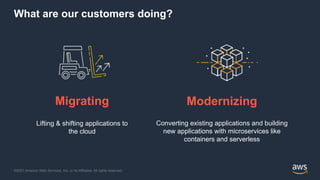
What are our customers doing?
Migrating
Lifting & shifting applications to
the cloud
Modernizing
Converting existing applications and building
new applications with microservices like
containers and serverless
© 2021, Amazon Web Services, Inc. or its Affiliates. All rights reserved.
©2021 Amazon Web Services, Inc. or its Affiliates. All rights reserved.
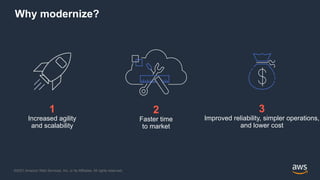
Why modernize?
2
Faster time
to market
1
Increased agility
and scalability
3
Improved reliability, simpler operations,
and lower cost
© 2021, Amazon Web Services, Inc. or its Affiliates. All rights reserved.
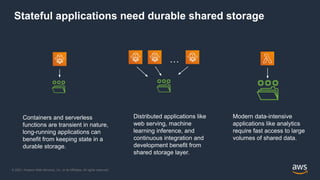
Stateful applications need durable shared storage
Containers and serverless
functions are transient in nature,
long-running applications can
benefit from keeping state in a
durable storage.
Distributed applications like
web serving, machine
learning inference, and
continuous integration and
development benefit from
shared storage layer.
Modern data-intensive
applications like analytics
require fast access to large
volumes of shared data.
…
© 2021, Amazon Web Services, Inc. or its Affiliates. All rights reserved.
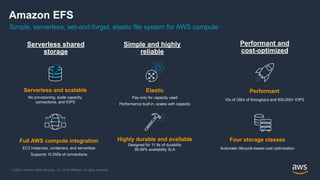
Performant and
cost-optimized
Serverless shared
storage
Full AWS compute integration
EC2 Instances, containers, and serverless
Supports 10,000s of connections
Four storage classes
Automatic lifecycle-based cost optimization
Serverless and scalable
No provisioning, scale capacity,
connections, and IOPS
Simple, serverless, set-and-forget, elastic file system for AWS compute
Amazon EFS
Simple and highly
reliable
Elastic
Pay only for capacity used
Performance built in, scales with capacity
Highly durable and available
Designed for 11 9s of durability
99.99% availability SLA
Performant
10s of GB/s of throughput and 500,000+ IOPS
© 2021, Amazon Web Services, Inc. or its Affiliates. All rights reserved.
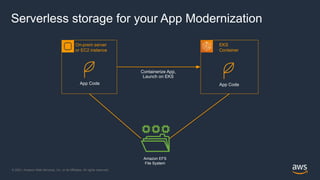
Serverless storage for your App Modernization
Amazon EFS
File System
On-prem server
or EC2 instance
App Code
EKS
Container
App Code
Containerize App,
Launch on EKS
© 2021, Amazon Web Services, Inc. or its Affiliates. All rights reserved.
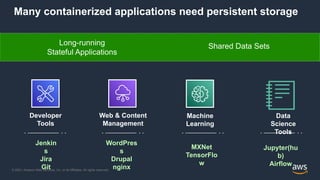
Many containerized applications need persistent storage
Long-running
Stateful Applications
Shared Data Sets
Developer
Tools
Web & Content
Management
Machine
Learning
Data
Science
Tools
WordPres
s
Drupal
nginx
Jenkin
s
Jira
Git
MXNet
TensorFlo
w
Jupyter(hu
b)
Airflow
© 2021, Amazon Web Services, Inc. or its Affiliates. All rights reserved.
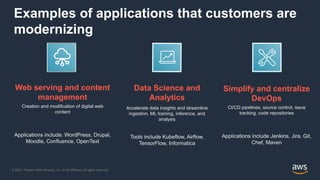
Examples of applications that customers are
modernizing
Simplify and centralize
DevOps
CI/CD pipelines, source control, issue
tracking, code repositories
Applications include Jenkins, Jira, Git,
Chef, Maven
Web serving and content
management
Creation and modification of digital web
content
Applications include: WordPress, Drupal,
Moodle, Confluence, OpenText
Data Science and
Analytics
Accelerate data insights and streamline
ingestion, ML training, inference, and
analysis
Tools include Kubeflow, Airflow,
TensorFlow, Informatica
© 2021, Amazon Web Services, Inc. or its Affiliates. All rights reserved.
”
“
”
“
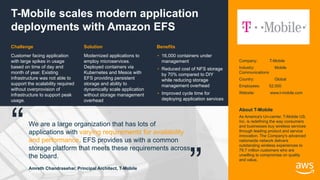
Modernized applications to
employ microservices.
Deployed containers via
Kubernetes and Mesos with
EFS providing persistent
storage and ability to
dynamically scale application
without storage management
overhead
T-Mobile scales modern application
deployments with Amazon EFS
Customer facing application
with large spikes in usage
based on time of day and
month of year. Existing
infrastructure was not able to
support the scalability required
without overprovision of
infrastructure to support peak
usage.
• 16,000 containers under
management
• Reduced cost of NFS storage
by 70% compared to DIY
while reducing storage
management overhead
• Improved cycle time for
deploying application services
Solution
Challenge Benefits
We are a large organization that has lots of
applications with varying requirements for availability
and performance. EFS provides us with a common
storage platform that meets these requirements across
the board.
Amreth Chandrasehar, Principal Architect, T-Mobile
Company: T-Mobile
Industry: Mobile
Communications
Country: Global
Employees: 52,000
Website: www.t-mobile.com
About T-Mobile
As America's Un-carrier, T-Mobile US,
Inc. is redefining the way consumers
and businesses buy wireless services
through leading product and service
innovation. The Company's advanced
nationwide network delivers
outstanding wireless experiences to
79.7 million customers who are
unwilling to compromise on quality
and value.
© 2021, Amazon Web Services, Inc. or its Affiliates. All rights reserved.
”
“
”
“
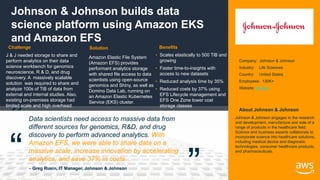
Johnson & Johnson builds data
science platform using Amazon EKS
and Amazon EFS
J & J needed storage to share and
perform analytics on their data
science workbench for genomics
neuroscience, R & D, and drug
discovery. A massively scalable
solution was required to share and
analyze 100s of TiB of data from
external and internal studies. Also,
existing on-premises storage had
limited scale and high overhead.
Amazon Elastic File System
(Amazon EFS) provides
performant analytics storage
with shared file access to data
scientists using open-source
genomics and Shiny, as well as
Domino Data Lab, running on
an Amazon Elastic Kubernetes
Service (EKS) cluster.
• Scales elastically to 500 TiB and
growing
• Faster time-to-insights with
access to new datasets
• Reduced analysis time by 35%
• Reduced costs by 37% using
EFS Lifecycle management and
EFS One Zone lower cost
storage classes
Solution
Challenge Benefits
Data scientists need access to massive data from
different sources for genomics, R&D, and drug
discovery to perform advanced analytics. With
Amazon EFS, we were able to share data on a
massive scale, increase innovation by accelerating
analytics, and save 37% in costs. .
– Greg Rusin, IT Manager, Johnson & Johnson
Company: Johnson & Johnson
Industry: Life Sciences
Country: United States
Employees: 130K+
Website: jnj.com
About Johnson & Johnson
Johnson & Johnson engages in the research
and development, manufacture and sale of a
range of products in the healthcare field.
Science and business experts collaborate to
incorporate science into healthcare solutions,
including medical device and diagnostic
technologies, consumer healthcare products,
and pharmaceuticals.
© 2021, Amazon Web Services, Inc. or its Affiliates. All rights reserved.
K8s Landscape
© 2021, Amazon Web Services, Inc. or its Affiliates. All rights reserved.
<Suman>
• <Suman>
Amazon Elastic
Kubernetes Service
© 2021, Amazon Web Services, Inc. or its Affiliates. All rights reserved.
Amazon EKS and Amazon EFS
© 2021, Amazon Web Services, Inc. or its Affiliates. All rights reserved.
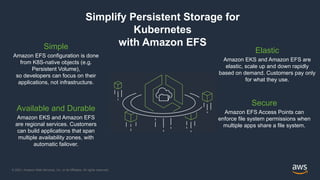
Simplify Persistent Storage for
Kubernetes
with Amazon EFS
Elastic
Amazon EKS and Amazon EFS are
elastic, scale up and down rapidly
based on demand. Customers pay only
for what they use.
Available and Durable
Amazon EKS and Amazon EFS
are regional services. Customers
can build applications that span
multiple availability zones, with
automatic failover.
Simple
Amazon EFS configuration is done
from K8S-native objects (e.g.
Persistent Volume),
so developers can focus on their
applications, not infrastructure.
Secure
Amazon EFS Access Points can
enforce file system permissions when
multiple apps share a file system.
© 2021, Amazon Web Services, Inc. or its Affiliates. All rights reserved.
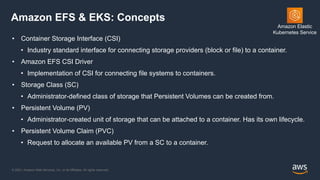
Amazon EFS & EKS: Concepts
• Container Storage Interface (CSI)
• Industry standard interface for connecting storage providers (block or file) to a container.
• Amazon EFS CSI Driver
• Implementation of CSI for connecting file systems to containers.
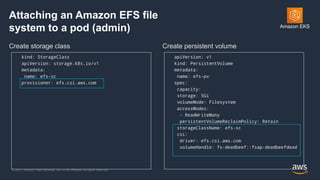
• Storage Class (SC)
• Administrator-defined class of storage that Persistent Volumes can be created from.
• Persistent Volume (PV)
• Administrator-created unit of storage that can be attached to a container. Has its own lifecycle.
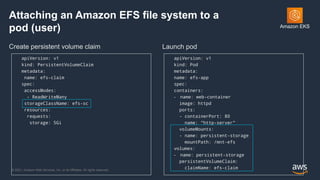
• Persistent Volume Claim (PVC)
• Request to allocate an available PV from a SC to a container.
Amazon Elastic
Kubernetes Service
© 2021, Amazon Web Services, Inc. or its Affiliates. All rights reserved.
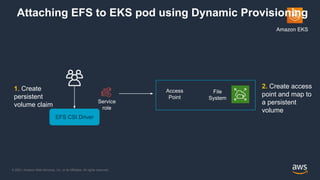
Amazon EKS
Attaching EFS to EKS pod using Dynamic Provisioning
EFS CSI Driver
Service
role
1. Create
persistent
volume claim
2. Create access
point and map to
a persistent
volume
File
System
Access
Point
© 2021, Amazon Web Services, Inc. or its Affiliates. All rights reserved.
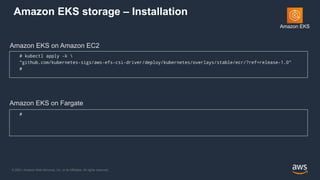
Amazon EKS storage – Installation
Amazon EKS on Amazon EC2
# kubectl apply -k 
"github.com/kubernetes-sigs/aws-efs-csi-driver/deploy/kubernetes/overlays/stable/ecr/?ref=release-1.0”
#
Amazon EKS on Fargate
#
Amazon EKS
© 2021, Amazon Web Services, Inc. or its Affiliates. All rights reserved.
Attaching an Amazon EFS file
system to a pod (admin)
Create storage class Create persistent volume
kind: StorageClass
apiVersion: storage.k8s.io/v1
metadata:
name: efs-sc
provisioner: efs.csi.aws.com
apiVersion: v1
kind: PersistentVolume
metadata:
name: efs-pv
spec:
capacity:
storage: 5Gi
volumeMode: Filesystem
accessModes:
- ReadWriteMany
persistentVolumeReclaimPolicy: Retain
storageClassName: efs-sc
csi:
driver: efs.csi.aws.com
volumeHandle: fs-deadbeef::fsap-deadbeefdead
Amazon EKS
© 2021, Amazon Web Services, Inc. or its Affiliates. All rights reserved.
Attaching an Amazon EFS file system to a
pod (user)
Create persistent volume claim Launch pod
apiVersion: v1
kind: PersistentVolumeClaim
metadata:
name: efs-claim
spec:
accessModes:
- ReadWriteMany
storageClassName: efs-sc
resources:
requests:
storage: 5Gi
apiVersion: v1
kind: Pod
metadata:
name: efs-app
spec:
containers:
- name: web-container
image: httpd
ports:
- containerPort: 80
name: “http-server”
volumeMounts:
- name: persistent-storage
mountPath: /mnt-efs
volumes:
- name: persistent-storage
persistentVolumeClaim:
claimName: efs-claim
Amazon EKS
© 2021, Amazon Web Services, Inc. or its Affiliates. All rights reserved.
Identity: Bridging Between
Pods & Storage
© 2021, Amazon Web Services, Inc. or its Affiliates. All rights reserved.
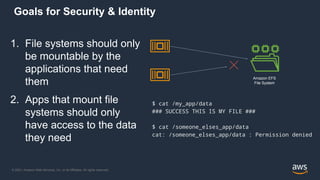
Goals for Security & Identity
1. File systems should only
be mountable by the
applications that need
them
2. Apps that mount file
systems should only
have access to the data
they need
Amazon EFS
File System
$ cat /my_app/data
### SUCCESS THIS IS MY FILE ###
$ cat /someone_elses_app/data
cat: /someone_elses_app/data : Permission denied
© 2021, Amazon Web Services, Inc. or its Affiliates. All rights reserved.
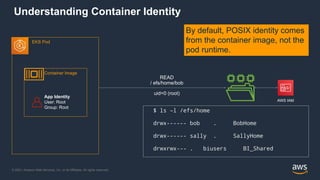
Understanding Container Identity
EKS Pod
AWS IAM
Container Image
App Identity
User: Root
Group: Root
$ ls –l /efs/home
drwx------ bob . BobHome
drwx------ sally . SallyHome
drwxrwx--- . biusers BI_Shared
READ
/ efs/home/bob
uid=0 (root)
By default, POSIX identity comes
from the container image, not the
pod runtime.
© 2021, Amazon Web Services, Inc. or its Affiliates. All rights reserved.
©2021 Amazon Web Services, Inc. or its Affiliates. All rights reserved.
Application-specific Access with EFS Access Points
{
“Name”: “MyApp”,
"FileSystemId": ”fs-deadbeef",
“PosixUser”: {
“Uid”: 123
“Gid”: 123,
“SecondaryGids”: [100, 200, 300]
},
“RootDirectory”: {
“Path”: “/apps/myapp”,
“CreationInfo”: {
“OwnerUid”: 123,
“OwnerGid”: 123,
“Permissions”: “0700”
}
}
}
EFS Access Point
Creates App-specific Directory & Permissions
No EC2 instance required!
Apps only see data they need
Enforces File System Identity
Root containers can’t escalate access
Arbitrary users aren’t locked out
© 2021, Amazon Web Services, Inc. or its Affiliates. All rights reserved.
©2021 Amazon Web Services, Inc. or its Affiliates. All rights reserved.
{
“Name”: “MyApp”,
“PosixUser”: {
“Uid”: 123
“Gid”: 123,
“SecondaryGids”: [100, 200, 300]
},
“RootDirectory”: {
“Path”: “/apps/myapp”,
“CreationInfo”: {
“OwnerUid”: 123,
“OwnerGid”: 123,
“Permissions”: “0700”
}
}
}
EFS Access Point
How EFS Access Points Work
App With IAM
Role
“approle” File System
with POSIX
Permissions
READ
/
uid=0
READ
/apps/myapp
uid=123
“Effect” : “allow”,
“Action” : “elasticfilesystem:Client*”,
“Principal” : { “AWS”: “approle” },
“Condition”* : {“accessPointArn” : “fsap-1234”
File System Resource Policy
© 2021, Amazon Web Services, Inc. or its Affiliates. All rights reserved.
Access Point Use Cases
• Solving container identity for sharing EFS data
• Packing multiple applications into a single file system
• Less resources to manage
• Sharing pool of throughput between multiple apps
© 2021, Amazon Web Services, Inc. or its Affiliates. All rights reserved.
Best Practices for IAM and Access Points, & Security
• Use Access Points, even if single app per file system!
• Simplifies directory permission setup
• Consistent experience regardless of user/group setup in container
• Future-proof for adding apps to share data
•Use IAM Authorization
• Use Resource Policies to restrict IAM roles to Access Points
• Use Identity Policies to give single role “admin” access to file systems
•Enable Encryption @ Rest and Encryption in Motion
• Simple setup, no performance penalty
© 2021, Amazon Web Services, Inc. or its Affiliates. All rights reserved.
Getting Started
• Amazon EFS CSI driver - https://github.com/kubernetes-sigs/aws-efs-csi-driver
• Deploying Kubeflow -
https://www.kubeflow.org/docs/distributions/aws/customizing-aws/storage/
• TensorFlow training using Kubeflow -
https://aws.amazon.com/blogs/opensource/distributed-tensorflow-training-using-k
ubeflow-on-amazon-eks/
© 2021, Amazon Web Services, Inc. or its Affiliates. All rights reserved.
Thank you!
© 2021, Amazon Web Services, Inc. or its Affiliates. All rights reserved.
Best Practices:
Performance, Cost,
& Ingest
© 2021, Amazon Web Services, Inc. or its Affiliates. All rights reserved.
Best Practices - Performance
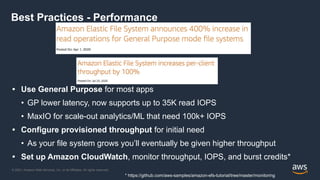
• Use General Purpose for most apps
• GP lower latency, now supports up to 35K read IOPS
• MaxIO for scale-out analytics/ML that need 100k+ IOPS
• Configure provisioned throughput for initial need
• As your file system grows you’ll eventually be given higher throughput
• Set up Amazon CloudWatch, monitor throughput, IOPS, and burst credits*
* https://github.com/aws-samples/amazon-efs-tutorial/tree/master/monitoring
© 2021, Amazon Web Services, Inc. or its Affiliates. All rights reserved.
When should I use EFS vs EBS?
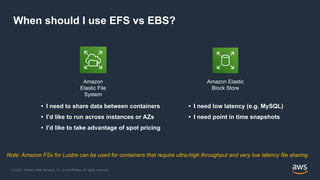
• I need to share data between containers
• I’d like to run across instances or AZs
• I’d like to take advantage of spot pricing
• I need low latency (e.g. MySQL)
• I need point in time snapshots
Amazon Elastic
Block Store
Amazon
Elastic File
System
Note: Amazon FSx for Lustre can be used for containers that require ultra-high throughput and very low latency file sharing
© 2021, Amazon Web Services, Inc. or its Affiliates. All rights reserved.
©2021 Amazon Web Services, Inc. or its Affiliates. All rights reserved.
Optimize cost with Amazon EFS Infrequent Access
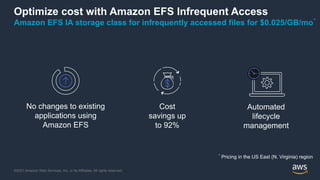
Amazon EFS IA storage class for infrequently accessed files for $0.025/GB/mo*
*
Pricing in the US East (N. Virginia) region
Automated
lifecycle
management
Cost
savings up
to 92%
No changes to existing
applications using
Amazon EFS
© 2021, Amazon Web Services, Inc. or its Affiliates. All rights reserved.
Backup for Amazon EFS
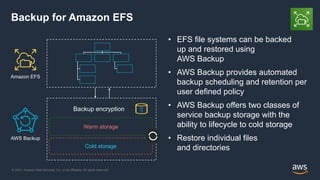
• EFS file systems can be backed
up and restored using
AWS Backup
• AWS Backup provides automated
backup scheduling and retention per
user defined policy
• AWS Backup offers two classes of
service backup storage with the
ability to lifecycle to cold storage
• Restore individual files
and directories
Cold storage
AWS Backup
Warm storage
Amazon EFS
Backup encryption
© 2021, Amazon Web Services, Inc. or its Affiliates. All rights reserved.
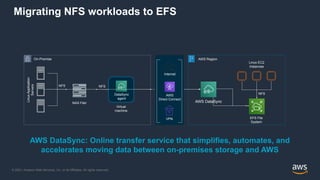
Migrating NFS workloads to EFS
On-Premise
NAS Filer
Linux
Application
Servers
NFS
EFS File
System
AWS Region
Linux EC2
Instances
NFS
AWS DataSync
DataSync
agent
AWS
Direct Connect
Internet
VPN
Virtual
machine
NFS
AWS DataSync: Online transfer service that simplifies, automates, and
accelerates moving data between on-premises storage and AWS
© 2021, Amazon Web Services, Inc. or its Affiliates. All rights reserved.
Where to learn more
Amazon EKS Documentation: Amazon EFS CSI Driver
Deploying Jenkins on Amazon EKS with Amazon EFS

Enable stateful applications on aws with persistent storage for k8s.pptx

  • 1.
    © 2021, AmazonWeb Services, Inc. or its Affiliates. All rights reserved. Ananth Vaidyanathan (ananva@) Sr. Product Manager, AWS Persistent File Storage for Kubernetes
  • 2.
    © 2021, AmazonWeb Services, Inc. or its Affiliates. All rights reserved. Customer Trends
  • 3.
    © 2021, AmazonWeb Services, Inc. or its Affiliates. All rights reserved. ©2021 Amazon Web Services, Inc. or its Affiliates. All rights reserved. What are our customers doing? Migrating Lifting & shifting applications to the cloud Modernizing Converting existing applications and building new applications with microservices like containers and serverless
  • 4.
    © 2021, AmazonWeb Services, Inc. or its Affiliates. All rights reserved. ©2021 Amazon Web Services, Inc. or its Affiliates. All rights reserved. Why modernize? 2 Faster time to market 1 Increased agility and scalability 3 Improved reliability, simpler operations, and lower cost
  • 5.
    © 2021, AmazonWeb Services, Inc. or its Affiliates. All rights reserved. Stateful applications need durable shared storage Containers and serverless functions are transient in nature, long-running applications can benefit from keeping state in a durable storage. Distributed applications like web serving, machine learning inference, and continuous integration and development benefit from shared storage layer. Modern data-intensive applications like analytics require fast access to large volumes of shared data. …
  • 6.
    © 2021, AmazonWeb Services, Inc. or its Affiliates. All rights reserved. Performant and cost-optimized Serverless shared storage Full AWS compute integration EC2 Instances, containers, and serverless Supports 10,000s of connections Four storage classes Automatic lifecycle-based cost optimization Serverless and scalable No provisioning, scale capacity, connections, and IOPS Simple, serverless, set-and-forget, elastic file system for AWS compute Amazon EFS Simple and highly reliable Elastic Pay only for capacity used Performance built in, scales with capacity Highly durable and available Designed for 11 9s of durability 99.99% availability SLA Performant 10s of GB/s of throughput and 500,000+ IOPS
  • 7.
    © 2021, AmazonWeb Services, Inc. or its Affiliates. All rights reserved. Serverless storage for your App Modernization Amazon EFS File System On-prem server or EC2 instance App Code EKS Container App Code Containerize App, Launch on EKS
  • 8.
    © 2021, AmazonWeb Services, Inc. or its Affiliates. All rights reserved. Many containerized applications need persistent storage Long-running Stateful Applications Shared Data Sets Developer Tools Web & Content Management Machine Learning Data Science Tools WordPres s Drupal nginx Jenkin s Jira Git MXNet TensorFlo w Jupyter(hu b) Airflow
  • 9.
    © 2021, AmazonWeb Services, Inc. or its Affiliates. All rights reserved. Examples of applications that customers are modernizing Simplify and centralize DevOps CI/CD pipelines, source control, issue tracking, code repositories Applications include Jenkins, Jira, Git, Chef, Maven Web serving and content management Creation and modification of digital web content Applications include: WordPress, Drupal, Moodle, Confluence, OpenText Data Science and Analytics Accelerate data insights and streamline ingestion, ML training, inference, and analysis Tools include Kubeflow, Airflow, TensorFlow, Informatica
  • 10.
    © 2021, AmazonWeb Services, Inc. or its Affiliates. All rights reserved. ” “ ” “ Modernized applications to employ microservices. Deployed containers via Kubernetes and Mesos with EFS providing persistent storage and ability to dynamically scale application without storage management overhead T-Mobile scales modern application deployments with Amazon EFS Customer facing application with large spikes in usage based on time of day and month of year. Existing infrastructure was not able to support the scalability required without overprovision of infrastructure to support peak usage. • 16,000 containers under management • Reduced cost of NFS storage by 70% compared to DIY while reducing storage management overhead • Improved cycle time for deploying application services Solution Challenge Benefits We are a large organization that has lots of applications with varying requirements for availability and performance. EFS provides us with a common storage platform that meets these requirements across the board. Amreth Chandrasehar, Principal Architect, T-Mobile Company: T-Mobile Industry: Mobile Communications Country: Global Employees: 52,000 Website: www.t-mobile.com About T-Mobile As America's Un-carrier, T-Mobile US, Inc. is redefining the way consumers and businesses buy wireless services through leading product and service innovation. The Company's advanced nationwide network delivers outstanding wireless experiences to 79.7 million customers who are unwilling to compromise on quality and value.
  • 11.
    © 2021, AmazonWeb Services, Inc. or its Affiliates. All rights reserved. ” “ ” “ Johnson & Johnson builds data science platform using Amazon EKS and Amazon EFS J & J needed storage to share and perform analytics on their data science workbench for genomics neuroscience, R & D, and drug discovery. A massively scalable solution was required to share and analyze 100s of TiB of data from external and internal studies. Also, existing on-premises storage had limited scale and high overhead. Amazon Elastic File System (Amazon EFS) provides performant analytics storage with shared file access to data scientists using open-source genomics and Shiny, as well as Domino Data Lab, running on an Amazon Elastic Kubernetes Service (EKS) cluster. • Scales elastically to 500 TiB and growing • Faster time-to-insights with access to new datasets • Reduced analysis time by 35% • Reduced costs by 37% using EFS Lifecycle management and EFS One Zone lower cost storage classes Solution Challenge Benefits Data scientists need access to massive data from different sources for genomics, R&D, and drug discovery to perform advanced analytics. With Amazon EFS, we were able to share data on a massive scale, increase innovation by accelerating analytics, and save 37% in costs. . – Greg Rusin, IT Manager, Johnson & Johnson Company: Johnson & Johnson Industry: Life Sciences Country: United States Employees: 130K+ Website: jnj.com About Johnson & Johnson Johnson & Johnson engages in the research and development, manufacture and sale of a range of products in the healthcare field. Science and business experts collaborate to incorporate science into healthcare solutions, including medical device and diagnostic technologies, consumer healthcare products, and pharmaceuticals.
  • 12.
    © 2021, AmazonWeb Services, Inc. or its Affiliates. All rights reserved. K8s Landscape
  • 13.
    © 2021, AmazonWeb Services, Inc. or its Affiliates. All rights reserved. <Suman> • <Suman> Amazon Elastic Kubernetes Service
  • 14.
    © 2021, AmazonWeb Services, Inc. or its Affiliates. All rights reserved. Amazon EKS and Amazon EFS
  • 15.
    © 2021, AmazonWeb Services, Inc. or its Affiliates. All rights reserved. Simplify Persistent Storage for Kubernetes with Amazon EFS Elastic Amazon EKS and Amazon EFS are elastic, scale up and down rapidly based on demand. Customers pay only for what they use. Available and Durable Amazon EKS and Amazon EFS are regional services. Customers can build applications that span multiple availability zones, with automatic failover. Simple Amazon EFS configuration is done from K8S-native objects (e.g. Persistent Volume), so developers can focus on their applications, not infrastructure. Secure Amazon EFS Access Points can enforce file system permissions when multiple apps share a file system.
  • 16.
    © 2021, AmazonWeb Services, Inc. or its Affiliates. All rights reserved. Amazon EFS & EKS: Concepts • Container Storage Interface (CSI) • Industry standard interface for connecting storage providers (block or file) to a container. • Amazon EFS CSI Driver • Implementation of CSI for connecting file systems to containers. • Storage Class (SC) • Administrator-defined class of storage that Persistent Volumes can be created from. • Persistent Volume (PV) • Administrator-created unit of storage that can be attached to a container. Has its own lifecycle. • Persistent Volume Claim (PVC) • Request to allocate an available PV from a SC to a container. Amazon Elastic Kubernetes Service
  • 17.
    © 2021, AmazonWeb Services, Inc. or its Affiliates. All rights reserved. Amazon EKS Attaching EFS to EKS pod using Dynamic Provisioning EFS CSI Driver Service role 1. Create persistent volume claim 2. Create access point and map to a persistent volume File System Access Point
  • 18.
    © 2021, AmazonWeb Services, Inc. or its Affiliates. All rights reserved. Amazon EKS storage – Installation Amazon EKS on Amazon EC2 # kubectl apply -k "github.com/kubernetes-sigs/aws-efs-csi-driver/deploy/kubernetes/overlays/stable/ecr/?ref=release-1.0” # Amazon EKS on Fargate # Amazon EKS
  • 19.
    © 2021, AmazonWeb Services, Inc. or its Affiliates. All rights reserved. Attaching an Amazon EFS file system to a pod (admin) Create storage class Create persistent volume kind: StorageClass apiVersion: storage.k8s.io/v1 metadata: name: efs-sc provisioner: efs.csi.aws.com apiVersion: v1 kind: PersistentVolume metadata: name: efs-pv spec: capacity: storage: 5Gi volumeMode: Filesystem accessModes: - ReadWriteMany persistentVolumeReclaimPolicy: Retain storageClassName: efs-sc csi: driver: efs.csi.aws.com volumeHandle: fs-deadbeef::fsap-deadbeefdead Amazon EKS
  • 20.
    © 2021, AmazonWeb Services, Inc. or its Affiliates. All rights reserved. Attaching an Amazon EFS file system to a pod (user) Create persistent volume claim Launch pod apiVersion: v1 kind: PersistentVolumeClaim metadata: name: efs-claim spec: accessModes: - ReadWriteMany storageClassName: efs-sc resources: requests: storage: 5Gi apiVersion: v1 kind: Pod metadata: name: efs-app spec: containers: - name: web-container image: httpd ports: - containerPort: 80 name: “http-server” volumeMounts: - name: persistent-storage mountPath: /mnt-efs volumes: - name: persistent-storage persistentVolumeClaim: claimName: efs-claim Amazon EKS
  • 21.
    © 2021, AmazonWeb Services, Inc. or its Affiliates. All rights reserved. Identity: Bridging Between Pods & Storage
  • 22.
    © 2021, AmazonWeb Services, Inc. or its Affiliates. All rights reserved. Goals for Security & Identity 1. File systems should only be mountable by the applications that need them 2. Apps that mount file systems should only have access to the data they need Amazon EFS File System $ cat /my_app/data ### SUCCESS THIS IS MY FILE ### $ cat /someone_elses_app/data cat: /someone_elses_app/data : Permission denied
  • 23.
    © 2021, AmazonWeb Services, Inc. or its Affiliates. All rights reserved. Understanding Container Identity EKS Pod AWS IAM Container Image App Identity User: Root Group: Root $ ls –l /efs/home drwx------ bob . BobHome drwx------ sally . SallyHome drwxrwx--- . biusers BI_Shared READ / efs/home/bob uid=0 (root) By default, POSIX identity comes from the container image, not the pod runtime.
  • 24.
    © 2021, AmazonWeb Services, Inc. or its Affiliates. All rights reserved. ©2021 Amazon Web Services, Inc. or its Affiliates. All rights reserved. Application-specific Access with EFS Access Points { “Name”: “MyApp”, "FileSystemId": ”fs-deadbeef", “PosixUser”: { “Uid”: 123 “Gid”: 123, “SecondaryGids”: [100, 200, 300] }, “RootDirectory”: { “Path”: “/apps/myapp”, “CreationInfo”: { “OwnerUid”: 123, “OwnerGid”: 123, “Permissions”: “0700” } } } EFS Access Point Creates App-specific Directory & Permissions No EC2 instance required! Apps only see data they need Enforces File System Identity Root containers can’t escalate access Arbitrary users aren’t locked out
  • 25.
    © 2021, AmazonWeb Services, Inc. or its Affiliates. All rights reserved. ©2021 Amazon Web Services, Inc. or its Affiliates. All rights reserved. { “Name”: “MyApp”, “PosixUser”: { “Uid”: 123 “Gid”: 123, “SecondaryGids”: [100, 200, 300] }, “RootDirectory”: { “Path”: “/apps/myapp”, “CreationInfo”: { “OwnerUid”: 123, “OwnerGid”: 123, “Permissions”: “0700” } } } EFS Access Point How EFS Access Points Work App With IAM Role “approle” File System with POSIX Permissions READ / uid=0 READ /apps/myapp uid=123 “Effect” : “allow”, “Action” : “elasticfilesystem:Client*”, “Principal” : { “AWS”: “approle” }, “Condition”* : {“accessPointArn” : “fsap-1234” File System Resource Policy
  • 26.
    © 2021, AmazonWeb Services, Inc. or its Affiliates. All rights reserved. Access Point Use Cases • Solving container identity for sharing EFS data • Packing multiple applications into a single file system • Less resources to manage • Sharing pool of throughput between multiple apps
  • 27.
    © 2021, AmazonWeb Services, Inc. or its Affiliates. All rights reserved. Best Practices for IAM and Access Points, & Security • Use Access Points, even if single app per file system! • Simplifies directory permission setup • Consistent experience regardless of user/group setup in container • Future-proof for adding apps to share data •Use IAM Authorization • Use Resource Policies to restrict IAM roles to Access Points • Use Identity Policies to give single role “admin” access to file systems •Enable Encryption @ Rest and Encryption in Motion • Simple setup, no performance penalty
  • 28.
    © 2021, AmazonWeb Services, Inc. or its Affiliates. All rights reserved. Getting Started • Amazon EFS CSI driver - https://github.com/kubernetes-sigs/aws-efs-csi-driver • Deploying Kubeflow - https://www.kubeflow.org/docs/distributions/aws/customizing-aws/storage/ • TensorFlow training using Kubeflow - https://aws.amazon.com/blogs/opensource/distributed-tensorflow-training-using-k ubeflow-on-amazon-eks/
  • 29.
    © 2021, AmazonWeb Services, Inc. or its Affiliates. All rights reserved. Thank you!
  • 30.
    © 2021, AmazonWeb Services, Inc. or its Affiliates. All rights reserved. Best Practices: Performance, Cost, & Ingest
  • 31.
    © 2021, AmazonWeb Services, Inc. or its Affiliates. All rights reserved. Best Practices - Performance • Use General Purpose for most apps • GP lower latency, now supports up to 35K read IOPS • MaxIO for scale-out analytics/ML that need 100k+ IOPS • Configure provisioned throughput for initial need • As your file system grows you’ll eventually be given higher throughput • Set up Amazon CloudWatch, monitor throughput, IOPS, and burst credits* * https://github.com/aws-samples/amazon-efs-tutorial/tree/master/monitoring
  • 32.
    © 2021, AmazonWeb Services, Inc. or its Affiliates. All rights reserved. When should I use EFS vs EBS? • I need to share data between containers • I’d like to run across instances or AZs • I’d like to take advantage of spot pricing • I need low latency (e.g. MySQL) • I need point in time snapshots Amazon Elastic Block Store Amazon Elastic File System Note: Amazon FSx for Lustre can be used for containers that require ultra-high throughput and very low latency file sharing
  • 33.
    © 2021, AmazonWeb Services, Inc. or its Affiliates. All rights reserved. ©2021 Amazon Web Services, Inc. or its Affiliates. All rights reserved. Optimize cost with Amazon EFS Infrequent Access Amazon EFS IA storage class for infrequently accessed files for $0.025/GB/mo* * Pricing in the US East (N. Virginia) region Automated lifecycle management Cost savings up to 92% No changes to existing applications using Amazon EFS
  • 34.
    © 2021, AmazonWeb Services, Inc. or its Affiliates. All rights reserved. Backup for Amazon EFS • EFS file systems can be backed up and restored using AWS Backup • AWS Backup provides automated backup scheduling and retention per user defined policy • AWS Backup offers two classes of service backup storage with the ability to lifecycle to cold storage • Restore individual files and directories Cold storage AWS Backup Warm storage Amazon EFS Backup encryption
  • 35.
    © 2021, AmazonWeb Services, Inc. or its Affiliates. All rights reserved. Migrating NFS workloads to EFS On-Premise NAS Filer Linux Application Servers NFS EFS File System AWS Region Linux EC2 Instances NFS AWS DataSync DataSync agent AWS Direct Connect Internet VPN Virtual machine NFS AWS DataSync: Online transfer service that simplifies, automates, and accelerates moving data between on-premises storage and AWS
  • 36.
    © 2021, AmazonWeb Services, Inc. or its Affiliates. All rights reserved. Where to learn more Amazon EKS Documentation: Amazon EFS CSI Driver Deploying Jenkins on Amazon EKS with Amazon EFS