ADVANCED EMPLOYEE
MANAGEMENT
SYSTEM
INTRODUCTION
 Aim- Identify suitable Design and Implementation model from the different
software engineering models.
 Objective- Main goal of this practical is to finalize the Design and Implementation
model from the different Software Engineering Models.
SOFTWARE PROCESS MODELS
Software Processes is a coherent set of activities for specifying, designing,
implementing and testing software systems. A software process model is an abstract
representation of a process that presents a description of a process from some
particular perspective. There are many different software processes but all involve:
 Specification – defining what the system should do.
 Design and Implementation – defining the organization of the system and
implementing the system.
 Validation – checking that it does what the customer wants.
 Evolution – changing the system in response to changing customer needs.
SDLC PHASES
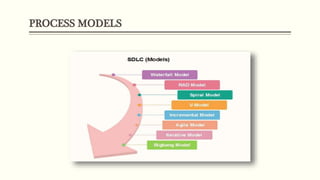
PROCESS MODELS
SOFTWARE ENGINEERING MODELS
Analysis –
Incremental Model:-
• Requirement Analysis.
• Design & Development.
• Testing.
• Implementation.
TYPES OF ENGINEERING MODELS
 Waterfall Model.
 Prototype Model.
 Incremental Model.
 Spiral Model.
 RAD Model.
WATERFALL MODEL
• Requirement Gathering and Analysis.
• System Design.
• Implementation.
• Integration and Testing.
• Deployment of system.
• Maintenance.
• Technology is understood and is not dynamic.
• Project is short.
ADVANTAGES AND DISADVANTAGES
Advantages –
• Simple and easy to understand.
• Easy to manage.
• Easy to arrange tasks.
• Process and results are well documented.
• Clearly defined stages.
Disadvantages –
• Difficult to measure progress within stages.
• Can’t accommodate changing requirements.
• Poor model for long and ongoing projects.
• Not a good model for complex and object-oriented projects.
• High amounts of risk and uncertainty.
PROTOTYPE MODEL
• Requirement Gathering and Analyst.
• Quick Decision.
• Build a Prototype.
• Assessment or User Evaluation.
• Prototype Refinement.
• Engineer Product.
ADVANTAGES AND DISADVANTAGES
Advantages –
• Reduce the risk of incorrect user requirement.
• Good where requirement are changing/uncommitted.
• Support early product marketing
• Reduce Maintenance cost.
• Errors can be detected much earlier as the system is made side by side.
Disadvantages –
• Difficult to know how long the project will last.
• Prototyping tools are expensive.
• Special tools & techniques are required to build a prototype.
• It is a time-consuming process.
• Needs committed customer.
INCREMENTAL MODEL
• Requirement Analysis.
• Design and Development.
• Testing.
• Implementation.
• Lengthy development schedules.
ADVANTAGES AND DISADVANTAGES
Advantages –
• Errors are easy to be recognized.
• Easier to test and debug
• More flexible.
• Simple to manage risk because it handled during its iteration.
• The Client gets important functionality early.
Disadvantages –
• Need for good planning
• Total Cost is high.
• Well defined module interfaces are needed.
SPIRAL MODEL
• Objective setting.
• Risk Assessment and reduction.
• Development and validation.
• Planning.
ADVANTAGES AND DISADVANTAGES
Advantages –
• High amount of risk analysis
• Useful for large and mission-critical projects.
Disadvantages –
• Can be a costly model to use.
• Risk analysis needed highly particular expertise
• Doesn't work well for smaller projects.
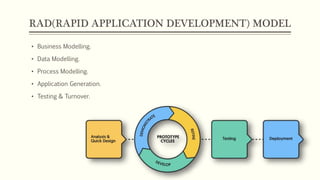
RAD(RAPID APPLICATION DEVELOPMENT) MODEL
• Business Modelling.
• Data Modelling.
• Process Modelling.
• Application Generation.
• Testing & Turnover.
ADVANTAGES AND DISADVANTAGES
Advantages –
• This model is flexible for change.
• In this model, changes are adoptable.
• Each phase in RAD brings highest priority functionality to the customer.
• It reduced development time.
• It increases the reusability of features.
Disadvantages –
• It required highly skilled designers.
• All application is not compatible with RAD.
• For smaller projects, we cannot use the RAD model.
• On the high technical risk, it's not suitable.
• Required user involvement.
MODEL
Model Selected –
Incremental Model - a process of software development where requirements divided into
multiple standalone modules of the software development cycle.
Justification –
• When the requirements are superior.
• A project has a lengthy development schedule.
• When Software team are not very well skilled or trained.
• When the customer demands a quick release of the product.
• You can develop prioritized requirements first.
REJECTED MODEL
Rejected Model –
Waterfall Model - a breakdown of project activities into linear sequential phases, where each
phase depends on the deliverables of the previous one and corresponds to a specialisation of
tasks.
Justification –
• Difficult to measure progress within stages.
• Can’t accommodate changing requirements.
• Poor model for long and ongoing projects.
• Not a good model for complex and object-oriented projects.
• High amounts of risk and uncertainty.
Employee Management Process (Engineering Model)

Employee Management Process (Engineering Model)

  • 1.
  • 2.
    INTRODUCTION  Aim- Identifysuitable Design and Implementation model from the different software engineering models.  Objective- Main goal of this practical is to finalize the Design and Implementation model from the different Software Engineering Models.
  • 3.
    SOFTWARE PROCESS MODELS SoftwareProcesses is a coherent set of activities for specifying, designing, implementing and testing software systems. A software process model is an abstract representation of a process that presents a description of a process from some particular perspective. There are many different software processes but all involve:  Specification – defining what the system should do.  Design and Implementation – defining the organization of the system and implementing the system.  Validation – checking that it does what the customer wants.  Evolution – changing the system in response to changing customer needs.
  • 4.
  • 5.
  • 6.
    SOFTWARE ENGINEERING MODELS Analysis– Incremental Model:- • Requirement Analysis. • Design & Development. • Testing. • Implementation.
  • 7.
    TYPES OF ENGINEERINGMODELS  Waterfall Model.  Prototype Model.  Incremental Model.  Spiral Model.  RAD Model.
  • 8.
    WATERFALL MODEL • RequirementGathering and Analysis. • System Design. • Implementation. • Integration and Testing. • Deployment of system. • Maintenance. • Technology is understood and is not dynamic. • Project is short.
  • 9.
    ADVANTAGES AND DISADVANTAGES Advantages– • Simple and easy to understand. • Easy to manage. • Easy to arrange tasks. • Process and results are well documented. • Clearly defined stages. Disadvantages – • Difficult to measure progress within stages. • Can’t accommodate changing requirements. • Poor model for long and ongoing projects. • Not a good model for complex and object-oriented projects. • High amounts of risk and uncertainty.
  • 10.
    PROTOTYPE MODEL • RequirementGathering and Analyst. • Quick Decision. • Build a Prototype. • Assessment or User Evaluation. • Prototype Refinement. • Engineer Product.
  • 11.
    ADVANTAGES AND DISADVANTAGES Advantages– • Reduce the risk of incorrect user requirement. • Good where requirement are changing/uncommitted. • Support early product marketing • Reduce Maintenance cost. • Errors can be detected much earlier as the system is made side by side. Disadvantages – • Difficult to know how long the project will last. • Prototyping tools are expensive. • Special tools & techniques are required to build a prototype. • It is a time-consuming process. • Needs committed customer.
  • 12.
    INCREMENTAL MODEL • RequirementAnalysis. • Design and Development. • Testing. • Implementation. • Lengthy development schedules.
  • 13.
    ADVANTAGES AND DISADVANTAGES Advantages– • Errors are easy to be recognized. • Easier to test and debug • More flexible. • Simple to manage risk because it handled during its iteration. • The Client gets important functionality early. Disadvantages – • Need for good planning • Total Cost is high. • Well defined module interfaces are needed.
  • 14.
    SPIRAL MODEL • Objectivesetting. • Risk Assessment and reduction. • Development and validation. • Planning.
  • 15.
    ADVANTAGES AND DISADVANTAGES Advantages– • High amount of risk analysis • Useful for large and mission-critical projects. Disadvantages – • Can be a costly model to use. • Risk analysis needed highly particular expertise • Doesn't work well for smaller projects.
  • 16.
    RAD(RAPID APPLICATION DEVELOPMENT)MODEL • Business Modelling. • Data Modelling. • Process Modelling. • Application Generation. • Testing & Turnover.
  • 17.
    ADVANTAGES AND DISADVANTAGES Advantages– • This model is flexible for change. • In this model, changes are adoptable. • Each phase in RAD brings highest priority functionality to the customer. • It reduced development time. • It increases the reusability of features. Disadvantages – • It required highly skilled designers. • All application is not compatible with RAD. • For smaller projects, we cannot use the RAD model. • On the high technical risk, it's not suitable. • Required user involvement.
  • 18.
    MODEL Model Selected – IncrementalModel - a process of software development where requirements divided into multiple standalone modules of the software development cycle. Justification – • When the requirements are superior. • A project has a lengthy development schedule. • When Software team are not very well skilled or trained. • When the customer demands a quick release of the product. • You can develop prioritized requirements first.
  • 19.
    REJECTED MODEL Rejected Model– Waterfall Model - a breakdown of project activities into linear sequential phases, where each phase depends on the deliverables of the previous one and corresponds to a specialisation of tasks. Justification – • Difficult to measure progress within stages. • Can’t accommodate changing requirements. • Poor model for long and ongoing projects. • Not a good model for complex and object-oriented projects. • High amounts of risk and uncertainty.

Editor's Notes

  • #2 NOTE: To change the image on this slide, select the picture and delete it. Then click the Pictures icon in the placeholder to insert your own image.