

How to Send Email in 
Large Number 
Trainer: Mr. Hoem Seiha 
Tel: 012‐699‐553 
Email: entrepconsulting@gmail.com 
∗ Use a software to enable mass mailing. Example: PHP 
List, Mail Merge with Outlook, or MailChimp 
∗ Use an dedicated email server 
∗ Use a dedicated high speed computer 
∗ Make sure that your computer is connected to a high, 
stable speed Internet. 
 
Mass Mailing Enablers 
First, you must have your email account configured on 
Microsoft Outlook. Then, it should be other necessary 
steps: 
∗ Create your campaign on Ms. Word or Publisher 
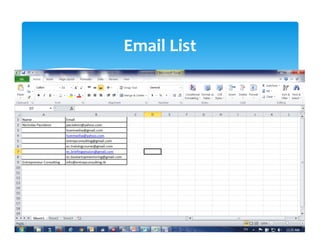
∗ Create a list on Ms. Excel or Word 
∗ Go to Email Merge field  
Microsoft Outlook: E‐mail Merge 
Email List 
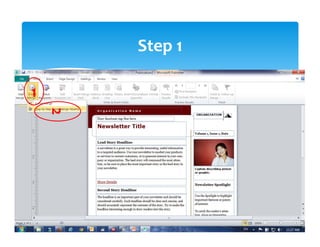
Step 1 
1 
2 
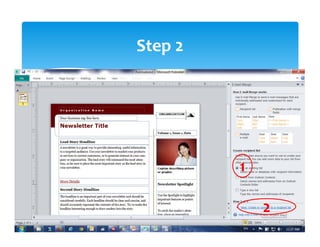
Step 2 
1 
2 
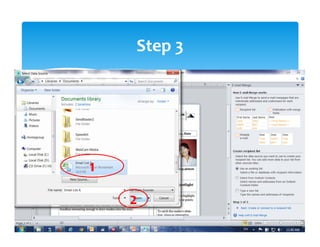
Step 3 
1 
2 
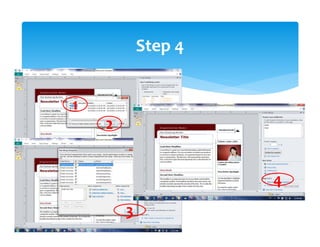
Step 4 
2 
1 
3 
4 
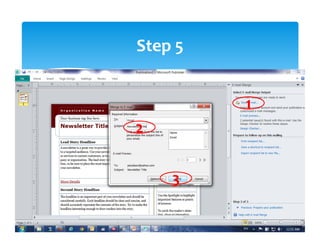
Step 5 
1 
2 
3 
Gmail is a good and free open web‐based email 
platform that can send up to 3,000 emails per day. To 
do this senders must learn how it works: 
∗ 24 hour: 3,000 emails (only 1 campaign/message) 
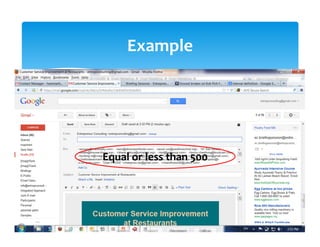
∗ At a time: 500 emails (only 1 campaign) 
∗ At 1 seat: 1,000 emails (only 1 campaign) 
∗ Interval: 5 hours 
∗ 3 Seats per day (9am, 3pm, 9pm) 
 
Web‐Based: Gmail 
Example 
Equal or less than 500 
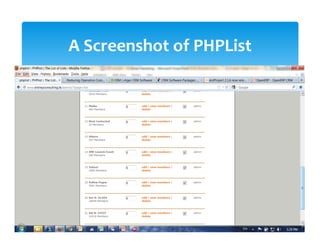
∗ PHPList is a web‐based open source software that 
enable mass mailing. 
∗ You can buy a dedicated email server and integrate 
PHPList on it.  
∗ This integrated system enables you to send up to 
40,000 within a span of 24 hours. 
Using PHPList & Dedicated Email 
Server 
 
A Screenshot of PHPList 


Wish You Success in Your Business. 
Thank You! 

Email marketing