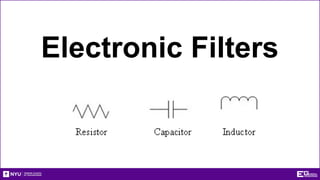
Electronic Filters
Overview
• Objective
• Background
• Materials
• Procedure
• Report/Presentation
• Closing
Objective
• Learn about electrical filters
• Different types
• Uses
• What is the -3dB point?
• Create filters and a crystal set radio using multiple circuit
elements
• Identify filters based on generated graphs
Frequency Response Graph
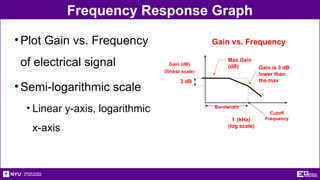
•Gain (dB)
• Ratio of output against input
• Always negative value
•-3dB Point
• 3dB drop of signal power from highest point on gain
• Signal power is half of original value
•Cutoff Frequency (Hz)
• Frequency at -3dB Point
Frequency Response Graph
•Plot Gain vs. Frequency
of electrical signal
•Semi-logarithmic scale
• Linear y-axis, logarithmic
x-axis
Cutoff
Frequency
3 dB
f (kHz)
(log scale)
Gain (dB)
(linear scale)
Gain vs. Frequency
Max Gain
(dB) Gain is 3 dB
lower than
the max
Bandwidth
What are Filters?
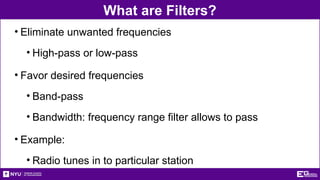
• Eliminate unwanted frequencies
• High-pass or low-pass
• Favor desired frequencies
• Band-pass
• Bandwidth: frequency range filter allows to pass
• Example:
• Radio tunes in to particular station
Basic Filter Types
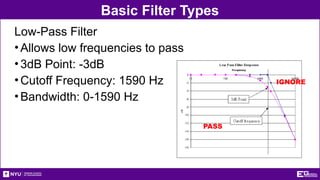
Low-Pass Filter
•Allows low frequencies to pass
•3dB Point: -3dB
•Cutoff Frequency: 1590 Hz
•Bandwidth: 0-1590 Hz
IGNORE
PASS
Basic Filter Types
High-Pass Filter
•Allows high frequencies to pass
•3dB Point: -3dB
•Cutoff Frequency: 160 Hz
•Bandwidth: 160 - āˆž Hz
PASS
IGNORE
Basic Filter Types
Band-Pass Filter
•Allows a limited range of
frequencies to pass
•3dB Point: -3dB
•Cutoff Frequency: 400 - 600 Hz
•Bandwidth: 400 - 600Hz
•Resonant Frequency
(High Response Point): 500 Hz
IGNORE IGNORE
PASS
Electrical Terminology
• Voltage (V)
• Potential difference in electrical energy
• Units = volts (V)
• Current (I)
• Charge flow rate
• Can be positive or negative
• Units = amperes (A)
Electrical Elements
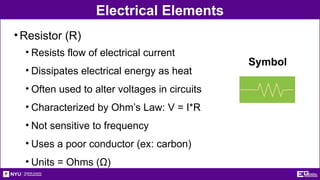
•Resistor (R)
• Resists flow of electrical current
• Dissipates electrical energy as heat
• Often used to alter voltages in circuits
• Characterized by Ohm’s Law: V = I*R
• Not sensitive to frequency
• Uses a poor conductor (ex: carbon)
• Units = Ohms (Ī©)
Symbol
Electrical Elements
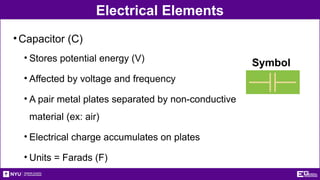
•Capacitor (C)
• Stores potential energy (V)
• Affected by voltage and frequency
• A pair metal plates separated by non-conductive
material (ex: air)
• Electrical charge accumulates on plates
• Units = Farads (F)
Symbol
Electrical Elements
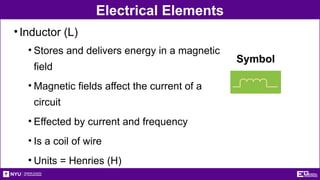
•Inductor (L)
• Stores and delivers energy in a magnetic
field
• Magnetic fields affect the current of a
circuit
• Effected by current and frequency
• Is a coil of wire
• Units = Henries (H)
Symbol
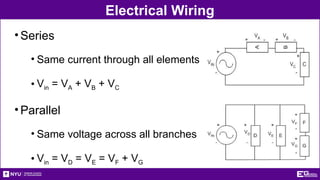
Electrical Wiring
•Series
• Same current through all elements
• Vin = VA + VB + VC
•Parallel
• Same voltage across all branches
• Vin = VD = VE = VF + VG
Materials
• Resistors
• Brown, black, yellow = 100KĪ©
• Brown, black, green = 1MĪ©
• Capacitors
• 102 = 0.001 µF
• 10J = 10pF
• Inductors
• 1mH
Materials
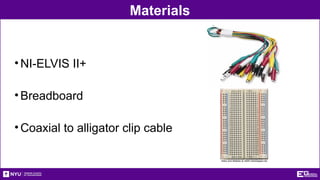
•NI-ELVIS II+
•Breadboard
•Coaxial to alligator clip cable
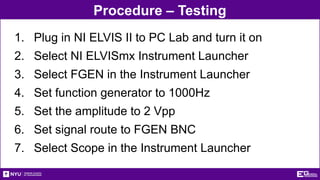
Procedure – Testing
1. Plug in NI ELVIS II to PC Lab and turn it on
2. Select NI ELVISmx Instrument Launcher
3. Select FGEN in the Instrument Launcher
4. Set function generator to 1000Hz
5. Set the amplitude to 2 Vpp
6. Set signal route to FGEN BNC
7. Select Scope in the Instrument Launcher
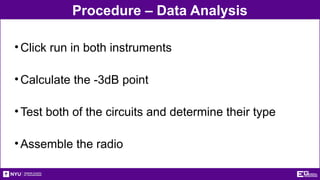
Procedure – Data Analysis
•Click run in both instruments
•Calculate the -3dB point
•Test both of the circuits and determine their type
•Assemble the radio
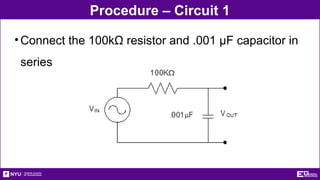
Procedure – Circuit 1
•Connect the 100kĪ© resistor and .001 µF capacitor in
series
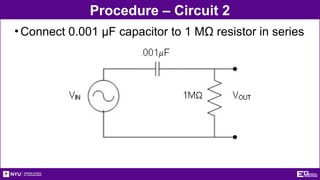
Procedure – Circuit 2
•Connect 0.001 µF capacitor to 1 MĪ© resistor in series
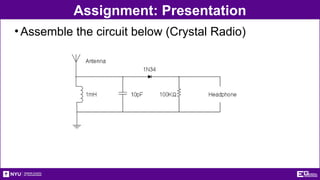
Assignment: Presentation
•Assemble the circuit below (Crystal Radio)
Assignment: Report
•Individual Report (one report per student)
•Title page
•Discussion topics in the manual
•For all circuits
• Include Excel tables and Gain vs. Frequency graphs
• Determine filter type
• Label each graph with determined filter type
•OPTIONAL- Include photos of circuits and setup
Assignment: Report
•Team Presentation
•Include lab data
•Professional-looking tables
•Discussion topics in the manual
•Include photos of circuits and setup
•Refer to ā€œCreating PowerPoint Presentationsā€
found in Online Manual
Closing
•TA will assign which circuit you start with
•Have all original data signed by your TA
•All team members must actively participate
in experiment
•Submit all work electronically
•Return all materials to your TA

Electronic_Filters Active and Passive filters.pptx

  • 1.
  • 2.
    Overview • Objective • Background •Materials • Procedure • Report/Presentation • Closing
  • 3.
    Objective • Learn aboutelectrical filters • Different types • Uses • What is the -3dB point? • Create filters and a crystal set radio using multiple circuit elements • Identify filters based on generated graphs
  • 4.
    Frequency Response Graph •Gain(dB) • Ratio of output against input • Always negative value •-3dB Point • 3dB drop of signal power from highest point on gain • Signal power is half of original value •Cutoff Frequency (Hz) • Frequency at -3dB Point
  • 5.
    Frequency Response Graph •PlotGain vs. Frequency of electrical signal •Semi-logarithmic scale • Linear y-axis, logarithmic x-axis Cutoff Frequency 3 dB f (kHz) (log scale) Gain (dB) (linear scale) Gain vs. Frequency Max Gain (dB) Gain is 3 dB lower than the max Bandwidth
  • 6.
    What are Filters? •Eliminate unwanted frequencies • High-pass or low-pass • Favor desired frequencies • Band-pass • Bandwidth: frequency range filter allows to pass • Example: • Radio tunes in to particular station
  • 7.
    Basic Filter Types Low-PassFilter •Allows low frequencies to pass •3dB Point: -3dB •Cutoff Frequency: 1590 Hz •Bandwidth: 0-1590 Hz IGNORE PASS
  • 8.
    Basic Filter Types High-PassFilter •Allows high frequencies to pass •3dB Point: -3dB •Cutoff Frequency: 160 Hz •Bandwidth: 160 - āˆž Hz PASS IGNORE
  • 9.
    Basic Filter Types Band-PassFilter •Allows a limited range of frequencies to pass •3dB Point: -3dB •Cutoff Frequency: 400 - 600 Hz •Bandwidth: 400 - 600Hz •Resonant Frequency (High Response Point): 500 Hz IGNORE IGNORE PASS
  • 10.
    Electrical Terminology • Voltage(V) • Potential difference in electrical energy • Units = volts (V) • Current (I) • Charge flow rate • Can be positive or negative • Units = amperes (A)
  • 11.
    Electrical Elements •Resistor (R) •Resists flow of electrical current • Dissipates electrical energy as heat • Often used to alter voltages in circuits • Characterized by Ohm’s Law: V = I*R • Not sensitive to frequency • Uses a poor conductor (ex: carbon) • Units = Ohms (Ī©) Symbol
  • 12.
    Electrical Elements •Capacitor (C) •Stores potential energy (V) • Affected by voltage and frequency • A pair metal plates separated by non-conductive material (ex: air) • Electrical charge accumulates on plates • Units = Farads (F) Symbol
  • 13.
    Electrical Elements •Inductor (L) •Stores and delivers energy in a magnetic field • Magnetic fields affect the current of a circuit • Effected by current and frequency • Is a coil of wire • Units = Henries (H) Symbol
  • 14.
    Electrical Wiring •Series • Samecurrent through all elements • Vin = VA + VB + VC •Parallel • Same voltage across all branches • Vin = VD = VE = VF + VG
  • 15.
    Materials • Resistors • Brown,black, yellow = 100KĪ© • Brown, black, green = 1MĪ© • Capacitors • 102 = 0.001 µF • 10J = 10pF • Inductors • 1mH
  • 16.
  • 17.
    Procedure – Testing 1.Plug in NI ELVIS II to PC Lab and turn it on 2. Select NI ELVISmx Instrument Launcher 3. Select FGEN in the Instrument Launcher 4. Set function generator to 1000Hz 5. Set the amplitude to 2 Vpp 6. Set signal route to FGEN BNC 7. Select Scope in the Instrument Launcher
  • 18.
    Procedure – DataAnalysis •Click run in both instruments •Calculate the -3dB point •Test both of the circuits and determine their type •Assemble the radio
  • 19.
    Procedure – Circuit1 •Connect the 100kĪ© resistor and .001 µF capacitor in series
  • 20.
    Procedure – Circuit2 •Connect 0.001 µF capacitor to 1 MĪ© resistor in series
  • 21.
    Assignment: Presentation •Assemble thecircuit below (Crystal Radio)
  • 22.
    Assignment: Report •Individual Report(one report per student) •Title page •Discussion topics in the manual •For all circuits • Include Excel tables and Gain vs. Frequency graphs • Determine filter type • Label each graph with determined filter type •OPTIONAL- Include photos of circuits and setup
  • 23.
    Assignment: Report •Team Presentation •Includelab data •Professional-looking tables •Discussion topics in the manual •Include photos of circuits and setup •Refer to ā€œCreating PowerPoint Presentationsā€ found in Online Manual
  • 24.
    Closing •TA will assignwhich circuit you start with •Have all original data signed by your TA •All team members must actively participate in experiment •Submit all work electronically •Return all materials to your TA