Picture – all cloud jargon
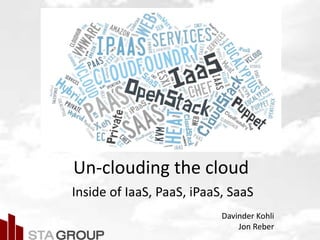
Un-clouding the cloud
Inside of IaaS, PaaS, iPaaS, SaaS
Davinder Kohli
Jon Reber
Picture – all cloud jargon
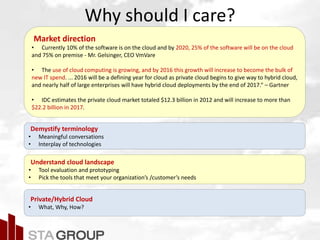
Why should I care?
Market direction
• Currently 10% of the software is on the cloud and by 2020, 25% of the software will be on the cloud
and 75% on premise - Mr. Gelsinger, CEO VmVare
• The use of cloud computing is growing, and by 2016 this growth will increase to become the bulk of
new IT spend. ... 2016 will be a defining year for cloud as private cloud begins to give way to hybrid cloud,
and nearly half of large enterprises will have hybrid cloud deployments by the end of 2017.“ – Gartner
• IDC estimates the private cloud market totaled $12.3 billion in 2012 and will increase to more than
$22.2 billion in 2017.
Demystify terminology
• Meaningful conversations
• Interplay of technologies
Understand cloud landscape
• Tool evaluation and prototyping
• Pick the tools that meet your organization’s /customer’s needs
Private/Hybrid Cloud
• What, Why, How?
Picture – all cloud jargon
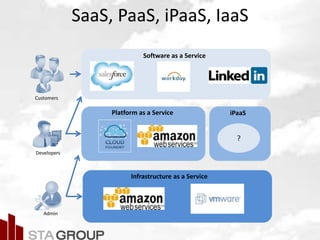
Infrastructure as a Service
Platform as a Service
Software as a Service
SaaS, PaaS, iPaaS, IaaS
iPaaS
?
Customers
Developers
Admin
Picture – all cloud jargon
Introduction
Davinder Kohli
Managing Technical Architect
Cloud Practice Lead
davinder.kohli@stagrp.com
Jon Reber
Sr. Architect
jon.reber@stagrp.com
Picture – all cloud jargon
Cloud or Virtualization
On-demand self-service
A consumer can unilaterally provision computing capabilities - server time, network storage automatically.
Broad network access
Capabilities are available over the network and accessed through standard mechanisms.
Resource pooling
Computing resources are pooled to serve multiple consumers using a multi-tenant model. These can be
scaled up or down based on demand.
Rapid elasticity
Capabilities can be elastically provisioned and released based on demand. To the customer, these
capabilities appear to be unlimited and can be appropriated in any quantity at any time.
Measured service
Monitor, control, and report resource utilization to consumers.
Picture – all cloud jargon
On-premise Vs. Cloud
• On-premise
Virtualized/Non-virtualized infrastructure that supports application
and data within an organization
• Public
Cloud infrastructure is made available for general public and is owned
by organization selling cloud service
• Private
Cloud infrastructure is solely for an organization managed internally or
externally
• Hybrid
Cloud infrastructure is a composition of private and public clouds.
Built on technology that enables data and application portability.
Cloud bursting for load balancing.
Picture – all cloud jargon
Why private cloud?
• Security
Better control on users accessing services
Integration with organization’s enterprise security
• Maximum resource utilization
Efficient use of organization’s resources
• Reliability
Organization is solely responsible for its SLAs.
• Customized
Infrastructure is customized to meet organization’s needs.
• Organization agility
Shorten delivery cycles and accelerate time to market
– Quickly spawn virtualized machines with ISO
– Cloud management self-service portals
• Better testing env
Spawn VM instances with different test environments.
Picture – all cloud jargonJourney inside the cloud
VM
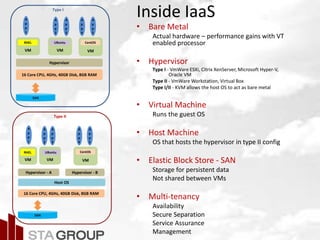
Inside IaaS
16 Core CPU, 4GHz, 40GB Disk, 8GB RAM
Hypervisor
RHEL
SAN
• Bare Metal
Actual hardware – performance gains with VT
enabled processor
• Hypervisor
Type I - VmWare ESXi, Citrix XenServer, Microsoft Hyper-V,
Oracle VM
Type II - VmWare Workstation, Virtual Box
Type I/II - KVM allows the host OS to act as bare metal
• Virtual Machine
Runs the guest OS
• Host Machine
OS that hosts the hypervisor in type II config
• Elastic Block Store - SAN
Storage for persistent data
Not shared between VMs
• Multi-tenancy
Availability
Secure Separation
Service Assurance
Management
A
p
p
1
A
p
p
2
A
p
p
3
A
p
p
4
A
p
p
5
Type I
16 Core CPU, 4GHz, 40GB Disk, 8GB RAM
Hypervisor - A
SAN
Type II
Host OS
VM
UBuntu
VM
CentOS
Hypervisor - B
VM
RHEL
A
p
p
1
A
p
p
2
A
p
p
3
A
p
p
4
A
p
p
5
VM
UBuntu
VM
CentOS
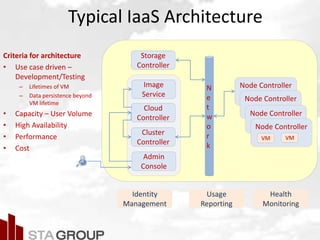
Typical IaaS Architecture
Criteria for architecture
• Use case driven –
Development/Testing
– Lifetimes of VM
– Data persistence beyond
VM lifetime
• Capacity – User Volume
• High Availability
• Performance
• Cost
Node ControllerN
e
t
w
o
r
k
Cloud
Controller
Cluster
Controller
Node Controller
Node Controller
Node Controller
Admin
Console
Storage
Controller
Image
Service
Identity
Management
Usage
Reporting
Health
Monitoring
VM VM
Picture – all cloud jargon
IaaS Capabilities
• Create, start, stop, remove virtual machines
• Assign guest VMs to particular hosts
• Assign public and private IP addresses to
particular accounts
• Allocates storage to guests as virtual disks
• Manages snapshots, templates, and ISO images
Picture – all cloud jargon
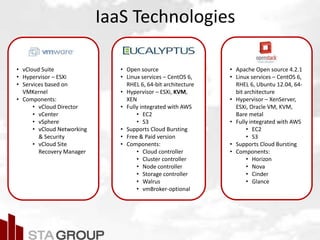
IaaS Technologies
• Open source
• Linux services – CentOS 6,
RHEL 6, 64-bit architecture
• Hypervisor – ESXi, KVM,
XEN
• Fully integrated with AWS
• EC2
• S3
• Supports Cloud Bursting
• Free & Paid version
• Components:
• Cloud controller
• Cluster controller
• Node controller
• Storage controller
• Walrus
• vmBroker-optional
• vCloud Suite
• Hypervisor – ESXi
• Services based on
VMKernel
• Components:
• vCloud Director
• vCenter
• vSphere
• vCloud Networking
& Security
• vCloud Site
Recovery Manager
• Apache Open source 4.2.1
• Linux services – CentOS 6,
RHEL 6, Ubuntu 12.04, 64-
bit architecture
• Hypervisor – XenServer,
ESXi, Oracle VM, KVM,
Bare metal
• Fully integrated with AWS
• EC2
• S3
• Supports Cloud Bursting
• Components:
• Horizon
• Nova
• Cinder
• Glance
Picture – all cloud jargon
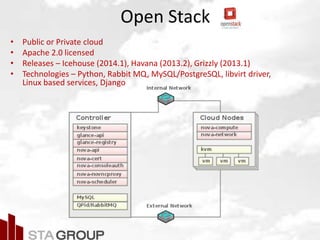
Open Stack
• Public or Private cloud
• Apache 2.0 licensed
• Releases – Icehouse (2014.1), Havana (2013.2), Grizzly (2013.1)
• Technologies – Python, Rabbit MQ, MySQL/PostgreSQL, libvirt driver,
Linux based services, Django
Picture – all cloud jargon
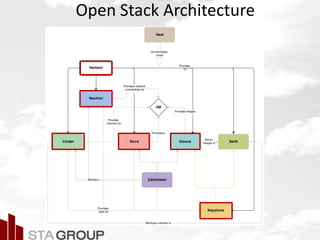
Open Stack Architecture
Picture – all cloud jargon
PaaS – Value Proposition
Increase deployment speed & agility
– Reduce length & complexity of app lifecycle
– Prevent loss in revenue
– Automate provisioning, management, and auto-
scaling of applications and services on IaaS
platform
– Support continuous delivery
Reduce infrastructure operation costs
– Automation of admin tasks
PaaS Ecosystem
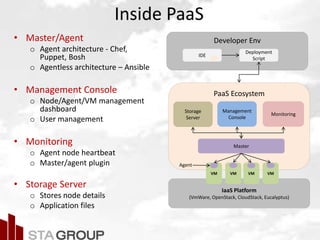
Inside PaaS
• Master/Agent
o Agent architecture - Chef,
Puppet, Bosh
o Agentless architecture – Ansible
• Management Console
o Node/Agent/VM management
dashboard
o User management
• Monitoring
o Agent node heartbeat
o Master/agent plugin
• Storage Server
o Stores node details
o Application files
IaaS Platform
(VmWare, OpenStack, CloudStack, Eucalyptus)
VM VM VM VM
Master
Management
Console
Agent
Monitoring
Storage
Server
Developer Env
Deployment
Script
IDE
PaaS Technologies
Heat
• Open source, Ruby,
PuppetLabs
• OS: Linux, Windows
• Manage up to 50K machines
• Puppet agent collects facts
and sends it to Puppet
master
• Master uses facts to create a
catalog and sends
Modules[manifest1,
manifest 2,…] to agent.
• Events generated during
application of catalog on
agent are sent to master as
reports.
• Open Source, Pivotal
• Supported IaaS: vSphere,
OpenStack, AWS
• Built on BOSH
• Components:
• Router
• Cloud Controller
• Droplet Execution
Agent
• Health Manager
• Service Provisioning
Agent
• Messaging System
• Apache Open source 4.2.1
• Linux services – CentOS 6,
RHEL 6, Ubuntu 12.04, 64-
bit architecture
• Components:
• Stack
• Template
• Resources
• Heat Engine
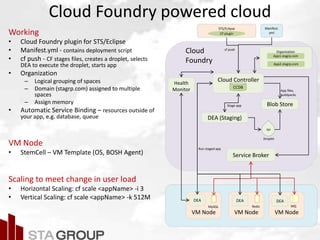
Cloud Foundry powered cloud
Working
• Cloud Foundry plugin for STS/Eclipse
• Manifest.yml - contains deployment script
• cf push - CF stages files, creates a droplet, selects
DEA to execute the droplet, starts app
• Organization
– Logical grouping of spaces
– Domain (stagrp.com) assigned to multiple
spaces
– Assign memory
• Automatic Service Binding – resources outside of
your app, e.g. database, queue
VM Node
• StemCell – VM Template (OS, BOSH Agent)
Scaling to meet change in user load
• Horizontal Scaling: cf scale <appName> -i 3
• Vertical Scaling: cf scale <appName> -k 512M
App1.stagrp.com
App2.stagrp.com
STS/Eclipse
CF plugin
Manifest.
yml
OrganizationCloud
Foundry
VM Node
Service Broker
Cloud Controller
Blob Store
App files,
buildpacks
cf push
DEA (Staging)
Stage app
Droplet
tar
DEA
Run staged app
VM Node VM Node
MySQL Redis MQ
DEA DEA
CCDB
Health
Monitor
Node Server
Control Server
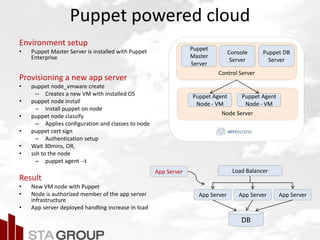
Puppet powered cloud
Environment setup
• Puppet Master Server is installed with Puppet
Enterprise
Provisioning a new app server
• puppet node_vmware create
– Creates a new VM with installed OS
• puppet node install
– Install puppet on node
• puppet node classify
– Applies configuration and classes to node
• puppet cert sign
– Authentication setup
• Wait 30mins, OR,
• ssh to the node
– puppet agent --t
Result
• New VM node with Puppet
• Node is authorized member of the app server
infrastructure
• App server deployed handling increase in load
Load Balancer
App Server App Server App Server
DB
App Server
Puppet
Master
Server
Puppet Agent
Node - VM
Puppet Agent
Node - VM
Console
Server
Puppet DB
Server
Picture – all cloud jargon
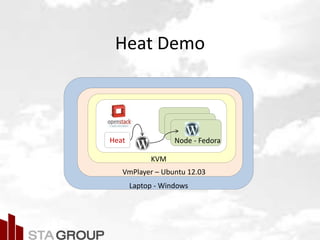
Heat Demo
Laptop - Windows
VmPlayer – Ubuntu 12.03
KVM
Node - FedoraHeat
Picture – all cloud jargon
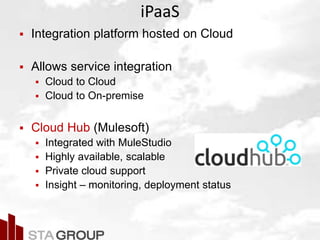
iPaaS
 Integration platform hosted on Cloud
 Allows service integration
 Cloud to Cloud
 Cloud to On-premise
 Cloud Hub (Mulesoft)
 Integrated with MuleStudio
 Highly available, scalable
 Private cloud support
 Insight – monitoring, deployment status
Picture – all cloud jargon
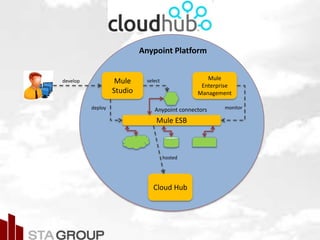
Anypoint Platform
Mule
Studio
Mule ESB
Anypoint connectors
Mule
Enterprise
Management
Cloud Hub
develop select
deploy monitor
hosted
Picture – all cloud jargon
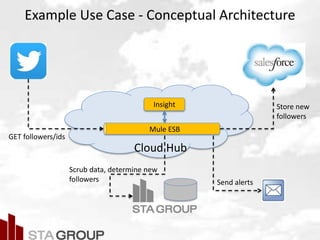
Example Use Case - Conceptual Architecture
Cloud Hub
Mule ESB
GET followers/ids
Scrub data, determine new
followers
Store new
followers
Insight
Send alerts
Picture – all cloud jargon
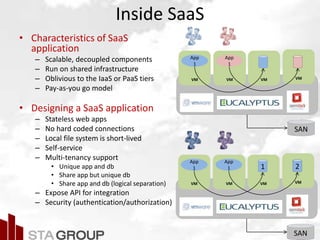
Inside SaaS
• Characteristics of SaaS
application
– Scalable, decoupled components
– Run on shared infrastructure
– Oblivious to the IaaS or PaaS tiers
– Pay-as-you go model
• Designing a SaaS application
– Stateless web apps
– No hard coded connections
– Local file system is short-lived
– Self-service
– Multi-tenancy support
• Unique app and db
• Share app but unique db
• Share app and db (logical separation)
– Expose API for integration
– Security (authentication/authorization)
VM VM VM
App
1
App
1
VM
SAN
VM VM VM
App
1
App
1 1
VM
2
SAN
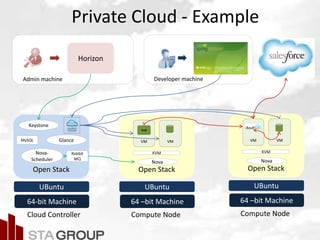
Private Cloud - Example
64 –bit Machine
Open Stack
UBuntu
64-bit Machine
Open Stack
UBuntu
Glance
Keystone
Nova-
Scheduler
MySQL
Nova
KVM
VM VM
Cloud Controller Compute Node
Rabbit
MQ
Developer machineAdmin machine
Horizon
WAR
64 –bit Machine
Open Stack
UBuntu
Nova
KVM
VM VM
Compute Node
Picture – all cloud jargon
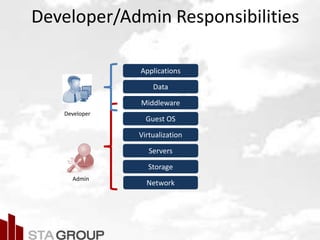
Developer/Admin Responsibilities
Network
Storage
Servers
Virtualization
Guest OS
Middleware
Data
Applications
Admin
Developer
Picture – all cloud jargon
Summary
• Improved conversations
• Improved decision making
• Architectural considerations
• Increased productivity
• Increased revenue
Picture – all cloud jargon
References
 Cloud Foundry
 CloudHub
 VmWare
 Puppet
 OpenStack
 Eucalyptus
Un-clouding the cloud

Un-clouding the cloud

  • 1.
    Picture – allcloud jargon Un-clouding the cloud Inside of IaaS, PaaS, iPaaS, SaaS Davinder Kohli Jon Reber
  • 2.
    Picture – allcloud jargon Why should I care? Market direction • Currently 10% of the software is on the cloud and by 2020, 25% of the software will be on the cloud and 75% on premise - Mr. Gelsinger, CEO VmVare • The use of cloud computing is growing, and by 2016 this growth will increase to become the bulk of new IT spend. ... 2016 will be a defining year for cloud as private cloud begins to give way to hybrid cloud, and nearly half of large enterprises will have hybrid cloud deployments by the end of 2017.“ – Gartner • IDC estimates the private cloud market totaled $12.3 billion in 2012 and will increase to more than $22.2 billion in 2017. Demystify terminology • Meaningful conversations • Interplay of technologies Understand cloud landscape • Tool evaluation and prototyping • Pick the tools that meet your organization’s /customer’s needs Private/Hybrid Cloud • What, Why, How?
  • 3.
    Picture – allcloud jargon Infrastructure as a Service Platform as a Service Software as a Service SaaS, PaaS, iPaaS, IaaS iPaaS ? Customers Developers Admin
  • 4.
    Picture – allcloud jargon Introduction Davinder Kohli Managing Technical Architect Cloud Practice Lead davinder.kohli@stagrp.com Jon Reber Sr. Architect jon.reber@stagrp.com
  • 5.
    Picture – allcloud jargon Cloud or Virtualization On-demand self-service A consumer can unilaterally provision computing capabilities - server time, network storage automatically. Broad network access Capabilities are available over the network and accessed through standard mechanisms. Resource pooling Computing resources are pooled to serve multiple consumers using a multi-tenant model. These can be scaled up or down based on demand. Rapid elasticity Capabilities can be elastically provisioned and released based on demand. To the customer, these capabilities appear to be unlimited and can be appropriated in any quantity at any time. Measured service Monitor, control, and report resource utilization to consumers.
  • 6.
    Picture – allcloud jargon On-premise Vs. Cloud • On-premise Virtualized/Non-virtualized infrastructure that supports application and data within an organization • Public Cloud infrastructure is made available for general public and is owned by organization selling cloud service • Private Cloud infrastructure is solely for an organization managed internally or externally • Hybrid Cloud infrastructure is a composition of private and public clouds. Built on technology that enables data and application portability. Cloud bursting for load balancing.
  • 7.
    Picture – allcloud jargon Why private cloud? • Security Better control on users accessing services Integration with organization’s enterprise security • Maximum resource utilization Efficient use of organization’s resources • Reliability Organization is solely responsible for its SLAs. • Customized Infrastructure is customized to meet organization’s needs. • Organization agility Shorten delivery cycles and accelerate time to market – Quickly spawn virtualized machines with ISO – Cloud management self-service portals • Better testing env Spawn VM instances with different test environments.
  • 8.
    Picture – allcloud jargonJourney inside the cloud
  • 9.
    VM Inside IaaS 16 CoreCPU, 4GHz, 40GB Disk, 8GB RAM Hypervisor RHEL SAN • Bare Metal Actual hardware – performance gains with VT enabled processor • Hypervisor Type I - VmWare ESXi, Citrix XenServer, Microsoft Hyper-V, Oracle VM Type II - VmWare Workstation, Virtual Box Type I/II - KVM allows the host OS to act as bare metal • Virtual Machine Runs the guest OS • Host Machine OS that hosts the hypervisor in type II config • Elastic Block Store - SAN Storage for persistent data Not shared between VMs • Multi-tenancy Availability Secure Separation Service Assurance Management A p p 1 A p p 2 A p p 3 A p p 4 A p p 5 Type I 16 Core CPU, 4GHz, 40GB Disk, 8GB RAM Hypervisor - A SAN Type II Host OS VM UBuntu VM CentOS Hypervisor - B VM RHEL A p p 1 A p p 2 A p p 3 A p p 4 A p p 5 VM UBuntu VM CentOS
  • 10.
    Typical IaaS Architecture Criteriafor architecture • Use case driven – Development/Testing – Lifetimes of VM – Data persistence beyond VM lifetime • Capacity – User Volume • High Availability • Performance • Cost Node ControllerN e t w o r k Cloud Controller Cluster Controller Node Controller Node Controller Node Controller Admin Console Storage Controller Image Service Identity Management Usage Reporting Health Monitoring VM VM
  • 11.
    Picture – allcloud jargon IaaS Capabilities • Create, start, stop, remove virtual machines • Assign guest VMs to particular hosts • Assign public and private IP addresses to particular accounts • Allocates storage to guests as virtual disks • Manages snapshots, templates, and ISO images
  • 12.
    Picture – allcloud jargon IaaS Technologies • Open source • Linux services – CentOS 6, RHEL 6, 64-bit architecture • Hypervisor – ESXi, KVM, XEN • Fully integrated with AWS • EC2 • S3 • Supports Cloud Bursting • Free & Paid version • Components: • Cloud controller • Cluster controller • Node controller • Storage controller • Walrus • vmBroker-optional • vCloud Suite • Hypervisor – ESXi • Services based on VMKernel • Components: • vCloud Director • vCenter • vSphere • vCloud Networking & Security • vCloud Site Recovery Manager • Apache Open source 4.2.1 • Linux services – CentOS 6, RHEL 6, Ubuntu 12.04, 64- bit architecture • Hypervisor – XenServer, ESXi, Oracle VM, KVM, Bare metal • Fully integrated with AWS • EC2 • S3 • Supports Cloud Bursting • Components: • Horizon • Nova • Cinder • Glance
  • 13.
    Picture – allcloud jargon Open Stack • Public or Private cloud • Apache 2.0 licensed • Releases – Icehouse (2014.1), Havana (2013.2), Grizzly (2013.1) • Technologies – Python, Rabbit MQ, MySQL/PostgreSQL, libvirt driver, Linux based services, Django
  • 14.
    Picture – allcloud jargon Open Stack Architecture
  • 15.
    Picture – allcloud jargon PaaS – Value Proposition Increase deployment speed & agility – Reduce length & complexity of app lifecycle – Prevent loss in revenue – Automate provisioning, management, and auto- scaling of applications and services on IaaS platform – Support continuous delivery Reduce infrastructure operation costs – Automation of admin tasks
  • 16.
    PaaS Ecosystem Inside PaaS •Master/Agent o Agent architecture - Chef, Puppet, Bosh o Agentless architecture – Ansible • Management Console o Node/Agent/VM management dashboard o User management • Monitoring o Agent node heartbeat o Master/agent plugin • Storage Server o Stores node details o Application files IaaS Platform (VmWare, OpenStack, CloudStack, Eucalyptus) VM VM VM VM Master Management Console Agent Monitoring Storage Server Developer Env Deployment Script IDE
  • 17.
    PaaS Technologies Heat • Opensource, Ruby, PuppetLabs • OS: Linux, Windows • Manage up to 50K machines • Puppet agent collects facts and sends it to Puppet master • Master uses facts to create a catalog and sends Modules[manifest1, manifest 2,…] to agent. • Events generated during application of catalog on agent are sent to master as reports. • Open Source, Pivotal • Supported IaaS: vSphere, OpenStack, AWS • Built on BOSH • Components: • Router • Cloud Controller • Droplet Execution Agent • Health Manager • Service Provisioning Agent • Messaging System • Apache Open source 4.2.1 • Linux services – CentOS 6, RHEL 6, Ubuntu 12.04, 64- bit architecture • Components: • Stack • Template • Resources • Heat Engine
  • 18.
    Cloud Foundry poweredcloud Working • Cloud Foundry plugin for STS/Eclipse • Manifest.yml - contains deployment script • cf push - CF stages files, creates a droplet, selects DEA to execute the droplet, starts app • Organization – Logical grouping of spaces – Domain (stagrp.com) assigned to multiple spaces – Assign memory • Automatic Service Binding – resources outside of your app, e.g. database, queue VM Node • StemCell – VM Template (OS, BOSH Agent) Scaling to meet change in user load • Horizontal Scaling: cf scale <appName> -i 3 • Vertical Scaling: cf scale <appName> -k 512M App1.stagrp.com App2.stagrp.com STS/Eclipse CF plugin Manifest. yml OrganizationCloud Foundry VM Node Service Broker Cloud Controller Blob Store App files, buildpacks cf push DEA (Staging) Stage app Droplet tar DEA Run staged app VM Node VM Node MySQL Redis MQ DEA DEA CCDB Health Monitor
  • 19.
    Node Server Control Server Puppetpowered cloud Environment setup • Puppet Master Server is installed with Puppet Enterprise Provisioning a new app server • puppet node_vmware create – Creates a new VM with installed OS • puppet node install – Install puppet on node • puppet node classify – Applies configuration and classes to node • puppet cert sign – Authentication setup • Wait 30mins, OR, • ssh to the node – puppet agent --t Result • New VM node with Puppet • Node is authorized member of the app server infrastructure • App server deployed handling increase in load Load Balancer App Server App Server App Server DB App Server Puppet Master Server Puppet Agent Node - VM Puppet Agent Node - VM Console Server Puppet DB Server
  • 20.
    Picture – allcloud jargon Heat Demo Laptop - Windows VmPlayer – Ubuntu 12.03 KVM Node - FedoraHeat
  • 21.
    Picture – allcloud jargon iPaaS  Integration platform hosted on Cloud  Allows service integration  Cloud to Cloud  Cloud to On-premise  Cloud Hub (Mulesoft)  Integrated with MuleStudio  Highly available, scalable  Private cloud support  Insight – monitoring, deployment status
  • 22.
    Picture – allcloud jargon Anypoint Platform Mule Studio Mule ESB Anypoint connectors Mule Enterprise Management Cloud Hub develop select deploy monitor hosted
  • 23.
    Picture – allcloud jargon Example Use Case - Conceptual Architecture Cloud Hub Mule ESB GET followers/ids Scrub data, determine new followers Store new followers Insight Send alerts
  • 24.
    Picture – allcloud jargon Inside SaaS • Characteristics of SaaS application – Scalable, decoupled components – Run on shared infrastructure – Oblivious to the IaaS or PaaS tiers – Pay-as-you go model • Designing a SaaS application – Stateless web apps – No hard coded connections – Local file system is short-lived – Self-service – Multi-tenancy support • Unique app and db • Share app but unique db • Share app and db (logical separation) – Expose API for integration – Security (authentication/authorization) VM VM VM App 1 App 1 VM SAN VM VM VM App 1 App 1 1 VM 2 SAN
  • 25.
    Private Cloud -Example 64 –bit Machine Open Stack UBuntu 64-bit Machine Open Stack UBuntu Glance Keystone Nova- Scheduler MySQL Nova KVM VM VM Cloud Controller Compute Node Rabbit MQ Developer machineAdmin machine Horizon WAR 64 –bit Machine Open Stack UBuntu Nova KVM VM VM Compute Node
  • 26.
    Picture – allcloud jargon Developer/Admin Responsibilities Network Storage Servers Virtualization Guest OS Middleware Data Applications Admin Developer
  • 27.
    Picture – allcloud jargon Summary • Improved conversations • Improved decision making • Architectural considerations • Increased productivity • Increased revenue
  • 28.
    Picture – allcloud jargon References  Cloud Foundry  CloudHub  VmWare  Puppet  OpenStack  Eucalyptus

Editor's Notes

  • #10 Multi-tenancy – provides operational efficiencies because each customer’s environment is not uniquely maintained.
  • #11 Based on use case, the services may be installed on a different physical
  • #20 Use Case: Add new app server to handle increase in load. Each component runs on a VM on ESXi. Classify - configures the node with all the settings, files, and database hooks needed to create a fully configured, ready-to-run app server