The document discusses effective Python package management, covering both intra- and inter-package management. Key topics include configuration files, versioning schemes in accordance with PEP 440, managing dependencies through requirements.txt, and utilizing virtual environments to avoid conflicts. It also addresses common issues in package management and strategies for resolving them.



![Configuration File Setup
import yaml
yaml_config = yaml.load(open(('../my-app.yaml'))
print yaml_config[’database’]
Usage
# DEFAULT VALUES
database: postgresql://production:5432/my_db
# LOCAL OVERRIDES
database: postgresql://localhost:5432/my_db
my-app.yaml.example
my-app.yaml](https://image.slidesharecdn.com/effectivepythonpackagemanagementpyconcanada2017-171208042336/85/Effective-Python-Package-Management-PyCon-Canada-2017-6-320.jpg)
![App Configurations
class Config(object):
DEBUG = False
CSRF_ENABLED = True
SECRET = yaml_config['flask_login_secret']
SQLALCHEMY_DATABASE_URI = yaml_config['database']
class DevelopmentConfig(Config):
DEBUG = True
class TestingConfig(Config):
TESTING = True
SQLALCHEMY_DATABASE_URI = yaml_config['test_database’]
DEBUG = True
class ProductionConfig(Config):
DEBUG = False
TESTING = False
app_config = {
'development': DevelopmentConfig,
'testing': TestingConfig,
'production': ProductionConfig
}
app = create_app('development')
app.run()
run.py
conftest.py
@pytest.fixture(scope='session')
def mock_app():
mock = create_app(’testing')
cxt = mock.app_context()
cxt.push()
yield mock](https://image.slidesharecdn.com/effectivepythonpackagemanagementpyconcanada2017-171208042336/85/Effective-Python-Package-Management-PyCon-Canada-2017-7-320.jpg)
![App Factories
app/__init__.py
db = SQLAlchemy()
def create_app(config_name):
app = Flask(__name__, instance_relative_config=True)
app.config.from_object(app_config[config_name])
app.config['SQLALCHEMY_TRACK_MODIFICATIONS'] = False
app.secret_key = app.config['SECRET']
cors = CORS(app, supports_credentials=True)
db.init_app(app)
login_manager.init_app(app)
app.register_blueprint(api)
return app](https://image.slidesharecdn.com/effectivepythonpackagemanagementpyconcanada2017-171208042336/85/Effective-Python-Package-Management-PyCon-Canada-2017-8-320.jpg)

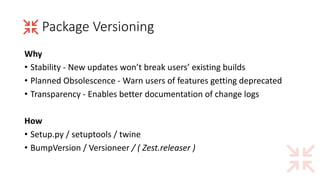
![Versioning Scheme
PEP440 standard from packaging.python.org
1.2.0.dev1 # Development release
1.2.0a1 # Alpha Release
1.2.0b1 # Beta Release
1.2.0rc1 # Release Candidate
1.2.0 # Final Release
1.2.0.post1 # Post Release
15.10 # Date based release
23 # Serial release
[MAJOR].[MINOR](.[MAINTENANCE])(.[CYCLE][N])
Major - Not backwards compatible or many changes
Minor - Added functionality
Maintenance/Micro - Bug fixes (or features if long version cycle)](https://image.slidesharecdn.com/effectivepythonpackagemanagementpyconcanada2017-171208042336/85/Effective-Python-Package-Management-PyCon-Canada-2017-11-320.jpg)
![Setup.py
from setuptools import setup, find_packages
setup(
name='My Project',
version='0.1.0',
description='',
author='PERSON/COMPANY',
author_email='you@example.com',
url='https://github.com/USERNAME/REPO',
packages=find_packages(),
install_requires=[
'alembic==0.8.6',
'psycopg2==2.6.1',
'PyYAML==3.11',
'SQLAlchemy==1.0.14'
]
)
setup.py (PEP440)
python setup.py install
Install package on your local environment
python setup.py register
Reserve package name on the Python Package Index (PyPI)
python setup.py sdist
Create a source-distribution bundle
twine upload dist/*
Push your currently version to PyPI](https://image.slidesharecdn.com/effectivepythonpackagemanagementpyconcanada2017-171208042336/85/Effective-Python-Package-Management-PyCon-Canada-2017-12-320.jpg)









![How to Design a Great API (using flask) [ploneconf2017]](https://cdn.slidesharecdn.com/ss_thumbnails/howtodesignagreatapiusingflaskplone2017-171018104226-thumbnail.jpg?width=640&height=640&fit=bounds)


