Effective PM Management  with eMaint X3
Topics for Discussion   PM Schedules and Setup  Tools/Options for Better PM Planning Generating and Managing PMs
PM Schedules and Setup
PM Schedules and Setup  Basic Anatomy of the PM Schedule Calendar Based: Static vs. Shadow  Meter Based: Static vs. Shadow  Suppression Skip Days
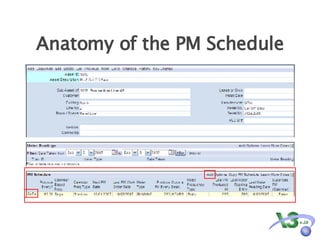
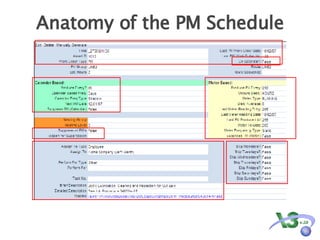
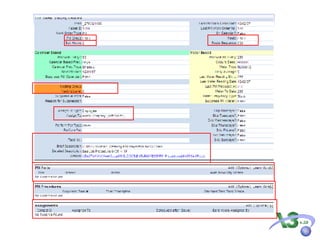
Anatomy of the PM Schedule
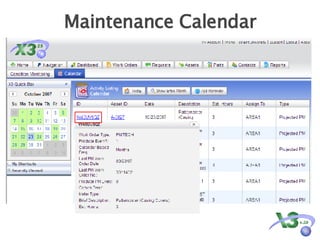
Maintenance Calendar
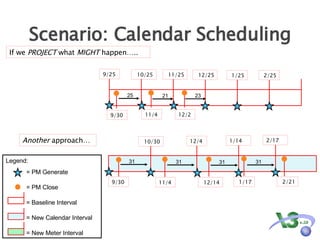
Scenario: Calendar Scheduling If we  PROJECT  what  MIGHT  happen….. 11/4 9/25 10/25 11/25 9/30 11/4 9/30 12/4 12/14 10/30 1/14 2/17 Another  approach… 25 21 31 31 31 31 12/25 1/25 2/25 12/2 23 2/21 1/17 Legend: = PM Generate = PM Close = Baseline Interval = New Calendar Interval  = New Meter Interval
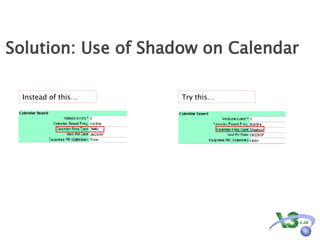
Solution: Use of Shadow on Calendar  Instead of this… Try this…
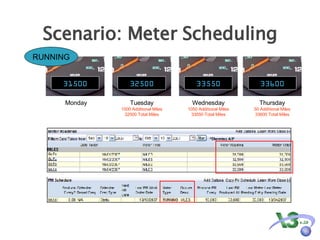
Scenario: Meter Scheduling Monday Tuesday 1000 Additional Miles 32500 Total Miles Wednesday 1050 Additional Miles 33550 Total Miles Thursday 50 Additional Miles 33600 Total Miles RUNNING 31500 32500 33550 33600
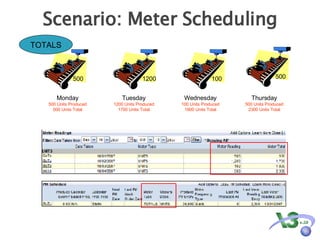
Scenario: Meter Scheduling TOTALS Monday 500 Units Produced 500 Units Total Tuesday 1200 Units Produced 1700 Units Total Wednesday 100 Units Produced 1800 Units Total Thursday 500 Units Produced 2300 Units Total 500 1200 100 500
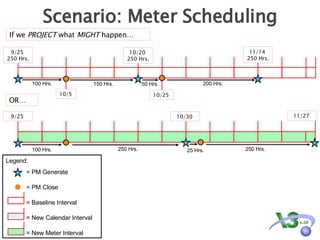
Scenario: Meter Scheduling If we  PROJECT  what  MIGHT  happen… 10/5 100 Hrs. 150 Hrs. 10/25 50 Hrs. 200 Hrs. 100 Hrs. 9/25  10/30  250 Hrs. 250 Hrs. 25 Hrs. 11/27  9/25  250 Hrs. 11/14  250 Hrs. 10/20  250 Hrs. OR… Legend: = PM Generate = PM Close = Baseline Interval = New Calendar Interval  = New Meter Interval
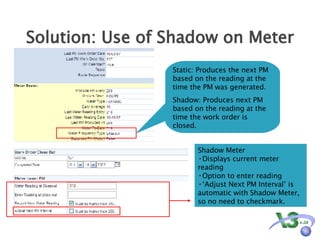
Solution: Use of Shadow on Meter Shadow Meter  Displays current meter reading Option to enter reading ‘ Adjust Next PM Interval’ is automatic with Shadow Meter, so no need to checkmark.  Static: Produces the next PM based on the reading at the time the PM was generated.  Shadow: Produces next PM based on the reading at the time the work order is closed.
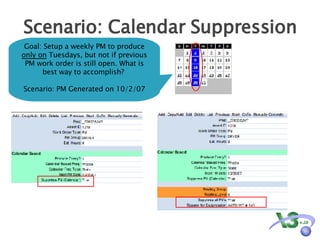
Scenario: Calendar Suppression Goal: Setup a weekly PM to produce  only on  Tuesdays, but not if previous PM work order is still open. What is best way to accomplish?  Scenario: PM Generated on 10/2/07
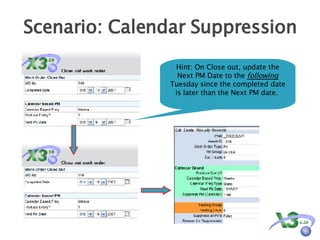
Scenario: Calendar Suppression Hint: On Close out, update the Next PM Date to the  following  Tuesday since the completed date is later than the Next PM date.
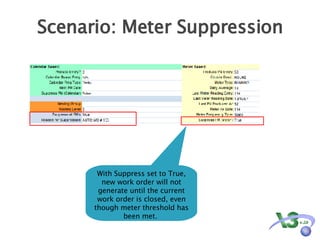
Scenario: Meter Suppression With Suppress set to True, new work order will not generate until the current work order is closed, even though meter threshold has been met.
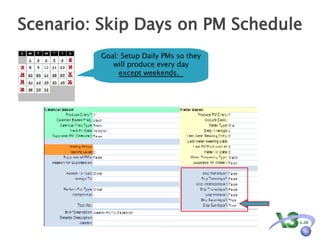
Scenario: Skip Days on PM Schedule Goal: Setup Daily PMs so they will produce every day  except weekends.  X X X X X X X X
Tools/Options for PM Planning
Tools/Options for PM Planning  Estimated Hours  Routing and Sequencing PM Groups  Nesting Tasks vs. Procedures PM Parts Planning and Usage PM Assignments ‘ Assign To’ field Assignment Table
Add parts and procedures table below and animate to align with screen 19
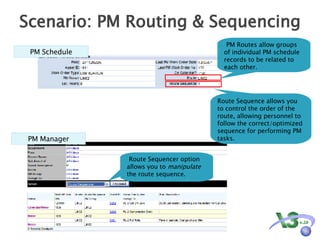
Scenario: PM Routing & Sequencing PM Schedule PM Routes allow groups of individual PM schedule records to be related to each other. Route Sequencer option allows you to  manipulate  the route sequence. Route Sequence allows you to control the order of the route, allowing personnel to follow the correct/optimized sequence for performing PM tasks.  PM Manager
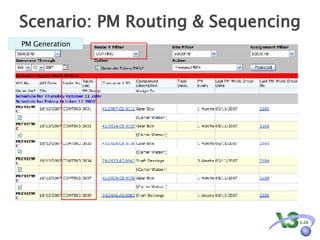
Scenario: PM Routing & Sequencing PM Generation
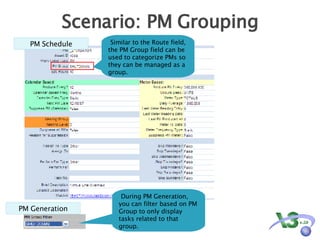
Scenario: PM Grouping PM Schedule Similar to the Route field, the PM Group field can be used to categorize PMs so they can be managed as a group.  PM Generation During PM Generation, you can filter based on PM Group to only display tasks related to that group.
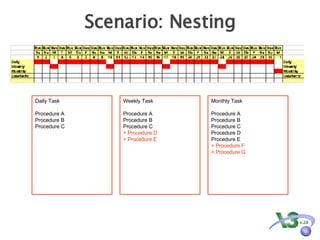
Scenario: Nesting Daily Task Procedure A Procedure B Procedure C Weekly Task Procedure A Procedure B Procedure C + Procedure D + Procedure E Monthly Task Procedure A Procedure B Procedure C Procedure D Procedure E + Procedure F + Procedure G
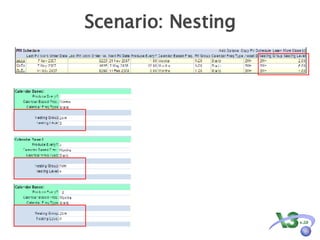
Scenario: Nesting
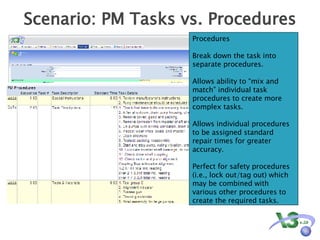
Scenario: PM Tasks vs. Procedures Procedures Break down the task into separate procedures. Allows ability to “mix and match” individual task procedures to create more complex tasks. Allows individual procedures to be assigned standard repair times for greater accuracy. Perfect for safety procedures (i.e., lock out/tag out) which may be combined with various other procedures to create the required tasks.
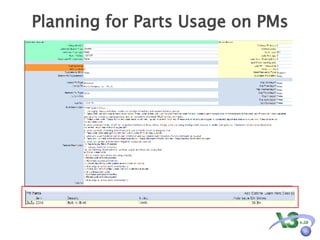
Planning for Parts Usage on PMs
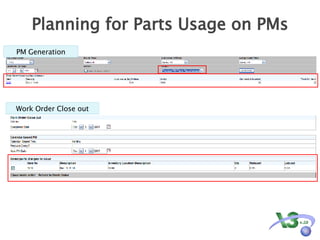
Planning for Parts Usage on PMs PM Generation Work Order Close out
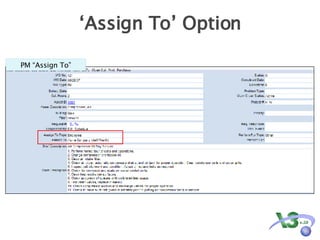
‘Assign To’ Option PM “Assign To”
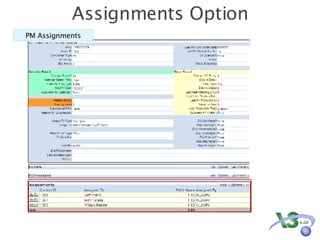
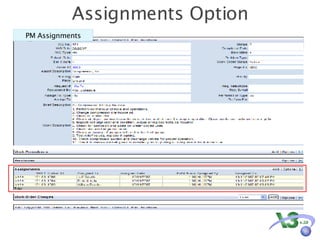
Assignments Option PM Assignments
PM Assignments Assignments Option
Generating and Managing PMs
Generating and Managing PMs  Generating PMs Automatic Generate/PM Settings Manually Generate PM Generate Menu PM Publisher Importing Meter Readings PM Manager
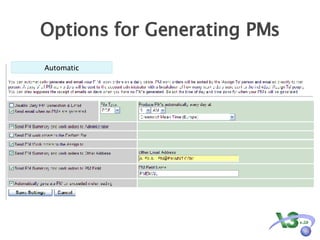
Options for Generating PMs Automatic
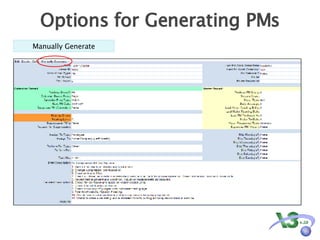
Options for Generating PMs Manually Generate
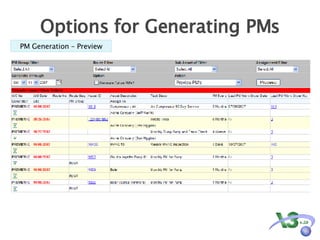
Options for Generating PMs PM Generation – Preview
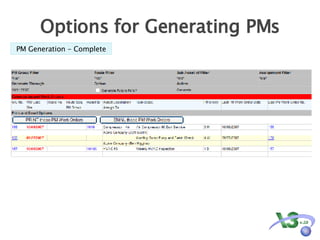
Options for Generating PMs PM Generation - Complete
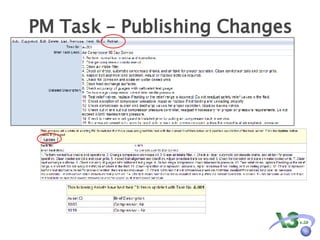
PM Task – Publishing Changes
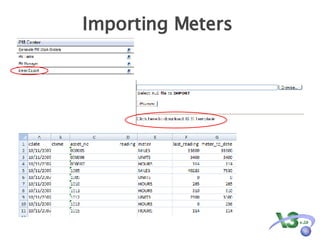
Importing Meters
PM Manager Change Values Update standard times PM Projection Change Next PM Date Route Sequencing
Q & A

Effective PM Management

  • 1.
    Effective PM Management with eMaint X3
  • 2.
    Topics for Discussion PM Schedules and Setup Tools/Options for Better PM Planning Generating and Managing PMs
  • 3.
  • 4.
    PM Schedules andSetup Basic Anatomy of the PM Schedule Calendar Based: Static vs. Shadow Meter Based: Static vs. Shadow Suppression Skip Days
  • 5.
    Anatomy of thePM Schedule
  • 6.
    Anatomy of thePM Schedule
  • 7.
  • 8.
    Scenario: Calendar SchedulingIf we PROJECT what MIGHT happen….. 11/4 9/25 10/25 11/25 9/30 11/4 9/30 12/4 12/14 10/30 1/14 2/17 Another approach… 25 21 31 31 31 31 12/25 1/25 2/25 12/2 23 2/21 1/17 Legend: = PM Generate = PM Close = Baseline Interval = New Calendar Interval = New Meter Interval
  • 9.
    Solution: Use ofShadow on Calendar Instead of this… Try this…
  • 10.
    Scenario: Meter SchedulingMonday Tuesday 1000 Additional Miles 32500 Total Miles Wednesday 1050 Additional Miles 33550 Total Miles Thursday 50 Additional Miles 33600 Total Miles RUNNING 31500 32500 33550 33600
  • 11.
    Scenario: Meter SchedulingTOTALS Monday 500 Units Produced 500 Units Total Tuesday 1200 Units Produced 1700 Units Total Wednesday 100 Units Produced 1800 Units Total Thursday 500 Units Produced 2300 Units Total 500 1200 100 500
  • 12.
    Scenario: Meter SchedulingIf we PROJECT what MIGHT happen… 10/5 100 Hrs. 150 Hrs. 10/25 50 Hrs. 200 Hrs. 100 Hrs. 9/25 10/30 250 Hrs. 250 Hrs. 25 Hrs. 11/27 9/25 250 Hrs. 11/14 250 Hrs. 10/20 250 Hrs. OR… Legend: = PM Generate = PM Close = Baseline Interval = New Calendar Interval = New Meter Interval
  • 13.
    Solution: Use ofShadow on Meter Shadow Meter Displays current meter reading Option to enter reading ‘ Adjust Next PM Interval’ is automatic with Shadow Meter, so no need to checkmark. Static: Produces the next PM based on the reading at the time the PM was generated. Shadow: Produces next PM based on the reading at the time the work order is closed.
  • 14.
    Scenario: Calendar SuppressionGoal: Setup a weekly PM to produce only on Tuesdays, but not if previous PM work order is still open. What is best way to accomplish? Scenario: PM Generated on 10/2/07
  • 15.
    Scenario: Calendar SuppressionHint: On Close out, update the Next PM Date to the following Tuesday since the completed date is later than the Next PM date.
  • 16.
    Scenario: Meter SuppressionWith Suppress set to True, new work order will not generate until the current work order is closed, even though meter threshold has been met.
  • 17.
    Scenario: Skip Dayson PM Schedule Goal: Setup Daily PMs so they will produce every day except weekends. X X X X X X X X
  • 18.
  • 19.
    Tools/Options for PMPlanning Estimated Hours Routing and Sequencing PM Groups Nesting Tasks vs. Procedures PM Parts Planning and Usage PM Assignments ‘ Assign To’ field Assignment Table
  • 20.
    Add parts andprocedures table below and animate to align with screen 19
  • 21.
    Scenario: PM Routing& Sequencing PM Schedule PM Routes allow groups of individual PM schedule records to be related to each other. Route Sequencer option allows you to manipulate the route sequence. Route Sequence allows you to control the order of the route, allowing personnel to follow the correct/optimized sequence for performing PM tasks. PM Manager
  • 22.
    Scenario: PM Routing& Sequencing PM Generation
  • 23.
    Scenario: PM GroupingPM Schedule Similar to the Route field, the PM Group field can be used to categorize PMs so they can be managed as a group. PM Generation During PM Generation, you can filter based on PM Group to only display tasks related to that group.
  • 24.
    Scenario: Nesting DailyTask Procedure A Procedure B Procedure C Weekly Task Procedure A Procedure B Procedure C + Procedure D + Procedure E Monthly Task Procedure A Procedure B Procedure C Procedure D Procedure E + Procedure F + Procedure G
  • 25.
  • 26.
    Scenario: PM Tasksvs. Procedures Procedures Break down the task into separate procedures. Allows ability to “mix and match” individual task procedures to create more complex tasks. Allows individual procedures to be assigned standard repair times for greater accuracy. Perfect for safety procedures (i.e., lock out/tag out) which may be combined with various other procedures to create the required tasks.
  • 27.
    Planning for PartsUsage on PMs
  • 28.
    Planning for PartsUsage on PMs PM Generation Work Order Close out
  • 29.
    ‘Assign To’ OptionPM “Assign To”
  • 30.
  • 31.
  • 32.
  • 33.
    Generating and ManagingPMs Generating PMs Automatic Generate/PM Settings Manually Generate PM Generate Menu PM Publisher Importing Meter Readings PM Manager
  • 34.
  • 35.
    Options for GeneratingPMs Manually Generate
  • 36.
    Options for GeneratingPMs PM Generation – Preview
  • 37.
    Options for GeneratingPMs PM Generation - Complete
  • 38.
    PM Task –Publishing Changes
  • 39.
  • 40.
    PM Manager ChangeValues Update standard times PM Projection Change Next PM Date Route Sequencing
  • 41.

Editor's Notes

  • #2 PM = Preventive or Preventative Maintenance Planned work, often with a defined set of tasks or steps, that is performed on a regularly scheduled basis to keep equipment running effectively Sometimes referred to as PM Work Orders How many of you do preventive maintenance How many people use X3 to generate PMs? How many feel you manage PMs effectively? How many would like to be more effective with your PM process? What we’ll be sharing with you today are Tips and Tricks Insider knowledge To hopefully help you handle your PMs Most effectively with X3 Let’s face it, before there was X3 there was a whiteboard and 3x5 cards, and probably a lot of critical equipment is still maintained this way. In order to discuss effective PM management, it will help us to think about some examples of ineffective PM management is. Let’s talk about need to know what ineffective PM management is. Let’s get into discussing Have you ever seen this happen? You have a 250 meter PM How do we make sure a 250 hour stay a 250 PM? Shadowing is a new feature we added in the past year Who has pieces of equipment here that runs on a meter and you do meter-based PMs