Engaging Learners with New
                         Strategies and Tools
                                                                                                Blogs, wikis,
  Student                                                                                       class e-mail
interactivity
                               TEACHER                           LEARNER                           list, &
                              STRATEGIES                                                       asynchronous
                                                                  TOOLS                         discussions


         Problem
          based                                                                                  Real-
         learning                                                   Detailed                     world
                                  Structured,                       syllabus,                   problem
                                supportive, and                   rubrics, FAQ
                                   respectful                        section,
                                    Learning                       timely and
                                 environment                        effective
                                                                   responses
       Involve                                                                              Collaborative,
      learner in                                                                              problem-
       building                                                                              based tasks
       content
     knowledge


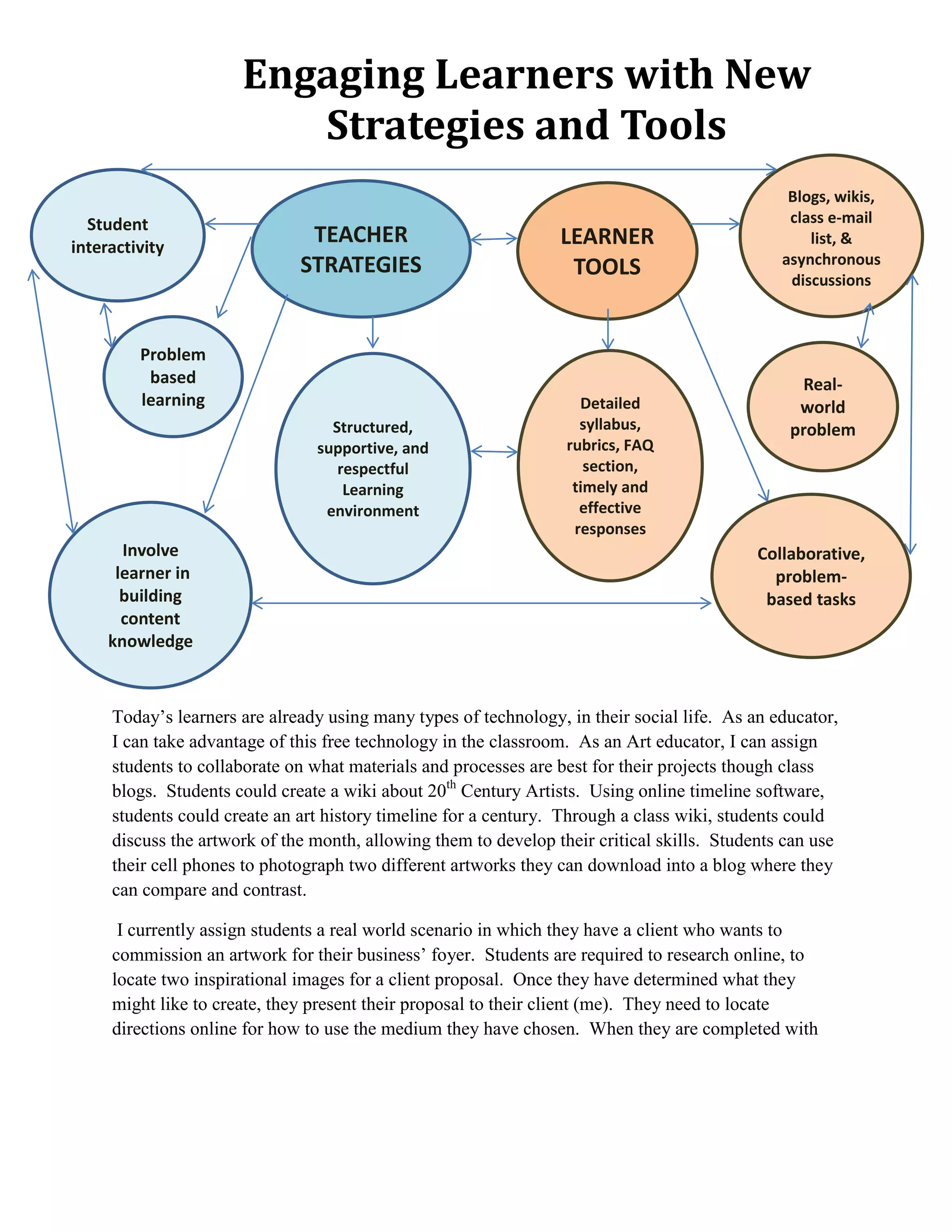
     Today’s learners are already using many types of technology, in their social life. As an educator,
     I can take advantage of this free technology in the classroom. As an Art educator, I can assign
     students to collaborate on what materials and processes are best for their projects though class
     blogs. Students could create a wiki about 20th Century Artists. Using online timeline software,
     students could create an art history timeline for a century. Through a class wiki, students could
     discuss the artwork of the month, allowing them to develop their critical skills. Students can use
     their cell phones to photograph two different artworks they can download into a blog where they
     can compare and contrast.

      I currently assign students a real world scenario in which they have a client who wants to
     commission an artwork for their business’ foyer. Students are required to research online, to
     locate two inspirational images for a client proposal. Once they have determined what they
     might like to create, they present their proposal to their client (me). They need to locate
     directions online for how to use the medium they have chosen. When they are completed with
their artwork, they must write an artist statement. This is currently done through a hard copy that
is filed in the class folder. In the future, each student can create their own e-portfolio that will
include all class documents and photos of their artwork, they take as representative of their
progress.

I can post a syllabus and rubrics for 5-8th graders, a list of FAQ’s, a gallery where they can
download photos of their completed artworks, a calendar for deadlines, a drop box for each class
to submit their completed assignments for grading and e-mail links for each class and for myself.
I can create a daily routine that allows me to be responsive to student e-mails that they know will
remain consistent.

Educ 8842-2 mod 4 blog post

  • 1.
    Engaging Learners withNew Strategies and Tools Blogs, wikis, Student class e-mail interactivity TEACHER LEARNER list, & STRATEGIES asynchronous TOOLS discussions Problem based Real- learning Detailed world Structured, syllabus, problem supportive, and rubrics, FAQ respectful section, Learning timely and environment effective responses Involve Collaborative, learner in problem- building based tasks content knowledge Today’s learners are already using many types of technology, in their social life. As an educator, I can take advantage of this free technology in the classroom. As an Art educator, I can assign students to collaborate on what materials and processes are best for their projects though class blogs. Students could create a wiki about 20th Century Artists. Using online timeline software, students could create an art history timeline for a century. Through a class wiki, students could discuss the artwork of the month, allowing them to develop their critical skills. Students can use their cell phones to photograph two different artworks they can download into a blog where they can compare and contrast. I currently assign students a real world scenario in which they have a client who wants to commission an artwork for their business’ foyer. Students are required to research online, to locate two inspirational images for a client proposal. Once they have determined what they might like to create, they present their proposal to their client (me). They need to locate directions online for how to use the medium they have chosen. When they are completed with
  • 2.
    their artwork, theymust write an artist statement. This is currently done through a hard copy that is filed in the class folder. In the future, each student can create their own e-portfolio that will include all class documents and photos of their artwork, they take as representative of their progress. I can post a syllabus and rubrics for 5-8th graders, a list of FAQ’s, a gallery where they can download photos of their completed artworks, a calendar for deadlines, a drop box for each class to submit their completed assignments for grading and e-mail links for each class and for myself. I can create a daily routine that allows me to be responsive to student e-mails that they know will remain consistent.