Apollo
Collaborative genome annotation editing
A workshop for the International Aphid Genome Consortium research community.
Monica Munoz-Torres, PhD | @monimunozto
Berkeley Bioinformatics Open-Source Projects (BBOP)
Environmental Genomics & Systems Biology Division
Lawrence Berkeley National Laboratory
Webinar - 22 March, 2017
http://GenomeArchitect.org
the	annotation	window
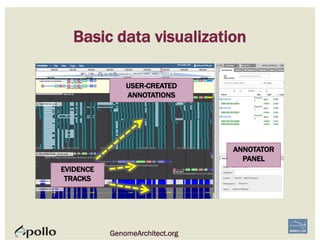
Basic data visualization
USER-CREATED
ANNOTATIONS
EVIDENCE
TRACKS
ANNOTATOR
PANEL
GenomeArchitect.org
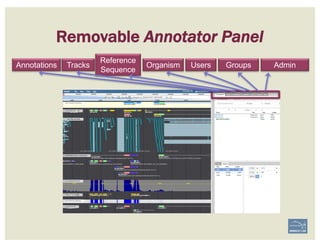
Annotations Organism Users Groups AdminTracks
Reference
Sequence
Removable Annotator Panel
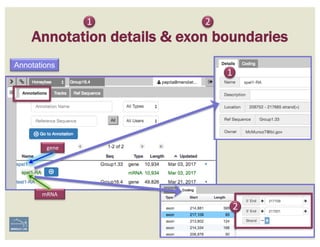
1
Annotation details & exon boundaries
2
Annotations
gene
mRNA
1
2
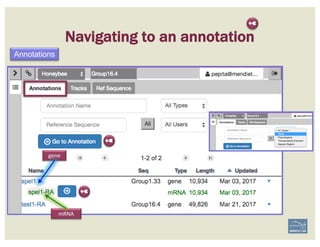
Navigating to an annotation
Annotations
gene
mRNA
➼
➼
➼
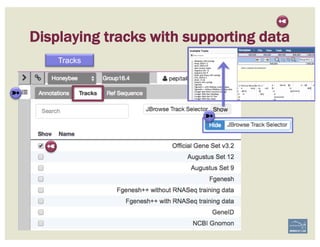
Displaying tracks with supporting data
Tracks
➼
➼
➼
➼
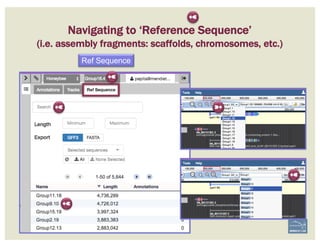
Navigating to ‘Reference Sequence’
(i.e. assembly fragments: scaffolds, chromosomes, etc.)
Ref Sequence
➼
➼
➼
➼
➼
➼
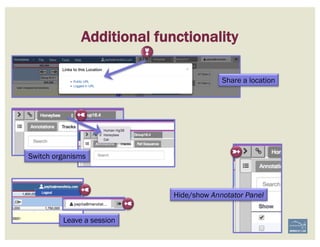
Additional functionality
➼
➼
➼
➼
Share a location
Switch organisms
Leave a session
Hide/show Annotator Panel➼
begin	with	a	new	gene	model
BECOMING ACQUAINTED WITH APOLLO
Annotator	
panel.
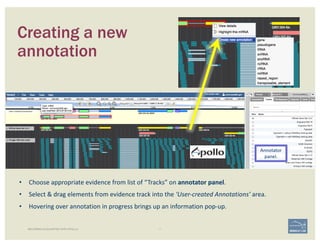
• Choose	appropriate	evidence	from	list	of	“Tracks”	on	annotator	panel.	
• Select	&	drag	elements	from	evidence	track	into	the	‘User-created	Annotations’	area.
• Hovering	over	annotation	in	progress	brings	up	an	information	pop-up.
Creating a new
annotation
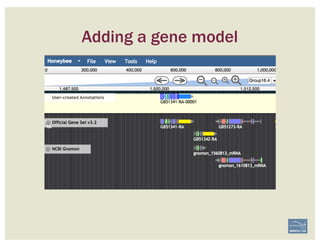
Adding a gene model
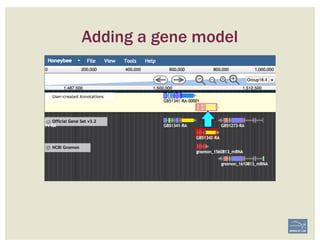
Adding a gene model
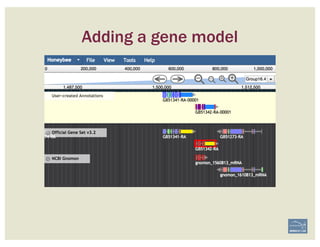
Adding a gene model
the	sequence	track
17 | BECOMING ACQUAINTED WITH APOLLO
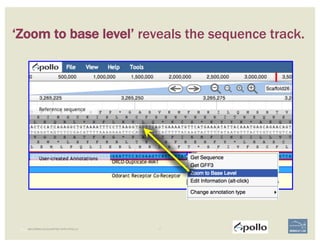
‘Zoom to base level’ reveals the sequence track.
18 | BECOMING ACQUAINTED WITH APOLLO
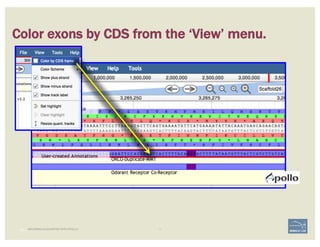
Color exons by CDS from the ‘View’ menu.
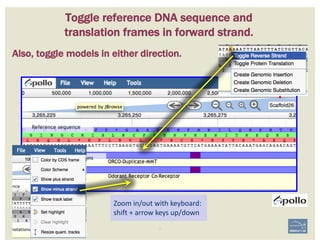
Zoom	in/out	with	keyboard:	
shift	+	arrow	keys	up/down
BECOMING ACQUAINTED WITH APOLLO
Toggle reference DNA sequence and
translation frames in forward strand.
Also, toggle models in either direction.
curating	simple	cases
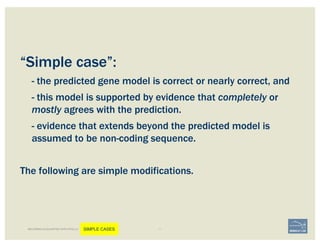
“Simple case”:
- the predicted gene model is correct or nearly correct, and
- this model is supported by evidence that completely or
mostly agrees with the prediction.
- evidence that extends beyond the predicted model is
assumed to be non-coding sequence.
The following are simple modifications.
BECOMING ACQUAINTED WITH APOLLO SIMPLE CASES
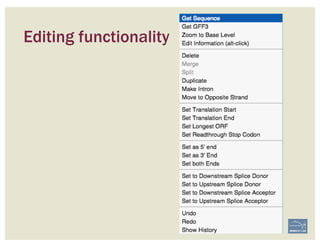
Editing functionality
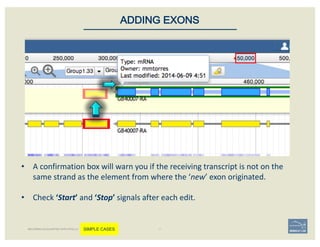
• A	confirmation	box	will	warn	you	if	the	receiving	transcript	is	not	on	the	
same	strand	as	the	element	from	where	the	‘new’	exon	originated.
• Check	‘Start’	and	‘Stop’ signals	after	each	edit.
ADDING EXONS
BECOMING ACQUAINTED WITH APOLLO SIMPLE CASES
Editing functionality
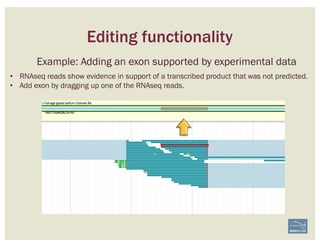
Example: Adding an exon supported by experimental data
• RNAseq reads show evidence in support of a transcribed product that was not predicted.
• Add exon by dragging up one of the RNAseq reads.
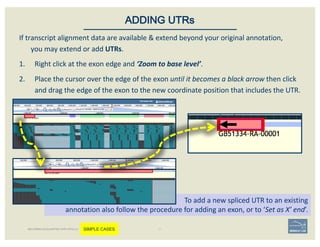
If	transcript	alignment	data	are	available	&	extend	beyond	your	original	annotation,	
you	may	extend	or	add	UTRs.	
1. Right	click	at	the	exon	edge	and	‘Zoom	to	base	level’.	
2. Place	the	cursor	over	the	edge	of	the	exon	until	it	becomes	a	black	arrow	then	click	
and	drag	the	edge	of	the	exon	to	the	new	coordinate	position	that	includes	the	UTR.	
ADDING UTRs
To	add	a	new	spliced	UTR	to	an	existing	
annotation	also	follow	the	procedure	for	adding	an	exon,	or	to	‘Set	as	X’	end’.
BECOMING ACQUAINTED WITH APOLLO SIMPLE CASES
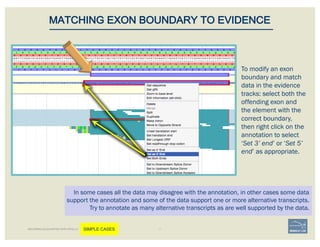
In some cases all the data may disagree with the annotation, in other cases some data
support the annotation and some of the data support one or more alternative transcripts.
Try to annotate as many alternative transcripts as are well supported by the data.
MATCHING EXON BOUNDARY TO EVIDENCE
BECOMING ACQUAINTED WITH APOLLO SIMPLE CASES
To modify an exon
boundary and match
data in the evidence
tracks: select both the
offending exon and
the element with the
correct boundary,
then right click on the
annotation to select
‘Set 3’ end’ or ‘Set 5’
end’ as appropriate.
1. Two	exons	from	different	tracks	sharing	the	same	start/end	coordinates	
display	a	red	bar	to	indicate	matching	edges.
2. Selecting	the	whole	annotation	or	one	exon	at	a	time,	use	this edge-
matching function	and	scroll	along	the	length	of	the	annotation,	
verifying	exon	boundaries	against	available	data.	
Use	square	[	]	brackets	to	scroll	from	exon	to	exon.
User	curly	{	}	brackets	to	scroll	from	annotation	to	annotation.
3. Check	if	cDNA	/	RNAseq	reads	lack	one	or	more	of	the	annotated	exons	
or	include	additional	exons.	
CHECK FOR EXON INTEGRITY
BECOMING ACQUAINTED WITH APOLLO SIMPLE CASES
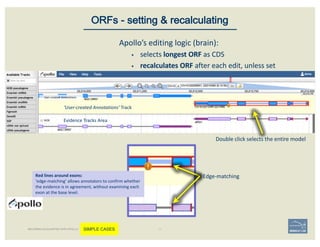
Double	click	selects	the	entire	model
Evidence	Tracks	Area
‘User-created	Annotations’	Track
Edge-matching
Apollo’s	editing	logic	(brain):	
§ selects	longest	ORF	as	CDS
§ recalculates	ORF	after	each	edit,	unless	set
ORFs - setting & recalculating
BECOMING ACQUAINTED WITH APOLLO SIMPLE CASES
Red	lines	around	exons:
‘edge-matching’	allows	annotators	to	confirm	whether	
the	evidence	is	in	agreement,	without	examining	each	
exon	at	the	base	level.
Non-canonical splices are indicated
with orange circles with a white
exclamation point inside, placed over
the edge of the offending exon.
Canonical	splice	sites:
3’-…exon]GA	/	TG[exon…-5’
5’-…exon]GT	/	AG[exon…-3’
reverse	strand,	not	reverse-complemented:
forward	strand
SPLICE SITES
Zoom to review non-canonical
splice site warnings. Although
these may not always have to be
corrected (e.g. GC donor), they
should be flagged with a
comment.
Exon/intron splice site error warning
Curated	model
BECOMING ACQUAINTED WITH APOLLO SIMPLE CASES
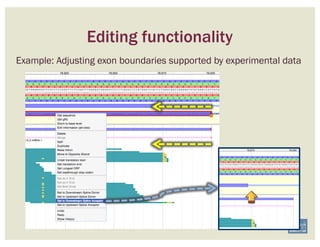
Editing functionality
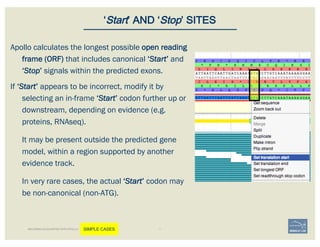
Example: Adjusting exon boundaries supported by experimental data
Apollo calculates the longest possible open reading
frame (ORF) that includes canonical ‘Start’ and
‘Stop’ signals within the predicted exons.
If ‘Start’ appears to be incorrect, modify it by
selecting an in-frame ‘Start’ codon further up or
downstream, depending on evidence (e.g.
proteins, RNAseq).
It may be present outside the predicted gene
model, within a region supported by another
evidence track.
In very rare cases, the actual ‘Start’ codon may
be non-canonical (non-ATG).
‘Start’ AND ‘Stop’ SITES
BECOMING ACQUAINTED WITH APOLLO SIMPLE CASES
curating	complex	cases
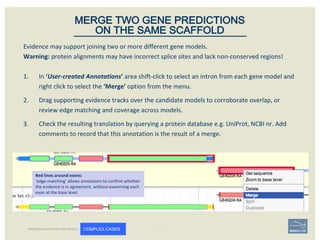
Evidence	may	support	joining	two	or	more	different	gene	models.	
Warning: protein	alignments	may	have	incorrect	splice	sites	and	lack	non-conserved	regions!
1. In	‘User-created	Annotations’	area shift-click	to	select	an	intron	from	each	gene	model	and	
right	click	to	select	the	‘Merge’ option	from	the	menu.	
2. Drag	supporting	evidence	tracks	over	the	candidate	models	to	corroborate	overlap,	or	
review	edge	matching	and	coverage	across	models.
3. Check	the	resulting	translation	by	querying	a	protein	database e.g.	UniProt,	NCBI	nr.	Add	
comments	to	record	that	this	annotation	is	the	result	of	a	merge.
MERGE TWO GENE PREDICTIONS
ON THE SAME SCAFFOLD
BECOMING ACQUAINTED WITH APOLLO COMPLEX CASES
Red	lines	around	exons:
‘edge-matching’	allows	annotators	to	confirm	whether	
the	evidence	is	in	agreement,	without	examining	each	
exon	at	the	base	level.
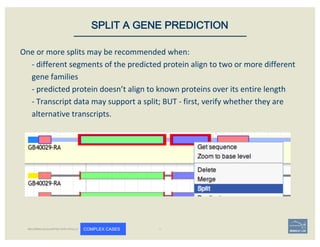
One	or	more	splits	may	be	recommended	when:	
- different	segments	of	the	predicted	protein	align	to	two	or	more	different	
gene	families	
- predicted	protein	doesn’t	align	to	known	proteins	over	its	entire	length
- Transcript	data	may	support	a	split;	BUT	- first,	verify	whether	they	are	
alternative	transcripts.	
SPLIT A GENE PREDICTION
BECOMING ACQUAINTED WITH APOLLO COMPLEX CASES
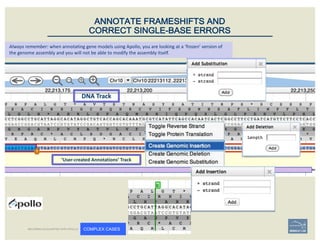
DNA	Track
‘User-created	Annotations’	Track
ANNOTATE FRAMESHIFTS AND
CORRECT SINGLE-BASE ERRORS
Always	remember:	when	annotating	gene	models	using	Apollo,	you	are	looking	at	a	‘frozen’	version	of	
the	genome	assembly	and	you	will	not	be	able	to	modify	the	assembly	itself.
BECOMING ACQUAINTED WITH APOLLO COMPLEX CASES
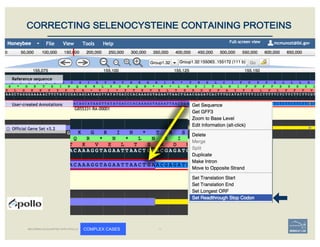
CORRECTING SELENOCYSTEINE CONTAINING PROTEINS
BECOMING ACQUAINTED WITH APOLLO COMPLEX CASES
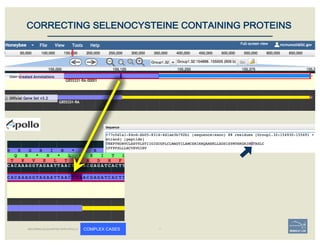
CORRECTING SELENOCYSTEINE CONTAINING PROTEINS
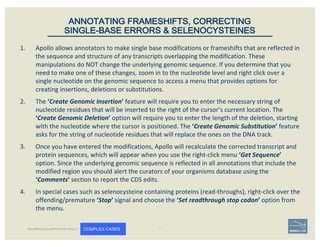
1. Apollo	allows	annotators	to	make	single	base	modifications	or	frameshifts	that	are	reflected	in	
the	sequence	and	structure	of	any	transcripts	overlapping	the	modification.	These	
manipulations	do	NOT	change	the	underlying	genomic	sequence.	If	you	determine	that	you	
need	to	make	one	of	these	changes,	zoom	in	to	the	nucleotide	level	and	right	click	over	a	
single	nucleotide	on	the	genomic	sequence	to	access	a	menu	that	provides	options	for	
creating	insertions,	deletions	or	substitutions.	
2. The	‘Create	Genomic	Insertion’	feature	will	require	you	to	enter	the	necessary	string	of	
nucleotide	residues	that	will	be	inserted	to	the	right	of	the	cursor’s	current	location.	The	
‘Create	Genomic	Deletion’ option	will	require	you	to	enter	the	length	of	the	deletion,	starting	
with	the	nucleotide	where	the	cursor	is	positioned.	The	‘Create	Genomic	Substitution’	feature	
asks	for	the	string	of	nucleotide	residues	that	will	replace	the	ones	on	the	DNA	track.
3. Once	you	have	entered	the	modifications,	Apollo	will	recalculate	the	corrected	transcript	and	
protein	sequences,	which	will	appear	when	you	use	the	right-click	menu	‘Get	Sequence’	
option.	Since	the	underlying	genomic	sequence	is	reflected	in	all	annotations	that	include	the	
modified	region	you	should	alert	the	curators	of	your	organisms	database	using	the	
‘Comments’	section	to	report	the	CDS	edits.	
4. In	special	cases	such	as	selenocysteine	containing	proteins	(read-throughs),	right-click	over	the	
offending/premature	‘Stop’	signal	and	choose	the	‘Set	readthrough	stop	codon’	option	from	
the	menu.
ANNOTATING FRAMESHIFTS, CORRECTING
SINGLE-BASE ERRORS & SELENOCYSTEINES
BECOMING ACQUAINTED WITH APOLLO COMPLEX CASES
adding	metadata
40 | BECOMING ACQUAINTED WITH APOLLO
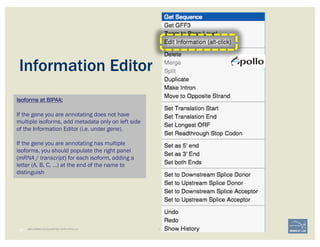
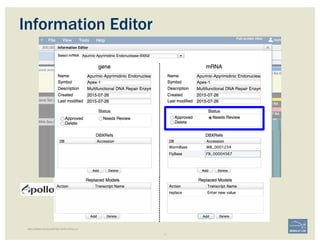
Information Editor
Isoforms at BIPAA:
If the gene you are annotating does not have
multiple isoforms, add metadata only on left side
of the Information Editor (i.e. under gene).
If the gene you are annotating has multiple
isoforms, you should populate the right panel
(mRNA / transcript) for each isoform, adding a
letter (A, B, C, …) at the end of the name to
distinguish
BECOMING ACQUAINTED WITH APOLLO
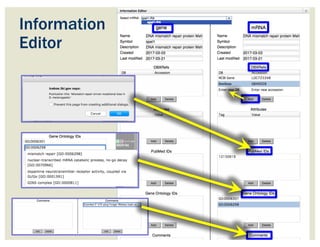
Information
Editor
BECOMING ACQUAINTED WITH APOLLO
Information Editor
history
44 | BECOMING ACQUAINTED WITH APOLLO
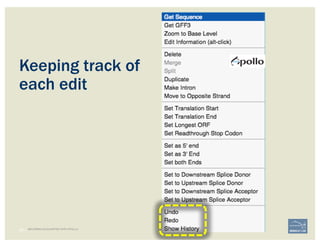
Keeping track of
each edit
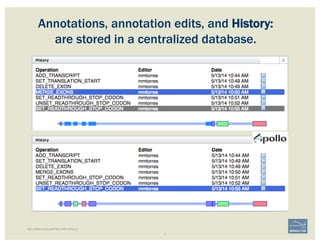
Annotations, annotation edits, and History:
are stored in a centralized database.
BECOMING ACQUAINTED WITH APOLLO
checklist
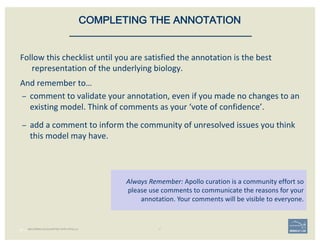
Follow	this	checklist	until	you	are	satisfied	the	annotation	is	the	best	
representation	of	the	underlying	biology.
And	remember	to…
– comment	to	validate	your	annotation,	even	if	you	made	no	changes	to	an	
existing	model.	Think	of	comments	as	your	‘vote	of	confidence’.
– add	a	comment	to	inform	the	community	of	unresolved	issues	you	think	
this	model	may	have.
47 |
Always	Remember:	Apollo	curation	is	a	community	effort	so	
please	use	comments	to	communicate	the	reasons	for	your	
annotation.	Your	comments	will	be	visible	to	everyone.
COMPLETING THE ANNOTATION
BECOMING ACQUAINTED WITH APOLLO
• Check	‘Start’ and	‘Stop’	sites.
• Check		splice	sites:	most	splice	sites	display	
these	residues	…]5’-GT/AG-3’[…
• Check	if	you	can	annotate	UTRs,	for	example	
using	RNA-Seq data:
– align	it	against	relevant	genes/gene	family
– blastp against	NCBI’s	RefSeq or	nr
• Check	&	comment	gaps in	the	genome.
• Additional	functionality	may	be	necessary:
– merge 2	gene	predictions	- same	scaffold
– ‘merge’ 2	gene	predictions	- different	
scaffolds	
– split a	gene	prediction
– annotate frameshifts
– annotate	selenocysteines,	correcting	
single-base	and	other	assembly	errors,	etc.
48 |
• Add:
– Important	project	information	in	the	form	of	
comments.
– IDs	for	this	gene	model	in	public	or	private	
databases	via	DBXRefs,	e.g.	GenBank ID,	
gene	symbol(s),	common	name(s),	
synonyms.
– Comments	about	the	changes	you	made	to	
each	gene	model,	if	any.	
– Any	appropriate	functional	assignments,	e.g.	
via	BLAST	+	HMM	(e.g.	InterProScan),	RNA-
Seq or	other	data	of	your	own,	literature	
searches,	etc.
CHECKLIST
for accuracy and integrity
MANUAL ANNOTATION CHECKLIST
example
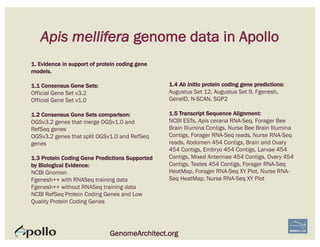
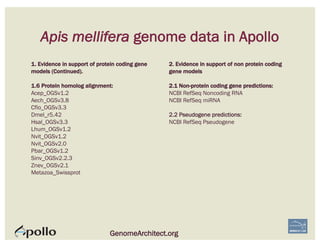
Apis mellifera genome data in Apollo
GenomeArchitect.org
1. Evidence in support of protein coding gene
models.
1.1 Consensus Gene Sets:
Official Gene Set v3.2
Official Gene Set v1.0
1.2 Consensus Gene Sets comparison:
OGSv3.2 genes that merge OGSv1.0 and
RefSeq genes
OGSv3.2 genes that split OGSv1.0 and RefSeq
genes
1.3 Protein Coding Gene Predictions Supported
by Biological Evidence:
NCBI Gnomon
Fgenesh++ with RNASeq training data
Fgenesh++ without RNASeq training data
NCBI RefSeq Protein Coding Genes and Low
Quality Protein Coding Genes
1.4 Ab initio protein coding gene predictions:
Augustus Set 12, Augustus Set 9, Fgenesh,
GeneID, N-SCAN, SGP2
1.5 Transcript Sequence Alignment:
NCBI ESTs, Apis cerana RNA-Seq, Forager Bee
Brain Illumina Contigs, Nurse Bee Brain Illumina
Contigs, Forager RNA-Seq reads, Nurse RNA-Seq
reads, Abdomen 454 Contigs, Brain and Ovary
454 Contigs, Embryo 454 Contigs, Larvae 454
Contigs, Mixed Antennae 454 Contigs, Ovary 454
Contigs, Testes 454 Contigs, Forager RNA-Seq
HeatMap, Forager RNA-Seq XY Plot, Nurse RNA-
Seq HeatMap, Nurse RNA-Seq XY Plot
Apis mellifera genome data in Apollo
GenomeArchitect.org
1. Evidence in support of protein coding gene
models (Continued).
1.6 Protein homolog alignment:
Acep_OGSv1.2
Aech_OGSv3.8
Cflo_OGSv3.3
Dmel_r5.42
Hsal_OGSv3.3
Lhum_OGSv1.2
Nvit_OGSv1.2
Nvit_OGSv2.0
Pbar_OGSv1.2
Sinv_OGSv2.2.3
Znev_OGSv2.1
Metazoa_Swissprot
2. Evidence in support of non protein coding
gene models
2.1 Non-protein coding gene predictions:
NCBI RefSeq Noncoding RNA
NCBI RefSeq miRNA
2.2 Pseudogene predictions:
NCBI RefSeq Pseudogene
follow	along
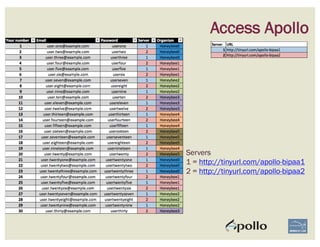
Access Apollo
Servers
1 = http://tinyurl.com/apollo-bipaa1
2 = http://tinyurl.com/apollo-bipaa2
Ceramidase
Example 54
Ceramidase is an enzyme, which cleaves fatty acids from ceramide, producing
sphingosine (SPH), which in turn is phosphorylated by a sphingosine kinase to
form sphingosine-1-phosphate (S1P). Ceramide, SPH, and S1P are bioactive
lipids that mediate cell proliferation, differentiation, apoptosis, adhesion, and
migration.
It has come to our attention that the honey bee Apis mellifera ortholog of
Ceramidase is fragmented into 2 or more genes in the current gene set (Official
Gene Set v3.2).
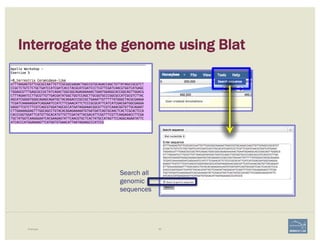
Interrogate the genome using Blat
Example 55
Search all
genomic
sequences
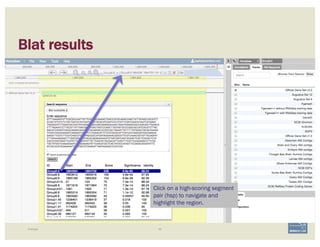
Blat results
Example 56
Click on a high-scoring segment
pair (hsp) to navigate and
highlight the region.
57i5K Workspace@NAL
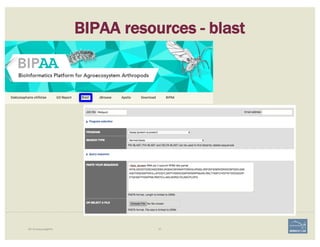
BIPAA resources - blast
58i5K Workspace@NAL
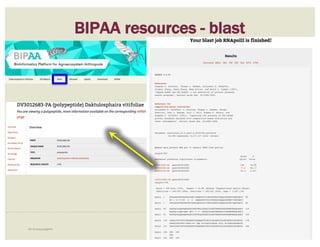
BIPAA resources - blast
59i5K Workspace@NAL
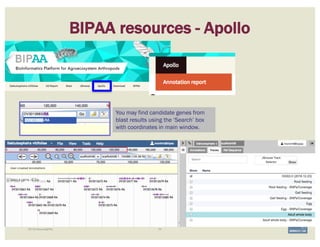
BIPAA resources - Apollo
You may find candidate genes from
blast results using the ‘Search’ box
with coordinates in main window.
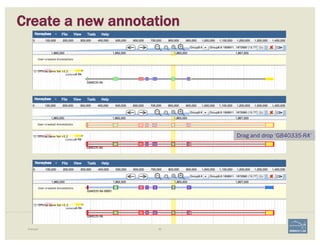
Create a new annotation
Example 60
Drag and drop ‘GB40335-RA’
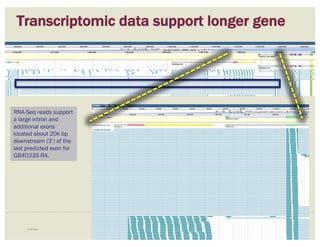
Transcriptomic data support longer gene
Example 61
RNA-Seq reads support
a large intron and
additional exons
located about 20k bp
downstream (3’) of the
last predicted exon for
GB40335-RA.
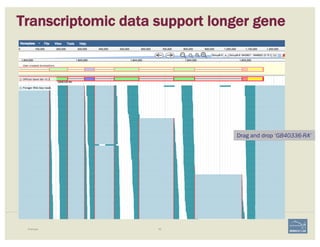
Transcriptomic data support longer gene
Example 62
Drag and drop ‘GB40336-RA’
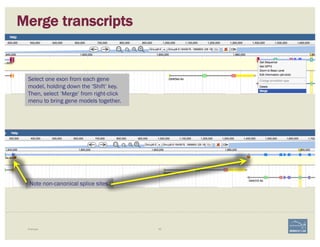
Merge transcripts
Example 63
Select one exon from each gene
model, holding down the ‘Shift’ key.
Then, select ‘Merge’ from right-click
menu to bring gene models together.
Note non-canonical splice sites.
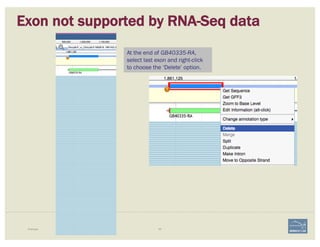
Exon not supported by RNA-Seq data
Example 64
At the end of GB40335-RA,
select last exon and right-click
to choose the ‘Delete’ option.
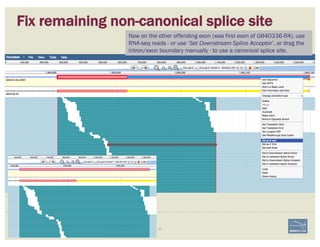
Fix remaining non-canonical splice site
Example 65
Now on the other offending exon (was first exon of GB40336-RA), use
RNA-seq reads - or use ‘Set Downstream Splice Acceptor’, or drag the
intron/exon boundary manually - to use a canonical splice site.
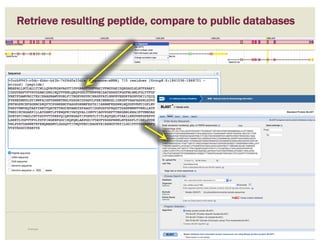
Retrieve resulting peptide, compare to public databases
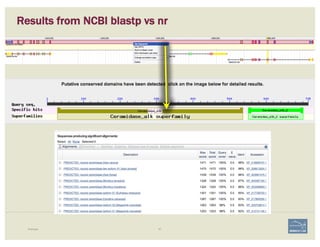
Example 66
Results from NCBI blastp vs nr
Example 67
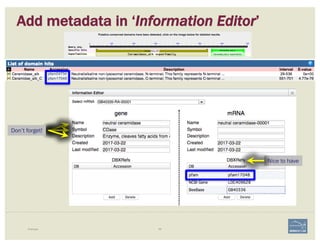
Add metadata in ‘Information Editor’
Example 68
Don’t forget!
Nice to have
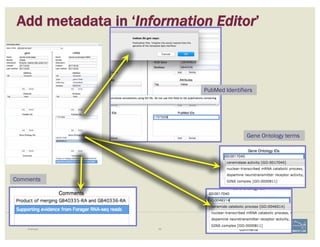
Add metadata in ‘Information Editor’
Example 69
PubMed Identifiers
Gene Ontology terms
Comments
curation	with	IAGC	&	BIPAA
71i5K Workspace@NAL
Accessing the genome home page
Each genome hosted on BIPAA has a dedicated home page, accessible
from AphidBase, ParWaspDB or LepidoDB. Access may be restricted
for some species; if so, login with your BIPAA account.
To create a BIPAA account visit http://bipaa.genouest.org/account
For Phylloxera, visit
http://bipaa.genouest.org/sp/daktulosphaira_vitifoliae/
72i5K Workspace@NAL
1. A computationally predicted consensus gene set has been
generated using multiple lines of evidence in MAKER.
2. BIPAA will integrate consensus computational predictions with
manual annotations to produce an updated, official gene set (OGS):
Attention!
• If it’s not on either track, it won’t make the OGS!
• If it’s there and it shouldn’t, it will still make the OGS!
Curation process with IAGC & BIPAA
73i5K Workspace@NAL
3. In some cases algorithms and metrics used to generate consensus sets may
actually reduce the accuracy of the gene’s representation. Use caution!
4. Isoforms: drag original and alternatively spliced form to ‘User-created
Annotations’ area.
If the gene you are annotating does not have multiple isoforms, add metadata only on left side of the
Information Editor (i.e. under gene).
If the gene you are annotating has multiple isoforms, you should populate the right panel (mRNA / transcript)
for each isoform, adding a letter (A, B, C, …) at the end of the name to distinguish each isoform.
5. If an annotation needs to be removed from the consensus set, drag it to the
‘User-created Annotations’ area, copy the gene ID in the Name field, and mark
with ‘Delete’ radio button on the Information Editor.
6. Overlapping interests? Collaborate to reach agreement.
7. Follow guidelines for IAGC & BIPAA, at
https://bipaa.genouest.org/is/how-to-annotate-a-genome/
Curation process with IAGC & BIPAA
74i5K Workspace@NAL
Annotation report
To avoid mistakes, a personal report is generated each night for each
annotator, giving access to the list of annotated genes, and the
possible corresponding errors and warnings (e.g. missing symbol,
wrong name, etc.).
75i5K Workspace@NAL
Updating the OGS
• Regularly, a new OGS is released: merging the original OGS with the
manual curation set.
• If a manually curated gene overlaps a gene predicted by Maker, we
keep the manual annotation and replace the automated one.***
• Question from moni: Overlapping CDS? Or just overlapping coordinates?
• Gene IDs are conserved between each OGS release, a suffix being
incremented when a gene is modified (structure, as well as
associated information like Name or Symbol).
PUBLIC DEMO
76 |
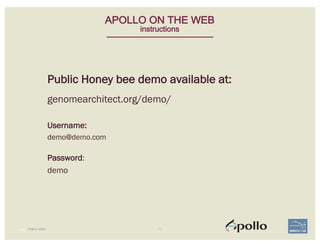
APOLLO ON THE WEB
instructions
Public Honey bee demo available at:
genomearchitect.org/demo/
Username:
demo@demo.com
Password:
demo
APOLLO
demonstration
PUBLIC DEMO 77
Demonstration	video	available	at
https://youtu.be/VgPtAP_fvxY
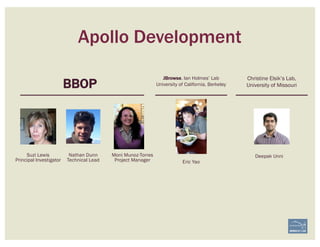
Apollo Development
Nathan Dunn
Technical Lead Eric Yao
Christine Elsik’s Lab,
University of Missouri
Suzi Lewis
Principal Investigator
BBOP
Moni Munoz-Torres
Project Manager
Deepak Unni
JBrowse. Ian Holmes’ Lab
University of California, Berkeley
For your attention,
Thank you!
Berkeley Bioinformatics Open-Source Projects,
Environmental Genomics & Systems Biology,
Lawrence Berkeley National Laboratory
Funding
• Apollo is supported by NIH grants 5R01GM080203 from NIGMS,
and 5R01HG004483 from NHGRI.
• BBOP is also supported by the Director, Office of Science,
Office of Basic Energy Sciences, of the U.S. Department of
Energy under Contract No. DE-AC02-05CH11231
Collaborators
• Ian Holmes, Eric Yao, UC Berkeley (JBrowse)
• Chris Elsik, Deepak Unni, U of Missouri (Apollo)
• Monica Poelchau, USDA/NAL (Apollo)
• i5k Community
berkeleybop.org
UNIVERSITY OF
CALIFORNIA
Suzanna Lewis & Chris Mungall
Seth Carbon (Noctua / AmiGO)
Nathan Dunn (Apollo)
Monica Munoz-Torres (Apollo / GO)
Jeremy Nguyen Xuan (Monarch Init.)
Editing Functionality - Apollo Workshop

Editing Functionality - Apollo Workshop