Managed PoE+ Gigabit Switch
with SFP
Models: ES-24-250W, ES-24-500W
Introduction
Thank you for purchasing the Ubiquiti Networks® EdgeSwitch®.
This Quick Start Guide is designed to guide you through
installation and also includes warranty terms.
The hardware description and installation instructions are the
same for both models, ES‑24-250W and ES-24-500W.
Package Contents
EdgeSwitch
Power Cord Mounting Screws
(Qty. 4)
Cage Nuts
(Qty. 4)
TERMS OF USE: All Ethernet cabling runs must use CAT5 (or above). It is the professional
installer’s responsibility to follow local country regulations, including operation within legal
frequency channels, output power, indoor cabling requirements, and Dynamic Frequency
Selection (DFS) requirements.
Installation Requirements
•	 Phillips screwdriver
•	 Standard-sized, 19" wide rack with a minimum of 1U height
available
•	 For indoor applications, use Category 5 (or above) UTP
cabling approved for indoor use.
•	 For outdoor applications, shielded Category 5 (or above)
cabling should be used for all wired Ethernet connections
and should be grounded through the AC ground of the
power supply.
We recommend that you protect your networks from
harmful outdoor environments and destructive ESD events
with industrial‑grade, shielded Ethernet cable from Ubiquiti
Networks. For more details, visit:
www.ubnt.com/toughcable
WARNING: To reduce the risk of fire or electric shock,
do not expose the EdgeSwitch to rain or moisture.
Note: Although the cabling can be located outdoors,
the EdgeSwitch itself should be housed inside a
protective enclosure.
Hardware Overview
Front Panel Ports
RJ45 1-24 SFP 1-2
Port Description
RJ45 1-24
RJ45 ports support Power over Ethernet
(PoE) and 10/100/1000 Ethernet connections.
SFP 1-2
Hot-swappable SFP ports support 1 Gbps
connections.
Front Panel LEDs
System
System LED
Note: The System LED functionality has been updated
with firmware v1.8.0. We recommend that you update
the EdgeSwitch to the latest firmware.
State Status
Flashing White Bootup in progress.
White
Ready for use, not connected to Ubiquiti®
Network Management System (UNMS™
).
Blue Ready for use, connected to UNMS.
Steady Blue
with Occasional
Flashing
Ready for use, unable to connect to
UNMS, check connection to UNMS server.
Quickly Flashing
Blue
Used to locate a device in UNMS.
Alternating
Blue/White
Firmware upgrade in progress.
You can use the EdgeSwitch Configuration Interface or UNMS
to manage your device. UNMS lets you configure, monitor,
upgrade, and back up your devices using a single application.
Get started at www.unms.com
SFP: Speed/Link/ActRJ45: Speed/Link/ActPoE
RJ45 LEDs
LED State Status
PoE
Off No PoE
Amber IEEE 802.3af/802.3at
Green 24V Passive
Speed/
Link/
Activity
Off No Link
Amber Link Established at 10/100 Mbps
Amber
Flashing
Link Activity at 10/100 Mbps
Green Link Established at 1000 Mbps (1 Gbps)
Green
Flashing
Link Activity at 1000 Mbps (1 Gbps)
SFP LEDs
LED State Status
Speed/
Link/
Activity
Off No Link
Green Link Established at 1 Gbps
Green
Flashing
Link Activity at 1 Gbps
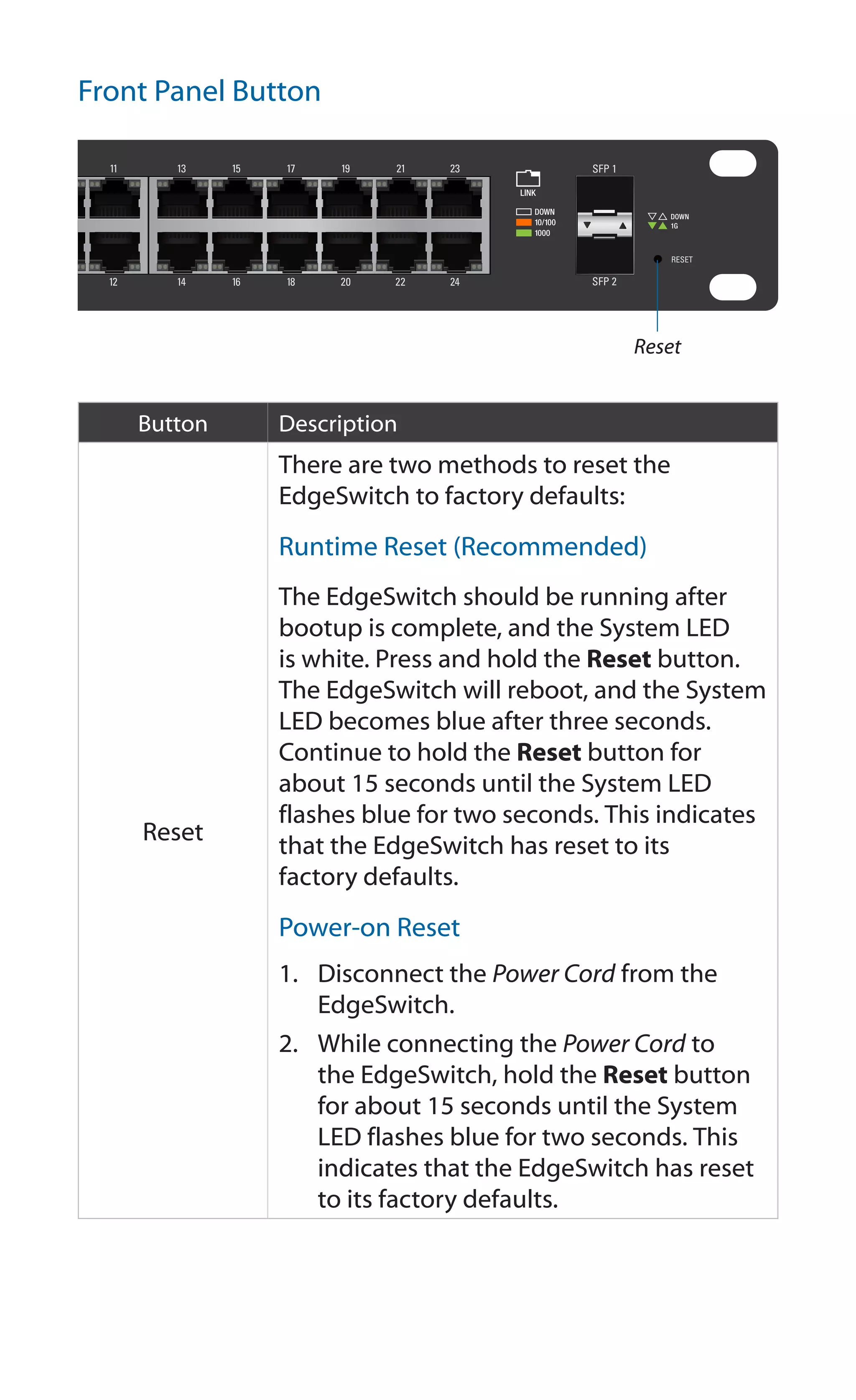
Front Panel Button
Reset
Button Description
Reset
There are two methods to reset the
EdgeSwitch to factory defaults:
Runtime Reset (Recommended)
The EdgeSwitch should be running after
bootup is complete, and the System LED
is white. Press and hold the Reset button.
The EdgeSwitch will reboot, and the System
LED becomes blue after three seconds.
Continue to hold the Reset button for
about 15 seconds until the System LED
flashes blue for two seconds. This indicates
that the EdgeSwitch has reset to its
factory defaults.
Power-on Reset
1.	 Disconnect the Power Cord from the
EdgeSwitch.
2.	 While connecting the Power Cord to
the EdgeSwitch, hold the Reset button
for about 15 seconds until the System
LED flashes blue for two seconds. This
indicates that the EdgeSwitch has reset
to its factory defaults.
Back Panel
CONSOLE
Mounting Holes
Power
Mounting Holes
Console
Port Description
Console
RJ45 serial console port for Command
Line Interface (CLI) management. Use an
RJ45‑to-DB9, serial console cable, also
known as a rollover cable, to connect
the Console port to your computer. Then
configure the following settings as needed:
•	 Baud rate  115200
•	 Data bits  8
•	 Parity  NONE
•	 Stop bits  1
•	 Flow control  NONE
Power
Connect the included Power Cord to the
Power port.
Note: There are fans and ventilation holes on the sides of
the EdgeSwitch.
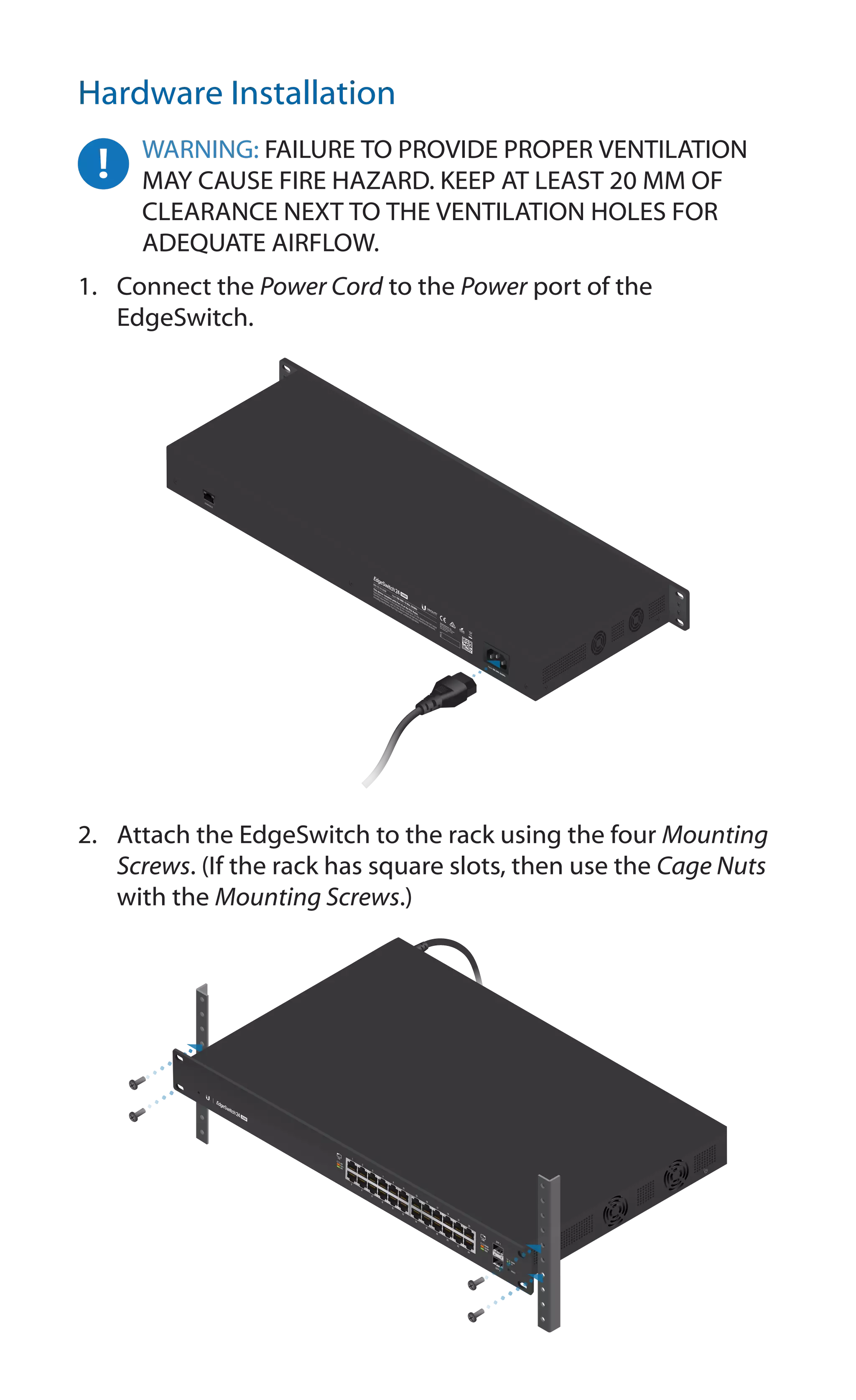
Hardware Installation
WARNING: FAILURE TO PROVIDE PROPER VENTILATION
MAY CAUSE FIRE HAZARD. KEEP AT LEAST 20 MM OF
CLEARANCE NEXT TO THE VENTILATION HOLES FOR
ADEQUATE AIRFLOW.
1.	 Connect the Power Cord to the Power port of the
EdgeSwitch.
2.	 Attach the EdgeSwitch to the rack using the four Mounting
Screws. (If the rack has square slots, then use the Cage Nuts
with the Mounting Screws.)
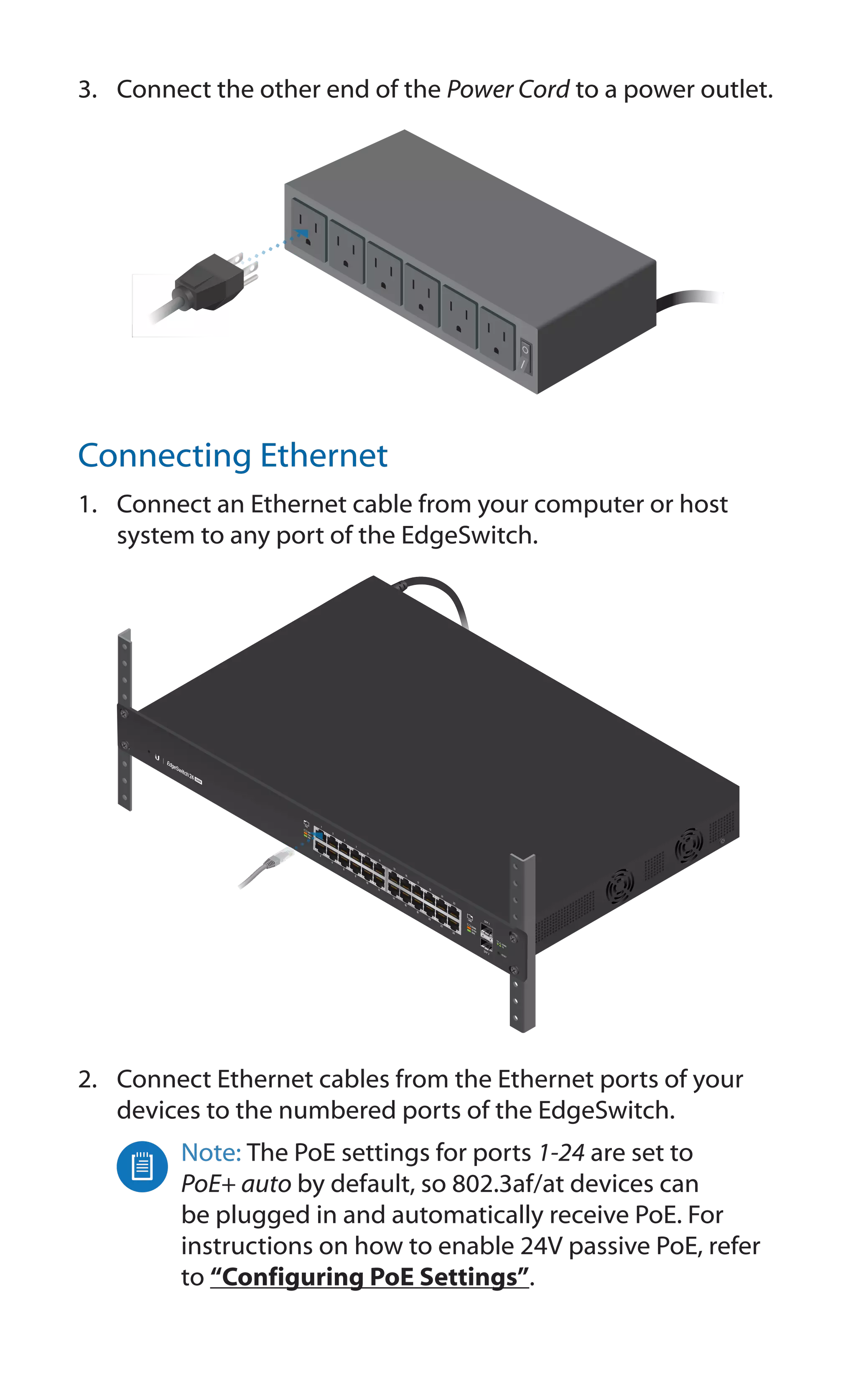
3.	 Connect the other end of the Power Cord to a power outlet.
Connecting Ethernet
1.	 Connect an Ethernet cable from your computer or host
system to any port of the EdgeSwitch.
2.	 Connect Ethernet cables from the Ethernet ports of your
devices to the numbered ports of the EdgeSwitch.
Note: The PoE settings for ports 1-24 are set to
PoE+ auto by default, so 802.3af/at devices can
be plugged in and automatically receive PoE. For
instructions on how to enable 24V passive PoE, refer
to “Configuring PoE Settings”.
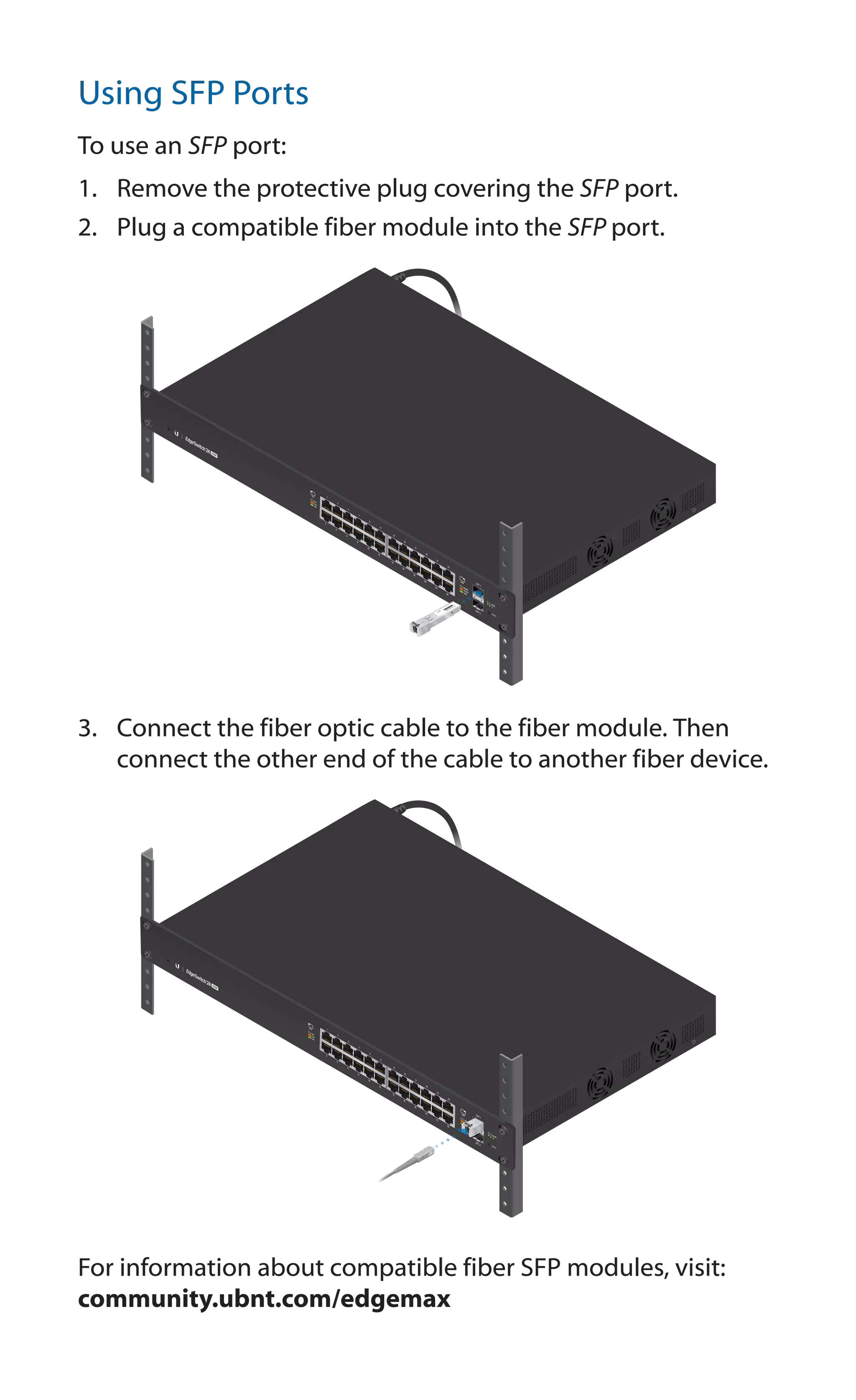
Using SFP Ports
To use an SFP port:
1.	 Remove the protective plug covering the SFP port.
2.	 Plug a compatible fiber module into the SFP port.
1
0
0
0
M
b
ps
S
M/
S
C
2
0
K
M
D
D
M
Tx
1
5
5
0
n
m/
Rx
1
3
1
0
n
m
3.	 Connect the fiber optic cable to the fiber module. Then
connect the other end of the cable to another fiber device.
For information about compatible fiber SFP modules, visit:
community.ubnt.com/edgemax
Accessing the Configuration Interface
The EdgeSwitch is set to DHCP by default, so it will try to
automatically obtain an IP address. If that fails, then it will use
the default fallback IP address, 192.168.1.2. Proceed to the
appropriate section, DHCP or “Fallback IP Address”:
DHCP
Use one of the following methods:
•	 Set up the DHCP server to provide a specific IP address to
the EdgeSwitch based on its MAC address (on the label).
•	 Let the EdgeSwitch obtain an IP address and then check the
DHCP server to see which IP address was assigned.
To log in, follow these steps:
1.	 Launch your web browser. Type the appropriate IP address
in the address field. Press enter (PC) or return (Mac).
2.	 The login screen will appear. Enter ubnt in the Username
and Password fields. Click Sign In.
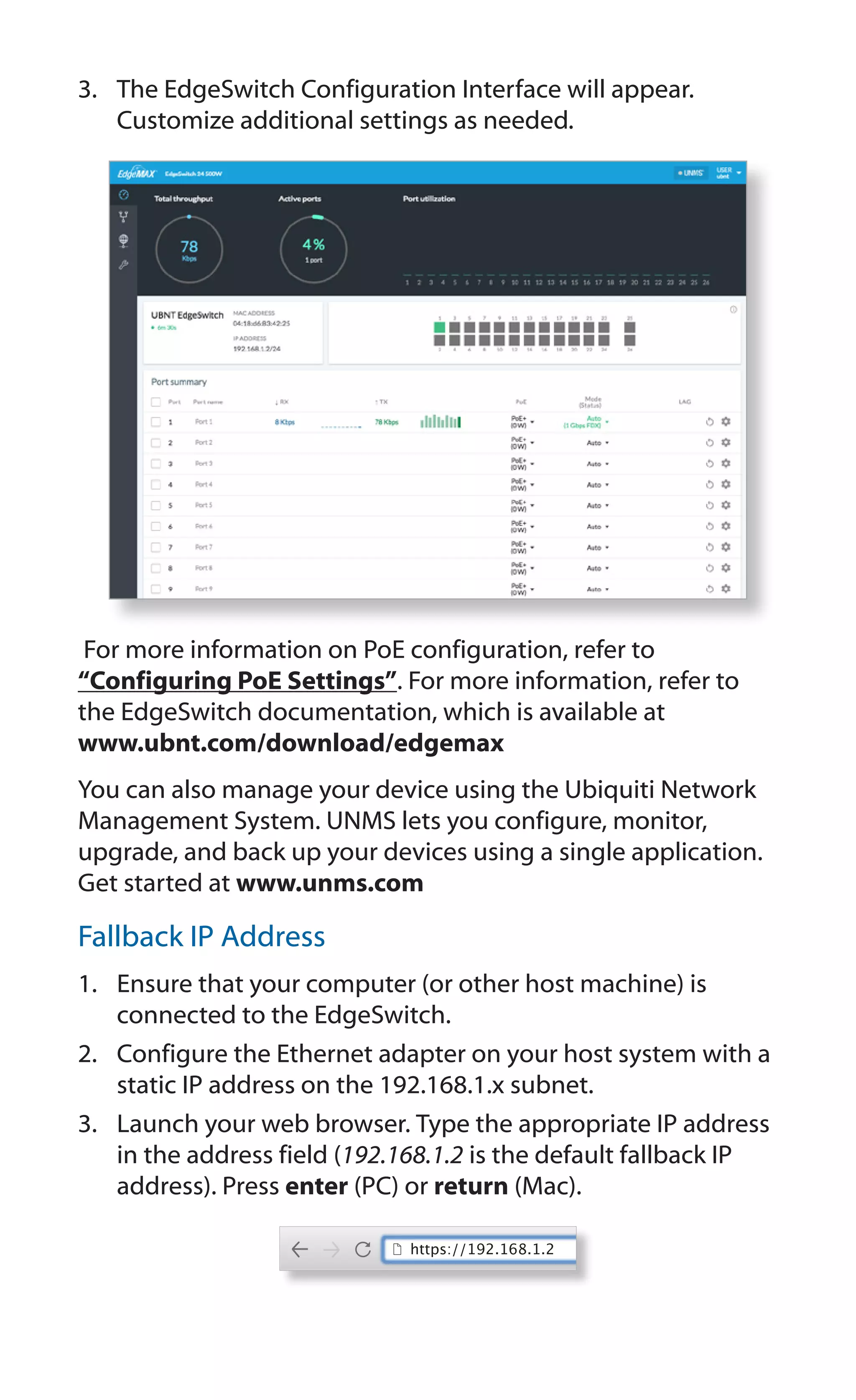
3.	 The EdgeSwitch Configuration Interface will appear.
Customize additional settings as needed.
For more information on PoE configuration, refer to
“Configuring PoE Settings”. For more information, refer to
the EdgeSwitch documentation, which is available at
www.ubnt.com/download/edgemax
You can also manage your device using the Ubiquiti Network
Management System. UNMS lets you configure, monitor,
upgrade, and back up your devices using a single application.
Get started at www.unms.com
Fallback IP Address
1.	 Ensure that your computer (or other host machine) is
connected to the EdgeSwitch.
2.	 Configure the Ethernet adapter on your host system with a
static IP address on the 192.168.1.x subnet.
3.	 Launch your web browser. Type the appropriate IP address
in the address field (192.168.1.2 is the default fallback IP
address). Press enter (PC) or return (Mac).
https://192.168.1.2
4.	 The login screen will appear. Enter ubnt in the Username
and Password fields. Click Sign In.
5.	 The EdgeSwitch Configuration Interface will appear. Click
the Settings icon.
6.	 Change the IP Address to a unique IP address. Click Apply.
Note: If you change the IP settings, then the session
will be cut off, and you will need to reconnect to the
EdgeSwitch using the new IP address.
Customize additional settings as needed. For more information
on PoE configuration, refer to “Configuring PoE Settings”.
Configuring PoE Settings
The PoE settings for ports 1-24 are set to PoE+ by default,
so 802.3af/at devices can be plugged in and automatically
receive PoE.
WARNING: Before activating 24V passive PoE, ensure
that the connected device supports PoE and the
supplied voltage.
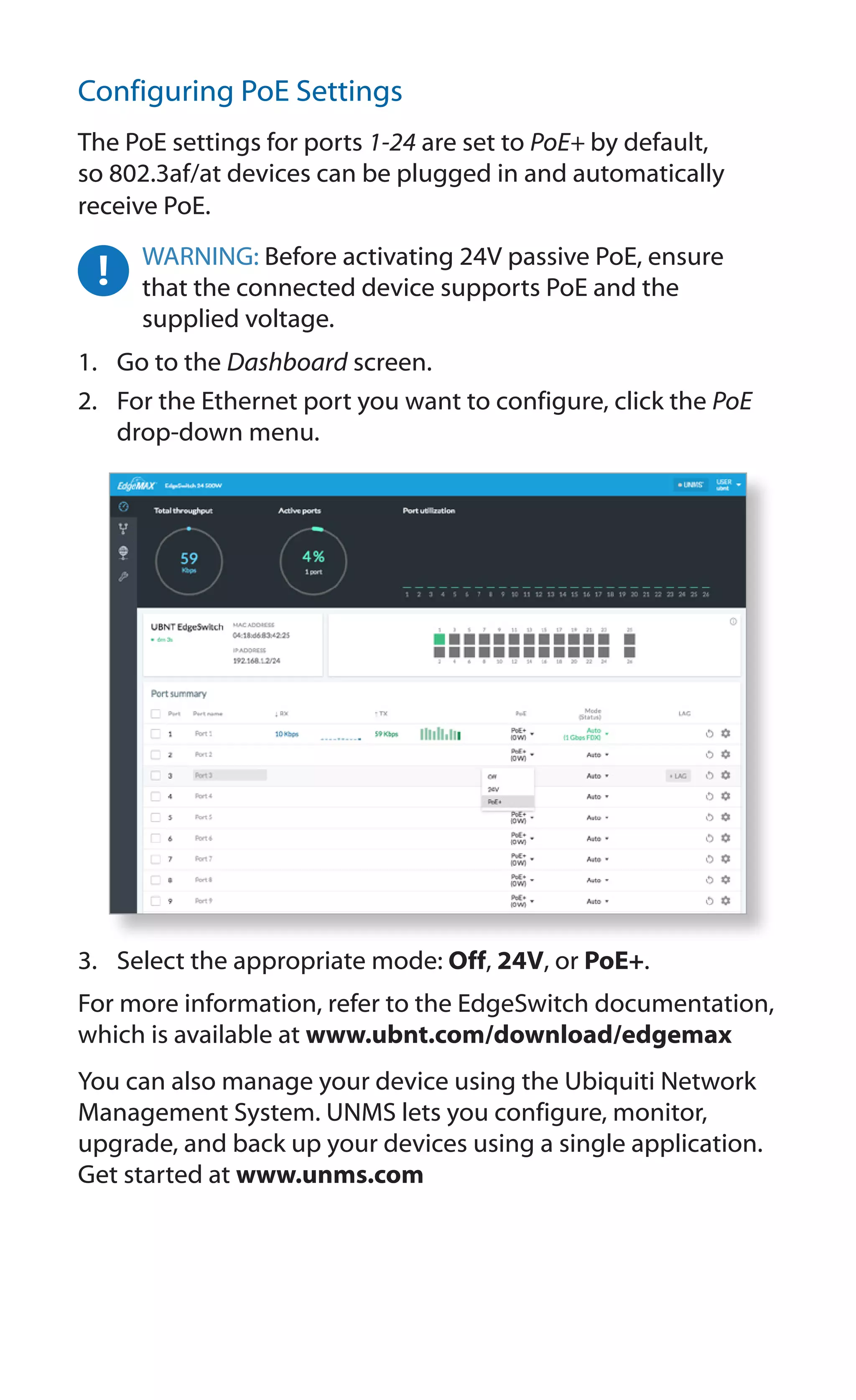
1.	 Go to the Dashboard screen.
2.	 For the Ethernet port you want to configure, click the PoE
drop-down menu.
3.	 Select the appropriate mode: Off, 24V, or PoE+.
For more information, refer to the EdgeSwitch documentation,
which is available at www.ubnt.com/download/edgemax
You can also manage your device using the Ubiquiti Network
Management System. UNMS lets you configure, monitor,
upgrade, and back up your devices using a single application.
Get started at www.unms.com
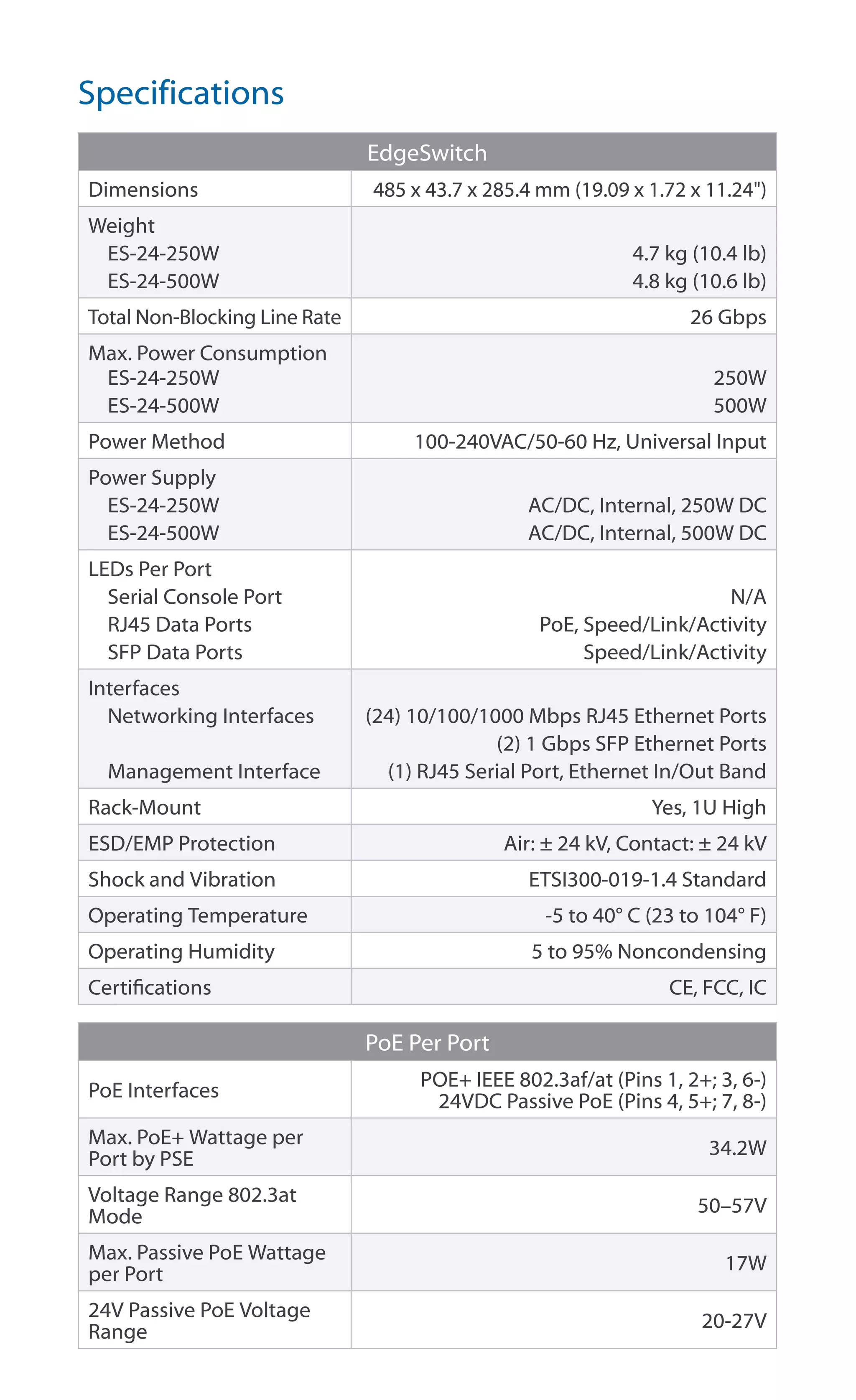
Specifications
EdgeSwitch
Dimensions 485 x 43.7 x 285.4 mm (19.09 x 1.72 x 11.24")
Weight
ES-24-250W
ES-24-500W
4.7 kg (10.4 lb)
4.8 kg (10.6 lb)
Total Non-Blocking Line Rate 26 Gbps
Max. Power Consumption
ES-24-250W
ES-24-500W
250W
500W
Power Method 100-240VAC/50-60 Hz, Universal Input
Power Supply
ES-24-250W
ES-24-500W
AC/DC, Internal, 250W DC
AC/DC, Internal, 500W DC
LEDs Per Port
Serial Console Port
RJ45 Data Ports
SFP Data Ports
N/A
PoE, Speed/Link/Activity
Speed/Link/Activity
Interfaces
Networking Interfaces
Management Interface
(24) 10/100/1000 Mbps RJ45 Ethernet Ports
(2) 1 Gbps SFP Ethernet Ports
(1) RJ45 Serial Port, Ethernet In/Out Band
Rack-Mount Yes, 1U High
ESD/EMP Protection Air: ± 24 kV, Contact: ± 24 kV
Shock and Vibration ETSI300-019-1.4 Standard
Operating Temperature -5 to 40° C (23 to 104° F)
Operating Humidity 5 to 95% Noncondensing
Certifications CE, FCC, IC
PoE Per Port
PoE Interfaces
POE+ IEEE 802.3af/at (Pins 1, 2+; 3, 6-)
24VDC Passive PoE (Pins 4, 5+; 7, 8-)
Max. PoE+ Wattage per
Port by PSE
34.2W
Voltage Range 802.3at
Mode
50–57V
Max. Passive PoE Wattage
per Port
17W
24V Passive PoE Voltage
Range
20-27V
Safety Notices
1.	 Read, follow, and keep these instructions.
2.	 Heed all warnings.
3.	 Only use attachments/accessories specified by the manufacturer.
WARNING: Failure to provide proper ventilation may
cause fire hazard. Keep at least 20 mm of clearance next
to the ventilation holes for adequate airflow.
WARNING: To reduce the risk of fire or electric shock, do
not expose this product to rain or moisture.
WARNING: Do not use this product in location that can
be submerged by water.
WARNING: Avoid using this product during an electrical
storm. There may be a remote risk of electric shock from
lightning.
Electrical Safety Information
1.	 Compliance is required with respect to voltage, frequency, and current
requirements indicated on the manufacturer’s label. Connection to a
different power source than those specified may result in improper
operation, damage to the equipment or pose a fire hazard if the
limitations are not followed.
2.	 There are no operator serviceable parts inside this equipment. Service
should be provided only by a qualified service technician.
3.	 This equipment is provided with a detachable power cord which has
an integral safety ground wire intended for connection to a grounded
safety outlet.
a.	 Do not substitute the power cord with one that is not the provided
approved type. Never use an adapter plug to connect to a 2-wire
outlet as this will defeat the continuity of the grounding wire.
b.	 The equipment requires the use of the ground wire as a part of the
safety certification, modification or misuse can provide a shock
hazard that can result in serious injury or death.
c.	 Contact a qualified electrician or the manufacturer if there
are questions about the installation prior to connecting the
equipment.
d.	 Protective earthing is provided by Listed AC adapter. Building
installation shall provide appropriate short-circuit backup
protection.
e.	 Protective bonding must be installed in accordance with local
national wiring rules and regulations.
Limited Warranty
www.ubnt.com/support/warranty/
The limited warranty requires the use of arbitration to resolve disputes on
an individual basis, and, where applicable, specify arbitration instead of
jury trials or class actions.
Compliance
FCC
Changes or modifications not expressly approved by the party responsible
for compliance could void the user’s authority to operate the equipment.
This device complies with Part 15 of the FCC Rules. Operation is subject to
the following two conditions:
1.	 This device may not cause harmful interference, and
2.	 This device must accept any interference received, including
interference that may cause undesired operation.
NOTE: This equipment has been tested and found to comply with the
limits for a Class A digital device, pursuant to part 15 of the FCC Rules.
These limits are designed to provide reasonable protection against
harmful interference when the equipment is operated in a commercial
environment. This equipment generates, uses, and can radiate radio
frequency energy and, if not installed and used in accordance with
the instruction manual, may cause harmful interference to radio
communications. Operations of this equipment in a residential area is likely
to cause harmful interference in which case the user will be required to
correct the interference at his own expense.
ISED Canada
CAN ICES-3(A)/NMB-3(A)
This Class A digital apparatus complies with Canadian CAN ICES-003.
CAN ICES-3(A)/NMB-3(A)
Cet appareil numérique de la classe A est conforme à la norme NMB-003
du Canada.
Australia and New Zealand
Warning: This is a Class A product. In a domestic environment this
product may cause radio interference in which case the user may
be required to take adequate measures.
CE Marking
CE marking on this product represents the product is in compliance with all
directives that are applicable to it.
RoHS/WEEE Compliance Statement
English
European Directive 2012/19/EU requires that the equipment bearing
this symbol on the product and/or its packaging must not be disposed
of with unsorted municipal waste. The symbol indicates that this
product should be disposed of separately from regular household waste
streams. It is your responsibility to dispose of this and other electric and
electronic equipment via designated collection facilities appointed by the
government or local authorities. Correct disposal and recycling will help
prevent potential negative consequences to the environment and human
health. For more detailed information about the disposal of your old
equipment, please contact your local authorities, waste disposal service, or
the shop where you purchased the product.
Deutsch
Die Europäische Richtlinie 2012/19/EU verlangt, dass technische
Ausrüstung, die direkt am Gerät und/oder an der Verpackung mit diesem
Symbol versehen ist, nicht zusammen mit unsortiertem Gemeindeabfall
entsorgt werden darf. Das Symbol weist darauf hin, dass das Produkt
von regulärem Haushaltmüll getrennt entsorgt werden sollte. Es
liegt in Ihrer Verantwortung, dieses Gerät und andere elektrische
und elektronische Geräte über die dafür zuständigen und von der
Regierung oder örtlichen Behörden dazu bestimmten Sammelstellen zu
entsorgen. Ordnungsgemäßes Entsorgen und Recyceln trägt dazu bei,
potentielle negative Folgen für Umwelt und die menschliche Gesundheit
zu vermeiden. Wenn Sie weitere Informationen zur Entsorgung Ihrer
Altgeräte benötigen, wenden Sie sich bitte an die örtlichen Behörden oder
städtischen Entsorgungsdienste oder an den Händler, bei dem Sie das
Produkt erworben haben.
Español
La Directiva 2012/19/UE exige que los equipos que lleven este símbolo en
el propio aparato y/o en su embalaje no deben eliminarse junto con otros
residuos urbanos no seleccionados. El símbolo indica que el producto
en cuestión debe separarse de los residuos domésticos convencionales
con vistas a su eliminación. Es responsabilidad suya desechar este y
cualesquiera otros aparatos eléctricos y electrónicos a través de los puntos
de recogida que ponen a su disposición el gobierno y las autoridades
locales. Al desechar y reciclar correctamente estos aparatos estará
contribuyendo a evitar posibles consecuencias negativas para el medio
ambiente y la salud de las personas. Si desea obtener información más
detallada sobre la eliminación segura de su aparato usado, consulte a las
autoridades locales, al servicio de recogida y eliminación de residuos de su
zona o pregunte en la tienda donde adquirió el producto.
Français
La directive européenne 2012/19/UE exige que l’équipement sur lequel
est apposé ce symbole sur le produit et/ou son emballage ne soit pas jeté
avec les autres ordures ménagères. Ce symbole indique que le produit
doit être éliminé dans un circuit distinct de celui pour les déchets des
ménages. Il est de votre responsabilité de jeter ce matériel ainsi que tout
autre matériel électrique ou électronique par les moyens de collecte
indiqués par le gouvernement et les pouvoirs publics des collectivités
territoriales. L’élimination et le recyclage en bonne et due forme ont pour
but de lutter contre l’impact néfaste potentiel de ce type de produits
sur l’environnement et la santé publique. Pour plus d’informations sur le
mode d’élimination de votre ancien équipement, veuillez prendre contact
avec les pouvoirs publics locaux, le service de traitement des déchets, ou
l’endroit où vous avez acheté le produit.
Italiano
La direttiva europea 2012/19/UE richiede che le apparecchiature
contrassegnate con questo simbolo sul prodotto e/o sull’imballaggio non
siano smaltite insieme ai rifiuti urbani non differenziati. Il simbolo indica
che questo prodotto non deve essere smaltito insieme ai normali rifiuti
domestici. È responsabilità del proprietario smaltire sia questi prodotti sia
le altre apparecchiature elettriche ed elettroniche mediante le specifiche
strutture di raccolta indicate dal governo o dagli enti pubblici locali. Il
corretto smaltimento ed il riciclaggio aiuteranno a prevenire conseguenze
potenzialmente negative per l’ambiente e per la salute dell’essere umano.
Per ricevere informazioni più dettagliate circa lo smaltimento delle vecchie
apparecchiature in Vostro possesso, Vi invitiamo a contattare gli enti
pubblici di competenza, il servizio di smaltimento rifiuti o il negozio nel
quale avete acquistato il prodotto.
Declaration of Conformity
български [Bulgarian]  С настоящото UBIQUITI NETWORKS декларира, че това устройство
ES-24-250W/ES-24-500W е в съответствие със съществените изисквания и други приложими
разпоредби на Директиви 2014/30/ЕС, 2014/35/ЕС. Цялостният текст на ЕС декларацията за
съответствие може да се намери на следния интернет адрес: www.ubnt.com/compliance
Hrvatski [Croatian]  UBIQUITI NETWORKS ovim putem izjavljuje da je ovaj uređaj
ES-24-250W/ES-24-500W sukladan osnovnim zahtjevima i ostalim bitnim odredbama Direktiva
2014/30/EU, 2014/35/EU. Cjeloviti tekst EU izjave o sukladnosti dostupan je na sljedećoj
internetskoj adresi: www.ubnt.com/compliance
Čeština [Czech]  UBIQUITI NETWORKS tímto prohlašuje, že toto ES-24-250W/ES-24-500W zařízení,
je ve shodě se základními požadavky a dalšími příslušnými ustanoveními směrnic 2014/30/EU,
2014/35/EU. Úplné znění EU prohlášení o shodě je k dispozici na této internetové adrese:
www.ubnt.com/compliance
Dansk [Danish]  Hermed, UBIQUITI NETWORKS, erklærer at denne ES-24-250W/ES-24-500W
enhed, er i overensstemmelse med de væsentlige krav og øvrige relevante krav i direktiver
2014/30/EU, 2014/35/EU. EU‑overensstemmelseserklæringens fulde tekst kan findes på følgende
internetadresse: www.ubnt.com/compliance
Nederlands [Dutch]  Hierbij verklaart UBIQUITI NETWORKS, dat deze ES-24-250W/ES-24-500W
apparaat, in overeenstemming is met de essentiële eisen en de andere relevante bepalingen van
richtlijnen 2014/30/EU, 2014/35/EU. De volledige tekst van de EU-conformiteitsverklaring kan
worden geraadpleegd op het volgende internetadres: www.ubnt.com/compliance
English  Hereby, UBIQUITI NETWORKS, declares that this ES-24-250W/ES-24-500W device,
is in compliance with the essential requirements and other relevant provisions of Directives
2014/30/EU, 2014/35/EU. The full text of the EU declaration of conformity is available at the
following internet address: www.ubnt.com/compliance
Eesti keel [Estonian]  Käesolevaga UBIQUITI NETWORKS kinnitab, et antud
ES-24-250W/ES-24-500W seade, on vastavus olulistele nõuetele ja teistele asjakohastele sätetele
direktiivide 2014/30/EL, 2014/35/EL. ELi vastavusdeklaratsiooni täielik tekst on kättesaadav
järgmisel internetiaadressil: www.ubnt.com/compliance
Suomi [Finnish]  Täten UBIQUITI NETWORKS vakuuttaa, että tämä ES-24-250W/ES-24-500W laite,
on yhdenmukainen olennaisten vaatimusten ja muiden sitä koskevien direktiivien 2014/30/EU,
2014/35/EU. EU‑vaatimustenmukaisuusvakuutuksen täysimittainen teksti on saatavilla
seuraavassa internetosoitteessa: www.ubnt.com/compliance
Français [French]  Par la présente UBIQUITI NETWORKS déclare que l’appareil
ES-24-250W/ES-24-500W, est conforme aux exigences essentielles et aux autres dispositions
pertinentes des directives 2014/30/UE, 2014/35/UE. Le texte complet de la déclaration UE de
conformité est disponible à l’adresse internet suivante: www.ubnt.com/compliance
Deutsch [German]  Hiermit erklärt UBIQUITI NETWORKS, dass sich dieses ES-24-250W/ES-24-500W
Gerät, in Übereinstimmung mit den grundlegenden Anforderungen und den anderen
relevanten Vorschriften der Richtlinien 2014/30/EU, 2014/35/EU befindet. Der vollständige
Text der EU-Konformitätserklärung ist unter der folgenden Internetadresse verfügbar:
www.ubnt.com/compliance
Ελληνικά [Greek]  Δια του παρόντος, UBIQUITI NETWORKS, δηλώνει ότι αυτή η συσκευή
ES-24-250W/ES-24-500W, είναι σε συμμόρφωση με τις βασικές απαιτήσεις και τις λοιπές σχετικές
διατάξεις των οδηγιών 2014/30/EE, 2014/35/EE. Το πλήρες κείμενο της δήλωσης συμμόρφωσης
ΕΕ διατίθεται στην ακόλουθη ιστοσελίδα στο διαδίκτυο: www.ubnt.com/compliance
Magyar [Hungarian]  Ezennel UBIQUITI NETWORKS kijelenti, hogy ez a ES-24-250W/ES-24-500W
készülék megfelel az alapvető követelményeknek és más vonatkozó 2014/30/EU, 2014/35/EU
irányelvek rendelkezéseit. Az EU-megfelelőségi nyilatkozat teljes szövege elérhető a következő
internetes címen: www.ubnt.com/compliance
Íslenska [Icelandic]  Hér, UBIQUITI NETWORKS, því yfir að þetta ES-24-250W/ES-24-500W tæki
er í samræmi við grunnkröfur og önnur viðeigandi ákvæði tilskipana 2014/30/ESB, 2014/35/ESB.
Fullur texti ESB samræmisyfirlýsing er að finna á eftirfarandi netfangi: www.ubnt.com/compliance
Italiano [Italian]  Con la presente, UBIQUITI NETWORKS, dichiara che questo dispositivo
ES-24-250W/ES-24-500W, è conforme ai requisiti essenziali ed alle altre disposizioni pertinenti
delle direttive 2014/30/UE, 2014/35/UE. Il testo completo della dichiarazione di conformità UE è
disponibile al seguente indirizzo Internet: www.ubnt.com/compliance
Latviešu valoda [Latvian]  Ar šo, UBIQUITI NETWORKS, deklarē, ka ES-24-250W/ES-24-500W
ierīce, ir saskaņā ar būtiskajām prasībām un citiem attiecīgiem noteikumiem Direktīvās
2014/30/ES, 2014/35/ES. Pilns ES atbilstības deklarācijas teksts ir pieejams šādā interneta vietnē:
www.ubnt.com/compliance
Lietuvių kalba [Lithuanian]  UBIQUITI NETWORKS deklaruoja, kad šis ES-24-250W/ES-24-500W
įrenginys atitinka esminius reikalavimus ir kitas 2014/30/ES, 2014/35/ES Direktyvų nuostatas. Visas
ES atitikties deklaracijos tekstas prieinamas šiuo interneto adresu: www.ubnt.com/compliance
Malti [Maltese]  Hawnhekk, UBIQUITI NETWORKS, tiddikjara li dan il-mezz ES-24-250W/ES-24-500W
huwa konformi mar-rekwiżiti essenzjali u dispożizzjonijiet rilevanti oħrajn ta‘Direttivi
2014/30/UE, 2014/35/UE. Id-dikjarazzjoni tal-konformità tista’tiġi kkonsultata minn
www.ubnt.com/compliance
Norsk [Norwegian]  Herved UBIQUITI NETWORKS, erklærer at denne ES-24-250W/ES-24-500W
enheten, er i samsvar med de grunnleggende kravene og andre relevante bestemmelser i
direktivene 2014/30/EU, 2014/35/EU. Den fulle teksten til EU-samsvarserklæringen er tilgjengelig
på følgende internettadresse: www.ubnt.com/compliance
Polski [Polish]  Niniejszym, Ubiquiti Networks, oświadcza, że ​​urządzenie
ES-24-250W/ES-24-500W, jest zgodny z zasadniczymi wymaganiami oraz pozostałymi
stosownymi postanowieniami Dyrektyw 2014/30/UE, 2014/35/UE. Pełny tekst
deklaracji zgodności UE jest dostępny pod następującym adresem internetowym:
www.ubnt.com/compliance
Português [Portuguese]  UBIQUITI NETWORKS declara que este dispositivo
ES-24-250W/ES-24-500W, está conforme com os requisitos essenciais e outras disposições
das Directivas 2014/30/UE, 2014/35/UE. O texto integral da declaração de conformidade está
disponível no seguinte endereço de Internet: www.ubnt.com/compliance
Română [Romanian]  Prin prezenta, UBIQUITI NETWORKS declară că acest dispozitiv
ES-24-250W/ES-24-500W este în conformitate cu cerințele esențiale și alte prevederi relevante
ale Directivelor 2014/30/UE, 2014/35/UE. Textul integral al declarației UE de conformitate este
disponibil la următoarea adresă internet: www.ubnt.com/compliance
Slovenčina [Slovak]  Týmto UBIQUITI NETWORKS, prehlasuje, že toto ES-24-250W/ES-24-500W
zariadenie, je v súlade so základnými požiadavkami a ďalšími relevantnými ustanoveniami smernice
2014/30/EÚ, 2014/35/EÚ. Úplné EÚ vyhlásenie o zhode je k dispozícii na tejto internetovej adrese:
www.ubnt.com/compliance
Slovenščina [Slovenian]  Družba UBIQUITI NETWORKS izjavlja, da je naprava
ES-24-250W/ES-24-500W v skladu z obveznimi zahtevami in drugimi ustreznimi določbami direktiv
2014/30/EU in 2014/35/EU. Celotno besedilo izjave EU o skladnosti je na voljo na naslednjem
spletnem naslovu: www.ubnt.com/compliance
Español [Spanish]  Por medio de la presente UBIQUITI NETWORKS declara que este
dispositivo ES-24-250W/ES-24-500W, cumple con los requisitos esenciales y cualesquiera
otras disposiciones aplicables o exigibles de las Directivas 2014/30/UE, 2014/35/UE. El texto
completo de la declaración UE de conformidad está disponible en la dirección Internet siguiente:
www.ubnt.com/compliance
Svenska [Swedish]  Härmed UBIQUITI NETWORKS, intygar att denna ES-24-250W/ES-24-500W
enhet är i överensstämmelse med de väsentliga egenskapskrav och övriga relevanta
bestämmelser som framgår av direktiven 2014/30/EU, 2014/35/EU. Den fullständiga
texten till EU-försäkran om överensstämmelse finns på följande webbadress:
www.ubnt.com/compliance
Online Resources
Support  help.ubnt.com
Community  community.ubnt.com
Downloads  downloads.ubnt.com
w w w . u b n t . c o m
Ubiquiti Networks, Inc.
685 Third Avenue, 27th Floor
New York, NY 10017
USA
©2014-2018 Ubiquiti Networks, Inc. All rights reserved. Ubiquiti, Ubiquiti Networks,
the Ubiquiti U logo, the Ubiquiti beam logo, EdgeMAX, EdgeOS, EdgeSwitch,
TOUGHCable, and UNMS are trademarks or registered trademarks of
Ubiquiti Networks, Inc. in the United States and in other countries. All other
trademarks are the property of their respective owners. NBJL100218

Edge switch es-24_qsg

  • 1.
    Managed PoE+ GigabitSwitch with SFP Models: ES-24-250W, ES-24-500W
  • 2.
    Introduction Thank you forpurchasing the Ubiquiti Networks® EdgeSwitch®. This Quick Start Guide is designed to guide you through installation and also includes warranty terms. The hardware description and installation instructions are the same for both models, ES‑24-250W and ES-24-500W. Package Contents EdgeSwitch Power Cord Mounting Screws (Qty. 4) Cage Nuts (Qty. 4) TERMS OF USE: All Ethernet cabling runs must use CAT5 (or above). It is the professional installer’s responsibility to follow local country regulations, including operation within legal frequency channels, output power, indoor cabling requirements, and Dynamic Frequency Selection (DFS) requirements.
  • 3.
    Installation Requirements • Phillipsscrewdriver • Standard-sized, 19" wide rack with a minimum of 1U height available • For indoor applications, use Category 5 (or above) UTP cabling approved for indoor use. • For outdoor applications, shielded Category 5 (or above) cabling should be used for all wired Ethernet connections and should be grounded through the AC ground of the power supply. We recommend that you protect your networks from harmful outdoor environments and destructive ESD events with industrial‑grade, shielded Ethernet cable from Ubiquiti Networks. For more details, visit: www.ubnt.com/toughcable WARNING: To reduce the risk of fire or electric shock, do not expose the EdgeSwitch to rain or moisture. Note: Although the cabling can be located outdoors, the EdgeSwitch itself should be housed inside a protective enclosure. Hardware Overview Front Panel Ports RJ45 1-24 SFP 1-2 Port Description RJ45 1-24 RJ45 ports support Power over Ethernet (PoE) and 10/100/1000 Ethernet connections. SFP 1-2 Hot-swappable SFP ports support 1 Gbps connections.
  • 4.
    Front Panel LEDs System SystemLED Note: The System LED functionality has been updated with firmware v1.8.0. We recommend that you update the EdgeSwitch to the latest firmware. State Status Flashing White Bootup in progress. White Ready for use, not connected to Ubiquiti® Network Management System (UNMS™ ). Blue Ready for use, connected to UNMS. Steady Blue with Occasional Flashing Ready for use, unable to connect to UNMS, check connection to UNMS server. Quickly Flashing Blue Used to locate a device in UNMS. Alternating Blue/White Firmware upgrade in progress. You can use the EdgeSwitch Configuration Interface or UNMS to manage your device. UNMS lets you configure, monitor, upgrade, and back up your devices using a single application. Get started at www.unms.com
  • 5.
    SFP: Speed/Link/ActRJ45: Speed/Link/ActPoE RJ45LEDs LED State Status PoE Off No PoE Amber IEEE 802.3af/802.3at Green 24V Passive Speed/ Link/ Activity Off No Link Amber Link Established at 10/100 Mbps Amber Flashing Link Activity at 10/100 Mbps Green Link Established at 1000 Mbps (1 Gbps) Green Flashing Link Activity at 1000 Mbps (1 Gbps) SFP LEDs LED State Status Speed/ Link/ Activity Off No Link Green Link Established at 1 Gbps Green Flashing Link Activity at 1 Gbps
  • 6.
    Front Panel Button Reset ButtonDescription Reset There are two methods to reset the EdgeSwitch to factory defaults: Runtime Reset (Recommended) The EdgeSwitch should be running after bootup is complete, and the System LED is white. Press and hold the Reset button. The EdgeSwitch will reboot, and the System LED becomes blue after three seconds. Continue to hold the Reset button for about 15 seconds until the System LED flashes blue for two seconds. This indicates that the EdgeSwitch has reset to its factory defaults. Power-on Reset 1. Disconnect the Power Cord from the EdgeSwitch. 2. While connecting the Power Cord to the EdgeSwitch, hold the Reset button for about 15 seconds until the System LED flashes blue for two seconds. This indicates that the EdgeSwitch has reset to its factory defaults.
  • 7.
    Back Panel CONSOLE Mounting Holes Power MountingHoles Console Port Description Console RJ45 serial console port for Command Line Interface (CLI) management. Use an RJ45‑to-DB9, serial console cable, also known as a rollover cable, to connect the Console port to your computer. Then configure the following settings as needed: • Baud rate  115200 • Data bits  8 • Parity  NONE • Stop bits  1 • Flow control  NONE Power Connect the included Power Cord to the Power port. Note: There are fans and ventilation holes on the sides of the EdgeSwitch.
  • 8.
    Hardware Installation WARNING: FAILURETO PROVIDE PROPER VENTILATION MAY CAUSE FIRE HAZARD. KEEP AT LEAST 20 MM OF CLEARANCE NEXT TO THE VENTILATION HOLES FOR ADEQUATE AIRFLOW. 1. Connect the Power Cord to the Power port of the EdgeSwitch. 2. Attach the EdgeSwitch to the rack using the four Mounting Screws. (If the rack has square slots, then use the Cage Nuts with the Mounting Screws.)
  • 9.
    3. Connect theother end of the Power Cord to a power outlet. Connecting Ethernet 1. Connect an Ethernet cable from your computer or host system to any port of the EdgeSwitch. 2. Connect Ethernet cables from the Ethernet ports of your devices to the numbered ports of the EdgeSwitch. Note: The PoE settings for ports 1-24 are set to PoE+ auto by default, so 802.3af/at devices can be plugged in and automatically receive PoE. For instructions on how to enable 24V passive PoE, refer to “Configuring PoE Settings”.
  • 10.
    Using SFP Ports Touse an SFP port: 1. Remove the protective plug covering the SFP port. 2. Plug a compatible fiber module into the SFP port. 1 0 0 0 M b ps S M/ S C 2 0 K M D D M Tx 1 5 5 0 n m/ Rx 1 3 1 0 n m 3. Connect the fiber optic cable to the fiber module. Then connect the other end of the cable to another fiber device. For information about compatible fiber SFP modules, visit: community.ubnt.com/edgemax
  • 11.
    Accessing the ConfigurationInterface The EdgeSwitch is set to DHCP by default, so it will try to automatically obtain an IP address. If that fails, then it will use the default fallback IP address, 192.168.1.2. Proceed to the appropriate section, DHCP or “Fallback IP Address”: DHCP Use one of the following methods: • Set up the DHCP server to provide a specific IP address to the EdgeSwitch based on its MAC address (on the label). • Let the EdgeSwitch obtain an IP address and then check the DHCP server to see which IP address was assigned. To log in, follow these steps: 1. Launch your web browser. Type the appropriate IP address in the address field. Press enter (PC) or return (Mac). 2. The login screen will appear. Enter ubnt in the Username and Password fields. Click Sign In.
  • 12.
    3. The EdgeSwitchConfiguration Interface will appear. Customize additional settings as needed. For more information on PoE configuration, refer to “Configuring PoE Settings”. For more information, refer to the EdgeSwitch documentation, which is available at www.ubnt.com/download/edgemax You can also manage your device using the Ubiquiti Network Management System. UNMS lets you configure, monitor, upgrade, and back up your devices using a single application. Get started at www.unms.com Fallback IP Address 1. Ensure that your computer (or other host machine) is connected to the EdgeSwitch. 2. Configure the Ethernet adapter on your host system with a static IP address on the 192.168.1.x subnet. 3. Launch your web browser. Type the appropriate IP address in the address field (192.168.1.2 is the default fallback IP address). Press enter (PC) or return (Mac). https://192.168.1.2
  • 13.
    4. The loginscreen will appear. Enter ubnt in the Username and Password fields. Click Sign In. 5. The EdgeSwitch Configuration Interface will appear. Click the Settings icon.
  • 14.
    6. Change theIP Address to a unique IP address. Click Apply. Note: If you change the IP settings, then the session will be cut off, and you will need to reconnect to the EdgeSwitch using the new IP address. Customize additional settings as needed. For more information on PoE configuration, refer to “Configuring PoE Settings”.
  • 15.
    Configuring PoE Settings ThePoE settings for ports 1-24 are set to PoE+ by default, so 802.3af/at devices can be plugged in and automatically receive PoE. WARNING: Before activating 24V passive PoE, ensure that the connected device supports PoE and the supplied voltage. 1. Go to the Dashboard screen. 2. For the Ethernet port you want to configure, click the PoE drop-down menu. 3. Select the appropriate mode: Off, 24V, or PoE+. For more information, refer to the EdgeSwitch documentation, which is available at www.ubnt.com/download/edgemax You can also manage your device using the Ubiquiti Network Management System. UNMS lets you configure, monitor, upgrade, and back up your devices using a single application. Get started at www.unms.com
  • 16.
    Specifications EdgeSwitch Dimensions 485 x43.7 x 285.4 mm (19.09 x 1.72 x 11.24") Weight ES-24-250W ES-24-500W 4.7 kg (10.4 lb) 4.8 kg (10.6 lb) Total Non-Blocking Line Rate 26 Gbps Max. Power Consumption ES-24-250W ES-24-500W 250W 500W Power Method 100-240VAC/50-60 Hz, Universal Input Power Supply ES-24-250W ES-24-500W AC/DC, Internal, 250W DC AC/DC, Internal, 500W DC LEDs Per Port Serial Console Port RJ45 Data Ports SFP Data Ports N/A PoE, Speed/Link/Activity Speed/Link/Activity Interfaces Networking Interfaces Management Interface (24) 10/100/1000 Mbps RJ45 Ethernet Ports (2) 1 Gbps SFP Ethernet Ports (1) RJ45 Serial Port, Ethernet In/Out Band Rack-Mount Yes, 1U High ESD/EMP Protection Air: ± 24 kV, Contact: ± 24 kV Shock and Vibration ETSI300-019-1.4 Standard Operating Temperature -5 to 40° C (23 to 104° F) Operating Humidity 5 to 95% Noncondensing Certifications CE, FCC, IC PoE Per Port PoE Interfaces POE+ IEEE 802.3af/at (Pins 1, 2+; 3, 6-) 24VDC Passive PoE (Pins 4, 5+; 7, 8-) Max. PoE+ Wattage per Port by PSE 34.2W Voltage Range 802.3at Mode 50–57V Max. Passive PoE Wattage per Port 17W 24V Passive PoE Voltage Range 20-27V
  • 17.
    Safety Notices 1. Read,follow, and keep these instructions. 2. Heed all warnings. 3. Only use attachments/accessories specified by the manufacturer. WARNING: Failure to provide proper ventilation may cause fire hazard. Keep at least 20 mm of clearance next to the ventilation holes for adequate airflow. WARNING: To reduce the risk of fire or electric shock, do not expose this product to rain or moisture. WARNING: Do not use this product in location that can be submerged by water. WARNING: Avoid using this product during an electrical storm. There may be a remote risk of electric shock from lightning. Electrical Safety Information 1. Compliance is required with respect to voltage, frequency, and current requirements indicated on the manufacturer’s label. Connection to a different power source than those specified may result in improper operation, damage to the equipment or pose a fire hazard if the limitations are not followed. 2. There are no operator serviceable parts inside this equipment. Service should be provided only by a qualified service technician. 3. This equipment is provided with a detachable power cord which has an integral safety ground wire intended for connection to a grounded safety outlet. a. Do not substitute the power cord with one that is not the provided approved type. Never use an adapter plug to connect to a 2-wire outlet as this will defeat the continuity of the grounding wire. b. The equipment requires the use of the ground wire as a part of the safety certification, modification or misuse can provide a shock hazard that can result in serious injury or death. c. Contact a qualified electrician or the manufacturer if there are questions about the installation prior to connecting the equipment. d. Protective earthing is provided by Listed AC adapter. Building installation shall provide appropriate short-circuit backup protection. e. Protective bonding must be installed in accordance with local national wiring rules and regulations.
  • 18.
    Limited Warranty www.ubnt.com/support/warranty/ The limitedwarranty requires the use of arbitration to resolve disputes on an individual basis, and, where applicable, specify arbitration instead of jury trials or class actions. Compliance FCC Changes or modifications not expressly approved by the party responsible for compliance could void the user’s authority to operate the equipment. This device complies with Part 15 of the FCC Rules. Operation is subject to the following two conditions: 1. This device may not cause harmful interference, and 2. This device must accept any interference received, including interference that may cause undesired operation. NOTE: This equipment has been tested and found to comply with the limits for a Class A digital device, pursuant to part 15 of the FCC Rules. These limits are designed to provide reasonable protection against harmful interference when the equipment is operated in a commercial environment. This equipment generates, uses, and can radiate radio frequency energy and, if not installed and used in accordance with the instruction manual, may cause harmful interference to radio communications. Operations of this equipment in a residential area is likely to cause harmful interference in which case the user will be required to correct the interference at his own expense. ISED Canada CAN ICES-3(A)/NMB-3(A) This Class A digital apparatus complies with Canadian CAN ICES-003. CAN ICES-3(A)/NMB-3(A) Cet appareil numérique de la classe A est conforme à la norme NMB-003 du Canada. Australia and New Zealand Warning: This is a Class A product. In a domestic environment this product may cause radio interference in which case the user may be required to take adequate measures.
  • 19.
    CE Marking CE markingon this product represents the product is in compliance with all directives that are applicable to it. RoHS/WEEE Compliance Statement English European Directive 2012/19/EU requires that the equipment bearing this symbol on the product and/or its packaging must not be disposed of with unsorted municipal waste. The symbol indicates that this product should be disposed of separately from regular household waste streams. It is your responsibility to dispose of this and other electric and electronic equipment via designated collection facilities appointed by the government or local authorities. Correct disposal and recycling will help prevent potential negative consequences to the environment and human health. For more detailed information about the disposal of your old equipment, please contact your local authorities, waste disposal service, or the shop where you purchased the product. Deutsch Die Europäische Richtlinie 2012/19/EU verlangt, dass technische Ausrüstung, die direkt am Gerät und/oder an der Verpackung mit diesem Symbol versehen ist, nicht zusammen mit unsortiertem Gemeindeabfall entsorgt werden darf. Das Symbol weist darauf hin, dass das Produkt von regulärem Haushaltmüll getrennt entsorgt werden sollte. Es liegt in Ihrer Verantwortung, dieses Gerät und andere elektrische und elektronische Geräte über die dafür zuständigen und von der Regierung oder örtlichen Behörden dazu bestimmten Sammelstellen zu entsorgen. Ordnungsgemäßes Entsorgen und Recyceln trägt dazu bei, potentielle negative Folgen für Umwelt und die menschliche Gesundheit zu vermeiden. Wenn Sie weitere Informationen zur Entsorgung Ihrer Altgeräte benötigen, wenden Sie sich bitte an die örtlichen Behörden oder städtischen Entsorgungsdienste oder an den Händler, bei dem Sie das Produkt erworben haben.
  • 20.
    Español La Directiva 2012/19/UEexige que los equipos que lleven este símbolo en el propio aparato y/o en su embalaje no deben eliminarse junto con otros residuos urbanos no seleccionados. El símbolo indica que el producto en cuestión debe separarse de los residuos domésticos convencionales con vistas a su eliminación. Es responsabilidad suya desechar este y cualesquiera otros aparatos eléctricos y electrónicos a través de los puntos de recogida que ponen a su disposición el gobierno y las autoridades locales. Al desechar y reciclar correctamente estos aparatos estará contribuyendo a evitar posibles consecuencias negativas para el medio ambiente y la salud de las personas. Si desea obtener información más detallada sobre la eliminación segura de su aparato usado, consulte a las autoridades locales, al servicio de recogida y eliminación de residuos de su zona o pregunte en la tienda donde adquirió el producto. Français La directive européenne 2012/19/UE exige que l’équipement sur lequel est apposé ce symbole sur le produit et/ou son emballage ne soit pas jeté avec les autres ordures ménagères. Ce symbole indique que le produit doit être éliminé dans un circuit distinct de celui pour les déchets des ménages. Il est de votre responsabilité de jeter ce matériel ainsi que tout autre matériel électrique ou électronique par les moyens de collecte indiqués par le gouvernement et les pouvoirs publics des collectivités territoriales. L’élimination et le recyclage en bonne et due forme ont pour but de lutter contre l’impact néfaste potentiel de ce type de produits sur l’environnement et la santé publique. Pour plus d’informations sur le mode d’élimination de votre ancien équipement, veuillez prendre contact avec les pouvoirs publics locaux, le service de traitement des déchets, ou l’endroit où vous avez acheté le produit. Italiano La direttiva europea 2012/19/UE richiede che le apparecchiature contrassegnate con questo simbolo sul prodotto e/o sull’imballaggio non siano smaltite insieme ai rifiuti urbani non differenziati. Il simbolo indica che questo prodotto non deve essere smaltito insieme ai normali rifiuti domestici. È responsabilità del proprietario smaltire sia questi prodotti sia le altre apparecchiature elettriche ed elettroniche mediante le specifiche strutture di raccolta indicate dal governo o dagli enti pubblici locali. Il corretto smaltimento ed il riciclaggio aiuteranno a prevenire conseguenze potenzialmente negative per l’ambiente e per la salute dell’essere umano. Per ricevere informazioni più dettagliate circa lo smaltimento delle vecchie apparecchiature in Vostro possesso, Vi invitiamo a contattare gli enti pubblici di competenza, il servizio di smaltimento rifiuti o il negozio nel quale avete acquistato il prodotto.
  • 21.
    Declaration of Conformity български[Bulgarian]  С настоящото UBIQUITI NETWORKS декларира, че това устройство ES-24-250W/ES-24-500W е в съответствие със съществените изисквания и други приложими разпоредби на Директиви 2014/30/ЕС, 2014/35/ЕС. Цялостният текст на ЕС декларацията за съответствие може да се намери на следния интернет адрес: www.ubnt.com/compliance Hrvatski [Croatian]  UBIQUITI NETWORKS ovim putem izjavljuje da je ovaj uređaj ES-24-250W/ES-24-500W sukladan osnovnim zahtjevima i ostalim bitnim odredbama Direktiva 2014/30/EU, 2014/35/EU. Cjeloviti tekst EU izjave o sukladnosti dostupan je na sljedećoj internetskoj adresi: www.ubnt.com/compliance Čeština [Czech]  UBIQUITI NETWORKS tímto prohlašuje, že toto ES-24-250W/ES-24-500W zařízení, je ve shodě se základními požadavky a dalšími příslušnými ustanoveními směrnic 2014/30/EU, 2014/35/EU. Úplné znění EU prohlášení o shodě je k dispozici na této internetové adrese: www.ubnt.com/compliance Dansk [Danish]  Hermed, UBIQUITI NETWORKS, erklærer at denne ES-24-250W/ES-24-500W enhed, er i overensstemmelse med de væsentlige krav og øvrige relevante krav i direktiver 2014/30/EU, 2014/35/EU. EU‑overensstemmelseserklæringens fulde tekst kan findes på følgende internetadresse: www.ubnt.com/compliance Nederlands [Dutch]  Hierbij verklaart UBIQUITI NETWORKS, dat deze ES-24-250W/ES-24-500W apparaat, in overeenstemming is met de essentiële eisen en de andere relevante bepalingen van richtlijnen 2014/30/EU, 2014/35/EU. De volledige tekst van de EU-conformiteitsverklaring kan worden geraadpleegd op het volgende internetadres: www.ubnt.com/compliance English  Hereby, UBIQUITI NETWORKS, declares that this ES-24-250W/ES-24-500W device, is in compliance with the essential requirements and other relevant provisions of Directives 2014/30/EU, 2014/35/EU. The full text of the EU declaration of conformity is available at the following internet address: www.ubnt.com/compliance Eesti keel [Estonian]  Käesolevaga UBIQUITI NETWORKS kinnitab, et antud ES-24-250W/ES-24-500W seade, on vastavus olulistele nõuetele ja teistele asjakohastele sätetele direktiivide 2014/30/EL, 2014/35/EL. ELi vastavusdeklaratsiooni täielik tekst on kättesaadav järgmisel internetiaadressil: www.ubnt.com/compliance Suomi [Finnish]  Täten UBIQUITI NETWORKS vakuuttaa, että tämä ES-24-250W/ES-24-500W laite, on yhdenmukainen olennaisten vaatimusten ja muiden sitä koskevien direktiivien 2014/30/EU, 2014/35/EU. EU‑vaatimustenmukaisuusvakuutuksen täysimittainen teksti on saatavilla seuraavassa internetosoitteessa: www.ubnt.com/compliance Français [French]  Par la présente UBIQUITI NETWORKS déclare que l’appareil ES-24-250W/ES-24-500W, est conforme aux exigences essentielles et aux autres dispositions pertinentes des directives 2014/30/UE, 2014/35/UE. Le texte complet de la déclaration UE de conformité est disponible à l’adresse internet suivante: www.ubnt.com/compliance Deutsch [German]  Hiermit erklärt UBIQUITI NETWORKS, dass sich dieses ES-24-250W/ES-24-500W Gerät, in Übereinstimmung mit den grundlegenden Anforderungen und den anderen relevanten Vorschriften der Richtlinien 2014/30/EU, 2014/35/EU befindet. Der vollständige Text der EU-Konformitätserklärung ist unter der folgenden Internetadresse verfügbar: www.ubnt.com/compliance Ελληνικά [Greek]  Δια του παρόντος, UBIQUITI NETWORKS, δηλώνει ότι αυτή η συσκευή ES-24-250W/ES-24-500W, είναι σε συμμόρφωση με τις βασικές απαιτήσεις και τις λοιπές σχετικές διατάξεις των οδηγιών 2014/30/EE, 2014/35/EE. Το πλήρες κείμενο της δήλωσης συμμόρφωσης ΕΕ διατίθεται στην ακόλουθη ιστοσελίδα στο διαδίκτυο: www.ubnt.com/compliance Magyar [Hungarian]  Ezennel UBIQUITI NETWORKS kijelenti, hogy ez a ES-24-250W/ES-24-500W készülék megfelel az alapvető követelményeknek és más vonatkozó 2014/30/EU, 2014/35/EU irányelvek rendelkezéseit. Az EU-megfelelőségi nyilatkozat teljes szövege elérhető a következő internetes címen: www.ubnt.com/compliance Íslenska [Icelandic]  Hér, UBIQUITI NETWORKS, því yfir að þetta ES-24-250W/ES-24-500W tæki er í samræmi við grunnkröfur og önnur viðeigandi ákvæði tilskipana 2014/30/ESB, 2014/35/ESB. Fullur texti ESB samræmisyfirlýsing er að finna á eftirfarandi netfangi: www.ubnt.com/compliance
  • 22.
    Italiano [Italian]  Conla presente, UBIQUITI NETWORKS, dichiara che questo dispositivo ES-24-250W/ES-24-500W, è conforme ai requisiti essenziali ed alle altre disposizioni pertinenti delle direttive 2014/30/UE, 2014/35/UE. Il testo completo della dichiarazione di conformità UE è disponibile al seguente indirizzo Internet: www.ubnt.com/compliance Latviešu valoda [Latvian]  Ar šo, UBIQUITI NETWORKS, deklarē, ka ES-24-250W/ES-24-500W ierīce, ir saskaņā ar būtiskajām prasībām un citiem attiecīgiem noteikumiem Direktīvās 2014/30/ES, 2014/35/ES. Pilns ES atbilstības deklarācijas teksts ir pieejams šādā interneta vietnē: www.ubnt.com/compliance Lietuvių kalba [Lithuanian]  UBIQUITI NETWORKS deklaruoja, kad šis ES-24-250W/ES-24-500W įrenginys atitinka esminius reikalavimus ir kitas 2014/30/ES, 2014/35/ES Direktyvų nuostatas. Visas ES atitikties deklaracijos tekstas prieinamas šiuo interneto adresu: www.ubnt.com/compliance Malti [Maltese]  Hawnhekk, UBIQUITI NETWORKS, tiddikjara li dan il-mezz ES-24-250W/ES-24-500W huwa konformi mar-rekwiżiti essenzjali u dispożizzjonijiet rilevanti oħrajn ta‘Direttivi 2014/30/UE, 2014/35/UE. Id-dikjarazzjoni tal-konformità tista’tiġi kkonsultata minn www.ubnt.com/compliance Norsk [Norwegian]  Herved UBIQUITI NETWORKS, erklærer at denne ES-24-250W/ES-24-500W enheten, er i samsvar med de grunnleggende kravene og andre relevante bestemmelser i direktivene 2014/30/EU, 2014/35/EU. Den fulle teksten til EU-samsvarserklæringen er tilgjengelig på følgende internettadresse: www.ubnt.com/compliance Polski [Polish]  Niniejszym, Ubiquiti Networks, oświadcza, że ​​urządzenie ES-24-250W/ES-24-500W, jest zgodny z zasadniczymi wymaganiami oraz pozostałymi stosownymi postanowieniami Dyrektyw 2014/30/UE, 2014/35/UE. Pełny tekst deklaracji zgodności UE jest dostępny pod następującym adresem internetowym: www.ubnt.com/compliance Português [Portuguese]  UBIQUITI NETWORKS declara que este dispositivo ES-24-250W/ES-24-500W, está conforme com os requisitos essenciais e outras disposições das Directivas 2014/30/UE, 2014/35/UE. O texto integral da declaração de conformidade está disponível no seguinte endereço de Internet: www.ubnt.com/compliance Română [Romanian]  Prin prezenta, UBIQUITI NETWORKS declară că acest dispozitiv ES-24-250W/ES-24-500W este în conformitate cu cerințele esențiale și alte prevederi relevante ale Directivelor 2014/30/UE, 2014/35/UE. Textul integral al declarației UE de conformitate este disponibil la următoarea adresă internet: www.ubnt.com/compliance Slovenčina [Slovak]  Týmto UBIQUITI NETWORKS, prehlasuje, že toto ES-24-250W/ES-24-500W zariadenie, je v súlade so základnými požiadavkami a ďalšími relevantnými ustanoveniami smernice 2014/30/EÚ, 2014/35/EÚ. Úplné EÚ vyhlásenie o zhode je k dispozícii na tejto internetovej adrese: www.ubnt.com/compliance Slovenščina [Slovenian]  Družba UBIQUITI NETWORKS izjavlja, da je naprava ES-24-250W/ES-24-500W v skladu z obveznimi zahtevami in drugimi ustreznimi določbami direktiv 2014/30/EU in 2014/35/EU. Celotno besedilo izjave EU o skladnosti je na voljo na naslednjem spletnem naslovu: www.ubnt.com/compliance Español [Spanish]  Por medio de la presente UBIQUITI NETWORKS declara que este dispositivo ES-24-250W/ES-24-500W, cumple con los requisitos esenciales y cualesquiera otras disposiciones aplicables o exigibles de las Directivas 2014/30/UE, 2014/35/UE. El texto completo de la declaración UE de conformidad está disponible en la dirección Internet siguiente: www.ubnt.com/compliance Svenska [Swedish]  Härmed UBIQUITI NETWORKS, intygar att denna ES-24-250W/ES-24-500W enhet är i överensstämmelse med de väsentliga egenskapskrav och övriga relevanta bestämmelser som framgår av direktiven 2014/30/EU, 2014/35/EU. Den fullständiga texten till EU-försäkran om överensstämmelse finns på följande webbadress: www.ubnt.com/compliance Online Resources Support  help.ubnt.com Community  community.ubnt.com Downloads  downloads.ubnt.com
  • 23.
    w w w. u b n t . c o m Ubiquiti Networks, Inc. 685 Third Avenue, 27th Floor New York, NY 10017 USA ©2014-2018 Ubiquiti Networks, Inc. All rights reserved. Ubiquiti, Ubiquiti Networks, the Ubiquiti U logo, the Ubiquiti beam logo, EdgeMAX, EdgeOS, EdgeSwitch, TOUGHCable, and UNMS are trademarks or registered trademarks of Ubiquiti Networks, Inc. in the United States and in other countries. All other trademarks are the property of their respective owners. NBJL100218