ECS140A-F16-07 October 27, 2016
ASSIGNMENT 5: LISP
Due: November 8, 2016
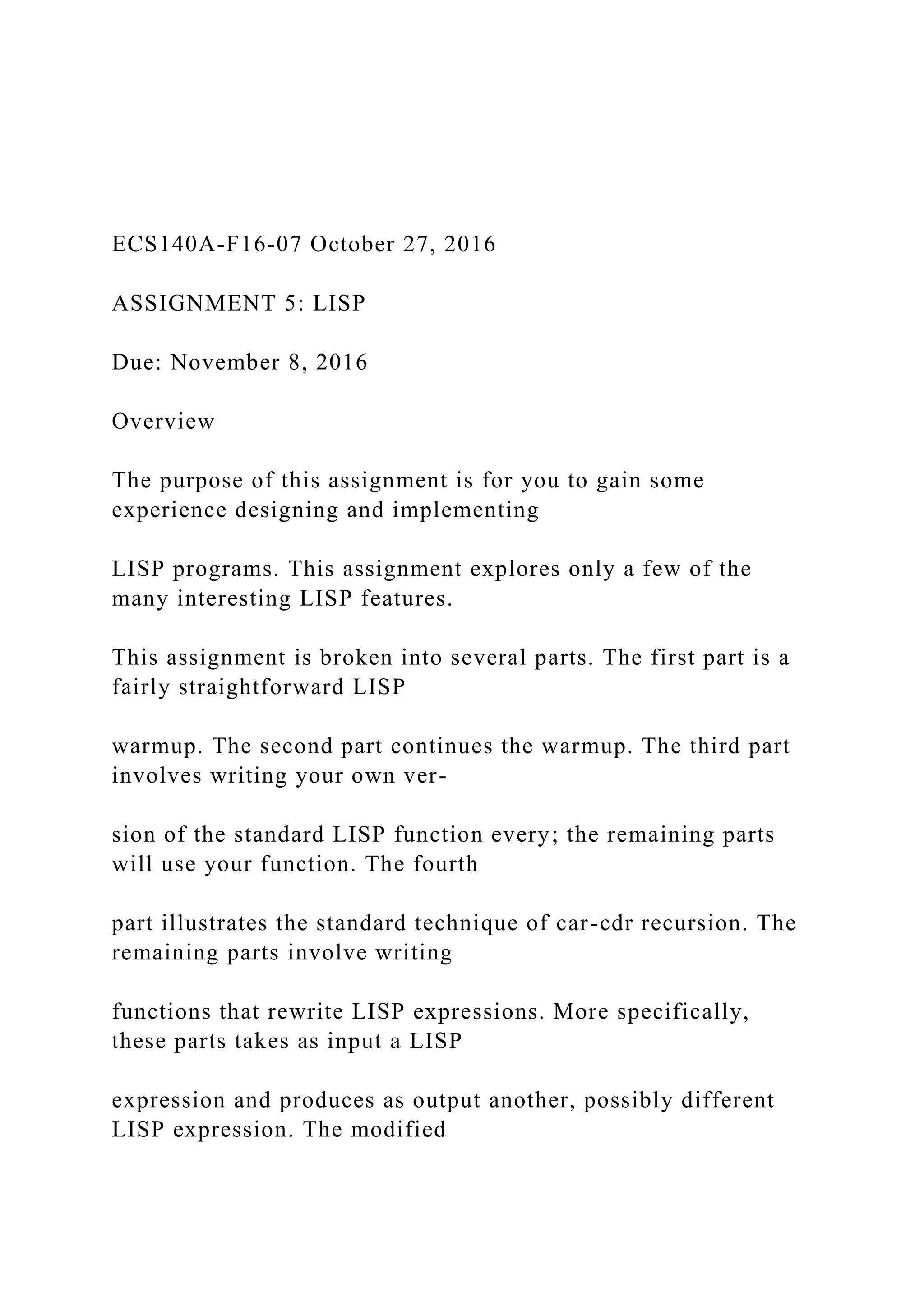
Overview
The purpose of this assignment is for you to gain some
experience designing and implementing
LISP programs. This assignment explores only a few of the
many interesting LISP features.
This assignment is broken into several parts. The first part is a
fairly straightforward LISP
warmup. The second part continues the warmup. The third part
involves writing your own ver-
sion of the standard LISP function every; the remaining parts
will use your function. The fourth
part illustrates the standard technique of car-cdr recursion. The
remaining parts involve writing
functions that rewrite LISP expressions. More specifically,
these parts takes as input a LISP
expression and produces as output another, possibly different
LISP expression. The modified
expression will be semantically equivalent to the original, but it
will use if’s rather than cond’s.
N.B., you are restricted as to which LISP functions you are
allowed to use for various parts of this
assignment. See “Notes” for details.
1
ECS140A-F16-07 October 27, 2016
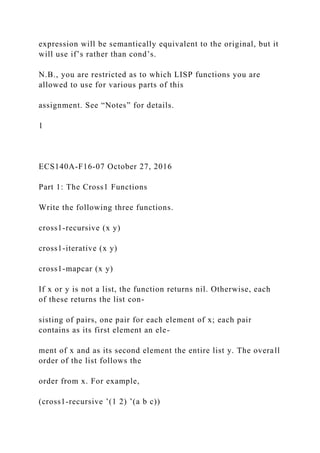
Part 1: The Cross1 Functions
Write the following three functions.
cross1-recursive (x y)
cross1-iterative (x y)
cross1-mapcar (x y)
If x or y is not a list, the function returns nil. Otherwise, each
of these returns the list con-
sisting of pairs, one pair for each element of x; each pair
contains as its first element an ele-
ment of x and as its second element the entire list y. The overall
order of the list follows the
order from x. For example,
(cross1-recursive ’(1 2) ’(a b c))
returns
((1 (a b c)) (2 (a b c)))
cross1-recursive is to be written recursively, cross1-iterative is
to be written iteratively
using either ‘go’ or ‘do’, and cross1-mapcar is to be written
using ‘mapcar’.
Part 2: The Cross2 Functions
Write the following three functions.
cross2-recursive (x y)
cross2-iterative (x y)
cross2-mapcar (x y)
If x or y is not a list, the function returns nil. Otherwise, each
of these returns the usual
2-dimensional cross-product of x and y. The overall order of the
list follows the order from
x. For example,
(cross2-recursive ’(1 2) ’(a b c))
returns
((1 a) (1 b) (1 c) (2 a) (2 b) (2 c))
cross2-recursive is to be written recursively, cross2-iterative is
to be written iteratively
using either ‘go’ or ‘do’, and cross1-mapcar is to be written
using ‘mapcar’.
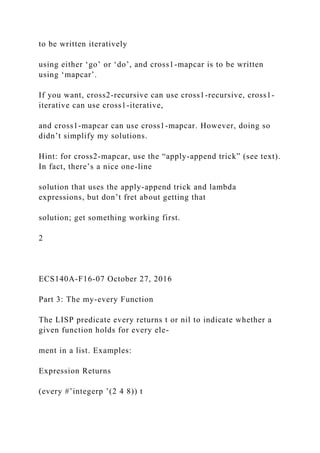
If you want, cross2-recursive can use cross1-recursive, cross1-
iterative can use cross1-iterative,
and cross1-mapcar can use cross1-mapcar. However, doing so
didn’t simplify my solutions.
Hint: for cross2-mapcar, use the “apply-append trick” (see text).
In fact, there’s a nice one-line
solution that uses the apply-append trick and lambda
expressions, but don’t fret about getting that
solution; get something working first.
2
ECS140A-F16-07 October 27, 2016
Part 3: The my-every Function
The LISP predicate every returns t or nil to indicate whether a
given function holds for every ele-
ment in a list. Examples:
Expression Returns
(every #’integerp ’(2 4 8)) t
(every #’integerp ’(2 nope 8)) nil
Evaluation of every stops early, and returns nil, if it finds an
element for which the given function
evaluates to nil.
Write your own version of every
my-every (fun q)
it behaves exactly as every using fun with argument list q.
Assume that my-every is invoked
with only one argument list and that fun can be evaluated on
one argument. You’ll need to
use funcall. Write my-every recursively. Use no iteration or
mapping functions!
Just FYI, LISP’s every also allows functions with multiple
arguments (just as mapcar does).
Examples:
Expression Returns
(every #’> ’(1 2 3) ’(0 0 2)) t
(every #’> ’(1 2 3) ’(0 4 2)) nil
That’s beyond the scope of my-every.
3
ECS140A-F16-07 October 27, 2016
Part 4: The flatp Function
1
A “flat” list is a list that contains no nested lists.
Write the function
flatp (x)
it returns t if x is flat and nil if x isn’t flat. Assume x is a list.
Examples:
list flatp lenLFL (explained in Part 5)
() t 0
(()) nil 0
(1 2 3) t 3
(1 (2) 3) nil 1
(1 () 3) nil 0
((1 2 3 4)) nil 4
(1 2 (1 (2 3 4) 5 6 7 8)) nil 3
Hint: use my-every.
Part 5: The lenLFL Function
Write the function
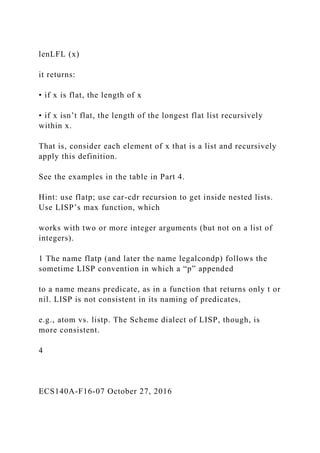
lenLFL (x)
it returns:
• if x is flat, the length of x
• if x isn’t flat, the length of the longest flat list recursively
within x.
That is, consider each element of x that is a list and recursively
apply this definition.
See the examples in the table in Part 4.
Hint: use flatp; use car-cdr recursion to get inside nested lists.
Use LISP’s max function, which
works with two or more integer arguments (but not on a list of
integers).
1 The name flatp (and later the name legalcondp) follows the
sometime LISP convention in which a “p” appended
to a name means predicate, as in a function that returns only t or
nil. LISP is not consistent in its naming of predicates,
e.g., atom vs. listp. The Scheme dialect of LISP, though, is
more consistent.
4
ECS140A-F16-07 October 27, 2016
Part 6: The legalcondp Function
This part considers what constitutes a “legal” cond. Our
definition will be simpler than (and a
subset of) what LISP allows. A legal cond has the form
(cond a
1
a
2
... a
N
)
• N must be ≥ 1. Terminology:
• arm — an a
i
• Each arm a
i
is a list with 1 or 2 elements. (LISP allows any non-empty list;
we don’t.)
Terminology:
• conditional — a
i
’s first element
• body — a
i
’s second element
Thus, an arm consists of a conditional and, optionally, a body.
Write the function
legalcondp (x)
it returns t if all cond expressions that the s-expr x contains are
legal; or it returns nil if x
contains any illegal cond expression.
Examples:
s-expr legalcondp reason
(cond) nil too few arms
(cond ()) nil arm has no conditional
(cond 3) nil arm isn’t a list
(cond (3)) t
(cond (3) (4 5) 6) nil last arm isn’t a list
(cond (3) (4 5) (6)) t
3 t no cond, so it’s fine
(alpha beta (gamma)) t
(foo bar (cond (3) (4 5) (6))) t
(foo (cond (3) (4 5) (6 (cond (3 2))))) t
(foo (cond (3) (4 5) (6 (cond ())))) nil nested cond missing
conditional
Hint: use car-cdr recursion to get inside nested lists.
5
ECS140A-F16-07 October 27, 2016
Part 7: The Rewrite Function
Write the function
re write (x)
x is an s-expr. If x is not a “legal” cond, re write returns nil.
Otherwise, re write returns an
expression in which each cond has been replaced by an
equivalent sequence of nested if-
then.
Examples:
Expression Returns
(rewrite ’(* 44 2)) (* 44 2)
(rewrite ’(cond (3 4) (t 5))) (if 3 4 (if t 5))
(rewrite ’(cond ((= 3 3) 11) (t 15))) (if (= 3 3) 11 (if t 15))
(rewrite ’(cond ((= 3 4) 11) ((= 5 6) 12) (t 17))) (if (= 3 4) 11
(if (= 5 6) 12 (if t 17)))
(rewrite ’(list (cond ((= 8 8) ’y)) (cond ((= 8 7) ’no)))) (list (if
(= 8 8) ’y) (if (= 8 7) ’no))
Note that each cond is rewritten to use only a sequence of
nested if-then expressions. (They do
not use any if-then-else expressions; that’s for Part 9.)
Reminders about evaluating a cond:
• If no conditional is found true, cond returns nil.
• If an arm’s conditional evaluates to true and the arm’s body is
empty, the arm returns the
value of the arm’s conditional. We’ll assume that the arm’s
conditional has no side effects,
so that the same expression can be replicated as the “then” for
the if (since an if requires a
“then” part).
• Recall that LISP allows a body of a cond’s arm to contain
multiple s-expr. Each would be
executed and the value of the last s-expr is what’s returned.
Having multiple s-expressions
is useful only if the non-last s-expressions have side effects.
This HW, as noted previ-
ously, allows only one s-expression at most in each arm’s body.
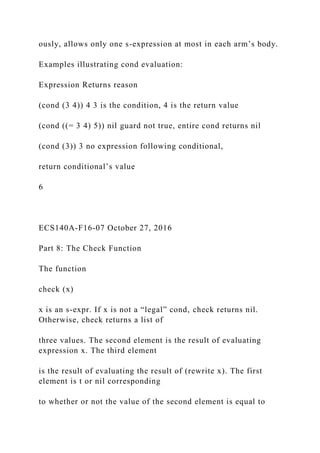
Examples illustrating cond evaluation:
Expression Returns reason
(cond (3 4)) 4 3 is the condition, 4 is the return value
(cond ((= 3 4) 5)) nil guard not true, entire cond returns nil
(cond (3)) 3 no expression following conditional,
return conditional’s value
6
ECS140A-F16-07 October 27, 2016
Part 8: The Check Function
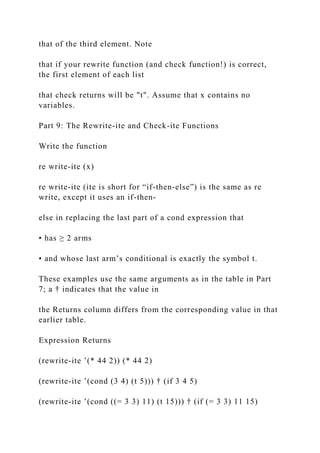
The function
check (x)
x is an s-expr. If x is not a “legal” cond, check returns nil.
Otherwise, check returns a list of
three values. The second element is the result of evaluating
expression x. The third element
is the result of evaluating the result of (rewrite x). The first
element is t or nil corresponding
to whether or not the value of the second element is equal to
that of the third element. Note
that if your rewrite function (and check function!) is correct,
the first element of each list
that check returns will be "t". Assume that x contains no
variables.
Part 9: The Rewrite-ite and Check-ite Functions
Write the function
re write-ite (x)
re write-ite (ite is short for “if-then-else”) is the same as re
write, except it uses an if-then-
else in replacing the last part of a cond expression that
• has ≥ 2 arms
• and whose last arm’s conditional is exactly the symbol t.
These examples use the same arguments as in the table in Part
7; a † indicates that the value in
the Returns column differs from the corresponding value in that
earlier table.
Expression Returns
(rewrite-ite ’(* 44 2)) (* 44 2)
(rewrite-ite ’(cond (3 4) (t 5))) † (if 3 4 5)
(rewrite-ite ’(cond ((= 3 3) 11) (t 15))) † (if (= 3 3) 11 15)
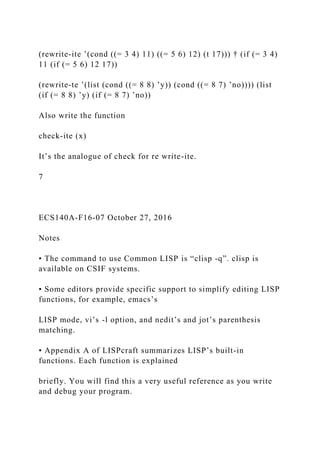
(rewrite-ite ’(cond ((= 3 4) 11) ((= 5 6) 12) (t 17))) † (if (= 3 4)
11 (if (= 5 6) 12 17))
(rewrite-te ’(list (cond ((= 8 8) ’y)) (cond ((= 8 7) ’no)))) (list
(if (= 8 8) ’y) (if (= 8 7) ’no))
Also write the function
check-ite (x)
It’s the analogue of check for re write-ite.
7
ECS140A-F16-07 October 27, 2016
Notes
• The command to use Common LISP is “clisp -q”. clisp is
available on CSIF systems.
• Some editors provide specific support to simplify editing LISP
functions, for example, emacs’s
LISP mode, vi’s -l option, and nedit’s and jot’s parenthesis
matching.
• Appendix A of LISPcraft summarizes LISP’s built-in
functions. Each function is explained
briefly. You will find this a very useful reference as you write
and debug your program.
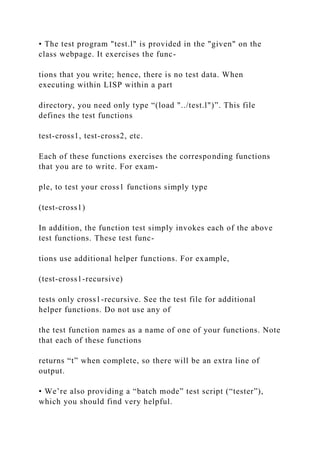
• The test program "test.l" is provided in the "given" on the
class webpage. It exercises the func-
tions that you write; hence, there is no test data. When
executing within LISP within a part
directory, you need only type “(load "../test.l")”. This file
defines the test functions
test-cross1, test-cross2, etc.
Each of these functions exercises the corresponding functions
that you are to write. For exam-
ple, to test your cross1 functions simply type
(test-cross1)
In addition, the function test simply invokes each of the above
test functions. These test func-
tions use additional helper functions. For example,
(test-cross1-recursive)
tests only cross1-recursive. See the test file for additional
helper functions. Do not use any of
the test function names as a name of one of your functions. Note
that each of these functions
returns “t” when complete, so there will be an extra line of
output.
• We’re also providing a “batch mode” test script (“tester”),
which you should find very helpful.
• “Correct” output will also be given. Your output must match
the “correct” output. By “match”,
we mean match exactly character by character, including blanks,
on each line; also, do not add
or omit any blank lines. (For this program, since LISP is doing
all the output, that shouldn’t be
hard.)
Be sure to read and follow relevant comments in the test
program
test.l.
In any case, it is up to you to verify the correctness of your
output.
• You may define additional helper functions that your main
functions use. Be sure, though, to
name the main functions as specified since the test program
uses those names.
• Coding restrictions.
See the LISP functions webpage under HW5 on the webpage. As
noted there, use only PURE
functions for all functions you write, except:
cross1-iterative, cross2-iterative: PURE, BASICITERATIVE,
prog, return, setq
cross1-mapcar, cross2-mapcar: PURE, MAPPING
(OK, I’ll be explicit: Don’t even think about using
INDEFINITES for my-every!)
Use no global variables.
8
ECS140A-F16-07 October 27, 2016
• To define your own initial LISP environment, place an init.lsp
file in the directory in which you
execute clisp and run clisp via “clisp -q -i init.lsp”. For
example, you will probably want to put
the command
(setq *print-case* :downcase)
in that file.
• When developing your program, you might find it easier to
test your functions first interactively
before using the test program. You might also find trace feature
(LISPcraft section 11.5) or
print functions (including the format function) useful in
debugging your functions.
• Your code’s execution on CSIF must not be grossly
inefficient: your code must complete all the
provided tests in at most 10 seconds (which is very generous).
If your code is taking longer,
then you are likely doing much needless recomputing. Using
“let” expressions will likely help
you solve that problem.
• Grading will be divided as follows.
Percentage Function(s)
10 Part 1: The Cross1 Functions
15 Part 2: The Cross2 Functions
10 Part 3: The my-every Function
10 Part 4: The flatp Function
15 Part 5: The lenLFL Function
15 Part 6: The legalcondp Function
15 Part 7: The Rewrite Function
5 Part 8: The Check Function
5 Part 9: The Rewrite-ite and Check-ite Functions
• A few points to help the novice LISP programmer:
• Watch your use of “(”, “)”, “"”, and “’”. Be sure to quote
things that need to be quoted,
e.g., the name of the file in load.
• To see how LISP reads in your function, use pretty printing.
For example, (pprint (sym-
bol-function ‘foo)) will print out the definition of function foo,
using indentation to show
nesting. This is useful to locate logically incorrect nesting due
to, e.g., wrong parenthesiz-
ing.
• If you cause an error, Common LISP places you into a mode in
which debugging can be
performed (LISPcraft section 11.2). To exit any lev el, except
the top level, type “:q”. To
exit the top level, type “ˆD”. See the class handout for an
example.
• See the webpage for exact details of what to turn in, the
provided source files, etc. As usual,
you must develop this program in “part order”: No credit will be
given for one part if the previ-
ous part is not entirely working.
9
Assignment 5 is designed to introduce you to LISP.
Some information to help you understand the Given:
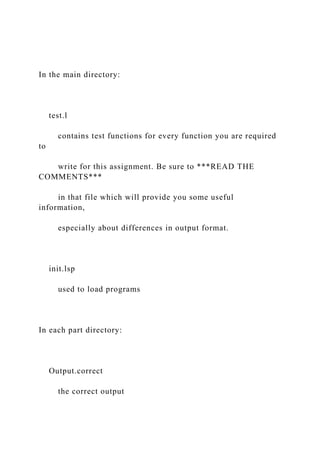
In the main directory:
test.l
contains test functions for every function you are required
to
write for this assignment. Be sure to ***READ THE
COMMENTS***
in that file which will provide you some useful
information,
especially about differences in output format.
init.lsp
used to load programs
In each part directory:
Output.correct
the correct output
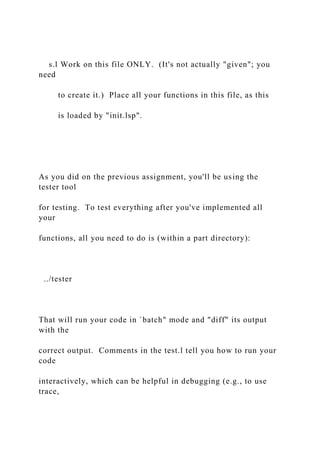
s.l Work on this file ONLY. (It's not actually "given"; you
need
to create it.) Place all your functions in this file, as this
is loaded by "init.lsp".
As you did on the previous assignment, you'll be using the
tester tool
for testing. To test everything after you've implemented all
your
functions, all you need to do is (within a part directory):
../tester
That will run your code in `batch" mode and "diff" its output
with the
correct output. Comments in the test.l tell you how to run your
code
interactively, which can be helpful in debugging (e.g., to use
trace,
etc.).
When you're done with one part, copy s.l to the next part and
start
work there.
To test all parts, within the main directory, just use:
./tester

ECS140A-F16-07 October 27, 2016ASSIGNMENT 5 LISPDue .docx

  • 1.
    ECS140A-F16-07 October 27,2016 ASSIGNMENT 5: LISP Due: November 8, 2016 Overview The purpose of this assignment is for you to gain some experience designing and implementing LISP programs. This assignment explores only a few of the many interesting LISP features. This assignment is broken into several parts. The first part is a fairly straightforward LISP warmup. The second part continues the warmup. The third part involves writing your own ver- sion of the standard LISP function every; the remaining parts will use your function. The fourth part illustrates the standard technique of car-cdr recursion. The remaining parts involve writing functions that rewrite LISP expressions. More specifically, these parts takes as input a LISP expression and produces as output another, possibly different LISP expression. The modified
  • 2.
    expression will besemantically equivalent to the original, but it will use if’s rather than cond’s. N.B., you are restricted as to which LISP functions you are allowed to use for various parts of this assignment. See “Notes” for details. 1 ECS140A-F16-07 October 27, 2016 Part 1: The Cross1 Functions Write the following three functions. cross1-recursive (x y) cross1-iterative (x y) cross1-mapcar (x y) If x or y is not a list, the function returns nil. Otherwise, each of these returns the list con- sisting of pairs, one pair for each element of x; each pair contains as its first element an ele- ment of x and as its second element the entire list y. The overall order of the list follows the order from x. For example, (cross1-recursive ’(1 2) ’(a b c))
  • 3.
    returns ((1 (a bc)) (2 (a b c))) cross1-recursive is to be written recursively, cross1-iterative is to be written iteratively using either ‘go’ or ‘do’, and cross1-mapcar is to be written using ‘mapcar’. Part 2: The Cross2 Functions Write the following three functions. cross2-recursive (x y) cross2-iterative (x y) cross2-mapcar (x y) If x or y is not a list, the function returns nil. Otherwise, each of these returns the usual 2-dimensional cross-product of x and y. The overall order of the list follows the order from x. For example, (cross2-recursive ’(1 2) ’(a b c)) returns ((1 a) (1 b) (1 c) (2 a) (2 b) (2 c)) cross2-recursive is to be written recursively, cross2-iterative is
  • 4.
    to be writteniteratively using either ‘go’ or ‘do’, and cross1-mapcar is to be written using ‘mapcar’. If you want, cross2-recursive can use cross1-recursive, cross1- iterative can use cross1-iterative, and cross1-mapcar can use cross1-mapcar. However, doing so didn’t simplify my solutions. Hint: for cross2-mapcar, use the “apply-append trick” (see text). In fact, there’s a nice one-line solution that uses the apply-append trick and lambda expressions, but don’t fret about getting that solution; get something working first. 2 ECS140A-F16-07 October 27, 2016 Part 3: The my-every Function The LISP predicate every returns t or nil to indicate whether a given function holds for every ele- ment in a list. Examples: Expression Returns (every #’integerp ’(2 4 8)) t
  • 5.
    (every #’integerp ’(2nope 8)) nil Evaluation of every stops early, and returns nil, if it finds an element for which the given function evaluates to nil. Write your own version of every my-every (fun q) it behaves exactly as every using fun with argument list q. Assume that my-every is invoked with only one argument list and that fun can be evaluated on one argument. You’ll need to use funcall. Write my-every recursively. Use no iteration or mapping functions! Just FYI, LISP’s every also allows functions with multiple arguments (just as mapcar does). Examples: Expression Returns (every #’> ’(1 2 3) ’(0 0 2)) t (every #’> ’(1 2 3) ’(0 4 2)) nil That’s beyond the scope of my-every. 3
  • 6.
    ECS140A-F16-07 October 27,2016 Part 4: The flatp Function 1 A “flat” list is a list that contains no nested lists. Write the function flatp (x) it returns t if x is flat and nil if x isn’t flat. Assume x is a list. Examples: list flatp lenLFL (explained in Part 5) () t 0 (()) nil 0 (1 2 3) t 3 (1 (2) 3) nil 1 (1 () 3) nil 0 ((1 2 3 4)) nil 4 (1 2 (1 (2 3 4) 5 6 7 8)) nil 3 Hint: use my-every. Part 5: The lenLFL Function Write the function
  • 7.
    lenLFL (x) it returns: •if x is flat, the length of x • if x isn’t flat, the length of the longest flat list recursively within x. That is, consider each element of x that is a list and recursively apply this definition. See the examples in the table in Part 4. Hint: use flatp; use car-cdr recursion to get inside nested lists. Use LISP’s max function, which works with two or more integer arguments (but not on a list of integers). 1 The name flatp (and later the name legalcondp) follows the sometime LISP convention in which a “p” appended to a name means predicate, as in a function that returns only t or nil. LISP is not consistent in its naming of predicates, e.g., atom vs. listp. The Scheme dialect of LISP, though, is more consistent. 4 ECS140A-F16-07 October 27, 2016
  • 8.
    Part 6: Thelegalcondp Function This part considers what constitutes a “legal” cond. Our definition will be simpler than (and a subset of) what LISP allows. A legal cond has the form (cond a 1 a 2 ... a N ) • N must be ≥ 1. Terminology: • arm — an a i • Each arm a i is a list with 1 or 2 elements. (LISP allows any non-empty list; we don’t.) Terminology: • conditional — a i ’s first element • body — a
  • 9.
    i ’s second element Thus,an arm consists of a conditional and, optionally, a body. Write the function legalcondp (x) it returns t if all cond expressions that the s-expr x contains are legal; or it returns nil if x contains any illegal cond expression. Examples: s-expr legalcondp reason (cond) nil too few arms (cond ()) nil arm has no conditional (cond 3) nil arm isn’t a list (cond (3)) t (cond (3) (4 5) 6) nil last arm isn’t a list (cond (3) (4 5) (6)) t 3 t no cond, so it’s fine (alpha beta (gamma)) t (foo bar (cond (3) (4 5) (6))) t
  • 10.
    (foo (cond (3)(4 5) (6 (cond (3 2))))) t (foo (cond (3) (4 5) (6 (cond ())))) nil nested cond missing conditional Hint: use car-cdr recursion to get inside nested lists. 5 ECS140A-F16-07 October 27, 2016 Part 7: The Rewrite Function Write the function re write (x) x is an s-expr. If x is not a “legal” cond, re write returns nil. Otherwise, re write returns an expression in which each cond has been replaced by an equivalent sequence of nested if- then. Examples: Expression Returns (rewrite ’(* 44 2)) (* 44 2) (rewrite ’(cond (3 4) (t 5))) (if 3 4 (if t 5)) (rewrite ’(cond ((= 3 3) 11) (t 15))) (if (= 3 3) 11 (if t 15))
  • 11.
    (rewrite ’(cond ((=3 4) 11) ((= 5 6) 12) (t 17))) (if (= 3 4) 11 (if (= 5 6) 12 (if t 17))) (rewrite ’(list (cond ((= 8 8) ’y)) (cond ((= 8 7) ’no)))) (list (if (= 8 8) ’y) (if (= 8 7) ’no)) Note that each cond is rewritten to use only a sequence of nested if-then expressions. (They do not use any if-then-else expressions; that’s for Part 9.) Reminders about evaluating a cond: • If no conditional is found true, cond returns nil. • If an arm’s conditional evaluates to true and the arm’s body is empty, the arm returns the value of the arm’s conditional. We’ll assume that the arm’s conditional has no side effects, so that the same expression can be replicated as the “then” for the if (since an if requires a “then” part). • Recall that LISP allows a body of a cond’s arm to contain multiple s-expr. Each would be executed and the value of the last s-expr is what’s returned. Having multiple s-expressions is useful only if the non-last s-expressions have side effects. This HW, as noted previ-
  • 12.
    ously, allows onlyone s-expression at most in each arm’s body. Examples illustrating cond evaluation: Expression Returns reason (cond (3 4)) 4 3 is the condition, 4 is the return value (cond ((= 3 4) 5)) nil guard not true, entire cond returns nil (cond (3)) 3 no expression following conditional, return conditional’s value 6 ECS140A-F16-07 October 27, 2016 Part 8: The Check Function The function check (x) x is an s-expr. If x is not a “legal” cond, check returns nil. Otherwise, check returns a list of three values. The second element is the result of evaluating expression x. The third element is the result of evaluating the result of (rewrite x). The first element is t or nil corresponding to whether or not the value of the second element is equal to
  • 13.
    that of thethird element. Note that if your rewrite function (and check function!) is correct, the first element of each list that check returns will be "t". Assume that x contains no variables. Part 9: The Rewrite-ite and Check-ite Functions Write the function re write-ite (x) re write-ite (ite is short for “if-then-else”) is the same as re write, except it uses an if-then- else in replacing the last part of a cond expression that • has ≥ 2 arms • and whose last arm’s conditional is exactly the symbol t. These examples use the same arguments as in the table in Part 7; a † indicates that the value in the Returns column differs from the corresponding value in that earlier table. Expression Returns (rewrite-ite ’(* 44 2)) (* 44 2) (rewrite-ite ’(cond (3 4) (t 5))) † (if 3 4 5) (rewrite-ite ’(cond ((= 3 3) 11) (t 15))) † (if (= 3 3) 11 15)
  • 14.
    (rewrite-ite ’(cond ((=3 4) 11) ((= 5 6) 12) (t 17))) † (if (= 3 4) 11 (if (= 5 6) 12 17)) (rewrite-te ’(list (cond ((= 8 8) ’y)) (cond ((= 8 7) ’no)))) (list (if (= 8 8) ’y) (if (= 8 7) ’no)) Also write the function check-ite (x) It’s the analogue of check for re write-ite. 7 ECS140A-F16-07 October 27, 2016 Notes • The command to use Common LISP is “clisp -q”. clisp is available on CSIF systems. • Some editors provide specific support to simplify editing LISP functions, for example, emacs’s LISP mode, vi’s -l option, and nedit’s and jot’s parenthesis matching. • Appendix A of LISPcraft summarizes LISP’s built-in functions. Each function is explained briefly. You will find this a very useful reference as you write and debug your program.
  • 15.
    • The testprogram "test.l" is provided in the "given" on the class webpage. It exercises the func- tions that you write; hence, there is no test data. When executing within LISP within a part directory, you need only type “(load "../test.l")”. This file defines the test functions test-cross1, test-cross2, etc. Each of these functions exercises the corresponding functions that you are to write. For exam- ple, to test your cross1 functions simply type (test-cross1) In addition, the function test simply invokes each of the above test functions. These test func- tions use additional helper functions. For example, (test-cross1-recursive) tests only cross1-recursive. See the test file for additional helper functions. Do not use any of the test function names as a name of one of your functions. Note that each of these functions returns “t” when complete, so there will be an extra line of output. • We’re also providing a “batch mode” test script (“tester”), which you should find very helpful.
  • 16.
    • “Correct” outputwill also be given. Your output must match the “correct” output. By “match”, we mean match exactly character by character, including blanks, on each line; also, do not add or omit any blank lines. (For this program, since LISP is doing all the output, that shouldn’t be hard.) Be sure to read and follow relevant comments in the test program test.l. In any case, it is up to you to verify the correctness of your output. • You may define additional helper functions that your main functions use. Be sure, though, to name the main functions as specified since the test program uses those names. • Coding restrictions. See the LISP functions webpage under HW5 on the webpage. As noted there, use only PURE functions for all functions you write, except: cross1-iterative, cross2-iterative: PURE, BASICITERATIVE, prog, return, setq cross1-mapcar, cross2-mapcar: PURE, MAPPING
  • 17.
    (OK, I’ll beexplicit: Don’t even think about using INDEFINITES for my-every!) Use no global variables. 8 ECS140A-F16-07 October 27, 2016 • To define your own initial LISP environment, place an init.lsp file in the directory in which you execute clisp and run clisp via “clisp -q -i init.lsp”. For example, you will probably want to put the command (setq *print-case* :downcase) in that file. • When developing your program, you might find it easier to test your functions first interactively before using the test program. You might also find trace feature (LISPcraft section 11.5) or print functions (including the format function) useful in debugging your functions. • Your code’s execution on CSIF must not be grossly inefficient: your code must complete all the provided tests in at most 10 seconds (which is very generous).
  • 18.
    If your codeis taking longer, then you are likely doing much needless recomputing. Using “let” expressions will likely help you solve that problem. • Grading will be divided as follows. Percentage Function(s) 10 Part 1: The Cross1 Functions 15 Part 2: The Cross2 Functions 10 Part 3: The my-every Function 10 Part 4: The flatp Function 15 Part 5: The lenLFL Function 15 Part 6: The legalcondp Function 15 Part 7: The Rewrite Function 5 Part 8: The Check Function 5 Part 9: The Rewrite-ite and Check-ite Functions • A few points to help the novice LISP programmer: • Watch your use of “(”, “)”, “"”, and “’”. Be sure to quote things that need to be quoted, e.g., the name of the file in load.
  • 19.
    • To seehow LISP reads in your function, use pretty printing. For example, (pprint (sym- bol-function ‘foo)) will print out the definition of function foo, using indentation to show nesting. This is useful to locate logically incorrect nesting due to, e.g., wrong parenthesiz- ing. • If you cause an error, Common LISP places you into a mode in which debugging can be performed (LISPcraft section 11.2). To exit any lev el, except the top level, type “:q”. To exit the top level, type “ˆD”. See the class handout for an example. • See the webpage for exact details of what to turn in, the provided source files, etc. As usual, you must develop this program in “part order”: No credit will be given for one part if the previ- ous part is not entirely working. 9 Assignment 5 is designed to introduce you to LISP. Some information to help you understand the Given:
  • 20.
    In the maindirectory: test.l contains test functions for every function you are required to write for this assignment. Be sure to ***READ THE COMMENTS*** in that file which will provide you some useful information, especially about differences in output format. init.lsp used to load programs In each part directory: Output.correct the correct output
  • 21.
    s.l Work onthis file ONLY. (It's not actually "given"; you need to create it.) Place all your functions in this file, as this is loaded by "init.lsp". As you did on the previous assignment, you'll be using the tester tool for testing. To test everything after you've implemented all your functions, all you need to do is (within a part directory): ../tester That will run your code in `batch" mode and "diff" its output with the correct output. Comments in the test.l tell you how to run your code interactively, which can be helpful in debugging (e.g., to use trace,
  • 22.
    etc.). When you're donewith one part, copy s.l to the next part and start work there. To test all parts, within the main directory, just use: ./tester