Recommended
PPTX
올챙이(Tadpole for DB Tools)로 살펴보는 Eclipse RAP
PPTX
Eclipse RAP - Single Source
PPTX
PPTX
PPTX
PPTX
PPTX
PPTX
PPTX
PDF
2018 03-05-robot framework
PDF
XECON2014 Laravel 프레임워크 소개
PDF
PDF
PDF
Jenkins를 활용한 Openshift CI/CD 구성
PDF
PDF
PDF
PDF
PDF
PDF
[H3 2012] Bridge over troubled water : make plug-in for Appspresso
PDF
141 deview 2013 발표자료(박준형) v1.1(track4-session1)
PPTX
PDF
Laravel 로 배우는 서버사이드 #1
PDF
실무에서 라라벨 테스트를 작성하다 알게 된 것
PDF
PPTX
xecon-phpfest2014composer
PDF
개발자가 인프라를 만났을때 - RHQ를 활용한 Legacy System 모니터링
PDF
DOC
Cacdangbai cau tao nguyen tu
PPTX
C2 Information Technology Advisors
More Related Content
PPTX
올챙이(Tadpole for DB Tools)로 살펴보는 Eclipse RAP
PPTX
Eclipse RAP - Single Source
PPTX
PPTX
PPTX
PPTX
PPTX
PPTX
What's hot
PPTX
PDF
2018 03-05-robot framework
PDF
XECON2014 Laravel 프레임워크 소개
PDF
PDF
PDF
Jenkins를 활용한 Openshift CI/CD 구성
PDF
PDF
PDF
PDF
PDF
PDF
[H3 2012] Bridge over troubled water : make plug-in for Appspresso
PDF
141 deview 2013 발표자료(박준형) v1.1(track4-session1)
PPTX
PDF
Laravel 로 배우는 서버사이드 #1
PDF
실무에서 라라벨 테스트를 작성하다 알게 된 것
PDF
PPTX
xecon-phpfest2014composer
PDF
개발자가 인프라를 만났을때 - RHQ를 활용한 Legacy System 모니터링
PDF
Viewers also liked
DOC
Cacdangbai cau tao nguyen tu
PPTX
C2 Information Technology Advisors
PPT
PPTX
Nc state presentationslideshare
PDF
Mike Watkins Design - Portfolio Sample
PDF
PDF
PPTX
PPTX
Den attraktiva gymnasieskolan
PPT
Creating A Facebook Fan Page
PPTX
PPTX
PPTX
PPTX
올챙이 확장으로 살펴보는 이클립스 확장
PDF
PDF
PDF
PPT
OLLI mediarepresentation 24th
PPTX
PPTX
Similar to Eclipse RAP
PPTX
PDF
PDF
spring.io를 통해 배우는 spring 개발사례
PDF
웹 Front-End 실무 이야기
PPTX
개발자 지향 WAS : IBM WebSphere Liberty Server
PDF
WAS의 동작과 WEB, Servlet, JSP_Wh apm
PDF
More from cho hyun jong
PPTX
평범한 개발자 오픈소스로 먹고살기 2
PPTX
테드폴허브(올챙이) PostgreSQL 디비 확장하기
PPTX
평범한 개발자 오픈소스로 먹고살기 2
PPTX
자바가 디비와 사귀기 까지 벌어지는 일들
PDF
테드폴허브 오픈소스Vs엔터프라이즈
PPTX
PDF
PPTX
Tadpole db hub-monitoring
PPTX
오픈소스 프로젝트 올챙이
PPTX
PPTX
PPTX
PPTX
DOCX
PPTX
PPTX
PPTX
PPTX
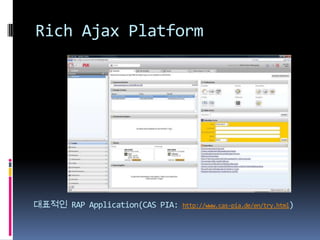
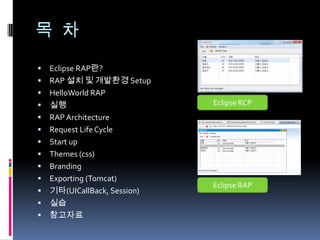
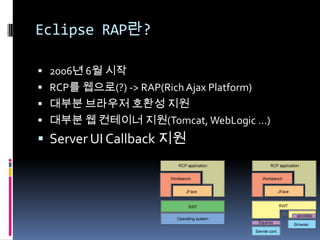
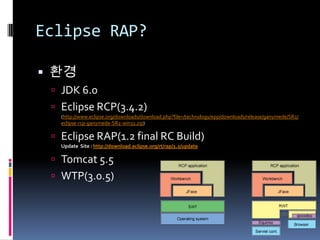
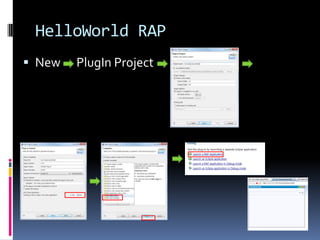
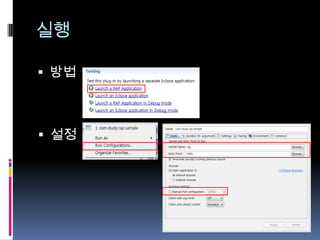
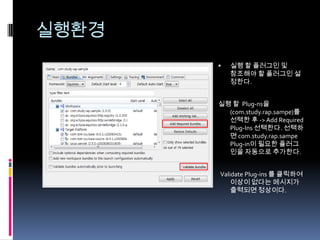
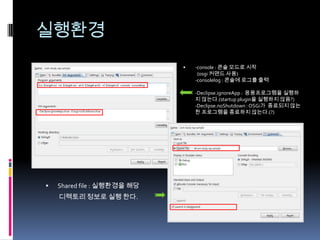
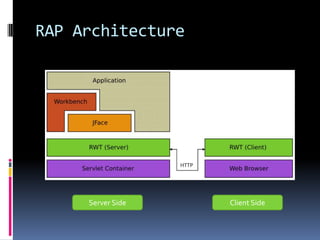
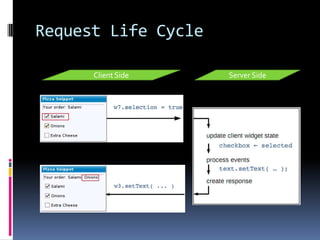
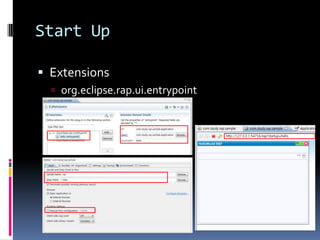
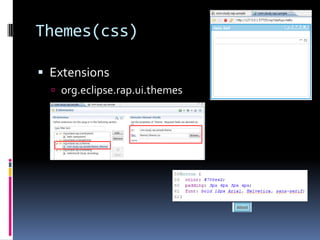
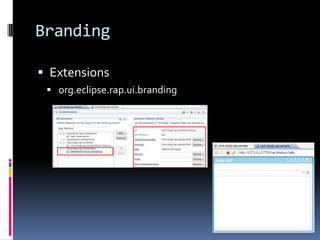
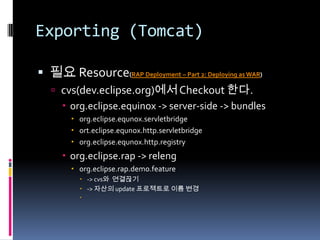
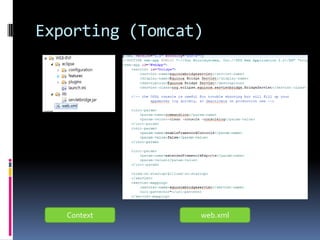
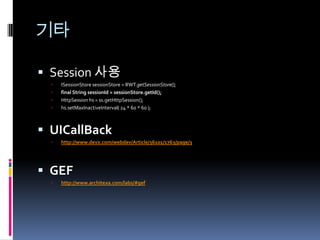
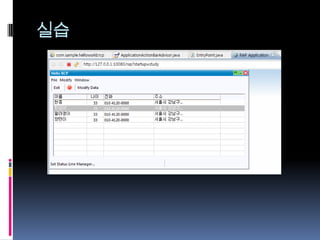
Eclipse RAP 1. 2. 3. 목 차Eclipse RAP란?RAP 설치 및 개발환경 SetupHelloWorld RAP실행RAP ArchitectureRequest Life CycleStart upThemes (css)BrandingExporting (Tomcat)기타(UICallBack, Session)실습참고자료Eclipse RCPEclipse RAP 4. Eclipse RAP란?2006년 6월 시작RCP를 웹으로(?) -> RAP(Rich Ajax Platform)대부분 브라우저 호환성 지원대부분 웹 컨테이너 지원(Tomcat, WebLogic …)Server UI Callback 지원 5. Eclipse RAP?환경JDK 6.0Eclipse RCP(3.4.2)(http://www.eclipse.org/downloads/download.php?file=/technology/epp/downloads/release/ganymede/SR2/eclipse-rcp-ganymede-SR2-win32.zip)Eclipse RAP(1.2 final RC Build)Update Site : http://download.eclipse.org/rt/rap/1.2/updateTomcat 5.5WTP(3.0.5) 6. 7. 실행방법설정실행환경실행 할 플러그인 및 참조해야 할 플러그인 설정한다.실행 할 Plug-ns을(com.study.rap.sampe)를 선택한 후 -> Add Required Plug-Ins 선택한다. 선택하면 com.study.rap.sampePlug-in이 필요한 플러그인을자동으로 추가한다. Validate Plug-ins 를 클릭하여 이상이 없다는 메시지가 출력되면 정상이다. 8. 실행환경-console : 콘솔 모드로 시작 (osgi 커맨드 사용)-consolelog : 콘솔에 로그를 출력-Declipse.ignoreApp : 응용프로그램을 실행하지 않는다.(startup plugin을 실행하지 않음?)-Declipse.noShutdown : OSGi가 종료되지 않는한 프로그램을 종료하지 않는다.(?)Shared file : 실행환경을 해당 디렉토리 정보로 실행 한다. 9. 10. 11. 12. 13. BrandingExtensionsorg.eclipse.rap.ui.brandingExporting (Tomcat)필요 Resource(RAP Deployment – Part 2: Deploying as WAR)cvs(dev.eclipse.org)에서 Checkout 한다.org.eclipse.equinox -> server-side -> bundlesorg.eclipse.equnox.servletbridgeort.eclipse.equnox.http.servletbridgeorg.eclipse.equnox.http.registryorg.eclipse.rap -> relengorg.eclipse.rap.demo.feature-> cvs와 연결끊기-> 자산의 update 프로젝트로 이름 변경 14. 15. 기타Session 사용ISessionStore sessionStore = RWT.getSessionStore();final String sessionId = sessionStore.getId();HttpSession hs = ss.getHttpSession();hs.setMaxInactiveInterval( 24 * 60 * 60 ); UICallBackhttp://www.devx.com/webdev/Article/36101/1763/page/3 GEFhttp://www.architexa.com/labs/#gef 16. 17. 참고자료Eclipse RAP HomeUsing Eclipse Ganymede to develop for the desktop, Web and mobile devices, Part 2: Developing for the Rich Client Platform, the Ganymede wayRich Ajax Platform, Part 2: 애플리케이션 개발하기Eclipse Rich Ajax Platform (RAP) - Tutorial with Eclipse 3.5 (Galileo)Equnox in a Servlet ContainerRAP Deployment – Part 2: Deploying as WARSingle Sourcing RAP and RCP PPT한금이블로그RAP 부분RAP 개발환경(RAP Development Environment)RAP 시작, 톰켓의 환경RAP에서 CSS 사용하기



![[H3 2012] Bridge over troubled water : make plug-in for Appspresso](https://cdn.slidesharecdn.com/ss_thumbnails/d4-bridgeovertroubledwaternomovie-121105220008-phpapp02-thumbnail.jpg?width=640&height=640&fit=bounds)


