Eclipse Draw2D

ECLIPSE DRAW2D
                 조현종(v.05, 12/12/09)
                 http://cafe.naver.com/eclipseplugin
                 http://hangumkj.blogspot.com/
                 hangum@gmail.com
목 차
 Draw2D란?
 Draw2D 살펴보기
 실행 환경
 HelloWorld Draw2D
 Figures 종류
 Painting of Figures
 Layout
 Locator Anchors Routers
 실습
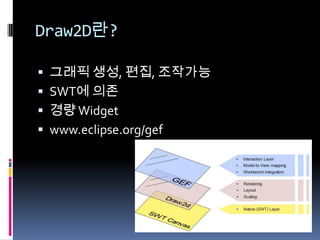
Draw2D란?

 그래픽 생성, 편집, 조작가능
 SWT에 의존
 경량 Widget
 www.eclipse.org/gef
Draw2D 살펴보기

 LightweightSystem?
   SWT Canvas와 Draw2D를 연결 .
   SWT Control 위에서 발생한 이벤트를 Draw2D이
    벤트로 변경
   SWT의 Display와 비슷한 역할을 함
Draw2D 살펴보기

 EventDispatcher?
   SWT Event to Draw2D router
 UpdateManager?
Draw2D 살펴보기

 Figure?
   Draw2D에서 표현 되어 지는 것.
   반드시 하나의 Root Figure가 존재해야함.
   부모 자식과의 관계가 가능 하며, 마우스 이벤트
    등의 이벤트 가능
   SWT의 Shell, Control, Composite등과 비슷함.


  Class는 org.eclipse.draw2d.IFigurer
실행환경

 Eclipse 4.2 SR1
 GEF SDK3.8.1 (update manager
  http://download.eclipse.org/tools/gef/updates/releases/)
HelloWorld Draw2D
                  .


ps) com.ibm.icu?? 추가하세요
Figure

 Figure?
   Draw2D에서 표현 되어 지는 것.
   반드시 하나의 Root Figure가 존재해야함.
   부모 자식과의 관계가 가능 하며, 마우스 이벤트
    등의 이벤트 가능
   SWT의 Shell, Control, Composite등과 비슷함.


  Class는 org.eclipse.draw2d.IFigurer
Figure – Common Figures

 Shapes – rectangle, triangles, ellipse
 Clickables – buttons, checkboxes
 Containers – Panel, ScrollPane
 Connections – figure간의 line
 Layered – figure 들을 layer
 Other – ImageFigure, Label등
Figures 종류?
Figure Border

   CompoundBorder
   FramBorder
   GroupBoxBorder
   LineBorder
   SimpleEtchedBorder
   SimpleLoweredBorder
   SimpleRaisedBorder

 TitleBarBorder
Figures Z-Order

 Figures들은 tree형식을 취합니다
  (Root Figure 존재)
 자식 Figure를 만들 수 있고, 부모와 자식 관
  계를 가집니다
 마지막에 그린 것이 제일위에 표시됩니다.
Event


Listener              Description
FocusListener         포커스를 얻거나 잃었을때
KeyListener
MouseListener         Mouse 클릭, 클릭 후, 버블클릭
MouseMotionListener   Mouse 가 움직일때
                      (mouse enter, mouse hover, mouse move)
Genealogy 예제

 Figure
   RectangleFigure
   PolygonShape
   PolylineConnection
     ChopboxAnchor
 Event
   MouseListener
   MouseMotionListener
Layout 종류
BorderLayout
               Canvas canvas = new Canvas(parent, SWT.NONE);
               LightweightSystem lws = new LightweightSystem(canvas);


               IFigure panel = new Figure();
               BorderLayout layout = new BorderLayout();
               panel.setLayoutManager(layout);


               Button btnLeft = new Button("Left Button");
               panel.setBorder(new LineBorder());
               panel.add(btnLeft, BorderLayout.LEFT);


               Button btnRight = new Button("right Button");
               panel.setBorder(new LineBorder());
               panel.add(btnRight, BorderLayout.RIGHT);


               Button btnTOP = new Button("TOP Button");
               panel.setBorder(new LineBorder());
               panel.add(btnTOP, BorderLayout.TOP);


               lws.setContents(panel);
FlowLayout
             Canvas canvas = new Canvas(parent,
                 SWT.NONE);
             LightweightSystem lws = new
                 LightweightSystem(canvas);

             IFigure panel = new Figure();

             FlowLayout layout = new FlowLayout();
             layout.setHorizontal(true);
             panel.setLayoutManager(layout);

             for (int i = 0; i < 10; i++) {
             panel.add(new Button("button" + i));
             }

             lws.setContents(panel);
XYLayout
           Canvas canvas = new
               Canvas(parent, SWT.NONE);
           LightweightSystem lws = new
               LightweightSystem(canvas);

           IFigure panel = new Figure();

           XYLayout layout = new XYLayout();
           panel.setLayoutManager(layout);

           Button btn = new Button("btn");
           Rectangle rect = new Rectangle(10, 10, 50, 50);
           panel.add(btn);
           panel.setConstraint(btn, rect);

           lws.setContents(panel);
ToolbarLayout
            Canvas canvas = new
                Canvas(parent, SWT.NONE);
            LightweightSystem lws = new
                LightweightSystem(canvas);

            IFigure panel = new Figure();

            ToolbarLayout layout = new ToolbarLayout();
            layout.setVertical(true);
            panel.setLayoutManager(layout);

            for (int i = 0; i < 10; i++) {
            panel.add(new Button("button" + i));
            }

            lws.setContents(panel);
ParagraphTextLayout
         private TextFlow makeTextFlow(String text) {
          TextFlow textFlow = new TextFlow();
          textFlow.setLayoutManager(new
         ParagraphTextLayout(textFlow,
          ParagraphTextLayout.WORD_WRAP_HARD));
          textFlow.setFont(this.getFont());
          textFlow.setText("rn"+text);

             return textFlow;
         }
Connections

 Anchors : Figure간의 선 연결
 Decorations : 선의 끝을 장식
 Routers : 선의 방향을 어떻게 할 것인지~
 Locator : 텍스트를 선의 어느 위치에 놓을
 것인지~
Anchors

 figure들 간에 선 연결
  ChopboxAnchor


  EllipseAnchor


  LabelAnchor


  XYAnchor
Decorations

 선의 끝 모양을 장식


 Default Decorations
   PolylineDecoration
   PolygonDecoration
   RotatableDecoration
Routers

 Router
   NullConnectionRouter


   BendpointConnectionRouter


   MantattanConnectionRouter
Router

 BendpointConnectionRouter
   AbsoluteBendpoint : 절대 좌표 리턴
     AbsoluteBendpoint(350, 10);
   RelativeBendpoint :
     RelativeBendpoint bp2 = new RelativeBendpoint(firstConnection);
     bp2.setRelativeDimensions(new Dimension(-50, 20), new
      Dimension(10, -40));
Connection Labels(Locator)
Locator


                     이 름                         종 류
          BendpointLocator            BendpointConnectionRoutter의
                                      텍스트
          ConnectionEndpointLocator   선의 양끝 텍스트
          MidpointLocator             선의 중앙 텍스트
          ConnectionLocator
          RelativeLocator
PolylineConnection ManhattanConnectionRouter
                           PolylineConnection connection = new PolylineConnection();
                           ..


                           // source label decoration
                           ConnectionEndpointLocator locator = new
                               ConnectionEndpointLocator (connection, false);
                           Label label = new Label("Source");
                           connection.add(label, locator);


                           // target label decoration
                           locator = new ConnectionEndpointLocator (connection, true);
                           label = new Label("Target");
                           connection.add(label, locator);


                           //
                           ManhattanConnectionRouter router = new
                               ManhattanConnectionRouter ();
                           connection.setConnectionRouter (router);


                           // rootFigure에 추가합니다.
                           rootFigure.add(connection);
실습
참고자료

 Addison Wesely The Eclipse Graphical Editing Framework
 Eclipse Help(http://help.eclipse.org/ganymede/index.jsp) – Draw2D
 Eclipse coon 2005 GEF in dept ppt
 SWT/Jface 인 액션(이선아/제갈호준/에이콘)
 http://www13.plala.or.jp/observe/draw2d/draw2d_overview.html
 Eclipse Plug-in & RCP café의 번역문
      http://eclipse-articles.springnote.com/pages/3666185
      http://eclipse-articles.springnote.com/pages/3683263
 http://eclipse.org/articles/Article-GEF-Draw2d/GEF-Draw2d.html
 Eclipse Development using the Graphical Editing Framework and the
   Eclipse Modeling Framework(IBM)

Draw2D

  • 1.
    Eclipse Draw2D ECLIPSE DRAW2D 조현종(v.05, 12/12/09) http://cafe.naver.com/eclipseplugin http://hangumkj.blogspot.com/ hangum@gmail.com
  • 2.
    목 차  Draw2D란? Draw2D 살펴보기  실행 환경  HelloWorld Draw2D  Figures 종류  Painting of Figures  Layout  Locator Anchors Routers  실습
  • 3.
    Draw2D란?  그래픽 생성,편집, 조작가능  SWT에 의존  경량 Widget  www.eclipse.org/gef
  • 4.
    Draw2D 살펴보기  LightweightSystem?  SWT Canvas와 Draw2D를 연결 .  SWT Control 위에서 발생한 이벤트를 Draw2D이 벤트로 변경  SWT의 Display와 비슷한 역할을 함
  • 5.
    Draw2D 살펴보기  EventDispatcher?  SWT Event to Draw2D router  UpdateManager?
  • 6.
    Draw2D 살펴보기  Figure?  Draw2D에서 표현 되어 지는 것.  반드시 하나의 Root Figure가 존재해야함.  부모 자식과의 관계가 가능 하며, 마우스 이벤트 등의 이벤트 가능  SWT의 Shell, Control, Composite등과 비슷함. Class는 org.eclipse.draw2d.IFigurer
  • 7.
    실행환경  Eclipse 4.2SR1  GEF SDK3.8.1 (update manager http://download.eclipse.org/tools/gef/updates/releases/)
  • 8.
    HelloWorld Draw2D . ps) com.ibm.icu?? 추가하세요
  • 9.
    Figure  Figure?  Draw2D에서 표현 되어 지는 것.  반드시 하나의 Root Figure가 존재해야함.  부모 자식과의 관계가 가능 하며, 마우스 이벤트 등의 이벤트 가능  SWT의 Shell, Control, Composite등과 비슷함. Class는 org.eclipse.draw2d.IFigurer
  • 10.
    Figure – CommonFigures  Shapes – rectangle, triangles, ellipse  Clickables – buttons, checkboxes  Containers – Panel, ScrollPane  Connections – figure간의 line  Layered – figure 들을 layer  Other – ImageFigure, Label등
  • 11.
  • 12.
    Figure Border  CompoundBorder  FramBorder  GroupBoxBorder  LineBorder  SimpleEtchedBorder  SimpleLoweredBorder  SimpleRaisedBorder  TitleBarBorder
  • 13.
    Figures Z-Order  Figures들은tree형식을 취합니다  (Root Figure 존재)  자식 Figure를 만들 수 있고, 부모와 자식 관 계를 가집니다  마지막에 그린 것이 제일위에 표시됩니다.
  • 14.
    Event Listener Description FocusListener 포커스를 얻거나 잃었을때 KeyListener MouseListener Mouse 클릭, 클릭 후, 버블클릭 MouseMotionListener Mouse 가 움직일때 (mouse enter, mouse hover, mouse move)
  • 15.
    Genealogy 예제  Figure  RectangleFigure  PolygonShape  PolylineConnection  ChopboxAnchor  Event  MouseListener  MouseMotionListener
  • 16.
  • 17.
    BorderLayout Canvas canvas = new Canvas(parent, SWT.NONE); LightweightSystem lws = new LightweightSystem(canvas); IFigure panel = new Figure(); BorderLayout layout = new BorderLayout(); panel.setLayoutManager(layout); Button btnLeft = new Button("Left Button"); panel.setBorder(new LineBorder()); panel.add(btnLeft, BorderLayout.LEFT); Button btnRight = new Button("right Button"); panel.setBorder(new LineBorder()); panel.add(btnRight, BorderLayout.RIGHT); Button btnTOP = new Button("TOP Button"); panel.setBorder(new LineBorder()); panel.add(btnTOP, BorderLayout.TOP); lws.setContents(panel);
  • 18.
    FlowLayout Canvas canvas = new Canvas(parent, SWT.NONE); LightweightSystem lws = new LightweightSystem(canvas); IFigure panel = new Figure(); FlowLayout layout = new FlowLayout(); layout.setHorizontal(true); panel.setLayoutManager(layout); for (int i = 0; i < 10; i++) { panel.add(new Button("button" + i)); } lws.setContents(panel);
  • 19.
    XYLayout Canvas canvas = new Canvas(parent, SWT.NONE); LightweightSystem lws = new LightweightSystem(canvas); IFigure panel = new Figure(); XYLayout layout = new XYLayout(); panel.setLayoutManager(layout); Button btn = new Button("btn"); Rectangle rect = new Rectangle(10, 10, 50, 50); panel.add(btn); panel.setConstraint(btn, rect); lws.setContents(panel);
  • 20.
    ToolbarLayout Canvas canvas = new Canvas(parent, SWT.NONE); LightweightSystem lws = new LightweightSystem(canvas); IFigure panel = new Figure(); ToolbarLayout layout = new ToolbarLayout(); layout.setVertical(true); panel.setLayoutManager(layout); for (int i = 0; i < 10; i++) { panel.add(new Button("button" + i)); } lws.setContents(panel);
  • 21.
    ParagraphTextLayout private TextFlow makeTextFlow(String text) { TextFlow textFlow = new TextFlow(); textFlow.setLayoutManager(new ParagraphTextLayout(textFlow, ParagraphTextLayout.WORD_WRAP_HARD)); textFlow.setFont(this.getFont()); textFlow.setText("rn"+text); return textFlow; }
  • 22.
    Connections  Anchors :Figure간의 선 연결  Decorations : 선의 끝을 장식  Routers : 선의 방향을 어떻게 할 것인지~  Locator : 텍스트를 선의 어느 위치에 놓을 것인지~
  • 23.
    Anchors  figure들 간에선 연결  ChopboxAnchor  EllipseAnchor  LabelAnchor  XYAnchor
  • 24.
    Decorations  선의 끝모양을 장식  Default Decorations  PolylineDecoration  PolygonDecoration  RotatableDecoration
  • 25.
    Routers  Router  NullConnectionRouter  BendpointConnectionRouter  MantattanConnectionRouter
  • 26.
    Router  BendpointConnectionRouter  AbsoluteBendpoint : 절대 좌표 리턴  AbsoluteBendpoint(350, 10);  RelativeBendpoint :  RelativeBendpoint bp2 = new RelativeBendpoint(firstConnection);  bp2.setRelativeDimensions(new Dimension(-50, 20), new Dimension(10, -40));
  • 27.
    Connection Labels(Locator) Locator 이 름 종 류 BendpointLocator BendpointConnectionRoutter의 텍스트 ConnectionEndpointLocator 선의 양끝 텍스트 MidpointLocator 선의 중앙 텍스트 ConnectionLocator RelativeLocator
  • 28.
    PolylineConnection ManhattanConnectionRouter PolylineConnection connection = new PolylineConnection(); .. // source label decoration ConnectionEndpointLocator locator = new ConnectionEndpointLocator (connection, false); Label label = new Label("Source"); connection.add(label, locator); // target label decoration locator = new ConnectionEndpointLocator (connection, true); label = new Label("Target"); connection.add(label, locator); // ManhattanConnectionRouter router = new ManhattanConnectionRouter (); connection.setConnectionRouter (router); // rootFigure에 추가합니다. rootFigure.add(connection);
  • 29.
  • 30.
    참고자료  Addison WeselyThe Eclipse Graphical Editing Framework  Eclipse Help(http://help.eclipse.org/ganymede/index.jsp) – Draw2D  Eclipse coon 2005 GEF in dept ppt  SWT/Jface 인 액션(이선아/제갈호준/에이콘)  http://www13.plala.or.jp/observe/draw2d/draw2d_overview.html  Eclipse Plug-in & RCP café의 번역문  http://eclipse-articles.springnote.com/pages/3666185  http://eclipse-articles.springnote.com/pages/3683263  http://eclipse.org/articles/Article-GEF-Draw2d/GEF-Draw2d.html  Eclipse Development using the Graphical Editing Framework and the Eclipse Modeling Framework(IBM)