ECAMPUSCONNECT
SE554 – Enterprise Component Architecture Project
An enterprise
application by
Dhaval Joshi and
Advait Patel
Contents
Overview 2
Use Case Diagrams: 2
Description of problem 2
Design 3
Sequence Diagrams: 3
Deployment Diagram: 4
Discussion of how your design met the requirements 4
Discussion of lessons learned 5
Decision Log 5
Research and Implementation of Advance Concepts 7
SE554 – ECampusConnect Project Page !1
Overview
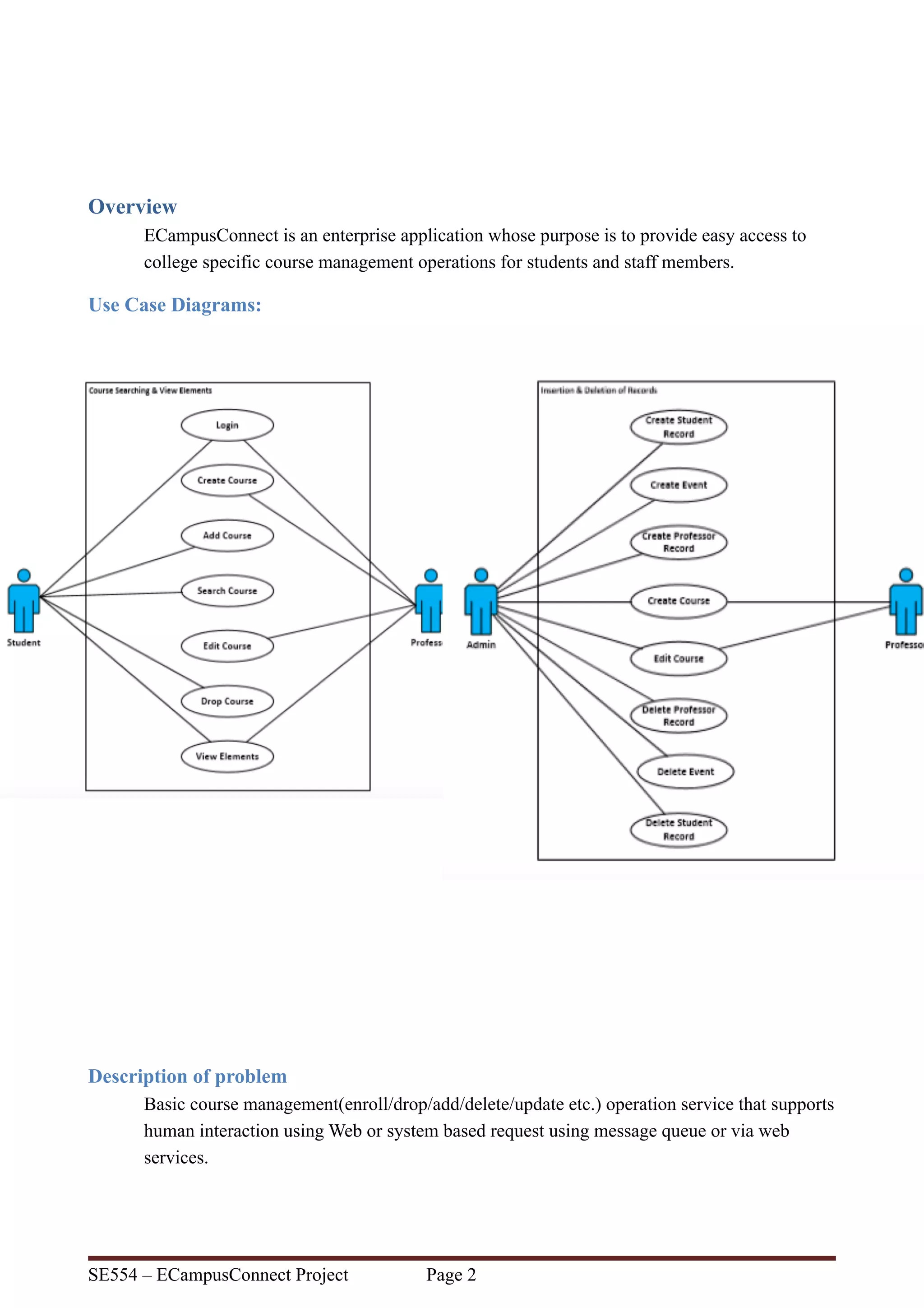
ECampusConnect is an enterprise application whose purpose is to provide easy access to
college specific course management operations for students and staff members.
Use Case Diagrams:
Description of problem
Basic course management(enroll/drop/add/delete/update etc.) operation service that supports
human interaction using Web or system based request using message queue or via web
services.
SE554 – ECampusConnect Project Page !2
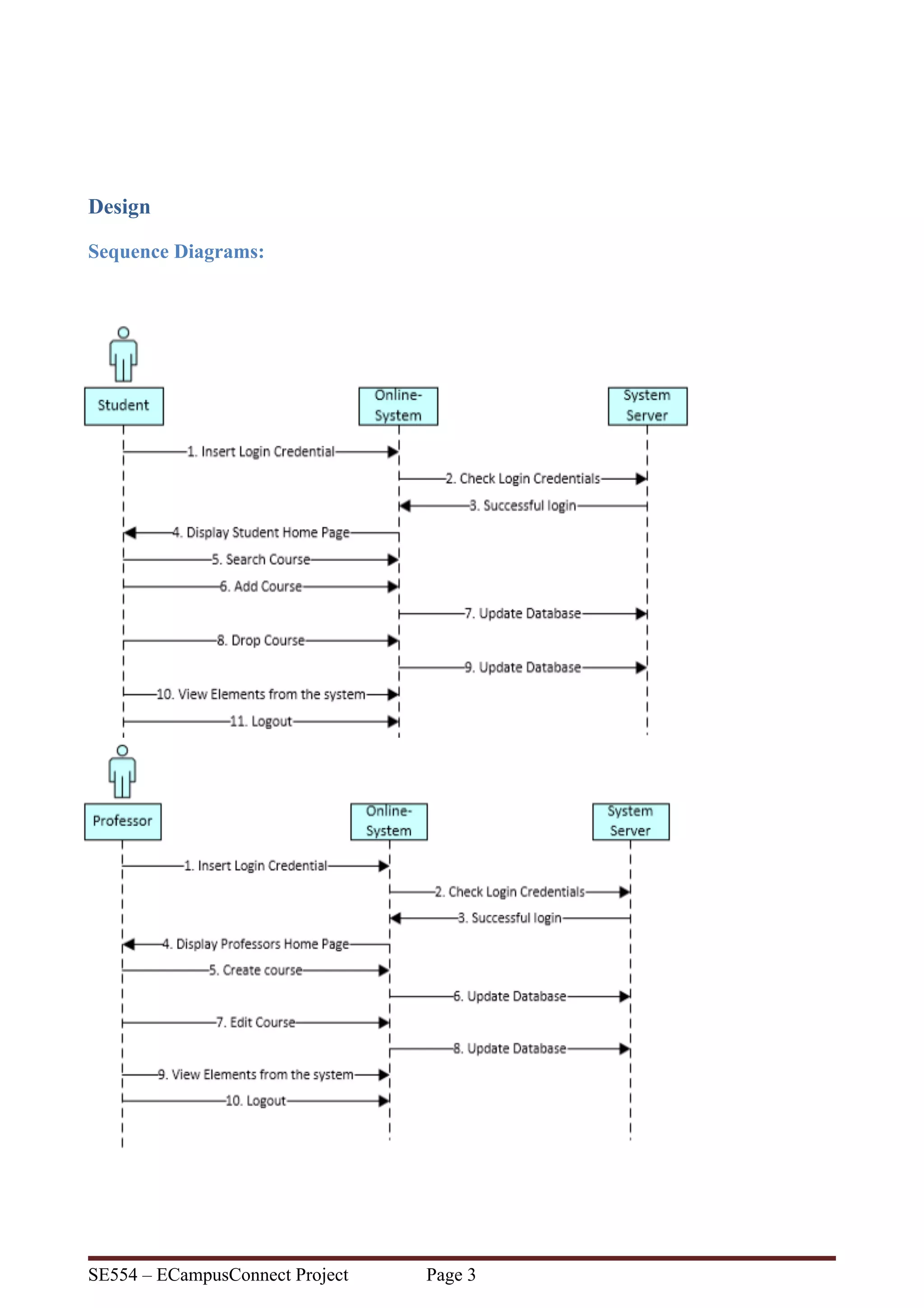
Design
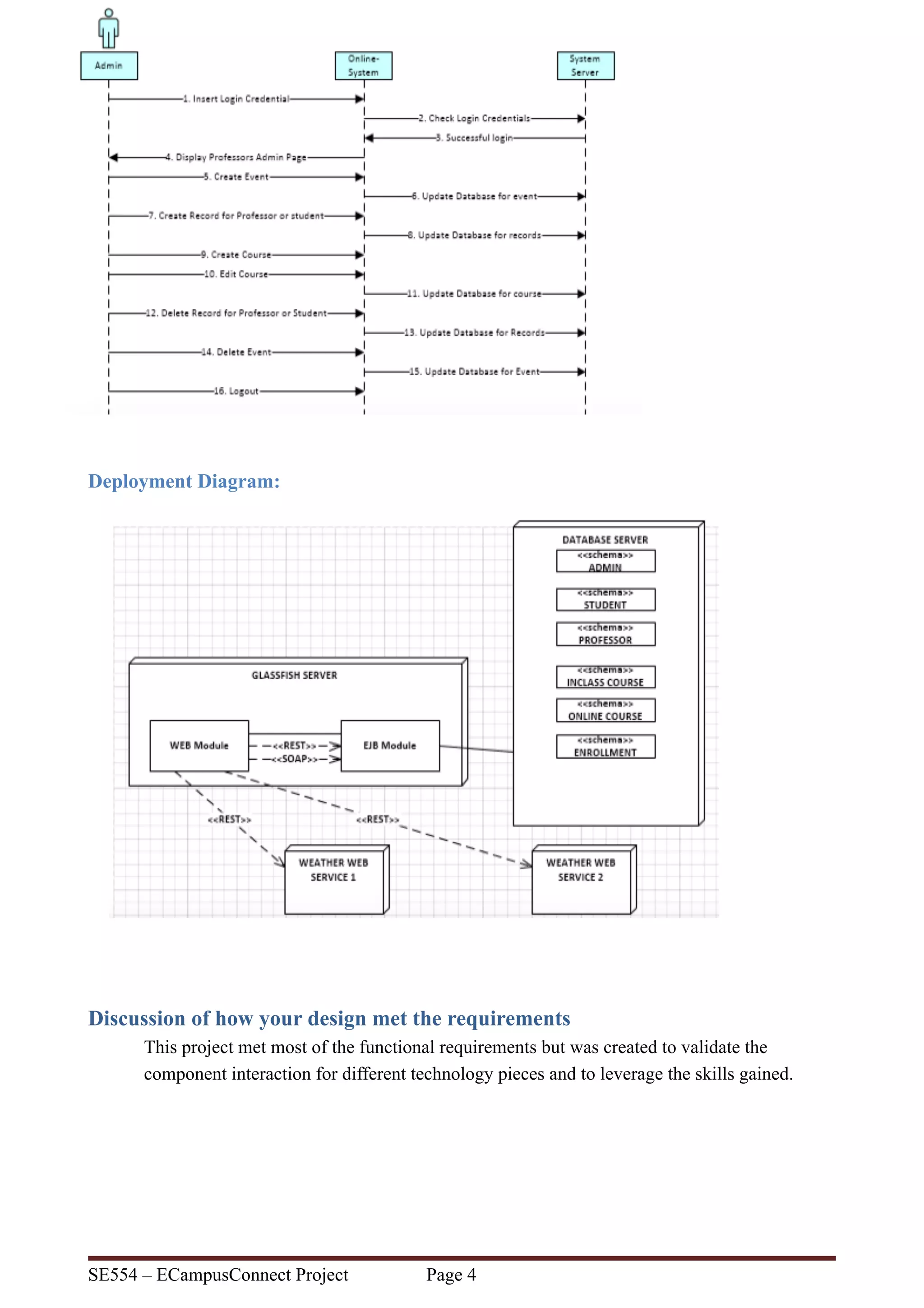
Sequence Diagrams:
SE554 – ECampusConnect Project Page !3
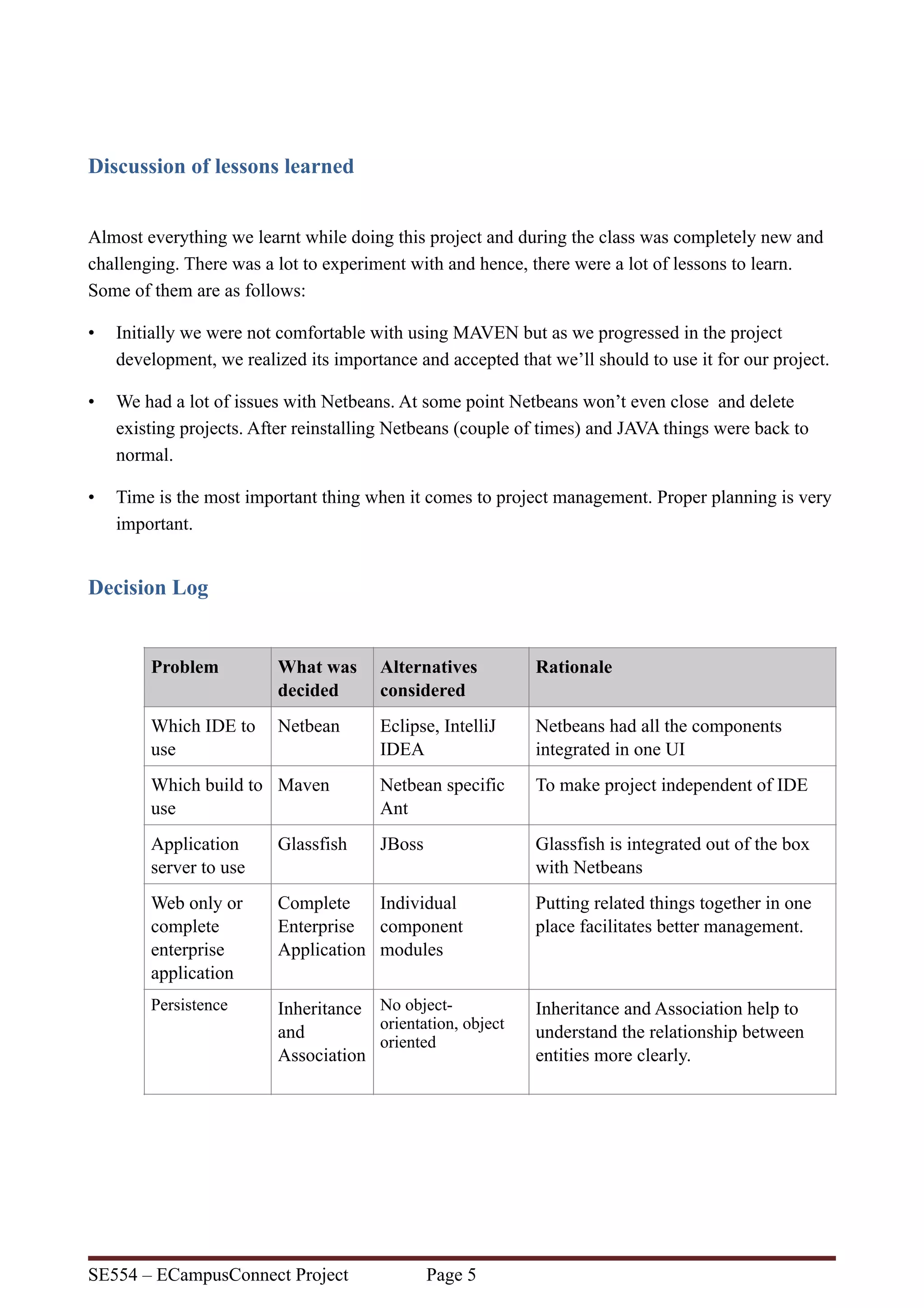
Deployment Diagram:
Discussion of how your design met the requirements
This project met most of the functional requirements but was created to validate the
component interaction for different technology pieces and to leverage the skills gained.
SE554 – ECampusConnect Project Page !4
Discussion of lessons learned
Almost everything we learnt while doing this project and during the class was completely new and
challenging. There was a lot to experiment with and hence, there were a lot of lessons to learn.
Some of them are as follows:
• Initially we were not comfortable with using MAVEN but as we progressed in the project
development, we realized its importance and accepted that we’ll should to use it for our project.
• We had a lot of issues with Netbeans. At some point Netbeans won’t even close and delete
existing projects. After reinstalling Netbeans (couple of times) and JAVA things were back to
normal.
• Time is the most important thing when it comes to project management. Proper planning is very
important.
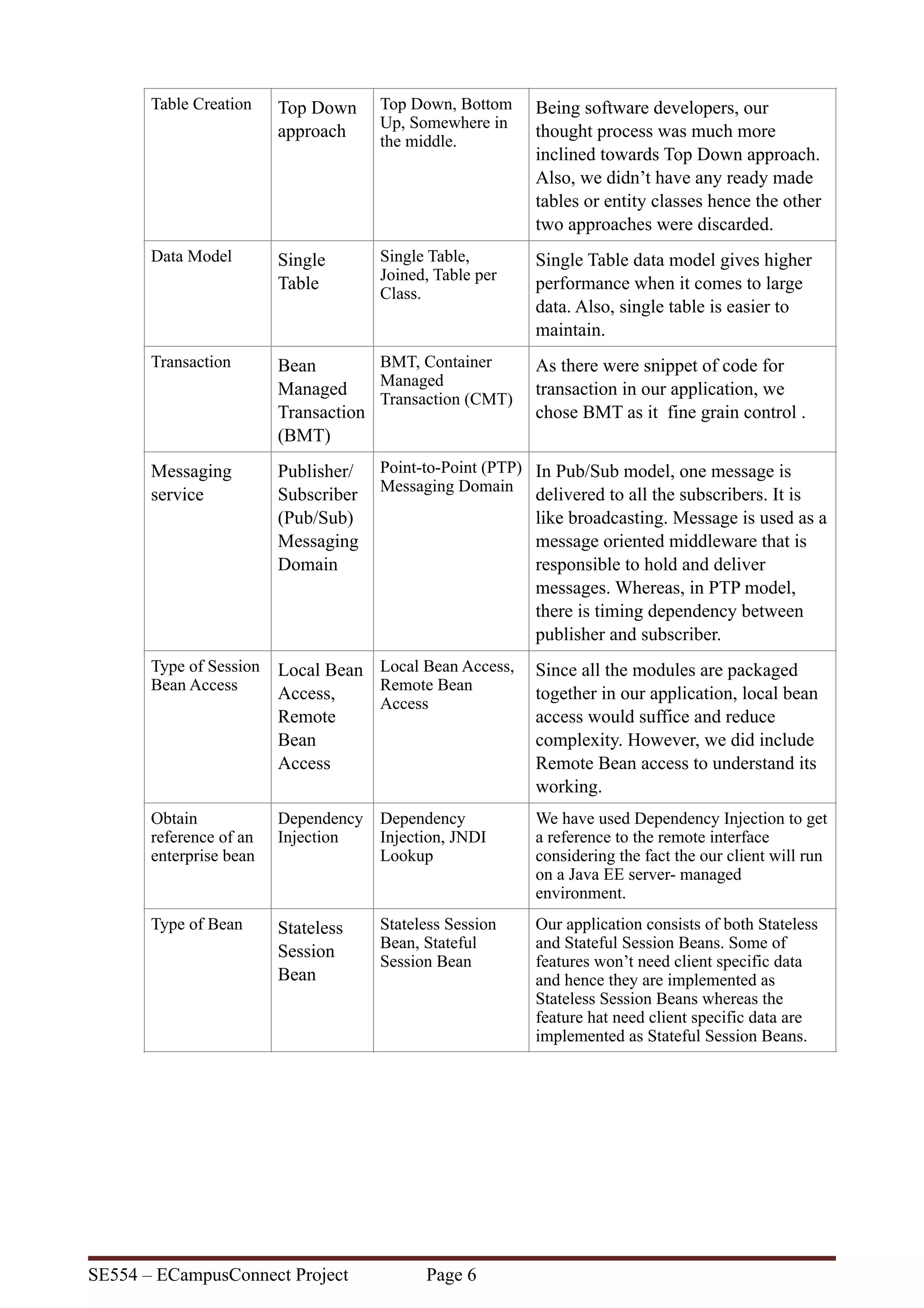
Decision Log
Problem What was
decided
Alternatives
considered
Rationale
Which IDE to
use
Netbean Eclipse, IntelliJ
IDEA
Netbeans had all the components
integrated in one UI
Which build to
use
Maven Netbean specific
Ant
To make project independent of IDE
Application
server to use
Glassfish JBoss Glassfish is integrated out of the box
with Netbeans
Web only or
complete
enterprise
application
Complete
Enterprise
Application
Individual
component
modules
Putting related things together in one
place facilitates better management.
Persistence Inheritance
and
Association
No object-
orientation, object
oriented
Inheritance and Association help to
understand the relationship between
entities more clearly.
SE554 – ECampusConnect Project Page !5
Table Creation Top Down
approach
Top Down, Bottom
Up, Somewhere in
the middle.
Being software developers, our
thought process was much more
inclined towards Top Down approach.
Also, we didn’t have any ready made
tables or entity classes hence the other
two approaches were discarded.
Data Model Single
Table
Single Table,
Joined, Table per
Class.
Single Table data model gives higher
performance when it comes to large
data. Also, single table is easier to
maintain.
Transaction Bean
Managed
Transaction
(BMT)
BMT, Container
Managed
Transaction (CMT)
As there were snippet of code for
transaction in our application, we
chose BMT as it fine grain control .
Messaging
service
Publisher/
Subscriber
(Pub/Sub)
Messaging
Domain
Point-to-Point (PTP)
Messaging Domain
In Pub/Sub model, one message is
delivered to all the subscribers. It is
like broadcasting. Message is used as a
message oriented middleware that is
responsible to hold and deliver
messages. Whereas, in PTP model,
there is timing dependency between
publisher and subscriber.
Type of Session
Bean Access
Local Bean
Access,
Remote
Bean
Access
Local Bean Access,
Remote Bean
Access
Since all the modules are packaged
together in our application, local bean
access would suffice and reduce
complexity. However, we did include
Remote Bean access to understand its
working.
Obtain
reference of an
enterprise bean
Dependency
Injection
Dependency
Injection, JNDI
Lookup
We have used Dependency Injection to get
a reference to the remote interface
considering the fact the our client will run
on a Java EE server- managed
environment.
Type of Bean Stateless
Session
Bean
Stateless Session
Bean, Stateful
Session Bean
Our application consists of both Stateless
and Stateful Session Beans. Some of
features won’t need client specific data
and hence they are implemented as
Stateless Session Beans whereas the
feature hat need client specific data are
implemented as Stateful Session Beans.
SE554 – ECampusConnect Project Page !6
Research and Implementation of Advance Concepts
• Entity Listeners
• Validation
• Singleton
• Calling two public REST service implementations
Github: https://github.com/springse554/ECampusConnect
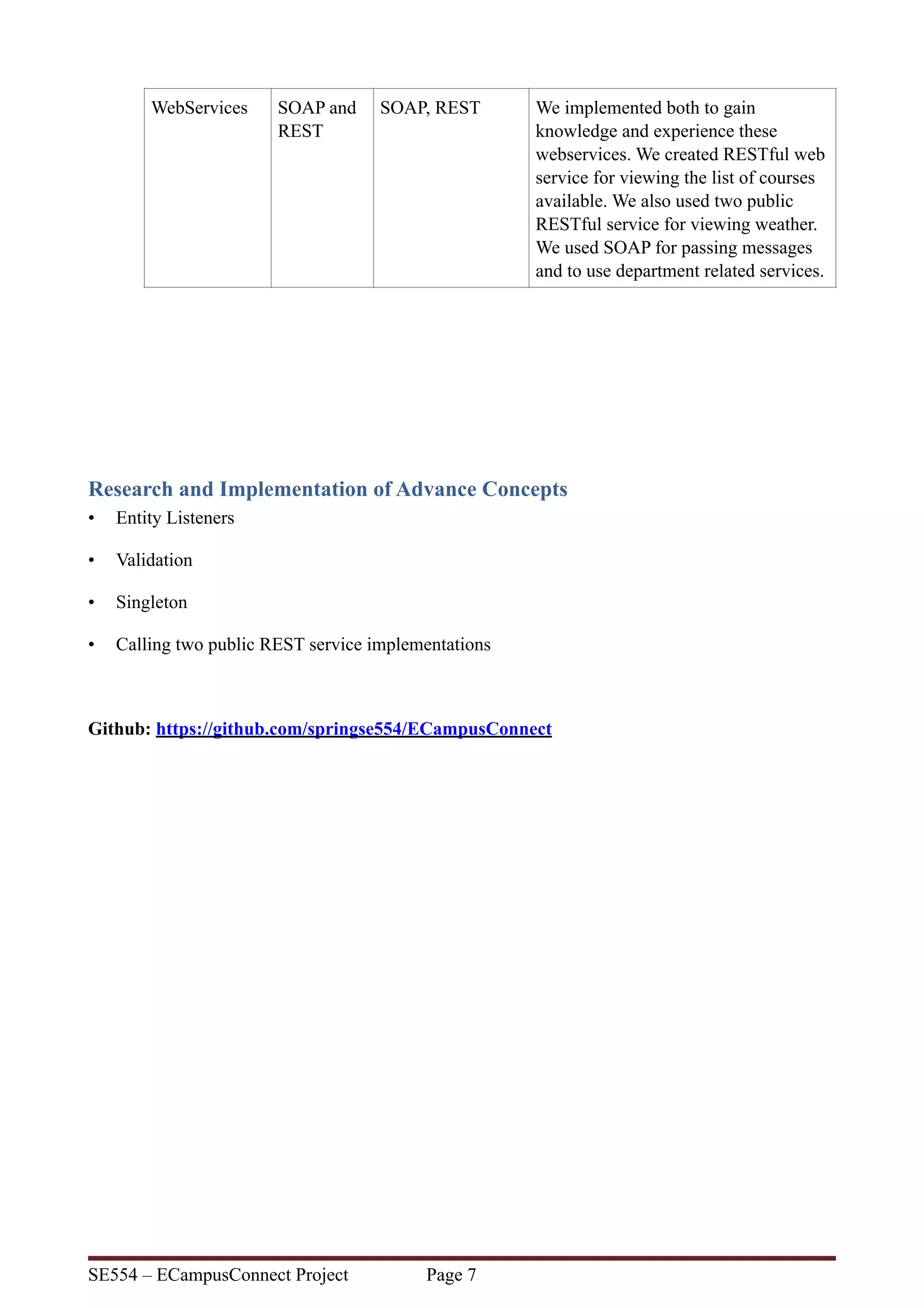
WebServices SOAP and
REST
SOAP, REST We implemented both to gain
knowledge and experience these
webservices. We created RESTful web
service for viewing the list of courses
available. We also used two public
RESTful service for viewing weather.
We used SOAP for passing messages
and to use department related services.
SE554 – ECampusConnect Project Page !7

ECampusConnect

  • 1.
    ECAMPUSCONNECT SE554 – EnterpriseComponent Architecture Project An enterprise application by Dhaval Joshi and Advait Patel
  • 2.
    Contents Overview 2 Use CaseDiagrams: 2 Description of problem 2 Design 3 Sequence Diagrams: 3 Deployment Diagram: 4 Discussion of how your design met the requirements 4 Discussion of lessons learned 5 Decision Log 5 Research and Implementation of Advance Concepts 7 SE554 – ECampusConnect Project Page !1
  • 3.
    Overview ECampusConnect is anenterprise application whose purpose is to provide easy access to college specific course management operations for students and staff members. Use Case Diagrams: Description of problem Basic course management(enroll/drop/add/delete/update etc.) operation service that supports human interaction using Web or system based request using message queue or via web services. SE554 – ECampusConnect Project Page !2
  • 4.
    Design Sequence Diagrams: SE554 –ECampusConnect Project Page !3
  • 5.
    Deployment Diagram: Discussion ofhow your design met the requirements This project met most of the functional requirements but was created to validate the component interaction for different technology pieces and to leverage the skills gained. SE554 – ECampusConnect Project Page !4
  • 6.
    Discussion of lessonslearned Almost everything we learnt while doing this project and during the class was completely new and challenging. There was a lot to experiment with and hence, there were a lot of lessons to learn. Some of them are as follows: • Initially we were not comfortable with using MAVEN but as we progressed in the project development, we realized its importance and accepted that we’ll should to use it for our project. • We had a lot of issues with Netbeans. At some point Netbeans won’t even close and delete existing projects. After reinstalling Netbeans (couple of times) and JAVA things were back to normal. • Time is the most important thing when it comes to project management. Proper planning is very important. Decision Log Problem What was decided Alternatives considered Rationale Which IDE to use Netbean Eclipse, IntelliJ IDEA Netbeans had all the components integrated in one UI Which build to use Maven Netbean specific Ant To make project independent of IDE Application server to use Glassfish JBoss Glassfish is integrated out of the box with Netbeans Web only or complete enterprise application Complete Enterprise Application Individual component modules Putting related things together in one place facilitates better management. Persistence Inheritance and Association No object- orientation, object oriented Inheritance and Association help to understand the relationship between entities more clearly. SE554 – ECampusConnect Project Page !5
  • 7.
    Table Creation TopDown approach Top Down, Bottom Up, Somewhere in the middle. Being software developers, our thought process was much more inclined towards Top Down approach. Also, we didn’t have any ready made tables or entity classes hence the other two approaches were discarded. Data Model Single Table Single Table, Joined, Table per Class. Single Table data model gives higher performance when it comes to large data. Also, single table is easier to maintain. Transaction Bean Managed Transaction (BMT) BMT, Container Managed Transaction (CMT) As there were snippet of code for transaction in our application, we chose BMT as it fine grain control . Messaging service Publisher/ Subscriber (Pub/Sub) Messaging Domain Point-to-Point (PTP) Messaging Domain In Pub/Sub model, one message is delivered to all the subscribers. It is like broadcasting. Message is used as a message oriented middleware that is responsible to hold and deliver messages. Whereas, in PTP model, there is timing dependency between publisher and subscriber. Type of Session Bean Access Local Bean Access, Remote Bean Access Local Bean Access, Remote Bean Access Since all the modules are packaged together in our application, local bean access would suffice and reduce complexity. However, we did include Remote Bean access to understand its working. Obtain reference of an enterprise bean Dependency Injection Dependency Injection, JNDI Lookup We have used Dependency Injection to get a reference to the remote interface considering the fact the our client will run on a Java EE server- managed environment. Type of Bean Stateless Session Bean Stateless Session Bean, Stateful Session Bean Our application consists of both Stateless and Stateful Session Beans. Some of features won’t need client specific data and hence they are implemented as Stateless Session Beans whereas the feature hat need client specific data are implemented as Stateful Session Beans. SE554 – ECampusConnect Project Page !6
  • 8.
    Research and Implementationof Advance Concepts • Entity Listeners • Validation • Singleton • Calling two public REST service implementations Github: https://github.com/springse554/ECampusConnect WebServices SOAP and REST SOAP, REST We implemented both to gain knowledge and experience these webservices. We created RESTful web service for viewing the list of courses available. We also used two public RESTful service for viewing weather. We used SOAP for passing messages and to use department related services. SE554 – ECampusConnect Project Page !7