CSE367 DIGITAL IMAGE PROCESSING
LECTURE 1
INTRODUCTION & FUNDAMENTALS (PART 1)
Dr. Fatma Newagy
Associate Prof. of Communications Engineering
Fatma_newagy@eng.asu.edu.eg
Rules and Ethics
• No more 10 minutes late
• Use chat window for questions
• Mute students when not participating
• Good behavior and participation is a must
• Turn on your camera if needed
• Send your feedback by email after each week with your
suggestions
Assessment Weights and Schedule
Assignments Weeks 3, 9
Quizzes Weeks 4, 11
Mid-Term Examination Week 8
Project Week 14
Final Exam End of semester
Attendance and Participation 5%
Assignments / project 10%
Quizzes 10%
Mid-Term Exam 25%
Lab Reports 10%
Final Exam 40%
Total 100%
Any copied
document
(assignments,
reports, projects,…)
from internet/
student
Will get negative
mark
Article Reading and Project
• Article Reading and Project
• Medical image analysis
• Face, fingerprint, and other object recognition
• Image and/or video compression
• Image segmentation and/or denoising
• Digital image/video watermarking/steganography and
detection
• Whatever you’re interested …
Evaluation of article reading and project
• Evaluation of article reading and project
• Report
Article reading
— Submit a survey of the articles you read and the list of the
articles
Project
— Submit an article including introduction, methods, experiments,
results, and conclusions
— Submit the project code, the readme document, and some
testing samples (images, videos, etc.) for validation
• Presentation
Journals & Conferences
in Image Processing
• Journals:
— IEEE T IMAGE PROCESSING
— IEEE T MEDICAL IMAGING
— INTL J COMP. VISION
— IEEE T PATTERN ANALYSIS MACHINE INTELLIGENCE
— PATTERN RECOGNITION
— COMP. VISION AND IMAGE UNDERSTANDING
— IMAGE AND VISION COMPUTING
… …
• Conferences:
— CVPR: Comp. Vision and Pattern Recognition
— ICCV: Intl Conf on Computer Vision
— ACM Multimedia
— ICIP
— SPIE
— ECCV: European Conf on Computer Vision
— CAIP: Intl Conf on Comp. Analysis of Images and Patterns
… …
• IEEE Communications Surveys & Tutorials
• IEEE Multimedia
• IEEE Signal Processing Magazine
Text Books
• Rafael C. Gonzalez and Richard E. Woods, Digital Image
Processing, Prentice Hall, 2008, Third Edition.
• Rafael C. Gonzalez and Richard E. Woods, Digital Image
Processing Using Matlab, Prentice Hall, 2009, Second
Edition.
Extra materials
• https://web.stanford.edu/class/ee368/
• http://www.imageprocessingplace.com/
• ……
This lecture will cover
• Introduction
• State of the art examples of digital image processing
• Key stages in digital image processing
• Digital Image Processing Fundamentals (Part-1)
Introduction
• Interest comes from two primary backgrounds
Improvement of pictorial information for human perception
• How can an image/video be made more aesthetically pleasing
• How can an image/video be enhanced to facilitate extraction of
useful information
Processing of data for autonomous machine perception
• What is Digital Image Processing?
Digital Image
— a two-dimensional function
x and y are spatial coordinates
The amplitude of f is called intensity or gray level at the point (x, y)
Digital Image Processing
— process digital images by means of computer, it covers low-, mid-, and high-level
processes
low-level: inputs and outputs are images
mid-level: outputs are attributes extracted from input images
high-level: an ensemble of recognition of individual objects
Pixel
— the elements of a digital image
Introduction
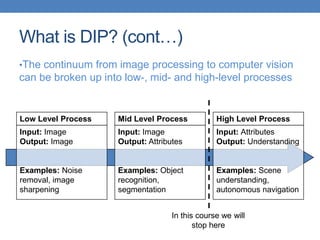
What is DIP? (cont…)
•The continuum from image processing to computer vision
can be broken up into low-, mid- and high-level processes
Low Level Process
Input: Image
Output: Image
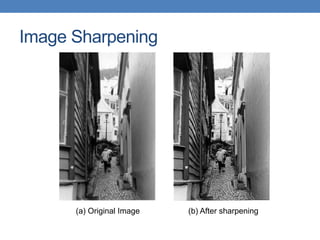
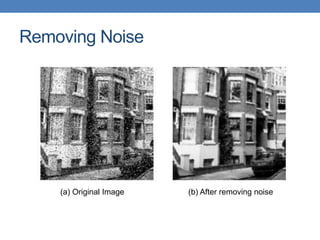
Examples: Noise
removal, image
sharpening
Mid Level Process
Input: Image
Output: Attributes
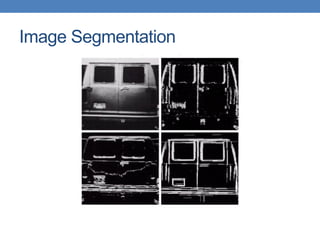
Examples: Object
recognition,
segmentation
High Level Process
Input: Attributes
Output: Understanding
Examples: Scene
understanding,
autonomous navigation
In this course we will
stop here
Image Sharpening
(a) Original Image (b) After sharpening
Removing Noise
(a) Original Image (b) After removing noise
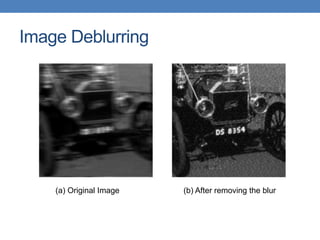
Image Deblurring
(a) Original Image (b) After removing the blur
Image Segmentation
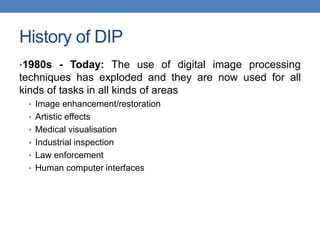
History of DIP
•1980s - Today: The use of digital image processing
techniques has exploded and they are now used for all
kinds of tasks in all kinds of areas
• Image enhancement/restoration
• Artistic effects
• Medical visualisation
• Industrial inspection
• Law enforcement
• Human computer interfaces
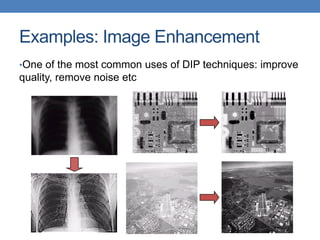
Examples: Image Enhancement
•One of the most common uses of DIP techniques: improve
quality, remove noise etc
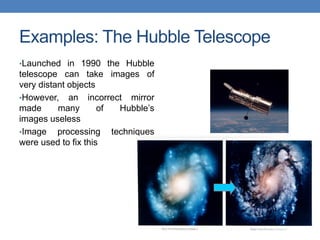
Examples: The Hubble Telescope
•Launched in 1990 the Hubble
telescope can take images of
very distant objects
•However, an incorrect mirror
made many of Hubble’s
images useless
•Image processing techniques
were used to fix this
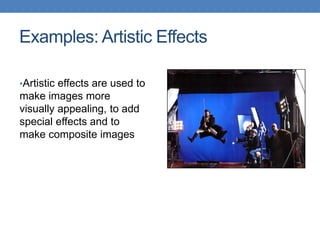
Examples: Artistic Effects
•Artistic effects are used to
make images more
visually appealing, to add
special effects and to
make composite images
Examples: Medicine
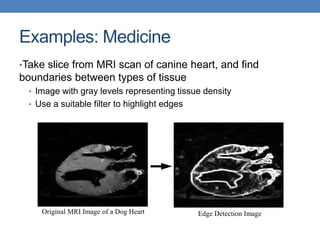
•Take slice from MRI scan of canine heart, and find
boundaries between types of tissue
• Image with gray levels representing tissue density
• Use a suitable filter to highlight edges
Original MRI Image of a Dog Heart Edge Detection Image
Examples: GIS
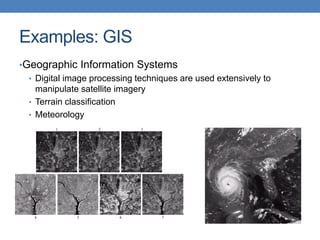
•Geographic Information Systems
• Digital image processing techniques are used extensively to
manipulate satellite imagery
• Terrain classification
• Meteorology
Examples: GIS (cont…)
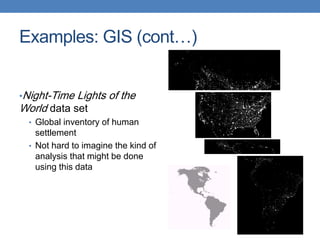
•Night-Time Lights of the
World data set
• Global inventory of human
settlement
• Not hard to imagine the kind of
analysis that might be done
using this data
Examples: Industrial Inspection
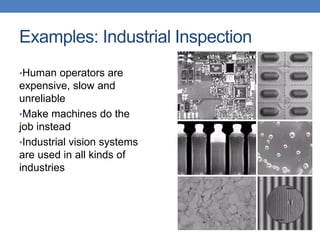
•Human operators are
expensive, slow and
unreliable
•Make machines do the
job instead
•Industrial vision systems
are used in all kinds of
industries
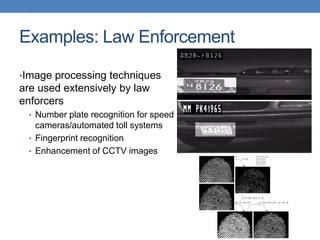
Examples: Law Enforcement
•Image processing techniques
are used extensively by law
enforcers
• Number plate recognition for speed
cameras/automated toll systems
• Fingerprint recognition
• Enhancement of CCTV images
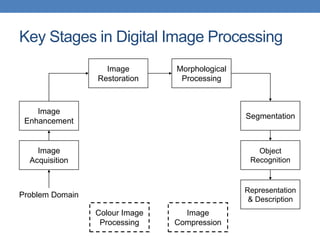
Key Stages in Digital Image Processing
Image
Acquisition
Image
Restoration
Morphological
Processing
Segmentation
Representation
& Description
Image
Enhancement
Object
Recognition
Problem Domain
Colour Image
Processing
Image
Compression
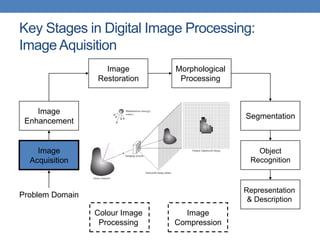
Key Stages in Digital Image Processing:
Image Aquisition
Image
Acquisition
Image
Restoration
Morphological
Processing
Segmentation
Representation
& Description
Image
Enhancement
Object
Recognition
Problem Domain
Colour Image
Processing
Image
Compression
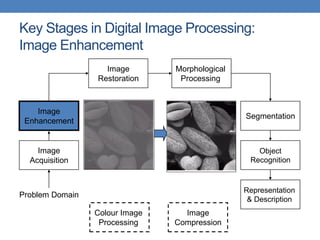
Key Stages in Digital Image Processing:
Image Enhancement
Image
Acquisition
Image
Restoration
Morphological
Processing
Segmentation
Representation
& Description
Image
Enhancement
Object
Recognition
Problem Domain
Colour Image
Processing
Image
Compression
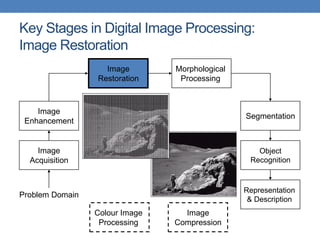
Key Stages in Digital Image Processing:
Image Restoration
Image
Acquisition
Image
Restoration
Morphological
Processing
Segmentation
Representation
& Description
Image
Enhancement
Object
Recognition
Problem Domain
Colour Image
Processing
Image
Compression
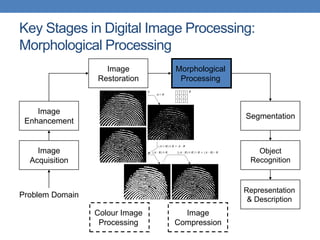
Key Stages in Digital Image Processing:
Morphological Processing
Image
Acquisition
Image
Restoration
Morphological
Processing
Segmentation
Representation
& Description
Image
Enhancement
Object
Recognition
Problem Domain
Colour Image
Processing
Image
Compression
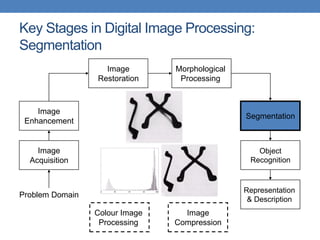
Key Stages in Digital Image Processing:
Segmentation
Image
Acquisition
Image
Restoration
Morphological
Processing
Segmentation
Representation
& Description
Image
Enhancement
Object
Recognition
Problem Domain
Colour Image
Processing
Image
Compression
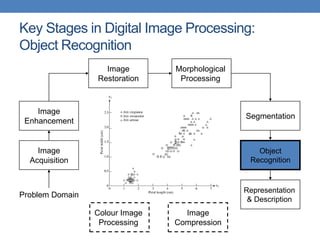
Key Stages in Digital Image Processing:
Object Recognition
Image
Acquisition
Image
Restoration
Morphological
Processing
Segmentation
Representation
& Description
Image
Enhancement
Object
Recognition
Problem Domain
Colour Image
Processing
Image
Compression
Key Stages in Digital Image Processing:
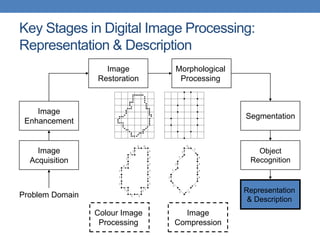
Representation & Description
Image
Acquisition
Image
Restoration
Morphological
Processing
Segmentation
Representation
& Description
Image
Enhancement
Object
Recognition
Problem Domain
Colour Image
Processing
Image
Compression
Key Stages in Digital Image Processing:
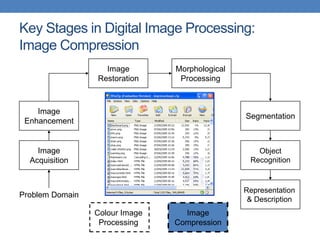
Image Compression
Image
Acquisition
Image
Restoration
Morphological
Processing
Segmentation
Representation
& Description
Image
Enhancement
Object
Recognition
Problem Domain
Colour Image
Processing
Image
Compression
Key Stages in Digital Image Processing:
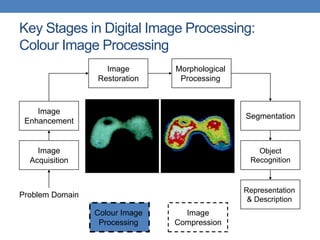
Colour Image Processing
Image
Acquisition
Image
Restoration
Morphological
Processing
Segmentation
Representation
& Description
Image
Enhancement
Object
Recognition
Problem Domain
Colour Image
Processing
Image
Compression
Computer Vision: Some Applications
• Optical character recognition (OCR)
• Face Detection
• Smile Detection
• Login without password using fingerprint scanners and
face recognition systems
• Object recognition in mobiles
• Smart Cars
• Vision in space
Fundamentals in DIP
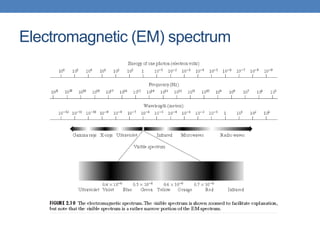
Electromagnetic (EM) spectrum
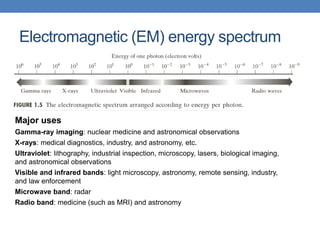
Electromagnetic (EM) energy spectrum
Major uses
Gamma-ray imaging: nuclear medicine and astronomical observations
X-rays: medical diagnostics, industry, and astronomy, etc.
Ultraviolet: lithography, industrial inspection, microscopy, lasers, biological imaging,
and astronomical observations
Visible and infrared bands: light microscopy, astronomy, remote sensing, industry,
and law enforcement
Microwave band: radar
Radio band: medicine (such as MRI) and astronomy
Light and EM Spectrum
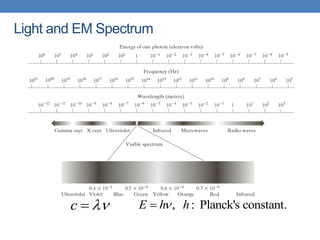
c 
 , : Planck's constant.
E h h


Light and EM Spectrum
► The colors that humans perceive in an object
are determined by the nature of the light
reflected from the object.
e.g. green objects reflect light with wavelengths primarily in the 500
to 570 nm range while absorbing most of the energy at other
wavelength
Light and EM Spectrum
► Monochromatic light: void of color Intensity is the only attribute,
from black to white Monochromatic images are referred to as gray-
scale images
► Chromatic light bands: 0.43 to 0.79 um
The quality of a chromatic light source:
Radiance: total amount of energy
Luminance (lm): the amount of energy an observer perceives from a light
source
Brightness: a subjective descriptor of light perception that is impossible to
measure. It embodies the achromatic notion of intensity and one of the key
factors in describing color sensation.
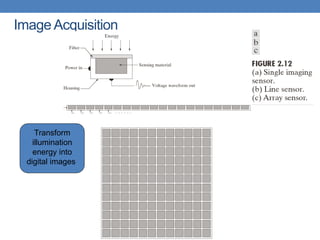
Image Acquisition
Transform
illumination
energy into
digital images
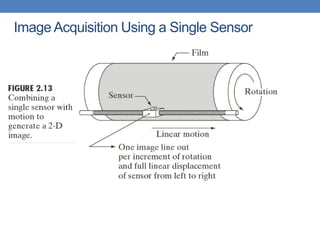
Image Acquisition Using a Single Sensor
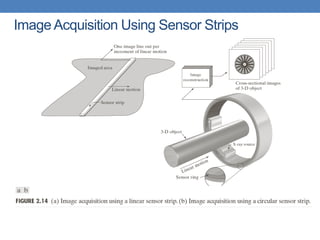
Image Acquisition Using Sensor Strips
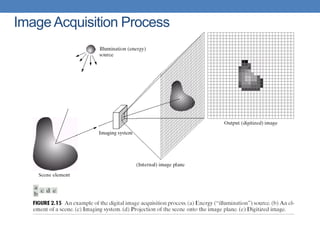
Image Acquisition Process
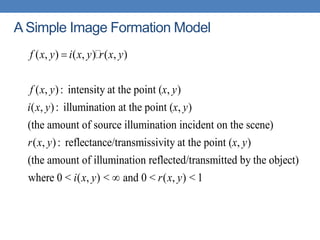
A Simple Image Formation Model
( , ) ( , ) ( , )
( , ): intensity at the point ( , )
( , ): illumination at the point ( , )
(the amount of source illumination incident on the scene)
( , ): reflectance/transmissivity
f x y i x y r x y
f x y x y
i x y x y
r x y

at the point ( , )
(the amount of illumination reflected/transmitted by the object)
where 0 < ( , ) < and 0 < ( , ) < 1
x y
i x y r x y

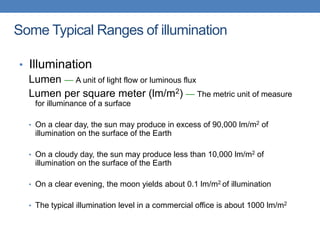
Some Typical Ranges of illumination
• Illumination
Lumen — A unit of light flow or luminous flux
Lumen per square meter (lm/m2) — The metric unit of measure
for illuminance of a surface
• On a clear day, the sun may produce in excess of 90,000 lm/m2 of
illumination on the surface of the Earth
• On a cloudy day, the sun may produce less than 10,000 lm/m2 of
illumination on the surface of the Earth
• On a clear evening, the moon yields about 0.1 lm/m2 of illumination
• The typical illumination level in a commercial office is about 1000 lm/m2
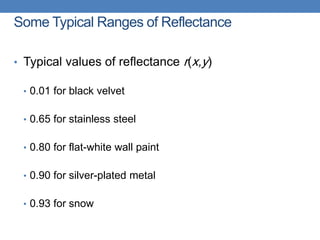
Some Typical Ranges of Reflectance
• Typical values of reflectance r(x,y)
• 0.01 for black velvet
• 0.65 for stainless steel
• 0.80 for flat-white wall paint
• 0.90 for silver-plated metal
• 0.93 for snow
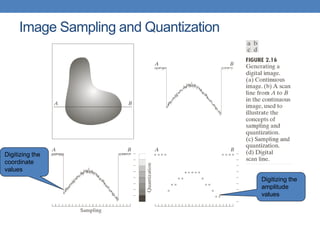
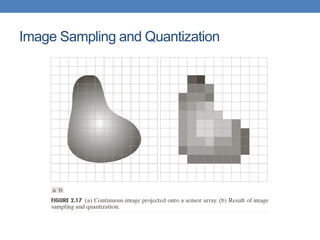
Image Sampling and Quantization
Digitizing the
coordinate
values
Digitizing the
amplitude
values
Image Sampling and Quantization
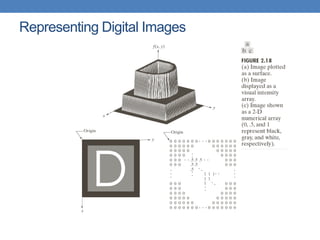
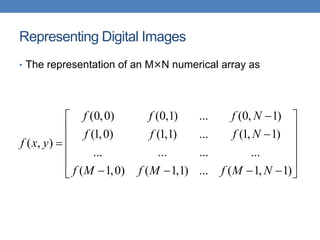
Representing Digital Images
• The representation of an M×N numerical array as
(0,0) (0,1) ... (0, 1)
(1,0) (1,1) ... (1, 1)
( , )
... ... ... ...
( 1,0) ( 1,1) ... ( 1, 1)
f f f N
f f f N
f x y
f M f M f M N

 
 

 

 
 
   
 
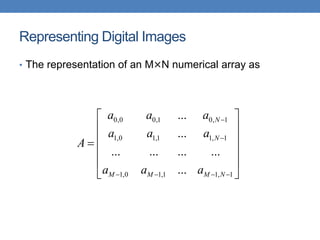
Representing Digital Images
• The representation of an M×N numerical array as
0,0 0,1 0, 1
1,0 1,1 1, 1
1,0 1,1 1, 1
...
...
... ... ... ...
...
N
N
M M M N
a a a
a a a
A
a a a


   
 
 
 

 
 
 
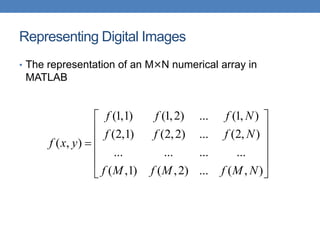
Representing Digital Images
• The representation of an M×N numerical array in
MATLAB
(1,1) (1,2) ... (1, )
(2,1) (2,2) ... (2, )
( , )
... ... ... ...
( ,1) ( ,2) ... ( , )
f f f N
f f f N
f x y
f M f M f M N
 
 
 

 
 
 
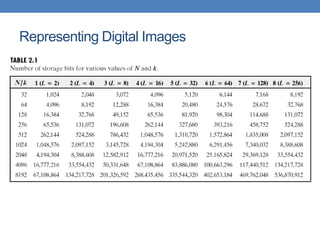
Representing Digital Images
• Discrete intensity interval [0, L-1], L=2k
• The number b of bits required to store a M × N
digitized image
b = M × N × k
Representing Digital Images
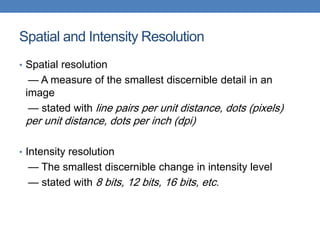
Spatial and Intensity Resolution
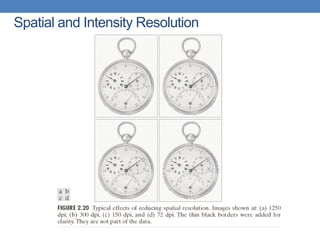
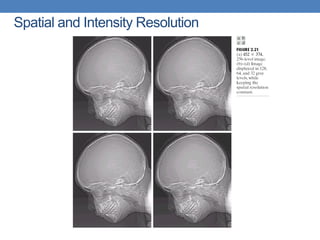
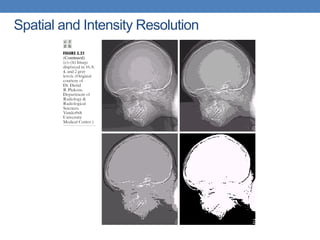
• Spatial resolution
— A measure of the smallest discernible detail in an
image
— stated with line pairs per unit distance, dots (pixels)
per unit distance, dots per inch (dpi)
• Intensity resolution
— The smallest discernible change in intensity level
— stated with 8 bits, 12 bits, 16 bits, etc.
Spatial and Intensity Resolution
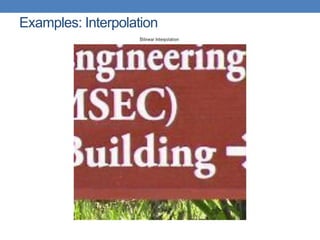
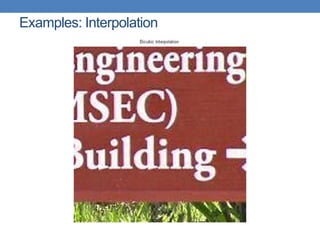
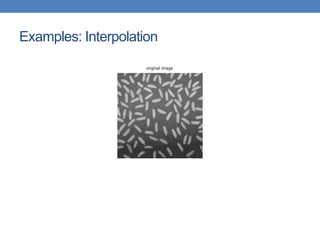
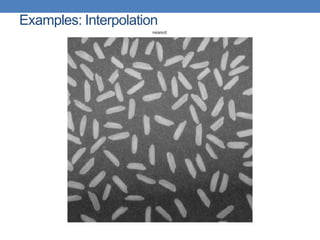
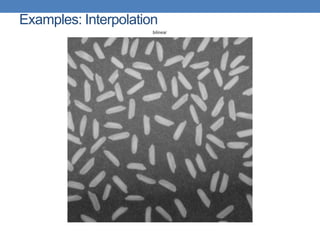
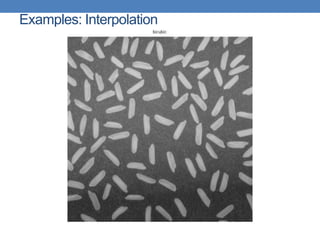
Image Interpolation
• Interpolation — Process of using known data to
estimate unknown values
e.g., zooming, shrinking, rotating, and geometric correction
• Interpolation (sometimes called resampling) — an
imaging method to increase (or decrease) the number of
pixels in a digital image.
Some digital cameras use interpolation to produce a larger image than
the sensor captured or to create digital zoom
Image Interpolation:
Nearest Neighbor Interpolation
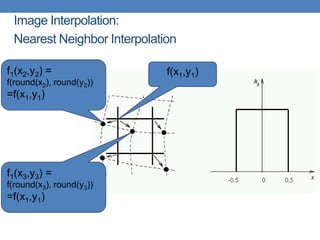
f1(x2,y2) =
f(round(x2), round(y2))
=f(x1,y1)
f(x1,y1)
f1(x3,y3) =
f(round(x3), round(y3))
=f(x1,y1)
Image Interpolation:
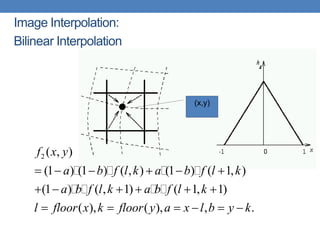
Bilinear Interpolation
2 ( , )
(1 ) (1 ) ( , ) (1 ) ( 1, )
(1 ) ( , 1) ( 1, 1)
( ), ( ), , .
f x y
a b f l k a b f l k
a b f l k a b f l k
l floor x k floor y a x l b y k
     
     
     
(x,y)
Image Interpolation:
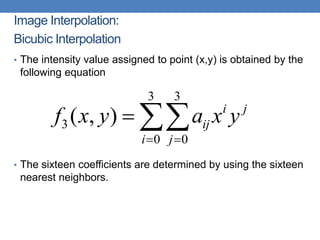
Bicubic Interpolation
3 3
3
0 0
( , ) i j
ij
i j
f x y a x y
 
 
• The intensity value assigned to point (x,y) is obtained by the
following equation
• The sixteen coefficients are determined by using the sixteen
nearest neighbors.
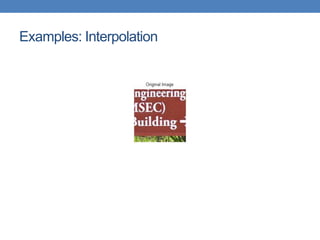
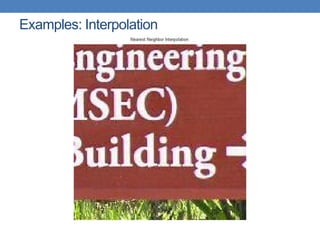
Examples: Interpolation

CSE367 Lecture 1 image processing lecture

  • 1.
    CSE367 DIGITAL IMAGEPROCESSING LECTURE 1 INTRODUCTION & FUNDAMENTALS (PART 1) Dr. Fatma Newagy Associate Prof. of Communications Engineering Fatma_newagy@eng.asu.edu.eg
  • 2.
    Rules and Ethics •No more 10 minutes late • Use chat window for questions • Mute students when not participating • Good behavior and participation is a must • Turn on your camera if needed • Send your feedback by email after each week with your suggestions
  • 3.
    Assessment Weights andSchedule Assignments Weeks 3, 9 Quizzes Weeks 4, 11 Mid-Term Examination Week 8 Project Week 14 Final Exam End of semester Attendance and Participation 5% Assignments / project 10% Quizzes 10% Mid-Term Exam 25% Lab Reports 10% Final Exam 40% Total 100% Any copied document (assignments, reports, projects,…) from internet/ student Will get negative mark
  • 4.
    Article Reading andProject • Article Reading and Project • Medical image analysis • Face, fingerprint, and other object recognition • Image and/or video compression • Image segmentation and/or denoising • Digital image/video watermarking/steganography and detection • Whatever you’re interested …
  • 5.
    Evaluation of articlereading and project • Evaluation of article reading and project • Report Article reading — Submit a survey of the articles you read and the list of the articles Project — Submit an article including introduction, methods, experiments, results, and conclusions — Submit the project code, the readme document, and some testing samples (images, videos, etc.) for validation • Presentation
  • 6.
    Journals & Conferences inImage Processing • Journals: — IEEE T IMAGE PROCESSING — IEEE T MEDICAL IMAGING — INTL J COMP. VISION — IEEE T PATTERN ANALYSIS MACHINE INTELLIGENCE — PATTERN RECOGNITION — COMP. VISION AND IMAGE UNDERSTANDING — IMAGE AND VISION COMPUTING … … • Conferences: — CVPR: Comp. Vision and Pattern Recognition — ICCV: Intl Conf on Computer Vision — ACM Multimedia — ICIP — SPIE — ECCV: European Conf on Computer Vision — CAIP: Intl Conf on Comp. Analysis of Images and Patterns … … • IEEE Communications Surveys & Tutorials • IEEE Multimedia • IEEE Signal Processing Magazine
  • 7.
    Text Books • RafaelC. Gonzalez and Richard E. Woods, Digital Image Processing, Prentice Hall, 2008, Third Edition. • Rafael C. Gonzalez and Richard E. Woods, Digital Image Processing Using Matlab, Prentice Hall, 2009, Second Edition.
  • 8.
    Extra materials • https://web.stanford.edu/class/ee368/ •http://www.imageprocessingplace.com/ • ……
  • 9.
    This lecture willcover • Introduction • State of the art examples of digital image processing • Key stages in digital image processing • Digital Image Processing Fundamentals (Part-1)
  • 10.
    Introduction • Interest comesfrom two primary backgrounds Improvement of pictorial information for human perception • How can an image/video be made more aesthetically pleasing • How can an image/video be enhanced to facilitate extraction of useful information Processing of data for autonomous machine perception
  • 11.
    • What isDigital Image Processing? Digital Image — a two-dimensional function x and y are spatial coordinates The amplitude of f is called intensity or gray level at the point (x, y) Digital Image Processing — process digital images by means of computer, it covers low-, mid-, and high-level processes low-level: inputs and outputs are images mid-level: outputs are attributes extracted from input images high-level: an ensemble of recognition of individual objects Pixel — the elements of a digital image Introduction
  • 12.
    What is DIP?(cont…) •The continuum from image processing to computer vision can be broken up into low-, mid- and high-level processes Low Level Process Input: Image Output: Image Examples: Noise removal, image sharpening Mid Level Process Input: Image Output: Attributes Examples: Object recognition, segmentation High Level Process Input: Attributes Output: Understanding Examples: Scene understanding, autonomous navigation In this course we will stop here
  • 13.
    Image Sharpening (a) OriginalImage (b) After sharpening
  • 14.
    Removing Noise (a) OriginalImage (b) After removing noise
  • 15.
    Image Deblurring (a) OriginalImage (b) After removing the blur
  • 16.
  • 17.
    History of DIP •1980s- Today: The use of digital image processing techniques has exploded and they are now used for all kinds of tasks in all kinds of areas • Image enhancement/restoration • Artistic effects • Medical visualisation • Industrial inspection • Law enforcement • Human computer interfaces
  • 18.
    Examples: Image Enhancement •Oneof the most common uses of DIP techniques: improve quality, remove noise etc
  • 19.
    Examples: The HubbleTelescope •Launched in 1990 the Hubble telescope can take images of very distant objects •However, an incorrect mirror made many of Hubble’s images useless •Image processing techniques were used to fix this
  • 20.
    Examples: Artistic Effects •Artisticeffects are used to make images more visually appealing, to add special effects and to make composite images
  • 21.
    Examples: Medicine •Take slicefrom MRI scan of canine heart, and find boundaries between types of tissue • Image with gray levels representing tissue density • Use a suitable filter to highlight edges Original MRI Image of a Dog Heart Edge Detection Image
  • 22.
    Examples: GIS •Geographic InformationSystems • Digital image processing techniques are used extensively to manipulate satellite imagery • Terrain classification • Meteorology
  • 23.
    Examples: GIS (cont…) •Night-TimeLights of the World data set • Global inventory of human settlement • Not hard to imagine the kind of analysis that might be done using this data
  • 24.
    Examples: Industrial Inspection •Humanoperators are expensive, slow and unreliable •Make machines do the job instead •Industrial vision systems are used in all kinds of industries
  • 25.
    Examples: Law Enforcement •Imageprocessing techniques are used extensively by law enforcers • Number plate recognition for speed cameras/automated toll systems • Fingerprint recognition • Enhancement of CCTV images
  • 26.
    Key Stages inDigital Image Processing Image Acquisition Image Restoration Morphological Processing Segmentation Representation & Description Image Enhancement Object Recognition Problem Domain Colour Image Processing Image Compression
  • 27.
    Key Stages inDigital Image Processing: Image Aquisition Image Acquisition Image Restoration Morphological Processing Segmentation Representation & Description Image Enhancement Object Recognition Problem Domain Colour Image Processing Image Compression
  • 28.
    Key Stages inDigital Image Processing: Image Enhancement Image Acquisition Image Restoration Morphological Processing Segmentation Representation & Description Image Enhancement Object Recognition Problem Domain Colour Image Processing Image Compression
  • 29.
    Key Stages inDigital Image Processing: Image Restoration Image Acquisition Image Restoration Morphological Processing Segmentation Representation & Description Image Enhancement Object Recognition Problem Domain Colour Image Processing Image Compression
  • 30.
    Key Stages inDigital Image Processing: Morphological Processing Image Acquisition Image Restoration Morphological Processing Segmentation Representation & Description Image Enhancement Object Recognition Problem Domain Colour Image Processing Image Compression
  • 31.
    Key Stages inDigital Image Processing: Segmentation Image Acquisition Image Restoration Morphological Processing Segmentation Representation & Description Image Enhancement Object Recognition Problem Domain Colour Image Processing Image Compression
  • 32.
    Key Stages inDigital Image Processing: Object Recognition Image Acquisition Image Restoration Morphological Processing Segmentation Representation & Description Image Enhancement Object Recognition Problem Domain Colour Image Processing Image Compression
  • 33.
    Key Stages inDigital Image Processing: Representation & Description Image Acquisition Image Restoration Morphological Processing Segmentation Representation & Description Image Enhancement Object Recognition Problem Domain Colour Image Processing Image Compression
  • 34.
    Key Stages inDigital Image Processing: Image Compression Image Acquisition Image Restoration Morphological Processing Segmentation Representation & Description Image Enhancement Object Recognition Problem Domain Colour Image Processing Image Compression
  • 35.
    Key Stages inDigital Image Processing: Colour Image Processing Image Acquisition Image Restoration Morphological Processing Segmentation Representation & Description Image Enhancement Object Recognition Problem Domain Colour Image Processing Image Compression
  • 36.
    Computer Vision: SomeApplications • Optical character recognition (OCR) • Face Detection • Smile Detection • Login without password using fingerprint scanners and face recognition systems • Object recognition in mobiles • Smart Cars • Vision in space
  • 37.
  • 38.
  • 39.
    Electromagnetic (EM) energyspectrum Major uses Gamma-ray imaging: nuclear medicine and astronomical observations X-rays: medical diagnostics, industry, and astronomy, etc. Ultraviolet: lithography, industrial inspection, microscopy, lasers, biological imaging, and astronomical observations Visible and infrared bands: light microscopy, astronomy, remote sensing, industry, and law enforcement Microwave band: radar Radio band: medicine (such as MRI) and astronomy
  • 40.
    Light and EMSpectrum c   , : Planck's constant. E h h  
  • 41.
    Light and EMSpectrum ► The colors that humans perceive in an object are determined by the nature of the light reflected from the object. e.g. green objects reflect light with wavelengths primarily in the 500 to 570 nm range while absorbing most of the energy at other wavelength
  • 42.
    Light and EMSpectrum ► Monochromatic light: void of color Intensity is the only attribute, from black to white Monochromatic images are referred to as gray- scale images ► Chromatic light bands: 0.43 to 0.79 um The quality of a chromatic light source: Radiance: total amount of energy Luminance (lm): the amount of energy an observer perceives from a light source Brightness: a subjective descriptor of light perception that is impossible to measure. It embodies the achromatic notion of intensity and one of the key factors in describing color sensation.
  • 43.
  • 44.
    Image Acquisition Usinga Single Sensor
  • 45.
  • 46.
  • 47.
    A Simple ImageFormation Model ( , ) ( , ) ( , ) ( , ): intensity at the point ( , ) ( , ): illumination at the point ( , ) (the amount of source illumination incident on the scene) ( , ): reflectance/transmissivity f x y i x y r x y f x y x y i x y x y r x y  at the point ( , ) (the amount of illumination reflected/transmitted by the object) where 0 < ( , ) < and 0 < ( , ) < 1 x y i x y r x y 
  • 48.
    Some Typical Rangesof illumination • Illumination Lumen — A unit of light flow or luminous flux Lumen per square meter (lm/m2) — The metric unit of measure for illuminance of a surface • On a clear day, the sun may produce in excess of 90,000 lm/m2 of illumination on the surface of the Earth • On a cloudy day, the sun may produce less than 10,000 lm/m2 of illumination on the surface of the Earth • On a clear evening, the moon yields about 0.1 lm/m2 of illumination • The typical illumination level in a commercial office is about 1000 lm/m2
  • 49.
    Some Typical Rangesof Reflectance • Typical values of reflectance r(x,y) • 0.01 for black velvet • 0.65 for stainless steel • 0.80 for flat-white wall paint • 0.90 for silver-plated metal • 0.93 for snow
  • 50.
    Image Sampling andQuantization Digitizing the coordinate values Digitizing the amplitude values
  • 51.
    Image Sampling andQuantization
  • 52.
  • 53.
    Representing Digital Images •The representation of an M×N numerical array as (0,0) (0,1) ... (0, 1) (1,0) (1,1) ... (1, 1) ( , ) ... ... ... ... ( 1,0) ( 1,1) ... ( 1, 1) f f f N f f f N f x y f M f M f M N                   
  • 54.
    Representing Digital Images •The representation of an M×N numerical array as 0,0 0,1 0, 1 1,0 1,1 1, 1 1,0 1,1 1, 1 ... ... ... ... ... ... ... N N M M M N a a a a a a A a a a                   
  • 55.
    Representing Digital Images •The representation of an M×N numerical array in MATLAB (1,1) (1,2) ... (1, ) (2,1) (2,2) ... (2, ) ( , ) ... ... ... ... ( ,1) ( ,2) ... ( , ) f f f N f f f N f x y f M f M f M N             
  • 56.
    Representing Digital Images •Discrete intensity interval [0, L-1], L=2k • The number b of bits required to store a M × N digitized image b = M × N × k
  • 57.
  • 58.
    Spatial and IntensityResolution • Spatial resolution — A measure of the smallest discernible detail in an image — stated with line pairs per unit distance, dots (pixels) per unit distance, dots per inch (dpi) • Intensity resolution — The smallest discernible change in intensity level — stated with 8 bits, 12 bits, 16 bits, etc.
  • 59.
  • 60.
  • 61.
  • 62.
    Image Interpolation • Interpolation— Process of using known data to estimate unknown values e.g., zooming, shrinking, rotating, and geometric correction • Interpolation (sometimes called resampling) — an imaging method to increase (or decrease) the number of pixels in a digital image. Some digital cameras use interpolation to produce a larger image than the sensor captured or to create digital zoom
  • 63.
    Image Interpolation: Nearest NeighborInterpolation f1(x2,y2) = f(round(x2), round(y2)) =f(x1,y1) f(x1,y1) f1(x3,y3) = f(round(x3), round(y3)) =f(x1,y1)
  • 64.
    Image Interpolation: Bilinear Interpolation 2( , ) (1 ) (1 ) ( , ) (1 ) ( 1, ) (1 ) ( , 1) ( 1, 1) ( ), ( ), , . f x y a b f l k a b f l k a b f l k a b f l k l floor x k floor y a x l b y k                   (x,y)
  • 65.
    Image Interpolation: Bicubic Interpolation 33 3 0 0 ( , ) i j ij i j f x y a x y     • The intensity value assigned to point (x,y) is obtained by the following equation • The sixteen coefficients are determined by using the sixteen nearest neighbors.
  • 66.
  • 67.
  • 68.
  • 69.
  • 70.
  • 71.
  • 72.
  • 73.