1 COMPANY CONFIDENTIAL – DO NOT DISTRIBUTE #Dynatrace
22 Jul 2015
Dynatrace Free Trial Test Drive
2 COMPANY CONFIDENTIAL – DO NOT DISTRIBUTE #Dynatrace
• About Dynatrace Application Monitoring
• What We’ll Be Doing
• Useful Resources
Agenda
3 COMPANY CONFIDENTIAL – DO NOT DISTRIBUTE #Dynatrace
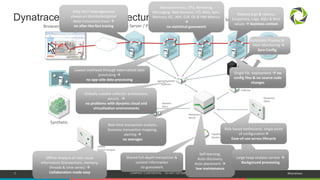
Dynatrace Memory Analysis Server
Dynatrace Solution Architecture
Web Server / PHPBrowser or Rich-Client Java .NET
Mainframe,
Native, … Database
Performance
Warehouse
Agent/PurePath
Collector
Monitoring
Collector
Dynatrace
Server
Dynatrace
Client
Sessions
Store
Exported
Session
Offline
Session Analysis
Only 24x7 heterogeneous
always-on distributed global
deep transaction trace 
no after-the-fact tracing
Execution times, CPU, Remoting,
Messaging, Web Services, I/O, Wait, Sync,
Memory, GC, JMX, CLR, OS & PMI Metrics

no statistical guesswork
Shared full-depth transaction &
context information
no guesswork
Self-learning,
Auto-discovery,
Auto placement 
low maintenance
Real-time transaction analysis,
business transaction mapping,
alerting 
no averages
Globally scalable collector architecture,
secure, 
no problems with dynamic cloud and
virtualization environments
Method args & returns,
Exceptions, Logs, SQLs & Bind
values  business context
Large heap analysis service 
Background processing
Offline Analysis of root-cause
information (transactions, memory,
threads & time series) 
Collaboration made easy
Automatic Process &
Host Monitoring 
Zero Config
Single file deployment  no
config files & no source code
changes
Lowest overhead through externalized data
processing 
no app-side data processing
Synthetic
Role based dashboards, single point
of configuration
Ease-of-use across lifecycle
4 COMPANY CONFIDENTIAL – DO NOT DISTRIBUTE #Dynatrace
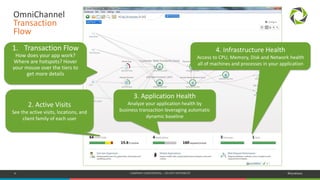
OmniChannel
Transaction
Flow
1. Transaction Flow
How does your app work?
Where are hotspots? Hover
your mouse over the tiers to
get more details
2. Active Visits
See the active visits, locations, and
client family of each user
3. Application Health
Analyze your application health by
business transaction leveraging automatic
dynamic baseline
4. Infrastructure Health
Access to CPU, Memory, Disk and Network health
all of machines and processes in your application
5 COMPANY CONFIDENTIAL – DO NOT DISTRIBUTE #Dynatrace
OmniChannel
Transaction
Flow
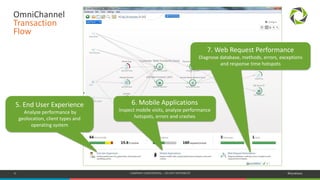
5. End User Experience
Analyze performance by
geolocation, client types and
operating system
6. Mobile Applications
Inspect mobile visits, analyze performance
hotspots, errors and crashes
7. Web Request Performance
Diagnose database, methods, errors, exceptions
and response time hotspots
6 COMPANY CONFIDENTIAL – DO NOT DISTRIBUTE #Dynatrace
OmniChannel
Transaction
Flow
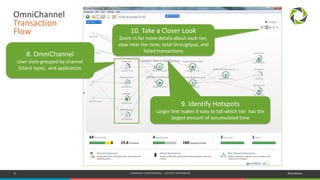
8. OmniChannel
User visits grouped by channel
(client type), and application
10. Take a Closer Look
Zoom in for more details about each tier,
view inter tier time, total throughput, and
failed transactions
9. Identify Hotspots
Larger text makes it easy to tell which tier has the
largest amount of accumulated time
7 COMPANY CONFIDENTIAL – DO NOT DISTRIBUTE #Dynatrace
What We’ll Be Doing
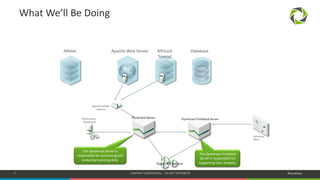
Dynatrace Sessions
Apache Web Server Alfresco
Tomcat
JMeter Database
Performance
Warehouse
Agent/PurePath
Collector
Dynatrace Server
Dynatrace
Client
Dynatrace Frontend Server
The Dynatrace Server is
responsible for processing and
analyzing incoming data.
The Dynatrace Frontend
Server is responsible for
supporting User Analysis.
8 COMPANY CONFIDENTIAL – DO NOT DISTRIBUTE #Dynatrace
Useful Resources
Free Trial http://bit.ly/dttrial
Video Tutorials http://bit.ly/dttutorials
Blog http://blog.dynatrace.com
9 COMPANY CONFIDENTIAL – DO NOT DISTRIBUTE #Dynatrace
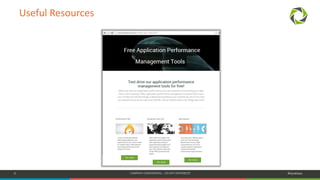
Useful Resources
10 COMPANY CONFIDENTIAL – DO NOT DISTRIBUTE #Dynatrace

Dynatrace FreeTrial Test Drive

  • 1.
    1 COMPANY CONFIDENTIAL– DO NOT DISTRIBUTE #Dynatrace 22 Jul 2015 Dynatrace Free Trial Test Drive
  • 2.
    2 COMPANY CONFIDENTIAL– DO NOT DISTRIBUTE #Dynatrace • About Dynatrace Application Monitoring • What We’ll Be Doing • Useful Resources Agenda
  • 3.
    3 COMPANY CONFIDENTIAL– DO NOT DISTRIBUTE #Dynatrace Dynatrace Memory Analysis Server Dynatrace Solution Architecture Web Server / PHPBrowser or Rich-Client Java .NET Mainframe, Native, … Database Performance Warehouse Agent/PurePath Collector Monitoring Collector Dynatrace Server Dynatrace Client Sessions Store Exported Session Offline Session Analysis Only 24x7 heterogeneous always-on distributed global deep transaction trace  no after-the-fact tracing Execution times, CPU, Remoting, Messaging, Web Services, I/O, Wait, Sync, Memory, GC, JMX, CLR, OS & PMI Metrics  no statistical guesswork Shared full-depth transaction & context information no guesswork Self-learning, Auto-discovery, Auto placement  low maintenance Real-time transaction analysis, business transaction mapping, alerting  no averages Globally scalable collector architecture, secure,  no problems with dynamic cloud and virtualization environments Method args & returns, Exceptions, Logs, SQLs & Bind values  business context Large heap analysis service  Background processing Offline Analysis of root-cause information (transactions, memory, threads & time series)  Collaboration made easy Automatic Process & Host Monitoring  Zero Config Single file deployment  no config files & no source code changes Lowest overhead through externalized data processing  no app-side data processing Synthetic Role based dashboards, single point of configuration Ease-of-use across lifecycle
  • 4.
    4 COMPANY CONFIDENTIAL– DO NOT DISTRIBUTE #Dynatrace OmniChannel Transaction Flow 1. Transaction Flow How does your app work? Where are hotspots? Hover your mouse over the tiers to get more details 2. Active Visits See the active visits, locations, and client family of each user 3. Application Health Analyze your application health by business transaction leveraging automatic dynamic baseline 4. Infrastructure Health Access to CPU, Memory, Disk and Network health all of machines and processes in your application
  • 5.
    5 COMPANY CONFIDENTIAL– DO NOT DISTRIBUTE #Dynatrace OmniChannel Transaction Flow 5. End User Experience Analyze performance by geolocation, client types and operating system 6. Mobile Applications Inspect mobile visits, analyze performance hotspots, errors and crashes 7. Web Request Performance Diagnose database, methods, errors, exceptions and response time hotspots
  • 6.
    6 COMPANY CONFIDENTIAL– DO NOT DISTRIBUTE #Dynatrace OmniChannel Transaction Flow 8. OmniChannel User visits grouped by channel (client type), and application 10. Take a Closer Look Zoom in for more details about each tier, view inter tier time, total throughput, and failed transactions 9. Identify Hotspots Larger text makes it easy to tell which tier has the largest amount of accumulated time
  • 7.
    7 COMPANY CONFIDENTIAL– DO NOT DISTRIBUTE #Dynatrace What We’ll Be Doing Dynatrace Sessions Apache Web Server Alfresco Tomcat JMeter Database Performance Warehouse Agent/PurePath Collector Dynatrace Server Dynatrace Client Dynatrace Frontend Server The Dynatrace Server is responsible for processing and analyzing incoming data. The Dynatrace Frontend Server is responsible for supporting User Analysis.
  • 8.
    8 COMPANY CONFIDENTIAL– DO NOT DISTRIBUTE #Dynatrace Useful Resources Free Trial http://bit.ly/dttrial Video Tutorials http://bit.ly/dttutorials Blog http://blog.dynatrace.com
  • 9.
    9 COMPANY CONFIDENTIAL– DO NOT DISTRIBUTE #Dynatrace Useful Resources
  • 10.
    10 COMPANY CONFIDENTIAL– DO NOT DISTRIBUTE #Dynatrace