DYLAN DONKIN
USER EXPERIENCE DESIGNER
EXPERIENCE
DESIGNING PRODUCTS FOR 4+ YEARS
DEVICES, PLATFORMS, APPS, WEB
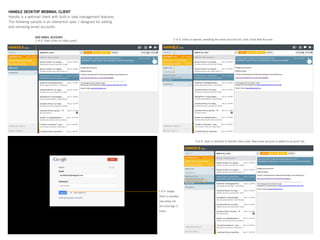
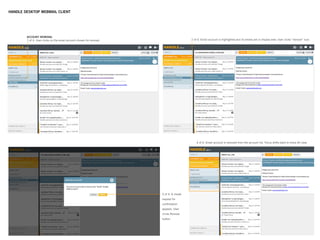
HANDLE DESKTOP WEBMAIL CLIENT
Handle is a webmail client with built-in task management features.
The following sample is an interaction spec I designed for adding
and removing email accounts.
HANDLE DESKTOP WEBMAIL CLIENT
HANDLE.COM
• Sign Up
• Login
SIGN UP FORM
MEET INVITE
CRITERIA?
Y
N
Y
N
LOGIN
SUCCESSFUL?
WEB SIGNUP
- Marketing messages
- Video/demo
- Curriculum materials
- Google Connect Button
HANDLEONE.2
Previous state
HANDLEONE.2
Updated state
HANDLEONE.2
New user state
• Item on Today list
• Guider pointing to Today
HANDLEONE.2
New user state
• No item on Today list
• Guider pointing to Today,
instruction on how to add 	
items to the Today list.
TODAY EXPERIENCE
What’s your most important
thing to do today?
• Text entry
• OK
	
CLICK-THRU DEMO (7 screens)
HANDLE USER
ACOUNT INFO
INVITE COMMAND
• Select invitees, latest
recipients
• Cancel
CONFIRM INVITES
SENT
• OK
One-off contact entry
ITEM ADDED TO
TODAY?
Y
N
APPROVED?
CHROME BROWSER?
Y
N
N
Y
ERROR MESSAGE
Explanation
- Try Again
- Cancel
ERROR MESSAGE
Chrome requirement
explained
- Download Chrome
- OK
GOOGLE CHROME
DOWNLOAD
GOOGLE CONNECT
ABOUT
US
PRODUCT FAQ PRESS SUPPORT LOGIN
ERROR
HANDLEONE.2
Invite Command
Activated
• Welcome to Handle!
• Prioritize remaining emails
• Name the new task
• Save the new task	
• Focus on your priorities
• Refine your priorities
• Task commands
• Today list
INVITE EMAIL FROM FRIEND
Notify user they have been invited to
join Handle
- Link
LEGEND
Screen Dialog
Process
Fork
Com- Delay
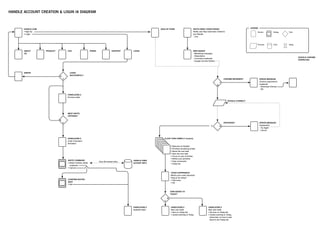
HANDLE ACCOUNT CREATION & LOGIN IA DIAGRAM
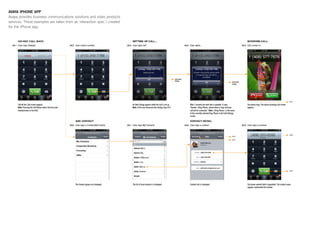
AVAYA IPHONE APP
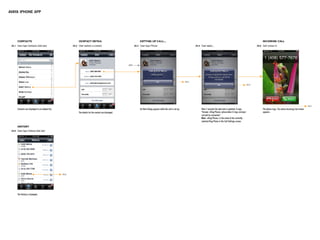
Avaya provides business communications solutions and video products
services. These examples are taken from an interaction spec I created
for the iPhone app.
Avaya iPhone App
AVAYA IPHONE APP
KODAK/MOTOROLA CAMERAPHONE
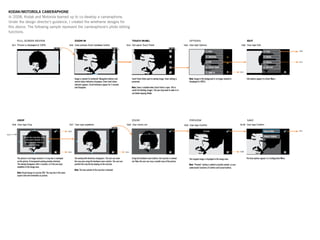
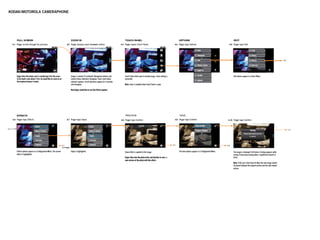
In 2008, Kodak and Motorola teamed up to co-develop a cameraphone.
Under the design director’s guidance, I created the wireframe designs for
this device. The following sample represent the cameraphone’s photo editing
functions.
KODAK/MOTOROLA CAMERAPHONE
Andrew the Thought Leader
In-The-Know, Early Adopter, Technophile
It’s five o’clock and Andrew has already received three
text messages from friends wondering where to go get the
night started. As he walks away from his apartment, he
pulls out his iPhone and launches the LightPole applica-
tion. It correctly identifies his location as Dolores Park. He
taps My Places to see his list of favorite Points of Interest.
He scans the list and finds his old standby, Mappy Hour.
A list of bars and nightclubs appears. He would like to
find a nearby bar that has character, but isn’t a complete
dive. He switches to map view and spots The Argus. He
knows they have a great jukebox and cool bartenders. He
taps the Share button and sends the listing to his friends
via SMS. Andrew grabs a muni bus and heads to the outer
Mission. He can almost taste the dollar PBRs.
Tasks
Launch LightPole Application from Home screen1.
Identify current location2.
Tap My Places3.
Tap MappyHour4.
Display POIs on a map5.
Tap The Argus6.
Share via SMS7.
Gwen the Social Butterfly
Stays Connected, Social, Fashionable
Gwen is hanging out with some friends in downtown San
Mateo after an afternoon of shopping at Hillsdale Mall.
Gwen took the funniest picture of Sheila trying on some
platform heels. She wants to send it to Heather and Maria,
but the image is pretty large. Gwen doesn’t want to pay
the data charges, so she convinces the crew to head to a
cafe with Wi-Fi. She pulls her new iPhone out of her bag
and fires up the LightPole application. It positively identi-
fies her location as Hillsdale Mall. She taps Channels
and chooses Hotspotr from the list. She’s not sure which
of the cafes is closest to her location, so she switches to
map view. She uses the iPhone pinch gesture to zoom
in. The closest cafe is 3 Bees Coffee on 3rd Street. Who
wants coffee? The girls jump in the car and cruise down El
Camino Real.
Tasks
Launch LightPole Application from Home screen1.
Identify current location2.
Tap Channels3.
Tap HotSpotr4.
Display POIs on a map5.
Zooms in6.
Views detail screen7.
Displays 3 Bees on map8.
Colin the Busy Guy
On-The-Go, Time-Concerned, Pragmatic
Colin is on a business trip in Chicago. He has just
wrapped up his last meeting of the day. Some colleagues
suggest they continue the conversation over dinner. Colin
is tired, but agrees, as long as they can go somewhere
within walking distance of the hotel. He opens his iPhone
and launches LightPole. The Hotel Sax is already in his
list of recent locations. He selects it from the list and
chooses the Yelp! channel. Colin figures he might as well
have some deep dish pizza on this trip. He enters pizza in
the Yelp! search box. His results are returned in a list. He
switches to map view and finds La Madia Art of Pizza is
two blocks from hotel. Perfect.
Tasks
Launch LightPole Application from Home screen1.
View recent locations2.
Tap Hotel Sax3.
Tap Yelp!4.
Searches for pizza5.
Display POIs6.
Toggle map view7.
Taps La Madia Art of Pizza8.
LIGHTPOLE USER SCENARIOS
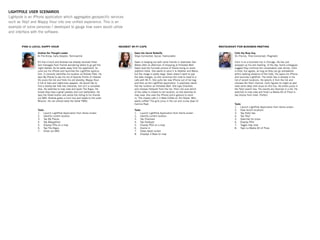
Lightpole is an iPhone application which aggregates geospecific services
such as Yelp! and Mappy Hour into one unified experience. This is an
example of some personas I developed to gauge how users would utilize
and interface with the software.
THANK YOU

Dylan Donkin: 2013 UX Portfolio

  • 1.
  • 2.
    EXPERIENCE DESIGNING PRODUCTS FOR4+ YEARS DEVICES, PLATFORMS, APPS, WEB
  • 3.
    HANDLE DESKTOP WEBMAILCLIENT Handle is a webmail client with built-in task management features. The following sample is an interaction spec I designed for adding and removing email accounts.
  • 4.
  • 5.
    HANDLE.COM • Sign Up •Login SIGN UP FORM MEET INVITE CRITERIA? Y N Y N LOGIN SUCCESSFUL? WEB SIGNUP - Marketing messages - Video/demo - Curriculum materials - Google Connect Button HANDLEONE.2 Previous state HANDLEONE.2 Updated state HANDLEONE.2 New user state • Item on Today list • Guider pointing to Today HANDLEONE.2 New user state • No item on Today list • Guider pointing to Today, instruction on how to add items to the Today list. TODAY EXPERIENCE What’s your most important thing to do today? • Text entry • OK CLICK-THRU DEMO (7 screens) HANDLE USER ACOUNT INFO INVITE COMMAND • Select invitees, latest recipients • Cancel CONFIRM INVITES SENT • OK One-off contact entry ITEM ADDED TO TODAY? Y N APPROVED? CHROME BROWSER? Y N N Y ERROR MESSAGE Explanation - Try Again - Cancel ERROR MESSAGE Chrome requirement explained - Download Chrome - OK GOOGLE CHROME DOWNLOAD GOOGLE CONNECT ABOUT US PRODUCT FAQ PRESS SUPPORT LOGIN ERROR HANDLEONE.2 Invite Command Activated • Welcome to Handle! • Prioritize remaining emails • Name the new task • Save the new task • Focus on your priorities • Refine your priorities • Task commands • Today list INVITE EMAIL FROM FRIEND Notify user they have been invited to join Handle - Link LEGEND Screen Dialog Process Fork Com- Delay HANDLE ACCOUNT CREATION & LOGIN IA DIAGRAM
  • 6.
    AVAYA IPHONE APP Avayaprovides business communications solutions and video products services. These examples are taken from an interaction spec I created for the iPhone app. Avaya iPhone App
  • 7.
  • 8.
    KODAK/MOTOROLA CAMERAPHONE In 2008,Kodak and Motorola teamed up to co-develop a cameraphone. Under the design director’s guidance, I created the wireframe designs for this device. The following sample represent the cameraphone’s photo editing functions.
  • 9.
  • 10.
    Andrew the ThoughtLeader In-The-Know, Early Adopter, Technophile It’s five o’clock and Andrew has already received three text messages from friends wondering where to go get the night started. As he walks away from his apartment, he pulls out his iPhone and launches the LightPole applica- tion. It correctly identifies his location as Dolores Park. He taps My Places to see his list of favorite Points of Interest. He scans the list and finds his old standby, Mappy Hour. A list of bars and nightclubs appears. He would like to find a nearby bar that has character, but isn’t a complete dive. He switches to map view and spots The Argus. He knows they have a great jukebox and cool bartenders. He taps the Share button and sends the listing to his friends via SMS. Andrew grabs a muni bus and heads to the outer Mission. He can almost taste the dollar PBRs. Tasks Launch LightPole Application from Home screen1. Identify current location2. Tap My Places3. Tap MappyHour4. Display POIs on a map5. Tap The Argus6. Share via SMS7. Gwen the Social Butterfly Stays Connected, Social, Fashionable Gwen is hanging out with some friends in downtown San Mateo after an afternoon of shopping at Hillsdale Mall. Gwen took the funniest picture of Sheila trying on some platform heels. She wants to send it to Heather and Maria, but the image is pretty large. Gwen doesn’t want to pay the data charges, so she convinces the crew to head to a cafe with Wi-Fi. She pulls her new iPhone out of her bag and fires up the LightPole application. It positively identi- fies her location as Hillsdale Mall. She taps Channels and chooses Hotspotr from the list. She’s not sure which of the cafes is closest to her location, so she switches to map view. She uses the iPhone pinch gesture to zoom in. The closest cafe is 3 Bees Coffee on 3rd Street. Who wants coffee? The girls jump in the car and cruise down El Camino Real. Tasks Launch LightPole Application from Home screen1. Identify current location2. Tap Channels3. Tap HotSpotr4. Display POIs on a map5. Zooms in6. Views detail screen7. Displays 3 Bees on map8. Colin the Busy Guy On-The-Go, Time-Concerned, Pragmatic Colin is on a business trip in Chicago. He has just wrapped up his last meeting of the day. Some colleagues suggest they continue the conversation over dinner. Colin is tired, but agrees, as long as they can go somewhere within walking distance of the hotel. He opens his iPhone and launches LightPole. The Hotel Sax is already in his list of recent locations. He selects it from the list and chooses the Yelp! channel. Colin figures he might as well have some deep dish pizza on this trip. He enters pizza in the Yelp! search box. His results are returned in a list. He switches to map view and finds La Madia Art of Pizza is two blocks from hotel. Perfect. Tasks Launch LightPole Application from Home screen1. View recent locations2. Tap Hotel Sax3. Tap Yelp!4. Searches for pizza5. Display POIs6. Toggle map view7. Taps La Madia Art of Pizza8. LIGHTPOLE USER SCENARIOS Lightpole is an iPhone application which aggregates geospecific services such as Yelp! and Mappy Hour into one unified experience. This is an example of some personas I developed to gauge how users would utilize and interface with the software.
  • 11.