(305) 4-1
Advanced DataStage
Working with
Sequential Data
Module
3
(305) 4-2
Advanced DataStage
Module Objectives
After this module, you will be able to:
 Use DataStage to access
Line-terminated sequential data
Non-line-terminated sequential data
Column-delimited data
Fixed-width columns
Fixed-format sequential data
Variable-format sequential data
 Use COMMON variables to store values and accumulations
between reads
 Merge sequential data using Merge plug-in
(305) 4-3
Advanced DataStage
Sequential Record Types
 Line (record) terminators
 Column delimited
For example: comma-delimited, tab-delimited
 Fixed-width columns
Lengths specified by the metadata
 No line terminators
 Fixed-width columns
Lengths specified by the metadata
(305) 4-4
Advanced DataStage
Variable-Record Formats
Sequential files may contain records with varying
formats
First field indicates type of format
Records (lines) may or may not be terminated
Fields may or may not be delimited
Require special processing
Can’t specify the different formats (column definitions) in
the sequential stage
Need to determine record type before processing
Line-terminated records can be read in as a single field of
data and then parsed
Can’t read in a non-line-terminated record until its type is
determined
(305) 4-5
Advanced DataStage
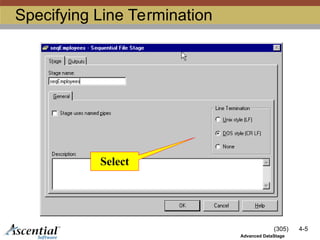
Specifying Line Termination
Select
(305) 4-6
Advanced DataStage
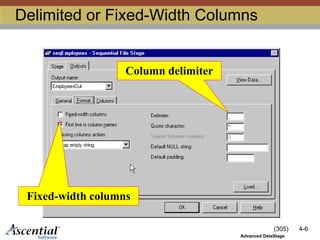
Delimited or Fixed-Width Columns
Column delimiter
Fixed-width columns
(305) 4-7
Advanced DataStage
Accessing Line Terminated Data
 Using Sequential stage
 Specify line terminator
 Specify column delimiter or fixed-width
 Define columns
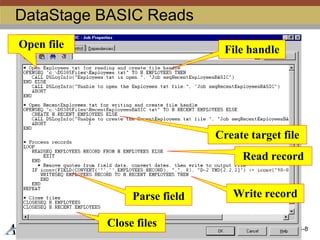
 Using DataStage BASIC
 OPENSEQ pathname TO file.handle THEN … ELSE ...
 READSEQ variable FROM file.handle THEN … ELSE ...
 FIELD(variable, delimiter, n)
 variable[n, l]
 WRITESEQ expression TO file.handle THEN … ELSE ...
 CLOSESEQ file.handle
(305) 4-8
Advanced DataStage
DataStage BASIC Reads
Open file File handle
Create target file
Read record
Write record
Close files
Parse field
(305) 4-9
Advanced DataStage
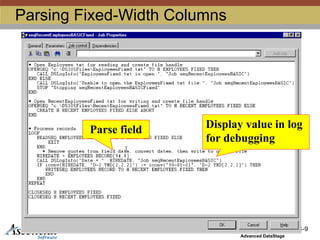
Parsing Fixed-Width Columns
Parse field Display value in log
for debugging
(305) 4-10
Advanced DataStage
Accessing Non-Terminated Records
 Using Sequential stage
 Specify “None” for line termination
 Specify fixed-width columns
 Define columns
 Using DataStage BASIC
 OPENSEQ pathname TO file.handle THEN … ELSE ...
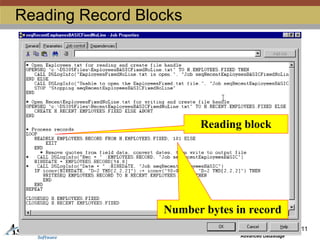
 READBLK variable FROM file.handle, blocksize THEN … ELSE ...
variable[n, l]
 WRITEBLK expression ON file.handle THEN … ELSE ...
 CLOSESEQ file.handle
(305) 4-11
Advanced DataStage
Reading Record Blocks
Reading block
Number bytes in record
(305) 4-12
Advanced DataStage
Accessing Multi-Format Records
Line terminated:
 Using Sequential stage
 Specify line terminator
 Specify column delimiter using a character not in the data
 Define a single column to store the whole record
 Parse using FIELD function or substring operator
 Using DataStage BASIC
 OPENSEQ to open file
 READSEQ to read a record
Parse using FIELD function or substring operator
 CLOSESEQ to close the file
(305) 4-13
Advanced DataStage
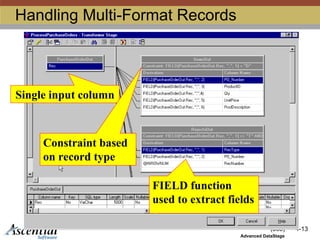
Handling Multi-Format Records
Single input column
Constraint based
on record type
FIELD function
used to extract fields
(305) 4-14
Advanced DataStage
Accessing Multi-Format Records
No Line terminators:
 Don’t use Sequential stage
 Using DataStage BASIC
 OPENSEQ to open file
 READBLK to read first byte of a new record to
determine its type
 READBLK the rest of the record based on its
type
Parse using substring operator based on record type
 CLOSESEQ to close the file
(305) 4-15
Advanced DataStage
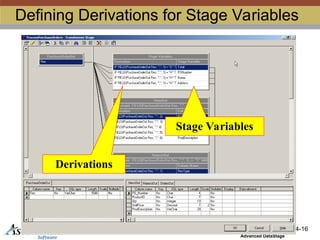
Using Stage Variables
 Use to store and accumulate values
between reads
 Persistent within a transformer
 Define in transformer
 Click icon to view
(305) 4-16
Advanced DataStage
Defining Derivations for Stage Variables
Stage Variables
Derivations
(305) 4-17
Advanced DataStage
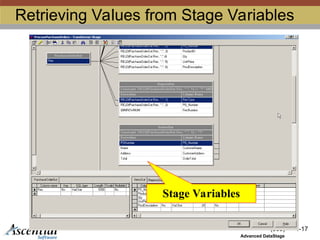
Retrieving Values from Stage Variables
Stage Variables
(305) 4-18
Advanced DataStage
Exercise Part I: Using BASIC
 Read sequential records with a BASIC program
 Read from a line-terminated, column delimited
file
 Read from a line-terminated file with fixed-length
records
 Read from a non-line-terminated file with fixed-
length records
 Read from a line-terminated file with varying-
format records
 Use stage variables accumulate a running total
(305) 4-19
Advanced DataStage
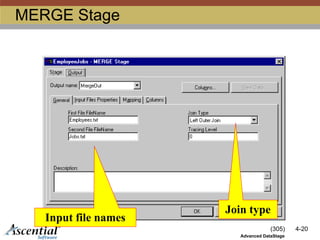
Merging Sequential Data
 Install the Merge plug-in
 Add Merge plug-in stage to job
 Define merge
 Names and locations of input files
 Temporary directory
 Type of join
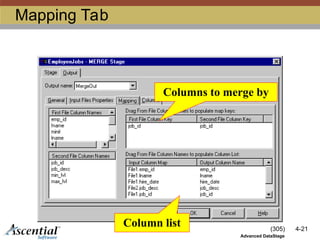
 Input columns for each input file
 Columns (key) to merge by
 Output columns
(305) 4-20
Advanced DataStage
MERGE Stage
Join type
Input file names
(305) 4-21
Advanced DataStage
Mapping Tab
Columns to merge by
Column list
(305) 4-22
Advanced DataStage
Exercise Part II: Merge Plug-In
 If necessary, install Merge plug-in server
and client components
 Merge sequential data using the Merge
plug-in
DS41_DS305_M03_DataAccess_SEQ DS41_DS305_M03_DataAccess_SEQ.ppt

  • 1.
    (305) 4-1 Advanced DataStage Workingwith Sequential Data Module 3
  • 2.
    (305) 4-2 Advanced DataStage ModuleObjectives After this module, you will be able to:  Use DataStage to access Line-terminated sequential data Non-line-terminated sequential data Column-delimited data Fixed-width columns Fixed-format sequential data Variable-format sequential data  Use COMMON variables to store values and accumulations between reads  Merge sequential data using Merge plug-in
  • 3.
    (305) 4-3 Advanced DataStage SequentialRecord Types  Line (record) terminators  Column delimited For example: comma-delimited, tab-delimited  Fixed-width columns Lengths specified by the metadata  No line terminators  Fixed-width columns Lengths specified by the metadata
  • 4.
    (305) 4-4 Advanced DataStage Variable-RecordFormats Sequential files may contain records with varying formats First field indicates type of format Records (lines) may or may not be terminated Fields may or may not be delimited Require special processing Can’t specify the different formats (column definitions) in the sequential stage Need to determine record type before processing Line-terminated records can be read in as a single field of data and then parsed Can’t read in a non-line-terminated record until its type is determined
  • 5.
  • 6.
    (305) 4-6 Advanced DataStage Delimitedor Fixed-Width Columns Column delimiter Fixed-width columns
  • 7.
    (305) 4-7 Advanced DataStage AccessingLine Terminated Data  Using Sequential stage  Specify line terminator  Specify column delimiter or fixed-width  Define columns  Using DataStage BASIC  OPENSEQ pathname TO file.handle THEN … ELSE ...  READSEQ variable FROM file.handle THEN … ELSE ...  FIELD(variable, delimiter, n)  variable[n, l]  WRITESEQ expression TO file.handle THEN … ELSE ...  CLOSESEQ file.handle
  • 8.
    (305) 4-8 Advanced DataStage DataStageBASIC Reads Open file File handle Create target file Read record Write record Close files Parse field
  • 9.
    (305) 4-9 Advanced DataStage ParsingFixed-Width Columns Parse field Display value in log for debugging
  • 10.
    (305) 4-10 Advanced DataStage AccessingNon-Terminated Records  Using Sequential stage  Specify “None” for line termination  Specify fixed-width columns  Define columns  Using DataStage BASIC  OPENSEQ pathname TO file.handle THEN … ELSE ...  READBLK variable FROM file.handle, blocksize THEN … ELSE ... variable[n, l]  WRITEBLK expression ON file.handle THEN … ELSE ...  CLOSESEQ file.handle
  • 11.
    (305) 4-11 Advanced DataStage ReadingRecord Blocks Reading block Number bytes in record
  • 12.
    (305) 4-12 Advanced DataStage AccessingMulti-Format Records Line terminated:  Using Sequential stage  Specify line terminator  Specify column delimiter using a character not in the data  Define a single column to store the whole record  Parse using FIELD function or substring operator  Using DataStage BASIC  OPENSEQ to open file  READSEQ to read a record Parse using FIELD function or substring operator  CLOSESEQ to close the file
  • 13.
    (305) 4-13 Advanced DataStage HandlingMulti-Format Records Single input column Constraint based on record type FIELD function used to extract fields
  • 14.
    (305) 4-14 Advanced DataStage AccessingMulti-Format Records No Line terminators:  Don’t use Sequential stage  Using DataStage BASIC  OPENSEQ to open file  READBLK to read first byte of a new record to determine its type  READBLK the rest of the record based on its type Parse using substring operator based on record type  CLOSESEQ to close the file
  • 15.
    (305) 4-15 Advanced DataStage UsingStage Variables  Use to store and accumulate values between reads  Persistent within a transformer  Define in transformer  Click icon to view
  • 16.
    (305) 4-16 Advanced DataStage DefiningDerivations for Stage Variables Stage Variables Derivations
  • 17.
    (305) 4-17 Advanced DataStage RetrievingValues from Stage Variables Stage Variables
  • 18.
    (305) 4-18 Advanced DataStage ExercisePart I: Using BASIC  Read sequential records with a BASIC program  Read from a line-terminated, column delimited file  Read from a line-terminated file with fixed-length records  Read from a non-line-terminated file with fixed- length records  Read from a line-terminated file with varying- format records  Use stage variables accumulate a running total
  • 19.
    (305) 4-19 Advanced DataStage MergingSequential Data  Install the Merge plug-in  Add Merge plug-in stage to job  Define merge  Names and locations of input files  Temporary directory  Type of join  Input columns for each input file  Columns (key) to merge by  Output columns
  • 20.
    (305) 4-20 Advanced DataStage MERGEStage Join type Input file names
  • 21.
    (305) 4-21 Advanced DataStage MappingTab Columns to merge by Column list
  • 22.
    (305) 4-22 Advanced DataStage ExercisePart II: Merge Plug-In  If necessary, install Merge plug-in server and client components  Merge sequential data using the Merge plug-in