Introduction
to
Sequential Files
COBOL's forte
 COBOL is generally used in situations where the
volume of data to be processed is large.
 These systems are sometimes referred to as
“data intensive” systems.
 Generally, large volumes of data arise not
because the data is inherently voluminous but
because the same items of information have
been recorded about a great many instances of
the same object.
Files, Records, Fields.
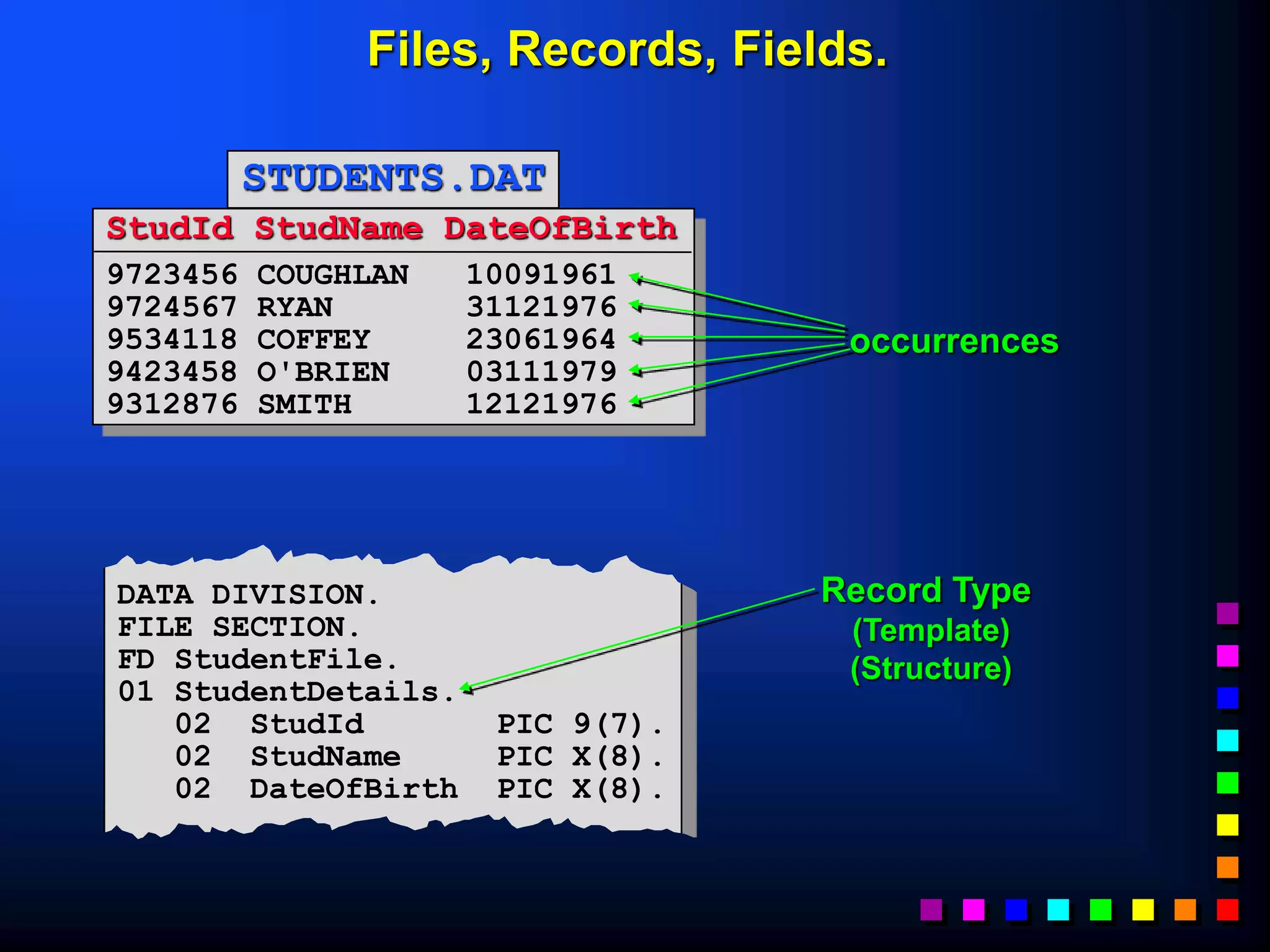
 We use the term FIELD to describe an item of
information we are recording about an object
(e.g. StudentName, DateOfBirth, CourseCode).
 We use the term RECORD to describe the collection
of fields which record information about an object
(e.g. a StudentRecord is a collection of fields recording
information about a student).
 We use the term FILE to describe a collection of one
or more occurrences (instances) of a record type
(template).
 It is important to distinguish between the record
occurrence (i.e. the values of a record) and the record
type (i.e. the structure of the record).
Every record in a file has a different value but the
same structure.
Files, Records, Fields.
StudId StudName DateOfBirth
9723456 COUGHLAN 10091961
9724567 RYAN 31121976
9534118 COFFEY 23061964
9423458 O'BRIEN 03111979
9312876 SMITH 12121976
STUDENTS.DAT
DATA DIVISION.
FILE SECTION.
FD StudentFile.
01 StudentDetails.
02 StudId PIC 9(7).
02 StudName PIC X(8).
02 DateOfBirth PIC X(8).
occurrences
Record Type
(Template)
(Structure)
How files are processed.
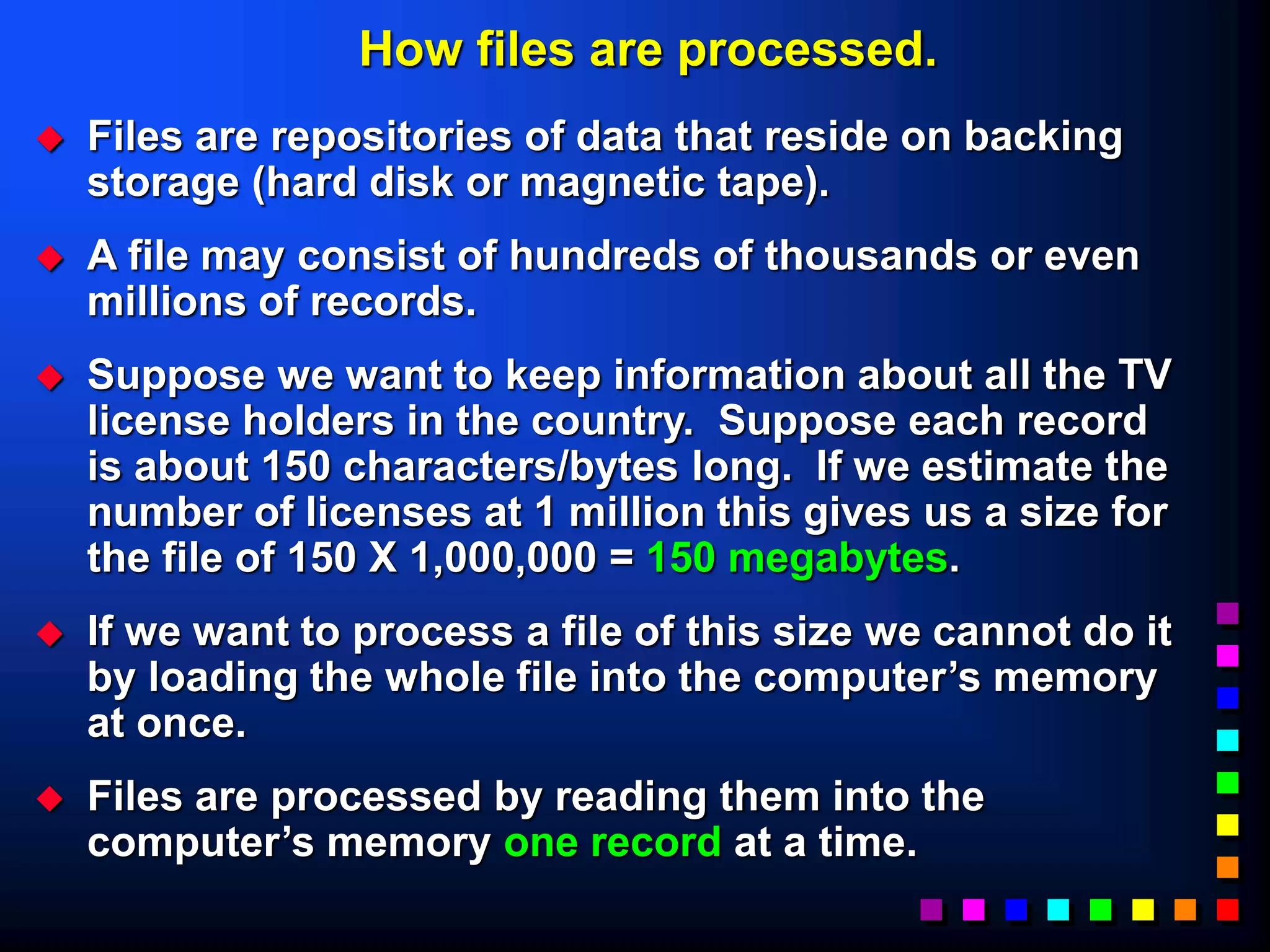
 Files are repositories of data that reside on backing
storage (hard disk or magnetic tape).
 A file may consist of hundreds of thousands or even
millions of records.
 Suppose we want to keep information about all the TV
license holders in the country. Suppose each record
is about 150 characters/bytes long. If we estimate the
number of licenses at 1 million this gives us a size for
the file of 150 X 1,000,000 = 150 megabytes.
 If we want to process a file of this size we cannot do it
by loading the whole file into the computer’s memory
at once.
 Files are processed by reading them into the
computer’s memory one record at a time.
Record Buffers
 To process a file records are read from the file into
the computer’s memory one record at a time.
 The computer uses the programmers description of
the record (i.e. the record template) to set aside
sufficient memory to store one instance of the
record.
 Memory allocated for storing a record is usually
called a “record buffer”
 The record buffer is the only connection between
the program and the records in the file.
Record Buffers
IDENTIFICATION DIVISION.
etc.
ENVIRONMENT DIVISION.
etc.
DATA DIVISION.
FILE SECTION.
Program
RecordBuffer
Declaration
STUDENTS.DAT
DISK Record Instance
Implications of ‘Buffers’
 If your program processes more than one file you
will have to describe a record buffer for each file.
 To process all the records in an INPUT file each
record instance must be copied (read) from the file
into the record buffer when required.
 To create an OUTPUT file containing data records
each record must be placed in the record buffer
and then transferred (written) to the file.
 To transfer a record from an input file to an output
file we will have to
 read the record into the input record buffer
 transfer it to the output record buffer
 write the data to the output file from the output record
buffer
Creating a Student Record
01 StudentDetails.
 Student Id. 02 StudentId PIC 9(7).
 Student Name. 02 StudentName.
Surname 03 Surname PIC X(8).
Initials 03 Initials PIC XX.
 Date of Birth 02 DateOfBirth.
Year of Birth 03 YOBirth PIC 99.
Month of Birth 03 MOBirth PIC 99.
Day of Birth 03 DOBirth PIC 99.
 Course Code 02 CourseCode PIC X(4).
 Value of grant 02 Grant PIC 9(4).
 Gender 02 Gender PIC X.
Student Details.
Describing the record buffer in COBOL
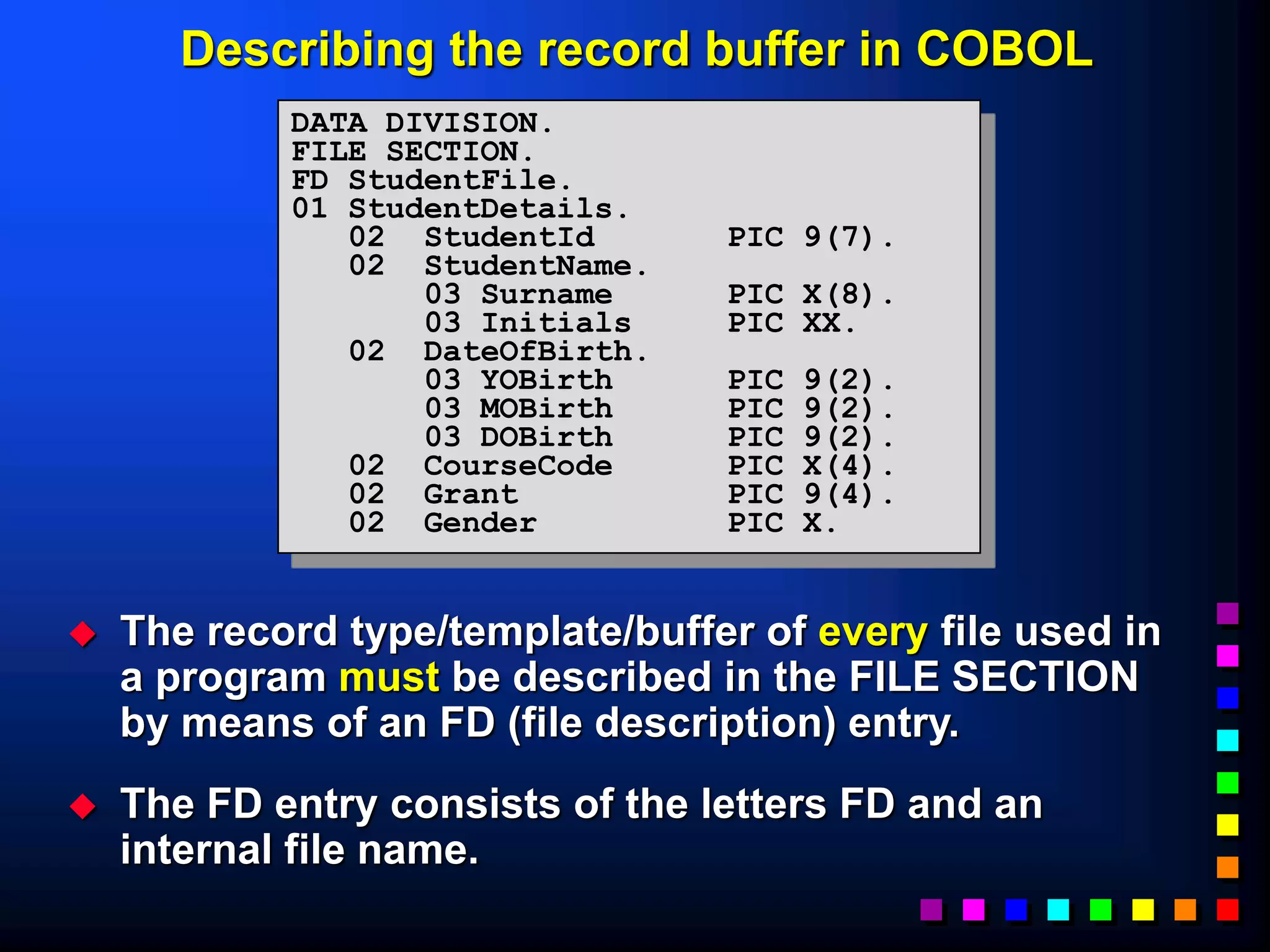
 The record type/template/buffer of every file used in
a program must be described in the FILE SECTION
by means of an FD (file description) entry.
 The FD entry consists of the letters FD and an
internal file name.
DATA DIVISION.
FILE SECTION.
FD StudentFile.
01 StudentDetails.
02 StudentId PIC 9(7).
02 StudentName.
03 Surname PIC X(8).
03 Initials PIC XX.
02 DateOfBirth.
03 YOBirth PIC 9(2).
03 MOBirth PIC 9(2).
03 DOBirth PIC 9(2).
02 CourseCode PIC X(4).
02 Grant PIC 9(4).
02 Gender PIC X.
STUDENTS.DAT
The Select and Assign Clause.
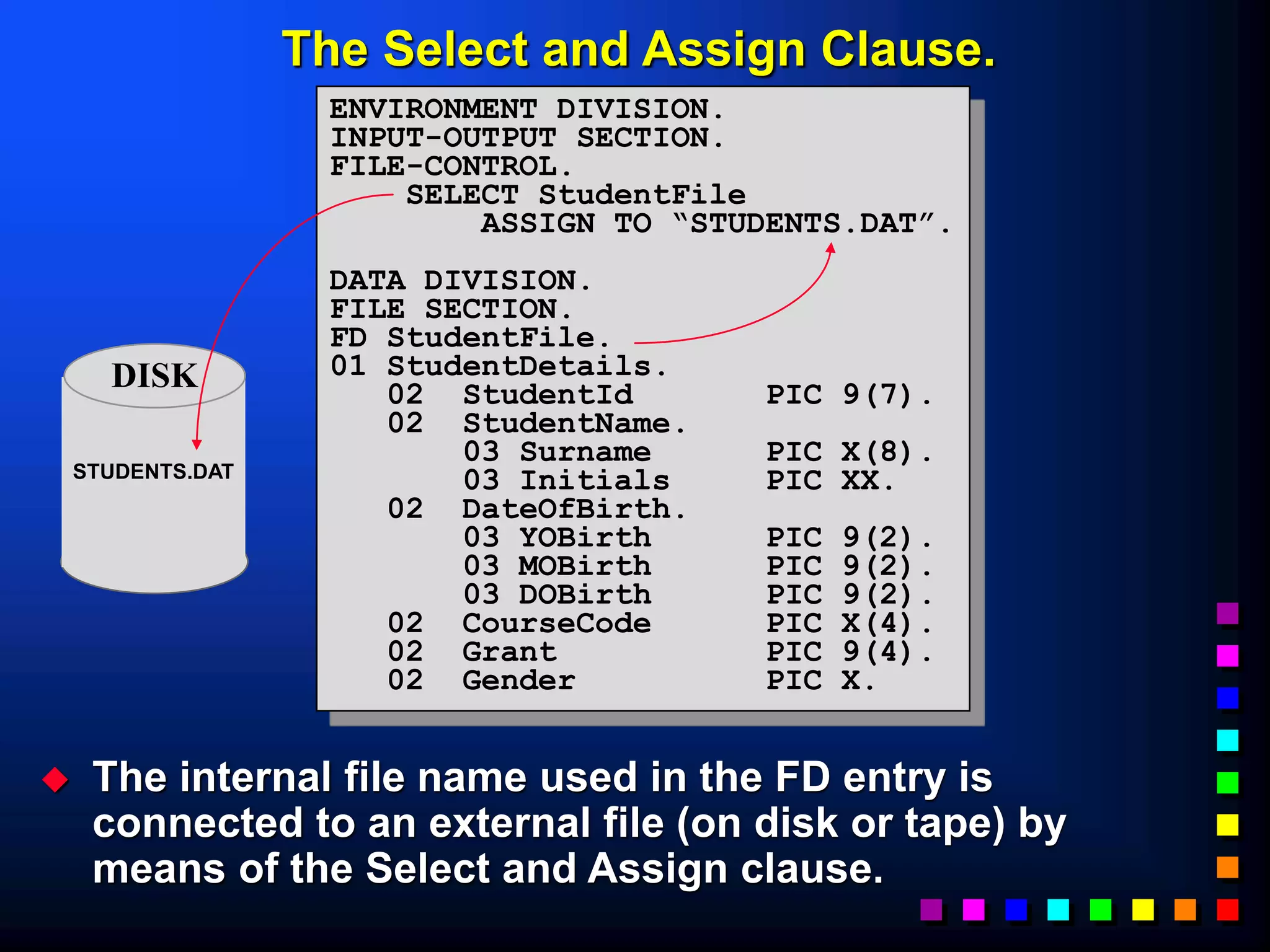
 The internal file name used in the FD entry is
connected to an external file (on disk or tape) by
means of the Select and Assign clause.
ENVIRONMENT DIVISION.
INPUT-OUTPUT SECTION.
FILE-CONTROL.
SELECT StudentFile
ASSIGN TO “STUDENTS.DAT”.
DATA DIVISION.
FILE SECTION.
FD StudentFile.
01 StudentDetails.
02 StudentId PIC 9(7).
02 StudentName.
03 Surname PIC X(8).
03 Initials PIC XX.
02 DateOfBirth.
03 YOBirth PIC 9(2).
03 MOBirth PIC 9(2).
03 DOBirth PIC 9(2).
02 CourseCode PIC X(4).
02 Grant PIC 9(4).
02 Gender PIC X.
DISK
Select and Assign Syntax.
 LINE SEQUENTIAL means each record is followed
by the carriage return and line feed characters.
 RECORD SEQUENTIAL means that the file consists
of a stream of bytes. Only the fact that we know
the size of each record allows us to retrieve them.
SELECT FileName ASSIGN TO ExternalFileReference
[ORGANIZATION IS
LINE
RECORD
SEQUENTIAL].






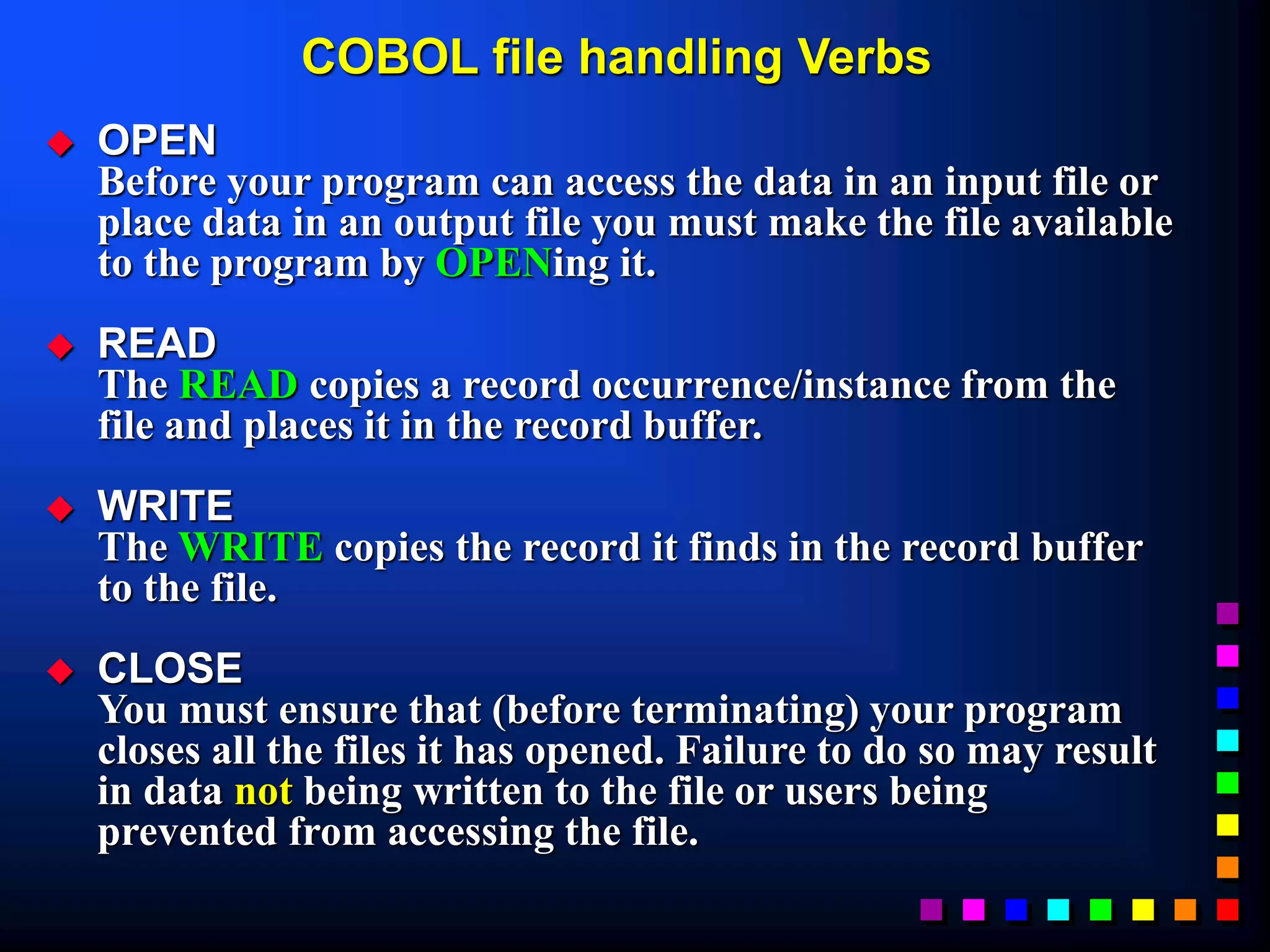
COBOL file handling Verbs
 OPEN
Before your program can access the data in an input file or
place data in an output file you must make the file available
to the program by OPENing it.
 READ
The READ copies a record occurrence/instance from the
file and places it in the record buffer.
 WRITE
The WRITE copies the record it finds in the record buffer
to the file.
 CLOSE
You must ensure that (before terminating) your program
closes all the files it has opened. Failure to do so may result
in data not being written to the file or users being
prevented from accessing the file.
OPEN and CLOSE verb syntax
 When you open a file you have to indicate to
the system what how you want to use it (e.g.
INPUT, OUTPUT, EXTEND) so that the system
can manage the file correctly.
 Opening a file does not transfer any data to
the record buffer, it simply provides access.
OPEN InternalFileName ...
INPUT
OUTPUT
EXTEND




















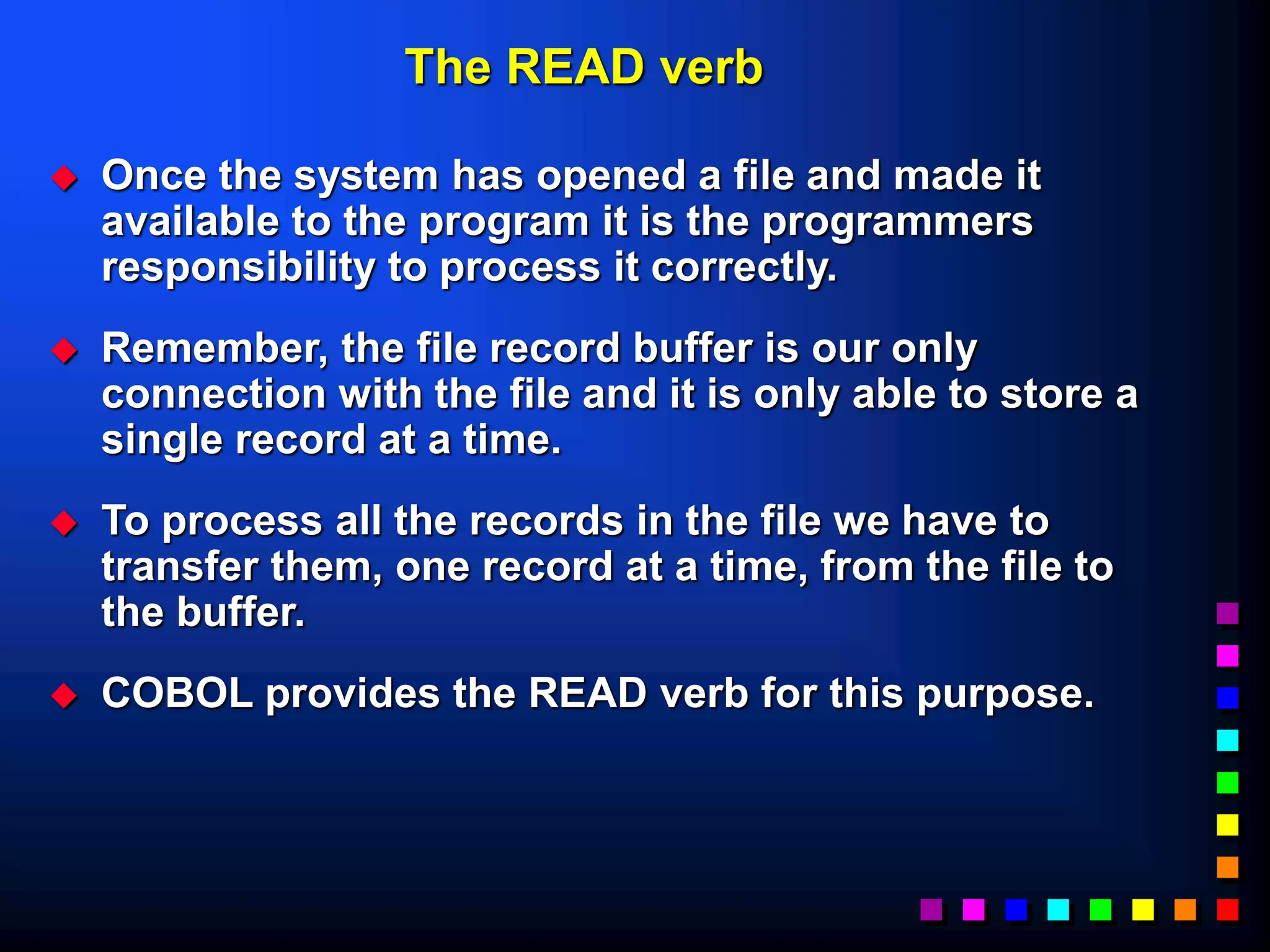
The READ verb
 Once the system has opened a file and made it
available to the program it is the programmers
responsibility to process it correctly.
 Remember, the file record buffer is our only
connection with the file and it is only able to store a
single record at a time.
 To process all the records in the file we have to
transfer them, one record at a time, from the file to
the buffer.
 COBOL provides the READ verb for this purpose.
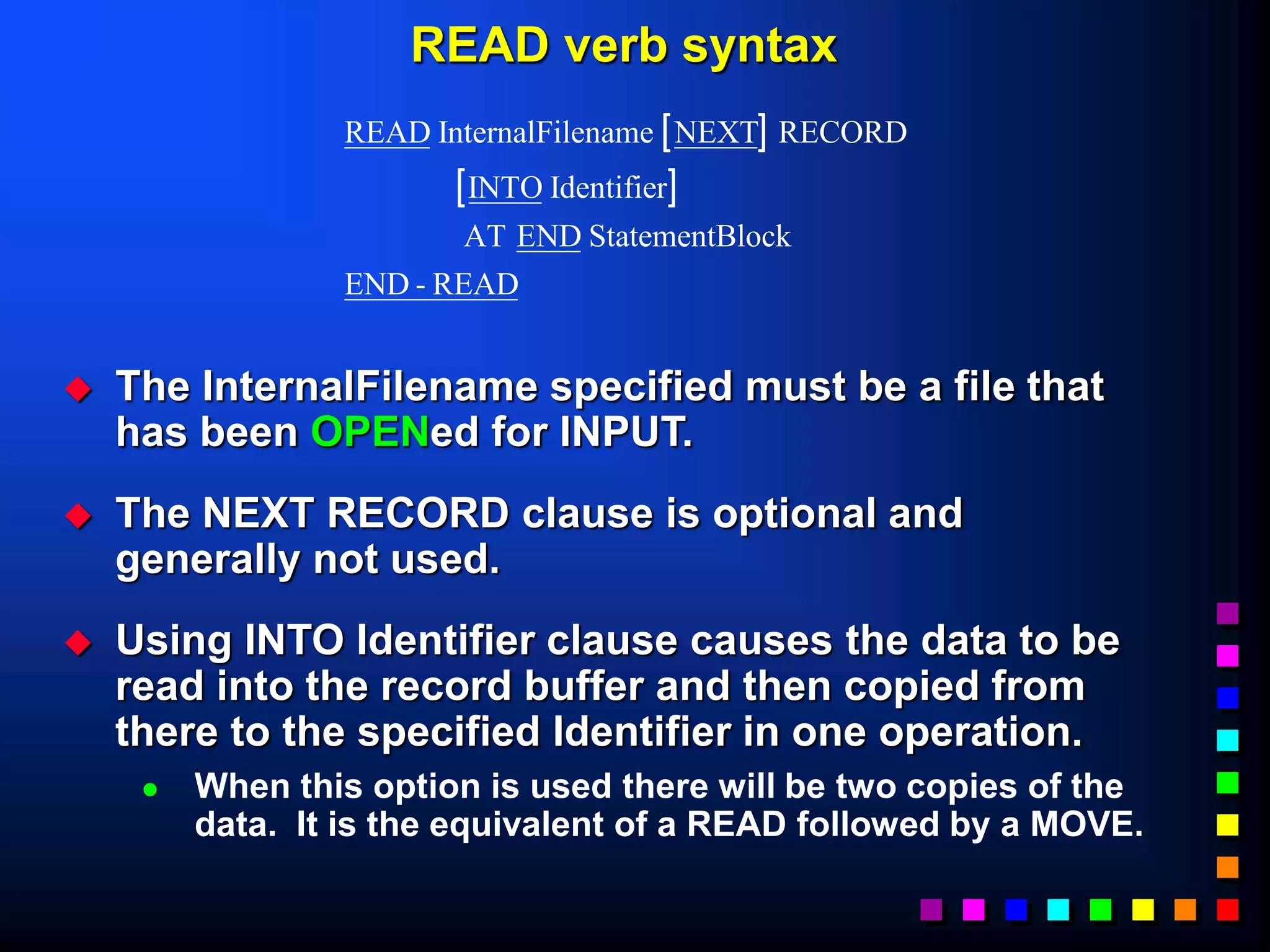
READ verb syntax
 The InternalFilename specified must be a file that
has been OPENed for INPUT.
 The NEXT RECORD clause is optional and
generally not used.
 Using INTO Identifier clause causes the data to be
read into the record buffer and then copied from
there to the specified Identifier in one operation.
 When this option is used there will be two copies of the
data. It is the equivalent of a READ followed by a MOVE.
 
 
READ InternalFilename NEXT RECORD
INTO Identifier
AT END StatementBlock
END - READ
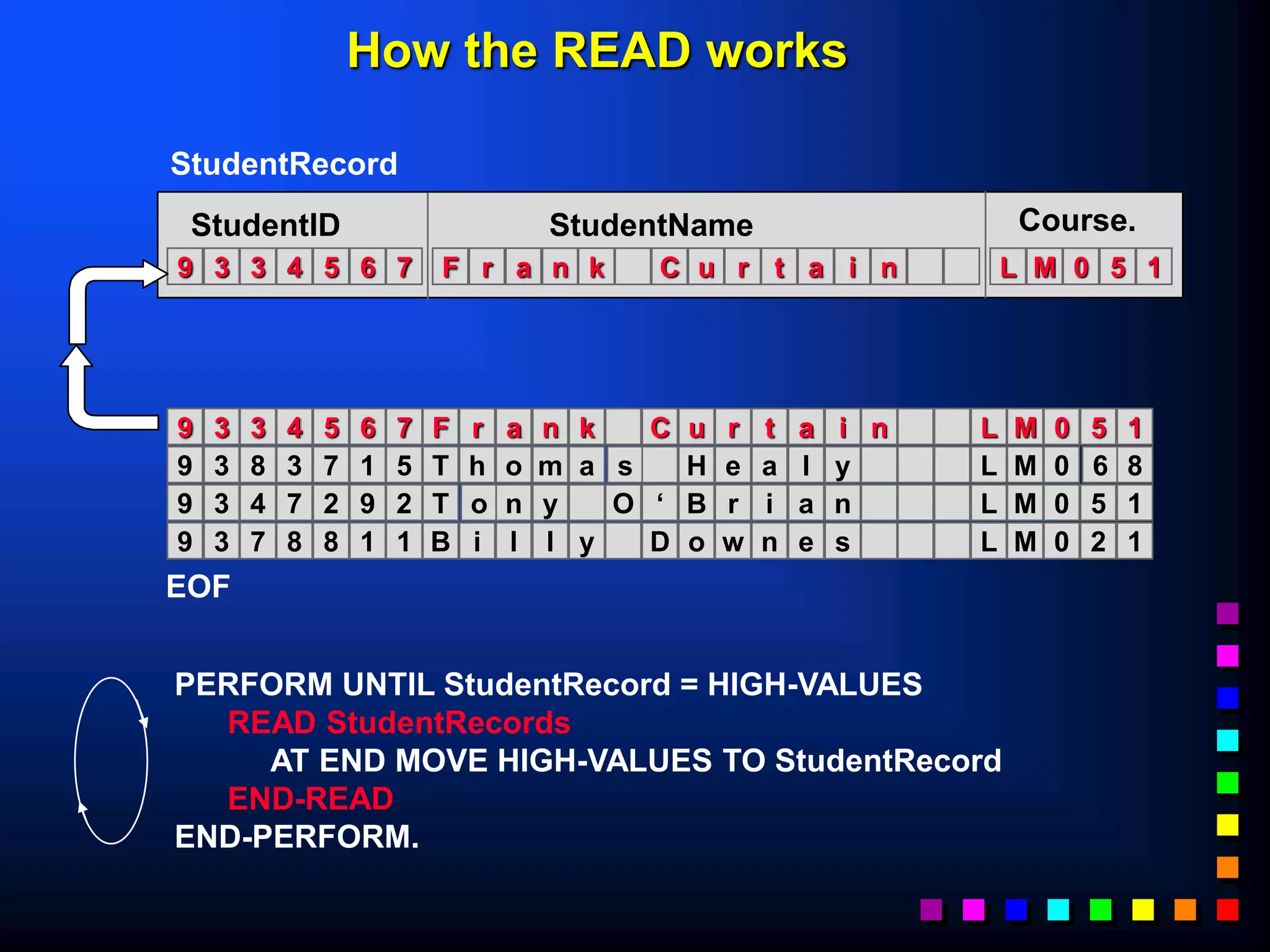
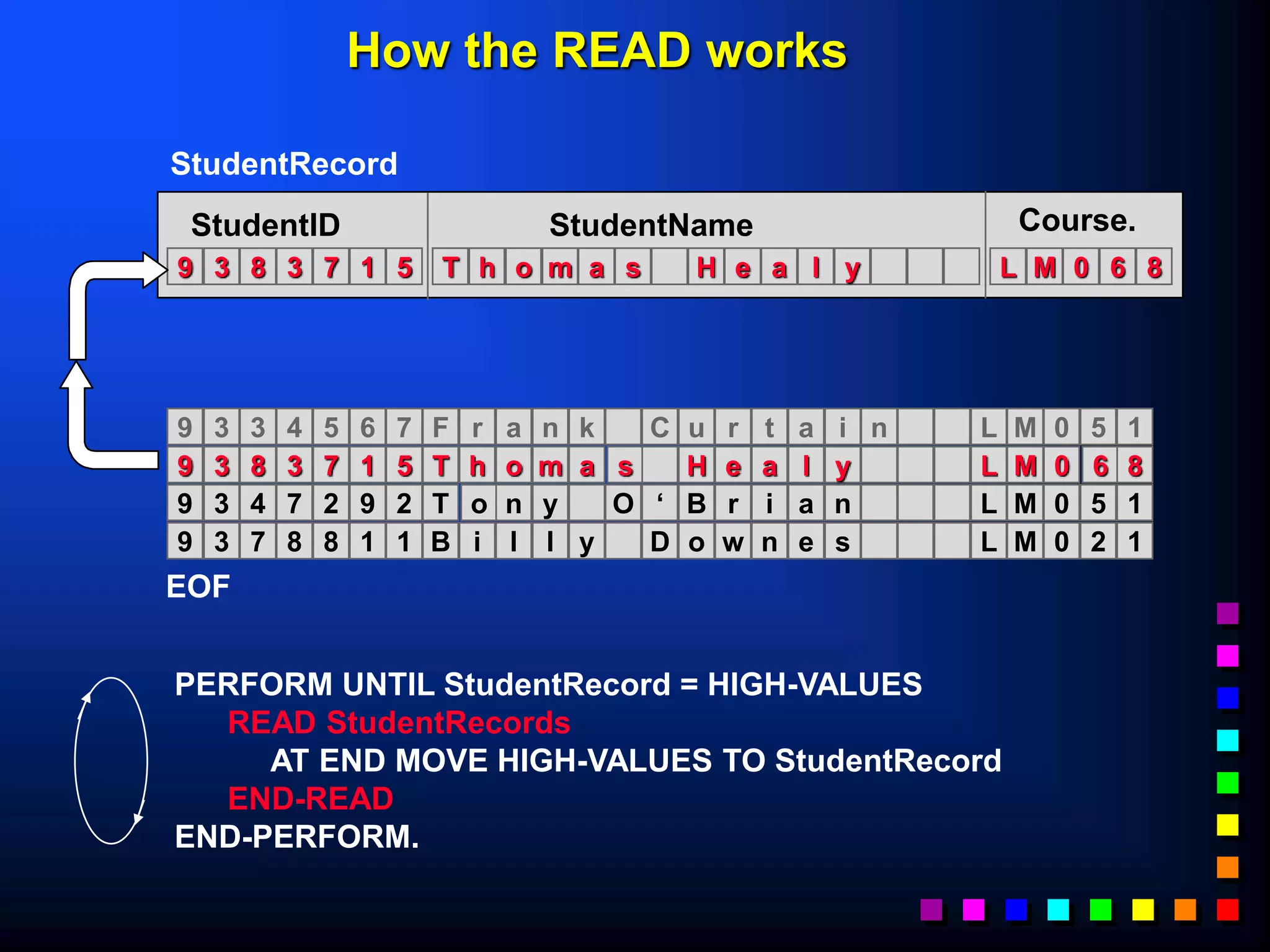
PERFORM UNTIL StudentRecord = HIGH-VALUES
READ StudentRecords
AT END MOVE HIGH-VALUES TO StudentRecord
END-READ
END-PERFORM.
F r a n k C u r t a i n
9 3 3 4 5 6 7 L M 0 5 1
StudentID StudentName Course.
StudentRecord
F r a n k C u r t a i n
9 3 3 4 5 6 7 L M 0 5 1
T h o m a s H e a l y
9 3 8 3 7 1 5 L M 0 6 8
T o n y O ‘ B r i a n
9 3 4 7 2 9 2 L M 0 5 1
B i l l y D o w n e s
9 3 7 8 8 1 1 L M 0 2 1
EOF
How the READ works
T h o m a s H e a l y
9 3 8 3 7 1 5 L M 0 6 8
StudentID StudentName Course.
StudentRecord
F r a n k C u r t a i n
9 3 3 4 5 6 7 L M 0 5 1
T h o m a s H e a l y
9 3 8 3 7 1 5 L M 0 6 8
T o n y O ‘ B r i a n
9 3 4 7 2 9 2 L M 0 5 1
B i l l y D o w n e s
9 3 7 8 8 1 1 L M 0 2 1
EOF
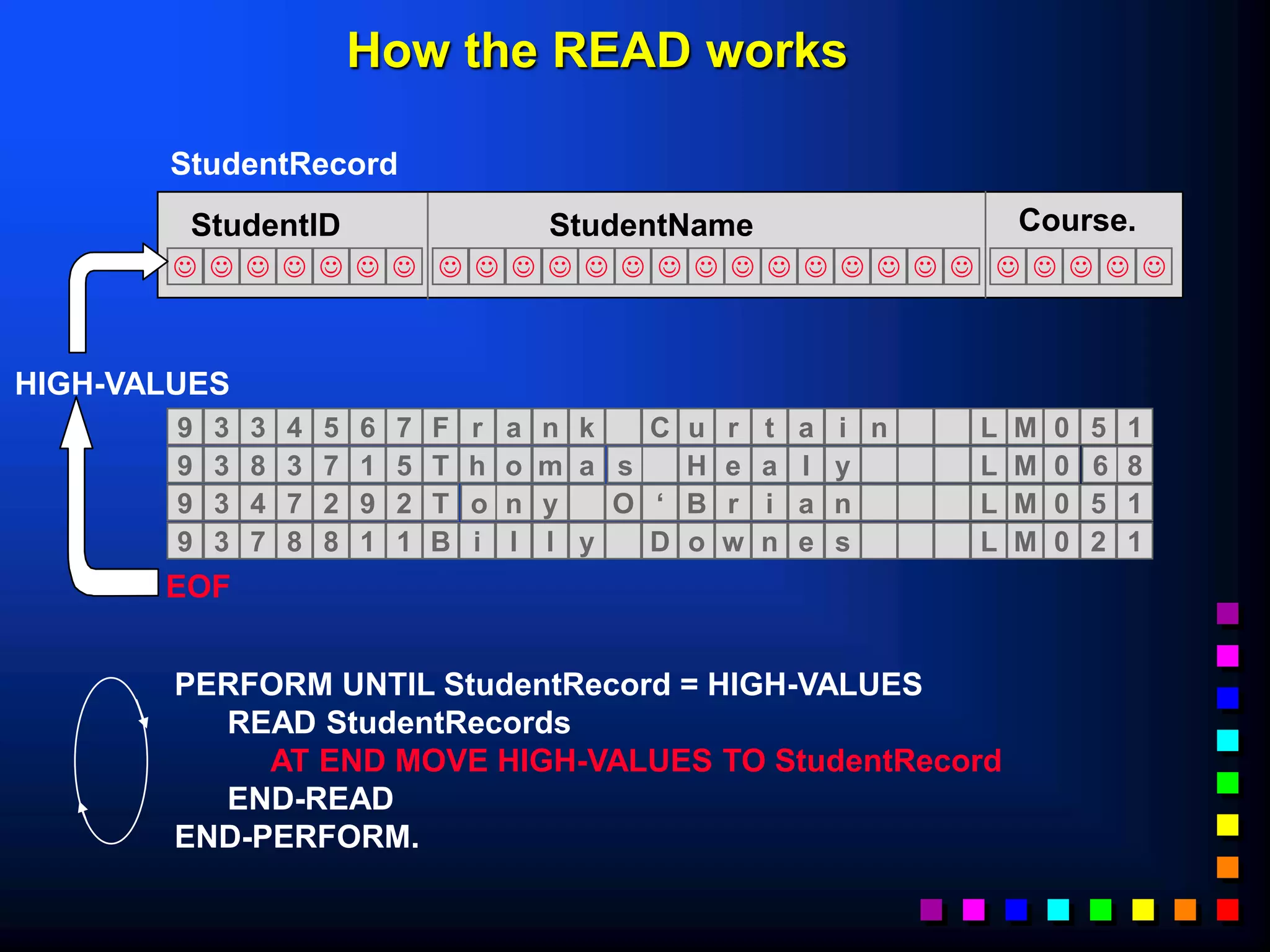
PERFORM UNTIL StudentRecord = HIGH-VALUES
READ StudentRecords
AT END MOVE HIGH-VALUES TO StudentRecord
END-READ
END-PERFORM.
How the READ works
T o n y O ‘ B r i a n
9 3 4 7 2 9 2 L M 0 5 1
StudentID StudentName Course.
StudentRecord
F r a n k C u r t a i n
9 3 3 4 5 6 7 L M 0 5 1
T h o m a s H e a l y
9 3 8 3 7 1 5 L M 0 6 8
T o n y O ‘ B r i a n
9 3 4 7 2 9 2 L M 0 5 1
B i l l y D o w n e s
9 3 7 8 8 1 1 L M 0 2 1
EOF
PERFORM UNTIL StudentRecord = HIGH-VALUES
READ StudentRecords
AT END MOVE HIGH-VALUES TO StudentRecord
END-READ
END-PERFORM.
How the READ works
B i l l y D o w n e s
9 3 7 8 8 1 1 L M 0 2 1
StudentID StudentName Course.
StudentRecord
F r a n k C u r t a i n
9 3 3 4 5 6 7 L M 0 5 1
T h o m a s H e a l y
9 3 8 3 7 1 5 L M 0 6 8
T o n y O ‘ B r i a n
9 3 4 7 2 9 2 L M 0 5 1
B i l l y D o w n e s
9 3 7 8 8 1 1 L M 0 2 1
EOF
PERFORM UNTIL StudentRecord = HIGH-VALUES
READ StudentRecords
AT END MOVE HIGH-VALUES TO StudentRecord
END-READ
END-PERFORM.
How the READ works
J J J J J J J J J J J J J J J
J J J J J J J J J J J J
StudentID StudentName Course.
StudentRecord
F r a n k C u r t a i n
9 3 3 4 5 6 7 L M 0 5 1
T h o m a s H e a l y
9 3 8 3 7 1 5 L M 0 6 8
T o n y O ‘ B r i a n
9 3 4 7 2 9 2 L M 0 5 1
B i l l y D o w n e s
9 3 7 8 8 1 1 L M 0 2 1
EOF
HIGH-VALUES
PERFORM UNTIL StudentRecord = HIGH-VALUES
READ StudentRecords
AT END MOVE HIGH-VALUES TO StudentRecord
END-READ
END-PERFORM.
How the READ works
WRITE Syntax.
 To WRITE data to a file move the data to the
record buffer (declared in the FD entry) and then
WRITE the contents of record buffer to the file.
 
WRITE
ADVANCING
AdvanceNum
MnemonicName
PAGE
RecordName FROM Identifier
BEFORE
AFTER
LINE
LINES










































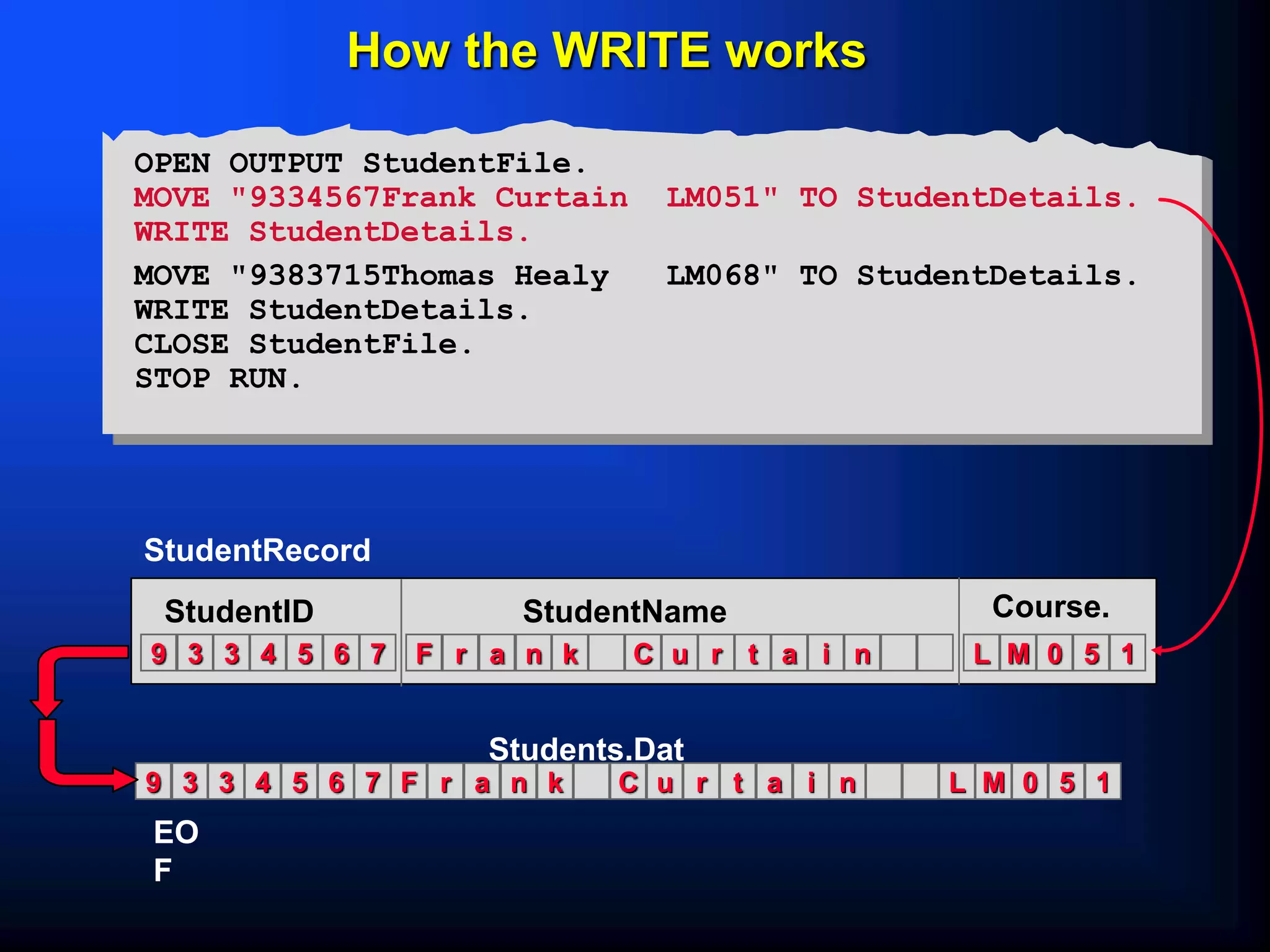
F r a n k C u r t a i n
9 3 3 4 5 6 7 L M 0 5 1
StudentID StudentName Course.
StudentRecord
F r a n k C u r t a i n
9 3 3 4 5 6 7 L M 0 5 1
EO
F
How the WRITE works
OPEN OUTPUT StudentFile.
MOVE "9334567Frank Curtain LM051" TO StudentDetails.
WRITE StudentDetails.
MOVE "9383715Thomas Healy LM068" TO StudentDetails.
WRITE StudentDetails.
CLOSE StudentFile.
STOP RUN.
Students.Dat
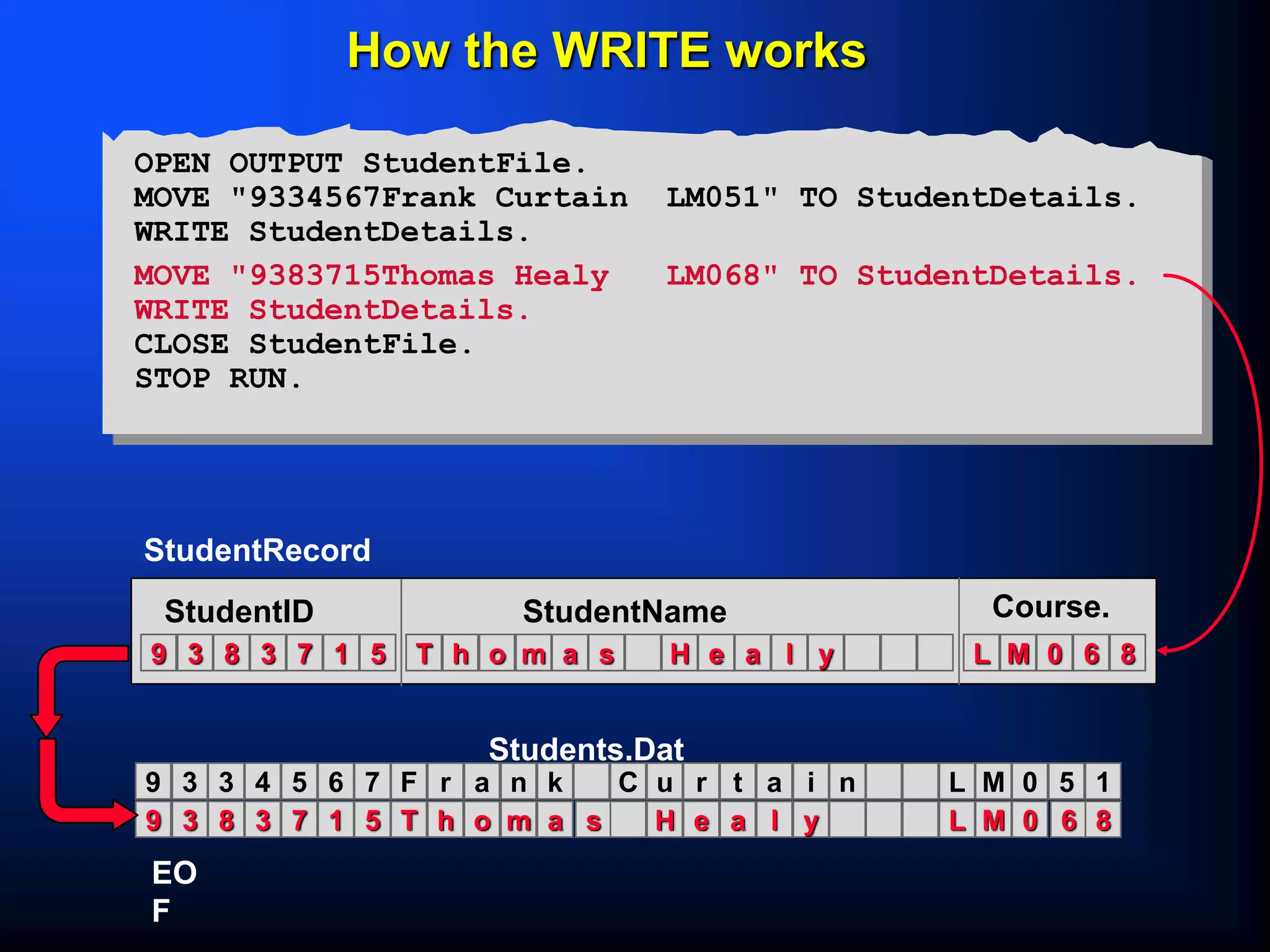
T h o m a s H e a l y
9 3 8 3 7 1 5 L M 0 6 8
StudentID StudentName Course.
StudentRecord
F r a n k C u r t a i n
9 3 3 4 5 6 7 L M 0 5 1
T h o m a s H e a l y
9 3 8 3 7 1 5 L M 0 6 8
EO
F
How the WRITE works
OPEN OUTPUT StudentFile.
MOVE "9334567Frank Curtain LM051" TO StudentDetails.
WRITE StudentDetails.
MOVE "9383715Thomas Healy LM068" TO StudentDetails.
WRITE StudentDetails.
CLOSE StudentFile.
STOP RUN.
Students.Dat
$ SET SOURCEFORMAT"FREE"
IDENTIFICATION DIVISION.
PROGRAM-ID. SeqWrite.
AUTHOR. Michael Coughlan.
ENVIRONMENT DIVISION.
INPUT-OUTPUT SECTION.
FILE-CONTROL.
SELECT StudentFile ASSIGN TO "STUDENTS.DAT"
ORGANIZATION IS LINE SEQUENTIAL.
DATA DIVISION.
FILE SECTION.
FD StudentFile.
01 StudentDetails.
02 StudentId PIC 9(7).
02 StudentName.
03 Surname PIC X(8).
03 Initials PIC XX.
02 DateOfBirth.
03 YOBirth PIC 9(2).
03 MOBirth PIC 9(2).
03 DOBirth PIC 9(2).
02 CourseCode PIC X(4).
02 Grant PIC 9(4).
02 Gender PIC X.
PROCEDURE DIVISION.
Begin.
OPEN OUTPUT StudentFile.
DISPLAY "Enter student details using template below. Enter no data to end.".
PERFORM GetStudentDetails.
PERFORM UNTIL StudentDetails = SPACES
WRITE StudentDetails
PERFORM GetStudentDetails
END-PERFORM.
CLOSE StudentFile.
STOP RUN.
GetStudentDetails.
DISPLAY "NNNNNNNSSSSSSSSIIYYMMDDCCCCGGGGS".
ACCEPT StudentDetails.
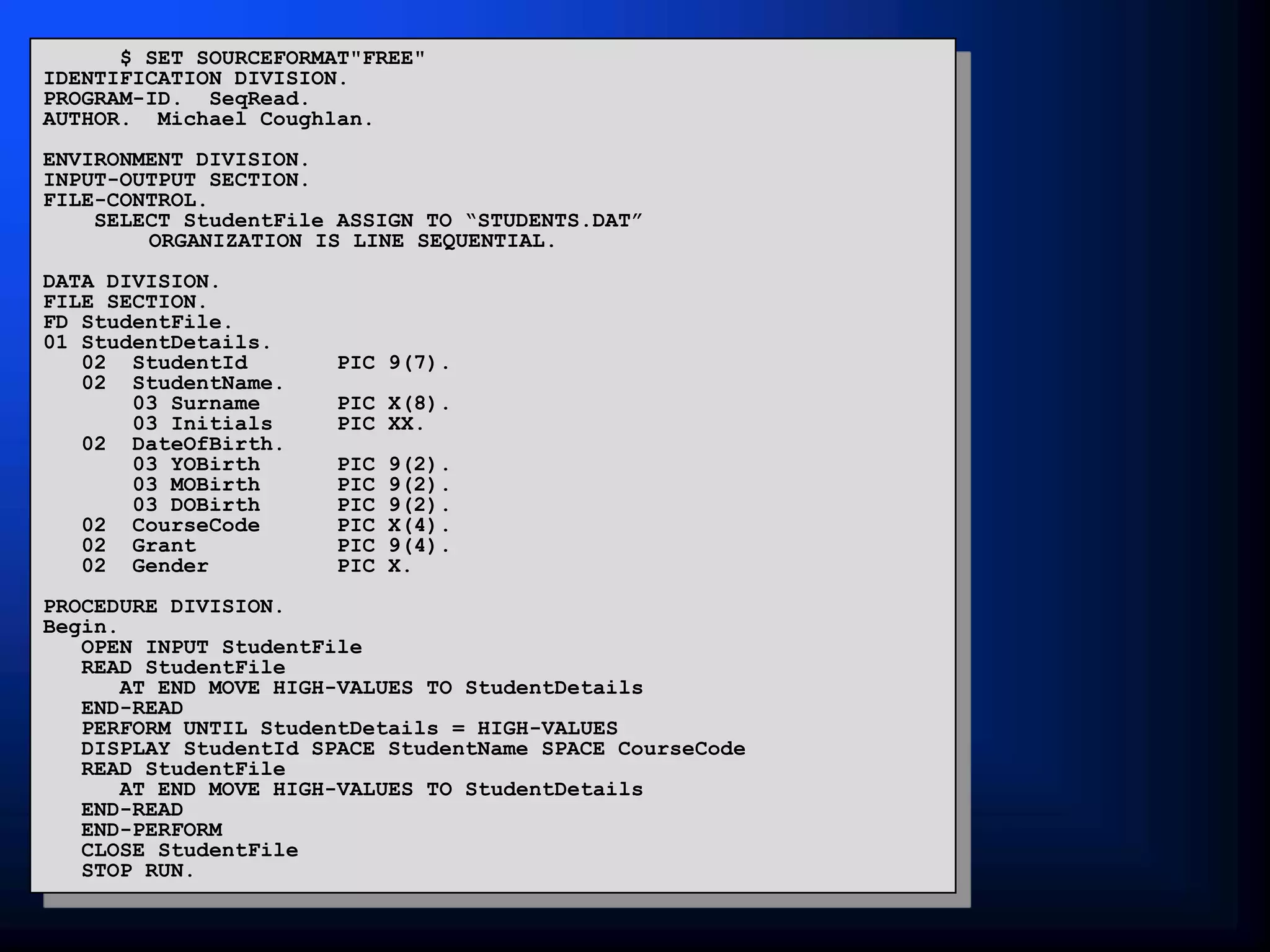
$ SET SOURCEFORMAT"FREE"
IDENTIFICATION DIVISION.
PROGRAM-ID. SeqRead.
AUTHOR. Michael Coughlan.
ENVIRONMENT DIVISION.
INPUT-OUTPUT SECTION.
FILE-CONTROL.
SELECT StudentFile ASSIGN TO “STUDENTS.DAT”
ORGANIZATION IS LINE SEQUENTIAL.
DATA DIVISION.
FILE SECTION.
FD StudentFile.
01 StudentDetails.
02 StudentId PIC 9(7).
02 StudentName.
03 Surname PIC X(8).
03 Initials PIC XX.
02 DateOfBirth.
03 YOBirth PIC 9(2).
03 MOBirth PIC 9(2).
03 DOBirth PIC 9(2).
02 CourseCode PIC X(4).
02 Grant PIC 9(4).
02 Gender PIC X.
PROCEDURE DIVISION.
Begin.
OPEN INPUT StudentFile
READ StudentFile
AT END MOVE HIGH-VALUES TO StudentDetails
END-READ
PERFORM UNTIL StudentDetails = HIGH-VALUES
DISPLAY StudentId SPACE StudentName SPACE CourseCode
READ StudentFile
AT END MOVE HIGH-VALUES TO StudentDetails
END-READ
END-PERFORM
CLOSE StudentFile
STOP RUN.

SEQFILE1.PPT

  • 1.
  • 2.
    COBOL's forte  COBOLis generally used in situations where the volume of data to be processed is large.  These systems are sometimes referred to as “data intensive” systems.  Generally, large volumes of data arise not because the data is inherently voluminous but because the same items of information have been recorded about a great many instances of the same object.
  • 3.
    Files, Records, Fields. We use the term FIELD to describe an item of information we are recording about an object (e.g. StudentName, DateOfBirth, CourseCode).  We use the term RECORD to describe the collection of fields which record information about an object (e.g. a StudentRecord is a collection of fields recording information about a student).  We use the term FILE to describe a collection of one or more occurrences (instances) of a record type (template).  It is important to distinguish between the record occurrence (i.e. the values of a record) and the record type (i.e. the structure of the record). Every record in a file has a different value but the same structure.
  • 4.
    Files, Records, Fields. StudIdStudName DateOfBirth 9723456 COUGHLAN 10091961 9724567 RYAN 31121976 9534118 COFFEY 23061964 9423458 O'BRIEN 03111979 9312876 SMITH 12121976 STUDENTS.DAT DATA DIVISION. FILE SECTION. FD StudentFile. 01 StudentDetails. 02 StudId PIC 9(7). 02 StudName PIC X(8). 02 DateOfBirth PIC X(8). occurrences Record Type (Template) (Structure)
  • 5.
    How files areprocessed.  Files are repositories of data that reside on backing storage (hard disk or magnetic tape).  A file may consist of hundreds of thousands or even millions of records.  Suppose we want to keep information about all the TV license holders in the country. Suppose each record is about 150 characters/bytes long. If we estimate the number of licenses at 1 million this gives us a size for the file of 150 X 1,000,000 = 150 megabytes.  If we want to process a file of this size we cannot do it by loading the whole file into the computer’s memory at once.  Files are processed by reading them into the computer’s memory one record at a time.
  • 6.
    Record Buffers  Toprocess a file records are read from the file into the computer’s memory one record at a time.  The computer uses the programmers description of the record (i.e. the record template) to set aside sufficient memory to store one instance of the record.  Memory allocated for storing a record is usually called a “record buffer”  The record buffer is the only connection between the program and the records in the file.
  • 7.
    Record Buffers IDENTIFICATION DIVISION. etc. ENVIRONMENTDIVISION. etc. DATA DIVISION. FILE SECTION. Program RecordBuffer Declaration STUDENTS.DAT DISK Record Instance
  • 8.
    Implications of ‘Buffers’ If your program processes more than one file you will have to describe a record buffer for each file.  To process all the records in an INPUT file each record instance must be copied (read) from the file into the record buffer when required.  To create an OUTPUT file containing data records each record must be placed in the record buffer and then transferred (written) to the file.  To transfer a record from an input file to an output file we will have to  read the record into the input record buffer  transfer it to the output record buffer  write the data to the output file from the output record buffer
  • 9.
    Creating a StudentRecord 01 StudentDetails.  Student Id. 02 StudentId PIC 9(7).  Student Name. 02 StudentName. Surname 03 Surname PIC X(8). Initials 03 Initials PIC XX.  Date of Birth 02 DateOfBirth. Year of Birth 03 YOBirth PIC 99. Month of Birth 03 MOBirth PIC 99. Day of Birth 03 DOBirth PIC 99.  Course Code 02 CourseCode PIC X(4).  Value of grant 02 Grant PIC 9(4).  Gender 02 Gender PIC X. Student Details.
  • 10.
    Describing the recordbuffer in COBOL  The record type/template/buffer of every file used in a program must be described in the FILE SECTION by means of an FD (file description) entry.  The FD entry consists of the letters FD and an internal file name. DATA DIVISION. FILE SECTION. FD StudentFile. 01 StudentDetails. 02 StudentId PIC 9(7). 02 StudentName. 03 Surname PIC X(8). 03 Initials PIC XX. 02 DateOfBirth. 03 YOBirth PIC 9(2). 03 MOBirth PIC 9(2). 03 DOBirth PIC 9(2). 02 CourseCode PIC X(4). 02 Grant PIC 9(4). 02 Gender PIC X.
  • 11.
    STUDENTS.DAT The Select andAssign Clause.  The internal file name used in the FD entry is connected to an external file (on disk or tape) by means of the Select and Assign clause. ENVIRONMENT DIVISION. INPUT-OUTPUT SECTION. FILE-CONTROL. SELECT StudentFile ASSIGN TO “STUDENTS.DAT”. DATA DIVISION. FILE SECTION. FD StudentFile. 01 StudentDetails. 02 StudentId PIC 9(7). 02 StudentName. 03 Surname PIC X(8). 03 Initials PIC XX. 02 DateOfBirth. 03 YOBirth PIC 9(2). 03 MOBirth PIC 9(2). 03 DOBirth PIC 9(2). 02 CourseCode PIC X(4). 02 Grant PIC 9(4). 02 Gender PIC X. DISK
  • 12.
    Select and AssignSyntax.  LINE SEQUENTIAL means each record is followed by the carriage return and line feed characters.  RECORD SEQUENTIAL means that the file consists of a stream of bytes. Only the fact that we know the size of each record allows us to retrieve them. SELECT FileName ASSIGN TO ExternalFileReference [ORGANIZATION IS LINE RECORD SEQUENTIAL].      
  • 13.
    COBOL file handlingVerbs  OPEN Before your program can access the data in an input file or place data in an output file you must make the file available to the program by OPENing it.  READ The READ copies a record occurrence/instance from the file and places it in the record buffer.  WRITE The WRITE copies the record it finds in the record buffer to the file.  CLOSE You must ensure that (before terminating) your program closes all the files it has opened. Failure to do so may result in data not being written to the file or users being prevented from accessing the file.
  • 14.
    OPEN and CLOSEverb syntax  When you open a file you have to indicate to the system what how you want to use it (e.g. INPUT, OUTPUT, EXTEND) so that the system can manage the file correctly.  Opening a file does not transfer any data to the record buffer, it simply provides access. OPEN InternalFileName ... INPUT OUTPUT EXTEND                    
  • 15.
    The READ verb Once the system has opened a file and made it available to the program it is the programmers responsibility to process it correctly.  Remember, the file record buffer is our only connection with the file and it is only able to store a single record at a time.  To process all the records in the file we have to transfer them, one record at a time, from the file to the buffer.  COBOL provides the READ verb for this purpose.
  • 16.
    READ verb syntax The InternalFilename specified must be a file that has been OPENed for INPUT.  The NEXT RECORD clause is optional and generally not used.  Using INTO Identifier clause causes the data to be read into the record buffer and then copied from there to the specified Identifier in one operation.  When this option is used there will be two copies of the data. It is the equivalent of a READ followed by a MOVE.     READ InternalFilename NEXT RECORD INTO Identifier AT END StatementBlock END - READ
  • 17.
    PERFORM UNTIL StudentRecord= HIGH-VALUES READ StudentRecords AT END MOVE HIGH-VALUES TO StudentRecord END-READ END-PERFORM. F r a n k C u r t a i n 9 3 3 4 5 6 7 L M 0 5 1 StudentID StudentName Course. StudentRecord F r a n k C u r t a i n 9 3 3 4 5 6 7 L M 0 5 1 T h o m a s H e a l y 9 3 8 3 7 1 5 L M 0 6 8 T o n y O ‘ B r i a n 9 3 4 7 2 9 2 L M 0 5 1 B i l l y D o w n e s 9 3 7 8 8 1 1 L M 0 2 1 EOF How the READ works
  • 18.
    T h om a s H e a l y 9 3 8 3 7 1 5 L M 0 6 8 StudentID StudentName Course. StudentRecord F r a n k C u r t a i n 9 3 3 4 5 6 7 L M 0 5 1 T h o m a s H e a l y 9 3 8 3 7 1 5 L M 0 6 8 T o n y O ‘ B r i a n 9 3 4 7 2 9 2 L M 0 5 1 B i l l y D o w n e s 9 3 7 8 8 1 1 L M 0 2 1 EOF PERFORM UNTIL StudentRecord = HIGH-VALUES READ StudentRecords AT END MOVE HIGH-VALUES TO StudentRecord END-READ END-PERFORM. How the READ works
  • 19.
    T o ny O ‘ B r i a n 9 3 4 7 2 9 2 L M 0 5 1 StudentID StudentName Course. StudentRecord F r a n k C u r t a i n 9 3 3 4 5 6 7 L M 0 5 1 T h o m a s H e a l y 9 3 8 3 7 1 5 L M 0 6 8 T o n y O ‘ B r i a n 9 3 4 7 2 9 2 L M 0 5 1 B i l l y D o w n e s 9 3 7 8 8 1 1 L M 0 2 1 EOF PERFORM UNTIL StudentRecord = HIGH-VALUES READ StudentRecords AT END MOVE HIGH-VALUES TO StudentRecord END-READ END-PERFORM. How the READ works
  • 20.
    B i ll y D o w n e s 9 3 7 8 8 1 1 L M 0 2 1 StudentID StudentName Course. StudentRecord F r a n k C u r t a i n 9 3 3 4 5 6 7 L M 0 5 1 T h o m a s H e a l y 9 3 8 3 7 1 5 L M 0 6 8 T o n y O ‘ B r i a n 9 3 4 7 2 9 2 L M 0 5 1 B i l l y D o w n e s 9 3 7 8 8 1 1 L M 0 2 1 EOF PERFORM UNTIL StudentRecord = HIGH-VALUES READ StudentRecords AT END MOVE HIGH-VALUES TO StudentRecord END-READ END-PERFORM. How the READ works
  • 21.
    J J JJ J J J J J J J J J J J J J J J J J J J J J J J StudentID StudentName Course. StudentRecord F r a n k C u r t a i n 9 3 3 4 5 6 7 L M 0 5 1 T h o m a s H e a l y 9 3 8 3 7 1 5 L M 0 6 8 T o n y O ‘ B r i a n 9 3 4 7 2 9 2 L M 0 5 1 B i l l y D o w n e s 9 3 7 8 8 1 1 L M 0 2 1 EOF HIGH-VALUES PERFORM UNTIL StudentRecord = HIGH-VALUES READ StudentRecords AT END MOVE HIGH-VALUES TO StudentRecord END-READ END-PERFORM. How the READ works
  • 22.
    WRITE Syntax.  ToWRITE data to a file move the data to the record buffer (declared in the FD entry) and then WRITE the contents of record buffer to the file.   WRITE ADVANCING AdvanceNum MnemonicName PAGE RecordName FROM Identifier BEFORE AFTER LINE LINES                                          
  • 23.
    F r an k C u r t a i n 9 3 3 4 5 6 7 L M 0 5 1 StudentID StudentName Course. StudentRecord F r a n k C u r t a i n 9 3 3 4 5 6 7 L M 0 5 1 EO F How the WRITE works OPEN OUTPUT StudentFile. MOVE "9334567Frank Curtain LM051" TO StudentDetails. WRITE StudentDetails. MOVE "9383715Thomas Healy LM068" TO StudentDetails. WRITE StudentDetails. CLOSE StudentFile. STOP RUN. Students.Dat
  • 24.
    T h om a s H e a l y 9 3 8 3 7 1 5 L M 0 6 8 StudentID StudentName Course. StudentRecord F r a n k C u r t a i n 9 3 3 4 5 6 7 L M 0 5 1 T h o m a s H e a l y 9 3 8 3 7 1 5 L M 0 6 8 EO F How the WRITE works OPEN OUTPUT StudentFile. MOVE "9334567Frank Curtain LM051" TO StudentDetails. WRITE StudentDetails. MOVE "9383715Thomas Healy LM068" TO StudentDetails. WRITE StudentDetails. CLOSE StudentFile. STOP RUN. Students.Dat
  • 25.
    $ SET SOURCEFORMAT"FREE" IDENTIFICATIONDIVISION. PROGRAM-ID. SeqWrite. AUTHOR. Michael Coughlan. ENVIRONMENT DIVISION. INPUT-OUTPUT SECTION. FILE-CONTROL. SELECT StudentFile ASSIGN TO "STUDENTS.DAT" ORGANIZATION IS LINE SEQUENTIAL. DATA DIVISION. FILE SECTION. FD StudentFile. 01 StudentDetails. 02 StudentId PIC 9(7). 02 StudentName. 03 Surname PIC X(8). 03 Initials PIC XX. 02 DateOfBirth. 03 YOBirth PIC 9(2). 03 MOBirth PIC 9(2). 03 DOBirth PIC 9(2). 02 CourseCode PIC X(4). 02 Grant PIC 9(4). 02 Gender PIC X. PROCEDURE DIVISION. Begin. OPEN OUTPUT StudentFile. DISPLAY "Enter student details using template below. Enter no data to end.". PERFORM GetStudentDetails. PERFORM UNTIL StudentDetails = SPACES WRITE StudentDetails PERFORM GetStudentDetails END-PERFORM. CLOSE StudentFile. STOP RUN. GetStudentDetails. DISPLAY "NNNNNNNSSSSSSSSIIYYMMDDCCCCGGGGS". ACCEPT StudentDetails.
  • 26.
    $ SET SOURCEFORMAT"FREE" IDENTIFICATIONDIVISION. PROGRAM-ID. SeqRead. AUTHOR. Michael Coughlan. ENVIRONMENT DIVISION. INPUT-OUTPUT SECTION. FILE-CONTROL. SELECT StudentFile ASSIGN TO “STUDENTS.DAT” ORGANIZATION IS LINE SEQUENTIAL. DATA DIVISION. FILE SECTION. FD StudentFile. 01 StudentDetails. 02 StudentId PIC 9(7). 02 StudentName. 03 Surname PIC X(8). 03 Initials PIC XX. 02 DateOfBirth. 03 YOBirth PIC 9(2). 03 MOBirth PIC 9(2). 03 DOBirth PIC 9(2). 02 CourseCode PIC X(4). 02 Grant PIC 9(4). 02 Gender PIC X. PROCEDURE DIVISION. Begin. OPEN INPUT StudentFile READ StudentFile AT END MOVE HIGH-VALUES TO StudentDetails END-READ PERFORM UNTIL StudentDetails = HIGH-VALUES DISPLAY StudentId SPACE StudentName SPACE CourseCode READ StudentFile AT END MOVE HIGH-VALUES TO StudentDetails END-READ END-PERFORM CLOSE StudentFile STOP RUN.