


your European technology advisoryour European
technology advis
Why ExtJS: Multiple Screens
Sencha ExtJs 6
• ExtJs 6 provides various tools and utilities to develop using the
“universal” approach
• Build config: classic and modern toolkits
• Runtime config: application profiles
Multiple Screens
Toolkits - Basic
• A toolkit is a package that contains only the visual part of the
framework (panels, buttons, grid, …)
• ExtJs 6 provides two different toolkits, also combined as “universal”
• classic: Contains visual components of ExtJs
• modern: Contains visual components of Sencha Touch
Toolkits - Definition
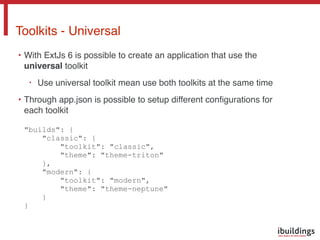
• With ExtJs 6 is possible to create an application that use the
universal toolkit
• Use universal toolkit mean use both toolkits at the same time
• Through app.json is possible to setup different configurations for
each toolkit


"builds": {

"classic": {

"toolkit": "classic",

"theme": "theme-triton"

},

"modern": {

"toolkit": "modern",

"theme": "theme-neptune"

}

}
Toolkits - Universal
Multiple Screens / Runtime config
Sencha ExtJs 6
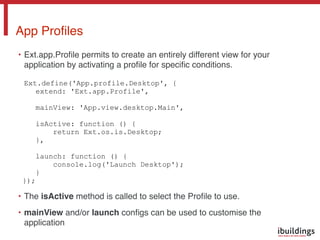
• Ext.app.Profile permits to create an entirely different view for your
application by activating a profile for specific conditions.


Ext.define('App.profile.Desktop', {
extend: 'Ext.app.Profile',
mainView: 'App.view.desktop.Main',
isActive: function () {
return Ext.os.is.Desktop;
},
launch: function () {
console.log('Launch Desktop');
}
});
• The isActive method is called to select the Profile to use.
• mainView and/or launch configs can be used to customise the
application
App Profiles
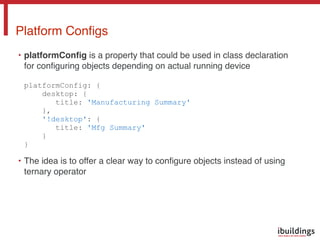
• platformConfig is a property that could be used in class declaration
for configuring objects depending on actual running device


platformConfig: {

desktop: {

title: 'Manufacturing Summary'

},

'!desktop': {

title: 'Mfg Summary'

}

}
• The idea is to offer a clear way to configure objects instead of using
ternary operator
Platform Configs
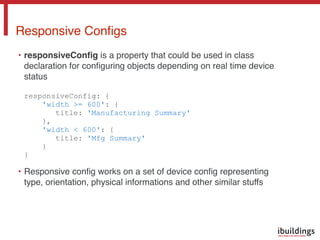
• responsiveConfig is a property that could be used in class
declaration for configuring objects depending on real time device
status


responsiveConfig: {

'width >= 600': {

title: 'Manufacturing Summary'

},

'width < 600': {

title: 'Mfg Summary'

}

}
• Responsive config works on a set of device config representing
type, orientation, physical informations and other similar stuffs
Responsive Configs
Demo
Sencha ExtJs 6
your European
technology advisor
indirizzo
Via Santa Maria Valle 3, 20123
Milano Italia
Gildeweg 39A 4383 NJ
Vlissingen Nederland
Goeman Borgesiuslaan 77
3515 ET Utrecht Nederland
telefono
+39 02 00681 028
email
marketing@ibuildings.it
support@ibuildings.it
your European
technology advisor

ExtJS: La piattaforma vincente (multiple screens)

  • 1.
    your European technologyadvisoryour European technology advis
  • 2.
    Why ExtJS: MultipleScreens Sencha ExtJs 6
  • 3.
    • ExtJs 6provides various tools and utilities to develop using the “universal” approach • Build config: classic and modern toolkits • Runtime config: application profiles Multiple Screens
  • 4.
  • 5.
    • A toolkitis a package that contains only the visual part of the framework (panels, buttons, grid, …) • ExtJs 6 provides two different toolkits, also combined as “universal” • classic: Contains visual components of ExtJs • modern: Contains visual components of Sencha Touch Toolkits - Definition
  • 6.
    • With ExtJs6 is possible to create an application that use the universal toolkit • Use universal toolkit mean use both toolkits at the same time • Through app.json is possible to setup different configurations for each toolkit
 
 "builds": {
 "classic": {
 "toolkit": "classic",
 "theme": "theme-triton"
 },
 "modern": {
 "toolkit": "modern",
 "theme": "theme-neptune"
 }
 } Toolkits - Universal
  • 7.
    Multiple Screens /Runtime config Sencha ExtJs 6
  • 8.
    • Ext.app.Profile permitsto create an entirely different view for your application by activating a profile for specific conditions.
 
 Ext.define('App.profile.Desktop', { extend: 'Ext.app.Profile', mainView: 'App.view.desktop.Main', isActive: function () { return Ext.os.is.Desktop; }, launch: function () { console.log('Launch Desktop'); } }); • The isActive method is called to select the Profile to use. • mainView and/or launch configs can be used to customise the application App Profiles
  • 9.
    • platformConfig isa property that could be used in class declaration for configuring objects depending on actual running device
 
 platformConfig: {
 desktop: {
 title: 'Manufacturing Summary'
 },
 '!desktop': {
 title: 'Mfg Summary'
 }
 } • The idea is to offer a clear way to configure objects instead of using ternary operator Platform Configs
  • 10.
    • responsiveConfig isa property that could be used in class declaration for configuring objects depending on real time device status
 
 responsiveConfig: {
 'width >= 600': {
 title: 'Manufacturing Summary'
 },
 'width < 600': {
 title: 'Mfg Summary'
 }
 } • Responsive config works on a set of device config representing type, orientation, physical informations and other similar stuffs Responsive Configs
  • 11.
  • 13.
    your European technology advisor indirizzo ViaSanta Maria Valle 3, 20123 Milano Italia Gildeweg 39A 4383 NJ Vlissingen Nederland Goeman Borgesiuslaan 77 3515 ET Utrecht Nederland telefono +39 02 00681 028 email marketing@ibuildings.it support@ibuildings.it your European technology advisor