DRAGON
SPEECH TO TEXT
  SOFTWARE
    Tracy O’Brien
 Dragon Speech-to-Text
     What is Dragon
       Software?
 Dragon is a form of speech
  recognition software
 There are programs
  available for both PC and
  Mac
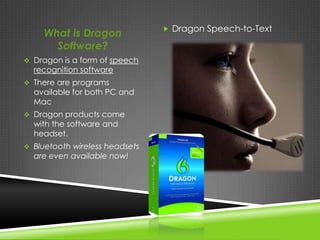
 Dragon products come
  with the software and
  headset.
 Bluetooth wireless headsets
  are even available now!
How Does it                            Please watch this

    Work?                                 quick, informative video about
                                          Dragon Software!
 Dragon is a form of speech
   recognition software.
 You can turn speech into text on
   your computer quickly, easily, and
   accurately.
 Now you can not only produce
   documents, emails, reports, etc.
   …
 BUT you can also control the
functions of your computer with only
your voice!
How Can it Help
   My Students?
 For Students with
  Physical Disabilities:
 Students won’t have to
  struggle with a
  pen, pencil, and paper.
 No need for slow typing on
  a word processor.
 Dication buddies are no
  longer necessary!
FOR STUDENTS WITH LEARNING
           DISABILITIES
 Especially useful for students who struggle with disabilities such
  as dyslexia or dysgraphia.
 For students who have memory issues, producing results will be
  as easy as speaking their ideas out loud.

       For English Language Learners
  Your students will benefit from using their oral skills to enrich
   their writing.
  Note-taking, fluency, and word pronunciation have also shown
   to improve.
 Your students will be able to demonstrate their creative abilities without
  frustration

 They can take notes quickly and accurately

 Their oral reading and fluency skills will improve

 They will be more enthusiastic when approaching school work!

 Teachers can also use Dragon to make note-taking quicker & easier with
  the use of a projector or Smart Board!
ADDITIONAL RESOURCES
 http://nuance.com/dragon/index.htm


 Look at the testimonials from students, parents, and teachers.


 Watch the video testimonial from a 12 year old student.

Dragon at pp

  • 1.
    DRAGON SPEECH TO TEXT SOFTWARE Tracy O’Brien
  • 2.
     Dragon Speech-to-Text What is Dragon Software?  Dragon is a form of speech recognition software  There are programs available for both PC and Mac  Dragon products come with the software and headset.  Bluetooth wireless headsets are even available now!
  • 3.
    How Does it  Please watch this Work? quick, informative video about Dragon Software!  Dragon is a form of speech recognition software.  You can turn speech into text on your computer quickly, easily, and accurately.  Now you can not only produce documents, emails, reports, etc. … BUT you can also control the functions of your computer with only your voice!
  • 4.
    How Can itHelp My Students?  For Students with Physical Disabilities:  Students won’t have to struggle with a pen, pencil, and paper.  No need for slow typing on a word processor.  Dication buddies are no longer necessary!
  • 5.
    FOR STUDENTS WITHLEARNING DISABILITIES  Especially useful for students who struggle with disabilities such as dyslexia or dysgraphia.  For students who have memory issues, producing results will be as easy as speaking their ideas out loud. For English Language Learners  Your students will benefit from using their oral skills to enrich their writing.  Note-taking, fluency, and word pronunciation have also shown to improve.
  • 6.
     Your studentswill be able to demonstrate their creative abilities without frustration  They can take notes quickly and accurately  Their oral reading and fluency skills will improve  They will be more enthusiastic when approaching school work!  Teachers can also use Dragon to make note-taking quicker & easier with the use of a projector or Smart Board!
  • 7.
    ADDITIONAL RESOURCES  http://nuance.com/dragon/index.htm Look at the testimonials from students, parents, and teachers.  Watch the video testimonial from a 12 year old student.