First Toy to Respond to Voice Commands

              1920
calculated   thoughtful


               less challenging
                             and better
quality
write more quickly

               difficulty
      transcribe
                                  skip over

                            missing key
elements   not reflective


    their thoughts out on paper
No need for a human scribe/transcriber


                             less time planning
and organising


     independent


read aloud
without fear of spelling errors

                    embarrassment


        pronunciation

              multiple repetitions
reading
writing

phonemic awareness


          how a word looks and sounds


                                        remediating
reading and spelling deficits
check the accuracy


   similar words


  best word


         learn to discriminate
Dragon
Naturally Speaking
Software:
            e-speaking
            Windows Speech Recognition Setup
            Dragon Naturally Speaking


Useful Information:
            Speech Recognition for Learning
            National Centre for Technology Innovation
            Use of Voice Recognition in Special Education
            Speech Recognition Software for Special Education
            Assistive Technology in Education/Speech Recognition Software
            Review on Speech Recognition Challenges
            Speech Recognition Leaps Forward
            The Centre for Speech Technology Research
            Speech at Carnegie Mellon University
            Assistive Technology in Irish Education
            Association for Higher Education Access and Disability
            National Council for Special Education
Speech Recognition for Inclusive Teaching/Training

Speech Recognition for Inclusive Teaching/Training

  • 3.
    First Toy toRespond to Voice Commands 1920
  • 8.
    calculated thoughtful less challenging and better quality
  • 9.
    write more quickly difficulty transcribe skip over missing key elements not reflective their thoughts out on paper
  • 10.
    No need fora human scribe/transcriber less time planning and organising independent read aloud
  • 11.
    without fear ofspelling errors embarrassment pronunciation multiple repetitions
  • 12.
    reading writing phonemic awareness how a word looks and sounds remediating reading and spelling deficits
  • 13.
    check the accuracy similar words best word learn to discriminate
  • 19.
  • 21.
    Software: e-speaking Windows Speech Recognition Setup Dragon Naturally Speaking Useful Information: Speech Recognition for Learning National Centre for Technology Innovation Use of Voice Recognition in Special Education Speech Recognition Software for Special Education Assistive Technology in Education/Speech Recognition Software Review on Speech Recognition Challenges Speech Recognition Leaps Forward The Centre for Speech Technology Research Speech at Carnegie Mellon University Assistive Technology in Irish Education Association for Higher Education Access and Disability National Council for Special Education

Editor's Notes

  • #2 Speech Recognition for Inclusive Teaching/Training
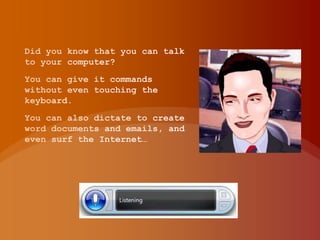
  • #3 Did you know that you can talk to your computer? You can give it commands without even touching the keyboard. You can also dictate to create word documents and emails, and even surf the Internet…
  • #4 Radio Rex was the first commercial toy to respond to voice commands. Produced in 1922 by the Elmwood Button Co., Radio Rex predates computers by more than 20 years. Rex is a brown bulldog made of celluloid and metal that responds to its name by leaping out of its house. The dog is controlled by a spring that is held in check by an electromagnet. Woof woof…
  • #5 Speech recognition lets people talk to computers, and then the computers do something with the spoken words. Either the computer types the words, carries out a command that was given with the phrase, or carries out an analysis of the spoken words. Speech to TextSpeech synthesisallows computers to talk to people. Text to SpeechVoice recognition allows computers to identify the identity of a speaker from their voice and then carry out a task e.g. allowing (or disallowing) entry into a building based on the clearance granted to that person.
  • #6 Noise. If there is too much noise in the background, words cannot be heard or understood properly. This can be defined as low signal to noise ratio. Users should work in a silent place and speak as close to the microphone as possible. Sound cards used may not be able to block signals from other computer parts, causing hissing noises. Overlapping speech as in a meeting or conference with many people, then voice recognition gets difficult. Speech recognition vocabulary takes up a lot of hard disk space. Homophones: words that sound similar but spelt differently or words that sound similar but with different meanings. Extensive training has helped reduce that issue. Other factors affecting speech recognition are the sex of the speaker, style of speaking, speed, dialects, and word boundary ambiguity (many ways of grouping words).
  • #7 Benefits of speech recognition for struggling writersPeople that may benefit from speech recognition technologies for learning include users with:Learning disabilities, including dyslexia and dysgraphiaRepetitive strain injuries, such as carpal tunnel syndromePhysical disabilitiesRheumatoid ArthritisLimited English LanguagePoor or limited motor skillsVision impairmentsBenefits for Learners with disabilities may include improved access to the computer, increases in writing production, improvements in writing mechanics, increased independence, decreased anxiety around writing, and improvements in core reading and writing abilities.
  • #8 Improved accessFor Learners with motor skill limitations, blindness/low vision, physical disabilities, or other difficulties using a standard keyboard and mouse, hands-free computing through the use of speech recognition technologies may be beneficial. By removing the physical barriers to writing and navigation of the computer, it can increase Learner access to technology and classroom activities.
  • #9 Writing productionFor Learners with learning disabilities, speech recognition technology will encourage writing that is more calculated and thoughtful . Learners with learning disabilities will find that input via speech is less challenging and that they often produce that are longer and better quality using speech recognition.
  • #10 Writing with EaseLearners can often write more quickly with speech recognition tools, thereby it avoids potential obstacles, such as difficulty with handwriting or the need to transcribe thoughts while brainstorming. Learners with learning disabilities will skip over words if they are unsure of the correct spelling, leading to pieces of writing that are short, missing key elements, or not reflective of the Learner's true abilities.Speech recognition and word processors can potentially alleviate some of these concerns by allowing the Learner to get their thoughts out on paper without worrying about these or other technical writing components.
  • #11 Increased independenceFor Learners with physical disabilities, learning disabilities or poor motor skills, a human transcriber is a low-tech solution for the classroom that allows the focus to shift from the physical act of writing to expressing thoughts and knowledge. However, a transcriber makes the Learner dependent upon a teacher or aide for writing tasks. Learners who use transcribers for writing often report spending less time planning and organizing because they felt they were keeping the transcriber waiting, or felt embarrassment about making mistakes or asking for multiple readings of what was written.Using speech-to-text tools can allow the Learner to be more independent in their writing and other academic activities. If the speech-to-text program also includes text-to-speech features, the Learner may hear their text read aloud to them multiple times, and correct their errors more independently.
  • #12 Decreasing anxietyIn addition to allowing the Learner to work in a more independent manner, speech recognition can allow Learners to write without fear of spelling errors, helping them avoid the anxieties associated with mechanics, organization, and editing. many struggling writers feel embarrassment about the appearance of their writing due to brevity of sentence or paragraph length, illegibility of handwriting, and/or misspelled words.For Learners who are English Language Learners, or are learning a second language, speech recognition programs can allow them to practice pronunciation in a safe, low-stress environment. Learners can engage in multiple repetitions of an unfamiliar word without worrying about feeling embarrassed. Some popular foreign language software programs now include speech recognition features for just this purpose.
  • #13 Improvements in core reading and writing abilitiesSpeech recognition tools can also serve a remedial function for Learners with learning disabilities in the areas of reading and writing. In allowing Learners to see the words on screen as they dictate, Learners can gain insight into important elements of phonemic awareness, such as sound-symbol correspondence. As Learners speak and see their words appear on the screen, the speech-to-text tool directly demonstrates the relationship between how a word looks and sounds. This bimodal presentation of text can be especially helpful for Learners with learning disabilities, and is thought to be why speech recognition has been found effective in remediating reading and spelling deficits.
  • #14 Error Correction ProcessesNo speech recognition product is completely accurate, it requires users to check the accuracy of each word uttered as sentences are being dictated. When an error is made, the learner must then find the correct word among a list of similar words and choose it. This process necessitates that the learner examine the word list closely, compare words that look or sound alike, and make decisions about the best word for the specific situation. This can give learners with a learning difficulty a boost in reading and spelling as they learn to discriminate between similar words.
  • #15 Speech Recognition Software - Three Examples:
  • #16 E-speaking
  • #17 Pros/cons
  • #18 Windows SRBIG SIS
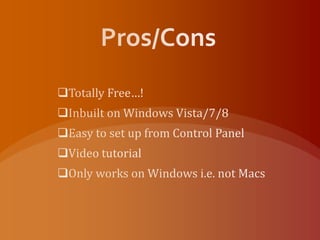
  • #19 Pros/cons
  • #20 Dragon Naturally Speaking
  • #21 Pros/cons
  • #22 Links and ReferencesSoftware:e-speakingWindows Speech Recognition SetupDragon Naturally SpeakingUseful Information:Speech Recognition for LearningNational Centre for Technology InnovationUse of Voice Recognition in Special EducationSpeech Recognition Software for Special EducationAssistive Technology in Education/Speech Recognition SoftwareReview on Speech Recognition ChallengesSpeech Recognition Leaps ForwardThe Centre for Speech Technology ResearchSpeech at Carnegie Mellon UniversityAssistive Technology in Irish EducationAssociation for Higher Education Access and DisabilityNational Council for Special Education
  • #23 Thanks for Watching My PresentationI hope you understand a little more about Speech Recognition.It is such a useful tool to help a diverse range of learners with controlling the computer and inputting text into documents.Any Questions?