Hadley Wickham 

@hadleywickham
Chief Scientist, RStudio
Data manipulation
with dplyr
June 2014
Data analysis is the process
by which data becomes
understanding, knowledge
and insight
Data analysis is the process
by which data becomes
understanding, knowledge
and insight
Data analysis is the process
by which data becomes
understanding, knowledge
and insight
Data analysis is the process
by which data becomes
understanding, knowledge
and insight
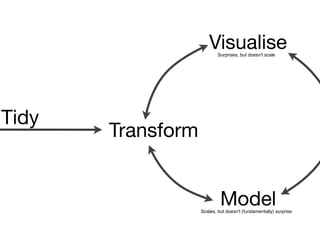
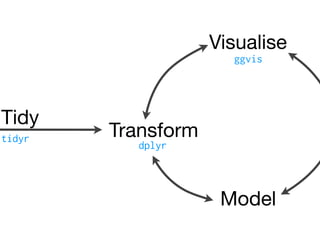
Transform
Visualise
Model
Surprises, but doesn't scale
Scales, but doesn't (fundamentally) surprise
Tidy
Transform
Visualise
Model
ggvis
tidyr
dplyr
Tidy
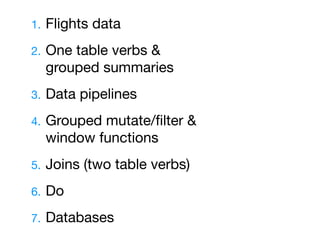
1. Flights data

2. One table verbs & 

grouped summaries

3. Data pipelines

4. Grouped mutate/filter & 

window functions

5. Joins (two table verbs)

6. Do 

7. Databases
The bad news:
It’s going to be
frustrating
http://hyperboleandahalf.blogspot.com/2010/09/four-levels-of-social-entrapment.html
© Allie Brosh
The good news:
Frustration is
typical and
temporary
http://hyperboleandahalf.blogspot.com/2010/06/this-is-why-ill-never-be-adult.html
© Allie Brosh
Flights
data
Studio
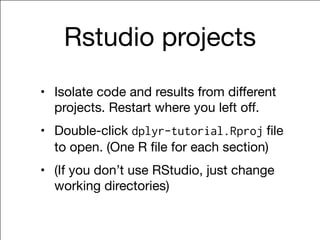
Rstudio projects
• Isolate code and results from different
projects. Restart where you left off.

• Double-click dplyr-tutorial.Rproj file
to open. (One R file for each section)

• (If you don’t use RStudio, just change
working directories)
Studio
Flights data
• flights [227,496 x 14]. Every flight
departing Houston in 2011.

• weather [8,723 x 14]. Hourly weather
data.

• planes [2,853 x 9]. Plane metadata.

• airports [3,376 x 7]. Airport metadata.
Studio
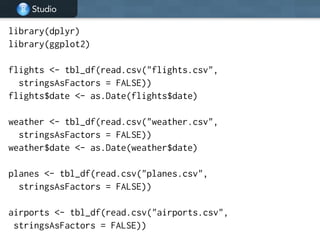
library(dplyr)
library(ggplot2)
!
flights <- tbl_df(read.csv("flights.csv",
stringsAsFactors = FALSE))
flights$date <- as.Date(flights$date)
!
weather <- tbl_df(read.csv("weather.csv",
stringsAsFactors = FALSE))
weather$date <- as.Date(weather$date)
!
planes <- tbl_df(read.csv("planes.csv",
stringsAsFactors = FALSE))
!
airports <- tbl_df(read.csv("airports.csv",
stringsAsFactors = FALSE))
Your turn
Introduce yourself to your neighbour.

What questions might you want to answer
with this data?
One table
verbs
Studio
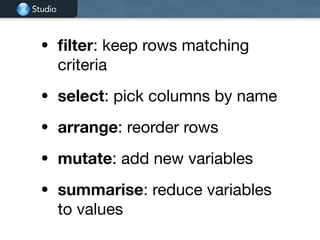
• filter: keep rows matching
criteria

• select: pick columns by name 

• arrange: reorder rows 

• mutate: add new variables

• summarise: reduce variables
to values
Studio
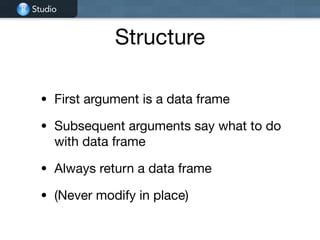
Structure
• First argument is a data frame

• Subsequent arguments say what to do
with data frame

• Always return a data frame

• (Never modify in place)
Studio
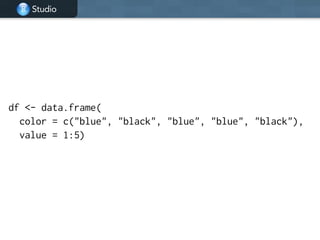
df <- data.frame(
color = c("blue", "black", "blue", "blue", "black"),
value = 1:5)
Studio
Studio
© 2014 RStudio, Inc. All rights reserved.
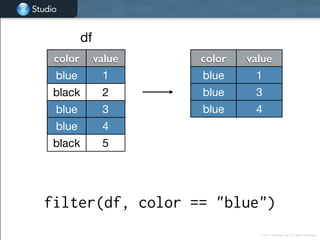
filter(df, color == "blue")
color value
blue 1
black 2
blue 3
blue 4
black 5
color value
blue 1
blue 3
blue 4
df
Studio
Studio
© 2014 RStudio, Inc. All rights reserved.
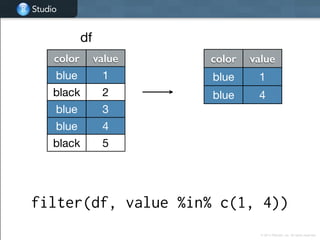
filter(df, value %in% c(1, 4))
color value
blue 1
black 2
blue 3
blue 4
black 5
df
color value
blue 1
blue 4
Studio
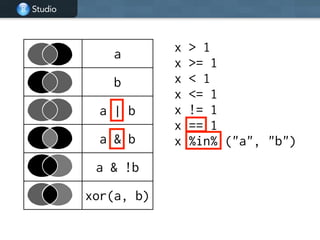
a
b
a | b
a & b
a & !b
xor(a, b)
x > 1
x >= 1
x < 1
x <= 1
x != 1
x == 1
x %in% ("a", "b")
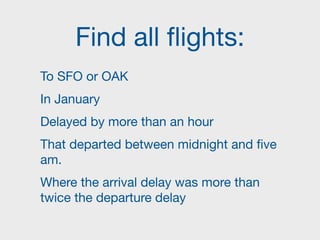
Find all flights:
To SFO or OAK

In January

Delayed by more than an hour

That departed between midnight and five
am.

Where the arrival delay was more than
twice the departure delay
Studio
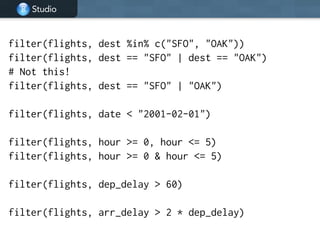
filter(flights, dest %in% c("SFO", "OAK"))
filter(flights, dest == "SFO" | dest == "OAK")
# Not this!
filter(flights, dest == "SFO" | "OAK")
!
filter(flights, date < "2001-02-01")
!
filter(flights, hour >= 0, hour <= 5)
filter(flights, hour >= 0 & hour <= 5)
!
filter(flights, dep_delay > 60)
filter(flights, arr_delay > 2 * dep_delay)
Studio
Studio
© 2014 RStudio, Inc. All rights reserved.
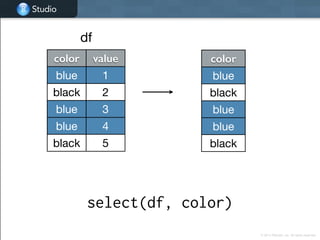
select(df, color)
color value
blue 1
black 2
blue 3
blue 4
black 5
df
color
blue
black
blue
blue
black
Studio
Studio
© 2014 RStudio, Inc. All rights reserved.
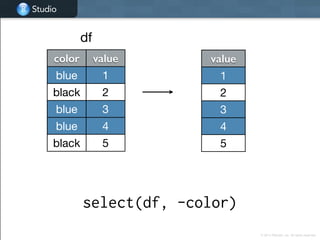
select(df, -color)
color value
blue 1
black 2
blue 3
blue 4
black 5
df
value
1
2
3
4
5
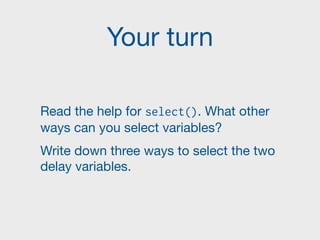
Your turn
Read the help for select(). What other
ways can you select variables?

Write down three ways to select the two
delay variables.
Studio
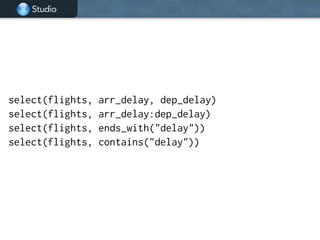
select(flights, arr_delay, dep_delay)
select(flights, arr_delay:dep_delay)
select(flights, ends_with("delay"))
select(flights, contains("delay"))
Studio
Studio
© 2014 RStudio, Inc. All rights reserved.
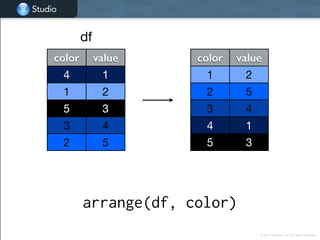
arrange(df, color)
color value
4 1
1 2
5 3
3 4
2 5
color value
1 2
2 5
3 4
4 1
5 3
df
Studio
Studio
© 2014 RStudio, Inc. All rights reserved.
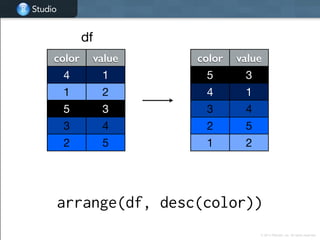
arrange(df, desc(color))
color value
4 1
1 2
5 3
3 4
2 5
color value
5 3
4 1
3 4
2 5
1 2
df
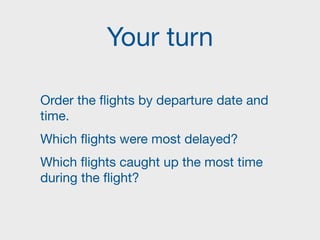
Your turn
Order the flights by departure date and
time.

Which flights were most delayed?

Which flights caught up the most time
during the flight?
Studio
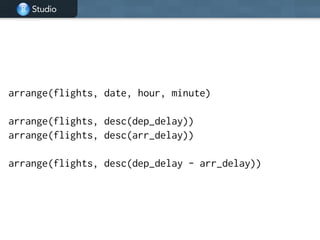
arrange(flights, date, hour, minute)
!
arrange(flights, desc(dep_delay))
arrange(flights, desc(arr_delay))
!
arrange(flights, desc(dep_delay - arr_delay))
Studio
Studio
© 2014 RStudio, Inc. All rights reserved.
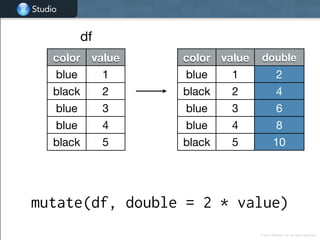
mutate(df, double = 2 * value)
color value
blue 1
black 2
blue 3
blue 4
black 5
color value double
blue 1 2
black 2 4
blue 3 6
blue 4 8
black 5 10
df
Studio
Studio
© 2014 RStudio, Inc. All rights reserved.
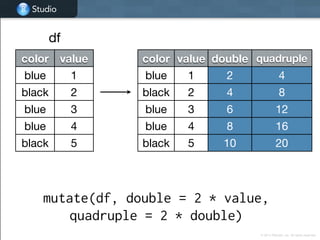
color value double quadruple
blue 1 2 4
black 2 4 8
blue 3 6 12
blue 4 8 16
black 5 10 20
mutate(df, double = 2 * value,
quadruple = 2 * double)
color value
blue 1
black 2
blue 3
blue 4
black 5
df
Your turn
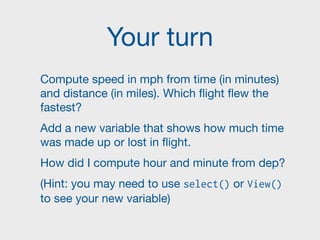
Compute speed in mph from time (in minutes)
and distance (in miles). Which flight flew the
fastest?

Add a new variable that shows how much time
was made up or lost in flight.

How did I compute hour and minute from dep?

(Hint: you may need to use select() or View()
to see your new variable)
Studio
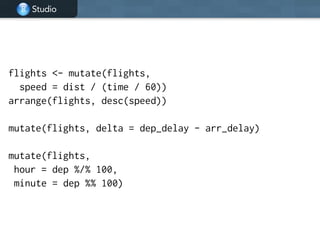
flights <- mutate(flights,
speed = dist / (time / 60))
arrange(flights, desc(speed))
!
mutate(flights, delta = dep_delay - arr_delay)
!
mutate(flights,
hour = dep %/% 100,
minute = dep %% 100)
Grouped
summarise
Studio
Studio
© 2014 RStudio, Inc. All rights reserved.
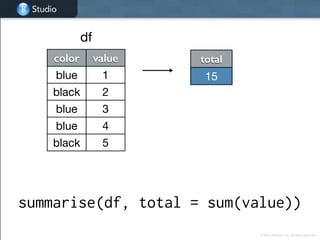
summarise(df, total = sum(value))
color value
blue 1
black 2
blue 3
blue 4
black 5
total
15
df
Studio
Studio
© 2014 RStudio, Inc. All rights reserved.
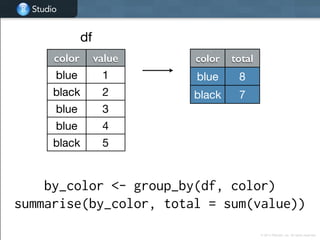
by_color <- group_by(df, color)
summarise(by_color, total = sum(value))
color value
blue 1
black 2
blue 3
blue 4
black 5
color total
blue 8
black 7
df
Studio
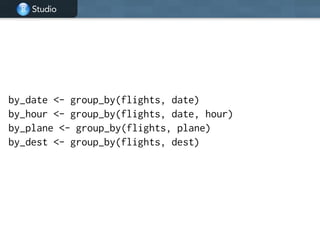
by_date <- group_by(flights, date)
by_hour <- group_by(flights, date, hour)
by_plane <- group_by(flights, plane)
by_dest <- group_by(flights, dest)
Studio
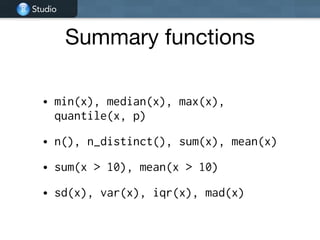
Summary functions
• min(x), median(x), max(x),
quantile(x, p)
• n(), n_distinct(), sum(x), mean(x)
• sum(x > 10), mean(x > 10)
• sd(x), var(x), iqr(x), mad(x)
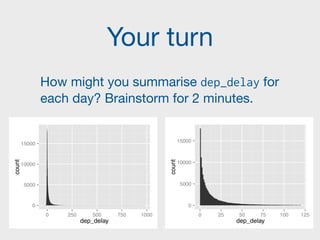
Your turn
How might you summarise dep_delay for
each day? Brainstorm for 2 minutes.
0
5000
10000
15000
0 250 500 750 1000
dep_delay
count
0
5000
10000
15000
0 25 50 75 100 125
dep_delay
count
Studio
!
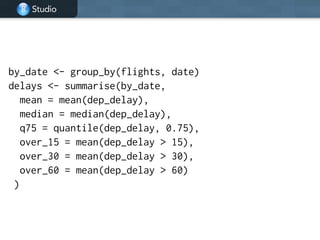
by_date <- group_by(flights, date)
delays <- summarise(by_date,
mean = mean(dep_delay),
median = median(dep_delay),
q75 = quantile(dep_delay, 0.75),
over_15 = mean(dep_delay > 15),
over_30 = mean(dep_delay > 30),
over_60 = mean(dep_delay > 60)
)
Studio
!
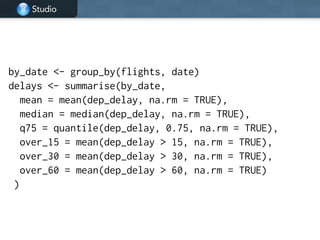
by_date <- group_by(flights, date)
delays <- summarise(by_date,
mean = mean(dep_delay, na.rm = TRUE),
median = median(dep_delay, na.rm = TRUE),
q75 = quantile(dep_delay, 0.75, na.rm = TRUE),
over_15 = mean(dep_delay > 15, na.rm = TRUE),
over_30 = mean(dep_delay > 30, na.rm = TRUE),
over_60 = mean(dep_delay > 60, na.rm = TRUE)
)
Studio
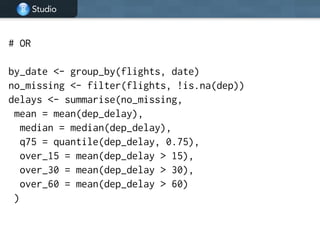
# OR
!
by_date <- group_by(flights, date)
no_missing <- filter(flights, !is.na(dep))
delays <- summarise(no_missing,
mean = mean(dep_delay),
median = median(dep_delay),
q75 = quantile(dep_delay, 0.75),
over_15 = mean(dep_delay > 15),
over_30 = mean(dep_delay > 30),
over_60 = mean(dep_delay > 60)
)
Data
pipelines
Studio
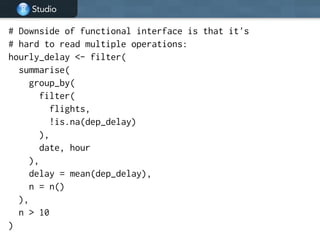
# Downside of functional interface is that it's
# hard to read multiple operations:
hourly_delay <- filter(
summarise(
group_by(
filter(
flights,
!is.na(dep_delay)
),
date, hour
),
delay = mean(dep_delay),
n = n()
),
n > 10
)
Studio
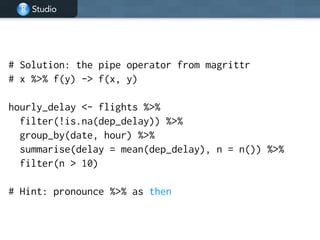
# Solution: the pipe operator from magrittr
# x %>% f(y) -> f(x, y)
!
hourly_delay <- flights %>%
filter(!is.na(dep_delay)) %>%
group_by(date, hour) %>%
summarise(delay = mean(dep_delay), n = n()) %>%
filter(n > 10)
!
# Hint: pronounce %>% as then
Your turn
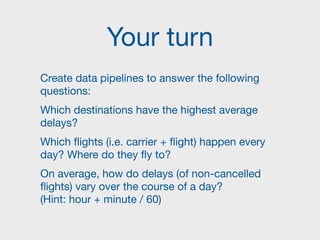
Create data pipelines to answer the following
questions:

Which destinations have the highest average
delays? 

Which flights (i.e. carrier + flight) happen every
day? Where do they fly to?

On average, how do delays (of non-cancelled
flights) vary over the course of a day? 

(Hint: hour + minute / 60)
Studio
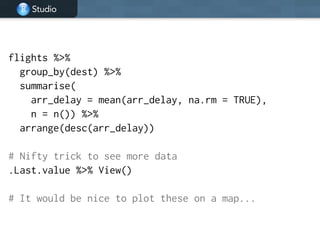
flights %>%
group_by(dest) %>%
summarise(
arr_delay = mean(arr_delay, na.rm = TRUE),
n = n()) %>%
arrange(desc(arr_delay))
!
# Nifty trick to see more data
.Last.value %>% View()
!
# It would be nice to plot these on a map...
Studio
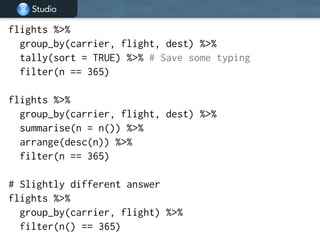
flights %>%
group_by(carrier, flight, dest) %>%
tally(sort = TRUE) %>% # Save some typing
filter(n == 365)
!
flights %>%
group_by(carrier, flight, dest) %>%
summarise(n = n()) %>%
arrange(desc(n)) %>%
filter(n == 365)
!
# Slightly different answer
flights %>%
group_by(carrier, flight) %>%
filter(n() == 365)
Studio
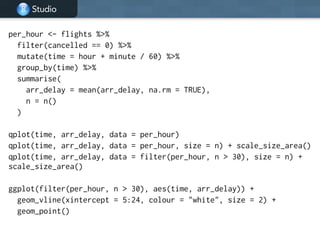
per_hour <- flights %>%
filter(cancelled == 0) %>%
mutate(time = hour + minute / 60) %>%
group_by(time) %>%
summarise(
arr_delay = mean(arr_delay, na.rm = TRUE),
n = n()
)
!
qplot(time, arr_delay, data = per_hour)
qplot(time, arr_delay, data = per_hour, size = n) + scale_size_area()
qplot(time, arr_delay, data = filter(per_hour, n > 30), size = n) +
scale_size_area()
!
ggplot(filter(per_hour, n > 30), aes(time, arr_delay)) +
geom_vline(xintercept = 5:24, colour = "white", size = 2) +
geom_point()
Grouped
mutate/filter
Studio
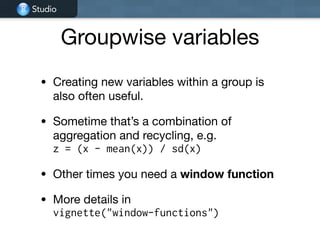
Groupwise variables
• Creating new variables within a group is
also often useful.

• Sometime that’s a combination of
aggregation and recycling, e.g. 

z = (x - mean(x)) / sd(x)

• Other times you need a window function

• More details in 

vignette("window-functions")
Studio
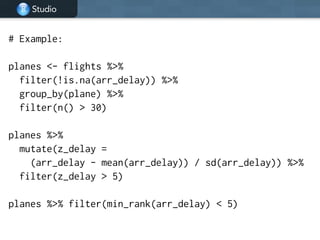
# Example:
!
planes <- flights %>%
filter(!is.na(arr_delay)) %>%
group_by(plane) %>%
filter(n() > 30)
!
planes %>%
mutate(z_delay =
(arr_delay - mean(arr_delay)) / sd(arr_delay)) %>%
filter(z_delay > 5)
!
planes %>% filter(min_rank(arr_delay) < 5)
Studio
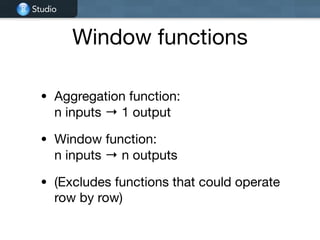
Window functions
• Aggregation function: 

n inputs → 1 output

• Window function: 

n inputs → n outputs

• (Excludes functions that could operate
row by row)
Studio
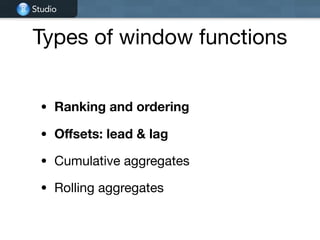
Types of window functions
• Ranking and ordering
• Offsets: lead & lag
• Cumulative aggregates

• Rolling aggregates
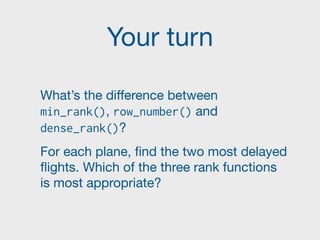
Your turn
What’s the difference between
min_rank(), row_number() and
dense_rank()?

For each plane, find the two most delayed
flights. Which of the three rank functions
is most appropriate?
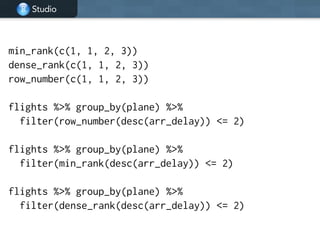
Studio
min_rank(c(1, 1, 2, 3))
dense_rank(c(1, 1, 2, 3))
row_number(c(1, 1, 2, 3))
!
flights %>% group_by(plane) %>%
filter(row_number(desc(arr_delay)) <= 2)
!
flights %>% group_by(plane) %>%
filter(min_rank(desc(arr_delay)) <= 2)
!
flights %>% group_by(plane) %>%
filter(dense_rank(desc(arr_delay)) <= 2)
Studio
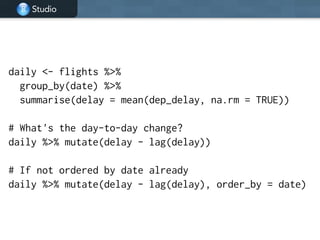
daily <- flights %>%
group_by(date) %>%
summarise(delay = mean(dep_delay, na.rm = TRUE))
!
# What's the day-to-day change?
daily %>% mutate(delay - lag(delay))
!
# If not ordered by date already
daily %>% mutate(delay - lag(delay), order_by = date)
Studio
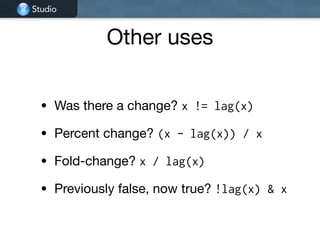
Other uses
• Was there a change? x != lag(x)

• Percent change? (x - lag(x)) / x

• Fold-change? x / lag(x)

• Previously false, now true? !lag(x) & x
Two table
verbs
Studio
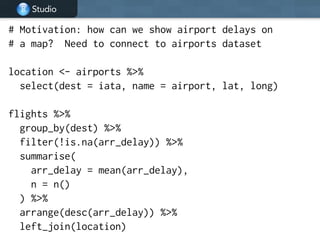
# Motivation: how can we show airport delays on
# a map? Need to connect to airports dataset
!
location <- airports %>%
select(dest = iata, name = airport, lat, long)
!
flights %>%
group_by(dest) %>%
filter(!is.na(arr_delay)) %>%
summarise(
arr_delay = mean(arr_delay),
n = n()
) %>%
arrange(desc(arr_delay)) %>%
left_join(location)
Studio
Studio
© 2014 RStudio, Inc. All rights reserved.
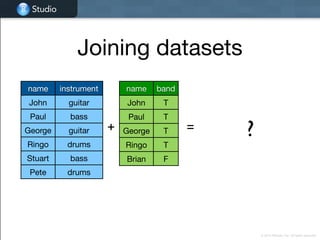
name band
John T
Paul T
George T
Ringo T
Brian F
name instrument
John guitar
Paul bass
George guitar
Ringo drums
Stuart bass
Pete drums
+ = ?
Joining datasets
Studio
Studio
© 2014 RStudio, Inc. All rights reserved.
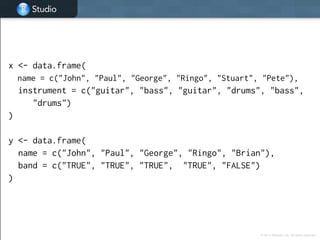
x <- data.frame(
name = c("John", "Paul", "George", "Ringo", "Stuart", "Pete"),
instrument = c("guitar", "bass", "guitar", "drums", "bass",
"drums")
)
!
y <- data.frame(
name = c("John", "Paul", "George", "Ringo", "Brian"),
band = c("TRUE", "TRUE", "TRUE", "TRUE", "FALSE")
)
Studio
Studio
© 2014 RStudio, Inc. All rights reserved.
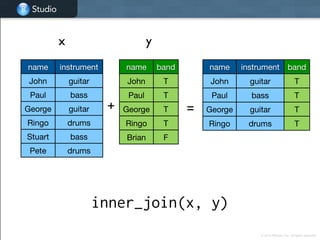
name instrument band
John guitar T
Paul bass T
George guitar T
Ringo drums T
x y
+ =
inner_join(x, y)
name instrument
John guitar
Paul bass
George guitar
Ringo drums
Stuart bass
Pete drums
name band
John T
Paul T
George T
Ringo T
Brian F
Studio
Studio
© 2014 RStudio, Inc. All rights reserved.
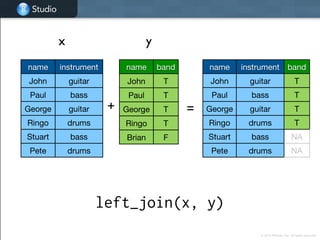
name instrument
John guitar
Paul bass
George guitar
Ringo drums
Stuart bass
Pete drums
name band
John T
Paul T
George T
Ringo T
Brian F
name instrument band
John guitar T
Paul bass T
George guitar T
Ringo drums T
Stuart bass NA
Pete drums NA
x y
+ =
left_join(x, y)
Studio
Studio
© 2014 RStudio, Inc. All rights reserved.
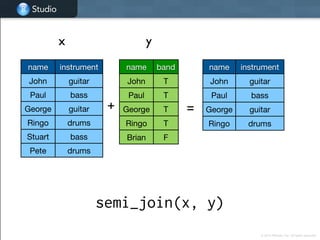
name instrument
John guitar
Paul bass
George guitar
Ringo drums
x y
+ =
semi_join(x, y)
name instrument
John guitar
Paul bass
George guitar
Ringo drums
Stuart bass
Pete drums
name band
John T
Paul T
George T
Ringo T
Brian F
Studio
Studio
© 2014 RStudio, Inc. All rights reserved.
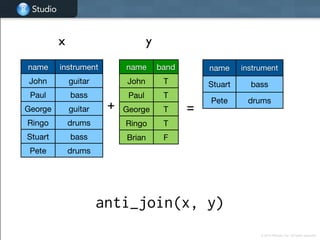
name instrument
John guitar
Paul bass
George guitar
Ringo drums
Stuart bass
Pete drums
name band
John T
Paul T
George T
Ringo T
Brian F
name instrument
Stuart bass
Pete drums
x y
+ =
anti_join(x, y)
© 2014 RStudio, Inc. All rights reserved.
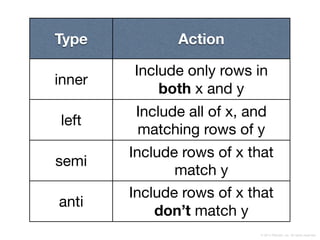
Type Action
inner
Include only rows in 

both x and y
left
Include all of x, and
matching rows of y
semi
Include rows of x that
match y
anti
Include rows of x that
don’t match y
Studio
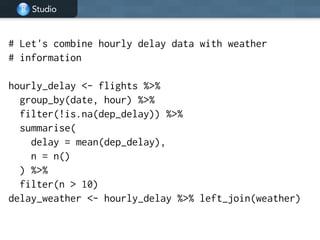
# Let's combine hourly delay data with weather
# information
!
hourly_delay <- flights %>%
group_by(date, hour) %>%
filter(!is.na(dep_delay)) %>%
summarise(
delay = mean(dep_delay),
n = n()
) %>%
filter(n > 10)
delay_weather <- hourly_delay %>% left_join(weather)
Your turn
What weather conditions are associated
with delays leaving in Houston?

Use graphics to explore.
Studio
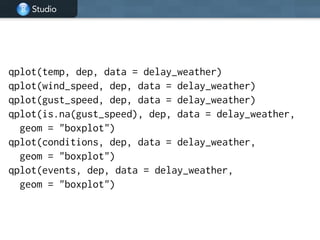
qplot(temp, dep, data = delay_weather)
qplot(wind_speed, dep, data = delay_weather)
qplot(gust_speed, dep, data = delay_weather)
qplot(is.na(gust_speed), dep, data = delay_weather,
geom = "boxplot")
qplot(conditions, dep, data = delay_weather,
geom = "boxplot")
qplot(events, dep, data = delay_weather,
geom = "boxplot")
Your turn
Are older planes more likely to be
delayed? Explore the data and answer
with a plot.

(Hint: I’d recommend by starting with
some checking of the plane data)
Do
Studio
The workhorse function
• If one of the specialised verbs doesn’t
do what you need, you can use do()

• It’s slower, but general purpose.

• Equivalent to ddply() and dlply(), and
is particularly useful in conjunction with
models
Studio
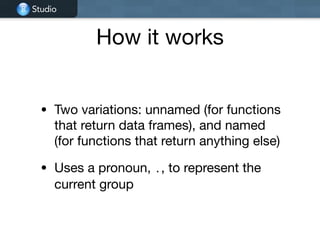
How it works
• Two variations: unnamed (for functions
that return data frames), and named
(for functions that return anything else)

• Uses a pronoun, ., to represent the
current group
Studio
# Derived from http://stackoverflow.com/a/23341485/16632
library(dplyr)
library(zoo)
df <- data.frame(
houseID = rep(1:10, each = 10),
year = 1995:2004,
price = ifelse(runif(10 * 10) > 0.50, NA, exp(rnorm(10 * 10)))
)
!
df %>%
group_by(houseID) %>%
do(na.locf(.))
!
df %>%
group_by(houseID) %>%
do(head(., 2))
!
df %>%
group_by(houseID) %>%
do(data.frame(year = .$year[1]))
Studio
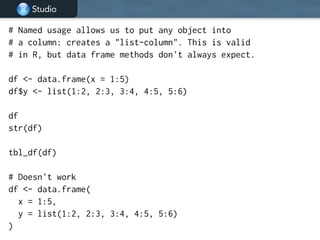
# Named usage allows us to put any object into
# a column: creates a "list-column". This is valid
# in R, but data frame methods don't always expect.
!
df <- data.frame(x = 1:5)
df$y <- list(1:2, 2:3, 3:4, 4:5, 5:6)
!
df
str(df)
!
tbl_df(df)
!
# Doesn't work
df <- data.frame(
x = 1:5,
y = list(1:2, 2:3, 3:4, 4:5, 5:6)
)
Studio
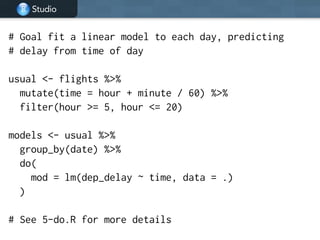
# Goal fit a linear model to each day, predicting
# delay from time of day
!
usual <- flights %>%
mutate(time = hour + minute / 60) %>%
filter(hour >= 5, hour <= 20)
!
models <- usual %>%
group_by(date) %>%
do(
mod = lm(dep_delay ~ time, data = .)
)
!
# See 5-do.R for more details
Studio
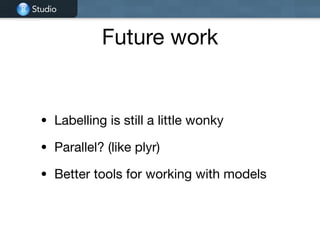
Future work
• Labelling is still a little wonky

• Parallel? (like plyr)

• Better tools for working with models
Databases
Studio
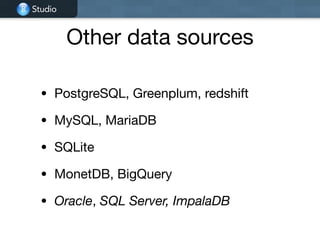
Other data sources
• PostgreSQL, Greenplum, redshift

• MySQL, MariaDB

• SQLite

• MonetDB, BigQuery

• Oracle, SQL Server, ImpalaDB
Studio
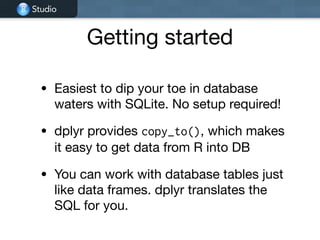
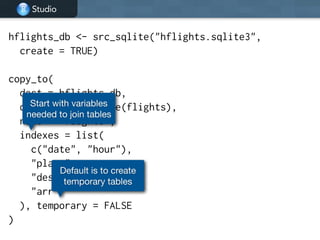
Getting started
• Easiest to dip your toe in database
waters with SQLite. No setup required!

• dplyr provides copy_to(), which makes
it easy to get data from R into DB

• You can work with database tables just
like data frames. dplyr translates the
SQL for you.
Studio
hflights_db <- src_sqlite("hflights.sqlite3",
create = TRUE)
!
copy_to(
dest = hflights_db,
df = as.data.frame(flights),
name = "flights",
indexes = list(
c("date", "hour"),
"plane",
"dest",
"arr"
), temporary = FALSE
)
Start with variables
needed to join tables
Default is to create
temporary tables
Studio
# DEMO
Studio
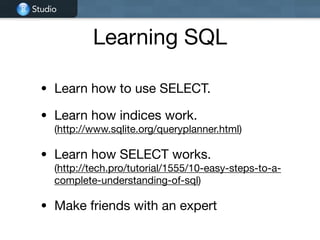
Learning SQL
• Learn how to use SELECT.

• Learn how indices work. 

(http://www.sqlite.org/queryplanner.html)

• Learn how SELECT works.

(http://tech.pro/tutorial/1555/10-easy-steps-to-a-
complete-understanding-of-sql)

• Make friends with an expert
Studio
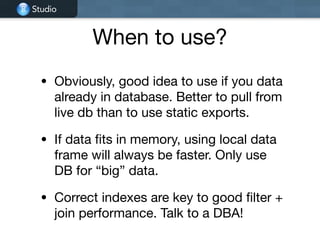
When to use?
• Obviously, good idea to use if you data
already in database. Better to pull from
live db than to use static exports.

• If data fits in memory, using local data
frame will always be faster. Only use
DB for “big” data.

• Correct indexes are key to good filter +
join performance. Talk to a DBA!
Where
next
Studio
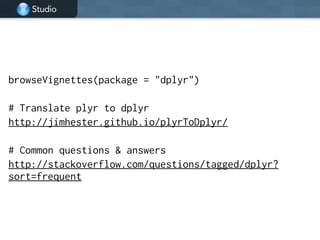
browseVignettes(package = "dplyr")
!
# Translate plyr to dplyr
http://jimhester.github.io/plyrToDplyr/
!
# Common questions & answers
http://stackoverflow.com/questions/tagged/dplyr?
sort=frequent

dplyr-tutorial.pdf

  • 1.
    Hadley Wickham 
 @hadleywickham ChiefScientist, RStudio Data manipulation with dplyr June 2014
  • 2.
    Data analysis isthe process by which data becomes understanding, knowledge and insight Data analysis is the process by which data becomes understanding, knowledge and insight
  • 3.
    Data analysis isthe process by which data becomes understanding, knowledge and insight Data analysis is the process by which data becomes understanding, knowledge and insight
  • 4.
    Transform Visualise Model Surprises, but doesn'tscale Scales, but doesn't (fundamentally) surprise Tidy
  • 5.
  • 6.
    1. Flights data 2.One table verbs & 
 grouped summaries 3. Data pipelines 4. Grouped mutate/filter & 
 window functions 5. Joins (two table verbs) 6. Do 7. Databases
  • 7.
    The bad news: It’sgoing to be frustrating http://hyperboleandahalf.blogspot.com/2010/09/four-levels-of-social-entrapment.html © Allie Brosh
  • 8.
    The good news: Frustrationis typical and temporary http://hyperboleandahalf.blogspot.com/2010/06/this-is-why-ill-never-be-adult.html © Allie Brosh
  • 9.
  • 10.
    Studio Rstudio projects • Isolatecode and results from different projects. Restart where you left off. • Double-click dplyr-tutorial.Rproj file to open. (One R file for each section) • (If you don’t use RStudio, just change working directories)
  • 11.
    Studio Flights data • flights[227,496 x 14]. Every flight departing Houston in 2011. • weather [8,723 x 14]. Hourly weather data. • planes [2,853 x 9]. Plane metadata. • airports [3,376 x 7]. Airport metadata.
  • 12.
    Studio library(dplyr) library(ggplot2) ! flights <- tbl_df(read.csv("flights.csv", stringsAsFactors= FALSE)) flights$date <- as.Date(flights$date) ! weather <- tbl_df(read.csv("weather.csv", stringsAsFactors = FALSE)) weather$date <- as.Date(weather$date) ! planes <- tbl_df(read.csv("planes.csv", stringsAsFactors = FALSE)) ! airports <- tbl_df(read.csv("airports.csv", stringsAsFactors = FALSE))
  • 13.
    Your turn Introduce yourselfto your neighbour. What questions might you want to answer with this data?
  • 14.
  • 15.
    Studio • filter: keeprows matching criteria • select: pick columns by name • arrange: reorder rows • mutate: add new variables • summarise: reduce variables to values
  • 16.
    Studio Structure • First argumentis a data frame • Subsequent arguments say what to do with data frame • Always return a data frame • (Never modify in place)
  • 17.
    Studio df <- data.frame( color= c("blue", "black", "blue", "blue", "black"), value = 1:5)
  • 18.
    Studio Studio © 2014 RStudio,Inc. All rights reserved. filter(df, color == "blue") color value blue 1 black 2 blue 3 blue 4 black 5 color value blue 1 blue 3 blue 4 df
  • 19.
    Studio Studio © 2014 RStudio,Inc. All rights reserved. filter(df, value %in% c(1, 4)) color value blue 1 black 2 blue 3 blue 4 black 5 df color value blue 1 blue 4
  • 20.
    Studio a b a | b a& b a & !b xor(a, b) x > 1 x >= 1 x < 1 x <= 1 x != 1 x == 1 x %in% ("a", "b")
  • 21.
    Find all flights: ToSFO or OAK In January Delayed by more than an hour That departed between midnight and five am. Where the arrival delay was more than twice the departure delay
  • 22.
    Studio filter(flights, dest %in%c("SFO", "OAK")) filter(flights, dest == "SFO" | dest == "OAK") # Not this! filter(flights, dest == "SFO" | "OAK") ! filter(flights, date < "2001-02-01") ! filter(flights, hour >= 0, hour <= 5) filter(flights, hour >= 0 & hour <= 5) ! filter(flights, dep_delay > 60) filter(flights, arr_delay > 2 * dep_delay)
  • 23.
    Studio Studio © 2014 RStudio,Inc. All rights reserved. select(df, color) color value blue 1 black 2 blue 3 blue 4 black 5 df color blue black blue blue black
  • 24.
    Studio Studio © 2014 RStudio,Inc. All rights reserved. select(df, -color) color value blue 1 black 2 blue 3 blue 4 black 5 df value 1 2 3 4 5
  • 25.
    Your turn Read thehelp for select(). What other ways can you select variables? Write down three ways to select the two delay variables.
  • 26.
    Studio select(flights, arr_delay, dep_delay) select(flights,arr_delay:dep_delay) select(flights, ends_with("delay")) select(flights, contains("delay"))
  • 27.
    Studio Studio © 2014 RStudio,Inc. All rights reserved. arrange(df, color) color value 4 1 1 2 5 3 3 4 2 5 color value 1 2 2 5 3 4 4 1 5 3 df
  • 28.
    Studio Studio © 2014 RStudio,Inc. All rights reserved. arrange(df, desc(color)) color value 4 1 1 2 5 3 3 4 2 5 color value 5 3 4 1 3 4 2 5 1 2 df
  • 29.
    Your turn Order theflights by departure date and time. Which flights were most delayed? Which flights caught up the most time during the flight?
  • 30.
    Studio arrange(flights, date, hour,minute) ! arrange(flights, desc(dep_delay)) arrange(flights, desc(arr_delay)) ! arrange(flights, desc(dep_delay - arr_delay))
  • 31.
    Studio Studio © 2014 RStudio,Inc. All rights reserved. mutate(df, double = 2 * value) color value blue 1 black 2 blue 3 blue 4 black 5 color value double blue 1 2 black 2 4 blue 3 6 blue 4 8 black 5 10 df
  • 32.
    Studio Studio © 2014 RStudio,Inc. All rights reserved. color value double quadruple blue 1 2 4 black 2 4 8 blue 3 6 12 blue 4 8 16 black 5 10 20 mutate(df, double = 2 * value, quadruple = 2 * double) color value blue 1 black 2 blue 3 blue 4 black 5 df
  • 33.
    Your turn Compute speedin mph from time (in minutes) and distance (in miles). Which flight flew the fastest? Add a new variable that shows how much time was made up or lost in flight. How did I compute hour and minute from dep? (Hint: you may need to use select() or View() to see your new variable)
  • 34.
    Studio flights <- mutate(flights, speed= dist / (time / 60)) arrange(flights, desc(speed)) ! mutate(flights, delta = dep_delay - arr_delay) ! mutate(flights, hour = dep %/% 100, minute = dep %% 100)
  • 35.
  • 36.
    Studio Studio © 2014 RStudio,Inc. All rights reserved. summarise(df, total = sum(value)) color value blue 1 black 2 blue 3 blue 4 black 5 total 15 df
  • 37.
    Studio Studio © 2014 RStudio,Inc. All rights reserved. by_color <- group_by(df, color) summarise(by_color, total = sum(value)) color value blue 1 black 2 blue 3 blue 4 black 5 color total blue 8 black 7 df
  • 38.
    Studio by_date <- group_by(flights,date) by_hour <- group_by(flights, date, hour) by_plane <- group_by(flights, plane) by_dest <- group_by(flights, dest)
  • 39.
    Studio Summary functions • min(x),median(x), max(x), quantile(x, p) • n(), n_distinct(), sum(x), mean(x) • sum(x > 10), mean(x > 10) • sd(x), var(x), iqr(x), mad(x)
  • 40.
    Your turn How mightyou summarise dep_delay for each day? Brainstorm for 2 minutes. 0 5000 10000 15000 0 250 500 750 1000 dep_delay count 0 5000 10000 15000 0 25 50 75 100 125 dep_delay count
  • 41.
    Studio ! by_date <- group_by(flights,date) delays <- summarise(by_date, mean = mean(dep_delay), median = median(dep_delay), q75 = quantile(dep_delay, 0.75), over_15 = mean(dep_delay > 15), over_30 = mean(dep_delay > 30), over_60 = mean(dep_delay > 60) )
  • 42.
    Studio ! by_date <- group_by(flights,date) delays <- summarise(by_date, mean = mean(dep_delay, na.rm = TRUE), median = median(dep_delay, na.rm = TRUE), q75 = quantile(dep_delay, 0.75, na.rm = TRUE), over_15 = mean(dep_delay > 15, na.rm = TRUE), over_30 = mean(dep_delay > 30, na.rm = TRUE), over_60 = mean(dep_delay > 60, na.rm = TRUE) )
  • 43.
    Studio # OR ! by_date <-group_by(flights, date) no_missing <- filter(flights, !is.na(dep)) delays <- summarise(no_missing, mean = mean(dep_delay), median = median(dep_delay), q75 = quantile(dep_delay, 0.75), over_15 = mean(dep_delay > 15), over_30 = mean(dep_delay > 30), over_60 = mean(dep_delay > 60) )
  • 44.
  • 45.
    Studio # Downside offunctional interface is that it's # hard to read multiple operations: hourly_delay <- filter( summarise( group_by( filter( flights, !is.na(dep_delay) ), date, hour ), delay = mean(dep_delay), n = n() ), n > 10 )
  • 46.
    Studio # Solution: thepipe operator from magrittr # x %>% f(y) -> f(x, y) ! hourly_delay <- flights %>% filter(!is.na(dep_delay)) %>% group_by(date, hour) %>% summarise(delay = mean(dep_delay), n = n()) %>% filter(n > 10) ! # Hint: pronounce %>% as then
  • 47.
    Your turn Create datapipelines to answer the following questions: Which destinations have the highest average delays? Which flights (i.e. carrier + flight) happen every day? Where do they fly to? On average, how do delays (of non-cancelled flights) vary over the course of a day? 
 (Hint: hour + minute / 60)
  • 48.
    Studio flights %>% group_by(dest) %>% summarise( arr_delay= mean(arr_delay, na.rm = TRUE), n = n()) %>% arrange(desc(arr_delay)) ! # Nifty trick to see more data .Last.value %>% View() ! # It would be nice to plot these on a map...
  • 49.
    Studio flights %>% group_by(carrier, flight,dest) %>% tally(sort = TRUE) %>% # Save some typing filter(n == 365) ! flights %>% group_by(carrier, flight, dest) %>% summarise(n = n()) %>% arrange(desc(n)) %>% filter(n == 365) ! # Slightly different answer flights %>% group_by(carrier, flight) %>% filter(n() == 365)
  • 50.
    Studio per_hour <- flights%>% filter(cancelled == 0) %>% mutate(time = hour + minute / 60) %>% group_by(time) %>% summarise( arr_delay = mean(arr_delay, na.rm = TRUE), n = n() ) ! qplot(time, arr_delay, data = per_hour) qplot(time, arr_delay, data = per_hour, size = n) + scale_size_area() qplot(time, arr_delay, data = filter(per_hour, n > 30), size = n) + scale_size_area() ! ggplot(filter(per_hour, n > 30), aes(time, arr_delay)) + geom_vline(xintercept = 5:24, colour = "white", size = 2) + geom_point()
  • 51.
  • 52.
    Studio Groupwise variables • Creatingnew variables within a group is also often useful. • Sometime that’s a combination of aggregation and recycling, e.g. 
 z = (x - mean(x)) / sd(x) • Other times you need a window function • More details in 
 vignette("window-functions")
  • 53.
    Studio # Example: ! planes <-flights %>% filter(!is.na(arr_delay)) %>% group_by(plane) %>% filter(n() > 30) ! planes %>% mutate(z_delay = (arr_delay - mean(arr_delay)) / sd(arr_delay)) %>% filter(z_delay > 5) ! planes %>% filter(min_rank(arr_delay) < 5)
  • 54.
    Studio Window functions • Aggregationfunction: 
 n inputs → 1 output • Window function: 
 n inputs → n outputs • (Excludes functions that could operate row by row)
  • 55.
    Studio Types of windowfunctions • Ranking and ordering • Offsets: lead & lag • Cumulative aggregates • Rolling aggregates
  • 56.
    Your turn What’s thedifference between min_rank(), row_number() and dense_rank()? For each plane, find the two most delayed flights. Which of the three rank functions is most appropriate?
  • 57.
    Studio min_rank(c(1, 1, 2,3)) dense_rank(c(1, 1, 2, 3)) row_number(c(1, 1, 2, 3)) ! flights %>% group_by(plane) %>% filter(row_number(desc(arr_delay)) <= 2) ! flights %>% group_by(plane) %>% filter(min_rank(desc(arr_delay)) <= 2) ! flights %>% group_by(plane) %>% filter(dense_rank(desc(arr_delay)) <= 2)
  • 58.
    Studio daily <- flights%>% group_by(date) %>% summarise(delay = mean(dep_delay, na.rm = TRUE)) ! # What's the day-to-day change? daily %>% mutate(delay - lag(delay)) ! # If not ordered by date already daily %>% mutate(delay - lag(delay), order_by = date)
  • 59.
    Studio Other uses • Wasthere a change? x != lag(x) • Percent change? (x - lag(x)) / x • Fold-change? x / lag(x) • Previously false, now true? !lag(x) & x
  • 60.
  • 61.
    Studio # Motivation: howcan we show airport delays on # a map? Need to connect to airports dataset ! location <- airports %>% select(dest = iata, name = airport, lat, long) ! flights %>% group_by(dest) %>% filter(!is.na(arr_delay)) %>% summarise( arr_delay = mean(arr_delay), n = n() ) %>% arrange(desc(arr_delay)) %>% left_join(location)
  • 62.
    Studio Studio © 2014 RStudio,Inc. All rights reserved. name band John T Paul T George T Ringo T Brian F name instrument John guitar Paul bass George guitar Ringo drums Stuart bass Pete drums + = ? Joining datasets
  • 63.
    Studio Studio © 2014 RStudio,Inc. All rights reserved. x <- data.frame( name = c("John", "Paul", "George", "Ringo", "Stuart", "Pete"), instrument = c("guitar", "bass", "guitar", "drums", "bass", "drums") ) ! y <- data.frame( name = c("John", "Paul", "George", "Ringo", "Brian"), band = c("TRUE", "TRUE", "TRUE", "TRUE", "FALSE") )
  • 64.
    Studio Studio © 2014 RStudio,Inc. All rights reserved. name instrument band John guitar T Paul bass T George guitar T Ringo drums T x y + = inner_join(x, y) name instrument John guitar Paul bass George guitar Ringo drums Stuart bass Pete drums name band John T Paul T George T Ringo T Brian F
  • 65.
    Studio Studio © 2014 RStudio,Inc. All rights reserved. name instrument John guitar Paul bass George guitar Ringo drums Stuart bass Pete drums name band John T Paul T George T Ringo T Brian F name instrument band John guitar T Paul bass T George guitar T Ringo drums T Stuart bass NA Pete drums NA x y + = left_join(x, y)
  • 66.
    Studio Studio © 2014 RStudio,Inc. All rights reserved. name instrument John guitar Paul bass George guitar Ringo drums x y + = semi_join(x, y) name instrument John guitar Paul bass George guitar Ringo drums Stuart bass Pete drums name band John T Paul T George T Ringo T Brian F
  • 67.
    Studio Studio © 2014 RStudio,Inc. All rights reserved. name instrument John guitar Paul bass George guitar Ringo drums Stuart bass Pete drums name band John T Paul T George T Ringo T Brian F name instrument Stuart bass Pete drums x y + = anti_join(x, y)
  • 68.
    © 2014 RStudio,Inc. All rights reserved. Type Action inner Include only rows in 
 both x and y left Include all of x, and matching rows of y semi Include rows of x that match y anti Include rows of x that don’t match y
  • 69.
    Studio # Let's combinehourly delay data with weather # information ! hourly_delay <- flights %>% group_by(date, hour) %>% filter(!is.na(dep_delay)) %>% summarise( delay = mean(dep_delay), n = n() ) %>% filter(n > 10) delay_weather <- hourly_delay %>% left_join(weather)
  • 70.
    Your turn What weatherconditions are associated with delays leaving in Houston? Use graphics to explore.
  • 71.
    Studio qplot(temp, dep, data= delay_weather) qplot(wind_speed, dep, data = delay_weather) qplot(gust_speed, dep, data = delay_weather) qplot(is.na(gust_speed), dep, data = delay_weather, geom = "boxplot") qplot(conditions, dep, data = delay_weather, geom = "boxplot") qplot(events, dep, data = delay_weather, geom = "boxplot")
  • 72.
    Your turn Are olderplanes more likely to be delayed? Explore the data and answer with a plot. (Hint: I’d recommend by starting with some checking of the plane data)
  • 73.
  • 74.
    Studio The workhorse function •If one of the specialised verbs doesn’t do what you need, you can use do() • It’s slower, but general purpose. • Equivalent to ddply() and dlply(), and is particularly useful in conjunction with models
  • 75.
    Studio How it works •Two variations: unnamed (for functions that return data frames), and named (for functions that return anything else) • Uses a pronoun, ., to represent the current group
  • 76.
    Studio # Derived fromhttp://stackoverflow.com/a/23341485/16632 library(dplyr) library(zoo) df <- data.frame( houseID = rep(1:10, each = 10), year = 1995:2004, price = ifelse(runif(10 * 10) > 0.50, NA, exp(rnorm(10 * 10))) ) ! df %>% group_by(houseID) %>% do(na.locf(.)) ! df %>% group_by(houseID) %>% do(head(., 2)) ! df %>% group_by(houseID) %>% do(data.frame(year = .$year[1]))
  • 77.
    Studio # Named usageallows us to put any object into # a column: creates a "list-column". This is valid # in R, but data frame methods don't always expect. ! df <- data.frame(x = 1:5) df$y <- list(1:2, 2:3, 3:4, 4:5, 5:6) ! df str(df) ! tbl_df(df) ! # Doesn't work df <- data.frame( x = 1:5, y = list(1:2, 2:3, 3:4, 4:5, 5:6) )
  • 78.
    Studio # Goal fita linear model to each day, predicting # delay from time of day ! usual <- flights %>% mutate(time = hour + minute / 60) %>% filter(hour >= 5, hour <= 20) ! models <- usual %>% group_by(date) %>% do( mod = lm(dep_delay ~ time, data = .) ) ! # See 5-do.R for more details
  • 79.
    Studio Future work • Labellingis still a little wonky • Parallel? (like plyr) • Better tools for working with models
  • 80.
  • 81.
    Studio Other data sources •PostgreSQL, Greenplum, redshift • MySQL, MariaDB • SQLite • MonetDB, BigQuery • Oracle, SQL Server, ImpalaDB
  • 82.
    Studio Getting started • Easiestto dip your toe in database waters with SQLite. No setup required! • dplyr provides copy_to(), which makes it easy to get data from R into DB • You can work with database tables just like data frames. dplyr translates the SQL for you.
  • 83.
    Studio hflights_db <- src_sqlite("hflights.sqlite3", create= TRUE) ! copy_to( dest = hflights_db, df = as.data.frame(flights), name = "flights", indexes = list( c("date", "hour"), "plane", "dest", "arr" ), temporary = FALSE ) Start with variables needed to join tables Default is to create temporary tables
  • 84.
  • 85.
    Studio Learning SQL • Learnhow to use SELECT. • Learn how indices work. 
 (http://www.sqlite.org/queryplanner.html) • Learn how SELECT works.
 (http://tech.pro/tutorial/1555/10-easy-steps-to-a- complete-understanding-of-sql) • Make friends with an expert
  • 86.
    Studio When to use? •Obviously, good idea to use if you data already in database. Better to pull from live db than to use static exports. • If data fits in memory, using local data frame will always be faster. Only use DB for “big” data. • Correct indexes are key to good filter + join performance. Talk to a DBA!
  • 87.
  • 88.
    Studio browseVignettes(package = "dplyr") ! #Translate plyr to dplyr http://jimhester.github.io/plyrToDplyr/ ! # Common questions & answers http://stackoverflow.com/questions/tagged/dplyr? sort=frequent