.NET Framework Overview
.NET Framework, CLR, MSIL, Assemblies, CTS, etc.
Table of Contents
1. What is .NET?
 Microsoft .NET platform architecture
2. What is .NET Framework?
 .NET Framework Architecture
3. Common Language Runtime (CLR)
4. Managed Code
5. Intermediate Language MSIL
6. Assemblies and Metadata
7. .NET Applications
Table of Contents (2)
8. Common Language Infrastructure (CLI) and
integration of different languages
 Common Language Specification (CLS)
 CommonType System (CTS)
9. Framework Class Library
10. Integrated Development EnvironmentVisual
Studio
.NET Framework
Microsoft's Platform for
Application Development
What is the .NET Platform?
 The .NET platform
 Microsoft's platform for software development
 Unified technology for development of almost
any kind of applications
 GUI / Web / RIA (rich internet application ) /
mobile / server / cloud / etc.
 .NET platform versions
 .NET Framework
 Silverlight / Windows Phone 7
 .NET Compact Framework
What is .NET Framework?
 .NET Framework
 An environment for developing and executing
.NET applications
 Unified programming model, set of languages,
class libraries, infrastructure, components and
tools for application development
 Environment for controlled execution of
managed code
 It is commonly assumed that
 .NET platform == .NET Framework
.NET Framework Components
 Common Language Runtime (CLR)
 Environment for controlled execution of
programmed code – like a virtual machine
 Executes .NET applications
 Framework Class Library (FCL)
 Standard class library for .NET development
 Delivers basic functionality for developing: XML,
ADO.NET, LINQ, ASP.NET, WPF,WCF,WWF,
Silverlight, Web services, Windows Forms, ...
 SDK, compilers and tools
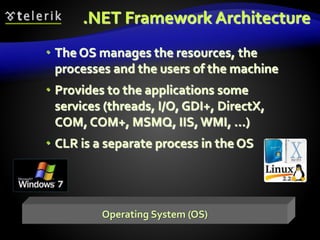
.NET Framework Architecture
 The OS manages the resources, the
processes and the users of the machine
 Provides to the applications some
services (threads, I/O, GDI+, DirectX,
COM, COM+, MSMQ, IIS,WMI, …)
 CLR is a separate process in the OS
Operating System (OS)
Common Language Runtime (CLR)
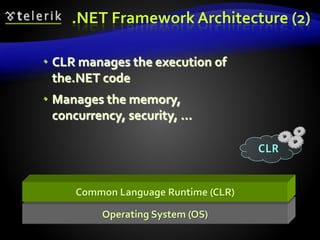
 CLR manages the execution of
the.NET code
 Manages the memory,
concurrency, security, ...
.NET Framework Architecture (2)
CLR
Operating System (OS)
Common Language Runtime (CLR)
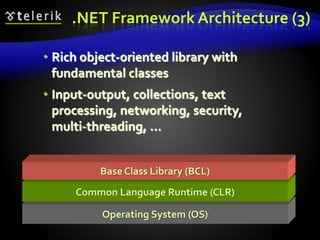
Base Class Library (BCL)
.NET Framework Architecture (3)
 Rich object-oriented library with
fundamental classes
 Input-output, collections, text
processing, networking, security,
multi-threading, …
Operating System (OS)
Common Language Runtime (CLR)
Base Class Library (BCL)
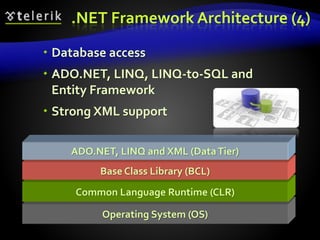
ADO.NET, LINQ and XML (DataTier)
.NET Framework Architecture (4)
 Database access
 ADO.NET, LINQ, LINQ-to-SQL and
Entity Framework
 Strong XML support
Operating System (OS)
Common Language Runtime (CLR)
Base Class Library (BCL)
ADO.NET, LINQ and XML (DataTier)
.NET Framework Architecture (5)
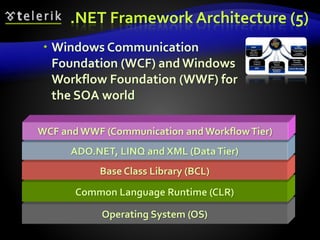
WCF and WWF (Communication and WorkflowTier)
 Windows Communication
Foundation (WCF) and Windows
Workflow Foundation (WWF) for
the SOA world
Operating System (OS)
Common Language Runtime (CLR)
Base Class Library (BCL)
ADO.NET, LINQ and XML (DataTier)
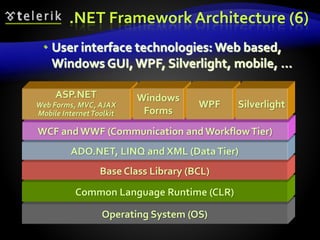
.NET Framework Architecture (6)
WCF and WWF (Communication and WorkflowTier)
ASP.NET
Web Forms, MVC, AJAX
Mobile InternetToolkit
Windows
Forms
WPF Silverlight
 User interface technologies: Web based,
Windows GUI, WPF, Silverlight, mobile, …
Operating System (OS)
Common Language Runtime (CLR)
Base Class Library (BCL)
ADO.NET, LINQ and XML (DataTier)
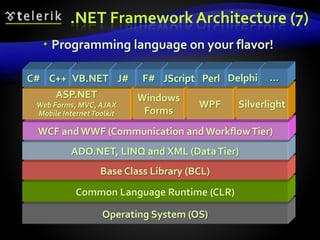
.NET Framework Architecture (7)
WCF and WWF (Communication and WorkflowTier)
ASP.NET
Web Forms, MVC, AJAX
Mobile InternetToolkit
Windows
Forms
WPF Silverlight
C# C++ VB.NET J# F# JScript Perl Delphi …
 Programming language on your flavor!
Common Language
Runtime (CLR)
The Heart of .NET Framework
Common Language Runtime (CLR)
 Managed execution environment
 Controls the execution of managed .NET
programming code
 Something like virtual machine
 Like the JavaVirtual Machine (JVM)
 Not an interpreter
 Compilation on-demand is used
 Known as Just InTime (JIT) compilation
 Possible compilation in advance (Ngen)
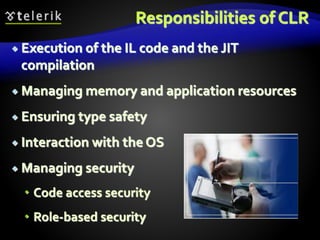
Responsibilities of CLR
 Execution of the IL code and the JIT
compilation
 Managing memory and application resources
 Ensuring type safety
 Interaction with the OS
 Managing security
 Code access security
 Role-based security
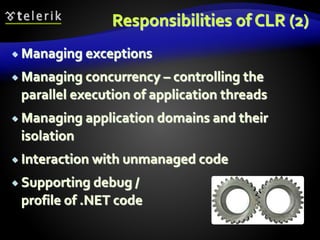
Responsibilities of CLR (2)
 Managing exceptions
 Managing concurrency – controlling the
parallel execution of application threads
 Managing application domains and their
isolation
 Interaction with unmanaged code
 Supporting debug /
profile of .NET code
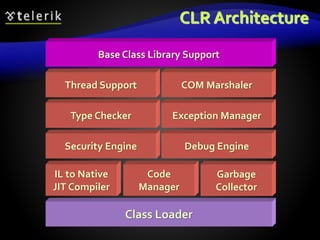
CLR Architecture
Class Loader
IL to Native
JIT Compiler
Code
Manager
Garbage
Collector
Security Engine Debug Engine
Type Checker Exception Manager
Thread Support COM Marshaler
Base Class Library Support
Managed and
Unmanaged Code
What is the Difference?
Managed Code
 CLR executed code is called managed code
 Represents programming code in the low level
language MSIL (MS Intermediate Language)
 Contains metadata
 Description of classes, interfaces, properties,
fields, methods, parameters, etc.
 Programs, written in any .NET language are
 Compiled to managed code (MSIL)
 Packaged as assemblies (.exe or .dll files)
Managed Code (2)
 Object-oriented
 Secure
 Reliable
 Protected from irregular use of types (type-safe)
 Allows integration between components and
data types of different programming
languages
 Portable between different platforms
 Windows, Linux, Max OS X, etc.
Unmanaged (Win32) Code
 No protection of memory and type-safety
 Reliability problems
 Safety problems
 Doesn’t contain metadata
 Needs additional overhead like (e.g. use COM)
 Compiled to machine-dependent code
 Need of different versions for different
platforms
 Hard to be ported to other platforms
Memory Management
 CLR manages memory automatically
 Dynamically loaded objects are stored in the
managed heap
 Unusable objects are automatically cleaned up
by the garbage collector
 Some of the big problems are solved
 Memory leaks
 Access to freed or unallocated memory
 Objects are accessed through a reference
Intermediate
Language (MSIL)
Intermediate Language
(MSIL, IL, CIL)
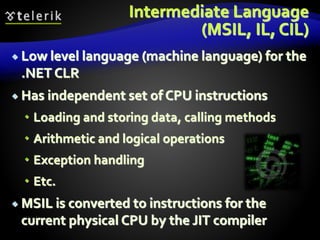
 Low level language (machine language) for the
.NET CLR
 Has independent set of CPU instructions
 Loading and storing data, calling methods
 Arithmetic and logical operations
 Exception handling
 Etc.
 MSIL is converted to instructions for the
current physical CPU by the JIT compiler
Sample MSIL Program
.method private hidebysig static void Main() cil managed
{
.entrypoint
// Code size 11 (0xb)
.maxstack 8
ldstr "Hello, world!"
call void
[mscorlib]System.Console::WriteLine(string)
ret
} // end of method HelloWorld::Main
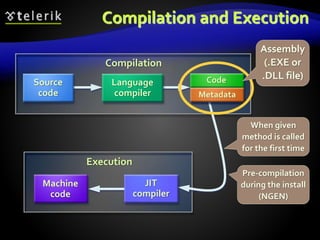
Compilation and Execution
Compilation
Execution
JIT
compiler
Machine
code
MSIL
Code
Metadata
Source
code
Language
compiler
Assembly
(.EXE or
.DLL file)
When given
method is called
for the first time
Pre-compilation
during the install
(NGEN)
.NET Applications
Assemblies, Metadata and Applications
.NET Assemblies
 .NET assemblies:
 Self-containing .NET components
 Stored in .DLL and .EXE files
 Contain list of classes, types and resources
 Smallest deployment unit in CLR
 Have unique version number
 .NET deployment model
 No version conflicts (forget the "DLL hell")
 Supports side-by-side execution of different
versions of the same assembly
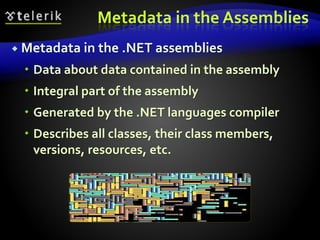
Metadata in the Assemblies
 Metadata in the .NET assemblies
 Data about data contained in the assembly
 Integral part of the assembly
 Generated by the .NET languages compiler
 Describes all classes, their class members,
versions, resources, etc.
Metadata in Assemblies
Type Description
Assembly Description
Classes, interfaces, inner types, base
classes, implemented interfaces,
member fields, properties, methods,
method parameters, return value,
attributes, etc.
Dependencies on other assemblies
Security permissions
Exported types
[digital
signature]
Name
Version
Localization
.NET Applications
 Configurable executable .NET units
 Consist of one or more assemblies
 Installed by "copy / paste"
 No complex registration of components
 Different applications use different versions of
common assemblies
 No conflicts due to their "strong name"
 Easy installation, un-installation and update
CommonType System (CTS)
 CTS defines the CLR supported types of data
and the operations over them
 Ensures data level compatibility between
different .NET languages
 E.g. string in C# is the same like String in
VB.NET and in J#
 Value types and reference types
 All types derive from System.Object
The .NET Languages
C#,VB.NET, C++, J#, etc.
.NET Languages
 .NET languages by Microsoft
 C#,VB.NET, Managed C++, J#, F#, JScript
 .NET languages by third parties
 Object Pascal, Perl, Python, COBOL, Haskell,
Oberon, Scheme, Smalltalk…
 Different languages can be mixed in a single
application
 Cross-language inheritance of types and
exception handling
C# Language
 C# is mixture between C++, Java and Delphi
 Fully object-oriented by design
 Component-oriented programming model
 Components, properties and events
 No header files like C/C++
 Suitable for GUI andWeb applications
 XML based documentation
 In C# all data types are objects
 Example: 5.ToString() is a valid call
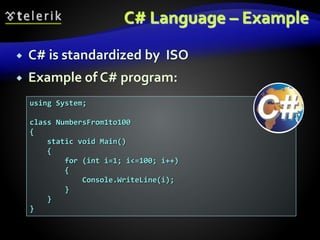
C# Language – Example
 C# is standardized by ISO
 Example of C# program:
using System;
class NumbersFrom1to100
{
static void Main()
{
for (int i=1; i<=100; i++)
{
Console.WriteLine(i);
}
}
}
Framework Class
Library (FCL)
Standard Out-of-the-box .NET APIs
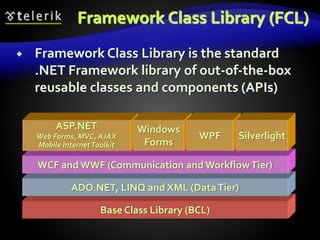
Framework Class Library (FCL)
 Framework Class Library is the standard
.NET Framework library of out-of-the-box
reusable classes and components (APIs)
Base Class Library (BCL)
ADO.NET, LINQ and XML (DataTier)
WCF and WWF (Communication and WorkflowTier)
ASP.NET
Web Forms, MVC, AJAX
Mobile InternetToolkit
Windows
Forms
WPF Silverlight
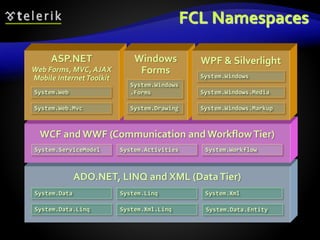
FCL Namespaces
ADO.NET, LINQ and XML (DataTier)
WCF and WWF (Communication and WorkflowTier)
ASP.NET
Web Forms, MVC, AJAX
Mobile InternetToolkit
Windows
Forms
WPF & Silverlight
System.Web
System.Web.Mvc
System.Windows
.Forms
System.Drawing
System.Windows
System.Windows.Media
System.Windows.Markup
System.ServiceModel System.Activities System.Workflow
System.Data System.Linq
System.Data.Linq
System.Xml
System.Xml.Linq System.Data.Entity
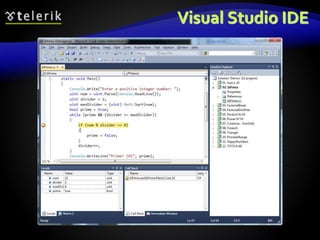
Visual Studio IDE
Powerful Development Environment for .NET
Visual Studio
 Visual Studio is powerful Integrated
Development Environment (IDE) for .NET
Developers
 Create, edit, compile and run .NET applications
 Different languages – C#, C++,VB.NET, J#, …
 Flexible code editor
 Powerful debugger
 Integrated with SQL Server and IIS
 Strong support of Web services, WCF and WWF
Visual Studio (2)
 Visual programming
 Component-oriented, event based
 Managed and unmanaged code
 Helpful wizards and editors
 Windows Forms Designer
 WCF / Silverlight Designer
 ASP.NET Web Forms Designer
 ADO.NET / LINQ-to-SQL / XML Data Designer
 Many third party extensions
Visual Studio IDE
.NET Framework Overview
Questions?

.Net Framework

  • 1.
    .NET Framework Overview .NETFramework, CLR, MSIL, Assemblies, CTS, etc.
  • 2.
    Table of Contents 1.What is .NET?  Microsoft .NET platform architecture 2. What is .NET Framework?  .NET Framework Architecture 3. Common Language Runtime (CLR) 4. Managed Code 5. Intermediate Language MSIL 6. Assemblies and Metadata 7. .NET Applications
  • 3.
    Table of Contents(2) 8. Common Language Infrastructure (CLI) and integration of different languages  Common Language Specification (CLS)  CommonType System (CTS) 9. Framework Class Library 10. Integrated Development EnvironmentVisual Studio
  • 4.
    .NET Framework Microsoft's Platformfor Application Development
  • 5.
    What is the.NET Platform?  The .NET platform  Microsoft's platform for software development  Unified technology for development of almost any kind of applications  GUI / Web / RIA (rich internet application ) / mobile / server / cloud / etc.  .NET platform versions  .NET Framework  Silverlight / Windows Phone 7  .NET Compact Framework
  • 6.
    What is .NETFramework?  .NET Framework  An environment for developing and executing .NET applications  Unified programming model, set of languages, class libraries, infrastructure, components and tools for application development  Environment for controlled execution of managed code  It is commonly assumed that  .NET platform == .NET Framework
  • 7.
    .NET Framework Components Common Language Runtime (CLR)  Environment for controlled execution of programmed code – like a virtual machine  Executes .NET applications  Framework Class Library (FCL)  Standard class library for .NET development  Delivers basic functionality for developing: XML, ADO.NET, LINQ, ASP.NET, WPF,WCF,WWF, Silverlight, Web services, Windows Forms, ...  SDK, compilers and tools
  • 8.
    .NET Framework Architecture The OS manages the resources, the processes and the users of the machine  Provides to the applications some services (threads, I/O, GDI+, DirectX, COM, COM+, MSMQ, IIS,WMI, …)  CLR is a separate process in the OS Operating System (OS)
  • 9.
    Operating System (OS) CommonLanguage Runtime (CLR)  CLR manages the execution of the.NET code  Manages the memory, concurrency, security, ... .NET Framework Architecture (2) CLR
  • 10.
    Operating System (OS) CommonLanguage Runtime (CLR) Base Class Library (BCL) .NET Framework Architecture (3)  Rich object-oriented library with fundamental classes  Input-output, collections, text processing, networking, security, multi-threading, …
  • 11.
    Operating System (OS) CommonLanguage Runtime (CLR) Base Class Library (BCL) ADO.NET, LINQ and XML (DataTier) .NET Framework Architecture (4)  Database access  ADO.NET, LINQ, LINQ-to-SQL and Entity Framework  Strong XML support
  • 12.
    Operating System (OS) CommonLanguage Runtime (CLR) Base Class Library (BCL) ADO.NET, LINQ and XML (DataTier) .NET Framework Architecture (5) WCF and WWF (Communication and WorkflowTier)  Windows Communication Foundation (WCF) and Windows Workflow Foundation (WWF) for the SOA world
  • 13.
    Operating System (OS) CommonLanguage Runtime (CLR) Base Class Library (BCL) ADO.NET, LINQ and XML (DataTier) .NET Framework Architecture (6) WCF and WWF (Communication and WorkflowTier) ASP.NET Web Forms, MVC, AJAX Mobile InternetToolkit Windows Forms WPF Silverlight  User interface technologies: Web based, Windows GUI, WPF, Silverlight, mobile, …
  • 14.
    Operating System (OS) CommonLanguage Runtime (CLR) Base Class Library (BCL) ADO.NET, LINQ and XML (DataTier) .NET Framework Architecture (7) WCF and WWF (Communication and WorkflowTier) ASP.NET Web Forms, MVC, AJAX Mobile InternetToolkit Windows Forms WPF Silverlight C# C++ VB.NET J# F# JScript Perl Delphi …  Programming language on your flavor!
  • 15.
    Common Language Runtime (CLR) TheHeart of .NET Framework
  • 16.
    Common Language Runtime(CLR)  Managed execution environment  Controls the execution of managed .NET programming code  Something like virtual machine  Like the JavaVirtual Machine (JVM)  Not an interpreter  Compilation on-demand is used  Known as Just InTime (JIT) compilation  Possible compilation in advance (Ngen)
  • 17.
    Responsibilities of CLR Execution of the IL code and the JIT compilation  Managing memory and application resources  Ensuring type safety  Interaction with the OS  Managing security  Code access security  Role-based security
  • 18.
    Responsibilities of CLR(2)  Managing exceptions  Managing concurrency – controlling the parallel execution of application threads  Managing application domains and their isolation  Interaction with unmanaged code  Supporting debug / profile of .NET code
  • 19.
    CLR Architecture Class Loader ILto Native JIT Compiler Code Manager Garbage Collector Security Engine Debug Engine Type Checker Exception Manager Thread Support COM Marshaler Base Class Library Support
  • 20.
  • 21.
    Managed Code  CLRexecuted code is called managed code  Represents programming code in the low level language MSIL (MS Intermediate Language)  Contains metadata  Description of classes, interfaces, properties, fields, methods, parameters, etc.  Programs, written in any .NET language are  Compiled to managed code (MSIL)  Packaged as assemblies (.exe or .dll files)
  • 22.
    Managed Code (2) Object-oriented  Secure  Reliable  Protected from irregular use of types (type-safe)  Allows integration between components and data types of different programming languages  Portable between different platforms  Windows, Linux, Max OS X, etc.
  • 23.
    Unmanaged (Win32) Code No protection of memory and type-safety  Reliability problems  Safety problems  Doesn’t contain metadata  Needs additional overhead like (e.g. use COM)  Compiled to machine-dependent code  Need of different versions for different platforms  Hard to be ported to other platforms
  • 24.
    Memory Management  CLRmanages memory automatically  Dynamically loaded objects are stored in the managed heap  Unusable objects are automatically cleaned up by the garbage collector  Some of the big problems are solved  Memory leaks  Access to freed or unallocated memory  Objects are accessed through a reference
  • 25.
  • 26.
    Intermediate Language (MSIL, IL,CIL)  Low level language (machine language) for the .NET CLR  Has independent set of CPU instructions  Loading and storing data, calling methods  Arithmetic and logical operations  Exception handling  Etc.  MSIL is converted to instructions for the current physical CPU by the JIT compiler
  • 27.
    Sample MSIL Program .methodprivate hidebysig static void Main() cil managed { .entrypoint // Code size 11 (0xb) .maxstack 8 ldstr "Hello, world!" call void [mscorlib]System.Console::WriteLine(string) ret } // end of method HelloWorld::Main
  • 28.
    Compilation and Execution Compilation Execution JIT compiler Machine code MSIL Code Metadata Source code Language compiler Assembly (.EXEor .DLL file) When given method is called for the first time Pre-compilation during the install (NGEN)
  • 29.
  • 30.
    .NET Assemblies  .NETassemblies:  Self-containing .NET components  Stored in .DLL and .EXE files  Contain list of classes, types and resources  Smallest deployment unit in CLR  Have unique version number  .NET deployment model  No version conflicts (forget the "DLL hell")  Supports side-by-side execution of different versions of the same assembly
  • 31.
    Metadata in theAssemblies  Metadata in the .NET assemblies  Data about data contained in the assembly  Integral part of the assembly  Generated by the .NET languages compiler  Describes all classes, their class members, versions, resources, etc.
  • 32.
    Metadata in Assemblies TypeDescription Assembly Description Classes, interfaces, inner types, base classes, implemented interfaces, member fields, properties, methods, method parameters, return value, attributes, etc. Dependencies on other assemblies Security permissions Exported types [digital signature] Name Version Localization
  • 33.
    .NET Applications  Configurableexecutable .NET units  Consist of one or more assemblies  Installed by "copy / paste"  No complex registration of components  Different applications use different versions of common assemblies  No conflicts due to their "strong name"  Easy installation, un-installation and update
  • 34.
    CommonType System (CTS) CTS defines the CLR supported types of data and the operations over them  Ensures data level compatibility between different .NET languages  E.g. string in C# is the same like String in VB.NET and in J#  Value types and reference types  All types derive from System.Object
  • 35.
  • 36.
    .NET Languages  .NETlanguages by Microsoft  C#,VB.NET, Managed C++, J#, F#, JScript  .NET languages by third parties  Object Pascal, Perl, Python, COBOL, Haskell, Oberon, Scheme, Smalltalk…  Different languages can be mixed in a single application  Cross-language inheritance of types and exception handling
  • 37.
    C# Language  C#is mixture between C++, Java and Delphi  Fully object-oriented by design  Component-oriented programming model  Components, properties and events  No header files like C/C++  Suitable for GUI andWeb applications  XML based documentation  In C# all data types are objects  Example: 5.ToString() is a valid call
  • 38.
    C# Language –Example  C# is standardized by ISO  Example of C# program: using System; class NumbersFrom1to100 { static void Main() { for (int i=1; i<=100; i++) { Console.WriteLine(i); } } }
  • 39.
  • 40.
    Framework Class Library(FCL)  Framework Class Library is the standard .NET Framework library of out-of-the-box reusable classes and components (APIs) Base Class Library (BCL) ADO.NET, LINQ and XML (DataTier) WCF and WWF (Communication and WorkflowTier) ASP.NET Web Forms, MVC, AJAX Mobile InternetToolkit Windows Forms WPF Silverlight
  • 41.
    FCL Namespaces ADO.NET, LINQand XML (DataTier) WCF and WWF (Communication and WorkflowTier) ASP.NET Web Forms, MVC, AJAX Mobile InternetToolkit Windows Forms WPF & Silverlight System.Web System.Web.Mvc System.Windows .Forms System.Drawing System.Windows System.Windows.Media System.Windows.Markup System.ServiceModel System.Activities System.Workflow System.Data System.Linq System.Data.Linq System.Xml System.Xml.Linq System.Data.Entity
  • 42.
    Visual Studio IDE PowerfulDevelopment Environment for .NET
  • 43.
    Visual Studio  VisualStudio is powerful Integrated Development Environment (IDE) for .NET Developers  Create, edit, compile and run .NET applications  Different languages – C#, C++,VB.NET, J#, …  Flexible code editor  Powerful debugger  Integrated with SQL Server and IIS  Strong support of Web services, WCF and WWF
  • 44.
    Visual Studio (2) Visual programming  Component-oriented, event based  Managed and unmanaged code  Helpful wizards and editors  Windows Forms Designer  WCF / Silverlight Designer  ASP.NET Web Forms Designer  ADO.NET / LINQ-to-SQL / XML Data Designer  Many third party extensions
  • 45.
  • 46.

Editor's Notes