New dotCEO claim
flow process
1. Click the ‘Claim your Name’ button on the home
page
More info about dotCEO identities are community
pages can be accessed by scrolling down
2. Users are then required to log into either Twitter,
LinkedIn or Facebook
3. They can then create a domain identity and will
immediately be shown the price of their specific
domain names
4. Users are then given the option to customise
their background
5. Next the user is asked to provide a few details
about themselves. This information will appear on
their dotCEO Identity page
6. Users can then select the communities
directories they want their page to be featured on
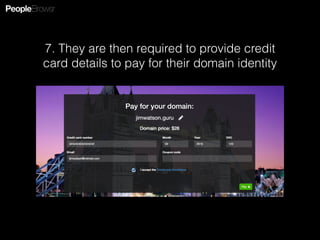
7. They are then required to provide credit
card details to pay for their domain identity
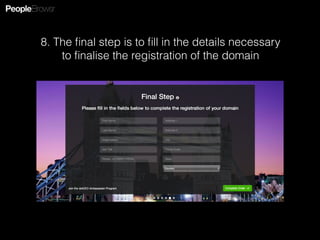
8. The final step is to fill in the details necessary
to finalise the registration of the domain

dotCEO claim flow process

  • 1.
  • 2.
    1. Click the‘Claim your Name’ button on the home page More info about dotCEO identities are community pages can be accessed by scrolling down
  • 3.
    2. Users arethen required to log into either Twitter, LinkedIn or Facebook
  • 4.
    3. They canthen create a domain identity and will immediately be shown the price of their specific domain names
  • 5.
    4. Users arethen given the option to customise their background
  • 6.
    5. Next theuser is asked to provide a few details about themselves. This information will appear on their dotCEO Identity page
  • 7.
    6. Users canthen select the communities directories they want their page to be featured on
  • 8.
    7. They arethen required to provide credit card details to pay for their domain identity
  • 9.
    8. The finalstep is to fill in the details necessary to finalise the registration of the domain