DOCUMENT IN MULE APPLICATION
STEPS TO EXPORT STUDIO
DOCUMENTATION
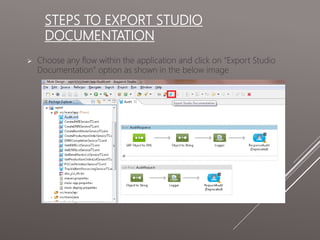
 Choose any flow within the application and click on “Export Studio
Documentation” option as shown in the below image
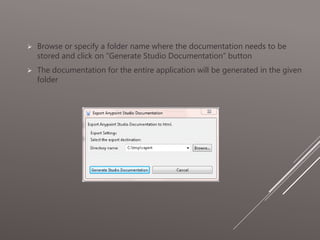
 Browse or specify a folder name where the documentation needs to be
stored and click on “Generate Studio Documentation” button
 The documentation for the entire application will be generated in the given
folder
 Open the index.html page created within the specified folder in the previous
step and browse through the documentation.
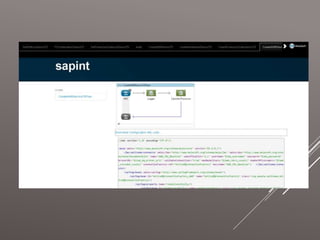
 The documentation allows to browse every single flows and shows both the
graphical flow design and XML configuration code of individual flows within
the application.
 In the following screen, the tabs can be seen for all the flow files in the
application. Upon selecting a flow name, it displays individual flows and XML
configuration code for the same.
CONCLUSION
 The documentations can be stored within any web server.
 In general, tomcat server is used to host Mule Management Console
for monitoring mule server and mule application.
 These set of documentations can be hosted as static HTML pages
within tomcat for easy browsing and also as a reference for individual
applications and flows.

Document in mule application

  • 1.
    DOCUMENT IN MULEAPPLICATION
  • 2.
    STEPS TO EXPORTSTUDIO DOCUMENTATION  Choose any flow within the application and click on “Export Studio Documentation” option as shown in the below image
  • 3.
     Browse orspecify a folder name where the documentation needs to be stored and click on “Generate Studio Documentation” button  The documentation for the entire application will be generated in the given folder
  • 4.
     Open theindex.html page created within the specified folder in the previous step and browse through the documentation.  The documentation allows to browse every single flows and shows both the graphical flow design and XML configuration code of individual flows within the application.  In the following screen, the tabs can be seen for all the flow files in the application. Upon selecting a flow name, it displays individual flows and XML configuration code for the same.
  • 6.
    CONCLUSION  The documentationscan be stored within any web server.  In general, tomcat server is used to host Mule Management Console for monitoring mule server and mule application.  These set of documentations can be hosted as static HTML pages within tomcat for easy browsing and also as a reference for individual applications and flows.