@ITCAMPRO #ITCAMP17Community Conference for IT Professionals
Docker Adventures in Continuous
Delivery
Alex Vranceanu
DevOps Lead @ Accesa
RedHat Certified Engineer, Docker Mentor
LinkedIn/Twitter: @vralex
@ITCAMPRO #ITCAMP17Community Conference for IT Professionals
Many thanks to our sponsors & partners!
GOLD
SILVER
PARTNERS
PLATINUM
POWERED BY
@ITCAMPRO #ITCAMP17Community Conference for IT Professionals
DOCKER QUICK INTRO
@ITCAMPRO #ITCAMP17Community Conference for IT Professionals
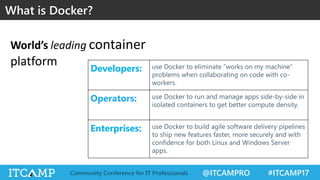
What is Docker?
Developers: use Docker to eliminate “works on my machine”
problems when collaborating on code with co-
workers.
Operators: use Docker to run and manage apps side-by-side in
isolated containers to get better compute density.
Enterprises: use Docker to build agile software delivery pipelines
to ship new features faster, more securely and with
confidence for both Linux and Windows Server
apps.
World’s leading container
platform
@ITCAMPRO #ITCAMP17Community Conference for IT Professionals
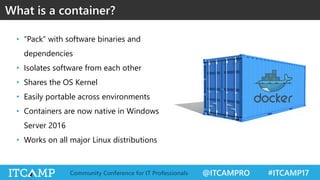
• “Pack” with software binaries and
dependencies
• Isolates software from each other
• Shares the OS Kernel
• Easily portable across environments
• Containers are now native in Windows
Server 2016
• Works on all major Linux distributions
What is a container?
@ITCAMPRO #ITCAMP17Community Conference for IT Professionals
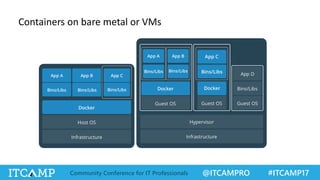
Containers on bare metal or VMs
@ITCAMPRO #ITCAMP17Community Conference for IT Professionals
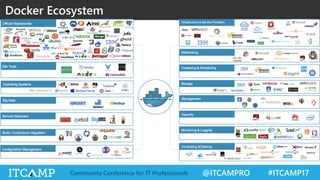
Docker Ecosystem
@ITCAMPRO #ITCAMP17Community Conference for IT Professionals
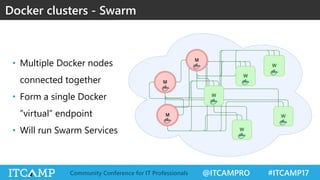
Docker clusters - Swarm
• Multiple Docker nodes
connected together
• Form a single Docker
”virtual” endpoint
• Will run Swarm Services
@ITCAMPRO #ITCAMP17Community Conference for IT Professionals
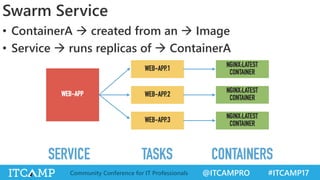
• ContainerA  created from an  Image
• Service  runs replicas of  ContainerA
Swarm Service
@ITCAMPRO #ITCAMP17Community Conference for IT Professionals
• Code push to GIT  CI system (Jenkins) starts  Unit
tests  Build binary artifact  Build, tag and push
Docker Image  Deploy to Dev Environment  Run Tests
 Done
Continuous Integration
• Example tags:
– myapp:develop-1.0.5-59 (from develop branch)
– myapp:feature-1.0.5-59 (from feature branch)
– myapp:1.0.5  corresponds to  myapp:latest
@ITCAMPRO #ITCAMP17Community Conference for IT Professionals
• …and a few more:
–Connectivity with software
dependencies
–Load balancers for
containers
–Logging & Monitoring
–Hardware scaling
Continuous Delivery with Docker
• A few considerations:
–Environment separation
–Sequential updates
–High availability
–Software scaling
–Security
–Data persistence
@ITCAMPRO #ITCAMP17Community Conference for IT Professionals
• CI system triggers CD pipeline
• New Docker Image deployed to pre-production
• Pre-production tests
• Image deployed to production
• Production tests
Continuous Delivery general workflow
@ITCAMPRO #ITCAMP17Community Conference for IT Professionals
DEMO
@ITCAMPRO #ITCAMP17Community Conference for IT Professionals
• Monitor Swarm Cluster health
– Be careful with Swarm qvorum
• Logically divide Swarm nodes with labels
• Minimum 2 replicas per service
• Use network volumes when persistence is necessary
• Build stateless apps (or use a DB service)
• Add healthchecks to containers
• Plan autoscaling parameters for Infrastructure
• Plan autoscaling parameters for Swarm Services
Lessons learned
@ITCAMPRO #ITCAMP17Community Conference for IT Professionals
Q & A

Docker adventures in Continuous Delivery - Alex Vranceanu

  • 1.
    @ITCAMPRO #ITCAMP17Community Conferencefor IT Professionals Docker Adventures in Continuous Delivery Alex Vranceanu DevOps Lead @ Accesa RedHat Certified Engineer, Docker Mentor LinkedIn/Twitter: @vralex
  • 2.
    @ITCAMPRO #ITCAMP17Community Conferencefor IT Professionals Many thanks to our sponsors & partners! GOLD SILVER PARTNERS PLATINUM POWERED BY
  • 3.
    @ITCAMPRO #ITCAMP17Community Conferencefor IT Professionals DOCKER QUICK INTRO
  • 4.
    @ITCAMPRO #ITCAMP17Community Conferencefor IT Professionals What is Docker? Developers: use Docker to eliminate “works on my machine” problems when collaborating on code with co- workers. Operators: use Docker to run and manage apps side-by-side in isolated containers to get better compute density. Enterprises: use Docker to build agile software delivery pipelines to ship new features faster, more securely and with confidence for both Linux and Windows Server apps. World’s leading container platform
  • 5.
    @ITCAMPRO #ITCAMP17Community Conferencefor IT Professionals • “Pack” with software binaries and dependencies • Isolates software from each other • Shares the OS Kernel • Easily portable across environments • Containers are now native in Windows Server 2016 • Works on all major Linux distributions What is a container?
  • 6.
    @ITCAMPRO #ITCAMP17Community Conferencefor IT Professionals Containers on bare metal or VMs
  • 7.
    @ITCAMPRO #ITCAMP17Community Conferencefor IT Professionals Docker Ecosystem
  • 8.
    @ITCAMPRO #ITCAMP17Community Conferencefor IT Professionals Docker clusters - Swarm • Multiple Docker nodes connected together • Form a single Docker ”virtual” endpoint • Will run Swarm Services
  • 9.
    @ITCAMPRO #ITCAMP17Community Conferencefor IT Professionals • ContainerA  created from an  Image • Service  runs replicas of  ContainerA Swarm Service
  • 10.
    @ITCAMPRO #ITCAMP17Community Conferencefor IT Professionals • Code push to GIT  CI system (Jenkins) starts  Unit tests  Build binary artifact  Build, tag and push Docker Image  Deploy to Dev Environment  Run Tests  Done Continuous Integration • Example tags: – myapp:develop-1.0.5-59 (from develop branch) – myapp:feature-1.0.5-59 (from feature branch) – myapp:1.0.5  corresponds to  myapp:latest
  • 11.
    @ITCAMPRO #ITCAMP17Community Conferencefor IT Professionals • …and a few more: –Connectivity with software dependencies –Load balancers for containers –Logging & Monitoring –Hardware scaling Continuous Delivery with Docker • A few considerations: –Environment separation –Sequential updates –High availability –Software scaling –Security –Data persistence
  • 12.
    @ITCAMPRO #ITCAMP17Community Conferencefor IT Professionals • CI system triggers CD pipeline • New Docker Image deployed to pre-production • Pre-production tests • Image deployed to production • Production tests Continuous Delivery general workflow
  • 13.
    @ITCAMPRO #ITCAMP17Community Conferencefor IT Professionals DEMO
  • 14.
    @ITCAMPRO #ITCAMP17Community Conferencefor IT Professionals • Monitor Swarm Cluster health – Be careful with Swarm qvorum • Logically divide Swarm nodes with labels • Minimum 2 replicas per service • Use network volumes when persistence is necessary • Build stateless apps (or use a DB service) • Add healthchecks to containers • Plan autoscaling parameters for Infrastructure • Plan autoscaling parameters for Swarm Services Lessons learned
  • 15.
    @ITCAMPRO #ITCAMP17Community Conferencefor IT Professionals Q & A