E BALL TECHNOLOGY
Presented by:
730920104020:T.Boomika
730920104045:S.Jothi priya
730920104055:S.Kiruthika
730920104060:R.Lillyflora
INTRODUCTION:
â—Ź The E-Ball concept PC is a sphere shaped computer which is the smallest
design among all the laptop and desktops.Soon E-BALL based computer
will be the new pc to be used in the near future.
● It’s going to be a pc with all conventional components like mouse,keyboard,
normal screen.
● E-Ball concept pc don’t have any external display unit.
CONCEPT:
â—Ź The body of E-BALL is made up of aluminium and plastic parts.
â—Ź E-BALL is the smallest among all the PCs developed so far as it has
120*120mm motherboard and is 6 inch in diameter.
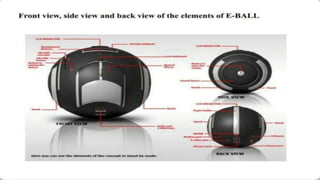
â—Ź The E-BALL pc has all the features and elements of conventional computer
like mouse, keyboard, display etc...
ELEMENTS:
â—Ź Virtual Keyboard
â—Ź Dual core processor
â—Ź 2GB RAM
â—Ź 350-500GB hard drive
â—Ź speakers
â—Ź LAN & WAN card
â—Ź Modem
â—Ź Web cam
â—Ź LCD projector
WORKING:
â—Ź The first thing before starting the E-BALL pc is to put it into standing position.
â—Ź For this press two buttons on the sides of E-BALL for 5 seconds and the
stands are automatically opened and adjusted so as to hold the E-BALL
pc in position.
â—Ź After this the focus,directions etc.. can be adjusted using the navigation
buttons.
DISPLAY UNIT:
â—Ź When the stands has been opened and the system has been turned on,
it becomes functional only when the screen or the display unit is available.
â—Ź The display unit is not physically present or attached on to the E-BALL.
â—Ź Rather,with the help of projector popping up out of the E-BALL PC,the
display unit can be projected on to the wall which can work as screen.
KEYBOARD:
â—Ź The E-BALL PC has a laser keyboard which is concept keyboard which is
visible only when the PC is in working mode.
â—Ź It recognizes your fingers with the help of your infrared sensors when you
are typing at a particular place.
â—Ź The Virtual Laser Keyboard projects a full-size keyboard onto a flat surface.
â—Ź It uses sensor technology.It has three components
1.sensor module
2.IR light source
3.Pattern Projector
PROJECTOR:
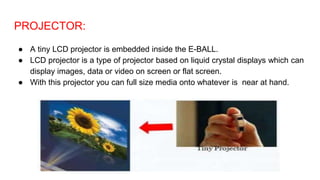
â—Ź A tiny LCD projector is embedded inside the E-BALL.
â—Ź LCD projector is a type of projector based on liquid crystal displays which can
display images, data or video on screen or flat screen.
â—Ź With this projector you can full size media onto whatever is near at hand.
OPTICAL MOUSE:
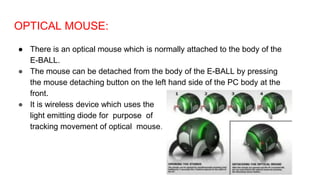
â—Ź There is an optical mouse which is normally attached to the body of the
E-BALL.
â—Ź The mouse can be detached from the body of the E-BALL by pressing
the mouse detaching button on the left hand side of the PC body at the
front.
â—Ź It is wireless device which uses the
light emitting diode for purpose of
tracking movement of optical mouse.

DOC-20230317-WA0000..pptx

  • 1.
    E BALL TECHNOLOGY Presentedby: 730920104020:T.Boomika 730920104045:S.Jothi priya 730920104055:S.Kiruthika 730920104060:R.Lillyflora
  • 2.
    INTRODUCTION: ● The E-Ballconcept PC is a sphere shaped computer which is the smallest design among all the laptop and desktops.Soon E-BALL based computer will be the new pc to be used in the near future. ● It’s going to be a pc with all conventional components like mouse,keyboard, normal screen. ● E-Ball concept pc don’t have any external display unit.
  • 3.
    CONCEPT: â—Ź The bodyof E-BALL is made up of aluminium and plastic parts. â—Ź E-BALL is the smallest among all the PCs developed so far as it has 120*120mm motherboard and is 6 inch in diameter. â—Ź The E-BALL pc has all the features and elements of conventional computer like mouse, keyboard, display etc...
  • 4.
    ELEMENTS: â—Ź Virtual Keyboard â—ŹDual core processor â—Ź 2GB RAM â—Ź 350-500GB hard drive â—Ź speakers â—Ź LAN & WAN card â—Ź Modem â—Ź Web cam â—Ź LCD projector
  • 6.
    WORKING: â—Ź The firstthing before starting the E-BALL pc is to put it into standing position. â—Ź For this press two buttons on the sides of E-BALL for 5 seconds and the stands are automatically opened and adjusted so as to hold the E-BALL pc in position. â—Ź After this the focus,directions etc.. can be adjusted using the navigation buttons.
  • 7.
    DISPLAY UNIT: â—Ź Whenthe stands has been opened and the system has been turned on, it becomes functional only when the screen or the display unit is available. â—Ź The display unit is not physically present or attached on to the E-BALL. â—Ź Rather,with the help of projector popping up out of the E-BALL PC,the display unit can be projected on to the wall which can work as screen.
  • 8.
    KEYBOARD: â—Ź The E-BALLPC has a laser keyboard which is concept keyboard which is visible only when the PC is in working mode. â—Ź It recognizes your fingers with the help of your infrared sensors when you are typing at a particular place. â—Ź The Virtual Laser Keyboard projects a full-size keyboard onto a flat surface. â—Ź It uses sensor technology.It has three components 1.sensor module 2.IR light source 3.Pattern Projector
  • 9.
    PROJECTOR: â—Ź A tinyLCD projector is embedded inside the E-BALL. â—Ź LCD projector is a type of projector based on liquid crystal displays which can display images, data or video on screen or flat screen. â—Ź With this projector you can full size media onto whatever is near at hand.
  • 10.
    OPTICAL MOUSE: â—Ź Thereis an optical mouse which is normally attached to the body of the E-BALL. â—Ź The mouse can be detached from the body of the E-BALL by pressing the mouse detaching button on the left hand side of the PC body at the front. â—Ź It is wireless device which uses the light emitting diode for purpose of tracking movement of optical mouse.