Distributed Tensorflow with Kubernetes
Jakob Karalus, @krallistic,
1
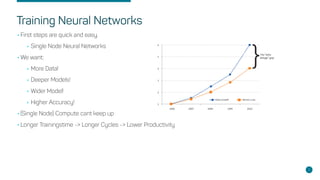
Training Neural Networks
•First steps are quick and easy.
•Single Node Neural Networks
•We want:
•More Data!
•Deeper Models!
•Wider Model!
•Higher Accuracy!
•(Single Node) Compute cant keep up
•Longer Trainingstime -> Longer Cycles -> Lower Productivity
2
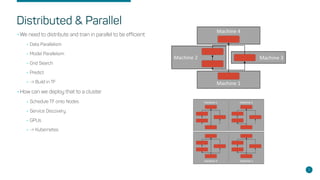
Distributed & Parallel
•We need to distribute and train in parallel to be efficient
•Data Parallelism
•Model Parallelsim
•Grid Search
•Predict
•-> Build in TF
•How can we deploy that to a cluster
•Schedule TF onto Nodes
•Service Discovery
•GPUs
•-> Kubernetes
3
Requirements & Content
•Basic Knowledge of Neural Networks
•Knowledge of Tensorflow
•Basic Docker/Kubernetes knowledge
•(Docker) Containers: Mini VM (Wrong!)
•Kubernetes: Schedulurer/Orchestration Tool for Containers
•Only focus on the task of parallel and/or distributed training
•We will not look at architectures like CNN/LTSM etc
4
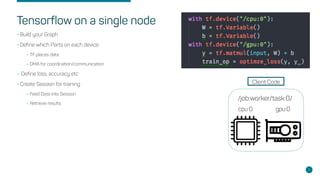
Tensorflow on a single node
5
•Build your Graph
•Define which Parts on each device
•TF places data
•DMA for coordination/communication
• Define loss, accuracy etc
•Create Session for training
•Feed Data into Session
•Retrieve results
cpu:0 gpu:0
/job:worker/task:0/
Client Code
Parameter Server & Worker Replicas
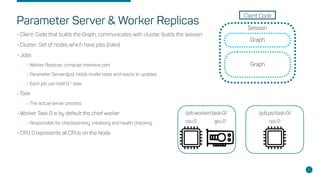
•Client: Code that builds the Graph, communicates with cluster, builds the session
•Cluster: Set of nodes which have jobs (roles)
•Jobs
•Worker Replicas: compute intensive part
•Parameter Servers(ps): Holds model state and reacts to updates
•Each job can hold 0..* task
•Task
•The actual server process
•Worker Task 0 is by default the chief worker
•Responsible for checkpointing, initialising and health checking
•CPU 0 represents all CPUs on the Node
6
Client Code
Session
Graph
Graph
cpu:0 gpu:0
/job:worker/task:0/
cpu:0
/job:ps/task:0/
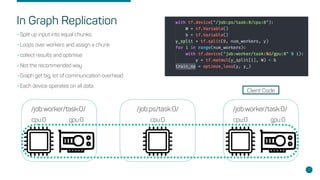
In Graph Replication
•Split up input into equal chunks,
•Loops over workers and assign a chunk
•collect results and optimise
•Not the recommended way
•Graph get big, lot of communication overhead
•Each device operates on all data
7
cpu:0 gpu:0
/job:worker/task:0/
cpu:0 gpu:0
/job:worker/task:0/
cpu:0
/job:ps/task:0/
Client Code
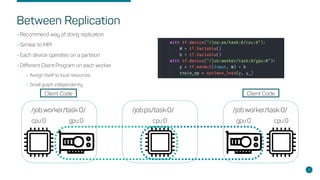
Between Replication
•Recommend way of doing replication
•Similiar to MPI
•Each device operates on a partition
•Different Client Program on each worker
•Assign itself to local resources
•Small graph independently
8
cpu:0gpu:0
/job:worker/task:0/
cpu:0 gpu:0
/job:worker/task:0/
cpu:0
/job:ps/task:0/
Client CodeClient Code
Variable Placement
•How to place the Variable onto different devices
•Manual Way
•Easy to start, full flexibility
•Gets annoying soon
•Device setter
•Automatic assign variables to ps and ops to workers
•Simple round robin by default
•Greedy Load Balancing Strategy
•Partitioned Values
•Needed for really large variables (often used in text embeddings)
•Splits variables between multiple Parameter Server
9
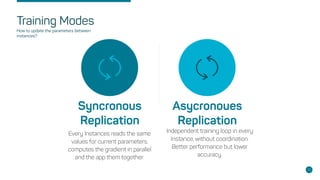
Training Modes
Syncronous
Replication
Every Instances reads the same
values for current parameters,
computes the gradient in parallel
and the app them together.
Asycronoues
Replication
Independent training loop in every
Instance, without coordination.
Better performance but lower
accuracy.
10
How to update the parameters between
instances?
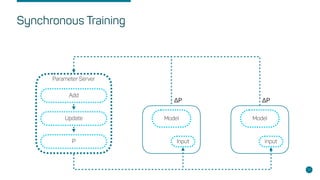
Synchronous Training
11
Parameter Server
Add
Update
P
Model Model
Input Input
ΔP ΔP
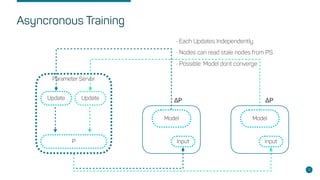
Asyncronous Training
12
Parameter Server
Update
P
Model Model
Input Input
Update
• Each Updates Independently
• Nodes can read stale nodes from PS
• Possible: Model dont converge
ΔP ΔP
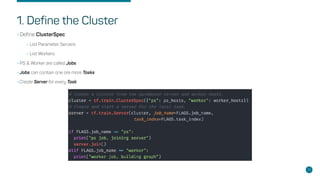
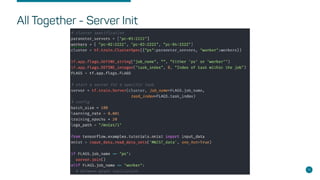
1. Define the Cluster
•Define ClusterSpec
•List Parameter Servers
•List Workers
•PS & Worker are called Jobs
•Jobs can contain one ore more Tasks
•Create Server for every Task
13
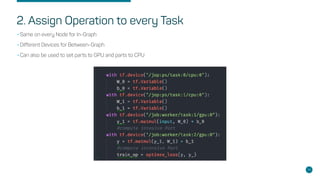
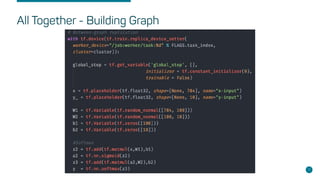
2. Assign Operation to every Task
•Same on every Node for In-Graph
•Different Devices for Between-Graph
•Can also be used to set parts to GPU and parts to CPU
14
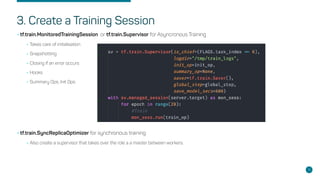
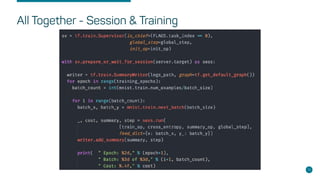
3. Create a Training Session
•tf.train.MonitoredTrainingSession or tf.train.Supervisor for Asyncronous Training
•Takes care of initialisation
•Snapshotting
•Closing if an error occurs
•Hooks
•Summary Ops, Init Ops
•tf.train.SyncReplicaOptimizer for synchronous training:
•Also create a supervisor that takes over the role a a master between workers.
15
All Together - Server Init
16
All Together - Building Graph
17
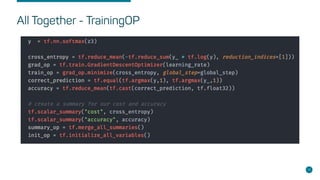
All Together - TrainingOP
18
All Together - Session & Training
19
20
Deployment & Distribution
Packaging
•The Application (and all its) dependencies needs to be packaged into a deployable
•Wheels
•Code into deployable Artefact with defined dependencies
•Dependent on runtime
•Container
•Build Image with runtime, dependencies and code
•Additional Tooling for building and running required (Docker)
21
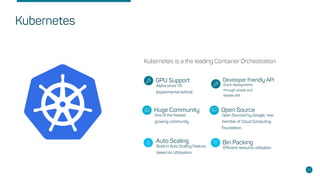
GPU Support
Alpha since 1.6
(experimental before)
Huge Community
One of the fastest
growing community
Auto Scaling
Build in Auto Scaling Feature
based on Ultitisation
Developer friendly API
Quick deployments
through simple and
flexible API.
Open Source
Open Sourced by Google, now
member of Cloud Computing
Foundation.
Bin Packing
Efficient resource utilisation
Kubernetes is a the leading Container Orchestration.
22
Kubernetes
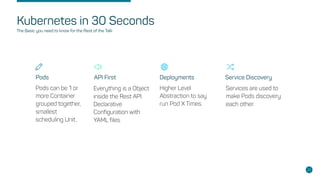
Pods
Pods can be 1 or
more Container
grouped together,
smallest
scheduling Unit..
API First Deployments Service Discovery
Everything is a Object
inside the Rest API.
Declarative
Configuration with
YAML files.
Higher Level
Abstraction to say
run Pod X Times.
Services are used to
make Pods discovery
each other.
Kubernetes in 30 Seconds
23
The Basic you need to know for the Rest of the Talk
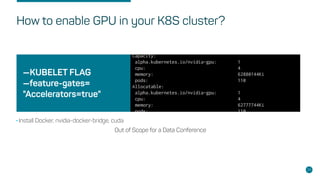
—KUBELET FLAG
—feature-gates=
"Accelerators=true"
Out of Scope for a Data Conference
24
How to enable GPU in your K8S cluster?
•Install Docker, nvidia-docker-bridge, cuda
Single Worker Instance
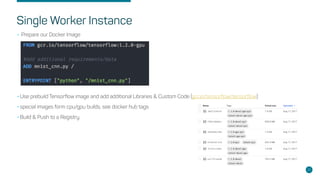
• Prepare our Docker Image
•Use prebuild Tensorflow image and add additional Libraries & Custom Code (gcr.io/tensorflow/tensorflow)
•special images form cpu/gpu builds, see docker hub tags
•Build & Push to a Registry
25
Write Kubernetes Pod Deployment
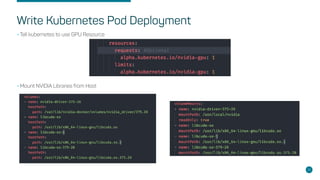
•Tell kubernetes to use GPU Resource
•Mount NVIDIA Libraries from Host
26
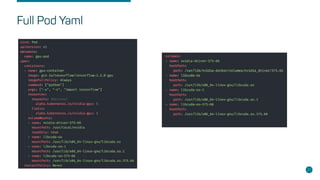
Full Pod Yaml
27
Distributed Tensorflow - Python Code
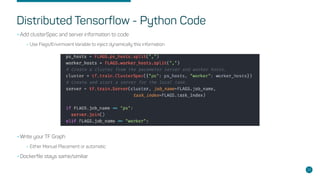
•Add clusterSpec and server information to code
•Use Flags/Envirmoent Variable to inject dynamically this information
•Write your TF Graph
•Either Manual Placement or automatic
•Dockerfile stays same/similiar
28
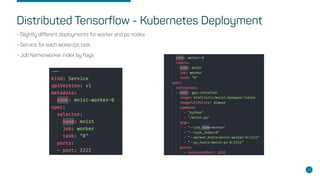
Distributed Tensorflow - Kubernetes Deployment
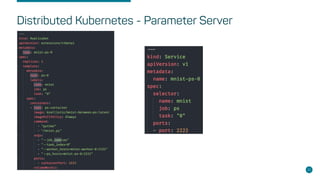
•Slightly different deployments for worker and ps nodes
•Service for each woker/ps task
•Job Name/worker index by flags
29
Distributed Kubernetes - Parameter Server
30
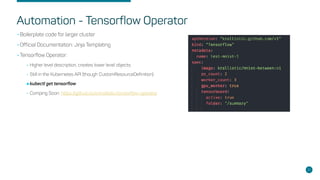
Automation - Tensorflow Operator
•Boilerplate code for larger cluster
•Official Documentation: Jinja Templating
•Tensorflow Operator:
•Higher level description, creates lower level objects.
•Still in the Kubernetes API (though CustomResourceDefinition)
•kubectl get tensorflow
•Comping Soon: https://github.com/krallistic/tensorflow-operator
31
Additional Stuff
•Tensorboard:
•Needs a global shared filesystem
•Instances write into subfolder
•Tensorboard Instances reads full folder
•Performance
•Scales amount of Parameter Servers
•Many CPU nodes can be more cost efficient
32
codecentric AG
Gartenstraße 69a
76135 Karlsruhe
E-Mail: jakob.karalus@codecentric.de
Twitter: @krallistic
Github: krallistic
www.codecentric.de
Address
Contact Info
Questions?
33

Distributed Tensorflow with Kubernetes - data2day - Jakob Karalus

  • 1.
    Distributed Tensorflow withKubernetes Jakob Karalus, @krallistic, 1
  • 2.
    Training Neural Networks •Firststeps are quick and easy. •Single Node Neural Networks •We want: •More Data! •Deeper Models! •Wider Model! •Higher Accuracy! •(Single Node) Compute cant keep up •Longer Trainingstime -> Longer Cycles -> Lower Productivity 2
  • 3.
    Distributed & Parallel •Weneed to distribute and train in parallel to be efficient •Data Parallelism •Model Parallelsim •Grid Search •Predict •-> Build in TF •How can we deploy that to a cluster •Schedule TF onto Nodes •Service Discovery •GPUs •-> Kubernetes 3
  • 4.
    Requirements & Content •BasicKnowledge of Neural Networks •Knowledge of Tensorflow •Basic Docker/Kubernetes knowledge •(Docker) Containers: Mini VM (Wrong!) •Kubernetes: Schedulurer/Orchestration Tool for Containers •Only focus on the task of parallel and/or distributed training •We will not look at architectures like CNN/LTSM etc 4
  • 5.
    Tensorflow on asingle node 5 •Build your Graph •Define which Parts on each device •TF places data •DMA for coordination/communication • Define loss, accuracy etc •Create Session for training •Feed Data into Session •Retrieve results cpu:0 gpu:0 /job:worker/task:0/ Client Code
  • 6.
    Parameter Server &Worker Replicas •Client: Code that builds the Graph, communicates with cluster, builds the session •Cluster: Set of nodes which have jobs (roles) •Jobs •Worker Replicas: compute intensive part •Parameter Servers(ps): Holds model state and reacts to updates •Each job can hold 0..* task •Task •The actual server process •Worker Task 0 is by default the chief worker •Responsible for checkpointing, initialising and health checking •CPU 0 represents all CPUs on the Node 6 Client Code Session Graph Graph cpu:0 gpu:0 /job:worker/task:0/ cpu:0 /job:ps/task:0/
  • 7.
    In Graph Replication •Splitup input into equal chunks, •Loops over workers and assign a chunk •collect results and optimise •Not the recommended way •Graph get big, lot of communication overhead •Each device operates on all data 7 cpu:0 gpu:0 /job:worker/task:0/ cpu:0 gpu:0 /job:worker/task:0/ cpu:0 /job:ps/task:0/ Client Code
  • 8.
    Between Replication •Recommend wayof doing replication •Similiar to MPI •Each device operates on a partition •Different Client Program on each worker •Assign itself to local resources •Small graph independently 8 cpu:0gpu:0 /job:worker/task:0/ cpu:0 gpu:0 /job:worker/task:0/ cpu:0 /job:ps/task:0/ Client CodeClient Code
  • 9.
    Variable Placement •How toplace the Variable onto different devices •Manual Way •Easy to start, full flexibility •Gets annoying soon •Device setter •Automatic assign variables to ps and ops to workers •Simple round robin by default •Greedy Load Balancing Strategy •Partitioned Values •Needed for really large variables (often used in text embeddings) •Splits variables between multiple Parameter Server 9
  • 10.
    Training Modes Syncronous Replication Every Instancesreads the same values for current parameters, computes the gradient in parallel and the app them together. Asycronoues Replication Independent training loop in every Instance, without coordination. Better performance but lower accuracy. 10 How to update the parameters between instances?
  • 11.
  • 12.
    Asyncronous Training 12 Parameter Server Update P ModelModel Input Input Update • Each Updates Independently • Nodes can read stale nodes from PS • Possible: Model dont converge ΔP ΔP
  • 13.
    1. Define theCluster •Define ClusterSpec •List Parameter Servers •List Workers •PS & Worker are called Jobs •Jobs can contain one ore more Tasks •Create Server for every Task 13
  • 14.
    2. Assign Operationto every Task •Same on every Node for In-Graph •Different Devices for Between-Graph •Can also be used to set parts to GPU and parts to CPU 14
  • 15.
    3. Create aTraining Session •tf.train.MonitoredTrainingSession or tf.train.Supervisor for Asyncronous Training •Takes care of initialisation •Snapshotting •Closing if an error occurs •Hooks •Summary Ops, Init Ops •tf.train.SyncReplicaOptimizer for synchronous training: •Also create a supervisor that takes over the role a a master between workers. 15
  • 16.
    All Together -Server Init 16
  • 17.
    All Together -Building Graph 17
  • 18.
    All Together -TrainingOP 18
  • 19.
    All Together -Session & Training 19
  • 20.
  • 21.
    Packaging •The Application (andall its) dependencies needs to be packaged into a deployable •Wheels •Code into deployable Artefact with defined dependencies •Dependent on runtime •Container •Build Image with runtime, dependencies and code •Additional Tooling for building and running required (Docker) 21
  • 22.
    GPU Support Alpha since1.6 (experimental before) Huge Community One of the fastest growing community Auto Scaling Build in Auto Scaling Feature based on Ultitisation Developer friendly API Quick deployments through simple and flexible API. Open Source Open Sourced by Google, now member of Cloud Computing Foundation. Bin Packing Efficient resource utilisation Kubernetes is a the leading Container Orchestration. 22 Kubernetes
  • 23.
    Pods Pods can be1 or more Container grouped together, smallest scheduling Unit.. API First Deployments Service Discovery Everything is a Object inside the Rest API. Declarative Configuration with YAML files. Higher Level Abstraction to say run Pod X Times. Services are used to make Pods discovery each other. Kubernetes in 30 Seconds 23 The Basic you need to know for the Rest of the Talk
  • 24.
    —KUBELET FLAG —feature-gates= "Accelerators=true" Out ofScope for a Data Conference 24 How to enable GPU in your K8S cluster? •Install Docker, nvidia-docker-bridge, cuda
  • 25.
    Single Worker Instance •Prepare our Docker Image •Use prebuild Tensorflow image and add additional Libraries & Custom Code (gcr.io/tensorflow/tensorflow) •special images form cpu/gpu builds, see docker hub tags •Build & Push to a Registry 25
  • 26.
    Write Kubernetes PodDeployment •Tell kubernetes to use GPU Resource •Mount NVIDIA Libraries from Host 26
  • 27.
  • 28.
    Distributed Tensorflow -Python Code •Add clusterSpec and server information to code •Use Flags/Envirmoent Variable to inject dynamically this information •Write your TF Graph •Either Manual Placement or automatic •Dockerfile stays same/similiar 28
  • 29.
    Distributed Tensorflow -Kubernetes Deployment •Slightly different deployments for worker and ps nodes •Service for each woker/ps task •Job Name/worker index by flags 29
  • 30.
    Distributed Kubernetes -Parameter Server 30
  • 31.
    Automation - TensorflowOperator •Boilerplate code for larger cluster •Official Documentation: Jinja Templating •Tensorflow Operator: •Higher level description, creates lower level objects. •Still in the Kubernetes API (though CustomResourceDefinition) •kubectl get tensorflow •Comping Soon: https://github.com/krallistic/tensorflow-operator 31
  • 32.
    Additional Stuff •Tensorboard: •Needs aglobal shared filesystem •Instances write into subfolder •Tensorboard Instances reads full folder •Performance •Scales amount of Parameter Servers •Many CPU nodes can be more cost efficient 32
  • 33.
    codecentric AG Gartenstraße 69a 76135Karlsruhe E-Mail: jakob.karalus@codecentric.de Twitter: @krallistic Github: krallistic www.codecentric.de Address Contact Info Questions? 33