1
Chapter 3- Processes
2
What is process?
 A process is an instance of a program running on a
computer.
 A process is a program in execution. The execution of a
process must progress sequentially.
 A process is defined as an entity representing the basic unit
of work to be implemented in the system.
 A process is a program that is actively running. Think of it
as something you see or use on your computer or phone,
like a game or an app.
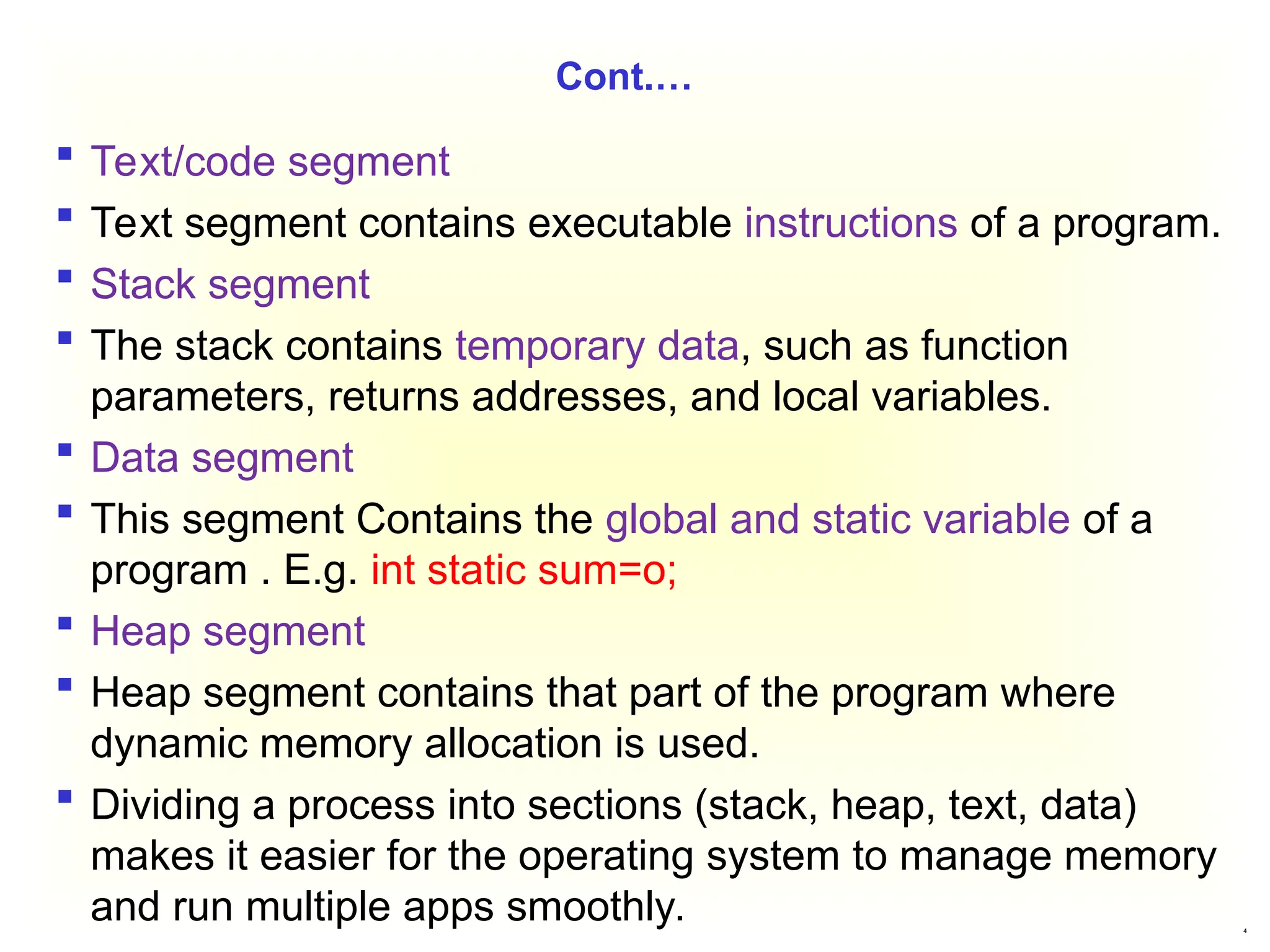
 When a program starts running, it gets divided into different
parts (stack, heap, text, and data) to keep everything
organized. Here's how it works with examples.
3
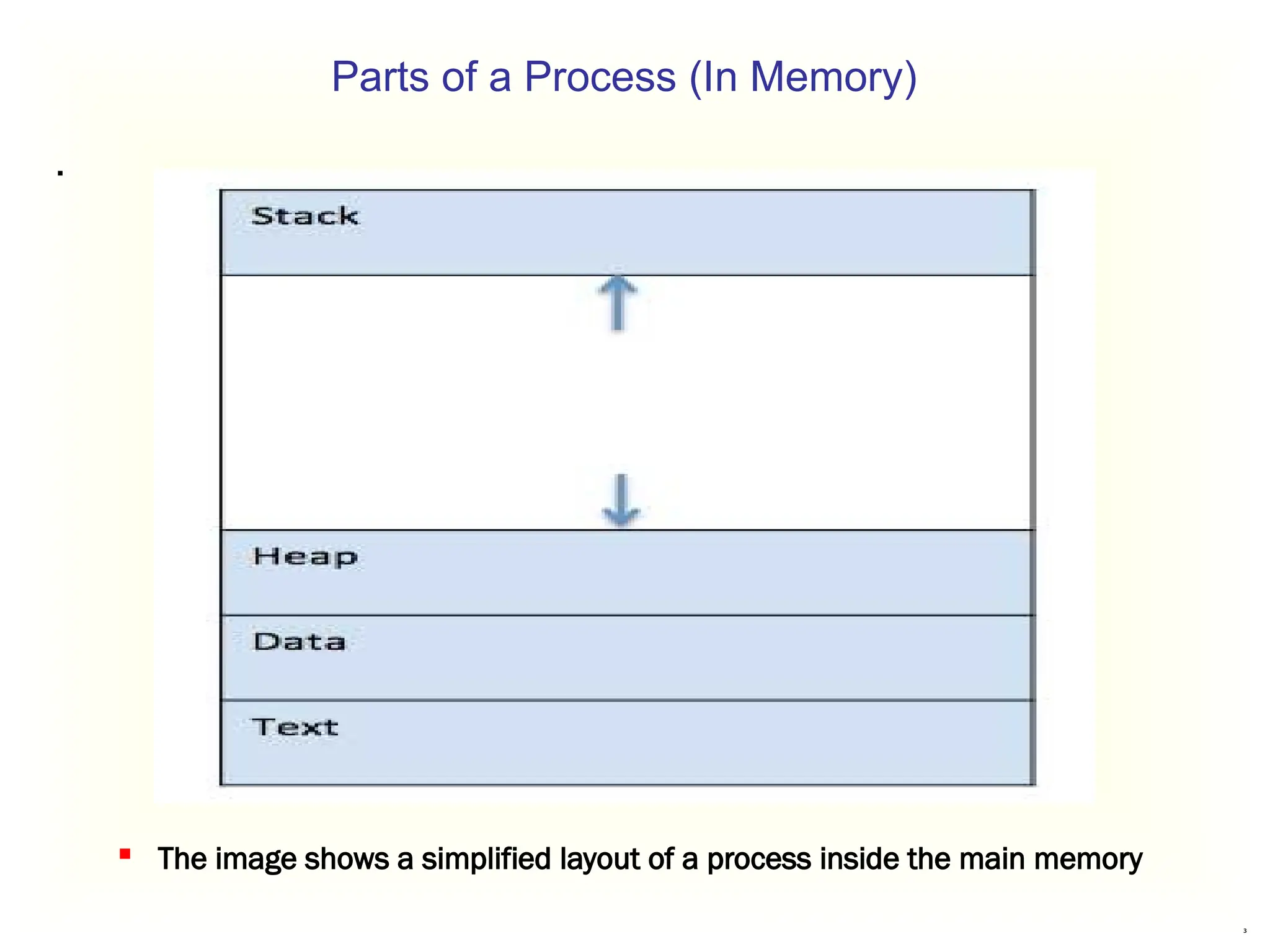
Parts of a Process (In Memory)
.
 The image shows a simplified layout of a process inside the main memory
4
Cont.…
 Text/code segment
 Text segment contains executable instructions of a program.
 Stack segment
 The stack contains temporary data, such as function
parameters, returns addresses, and local variables.
 Data segment
 This segment Contains the global and static variable of a
program . E.g. int static sum=o;
 Heap segment
 Heap segment contains that part of the program where
dynamic memory allocation is used.
 Dividing a process into sections (stack, heap, text, data)
makes it easier for the operating system to manage memory
and run multiple apps smoothly.
5
Cont.…
1. Google Chrome (Web Browser)
When you open Chrome:
Text section: Contains the core code that tells Chrome how
to work, like displaying web pages or opening new tabs.
Data section: Stores default settings like your homepage or
bookmarks.
Stack: Keeps track of what tabs or windows you’ve opened
and what you’re clicking.
Heap: Stores temporary things like images or data from a
website you visit.
6
Cont.…
2. Microsoft Word (Document Editor)
When you write a document:
Text section: Has the basic code that lets you type, edit,
and save files.
Data section: Contains default templates and settings (like
font styles or page size).
Stack: Tracks temporary actions, like where your cursor is
or what menu you just clicked.
Heap: Stores anything you add, like images or tables, while
working on the document.
7
What is Thread?
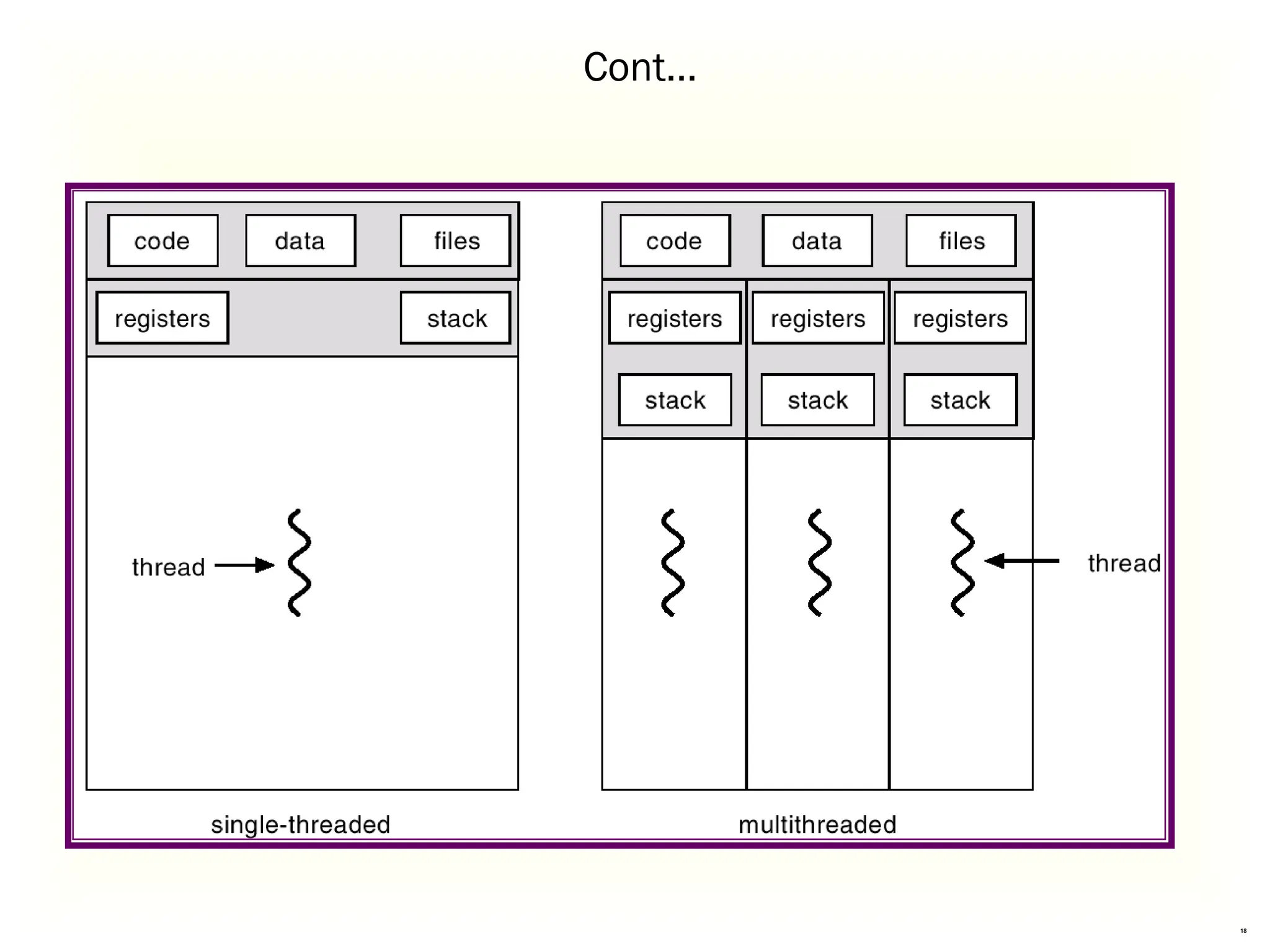
 A thread is a single sequence stream within a process.
 In an operating system that supports multithreading, the
process can consist of many threads.
 A thread is like a single worker in a team (the process).
A process is like a big project, and threads are smaller tasks
that work together to complete it.
Threads are called "lightweight processes" because they are
smaller and share resources like memory with the main
process.
 Now, any operating system process can execute a thread.
 we can say, that a process can have multiple threads.
 The process can be split down into so many threads.
8
What is Thread?
Threads in Real Life:
Browser Example:
When you use a browser like Google Chrome:
Each tab is like a thread.
If one tab crashes, the others keep working because
they’re separate threads.
MS Word Example:
When you write a document in MS Word:
One thread checks your spelling and grammar.
Another thread handles typing and formatting.
A third thread saves your work in the background.
9
Cont.…
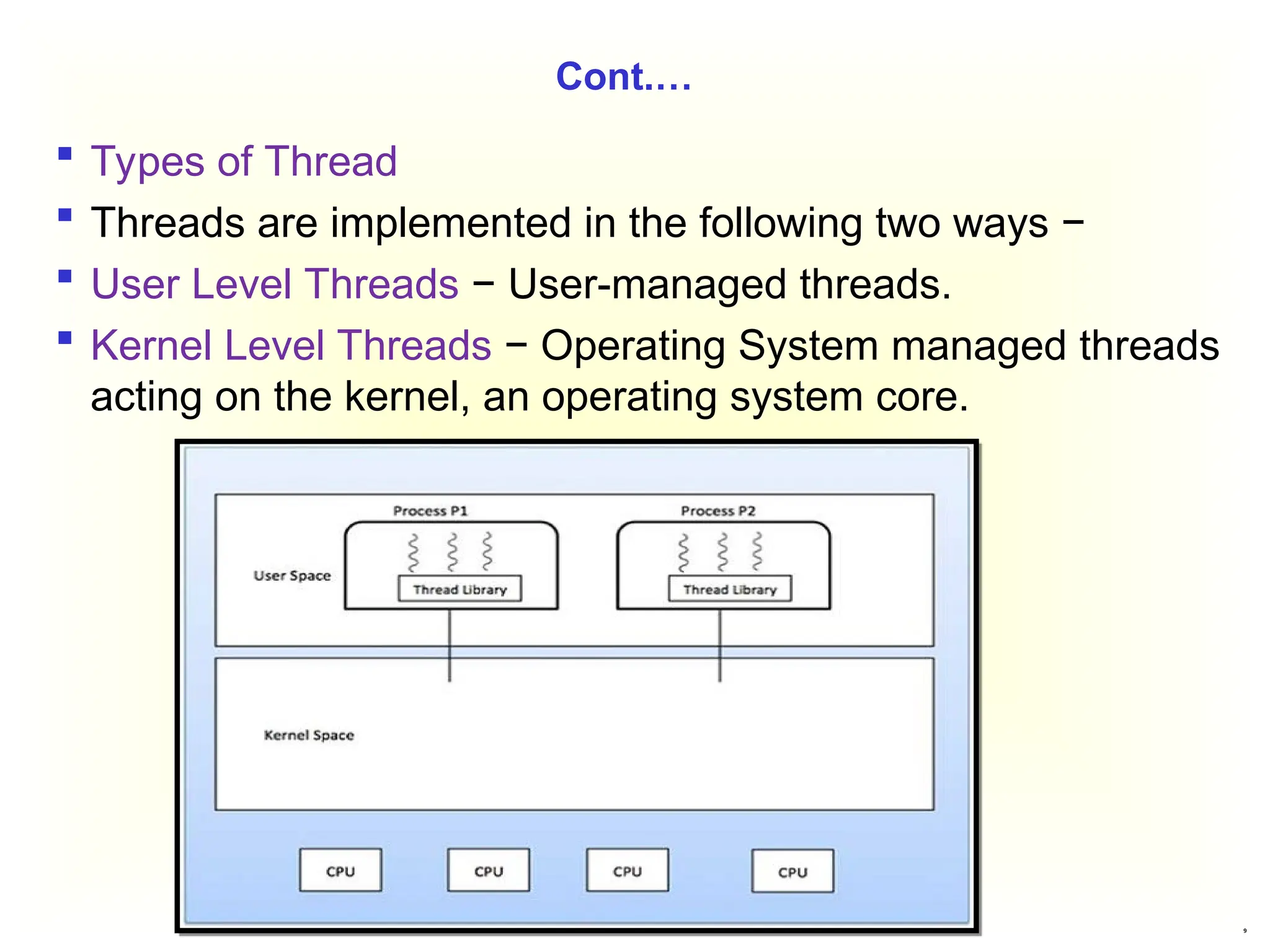
 Types of Thread
 Threads are implemented in the following two ways −
 User Level Threads − User-managed threads.
 Kernel Level Threads − Operating System managed threads
acting on the kernel, an operating system core.
10
Difference Between Process and Thread
A process is like a big task or project that a computer works
on.
It is heavyweight, meaning it needs a lot of resources like
memory, files, and CPU time.
Each process works independently of others, and they
don’t easily share resources.
If one process gets stuck (blocked), other processes might
have to wait for it to finish.
Characteristics of Processes:
1. Resource-Intensive: Processes have their own memory,
files, and settings.
Example: When you open a browser and a game at the
same time, they don’t share memory or files, making them
resource-heavy.
11
Cont…
2.Independent Operation:
Processes don’t depend on each other.
Example: If a video editor crashes, your web browser
keeps working because they are independent processes.
3.OS Interaction for Switching:
The operating system helps manage switching between
processes.
Example: If you switch between Word and Spotify, the
operating system handles pausing one and resuming the
other.
4. Blocked Process Affects Others:
If one process is stuck, others may need to wait.
Example: If you’re downloading a large file and your system
runs out of memory, other apps might slow down or stop.
12
Cont.…
A thread is a smaller, lightweight part of a process.
It takes fewer resources than a process.
Threads work together inside a single process and share the
same memory and files.
If one thread is stuck, other threads in the same process can
still work
Key Characteristics of Threads
1. Lightweight:
Threads don’t need as many resources as a process.
2. No OS Interaction for Switching:
Switching between threads happens within the process, so
it’s faster than switching between processes.
13
Cont.…
3. Shared Resources:
Threads within a process share the same memory, open
files, and child processes.
4. Parallel Execution:
If one thread is blocked (e.g., waiting for input), another
thread in the same process can continue running.
5. Fewer Resources for Multithreading:
Multithreaded processes use less memory compared to
running separate processes.
6. Data Sharing Between Threads:
Threads can directly share and modify each other’s data.
14
Cont.…
Real-Life Examples of Threads:
1. MS Word:
Thread 1: Processes typing and formatting.
Thread 2: Checks spelling and grammar.
Thread 3: Autosaves your work.
2. E-commerce App (e.g., Amazon):
Thread 1: Searches for products.
Thread 2: Updates the shopping cart.
Thread 3: Processes payment details.
15
Threads and their Implementation
 Threads can be used in both distributed and non-distributed
systems.
 Threads in Non-distributed Systems
 Address Space: Each program (or process) has its own
space in memory where it stores its code and data.
 Single Thread:
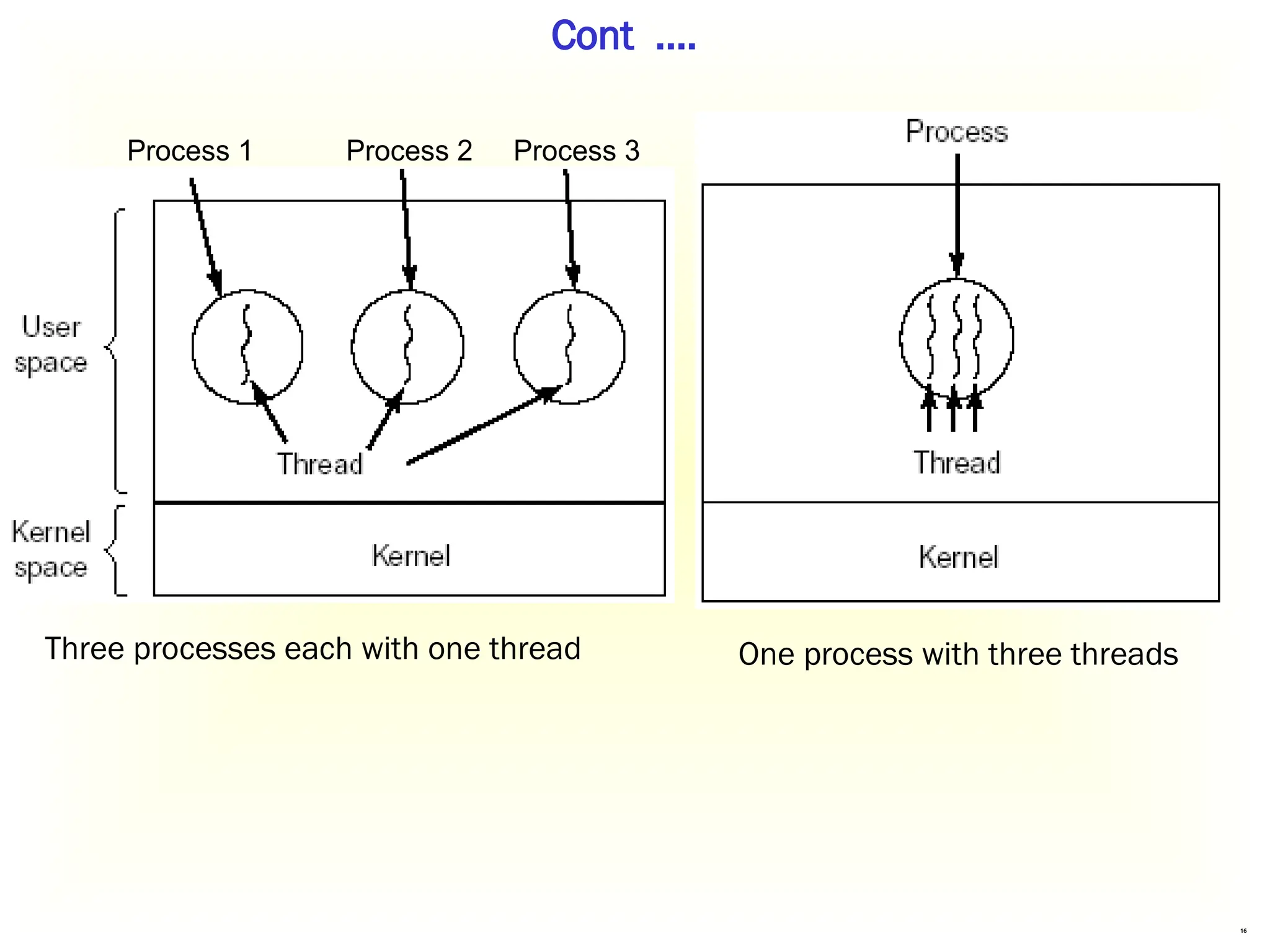
 A process can run with just one thread, meaning it can
only do one thing at a time.
 A process can run with multiple threads, allowing it to
do several things at once.
16
Cont .…
Process 1 Process 2 Process 3
Three processes each with one thread One process with three threads
17
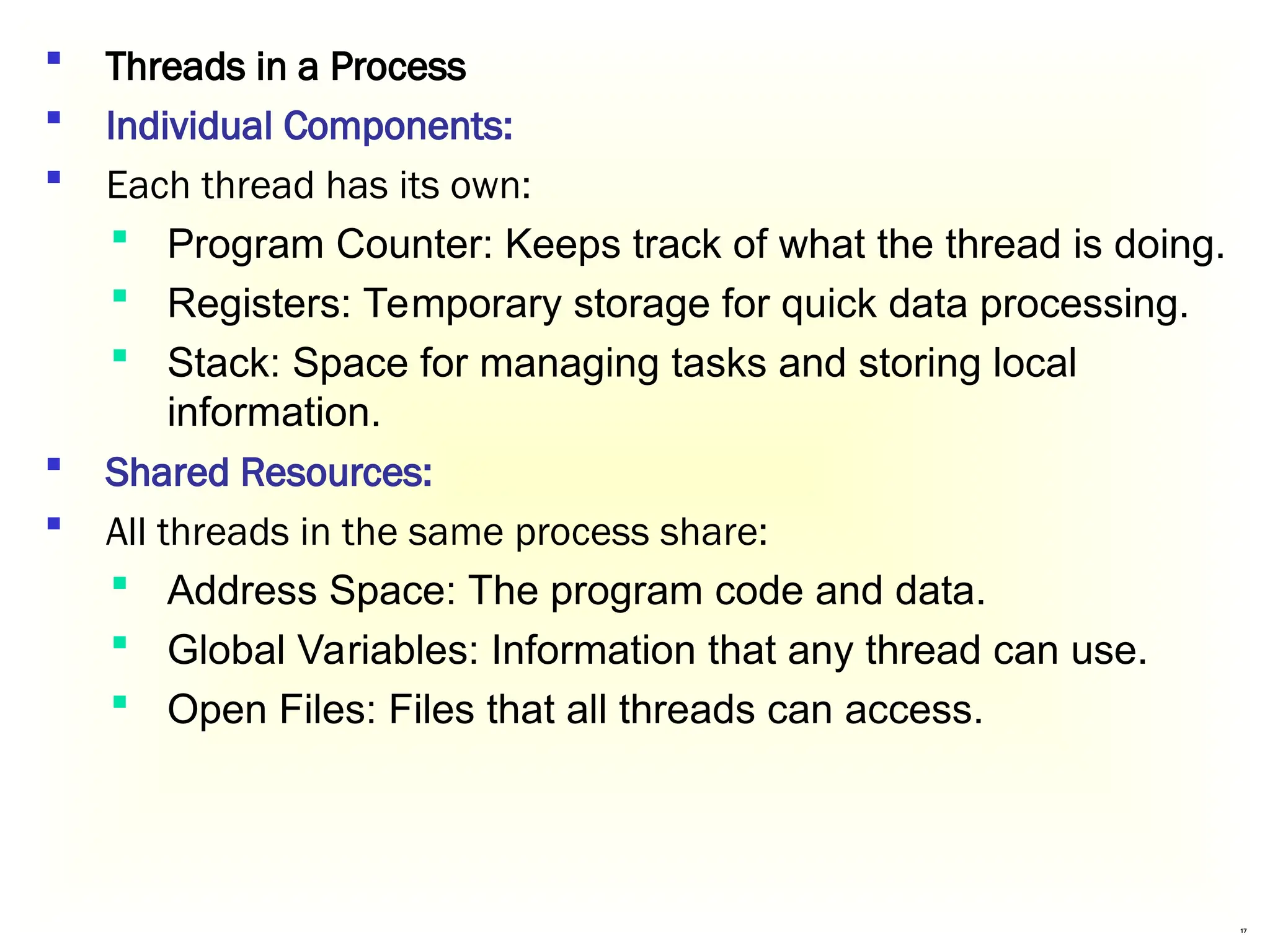
 Threads in a Process
 Individual Components:
 Each thread has its own:
 Program Counter: Keeps track of what the thread is doing.
 Registers: Temporary storage for quick data processing.
 Stack: Space for managing tasks and storing local
information.
 Shared Resources:
 All threads in the same process share:
 Address Space: The program code and data.
 Global Variables: Information that any thread can use.
 Open Files: Files that all threads can access.
18
Cont…
19
Why Do We Need Threads?
Threads make programs faster, more efficient, and
responsive. Here are the key reasons why threads are
important:
Simplifying the Programming Model:
Threads make it easier to manage multiple tasks happening
at the same time.
Example: In a word processor, multiple threads handle.
Ease of Creation and Destruction:
Threads are lightweight and faster to create and terminate
compared to processes.
Example: Opening a new tab in a browser uses a thread
instead of creating an entirely new process.
20
Cont…
Real Parallelism in Multiprocessor Systems:
On systems with multiple processors, threads can truly run
in parallel, improving speed and efficiency.
Example: In video editing software, one thread renders
video frames while another applies effects in real time.
Improved Performance by Overlapping Activities:
Threads can prevent blocking by handling I/O operations
and calculations in parallel.
Example: In a spreadsheet application, one thread waits
for user input while another calculates formulas or updates
charts.
21
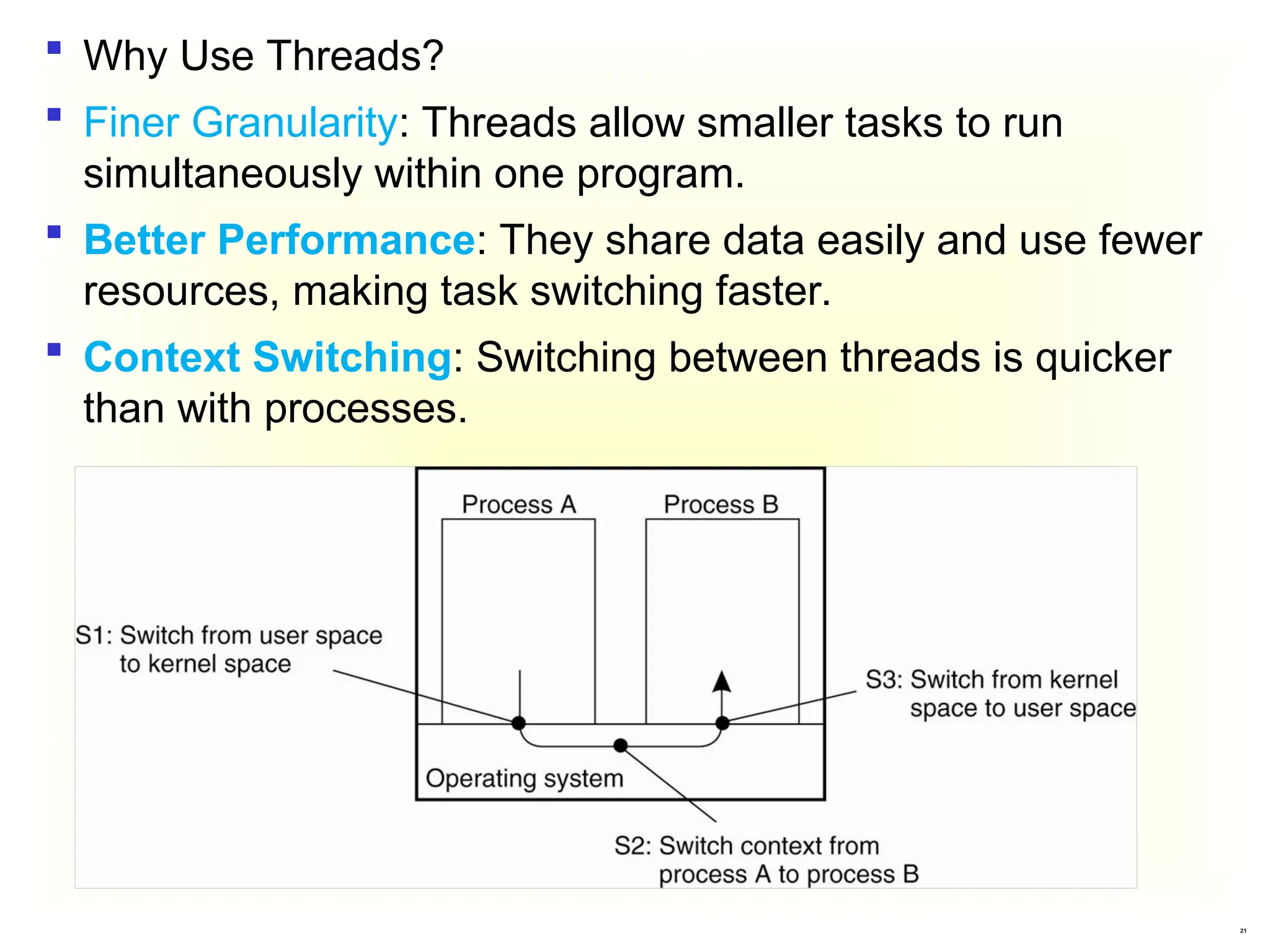
 Why Use Threads?
 Finer Granularity: Threads allow smaller tasks to run
simultaneously within one program.
 Better Performance: They share data easily and use fewer
resources, making task switching faster.
 Context Switching: Switching between threads is quicker
than with processes.
22
Threads in Distributed Systems
 Multithreaded Clients
 A multithreaded client is a type of application (like a web
browser) that can make multiple requests simultaneously.
 This is useful for improving performance and responsiveness.
 Examples:
 Web Browsers: Load images and text simultaneously.
 Email Apps: Check for new messages while displaying the
inbox.
 Video Streaming Apps: Load video and recommendations
at once.
 Online Gaming: Fetch graphics and player data together.
 Social Media Apps: Display feeds and notifications
simultaneously.
23
Threads in Distributed Systems
 Multithreaded Servers
 Multithreaded servers are designed to handle multiple
requests from clients simultaneously.
 This is crucial for applications that need to serve many
users at once, like web servers.
 Examples:
 Web Servers: Support thousands of users on sites like
Amazon.
 Online Banking: Allow multiple customers to access
accounts simultaneously.
 Streaming Services: Stream videos to millions at once.
 Cloud Services: Let users upload and edit files
concurrently.
 Gaming Servers: Enable real-time interactions for many
players.
24
Threads in Distributed Systems
 a. Single-Threaded Process
 In a single-threaded server model, the server processes
requests one at a time. When a request comes in, the
server:
 Receives the request.
 Examines it and processes it to completion.
 Returns the response to the client.
 b. Multithreaded server
 A multithreaded server can handle multiple requests from
clients simultaneously, which is crucial for performance and
responsiveness.
 Example:
 File Servers: Quickly serve multiple users requesting files
by distributing tasks among worker threads.
25
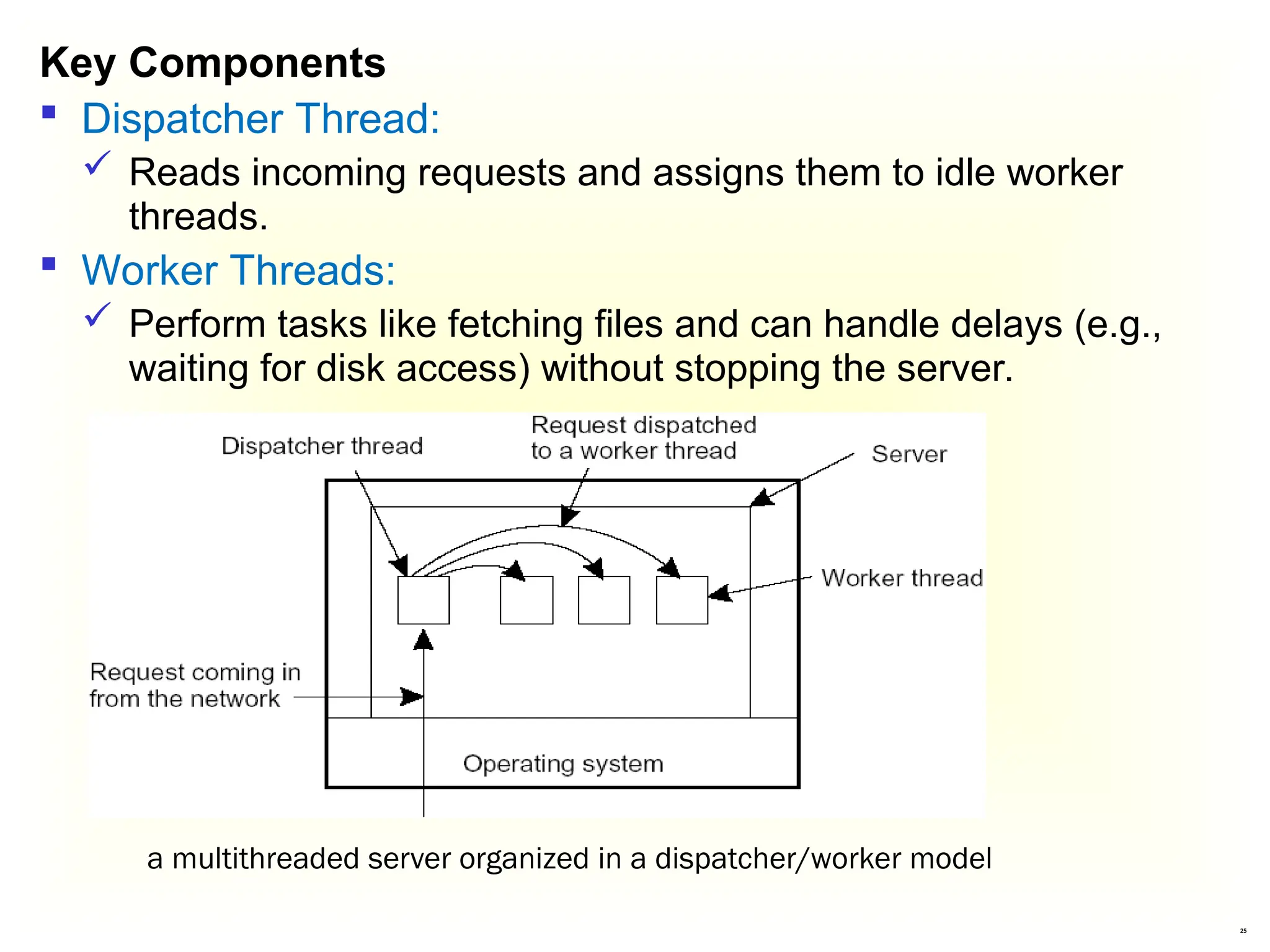
Key Components
 Dispatcher Thread:
 Reads incoming requests and assigns them to idle worker
threads.
 Worker Threads:
 Perform tasks like fetching files and can handle delays (e.g.,
waiting for disk access) without stopping the server.
a multithreaded server organized in a dispatcher/worker model
26
 Examples:
 Modern Web Servers: Sites like Amazon can serve many
users browsing and buying simultaneously.
 Online Banking: Banks that let multiple customers log in and
perform transactions at the same time.
 Streaming Services: Platforms like Netflix that stream videos
to many users concurrently without delays.
 Online Games: Multiplayer games that allow several players
to interact in real-time.
 Social Media Platforms: Apps like Facebook that handle
many users posting, commenting, and messaging at once.
27
 Two issues: user interfaces and client-side software for
distribution transparency
 User Interfaces (UIs)
 UIs are how people interact with apps and computers using
visual elements like buttons and menus.
 Graphical User Interfaces (GUIs)
 GUIs are visual interfaces that use icons and windows,
making it easy to click and navigate instead of typing
commands.
 Common System:
 The X Window System (or X) is a popular framework for
creating GUIs.
3.2 Anatomy of Clients
28
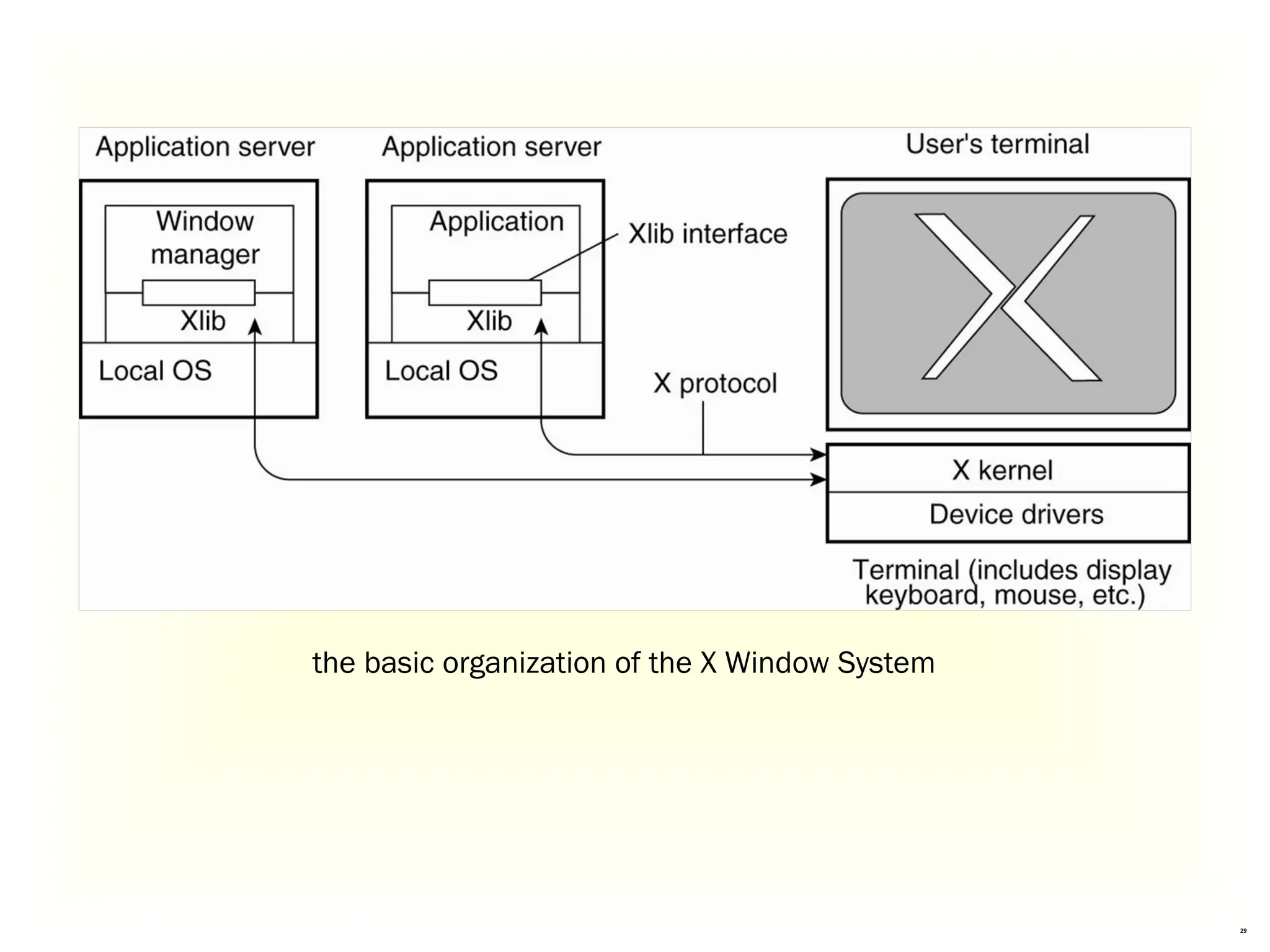
User's Terminal:
The device you use (like a computer) to interact with applications.
Kernel:
The part of the operating system that helps your device talk to
applications and manage resources.
Application Servers:
These run the applications you want to use, like web browsers or
games.
Window Manager:
This controls how application windows appear on your screen (like
their size and position).
Xlib Interface:
A library that helps applications show graphics and images.
Local OS:
The operating system that runs everything, like Windows or Linux.
Basic Organization of the X Window System
29
the basic organization of the X Window System
30
b. Client-Side Software for Distribution Transparency
 Purpose:
 Helps your device interact with remote services without
showing complex details.
 Replication Transparency:
 Manages multiple copies of data so you don’t have to worry
about where it’s stored.
 Client Proxy:
 Sends requests to different servers and combines their
responses into one easy answer.
31
 Real-Life Examples of Distributed Systems
 Social Media (e.g., Facebook):
 Posts are stored on multiple servers, but you don’t need to
know where.
 Online Banking:
 Your balance and transactions come from various servers,
shown as one page.
 Cloud Storage (e.g., Google Drive):
 Access files from different locations, all appearing in one place.
32
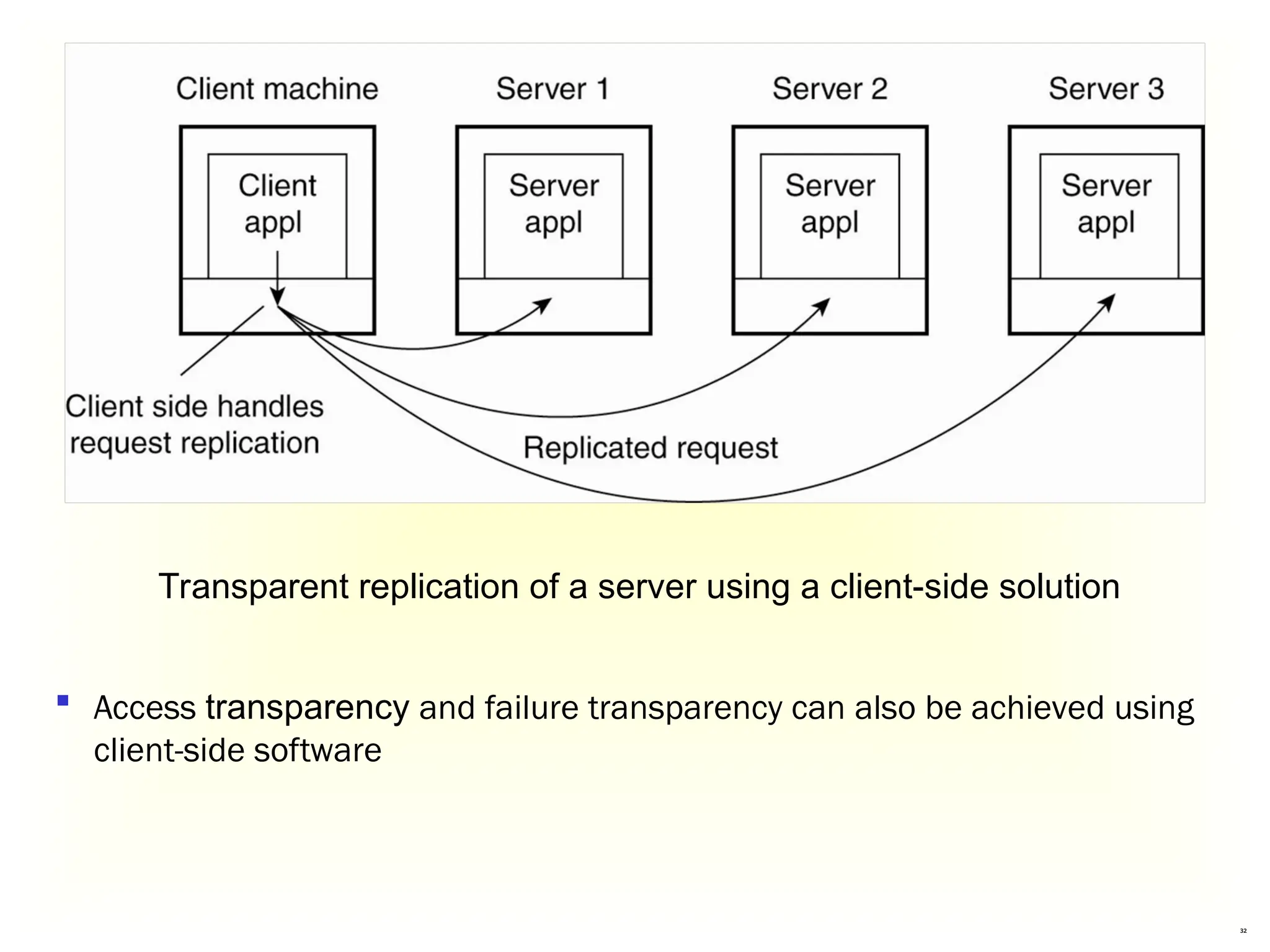
Transparent replication of a server using a client-side solution
 Access transparency and failure transparency can also be achieved using
client-side software
33
 Types of Servers
 Iterative Server : Handles one request at a time, one client
after another.
 Example: A small local coffee shop taking orders one by
one.
 Concurrent Server: Can manage multiple requests at the
same time by using separate threads or processes.
 Example: A popular restaurant where multiple waiters serve
different tables simultaneously.
 Super Server : Runs in the background and can start other
server processes as needed.
 Example: A hotel management system that runs in the
background and manages different services like booking,
room service, and maintenance.
Servers and design issues
34
 Stateless Server:
 Does not remember anything about previous requests. Each
request is treated as a new one.
 Example: A web server that serves webpages. When you visit a
site, it doesn’t remember anything about you from your last
visit.
 Stateful Server:
 Remembers information about clients and their past
interactions.
 Example: A file storage service that keeps track of your files
and changes you make, allowing you to access your recent
files.
Servers state
35
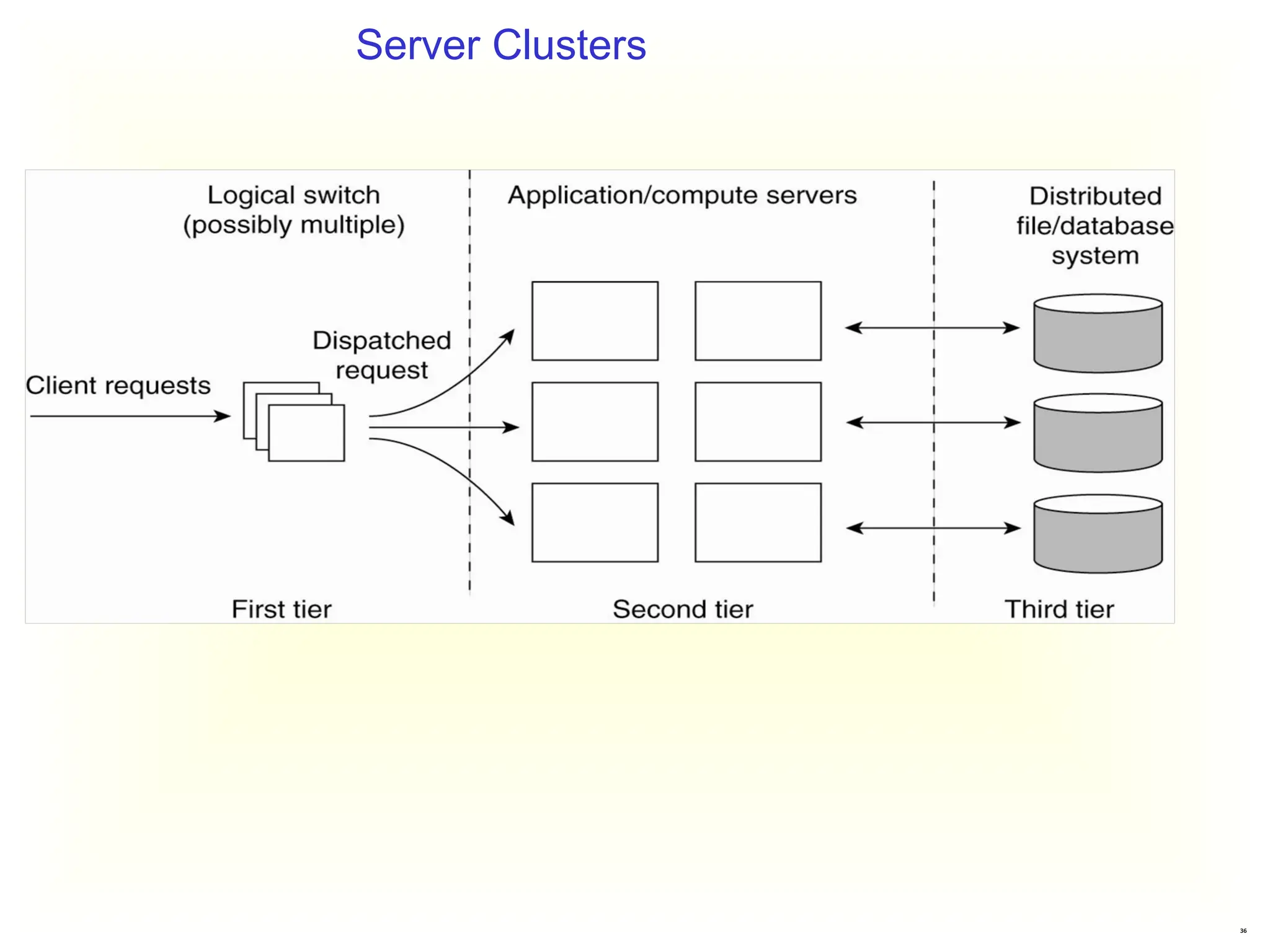
 A server cluster is a group of computers (servers) that work together as
a single system. They are connected through a high-speed network.
 Purpose: The main goal is to improve performance, reliability, and
availability by sharing the workload among multiple machines.
 Structure of a Server Cluster
 First Tier:
 Receives requests from users and directs them to the appropriate
server.
 Middle Tier:
 Processes the requests. This can include running applications or
performing computations.
 Third Tier:
 Handles data storage and management, often using databases or file
systems.
Server Clusters
36
Server Clusters
37
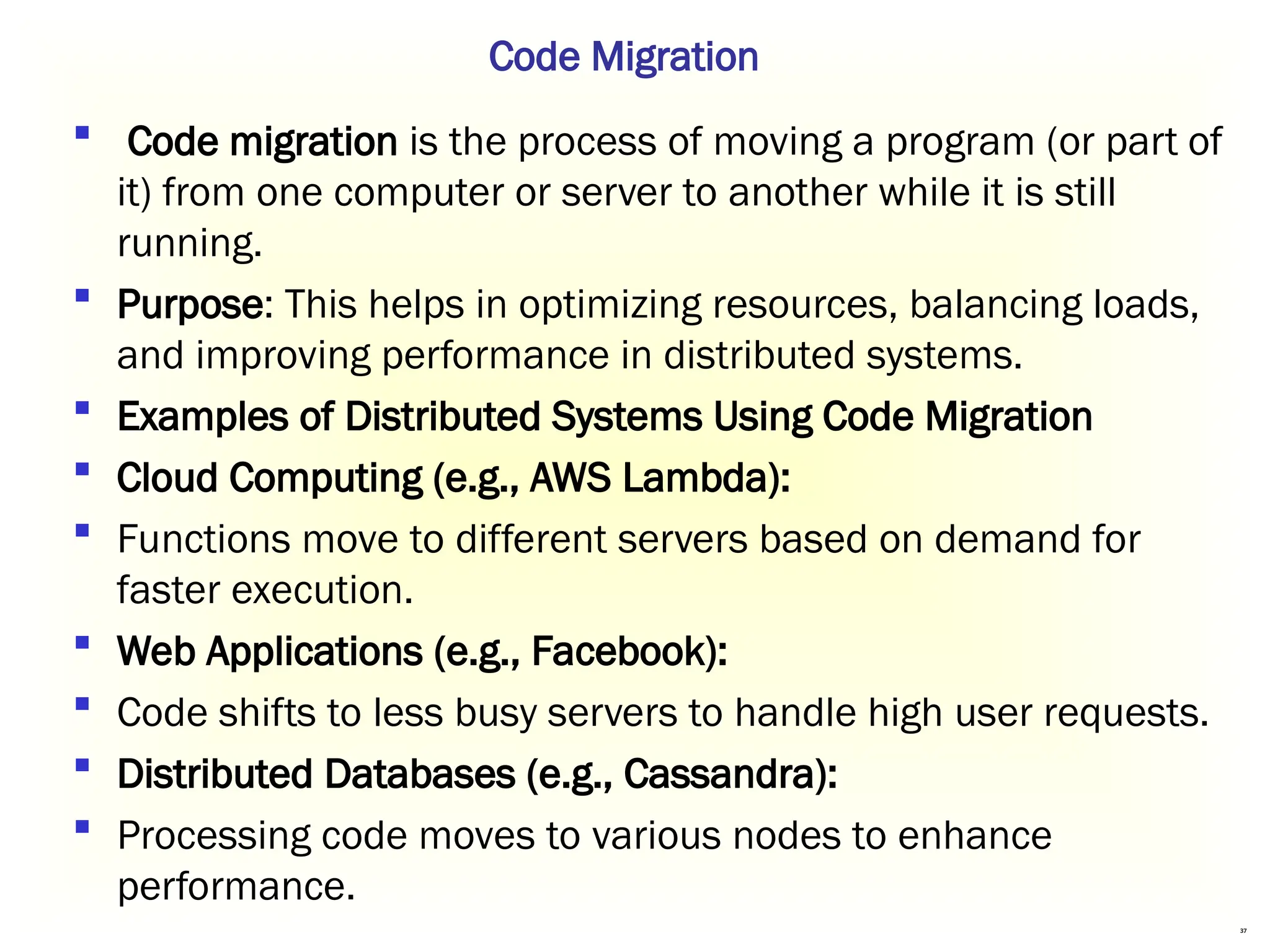
 Code migration is the process of moving a program (or part of
it) from one computer or server to another while it is still
running.
 Purpose: This helps in optimizing resources, balancing loads,
and improving performance in distributed systems.
 Examples of Distributed Systems Using Code Migration
 Cloud Computing (e.g., AWS Lambda):
 Functions move to different servers based on demand for
faster execution.
 Web Applications (e.g., Facebook):
 Code shifts to less busy servers to handle high user requests.
 Distributed Databases (e.g., Cassandra):
 Processing code moves to various nodes to enhance
performance.
Code Migration
38
 Reasons for Migrating Code
 Improve Performance
 Shift tasks from busy computers to faster ones.
 Enhance Communication
 Use applications that run many tasks on a server, returning only
necessary results.
 Exploit Parallelism
 Run multiple instances of a program simultaneously, like web
crawlers.
39
 Models for Code Migration
 A program is made up of three parts:
 Code Segment
 The actual instructions the program follows.
 Resource Segment
 Links to things the program needs, like files or printers.
 Execution Segment
 Keeps track of the program's current state, including
temporary data.
 Weak Mobility
 Transfers only the code segment and some initial data.
 This means the program starts from the beginning each
time.
40
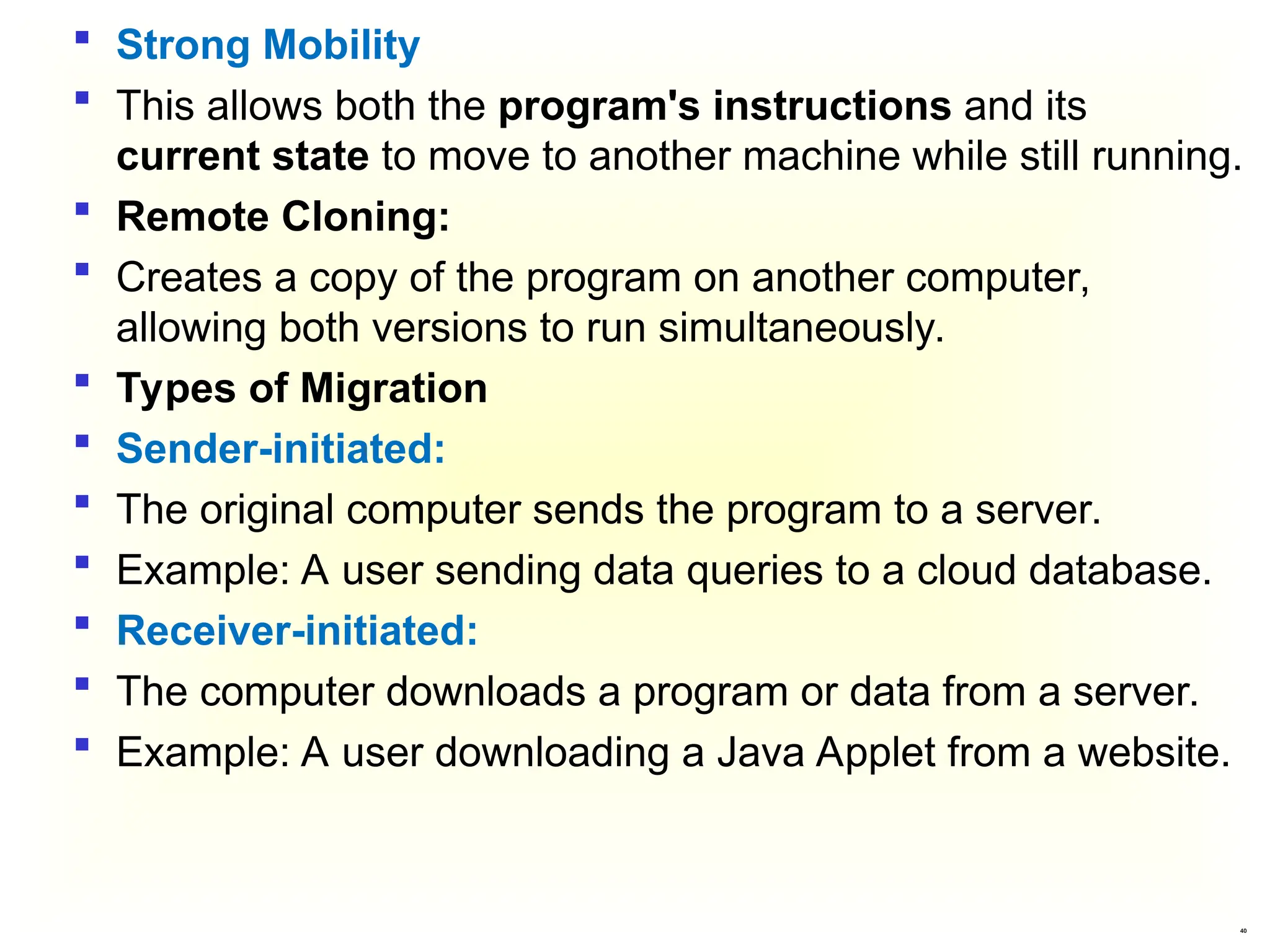
 Strong Mobility
 This allows both the program's instructions and its
current state to move to another machine while still running.
 Remote Cloning:
 Creates a copy of the program on another computer,
allowing both versions to run simultaneously.
 Types of Migration
 Sender-initiated:
 The original computer sends the program to a server.
 Example: A user sending data queries to a cloud database.
 Receiver-initiated:
 The computer downloads a program or data from a server.
 Example: A user downloading a Java Applet from a website.
41
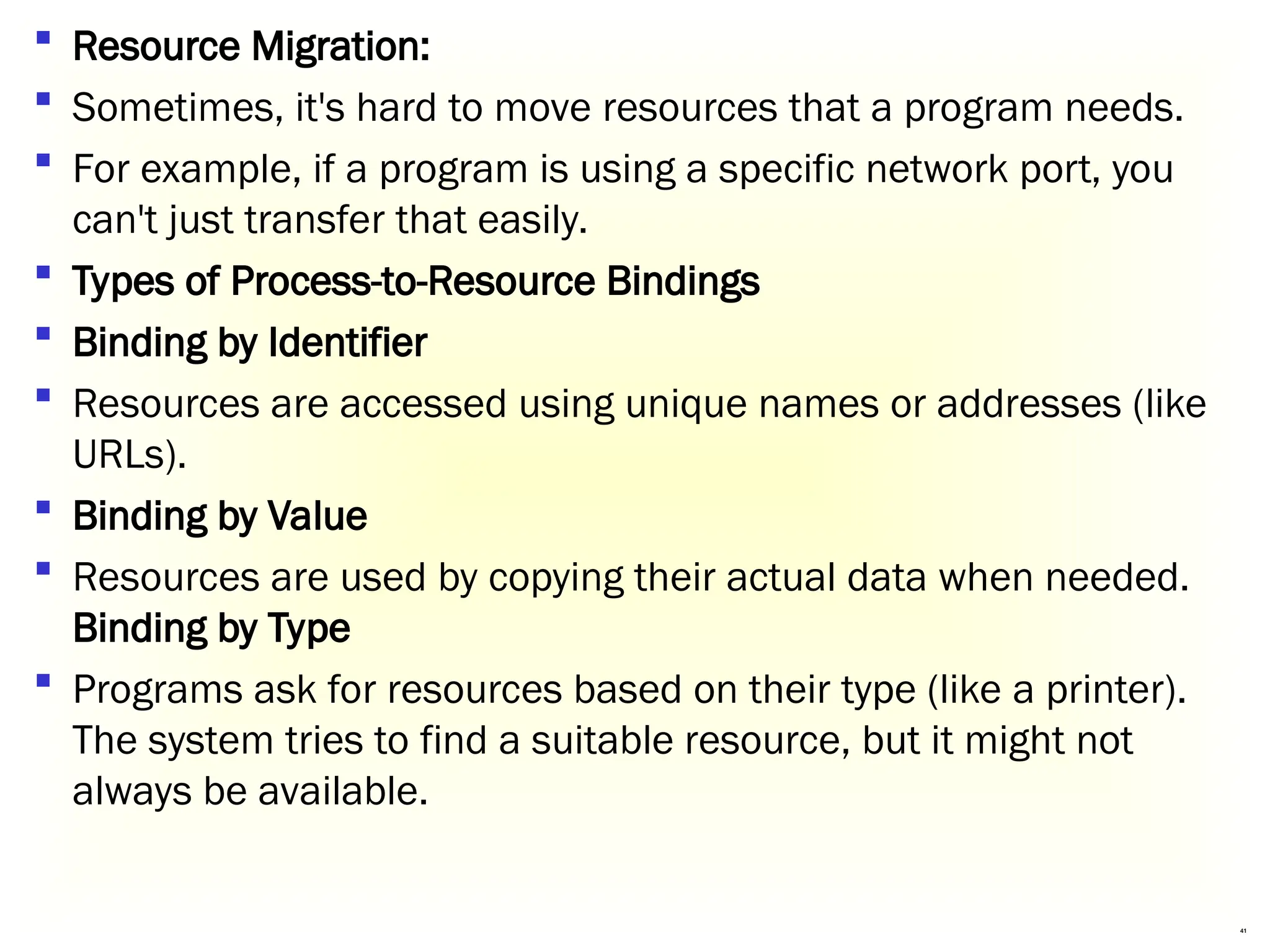
 Resource Migration:
 Sometimes, it's hard to move resources that a program needs.
 For example, if a program is using a specific network port, you
can't just transfer that easily.
 Types of Process-to-Resource Bindings
 Binding by Identifier
 Resources are accessed using unique names or addresses (like
URLs).
 Binding by Value
 Resources are used by copying their actual data when needed.
Binding by Type
 Programs ask for resources based on their type (like a printer).
The system tries to find a suitable resource, but it might not
always be available.
42
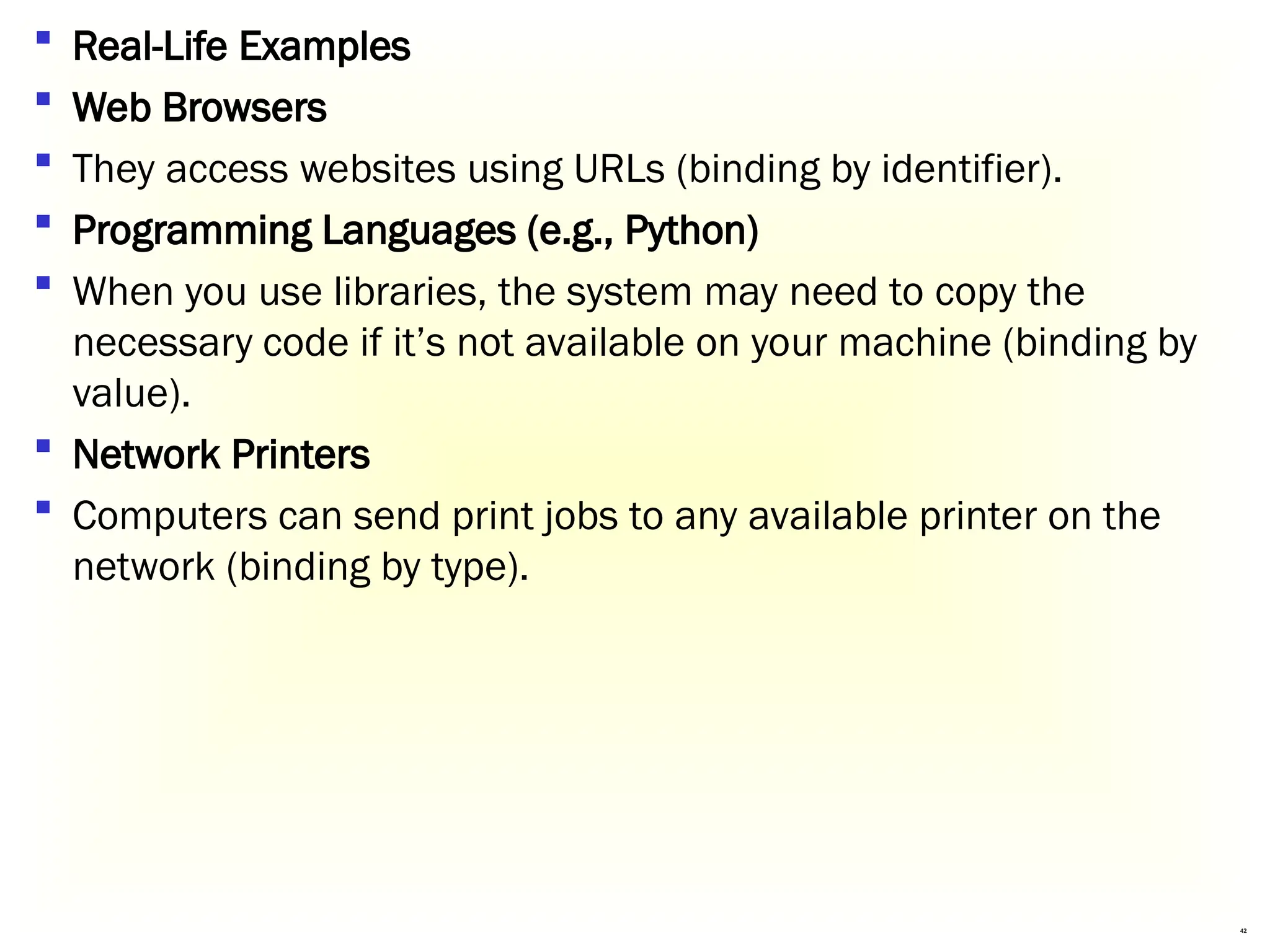
 Real-Life Examples
 Web Browsers
 They access websites using URLs (binding by identifier).
 Programming Languages (e.g., Python)
 When you use libraries, the system may need to copy the
necessary code if it’s not available on your machine (binding by
value).
 Network Printers
 Computers can send print jobs to any available printer on the
network (binding by type).
43
 Resource Types
 Unattached Resources
 These can be easily moved with the code (e.g., files).
 Fastened Resources
 These can be moved but might be expensive to do so (e.g.,
specialized databases).
 Fixed Resources
 These cannot be moved at all, like local hardware (e.g., printers).
44
 Real-Life Examples
 File Storage Services (e.g., Dropbox)
 Files can easily be moved and accessed from different devices
(unattached resources).
 Cloud Databases (e.g., Amazon RDS)
 They can be relocated but might involve costs for migration
(fastened resources).
 Local Printers
 You can’t move them to another location; they stay where they
are (fixed resources).
End Of the Chapter
45

Distributed systems Chapter 3-Processes.ppt

  • 1.
  • 2.
    2 What is process? A process is an instance of a program running on a computer.  A process is a program in execution. The execution of a process must progress sequentially.  A process is defined as an entity representing the basic unit of work to be implemented in the system.  A process is a program that is actively running. Think of it as something you see or use on your computer or phone, like a game or an app.  When a program starts running, it gets divided into different parts (stack, heap, text, and data) to keep everything organized. Here's how it works with examples.
  • 3.
    3 Parts of aProcess (In Memory) .  The image shows a simplified layout of a process inside the main memory
  • 4.
    4 Cont.…  Text/code segment Text segment contains executable instructions of a program.  Stack segment  The stack contains temporary data, such as function parameters, returns addresses, and local variables.  Data segment  This segment Contains the global and static variable of a program . E.g. int static sum=o;  Heap segment  Heap segment contains that part of the program where dynamic memory allocation is used.  Dividing a process into sections (stack, heap, text, data) makes it easier for the operating system to manage memory and run multiple apps smoothly.
  • 5.
    5 Cont.… 1. Google Chrome(Web Browser) When you open Chrome: Text section: Contains the core code that tells Chrome how to work, like displaying web pages or opening new tabs. Data section: Stores default settings like your homepage or bookmarks. Stack: Keeps track of what tabs or windows you’ve opened and what you’re clicking. Heap: Stores temporary things like images or data from a website you visit.
  • 6.
    6 Cont.… 2. Microsoft Word(Document Editor) When you write a document: Text section: Has the basic code that lets you type, edit, and save files. Data section: Contains default templates and settings (like font styles or page size). Stack: Tracks temporary actions, like where your cursor is or what menu you just clicked. Heap: Stores anything you add, like images or tables, while working on the document.
  • 7.
    7 What is Thread? A thread is a single sequence stream within a process.  In an operating system that supports multithreading, the process can consist of many threads.  A thread is like a single worker in a team (the process). A process is like a big project, and threads are smaller tasks that work together to complete it. Threads are called "lightweight processes" because they are smaller and share resources like memory with the main process.  Now, any operating system process can execute a thread.  we can say, that a process can have multiple threads.  The process can be split down into so many threads.
  • 8.
    8 What is Thread? Threadsin Real Life: Browser Example: When you use a browser like Google Chrome: Each tab is like a thread. If one tab crashes, the others keep working because they’re separate threads. MS Word Example: When you write a document in MS Word: One thread checks your spelling and grammar. Another thread handles typing and formatting. A third thread saves your work in the background.
  • 9.
    9 Cont.…  Types ofThread  Threads are implemented in the following two ways −  User Level Threads − User-managed threads.  Kernel Level Threads − Operating System managed threads acting on the kernel, an operating system core.
  • 10.
    10 Difference Between Processand Thread A process is like a big task or project that a computer works on. It is heavyweight, meaning it needs a lot of resources like memory, files, and CPU time. Each process works independently of others, and they don’t easily share resources. If one process gets stuck (blocked), other processes might have to wait for it to finish. Characteristics of Processes: 1. Resource-Intensive: Processes have their own memory, files, and settings. Example: When you open a browser and a game at the same time, they don’t share memory or files, making them resource-heavy.
  • 11.
    11 Cont… 2.Independent Operation: Processes don’tdepend on each other. Example: If a video editor crashes, your web browser keeps working because they are independent processes. 3.OS Interaction for Switching: The operating system helps manage switching between processes. Example: If you switch between Word and Spotify, the operating system handles pausing one and resuming the other. 4. Blocked Process Affects Others: If one process is stuck, others may need to wait. Example: If you’re downloading a large file and your system runs out of memory, other apps might slow down or stop.
  • 12.
    12 Cont.… A thread isa smaller, lightweight part of a process. It takes fewer resources than a process. Threads work together inside a single process and share the same memory and files. If one thread is stuck, other threads in the same process can still work Key Characteristics of Threads 1. Lightweight: Threads don’t need as many resources as a process. 2. No OS Interaction for Switching: Switching between threads happens within the process, so it’s faster than switching between processes.
  • 13.
    13 Cont.… 3. Shared Resources: Threadswithin a process share the same memory, open files, and child processes. 4. Parallel Execution: If one thread is blocked (e.g., waiting for input), another thread in the same process can continue running. 5. Fewer Resources for Multithreading: Multithreaded processes use less memory compared to running separate processes. 6. Data Sharing Between Threads: Threads can directly share and modify each other’s data.
  • 14.
    14 Cont.… Real-Life Examples ofThreads: 1. MS Word: Thread 1: Processes typing and formatting. Thread 2: Checks spelling and grammar. Thread 3: Autosaves your work. 2. E-commerce App (e.g., Amazon): Thread 1: Searches for products. Thread 2: Updates the shopping cart. Thread 3: Processes payment details.
  • 15.
    15 Threads and theirImplementation  Threads can be used in both distributed and non-distributed systems.  Threads in Non-distributed Systems  Address Space: Each program (or process) has its own space in memory where it stores its code and data.  Single Thread:  A process can run with just one thread, meaning it can only do one thing at a time.  A process can run with multiple threads, allowing it to do several things at once.
  • 16.
    16 Cont .… Process 1Process 2 Process 3 Three processes each with one thread One process with three threads
  • 17.
    17  Threads ina Process  Individual Components:  Each thread has its own:  Program Counter: Keeps track of what the thread is doing.  Registers: Temporary storage for quick data processing.  Stack: Space for managing tasks and storing local information.  Shared Resources:  All threads in the same process share:  Address Space: The program code and data.  Global Variables: Information that any thread can use.  Open Files: Files that all threads can access.
  • 18.
  • 19.
    19 Why Do WeNeed Threads? Threads make programs faster, more efficient, and responsive. Here are the key reasons why threads are important: Simplifying the Programming Model: Threads make it easier to manage multiple tasks happening at the same time. Example: In a word processor, multiple threads handle. Ease of Creation and Destruction: Threads are lightweight and faster to create and terminate compared to processes. Example: Opening a new tab in a browser uses a thread instead of creating an entirely new process.
  • 20.
    20 Cont… Real Parallelism inMultiprocessor Systems: On systems with multiple processors, threads can truly run in parallel, improving speed and efficiency. Example: In video editing software, one thread renders video frames while another applies effects in real time. Improved Performance by Overlapping Activities: Threads can prevent blocking by handling I/O operations and calculations in parallel. Example: In a spreadsheet application, one thread waits for user input while another calculates formulas or updates charts.
  • 21.
    21  Why UseThreads?  Finer Granularity: Threads allow smaller tasks to run simultaneously within one program.  Better Performance: They share data easily and use fewer resources, making task switching faster.  Context Switching: Switching between threads is quicker than with processes.
  • 22.
    22 Threads in DistributedSystems  Multithreaded Clients  A multithreaded client is a type of application (like a web browser) that can make multiple requests simultaneously.  This is useful for improving performance and responsiveness.  Examples:  Web Browsers: Load images and text simultaneously.  Email Apps: Check for new messages while displaying the inbox.  Video Streaming Apps: Load video and recommendations at once.  Online Gaming: Fetch graphics and player data together.  Social Media Apps: Display feeds and notifications simultaneously.
  • 23.
    23 Threads in DistributedSystems  Multithreaded Servers  Multithreaded servers are designed to handle multiple requests from clients simultaneously.  This is crucial for applications that need to serve many users at once, like web servers.  Examples:  Web Servers: Support thousands of users on sites like Amazon.  Online Banking: Allow multiple customers to access accounts simultaneously.  Streaming Services: Stream videos to millions at once.  Cloud Services: Let users upload and edit files concurrently.  Gaming Servers: Enable real-time interactions for many players.
  • 24.
    24 Threads in DistributedSystems  a. Single-Threaded Process  In a single-threaded server model, the server processes requests one at a time. When a request comes in, the server:  Receives the request.  Examines it and processes it to completion.  Returns the response to the client.  b. Multithreaded server  A multithreaded server can handle multiple requests from clients simultaneously, which is crucial for performance and responsiveness.  Example:  File Servers: Quickly serve multiple users requesting files by distributing tasks among worker threads.
  • 25.
    25 Key Components  DispatcherThread:  Reads incoming requests and assigns them to idle worker threads.  Worker Threads:  Perform tasks like fetching files and can handle delays (e.g., waiting for disk access) without stopping the server. a multithreaded server organized in a dispatcher/worker model
  • 26.
    26  Examples:  ModernWeb Servers: Sites like Amazon can serve many users browsing and buying simultaneously.  Online Banking: Banks that let multiple customers log in and perform transactions at the same time.  Streaming Services: Platforms like Netflix that stream videos to many users concurrently without delays.  Online Games: Multiplayer games that allow several players to interact in real-time.  Social Media Platforms: Apps like Facebook that handle many users posting, commenting, and messaging at once.
  • 27.
    27  Two issues:user interfaces and client-side software for distribution transparency  User Interfaces (UIs)  UIs are how people interact with apps and computers using visual elements like buttons and menus.  Graphical User Interfaces (GUIs)  GUIs are visual interfaces that use icons and windows, making it easy to click and navigate instead of typing commands.  Common System:  The X Window System (or X) is a popular framework for creating GUIs. 3.2 Anatomy of Clients
  • 28.
    28 User's Terminal: The deviceyou use (like a computer) to interact with applications. Kernel: The part of the operating system that helps your device talk to applications and manage resources. Application Servers: These run the applications you want to use, like web browsers or games. Window Manager: This controls how application windows appear on your screen (like their size and position). Xlib Interface: A library that helps applications show graphics and images. Local OS: The operating system that runs everything, like Windows or Linux. Basic Organization of the X Window System
  • 29.
    29 the basic organizationof the X Window System
  • 30.
    30 b. Client-Side Softwarefor Distribution Transparency  Purpose:  Helps your device interact with remote services without showing complex details.  Replication Transparency:  Manages multiple copies of data so you don’t have to worry about where it’s stored.  Client Proxy:  Sends requests to different servers and combines their responses into one easy answer.
  • 31.
    31  Real-Life Examplesof Distributed Systems  Social Media (e.g., Facebook):  Posts are stored on multiple servers, but you don’t need to know where.  Online Banking:  Your balance and transactions come from various servers, shown as one page.  Cloud Storage (e.g., Google Drive):  Access files from different locations, all appearing in one place.
  • 32.
    32 Transparent replication ofa server using a client-side solution  Access transparency and failure transparency can also be achieved using client-side software
  • 33.
    33  Types ofServers  Iterative Server : Handles one request at a time, one client after another.  Example: A small local coffee shop taking orders one by one.  Concurrent Server: Can manage multiple requests at the same time by using separate threads or processes.  Example: A popular restaurant where multiple waiters serve different tables simultaneously.  Super Server : Runs in the background and can start other server processes as needed.  Example: A hotel management system that runs in the background and manages different services like booking, room service, and maintenance. Servers and design issues
  • 34.
    34  Stateless Server: Does not remember anything about previous requests. Each request is treated as a new one.  Example: A web server that serves webpages. When you visit a site, it doesn’t remember anything about you from your last visit.  Stateful Server:  Remembers information about clients and their past interactions.  Example: A file storage service that keeps track of your files and changes you make, allowing you to access your recent files. Servers state
  • 35.
    35  A servercluster is a group of computers (servers) that work together as a single system. They are connected through a high-speed network.  Purpose: The main goal is to improve performance, reliability, and availability by sharing the workload among multiple machines.  Structure of a Server Cluster  First Tier:  Receives requests from users and directs them to the appropriate server.  Middle Tier:  Processes the requests. This can include running applications or performing computations.  Third Tier:  Handles data storage and management, often using databases or file systems. Server Clusters
  • 36.
  • 37.
    37  Code migrationis the process of moving a program (or part of it) from one computer or server to another while it is still running.  Purpose: This helps in optimizing resources, balancing loads, and improving performance in distributed systems.  Examples of Distributed Systems Using Code Migration  Cloud Computing (e.g., AWS Lambda):  Functions move to different servers based on demand for faster execution.  Web Applications (e.g., Facebook):  Code shifts to less busy servers to handle high user requests.  Distributed Databases (e.g., Cassandra):  Processing code moves to various nodes to enhance performance. Code Migration
  • 38.
    38  Reasons forMigrating Code  Improve Performance  Shift tasks from busy computers to faster ones.  Enhance Communication  Use applications that run many tasks on a server, returning only necessary results.  Exploit Parallelism  Run multiple instances of a program simultaneously, like web crawlers.
  • 39.
    39  Models forCode Migration  A program is made up of three parts:  Code Segment  The actual instructions the program follows.  Resource Segment  Links to things the program needs, like files or printers.  Execution Segment  Keeps track of the program's current state, including temporary data.  Weak Mobility  Transfers only the code segment and some initial data.  This means the program starts from the beginning each time.
  • 40.
    40  Strong Mobility This allows both the program's instructions and its current state to move to another machine while still running.  Remote Cloning:  Creates a copy of the program on another computer, allowing both versions to run simultaneously.  Types of Migration  Sender-initiated:  The original computer sends the program to a server.  Example: A user sending data queries to a cloud database.  Receiver-initiated:  The computer downloads a program or data from a server.  Example: A user downloading a Java Applet from a website.
  • 41.
    41  Resource Migration: Sometimes, it's hard to move resources that a program needs.  For example, if a program is using a specific network port, you can't just transfer that easily.  Types of Process-to-Resource Bindings  Binding by Identifier  Resources are accessed using unique names or addresses (like URLs).  Binding by Value  Resources are used by copying their actual data when needed. Binding by Type  Programs ask for resources based on their type (like a printer). The system tries to find a suitable resource, but it might not always be available.
  • 42.
    42  Real-Life Examples Web Browsers  They access websites using URLs (binding by identifier).  Programming Languages (e.g., Python)  When you use libraries, the system may need to copy the necessary code if it’s not available on your machine (binding by value).  Network Printers  Computers can send print jobs to any available printer on the network (binding by type).
  • 43.
    43  Resource Types Unattached Resources  These can be easily moved with the code (e.g., files).  Fastened Resources  These can be moved but might be expensive to do so (e.g., specialized databases).  Fixed Resources  These cannot be moved at all, like local hardware (e.g., printers).
  • 44.
    44  Real-Life Examples File Storage Services (e.g., Dropbox)  Files can easily be moved and accessed from different devices (unattached resources).  Cloud Databases (e.g., Amazon RDS)  They can be relocated but might involve costs for migration (fastened resources).  Local Printers  You can’t move them to another location; they stay where they are (fixed resources).
  • 45.
    End Of theChapter 45