Use of Digital Manipulatives forUse of Digital Manipulatives for
Experimental DesignExperimental Design
Joselyn J. ToddJoselyn J. Todd
Director of Instructional TechnologyDirector of Instructional Technology
Cary Academy, Cary, NCCary Academy, Cary, NC
http://http://caryacademy.orgcaryacademy.org
Thank You, Liz!Thank You, Liz!
WelcomWelcom
ee
•
Who am I?Who am I?
•
**Who are you?** (**Who are you?** (Where are youWhere are you
from? Primary Discipline ?)from? Primary Discipline ?)
•
What are we going to doWhat are we going to do
over the next 50 minutes orover the next 50 minutes or
so?so?
•
(Browsers)(Browsers)
Participant LearningParticipant Learning
ObjectivesObjectivesParticipants will be able to:Participants will be able to:
•
Collaboratively exploreCollaboratively explore
how a DM can be usedhow a DM can be used
with students to studywith students to study
experimental designexperimental design
•
Help students analyzeHelp students analyze
the affordances andthe affordances and
limitations of a DMlimitations of a DM
•
Share digitalShare digital
manipulatives-applets,manipulatives-applets,
simulations, and softwaresimulations, and software
that can be used tothat can be used to
create such thingscreate such things
** Do you use DMs in your classroom? How?**** Do you use DMs in your classroom? How?**
Why use DMs?Why use DMs?
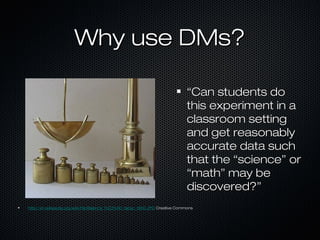
““Can students doCan students do
this experiment in athis experiment in a
classroom settingclassroom setting
and get reasonablyand get reasonably
accurate data suchaccurate data such
that the “science” orthat the “science” or
“math” may be“math” may be
discovered?”discovered?”
http://en.wikipedia.org/wiki/File:Balance_%C3%A0_tabac_1850.JPGhttp://en.wikipedia.org/wiki/File:Balance_%C3%A0_tabac_1850.JPG Creative CommonsCreative Commons
Digital ManipulativesDigital Manipulatives•
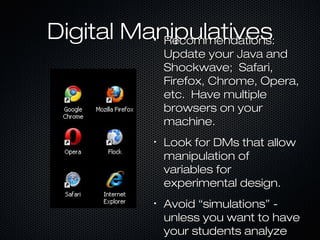
Recommendations:Recommendations:
Update your Java andUpdate your Java and
Shockwave; Safari,Shockwave; Safari,
Firefox, Chrome, Opera,Firefox, Chrome, Opera,
etc. Have multipleetc. Have multiple
browsers on yourbrowsers on your
machine.machine.
•
Look for DMs that allowLook for DMs that allow
manipulation ofmanipulation of
variables forvariables for
experimental design.experimental design.
•
Avoid “simulations” -Avoid “simulations” -
unless you want to haveunless you want to have
your students analyzeyour students analyze
Let’s CollaborateLet’s Collaborate
**Determine whether the following are useful for students to**Determine whether the following are useful for students to
study experimental design.** Explore for 5 minutes tostudy experimental design.** Explore for 5 minutes to
determine if this is a good DM for ED. What are thedetermine if this is a good DM for ED. What are the
affordances and limitations of these tools?affordances and limitations of these tools?
•
DM 1 -DM 1 -
http://www.eduplace.com/kids/hmsc/activities/simulations/gr5/http://www.eduplace.com/kids/hmsc/activities/simulations/gr5/
•
DM 2 -DM 2 -
http://highered.mcgraw-hill.com/olc/dl/120074/bio18.swfhttp://highered.mcgraw-hill.com/olc/dl/120074/bio18.swf
•
DM 3 -DM 3 -
http://www.learner.org/courses/envsci/interactives/ecology/http://www.learner.org/courses/envsci/interactives/ecology/
Exploring An ExampleExploring An Example
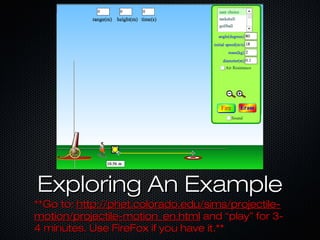
**Go to:**Go to: http://phet.colorado.edu/sims/projectile-http://phet.colorado.edu/sims/projectile-
motion/projectile-motion_en.htmlmotion/projectile-motion_en.html and “play” for 3-and “play” for 3-
4 minutes. Use FireFox if you have it.**4 minutes. Use FireFox if you have it.**
Let’s Collaborate FurtherLet’s Collaborate Further
**Having explored the tool now we will divide**Having explored the tool now we will divide
into teams and develop short materials andinto teams and develop short materials and
methods in order to design an experiment.methods in order to design an experiment.
Google Docs? Board? Pirate Pad? Cacoo?Google Docs? Board? Pirate Pad? Cacoo?
We’ll use Pirate Pad.**We’ll use Pirate Pad.**
•
T1-T1- https://www.piratepad.ca/p/Simulationhttps://www.piratepad.ca/p/Simulation
•
T2 -T2 - https://www.piratepad.ca/p/Simulationhttps://www.piratepad.ca/p/Simulation
•
T3 -T3 - https://www.piratepad.ca/p/Simulationhttps://www.piratepad.ca/p/Simulation
Share Screen. Taking it Further!Share Screen. Taking it Further!
ResourcesResources
Tools for Math and Science:Tools for Math and Science:
http://nlvm.usu.eduhttp://nlvm.usu.edu//
http://www.shodor.org/interactivate/http://www.shodor.org/interactivate/
http://phet.colorado.eduhttp://phet.colorado.edu//
http://www.explorelearning.comhttp://www.explorelearning.com//
http://concord.org/activitieshttp://concord.org/activities ( Create your( Create your
own:own: http://mw.concord.org/modeler/http://mw.concord.org/modeler/ ))
**Share your own resources in the Chat****Share your own resources in the Chat**
Joselyn’s InformationJoselyn’s Information
Joselyn J. Todd, Ph.D.Joselyn J. Todd, Ph.D.
Director of Instructional TechnologyDirector of Instructional Technology
Cary Academy, Cary, NCCary Academy, Cary, NC
joselyn_todd@caryacademy.orgjoselyn_todd@caryacademy.org
919-228-4541919-228-4541
Twitter: @joselyntoddTwitter: @joselyntodd

Digital manipulatives todd 2

  • 1.
    Use of DigitalManipulatives forUse of Digital Manipulatives for Experimental DesignExperimental Design Joselyn J. ToddJoselyn J. Todd Director of Instructional TechnologyDirector of Instructional Technology Cary Academy, Cary, NCCary Academy, Cary, NC http://http://caryacademy.orgcaryacademy.org Thank You, Liz!Thank You, Liz!
  • 2.
    WelcomWelcom ee • Who am I?Whoam I? • **Who are you?** (**Who are you?** (Where are youWhere are you from? Primary Discipline ?)from? Primary Discipline ?) • What are we going to doWhat are we going to do over the next 50 minutes orover the next 50 minutes or so?so? • (Browsers)(Browsers)
  • 3.
    Participant LearningParticipant Learning ObjectivesObjectivesParticipantswill be able to:Participants will be able to: • Collaboratively exploreCollaboratively explore how a DM can be usedhow a DM can be used with students to studywith students to study experimental designexperimental design • Help students analyzeHelp students analyze the affordances andthe affordances and limitations of a DMlimitations of a DM • Share digitalShare digital manipulatives-applets,manipulatives-applets, simulations, and softwaresimulations, and software that can be used tothat can be used to create such thingscreate such things ** Do you use DMs in your classroom? How?**** Do you use DMs in your classroom? How?**
  • 4.
    Why use DMs?Whyuse DMs? ““Can students doCan students do this experiment in athis experiment in a classroom settingclassroom setting and get reasonablyand get reasonably accurate data suchaccurate data such that the “science” orthat the “science” or “math” may be“math” may be discovered?”discovered?” http://en.wikipedia.org/wiki/File:Balance_%C3%A0_tabac_1850.JPGhttp://en.wikipedia.org/wiki/File:Balance_%C3%A0_tabac_1850.JPG Creative CommonsCreative Commons
  • 5.
    Digital ManipulativesDigital Manipulatives• Recommendations:Recommendations: Updateyour Java andUpdate your Java and Shockwave; Safari,Shockwave; Safari, Firefox, Chrome, Opera,Firefox, Chrome, Opera, etc. Have multipleetc. Have multiple browsers on yourbrowsers on your machine.machine. • Look for DMs that allowLook for DMs that allow manipulation ofmanipulation of variables forvariables for experimental design.experimental design. • Avoid “simulations” -Avoid “simulations” - unless you want to haveunless you want to have your students analyzeyour students analyze
  • 6.
    Let’s CollaborateLet’s Collaborate **Determinewhether the following are useful for students to**Determine whether the following are useful for students to study experimental design.** Explore for 5 minutes tostudy experimental design.** Explore for 5 minutes to determine if this is a good DM for ED. What are thedetermine if this is a good DM for ED. What are the affordances and limitations of these tools?affordances and limitations of these tools? • DM 1 -DM 1 - http://www.eduplace.com/kids/hmsc/activities/simulations/gr5/http://www.eduplace.com/kids/hmsc/activities/simulations/gr5/ • DM 2 -DM 2 - http://highered.mcgraw-hill.com/olc/dl/120074/bio18.swfhttp://highered.mcgraw-hill.com/olc/dl/120074/bio18.swf • DM 3 -DM 3 - http://www.learner.org/courses/envsci/interactives/ecology/http://www.learner.org/courses/envsci/interactives/ecology/
  • 7.
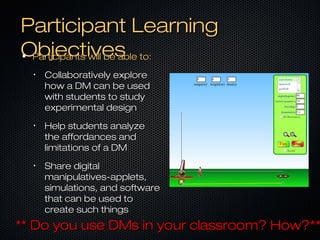
    Exploring An ExampleExploringAn Example **Go to:**Go to: http://phet.colorado.edu/sims/projectile-http://phet.colorado.edu/sims/projectile- motion/projectile-motion_en.htmlmotion/projectile-motion_en.html and “play” for 3-and “play” for 3- 4 minutes. Use FireFox if you have it.**4 minutes. Use FireFox if you have it.**
  • 8.
    Let’s Collaborate FurtherLet’sCollaborate Further **Having explored the tool now we will divide**Having explored the tool now we will divide into teams and develop short materials andinto teams and develop short materials and methods in order to design an experiment.methods in order to design an experiment. Google Docs? Board? Pirate Pad? Cacoo?Google Docs? Board? Pirate Pad? Cacoo? We’ll use Pirate Pad.**We’ll use Pirate Pad.** • T1-T1- https://www.piratepad.ca/p/Simulationhttps://www.piratepad.ca/p/Simulation • T2 -T2 - https://www.piratepad.ca/p/Simulationhttps://www.piratepad.ca/p/Simulation • T3 -T3 - https://www.piratepad.ca/p/Simulationhttps://www.piratepad.ca/p/Simulation Share Screen. Taking it Further!Share Screen. Taking it Further!
  • 9.
    ResourcesResources Tools for Mathand Science:Tools for Math and Science: http://nlvm.usu.eduhttp://nlvm.usu.edu// http://www.shodor.org/interactivate/http://www.shodor.org/interactivate/ http://phet.colorado.eduhttp://phet.colorado.edu// http://www.explorelearning.comhttp://www.explorelearning.com// http://concord.org/activitieshttp://concord.org/activities ( Create your( Create your own:own: http://mw.concord.org/modeler/http://mw.concord.org/modeler/ )) **Share your own resources in the Chat****Share your own resources in the Chat**
  • 10.
    Joselyn’s InformationJoselyn’s Information JoselynJ. Todd, Ph.D.Joselyn J. Todd, Ph.D. Director of Instructional TechnologyDirector of Instructional Technology Cary Academy, Cary, NCCary Academy, Cary, NC joselyn_todd@caryacademy.orgjoselyn_todd@caryacademy.org 919-228-4541919-228-4541 Twitter: @joselyntoddTwitter: @joselyntodd

Editor's Notes

  • #3 1:1 Classroom, 15 year, Ph.D. Molecular Geneticists turned middle school/high school educator, 70 years in education Who are you, Where are you from, Primary discipline?
  • #4 Do you use DMs in your classroom – raise your hand) How- Chat
  • #5 Litmus Test
  • #6 Analyzing for accuracy- whole nothing ballgame.
  • #9 T1- https://www.piratepad.ca/p/Simulation
  • #10 Share your own!