LEARNING OBJECTIVES
TO KNOW
•INTRODUCTION
• HISTORY AND DEVELOPMENT
• SCOPE AND SIGNIFICANCE OF CYBER FORENSICS
• BASICS CONCEPTS OF COMPUTER DATA
• FILE SYSTEM AND OS SYSYTEM
• BASIC TERMINOLOGIES IN CYBER FORENSICS
• PRESERVATION OF COMPUTER EVIDENCE
• ETHICS AND PRACTICES IN CYBER INVESTIGATION
3.
INTRODUCTION TO CYBERFORENSIC
• QUESTION
How will you differentiate Cybercrime from Traditional crimes?
. Cybercrime doesn’t have physical or geographic boundaries whereas
traditional crimes have physical or geographic boundaries.
. Physical presence will be an indication of traditional crimes
. Virtual presence will be the indication of Cybercrimes
5.
Factors for acrime to be performed
•Actus Reus means "Guilty act". The act or omission that comprise the physical
elements of a crime as required by statute. It is of 2 types- Positive act &
negative act.
• Mens rea is concerned, it means "A guilty state of mind". Criminal intent or
evil mind. It is of 2 types- Intention & Recklessness.
•The act remains the same while the state of mind makes the act 'reus' and
hence an offence.
•As far cyber crime goes it is very difficult to determine the mens rea in
cybercrimes.
•Actus Reus in cybercrimes has become a challenge as the entire act is
committed in intangible surroundings.
6.
What is thedifference between digital forensics,
cyber forensics, and mobile forensics?
• Definition: Digital forensics involves the recovery and investigation of
data found on digital devices. It encompasses a wide range of devices
and focuses on data at rest.
• Scope:
• Hard drives
• USB drives
• CDs/DVDs
• Digital cameras
7.
• Example:
• Scenario:A company suspects that sensitive data has been stolen.
• Investigation: A digital forensics expert would analyze computers and
servers to recover deleted files, examine email communications, and
look for unauthorized access to devices. They might find that sensitive
documents were copied to an external hard drive.
8.
Cyber Forensics
• Definition:Cyber forensics, also known as network forensics, focuses
on monitoring and analyzing network traffic to gather information
about cyber crimes. It deals with data in motion.
• Scope:
• Network traffic analysis
• Virtual presence will be the indication of Cybercrimes
• Firewalls and routers
• Cloud services
9.
• Example:
• Scenario:A company experiences a denial-of-service (DoS) attack.
• Investigation: A cyber forensics expert would analyze network traffic
to identify the source and method of the attack. They might find that
the attack originated from a botnet and track the malicious IP
addresses involved.
10.
Mobile Forensics
• Definition:Mobile forensics involves the recovery and investigation of
data found on mobile devices such as smartphones and tablets. It
focuses on data stored and transmitted by mobile devices.
• Scope:
• Smartphones
• Tablets
• SIM cards
• SD cards
• Mobile applications
11.
• Example:
• Scenario:An individual is suspected of involvement in illegal activities
and their mobile phone is seized.
• Investigation: A mobile forensics expert would extract data from the
phone, including text messages, call logs, photos, GPS data, and app
data. They might recover deleted messages that indicate the
individual’s involvement in illegal activities.
12.
Summary of Differenceswith an Integrated
Example
• Integrated Scenario: A company suspects an employee of leaking
sensitive information and receiving instructions from external hackers
who launched a DoS attack on the company’s network.
• Digital Forensics:
• Investigators examine the employee’s computer to find evidence of data
theft, such as copied files on external drives or deleted email
communications.
• They recover deleted files and analyze usage logs on the computer.
13.
• Cyber Forensics:
•Investigators analyze network logs to trace the source of the DoS attack.
• They identify IP addresses and track the flow of data packets to find
external hackers.
• Mobile Forensics:
• Investigators examine the employee’s mobile phone to find
communications with the external hackers.
• They extract text messages, call logs, and app data that show the
employee’s involvement and coordination with the hackers.
14.
HISTORY AND DEVELOPMENTOF DIGITAL
FORENSIC
• Early Beginnings (1970s-1980s):
• 1970s: The concept of computer forensics started to emerge as
computers began to be used more widely in various sectors.
• 1980s: Law enforcement agencies started to encounter cases involving
digital evidence. The first specialized digital forensics units were formed
within police departments.
• Formalization and Standardization (1990s):
• 1990s: The field started to become more formalized with the
development of specific methodologies and tools for digital
investigations.
15.
• 1992: TheInternational Association of Computer Investigative
Specialists (IACIS) was formed to support law enforcement with
computer forensic training
• 1997: The first FBI Computer Analysis and Response Team (CART) was
established.
• Expansion and Technological Advancements (2000s):
• Early 2000s: With the rapid growth of the internet and personal
computing, digital forensics expanded to include internet forensics,
network forensics, and mobile device forensics.
16.
• 2001: Theestablishment of the Scientific Working Group on Digital
Evidence (SWGDE) provided guidelines and best practices for digital
evidence.
• Mid-2000s: Tools like EnCase, FTK (Forensic Toolkit), and others
became more sophisticated, allowing for more comprehensive
analysis of digital evidence.
• Emergence of Cyber Forensics and Mobile Forensics (2010s):
• 2010s: The rise of cyber crimes, including hacking, malware attacks,
and cyber terrorism, led to the development of cyber forensics
17.
• Mobile Forensics:With the proliferation of smartphones and tablets,
mobile forensics emerged as a critical sub-discipline, focusing on
extracting and analyzing data from mobile devices.
• Cloud computing and social media forensics also became significant
areas of focus.
• Current Trends and Future Directions (2020s and beyond):
• AI and Machine Learning: The integration of AI and machine learning
into forensic tools is enhancing the ability to analyze large volumes of
data more efficiently.
18.
• IoT Forensics:As the Internet of Things (IoT) grows, forensic experts
are developing methods to investigate data from connected devices.
• Legislation and Privacy Concerns: New laws and regulations, such as
GDPR, are influencing how digital forensics is conducted, with a
greater emphasis on privacy and data protection.
19.
Scope of CyberForensics
• 1. Network Traffic Analysis
• Intrusion Detection: Monitoring and analyzing network traffic to detect
unauthorized access or intrusions.
• Incident Response: Investigating network-based attacks, such as Distributed
Denial of Service (DDoS) attacks, by analyzing traffic patterns and identifying
sources.
• 2. Malware Analysis
• Reverse Engineering: Analyzing malware to understand its behavior, origin, and
impact.
• Containment and Eradication: Identifying infected systems and devising
strategies to remove malware and prevent future infections.
20.
3. Digital EvidenceCollection
• Data Acquisition: Collecting and preserving digital evidence from
networks, devices, and cloud environments.
• Chain of Custody: Maintaining the integrity and authenticity of collected
evidence to ensure it is admissible in court.
4. Cloud Forensics
• Cloud Environment Analysis: Investigating incidents in cloud
infrastructures, including data breaches and unauthorized access.
• Service Provider Collaboration: Working with cloud service providers to
obtain relevant evidence and logs.
21.
5. Legal andCompliance
• Regulatory Adherence: Ensuring that cyber forensic investigations
comply with legal and regulatory requirements.
• Expert Testimony: Providing expert witness testimony in court cases
involving cyber crimes.
22.
Significance of CyberForensics
1. Combatting Cyber Crime
• Detection and Prevention: Cyber forensics plays a crucial role in identifying and
preventing cyber crimes by uncovering the methods and tools used by attackers.
• Law Enforcement Support: Assisting law enforcement agencies in tracking down
and prosecuting cyber criminals.
2. Incident Response and Recovery
• Rapid Response: Enabling quick identification and containment of cyber threats
to minimize damage.
• Restoration: Helping organizations recover from cyber incidents by
understanding the extent of the breach and guiding remediation efforts.
23.
3. Enhancing OrganizationalSecurity
• Vulnerability Assessment: Identifying weaknesses in an organization’s
network and recommending improvements.
• Policy Development: Assisting in the creation of security policies and
procedures based on forensic findings and trends.
4. Supporting Legal Proceedings
• Evidence Admissibility: Providing digital evidence that is reliable and
admissible in court, supporting the prosecution of cyber criminals.
• Expert Testimony: Offering expert analysis and testimony to explain
complex cyber forensic findings to judges and juries.
24.
6. Advancing Researchand Technology
• Innovative Solutions: Driving the development of new forensic tools
and techniques to keep up with evolving cyber threats.
• Knowledge Sharing: Contributing to the broader cybersecurity
community by sharing findings, techniques, and best practices
25.
Basics concepts ofcomputer data
1. Data: Data refers to any collection of raw facts, figures, or instructions that can be processed or
stored by a computer. Data can be in various forms such as text, numbers, images, audio, and video.
2. Bit: The smallest unit of data in a computer is a bit (binary digit). It can have a value of either 0 or
1.
3. Byte: A byte consists of 8 bits and can represent 256 different values (2^8). It's a common unit of
data storage.
4. Data Types:
• Integer: Whole numbers, both positive and negative, without decimal points.
• Float (or Double): Numbers that contain decimal points.
• Character: A single letter, digit, or symbol.
• String: A sequence of characters.
• Boolean: Data that can only have two values: true or false
26.
5.Data Structures:
• Array:A collection of elements (values or variables), each identified
by at least one array index or key.
• List: An ordered collection of elements that can be of different types.
• Dictionary (or HashMap): A collection of key-value pairs, where each
key is unique.
• Tree: A hierarchical structure with a root value and subtrees of
children, represented as a set of linked nodes.
• Graph: A set of nodes connected by edges.
27.
6. File: Acollection of data stored on a computer that can be identified by a
filename. Files can be text files, binary files, image files, etc
7. Database: An organized collection of data that can be easily accessed,
managed, and updated. Databases use tables to store data in rows and
columns.
8. Data Processing: The manipulation of data by a computer to convert raw
data into meaningful information. This includes data input, data processing,
and data output.
9. Data Storage: Refers to the recording (storing) of information in a storage
medium. Common storage devices include hard drives, SSDs, USB drives, and
cloud storage.
28.
10. Data Transmission:The transfer of data between computers or
devices. This can occur over various media such as wired connections
(Ethernet cables) or wireless connections (Wi-Fi, Bluetooth).
11. Data Compression: The process of reducing the size of a data file to
save space or transmission time. Compression can be lossless (no data
loss) or lossy (some data loss).
12. Data Encryption: The process of converting data into a code to
prevent unauthorized access. Encrypted data requires a key to be
decrypted back into its original form.
29.
File Systems
• Afile system is an essential component of an operating system (OS)
that manages how data is stored and retrieved on a storage device,
such as a hard drive, SSD, or USB flash drive. The file system dictates
how files are organized, named, and accessed on the device.
• Key Components of a File System
1.Files and Directories:
1.Files: These are the smallest units of storage in a file system,
representing a collection of data. Each file has a name and a
format (e.g., .txt, .jpg).
2.Directories: Also known as folders, directories are containers that
can hold files or other directories, creating a hierarchical structure.
30.
2. Inodes:
• Aninode is a data structure that stores metadata about a file or directory. This
includes information such as file size, ownership, permissions, and the location
of the data blocks on the disk.
3. Data Blocks:
• Data blocks are the basic units of data storage on a disk. The file system divides
the disk into these blocks, and each block stores a portion of a file's data.
4. File Allocation Table (FAT):
• The FAT is a table that keeps track of which data blocks are used by which files.
It helps in locating the data blocks that belong to a particular file.
31.
5. Master FileTable (MFT):
• Used in NTFS (New Technology File System), the MFT is a
more advanced structure compared to FAT. It stores detailed
information about each file and directory in the file system
6. Superblock:
• The superblock is a critical data structure in a file system. It
contains metadata about the file system itself, including its size,
block size, and the location of important structures like the inode
table.
32.
Operating System (OS)
•An Operating System (OS) is a software that acts as an interface between
computer hardware components and the user.
• Every computer system must have at least one operating system to run other
programs.
• Applications like Browsers, MS Office, Notepad Games, etc., need some
environment to run and perform its tasks
• Operating systems were first developed in the late 1950s to manage tape storage
• The General Motors Research Lab implemented the first OS in the early 1950s
for their IBM 701
33.
Functions of OperatingSystem
• An operating system (OS) is system software that manages computer hardware,
software resources, and provides common services for computer programs. It acts as
an intermediary between users and the computer hardware.
• Key functions and concepts of an OS include
1. Process Management:
• The OS manages processes, which are instances of running programs. It handles
process creation, scheduling, and termination. It ensures that processes get fair
access to the CPU and other resources.
2. Memory Management:
• The OS manages the computer's memory, allocating space for processes and ensuring
efficient use of memory. It includes techniques like paging and segmentation.
34.
3. File SystemManagement:
• The OS provides an interface for users and applications to interact with
the file system. It handles file creation, deletion, reading, and writing.
4. Device Management:
• The OS manages hardware devices such as printers, disks, and network
interfaces. It provides drivers to allow communication between the OS
and hardware.
5. User Interface:
• The OS provides a user interface (UI) that can be command-line (CLI) or
graphical (GUI). The UI allows users to interact with the computer.
35.
6. Security andAccess Control:
• The OS ensures system security by managing user accounts,
permissions, and access control. It protects against unauthorized
access and malware.
7. Networking:
• The OS provides networking capabilities, allowing computers to
connect and communicate over networks. It manages network
connections and data transmission.
36.
Types of OS
BatchOperating System
• This OS does not directly interact with the computer.
• Instead, an operator takes up similar jobs and groups them together
into a batch, and then these batches are executed one by one based on
the first-come, first, serve principle
37.
Batch Operating System
Advantagesof Batch OS
• Execution time taken for similar jobs is higher.
• Multiple users can share batch systems.
• Managing large works becomes easy in batch systems.
• The idle time for a single batch is very less.
Disadvantages of OS
• It is hard to debug batch systems.
• If a job fails, then the other jobs have to wait for an unknown time till the issue is
resolved.
• Batch systems are sometimes costly.
• Examples of Batch OS: payroll system, bank statement
38.
Time Sharing OperatingSystem (Multitasking)
Each task is given some time to execute so that all the tasks work
smoothly.
● Each user gets the time of CPU as they use a single system.
● These systems are also known as Multitasking Systems.
● The task can be from a single user or different users also.
● The time that each task gets to execute is called quantum.
● After this time interval is over OS switches over to the next task.
39.
Time Sharing OperatingSystem (Multitasking)
Advantages of Time-Sharing OS:
● Each task gets an equal opportunity
● Fewer chances of duplication of software
● CPU idle time can be reduced
Disadvantages of Time-Sharing OS:
● Reliability problem
● One must have to take care of the security and integrity of user programs and
data
● Data communication problem
● Examples of Time-Sharing OSs are: Multics, Unix, etc.
40.
Multiprocessing OS
● MultiprocessorOperating System refers to the use of two or more
central processing units (CPU) within a single computer system.
● These multiple CPUs are in close communication sharing the
computer bus, memory and other peripheral devices.
● These systems are referred to as tightly coupled systems.
● These types of systems are used when very high speed is required to
process a large volume of data.
● These systems are generally used in environments like satellite
control, weather forecasting etc.
Realtime OS
● Thesetypes of OSs serve real-time systems.
● The time interval required to process and respond to inputs is very
small.
● This time interval is called response time.
● Real-time systems are used when there are time requirements that
are very strict like missile systems, air traffic control systems, robots, etc
Types:
○ Hard Real-Time Systems
○ Soft Real-Time Systems
43.
Distributed OS
• Distributedsystems use multiple central processors to serve multiple
real-time applications and multiple users.
● Data processing jobs are distributed among the processors
accordingly.
● The processors communicate with one another through various
communication lines (such as high-speed buses or telephone lines).
● Also, referred as loosely coupled or distributed systems.
● Processors in a distributed system may vary in size and function.
44.
Distributed OS
Advantages:
● Speedupthe exchange of data with one another
via electronic mail.
● If one site fails in a distributed system, the
remaining sites can potentially continue operating.
● Better service to the customers.
● Reduction of the load on the host computer.
● Reduction of delays in data processing.
45.
Network OS
• ANetwork Operating System runs on a server and provides the server
the capability to manage data, users, groups, security, applications,
and other networking functions.
• The primary purpose of the network operating system is to allow
shared file and printer access among multiple computers in a
network, typically a local area network (LAN), a private network or to
other networks.
• Examples of network operating systems include Microsoft Windows
Server 2003, Microsoft Windows Server 2008, UNIX, Linux, Mac OS X,
Novell NetWare, and BSD.
46.
Network OS
Advantages:
●Centralized servers are highly stable.
● Security is server managed.
● Upgrades to new technologies and hardware can
be easily integrated into the system.
● Remote access to servers is possible from
different locations and types of systems.
Disadvantages:
● High cost of buying and running a server.
● Dependency on a central location for most
operations.
● Regular maintenance and updates are required.
47.
Mobile OS
• Mobileoperating systems are those OS which is especially that are
designed to power smartphones, tablets, and wearables devices.
• Some most famous mobile operating systems are Android and iOS,
but others include BlackBerry, Web, and watchOS
48.
Basic terminology incyber forensic
• Digital Forensics: The process of uncovering and interpreting
electronic data. The goal is to preserve any evidence in its most
original form while performing a structured investigation.
• Incident Response: A structured approach to handle and manage the
aftermath of a security breach or cyberattack.
• Chain of Custody: The chronological documentation showing the
seizure, custody, control, transfer, analysis, and disposition of physical
or electronic evidence.
• Acquisition: The process of collecting digital evidence from electronic
devices in a way that preserves the original data.
49.
• Imaging: Creatingan exact bit-by-bit copy of a digital storage device.
• Hash Value: A unique value generated by a hashing algorithm (like MD5
or SHA-256) representing a specific data set. It ensures data integrity
and authenticity.
• Malware: Malicious software designed to harm, exploit, or otherwise
compromise an electronic device or network.
• Volatile Data: Information that is temporarily stored in memory and is
lost when the device is powered off.
• Non-Volatile Data: Information stored on permanent storage media,
such as hard drives, that persists even when the device is powered off.
50.
• Steganography: Thepractice of hiding data within other non-secret
text or data.
• Encryption: The process of converting information or data into a code
to prevent unauthorized access.
• Decryption: The process of converting encrypted data back into its
original form.
51.
Five rules ofcollecting electronic evidence
• Five rules of collecting electronic evidence
• Admissible
• Authentic
• Complete
• Reliable
• Believable
52.
Five rules ofcollecting electronic evidence
• Admissible ○ It the most basic rule (the evidence must be able to be
used) in court or otherwise. ○ Failure to comply with this rule is
equivalent to not collecting the evidence is higher cost.
• Authentic ○ You must be able to show that the evidence relates to the
incident in a relevant way. ○ The proponent must produce evidence
sufficient to support a finding
• Complete ○ Collected evidence can prove the attacker’s actions, but
also evidence that could prove their innocence. ○ For instance, Log
should show who else was logged in & is an important part of proving
a case
53.
Five rules ofcollecting electronic evidence
• Reliable ○ The evidence you collect must be reliable. ○ Must not cast
doubt on the evidences authenticity ○ Depends on the nature &
source of the evidence ○ Also depends on the circumstances under
which it is obtained
• Believable ○ The evidence you present should be clearly
understandable & believable ○ There’s no point presenting a binary
dump of process memory ○ Evidence should be formatted & human-
understandable version ○ Should show the relationship to the original
binary data
Steps to preservedigital evidence.
• Document Device Condition
• Get Forensic Experts Involved
• Don’t Change the Power Status
• Secure the Device
• Never Work on the Original Data
• Keep the Device Digitally Isolated Prepare for Long-Term Storage
• Monitor Evidence Transactions
• Periodically Audit Your Evidence Management Program
56.
Roles of firstresponders in computer
forensics
• Identifying the crime scene
• ○ Responder identifies the scope of the crime scene and establishes a
perimeter. ○
• Eg. building depending on the networked computers ○ Listing the computer
systems that are involved in the incident
• ● Protecting the crime scene
• ○ Responder protects all the computers & electronic devices
• ● Preserving temporary and fragile evidence
• ○ In the case of temporary and fragile evidence, responder can take
photographs of all the evidence.
57.
• Collecting completeinformation about the incident
• Responder conducts preliminary interviews of all persons present at the crime
scene & asks questions about the incident.
● Documenting all findings:
○ Responder starts documenting all information about the collected evidence
○ Chain of custody document: Contains case number, name of the, address and
telephone number, location of the evidence, date/time, and a complete description.
● Packaging and transporting the electronic evidence:
○ Responder labels all the evidence and places it in evidence storage bags
. Then, transports these packed bags to the forensics laboratory
58.
● Gather preliminaryinformation at the scene:
○ Provides the basis for the forensics investigation, and helps in finding
the evidence easily
59.
Preliminary information atthe incident scene
offers the following details
• The type of incident.
• Reason for the occurrence of the incident.
• The potential damage due to the incident.
• Potential evidence from scattered objects outside the attacked
system.
• Details of the person who used the system last before the incident.
• People who first knew about the incident’s occurrence.
Cyber Attack
• Theconcept of a cyberattack refers to an attempt by an individual or organization to breach another individual or
organization, deliberately.
• Cybercriminals use a variety of methods to launch a cyber attack, including malware, phishing, ransomware, denial of
service, among other methods
1. TYPES OF CYBER ATTACKS
Malware -based attacks :
• “Malware” refers to malicious software viruses including worms, spyware, ransomware, adware, and trojans.
o The trojan virus: disguises itself as legitimate software.
o Ransomware: blocks access to the network's key components
o Spyware: is software that steals all your confidential data without your knowledge.
o Adware: is software that displays advertising content such as banners on a user's screen.
• Malware breaches a network through a vulnerability. When the user clicks a dangerous link, it downloads an email
attachment or when an infected pen drive is used.
62.
• how wecan prevent a malware attack:
Use antivirus software. It can protect your computer against malware. Avast Antivirus,
Norton Antivirus, and McAfee Antivirus are a few of the popular antivirus software.
Use firewalls. Firewalls filter the traffic that may enter your device. Windows and
Mac OS X have their default built-in firewalls, named Windows Firewall and Mac
Firewall.
Stay alert and avoid clicking on suspicious links.
Update your OS and browsers, regularly.
63.
• Phishing Attack:
o Phishing attacks are one of the most prominent widespread types of cyberattacks.
o It is a type of social engineering attack wherein an attacker impersonates to be a trusted contact and sends the victim fake mails.
o Unaware of this, the victim opens the mail and clicks on the malicious link or opens the mail's attachment. By doing so,
attackers gain access to confidential information and account credentials. They can also install malware through a phishing
attack.
• Phishing attacks can be prevented by following the below-mentioned steps:
Scrutinize the emails you receive. Most phishing emails have significant errors like spelling mistakes and format changes from
that of legitimate sources.
Make use of an anti-phishing toolbar.
Update your passwords regularly.
64.
1. Password Attack:
• It is a form of attack wherein a hacker cracks your password with various programs and password
cracking tools like Aircrack, Cain, Abel, John the Ripper, Hashcat, etc. There are different types of
password attacks like brute force attacks, dictionary attacks, and keylogger attacks.
• Listed below are a few ways to prevent password attacks:
Use strong alphanumeric passwords with special characters.
Abstain from using the same password for multiple websites or accounts.
Update your passwords; this will limit your exposure to a password attack.
Do not have any password hints in the open.
65.
• Man-in-the-Middle Attack:
• A Man-in-the-Middle Attack (MITM) is also known as an eavesdropping attack. In this
attack, an attacker comes in between a two-party communication, i.e., the attacker hijacks
the session between a client and host. By doing so, hackers steal and manipulate data. The
client-server communication has been cut off, and instead, the communication line goes
through the hacker.
• MITM attacks can be prevented by following the below-mentioned steps:
Be mindful of the security of the website you are using. Use encryption on your devices.
Refrain from using public Wi-Fi networks.
66.
• SQL InjectionAttack :
A Structured Query Language (SQL) injection attack occurs on a database-driven website when the hacker
manipulates a standard SQL query.
It is carried by injecting a malicious code into a vulnerable website search box, thereby making the server
reveal crucial information.
This results in the attacker being able to view, edit, and delete tables in the databases. Attackers can also
get administrative rights through this.
• To prevent a SQL injection attack:
Use an Intrusion detection system, as they design it to detect unauthorized access to a network.
Carry out a validation of the user-supplied data. With a validation process, it keeps the user input in check.
67.
• Denial-of-Service Attack:
• It is also known as a DDoS (Distributed Denial-of-Service) attack when attackers use multiple compromised systems to
launch this attack.
• A Denial-of-Service Attack is a significant threat to companies. Here, attackers target systems, servers, or networks and
flood them with traffic to exhaust their resources and bandwidth.
• When this happens, catering to the incoming requests becomes overwhelming for the servers, resulting in the website it
hosts either shut down or slow down. This leaves the legitimate service requests unattended.
• how to prevent a DDoS attack:
Run a traffic analysis to identify malicious traffic.
Understand the warning signs like network slowdown, intermittent website shutdowns, etc. At such times, the
organization must take the necessary steps without delay.
Formulate an incident response plan, have a checklist and make sure your team and data center can handle a DDoS
attack.
Outsource DDoS prevention to cloud-based service providers.
68.
• Insider Threat:
• An insider threat does not involve a third party but an insider. In such a case; it could be an individual from within
the organization who knows everything about the organization. Insider threats have the potential to cause
tremendous damages.
• Insider threats are rampant in small businesses, as the staff there hold access to multiple accounts with data.
Reasons for this form of an attack are many, it can be greed, malice, or even carelessness. Insider threats are hard to
predict and hence tricky.
• To prevent the insider threat attack:
Organizations should have a good culture of security awareness.
Companies must limit the IT resources staff can have access to depending on their job roles.
Organizations must train employees to spot insider threats. This will help employees understand when a hacker
has manipulated or is attempting to misuse the organization's data.
69.
• Cryptojacking :
•The term Cryptojacking is closely related to cryptocurrency. Cryptojacking takes place when attackers
access someone else’s computer for mining cryptocurrency.
• The access is gained by infecting a website or manipulating the victim to click on a malicious link. They
also use online ads with JavaScript code for this. Victims are unaware of this as the Crypto mining code
works in the background; a delay in the execution is the only sign they might witness.
• Cryptojacking can be prevented by following the below-mentioned steps:
Update your software and all the security apps as cryptojacking can infect the most unprotected systems.
Have cryptojacking awareness training for the employees; this will help them detect cryptojacking threats.
• Install an ad blocker as ads are a primary source of cryptojacking scripts. Also have extensions like
MinerBlock, which is used to identify and block crypto mining scripts
70.
• . Zero-DayExploit :
• A Zero-Day Exploit happens after the announcement of a network vulnerability; there is no solution for the
vulnerability in most cases. Hence the vendor notifies the vulnerability so that the users are aware; however,
this news also reaches the attackers.
• Depending on the vulnerability, the vendor or the developer could take any amount of time to fix the issue.
Meanwhile, the attackers target the disclosed vulnerability. They make sure to exploit the vulnerability even
before a patch or solution is implemented for it.
• Zero-day exploits can be prevented by:
Organizations should have well-communicated patch management processes. Use management solutions to
automate the procedures. Thus it avoids delays in deployment.
Have an incident response plan to help you deal with a cyberattack. Keep a strategy focussing on zero-day
attacks. By doing so, the damage can be reduced or completely avoided.
71.
• Watering HoleAttack :
• The victim here is a particular group of an organization, region, etc. In such an attack, the attacker targets websites which
are frequently used by the targeted group. Websites are identified either by closely monitoring the group or by guessing.
• After this, the attackers infect these websites with malware, which infects the victims' systems. The malware in such an
attack targets the user's personal information. Here, it is also possible for the hacker to take remote access to the infected
computer.
• how we can prevent the watering hole attack:
Update your software and reduce the risk of an attacker exploiting vulnerabilities. Make sure to check for security
patches regularly.
Use your network security tools to spot watering hole attacks. Intrusion prevention systems (IPS) work well when it
comes to detecting such suspicious activities.
To prevent a watering hole attack, it is advised to conceal your online activities. For this, use a VPN and also make use
of your browser’s private browsing feature. A VPN delivers a secure connection to another network over the Internet. It
acts as a shield for your browsing activity. E.g. NordVPN .
72.
Cyber forensic investigastionprocess
• Cyber forensic investigation is a systematic process used to
identify, preserve, analyze, and present digital evidence in a
manner that is legally admissible. Here’s an overview of the
typical steps involved in a cyber forensic investigation:
• 1. Identification
• Determine Scope: Identify the incident, determine the
scope of the investigation, and understand the types of data
involved.
• Locate Evidence: Identify potential sources of digital
evidence, such as computers, mobile devices, networks, and
cloud storage.
73.
• 2. Preservation
•Legal Considerations: Ensure proper legal procedures are followed, including
obtaining warrants if necessary.
• Imaging: Create exact copies (forensic images) of digital evidence to avoid altering
the original data.
• Chain of Custody: Document the collection process to maintain a clear chain of
custody, ensuring the evidence is admissible in court.
• 3. Analysis
• Data Recovery: Recover deleted, encrypted, or hidden data using specialized
forensic tools.
• Timeline Analysis: Reconstruct events by analyzing timestamps and logs to create a
timeline of the incident.
• Data Correlation: Cross-reference different data sources to corroborate findings.
74.
• 4. Examination
•In-depth Analysis: Examine the data for signs of unauthorized access,
malware, or other suspicious activities.
• Content Analysis: Review emails, documents, and other files for relevant
information.
• Network Analysis: Analyze network traffic and logs to identify unauthorized
activities or intrusions.
• 5. Documentation
• Report Writing: Document the findings in a detailed report, including
methodologies used, evidence discovered, and conclusions drawn.
• Visual Aids: Create charts, timelines, or diagrams to help explain the
findings.
75.
• 6. Presentation
•Legal Proceedings: Present findings in court or to stakeholders
in a clear and concise manner.
• Expert Testimony: If necessary, provide expert testimony to
explain the technical details of the investigation.
• 7. Incident Response and Remediation
• Post-Investigation: Work with cybersecurity teams to address
vulnerabilities and prevent future incidents.
• Lessons Learned: Review the investigation process to improve
future responses and update security protocols.
76.
Computer data –acquisition, recovery and authentication,
hashing, cryptography and integrity testing.
• 1. Data Acquisition
• Definition: The process of collecting digital evidence from various
devices in a forensically sound manner, ensuring that the original
data is not altered.
• Techniques:
• Live Acquisition: Collecting data from a running system, useful for volatile
data like RAM, active network connections, and running processes.
• Static Acquisition: Involves creating a forensic image (bit-by-bit copy) of
storage devices such as hard drives, SSDs, and USBs, which can be
analyzed without affecting the original data.
• Tools: Software like FTK Imager, EnCase, and hardware write-blockers to
prevent changes to the original data.
77.
• 2. DataRecovery
• Definition: The process of retrieving lost, deleted, or corrupted data
from digital storage devices.
• Techniques:
• File Carving: Extracting files from unallocated space on a storage device,
often used when metadata is unavailable.
• Metadata Analysis: Analyzing file system metadata to locate and recover
files.
• Data Reconstruction: Rebuilding data from fragments when dealing with
corrupted files or partitions.
• Tools: Software like Autopsy, R-Studio, and Recuva are commonly
used for data recovery.
78.
• 3. DataAuthentication
• Definition: The process of ensuring that digital evidence has not been altered from its original state.
• Methods:
• Hashing: Generating a unique fixed-length string (hash value) from data, which can be used to verify the integrity of the
data.
• Digital Signatures: Cryptographically generated signatures that validate the authenticity of data.
• 4. Hashing
• Definition: A method of converting data into a fixed-size string of characters, which is typically a hash value.
• Common Algorithms:
• MD5 (Message Digest Algorithm 5): Produces a 128-bit hash value, but considered less secure today due to
vulnerabilities.
• SHA-1 (Secure Hash Algorithm 1): Produces a 160-bit hash value, also considered vulnerable.
• SHA-256 (Secure Hash Algorithm 256): Part of the SHA-2 family, producing a 256-bit hash value, widely used due to its
stronger security.
• Use in Forensics: Hashing is used to ensure the integrity of forensic images and other digital evidence. If the
hash value of the original data matches the hash value of the copy, the data is confirmed to be unaltered.
79.
• 5. Cryptography
•Definition: The practice of securing data by converting it into a format
that is unreadable without a decryption key.
• Types:
• Symmetric Cryptography: The same key is used for both encryption and
decryption (e.g., AES, DES).
• Asymmetric Cryptography: Uses a pair of keys – a public key for encryption
and a private key for decryption (e.g., RSA, ECC).
• Applications:
• Data Encryption: Protecting sensitive data during storage or transmission.
• Digital Signatures: Authenticating the identity of the sender and ensuring
the message has not been tampered with
80.
• 6. IntegrityTesting
• Definition: The process of verifying that data has not been altered
or tampered with.
• Methods:
• Checksum Validation: A simple form of data integrity verification where a
checksum is calculated for the data before and after transmission or
storage.
• Hash Comparison: Comparing hash values of data before and after an
event to ensure that it remains unchanged.
• Use in Forensics: Integrity testing ensures that the digital evidence
collected during an investigation remains in its original state,
thereby preserving its admissibility in legal proceedings.
81.
Challenges associated incyber forensic
investigation.
• Cyber forensic investigations are complex and often face several
challenges that can hinder the investigation process. Here are
some of the key challenges:
• 1. Rapidly Evolving Technology
• Constant Updates: Technology evolves quickly, with new devices,
operating systems, and applications emerging frequently.
Investigators must continually update their knowledge and tools
to keep up.
• Encrypted Data: The widespread use of encryption makes it
challenging to access data without the correct decryption keys,
often leading to dead ends in investigations.
82.
• 2. DataVolume and Complexity
• Big Data: Modern devices store vast amounts of data, and investigating
this data can be time-consuming and resource-intensive.
• Complex Data Structures: The increasing use of cloud storage,
virtualization, and distributed systems adds layers of complexity to data
acquisition and analysis.
• 3. Data Volatility
• Ephemeral Data: Some data, like RAM contents, live network sessions,
and system logs, are volatile and can be lost if not captured immediately.
• Dynamic Environments: Cloud-based and virtual environments can
change rapidly, making it difficult to capture a consistent snapshot of the
evidence.
83.
• 4. Anti-ForensicTechniques
• Data Obfuscation: Criminals may use techniques like data wiping,
encryption, and steganography to hide or destroy evidence.
• Rootkits and Malware: Sophisticated malware can evade detection or
manipulate system logs and data, leading investigators astray.
• 5. Legal and Jurisdictional Issues
• Cross-Jurisdictional Challenges: Cybercrimes often cross international
borders, creating legal and jurisdictional challenges. Different countries have
varying laws regarding data privacy, evidence collection, and cybercrime.
• Data Privacy Laws: Regulations like GDPR in the EU or CCPA in California
impose strict guidelines on how personal data can be accessed and
processed, which can complicate investigations.
84.
• 6. Chainof Custody Issues
• Maintaining Integrity: Ensuring the integrity of digital evidence throughout
the investigation is critical. Any gaps in the chain of custody can lead to
evidence being deemed inadmissible in court.
• Documentation: Proper documentation of every step in the acquisition and
analysis process is necessary, and any oversight can lead to challenges in court.
• 7. Resource Limitations
• Skilled Personnel: Cyber forensic investigations require highly specialized
skills, and there is often a shortage of trained professionals.
• Tools and Infrastructure: Advanced forensic tools and infrastructure are
expensive, and not all organizations or law enforcement agencies have access
to them.
85.
• 8. TimeConstraints
• Time-Sensitive Data: In many cases, investigators must act quickly to preserve
evidence before it is altered or destroyed, adding pressure to the investigation
process.
• Incident Response: Forensic investigations often occur alongside incident
response activities, where quick containment and recovery actions might be
necessary, sometimes conflicting with the need to preserve evidence.
9. Encryption and Password Protection
• Strong Encryption: Investigators may encounter encrypted devices or data,
making it difficult to access crucial evidence without the decryption keys.
• Password-Protected Devices: Investigating locked or password-protected
devices can delay the investigation process significantly, especially if the
passwords are complex or unknown
86.
• 10. Steganographyand Data Hiding
• Hidden Data: Criminals may use steganography to hide
data within images, videos, or other files, making it difficult
to detect without specialized tools and techniques.
• Obscure File Formats: The use of uncommon or
proprietary file formats can hinder analysis if forensic tools
are not compatible with or capable of parsing them.
legal process andconsiderations in
cyber investigation process
• The legal process and considerations in a cyber forensic investigation are
critical to ensuring that evidence is collected, analyzed, and presented in a
manner that is admissible in court. Here’s an overview of the key aspects
involved:
• 1. Understanding Legal Frameworks
• Laws and Regulations: Familiarity with relevant laws governing cyber
investigations, including:
• Computer Fraud and Abuse Act (CFAA) in the U.S.
• General Data Protection Regulation (GDPR) in the EU.
• Electronic Communications Privacy Act (ECPA).
• International Treaties: Awareness of international agreements like
the Budapest Convention on cybercrime that facilitate cooperation between
countries in cyber investigations.
89.
• 2. ObtainingLegal Authority
• Search Warrants: Obtaining warrants from a court to
search and seize digital evidence is essential to ensure that
the investigation complies with constitutional rights (e.g.,
Fourth Amendment in the U.S.).
• Subpoenas: Using subpoenas to compel individuals or
organizations to produce relevant data or documents.
• Consent: In some cases, obtaining consent from the
involved parties can allow for legal access to data without a
warrant.
90.
• 3. Chainof Custody
• Documentation: Maintaining a clear and detailed chain of custody log that tracks
the handling of evidence from the point of acquisition to presentation in court.
• Integrity of Evidence: Ensuring that all evidence is preserved and remains
unaltered. This includes using write-blockers during data acquisition and hashing
to verify integrity.
• 4. Privacy Considerations
• Data Protection Laws: Complying with data protection regulations that restrict
how personal data can be accessed, processed, and stored.
• Minimization Principle: Collecting only the data necessary for the investigation to
avoid violating privacy rights.
• Notification Requirements: In some jurisdictions, there may be requirements to
notify individuals whose data has been collected.
91.
• 5. ExpertWitness Considerations
• Qualifications: Ensuring that forensic investigators or analysts can serve as
expert witnesses by demonstrating their qualifications, training, and experience
in digital forensics.
• Clear Presentation: Experts must be able to present their findings in a manner
that is understandable to a non-technical audience, including judges and juries.
• 6. Court Procedures
• Pre-Trial Motions: Be prepared for pre-trial motions where the opposing party
may challenge the admissibility of evidence based on how it was collected or
analyzed.
• Trial Testimony: Familiarity with courtroom procedures for presenting
evidence, including how to handle exhibits and respond to cross-examination.
92.
• 7. IncidentResponse Policies
• Organizational Policies: Establishing clear incident response policies that
include legal considerations, which can guide personnel in the event of a
cyber incident.
• Training: Ensuring that staff are trained on legal requirements and
procedures related to data breaches and investigations.
• 8. Data Retention and Preservation
• Retention Policies: Implementing policies for how long digital evidence
must be preserved, based on legal requirements and organizational
policies.
• Archiving Evidence: Securely archiving evidence for potential future use
in legal proceedings or audits.
93.
Main rules whichgovern the admissibility of digital evidence.
• There are two main rules which govern the admissibility of digital
evidence in court
• LegalityofAcquisition
• Digitalevidencehandling
• Main rules - 1. Legality of Acquisition
● Involves establishing whether the evidence was obtained with the
appropriate authorization.
● Authorization tools include search warrants, consent, and
exigency.
94.
•A search warrant,which gives legal permission for investigators to search a
vicinity,
•property, or personal effects
•Consent, which is given willingly by the person or party concerned to the
investigators, to access an area, property, or personal effects to help with
their investigations
•Exigency, which entails that the situation presents a level of urgency
requiring investigators to carry out a search
•For example, the police may obtain a warrant to search an office while
investigating some sort of a fraud.
95.
Main rules -2. Digital Evidence Handling
• Handling methods of digital evidence.
• Digital evidence can be volatile, and
any mistake in handling the information
or devices
• A proper system of chain of custody and
processes must be observed and
maintained.
• Forensic experts have specialized tools
and methods that they use when copying
contents.
• Example: An exact image of the drive is
obtained, preventing any form of
changes to the data.
96.
IT ACT- 2000
•Section 66 of the Information Technology Act, 2000 (India): This section
deals with computer-related offenses. It states that if any person,
dishonestly or fraudulently, does any act referred to in Section 43 of the
IT Act, they shall be punishable with imprisonment for up to three years
or with a fine which may extend to five lakh rupees or with both.
• Example:
• Suppose a person hacks into someone's computer and deletes important
files, causing financial loss to the victim. This act of hacking is done with
dishonest intent. Under Section 66, the hacker can be prosecuted and
may face imprisonment and/or a fine.
97.
It ACT –66B [RECEIVING STOLEN COMPUTER
OR DEVICES]
• Section 66B of the Information Technology Act, 2000 (India): This section deals
with the punishment for dishonestly receiving stolen computer resources or
communication devices. If a person receives or retains any stolen computer
resource or communication device, knowing or having reason to believe that it is
stolen, they shall be punished with imprisonment for up to three years or with a
fine which may extend to one lakh rupees or with both.
• Example:
• Continuing with the previous example, suppose a person, after the hacking
incident, buys the stolen files or data from the hacker, knowing that these files
were obtained illegally. Under Section 66B, the person who bought the stolen
files can be prosecuted and may face imprisonment and/or a fine for dishonestly
receiving the stolen computer resource.
98.
IT ACT –66c [ID Theft – using password of
others]
• Section 66C of the Information Technology Act, 2000 (India): This section deals
with the punishment for identity theft. It states that whoever, fraudulently or
dishonestly, makes use of the electronic signature, password, or any other unique
identification feature of any other person, shall be punished with imprisonment
for a term which may extend to three years and shall also be liable to a fine which
may extend to one lakh rupees.
• Example:
• In the context of the previous example, suppose the hacker not only deletes files
but also steals the victim’s password and uses it to access the victim's bank
account to transfer money to another account. This fraudulent use of the victim's
password falls under identity theft. Under Section 66C, the hacker can be
prosecuted and may face imprisonment and/or a fine for this act of identity theft.
99.
It ACT –66D [CHEATING BY USING
COMPUTER RESOURCES]
• Section 66D of the Information Technology Act, 2000 (India): This section
deals with the punishment for cheating by personation using computer
resources. It states that whoever, by means of any communication device or
computer resource, cheats by personation shall be punished with imprisonment
for a term which may extend to three years and shall also be liable to a fine
which may extend to one lakh rupees.
• Example:
• Building on the previous example, suppose the hacker not only hacks into the
victim's computer and steals their password but then uses the victim's identity to
send fraudulent emails to the victim's contacts, pretending to be the victim, and
asking for money. This act of impersonating the victim to deceive others into
giving money is covered under Section 66D. The hacker can be prosecuted for
cheating by personation using a computer resource, and may face imprisonment
and/or a fine under this section.
100.
It ACT –66E [PUBLISHING PRIVATE IMAGES
OF OTHERS]
• Section 66E of the Information Technology Act, 2000 (India): This section
deals with the punishment for the violation of privacy. It states that whoever,
intentionally or knowingly, captures, publishes, or transmits the image of a
private area of any person without their consent, under circumstances violating
the privacy of that person, shall be punished with imprisonment for a term
which may extend to three years or with a fine not exceeding two lakh rupees, or
with both.
• Example:
• Continuing from the previous examples, suppose after hacking into the victim's
computer, the hacker accesses the victim’s webcam and captures private images
without the victim's knowledge or consent. If the hacker then shares or
publishes these images online, it constitutes a violation of the victim’s privacy.
Under Section 66E, the hacker can be prosecuted and may face imprisonment
and/or a fine for the unauthorized capture and dissemination of private images.
101.
It ACT –66F [ACTS OF CYBER TERRORISM]
• Section 66F of the Information Technology Act, 2000 (India): This section
deals with the punishment for cyber terrorism. It states that whoever, with
intent to threaten the unity, integrity, security, or sovereignty of India, shall
be punishable with imprisonment which may extend to imprisonment for
life.
• Example:
• Suppose a hacker, with the intent to disrupt national security, hacks into the
computer systems controlling the power grid of a major city in India,
causing a massive blackout. This action not only disrupts essential services
but also poses a threat to public safety and national security. Under Section
66F, this act would be considered cyber terrorism. The hacker can be
prosecuted and may face imprisonment, potentially for life, due to the
severe implications of the attack on public safety and national security.
102.
It ACT –67 [PUBHLISHING INFO WHICH IS
OBSCENE IN E-FORM]
• Section 67 of the Information Technology Act, 2000 (India): This section deals with
the punishment for publishing or transmitting obscene material in electronic form. It
states that whoever publishes or transmits or causes to be published or transmitted in
the electronic form, any material which is lascivious or appeals to the prurient interest
or if its effect is such as to tend to deprave and corrupt persons who are likely to read,
see or hear the matter contained in it, shall be punished on first conviction with
imprisonment which may extend to three years and with a fine which may extend to
five lakh rupees, and in the event of a second or subsequent conviction with
imprisonment which may extend to five years and also with a fine which may extend to
ten lakh rupees.
• Example:
• Imagine a person creates a website and uploads images or videos that are considered
obscene, but they do not contain any sexually explicit acts (e.g., inappropriate
gestures, nudity, or suggestive content that may deprave or corrupt viewers). While
the material is inappropriate, it does not depict sexual acts explicitly.
103.
It ACT –67A [PUBHLISHING IMAGES
CONTAINING SEXUAL ACTS]
• Section 67A of the Information Technology Act, 2000 (India): This section
deals with the punishment for publishing or transmitting material containing
sexually explicit acts in electronic form. It states that whoever publishes or
transmits or causes to be published or transmitted in the electronic form any
material which contains sexually explicit acts or conduct, shall be punished on
first conviction with imprisonment for a term which may extend to five years and
with a fine which may extend to ten lakh rupees, and in the event of a second or
subsequent conviction, with imprisonment for a term which may extend to
seven years and also with a fine which may extend to ten lakh rupees.
• Example:
• Now, suppose the same person uploads videos that clearly show sexually
explicit acts, such as graphic sexual content or pornography. This kind of
content goes beyond being merely obscene and involves the actual depiction of
sexual activity.
104.
IT ACT –67B [publishing or transmitting of
material depicting children in sexually explicitact]
• Section 67B of the Information Technology Act, 2000 (India): This section addresses the publishing,
transmitting, or browsing of material depicting children in sexually explicit acts, primarily focusing on
preventing child pornography in electronic form. It imposes severe penalties for involvement in such activities.
• Key Provisions of Section 67B:
• It prohibits:
1. Publishing or transmitting material depicting children in sexually explicit acts.
2. Creating, collecting, browsing, downloading, promoting, or distributing such material.
3. Enticing or inducing children online for sexual purposes.
4. Facilitating or encouraging child exploitation through online platforms.
• Punishment:
• First conviction: Imprisonment up to 5 years and/or a fine up to 10 lakh rupees.
• Subsequent conviction: Imprisonment up to 7 years and/or a fine up to 10 lakh rupees.
• Example:
• Suppose a person downloads and shares videos featuring minors involved in sexually explicit acts through an
online platform or messaging service. This action falls under child pornography and constitutes a violation of
Section 67B.
105.
IT ACT –67C [FAILURE TO MAINTAIN
RECORDS]
• Section 67C of the Information Technology Act, 2000 (India): This section mandates the preservation and
retention of information by intermediaries (such as ISPs, social media platforms, or other service providers). It
requires intermediaries to retain specific information as directed by the government for a prescribed period and to
provide access to it when required by authorities. Failing to comply with these requirements leads to punishment.
• Key Provisions:
• Intermediaries are required to preserve and retain certain information as specified by law.
• The government may issue directions regarding the duration for which such information must be retained.
• Non-compliance with these directions results in punishment.
• Punishment:
• Imprisonment for up to 3 years and/or a fine.
• Example:
• Suppose a social media platform is instructed by the government to retain data about user activity for a specific
period, such as messages sent over the platform. If the platform fails to retain or deletes this data before the
prescribed time, despite receiving the government's direction, it would be in violation of Section 67C.
106.
IT ACT –68 [FAILURE / REFUSAL TO COMPLY
WITH OTHERS]
• Section 68 of the Information Technology Act, 2000 (India): This section empowers a designated
government officer to direct any person in charge of a computer resource to assist in decrypting or
providing access to data, or to comply with instructions necessary for law enforcement purposes. If
the person fails to comply with these directions, they can face legal consequences.
• Key Provisions:
• A government officer (authorized by the central or state government) can issue instructions to a
person in charge of a computer resource.
• The person must comply with the directions given for accessing or decrypting data.
• Non-compliance with these instructions results in punishment.
• Punishment:
• Imprisonment for up to 2 years and/or a fine of up to 1 lakh rupees.
• Example:
• Suppose law enforcement officers investigating a cybercrime request an IT company to decrypt
certain data stored on their server that is critical to the investigation. If the company refuses to
provide assistance or fails to comply with the decryption request, they would be violating Section 68.
107.
It ACT –69 [FAILURE / REFUSAL TO
DECRYPT THE DATA]
• Section 69 of the Information Technology Act, 2000 (India): This section grants the government the authority to issue directions for
interception, monitoring, or decryption of any information through any computer resource. The government can exercise this power in
the interest of national security, defense, public order, or to prevent incitement to the commission of any cognizable offense.
• Failure to comply with such directions is punishable by law.
• Key Provisions:
• The government (or authorized officers) can direct agencies or service providers to intercept, monitor, or decrypt information for
reasons such as:
• National security
• Defense
• Sovereignty and integrity of India
• Friendly relations with foreign states
• Public order or preventing crimes
• The person or service provider receiving such instructions must comply.
• Non-compliance with these directions leads to punishment.
• Punishment:
• Imprisonment for up to 7 years and/or a fine.
• Example:
• Suppose a government intelligence agency suspects that terrorists are using encrypted communication over a messaging service to
plan attacks. Under Section 69, the government can issue directions to the messaging service to intercept or decrypt the
communication for investigation purposes. If the messaging service refuses to comply with the government order, it would be in
violation of Section 69.
108.
It ACT –70 [Protected systems and networks]
• Section 70 of the Information Technology Act, 2000 (India): This section designates certain computer resources as
"protected systems" by the government. These protected systems are crucial for the country's national security, defense,
or public infrastructure, and access to them is restricted. Only authorized personnel are permitted to access these
systems, and any unauthorized access or tampering with them is a serious offense.
• Key Provisions:
• The government may declare any computer resource as a "protected system" through an official notification.
• Only authorized personnel are allowed to access these protected systems.
• Unauthorized access or attempts to secure access without authorization are strictly prohibited.
• Any person who secures unauthorized access or tampers with a protected system faces severe legal consequences.
• Punishment:
• Imprisonment for up to 10 years and/or a fine.
• Example:
• Suppose a government-controlled nuclear power plant uses specialized computer systems to manage its operations. The
government officially declares these systems as "protected systems" under Section 70. If a hacker attempts to breach
the plant's control system to gain unauthorized access, even if they don't succeed, they would be violating Section 70.
109.
Introduction to MobileForensics
• Mobile Forensics refers to the process of recovering, analyzing, and
preserving digital evidence from mobile devices, such as smartphones, tablets,
and other handheld devices. It is a specialized branch of digital forensics due
to the unique challenges posed by the constantly evolving mobile technology.
• Here’s a brief overview:
1.Data Sources: Mobile devices contain various types of data, including call logs,
SMS/MMS, emails, GPS location, browser history, photos, videos, and social
media activity. Additionally, there can be data in third-party apps, cloud
storage, and external memory cards.
2.Acquisition Methods: Forensic experts use techniques like logical acquisition
(extracting user data) and physical acquisition (retrieving all data, including
deleted files and system files). Tools such as Cellebrite, UFED, and Magnet
AXIOM are commonly used.
110.
3. Challenges: Mobileforensics faces unique challenges, such as:
1. Encryption and Security Features: Many devices are protected by encryption,
passwords, and biometric locks, making data extraction difficult.
2. Constant Updates: The frequent release of new operating systems, apps, and
firmware updates complicates forensic processes.
3. Data Volatility: Mobile data can be volatile and easy to modify, delete, or overwrite.
4. Legal Considerations: Investigators must follow strict protocols to ensure
the admissibility of the evidence in court. This includes maintaining a proper
chain of custody and using legally compliant extraction techniques.
• Mobile forensics plays a key role in criminal investigations, corporate
security, and civil litigation, where mobile devices often contain crucial
evidence.
111.
Concepts of mobile& cellular
technologies
• Mobile and cellular technologies have evolved significantly, driven by the need for faster data
transmission, better call quality, and enhanced mobile services. Below is an explanation of key
concepts and technologies in this field:
• 1. ATM (Asynchronous Transfer Mode)
• ATM is a telecommunications protocol designed for the high-speed transmission of data, voice,
and video. It is a packet-switching technology that splits information into small, fixed-size cells
(53 bytes). These cells are transmitted over a network and reassembled at the destination.
• Key Features:
• Fixed Cell Size: The uniform size of cells allows for efficient handling of various data types (voice, video,
etc.) and ensures consistent quality of service (QoS).
• High-Speed Transmission: ATM is optimized for fast data transmission, commonly used in backbone
networks.
• Asynchronous: Unlike time-division multiplexing (TDM), ATM does not depend on a fixed timing for
transmission; cells are sent when data is available, making it more flexible.
• Use in Mobile Networks: ATM has been used in older 3G mobile networks for handling core
network data traffic.
112.
• WAP (WirelessApplication Protocol)
• WAP is a protocol that enables mobile devices to access the internet. Before
smartphones, mobile devices had limited processing power and small screens,
and WAP was designed to deliver web content in a simplified, text-based format.
• Key Features:
• Content Adaptation: WAP adjusts content to suit mobile devices with smaller screens
and limited bandwidth.
• WML (Wireless Markup Language): A simplified version of HTML, WML was used to
display web pages on WAP-enabled devices.
• Gateway Architecture: WAP uses a WAP gateway to convert web pages into WML
content that is suitable for mobile phones.
• Modern Relevance: With the rise of modern smartphones and full-featured
mobile browsers, WAP has largely been replaced by more sophisticated web
technologies.
113.
• AMPS (AdvancedMobile Phone System)
• AMPS was one of the first cellular technologies used in the United States,
introduced in 1983. It is an analog technology, meaning it transmits voice
signals as continuous waves, unlike modern digital systems.
• Key Features:
• Analog Technology: Unlike modern digital systems (GSM, CDMA), AMPS used analog
transmission, which had lower security and quality.
• Frequency Modulation: AMPS uses frequency modulation (FM) to transmit voice signals.
• FDMA (Frequency Division Multiple Access): AMPS uses FDMA to divide the available
bandwidth into individual channels for different users.
• Relevance Today: AMPS has been phased out due to its inefficiency and the
need for digital technologies that offer better call quality, security, and data
services.
114.
• TDMA (TimeDivision Multiple Access)
• TDMA is a technology used in mobile communications that divides each cellular
frequency into time slots to allow multiple users to share the same frequency
channel without interference.
• Key Features:
• Time Slots: Each user is assigned a specific time slot in a frequency band, allowing
several users to share the same frequency.
• Digital Technology: Unlike AMPS, TDMA is a digital technology, providing better voice
quality and security.
• Efficient Use of Bandwidth: TDMA enables multiple users to share a single frequency
channel, making it more efficient than analog systems like AMPS.
• Use in GSM: TDMA is the underlying technology for GSM (Global System for
Mobile Communications), which uses a combination of TDMA and FDMA for
efficient spectrum use.
115.
• CDMA (CodeDivision Multiple Access)
• CDMA is a digital technology used for mobile communication that allows multiple
users to share the same frequency band by assigning unique codes to each user’s
data. Unlike TDMA, CDMA does not divide the frequency by time but by codes.
• Key Features:
• Spread Spectrum: CDMA spreads each user’s signal across the entire frequency band using
a unique code, allowing multiple users to share the same spectrum.
• Improved Security: The unique codes used for each user’s data enhance security, making
it difficult to intercept communications.
• Resistance to Interference: CDMA is more resilient to interference and offers better voice
quality in noisy environments compared to TDMA.
• Use in Mobile Networks: CDMA was widely used in 3G networks (e.g.,
CDMA2000) and continues to be a foundation for modern cellular technologies.
116.
• GSM (GlobalSystem for Mobile Communications)
• GSM is the most widely adopted mobile communication standard globally,
known for its use of digital technology and international roaming capabilities.
• Key Features:
• TDMA/FDMA: GSM uses a combination of TDMA and FDMA to allow multiple users to
share the same frequency band efficiently.
• SIM Cards: GSM introduced the concept of SIM (Subscriber Identity Module) cards, which
store user identity and network credentials.
• Global Roaming: GSM’s global standardization allows users to use their phones across
different countries with compatible networks.
• Enhanced Data Services: GSM has evolved over the years, supporting data services like
GPRS (General Packet Radio Service) and EDGE (Enhanced Data rates for GSM Evolution).
• Relevance: GSM forms the foundation of modern 2G, 3G, and even 4G networks
and is still widely used today.
117.
• SIM (SubscriberIdentity Module)
• A SIM card is a small, removable chip used in mobile devices to store the user’s
mobile network identity, including their phone number, carrier information, and
encryption keys.
• Key Features:
• User Identity: The SIM stores the International Mobile Subscriber Identity (IMSI), which
is used by mobile networks to identify and authenticate users.
• Portable: Users can swap SIM cards between devices to retain their phone number and
network access.
• Encryption: SIM cards store encryption keys that ensure secure communication between
the mobile device and the network.
• Use in GSM and Beyond: SIM cards are central to GSM technology, and their
use has continued in 3G, 4G, and 5G networks, though the format has evolved
(e.g., mini-SIM, micro-SIM, nano-SIM).
118.
• IMEI (InternationalMobile Equipment Identity)
• The IMEI is a unique identifier assigned to each mobile
device, used to distinguish each phone on a network.
• Key Features:
• Device Identification: The IMEI number uniquely identifies a
mobile device, enabling carriers and manufacturers to track the
phone.
• Anti-Theft Measures: If a phone is stolen, its IMEI can be
blacklisted, preventing it from accessing the mobile network.
• Not Tied to User: Unlike the IMSI (which is stored in the SIM card
and linked to the user), the IMEI is tied to the physical device.
119.
• External MemoryDump
• An external memory dump involves extracting data from a mobile
device’s external storage, such as an SD card or USB drive, for forensic
analysis.
• Key Features:
• Data Extraction: A memory dump captures all data stored on external
memory, including active files and deleted data (if not overwritten).
• Forensic Use: External memory dumps are used in investigations to recover
evidence, such as photos, videos, and documents.
• Relevance in Forensics: External memory dumps are an important
part of mobile forensics, especially when external storage contains
crucial evidence.
120.
• SIM CardTechnology
• A SIM card contains integrated circuits that securely store the IMSI and
authentication keys used to identify and authenticate subscribers on mobile
networks.
• Key Features:
• Storage of User Data: SIM cards store the user’s phone number, network settings, and
contacts (in older phones).
• Authentication: When a user connects to a mobile network, the SIM provides the IMSI
and encryption keys to authenticate the user.
• Portable Identity: Users can swap SIM cards between compatible devices while keeping
their phone number and network service.
• Evolution: Over time, SIM cards have evolved in size (mini-SIM, micro-SIM,
nano-SIM) but still perform the same basic function of identifying the subscriber
and enabling secure access to mobile networks.
121.
OS Components –Android and iOS
• Android:
• Kernel: Android's kernel is based on Linux, which provides core system functionalities
such as memory management, process scheduling, and hardware interaction. It serves
as the bridge between the software and hardware.
• Libraries: These are C/C++ libraries like SQLite (for database management), OpenGL
(for graphics), and WebKit (for browser support). They allow Android applications to
perform complex tasks like rendering graphics or managing multimedia content.
• Android Runtime (ART): This is the environment in which Android applications run. It
executes app code in a virtual machine, converting it from bytecode to native code.
• Application Framework: Provides APIs for developers to build applications. It includes
modules for handling user interfaces (UI), telephony services, location data, resource
management, and more.
• Applications: The top layer in the Android stack. It includes core apps like phone
dialer, messaging, contacts, as well as user-installed applications from the Play Store.
122.
• iOS:
• Kernel:iOS uses the XNU kernel, a hybrid kernel (combining Mach and BSD
components) that handles low-level tasks like process and memory management, and
hardware abstraction.
• Core OS: Provides essential services like networking, file system access, and security.
It's responsible for managing system functions.
• Core Services: Contains essential APIs for data management, networking, and
threading. It provides services like CloudKit, SQLite, and Core Data for app developers.
• Media Layer: Responsible for handling graphics, audio, and video. It includes
frameworks like OpenGL ES (for graphics) and Core Animation (for smooth UI).
• Cocoa Touch: The uppermost layer where iOS apps run. It manages touch input,
multitasking, notifications, and the user interface. It includes UIKit for building app
interfaces.
123.
Mobile Data Extraction& Acquisition Approaches
• Physical Acquisition:
• Overview: Physical acquisition extracts a bit-by-bit copy of the entire memory (including both
user data and system data) from a mobile device. This can include deleted data, system files,
and app caches, which are not accessible through logical means.
• Use: Useful in criminal investigations where deleted data, system logs, or forensic-level data
recovery is necessary.
• Challenges: Requires bypassing encryption and can be complex on modern devices due to
security mechanisms like full disk encryption and Secure Enclave (on iOS).
• Logical Acquisition:
• Overview: This method retrieves only the user-accessible data from the device, such as
contacts, call logs, SMS, multimedia files, and app data. It does not dig into system files or
recover deleted data.
• Use: Suitable for cases where you need to quickly extract essential data without needing to
bypass deep system-level protections.
• Challenges: Cannot recover deleted files or metadata from system areas.
124.
Mobile Forensic Investigation
Process
•Seizure:
• When seizing a mobile device, it is critical to prevent the loss of data due to actions
like remote wiping or automatic system updates. This is done by isolating the device
from networks using airplane mode or a Faraday bag.
• Documentation:
• Proper documentation ensures that the chain of custody is maintained. Details like
the make, model, serial numbers, and condition of the device are noted, along with
any visible evidence like SMS or call logs.
• Data Acquisition:
• Depending on the situation, physical, logical, or manual acquisition methods are
employed to extract the necessary data from the mobile device. For example,
physical acquisition would be used if there is a need to retrieve deleted files.
125.
• Data Analysis:
•After data extraction, forensic tools are used to analyze the
data. This can include keyword searches, reviewing call logs,
app usage patterns, recovering deleted messages, or
piecing together a timeline of events.
• Reporting:
• The findings are compiled into a formal report that explains
the extraction method, the data retrieved, and its relevance
to the investigation. This report must be clear and follow
legal standards to be admissible in court.
126.
Toolkits and Softwarefor Mobile
Forensics
• Toolkits for Android
• Cellebrite UFED: A widely used tool that supports data extraction from locked and unlocked
Android and iOS devices. It can handle physical, logical, and file system extractions. It also
provides advanced decryption capabilities for encrypted data.
• Magnet AXIOM: An all-encompassing tool for digital forensics that supports mobile, cloud,
and computer data acquisition. It also features analysis tools for viewing and categorizing
recovered data from mobile devices.
• Oxygen Forensic Detective: Provides data extraction and analysis capabilities, including
support for third-party applications, encrypted data, and cloud data. Oxygen is especially
useful for analyzing app data and geolocation services.
• MSAB XRY: Focuses on mobile device data acquisition and analysis, particularly for law
enforcement agencies. XRY supports a variety of device types and offers quick logical and
file system extraction.
127.
• Software foriOS:
• Elcomsoft iOS Forensic Toolkit: A specialized tool for iOS devices, particularly
focused on bypassing security mechanisms to extract data from iPhones and
iPads. It supports physical and logical acquisitions, and can retrieve data from
iCloud backups.
• iBackup Extractor: This tool is designed to extract data from iOS device
backups stored in iTunes or iCloud. It retrieves contacts, messages, call logs,
photos, and other personal data.
• Cellebrite: This industry-standard tool provides support for iOS devices by
enabling both logical and physical data extraction, including encrypted data. It
can unlock iOS devices and retrieve deleted data.
128.
MOBILedit Forensic
• DeviceSupport: MOBILedit supports thousands of Android devices, offering
flexibility when handling different phone models and operating system versions.
• Data Types Extracted:
• Contacts, call history, messages (SMS, MMS, and instant messages from apps like WhatsApp
and Viber), media files (photos, videos), and calendar events.
• Application data from social media and messaging apps like WhatsApp, Facebook, and
Instagram.
• Acquisition Methods:
• Logical Acquisition: MOBILedit primarily performs logical extraction, meaning it gathers user
data stored in the accessible parts of the device’s file system, such as contacts, messages, and
app data. Logical extraction is useful for gathering evidence from non-encrypted areas.
• Backup Extraction: MOBILedit can also retrieve data from device backups, either stored locally
on a computer or in the cloud.
129.
• Analysis Tools:
•Keyword Search: Allows investigators to search through extracted data for
specific keywords, such as names, phone numbers, or messages.
• Deleted Data Recovery: Limited recovery of deleted messages and data (as
long as it hasn’t been overwritten).
• File System Viewer: Investigators can browse through the file system of the
Android phone to analyze files, folders, and hidden directories.
• Reporting:
• MOBILedit generates comprehensive reports, which are easy to read and
exportable to multiple formats (PDF, CSV, XML). Reports can be customized to
include specific data based on the investigation’s needs.
130.
• Strengths:
• User-friendlyinterface: MOBILedit’s interface is intuitive, making it easy
for forensic investigators with limited technical expertise to use the tool.
• Application Data: MOBILedit excels at extracting data from apps, making it
a good choice for analyzing communication from apps like WhatsApp,
Telegram, and Facebook Messenger.
• Limitations:
• No Physical Acquisition: MOBILedit Forensic focuses on logical acquisition
and doesn’t offer physical acquisition capabilities, limiting its ability to
recover low-level system data or deleted files that haven’t been overwritten.
131.
Cellebrite UFED (UniversalForensic Extraction Device)
• Cellebrite UFED is one of the most popular and powerful tools used
for mobile device forensics. It supports physical, logical, and file system
extraction from Android and iOS devices and is widely used by law
enforcement and government agencies for investigative purposes.
• Key Features:
• Device Support: UFED supports a broad range of Android phones,
including locked, encrypted, and damaged devices.
• Data Types Extracted:
• Contacts, call logs, SMS, MMS, and instant messaging apps like WhatsApp,
Facebook Messenger, and Viber.
• Geolocation data, photos, videos, browsing history, and emails.
• System logs, metadata, and application data from installed apps.
132.
• Acquisition Methods:
•Physical Acquisition: UFED supports physical extraction by capturing a bit-
by-bit copy of the device's entire memory. This includes not just user data, but
also system-level data, deleted files, and hidden information, making it ideal
for comprehensive forensic investigations.
• Logical Acquisition: UFED can perform logical extraction by gathering visible
user data like contacts, messages, and app data from the file system.
• File System Extraction: This method focuses on acquiring all accessible files
from the phone’s internal storage. It includes system files and files stored by
apps but without capturing the entire memory like in physical acquisition.
• Advanced Logical Extraction: UFED can also acquire data through backup
files and extract content from encrypted devices, especially when the
passcode is known or can be bypassed.
133.
• Analysis Tools:
•UFED Physical Analyzer: This companion software is used to analyze extracted data. It
provides features like keyword searches, application data parsing (WhatsApp, Telegram,
etc.), geolocation analysis, and timeline reconstruction to give investigators insights into the
device’s usage.
• Hex Viewer: Investigators can view raw data in hexadecimal format to analyze low-level
information.
• Data Parsing: Automatically organizes and presents extracted data, including contacts,
messages, and media files in an understandable format.
• Deleted Data Recovery: UFED excels at recovering deleted data such as messages, photos,
and app data, making it one of the most powerful tools for comprehensive mobile forensics.
• Reporting:
• UFED generates highly detailed reports, providing investigators with an organized overview
of extracted data. Reports can be customized to include specific data types and exported in
various formats (PDF, Excel, HTML).
134.
Introduction to PhonePhreaking
• Definition: Phone phreaking is the manipulation of telephone
systems, especially to make free long-distance calls, by exploiting
vulnerabilities.
• Origins: Emerged in the 1960s, reaching its peak in the 1970s and
1980s, as tech-savvy individuals explored how phone systems
worked.
• Purpose: Phreakers bypassed telecommunication billing systems
for curiosity, system exploration, or free services.
• Key Figures: Famous phreakers like John Draper (Captain
Crunch) and early tech enthusiasts such as Steve Jobs and Steve
Wozniak were instrumental in popularizing phreaking methods.
135.
How Phone PhreakingWorked
•
In the old phone system, known as PSTN (Public Switched Telephone Network), long-distance
calls were routed through switches that were controlled by specific tones. These tones told the
phone system how to handle the call (e.g., which number to connect to, whether it was local or
long-distance). Phreakers discovered that by replicating these tones, they could trick the system
into granting them free calls or access to restricted services.
• Example: The Blue Box
• A well-known phreaking device was the Blue Box, which replicated the 2600 Hz tone used by
long-distance trunk lines. Here’s how it worked:
1.Finding the Trunk Line: A phreaker would place a call and wait for it to pass through a long-
distance switch.
2.Playing the Tone: Using the Blue Box, the phreaker would emit the 2600 Hz tone, which would
fool the phone switch into thinking the call had ended, releasing the trunk line.
3.Free Control: Once the trunk line was free, the phreaker had control over the line and could
manually enter a new phone number using the Blue Box, making long-distance calls without
being billed.
136.
Key Figures andImpact of Phreaking
• John Draper (Captain Crunch): Used a whistle from a Cap’n
Crunch cereal box to generate the 2600 Hz tone, allowing him to
make free calls.
• Steve Jobs & Steve Wozniak: Before founding Apple, they
experimented with and sold blue boxes. Their work in phone
phreaking shaped their innovative approach to technology.
• Cultural Impact:
• Hacker Subculture: Phreaking laid the foundation for modern hacking,
with a focus on curiosity and system exploration.
• Influence on Technology: Many phreakers went on to become influential
figures in the tech industry, contributing to innovations in computing and
telecommunications.
137.
Methods for TracingMobile Phone
Location
• There are different ways to trace a phone's location, each with its own strengths and
weaknesses. These methods use a combination of cellular, satellite, and internet-based
technologies.
1. Global Positioning System (GPS)
• How it Works: GPS involves using a network of satellites to triangulate the position of
a mobile device. Most smartphones are equipped with GPS chips that communicate
with these satellites.
• Accuracy: GPS provides highly accurate location data, typically within a few meters. It
works best in open areas with a clear view of the sky but can be less accurate in urban
environments or indoors.
• Use Cases: Navigation apps like Google Maps, location-based services, and emergency
services rely on GPS.
138.
2. Cellular Network-BasedLocation Tracking
• This method relies on data from mobile network infrastructure to determine a
phone’s location, primarily using cell towers. It includes the following techniques:
Cell Tower Triangulation (Triangulation)
• How it Works: The phone connects to multiple cell towers, and by measuring
the signal strength and timing from different towers, the network can estimate
the phone’s position.
• Accuracy: Less accurate than GPS, generally providing a location within a few
hundred meters or more. Accuracy improves in urban areas with more cell
towers.
• Use Cases: Used by network providers and law enforcement to track mobile
devices, especially when GPS is unavailable.
139.
4.Cell Tower Localization(Single Cell Tower)
• How it Works: When a phone connects to a cell tower, its
location can be estimated based on the tower’s coverage
area (cell sector) and signal strength.
• Accuracy: Generally, it is less precise than triangulation,
offering location data within a 1-3 km radius, depending on
the tower’s range and density of towers in the area.
• Use Cases: Often used in emergency services, such as when
calling 911, and by telecom providers for basic location
services.
140.
WEP (Wired EquivalentPrivacy)
• Wired Equivalent Privacy (WEP) is a security protocol designed to provide
a level of privacy comparable to that of a wired network for wireless local
area networks (WLANs), particularly those using IEEE 802.11 standards.
WEP was one of the first protocols developed to secure wireless networks,
but over time, significant vulnerabilities were discovered, leading to its
replacement by more secure protocols like WPA and WPA2.
• How WEP Worked:
• WEP used encryption to protect data transmitted over Wi-Fi networks. It
scrambled the data with a key, so only the devices with the correct key
could decrypt and understand it. The goal was to ensure that any
unauthorized person intercepting the data wouldn't be able to make sense
of it without the key. However, WEP used a relatively short encryption key,
which made it more vulnerable to attacks.
141.
• WEP (WiredEquivalent Privacy) is an outdated and vulnerable protocol
designed to secure wireless networks. Despite its name, it doesn't provide
strong protection due to several inherent flaws. Over time, various attack
methods have emerged to exploit these weaknesses. Here are some
key concepts of WEP attacks:
• 1. WEP Key Cracking
• Concept: WEP relies on static keys for encryption. These keys are used to
encrypt packets transmitted between a wireless client and an access point.
Cracking involves capturing enough packets to analyze and extract the WEP key.
• Techniques:
• Passive Attacks: Involves capturing packets from the network without injecting or
modifying traffic. The attacker listens for enough traffic to recover the encryption key.
• Active Attacks: Involves injecting packets into the network to accelerate the process of
packet collection and key cracking.
142.
2. IV (InitializationVector) Attacks
• Concept: WEP uses an IV, a 24-bit value combined with a secret key to encrypt data. However,
because the IV is short, it repeats frequently, especially in high-traffic networks. This
repetition allows attackers to collect enough data for cryptanalysis.
• IV Replay Attack: Attackers collect IVs and exploit the weak key schedule to crack the
encryption key. Tools like Aircrack-ng and Kismet automate the collection and analysis of IVs.
• Weak IVs: Some IVs are easier to break due to weak key scheduling in the RC4 encryption
algorithm used by WEP. These weak IVs are commonly targeted during cracking attempts.
3. FMS Attack (Fluhrer, Mantin, and Shamir)
• Concept: This attack exploits a vulnerability in the RC4 key scheduling algorithm. By analyzing
the first few bytes of a WEP-encrypted packet, an attacker can determine the key byte by byte.
• Process: The attacker captures multiple encrypted packets with weak IVs and uses them to
perform statistical analysis, eventually revealing the WEP key.
143.
WPA (Wi-Fi ProtectedAccess)
• WPA (Wi-Fi Protected Access) is a security protocol that was introduced to address the
vulnerabilities of WEP, but it is not immune to attacks. There are several types of attacks
that target both WPA and its improved version, WPA2. These attacks can compromise
the security of wireless networks if proper security measures are not implemented.
Here’s an overview of the major attacks on WPA/WPA2:
• WPA/WPA2-PSK (Pre-Shared Key) Attack
• Concept: In WPA/WPA2-PSK, a shared password (pre-shared key) is used to authenticate
users. If the password is weak, attackers can crack it by capturing the network’s
handshake and performing a brute-force or dictionary attack.
• Techniques:
• Handshake Capture: WPA/WPA2 employs a four-way handshake when a client connects to the
network. Attackers can capture this handshake using tools like Aircrack-ng or Wireshark.
• Brute-force Attack: Attackers attempt all possible combinations of passwords.
• Dictionary Attack: Attackers use a predefined list of likely passwords (dictionary) to test against
the captured handshake.
144.
• WPA-Enterprise Attack(EAP-based Authentication)
• Concept: WPA-Enterprise uses a RADIUS server for authentication
and provides more robust security than WPA-PSK. However, it can
be attacked through misconfigured servers or vulnerable
authentication methods.
• Techniques:
• EAP-based Attacks: If weaker EAP (Extensible Authentication Protocol)
methods, such as LEAP (Lightweight EAP), are used, attackers can
intercept credentials through man-in-the-middle (MITM) attacks.
• Evil Twin Attack: Attackers set up a rogue access point that mimics the
legitimate network. When users connect to this fake network, their
authentication information is captured.
145.
• KRACK Attack(Key Reinstallation Attack)
• Concept: KRACK is a serious vulnerability in WPA2’s four-way handshake process. It
allows an attacker to decrypt and potentially inject data into a WPA2-encrypted
network without needing the Wi-Fi password.
• Process:
• The attacker forces the victim to reinstall an already-in-use cryptographic key by replaying
handshake messages.
• This causes the nonce (a number used once) to be reset, allowing the attacker to decrypt the
same data multiple times, leading to packet decryption and possible data injection.
• Impact: KRACK affects all devices that use WPA2. It allows attackers to decrypt Wi-
Fi traffic, making it possible to steal sensitive information like passwords, chat
messages, and emails.
• Mitigation: Patching devices and routers with updates that fix the KRACK
vulnerability.
146.
• Hole196 Attack
•Concept: This attack exploits a flaw in the WPA2 Group
Temporal Key (GTK) management.
• Process:
• An attacker, already authenticated to the WPA2 network, can misuse
the GTK to intercept and decrypt multicast and broadcast traffic from
other clients on the network.
• The attacker could also inject malicious traffic.
• Impact: The attack requires the attacker to already have access
to the network, so it’s more of an insider threat than a remote
attack.
147.
fake hotspots
• Attacksinvolving fake hotspots, also known as Evil Twin
Attacks or Rogue Access Point Attacks, are a form of Man-
in-the-Middle (MITM) attack where an attacker sets up a
fraudulent Wi-Fi access point to lure unsuspecting users into
connecting. Once connected, the attacker can monitor,
intercept, and manipulate the victim’s internet traffic, often
leading to data theft or other forms of exploitation. Below
are the key attacks and techniques related to fake
hotspots:
148.
• Evil TwinAttack
• Concept: In an Evil Twin Attack, the attacker creates a rogue Wi-Fi access point that
looks identical to a legitimate one (e.g., by copying the same SSID or network
name).
• Process:
• The attacker sets up a fake access point using the same SSID as a trusted network (e.g.,
“CoffeeShop_WiFi”).
• Users connect to the attacker’s AP, thinking it’s the legitimate one.
• The attacker can intercept all network traffic, potentially capturing sensitive information
such as login credentials, emails, or banking information.
• Tools: Software such as Airbase-ng (part of the Aircrack-ng suite) or Wifiphisher is
commonly used to create rogue access points.
• Impact: Sensitive data such as usernames, passwords, personal information, and
browsing history can be stolen or manipulated.
149.
• Man-in-the-Middle (MITM)Attack
• Concept: Once a victim connects to the fake hotspot, the attacker positions
themselves between the user and the legitimate network or internet. This allows
the attacker to intercept all the traffic passing between the two.
• Techniques:
• Packet Sniffing: The attacker captures and inspects network packets, looking for sensitive
data like passwords, credit card numbers, or session cookies. Tools like Wireshark are
commonly used for this purpose.
• SSL Stripping: When users attempt to access HTTPS websites, the attacker can downgrade
the connection to HTTP, making it easier to intercept and read encrypted traffic. Tools
like SSLStrip are used to achieve this by redirecting HTTPS connections to unencrypted
HTTP ones.
• DNS Spoofing: The attacker modifies DNS responses to redirect the victim to malicious
websites that look identical to legitimate ones (e.g., a fake banking site). This allows for
credential harvesting or malware distribution.
150.
• Phishing OverFake Hotspot
• Concept: Attackers can use fake hotspots to direct users to phishing
websites. These sites often mimic legitimate login pages (such as Gmail,
Facebook, or banking sites) to harvest credentials.
• Process:
• After the victim connects to the fake hotspot, they may be redirected to a fake login
page that appears legitimate.
• The victim enters their credentials, which are immediately captured by the attacker.
• The victim may be redirected back to the legitimate site, unaware that their
credentials were stolen.
• Tools: SET (Social Engineering Toolkit) and Wifiphisher can automate
this process by generating fake login pages and redirecting users.
151.
Call Detail Record(CDR) Analysis
• A Call Detail Record (CDR) is a data record produced by telecommunication
equipment such as switches, routers, or any intermediary communication
device. It contains metadata about telephone calls, SMS messages, or other
forms of communications (like VoIP).
• A typical CDR contains details such as:
• Caller and Callee Information: Phone numbers of the originator and receiver.
• Call Duration: How long the call lasted.
• Call Start/End Time: Exact timestamps when the call started and ended.
• Call Type: Whether it’s a voice call, SMS, data session, or MMS.
• Cell Tower/Location Information: Geographical details on where the call
originated.
• Billing Information: Data related to the charges for the call or session.
152.
Purpose of CDRAnalysis
• Fraud Detection: Detects unusual patterns like an abnormal number of
calls, high-duration calls, international calling activity, or SIM cloning,
indicating potential fraud.
• Customer Billing: Accurately billing users for voice calls, SMS, data
usage, etc.
• Network Performance Monitoring: Identifies network load, dropped
calls, and performance bottlenecks.
• Law Enforcement and Forensic Investigations: Provides a record of
communication for use in criminal investigations or disputes.
• Churn Analysis and Marketing: Used to analyze customer behavior and
prevent churn by identifying customer preferences and potential issues
153.
Techniques and Toolsin CDR Analysis
1.Pattern Recognition:
1. Analyze call patterns to spot anomalies, like an unusual surge in calls during a short period.
2. Cluster analysis is used to group similar users based on their call behaviors.
2.Data Mining & Machine Learning:
1. Anomaly Detection: Machine learning models like Isolation Forests or Autoencoders can be applied to
detect fraud or unusual activities.
2. Classification and Clustering: Techniques like k-means clustering or decision trees help in identifying
common user behaviors and fraud patterns.
3.Graph Analysis:
1. CDR data can be represented as a graph where phone numbers are nodes, and calls between them are
edges. Graph algorithms help detect call rings (fraud schemes) or social network analysis.
2. Social Network Analysis (SNA): Investigating the relationships and connections between callers to detect
communities, influential callers, or fraudulent groups.
4.Temporal Analysis:
1. Examining the timestamps of calls can reveal patterns over time. For example, a high frequency of
international calls late at night might suggest a pattern of fraudulent use.
154.
CDR Analysis Tools
•Apache Hadoop and Spark: Big Data processing platforms
used to store and analyze vast amounts of CDR data.
• ELK Stack (Elasticsearch, Logstash, Kibana): Often used to
collect, search, and visualize CDR data in real time.
• Neo4j: A graph database used for graph-based analysis of
CDRs.
• Weka: A machine learning tool that can be used for
predictive analysis on CDR data.
• Octoparse: For CDR data extraction and transformation,
especially in structured formats like CSV or JSON.
155.
Authentication in
Telecommunications
• Authenticationensures that the entity (e.g., a person or a device) making a request in a
telecommunications network is authorized to do so. Proper authentication helps prevent
unauthorized access to network resources, ensures billing integrity, and protects against
fraud.
• Types of Authentication in Telecom
• a) Subscriber Authentication
• SIM Card Authentication:
• The most common form of authentication for mobile networks is via a SIM card. When a mobile
device attempts to connect to the network, it uses the IMSI (International Mobile Subscriber
Identity) stored on the SIM and sends it to the network.
• Authentication Process:
• The network generates a random challenge (RAND).
• Using the IMSI and a shared secret key (Ki), the SIM card computes a response.
• If the network's computed response matches the SIM's, authentication is successful.
• Algorithms: GSM networks use A3/A8 algorithms for authentication, while 4G LTE networks
use MILENAGE and other algorithms.
156.
• Username/Password Authentication:
•Used for services like Wi-Fi calling or VoIP. Users authenticate using a
username and password, often coupled with additional methods like
OTP (One-Time Password).
• Certificate-Based Authentication:
• Used in IP-based telecommunications networks such as VoLTE (Voice
over LTE). Digital certificates issued by trusted authorities verify the
authenticity of devices and users.
• Multi-Factor Authentication (MFA):
• Some mobile operators implement MFA to add an additional layer of
security, requiring something the user knows (password), something
they have (a device), and something they are (biometrics).

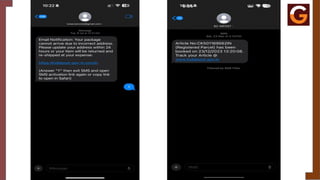
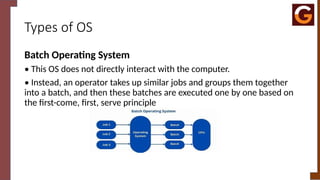
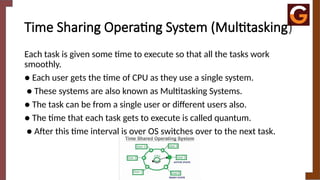
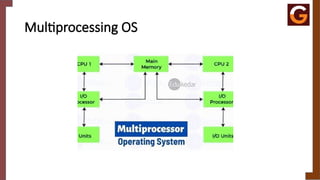
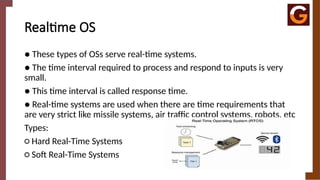
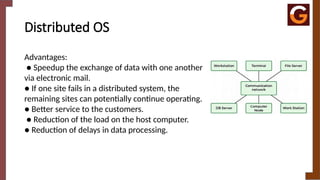
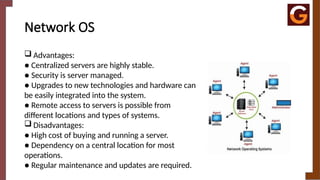
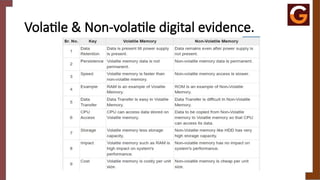
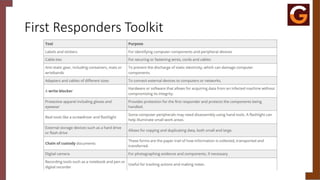

![It ACT – 66B [RECEIVING STOLEN COMPUTER
OR DEVICES]
• Section 66B of the Information Technology Act, 2000 (India): This section deals
with the punishment for dishonestly receiving stolen computer resources or
communication devices. If a person receives or retains any stolen computer
resource or communication device, knowing or having reason to believe that it is
stolen, they shall be punished with imprisonment for up to three years or with a
fine which may extend to one lakh rupees or with both.
• Example:
• Continuing with the previous example, suppose a person, after the hacking
incident, buys the stolen files or data from the hacker, knowing that these files
were obtained illegally. Under Section 66B, the person who bought the stolen
files can be prosecuted and may face imprisonment and/or a fine for dishonestly
receiving the stolen computer resource.](https://image.slidesharecdn.com/digitalforensicsmultimediaandincidentresponseunit1-250627025912-e6fbb8a2/85/DIGITAL-FORENSICS-MULTIMEDIA-AND-INCIDENT-RESPONSE-pptx-97-320.jpg)
![IT ACT – 66c [ID Theft – using password of
others]
• Section 66C of the Information Technology Act, 2000 (India): This section deals
with the punishment for identity theft. It states that whoever, fraudulently or
dishonestly, makes use of the electronic signature, password, or any other unique
identification feature of any other person, shall be punished with imprisonment
for a term which may extend to three years and shall also be liable to a fine which
may extend to one lakh rupees.
• Example:
• In the context of the previous example, suppose the hacker not only deletes files
but also steals the victim’s password and uses it to access the victim's bank
account to transfer money to another account. This fraudulent use of the victim's
password falls under identity theft. Under Section 66C, the hacker can be
prosecuted and may face imprisonment and/or a fine for this act of identity theft.](https://image.slidesharecdn.com/digitalforensicsmultimediaandincidentresponseunit1-250627025912-e6fbb8a2/85/DIGITAL-FORENSICS-MULTIMEDIA-AND-INCIDENT-RESPONSE-pptx-98-320.jpg)
![It ACT – 66D [CHEATING BY USING
COMPUTER RESOURCES]
• Section 66D of the Information Technology Act, 2000 (India): This section
deals with the punishment for cheating by personation using computer
resources. It states that whoever, by means of any communication device or
computer resource, cheats by personation shall be punished with imprisonment
for a term which may extend to three years and shall also be liable to a fine
which may extend to one lakh rupees.
• Example:
• Building on the previous example, suppose the hacker not only hacks into the
victim's computer and steals their password but then uses the victim's identity to
send fraudulent emails to the victim's contacts, pretending to be the victim, and
asking for money. This act of impersonating the victim to deceive others into
giving money is covered under Section 66D. The hacker can be prosecuted for
cheating by personation using a computer resource, and may face imprisonment
and/or a fine under this section.](https://image.slidesharecdn.com/digitalforensicsmultimediaandincidentresponseunit1-250627025912-e6fbb8a2/85/DIGITAL-FORENSICS-MULTIMEDIA-AND-INCIDENT-RESPONSE-pptx-99-320.jpg)
![It ACT – 66E [PUBLISHING PRIVATE IMAGES
OF OTHERS]
• Section 66E of the Information Technology Act, 2000 (India): This section
deals with the punishment for the violation of privacy. It states that whoever,
intentionally or knowingly, captures, publishes, or transmits the image of a
private area of any person without their consent, under circumstances violating
the privacy of that person, shall be punished with imprisonment for a term
which may extend to three years or with a fine not exceeding two lakh rupees, or
with both.
• Example:
• Continuing from the previous examples, suppose after hacking into the victim's
computer, the hacker accesses the victim’s webcam and captures private images
without the victim's knowledge or consent. If the hacker then shares or
publishes these images online, it constitutes a violation of the victim’s privacy.
Under Section 66E, the hacker can be prosecuted and may face imprisonment
and/or a fine for the unauthorized capture and dissemination of private images.](https://image.slidesharecdn.com/digitalforensicsmultimediaandincidentresponseunit1-250627025912-e6fbb8a2/85/DIGITAL-FORENSICS-MULTIMEDIA-AND-INCIDENT-RESPONSE-pptx-100-320.jpg)
![It ACT – 66F [ACTS OF CYBER TERRORISM]
• Section 66F of the Information Technology Act, 2000 (India): This section
deals with the punishment for cyber terrorism. It states that whoever, with
intent to threaten the unity, integrity, security, or sovereignty of India, shall
be punishable with imprisonment which may extend to imprisonment for
life.
• Example:
• Suppose a hacker, with the intent to disrupt national security, hacks into the
computer systems controlling the power grid of a major city in India,
causing a massive blackout. This action not only disrupts essential services
but also poses a threat to public safety and national security. Under Section
66F, this act would be considered cyber terrorism. The hacker can be
prosecuted and may face imprisonment, potentially for life, due to the
severe implications of the attack on public safety and national security.](https://image.slidesharecdn.com/digitalforensicsmultimediaandincidentresponseunit1-250627025912-e6fbb8a2/85/DIGITAL-FORENSICS-MULTIMEDIA-AND-INCIDENT-RESPONSE-pptx-101-320.jpg)
![It ACT – 67 [PUBHLISHING INFO WHICH IS
OBSCENE IN E-FORM]
• Section 67 of the Information Technology Act, 2000 (India): This section deals with
the punishment for publishing or transmitting obscene material in electronic form. It
states that whoever publishes or transmits or causes to be published or transmitted in
the electronic form, any material which is lascivious or appeals to the prurient interest
or if its effect is such as to tend to deprave and corrupt persons who are likely to read,
see or hear the matter contained in it, shall be punished on first conviction with
imprisonment which may extend to three years and with a fine which may extend to
five lakh rupees, and in the event of a second or subsequent conviction with
imprisonment which may extend to five years and also with a fine which may extend to
ten lakh rupees.
• Example:
• Imagine a person creates a website and uploads images or videos that are considered
obscene, but they do not contain any sexually explicit acts (e.g., inappropriate
gestures, nudity, or suggestive content that may deprave or corrupt viewers). While
the material is inappropriate, it does not depict sexual acts explicitly.](https://image.slidesharecdn.com/digitalforensicsmultimediaandincidentresponseunit1-250627025912-e6fbb8a2/85/DIGITAL-FORENSICS-MULTIMEDIA-AND-INCIDENT-RESPONSE-pptx-102-320.jpg)
![It ACT – 67A [PUBHLISHING IMAGES
CONTAINING SEXUAL ACTS]
• Section 67A of the Information Technology Act, 2000 (India): This section
deals with the punishment for publishing or transmitting material containing
sexually explicit acts in electronic form. It states that whoever publishes or
transmits or causes to be published or transmitted in the electronic form any
material which contains sexually explicit acts or conduct, shall be punished on
first conviction with imprisonment for a term which may extend to five years and
with a fine which may extend to ten lakh rupees, and in the event of a second or
subsequent conviction, with imprisonment for a term which may extend to
seven years and also with a fine which may extend to ten lakh rupees.
• Example:
• Now, suppose the same person uploads videos that clearly show sexually
explicit acts, such as graphic sexual content or pornography. This kind of
content goes beyond being merely obscene and involves the actual depiction of
sexual activity.](https://image.slidesharecdn.com/digitalforensicsmultimediaandincidentresponseunit1-250627025912-e6fbb8a2/85/DIGITAL-FORENSICS-MULTIMEDIA-AND-INCIDENT-RESPONSE-pptx-103-320.jpg)
![IT ACT – 67B [publishing or transmitting of
material depicting children in sexually explicitact]
• Section 67B of the Information Technology Act, 2000 (India): This section addresses the publishing,
transmitting, or browsing of material depicting children in sexually explicit acts, primarily focusing on
preventing child pornography in electronic form. It imposes severe penalties for involvement in such activities.
• Key Provisions of Section 67B:
• It prohibits:
1. Publishing or transmitting material depicting children in sexually explicit acts.
2. Creating, collecting, browsing, downloading, promoting, or distributing such material.
3. Enticing or inducing children online for sexual purposes.
4. Facilitating or encouraging child exploitation through online platforms.
• Punishment:
• First conviction: Imprisonment up to 5 years and/or a fine up to 10 lakh rupees.
• Subsequent conviction: Imprisonment up to 7 years and/or a fine up to 10 lakh rupees.
• Example:
• Suppose a person downloads and shares videos featuring minors involved in sexually explicit acts through an
online platform or messaging service. This action falls under child pornography and constitutes a violation of
Section 67B.](https://image.slidesharecdn.com/digitalforensicsmultimediaandincidentresponseunit1-250627025912-e6fbb8a2/85/DIGITAL-FORENSICS-MULTIMEDIA-AND-INCIDENT-RESPONSE-pptx-104-320.jpg)
![IT ACT – 67C [FAILURE TO MAINTAIN
RECORDS]
• Section 67C of the Information Technology Act, 2000 (India): This section mandates the preservation and
retention of information by intermediaries (such as ISPs, social media platforms, or other service providers). It
requires intermediaries to retain specific information as directed by the government for a prescribed period and to
provide access to it when required by authorities. Failing to comply with these requirements leads to punishment.
• Key Provisions:
• Intermediaries are required to preserve and retain certain information as specified by law.
• The government may issue directions regarding the duration for which such information must be retained.
• Non-compliance with these directions results in punishment.
• Punishment:
• Imprisonment for up to 3 years and/or a fine.
• Example:
• Suppose a social media platform is instructed by the government to retain data about user activity for a specific
period, such as messages sent over the platform. If the platform fails to retain or deletes this data before the
prescribed time, despite receiving the government's direction, it would be in violation of Section 67C.](https://image.slidesharecdn.com/digitalforensicsmultimediaandincidentresponseunit1-250627025912-e6fbb8a2/85/DIGITAL-FORENSICS-MULTIMEDIA-AND-INCIDENT-RESPONSE-pptx-105-320.jpg)
![IT ACT – 68 [FAILURE / REFUSAL TO COMPLY
WITH OTHERS]
• Section 68 of the Information Technology Act, 2000 (India): This section empowers a designated
government officer to direct any person in charge of a computer resource to assist in decrypting or
providing access to data, or to comply with instructions necessary for law enforcement purposes. If
the person fails to comply with these directions, they can face legal consequences.
• Key Provisions:
• A government officer (authorized by the central or state government) can issue instructions to a
person in charge of a computer resource.
• The person must comply with the directions given for accessing or decrypting data.
• Non-compliance with these instructions results in punishment.
• Punishment:
• Imprisonment for up to 2 years and/or a fine of up to 1 lakh rupees.
• Example:
• Suppose law enforcement officers investigating a cybercrime request an IT company to decrypt
certain data stored on their server that is critical to the investigation. If the company refuses to
provide assistance or fails to comply with the decryption request, they would be violating Section 68.](https://image.slidesharecdn.com/digitalforensicsmultimediaandincidentresponseunit1-250627025912-e6fbb8a2/85/DIGITAL-FORENSICS-MULTIMEDIA-AND-INCIDENT-RESPONSE-pptx-106-320.jpg)
![It ACT – 69 [FAILURE / REFUSAL TO
DECRYPT THE DATA]
• Section 69 of the Information Technology Act, 2000 (India): This section grants the government the authority to issue directions for
interception, monitoring, or decryption of any information through any computer resource. The government can exercise this power in
the interest of national security, defense, public order, or to prevent incitement to the commission of any cognizable offense.
• Failure to comply with such directions is punishable by law.
• Key Provisions:
• The government (or authorized officers) can direct agencies or service providers to intercept, monitor, or decrypt information for
reasons such as:
• National security
• Defense
• Sovereignty and integrity of India
• Friendly relations with foreign states
• Public order or preventing crimes
• The person or service provider receiving such instructions must comply.
• Non-compliance with these directions leads to punishment.
• Punishment:
• Imprisonment for up to 7 years and/or a fine.
• Example:
• Suppose a government intelligence agency suspects that terrorists are using encrypted communication over a messaging service to
plan attacks. Under Section 69, the government can issue directions to the messaging service to intercept or decrypt the
communication for investigation purposes. If the messaging service refuses to comply with the government order, it would be in
violation of Section 69.](https://image.slidesharecdn.com/digitalforensicsmultimediaandincidentresponseunit1-250627025912-e6fbb8a2/85/DIGITAL-FORENSICS-MULTIMEDIA-AND-INCIDENT-RESPONSE-pptx-107-320.jpg)
![It ACT – 70 [Protected systems and networks]
• Section 70 of the Information Technology Act, 2000 (India): This section designates certain computer resources as
"protected systems" by the government. These protected systems are crucial for the country's national security, defense,
or public infrastructure, and access to them is restricted. Only authorized personnel are permitted to access these
systems, and any unauthorized access or tampering with them is a serious offense.
• Key Provisions:
• The government may declare any computer resource as a "protected system" through an official notification.
• Only authorized personnel are allowed to access these protected systems.
• Unauthorized access or attempts to secure access without authorization are strictly prohibited.
• Any person who secures unauthorized access or tampers with a protected system faces severe legal consequences.
• Punishment:
• Imprisonment for up to 10 years and/or a fine.
• Example:
• Suppose a government-controlled nuclear power plant uses specialized computer systems to manage its operations. The
government officially declares these systems as "protected systems" under Section 70. If a hacker attempts to breach
the plant's control system to gain unauthorized access, even if they don't succeed, they would be violating Section 70.](https://image.slidesharecdn.com/digitalforensicsmultimediaandincidentresponseunit1-250627025912-e6fbb8a2/85/DIGITAL-FORENSICS-MULTIMEDIA-AND-INCIDENT-RESPONSE-pptx-108-320.jpg)
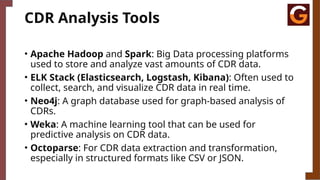
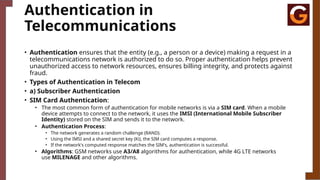
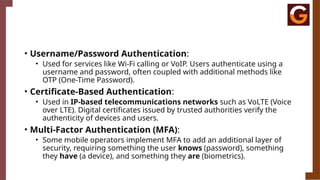



![Polymer [ बहुलक ] Chemistry Notes PDF - Irfanullah Mehar - JJ Sir Chemistry.pdf](https://cdn.slidesharecdn.com/ss_thumbnails/polymerchemistrynotespdf-irfanullahmehar-jjsirchemistry-260210172118-3f9b37f7-thumbnail.jpg?width=640&height=640&fit=bounds)


