Welcome Digital
Accessibility Essentials
for Educators
Dr. Rob Power
President, Power Learning Solutions
Power Learning Solutions and Sheppard Diversity Training recognize
that Cape Breton Island is in Mi’kma’ki, the ancestral and unceded
territory of the Mi’kmaq People. This territory is covered by the
“Treaties of Peace and Friendship” which Mi’kmaq and Wolastoqiyik
(Maliseet) people first signed with the British Crown in 1725. The
treaties did not deal with surrender of lands and resources but in fact
recognized Mi’kmaq and Wolastoqiyik (Maliseet) title and established
the rules for what was to be an ongoing relationship between nations.
Land Acknowledgement
My Perspective
What We’ll Explore Today
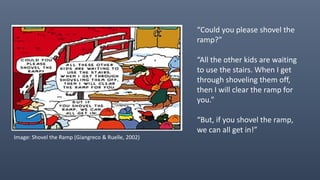
Image: Shovel the Ramp (Giangreco & Ruelle, 2002)
“Could you please shovel the
ramp?”
“All the other kids are waiting
to use the stairs. When I get
through shoveling them off,
then I will clear the ramp for
you.”
“But, if you shovel the ramp,
we can all get in!”
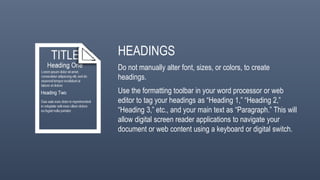
HEADINGS
Do not manually alter font, sizes, or colors, to create
headings.
Use the formatting toolbar in your word processor or web
editor to tag your headings as “Heading 1,” “Heading 2,”
“Heading 3,” etc., and your main text as “Paragraph.” This will
allow digital screen reader applications to navigate your
document or web content using a keyboard or digital switch.
IMAGES
Do not embed text within an image. It is not machine readable,
so it is not accessible.
If the image is purely decorative, check the “Mark as Decorative”
option when inserting it. Digital screen reader applications will
ignore it.
If the image contains important content, include ALT text. Add a
sentence or two that describes the image for visually impaired
audiences.
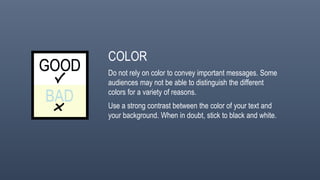
COLOR
Do not rely on color to convey important messages. Some
audiences may not be able to distinguish the different
colors for a variety of reasons.
Use a strong contrast between the color of your text and
your background. When in doubt, stick to black and white.
VIDEO CAPTIONS
Many users may not be able to hear the narration in videos you
choose or create to add to your course or web-based content.
Many other users frequently choose to watch videos with the
sound turned off.
Make sure you select videos that have Closed Captions available.
Use your video editor or YouTube’s closed captioning tools to add
captions to your own videos.
HOW-TO DEMONSTRATION
THANK-YOU
POWERLEARNINGSOLUTIONS.COM SHEPPARDDIVERSITY.COM

Digital Accessible Essentials for Educators

  • 1.
    Welcome Digital Accessibility Essentials forEducators Dr. Rob Power President, Power Learning Solutions
  • 2.
    Power Learning Solutionsand Sheppard Diversity Training recognize that Cape Breton Island is in Mi’kma’ki, the ancestral and unceded territory of the Mi’kmaq People. This territory is covered by the “Treaties of Peace and Friendship” which Mi’kmaq and Wolastoqiyik (Maliseet) people first signed with the British Crown in 1725. The treaties did not deal with surrender of lands and resources but in fact recognized Mi’kmaq and Wolastoqiyik (Maliseet) title and established the rules for what was to be an ongoing relationship between nations. Land Acknowledgement
  • 4.
  • 5.
  • 6.
    Image: Shovel theRamp (Giangreco & Ruelle, 2002) “Could you please shovel the ramp?” “All the other kids are waiting to use the stairs. When I get through shoveling them off, then I will clear the ramp for you.” “But, if you shovel the ramp, we can all get in!”
  • 8.
    HEADINGS Do not manuallyalter font, sizes, or colors, to create headings. Use the formatting toolbar in your word processor or web editor to tag your headings as “Heading 1,” “Heading 2,” “Heading 3,” etc., and your main text as “Paragraph.” This will allow digital screen reader applications to navigate your document or web content using a keyboard or digital switch.
  • 9.
    IMAGES Do not embedtext within an image. It is not machine readable, so it is not accessible. If the image is purely decorative, check the “Mark as Decorative” option when inserting it. Digital screen reader applications will ignore it. If the image contains important content, include ALT text. Add a sentence or two that describes the image for visually impaired audiences.
  • 10.
    COLOR Do not relyon color to convey important messages. Some audiences may not be able to distinguish the different colors for a variety of reasons. Use a strong contrast between the color of your text and your background. When in doubt, stick to black and white.
  • 11.
    VIDEO CAPTIONS Many usersmay not be able to hear the narration in videos you choose or create to add to your course or web-based content. Many other users frequently choose to watch videos with the sound turned off. Make sure you select videos that have Closed Captions available. Use your video editor or YouTube’s closed captioning tools to add captions to your own videos.
  • 12.
  • 13.