DevOps presentation
What is DevOps
● A buzz word
● A culture among developers
● A combination of many different tools
● An environment where building, testing
and releasing happens rapidly and
frequently
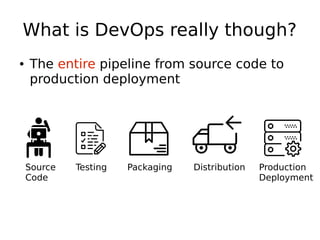
What is DevOps really though?
● The entire pipeline from source code to
production deployment
Source
Code
Testing Packaging Distribution Production
Deployment
Source Code
● Version management is essential
● Tools:
– Git
– Subversion
– Bazaar
– ...
Version Management
● Keep track of all software revisions
● Allow multiple developers to work in
parallel
● At Axsh we use git and github
Version Management
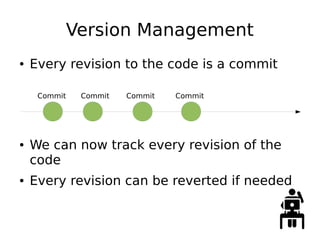
● Every revision to the code is a commit
● We can now track every revision of the
code
● Every revision can be reverted if needed
Commit Commit Commit Commit
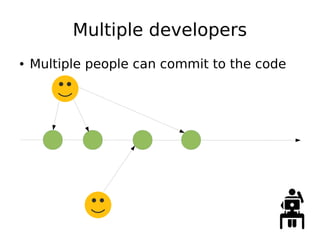
Multiple developers
● Multiple people can commit to the code
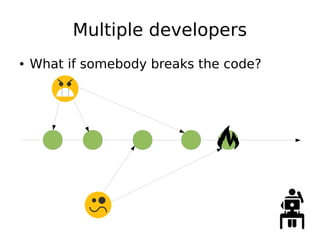
Multiple developers
● What if somebody breaks the code?
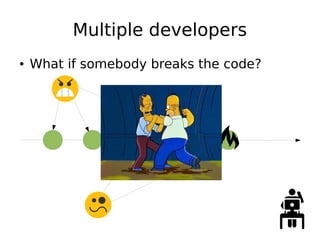
Multiple developers
● What if somebody breaks the code?
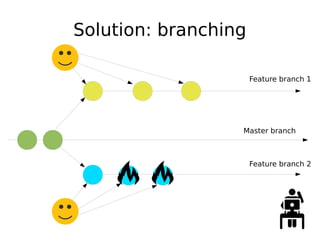
Solution: branching
Master branch
Feature branch 1
Feature branch 2
Branching benefits
● Developers don’t get in each others way
● Safe to experiment and break the code
since Master branch is not affected
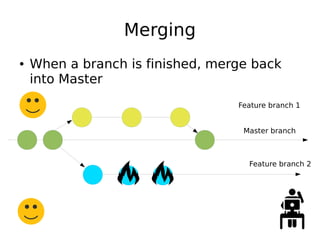
Merging
● When a branch is finished, merge back
into Master
Master branch
Feature branch 1
Feature branch 2
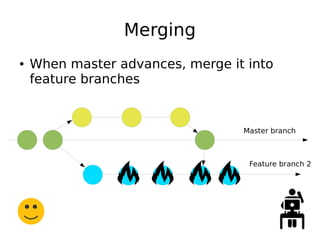
Merging
● When master advances, merge it into
feature branches
Master branch
Feature branch 2
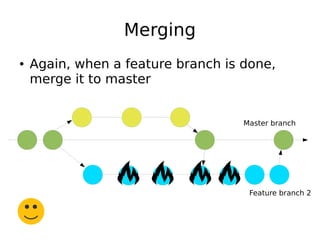
Merging
● Again, when a feature branch is done,
merge it to master
Master branch
Feature branch 2
Good branching culture
● Never commit directly to master
● Every time a new feature or bugfix starts,
cut a new branch from master
● When a feature branch is done
– Review code
– Run automatic tests
– Merge
– Delete feature branch
How to test a feature branch
● Run unit tests:
– Quick tests that each cover a small part of
the code
● Build packages
● Install on test environment just like you
would on production
● Run integration tests
– Test the entire software system like it would
be used in production
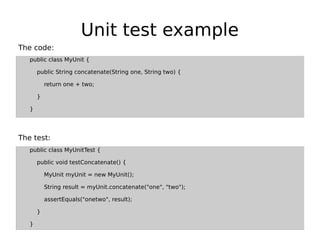
Unit test example
public class MyUnit {
public String concatenate(String one, String two) {
return one + two;
}
}
public class MyUnitTest {
public void testConcatenate() {
MyUnit myUnit = new MyUnit();
String result = myUnit.concatenate("one", "two");
assertEquals("onetwo", result);
}
}
The test:
The code:
Unit tests
● Are very small
● Are very quick
● Test only one specific part of the code
● Can be done repeatedly while writing
code (Test Driven Development)
Integration testing
● Deploy the entire application on an
environment similar to production
● Test the application just like a real client
would use it
● Integration tests take a long time
● They should run at the end of a feature
branch
Effective testing
● Should be done automatically using CI
● Should be simple and repeatable
● Should report test results
Code review
● Automated tests ensure the code works
● Developers needs to ensure code quality
● Feature branches needs to get approval
from another developer before merge
● Some teams use automatic code review
tools
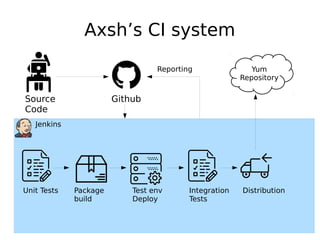
Jenkins
Axsh’s CI system
Source
Code
Github
Unit Tests Package
build
Test env
Deploy
Integration
Tests
Distribution
Yum
Repository
Reporting

DevOps presentation

  • 1.
  • 2.
    What is DevOps ●A buzz word ● A culture among developers ● A combination of many different tools ● An environment where building, testing and releasing happens rapidly and frequently
  • 3.
    What is DevOpsreally though? ● The entire pipeline from source code to production deployment Source Code Testing Packaging Distribution Production Deployment
  • 4.
    Source Code ● Versionmanagement is essential ● Tools: – Git – Subversion – Bazaar – ...
  • 5.
    Version Management ● Keeptrack of all software revisions ● Allow multiple developers to work in parallel ● At Axsh we use git and github
  • 6.
    Version Management ● Everyrevision to the code is a commit ● We can now track every revision of the code ● Every revision can be reverted if needed Commit Commit Commit Commit
  • 7.
    Multiple developers ● Multiplepeople can commit to the code
  • 8.
    Multiple developers ● Whatif somebody breaks the code?
  • 9.
    Multiple developers ● Whatif somebody breaks the code?
  • 10.
  • 11.
    Branching benefits ● Developersdon’t get in each others way ● Safe to experiment and break the code since Master branch is not affected
  • 12.
    Merging ● When abranch is finished, merge back into Master Master branch Feature branch 1 Feature branch 2
  • 13.
    Merging ● When masteradvances, merge it into feature branches Master branch Feature branch 2
  • 14.
    Merging ● Again, whena feature branch is done, merge it to master Master branch Feature branch 2
  • 15.
    Good branching culture ●Never commit directly to master ● Every time a new feature or bugfix starts, cut a new branch from master ● When a feature branch is done – Review code – Run automatic tests – Merge – Delete feature branch
  • 16.
    How to testa feature branch ● Run unit tests: – Quick tests that each cover a small part of the code ● Build packages ● Install on test environment just like you would on production ● Run integration tests – Test the entire software system like it would be used in production
  • 17.
    Unit test example publicclass MyUnit { public String concatenate(String one, String two) { return one + two; } } public class MyUnitTest { public void testConcatenate() { MyUnit myUnit = new MyUnit(); String result = myUnit.concatenate("one", "two"); assertEquals("onetwo", result); } } The test: The code:
  • 18.
    Unit tests ● Arevery small ● Are very quick ● Test only one specific part of the code ● Can be done repeatedly while writing code (Test Driven Development)
  • 19.
    Integration testing ● Deploythe entire application on an environment similar to production ● Test the application just like a real client would use it ● Integration tests take a long time ● They should run at the end of a feature branch
  • 20.
    Effective testing ● Shouldbe done automatically using CI ● Should be simple and repeatable ● Should report test results
  • 21.
    Code review ● Automatedtests ensure the code works ● Developers needs to ensure code quality ● Feature branches needs to get approval from another developer before merge ● Some teams use automatic code review tools
  • 22.
    Jenkins Axsh’s CI system Source Code Github UnitTests Package build Test env Deploy Integration Tests Distribution Yum Repository Reporting