Unit 1
Overview of Devops
Introduction to DevOps, Benefits of working in a DevOps
environment, DevOps Lifecycle, How DevOps affects
Architecture, DevOps Delivery Pipeline.
What is DevOps?
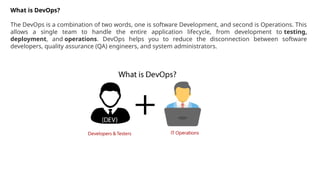
The DevOps is a combination of two words, one is software Development, and second is Operations. This
allows a single team to handle the entire application lifecycle, from development to testing,
deployment, and operations. DevOps helps you to reduce the disconnection between software
developers, quality assurance (QA) engineers, and system administrators.
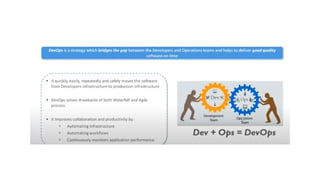
• DevOps promotes collaboration between Development and Operations team to deploy code to
production faster in an automated & repeatable way.
• DevOps helps to increase organization speed to deliver applications and services. It also allows
organizations to serve their customers better and compete more strongly in the market.
• DevOps can also be defined as a sequence of development and IT operations with better communication
and collaboration.
• DevOps has become one of the most valuable business disciplines for enterprises or organizations. With
the help of DevOps, quality, and speed of the application delivery has improved to a great extent.
• DevOps is nothing but a practice or methodology of making "Developers" and "Operations" folks work
together. DevOps represents a change in the IT culture with a complete focus on rapid IT service delivery
through the adoption of agile practices in the context of a system-oriented approach.
• DevOps is all about the integration of the operations and development process. Organizations that have
adopted DevOps noticed a 22% improvement in software quality and a 17% improvement in application
deployment frequency and achieve a 22% hike in customer satisfaction. 19% of revenue hikes as a result
of the successful DevOps implementation.
Why DevOps?
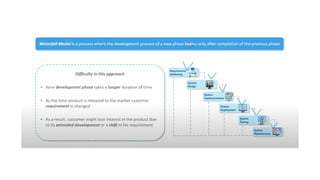
• Before going further, we need to understand why we need the DevOps over the other
methods.
• The operation and development team worked in complete isolation.
• After the design-build, the testing and deployment are performed respectively. That's why
they consumed more time than actual build cycles.
• Without the use of DevOps, the team members are spending a large amount of time on
designing, testing, and deploying instead of building the project.
• Manual code deployment leads to human errors in production.
• Coding and operation teams have their separate timelines and are not in synch, causing
further delays.
Benefits of DevOps
• DevOps is an excellent approach for quick development and deployment of applications.
• It responds faster to the market changes to improve business growth.
• DevOps escalate business profit by decreasing software delivery time and transportation
costs.
• DevOps clears the descriptive process, which gives clarity on product development and
delivery.
• It improves customer experience and satisfaction.
• DevOps simplifies collaboration and places all tools in the cloud for customers to access.
• DevOps means collective responsibility, which leads to better team engagement and
productivity.
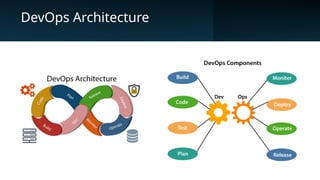
DevOps Architecture
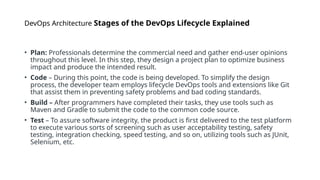
DevOps Architecture Stages of the DevOps Lifecycle Explained
• Plan: Professionals determine the commercial need and gather end-user opinions
throughout this level. In this step, they design a project plan to optimize business
impact and produce the intended result.
• Code – During this point, the code is being developed. To simplify the design
process, the developer team employs lifecycle DevOps tools and extensions like Git
that assist them in preventing safety problems and bad coding standards.
• Build – After programmers have completed their tasks, they use tools such as
Maven and Gradle to submit the code to the common code source.
• Test – To assure software integrity, the product is first delivered to the test platform
to execute various sorts of screening such as user acceptability testing, safety
testing, integration checking, speed testing, and so on, utilizing tools such as JUnit,
Selenium, etc.
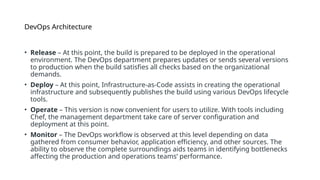
DevOps Architecture
• Release – At this point, the build is prepared to be deployed in the operational
environment. The DevOps department prepares updates or sends several versions
to production when the build satisfies all checks based on the organizational
demands.
• Deploy – At this point, Infrastructure-as-Code assists in creating the operational
infrastructure and subsequently publishes the build using various DevOps lifecycle
tools.
• Operate – This version is now convenient for users to utilize. With tools including
Chef, the management department take care of server configuration and
deployment at this point.
• Monitor – The DevOps workflow is observed at this level depending on data
gathered from consumer behavior, application efficiency, and other sources. The
ability to observe the complete surroundings aids teams in identifying bottlenecks
affecting the production and operations teams’ performance.
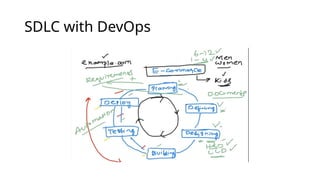
SDLC with DevOps
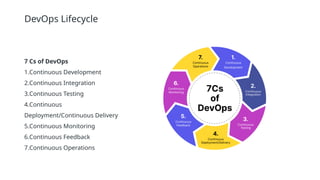
DevOps Lifecycle
7 Cs of DevOps
1.Continuous Development
2.Continuous Integration
3.Continuous Testing
4.Continuous
Deployment/Continuous Delivery
5.Continuous Monitoring
6.Continuous Feedback
7.Continuous Operations
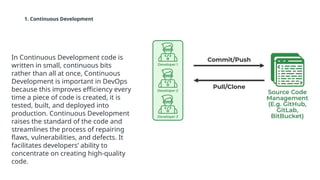
1. Continuous Development
In Continuous Development code is
written in small, continuous bits
rather than all at once, Continuous
Development is important in DevOps
because this improves efficiency every
time a piece of code is created, it is
tested, built, and deployed into
production. Continuous Development
raises the standard of the code and
streamlines the process of repairing
flaws, vulnerabilities, and defects. It
facilitates developers’ ability to
concentrate on creating high-quality
code.
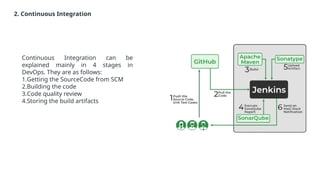
2. Continuous Integration
Continuous Integration can be
explained mainly in 4 stages in
DevOps. They are as follows:
1.Getting the SourceCode from SCM
2.Building the code
3.Code quality review
4.Storing the build artifacts
Continuous Integration
The stages mentioned above are the flow of Continuous Integration and we can use any of the tools
that suit our requirement in each stage and of the most popular tools are GitHub for source code
management(SCM) when the developer develops the code on his local machine he pushes it to the
remote repository which is GitHub from here who is having the access can Pull, clone and can make
required changes to the code.
From there by using Maven we can build them into the required package (war, jar, ear) and can test
the Junit cases.SonarQube performs code quality reviews where it will measure the quality of
source code and generates a report in the form of HTML or PDF format.
Nexus for storing the build artifacts will help us to store the artifacts that are build by using Maven
and this whole process is achieved by using a Continuous Integration tool Jenkins.
1. Push the Source Code
•Developers write source code and unit test cases locally.
•The code is pushed to a GitHub repository (Version Control System)
•2. Pull the Code
•Jenkins, a CI/CD automation tool, is triggered to pull the code from GitHub.
•3. Build using Apache Maven
•Jenkins uses Apache Maven to:
• Compile the code.
• Resolve dependencies.
• Package the application (e.g., into a .jar or .war file).
•4. Execute SonarQube Report
•Jenkins triggers a SonarQube analysis to:
• Perform static code analysis.
• Check for code quality, vulnerabilities, and technical debt.
•A report is generated to ensure code meets quality standards.
5. Upload Artifact
•After the successful build and quality check, Jenkins uploads the built artifact (e.g., the packaged
file) to Sonatype (e.g., Nexus Repository Manager), which acts as an artifact repository.
•6. Send Notifications
•Jenkins sends notifications (via email or Slack) about the build status (success/failure) to the
team, keeping everyone informed.
3. Continuous Testing
Any firm can deploy continuous testing with the use of the agile and DevOps methodologies.
Depending on our needs, we can perform continuous testing using automation testing tools such
as Testsigma, Selenium, LambdaTest, etc.
With these tools, we can test our code and prevent problems and code smells, as well as test more quickly
and intelligently.
With the aid of a continuous integration platform like Jenkins, the entire process can be automated, which
is another added benefit.
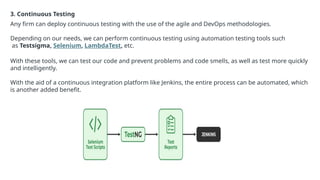
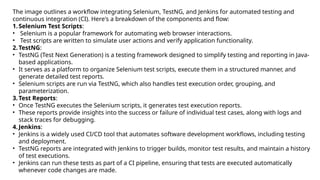
The image outlines a workflow integrating Selenium, TestNG, and Jenkins for automated testing and
continuous integration (CI). Here's a breakdown of the components and flow:
1.Selenium Test Scripts:
• Selenium is a popular framework for automating web browser interactions.
• Test scripts are written to simulate user actions and verify application functionality.
2.TestNG:
• TestNG (Test Next Generation) is a testing framework designed to simplify testing and reporting in Java-
based applications.
• It serves as a platform to organize Selenium test scripts, execute them in a structured manner, and
generate detailed test reports.
• Selenium scripts are run via TestNG, which also handles test execution order, grouping, and
parameterization.
3.Test Reports:
• Once TestNG executes the Selenium scripts, it generates test execution reports.
• These reports provide insights into the success or failure of individual test cases, along with logs and
stack traces for debugging.
4.Jenkins:
• Jenkins is a widely used CI/CD tool that automates software development workflows, including testing
and deployment.
• TestNG reports are integrated with Jenkins to trigger builds, monitor test results, and maintain a history
of test executions.
• Jenkins can run these tests as part of a CI pipeline, ensuring that tests are executed automatically
whenever code changes are made.
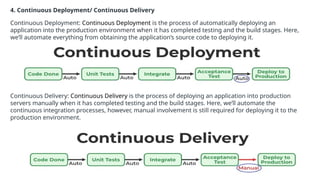
4. Continuous Deployment/ Continuous Delivery
Continuous Deployment: Continuous Deployment is the process of automatically deploying an
application into the production environment when it has completed testing and the build stages. Here,
we’ll automate everything from obtaining the application’s source code to deploying it.
Continuous Delivery: Continuous Delivery is the process of deploying an application into production
servers manually when it has completed testing and the build stages. Here, we’ll automate the
continuous integration processes, however, manual involvement is still required for deploying it to the
production environment.
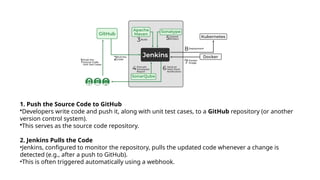
1. Push the Source Code to GitHub
•Developers write code and push it, along with unit test cases, to a GitHub repository (or another
version control system).
•This serves as the source code repository.
2. Jenkins Pulls the Code
•Jenkins, configured to monitor the repository, pulls the updated code whenever a change is
detected (e.g., after a push to GitHub).
•This is often triggered automatically using a webhook.
3. SonarQube Code Analysis
•After the build, SonarQube analyzes the code for quality and security.
•SonarQube generates a report highlighting code smells, bugs, vulnerabilities, and overall code quality.
4. Upload Artifact to Sonatype (Nexus/Repository Manager)
•If the build and code quality checks pass, Jenkins uploads the built artifact (e.g., JAR, WAR, or Docker
image) to a repository like Sonatype Nexus.
•This artifact repository serves as a storage for application packages that can be used for deployments.
5Upload Artifact to Sonatype (Nexus/Repository Manager)
•If the build and code quality checks pass, Jenkins uploads the built artifact (e.g., JAR, WAR, or Docker
image) to a repository like Sonatype Nexus.
•This artifact repository serves as a storage for application packages that can be used for deployments.
6. Notifications (Email/Slack)
•Jenkins sends notifications (via email or Slack) to the team about the build status (success or failure).
•This ensures transparency and timely updates for the development team.
6. Build a Docker Image​
• Jenkins creates a Docker image for the application.​
• Docker images encapsulate the application and its environment, ensuring consistency across different
environments (development, staging, production).​
7. Deploy to Kubernetes​
• The Docker image is deployed to a Kubernetes cluster.​
• Kubernetes manages the containerized application, ensuring scalability, high availability, and efficient
resource utilization.
5. Continuous Monitoring
• DevOps lifecycle is incomplete if there was no Continuous Monitoring.
• Continuous Monitoring can be achieved with the help of Prometheus and Grafana we can continuously monitor
and can get notified before anything goes wrong with the help of Prometheus we can gather many performance
measures, including CPU and memory utilization, network traffic, application response times, error rates, and
others.
• Grafana makes it possible to visually represent and keep track of data from time series, such as CPU and
memory utilization.
6. Continuous Feedback
• Once the application is released into the market the end users will use the application and they will give us
feedback about the performance of the application and any glitches affecting the user experience after getting
multiple feedback from the end users.
• The DevOps team will analyze the feedbacks given by end users and they will reach out to the developer team
tries to rectify the mistakes they are performed in that piece of code by this we can reduce the errors or bugs
that which we are currently developing and can produce much more effective results for the end users also we
reduce any unnecessary steps to deploy the application.
• Continuous Feedback can increase the performance of the application and reduce bugs in the code making it
smooth for end users to use the application.
7. Continuous Operations
We will sustain the higher application uptime by implementing continuous operation, which will assist
us to cut down on the maintenance downtime that will negatively impact end users’ experiences. More
output, lower manufacturing costs, and better quality control are benefits of continuous operations.
How DevOps Affects Architecture
DevOps has a profound impact on software and infrastructure architecture:
1. Microservices Architecture: DevOps supports breaking applications into smaller, independent services, allowing
teams to develop, deploy, and scale them individually.
2. Infrastructure as Code (IaC): Tools like Terraform and Ansible automate the provisioning and management of
infrastructure.
3. Containerization: Technologies like Docker and Kubernetes enable consistent environments across development,
testing, and production.
4. Scalability and Reliability: DevOps focuses on designing architectures that can handle scaling, fault tolerance,
and continuous updates without downtime.
5. Decoupling Deployments: With practices like Blue-Green Deployments and Canary Releases, DevOps ensures
smooth updates without affecting end users.
How DevOps Affects Architecture
DevOps fundamentally changes how software systems are architected, developed, and deployed. By
emphasizing collaboration between development and operations teams, DevOps introduces new
architectural principles and practices that align with the goals of continuous delivery, scalability, and
reliability. Here's how DevOps affects architecture:
1. Microservices-Based Architecture
• DevOps encourages the use of microservices, where applications are broken down into small, loosely
coupled services.
• Each service is independently deployable and can be developed, tested, and scaled separately.
• Enables rapid development and deployment cycles, aligning with DevOps practices.
Impact:
• Systems become modular and easier to update or replace without affecting other components.
• Promotes scalability and fault isolation.
2. Infrastructure as Code (IaC)
• DevOps relies heavily on IaC, where infrastructure configuration is written as code and version-controlled.
• Automated provisioning and configuration reduce manual intervention and improve consistency.
Impact:
• Architectural decisions must account for declarative configurations.
• Environment setups (e.g., development, testing, production) become repeatable and consistent.
3. Event-Driven Architectures
• DevOps environments often use event-driven architectures to handle asynchronous communication between
components.
• Systems can respond dynamically to events, making them more adaptable to change.
• Impact:
• Improves scalability and system responsiveness.
• Enhances integration capabilities between distributed systems.
4. Containerization and Orchestration
• DevOps emphasizes the use of containers (e.g., Docker) for deploying applications and orchestration tools
(e.g., Kubernetes) for managing them.
• Containers package applications and their dependencies, ensuring consistency across environments.
Impact:
• Architectures must support containerized deployments and orchestration.
• Facilitates scaling, load balancing, and resource optimization.
5. Scalable and Resilient Systems
• DevOps practices such as continuous monitoring, automated testing, and CI/CD pipelines require architectures that
are:
• Scalable: To handle varying loads.
• Resilient: To recover quickly from failures.
Impact:
•Introduces failover mechanisms, load balancing, and auto-scaling.
•Focus on fault-tolerant design patterns.
6. Decentralized Data Management
•Microservices and DevOps often require decentralized data management, where each service may have its own
database.
•Ensures services remain independent and scalable.
•Impact:
•Increases architectural complexity in managing data consistency and synchronization.
•Requires techniques like eventual consistency or CQRS (Command Query Responsibility Segregation).
7. DevOps-Friendly Design Patterns
• Architectures are optimized for DevOps workflows, including:
• Blue/Green Deployments.
• Canary Releases.
• Feature Toggles for incremental feature rollouts.
Impact:
•Reduces deployment risks and downtime.
•Enables fast feedback and iterative development.
8. Observability and Monitoring
•DevOps prioritizes observability, with metrics, logs, and traces as integral components.
•Architectures need to include hooks for monitoring and real-time alerting.
•Impact:
•Promotes proactive issue detection and resolution.
•Improves system reliability and user satisfaction.
9. Security by Design
•DevOps integrates security practices (DevSecOps) into the lifecycle, requiring architectures to be
secure by design.
•Automates vulnerability scans and compliance checks.
•Impact:
•Enforces secure development practices.
•Ensures data privacy and protection across the system.

Devops Basic Concepts, Lifecycle of Devops

  • 1.
    Unit 1 Overview ofDevops Introduction to DevOps, Benefits of working in a DevOps environment, DevOps Lifecycle, How DevOps affects Architecture, DevOps Delivery Pipeline.
  • 5.
    What is DevOps? TheDevOps is a combination of two words, one is software Development, and second is Operations. This allows a single team to handle the entire application lifecycle, from development to testing, deployment, and operations. DevOps helps you to reduce the disconnection between software developers, quality assurance (QA) engineers, and system administrators.
  • 6.
    • DevOps promotescollaboration between Development and Operations team to deploy code to production faster in an automated & repeatable way. • DevOps helps to increase organization speed to deliver applications and services. It also allows organizations to serve their customers better and compete more strongly in the market. • DevOps can also be defined as a sequence of development and IT operations with better communication and collaboration. • DevOps has become one of the most valuable business disciplines for enterprises or organizations. With the help of DevOps, quality, and speed of the application delivery has improved to a great extent. • DevOps is nothing but a practice or methodology of making "Developers" and "Operations" folks work together. DevOps represents a change in the IT culture with a complete focus on rapid IT service delivery through the adoption of agile practices in the context of a system-oriented approach. • DevOps is all about the integration of the operations and development process. Organizations that have adopted DevOps noticed a 22% improvement in software quality and a 17% improvement in application deployment frequency and achieve a 22% hike in customer satisfaction. 19% of revenue hikes as a result of the successful DevOps implementation.
  • 7.
    Why DevOps? • Beforegoing further, we need to understand why we need the DevOps over the other methods. • The operation and development team worked in complete isolation. • After the design-build, the testing and deployment are performed respectively. That's why they consumed more time than actual build cycles. • Without the use of DevOps, the team members are spending a large amount of time on designing, testing, and deploying instead of building the project. • Manual code deployment leads to human errors in production. • Coding and operation teams have their separate timelines and are not in synch, causing further delays.
  • 8.
    Benefits of DevOps •DevOps is an excellent approach for quick development and deployment of applications. • It responds faster to the market changes to improve business growth. • DevOps escalate business profit by decreasing software delivery time and transportation costs. • DevOps clears the descriptive process, which gives clarity on product development and delivery. • It improves customer experience and satisfaction. • DevOps simplifies collaboration and places all tools in the cloud for customers to access. • DevOps means collective responsibility, which leads to better team engagement and productivity.
  • 9.
  • 10.
    DevOps Architecture Stagesof the DevOps Lifecycle Explained • Plan: Professionals determine the commercial need and gather end-user opinions throughout this level. In this step, they design a project plan to optimize business impact and produce the intended result. • Code – During this point, the code is being developed. To simplify the design process, the developer team employs lifecycle DevOps tools and extensions like Git that assist them in preventing safety problems and bad coding standards. • Build – After programmers have completed their tasks, they use tools such as Maven and Gradle to submit the code to the common code source. • Test – To assure software integrity, the product is first delivered to the test platform to execute various sorts of screening such as user acceptability testing, safety testing, integration checking, speed testing, and so on, utilizing tools such as JUnit, Selenium, etc.
  • 11.
    DevOps Architecture • Release– At this point, the build is prepared to be deployed in the operational environment. The DevOps department prepares updates or sends several versions to production when the build satisfies all checks based on the organizational demands. • Deploy – At this point, Infrastructure-as-Code assists in creating the operational infrastructure and subsequently publishes the build using various DevOps lifecycle tools. • Operate – This version is now convenient for users to utilize. With tools including Chef, the management department take care of server configuration and deployment at this point. • Monitor – The DevOps workflow is observed at this level depending on data gathered from consumer behavior, application efficiency, and other sources. The ability to observe the complete surroundings aids teams in identifying bottlenecks affecting the production and operations teams’ performance.
  • 14.
  • 15.
    DevOps Lifecycle 7 Csof DevOps 1.Continuous Development 2.Continuous Integration 3.Continuous Testing 4.Continuous Deployment/Continuous Delivery 5.Continuous Monitoring 6.Continuous Feedback 7.Continuous Operations
  • 16.
    1. Continuous Development InContinuous Development code is written in small, continuous bits rather than all at once, Continuous Development is important in DevOps because this improves efficiency every time a piece of code is created, it is tested, built, and deployed into production. Continuous Development raises the standard of the code and streamlines the process of repairing flaws, vulnerabilities, and defects. It facilitates developers’ ability to concentrate on creating high-quality code.
  • 17.
    2. Continuous Integration ContinuousIntegration can be explained mainly in 4 stages in DevOps. They are as follows: 1.Getting the SourceCode from SCM 2.Building the code 3.Code quality review 4.Storing the build artifacts
  • 18.
    Continuous Integration The stagesmentioned above are the flow of Continuous Integration and we can use any of the tools that suit our requirement in each stage and of the most popular tools are GitHub for source code management(SCM) when the developer develops the code on his local machine he pushes it to the remote repository which is GitHub from here who is having the access can Pull, clone and can make required changes to the code. From there by using Maven we can build them into the required package (war, jar, ear) and can test the Junit cases.SonarQube performs code quality reviews where it will measure the quality of source code and generates a report in the form of HTML or PDF format. Nexus for storing the build artifacts will help us to store the artifacts that are build by using Maven and this whole process is achieved by using a Continuous Integration tool Jenkins.
  • 19.
    1. Push theSource Code •Developers write source code and unit test cases locally. •The code is pushed to a GitHub repository (Version Control System) •2. Pull the Code •Jenkins, a CI/CD automation tool, is triggered to pull the code from GitHub. •3. Build using Apache Maven •Jenkins uses Apache Maven to: • Compile the code. • Resolve dependencies. • Package the application (e.g., into a .jar or .war file). •4. Execute SonarQube Report •Jenkins triggers a SonarQube analysis to: • Perform static code analysis. • Check for code quality, vulnerabilities, and technical debt. •A report is generated to ensure code meets quality standards.
  • 20.
    5. Upload Artifact •Afterthe successful build and quality check, Jenkins uploads the built artifact (e.g., the packaged file) to Sonatype (e.g., Nexus Repository Manager), which acts as an artifact repository. •6. Send Notifications •Jenkins sends notifications (via email or Slack) about the build status (success/failure) to the team, keeping everyone informed.
  • 21.
    3. Continuous Testing Anyfirm can deploy continuous testing with the use of the agile and DevOps methodologies. Depending on our needs, we can perform continuous testing using automation testing tools such as Testsigma, Selenium, LambdaTest, etc. With these tools, we can test our code and prevent problems and code smells, as well as test more quickly and intelligently. With the aid of a continuous integration platform like Jenkins, the entire process can be automated, which is another added benefit.
  • 22.
    The image outlinesa workflow integrating Selenium, TestNG, and Jenkins for automated testing and continuous integration (CI). Here's a breakdown of the components and flow: 1.Selenium Test Scripts: • Selenium is a popular framework for automating web browser interactions. • Test scripts are written to simulate user actions and verify application functionality. 2.TestNG: • TestNG (Test Next Generation) is a testing framework designed to simplify testing and reporting in Java- based applications. • It serves as a platform to organize Selenium test scripts, execute them in a structured manner, and generate detailed test reports. • Selenium scripts are run via TestNG, which also handles test execution order, grouping, and parameterization. 3.Test Reports: • Once TestNG executes the Selenium scripts, it generates test execution reports. • These reports provide insights into the success or failure of individual test cases, along with logs and stack traces for debugging. 4.Jenkins: • Jenkins is a widely used CI/CD tool that automates software development workflows, including testing and deployment. • TestNG reports are integrated with Jenkins to trigger builds, monitor test results, and maintain a history of test executions. • Jenkins can run these tests as part of a CI pipeline, ensuring that tests are executed automatically whenever code changes are made.
  • 23.
    4. Continuous Deployment/Continuous Delivery Continuous Deployment: Continuous Deployment is the process of automatically deploying an application into the production environment when it has completed testing and the build stages. Here, we’ll automate everything from obtaining the application’s source code to deploying it. Continuous Delivery: Continuous Delivery is the process of deploying an application into production servers manually when it has completed testing and the build stages. Here, we’ll automate the continuous integration processes, however, manual involvement is still required for deploying it to the production environment.
  • 24.
    1. Push theSource Code to GitHub •Developers write code and push it, along with unit test cases, to a GitHub repository (or another version control system). •This serves as the source code repository. 2. Jenkins Pulls the Code •Jenkins, configured to monitor the repository, pulls the updated code whenever a change is detected (e.g., after a push to GitHub). •This is often triggered automatically using a webhook.
  • 25.
    3. SonarQube CodeAnalysis •After the build, SonarQube analyzes the code for quality and security. •SonarQube generates a report highlighting code smells, bugs, vulnerabilities, and overall code quality. 4. Upload Artifact to Sonatype (Nexus/Repository Manager) •If the build and code quality checks pass, Jenkins uploads the built artifact (e.g., JAR, WAR, or Docker image) to a repository like Sonatype Nexus. •This artifact repository serves as a storage for application packages that can be used for deployments. 5Upload Artifact to Sonatype (Nexus/Repository Manager) •If the build and code quality checks pass, Jenkins uploads the built artifact (e.g., JAR, WAR, or Docker image) to a repository like Sonatype Nexus. •This artifact repository serves as a storage for application packages that can be used for deployments. 6. Notifications (Email/Slack) •Jenkins sends notifications (via email or Slack) to the team about the build status (success or failure). •This ensures transparency and timely updates for the development team.
  • 26.
    6. Build aDocker Image​ • Jenkins creates a Docker image for the application.​ • Docker images encapsulate the application and its environment, ensuring consistency across different environments (development, staging, production).​ 7. Deploy to Kubernetes​ • The Docker image is deployed to a Kubernetes cluster.​ • Kubernetes manages the containerized application, ensuring scalability, high availability, and efficient resource utilization.
  • 27.
    5. Continuous Monitoring •DevOps lifecycle is incomplete if there was no Continuous Monitoring. • Continuous Monitoring can be achieved with the help of Prometheus and Grafana we can continuously monitor and can get notified before anything goes wrong with the help of Prometheus we can gather many performance measures, including CPU and memory utilization, network traffic, application response times, error rates, and others. • Grafana makes it possible to visually represent and keep track of data from time series, such as CPU and memory utilization. 6. Continuous Feedback • Once the application is released into the market the end users will use the application and they will give us feedback about the performance of the application and any glitches affecting the user experience after getting multiple feedback from the end users. • The DevOps team will analyze the feedbacks given by end users and they will reach out to the developer team tries to rectify the mistakes they are performed in that piece of code by this we can reduce the errors or bugs that which we are currently developing and can produce much more effective results for the end users also we reduce any unnecessary steps to deploy the application. • Continuous Feedback can increase the performance of the application and reduce bugs in the code making it smooth for end users to use the application.
  • 28.
    7. Continuous Operations Wewill sustain the higher application uptime by implementing continuous operation, which will assist us to cut down on the maintenance downtime that will negatively impact end users’ experiences. More output, lower manufacturing costs, and better quality control are benefits of continuous operations.
  • 29.
    How DevOps AffectsArchitecture DevOps has a profound impact on software and infrastructure architecture: 1. Microservices Architecture: DevOps supports breaking applications into smaller, independent services, allowing teams to develop, deploy, and scale them individually. 2. Infrastructure as Code (IaC): Tools like Terraform and Ansible automate the provisioning and management of infrastructure. 3. Containerization: Technologies like Docker and Kubernetes enable consistent environments across development, testing, and production. 4. Scalability and Reliability: DevOps focuses on designing architectures that can handle scaling, fault tolerance, and continuous updates without downtime. 5. Decoupling Deployments: With practices like Blue-Green Deployments and Canary Releases, DevOps ensures smooth updates without affecting end users.
  • 30.
    How DevOps AffectsArchitecture DevOps fundamentally changes how software systems are architected, developed, and deployed. By emphasizing collaboration between development and operations teams, DevOps introduces new architectural principles and practices that align with the goals of continuous delivery, scalability, and reliability. Here's how DevOps affects architecture: 1. Microservices-Based Architecture • DevOps encourages the use of microservices, where applications are broken down into small, loosely coupled services. • Each service is independently deployable and can be developed, tested, and scaled separately. • Enables rapid development and deployment cycles, aligning with DevOps practices. Impact: • Systems become modular and easier to update or replace without affecting other components. • Promotes scalability and fault isolation.
  • 31.
    2. Infrastructure asCode (IaC) • DevOps relies heavily on IaC, where infrastructure configuration is written as code and version-controlled. • Automated provisioning and configuration reduce manual intervention and improve consistency. Impact: • Architectural decisions must account for declarative configurations. • Environment setups (e.g., development, testing, production) become repeatable and consistent. 3. Event-Driven Architectures • DevOps environments often use event-driven architectures to handle asynchronous communication between components. • Systems can respond dynamically to events, making them more adaptable to change. • Impact: • Improves scalability and system responsiveness. • Enhances integration capabilities between distributed systems. 4. Containerization and Orchestration • DevOps emphasizes the use of containers (e.g., Docker) for deploying applications and orchestration tools (e.g., Kubernetes) for managing them. • Containers package applications and their dependencies, ensuring consistency across environments. Impact: • Architectures must support containerized deployments and orchestration. • Facilitates scaling, load balancing, and resource optimization.
  • 32.
    5. Scalable andResilient Systems • DevOps practices such as continuous monitoring, automated testing, and CI/CD pipelines require architectures that are: • Scalable: To handle varying loads. • Resilient: To recover quickly from failures. Impact: •Introduces failover mechanisms, load balancing, and auto-scaling. •Focus on fault-tolerant design patterns. 6. Decentralized Data Management •Microservices and DevOps often require decentralized data management, where each service may have its own database. •Ensures services remain independent and scalable. •Impact: •Increases architectural complexity in managing data consistency and synchronization. •Requires techniques like eventual consistency or CQRS (Command Query Responsibility Segregation).
  • 33.
    7. DevOps-Friendly DesignPatterns • Architectures are optimized for DevOps workflows, including: • Blue/Green Deployments. • Canary Releases. • Feature Toggles for incremental feature rollouts. Impact: •Reduces deployment risks and downtime. •Enables fast feedback and iterative development. 8. Observability and Monitoring •DevOps prioritizes observability, with metrics, logs, and traces as integral components. •Architectures need to include hooks for monitoring and real-time alerting. •Impact: •Promotes proactive issue detection and resolution. •Improves system reliability and user satisfaction. 9. Security by Design •DevOps integrates security practices (DevSecOps) into the lifecycle, requiring architectures to be secure by design. •Automates vulnerability scans and compliance checks. •Impact: •Enforces secure development practices. •Ensures data privacy and protection across the system.