Data pipelines: building 

an efficient instrument 

to create a custom
workflow
Speaker: Daniel Yavorovych
DevOpsFest2020
Daniel Yavorovych
CTO & Co-Founder at Dysnix
10+ years of * nix-systems administration;

5+ years of DevOps, SRE;

7+ years in the development of the cloud solution
architectures and HL / HA infrastructures;

7+ years in the development of highly-powerful servers
(Python / Golang).
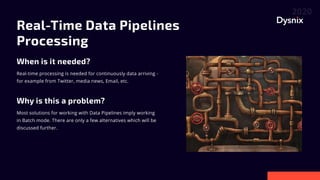
Real-Time Data Pipelines
Processing

When is it needed?
Why is this a problem?
Real-time processing is needed for continuously data arriving -
for example from Twitter, media news, Email, etc.
Most solutions for working with Data Pipelines imply working
in Batch mode. There are only a few alternatives which will be
discussed further.
Data Pipeline Solutions
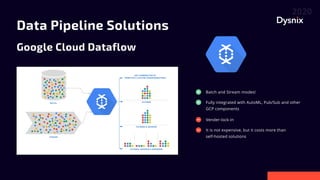
Google Cloud Dataflow
Batch and Stream modes!
Fully integrated with AutoML, Pub/Sub and other
GCP components
Vender-lock-in
It is not expensive, but it costs more than
self-hosted solutions
Data Pipeline Solutions
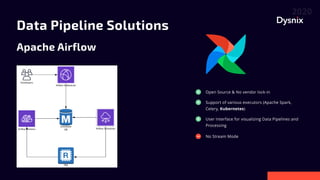
Apache Airflow
Open Source & No vendor lock-in
User Interface for visualizing Data Pipelines and
Processing
Support of various executors (Apache Spark,
Celery, Kubernetes)
No Stream Mode
Data Pipeline Solutions
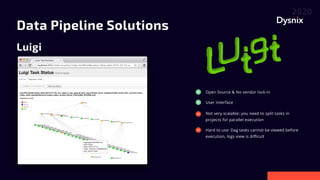
Luigi
Open Source & No vendor lock-in
Not very scalable: you need to split tasks in
projects for parallel execution
User Interface
Hard to use: Dag tasks cannot be viewed before
execution, logs view is difficult
Data Pipeline Solutions
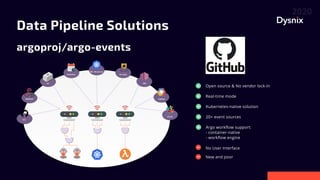
argoproj/argo-events
Open source & No vendor lock-in
No User Interface
Real-time mode
Kubernetes-native solution
20+ event sources
Argo workflow support: 

- container-native 

- workflow engine
New and poor
Data Pipeline Solutions
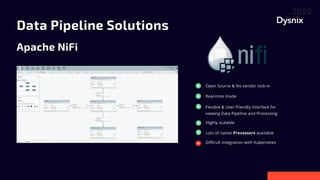
Apache NiFi
Open Source & No vendor lock-in
Difficult integration with Kubernetes
Real-time mode
Flexible & User-friendly Interface for
viewing Data Pipeline and Processing
Highly scalable
Lots of native Processors available
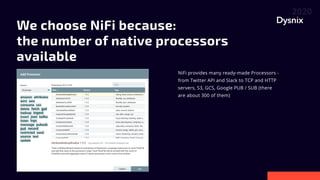
We choose NiFi because: 

the number of native processors
available
NiFi provides many ready-made Processors -
from Twitter API and Slack to TCP and HTTP
servers, S3, GCS, Google PUB / SUB (there
are about 300 of them)
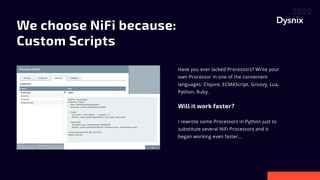
We choose NiFi because: 

Custom Scripts
Have you ever lacked Processors? Write your
own Processor in one of the convenient
languages: Clojure, ECMAScript, Groovy, Lua,
Python, Ruby.


Will it work faster?


I rewrote some Processors in Python just to
substitute several NiFi Processors and it
began working even faster...
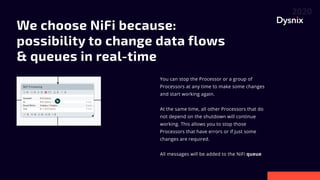
WechooseNiFibecause:
possibilitytochangedataflows
&queuesinreal-time

You can stop the Processor or a group of
Processors at any time to make some changes
and start working again.


At the same time, all other Processors that do
not depend on the shutdown will continue
working. This allows you to stop those
Processors that have errors or if just some
changes are required.


All messages will be added to the NiFi queue
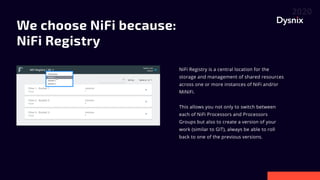
We choose NiFi because: 

NiFi Registry


NiFi Registry is a central location for the
storage and management of shared resources
across one or more instances of NiFi and/or
MiNiFi.


This allows you not only to switch between
each of NiFi Processors and Processors
Groups but also to create a version of your
work (similar to GIT), always be able to roll
back to one of the previous versions.
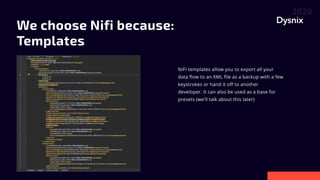
WechooseNifibecause:
Templates

NiFi templates allow you to export all your
data flow to an XML file as a backup with a few
keystrokes or hand it off to another
developer. It can also be used as a base for
presets (we'll talk about this later)
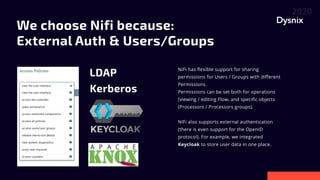
We choose Nifi because:
External Auth & Users/Groups
NiFi has flexible support for sharing
permissions for Users / Groups with different
Permissions.

Permissions can be set both for operations
(viewing / editing Flow, and specific objects
(Processors / Processors groups).


NiFi also supports external authentication
(there is even support for the OpenID
protocol). For example, we integrated
Keycloak to store user data in one place.
LDAP
Kerberos
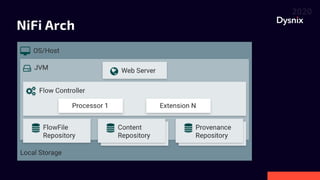
NiFi Arch
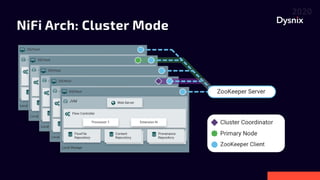
NiFi Arch: Cluster Mode
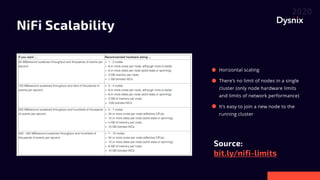
NiFi Scalability
bit.ly/nifi-limits

Source:

Horizontal scaling
There’s no limit of nodes in a single
cluster (only node hardware limits
and limits of network performance)
It’s easy to join a new node to the
running cluster
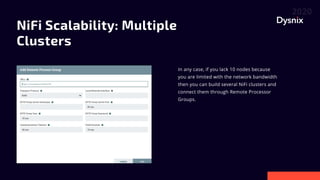
NiFi Scalability: Multiple
Clusters
In any case, if you lack 10 nodes because
you are limited with the network bandwidth
then you can build several NiFi clusters and
connect them through Remote Processor
Groups.
NiFi & Kubernetes
Existing solutions:
https://medium.com/swlh/operationalising-nifi-on-kubernetes-1a8e0ae16a6c
https://hub.helm.sh/charts/cetic/nifi
https://community.cloudera.com/t5/Community-Articles/Deploy-NiFi-On-Kubernetes/ta-p/269758
The last Helm Chart was the most relevant and we took it as a basis
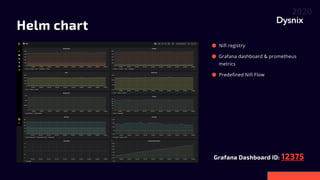
Helm chart
12375
Grafana Dashboard ID:
Nifi registry
Grafana dashboard & prometheus
metrics
Predefined Nifi Flow
Tips & Tricks
Use Kafka or any Message Bus. If there are any failures in NiFi, safety must
be in any concern.
Although NiFi has a visual editor and a bunch of Processors they must be
built by a technically competent engineer, otherwise, data flow can be
destabilized.
For unpredictable inputs, use Rate Limit Processor.
Use NiFi Registry - it will always allow you to roll back!
Don’t try to use only Native NiFi Processors: sometimes it's too complicated
and easier to write a couple of lines in Python.
Don’t gloss over the mistakes! Working in NiFi you can deal with errors the
same way as with regular data and send them to Slack or use for your
purposes.
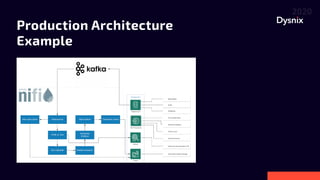
Production Architecture
Example
Conclusion
NiFi proved to be not only good for rapid prototyping of Data Pipeline Flow
but also a good basis for scalable and loaded ELT systems
Of all free self-hosted implementations that support NiFi, it is the most
modern and actively developing
Configuration of a NiFi cluster in Kubernetes did not seem like a trivial task
but after some difficulties faced this ready-to-use solution meets all the
requirements
NiFi is flexible - it does not block everything on itself and using it properly
you can achieve very good results with the support of really big but similar
projects
Dysnix Open Source
github.com/dysnix

Helm charts
Cryptocurrency nodes docker images
Prometheus exporters
Grafana dashboards
Terraform for Blockchain-ETL (project for Google Cloud Platform)
Daniel Yavorovych
CTO & Co-Founder at Dysnix
daniel@dysnix.com
https://www.linkedin.com/in/daniel-yavorovych/
Questions?

DevOps Fest 2020. Даніель Яворович. Data pipelines: building an efficient instrument to make custom workflow

  • 1.
    Data pipelines: building an efficient instrument to create a custom workflow Speaker: Daniel Yavorovych DevOpsFest2020
  • 2.
    Daniel Yavorovych CTO &Co-Founder at Dysnix 10+ years of * nix-systems administration; 5+ years of DevOps, SRE; 7+ years in the development of the cloud solution architectures and HL / HA infrastructures; 7+ years in the development of highly-powerful servers (Python / Golang).
  • 3.
    Real-Time Data Pipelines Processing Whenis it needed? Why is this a problem? Real-time processing is needed for continuously data arriving - for example from Twitter, media news, Email, etc. Most solutions for working with Data Pipelines imply working in Batch mode. There are only a few alternatives which will be discussed further.
  • 4.
    Data Pipeline Solutions GoogleCloud Dataflow Batch and Stream modes! Fully integrated with AutoML, Pub/Sub and other GCP components Vender-lock-in It is not expensive, but it costs more than self-hosted solutions
  • 5.
    Data Pipeline Solutions ApacheAirflow Open Source & No vendor lock-in User Interface for visualizing Data Pipelines and Processing Support of various executors (Apache Spark, Celery, Kubernetes) No Stream Mode
  • 6.
    Data Pipeline Solutions Luigi OpenSource & No vendor lock-in Not very scalable: you need to split tasks in projects for parallel execution User Interface Hard to use: Dag tasks cannot be viewed before execution, logs view is difficult
  • 7.
    Data Pipeline Solutions argoproj/argo-events Opensource & No vendor lock-in No User Interface Real-time mode Kubernetes-native solution 20+ event sources Argo workflow support: - container-native - workflow engine New and poor
  • 8.
    Data Pipeline Solutions ApacheNiFi Open Source & No vendor lock-in Difficult integration with Kubernetes Real-time mode Flexible & User-friendly Interface for viewing Data Pipeline and Processing Highly scalable Lots of native Processors available
  • 9.
    We choose NiFibecause: the number of native processors available NiFi provides many ready-made Processors - from Twitter API and Slack to TCP and HTTP servers, S3, GCS, Google PUB / SUB (there are about 300 of them)
  • 10.
    We choose NiFibecause: Custom Scripts Have you ever lacked Processors? Write your own Processor in one of the convenient languages: Clojure, ECMAScript, Groovy, Lua, Python, Ruby. Will it work faster? I rewrote some Processors in Python just to substitute several NiFi Processors and it began working even faster...
  • 11.
    WechooseNiFibecause: possibilitytochangedataflows &queuesinreal-time You can stopthe Processor or a group of Processors at any time to make some changes and start working again. At the same time, all other Processors that do not depend on the shutdown will continue working. This allows you to stop those Processors that have errors or if just some changes are required. All messages will be added to the NiFi queue
  • 12.
    We choose NiFibecause: NiFi Registry NiFi Registry is a central location for the storage and management of shared resources across one or more instances of NiFi and/or MiNiFi. This allows you not only to switch between each of NiFi Processors and Processors Groups but also to create a version of your work (similar to GIT), always be able to roll back to one of the previous versions.
  • 13.
    WechooseNifibecause: Templates NiFi templates allowyou to export all your data flow to an XML file as a backup with a few keystrokes or hand it off to another developer. It can also be used as a base for presets (we'll talk about this later)
  • 14.
    We choose Nifibecause: External Auth & Users/Groups NiFi has flexible support for sharing permissions for Users / Groups with different Permissions. Permissions can be set both for operations (viewing / editing Flow, and specific objects (Processors / Processors groups). NiFi also supports external authentication (there is even support for the OpenID protocol). For example, we integrated Keycloak to store user data in one place. LDAP Kerberos
  • 15.
  • 16.
  • 17.
    NiFi Scalability bit.ly/nifi-limits Source: Horizontal scaling There’sno limit of nodes in a single cluster (only node hardware limits and limits of network performance) It’s easy to join a new node to the running cluster
  • 18.
    NiFi Scalability: Multiple Clusters Inany case, if you lack 10 nodes because you are limited with the network bandwidth then you can build several NiFi clusters and connect them through Remote Processor Groups.
  • 19.
    NiFi & Kubernetes Existingsolutions: https://medium.com/swlh/operationalising-nifi-on-kubernetes-1a8e0ae16a6c https://hub.helm.sh/charts/cetic/nifi https://community.cloudera.com/t5/Community-Articles/Deploy-NiFi-On-Kubernetes/ta-p/269758 The last Helm Chart was the most relevant and we took it as a basis
  • 20.
    Helm chart 12375 Grafana DashboardID: Nifi registry Grafana dashboard & prometheus metrics Predefined Nifi Flow
  • 21.
    Tips & Tricks UseKafka or any Message Bus. If there are any failures in NiFi, safety must be in any concern. Although NiFi has a visual editor and a bunch of Processors they must be built by a technically competent engineer, otherwise, data flow can be destabilized. For unpredictable inputs, use Rate Limit Processor. Use NiFi Registry - it will always allow you to roll back! Don’t try to use only Native NiFi Processors: sometimes it's too complicated and easier to write a couple of lines in Python. Don’t gloss over the mistakes! Working in NiFi you can deal with errors the same way as with regular data and send them to Slack or use for your purposes.
  • 22.
  • 23.
    Conclusion NiFi proved tobe not only good for rapid prototyping of Data Pipeline Flow but also a good basis for scalable and loaded ELT systems Of all free self-hosted implementations that support NiFi, it is the most modern and actively developing Configuration of a NiFi cluster in Kubernetes did not seem like a trivial task but after some difficulties faced this ready-to-use solution meets all the requirements NiFi is flexible - it does not block everything on itself and using it properly you can achieve very good results with the support of really big but similar projects
  • 24.
    Dysnix Open Source github.com/dysnix Helmcharts Cryptocurrency nodes docker images Prometheus exporters Grafana dashboards Terraform for Blockchain-ETL (project for Google Cloud Platform)
  • 25.
    Daniel Yavorovych CTO &Co-Founder at Dysnix daniel@dysnix.com https://www.linkedin.com/in/daniel-yavorovych/ Questions?