Contribute to OpenNMS
DEV JAM 2019 

June 24, 2019 to June 28, 2019

Markus von Rüden
who | what | where | how
Who Am I
Involved with OpenNMS since end of 2012


Full time contributor for The OpenNMS
Project since March 2013
Stuttgart, DE
https://dev.marskuh.de

mvr@opennms.com

https://github.com/mvrueden
Joined ~2013
mvrueden // mvr

Markus von Rüden
Most Recent Contributions 

Bootstrap 4 Migration
Ulf Login Screen
Geocoder Config UI
Grafana Endpoint UI
Reporting UI (WIP)
Who contributes to the
OpenNMS project?
The OpenNMS Group (TOG)
Order of The Green Polo (OGP)
OpenNMS Community
What to contribute?
Documentation
Code
Configs
Report templates
Bug Reports
Knowledge
Features
Stories
Ideas
Games
Comics
Songs
Where to Contribute?
Chat GITHUB JIRADiscourse
Configuration, documentation, patches,
features
Knowledge
blogyoutube
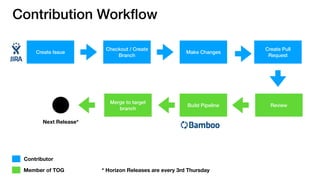
Contribution Workflow
Create Issue
Checkout / Create
Branch
Make Changes
Create Pull
Request
Contributor
Member of TOG
ReviewBuild Pipeline
Merge to target
branch
Next Release*
* Horizon Releases are every 3rd Thursday
Create Issue // Important fields
Feature?
Bug?
Configuration?
Story
Bug
Configuration
Issue TypeIs it a
Don’t worry about the fields too much

we will fill them in for you
Summary
Affected Version
Description
Required fields
@ issues.opennms.org
Issue Workflow
OPEN
IN PROGRESS
IN REVIEW
RESOLVED/
CLOSED
Issue Created
Working on
Issue
Pull Request
created
Pull Request
merged
Set up your environment
latest JDK 8

Maven >= 3.5

PostgreSQL Server >= 9.5

makensis

Pearl

git
MAC OS Users 

https://opennms.discourse.group/t/set-up-local-development-environment-macos/485

Docker Build Image

https://hub.docker.com/r/opennms/build-env
jicmp, jicmp6 (optional)

https://github.com/OpenNMS/jicmp6

https://github.com/OpenNMS/jicmp
Git & Github
Create account @ https://github.com/join
Generate SSH Key

https://help.github.com/en/articles/generating-a-new-ssh-key-and-adding-it-to-the-ssh-agent
Add SSH Key to your Account

https://help.github.com/en/enterprise/2.15/user/articles/adding-a-new-ssh-key-to-your-github-account
Optionally add GPG Key to your Account

https://help.github.com/en/articles/adding-a-new-gpg-key-to-your-github-account
Install git either via desktop.github.com or git command o/
Git Settings
Ensure git config —global
user.name and user.email are set
properly
Optionally sign the commits
The user.email should match any github user account email address
Please use real user name and email
address as it shows up in the
commit history
1
2
1
2
Code base // Github
• Code is hosted at GitHub

• Everything (https://github.com/OpenNMS)

• OpenNMS (https://github.com/OpenNMS/opennms)

• Patches, Config files, Documentation typo fixes, new documentation

• Only members of The OpenNMS Group and The Order of the Green Polo have
direct commit access

• There is a way for contribution —> Fork Project

• Questions: https://chat.opennms.org @ OpenNMS Development Channel
1. Go to the OpenNMS repository @ https://github.com/OpenNMS/opennms
3. Go to your fork of OpenNMS 

@ https://github.com/mvrueden/opennms
2. Fork OpenNMS
Forking the OpenNMS Project
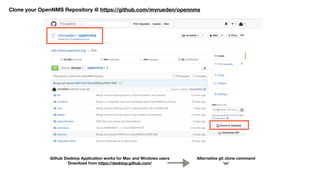
Github Desktop Application works for Mac and Windows users
Download from https://desktop.github.com/
Clone your OpenNMS Repository @ https://github.com/mvrueden/opennms
Alternative git clone command

o/
Manually create pull request at https://github.com/OpenNMS/opennms/pulls/create and
compare across forks
Pull Request Magic
Choose base fork/branch and head fork/branch
OCA not signed?
Fill out https://wiki.opennms.org/wiki/images/6/6b/ContributorAgreement.pdf
send to oca@opennms.org
Tools
Atom.io
Visual Studio Code
Vi, Emacs, …
IntelliJ
Eclipse
yEd - Graph Editor
DataGrip - Database Tool
Development Single File / Documentation Others
Which base branch to use?
Meridian Horizon Branch
M2015 H14 foundation
bug fixes
M2016 H17 foundation-2016
M2017 H19 foundation-2017
M2018 H21 foundation-2018
M2019 TBA, most likely H25
foundation-2019
(not yet available)
- H24.1.1 release-24.1.1
next major release develop new features
Branch naming conventions
most branches jira/<issue-number> jira/NMS-1000
feature branches features/ features/graph-service
test branches <user-prefix>/ mvr/navbar-rework
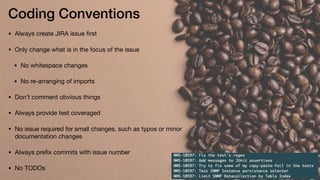
Coding Conventions
• Always create JIRA issue first

• Only change what is in the focus of the issue

• No whitespace changes

• No re-arranging of imports

• Don’t comment obvious things

• Always provide test coveraged

• No issue required for small changes, such as typos or minor
documentation changes

• Always prefix commits with issue number

• No TODOs
Useful git commands
Git Cheat Sheet

https://opennms.discourse.group/t/git-cheat-sheet/602
General Build Steps
./clean.pl Deletes all target directory for root and
assembly projects
./compile.pl -DskipTests compiles project
./assemble.pl -p dir -DskipTests [-Dopennms.home=/opt/opennms] produces tar.gz distribution
time (./clean.pl && ./compile.pl -DskipTests && ./assemble.pl -Dopennms.home=/opt/opennms -
DskipTests); say "OpenNMS may be ready for deployment”
Takes roughly 15-20 Minutes if .m2 already
populated, otherwise hours
Run Individual Tests
Do a full build 

cd features/<my-feature>
mvn clean install -DskipTests
mvn test 

For the whole module, will not run ITs

mvn verify -DskipITs=false 

Runs Unit and Integration Tests


mvn clean test -Dtest=<myTest> -Dmaven.surefire.debug

mvn clean verify -DskipITs=false -Dit.test=<myIT> -Dmaven.failsafe.debug

This will also run all Unit Tests and the specified IT
Run Smoke Test
Always only run a single test. Never the whole suite!

Requires Firefox 45.0.2. Alternatively use Chrome, which requires chromedriver

Do a full build 

(or use mvn clean install -DskipTests --also-make)

cd smoke-test
mvn clean install -DskipTests 

(make sure it compiles)

mvn clean verify -Dsmoke=true -DskipITs=false -Dit.test=<myTest> [-Dmaven.failsafe.debug]
mvn clean verify -Dorg.opennms.smoketest.webdriver.use-chrome -D"chrome.path=/
Applications/Google Chrome.app/Contents/MacOS/Google Chrome" -DskipITs=false -
Dit.test=AngularLoginRedirectIT [-Dmaven.failsafe.debug]

(Run with Chrome instead of Firefox)
Run System Test
Always only run a single system test, never the whole suite

System Tests require the OpenNMS Docker Test images

Bamboo must have build them, otherwise this is going to be more tricky

Checkout repository 

https://github.com/OpenNMS/opennms-system-test-api

Modify accordingly

https://github.com/mvrueden/scripts/blob/master/opennms/system-tests.sh

Downloads the RPMs from Bamboo and builds the Docker Images

./system-tests.sh https://bamboo.opennms.org/browse/OPENNMS-OPENNMS57-2
mvn clean verify -Dorg.opennms.smoketest.docker=true -Dsmoke=true [-
Dorg.opennms.smoketest.docker.skipTearDown=true] -DskipITs=false -Dit.test=HealthCheckIT -
Dorg.opennms.advertised-host-address=192.168.2.158
• OpenNMS in Debug mode

$OPENNM_HOME/bin/opennms -t start

• If Docker Image, ensure Debug Port 8001 is
exposed

• Maven with debug options will open a port
on 5005

• Add a remote debug connection from your
IDE using port 8001 or 5005
bundle:watch *
• OpenNMS is most likely run as root

• link <root-home>/.m2/repository to <your-user>/.m2/
repository 

• ssh into OpenNMS’ Karaf Shell: ssh admin@localhost -p 8101

• bundle:watch *
• now do a mvn clean install -DskipTests of your maven module
(must be a bundle) and it will automatically be refreshed no rebuild
required
Only assemble.pl
Check all the root modules which have been changed

git status

Manually build each non bundle maven module (i.e. opennms-webapp)

mvn clean install -DskipTests
Stop OpenNMS, delete target and rerun 

./assemble.pl -p dir -DskipTests

Even faster

If only one jar changed, you can copy it to target/opennms-<version>/lib and
restart OpenNMS
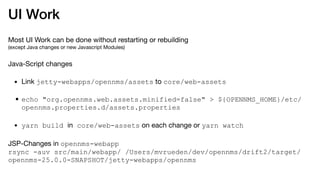
UI Work
Most UI Work can be done without restarting or rebuilding 

(except Java changes or new Javascript Modules)

Java-Script changes

• Link jetty-webapps/opennms/assets to core/web-assets

•echo "org.opennms.web.assets.minified=false" > ${OPENNMS_HOME}/etc/
opennms.properties.d/assets.properties
• yarn build in core/web-assets on each change or yarn watch

JSP-Changes in opennms-webapp

rsync -auv src/main/webapp/ /Users/mvrueden/dev/opennms/drift2/target/
opennms-25.0.0-SNAPSHOT/jetty-webapps/opennms
Questions?
Where to go from here?
Developer Guide 

https://docs.opennms.org/opennms/branches/develop/guide-development/guide-
development.html

IntelliJ

https://wiki.opennms.org/wiki/IDEA_and_OpenNMS

Eclipse

https://wiki.opennms.org/wiki/Eclipse_and_OpenNMS

Issues

https://issues.opennms.org

Discourse

community.opennms.com

https://opennms.discourse.group/c/development

https://opennms.discourse.group/tags/devjam-2019

Chat

chat.opennms.com @ DEV JAM

Checkout the Github Repository

https://github.com/opennms/opennms
Git Cheat Sheet

https://opennms.discourse.group/t/git-cheat-sheet/602

Dev-Jam 2019 - Developing & Contributing to OpenNMS

  • 1.
    Contribute to OpenNMS DEVJAM 2019 
 June 24, 2019 to June 28, 2019 Markus von Rüden who | what | where | how
  • 2.
    Who Am I Involvedwith OpenNMS since end of 2012 
 Full time contributor for The OpenNMS Project since March 2013 Stuttgart, DE https://dev.marskuh.de
 mvr@opennms.com
 https://github.com/mvrueden Joined ~2013 mvrueden // mvr
 Markus von Rüden Most Recent Contributions 
 Bootstrap 4 Migration Ulf Login Screen Geocoder Config UI Grafana Endpoint UI Reporting UI (WIP)
  • 3.
    Who contributes tothe OpenNMS project? The OpenNMS Group (TOG) Order of The Green Polo (OGP) OpenNMS Community
  • 4.
    What to contribute? Documentation Code Configs Reporttemplates Bug Reports Knowledge Features Stories Ideas Games Comics Songs
  • 5.
    Where to Contribute? ChatGITHUB JIRADiscourse Configuration, documentation, patches, features Knowledge blogyoutube
  • 6.
    Contribution Workflow Create Issue Checkout/ Create Branch Make Changes Create Pull Request Contributor Member of TOG ReviewBuild Pipeline Merge to target branch Next Release* * Horizon Releases are every 3rd Thursday
  • 7.
    Create Issue //Important fields Feature? Bug? Configuration? Story Bug Configuration Issue TypeIs it a Don’t worry about the fields too much
 we will fill them in for you Summary Affected Version Description Required fields @ issues.opennms.org
  • 8.
    Issue Workflow OPEN IN PROGRESS INREVIEW RESOLVED/ CLOSED Issue Created Working on Issue Pull Request created Pull Request merged
  • 9.
    Set up yourenvironment latest JDK 8 Maven >= 3.5 PostgreSQL Server >= 9.5 makensis Pearl git MAC OS Users 
 https://opennms.discourse.group/t/set-up-local-development-environment-macos/485
 Docker Build Image
 https://hub.docker.com/r/opennms/build-env jicmp, jicmp6 (optional)
 https://github.com/OpenNMS/jicmp6
 https://github.com/OpenNMS/jicmp
  • 10.
    Git & Github Createaccount @ https://github.com/join Generate SSH Key
 https://help.github.com/en/articles/generating-a-new-ssh-key-and-adding-it-to-the-ssh-agent Add SSH Key to your Account
 https://help.github.com/en/enterprise/2.15/user/articles/adding-a-new-ssh-key-to-your-github-account Optionally add GPG Key to your Account
 https://help.github.com/en/articles/adding-a-new-gpg-key-to-your-github-account Install git either via desktop.github.com or git command o/
  • 11.
    Git Settings Ensure gitconfig —global user.name and user.email are set properly Optionally sign the commits The user.email should match any github user account email address Please use real user name and email address as it shows up in the commit history 1 2 1 2
  • 12.
    Code base //Github • Code is hosted at GitHub • Everything (https://github.com/OpenNMS) • OpenNMS (https://github.com/OpenNMS/opennms) • Patches, Config files, Documentation typo fixes, new documentation • Only members of The OpenNMS Group and The Order of the Green Polo have direct commit access • There is a way for contribution —> Fork Project • Questions: https://chat.opennms.org @ OpenNMS Development Channel
  • 13.
    1. Go tothe OpenNMS repository @ https://github.com/OpenNMS/opennms 3. Go to your fork of OpenNMS 
 @ https://github.com/mvrueden/opennms 2. Fork OpenNMS Forking the OpenNMS Project
  • 14.
    Github Desktop Applicationworks for Mac and Windows users Download from https://desktop.github.com/ Clone your OpenNMS Repository @ https://github.com/mvrueden/opennms Alternative git clone command
 o/
  • 15.
    Manually create pullrequest at https://github.com/OpenNMS/opennms/pulls/create and compare across forks Pull Request Magic Choose base fork/branch and head fork/branch
  • 16.
    OCA not signed? Fillout https://wiki.opennms.org/wiki/images/6/6b/ContributorAgreement.pdf send to oca@opennms.org
  • 17.
    Tools Atom.io Visual Studio Code Vi,Emacs, … IntelliJ Eclipse yEd - Graph Editor DataGrip - Database Tool Development Single File / Documentation Others
  • 18.
    Which base branchto use? Meridian Horizon Branch M2015 H14 foundation bug fixes M2016 H17 foundation-2016 M2017 H19 foundation-2017 M2018 H21 foundation-2018 M2019 TBA, most likely H25 foundation-2019 (not yet available) - H24.1.1 release-24.1.1 next major release develop new features
  • 19.
    Branch naming conventions mostbranches jira/<issue-number> jira/NMS-1000 feature branches features/ features/graph-service test branches <user-prefix>/ mvr/navbar-rework
  • 20.
    Coding Conventions • Alwayscreate JIRA issue first • Only change what is in the focus of the issue • No whitespace changes • No re-arranging of imports • Don’t comment obvious things • Always provide test coveraged • No issue required for small changes, such as typos or minor documentation changes • Always prefix commits with issue number • No TODOs
  • 21.
    Useful git commands GitCheat Sheet
 https://opennms.discourse.group/t/git-cheat-sheet/602
  • 22.
    General Build Steps ./clean.plDeletes all target directory for root and assembly projects ./compile.pl -DskipTests compiles project ./assemble.pl -p dir -DskipTests [-Dopennms.home=/opt/opennms] produces tar.gz distribution time (./clean.pl && ./compile.pl -DskipTests && ./assemble.pl -Dopennms.home=/opt/opennms - DskipTests); say "OpenNMS may be ready for deployment” Takes roughly 15-20 Minutes if .m2 already populated, otherwise hours
  • 23.
    Run Individual Tests Doa full build cd features/<my-feature> mvn clean install -DskipTests mvn test 
 For the whole module, will not run ITs mvn verify -DskipITs=false 
 Runs Unit and Integration Tests
 
 mvn clean test -Dtest=<myTest> -Dmaven.surefire.debug mvn clean verify -DskipITs=false -Dit.test=<myIT> -Dmaven.failsafe.debug
 This will also run all Unit Tests and the specified IT
  • 24.
    Run Smoke Test Alwaysonly run a single test. Never the whole suite! Requires Firefox 45.0.2. Alternatively use Chrome, which requires chromedriver Do a full build 
 (or use mvn clean install -DskipTests --also-make) cd smoke-test mvn clean install -DskipTests 
 (make sure it compiles) mvn clean verify -Dsmoke=true -DskipITs=false -Dit.test=<myTest> [-Dmaven.failsafe.debug] mvn clean verify -Dorg.opennms.smoketest.webdriver.use-chrome -D"chrome.path=/ Applications/Google Chrome.app/Contents/MacOS/Google Chrome" -DskipITs=false - Dit.test=AngularLoginRedirectIT [-Dmaven.failsafe.debug]
 (Run with Chrome instead of Firefox)
  • 25.
    Run System Test Alwaysonly run a single system test, never the whole suite System Tests require the OpenNMS Docker Test images Bamboo must have build them, otherwise this is going to be more tricky Checkout repository 
 https://github.com/OpenNMS/opennms-system-test-api Modify accordingly
 https://github.com/mvrueden/scripts/blob/master/opennms/system-tests.sh Downloads the RPMs from Bamboo and builds the Docker Images
 ./system-tests.sh https://bamboo.opennms.org/browse/OPENNMS-OPENNMS57-2 mvn clean verify -Dorg.opennms.smoketest.docker=true -Dsmoke=true [- Dorg.opennms.smoketest.docker.skipTearDown=true] -DskipITs=false -Dit.test=HealthCheckIT - Dorg.opennms.advertised-host-address=192.168.2.158
  • 26.
    • OpenNMS inDebug mode
 $OPENNM_HOME/bin/opennms -t start • If Docker Image, ensure Debug Port 8001 is exposed • Maven with debug options will open a port on 5005 • Add a remote debug connection from your IDE using port 8001 or 5005
  • 27.
    bundle:watch * • OpenNMSis most likely run as root • link <root-home>/.m2/repository to <your-user>/.m2/ repository • ssh into OpenNMS’ Karaf Shell: ssh admin@localhost -p 8101 • bundle:watch * • now do a mvn clean install -DskipTests of your maven module (must be a bundle) and it will automatically be refreshed no rebuild required
  • 28.
    Only assemble.pl Check allthe root modules which have been changed
 git status Manually build each non bundle maven module (i.e. opennms-webapp)
 mvn clean install -DskipTests Stop OpenNMS, delete target and rerun 
 ./assemble.pl -p dir -DskipTests Even faster
 If only one jar changed, you can copy it to target/opennms-<version>/lib and restart OpenNMS
  • 29.
    UI Work Most UIWork can be done without restarting or rebuilding 
 (except Java changes or new Javascript Modules) Java-Script changes • Link jetty-webapps/opennms/assets to core/web-assets •echo "org.opennms.web.assets.minified=false" > ${OPENNMS_HOME}/etc/ opennms.properties.d/assets.properties • yarn build in core/web-assets on each change or yarn watch JSP-Changes in opennms-webapp
 rsync -auv src/main/webapp/ /Users/mvrueden/dev/opennms/drift2/target/ opennms-25.0.0-SNAPSHOT/jetty-webapps/opennms
  • 30.
  • 31.
    Where to gofrom here? Developer Guide 
 https://docs.opennms.org/opennms/branches/develop/guide-development/guide- development.html IntelliJ
 https://wiki.opennms.org/wiki/IDEA_and_OpenNMS Eclipse
 https://wiki.opennms.org/wiki/Eclipse_and_OpenNMS Issues
 https://issues.opennms.org Discourse
 community.opennms.com
 https://opennms.discourse.group/c/development
 https://opennms.discourse.group/tags/devjam-2019 Chat
 chat.opennms.com @ DEV JAM Checkout the Github Repository
 https://github.com/opennms/opennms Git Cheat Sheet
 https://opennms.discourse.group/t/git-cheat-sheet/602