Implementing Java Security with  JAAS   Rizwan Ahmed © 2003 Implementing Java Security with JAAS   Rizwan Ahmed Sun Certified Professional
What is JAAS? Java Authentication and Authorization Service Introduced as an optional package in J2SE 1.3 Integrated into J2SE 1.4 Provides a pluggable and flexible framework that allows developers to incorporate different security mechanisms and sources
Goals JAAS is an extensive and complicated library. The goals for this presentation are: To give an overview of JAAS and its constituent parts and illustrate how they all work together Provide an introduction on how to use JAAS; code examples to help you get started
Outline Introduction What is JAAS Authentication vs. Authorization Subject Principal Authentication Authorization
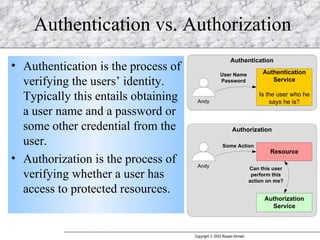
Authentication vs. Authorization Authentication is the process of verifying the users’ identity.  Typically this entails obtaining a user name and a password or some other credential from the user. Authorization is the process of verifying whether a user has access to protected resources.
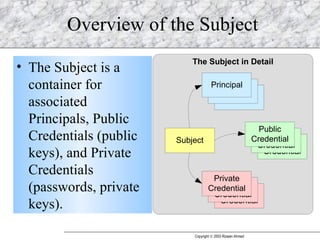
Overview of the Subject The Subject is a container for associated Principals, Public Credentials (public keys), and Private Credentials (passwords, private keys).
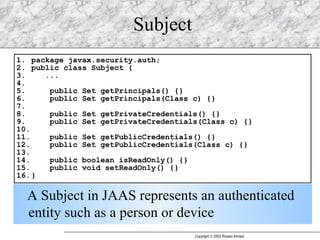
Subject A Subject in JAAS represents an authenticated entity such as a person or device
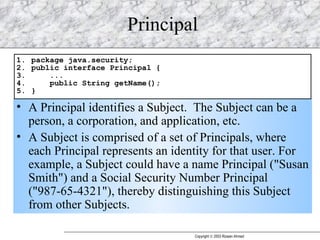
Principal A Principal identifies a Subject.  The Subject can be a person, a corporation, and application, etc. A Subject is comprised of a set of Principals, where each Principal represents an identity for that user. For example, a Subject could have a name Principal ("Susan Smith") and a Social Security Number Principal ("987-65-4321"), thereby distinguishing this Subject from other Subjects.
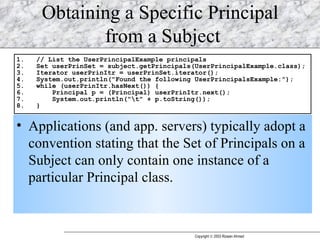
Obtaining a Specific Principal  from a Subject Applications (and app. servers) typically adopt a convention stating that the Set of Principals on a Subject can only contain one instance of a particular Principal class.
Outline Introduction Authentication Authorization
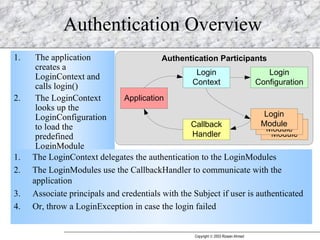
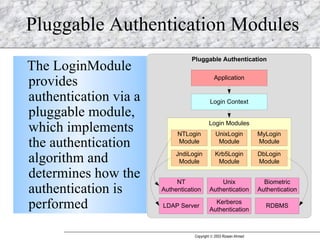
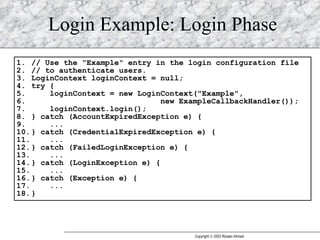
Authentication Overview The application creates a LoginContext and calls login() The LoginContext looks up the LoginConfiguration to load the predefined LoginModule The LoginContext delegates the authentication to the LoginModules The LoginModules use the CallbackHandler to communicate with the application Associate principals and credentials with the Subject if user is authenticated Or, throw a LoginException in case the login failed
Pluggable Authentication Modules The LoginModule provides authentication via a pluggable module, which implements the authentication algorithm and determines how the authentication is performed
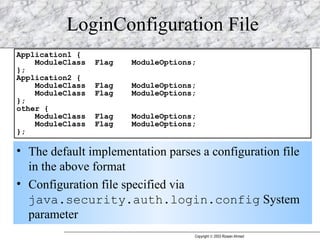
LoginConfiguration File The default implementation parses a configuration file in the above format Configuration file specified via  java.security.auth.login.config  System parameter
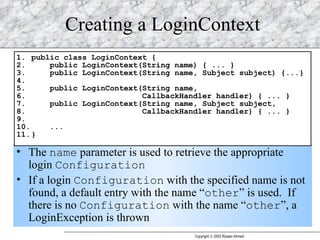
Creating a LoginContext The  name  parameter is used to retrieve the appropriate login  Configuration If a login  Configuration  with the specified name is not found, a default entry with the name “ other ” is used.  If there is no  Configuration  with the name “ other ”, a LoginException is thrown
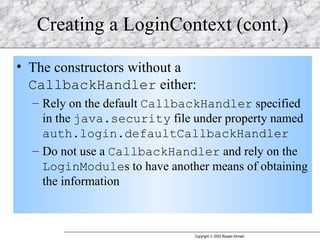
Creating a LoginContext (cont.) The constructors without a  CallbackHandler  either: Rely on the default  CallbackHandler  specified in the  java.security  file under property named  auth.login.defaultCallbackHandler   Do not use a  CallbackHandler  and rely on the  LoginModule s to have another means of obtaining the information
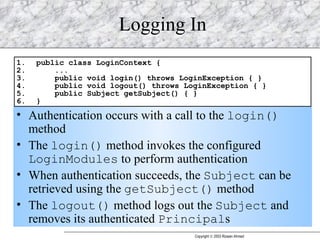
Logging In Authentication occurs with a call to the  login()  method The  login()  method invokes the configured  LoginModules  to perform authentication When authentication succeeds, the  Subject  can be retrieved using the  getSubject()  method The  logout()  method logs out the  Subject  and removes its authenticated  Principal s
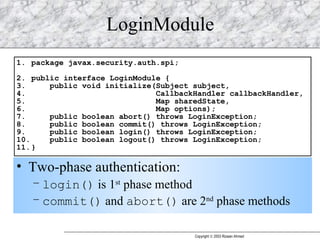
LoginModule  Two-phase authentication: login()  is 1 st  phase method commit()  and  abort()  are 2 nd  phase methods
Login Example: Login Phase
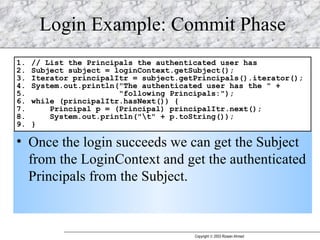
Login Example: Commit Phase Once the login succeeds we can get the Subject from the LoginContext and get the authenticated Principals from the Subject.
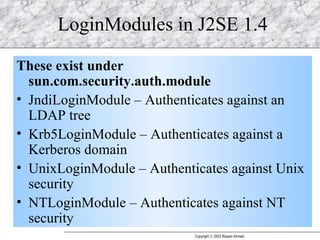
LoginModules in J2SE 1.4 These exist under sun.com.security.auth.module JndiLoginModule – Authenticates against an LDAP tree Krb5LoginModule – Authenticates against a Kerberos domain UnixLoginModule – Authenticates against Unix security NTLoginModule – Authenticates against NT security
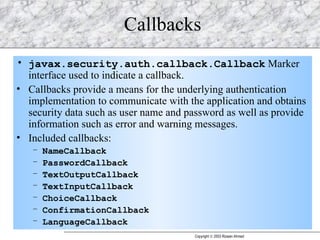
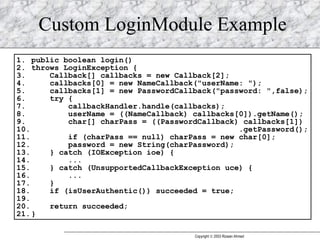
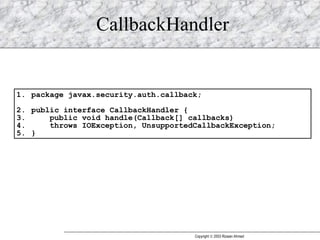
Callbacks javax.security.auth.callback.Callback  Marker interface used to indicate a callback. Callbacks provide a means for the underlying authentication implementation to communicate with the application and obtains security data such as user name and password as well as provide information such as error and warning messages. Included callbacks: NameCallback PasswordCallback TextOutputCallback TextInputCallback ChoiceCallback ConfirmationCallback LanguageCallback
Custom LoginModule Example
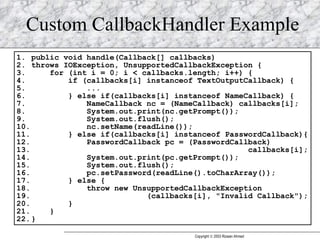
CallbackHandler
Custom CallbackHandler Example
Outline Introduction Authentication Authorization
What is Authorization? Authorization is the process of determining whether an authenticated user is permitted to perform some actions such as accessing a resource. The process is Policy based since JAAS is built on the existing Java security model.
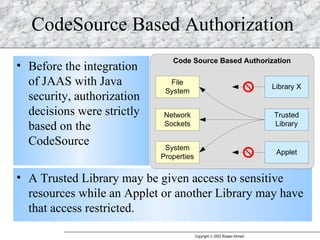
CodeSource Based Authorization Before the integration of JAAS with Java security, authorization decisions were strictly based on the CodeSource A Trusted Library may be given access to sensitive resources while an Applet or another Library may have that access restricted.
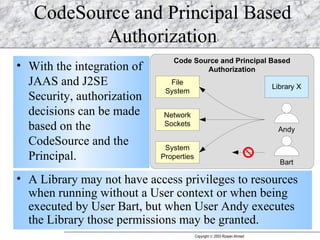
CodeSource and Principal Based Authorization With the integration of JAAS and J2SE Security, authorization decisions can be made based on the CodeSource and the Principal. A Library may not have access privileges to resources when running without a User context or when being executed by User Bart, but when User Andy executes the Library those permissions may be granted.
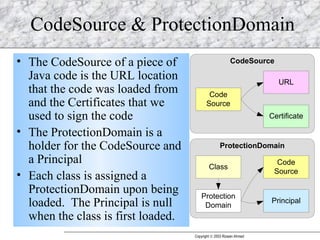
CodeSource & ProtectionDomain The CodeSource of a piece of Java code is the URL location that the code was loaded from and the Certificates that we used to sign the code The ProtectionDomain is a holder for the CodeSource and a Principal Each class is assigned a ProtectionDomain upon being loaded.  The Principal is null when the class is first loaded.
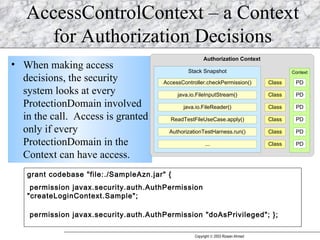
AccessControlContext – a Context for Authorization Decisions When making access decisions, the security system looks at every ProtectionDomain involved in the call.  Access is granted only if every ProtectionDomain in the Context can have access. grant codebase "file:./SampleAzn.jar" { permission javax.security.auth.AuthPermission "createLoginContext.Sample";  permission javax.security.auth.AuthPermission "doAsPrivileged"; };
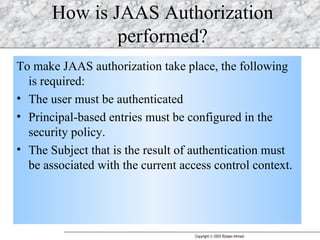
How is JAAS Authorization performed? To make JAAS authorization take place, the following is required:  The user must be authenticated Principal-based entries must be configured in the security policy.  The Subject that is the result of authentication must be associated with the current access control context.
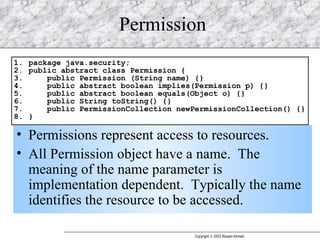
Permission Permissions represent access to resources. All Permission object have a name.  The meaning of the name parameter is implementation dependent.  Typically the name identifies the resource to be accessed.
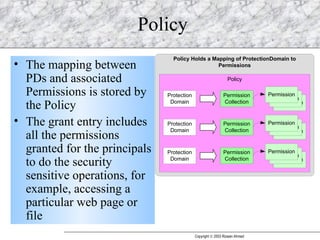
Policy The mapping between PDs and associated Permissions is stored by the Policy The grant entry includes all the permissions granted for the principals to do the security sensitive operations, for example, accessing a particular web page or file
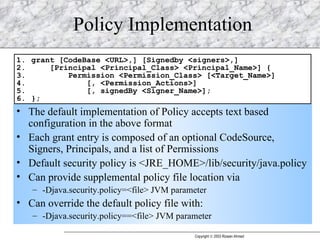
Policy Implementation The default implementation of Policy accepts text based configuration in the above format Each grant entry is composed of an optional CodeSource, Signers, Principals, and a list of Permissions Default security policy is <JRE_HOME>/lib/security/java.policy Can provide supplemental policy file location via  -Djava.security.policy=<file> JVM parameter Can override the default policy file with: -Djava.security.policy==<file> JVM parameter
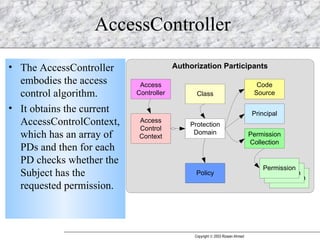
AccessController The AccessController embodies the access control algorithm.  It obtains the current AccessControlContext, which has an array of PDs and then for each PD checks whether the Subject has the requested permission.
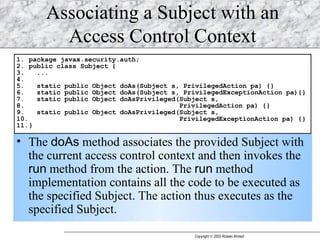
Associating a Subject with an Access Control Context The  doAs  method associates the provided Subject with the current access control context and then invokes the  run  method from the action. The  run  method implementation contains all the code to be executed as the specified Subject. The action thus executes as the specified Subject.
Execution flow Invoke Subject.doAs(..) or Subject.doAsPriviledged() SecurityManager.checkPermission(..) is called to check the permission The SecurityManager delegates the check to the AccessController The AccessController tries to find out if the relevant AccessControlContext contains sufficient permissions for the action to be taken If not, the SecurityManager updates the current AccessControlContext with the permissions granted to the subject via the Policy from the Policy file
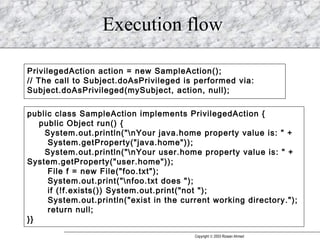
Execution flow PrivilegedAction action = new SampleAction();  // The call to Subject.doAsPrivileged is performed via:  Subject.doAsPrivileged(mySubject, action, null);  public class SampleAction implements PrivilegedAction {  public Object run() {  System.out.println(&quot;\nYour java.home property value is: &quot; +  System.getProperty(&quot;java.home&quot;));  System.out.println(&quot;\nYour user.home property value is: &quot; + System.getProperty(&quot;user.home&quot;));  File f = new File(&quot;foo.txt&quot;);  System.out.print(&quot;\nfoo.txt does &quot;);  if (!f.exists()) System.out.print(&quot;not &quot;);  System.out.println(&quot;exist in the current working directory.&quot;);  return null;  }}
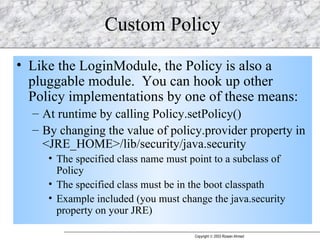
Custom Policy Like the LoginModule, the Policy is also a pluggable module.  You can hook up other Policy implementations by one of these means: At runtime by calling Policy.setPolicy() By changing the value of policy.provider property in <JRE_HOME>/lib/security/java.security The specified class name must point to a subclass of Policy The specified class must be in the boot classpath Example included (you must change the java.security property on your JRE)
Extend JAAS JAAS is built on top of the existing Java security model, which is CodeSource based, and the plaintext format policy implementation. For an enterprise application you may want to use custom security repositories with JAAS, such as LDAP, database or another file system This can be done by writing a customized module thanks to the JAAS pluggable feature
About the Speaker Speaker is a Senior Architect at Ventyx Inc. He has over 5 years of experience in  J2EE/Web development and has worked with extensive open source technologies. His interests are in the areas of technical architecture, enterprise application integration and web services.

Developing With JAAS

  • 1.
    Implementing Java Securitywith JAAS Rizwan Ahmed © 2003 Implementing Java Security with JAAS Rizwan Ahmed Sun Certified Professional
  • 2.
    What is JAAS?Java Authentication and Authorization Service Introduced as an optional package in J2SE 1.3 Integrated into J2SE 1.4 Provides a pluggable and flexible framework that allows developers to incorporate different security mechanisms and sources
  • 3.
    Goals JAAS isan extensive and complicated library. The goals for this presentation are: To give an overview of JAAS and its constituent parts and illustrate how they all work together Provide an introduction on how to use JAAS; code examples to help you get started
  • 4.
    Outline Introduction Whatis JAAS Authentication vs. Authorization Subject Principal Authentication Authorization
  • 5.
    Authentication vs. AuthorizationAuthentication is the process of verifying the users’ identity. Typically this entails obtaining a user name and a password or some other credential from the user. Authorization is the process of verifying whether a user has access to protected resources.
  • 6.
    Overview of theSubject The Subject is a container for associated Principals, Public Credentials (public keys), and Private Credentials (passwords, private keys).
  • 7.
    Subject A Subjectin JAAS represents an authenticated entity such as a person or device
  • 8.
    Principal A Principalidentifies a Subject. The Subject can be a person, a corporation, and application, etc. A Subject is comprised of a set of Principals, where each Principal represents an identity for that user. For example, a Subject could have a name Principal (&quot;Susan Smith&quot;) and a Social Security Number Principal (&quot;987-65-4321&quot;), thereby distinguishing this Subject from other Subjects.
  • 9.
    Obtaining a SpecificPrincipal from a Subject Applications (and app. servers) typically adopt a convention stating that the Set of Principals on a Subject can only contain one instance of a particular Principal class.
  • 10.
  • 11.
    Authentication Overview Theapplication creates a LoginContext and calls login() The LoginContext looks up the LoginConfiguration to load the predefined LoginModule The LoginContext delegates the authentication to the LoginModules The LoginModules use the CallbackHandler to communicate with the application Associate principals and credentials with the Subject if user is authenticated Or, throw a LoginException in case the login failed
  • 12.
    Pluggable Authentication ModulesThe LoginModule provides authentication via a pluggable module, which implements the authentication algorithm and determines how the authentication is performed
  • 13.
    LoginConfiguration File Thedefault implementation parses a configuration file in the above format Configuration file specified via java.security.auth.login.config System parameter
  • 14.
    Creating a LoginContextThe name parameter is used to retrieve the appropriate login Configuration If a login Configuration with the specified name is not found, a default entry with the name “ other ” is used. If there is no Configuration with the name “ other ”, a LoginException is thrown
  • 15.
    Creating a LoginContext(cont.) The constructors without a CallbackHandler either: Rely on the default CallbackHandler specified in the java.security file under property named auth.login.defaultCallbackHandler Do not use a CallbackHandler and rely on the LoginModule s to have another means of obtaining the information
  • 16.
    Logging In Authenticationoccurs with a call to the login() method The login() method invokes the configured LoginModules to perform authentication When authentication succeeds, the Subject can be retrieved using the getSubject() method The logout() method logs out the Subject and removes its authenticated Principal s
  • 17.
    LoginModule Two-phaseauthentication: login() is 1 st phase method commit() and abort() are 2 nd phase methods
  • 18.
  • 19.
    Login Example: CommitPhase Once the login succeeds we can get the Subject from the LoginContext and get the authenticated Principals from the Subject.
  • 20.
    LoginModules in J2SE1.4 These exist under sun.com.security.auth.module JndiLoginModule – Authenticates against an LDAP tree Krb5LoginModule – Authenticates against a Kerberos domain UnixLoginModule – Authenticates against Unix security NTLoginModule – Authenticates against NT security
  • 21.
    Callbacks javax.security.auth.callback.Callback Marker interface used to indicate a callback. Callbacks provide a means for the underlying authentication implementation to communicate with the application and obtains security data such as user name and password as well as provide information such as error and warning messages. Included callbacks: NameCallback PasswordCallback TextOutputCallback TextInputCallback ChoiceCallback ConfirmationCallback LanguageCallback
  • 22.
  • 23.
  • 24.
  • 25.
  • 26.
    What is Authorization?Authorization is the process of determining whether an authenticated user is permitted to perform some actions such as accessing a resource. The process is Policy based since JAAS is built on the existing Java security model.
  • 27.
    CodeSource Based AuthorizationBefore the integration of JAAS with Java security, authorization decisions were strictly based on the CodeSource A Trusted Library may be given access to sensitive resources while an Applet or another Library may have that access restricted.
  • 28.
    CodeSource and PrincipalBased Authorization With the integration of JAAS and J2SE Security, authorization decisions can be made based on the CodeSource and the Principal. A Library may not have access privileges to resources when running without a User context or when being executed by User Bart, but when User Andy executes the Library those permissions may be granted.
  • 29.
    CodeSource & ProtectionDomainThe CodeSource of a piece of Java code is the URL location that the code was loaded from and the Certificates that we used to sign the code The ProtectionDomain is a holder for the CodeSource and a Principal Each class is assigned a ProtectionDomain upon being loaded. The Principal is null when the class is first loaded.
  • 30.
    AccessControlContext – aContext for Authorization Decisions When making access decisions, the security system looks at every ProtectionDomain involved in the call. Access is granted only if every ProtectionDomain in the Context can have access. grant codebase &quot;file:./SampleAzn.jar&quot; { permission javax.security.auth.AuthPermission &quot;createLoginContext.Sample&quot;; permission javax.security.auth.AuthPermission &quot;doAsPrivileged&quot;; };
  • 31.
    How is JAASAuthorization performed? To make JAAS authorization take place, the following is required: The user must be authenticated Principal-based entries must be configured in the security policy. The Subject that is the result of authentication must be associated with the current access control context.
  • 32.
    Permission Permissions representaccess to resources. All Permission object have a name. The meaning of the name parameter is implementation dependent. Typically the name identifies the resource to be accessed.
  • 33.
    Policy The mappingbetween PDs and associated Permissions is stored by the Policy The grant entry includes all the permissions granted for the principals to do the security sensitive operations, for example, accessing a particular web page or file
  • 34.
    Policy Implementation Thedefault implementation of Policy accepts text based configuration in the above format Each grant entry is composed of an optional CodeSource, Signers, Principals, and a list of Permissions Default security policy is <JRE_HOME>/lib/security/java.policy Can provide supplemental policy file location via -Djava.security.policy=<file> JVM parameter Can override the default policy file with: -Djava.security.policy==<file> JVM parameter
  • 35.
    AccessController The AccessControllerembodies the access control algorithm. It obtains the current AccessControlContext, which has an array of PDs and then for each PD checks whether the Subject has the requested permission.
  • 36.
    Associating a Subjectwith an Access Control Context The doAs method associates the provided Subject with the current access control context and then invokes the run method from the action. The run method implementation contains all the code to be executed as the specified Subject. The action thus executes as the specified Subject.
  • 37.
    Execution flow InvokeSubject.doAs(..) or Subject.doAsPriviledged() SecurityManager.checkPermission(..) is called to check the permission The SecurityManager delegates the check to the AccessController The AccessController tries to find out if the relevant AccessControlContext contains sufficient permissions for the action to be taken If not, the SecurityManager updates the current AccessControlContext with the permissions granted to the subject via the Policy from the Policy file
  • 38.
    Execution flow PrivilegedActionaction = new SampleAction(); // The call to Subject.doAsPrivileged is performed via: Subject.doAsPrivileged(mySubject, action, null); public class SampleAction implements PrivilegedAction { public Object run() { System.out.println(&quot;\nYour java.home property value is: &quot; + System.getProperty(&quot;java.home&quot;)); System.out.println(&quot;\nYour user.home property value is: &quot; + System.getProperty(&quot;user.home&quot;)); File f = new File(&quot;foo.txt&quot;); System.out.print(&quot;\nfoo.txt does &quot;); if (!f.exists()) System.out.print(&quot;not &quot;); System.out.println(&quot;exist in the current working directory.&quot;); return null; }}
  • 39.
    Custom Policy Likethe LoginModule, the Policy is also a pluggable module. You can hook up other Policy implementations by one of these means: At runtime by calling Policy.setPolicy() By changing the value of policy.provider property in <JRE_HOME>/lib/security/java.security The specified class name must point to a subclass of Policy The specified class must be in the boot classpath Example included (you must change the java.security property on your JRE)
  • 40.
    Extend JAAS JAASis built on top of the existing Java security model, which is CodeSource based, and the plaintext format policy implementation. For an enterprise application you may want to use custom security repositories with JAAS, such as LDAP, database or another file system This can be done by writing a customized module thanks to the JAAS pluggable feature
  • 41.
    About the SpeakerSpeaker is a Senior Architect at Ventyx Inc. He has over 5 years of experience in J2EE/Web development and has worked with extensive open source technologies. His interests are in the areas of technical architecture, enterprise application integration and web services.

Editor's Notes

  • #13 LoginModule never gets called directly. Sun provides a few default LoginModule implementations such as the JNDILoginModule etc.
  • #19 Maybe I should add another slide here to illustrate everything that happens when login() is called. This method is a little confusing at first because it results in the callbacks to be called, and that has a asynchronous feel to it (like one hand is acting independently of the other – one hand does not know what the other is doing).