



•

•

•

•

•
•

•

•
•

    •
    •
    •
    •
•

•

•

•
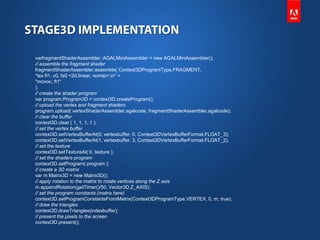
// create the vertices
varvertices:Vector.<Number> = Vector.<Number>([
-0.5,-0.5,0, 0, 0, // x, y, z, u, v
-0.5, 0.5, 0, 0, 1,
0.5, 0.5, 0, 1, 1,
0.5, -0.5, 0, 1, 0]);
// create the buffer to upload the vertices
var vertexbuffer:VertexBuffer3D = context3D.createVertexBuffer(4, 5);
// upload the vertices
vertexbuffer.uploadFromVector(vertices, 0, 4);
// create the buffer to upload the indices
var indexbuffer:IndexBuffer3D = context3D.createIndexBuffer(6);
// upload the indices
indexbuffer.uploadFromVector (Vector.<uint>([0, 1, 2, 2, 3, 0]), 0, 6);
// create the bitmap texture
varbitmap:Bitmap = new TextureBitmap();
// create the texture bitmap to upload the bitmap
vartexture:Texture = context3D.createTexture(bitmap.bitmapData.width,
bitmap.bitmapData.height, Context3DTextureFormat.BGRA, false);
// upload the bitmap
texture.uploadFromBitmapData(bitmap.bitmapData);
// create the mini assembler
varvertexShaderAssembler :AGALMiniAssembler = new AGALMiniAssembler();
// assemble the vertex shader
vertexShaderAssembler.assemble( Context3DProgramType.VERTEX,
"m44 op, va0, vc0n" + // pos to clipspace
"mov v0, va1" // copy uv
);
varfragmentShaderAssembler :AGALMiniAssembler = new AGALMiniAssembler();
// assemble the fragment shader
fragmentShaderAssembler.assemble( Context3DProgramType.FRAGMENT,
"tex ft1, v0, fs0 <2d,linear, nomip>;n" +
"movoc, ft1"
);
// create the shader program
var program:Program3D = context3D.createProgram();
// upload the vertex and fragment shaders
program.upload( vertexShaderAssembler.agalcode, fragmentShaderAssembler.agalcode);
// clear the buffer
context3D.clear ( 1, 1, 1, 1 );
// set the vertex buffer
context3D.setVertexBufferAt(0, vertexbuffer, 0, Context3DVertexBufferFormat.FLOAT_3);
context3D.setVertexBufferAt(1, vertexbuffer, 3, Context3DVertexBufferFormat.FLOAT_2);
// set the texture
context3D.setTextureAt( 0, texture );
// set the shaders program
context3D.setProgram( program );
// create a 3D matrix
var m:Matrix3D = new Matrix3D();
// apply rotation to the matrix to rotate vertices along the Z axis
m.appendRotation(getTimer()/50, Vector3D.Z_AXIS);
// set the program constants (matrix here)
context3D.setProgramConstantsFromMatrix(Context3DProgramType.VERTEX, 0, m, true);
// draw the triangles
context3D.drawTriangles(indexbuffer);
// present the pixels to the screen
context3D.present();
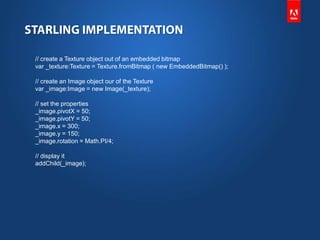
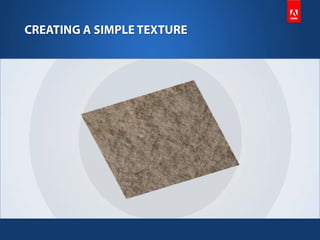
// create a Texture object out of an embedded bitmap
var _texture:Texture = Texture.fromBitmap ( new EmbeddedBitmap() );

// create an Image object our of the Texture
var _image:Image = new Image(_texture);

// set the properties
_image.pivotX = 50;
_image.pivotY = 50;
_image.x = 300;
_image.y = 150;
_image.rotation = Math.PI/4;

// display it
addChild(_image);
Developing 2D Games with Stage3D

Developing 2D Games with Stage3D

  • 4.
  • 6.
  • 7.
    • • • •
  • 9.
  • 11.
    // create thevertices varvertices:Vector.<Number> = Vector.<Number>([ -0.5,-0.5,0, 0, 0, // x, y, z, u, v -0.5, 0.5, 0, 0, 1, 0.5, 0.5, 0, 1, 1, 0.5, -0.5, 0, 1, 0]); // create the buffer to upload the vertices var vertexbuffer:VertexBuffer3D = context3D.createVertexBuffer(4, 5); // upload the vertices vertexbuffer.uploadFromVector(vertices, 0, 4); // create the buffer to upload the indices var indexbuffer:IndexBuffer3D = context3D.createIndexBuffer(6); // upload the indices indexbuffer.uploadFromVector (Vector.<uint>([0, 1, 2, 2, 3, 0]), 0, 6); // create the bitmap texture varbitmap:Bitmap = new TextureBitmap(); // create the texture bitmap to upload the bitmap vartexture:Texture = context3D.createTexture(bitmap.bitmapData.width, bitmap.bitmapData.height, Context3DTextureFormat.BGRA, false); // upload the bitmap texture.uploadFromBitmapData(bitmap.bitmapData); // create the mini assembler varvertexShaderAssembler :AGALMiniAssembler = new AGALMiniAssembler(); // assemble the vertex shader vertexShaderAssembler.assemble( Context3DProgramType.VERTEX, "m44 op, va0, vc0n" + // pos to clipspace "mov v0, va1" // copy uv );
  • 12.
    varfragmentShaderAssembler :AGALMiniAssembler =new AGALMiniAssembler(); // assemble the fragment shader fragmentShaderAssembler.assemble( Context3DProgramType.FRAGMENT, "tex ft1, v0, fs0 <2d,linear, nomip>;n" + "movoc, ft1" ); // create the shader program var program:Program3D = context3D.createProgram(); // upload the vertex and fragment shaders program.upload( vertexShaderAssembler.agalcode, fragmentShaderAssembler.agalcode); // clear the buffer context3D.clear ( 1, 1, 1, 1 ); // set the vertex buffer context3D.setVertexBufferAt(0, vertexbuffer, 0, Context3DVertexBufferFormat.FLOAT_3); context3D.setVertexBufferAt(1, vertexbuffer, 3, Context3DVertexBufferFormat.FLOAT_2); // set the texture context3D.setTextureAt( 0, texture ); // set the shaders program context3D.setProgram( program ); // create a 3D matrix var m:Matrix3D = new Matrix3D(); // apply rotation to the matrix to rotate vertices along the Z axis m.appendRotation(getTimer()/50, Vector3D.Z_AXIS); // set the program constants (matrix here) context3D.setProgramConstantsFromMatrix(Context3DProgramType.VERTEX, 0, m, true); // draw the triangles context3D.drawTriangles(indexbuffer); // present the pixels to the screen context3D.present();
  • 13.
    // create aTexture object out of an embedded bitmap var _texture:Texture = Texture.fromBitmap ( new EmbeddedBitmap() ); // create an Image object our of the Texture var _image:Image = new Image(_texture); // set the properties _image.pivotX = 50; _image.pivotY = 50; _image.x = 300; _image.y = 150; _image.rotation = Math.PI/4; // display it addChild(_image);

Editor's Notes

  • #4 Trust Lee to pick these images :p