How to Do
Retrospective Meetings
with devActivity
What are Retrospective Meetings?
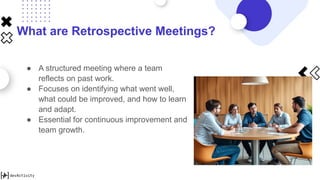
● A structured meeting where a team
reflects on past work.
● Focuses on identifying what went well,
what could be improved, and how to learn
and adapt.
● Essential for continuous improvement and
team growth.
The Importance of Data in Retrospectives
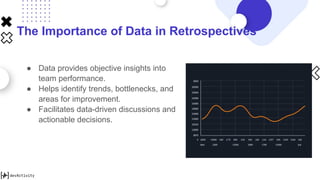
● Data provides objective insights into
team performance.
● Helps identify trends, bottlenecks, and
areas for improvement.
● Facilitates data-driven discussions and
actionable decisions.
Introducing devActivity
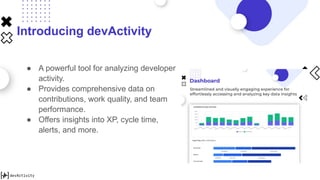
● A powerful tool for analyzing developer
activity.
● Provides comprehensive data on
contributions, work quality, and team
performance.
● Offers insights into XP, cycle time,
alerts, and more.
How devActivity Enhances Retrospectives
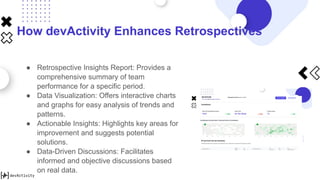
● Retrospective Insights Report: Provides a
comprehensive summary of team
performance for a specific period.
● Data Visualization: Offers interactive charts
and graphs for easy analysis of trends and
patterns.
● Actionable Insights: Highlights key areas for
improvement and suggests potential
solutions.
● Data-Driven Discussions: Facilitates
informed and objective discussions based
on real data.
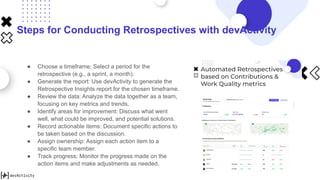
Steps for Conducting Retrospectives with devActivity
● Choose a timeframe: Select a period for the
retrospective (e.g., a sprint, a month).
● Generate the report: Use devActivity to generate the
Retrospective Insights report for the chosen timeframe.
● Review the data: Analyze the data together as a team,
focusing on key metrics and trends.
● Identify areas for improvement: Discuss what went
well, what could be improved, and potential solutions.
● Record actionable items: Document specific actions to
be taken based on the discussion.
● Assign ownership: Assign each action item to a
specific team member.
● Track progress: Monitor the progress made on the
action items and make adjustments as needed.
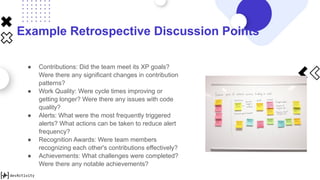
Example Retrospective Discussion Points
● Contributions: Did the team meet its XP goals?
Were there any significant changes in contribution
patterns?
● Work Quality: Were cycle times improving or
getting longer? Were there any issues with code
quality?
● Alerts: What were the most frequently triggered
alerts? What actions can be taken to reduce alert
frequency?
● Recognition Awards: Were team members
recognizing each other's contributions effectively?
● Achievements: What challenges were completed?
Were there any notable achievements?
Benefits of Using devActivity for Retrospectives
● More objective and data-driven
discussions.
● Improved team communication and
collaboration.
● Increased accountability and ownership
of action items.
● Enhanced team performance and
continuous improvement.
Try devActivity Today!
● Sign up for free
● Start leveraging data-driven insights for
your retrospective meetings.

[devActivity] How to Do Retrospective Meetings with devActivity.pptx

  • 1.
    How to Do RetrospectiveMeetings with devActivity
  • 2.
    What are RetrospectiveMeetings? ● A structured meeting where a team reflects on past work. ● Focuses on identifying what went well, what could be improved, and how to learn and adapt. ● Essential for continuous improvement and team growth.
  • 3.
    The Importance ofData in Retrospectives ● Data provides objective insights into team performance. ● Helps identify trends, bottlenecks, and areas for improvement. ● Facilitates data-driven discussions and actionable decisions.
  • 4.
    Introducing devActivity ● Apowerful tool for analyzing developer activity. ● Provides comprehensive data on contributions, work quality, and team performance. ● Offers insights into XP, cycle time, alerts, and more.
  • 5.
    How devActivity EnhancesRetrospectives ● Retrospective Insights Report: Provides a comprehensive summary of team performance for a specific period. ● Data Visualization: Offers interactive charts and graphs for easy analysis of trends and patterns. ● Actionable Insights: Highlights key areas for improvement and suggests potential solutions. ● Data-Driven Discussions: Facilitates informed and objective discussions based on real data.
  • 6.
    Steps for ConductingRetrospectives with devActivity ● Choose a timeframe: Select a period for the retrospective (e.g., a sprint, a month). ● Generate the report: Use devActivity to generate the Retrospective Insights report for the chosen timeframe. ● Review the data: Analyze the data together as a team, focusing on key metrics and trends. ● Identify areas for improvement: Discuss what went well, what could be improved, and potential solutions. ● Record actionable items: Document specific actions to be taken based on the discussion. ● Assign ownership: Assign each action item to a specific team member. ● Track progress: Monitor the progress made on the action items and make adjustments as needed.
  • 7.
    Example Retrospective DiscussionPoints ● Contributions: Did the team meet its XP goals? Were there any significant changes in contribution patterns? ● Work Quality: Were cycle times improving or getting longer? Were there any issues with code quality? ● Alerts: What were the most frequently triggered alerts? What actions can be taken to reduce alert frequency? ● Recognition Awards: Were team members recognizing each other's contributions effectively? ● Achievements: What challenges were completed? Were there any notable achievements?
  • 8.
    Benefits of UsingdevActivity for Retrospectives ● More objective and data-driven discussions. ● Improved team communication and collaboration. ● Increased accountability and ownership of action items. ● Enhanced team performance and continuous improvement.
  • 9.
    Try devActivity Today! ●Sign up for free ● Start leveraging data-driven insights for your retrospective meetings.