Maximizing code reuse between
Windows Phone 8 and Windows 8
Tom Walker
@Tinytoot
orangesodacode.azurewebsites.net
Ken Cenerelli
@KenCenerelli
kencenerelli.wordpress.com
• Part 1: Hardware Overview
 Platform APIs
 Shared Core
• Part 2: Development Techniques
 MVVM project structure
 Portable Class Libraries
 Shared XAML UI
 Sharing Code
• Part 3: Demo – In-depth development for both platforms
• Wrap-up
 Next Steps, Resources & Related Sessions
 Q & A
Agenda
Maximizing code reuse between WP8 and Windows 8
• We are on the path to Windows and Windows Phone
convergence
• Right now Windows 8 and Windows Phone 8 have a
shared core but you cannot write once and run everywhere
(unlike iOS or Android)
• We can however leverage some existing architecture
similarities between the two
Part 1: Hardware Overview
Maximizing code reuse between WP8 and Windows 8
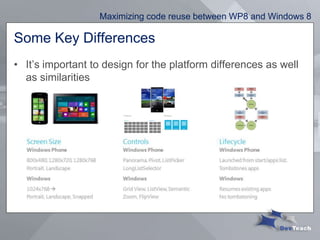
Some Key Differences
• It’s important to design for the platform differences as well
as similarities
Maximizing code reuse between WP8 and Windows 8
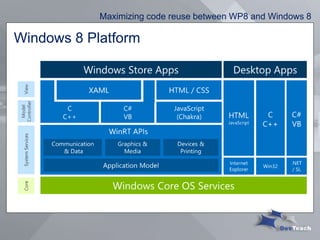
Windows 8 Platform
Maximizing code reuse between WP8 and Windows 8
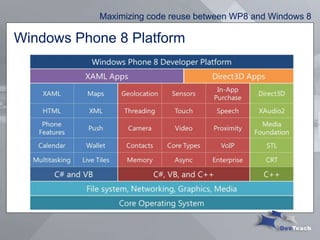
Windows Phone 8 Platform
Maximizing code reuse between WP8 and Windows 8
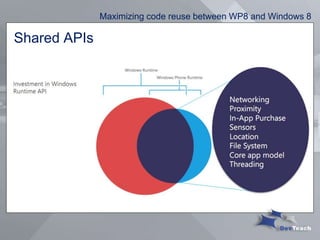
Shared APIs
Maximizing code reuse between WP8 and Windows 8
What Shared Core Means
• OS components such as the kernel, networking, graphics
support, file system and multimedia are the same on both
Windows 8 and Windows Phone 8
• Hardware manufacturers work with the same driver model
on both platforms
• Windows Phone gets the support for multi-core and other
hardware features that Windows has had for years
• These solid, common foundations makes it easier to extend
the Windows platform into the future
Maximizing code reuse between WP8 and Windows 8
What Shared Core Doesn’t Mean
• Windows 8 and Windows Phone 8 developers work to
exactly the same APIs
 (though you will see more commonality as new features are introduced to
both platforms in the future)
Maximizing code reuse between WP8 and Windows 8
Part 2: Development Techniques
• Four examples of how you can approach code reuse:
 MVVM project structure
 Portable Class Libraries
 Shared XAML UI
 Add As Link (Partial Classes)
• Accelerate your app development with these methods
• Not all will work in every situation
Maximizing code reuse between WP8 and Windows 8
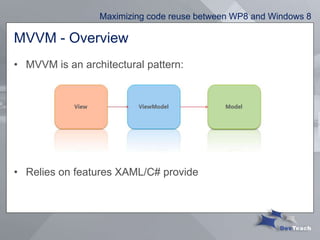
MVVM - Overview
• MVVM is an architectural pattern:
• Relies on features XAML/C# provide
Maximizing code reuse between WP8 and Windows 8
Why use MVVM?
• Loose coupling between UI and code
• Enables reusability
• Separation between UX designer & developer
• Increased testability
Maximizing code reuse between WP8 and Windows 8
MVVM components
• Model
 Data or business logic
 Database, Web Services, File System, etc.
• View Model
 A specialization of the Model that the View uses
 Informs the view to update
 No UI code
• View
 Represents the user interface the user sees
 Should contain a minimal amount of code
Maximizing code reuse between WP8 and Windows 8
MVVM for code reuse
• Create a separate UI for each platform to take advantage of
the different screen sizes
• MVVM by itself doesn’t help us for sharing code across
platforms – only on the same platform
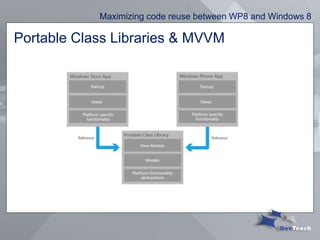
• Use Portable Class Libraries to share models and view
models across platforms
Maximizing code reuse between WP8 and Windows 8
MVVM - Demo• Setting up a project to use MVVM
Maximizing code reuse between WP8 and Windows 8
Demo 1:
MVVM Project Setup
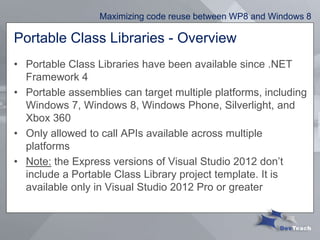
Portable Class Libraries - Overview
• Portable Class Libraries have been available since .NET
Framework 4
• Portable assemblies can target multiple platforms, including
Windows 7, Windows 8, Windows Phone, Silverlight, and
Xbox 360
• Only allowed to call APIs available across multiple
platforms
• Note: the Express versions of Visual Studio 2012 don’t
include a Portable Class Library project template. It is
available only in Visual Studio 2012 Pro or greater
Maximizing code reuse between WP8 and Windows 8
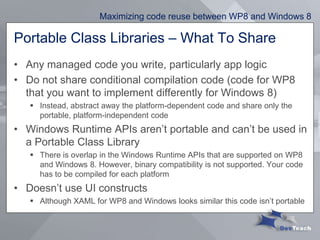
Portable Class Libraries – What To Share
• Any managed code you write, particularly app logic
• Do not share conditional compilation code (code for WP8
that you want to implement differently for Windows 8)
 Instead, abstract away the platform-dependent code and share only the
portable, platform-independent code
• Windows Runtime APIs aren’t portable and can’t be used in
a Portable Class Library
 There is overlap in the Windows Runtime APIs that are supported on WP8
and Windows 8. However, binary compatibility is not supported. Your code
has to be compiled for each platform
• Doesn’t use UI constructs
 Although XAML for WP8 and Windows looks similar this code isn’t portable
Maximizing code reuse between WP8 and Windows 8
Portable Class Libraries & MVVM
Maximizing code reuse between WP8 and Windows 8
Portable Class Libraries - Demo
• Creating a simple Portable Class Library
Maximizing code reuse between WP8 and Windows 8
Demo 2:
Portable Class Library
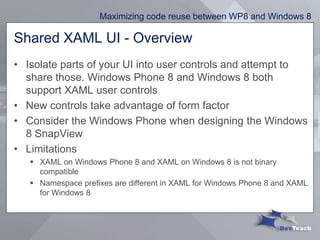
Shared XAML UI - Overview
• Isolate parts of your UI into user controls and attempt to
share those. Windows Phone 8 and Windows 8 both
support XAML user controls
• New controls take advantage of form factor
• Consider the Windows Phone when designing the Windows
8 SnapView
• Limitations
 XAML on Windows Phone 8 and XAML on Windows 8 is not binary
compatible
 Namespace prefixes are different in XAML for Windows Phone 8 and XAML
for Windows 8
Maximizing code reuse between WP8 and Windows 8
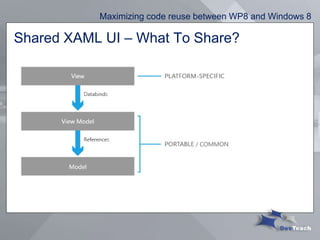
Shared XAML UI – What To Share?
Maximizing code reuse between WP8 and Windows 8
Demo 3:
Shared XAML UI
Sharing Code - Overview
• Change once, Change everywhere
• Approaches:
 Add as Link
 #if conditional blocks
 Partial Classes and Methods
Maximizing code reuse between WP8 and Windows 8
Add As Link - Overview
• Use this technique for any code you’re able to isolate that’s
platform-independent and used in both apps
 eg. User controls with no platform dependencies.
• This is particularly useful when you’re trying to share code
that uses a Windows Runtime API that can’t be shared
inside a Portable Class Library
Maximizing code reuse between WP8 and Windows 8
#if Conditional Blocks - Overview
• Pros:
 Enable/Disable lines or chunks of code based on compilation platform
 Existing compilation constants
 NETFX_CORE Windows 8
 WINDOWS_PHONE Windows Phone 8
 Useful for when there are subtle differences in syntax or methods
• Cons:
 A downside is it can make code unreadable
Maximizing code reuse between WP8 and Windows 8
Partial Classes - Overview
• Can put shared functionality in one code file and platform
specific code in additional code file
• Classes are marked as partial and compiled into a single
class
• Separates platform specific features
• Can use partial methods as a mechanism to separate out
platform specific logic
Maximizing code reuse between WP8 and Windows 8
Demo 4:
Creating a Partial
Class
Part 3: Demo – An app for both platforms
• Technologies Used:
 MVVM Light Toolkit
 Portable Class Library for JSON.NET (NewtonSoft)
 HttpClient for Windows 8 and Windows Phone 8 (release candidate)
 Add As Link
 ComicVine WebAPI
Maximizing code reuse between WP8 and Windows 8
Demo:
Create an app for
both platforms
Actions to continue your learning
• Build a project in both Windows 8 and
Windows Phone 8
• Create a Portable Class Library to link the
two projects
• Choose one other development technique to
extend your code between both projects
Maximizing code reuse between WP8 and Windows 8
Resources for Attendees
• Channel 9: Building Apps for Both Windows 8 and
Windows Phone 8 Jump Start http://bit.ly/18dELOu
• Maximize code reuse between Windows Phone 8
and Windows 8 http://bit.ly/11TfzOl
• How to Make Portable Class Libraries Work for
You http://bit.ly/116yIL4
• Channel 9: Create Cross-platform Apps using
Portable Class Libraries http://bit.ly/1906wv8
Maximizing code reuse between WP8 and Windows 8
Related Sessions
• Architecting mobile apps for Win8, IOS and Android
 Erik Renaud - ARC376
• Building Mobile Experiences that Don't Suck
 Atley Hunter - MOB362
• Designing Windows Store HTML5/JS Apps
 Mark Arteaga - WIN371
• Bringing it all together Win8 WP8 Azure MVC...
 Colin Melia - WIN312
Maximizing code reuse between WP8 and Windows 8
Questions?
• Tom Walker
 @Tinytoot
 orangesodacode.azurewebsites.net
• Ken Cenerelli
 @KenCenerelli
 kencenerelli.wordpress.com
Maximizing code reuse between WP8 and Windows 8

Maximizing code reuse between Windows Phone 8 and Windows 8 (DevTeach Toronto 2013)

  • 1.
    Maximizing code reusebetween Windows Phone 8 and Windows 8 Tom Walker @Tinytoot orangesodacode.azurewebsites.net Ken Cenerelli @KenCenerelli kencenerelli.wordpress.com
  • 2.
    • Part 1:Hardware Overview  Platform APIs  Shared Core • Part 2: Development Techniques  MVVM project structure  Portable Class Libraries  Shared XAML UI  Sharing Code • Part 3: Demo – In-depth development for both platforms • Wrap-up  Next Steps, Resources & Related Sessions  Q & A Agenda Maximizing code reuse between WP8 and Windows 8
  • 3.
    • We areon the path to Windows and Windows Phone convergence • Right now Windows 8 and Windows Phone 8 have a shared core but you cannot write once and run everywhere (unlike iOS or Android) • We can however leverage some existing architecture similarities between the two Part 1: Hardware Overview Maximizing code reuse between WP8 and Windows 8
  • 4.
    Some Key Differences •It’s important to design for the platform differences as well as similarities Maximizing code reuse between WP8 and Windows 8
  • 5.
    Windows 8 Platform Maximizingcode reuse between WP8 and Windows 8
  • 6.
    Windows Phone 8Platform Maximizing code reuse between WP8 and Windows 8
  • 7.
    Shared APIs Maximizing codereuse between WP8 and Windows 8
  • 8.
    What Shared CoreMeans • OS components such as the kernel, networking, graphics support, file system and multimedia are the same on both Windows 8 and Windows Phone 8 • Hardware manufacturers work with the same driver model on both platforms • Windows Phone gets the support for multi-core and other hardware features that Windows has had for years • These solid, common foundations makes it easier to extend the Windows platform into the future Maximizing code reuse between WP8 and Windows 8
  • 9.
    What Shared CoreDoesn’t Mean • Windows 8 and Windows Phone 8 developers work to exactly the same APIs  (though you will see more commonality as new features are introduced to both platforms in the future) Maximizing code reuse between WP8 and Windows 8
  • 10.
    Part 2: DevelopmentTechniques • Four examples of how you can approach code reuse:  MVVM project structure  Portable Class Libraries  Shared XAML UI  Add As Link (Partial Classes) • Accelerate your app development with these methods • Not all will work in every situation Maximizing code reuse between WP8 and Windows 8
  • 11.
    MVVM - Overview •MVVM is an architectural pattern: • Relies on features XAML/C# provide Maximizing code reuse between WP8 and Windows 8
  • 12.
    Why use MVVM? •Loose coupling between UI and code • Enables reusability • Separation between UX designer & developer • Increased testability Maximizing code reuse between WP8 and Windows 8
  • 13.
    MVVM components • Model Data or business logic  Database, Web Services, File System, etc. • View Model  A specialization of the Model that the View uses  Informs the view to update  No UI code • View  Represents the user interface the user sees  Should contain a minimal amount of code Maximizing code reuse between WP8 and Windows 8
  • 14.
    MVVM for codereuse • Create a separate UI for each platform to take advantage of the different screen sizes • MVVM by itself doesn’t help us for sharing code across platforms – only on the same platform • Use Portable Class Libraries to share models and view models across platforms Maximizing code reuse between WP8 and Windows 8
  • 15.
    MVVM - Demo•Setting up a project to use MVVM Maximizing code reuse between WP8 and Windows 8 Demo 1: MVVM Project Setup
  • 16.
    Portable Class Libraries- Overview • Portable Class Libraries have been available since .NET Framework 4 • Portable assemblies can target multiple platforms, including Windows 7, Windows 8, Windows Phone, Silverlight, and Xbox 360 • Only allowed to call APIs available across multiple platforms • Note: the Express versions of Visual Studio 2012 don’t include a Portable Class Library project template. It is available only in Visual Studio 2012 Pro or greater Maximizing code reuse between WP8 and Windows 8
  • 17.
    Portable Class Libraries– What To Share • Any managed code you write, particularly app logic • Do not share conditional compilation code (code for WP8 that you want to implement differently for Windows 8)  Instead, abstract away the platform-dependent code and share only the portable, platform-independent code • Windows Runtime APIs aren’t portable and can’t be used in a Portable Class Library  There is overlap in the Windows Runtime APIs that are supported on WP8 and Windows 8. However, binary compatibility is not supported. Your code has to be compiled for each platform • Doesn’t use UI constructs  Although XAML for WP8 and Windows looks similar this code isn’t portable Maximizing code reuse between WP8 and Windows 8
  • 18.
    Portable Class Libraries& MVVM Maximizing code reuse between WP8 and Windows 8
  • 19.
    Portable Class Libraries- Demo • Creating a simple Portable Class Library Maximizing code reuse between WP8 and Windows 8 Demo 2: Portable Class Library
  • 20.
    Shared XAML UI- Overview • Isolate parts of your UI into user controls and attempt to share those. Windows Phone 8 and Windows 8 both support XAML user controls • New controls take advantage of form factor • Consider the Windows Phone when designing the Windows 8 SnapView • Limitations  XAML on Windows Phone 8 and XAML on Windows 8 is not binary compatible  Namespace prefixes are different in XAML for Windows Phone 8 and XAML for Windows 8 Maximizing code reuse between WP8 and Windows 8
  • 21.
    Shared XAML UI– What To Share? Maximizing code reuse between WP8 and Windows 8
  • 22.
    Maximizing code reusebetween WP8 and Windows 8 Demo 3: Shared XAML UI
  • 23.
    Sharing Code -Overview • Change once, Change everywhere • Approaches:  Add as Link  #if conditional blocks  Partial Classes and Methods Maximizing code reuse between WP8 and Windows 8
  • 24.
    Add As Link- Overview • Use this technique for any code you’re able to isolate that’s platform-independent and used in both apps  eg. User controls with no platform dependencies. • This is particularly useful when you’re trying to share code that uses a Windows Runtime API that can’t be shared inside a Portable Class Library Maximizing code reuse between WP8 and Windows 8
  • 25.
    #if Conditional Blocks- Overview • Pros:  Enable/Disable lines or chunks of code based on compilation platform  Existing compilation constants  NETFX_CORE Windows 8  WINDOWS_PHONE Windows Phone 8  Useful for when there are subtle differences in syntax or methods • Cons:  A downside is it can make code unreadable Maximizing code reuse between WP8 and Windows 8
  • 26.
    Partial Classes -Overview • Can put shared functionality in one code file and platform specific code in additional code file • Classes are marked as partial and compiled into a single class • Separates platform specific features • Can use partial methods as a mechanism to separate out platform specific logic Maximizing code reuse between WP8 and Windows 8
  • 27.
    Maximizing code reusebetween WP8 and Windows 8 Demo 4: Creating a Partial Class
  • 28.
    Part 3: Demo– An app for both platforms • Technologies Used:  MVVM Light Toolkit  Portable Class Library for JSON.NET (NewtonSoft)  HttpClient for Windows 8 and Windows Phone 8 (release candidate)  Add As Link  ComicVine WebAPI Maximizing code reuse between WP8 and Windows 8
  • 29.
    Maximizing code reusebetween WP8 and Windows 8 Demo: Create an app for both platforms
  • 30.
    Actions to continueyour learning • Build a project in both Windows 8 and Windows Phone 8 • Create a Portable Class Library to link the two projects • Choose one other development technique to extend your code between both projects Maximizing code reuse between WP8 and Windows 8
  • 31.
    Resources for Attendees •Channel 9: Building Apps for Both Windows 8 and Windows Phone 8 Jump Start http://bit.ly/18dELOu • Maximize code reuse between Windows Phone 8 and Windows 8 http://bit.ly/11TfzOl • How to Make Portable Class Libraries Work for You http://bit.ly/116yIL4 • Channel 9: Create Cross-platform Apps using Portable Class Libraries http://bit.ly/1906wv8 Maximizing code reuse between WP8 and Windows 8
  • 32.
    Related Sessions • Architectingmobile apps for Win8, IOS and Android  Erik Renaud - ARC376 • Building Mobile Experiences that Don't Suck  Atley Hunter - MOB362 • Designing Windows Store HTML5/JS Apps  Mark Arteaga - WIN371 • Bringing it all together Win8 WP8 Azure MVC...  Colin Melia - WIN312 Maximizing code reuse between WP8 and Windows 8
  • 33.
    Questions? • Tom Walker @Tinytoot  orangesodacode.azurewebsites.net • Ken Cenerelli  @KenCenerelli  kencenerelli.wordpress.com Maximizing code reuse between WP8 and Windows 8

Editor's Notes

  • #4 The only true reuse scenario that is currently supported is via a Portable Class Library
  • #9 - Windows 8 and Windows Phone 8 Share Many Components At The Operating System Level
  • #12 Created by John GossmanDerived from MVCRequired XAML Data Binding
  • #14 ViewModel:-The glue that ties the View to the model – the UI to the data- Exposes data from the model that the view can bind toView: Each page shown to a user is a ViewData from model is displayed to userUsing binding
  • #17 The only true reuse scenario that is currently supported is via a Portable Class Library
  • #18 Assemblies that target multiple platformsSupport subset of .NET assemblies that target the platforms you choosePCL doesn’t allow any WinRT/WinPRT APIs – only .NET (to get WinRT APIs, you need to link)Pros: Written in managed code, complete reuse with the ability to simply “Add Reference” to the built assembly.Cons: Severe limitations imposed by the need to work across different platforms without targeting. Important features such as INotifyPropertyChanged and Task are missing making it difficult to use in practice.
  • #19 Show how to reference a PCLThe most common recommendation is to put your models and business logic in a reusable PCL and put your platform-specific view models in the respective User Interface tiers
  • #20 Demo: Creating a simple Portable Class LibraryUse same project as MVVM one?
  • #21 - Microsoft insists that sharing XAML is not where you should invest time- Instead, you’ll have much more success structuring your app logic to make it reusable
  • #22 Majority of UI will be platform specificPortable code can be compiled once and run on WP8 or W8 – anything in PCLCommon code is code that use APIs available to both platforms but not portable (WinRT APIs)B/C code must be compiled for each platform
  • #23 Demo: Creating a User Control in each projectThis technique limited but it also does not scale well
  • #26 This strategy is useful for where there are subtle differences (for example a different namespace or slightly different parameters to a method)The biggest issue with this strategy is that it can quite easily make code unreadable and hard to maintain.
  • #27 This strategy is useful for where there are subtle differences (for example a different namespace or slightly different parameters to a method)The biggest issue with this strategy is that it can quite easily make code unreadable and hard to maintain.
  • #28 - Demo: Adding a link between two projects OR Create a partial class