Desktop Publishing
Software
What does the software do?
Desktop publishing (DTP) programs are more flexible than word processing software when creating
document layouts.
 The software uses frames. Every object on the page is contained within a frame.
 The frames can easily be moved and resized, which makes it easy to change the layout.
There are tools for inserting text, clip art, borders, pictures, word art and for drawing.
 Templates and wizards give you standard layouts which you can edit and change.
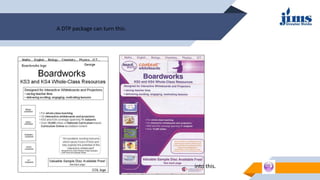
A DTP package can turn this:
into this.
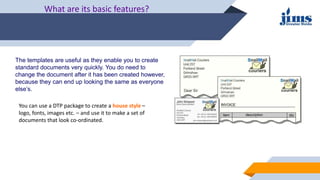
The templates are useful as they enable you to create
standard documents very quickly. You do need to
change the document after it has been created however,
because they can end up looking the same as everyone
else’s.
What are its basic features?
You can use a DTP package to create a house style –
logo, fonts, images etc. – and use it to make a set of
documents that look co-ordinated.
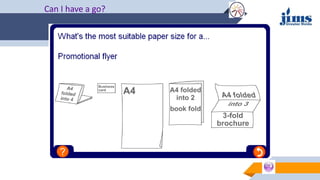
The documents you create using DTP are in standard sizes.
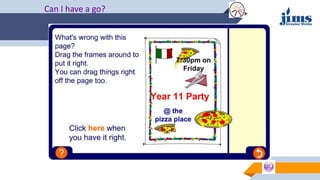
Can I have a go?
Importing files
Desktop publishing software is often used to assemble pages using files from other
packages.
It can import text files from word processors and graphics and photographs from
graphics software.
The software needs filters to translate the files so that the desktop publishing
software can understand the content.
If you import text using the wrong filter, it might look like this:
This is especially important in publishing companies, who receive files created on
different types of software.
What else can it do?
DTP is all about layout and attention to detail.
Can I have a go?
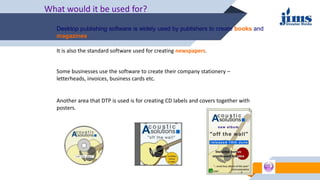
What would it be used for?
Desktop publishing software is widely used by publishers to create books and
magazines.
It is also the standard software used for creating newspapers.
Some businesses use the software to create their company stationery –
letterheads, invoices, business cards etc.
Another area that DTP is used is for creating CD labels and covers together with
posters.
Summary
Every object on the page is contained within a frame which can be moved
and resized accordingly.
DTP software is often used to create documents by inserting a number of
objects from different files.
DTP is useful for creating documents where layout is very important.
Software features include kerning, creating transparent frames, layering
and using templates and wizards.
Most publishing houses use DTP software to create newspapers, books,
and magazines.

Desktop Publishing.ppt

  • 1.
  • 2.
    What does thesoftware do? Desktop publishing (DTP) programs are more flexible than word processing software when creating document layouts.  The software uses frames. Every object on the page is contained within a frame.  The frames can easily be moved and resized, which makes it easy to change the layout. There are tools for inserting text, clip art, borders, pictures, word art and for drawing.  Templates and wizards give you standard layouts which you can edit and change.
  • 3.
    A DTP packagecan turn this: into this.
  • 4.
    The templates areuseful as they enable you to create standard documents very quickly. You do need to change the document after it has been created however, because they can end up looking the same as everyone else’s. What are its basic features? You can use a DTP package to create a house style – logo, fonts, images etc. – and use it to make a set of documents that look co-ordinated.
  • 5.
    The documents youcreate using DTP are in standard sizes.
  • 6.
  • 7.
    Importing files Desktop publishingsoftware is often used to assemble pages using files from other packages. It can import text files from word processors and graphics and photographs from graphics software. The software needs filters to translate the files so that the desktop publishing software can understand the content. If you import text using the wrong filter, it might look like this: This is especially important in publishing companies, who receive files created on different types of software.
  • 8.
    What else canit do? DTP is all about layout and attention to detail.
  • 9.
  • 10.
    What would itbe used for? Desktop publishing software is widely used by publishers to create books and magazines. It is also the standard software used for creating newspapers. Some businesses use the software to create their company stationery – letterheads, invoices, business cards etc. Another area that DTP is used is for creating CD labels and covers together with posters.
  • 11.
    Summary Every object onthe page is contained within a frame which can be moved and resized accordingly. DTP software is often used to create documents by inserting a number of objects from different files. DTP is useful for creating documents where layout is very important. Software features include kerning, creating transparent frames, layering and using templates and wizards. Most publishing houses use DTP software to create newspapers, books, and magazines.