PUBLIC Copyright © 2017 Rockwell Automation, Inc. All Rights Reserved. 1Rockwell Automation TechED 2017 @ROKTechED #ROKTechED
Copyright © 2017 Rockwell Automation, Inc. All Rights Reserved. 2Rockwell Automation TechED 2017 @ROKTechED #ROKTechED
PUBLIC
Designing Machine-level HMI with
Studio 5000 View Designer® Demonstration
PUBLIC Copyright © 2017 Rockwell Automation, Inc. All Rights Reserved. 3Rockwell Automation TechED 2017 @ROKTechED #ROKTechED
Agenda
Demo
What’s Coming Next?
Background
PUBLIC Copyright © 2017 Rockwell Automation, Inc. All Rights Reserved. 4Rockwell Automation TechED 2017 @ROKTechED #ROKTechED
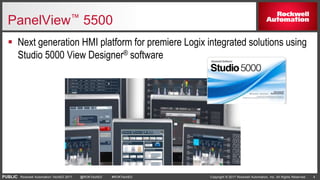
PanelView™ 5500
 Next generation HMI platform for premiere Logix integrated solutions using
Studio 5000 View Designer® software
PUBLIC Copyright © 2017 Rockwell Automation, Inc. All Rights Reserved. 5Rockwell Automation TechED 2017 @ROKTechED #ROKTechED
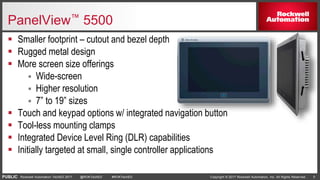
PanelView™ 5500
 Smaller footprint – cutout and bezel depth
 Rugged metal design
 More screen size offerings
 Wide-screen
 Higher resolution
 7” to 19” sizes
 Touch and keypad options w/ integrated navigation button
 Tool-less mounting clamps
 Integrated Device Level Ring (DLR) capabilities
 Initially targeted at small, single controller applications
PUBLIC Copyright © 2017 Rockwell Automation, Inc. All Rights Reserved. 6Rockwell Automation TechED 2017 @ROKTechED #ROKTechED
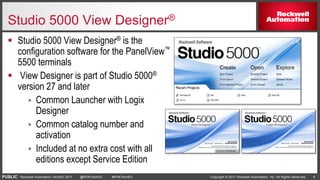
Studio 5000 View Designer®
 Studio 5000 View Designer® is the
configuration software for the PanelView™
5500 terminals
 View Designer is part of Studio 5000®
version 27 and later
 Common Launcher with Logix
Designer
 Common catalog number and
activation
 Included at no extra cost with all
editions except Service Edition
PUBLIC Copyright © 2017 Rockwell Automation, Inc. All Rights Reserved. 7Rockwell Automation TechED 2017 @ROKTechED #ROKTechED
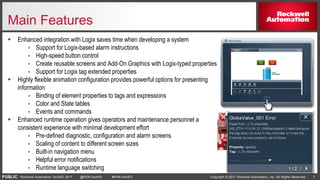
Main Features
 Enhanced integration with Logix saves time when developing a system
 Support for Logix-based alarm instructions
 High-speed button control
 Create reusable screens and Add-On Graphics with Logix-typed properties
 Support for Logix tag extended properties
 Highly flexible animation configuration provides powerful options for presenting
information
 Binding of element properties to tags and expressions
 Color and State tables
 Events and commands
 Enhanced runtime operation gives operators and maintenance personnel a
consistent experience with minimal development effort
 Pre-defined diagnostic, configuration and alarm screens
 Scaling of content to different screen sizes
 Built-in navigation menu
 Helpful error notifications
 Runtime language switching
PUBLIC Copyright © 2017 Rockwell Automation, Inc. All Rights Reserved. 8Rockwell Automation TechED 2017 @ROKTechED #ROKTechED
Agenda
Demo
What’s Coming Next?
Background
PUBLIC Copyright © 2017 Rockwell Automation, Inc. All Rights Reserved. 9Rockwell Automation TechED 2017 @ROKTechED #ROKTechED
View Designer and PanelView5000 V4 (4Q CY
2017 – with Studio 5000® V31) Planned Features
 New PV5310 hardware
 Lower cost panel in 6”, 7”W, 9”W, and 12”W sizes.
 Supports up to 50 screens and popups.
 HMI features:
 Data logging and historical trending
 Emulator
 PDF viewer
 VNC support
 Download from removable media
 Support up to 100 screens and popups on a PanelView™ 5500.
 4 Terminal - 1 Controller Support
 Slider graphic element
 Simple line tool
Preliminary – Subject to change!
PUBLIC Copyright © 2017 Rockwell Automation, Inc. All Rights Reserved. 10Rockwell Automation TechED 2017 @ROKTechED #ROKTechED
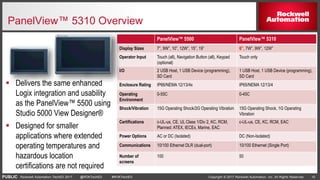
PanelView™ 5310 Overview
 Delivers the same enhanced
Logix integration and usability
as the PanelView™ 5500 using
Studio 5000 View Designer®
 Designed for smaller
applications where extended
operating temperatures and
hazardous location
certifications are not required
PanelView™ 5500 PanelView™ 5310
Display Sizes 7”, 9W”, 10”, 12W”, 15”, 19” 6”, 7W”, 9W”, 12W”
Operator Input Touch (all), Navigation Button (all), Keypad
(optional)
Touch only
I/O 2 USB Host, 1 USB Device (programming),
SD Card
1 USB Host, 1 USB Device (programming),
SD Card
Enclosure Rating IP66/NEMA 12/13/4x IP65/NEMA 12/13/4
Operating
Environment
0-55C 0-45C
Shock/Vibration 15G Operating Shock/2G Operating Vibration 15G Operating Shock, 1G Operating
Vibration
Certifications c-UL-us, CE, UL Class 1/Div 2, KC, RCM,
Planned: ATEX, IECEx, Marine, EAC
c-UL-us, CE, KC, RCM, EAC
Power Options AC or DC (Isolated) DC (Non-Isolated)
Communications 10/100 Ethernet DLR (dual-port) 10/100 Ethernet (Single Port)
Number of
screens
100 50
PUBLIC Copyright © 2017 Rockwell Automation, Inc. All Rights Reserved. 11Rockwell Automation TechED 2017 @ROKTechED #ROKTechED
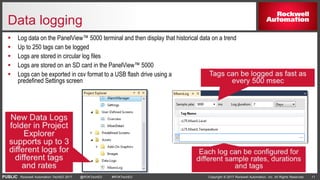
Data logging
 Log data on the PanelView™ 5000 terminal and then display that historical data on a trend
 Up to 250 tags can be logged
 Logs are stored in circular log files
 Logs are stored on an SD card in the PanelView™ 5000
 Logs can be exported in csv format to a USB flash drive using a
predefined Settings screen
PUBLIC Copyright © 2017 Rockwell Automation, Inc. All Rights Reserved. 12Rockwell Automation TechED 2017 @ROKTechED #ROKTechED
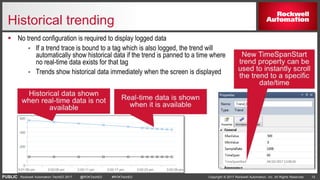
Historical trending
 No trend configuration is required to display logged data
 If a trend trace is bound to a tag which is also logged, the trend will
automatically show historical data if the trend is panned to a time where
no real-time data exists for that tag
 Trends show historical data immediately when the screen is displayed
PUBLIC Copyright © 2017 Rockwell Automation, Inc. All Rights Reserved. 13Rockwell Automation TechED 2017 @ROKTechED #ROKTechED
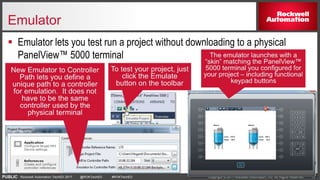
Emulator
 Emulator lets you test run a project without downloading to a physical
PanelView™ 5000 terminal
PUBLIC Copyright © 2017 Rockwell Automation, Inc. All Rights Reserved. 14Rockwell Automation TechED 2017 @ROKTechED #ROKTechED
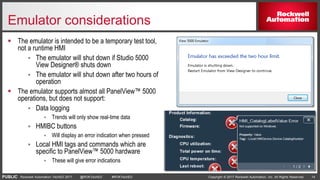
Emulator considerations
 The emulator is intended to be a temporary test tool,
not a runtime HMI
 The emulator will shut down if Studio 5000
View Designer® shuts down
 The emulator will shut down after two hours of
operation
 The emulator supports almost all PanelView™ 5000
operations, but does not support:
 Data logging
 Trends will only show real-time data
 HMIBC buttons
 Will display an error indication when pressed
 Local HMI tags and commands which are
specific to PanelView™ 5000 hardware
 These will give error indications
PUBLIC Copyright © 2017 Rockwell Automation, Inc. All Rights Reserved. 15Rockwell Automation TechED 2017 @ROKTechED #ROKTechED
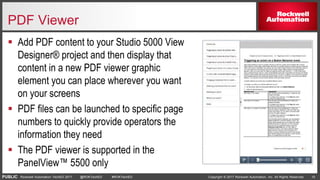
PDF Viewer
 Add PDF content to your Studio 5000 View
Designer® project and then display that
content in a new PDF viewer graphic
element you can place wherever you want
on your screens
 PDF files can be launched to specific page
numbers to quickly provide operators the
information they need
 The PDF viewer is supported in the
PanelView™ 5500 only
PUBLIC Copyright © 2017 Rockwell Automation, Inc. All Rights Reserved. 16Rockwell Automation TechED 2017 @ROKTechED #ROKTechED
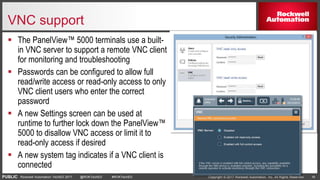
VNC support
 The PanelView™ 5000 terminals use a built-
in VNC server to support a remote VNC client
for monitoring and troubleshooting
 Passwords can be configured to allow full
read/write access or read-only access to only
VNC client users who enter the correct
password
 A new Settings screen can be used at
runtime to further lock down the PanelView™
5000 to disallow VNC access or limit it to
read-only access if desired
 A new system tag indicates if a VNC client is
connected
PUBLIC Copyright © 2017 Rockwell Automation, Inc. All Rights Reserved. 17Rockwell Automation TechED 2017 @ROKTechED #ROKTechED
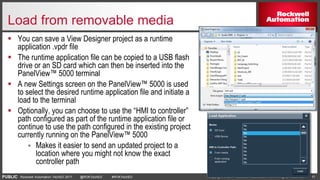
Load from removable media
 You can save a View Designer project as a runtime
application .vpdr file
 The runtime application file can be copied to a USB flash
drive or an SD card which can then be inserted into the
PanelView™ 5000 terminal
 A new Settings screen on the PanelView™ 5000 is used
to select the desired runtime application file and initiate a
load to the terminal
 Optionally, you can choose to use the “HMI to controller”
path configured as part of the runtime application file or
continue to use the path configured in the existing project
currently running on the PanelView™ 5000
 Makes it easier to send an updated project to a
location where you might not know the exact
controller path
PUBLIC Copyright © 2017 Rockwell Automation, Inc. All Rights Reserved. 20Rockwell Automation TechED 2017 @ROKTechED #ROKTechED
V2 discontinuation
 Starting with V4 (Q4 CY2017), we are discontinuing the V2.00x PanelView™ 5500
firmware
 Any existing PanelView™ 5500 terminals can be flash updated to V3 or V4 firmware
 Projects created in V2 View Designer can be converted to V3 or V4 simply by
opening them in the newer version of View Designer
 You can keep using V2, but any issues found will be addressed in a newer release
 V3 and V4 provide many new features
 V2 shipped with Studio 5000® releases V27, V28 and V29
 V3 shipped with Studio 5000® release V30
 V4 will be released with Studio 5000® release V31
PUBLIC Copyright © 2017 Rockwell Automation, Inc. All Rights Reserved. 21Rockwell Automation TechED 2017 @ROKTechED #ROKTechED
Agenda
Demo
What’s Coming Next?
Background
PUBLIC Copyright © 2017 Rockwell Automation, Inc. All Rights Reserved. 22Rockwell Automation TechED 2017 @ROKTechED #ROKTechED
Please take a moment to complete the brief session survey
on our mobile app and let us know how we’re doing!
Username: Last name
Password: Email address used to register
 Locate the session in the “Schedule” icon
 Click on the “Survey” icon in the lower right corner of the session details
 Complete survey & submit
 Download the ROKTechED app and login:
Thank you!
Complete A Survey
www.rockwellautomation.com
Copyright © 2017 Rockwell Automation, Inc. All Rights Reserved. 23Rockwell Automation TechED 2017 @ROKTechED #ROKTechED
PUBLIC
Thank you!

Designing Machine-level HMI with Studio 5000 View Designer® Demonstration

  • 1.
    PUBLIC Copyright ©2017 Rockwell Automation, Inc. All Rights Reserved. 1Rockwell Automation TechED 2017 @ROKTechED #ROKTechED
  • 2.
    Copyright © 2017Rockwell Automation, Inc. All Rights Reserved. 2Rockwell Automation TechED 2017 @ROKTechED #ROKTechED PUBLIC Designing Machine-level HMI with Studio 5000 View Designer® Demonstration
  • 3.
    PUBLIC Copyright ©2017 Rockwell Automation, Inc. All Rights Reserved. 3Rockwell Automation TechED 2017 @ROKTechED #ROKTechED Agenda Demo What’s Coming Next? Background
  • 4.
    PUBLIC Copyright ©2017 Rockwell Automation, Inc. All Rights Reserved. 4Rockwell Automation TechED 2017 @ROKTechED #ROKTechED PanelView™ 5500  Next generation HMI platform for premiere Logix integrated solutions using Studio 5000 View Designer® software
  • 5.
    PUBLIC Copyright ©2017 Rockwell Automation, Inc. All Rights Reserved. 5Rockwell Automation TechED 2017 @ROKTechED #ROKTechED PanelView™ 5500  Smaller footprint – cutout and bezel depth  Rugged metal design  More screen size offerings  Wide-screen  Higher resolution  7” to 19” sizes  Touch and keypad options w/ integrated navigation button  Tool-less mounting clamps  Integrated Device Level Ring (DLR) capabilities  Initially targeted at small, single controller applications
  • 6.
    PUBLIC Copyright ©2017 Rockwell Automation, Inc. All Rights Reserved. 6Rockwell Automation TechED 2017 @ROKTechED #ROKTechED Studio 5000 View Designer®  Studio 5000 View Designer® is the configuration software for the PanelView™ 5500 terminals  View Designer is part of Studio 5000® version 27 and later  Common Launcher with Logix Designer  Common catalog number and activation  Included at no extra cost with all editions except Service Edition
  • 7.
    PUBLIC Copyright ©2017 Rockwell Automation, Inc. All Rights Reserved. 7Rockwell Automation TechED 2017 @ROKTechED #ROKTechED Main Features  Enhanced integration with Logix saves time when developing a system  Support for Logix-based alarm instructions  High-speed button control  Create reusable screens and Add-On Graphics with Logix-typed properties  Support for Logix tag extended properties  Highly flexible animation configuration provides powerful options for presenting information  Binding of element properties to tags and expressions  Color and State tables  Events and commands  Enhanced runtime operation gives operators and maintenance personnel a consistent experience with minimal development effort  Pre-defined diagnostic, configuration and alarm screens  Scaling of content to different screen sizes  Built-in navigation menu  Helpful error notifications  Runtime language switching
  • 8.
    PUBLIC Copyright ©2017 Rockwell Automation, Inc. All Rights Reserved. 8Rockwell Automation TechED 2017 @ROKTechED #ROKTechED Agenda Demo What’s Coming Next? Background
  • 9.
    PUBLIC Copyright ©2017 Rockwell Automation, Inc. All Rights Reserved. 9Rockwell Automation TechED 2017 @ROKTechED #ROKTechED View Designer and PanelView5000 V4 (4Q CY 2017 – with Studio 5000® V31) Planned Features  New PV5310 hardware  Lower cost panel in 6”, 7”W, 9”W, and 12”W sizes.  Supports up to 50 screens and popups.  HMI features:  Data logging and historical trending  Emulator  PDF viewer  VNC support  Download from removable media  Support up to 100 screens and popups on a PanelView™ 5500.  4 Terminal - 1 Controller Support  Slider graphic element  Simple line tool Preliminary – Subject to change!
  • 10.
    PUBLIC Copyright ©2017 Rockwell Automation, Inc. All Rights Reserved. 10Rockwell Automation TechED 2017 @ROKTechED #ROKTechED PanelView™ 5310 Overview  Delivers the same enhanced Logix integration and usability as the PanelView™ 5500 using Studio 5000 View Designer®  Designed for smaller applications where extended operating temperatures and hazardous location certifications are not required PanelView™ 5500 PanelView™ 5310 Display Sizes 7”, 9W”, 10”, 12W”, 15”, 19” 6”, 7W”, 9W”, 12W” Operator Input Touch (all), Navigation Button (all), Keypad (optional) Touch only I/O 2 USB Host, 1 USB Device (programming), SD Card 1 USB Host, 1 USB Device (programming), SD Card Enclosure Rating IP66/NEMA 12/13/4x IP65/NEMA 12/13/4 Operating Environment 0-55C 0-45C Shock/Vibration 15G Operating Shock/2G Operating Vibration 15G Operating Shock, 1G Operating Vibration Certifications c-UL-us, CE, UL Class 1/Div 2, KC, RCM, Planned: ATEX, IECEx, Marine, EAC c-UL-us, CE, KC, RCM, EAC Power Options AC or DC (Isolated) DC (Non-Isolated) Communications 10/100 Ethernet DLR (dual-port) 10/100 Ethernet (Single Port) Number of screens 100 50
  • 11.
    PUBLIC Copyright ©2017 Rockwell Automation, Inc. All Rights Reserved. 11Rockwell Automation TechED 2017 @ROKTechED #ROKTechED Data logging  Log data on the PanelView™ 5000 terminal and then display that historical data on a trend  Up to 250 tags can be logged  Logs are stored in circular log files  Logs are stored on an SD card in the PanelView™ 5000  Logs can be exported in csv format to a USB flash drive using a predefined Settings screen
  • 12.
    PUBLIC Copyright ©2017 Rockwell Automation, Inc. All Rights Reserved. 12Rockwell Automation TechED 2017 @ROKTechED #ROKTechED Historical trending  No trend configuration is required to display logged data  If a trend trace is bound to a tag which is also logged, the trend will automatically show historical data if the trend is panned to a time where no real-time data exists for that tag  Trends show historical data immediately when the screen is displayed
  • 13.
    PUBLIC Copyright ©2017 Rockwell Automation, Inc. All Rights Reserved. 13Rockwell Automation TechED 2017 @ROKTechED #ROKTechED Emulator  Emulator lets you test run a project without downloading to a physical PanelView™ 5000 terminal
  • 14.
    PUBLIC Copyright ©2017 Rockwell Automation, Inc. All Rights Reserved. 14Rockwell Automation TechED 2017 @ROKTechED #ROKTechED Emulator considerations  The emulator is intended to be a temporary test tool, not a runtime HMI  The emulator will shut down if Studio 5000 View Designer® shuts down  The emulator will shut down after two hours of operation  The emulator supports almost all PanelView™ 5000 operations, but does not support:  Data logging  Trends will only show real-time data  HMIBC buttons  Will display an error indication when pressed  Local HMI tags and commands which are specific to PanelView™ 5000 hardware  These will give error indications
  • 15.
    PUBLIC Copyright ©2017 Rockwell Automation, Inc. All Rights Reserved. 15Rockwell Automation TechED 2017 @ROKTechED #ROKTechED PDF Viewer  Add PDF content to your Studio 5000 View Designer® project and then display that content in a new PDF viewer graphic element you can place wherever you want on your screens  PDF files can be launched to specific page numbers to quickly provide operators the information they need  The PDF viewer is supported in the PanelView™ 5500 only
  • 16.
    PUBLIC Copyright ©2017 Rockwell Automation, Inc. All Rights Reserved. 16Rockwell Automation TechED 2017 @ROKTechED #ROKTechED VNC support  The PanelView™ 5000 terminals use a built- in VNC server to support a remote VNC client for monitoring and troubleshooting  Passwords can be configured to allow full read/write access or read-only access to only VNC client users who enter the correct password  A new Settings screen can be used at runtime to further lock down the PanelView™ 5000 to disallow VNC access or limit it to read-only access if desired  A new system tag indicates if a VNC client is connected
  • 17.
    PUBLIC Copyright ©2017 Rockwell Automation, Inc. All Rights Reserved. 17Rockwell Automation TechED 2017 @ROKTechED #ROKTechED Load from removable media  You can save a View Designer project as a runtime application .vpdr file  The runtime application file can be copied to a USB flash drive or an SD card which can then be inserted into the PanelView™ 5000 terminal  A new Settings screen on the PanelView™ 5000 is used to select the desired runtime application file and initiate a load to the terminal  Optionally, you can choose to use the “HMI to controller” path configured as part of the runtime application file or continue to use the path configured in the existing project currently running on the PanelView™ 5000  Makes it easier to send an updated project to a location where you might not know the exact controller path
  • 18.
    PUBLIC Copyright ©2017 Rockwell Automation, Inc. All Rights Reserved. 20Rockwell Automation TechED 2017 @ROKTechED #ROKTechED V2 discontinuation  Starting with V4 (Q4 CY2017), we are discontinuing the V2.00x PanelView™ 5500 firmware  Any existing PanelView™ 5500 terminals can be flash updated to V3 or V4 firmware  Projects created in V2 View Designer can be converted to V3 or V4 simply by opening them in the newer version of View Designer  You can keep using V2, but any issues found will be addressed in a newer release  V3 and V4 provide many new features  V2 shipped with Studio 5000® releases V27, V28 and V29  V3 shipped with Studio 5000® release V30  V4 will be released with Studio 5000® release V31
  • 19.
    PUBLIC Copyright ©2017 Rockwell Automation, Inc. All Rights Reserved. 21Rockwell Automation TechED 2017 @ROKTechED #ROKTechED Agenda Demo What’s Coming Next? Background
  • 20.
    PUBLIC Copyright ©2017 Rockwell Automation, Inc. All Rights Reserved. 22Rockwell Automation TechED 2017 @ROKTechED #ROKTechED Please take a moment to complete the brief session survey on our mobile app and let us know how we’re doing! Username: Last name Password: Email address used to register  Locate the session in the “Schedule” icon  Click on the “Survey” icon in the lower right corner of the session details  Complete survey & submit  Download the ROKTechED app and login: Thank you! Complete A Survey
  • 21.
    www.rockwellautomation.com Copyright © 2017Rockwell Automation, Inc. All Rights Reserved. 23Rockwell Automation TechED 2017 @ROKTechED #ROKTechED PUBLIC Thank you!