Design Thinking Process
Unit 2
CIT6 Capstone Project 1
Lovely Jenn A. Reformado
Table of Contents
• Introduction to design thinking
process
• Identifying stakeholders
• Empathize
• Define
• Ideate
• Prototype
• Test
NOTICE
This presentation was
prepared by Ms. Lovely Jenn
Reformado for the
PERSONAL AND
EDUCATIONAL USE of the
students taking up CIT6
Capstone Project 1
Unauthorized public use and
distribution is prohibited
Introduction to Design
Thinking
What is design thinking? | Design thinking methodology | Design
thinking for researchers | List of deliverables
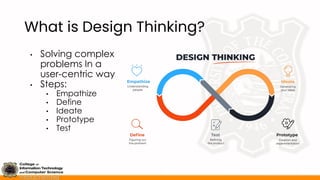
What is Design Thinking?
• Solving complex
problems In a
user-centric way
• Steps:
• Empathize
• Define
• Ideate
• Prototype
• Test
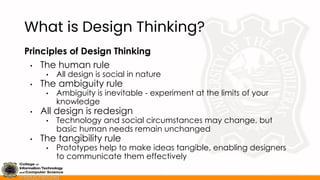
What is Design Thinking?
Principles of Design Thinking
• The human rule
• All design is social in nature
• The ambiguity rule
• Ambiguity is inevitable - experiment at the limits of your
knowledge
• All design is redesign
• Technology and social circumstances may change, but
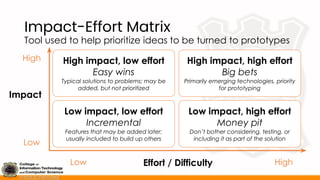
basic human needs remain unchanged
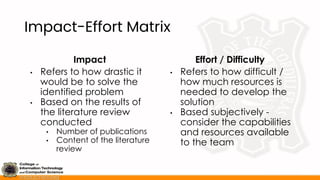
• The tangibility rule
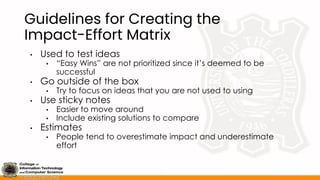
• Prototypes help to make ideas tangible, enabling designers
to communicate them effectively
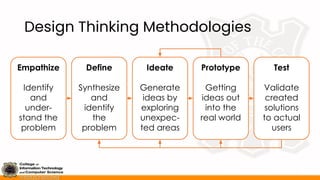
Design Thinking Methodologies
Ideate
Generate
ideas by
exploring
unexpec-
ted areas
Define
Synthesize
and
identify
the
problem
Empathize
Identify
and
under-
stand the
problem
Prototype
Getting
ideas out
into the
real world
Test
Validate
created
solutions
to actual
users
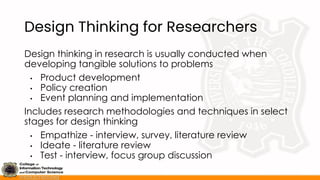
Design Thinking for Researchers
Design thinking in research is usually conducted when
developing tangible solutions to problems
• Product development
• Policy creation
• Event planning and implementation
Includes research methodologies and techniques in select
stages for design thinking
• Empathize - interview, survey, literature review
• Ideate - literature review
• Test - interview, focus group discussion
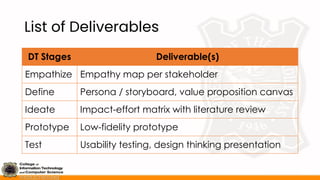
List of Deliverables
DT Stages Deliverable(s)
Empathize Empathy map per stakeholder
Define Persona / storyboard, value proposition canvas
Ideate Impact-effort matrix with literature review
Prototype Low-fidelity prototype
Test Usability testing, design thinking presentation
Identifying Stakeholders
What is a stakeholder? | Stakeholders in the product supply chain |
Types of stakeholders | Stakeholder analysis
What is a Stakeholder?
• Person, group, or organization with vested interest or
stake in the decision-making and activities of a project
• Entities that would be interviewed / referred to during
the design thinking processes
• May be identified according to:
• Product supply chain
• Types of jobs to be done
• Prioritized through the stakeholder analysis
• Stakeholder analysis - Process of identifying and prioritizing
stakeholders to identify the ways on how to communicate
and involve each stakeholder
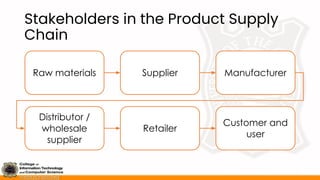
Stakeholders in the Product Supply
Chain
Raw materials Supplier Manufacturer
Distributor /
wholesale
supplier
Retailer
Customer and
user
Types of Stakeholders
Influencer
• Opinions might count and whom the decision maker
might want to listen to, even in an informal way
Recommender
• Carry out search and evaluation processes and create
a formal recommendation
Economic Buyer
• Controls the budget; concern is about financial
performance and budgetary efficiency
Types of Stakeholders
Decision Maker
• Responsible for choice of product / service; usually has
authority over budget
End User
• May be passive or active, depending on how much say
they have in the decision process
Saboteur
• Obstructs or derails the process of search, evaluation,
and purchase of a product / service
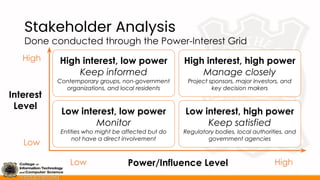
Stakeholder Analysis
Done conducted through the Power-Interest Grid
High interest, low power
Keep informed
Contemporary groups, non-government
organizations, and local residents
High interest, high power
Manage closely
Project sponsors, major investors, and
key decision makers
Low interest, low power
Monitor
Entities who might be affected but do
not have a direct involvement
Low interest, high power
Keep satisfied
Regulatory bodies, local authorities, and
government agencies
High
Low
Low High
Power/Influence Level
Interest
Level
Stakeholder Analysis
Steps for Stakeholder Analysis
1. Identify stakeholders
a. Base them either through the supply chain / jobs-to-be-done
b. Minimum of three (3) stakeholders
2. Identify the power and interest level for each
stakeholder
3. Identify a person to contact and collaborate with
during the design thinking process
4. Prioritize the stakeholders to talk to during the process
a. Base the power / influence level as a means to prioritize, with
the interest level as a secondary factor
Empathize
What is the empathize stage? | Steps in the empathize stage |
Guidelines for conducting interviews | Empathy map | Guidelines for
creating the empathy map | Refining the empathy map with
literature review
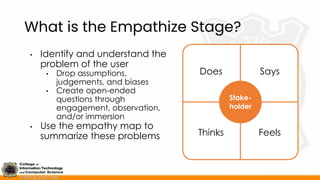
What is the Empathize Stage?
• Identify and understand the
problem of the user
• Drop assumptions,
judgements, and biases
• Create open-ended
questions through
engagement, observation,
and/or immersion
• Use the empathy map to
summarize these problems
Stake-
holder
Does Says
Thinks Feels
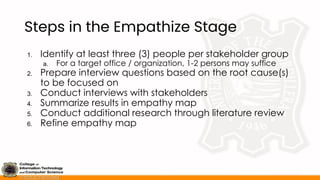
Steps in the Empathize Stage
1. Identify at least three (3) people per stakeholder group
a. For a target office / organization, 1-2 persons may suffice
2. Prepare interview questions based on the root cause(s)
to be focused on
3. Conduct interviews with stakeholders
4. Summarize results in empathy map
5. Conduct additional research through literature review
6. Refine empathy map
Guidelines for Conducting Interviews
• Prepare generalized, open-ended questions
• What is your daily routine regarding this root cause?
• How do these problems impact your daily life?
• What are the expected outcomes / goals you wish to see
when addressing this problem?
• Do NOT create too many questions
• Do NOT use terms like “system”, “app”, “software”, or
any term that will allude to a solution, particularly a
tech-based one
• Be prepared to answer follow-up questions to further
detail their problems and goals
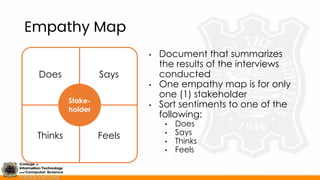
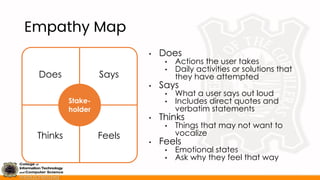
Empathy Map
• Document that summarizes
the results of the interviews
conducted
• One empathy map is for only
one (1) stakeholder
• Sort sentiments to one of the
following:
• Does
• Says
• Thinks
• Feels
Stake-
holder
Does Says
Thinks Feels
Empathy Map
• Does
• Actions the user takes
• Daily activities or solutions that
they have attempted
• Says
• What a user says out loud
• Includes direct quotes and
verbatim statements
• Thinks
• Things that may not want to
vocalize
• Feels
• Emotional states
• Ask why they feel that way
Stake-
holder
Does Says
Thinks Feels
Guidelines for Creating the Empathy
Map
• Set scope and goals
• Who’s the stakeholder?
• Is it to know the stakeholder or the problem?
• Use sticky notes
• Easier to move around
• Use one color per team member
• Merge with data gathering tools
• Include existing literature in the empathy map
• Don’t be afraid to edit
• Conflicting ideas may be present
• Move around ideas if needed
Refining the Empathy Map with
Literature Review
Additional literature review may be done if there are:
• Too few answers
• Conflicting ideas
• Needs for more detailed explanation (ex. phenomena)
• Needs to validate the statements mentioned by the
interviewees
Utilize in-text citation for answers identified through literature
review
• Journals and conference publications
• News articles
Define
What is the define stage? | Storyboard and persona | What is a
value proposition? | Value proposition canvas | How to create the
value proposition canvas
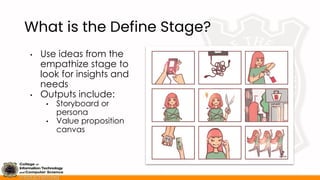
What is the Define Stage?
• Use ideas from the
empathize stage to
look for insights and
needs
• Outputs include:
• Storyboard or
persona
• Value proposition
canvas
Storyboard and Persona
Storyboard
• Visual timeline to show
day-to-day struggles of
the stakeholder
• Used if there is a routine /
process inherent to the
problem
Persona
• Profile representing a
typical stakeholder
• Used if there is there is a
focus to the
characteristics of the
problem and stakeholder
IMPORTANT: Use only one of the following for the first half of the
Define stage; do NOT use both at the same time
Storyboard and Persona
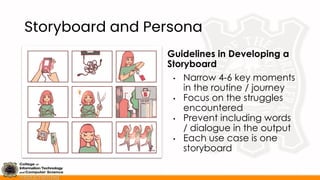
Guidelines in Developing a
Storyboard
• Narrow 4-6 key moments
in the routine / journey
• Focus on the struggles
encountered
• Prevent including words
/ dialogue in the output
• Each use case is one
storyboard
Storyboard and Persona
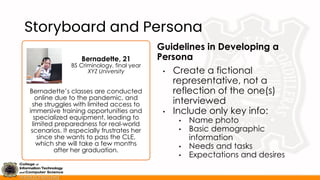
Guidelines in Developing a
Persona
• Create a fictional
representative, not a
reflection of the one(s)
interviewed
• Include only key info:
• Name photo
• Basic demographic
information
• Needs and tasks
• Expectations and desires
Bernadette’s classes are conducted
online due to the pandemic, and
she struggles with limited access to
immersive training opportunities and
specialized equipment, leading to
limited preparedness for real-world
scenarios. It especially frustrates her
since she wants to pass the CLE,
which she will take a few months
after her graduation.
Bernadette, 21
BS Criminology, final year
XYZ University
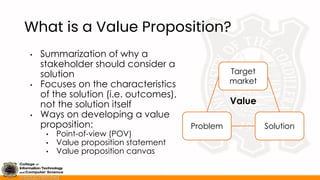
What is a Value Proposition?
• Summarization of why a
stakeholder should consider a
solution
• Focuses on the characteristics
of the solution (i.e. outcomes),
not the solution itself
• Ways on developing a value
proposition:
• Point-of-view (POV)
• Value proposition statement
• Value proposition canvas
Problem Solution
Target
market
Value
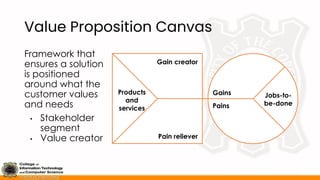
Value Proposition Canvas
Framework that
ensures a solution
is positioned
around what the
customer values
and needs
• Stakeholder
segment
• Value creator
Jobs-to-
be-done
Pains
Gains
Products
and
services
Pain reliever
Gain creator
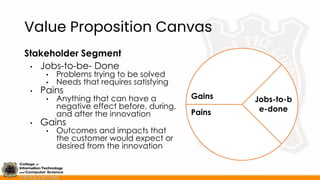
Value Proposition Canvas
Stakeholder Segment
• Jobs-to-be- Done
• Problems trying to be solved
• Needs that requires satisfying
• Pains
• Anything that can have a
negative effect before, during,
and after the innovation
• Gains
• Outcomes and impacts that
the customer would expect or
desired from the innovation
Jobs-to-b
e-done
Pains
Gains
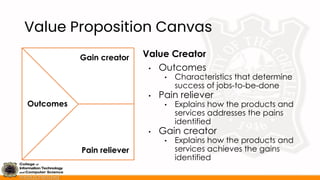
Value Proposition Canvas
Value Creator
• Outcomes
• Characteristics that determine
success of jobs-to-be-done
• Pain reliever
• Explains how the products and
services addresses the pains
identified
• Gain creator
• Explains how the products and
services achieves the gains
identified
Outcomes
Pain reliever
Gain creator
How to Create the Value Proposition
Canvas
• Identify stakeholders
• Observe or define a phenomenon or market need
• Include the jobs, pains, and gains of the stakeholder
• Product or service
• Develop a hypothesis about a solution to the problem
identified by the stakeholders
• Conduct testing
• Conduct an experiment to the actual customer segment to
test the hypothesis
• Re-adjust the canvas
• Adjust the contents of the value proposition canvas based on
the results of the testing
Ideate
What is the ideate stage? | Review: solution generation |
Introduction to literature review | Steps in literature review |
Impact-effort matrix | Guidelines for creating the impact-effort matrix
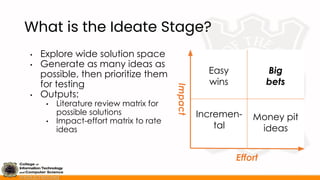
What is the Ideate Stage?
• Explore wide solution space
• Generate as many ideas as
possible, then prioritize them
for testing
• Outputs:
• Literature review matrix for
possible solutions
• Impact-effort matrix to rate
ideas
Easy
wins
Big
bets
Incremen-
tal
Money pit
ideas
Effort
Impact
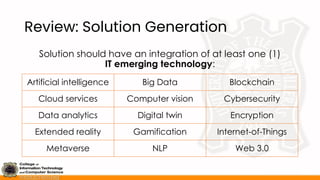
Review: Solution Generation
Solution should have an integration of at least one (1)
IT emerging technology:
Artificial intelligence Big Data Blockchain
Cloud services Computer vision Cybersecurity
Data analytics Digital twin Encryption
Extended reality Gamification Internet-of-Things
Metaverse NLP Web 3.0
Introduction to Literature Review
• Synthesizing available literatures on a topic
• Usually includes journal publications and conference
proceedings
• Can also include books and news articles depending on the
field of study
• Literature review can be seen in research through:
• Review of related literature
• Systematic literature review
• Answering a specific objective through literature review
IMPORTANT: For Capstone Project 1, literature review shall be the
basis for generating ideas to be used in the Impact-Effort Matrix
Steps in Literature Review
1. Choose databases
2. Identify keywords
3. Identify inclusion and exclusion criteria
4. Conduct literature search
5. Review results
6. Synthesize the information gathered
Steps in Literature Review
1. Choose databases
2. Identify keywords
3. Identify inclusion and exclusion criteria
4. Conduct literature search
5. Review results
6. Synthesize the information gathered
Steps in Literature Review
1. Choose Databases
• Website of a research database either from an
organization, company, or social media
• Limit the choice of database(s) to around 1-3
• Recommended databases for ITCS:
• ACM Digital Library - https://dl.acm.org/
• Directory of Open Access Journals - https://doaj.org/
• Elsevier - https://www.sciencedirect.com/
• IEEE Explore - https://ieeexplore.ieee.org/Xplore/home.jsp
• Open Access - https://www.openaccess.nl/en
Steps in Literature Review
2. Identify Keywords
• Identify what will be searched in the databases
• Keep it simple
• Focus on finding solution to the key problems identified in the
value proposition canvas
• Sample keywords to search:
• “IT solution” + topic: IT solution police training
• “ICT” + topic: ICT training
• Topic + “solution”: Access to police equipment solution
• Depending on the research database, take note of
their search criteria
Steps in Literature Review
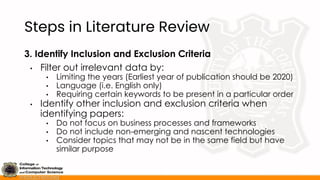
3. Identify Inclusion and Exclusion Criteria
• Filter out irrelevant data by:
• Limiting the years (Earliest year of publication should be 2020)
• Language (i.e. English only)
• Requiring certain keywords to be present in a particular order
• Identify other inclusion and exclusion criteria when
identifying papers:
• Do not focus on business processes and frameworks
• Do not include non-emerging and nascent technologies
• Consider topics that may not be in the same field but have
similar purpose
Steps in Literature Review
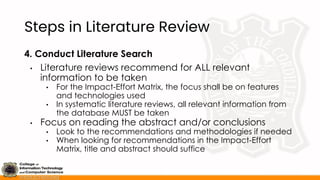
4. Conduct Literature Search
• Literature reviews recommend for ALL relevant
information to be taken
• For the Impact-Effort Matrix, the focus shall be on features
and technologies used
• In systematic literature reviews, all relevant information from
the database MUST be taken
• Focus on reading the abstract and/or conclusions
• Look to the recommendations and methodologies if needed
• When looking for recommendations in the Impact-Effort
Matrix, title and abstract should suffice
Steps in Literature Review
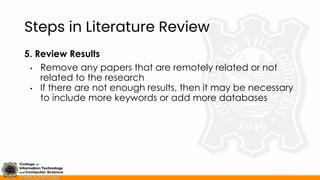
5. Review Results
• Remove any papers that are remotely related or not
related to the research
• If there are not enough results, then it may be necessary
to include more keywords or add more databases
Steps in Literature Review
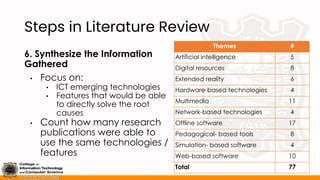
6. Synthesize the Information
Gathered
• Focus on:
• ICT emerging technologies
• Features that would be able
to directly solve the root
causes
• Count how many research
publications were able to
use the same technologies /
features
Themes #
Artificial intelligence 5
Digital resources 8
Extended reality 6
Hardware-based technologies 4
Multimedia 11
Network-based technologies 4
Offline software 17
Pedagogical- based tools 8
Simulation- based software 4
Web-based software 10
Total 77
Impact-Effort Matrix
Tool used to help prioritize ideas to be turned to prototypes
High impact, low effort
Easy wins
Typical solutions to problems; may be
added, but not prioritized
High impact, high effort
Big bets
Primarily emerging technologies, priority
for prototyping
Low impact, low effort
Incremental
Features that may be added later;
usually included to build up others
Low impact, high effort
Money pit
Don’t bother considering, testing, or
including it as part of the solution
High
Low
Low High
Effort / Difficulty
Impact
Impact-Effort Matrix
Impact
• Refers to how drastic it
would be to solve the
identified problem
• Based on the results of
the literature review
conducted
• Number of publications
• Content of the literature
review
Effort / Difficulty
• Refers to how difficult /
how much resources is
needed to develop the
solution
• Based subjectively -
consider the capabilities
and resources available
to the team
Guidelines for Creating the
Impact-Effort Matrix
• Used to test ideas
• “Easy Wins” are not prioritized since it’s deemed to be
successful
• Go outside of the box
• Try to focus on ideas that you are not used to using
• Use sticky notes
• Easier to move around
• Include existing solutions to compare
• Estimates
• People tend to overestimate impact and underestimate
effort
Prototype
What is the prototype stage? | Guidelines in creating the prototypes
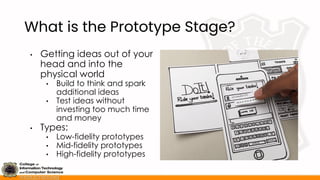
What is the Prototype Stage?
• Getting ideas out of your
head and into the
physical world
• Build to think and spark
additional ideas
• Test ideas without
investing too much time
and money
• Types:
• Low-fidelity prototypes
• Mid-fidelity prototypes
• High-fidelity prototypes
Guidelines in Creating the
Prototypes
• Ensure that all outputs in the “Big Bets” are tested
• If there is time, include “Incrementals” and “Easy Wins”
• If possible, include them already when doing prototypes of
the “Big Bets”
• Focus on only doing low-fidelity prototypes
• Done due to the time restraint and the amount of time
needed to test the prototypes
• Prototypes don’t matter if they are not tested
• Create the prototypes to where the stakeholder would
be able to understand
• If there are multiple stakeholders, no need to show the other
features for other stakeholders
Test
What is the test stage? | Usability testing | Types of testing
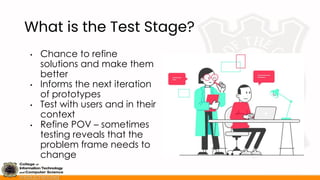
What is the Test Stage?
• Chance to refine
solutions and make them
better
• Informs the next iteration
of prototypes
• Test with users and in their
context
• Refine POV – sometimes
testing reveals that the
problem frame needs to
change
Usability Testing
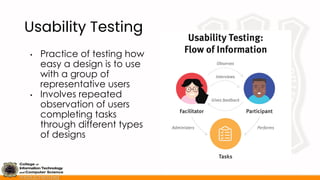
• Practice of testing how
easy a design is to use
with a group of
representative users
• Involves repeated
observation of users
completing tasks
through different types
of designs
Usability Testing
Checklist
1. Determine the features to test
2. Set success metrics
3. Determine people to test on
4. Create task scenarios
5. Write a test script
6. Prepare test environment
Types of Testing
• Interview
• Allow users to use the prototype
• Record what they say, think, do, and feel when using the
prototype
• Survey
• Allow users to use the prototype
• Use existing surveys (i.e. usability survey) to check the usability
• Presentation
• Showcase your solution to a set of users
• Get their feedback after the presentation

Design Thinking Process For Empathize, Define, And Ideate

  • 1.
    Design Thinking Process Unit2 CIT6 Capstone Project 1 Lovely Jenn A. Reformado
  • 2.
    Table of Contents •Introduction to design thinking process • Identifying stakeholders • Empathize • Define • Ideate • Prototype • Test NOTICE This presentation was prepared by Ms. Lovely Jenn Reformado for the PERSONAL AND EDUCATIONAL USE of the students taking up CIT6 Capstone Project 1 Unauthorized public use and distribution is prohibited
  • 3.
    Introduction to Design Thinking Whatis design thinking? | Design thinking methodology | Design thinking for researchers | List of deliverables
  • 4.
    What is DesignThinking? • Solving complex problems In a user-centric way • Steps: • Empathize • Define • Ideate • Prototype • Test
  • 5.
    What is DesignThinking? Principles of Design Thinking • The human rule • All design is social in nature • The ambiguity rule • Ambiguity is inevitable - experiment at the limits of your knowledge • All design is redesign • Technology and social circumstances may change, but basic human needs remain unchanged • The tangibility rule • Prototypes help to make ideas tangible, enabling designers to communicate them effectively
  • 6.
    Design Thinking Methodologies Ideate Generate ideasby exploring unexpec- ted areas Define Synthesize and identify the problem Empathize Identify and under- stand the problem Prototype Getting ideas out into the real world Test Validate created solutions to actual users
  • 7.
    Design Thinking forResearchers Design thinking in research is usually conducted when developing tangible solutions to problems • Product development • Policy creation • Event planning and implementation Includes research methodologies and techniques in select stages for design thinking • Empathize - interview, survey, literature review • Ideate - literature review • Test - interview, focus group discussion
  • 8.
    List of Deliverables DTStages Deliverable(s) Empathize Empathy map per stakeholder Define Persona / storyboard, value proposition canvas Ideate Impact-effort matrix with literature review Prototype Low-fidelity prototype Test Usability testing, design thinking presentation
  • 9.
    Identifying Stakeholders What isa stakeholder? | Stakeholders in the product supply chain | Types of stakeholders | Stakeholder analysis
  • 10.
    What is aStakeholder? • Person, group, or organization with vested interest or stake in the decision-making and activities of a project • Entities that would be interviewed / referred to during the design thinking processes • May be identified according to: • Product supply chain • Types of jobs to be done • Prioritized through the stakeholder analysis • Stakeholder analysis - Process of identifying and prioritizing stakeholders to identify the ways on how to communicate and involve each stakeholder
  • 11.
    Stakeholders in theProduct Supply Chain Raw materials Supplier Manufacturer Distributor / wholesale supplier Retailer Customer and user
  • 12.
    Types of Stakeholders Influencer •Opinions might count and whom the decision maker might want to listen to, even in an informal way Recommender • Carry out search and evaluation processes and create a formal recommendation Economic Buyer • Controls the budget; concern is about financial performance and budgetary efficiency
  • 13.
    Types of Stakeholders DecisionMaker • Responsible for choice of product / service; usually has authority over budget End User • May be passive or active, depending on how much say they have in the decision process Saboteur • Obstructs or derails the process of search, evaluation, and purchase of a product / service
  • 14.
    Stakeholder Analysis Done conductedthrough the Power-Interest Grid High interest, low power Keep informed Contemporary groups, non-government organizations, and local residents High interest, high power Manage closely Project sponsors, major investors, and key decision makers Low interest, low power Monitor Entities who might be affected but do not have a direct involvement Low interest, high power Keep satisfied Regulatory bodies, local authorities, and government agencies High Low Low High Power/Influence Level Interest Level
  • 15.
    Stakeholder Analysis Steps forStakeholder Analysis 1. Identify stakeholders a. Base them either through the supply chain / jobs-to-be-done b. Minimum of three (3) stakeholders 2. Identify the power and interest level for each stakeholder 3. Identify a person to contact and collaborate with during the design thinking process 4. Prioritize the stakeholders to talk to during the process a. Base the power / influence level as a means to prioritize, with the interest level as a secondary factor
  • 16.
    Empathize What is theempathize stage? | Steps in the empathize stage | Guidelines for conducting interviews | Empathy map | Guidelines for creating the empathy map | Refining the empathy map with literature review
  • 17.
    What is theEmpathize Stage? • Identify and understand the problem of the user • Drop assumptions, judgements, and biases • Create open-ended questions through engagement, observation, and/or immersion • Use the empathy map to summarize these problems Stake- holder Does Says Thinks Feels
  • 18.
    Steps in theEmpathize Stage 1. Identify at least three (3) people per stakeholder group a. For a target office / organization, 1-2 persons may suffice 2. Prepare interview questions based on the root cause(s) to be focused on 3. Conduct interviews with stakeholders 4. Summarize results in empathy map 5. Conduct additional research through literature review 6. Refine empathy map
  • 19.
    Guidelines for ConductingInterviews • Prepare generalized, open-ended questions • What is your daily routine regarding this root cause? • How do these problems impact your daily life? • What are the expected outcomes / goals you wish to see when addressing this problem? • Do NOT create too many questions • Do NOT use terms like “system”, “app”, “software”, or any term that will allude to a solution, particularly a tech-based one • Be prepared to answer follow-up questions to further detail their problems and goals
  • 20.
    Empathy Map • Documentthat summarizes the results of the interviews conducted • One empathy map is for only one (1) stakeholder • Sort sentiments to one of the following: • Does • Says • Thinks • Feels Stake- holder Does Says Thinks Feels
  • 21.
    Empathy Map • Does •Actions the user takes • Daily activities or solutions that they have attempted • Says • What a user says out loud • Includes direct quotes and verbatim statements • Thinks • Things that may not want to vocalize • Feels • Emotional states • Ask why they feel that way Stake- holder Does Says Thinks Feels
  • 22.
    Guidelines for Creatingthe Empathy Map • Set scope and goals • Who’s the stakeholder? • Is it to know the stakeholder or the problem? • Use sticky notes • Easier to move around • Use one color per team member • Merge with data gathering tools • Include existing literature in the empathy map • Don’t be afraid to edit • Conflicting ideas may be present • Move around ideas if needed
  • 23.
    Refining the EmpathyMap with Literature Review Additional literature review may be done if there are: • Too few answers • Conflicting ideas • Needs for more detailed explanation (ex. phenomena) • Needs to validate the statements mentioned by the interviewees Utilize in-text citation for answers identified through literature review • Journals and conference publications • News articles
  • 24.
    Define What is thedefine stage? | Storyboard and persona | What is a value proposition? | Value proposition canvas | How to create the value proposition canvas
  • 25.
    What is theDefine Stage? • Use ideas from the empathize stage to look for insights and needs • Outputs include: • Storyboard or persona • Value proposition canvas
  • 26.
    Storyboard and Persona Storyboard •Visual timeline to show day-to-day struggles of the stakeholder • Used if there is a routine / process inherent to the problem Persona • Profile representing a typical stakeholder • Used if there is there is a focus to the characteristics of the problem and stakeholder IMPORTANT: Use only one of the following for the first half of the Define stage; do NOT use both at the same time
  • 27.
    Storyboard and Persona Guidelinesin Developing a Storyboard • Narrow 4-6 key moments in the routine / journey • Focus on the struggles encountered • Prevent including words / dialogue in the output • Each use case is one storyboard
  • 28.
    Storyboard and Persona Guidelinesin Developing a Persona • Create a fictional representative, not a reflection of the one(s) interviewed • Include only key info: • Name photo • Basic demographic information • Needs and tasks • Expectations and desires Bernadette’s classes are conducted online due to the pandemic, and she struggles with limited access to immersive training opportunities and specialized equipment, leading to limited preparedness for real-world scenarios. It especially frustrates her since she wants to pass the CLE, which she will take a few months after her graduation. Bernadette, 21 BS Criminology, final year XYZ University
  • 29.
    What is aValue Proposition? • Summarization of why a stakeholder should consider a solution • Focuses on the characteristics of the solution (i.e. outcomes), not the solution itself • Ways on developing a value proposition: • Point-of-view (POV) • Value proposition statement • Value proposition canvas Problem Solution Target market Value
  • 30.
    Value Proposition Canvas Frameworkthat ensures a solution is positioned around what the customer values and needs • Stakeholder segment • Value creator Jobs-to- be-done Pains Gains Products and services Pain reliever Gain creator
  • 31.
    Value Proposition Canvas StakeholderSegment • Jobs-to-be- Done • Problems trying to be solved • Needs that requires satisfying • Pains • Anything that can have a negative effect before, during, and after the innovation • Gains • Outcomes and impacts that the customer would expect or desired from the innovation Jobs-to-b e-done Pains Gains
  • 32.
    Value Proposition Canvas ValueCreator • Outcomes • Characteristics that determine success of jobs-to-be-done • Pain reliever • Explains how the products and services addresses the pains identified • Gain creator • Explains how the products and services achieves the gains identified Outcomes Pain reliever Gain creator
  • 33.
    How to Createthe Value Proposition Canvas • Identify stakeholders • Observe or define a phenomenon or market need • Include the jobs, pains, and gains of the stakeholder • Product or service • Develop a hypothesis about a solution to the problem identified by the stakeholders • Conduct testing • Conduct an experiment to the actual customer segment to test the hypothesis • Re-adjust the canvas • Adjust the contents of the value proposition canvas based on the results of the testing
  • 34.
    Ideate What is theideate stage? | Review: solution generation | Introduction to literature review | Steps in literature review | Impact-effort matrix | Guidelines for creating the impact-effort matrix
  • 35.
    What is theIdeate Stage? • Explore wide solution space • Generate as many ideas as possible, then prioritize them for testing • Outputs: • Literature review matrix for possible solutions • Impact-effort matrix to rate ideas Easy wins Big bets Incremen- tal Money pit ideas Effort Impact
  • 36.
    Review: Solution Generation Solutionshould have an integration of at least one (1) IT emerging technology: Artificial intelligence Big Data Blockchain Cloud services Computer vision Cybersecurity Data analytics Digital twin Encryption Extended reality Gamification Internet-of-Things Metaverse NLP Web 3.0
  • 37.
    Introduction to LiteratureReview • Synthesizing available literatures on a topic • Usually includes journal publications and conference proceedings • Can also include books and news articles depending on the field of study • Literature review can be seen in research through: • Review of related literature • Systematic literature review • Answering a specific objective through literature review IMPORTANT: For Capstone Project 1, literature review shall be the basis for generating ideas to be used in the Impact-Effort Matrix
  • 38.
    Steps in LiteratureReview 1. Choose databases 2. Identify keywords 3. Identify inclusion and exclusion criteria 4. Conduct literature search 5. Review results 6. Synthesize the information gathered
  • 39.
    Steps in LiteratureReview 1. Choose databases 2. Identify keywords 3. Identify inclusion and exclusion criteria 4. Conduct literature search 5. Review results 6. Synthesize the information gathered
  • 40.
    Steps in LiteratureReview 1. Choose Databases • Website of a research database either from an organization, company, or social media • Limit the choice of database(s) to around 1-3 • Recommended databases for ITCS: • ACM Digital Library - https://dl.acm.org/ • Directory of Open Access Journals - https://doaj.org/ • Elsevier - https://www.sciencedirect.com/ • IEEE Explore - https://ieeexplore.ieee.org/Xplore/home.jsp • Open Access - https://www.openaccess.nl/en
  • 41.
    Steps in LiteratureReview 2. Identify Keywords • Identify what will be searched in the databases • Keep it simple • Focus on finding solution to the key problems identified in the value proposition canvas • Sample keywords to search: • “IT solution” + topic: IT solution police training • “ICT” + topic: ICT training • Topic + “solution”: Access to police equipment solution • Depending on the research database, take note of their search criteria
  • 42.
    Steps in LiteratureReview 3. Identify Inclusion and Exclusion Criteria • Filter out irrelevant data by: • Limiting the years (Earliest year of publication should be 2020) • Language (i.e. English only) • Requiring certain keywords to be present in a particular order • Identify other inclusion and exclusion criteria when identifying papers: • Do not focus on business processes and frameworks • Do not include non-emerging and nascent technologies • Consider topics that may not be in the same field but have similar purpose
  • 43.
    Steps in LiteratureReview 4. Conduct Literature Search • Literature reviews recommend for ALL relevant information to be taken • For the Impact-Effort Matrix, the focus shall be on features and technologies used • In systematic literature reviews, all relevant information from the database MUST be taken • Focus on reading the abstract and/or conclusions • Look to the recommendations and methodologies if needed • When looking for recommendations in the Impact-Effort Matrix, title and abstract should suffice
  • 44.
    Steps in LiteratureReview 5. Review Results • Remove any papers that are remotely related or not related to the research • If there are not enough results, then it may be necessary to include more keywords or add more databases
  • 45.
    Steps in LiteratureReview 6. Synthesize the Information Gathered • Focus on: • ICT emerging technologies • Features that would be able to directly solve the root causes • Count how many research publications were able to use the same technologies / features Themes # Artificial intelligence 5 Digital resources 8 Extended reality 6 Hardware-based technologies 4 Multimedia 11 Network-based technologies 4 Offline software 17 Pedagogical- based tools 8 Simulation- based software 4 Web-based software 10 Total 77
  • 46.
    Impact-Effort Matrix Tool usedto help prioritize ideas to be turned to prototypes High impact, low effort Easy wins Typical solutions to problems; may be added, but not prioritized High impact, high effort Big bets Primarily emerging technologies, priority for prototyping Low impact, low effort Incremental Features that may be added later; usually included to build up others Low impact, high effort Money pit Don’t bother considering, testing, or including it as part of the solution High Low Low High Effort / Difficulty Impact
  • 47.
    Impact-Effort Matrix Impact • Refersto how drastic it would be to solve the identified problem • Based on the results of the literature review conducted • Number of publications • Content of the literature review Effort / Difficulty • Refers to how difficult / how much resources is needed to develop the solution • Based subjectively - consider the capabilities and resources available to the team
  • 48.
    Guidelines for Creatingthe Impact-Effort Matrix • Used to test ideas • “Easy Wins” are not prioritized since it’s deemed to be successful • Go outside of the box • Try to focus on ideas that you are not used to using • Use sticky notes • Easier to move around • Include existing solutions to compare • Estimates • People tend to overestimate impact and underestimate effort
  • 49.
    Prototype What is theprototype stage? | Guidelines in creating the prototypes
  • 50.
    What is thePrototype Stage? • Getting ideas out of your head and into the physical world • Build to think and spark additional ideas • Test ideas without investing too much time and money • Types: • Low-fidelity prototypes • Mid-fidelity prototypes • High-fidelity prototypes
  • 51.
    Guidelines in Creatingthe Prototypes • Ensure that all outputs in the “Big Bets” are tested • If there is time, include “Incrementals” and “Easy Wins” • If possible, include them already when doing prototypes of the “Big Bets” • Focus on only doing low-fidelity prototypes • Done due to the time restraint and the amount of time needed to test the prototypes • Prototypes don’t matter if they are not tested • Create the prototypes to where the stakeholder would be able to understand • If there are multiple stakeholders, no need to show the other features for other stakeholders
  • 52.
    Test What is thetest stage? | Usability testing | Types of testing
  • 53.
    What is theTest Stage? • Chance to refine solutions and make them better • Informs the next iteration of prototypes • Test with users and in their context • Refine POV – sometimes testing reveals that the problem frame needs to change
  • 54.
    Usability Testing • Practiceof testing how easy a design is to use with a group of representative users • Involves repeated observation of users completing tasks through different types of designs
  • 55.
    Usability Testing Checklist 1. Determinethe features to test 2. Set success metrics 3. Determine people to test on 4. Create task scenarios 5. Write a test script 6. Prepare test environment
  • 56.
    Types of Testing •Interview • Allow users to use the prototype • Record what they say, think, do, and feel when using the prototype • Survey • Allow users to use the prototype • Use existing surveys (i.e. usability survey) to check the usability • Presentation • Showcase your solution to a set of users • Get their feedback after the presentation