Design Patterns in
Android
A guide by Zahra Heydari
What are Design Patterns?
A Design Pattern is just a convenient way of reusing
object-oriented(OO) code between projects and
programmers.
A common pattern in early literature on programming
frameworks is MVC for smalltalk, which divides user
interface problem into three parts.
Why we use Design Patterns?
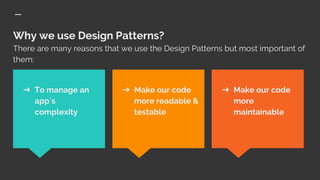
There are many reasons that we use the Design Patterns but most important of
them:
➔ Make our code
more
maintainable
➔ To manage an
app`s
complexity
➔ Make our code
more readable &
testable
Design pattern use in Android
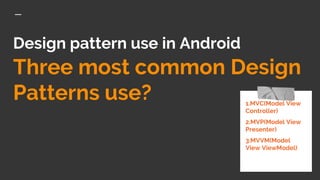
Three most common Design
Patterns use? 1.MVC(Model View
Controller)
2.MVP(Model View
Presenter)
3.MVVM(Model
View ViewModel)
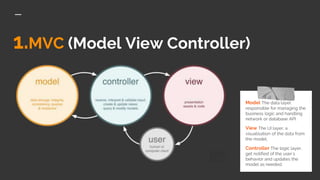
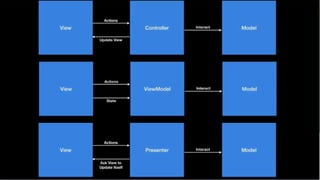
1.MVC (Model View Controller)
Model The data layer,
responsible for managing the
business logic and handling
network or database API.
View The UI layer, a
visualisation of the data from
the model.
Controller The logic layer,
get notified of the user`s
behavior and updates the
model as needed.
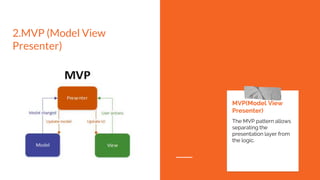
2.MVP (Model View
Presenter)
MVP(Model View
Presenter)
The MVP pattern allows
separating the
presentation layer from
the logic.
Notice:
In the MVP pattern, the View is completely
passive and Data is always delivered to the
View by the Presenter.
➔ The View cannot access the Model.
➔ The Presenter is tied to a single
View.
➔ The View is completely passive in the
MVP pattern.
3.MVVM(Model View
ViewModel)
This pattern allows fast reaction to
design changes!
MVVM is Not a Framework,
class(Android Architecture
Component Class) or API!
It`s for modeling
applications that have a
User Interface.
The difference between
MVVM & MVP?
● ViewModel replaces the Presenter in the Middle
Layer.
● The Presenter holds references to the View. The
ViewModel doesn’t.
● The Presenter updates the View using the
classical way (triggering methods).
● The ViewModel sends data streams.
● The Presenter and View are in a 1 to 1 relationship.
● The View and the ViewModel are in a 1 to many
relationship.
Singleton
The Singleton Pattern
specifies that only a single
instance of a class should
exist with a global point of
access. This works well
when modeling real-world
objects only having one
instance.
Good luck!
We hope you’ll use these tips to find out more
about Design Patterns and use them to
implement the structure of your projects!
For more (free) information and tips relevant
to these concepts, go to
medium.com
For more about making
your ideas stick with
others, check out Design
Patterns book!

Design patterns in android

  • 1.
    Design Patterns in Android Aguide by Zahra Heydari
  • 2.
    What are DesignPatterns? A Design Pattern is just a convenient way of reusing object-oriented(OO) code between projects and programmers. A common pattern in early literature on programming frameworks is MVC for smalltalk, which divides user interface problem into three parts.
  • 3.
    Why we useDesign Patterns? There are many reasons that we use the Design Patterns but most important of them: ➔ Make our code more maintainable ➔ To manage an app`s complexity ➔ Make our code more readable & testable
  • 4.
    Design pattern usein Android Three most common Design Patterns use? 1.MVC(Model View Controller) 2.MVP(Model View Presenter) 3.MVVM(Model View ViewModel)
  • 5.
    1.MVC (Model ViewController) Model The data layer, responsible for managing the business logic and handling network or database API. View The UI layer, a visualisation of the data from the model. Controller The logic layer, get notified of the user`s behavior and updates the model as needed.
  • 6.
    2.MVP (Model View Presenter) MVP(ModelView Presenter) The MVP pattern allows separating the presentation layer from the logic.
  • 7.
    Notice: In the MVPpattern, the View is completely passive and Data is always delivered to the View by the Presenter. ➔ The View cannot access the Model. ➔ The Presenter is tied to a single View. ➔ The View is completely passive in the MVP pattern.
  • 8.
    3.MVVM(Model View ViewModel) This patternallows fast reaction to design changes!
  • 9.
    MVVM is Nota Framework, class(Android Architecture Component Class) or API! It`s for modeling applications that have a User Interface.
  • 10.
    The difference between MVVM& MVP? ● ViewModel replaces the Presenter in the Middle Layer. ● The Presenter holds references to the View. The ViewModel doesn’t. ● The Presenter updates the View using the classical way (triggering methods). ● The ViewModel sends data streams. ● The Presenter and View are in a 1 to 1 relationship. ● The View and the ViewModel are in a 1 to many relationship. Singleton The Singleton Pattern specifies that only a single instance of a class should exist with a global point of access. This works well when modeling real-world objects only having one instance.
  • 12.
    Good luck! We hopeyou’ll use these tips to find out more about Design Patterns and use them to implement the structure of your projects! For more (free) information and tips relevant to these concepts, go to medium.com For more about making your ideas stick with others, check out Design Patterns book!