
Uploaded byMobiloitte
Design guide for iOS and Android
The document outlines design guidelines for mobile user interfaces on iOS and Android, covering key components such as status bars, navigation bars, and content display areas. It provides tips for optimizing layout and user interaction, emphasizing consistency and familiarity in app design. Additionally, it includes contact information for further inquiries.
More Related Content


![[SwiftPH + PADC Meetup - May 2019] Mobile Interface Guidelines Comparison (iO...](https://cdn.slidesharecdn.com/ss_thumbnails/swiftph-mobileinterfaceguidelines-190522010444-thumbnail.jpg?width=640&height=640&fit=bounds)
Similar to Design guide for iOS and Android


More from Mobiloitte


Design guide for iOS and Android
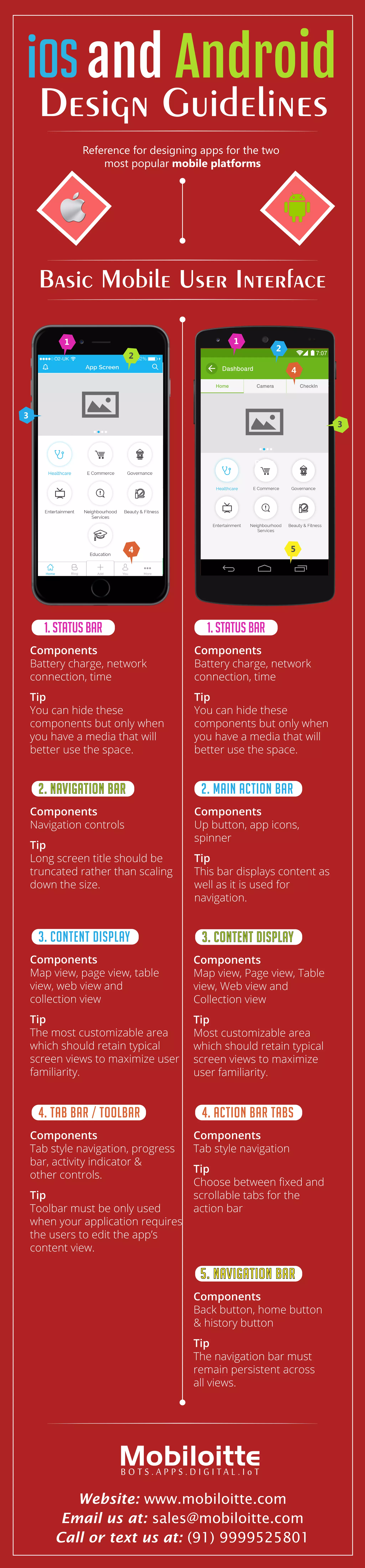
- 1. iOS and Android DesignGuidelines Basic Mobile User Interface Reference for designing apps for the two most popular mobile platforms 1 1 2 3 5 2 3 4 4 1. STATUS BAR 1. STATUS BAR Components Battery charge, network connection, time Tip You can hide these components but only when you have a media that will better use the space. 2. Navigation BAR Components Navigation controls Tip Long screen title should be truncated rather than scaling down the size. 3. CONTENT DISPLAY Components Map view, Page view, Table view, Web view and Collection view Tip Most customizable area which should retain typical screen views to maximize user familiarity. 3. CONTENT DISPLAY Components Map view, page view, table view, web view and collection view Tip The most customizable area which should retain typical screen views to maximize user familiarity. 4. TAB BAR / TOOLBAR Components Tab style navigation, progress bar, activity indicator & other controls. Tip Toolbar must be only used when your application requires the users to edit the app’s content view. 4. ACTION BAR TABS Components Tab style navigation Tip Choose between fixed and scrollable tabs for the action bar 5. NAVIGATION BAR Components Back button, home button & history button Tip The navigation bar must remain persistent across all views. 2. Main Action BAR Components Up button, app icons, spinner Tip This bar displays content as well as it is used for navigation. Components Battery charge, network connection, time Tip You can hide these components but only when you have a media that will better use the space. Website: www.mobiloitte.com Email us at: sales@mobiloitte.com Call or text us at: (91) 9999525801