DESIGN FOR
ADDITIVE
MANUFACTURING
PARTICULARITIES TO BE CONSIDERED
WHEN PREPARING PARTS FOR BEING
PRINTED ON AN ULTIMAKER FDM PRINTER
                              Greta D’Angelo
                              Martí Bertran
                              Thomas J. Howard
AGENDA
1. Introduction on FDM and AM
2. Geometrical constraints
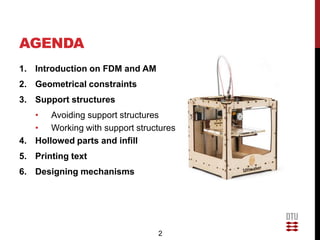
3. Support structures
   • Avoiding support structures
   • Working with support structures
4. Hollowed parts and infill
5. Printing text
6. Designing mechanisms


                                2
FUSED DEPOSITION
MODELLING
• Additive Manufacturing (AM)
  technologies build parts by
  overlapping layers of
  material
• Extrusion of melted material
  through a nozzle on a build
  plate
• Cartesian coordinates
• Tolerance (in vertical
  direction) is determined by
  the diameter of the nozzle
• Examples:
  Stratasys, RepRap, Ultimake
  r

                                 3
WORKFLOW

   1                 2                    3
Design a part     Export to STL        Check STL
• CAD program     • All packages can   • Netfabb
                    do it


   6                 5                    4
Start printing!   Upload Gcode         Slice and
• Ultimaker’s     to printer           generate Gcode
  controller      • SD card            • Cura


                               4
MATERIAL PROPERTIES
• Ultimaker uses 3mm                                      PLA
  PLA filament                                          Polymer
• Biodegradable              Physical property
  thermoplastic              Specific Gravity [g/cm3]    1,25
                             Melt Index [g/10min]
• Highly anisotropic         (190º/2,16kg)
                                                         4-8
  mechanical properties
• Several colors available


                             5
GEOMETRICAL
CONSTRAINTS
Minimum Wall thickness:
• Vertical and tilted walls:
   • 2mm and above. Recommended
• Horizontal walls:
  • 1mm and above is correct
Definition  0,5mm minimum details noticed
Accuracy  0,3% (min +/-0,3mm)
Avoid warping  Large horizontal and thick surfaces are
likely to warp, skip using them if you can.
Overall maximum dimensions  150*150*150 mm (x*y*z)


                               6
FACING GEOMETRICAL
CONSTRAINTS
• Scale parts
 • After scaling check that your part meets the geometrical
   constraints
 • Notice that wall thicknesses will be scaled down as well, and
   may not meet the requirements


                                  7
SUPPORT STRUCTURES
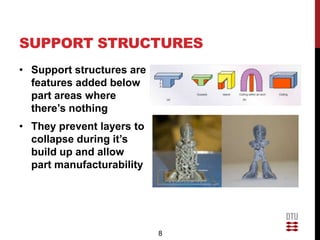
• Support structures are
  features added below
  part areas where
  there’s nothing
• They prevent layers to
  collapse during it’s
  build up and allow
  part manufacturability


                           8
AVOIDING SUPPORT
STRUCTURES: PART ORIENTATION
• Part orientation is a key
  factor to achieve a good
  print
• In many cases we can
  avoid or at least reduce
  the amount of supports
  required
• Resolution is better in the
  z-axis faces (vertical) than
  XY (horizontal) 
  stepping
• Mechanical properties are
  better in the XY plane


                                 9
PART ORIENTATION


                          Smooth
                          surfaces


  Staircase effect


                     10
AVOIDING SUPPORT STRUCTURES:
SPLITTING PARTS
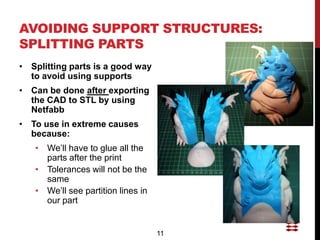
• Splitting parts is a good way
  to avoid using supports
• Can be done after exporting
  the CAD to STL by using
  Netfabb
• To use in extreme causes
  because:
   • We’ll have to glue all the
     parts after the print
   • Tolerances will not be the
     same
   • We’ll see partition lines in
     our part


                                    11
AVOIDING SUPPORT
STRUCTURES: MODIFY
OVERHANGING SURFACE
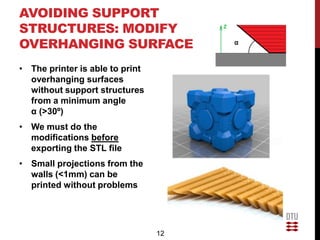
• The printer is able to print
  overhanging surfaces
  without support structures
  from a minimum angle
  α (>30º)
• We must do the
  modifications before
  exporting the STL file
• Small projections from the
  walls (<1mm) can be
  printed without problems


                                 12
AVOIDING SUPPORT
STRUCTURES: MODIFY
OVERHANGING SURFACE

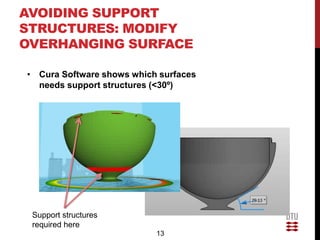
• Cura Software shows which surfaces
  needs support structures (<30º)


 Support structures
 required here
                           13
AVOIDING SUPPORT
STRUCTURES: BRIDGES


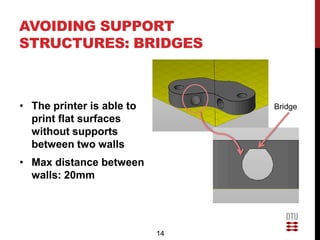
• The printer is able to        Bridge
  print flat surfaces
  without supports
  between two walls
• Max distance between
  walls: 20mm


                           14
AVOIDING SUPPORT
STRUCTURES: BRIDGES


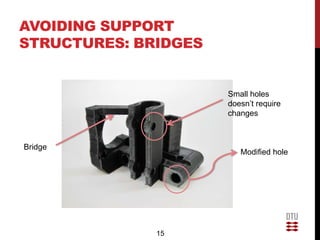
                      Small holes
                      doesn’t require
                      changes


Bridge
                         Modified hole


              15
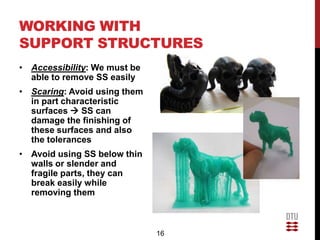
WORKING WITH
SUPPORT STRUCTURES
• Accessibility: We must be
  able to remove SS easily
• Scaring: Avoid using them
  in part characteristic
  surfaces  SS can
  damage the finishing of
  these surfaces and also
  the tolerances
• Avoid using SS below thin
  walls or slender and
  fragile parts, they can
  break easily while
  removing them


                              16
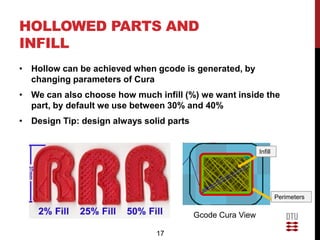
HOLLOWED PARTS AND
INFILL
• Hollow can be achieved when gcode is generated, by
  changing parameters of Cura
• We can also choose how much infill (%) we want inside the
  part, by default we use between 30% and 40%
• Design Tip: design always solid parts


                                                            Infill


                                                                     Perimeters

                                          Gcode Cura View

                               17
HOLLOWED PARTS AND
INFILL
By reducing the infill:
• Build time decreases
• Used material decreases
• It helps to avoid warping
• Strength doesn’t decreases
  that much


                               18
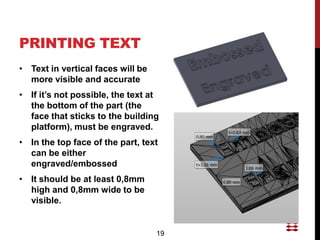
PRINTING TEXT
• Text in vertical faces will be
  more visible and accurate
• If it’s not possible, the text at
  the bottom of the part (the
  face that sticks to the building
  platform), must be engraved.
• In the top face of the part, text
  can be either
  engraved/embossed
• It should be at least 0,8mm
  high and 0,8mm wide to be
  visible.


                                   19
PRINTING TEXT
                                    Vertical embossed text


   Horizontal engraved text


                                   Vertical engraved text


                              20
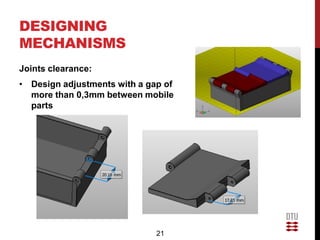
DESIGNING
MECHANISMS
Joints clearance:
• Design adjustments with a gap of
  more than 0,3mm between mobile
  parts


                              21
DESIGNING
MECHANISMS
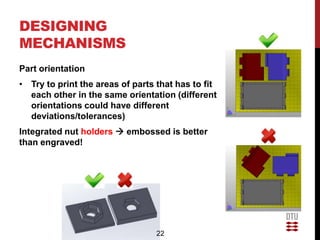
Part orientation
• Try to print the areas of parts that has to fit
  each other in the same orientation (different
  orientations could have different
  deviations/tolerances)
Integrated nut holders  embossed is better
than engraved!


                                  22
QUESTIONS?


             23

Design for ultimaker rev2

  • 1.
    DESIGN FOR ADDITIVE MANUFACTURING PARTICULARITIES TOBE CONSIDERED WHEN PREPARING PARTS FOR BEING PRINTED ON AN ULTIMAKER FDM PRINTER Greta D’Angelo Martí Bertran Thomas J. Howard
  • 2.
    AGENDA 1. Introduction onFDM and AM 2. Geometrical constraints 3. Support structures • Avoiding support structures • Working with support structures 4. Hollowed parts and infill 5. Printing text 6. Designing mechanisms 2
  • 3.
    FUSED DEPOSITION MODELLING • AdditiveManufacturing (AM) technologies build parts by overlapping layers of material • Extrusion of melted material through a nozzle on a build plate • Cartesian coordinates • Tolerance (in vertical direction) is determined by the diameter of the nozzle • Examples: Stratasys, RepRap, Ultimake r 3
  • 4.
    WORKFLOW 1 2 3 Design a part Export to STL Check STL • CAD program • All packages can • Netfabb do it 6 5 4 Start printing! Upload Gcode Slice and • Ultimaker’s to printer generate Gcode controller • SD card • Cura 4
  • 5.
    MATERIAL PROPERTIES • Ultimakeruses 3mm PLA PLA filament Polymer • Biodegradable Physical property thermoplastic Specific Gravity [g/cm3] 1,25 Melt Index [g/10min] • Highly anisotropic (190º/2,16kg) 4-8 mechanical properties • Several colors available 5
  • 6.
    GEOMETRICAL CONSTRAINTS Minimum Wall thickness: •Vertical and tilted walls: • 2mm and above. Recommended • Horizontal walls: • 1mm and above is correct Definition  0,5mm minimum details noticed Accuracy  0,3% (min +/-0,3mm) Avoid warping  Large horizontal and thick surfaces are likely to warp, skip using them if you can. Overall maximum dimensions  150*150*150 mm (x*y*z) 6
  • 7.
    FACING GEOMETRICAL CONSTRAINTS • Scaleparts • After scaling check that your part meets the geometrical constraints • Notice that wall thicknesses will be scaled down as well, and may not meet the requirements 7
  • 8.
    SUPPORT STRUCTURES • Supportstructures are features added below part areas where there’s nothing • They prevent layers to collapse during it’s build up and allow part manufacturability 8
  • 9.
    AVOIDING SUPPORT STRUCTURES: PARTORIENTATION • Part orientation is a key factor to achieve a good print • In many cases we can avoid or at least reduce the amount of supports required • Resolution is better in the z-axis faces (vertical) than XY (horizontal)  stepping • Mechanical properties are better in the XY plane 9
  • 10.
    PART ORIENTATION Smooth surfaces Staircase effect 10
  • 11.
    AVOIDING SUPPORT STRUCTURES: SPLITTINGPARTS • Splitting parts is a good way to avoid using supports • Can be done after exporting the CAD to STL by using Netfabb • To use in extreme causes because: • We’ll have to glue all the parts after the print • Tolerances will not be the same • We’ll see partition lines in our part 11
  • 12.
    AVOIDING SUPPORT STRUCTURES: MODIFY OVERHANGINGSURFACE • The printer is able to print overhanging surfaces without support structures from a minimum angle α (>30º) • We must do the modifications before exporting the STL file • Small projections from the walls (<1mm) can be printed without problems 12
  • 13.
    AVOIDING SUPPORT STRUCTURES: MODIFY OVERHANGINGSURFACE • Cura Software shows which surfaces needs support structures (<30º) Support structures required here 13
  • 14.
    AVOIDING SUPPORT STRUCTURES: BRIDGES •The printer is able to Bridge print flat surfaces without supports between two walls • Max distance between walls: 20mm 14
  • 15.
    AVOIDING SUPPORT STRUCTURES: BRIDGES Small holes doesn’t require changes Bridge Modified hole 15
  • 16.
    WORKING WITH SUPPORT STRUCTURES •Accessibility: We must be able to remove SS easily • Scaring: Avoid using them in part characteristic surfaces  SS can damage the finishing of these surfaces and also the tolerances • Avoid using SS below thin walls or slender and fragile parts, they can break easily while removing them 16
  • 17.
    HOLLOWED PARTS AND INFILL •Hollow can be achieved when gcode is generated, by changing parameters of Cura • We can also choose how much infill (%) we want inside the part, by default we use between 30% and 40% • Design Tip: design always solid parts Infill Perimeters Gcode Cura View 17
  • 18.
    HOLLOWED PARTS AND INFILL Byreducing the infill: • Build time decreases • Used material decreases • It helps to avoid warping • Strength doesn’t decreases that much 18
  • 19.
    PRINTING TEXT • Textin vertical faces will be more visible and accurate • If it’s not possible, the text at the bottom of the part (the face that sticks to the building platform), must be engraved. • In the top face of the part, text can be either engraved/embossed • It should be at least 0,8mm high and 0,8mm wide to be visible. 19
  • 20.
    PRINTING TEXT Vertical embossed text Horizontal engraved text Vertical engraved text 20
  • 21.
    DESIGNING MECHANISMS Joints clearance: • Designadjustments with a gap of more than 0,3mm between mobile parts 21
  • 22.
    DESIGNING MECHANISMS Part orientation • Tryto print the areas of parts that has to fit each other in the same orientation (different orientations could have different deviations/tolerances) Integrated nut holders  embossed is better than engraved! 22
  • 23.