LearningMate
                 PORTFOLIO MANAGEMENT


              DESIGN DEVELOPMENT


Copyright © 2012 LearningMate Solutions Pvt. Ltd. | SEI CMMI® Level 5 Company
Project Brief
The Marketing team needs a repository of case studies that can be packaged to present as portfolio to prospective clients, as
iPhone & iPad app.


Requirements -
- Author case studies
- Group case studies and share as portfolio


Authoring
A simple and concise authoring feature to capture project details that will be delivered as case studies. The users will be group
leaders of design, writers, technology and Project Management groups
Provide grouping features like tagging and taxonomy - content, technology, porting, to segregate case studies by terms
Portfolio management
Browsing feature to access case studies by Account title, taxonomy, by team members, project kick off and closure dates, liked by
client, commented etc. The marketing team should be able to select and publish a portfolio for the client. The client will access
the online link shared by the marketing representative, browse through the portfolio, mark favorites or mark as close to expecta-
tions, add comments or questions, request for more samples on the lines of a particular case studies etc
The web-application should be able to inform the marketing representative about the client feedback on the portfolio and view
a report on the number of visits to the portfolio, track no. of visits to the case studies etc.


                                   Copyright © 2012 LearningMate Solutions Pvt. Ltd. | SEI CMMI® Level 5 Company
User Analysis
Potential users of the system :


1. Marketing Team Members
2. Group Leads from Design, Technical, Writers, Project Management.
3. Existing Clients
4. New Clients.


                                  Copyright © 2012 LearningMate Solutions Pvt. Ltd. | SEI CMMI® Level 5 Company
Functionality Requirement
Potential use of the system :


1. Authoring Features, Where Marketing team can start the process of creating a new case study, and group leaders of design,
  Technical, writers, project management can contribute their parts to the case study.
2. Grouping Features like tagging, taxonomy, content, technology , porting to segregate case studies by terms
3. Searching Features to access case studies by account title, taxonomy, team members, project kick off and closure dated
  Liked by client, commented etc
4. Marketing team can bundle case studies and publish a portfolio for the client.
5. Both Existing / new client should able browse the portfolio shared with them on a iphone apps by using a online link shared
   By marketing team.
6. Both Existing / new Client can mark favorite, mark close to expectation, add comments or questions, or requests for more
   Samples on the line of a particular case study.
7. The web application should be able to inform the marketing representatives about the client feedback on the portfolio and
   View a report of number of visits to the portfolio, trank no. of visits to the case studies.
8. Marketing team can share a portfolio with many clients (both existing/new)
9. Should be able to add / remove case studies from a portfolio
10. Add New client.


                                Copyright © 2012 LearningMate Solutions Pvt. Ltd. | SEI CMMI® Level 5 Company
Major UI/UX Problems & Solutions

 Problem 1 :

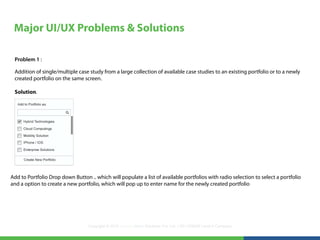
 Addition of single/multiple case study from a large collection of available case studies to an existing portfolio or to a newly
 created portfolio on the same screen.

 Solution.


Add to Portfolio Drop down Button .. which will populate a list of available portfolios with radio selection to select a portfolio
and a option to create a new portfolio, which will pop up to enter name for the newly created portfolio


                                  Copyright © 2012 LearningMate Solutions Pvt. Ltd. | SEI CMMI® Level 5 Company
Major UI/UX Problems & Solutions

Problem 2 :

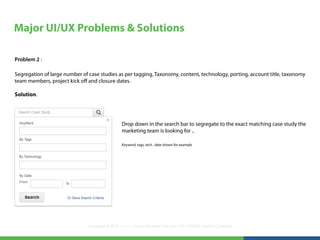
Segregation of large number of case studies as per tagging, Taxonomy, content, technology, porting, account title, taxonomy
team members, project kick off and closure dates.

Solution.


                                                Drop down in the search bar to segregate to the exact matching case study the
                                                marketing team is looking for ..

                                                Keyword, tags, tech , date shown for example


                               Copyright © 2012 LearningMate Solutions Pvt. Ltd. | SEI CMMI® Level 5 Company
Major UI/UX Problems & Solutions

Problem 3 :

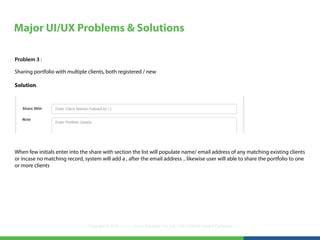
Sharing portfolio with multiple clients, both registered / new

Solution.


When few initials enter into the share with section the list will populate name/ email address of any matching existing clients
or incase no matching record, system will add a , after the email address .. likewise user will able to share the portfolio to one
or more clients


                                Copyright © 2012 LearningMate Solutions Pvt. Ltd. | SEI CMMI® Level 5 Company
Major UI/UX Problems & Solutions

Problem 4 :

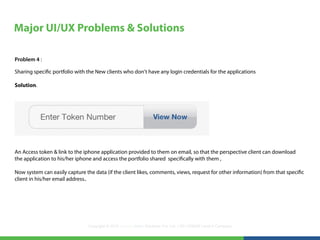
Sharing specific portfolio with the New clients who don't have any login credentials for the applications

Solution.


An Access token & link to the iphone application provided to them on email, so that the perspective client can download
the application to his/her iphone and access the portfolio shared specifically with them ,

Now system can easily capture the data (if the client likes, comments, views, request for other information) from that specific
client in his/her email address..


                                Copyright © 2012 LearningMate Solutions Pvt. Ltd. | SEI CMMI® Level 5 Company
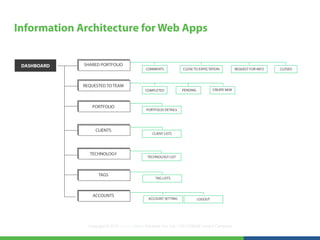
Information Architecture for Web Apps


 DASHBOARD   SHARED PORTFOLIO
                                             COMMENTS             CLOSE TO EXPECTATION            REQUEST FOR INFO   CLOSED


             REQUESTED TO TEAM
                                             COMPLETED            PENDING            CREATE NEW


                 PORTFOLIO
                                              PORTFOLIO DETAILS


                  CLIENTS
                                                 CLIENT LISTS


               TECHNOLOGY
                                              TECHNOLOGY LIST


                    TAGS
                                                   TAG LISTS


                 ACCOUNTS
                                               ACCOUNT SETTING              LOGOUT


               Copyright © 2012 LearningMate Solutions Pvt. Ltd. | SEI CMMI® Level 5 Company
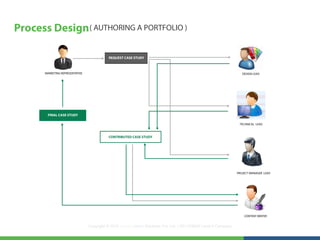
Process Design ( AUTHORING A PORTFOLIO )

                                            REQUEST CASE STUDY


       MARKETING REPRESENTATIVE                                                                                      DESIGN LEAD


        FINAL CASE STUDY

                                                                                                                   TECHNICAL LEAD


                                            CONTRIBUTED CASE STUDY


                                                                                                                  PROJECT MANAGER LEAD


                                                                                                                      CONTENT WRITER


                                  Copyright © 2012 LearningMate Solutions Pvt. Ltd. | SEI CMMI® Level 5 Company
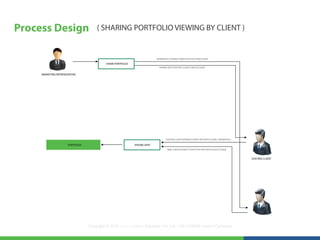
Process Design                         ( SHARING PORTFOLIO VIEWING BY CLIENT )


                                                                            GENERATED A UNIQUE TOKEN FOR EACH NEW CLIENT

                                            SHARE PORTFOLIO
                                                                              SHARED WITH EXISTING CLIENT USER ACCOUNT


     MARKETING REPRESENTATIVE


                                                                                   EXISTING CLIENT INTERACTS WITH APPS WITH LOGIN CREDENTIALS

                       PORTFOLIO                              IPHONE APPS
                                                                                    NEW CLIENT INTERACTS WITH THE APPS WITH ACCESS TOKEN


                                                                                                                                                EXISTING CLIENT


                                   Copyright © 2012 LearningMate Solutions Pvt. Ltd. | SEI CMMI® Level 5 Company
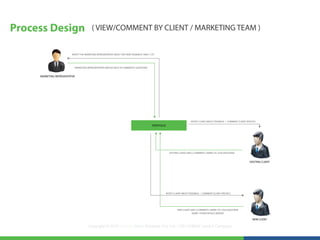
Process Design                              ( VIEW/COMMENT BY CLIENT / MARKETING TEAM )


                           NOTIFY THE MARKETING REPRESENTATIVE ABOUT ANY NEW FEEDBACK/ LIKES / CTE


                             MARKETING REPRESENTATIVES REPLIES BACK TO COMMENTS/ QUESTIONS


     MARKETING REPRESENTATIVE


                                                                                                                               NOTIFY CLIENT ABOUT FEEDBACK / COMMENT (CLIENT SPECIFIC)
                                                                                                PORTFOLIO


                                                                                                            EXISTING CLIENT LIKES | COMMENTS | MARK CTE | ASK QUESTIONS


                                                                                                                                                                                 EXISTING CLIENT


                                                                                                        NOTIFY CLIENT ABOUT FEEDBACK / COMMENT (CLIENT SPECIFIC)


                                                                                                                   NEW CLIENT LIKES | COMMENTS | MARK CTE | ASK QUESTIONS
                                                                                                                                NAME / OTHER DETAILS NEEDED

                                                                                                                                                                                    NEW CLIENT

                                         Copyright © 2012 LearningMate Solutions Pvt. Ltd. | SEI CMMI® Level 5 Company
Prototyping & UI Design                                    ( HIGH FIDELITY CLICKABLE PROTOTYPE FOR WEB APPS )


                                    http://learningmate.abhilashmishra.in/


Required Axure Rp Extenstion,
Chrome: https://chrome.google.com/webstore/detail/axure-rp-extension-for-ch/dogkpdfcklifaemcdfbildhcofnopogp


                                 Copyright © 2012 LearningMate Solutions Pvt. Ltd. | SEI CMMI® Level 5 Company
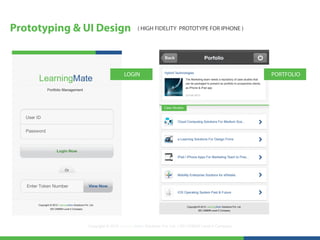
Prototyping & UI Design                 ( HIGH FIDELITY PROTOTYPE FOR IPHONE )


                                 LOGIN                                                        PORTFOLIO


              Copyright © 2012 LearningMate Solutions Pvt. Ltd. | SEI CMMI® Level 5 Company
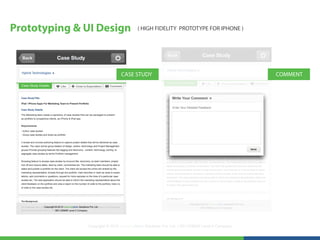
Prototyping & UI Design                 ( HIGH FIDELITY PROTOTYPE FOR IPHONE )


                               CASE STUDY                                                     COMMENT


              Copyright © 2012 LearningMate Solutions Pvt. Ltd. | SEI CMMI® Level 5 Company
UI/ UX Evaluation                              ( User Experience Research Sheet )


1. Utility: Does the user perceive the functions in the system as useful and fit for the purpose?


2. Usability: Does the user feel that it is easy and efficient to get things done with the system?


3. Aesthetics: Does the user see the system as visually attractive? Does it feel pleasurable in hand??


                                        Copyright © 2012 LearningMate Solutions Pvt. Ltd. | SEI CMMI® Level 5 Company
UI/ UX Evaluation                               ( User Experience Research Sheet )


4. Identification: Can I identify myself with the product? Do I look good when using it?


5. Stimulation: Does the system give me inspiration? Or wow experiences?


5. Value: Is the system important to me? What is its value for me?


                                         Copyright © 2012 LearningMate Solutions Pvt. Ltd. | SEI CMMI® Level 5 Company
Thank You


ABHILASH MISHRA
Mobile - 9550484067, Portfolio : www.abhilashmishra.in
If You Want To Have Something You Never “ HAD” .. Do Something You Never “DID”


                                              Copyright © 2012 LearningMate Solutions Pvt. Ltd. | SEI CMMI® Level 5 Company

Design developement For Portfolio Management Apps

  • 1.
    LearningMate PORTFOLIO MANAGEMENT DESIGN DEVELOPMENT Copyright © 2012 LearningMate Solutions Pvt. Ltd. | SEI CMMI® Level 5 Company
  • 2.
    Project Brief The Marketingteam needs a repository of case studies that can be packaged to present as portfolio to prospective clients, as iPhone & iPad app. Requirements - - Author case studies - Group case studies and share as portfolio Authoring A simple and concise authoring feature to capture project details that will be delivered as case studies. The users will be group leaders of design, writers, technology and Project Management groups Provide grouping features like tagging and taxonomy - content, technology, porting, to segregate case studies by terms Portfolio management Browsing feature to access case studies by Account title, taxonomy, by team members, project kick off and closure dates, liked by client, commented etc. The marketing team should be able to select and publish a portfolio for the client. The client will access the online link shared by the marketing representative, browse through the portfolio, mark favorites or mark as close to expecta- tions, add comments or questions, request for more samples on the lines of a particular case studies etc The web-application should be able to inform the marketing representative about the client feedback on the portfolio and view a report on the number of visits to the portfolio, track no. of visits to the case studies etc. Copyright © 2012 LearningMate Solutions Pvt. Ltd. | SEI CMMI® Level 5 Company
  • 3.
    User Analysis Potential usersof the system : 1. Marketing Team Members 2. Group Leads from Design, Technical, Writers, Project Management. 3. Existing Clients 4. New Clients. Copyright © 2012 LearningMate Solutions Pvt. Ltd. | SEI CMMI® Level 5 Company
  • 4.
    Functionality Requirement Potential useof the system : 1. Authoring Features, Where Marketing team can start the process of creating a new case study, and group leaders of design, Technical, writers, project management can contribute their parts to the case study. 2. Grouping Features like tagging, taxonomy, content, technology , porting to segregate case studies by terms 3. Searching Features to access case studies by account title, taxonomy, team members, project kick off and closure dated Liked by client, commented etc 4. Marketing team can bundle case studies and publish a portfolio for the client. 5. Both Existing / new client should able browse the portfolio shared with them on a iphone apps by using a online link shared By marketing team. 6. Both Existing / new Client can mark favorite, mark close to expectation, add comments or questions, or requests for more Samples on the line of a particular case study. 7. The web application should be able to inform the marketing representatives about the client feedback on the portfolio and View a report of number of visits to the portfolio, trank no. of visits to the case studies. 8. Marketing team can share a portfolio with many clients (both existing/new) 9. Should be able to add / remove case studies from a portfolio 10. Add New client. Copyright © 2012 LearningMate Solutions Pvt. Ltd. | SEI CMMI® Level 5 Company
  • 5.
    Major UI/UX Problems& Solutions Problem 1 : Addition of single/multiple case study from a large collection of available case studies to an existing portfolio or to a newly created portfolio on the same screen. Solution. Add to Portfolio Drop down Button .. which will populate a list of available portfolios with radio selection to select a portfolio and a option to create a new portfolio, which will pop up to enter name for the newly created portfolio Copyright © 2012 LearningMate Solutions Pvt. Ltd. | SEI CMMI® Level 5 Company
  • 6.
    Major UI/UX Problems& Solutions Problem 2 : Segregation of large number of case studies as per tagging, Taxonomy, content, technology, porting, account title, taxonomy team members, project kick off and closure dates. Solution. Drop down in the search bar to segregate to the exact matching case study the marketing team is looking for .. Keyword, tags, tech , date shown for example Copyright © 2012 LearningMate Solutions Pvt. Ltd. | SEI CMMI® Level 5 Company
  • 7.
    Major UI/UX Problems& Solutions Problem 3 : Sharing portfolio with multiple clients, both registered / new Solution. When few initials enter into the share with section the list will populate name/ email address of any matching existing clients or incase no matching record, system will add a , after the email address .. likewise user will able to share the portfolio to one or more clients Copyright © 2012 LearningMate Solutions Pvt. Ltd. | SEI CMMI® Level 5 Company
  • 8.
    Major UI/UX Problems& Solutions Problem 4 : Sharing specific portfolio with the New clients who don't have any login credentials for the applications Solution. An Access token & link to the iphone application provided to them on email, so that the perspective client can download the application to his/her iphone and access the portfolio shared specifically with them , Now system can easily capture the data (if the client likes, comments, views, request for other information) from that specific client in his/her email address.. Copyright © 2012 LearningMate Solutions Pvt. Ltd. | SEI CMMI® Level 5 Company
  • 9.
    Information Architecture forWeb Apps DASHBOARD SHARED PORTFOLIO COMMENTS CLOSE TO EXPECTATION REQUEST FOR INFO CLOSED REQUESTED TO TEAM COMPLETED PENDING CREATE NEW PORTFOLIO PORTFOLIO DETAILS CLIENTS CLIENT LISTS TECHNOLOGY TECHNOLOGY LIST TAGS TAG LISTS ACCOUNTS ACCOUNT SETTING LOGOUT Copyright © 2012 LearningMate Solutions Pvt. Ltd. | SEI CMMI® Level 5 Company
  • 10.
    Process Design (AUTHORING A PORTFOLIO ) REQUEST CASE STUDY MARKETING REPRESENTATIVE DESIGN LEAD FINAL CASE STUDY TECHNICAL LEAD CONTRIBUTED CASE STUDY PROJECT MANAGER LEAD CONTENT WRITER Copyright © 2012 LearningMate Solutions Pvt. Ltd. | SEI CMMI® Level 5 Company
  • 11.
    Process Design ( SHARING PORTFOLIO VIEWING BY CLIENT ) GENERATED A UNIQUE TOKEN FOR EACH NEW CLIENT SHARE PORTFOLIO SHARED WITH EXISTING CLIENT USER ACCOUNT MARKETING REPRESENTATIVE EXISTING CLIENT INTERACTS WITH APPS WITH LOGIN CREDENTIALS PORTFOLIO IPHONE APPS NEW CLIENT INTERACTS WITH THE APPS WITH ACCESS TOKEN EXISTING CLIENT Copyright © 2012 LearningMate Solutions Pvt. Ltd. | SEI CMMI® Level 5 Company
  • 12.
    Process Design ( VIEW/COMMENT BY CLIENT / MARKETING TEAM ) NOTIFY THE MARKETING REPRESENTATIVE ABOUT ANY NEW FEEDBACK/ LIKES / CTE MARKETING REPRESENTATIVES REPLIES BACK TO COMMENTS/ QUESTIONS MARKETING REPRESENTATIVE NOTIFY CLIENT ABOUT FEEDBACK / COMMENT (CLIENT SPECIFIC) PORTFOLIO EXISTING CLIENT LIKES | COMMENTS | MARK CTE | ASK QUESTIONS EXISTING CLIENT NOTIFY CLIENT ABOUT FEEDBACK / COMMENT (CLIENT SPECIFIC) NEW CLIENT LIKES | COMMENTS | MARK CTE | ASK QUESTIONS NAME / OTHER DETAILS NEEDED NEW CLIENT Copyright © 2012 LearningMate Solutions Pvt. Ltd. | SEI CMMI® Level 5 Company
  • 13.
    Prototyping & UIDesign ( HIGH FIDELITY CLICKABLE PROTOTYPE FOR WEB APPS ) http://learningmate.abhilashmishra.in/ Required Axure Rp Extenstion, Chrome: https://chrome.google.com/webstore/detail/axure-rp-extension-for-ch/dogkpdfcklifaemcdfbildhcofnopogp Copyright © 2012 LearningMate Solutions Pvt. Ltd. | SEI CMMI® Level 5 Company
  • 14.
    Prototyping & UIDesign ( HIGH FIDELITY PROTOTYPE FOR IPHONE ) LOGIN PORTFOLIO Copyright © 2012 LearningMate Solutions Pvt. Ltd. | SEI CMMI® Level 5 Company
  • 15.
    Prototyping & UIDesign ( HIGH FIDELITY PROTOTYPE FOR IPHONE ) CASE STUDY COMMENT Copyright © 2012 LearningMate Solutions Pvt. Ltd. | SEI CMMI® Level 5 Company
  • 16.
    UI/ UX Evaluation ( User Experience Research Sheet ) 1. Utility: Does the user perceive the functions in the system as useful and fit for the purpose? 2. Usability: Does the user feel that it is easy and efficient to get things done with the system? 3. Aesthetics: Does the user see the system as visually attractive? Does it feel pleasurable in hand?? Copyright © 2012 LearningMate Solutions Pvt. Ltd. | SEI CMMI® Level 5 Company
  • 17.
    UI/ UX Evaluation ( User Experience Research Sheet ) 4. Identification: Can I identify myself with the product? Do I look good when using it? 5. Stimulation: Does the system give me inspiration? Or wow experiences? 5. Value: Is the system important to me? What is its value for me? Copyright © 2012 LearningMate Solutions Pvt. Ltd. | SEI CMMI® Level 5 Company
  • 18.
    Thank You ABHILASH MISHRA Mobile- 9550484067, Portfolio : www.abhilashmishra.in If You Want To Have Something You Never “ HAD” .. Do Something You Never “DID” Copyright © 2012 LearningMate Solutions Pvt. Ltd. | SEI CMMI® Level 5 Company