Deploying VNFs with
Kubernetes pods and VMs
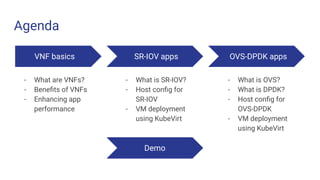
Agenda
VNF basics
- What are VNFs?
- Benefits of VNFs
- Enhancing app
performance
SR-IOV apps
- What is SR-IOV?
- Host config for
SR-IOV
- VM deployment
using KubeVirt
OVS-DPDK apps
- What is OVS?
- What is DPDK?
- Host config for
OVS-DPDK
- VM deployment
using KubeVirt
Demo
Virtual Network Functions
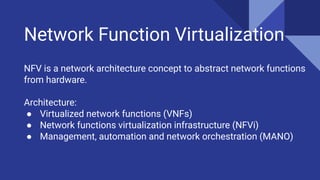
Network Function Virtualization
NFV is a network architecture concept to abstract network functions
from hardware.
Architecture:
● Virtualized network functions (VNFs)
● Network functions virtualization infrastructure (NFVi)
● Management, automation and network orchestration (MANO)
What are VNFs?
● Virtualized network services that replace legacy network
appliances on proprietary hardware
● VNFs are built on top of NFV infrastructure serving as a
foundational technology for 5G or edge networks
● Often deployed as virtual machines (VMs) by various
telecommunications providers
● Common VNF applications - routers, firewalls, WAN
optimization, NAT, load balancers
Benefits of VNFs
● Improved network scalability
● Efficient use of network infrastructure
● Reduced power consumption
● Better security features
● Saves on physical space needed for hardware
● Reduced operational and capital expenditures
Enhancing VNF performance
Heavy data traffic when running multiple VNF VMs on a host.
Efficient memory access, task and resource allocations, network I/O.
Faster packet processing than native Linux kernel network stack
● SR-IOV
● DPDK
SR-IOV
What is SR-IOV?
Single Root I/O Virtualization allows the isolation of PCI Express
resources for manageability and performance reasons.
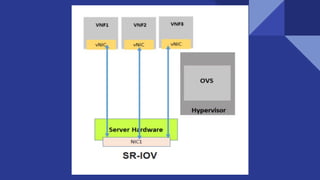
It allows VNFs to access NIC directly, bypassing hypervisor.
Requires support in BIOS and at OS level.
● Physical functions (PFs) - full-featured PCIe functions
● Virtual functions (VFs) - “lightweight” PCIe functions
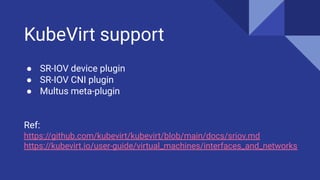
KubeVirt support
● SR-IOV device plugin
● SR-IOV CNI plugin
● Multus meta-plugin
Ref:
https://github.com/kubevirt/kubevirt/blob/main/docs/sriov.md
https://kubevirt.io/user-guide/virtual_machines/interfaces_and_networks
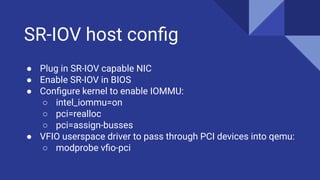
SR-IOV host config
● Plug in SR-IOV capable NIC
● Enable SR-IOV in BIOS
● Configure kernel to enable IOMMU:
○ intel_iommu=on
○ pci=realloc
○ pci=assign-busses
● VFIO userspace driver to pass through PCI devices into qemu:
○ modprobe vfio-pci
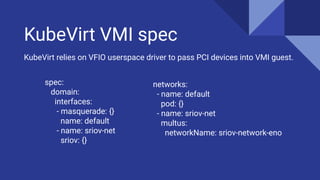
KubeVirt VMI spec
spec:
domain:
interfaces:
- masquerade: {}
name: default
- name: sriov-net
sriov: {}
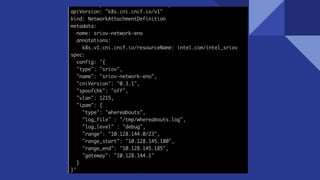
KubeVirt relies on VFIO userspace driver to pass PCI devices into VMI guest.
networks:
- name: default
pod: {}
- name: sriov-net
multus:
networkName: sriov-network-eno
OVS-DPDK
What is OVS?
Open vSwitch: a production quality, multi-layer virtual switch
Main components:
● Forwarding path: implemented in kernel space for high
performance
● Vswitchd: main userspace program
What is DPDK?
● DPDK stands for Data Plane Development Kit
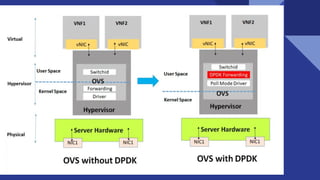
● Packet processing bypasses Linux kernel network stack
● Fast switching in user space using Poll mode drivers
● Open vSwitch can be combined with DPDK for accelerated
performance
● For East-West traffic in same server, DPDK wins against SR-IOV
KubeVirt support
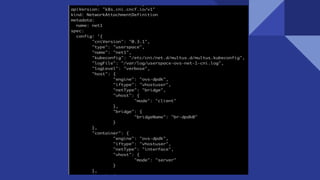
● Userspace CNI plugin
● Multus meta-plugin
● OVS built with DPDK support
Pending Github PR - https://github.com/kubevirt/kubevirt/pull/3208
Ref:
https://github.com/intel/userspace-cni-network-plugin
https://telcocloudbridge.com/blog/dpdk-vs-sr-iov-for-nfv-why-a-wrong-deci
sion-can-impact-performance/
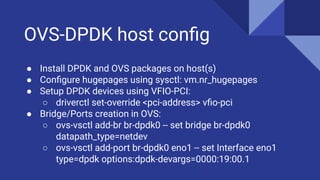
OVS-DPDK host config
● Install DPDK and OVS packages on host(s)
● Configure hugepages using sysctl: vm.nr_hugepages
● Setup DPDK devices using VFIO-PCI:
○ driverctl set-override <pci-address> vfio-pci
● Bridge/Ports creation in OVS:
○ ovs-vsctl add-br br-dpdk0 -- set bridge br-dpdk0
datapath_type=netdev
○ ovs-vsctl add-port br-dpdk0 eno1 -- set Interface eno1
type=dpdk options:dpdk-devargs=0000:19:00.1
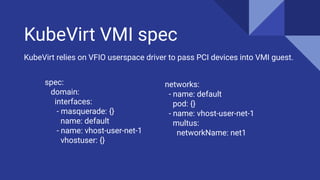
KubeVirt VMI spec
spec:
domain:
interfaces:
- masquerade: {}
name: default
- name: vhost-user-net-1
vhostuser: {}
KubeVirt relies on VFIO userspace driver to pass PCI devices into VMI guest.
networks:
- name: default
pod: {}
- name: vhost-user-net-1
multus:
networkName: net1
Demo…
Thank You!!

Deploying vn fs with kubernetes pods and vms

  • 1.
  • 2.
    Agenda VNF basics - Whatare VNFs? - Benefits of VNFs - Enhancing app performance SR-IOV apps - What is SR-IOV? - Host config for SR-IOV - VM deployment using KubeVirt OVS-DPDK apps - What is OVS? - What is DPDK? - Host config for OVS-DPDK - VM deployment using KubeVirt Demo
  • 3.
  • 4.
    Network Function Virtualization NFVis a network architecture concept to abstract network functions from hardware. Architecture: ● Virtualized network functions (VNFs) ● Network functions virtualization infrastructure (NFVi) ● Management, automation and network orchestration (MANO)
  • 5.
    What are VNFs? ●Virtualized network services that replace legacy network appliances on proprietary hardware ● VNFs are built on top of NFV infrastructure serving as a foundational technology for 5G or edge networks ● Often deployed as virtual machines (VMs) by various telecommunications providers ● Common VNF applications - routers, firewalls, WAN optimization, NAT, load balancers
  • 6.
    Benefits of VNFs ●Improved network scalability ● Efficient use of network infrastructure ● Reduced power consumption ● Better security features ● Saves on physical space needed for hardware ● Reduced operational and capital expenditures
  • 7.
    Enhancing VNF performance Heavydata traffic when running multiple VNF VMs on a host. Efficient memory access, task and resource allocations, network I/O. Faster packet processing than native Linux kernel network stack ● SR-IOV ● DPDK
  • 8.
  • 9.
    What is SR-IOV? SingleRoot I/O Virtualization allows the isolation of PCI Express resources for manageability and performance reasons. It allows VNFs to access NIC directly, bypassing hypervisor. Requires support in BIOS and at OS level. ● Physical functions (PFs) - full-featured PCIe functions ● Virtual functions (VFs) - “lightweight” PCIe functions
  • 11.
    KubeVirt support ● SR-IOVdevice plugin ● SR-IOV CNI plugin ● Multus meta-plugin Ref: https://github.com/kubevirt/kubevirt/blob/main/docs/sriov.md https://kubevirt.io/user-guide/virtual_machines/interfaces_and_networks
  • 12.
    SR-IOV host config ●Plug in SR-IOV capable NIC ● Enable SR-IOV in BIOS ● Configure kernel to enable IOMMU: ○ intel_iommu=on ○ pci=realloc ○ pci=assign-busses ● VFIO userspace driver to pass through PCI devices into qemu: ○ modprobe vfio-pci
  • 13.
    KubeVirt VMI spec spec: domain: interfaces: -masquerade: {} name: default - name: sriov-net sriov: {} KubeVirt relies on VFIO userspace driver to pass PCI devices into VMI guest. networks: - name: default pod: {} - name: sriov-net multus: networkName: sriov-network-eno
  • 15.
  • 16.
    What is OVS? OpenvSwitch: a production quality, multi-layer virtual switch Main components: ● Forwarding path: implemented in kernel space for high performance ● Vswitchd: main userspace program
  • 17.
    What is DPDK? ●DPDK stands for Data Plane Development Kit ● Packet processing bypasses Linux kernel network stack ● Fast switching in user space using Poll mode drivers ● Open vSwitch can be combined with DPDK for accelerated performance ● For East-West traffic in same server, DPDK wins against SR-IOV
  • 19.
    KubeVirt support ● UserspaceCNI plugin ● Multus meta-plugin ● OVS built with DPDK support Pending Github PR - https://github.com/kubevirt/kubevirt/pull/3208 Ref: https://github.com/intel/userspace-cni-network-plugin https://telcocloudbridge.com/blog/dpdk-vs-sr-iov-for-nfv-why-a-wrong-deci sion-can-impact-performance/
  • 20.
    OVS-DPDK host config ●Install DPDK and OVS packages on host(s) ● Configure hugepages using sysctl: vm.nr_hugepages ● Setup DPDK devices using VFIO-PCI: ○ driverctl set-override <pci-address> vfio-pci ● Bridge/Ports creation in OVS: ○ ovs-vsctl add-br br-dpdk0 -- set bridge br-dpdk0 datapath_type=netdev ○ ovs-vsctl add-port br-dpdk0 eno1 -- set Interface eno1 type=dpdk options:dpdk-devargs=0000:19:00.1
  • 21.
    KubeVirt VMI spec spec: domain: interfaces: -masquerade: {} name: default - name: vhost-user-net-1 vhostuser: {} KubeVirt relies on VFIO userspace driver to pass PCI devices into VMI guest. networks: - name: default pod: {} - name: vhost-user-net-1 multus: networkName: net1
  • 23.
  • 24.